
Top-Level Power Structures Pushed into Block Level
During floorplanning, you often need to push the top-level implementation of power structures to the block level. Floorplanner provides the Push Into Blocks command that enables you to do this.
If the Power - Ground Net(s) option is selected in the Push Into Blocks form, then the supported objects can be pushed only if the nets corresponding to these objects have the ‘ground’ or ‘power’ signal types. However, if the Regular (non-Power/Ground) Net(s) option is selected, then the supported objects can be pushed only if the nets corresponding to these objects have the signal types, such as ‘tieHi’, ‘tieLow’, ‘clock’, and ‘signal’. In addition, the supported shape objects should be on the layers for which the layer function in the technology file is defined as ‘metal’. The Push Into Blocks command pushes the top-level power structures down to one level only.
Depending on whether the soft block instance is fed by the top-level net to which the objects are attached to, the Push Into Blocks command pushes the top-level power structures to the block level as-is or as routing blockages. If the soft block instance is fed by the same top-level net, the net geometry (associated vias and supported shape objects) are pushed as they are. In this case, square pins are created at the intersection of the net geometry and the PR boundary. These pins are created inside the PR boundary.
If the soft block is not fed by the same top-level net, the power structures are pushed as routing blockages.
Power geometries that are close (within the maximum of the minSpacing value) to the PR boundary, but are placed outside the PR boundary, are pushed as routing blockages. Vias that have connectivity with routes are pushed as three routing blockages.
The following table summarizes the behavior.
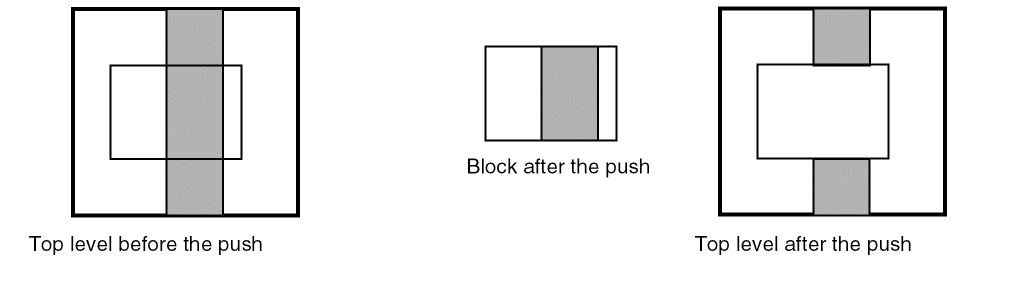
The following figure shows the net geometry completely overlaps the soft block instance boundary.
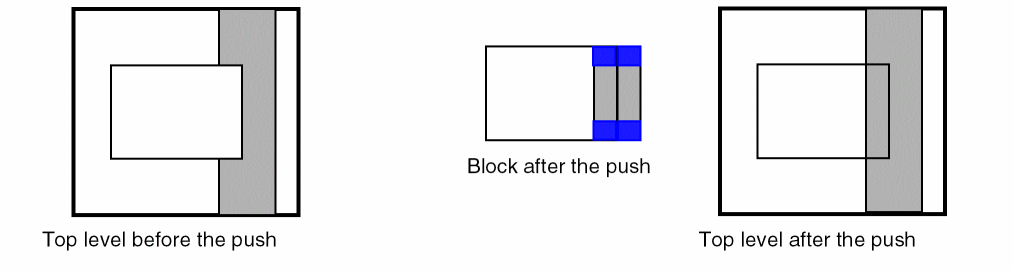
The following figure shows the net geometry partially overlaps the soft block instance boundary.
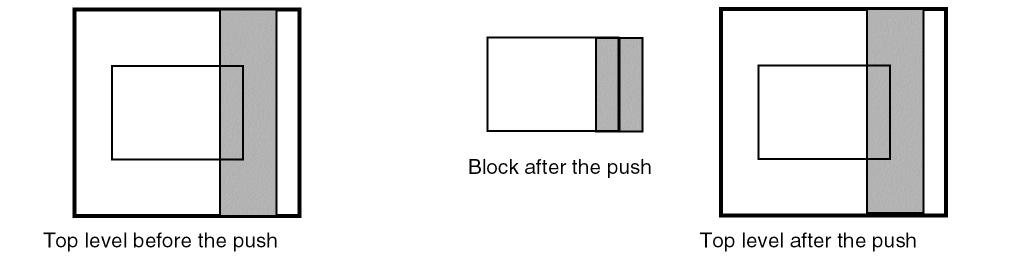
The following figure shows the net geometry completely or partially overlaps the soft block instance boundary
Related Topics
Pushing Top-level Power Structures into Soft Blocks
Return to top