
Modifying Target View Names
You can edit the values in the Target View section of the Push Into Blocks form based on your requirements.
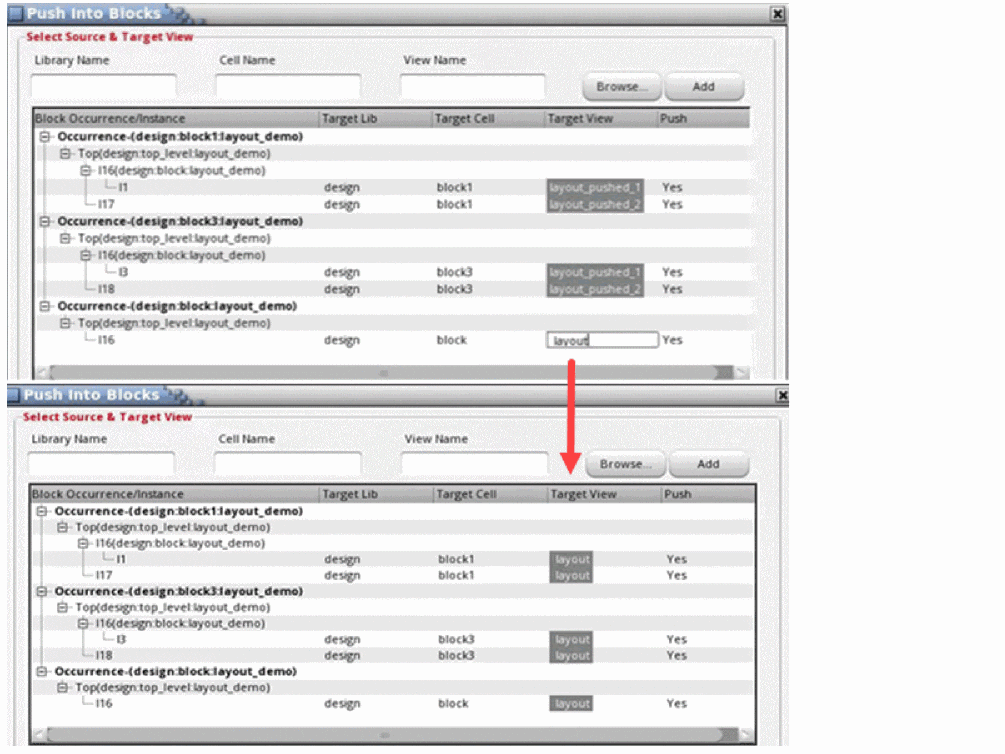
If there are multiple occurrences of the same master in the hierarchy, on adding the block it populates unique target views in the tree with Target View name set to layout_pushed_1, layout_pushed_2 and so on. You can also append the hierarchical path to the view names using the Auto Suffix Occurrence Path checkbox.
To change the name of the multiple target views to a common view name:
- Choose Floorplan – Soft Block Update – Push Into Blocks.
- Select multiple Target View names and press the space bar.
- Specify the desired target cellview name.
-
Press
Enterwhen you are done. - Click OK.
You can also update the target view using the
When t, it automatically updates the target view to layout and all the target layout_pushed views are populated in the Push Into Blocks form as shown in the following figure.
Related Topics
Pushing Top-level Power Structures into Soft Blocks
Return to top