
Text Cellviews
While copying or renaming a text cellview, the corresponding module name in the HDL file can be updated automatically using the autoModuleNameUpdate cdsenv variables.
For example, if you rename functional text cellview myVerilogCell, with the module by the same name, to myNewVerilogCell, the module name updates in the Verilog file automatically.
While copying or renaming a text cellview, the match is done only till the first uncommented module name is found instead of matching till "(;".
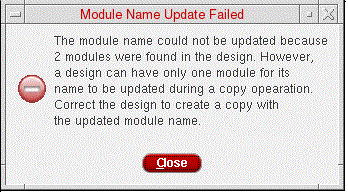
The module name does not get updated automatically if there are HDL file parsing errors or multiple modules are existing in the HDL file of the associated cell. In case the HDL file has multiple modules, copying or renaming the associated cell displays the following error message and the module name does not get updated.
The feature to update the module name in the HDL file automatically is available for Verilog, SystemVerilog, Verilog-A, or Verilog-AMS views.
For Verilog-A views, matching of cell names and module names is not done by default. However, you can reconfigure this behavior by setting the matchModuleNameCellName cdsenv variable.
Related Topics
Library Manager Environment Variables
Return to top