After you configure licensing, you still have a few steps left before you can use the Cadence products.
Backing Up Your Licensing Files
Now that you have configured licensing, it is a good idea to back up the files you just configured, such as the install_dir/share/license/* file.
Letting Users Access Cadence Products
To run licensed Cadence products, users must be able to locate the Cadence products and the license files, either locally or remotely.
- For the C-shell, users need to edit their ~/.cshrc files.
- Add the Cadence products to their search path.
set path = (install_dir/tools/bin $path) - Specify how to locate the license file.
To locate the license files with the clients file, you do not need to do anything. - Depending on the method of locating the license files, you need to set other variables.
- Source the file.
source ~/.cshrc - For the Bourne or Korn shell, users need to edit their ~/.profile files.
- Set the search path.
PATH=install_dir/tools/bin:$PATH
export PATH - To locate the license files with the clients file, you do not need to do anything.
- To locate the license files with a variable, such as CDS_LIC_FILE or LM_LICENSE_FILE, set the variable.
CDS_LIC_FILE=pathA:pathB:pathC:port@host
export CDS_LIC_FILE - To source the file, type
. ./.profile
- Set the search path.
- Specific Cadence applications require additional paths, such as install_dir/tools/dfII/bin
- See your application's configuration guide in CDNSHelp for details.
- If users will be running Cadence software in the background, they need to make sure their stty settings do not prevent it.
- Cadence software usually writes information to the terminal. Occasionally, users have terminals set up to prevent software running in the background from writing to the terminal. If you plan to run the Cadence software in the background, follow these steps:
- Determine if the workstation configuration prevents background jobs from writing to the terminal by typing
stty- If you see tostop without a dash (as the following example shows), background programs cannot write to the terminal. The programs hang.
speed 9600 baud;
-inpck -istrip imaxbel
iexten crt tostop - Users on the above workstation cannot run Cadence products in the background. They must run them in the foreground without the ampersand (&), such as awb instead of awb &. Or, they can reset the terminal and then invoke the tool in the background.
- If you see tostop without a dash (as the following example shows), background programs cannot write to the terminal. The programs hang.
- To run Cadence software in the background, reset your terminal by typing
stty -tostop
For more information, see your operating system documentation.
- Determine if the workstation configuration prevents background jobs from writing to the terminal by typing
- Cadence software usually writes information to the terminal. Occasionally, users have terminals set up to prevent software running in the background from writing to the terminal. If you plan to run the Cadence software in the background, follow these steps:
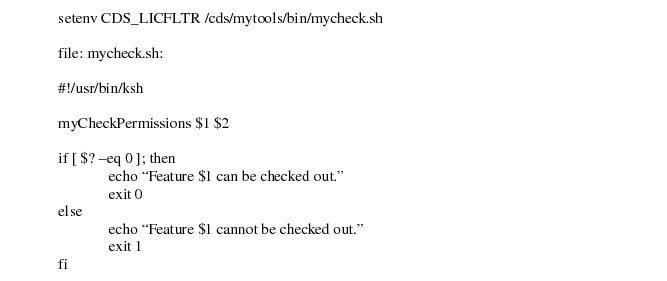
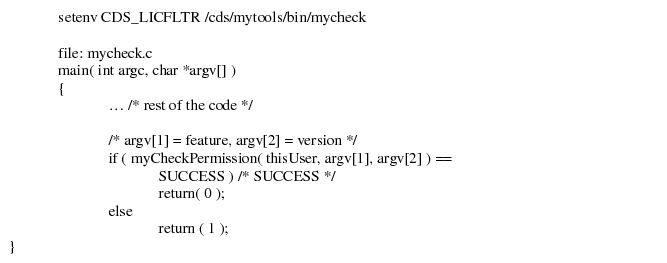
- An additional option provided at the client side for user accessibility is the Cadence Client Filter. This option provides a way for the administrator to manage the local licensing environment, such as restricting specific users from checking out a license or used to filter license features that the applications search for, and which may not exist in the customer environment. The following outlines the steps of using the client filter:
- A client filter program needs to be created in the form of a binary or shell script with two arguments:
- feature - the feature being requested
- version - the version being requested
- In the local environment of the running application, set environment variable CDS_LICFLTR to the filter program.
- The product will either continue or exit depending on the return status of the filter program. If the return status of the filter program is 0, then the product will continue and try to check out the requested license. If the client filter program returns a non-zero status, then the product will not checkout a license and return with an error status.
Example 1: A filter program written in C
Example 2: A filter program written using Korn Shell script