
6
Spectre FMC Analysis
As the process feature sizes have scaled down, the impact of device mismatch on circuit performance has increased and more Monte Carlo simulations are required to analyze the impact of this mismatch on performance metrics. With standard Monte Carlo algorithms, it is not feasible (high cost) to complete even the one million Monte Carlo simulations needed in memory design to determine 4 sigma yield numbers. For high-sigma yield analysis, more than one billion simulations would be required.
Spectre FMC Analysis has an advanced algorithm to accelerate the high-sigma yield estimation. It lets you extract the useful statistical information without running the full set of Monte Carlo samples, especially for high-sigma analysis.
For more details, refer to the following topics:
Setup to Enhance the Performance of a Fast Monte Carlo Simulation
Post-Process Fast Monte Carlo Data
Technology and Overview
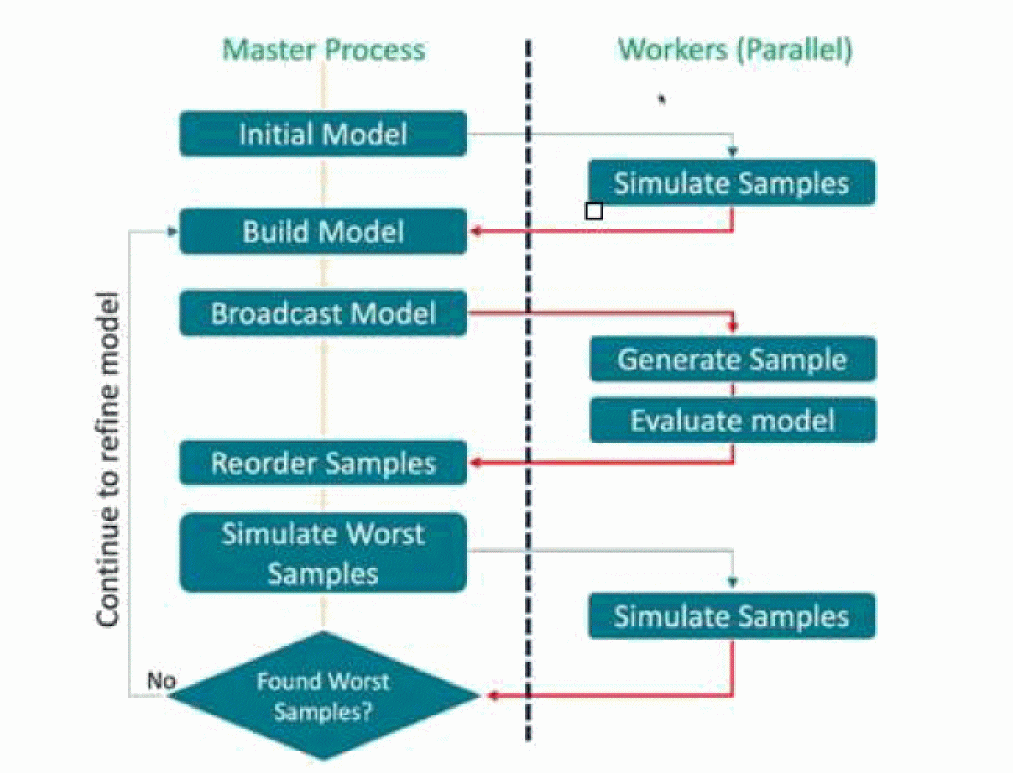
Fast Monte Carlo runs a group of samples initially and obtains the measurements. Then, the library with newer algorithm builds a model and predicts the worst sample based on the result and specifications set by user. It may take a few group iterations from model building, worst sampling prediction and verification to find out the tail of distribution. This Fast Monte Carlo technology improves performance greatly and reduces memory cost when compared to the normal Monte Carlo simulation.
In addition to the new approach adopted in Monte Carlo Analysis and the auto-stop enabled to shorten the simulation time, Fast Monte Carlo also supports multi-processes distribution to further speed up the performance. Sample generation, model evaluation and simulation are now processed by parallel workers.
A typical distribution flow for Fast Monte Carlo is shown below.
Use Model and Applications
In addition to the brute-force setup, the use model for Fast Monte Carlo analysis involves the following tasks:
Setting up a Fast Monte Carlo Goal
Specifying the Fast Monte Carlo Method
Enabling Sweep Sigma Trend with Fast Monte Carlo in a Single Run
Specifying Other Parameters for Fast Monte Carlo
Enable Moments in Fast Monte Carlo
Yield Estimation with Brute Force Monte Carlo
Setting up a Fast Monte Carlo Goal
From the netlist, identify a list of measurements that are used to verify the correct functional behavior of the design under test and specify those measurements as goals to drive the high-sigma analysis.
You can specify goals by using the target block in the statistics statement. Syntax of the target block is shown below.
The syntax for this block is as follows;
statistics {
target {
goal <measurement_name> min=<value>
goal <measurement_name> max=<value>
goal <measurement_name> min=<value> max =<value>
}
}
You can specify either a single measurement name with a min goal, max goal or both min and max goals, or multiple measurement names with a min goal, max goal or both min and max goals.
The keyword of max intends to look for the worst tails on the positive sigma side of the statistics distribution while min is to find the negative sigma side. The values for min and max set the criteria for Spectre to count the number of #pass or #failed for each iteration. They can also be used for setting autostop conditions through parameter fmcnumfails.
.MEASURE syntax can be used as goals in Spectre command-line flow. The goal cannot be from a measurement that is defined using the MDL format or evaluated in a post-processing mode using OCEAN.An example of a targets block is shown below.
.MEASURE tpdr
+ TRIG v(b) VAL='PWR_SUPPLY/2' FALL=1
TARG v(c) VAL='PWR_SUPPLY/2' RISE=1
.MEASURE tpdf
+ TRIG v(b) VAL='PWR_SUPPLY/2' RISE=1
TARG v(c) VAL='PWR_SUPPLY/2' FALL=1
.MEASURE tpd param='(tpdr+tpdf)/2'
Simulator lang=spectre
// Use the targets block in the statistics statement to
// define which measurements are to be analyzed with FMC

statistics {
targets {
goal tpd min=8p max=10p
}
}
Best practices to avoid unnecessary issues that may seem like a product defect:
- If there are two or more measurements from the design that the you would like to use as a part of the high-sigma analysis, then it is better not to combine them in a single Spectre FMC run. For better accuracy and performance, it is better to do separate individual high-sigma runs for each measurement goal of interest.
- If there are two measurements where one is a timing measurement and one is voltage measurement, then it is advised not to mix these goals in a single Spectre FMC run.
- If you know that a min for the goal or a max for the goal would not make sense for a high sigma analysis, then it is advised to use either a min goal or a max goal for the specific measurement based on what is the actual criteria for a failure.
Specifying the Fast Monte Carlo Method
Use the fmcmethod parameter to specify the method or algorithm to be used and the outputs required for your design. FMC can use three methods, worstsample, yield, and yieldest to obtain the statistical result. Amongst the first two, it is recommended to use worstsample because it allows exploration of high-sigma tails with more useful information while yield is more of a pass/fail analysis.
The Worstsample Method
For worstsample, specify any two of the following three parameters in the Monte Carlo statement.
The following are examples of multiple combinations of any two parameters:
-
Driving Spectre FMC by specifying the number of samples in the monte carlo sample space (
numruns) and the target yield in the form of a sigma value (fmcsigma).mc1 montecarlo fmcmethod=worstsample numruns=1e6 fmcsigma=4.2 { tran tran stop=3n }
-
Driving Spectre FMC by specifying the number of samples in the monte carlo sample space (
numruns) and specifying the number of worst-case tail samples (fmcnumtailsamples).mc1 montecarlo fmcmethod=worstsample numruns=1e6 fmcnumtailsamples=14 { tran tran stop=3n }
-
Driving Spectre FMC by only specifying the target yield in the form of a sigma value (
fmcsigma) and the number of worst-case tail samples (fmcnumtailsamples) to be estimated. There is no need to specify total sampling number.mc1 montecarlo fmcmethod=worstsample fmcsigma=4.2 fmcnumtailsamples=14 { tran tran step=1p stop=tran_time autostop=yes method=gear2 }
The following settings are equivalent because for one million samples, the sample at 4.2 sigma is the 14th worst sample while FMC will report 14 samples and the sigma range is (4.2, 4.89) when numruns=1M fmcsigma=4.2.
"numruns=1M fmcsigma=4.2, or
"fmcsigma=4.2 fmcnumtailsamples=14, or
"numruns=1M fmcnumtailsamples=14
Below are examples of multiple combinations of any two parameters.
mc1 montecarlo numruns=20000 firstrun=1 seed=12345 variations=all \
donominal=no savefamilyplots=no \
fmcmethod=worstsample fmcsigma=3 {
tran tran step=1p stop=2n
}
The Yieldest Method
Spectre FMC estimates the failure rate based on the boundaries of measurement goal with much fewer sample set by fmcbudget. This feature provides the approximation result so that you can use it as a reference to set up the FMC worst sample simulation if you don't know what yield is expected for the design.
mc1 montecarlo numruns=1e+6 fmcmethod=yieldest fmcbudget=3000 “fmcconfidence=0.95
 {
    tran tran step=1p stop=tran_time autostop=yes method=gear2
    }
Enabling Sweep Sigma Trend with Fast Monte Carlo in a Single Run
Use the fmcsweepsigma parameter to yes to enable sweeping of variations from 3 sigma to a high sigma achieved with the number of samples in stages. It allows to get the entire trend in a single FMC run instead of running multiple simulations for 3 sigma, 4 sigma, 5 sigma and 6 sigma separately.
The following example shows how fmcsweepsigma is specified in the montecarlo statement:
mc1 montecarlo fmcmethod=worstsample numruns=1e6 fmcnumtailsamples=14
fmcsweepsigma=yes {tran tran stop=2n }
When running high sigma simulation is too expensive, this sigma sweeping based on lower sampling numbers can provide an idea of high sigma.
When fmcsweepsigma is enabled, the simulation saves a file named worst_by_stage_*.csv. You can post-process this file with a python script plot_sweep_sigma.py to generate the sigma trend plots.
Related Topic
Specifying Other Parameters for Fast Monte Carlo
The following table describes other Fast Monte Carlo parameters supported by Spectre.
Enable Moments in Fast Monte Carlo
The Fast Monte Carlo analysis is designated to identify the worst samples at both tails of distribution so that the moments are not supported by default. It can support the moments by increasing the default value of the fmcinitruns parameter from 50 to 1000. You can define this parameter explicitly in Monte Carlo statement to override the default number.
When the following statement is set, the moments computation for target goal distributions is enabled.
mc1 montecarlo numruns=1e+6 firstrun=1 seed=12345 variations=all
    donominal=no savefamilyplots=no
    fmcmethod=worstsample fmcsigma=4.2 fmcmoments=yes  {
      tran tran step=1p stop=tran_time autostop=yes method=gear2
}
Initial group of size 1000 samples is used to compute the moments.
When simulation is done, the information about moments of 1000 samples is saved in the last section of output file of *.fmc.log as given below.
FMC moments of spec distributions:
Spec: tpd
Mean = 1.2226e-11
Variance = 1.49197e-24
Stddev = 1.22146e-12
Skewness = 0.662279
Kurtosis = 0.981272
Yield Estimation with Brute Force Monte Carlo
To estimate the sigma for the measurement goal with much fewer samples, you can use the spectre_yieldest command. This command runs the Brute Force Monte Carlo simulation.
spectre_yieldest [spectre_cmds...] [yieldest_cmds...] netlist_with_mc
spectre_cmds can be +aps +mt=2
yieldest_cmds can be one or more of the following:
-
-n NUMRUNSspecifies the total number of Monte Carlo iterations to predict yield estimation. Default is 3000. -
-s SEEDspecifies the seed for Monte-Carlo run (overrides netlist setting). -
-c CONFspecifies the confidence level for confidence interval, default is 0.95 (95%). -
-cleandoes a clean rerun of Spectre even if the previous simulation result exist. By default, if OUTDIR exists and a previousyieldestoutput directory exists, it will reuse previous simulation results. Runs incrementally only if needed. -
-plotdraws the estimated QQ plot for each goal. -
-l LOGNAMEspecifies the yield estimation log file name. -
-o OUTDIRspecifies the yield estimation output directory.
-
netlist_with_mc is a regular netlist file that contains Monte Carlo analysis and statistical target (goal) definition. The netlist or configure file that contains the Monte Carlo analysis and the target goal has to be specified at the end of the command line.
sampling, firstrun, and seed parameters have the same values for both simulations. In Spectre, the default value of sampling method is standard. The default method in ADE is lds.Setup to Enhance the Performance of a Fast Monte Carlo Simulation
The run time is truly critical when the sampling number of Monte Carlo runs a million times for a high sigma requirement. You can use the following features to enhance the performance of a Fast Monte Carlo run:
Distributing a Fast Monte Carlo Run
Parameters to Accelerate Performance
Enabling AutoStop to Save Run Time
Distributing a Fast Monte Carlo Run
The distribution process can be launched by +mp specified in Spectre command line. It is always recommended to enable +mp for Fast Monte Carlo to build up the model and predict worst samples with multiple workers to achieve the best performance speedup.
The Fast Monte Carlo analysis supports three distribution mechanisms.
-
Job submission in farm with
lsf,sgeornc -
Using
rshandsshon theo remote systems -
Using
forkto create multiple jobs on a single system
When using fork in distribution mode on a terminal of the requested farm machine, add +mplauncher=ksh in the command line to run all distributed processes on the same machine locally. Otherwise, Spectre launches multiple processes when it detects a farm environment.
Parameters to Accelerate Performance
You can add the following parameters in the Monte Carlo statement to accelerate the performance of a simulation:
Enabling AutoStop to Save Run Time
The target goal is defined by the .measurement statement. Most of time, the measurements are achieved prior to the stop time set in transient. You can stop the transient simulation once the measurements are completed to save the simulation time further.
Alternatively, enable auto-stop by setting autostop=yes in the transient statement.
tran tran step=1p stop=tran_time autostop=yes
Post-Process Fast Monte Carlo Data
Spectre provides the following two commands to let you post process the Monte Carlo data:
spectre_fmcverifier
This command lets you view the sample data distribution for the Brute Force Monte Carlo and Fast Monte Carlo, use the spectre_fmcverifier binary utility. It plots the QQ plot and histogram plot.
spectre_fmcverifier [-h] [-mc MC] [-mcdir MTCDIR] [-csvbfmc CSVBFMC]
[-legendloc LEGENDLOC] [-worstnum WORSTNUM]
[-fmc FMC] [-csvfmc CSVFMC] [-fmcnumruns FMCNUMRUNS] [-goal GOAL]
[-qqplot] [-histo] [-plotsigma] [-plotall] [-switch]
plot_sweep_sigma
This python script post processes the data from FMC sigma sweeping. The output file worst_by_stage_*.csv is generated from FMC simulation with the goal name.
A file with *_H in its name contains the sigma values on maximum boundary. A file with *_L in its name contains the sigma values on minimum boundary.
plot_sweep_sigma.py [options]
| Parameter | Description |
%cdspython -64 ../bin/plot_sweep_sigma.py
-f out_sweep_sigma_1M_mp32/worst_by_stage_tpd_H.csv -m tpd
%cdspython -64 ../bin/plot_sweep_sigma.py -h
Return to top