
7
Custom Digital Placer Environment Variables
This appendix provides information on the names, descriptions, and graphical user interface equivalents for the Virtuoso® custom digital placer (the placer).
Inherited Environment Variable Settings
Many of the environment variables honored by the placer are set in Layout XL and Layout L. Information on these environment variables is not duplicated in this section.
For more information, see
Related Topics
List of Custom Digital Placer Environment Variables
List of Custom Digital Placer Environment Variables
- adjustBdy
- allowPins
- allowRotation
- allowRowsBeyondRegion
- avoidAbutment
- botRowBdryCell
- botTapBdryCell
- boundaryCellType
- colorRemasteringCellMapFiles
- colorRemasteringCellMapSuffix
- componentEdge
- considerOptionalEdges
- contextAwarePlacement
- contextConstraintFile
- createPhysOnlyFillers
- ecoModeImpact
- enableColorRemastering
- endCapCellName
- endCapLibName
- endCapViewName
- extendBoundary
- extendBoundaryDirection
- fillerCompTypes
- highlightRowFromDTE
- generateRails
- groupCMOSPairs
- groupMFactors
- hierVHPlace
- ignoreBlockage
- ignoreBlockageAndInsts
- insertBdryCells
- insertCapCells
- insertFillerCells
- insertFillers
- insertSubstrateContacts
- interRowSpacer
- intraRowSpacer
- leftBotCornerBdryCell
- leftBotEdgeBdryCell
- leftCellMirror
- leftCornerCellMirror
- leftEdgeBdryCell
- leftTopCornerBdryCell
- leftTopEdgeBdryCell
- lockTap
- lxGroundNetNames
- lxSupplyNetNames
- maxPinsPerNet
- minBoundaryOffset
- mixedMode
- multiVTLayers
- minVTLength
- multiVTPlacement
- nDiffSpacing
- numRowOption
- numRowSites
- numTemplateRowOption
- openWindow
- optimization
- packedPlacement
- pDiffSpacing
- periodicTap
- pinPlacementXGrid
- pinPlacementYGrid
- placeCluster
- placementMode
- placementRegion
- preserveChains
- refXGridName
- refYGridName
- refXOffset
- refYOffset
- reserveTracksForRouting
- rightBotCornerBdryCell
- rightCellMirror
- rightCornerCellMirror
- rightEdgeBdryCell
- rightTopCornerBdryCell
- rightTopEdgeBdryCell
- routingAwarePinPlc
- rowCount
- rowsFromLowerLeft
- rowGroundLayer
- rowGroundName
- rowGroundWidth
- rowOffsetX
- rowOffsetY
- rowPowerLayer
- rowPowerName
- rowPowerWidth
- rowSpacingOption
- rowTapEndOffset
- rowTemplateName
- rowUtilization
- row2RowSpacing
- rowPitchOption
- rowPitchValue
- saveAs
- saveAsCellName
- saveAsLibName
- saveAsViewName
- selectedFillerCells
- selectFillerCellsFrom
- selectedOnly
- showProgress
- startCapCellName
- startCapLibName
- startCapViewName
- subContInAlternateRow
- subContMaxSpacing
- subContMinSpacing
- substrateContactType
- supplyPattern
- supplyPosition
- templateRowCount
- topBotRowPlaceable
- topRowBdryCell
- topTapBdryCell
- usePartialTemplate
- vcpCellBoundaryLPPs
- vcpCellBoundaryUI
- vcpEnableMultiVoltagePlacement
- vcpGlobalPathScript
- vcpKeepoutDepth
- vcpRulesConstraintGroup
- vcpVerboseLevel
- vcpWriteToCIW
- vpaAutoLevel1Switch
- vpaAutoZoomEnable
- vpaAutoZoomLevel
- vpaUpdateConstraints
adjustBdy
layoutXL.placement adjustBdy boolean { t | nil }
Description
Automatically recalculates the place and route boundary to take into account the spacing options set on the Auto Placer and Placement Planning forms.
GUI Equivalent
Examples
envGetVal("layoutXL.placement" "adjustBdy")
envSetVal("layoutXL.placement" "adjustBdy" 'boolean t)
envSetVal("layoutXL.placement" "adjustBdy" 'boolean nil)
Related Topics
List of Custom Digital Placer Environment Variables
allowPins
layoutXL.placement allowPins boolean { t | nil }
Description
Prevents rows from overlapping pins by reserving inside the boundary edge a space equal to the size of the pin plus the spacing rule.
GUI Equivalent
|
Place – Custom Digital – Placement Planning – Boundary Cell tab |
|
Examples
envGetVal("layoutXL.placement" "allowPins")
envSetVal("layoutXL.placement" "allowPins" 'boolean t)
envSetVal("layoutXL.placement" "allowPins" 'boolean nil)
Related Topics
List of Custom Digital Placer Environment Variables
allowRotation
layoutXL.placement allowRotation boolean { t | nil }
Description
Allows the placer to rotate components as part of its optimization. When set to nil, the placer can move components but not rotate them.
GUI Equivalent
Examples
envGetVal("layoutXL.placement" "allowRotation")
envSetVal("layoutXL.placement" "allowRotation" 'boolean t)
envSetVal("layoutXL.placement" "allowRotation" 'boolean nil)
Related Topics
List of Custom Digital Placer Environment Variables
allowRowsBeyondRegion
layoutXL.placement allowRowsBeyondRegion boolean { t | nil }
Description
Automatically expands the row beyond the region if needed.
GUI Equivalent
Examples
envGetVal("layoutXL.placement" "allowRowsBeyondRegion")
envSetVal("layoutXL.placement" "allowRowsBeyondRegion" 'boolean t)
envSetVal("layoutXL.placement" "allowRowsBeyondRegion" 'boolean nil)
Related Topics
List of Custom Digital Placer Environment Variables
avoidAbutment
layoutXL.placement avoidAbutment boolean { t | nil }
Description
Controls the abutment of tap cells that are inserted by running the vcpfePlaceTapCells SKILL function. This setting is ignored when tapPattern is set to Checker Board.
The default value is nil, and therefore the tap cells are abutted vertically.
GUI Equivalent
Examples
envGetVal("layoutXL.placement" "avoidAbutment")
envSetVal("layoutXL.placement" "avoidAbutment" 'boolean t)
envSetVal("layoutXL.placement" "avoidAbutment" 'boolean nil)
Related Topics
List of Custom Digital Placer Environment Variables
botRowBdryCell
layoutXL.placement botRowBdryCell string { "" | "string1 string2 ..." }
Description
Specifies the row cell to be inserted at the bottom of the standard cell.
GUI Equivalent
|
Place – Custom Digital – Placement Planning – Boundary Cell tab |
|
Examples
envGetVal("layoutXL.placement" "botRowBdryCell")
envSetVal("layoutXL.placement" "botRowBdryCell" 'string "ROW_CELL_BOTTOM")
Related Topics
List of Custom Digital Placer Environment Variables
botTapBdryCell
layoutXL.placement botTapBdryCell string { "" | "string" }
Description
Specifies the tap cell to be inserted at the bottom of the standard cell.
GUI Equivalent
Examples
envGetVal("layoutXL.placement" "botTapBdryCell")
envSetVal("layoutXL.placement" "botTapBdryCell" 'string "FILLER_CELL_BT")
Related Topics
List of Custom Digital Placer Environment Variables
boundaryCellType
layoutXL.placement boundaryCellType string { "" | "string1 string2 ..." }
Description
Specifies the component type that contains the boundary cells. This setting is valid only if selectBoundaryCellsFrom is set to Component Types.
GUI Equivalent
|
Place – Custom Digital – Placement Planning – Boundary Cell tab |
|
Examples
envGetVal("layoutXL.placement" "boundaryCellType")
envSetVal("layoutXL.placement" "boundaryCellType" 'string "BounCell")
Related Topics
List of Custom Digital Placer Environment Variables
colorRemasteringCellMapFiles
layoutXL.placement endCapCellName string "cellMapFile"
Description
Specifies the name of the cell map file that stores a list of color variants for instances. This information is used during color re-mastering of instances.
The default value is "", which indicates that the cell map file is either empty or not specified. Use the enableColorRemastering environment variable to turn on color re-mastering.
GUI Equivalent
Examples
envGetVal("layoutXL.placement" "endCapCellName")
envSetVal("layoutXL.placement" "endCapCellName" 'string "MyFile_cell_color_mapping.lst")
Related Topics
List of Custom Digital Placer Environment Variables
colorRemasteringCellMapSuffix
layoutXL.placement colorRemasteringCellMapSuffix string "suffix"
Description
Specifies the suffix to be added to the name of the cell map file defined by colorRemasteringCellMapFiles.
The default value is "_cell_color_mapping.lst".
GUI Equivalent
Examples
envGetVal("layoutXL.placement" "colorRemasteringCellMapSuffix")
envSetVal("layoutXL.placement" "colorRemasteringCellMapSuffix" 'string "_custom_color_mapping.lst")
Related Topics
List of Custom Digital Placer Environment Variables
componentEdge
layoutXL.placement componentEdge cyclic { "Boundary" | "Bounding Box" }
Description
Specifies which edge is used when placing a component against the placement boundary. This environment variable can take two values. Default is Boundary.
-
Boundary: Places the component’s boundary against the placement boundary. This does not include any well spacing defined around the component, which consequently might lie outside the boundary after placement. -
Bounding Box: Places the component’s bounding box against the placement boundary. This includes any well spacing defined around the component.
GUI Equivalent
Examples
envGetVal("layoutXL.placement" "componentEdge")
envSetVal("layoutXL.placement" "componentEdge" 'cyclic "Boundary")
envSetVal("layoutXL.placement" "componentEdge" 'cyclic "Bounding Box")
Related Topics
List of Custom Digital Placer Environment Variables
considerOptionalEdges
layoutXL.placement considerOptionalEdges boolean { t | nil }
Description
When set to t, VCP honors the OPTIONAL CELLEDGESPACINGTABLE property.
GUI Equivalent
Examples
envGetVal("layoutXL.placement" "considerOptionalEdges")
envSetVal("layoutXL.placement" "considerOptionalEdges" 'boolean t)
envSetVal("layoutXL.placement" "considerOptionalEdges" 'boolean nil)
Related Topics
List of Custom Digital Placer Environment Variables
contextAwarePlacement
layoutXL.placement contextAwarePlacement boolean { t | nil }
Description
Specifies that the placement should be context-aware.
The default is nil, which means that no extra rows are budgeted for or created for context-aware placement.
GUI Equivalent
Examples
envGetVal("layoutXL.placement" "contextAwarePlacement")
envSetVal("layoutXL.placement" "contextAwarePlacement" 'boolean t)
envSetVal("layoutXL.placement" "contextAwarePlacement" 'boolean nil)
Related Topics
List of Custom Digital Placer Environment Variables
contextConstraintFile
layoutXL.placement contextConstraintFile string {"" "string"}
Description
Specifies the XML file containing edge spacing constraint information for performing context-aware placement.
If the specified file name is invalid, or the file is not specified at all, a warning is issued.
GUI Equivalent
Examples
envGetVal("layoutXL.placement" "contextConstraintFile")
envSetVal("layoutXL.placement" "contextConstraintFile" 'string "")
envSetVal("layoutXL.placement" "contextConstraintFile" 'string "xmlFile")
Related Topics
List of Custom Digital Placer Environment Variables
createPhysOnlyFillers
layoutXL.placement createPhysOnlyFillers boolean { t | nil }
Description
Specifies whether the physOnly attribute needs to be set for filler cells.
GUI Equivalent
Examples
envGetVal("layoutXL.placement" "createPhysOnlyFillers")
envSetVal("layoutXL.placement" "createPhysOnlyFillers" 'boolean t)
envSetVal("layoutXL.placement" "createPhysOnlyFillers" 'boolean nil)
Related Topics
List of Custom Digital Placer Environment Variables
ecoModeImpact
layoutXL.placement ecoModeImpact cyclic { "none" | "localized" | "maximized" }
Description
Specifies the extent to which the placed components within the design can be moved from their original positions.
GUI Equivalent
Examples
envGetVal("layoutXL.placement" "ecoModeImpact")
envSetVal("layoutXL.placement" "ecoModeImpact" 'cyclic "none")
envSetVal("layoutXL.placement" "ecoModeImpact" 'cyclic "localized")
envSetVal("layoutXL.placement" "ecoModeImpact" 'cyclic "maximized")
Related Topics
List of Custom Digital Placer Environment Variables
enableColorRemastering
layoutXL.placement enableColorRemastering boolean { t | nil }
Description
Enables re-mastering of instances to their color variants, when required, to prevent color shorts due to cell structure. Color variants are stored in a color map file, which is defined by the colorRemasteringCellMapFiles environment variable.
The default value is nil, in which case color re-mastering is turned off.
GUI Equivalent
Examples
envGetVal("layoutXL.placement" "enableColorRemastering")
envSetVal("layoutXL.placement" "enableColorRemastering" 'boolean t)
Related Topics
List of Custom Digital Placer Environment Variables
endCapCellName
layoutXL.placement endCapCellName string "cell_name"
Description
Specifies the cell name of the cellview to be placed as an end cap.
GUI Equivalent
Examples
envGetVal("layoutXL.placement" "endCapCellName")
envSetVal("layoutXL.placement" "endCapCellName" 'string "ENDCAP")
Related Topics
List of Custom Digital Placer Environment Variables
endCapLibName
layoutXL.placement endCapLibName 'string "library_name"
Description
Specifies the library name of the cellview to be placed as an end cap.
GUI Equivalent
Examples
envGetVal("layoutXL.placement" "endCapLibName")
envSetVal("layoutXL.placement" "endCapLibName" 'string "TESTLIB")
Related Topics
List of Custom Digital Placer Environment Variables
endCapViewName
layoutXL.placement endCapViewName string "view_name"
Description
Specifies the view name of the cellview to be placed as an end cap.
GUI Equivalent
Examples
envGetVal("layoutXL.placement" "endCapViewName")
envSetVal("layoutXL.placement" "endCapViewName" 'string "layout")
Related Topics
List of Custom Digital Placer Environment Variables
extendBoundary
layoutXL.placement extendBoundary boolean { t | nil }
Description
When set to t, automatically expands the row and the PR boundary beyond the region, if needed. Use the extendBoundaryDirection environment variable to specify whether rows are to be stretched horizontally or vertically.
Default is nil, in which case expansion of rows and boundaries is not possible.
GUI Equivalent
Examples
envGetVal("layoutXL.placement" "extendBoundary")
envSetVal("layoutXL.placement" "extendBoundary" 'boolean t)
envSetVal("layoutXL.placement" "extendBoundary" 'boolean nil)
Related Topics
List of Custom Digital Placer Environment Variables
extendBoundaryDirection
layoutXL.placement extendBoundaryDirection cyclic { "Horizontally" | "Vertically" }
Description
Specifies whether rows are to be stretched horizontally or vertically. This environment variable can be used only when extendBoundary is set to t.
GUI Equivalent
Examples
envGetVal("layoutXL.placement" "extendBoundaryDirection")
envSetVal("layoutXL.placement" "extendBoundaryDirection" 'cyclic "Horizontally")
envSetVal("layoutXL.placement" "extendBoundaryDirection" 'cyclic "Vertically")
Related Topics
List of Custom Digital Placer Environment Variables
fillerCompTypes
layoutXL.placement fillerCompTypes string "fillerCompName"
Description
Specifies the names of the component types that contain filler cells that you want to insert in the spaces between the standard cells in a row.
GUI Equivalent
Examples
envGetVal("layoutXL.placement" "fillerCompTypes")
envSetVal("layoutXL.placement" "fillerCompTypes" 'string "FILLER_2")
Related Topics
List of Custom Digital Placer Environment Variables
highlightRowFromDTE
layoutXL.placement highlightRowFromDTE boolean { t | nil }
Description
Highlights those rows in the layout canvas that use the rail definitions that are selected on the Rail Definition tab of the Dressing Template Editor.
GUI Equivalent
Examples
envGetVal("layoutXL.placement" "highlightRowFromDTE")
envSetVal("layoutXL.placement" "highlightRowFromDTE" 'boolean t)
envSetVal("layoutXL.placement" "highlightRowFromDTE" 'boolean nil)
Related Topics
List of Custom Digital Placer Environment Variables
generateRails
layoutXL.placement generateRails boolean { t | nil }
Description
Creates rails based on the power and ground rail specifications that you provide using environment variables rowGroundLayer, rowGroundName, rowGroundWidth, rowPowerLayer, rowPowerName, rowPowerWidth.
GUI Equivalent
Examples
envGetVal("layoutXL.placement" "generateRails")
envSetVal("layoutXL.placement" "generateRails" 'boolean t)
envSetVal("layoutXL.placement" "generateRails" 'boolean nil)
Related Topics
List of Custom Digital Placer Environment Variables
groupCMOSPairs
layoutXL.placement groupCMOSPairs boolean { t | nil }
Description
Groups pairs of CMOS devices in designs that have been generated with chaining switched on. (This environment variable does not work with devices that have been abutted manually because clustering needs chaining information.)
GUI Equivalent
Examples
envGetVal("layoutXL.placement" "groupCMOSPairs")
envSetVal("layoutXL.placement" "groupCMOSPairs" 'boolean t)
envSetVal("layoutXL.placement" "groupCMOSPairs" 'boolean nil)
Related Topics
List of Custom Digital Placer Environment Variables
groupMFactors
layoutXL.placement groupMFactors boolean { t | nil }
Description
Automatically adds a grouping constraint for complementary MOS devices that have a multiplication factor in the schematic.
GUI Equivalent
Examples
envGetVal("layoutXL.placement" "groupMFactors")
envSetVal("layoutXL.placement" "groupMFactors" 'boolean t)
envSetVal("layoutXL.placement" "groupMFactors" 'boolean nil)
Related Topics
List of Custom Digital Placer Environment Variables
hierVHPlace
layoutXL.placement hierVHPlace boolean { t | nil }
Description
Specifies whether the placer must descend into the hierarchy and place the instances inside it while placing virtual figGroups. The default is t.
GUI Equivalent
Examples
envGetVal("layoutXL.placement" "hierVHPlace")
envSetVal("layoutXL.placement" "hierVHPlace" 'boolean t)
envSetVal("layoutXL.placement" "hierVHPlace" 'boolean nil)
Related Topics
List of Custom Digital Placer Environment Variables
ignoreBlockage
layoutXL.placement ignoreBlockage boolean { t | nil }
Description
Specifies whether blockages need to be ignored during filler cell creation.
GUI Equivalent
|
Ignore Placement Blockages [ |
Examples
envGetVal("layoutXL.placement" "ignoreBlockage")
envSetVal("layoutXL.placement" "ignoreBlockage" 'boolean t)
envSetVal("layoutXL.placement" "ignoreBlockage" 'boolean nil)
Related Topics
List of Custom Digital Placer Environment Variables
ignoreBlockageAndInsts
layoutXL.placement ignoreBlockageAndInsts boolean { t | nil }
Description
Ignores existing blockages and instances while generating rows. As a result, rows are and created over the existing blockages and instances.
GUI Equivalent
|
Region – Ignore Blockages and Instances [ |
Examples
envGetVal("layoutXL.placement" "ignoreBlockageAndInsts")
envSetVal("layoutXL.placement" "ignoreBlockageAndInsts" 'boolean t)
envSetVal("layoutXL.placement" "ignoreBlockageAndInsts" 'boolean nil)
Related Topics
List of Custom Digital Placer Environment Variables
insertBdryCells
layoutXL.placement insertBdryCells boolean { t | nil }
Description
When set to t, inserts boundary cells around core cells. When set to nil, deletes existing boundary cells from the current design.
GUI Equivalent
Examples
envGetVal("layoutXL.placement" "insertBdryCells")
envSetVal("layoutXL.placement" "insertBdryCells" 'boolean t)
envSetVal("layoutXL.placement" "insertBdryCells" 'boolean nil)
Related Topics
List of Custom Digital Placer Environment Variables
insertCapCells
layoutXL.placement insertCapCells boolean { t | nil }
Description
Inserts cap cells at the start and end of each row when placing components using the Assisted Standard-Cell placement mode.
GUI Equivalent
Examples
envGetVal("layoutXL.placement" "insertCapCells")
envSetVal("layoutXL.placement" "insertCapCells" 'boolean t)
envSetVal("layoutXL.placement" "insertCapCells" 'boolean nil)
Related Topics
List of Custom Digital Placer Environment Variables
insertFillerCells
layoutXL.placement insertFillerCells boolean { t | nil }
Description
Inserts filler cells into the empty spaces between standard cells in a row without impacting the row size.
You define cells as filler cells by assigning them to a component type with component class FILLER. See
GUI Equivalent
Examples
envGetVal("layoutXL.placement" "insertFillerCells")
envSetVal("layoutXL.placement" "insertFillerCells" 'boolean t)
envSetVal("layoutXL.placement" "insertFillerCells" 'boolean nil)
Related Topics
List of Custom Digital Placer Environment Variables
insertFillers
layoutXL.placement insertFillers boolean { t | nil }
Description
Inserts filler cells into the empty spaces between standard cells in a row without impacting the row size. Specify the component type that contains filler cells by using the fillerCompTypes environment variable. Specify the filler cell types by using the fillerCompTypes environment variable.
You define cells as filler cells by assigning them to a component type with component class FILLER. See
GUI Equivalent
Examples
envGetVal("layoutXL.placement" "insertFillers")
envSetVal("layoutXL.placement" "insertFillers" 'boolean t)
envSetVal("layoutXL.placement" "insertFillers" 'boolean nil)
Related Topics
List of Custom Digital Placer Environment Variables
insertSubstrateContacts
layoutXL.placement insertSubstrateContacts boolean { t | nil }
Description
Inserts tap cells (standard cell substrate contacts) in the empty spaces between the standard cells in a row based on a specified minimum and maximum contact spacing value. Specify the name of the component type that contains the substrate contacts by using the substrateContactType environment variable.
You define cells as substrate contacts by assigning them to a component type with component class STDSUBCONT. See
GUI Equivalent
Examples
envGetVal("layoutXL.placement" "insertSubstrateContacts")
envSetVal("layoutXL.placement" "insertSubstrateContacts" 'boolean t)
envSetVal("layoutXL.placement" "insertSubstrateContacts" 'boolean nil)
Related Topics
List of Custom Digital Placer Environment Variables
interRowSpacer
layoutXL.placement interRowSpacer boolean { t | nil }
Description
Adds or removes space between each row to improve routability. Specify the number of tracks to add between each row using the reserveTracksForRouting environment variable.
GUI Equivalent
Examples
envGetVal("layoutXL.placement" "interRowSpacer")
envSetVal("layoutXL.placement" "interRowSpacer" 'boolean t)
envSetVal("layoutXL.placement" "interRowSpacer" 'boolean nil)
Related Topics
List of Custom Digital Placer Environment Variables
intraRowSpacer
layoutXL.placement intraRowSpacer boolean { t | nil }
Description
Adds or removes space between the components within each row.
GUI Equivalent
Examples
envGetVal("layoutXL.placement" "intraRowSpacer")
envSetVal("layoutXL.placement" "intraRowSpacer" 'boolean t)
envSetVal("layoutXL.placement" "intraRowSpacer" 'boolean nil)
Related Topics
List of Custom Digital Placer Environment Variables
leftBotCornerBdryCell
layoutXL.placement leftBotCornerBdryCell string { "" | "string" }
Description
Specifies the cut poly cell to be inserted at the left bottom corner of the standard cell.
GUI Equivalent
|
Place – Custom Digital – Placement Planning – Boundary Cell tab |
|
Examples
envGetVal("layoutXL.placement" "leftBotCornerBdryCell")
envSetVal("layoutXL.placement" "leftBotCornerBdryCell" 'string "FILLER_CELL_LB")
Related Topics
List of Custom Digital Placer Environment Variables
leftBotEdgeBdryCell
layoutXL.placement leftBotEdgeBdryCell string { "" | "string" }
Description
Specifies the boundary cell to be inserted at the left bottom edge.
GUI Equivalent
|
Place – Custom Digital – Placement Planning – Boundary Cell tab |
|
Examples
envGetVal("layoutXL.placement" "leftBotEdgeBdryCell")
envSetVal("layoutXL.placement" "leftBotEdgeBdryCell" 'string "BOUNDARY_CELL_LB")
Related Topics
List of Custom Digital Placer Environment Variables
leftCellMirror
layoutXL.placement leftCellMirror boolean { t | nil }
Description
Applies a mirrored orientation to the boundary cells to be inserted in the left edge.
GUI Equivalent
|
Place – Custom Digital – Placement Planning – Boundary Cell tab |
|
Examples
envGetVal("layoutXL.placement" "leftCellMirror")
envSetVal("layoutXL.placement" "leftCellMirror" 'boolean t)
envSetVal("layoutXL.placement" "leftCellMirror" 'boolean nil)
Related Topics
List of Custom Digital Placer Environment Variables
leftCornerCellMirror
layoutXL.placement leftCornerCellMirror boolean { t | nil }
Description
Applies a mirrored orientation to the boundary cells to be inserted in the left to and bottom corner.
GUI Equivalent
|
Place – Custom Digital – Placement Planning – Boundary Cell tab |
|
Examples
envGetVal("layoutXL.placement" "leftCornerCellMirror")
envSetVal("layoutXL.placement" "leftCornerCellMirror" 'boolean t)
envSetVal("layoutXL.placement" "leftCornerCellMirror" 'boolean nil)
Related Topics
List of Custom Digital Placer Environment Variables
leftEdgeBdryCell
layoutXL.placement leftEdgeBdryCell string { "" | "string" }
Description
Specifies the boundary cell that needs to be inserted at the left edge.
GUI Equivalent
|
Place – Custom Digital – Placement Planning – Boundary Cell tab |
|
Examples
envGetVal("layoutXL.placement" "leftEdgeBdryCell")
envSetVal("layoutXL.placement" "leftEdgeBdryCell" 'string "FILLER_CELL_L")
Related Topics
List of Custom Digital Placer Environment Variables
leftTopCornerBdryCell
layoutXL.placement leftTopCornerBdryCell string { "" | "string" }
Description
Specifies the cut poly cell to be inserted at the upper-left corner of the standard cell.
GUI Equivalent
|
Place – Custom Digital – Placement Planning – Boundary Cell tab |
|
Examples
envGetVal("layoutXL.placement" "leftTopCornerBdryCell")
envSetVal("layoutXL.placement" "leftTopCornerBdryCell" 'string "FILLER_CELL_TL")
Related Topics
List of Custom Digital Placer Environment Variables
leftTopEdgeBdryCell
layoutXL.placement leftTopEdgeBdryCell string { "" | "string" }
Description
Specifies the boundary cell to be inserted at the left top edges of standard cells.
GUI Equivalent
|
Place – Custom Digital – Placement Planning – Boundary Cell tab |
|
Examples
envGetVal("layoutXL.placement" "leftTopEdgeBdryCell")
envSetVal("layoutXL.placement" "leftTopEdgeBdryCell" 'string "BOUNDARY_CELL_LTE")
Related Topics
List of Custom Digital Placer Environment Variables
lockTap
layoutXL.placement lockTap boolean { t | nil }
Description
Specifies whether the tap cells inserted by running the vcpfePlaceTapCells SKILL function must be locked.
GUI Equivalent
Examples
envGetVal("layoutXL.placement" "lockTap")
envSetVal("layoutXL.placement" "lockTap" 'boolean t)
envSetVal("layoutXL.placement" "lockTap" 'boolean nil)
Related Topics
List of Custom Digital Placer Environment Variables
lxGroundNetNames
layoutXL lxGroundNetNames string "list_of_ground_net_names"
Description
Specifies a list of ground net names to be excluded from wire length optimization. The list must be enclosed in quotation marks, and each ground net name must be separated by a space.
The default list of names is: "gnd gnd! gnd: vss vss! vss:".
GUI Equivalent
Examples
envGetVal("layoutXL" "lxGroundNetNames")
envSetVal("layoutXL" "lxGroundNetNames" 'string "gnd gnd! gnd: vss vss! vss:")
Related Topics
List of Custom Digital Placer Environment Variables
lxSupplyNetNames
layoutXL lxSupplyNetNames string "list_of_supply_net_names"
Description
Specifies a list of power net names to be excluded from wire length optimization. The list must be enclosed in quotation marks, and each supply net name must be separated by a space.
The default list of names is: "vcc vcc! vcc: vdd vdd! vdd:".
GUI Equivalent
Examples
envGetVal("layoutXL" "lxSupplyNetNames")
envSetVal("layoutXL" "lxSupplyNetNames" 'string "vcc vcc! vcc: vdd vdd! vdd:")
Related Topics
List of Custom Digital Placer Environment Variables
maxPinsPerNet
layoutXL.placement maxPinsPerNet int integer_number
Description
Specifies the maximum number of pins a net can have for its cost to be considered during placement. Nets with more than the specified number of pins are not considered.
GUI Equivalent
Examples
envGetVal("layoutXL.placement" "maxPinsPerNet")
envSetVal("layoutXL.placement" "maxPinsPerNet" 'int 25)
Related Topics
List of Custom Digital Placer Environment Variables
minBoundaryOffset
layoutXL.placement minBoundaryOffset float float_number
Description
Specifies the minimum spacing allowed between the boundary edge and the nearest component. The default value is half of the maximum value of all the spacing rules for the layers specified in the applicable technology file.
GUI Equivalent
Examples
envGetVal("layoutXL.placement" "minBoundaryOffset")
envSetVal("layoutXL.placement" "minBoundaryOffset" 'float 0.5)
Related Topics
List of Custom Digital Placer Environment Variables
mixedMode
layoutXL.placement mixedMode boolean { t | nil }
Description
Allows floating components to be moved when using the Assisted Mixed CMOS/Standard Cell placement mode.
GUI Equivalent
Examples
envGetVal("layoutXL.placement" "mixedMode")
envSetVal("layoutXL.placement" "mixedMode" 'boolean t)
envSetVal("layoutXL.placement" "mixedMode" 'boolean nil)
Related Topics
List of Custom Digital Placer Environment Variables
multiVTLayers
layoutXL.placement multiVTLayers string "layerNames"
Description
Specifies the multi-voltage layer names to be used for multi-voltage placement.
The default value is "VTS_N VTL_N VTUL_N".
GUI Equivalent
Examples
envGetVal("layoutXL.placement" "multiVTLayers")
envSetVal("layoutXL.placement" "multiVTLayers" 'string "VTS_N VTL_N VTUL_N")
Related Topics
List of Custom Digital Placer Environment Variables
minVTLength
layoutXL.placement minVTLength float float_number
Description
Specifies the minimum length of multi-voltage layers.
GUI Equivalent
Examples
envGetVal("layoutXL.placement" "minVTLength")
envSetVal("layoutXL.placement" "minVTLength" 'float 0.30)
Related Topics
List of Custom Digital Placer Environment Variables
multiVTPlacement
layoutXL.placement multiVTPlacement boolean { t | nil }
Description
Enables multi-voltage placement.
GUI Equivalent
Examples
envGetVal("layoutXL.placement" "multiVTPlacement")
envSetVal("layoutXL.placement" "multiVTPlacement" 'boolean t)
envSetVal("layoutXL.placement" "multiVTPlacement" 'boolean nil)
Related Topics
List of Custom Digital Placer Environment Variables
nDiffSpacing
layoutXL.placement nDiffSpacing float float_number
Description
Sets the minimum spacing required between adjacent NMOS chains. This value affects the estimation of the number of rows required.
GUI Equivalent
Examples
envGetVal("layoutXL.placement" "nDiffSpacing")
envSetVal("layoutXL.placement" "nDiffSpacing" 'float 5.0)
Related Topics
List of Custom Digital Placer Environment Variables
numRowOption
layoutXL.placement numRowOption cyclic { "Auto" | "Maximum" | "Specify" }
Description
Lets you Specify the number of rows to be created or leave it to the placer to create the Maximum number of rows possible in the space available.
The default is Auto, where the placer automatically creates rows based on other row parameters.
-
Auto: Lets the placer calculate the number of rows to be generated based on other row parameters. -
Maximum: Specifies that the placer to generate the maximum number of rows possible in the space available. -
Specify: Specifies the number of rows to be generated. Use the rowCount environment variable to specify the required value.
GUI Equivalent
Examples
envGetVal("layoutXL.placement" "numRowOption")
envSetVal("layoutXL.placement" "numRowOption" 'cyclic "Auto")
envSetVal("layoutXL.placement" "numRowOption" 'cyclic "Maximum")
envSetVal("layoutXL.placement" "numRowOption" 'cyclic "Specify")
Related Topics
List of Custom Digital Placer Environment Variables
numRowSites
layoutXL.placement numRowSites cyclic { "Auto" | "Odd" | "Even" }
Description
Specifies whether the number of row sites that is calculated automatically (Auto) should be used or whether the value needs to be rolled down to the nearest Odd or Even number.
-
Auto: The calculated number of row sites is used. -
Odd: The calculated number of row sites is rolled down to the nearest odd number. For example, if the calculated number of row sites is 76, then it is rolled down to 75. -
Even: The calculated number of row sites is rolled down to the nearest even number. For example, if the calculated number of row sites is 77, then it is rolled down to 76.
GUI Equivalent
Examples
envGetVal("layoutXL.placement" "numRowSites")
envSetVal("layoutXL.placement" "numRowSites" 'cyclic "Auto")
envSetVal("layoutXL.placement" "numRowSites" 'cyclic "Odd")
envSetVal("layoutXL.placement" "numRowSites" 'cyclic "Even")
Related Topics
List of Custom Digital Placer Environment Variables
numTemplateRowOption
layoutXL.placement numTemplateRowOption cyclic { "Maximum" | "Specify" }
Description
Specifies the number of rows to be generated in the row region. Valid options are:
-
Maximum(default) - Generates the maximum number rows in the row region. -
Specify- Lets you specify the exact number of rows to be generated using the templateRowCountenvironment variable.
GUI Equivalent
Examples
envGetVal("layoutXL.placement" "numTemplateRowOption")
envSetVal("layoutXL.placement" "numTemplateRowOption" 'cyclic "Specify")
envSetVal("layoutXL.placement" "numTemplateRowOption" 'cyclic "Maximum")
Related Topics
List of Custom Digital Placer Environment Variables
openWindow
layoutXL.placement openWindow boolean { t | nil }
Description
Displays the placed view in a new window after placement. Otherwise, the system updates the output view in an existing window.
GUI Equivalent
Examples
envGetVal("layoutXL.placement" "openWindow")
envSetVal("layoutXL.placement" "openWindow" 'boolean t)
envSetVal("layoutXL.placement" "openWindow" 'boolean nil)
Related Topics
List of Custom Digital Placer Environment Variables
optimization
layoutXL.placement optimization cyclic { "none" | "basic" | "moderate" | "optimized" }
Description
Controls the time that the placer spends trying to achieve the best possible results.
GUI Equivalent
Examples
envGetVal("layoutXL.placement" "optimization")
envSetVal("layoutXL.placement" "optimization" 'cyclic "none")
envSetVal("layoutXL.placement" "optimization" 'cyclic "basic")
envSetVal("layoutXL.placement" "optimization" 'cyclic "moderate")
envSetVal("layoutXL.placement" "optimization" 'cyclic "optimized")
Related Topics
List of Custom Digital Placer Environment Variables
packedPlacement
layoutXL.placement packedPlacement boolean { t | nil }
Description
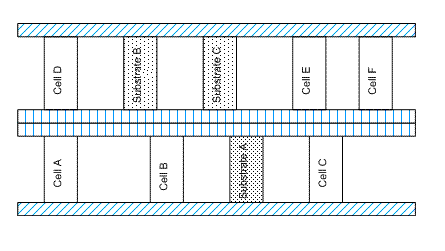
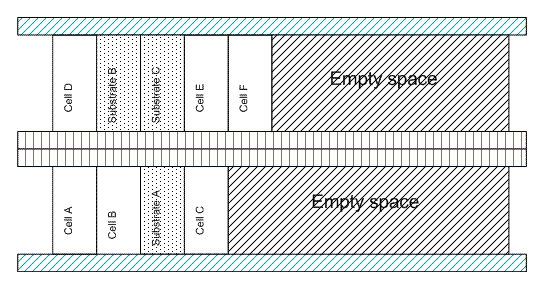
Places the standard cells and tap cells abutted together. However, after abutment, you might notice empty spaces at the end of the row because the environment variable does not adjust the existing prBoundary based on the new placement. Also, if a design has any predefined constraints, the environment variable might not honor them, resulting in constraint violations.
Below is a design for which the packedPlacement environment variable has not been set.
After the packedPlacement environment variable is set for the design, the cells in the design, as shown below, appear abutted together and an empty space is created at the end of the row.
GUI Equivalent
Examples
envGetVal("layoutXL.placement" "packedPlacement")
envSetVal("layoutXL.placement" "packedPlacement" 'boolean t)
envSetVal("layoutXL.placement" "packedPlacement" 'boolean nil)
Related Topics
List of Custom Digital Placer Environment Variables
pDiffSpacing
layoutXL.placement pDiffSpacing float float_number
Description
Sets the minimum spacing required between adjacent PMOS chains. This value affects the estimation of the number of rows required.
GUI Equivalent
Examples
envGetVal("layoutXL.placement" "pDiffSpacing")
envSetVal("layoutXL.placement" "pDiffSpacing" 'float 5.0)
Related Topics
List of Custom Digital Placer Environment Variables
periodicTap
layoutXL.placement periodicTap boolean { t | nil }
Description
Inserts all the available tap cells periodically starting from bottom lower-left corner of the boundary in a circular pattern. The default value is nil.
GUI Equivalent
Examples
envGetVal("layoutXL.placement" "periodicTap")
envSetVal("layoutXL.placement" "periodicTap" 'boolean t)
envSetVal("layoutXL.placement" "periodicTap" 'boolean nil)
Related Topics
List of Custom Digital Placer Environment Variables
pinPlacementXGrid
layoutXL.placement pinPlacementXGrid float float_number
Description
Specifies the X-coordinate of the placement grid on which the Custom Digital placer places pins. When not set, the default value, 0.0, is used to indicate that the placer places pins on the manufacturing grid.
Set the pinPlacementYGrid environment variable to specify the Y-coordinate of the placement grid.
GUI Equivalent
Examples
envGetVal("layoutXL.placement" "pinPlacementXGrid")
envSetVal("layoutXL.placement" "pinPlacementXGrid" 'float 0.02)
Related Topics
List of Custom Digital Placer Environment Variables
pinPlacementYGrid
layoutXL.placement pinPlacementYGrid float float_number
Description
Specifies the Y-coordinate of the placement grid on which the Custom Digital placer places pins. When not set, the default value, 0.0, is used to indicate that the placer places pins on the manufacturing grid.
Set the pinPlacementXGrid environment variable to specify the X-coordinate of the placement grid.
GUI Equivalent
Examples
envGetVal("layoutXL.placement" "pinPlacementYGrid")
envSetVal("layoutXL.placement" "pinPlacementYGrid" 'float 0.005)
Related Topics
List of Custom Digital Placer Environment Variables
placeCluster
layoutXL.placement placeCluster string "clusterName"
Description
Places only the components assigned to the specified cluster name.
GUI Equivalent
Examples
envGetVal("layoutXL.placement" "placeCluster")
envSetVal("layoutXL.placement" "placeCluster" 'string "myCluster")
Related Topics
List of Custom Digital Placer Environment Variables
placementMode
layoutXL.placement placementMode cyclic { "Auto Placement" | "ECO Placement" }
Description
Specifies the mode to be used to place components. If ECO Placement is specified, then all unplaced components are placed based on their connectivity with the placed components. If Auto Placement is specified, then components are placed without any regard to their initial placement.
The default is Auto Placement.
GUI Equivalent
Examples
envGetVal("layoutXL.placement" "placementMode")
envSetVal("layoutXL.placement" "placementMode" 'cyclic "Auto Placement")
envSetVal("layoutXL.placement" "placementMode" 'cyclic "ECO Placement")
Related Topics
List of Custom Digital Placer Environment Variables
placementRegion
layoutXL.placement placementRegion cyclic { "Boundary" | "Placement Region" }
Description
Specifies the region or boundary within which components need to be placed.
GUI Equivalent
Examples
envGetVal("layoutXL.placement" "placementRegion")
envSetVal("layoutXL.placement" "placementRegion" 'cyclic "Boundary")
envSetVal("layoutXL.placement" "placementRegion" 'cyclic "Placement Region")
Related Topics
List of Custom Digital Placer Environment Variables
preserveChains
layoutXL.placement preserveChains boolean { t | nil }
Description
Preserves chains that were generated automatically by the Generate All From Source or Placement Planning commands. When switched off, the placer is free to break chains to share diffusion on individual transistors, which can reduce the wire length of polysilicon gate connections and result in better alignment.
Cadence recommends that you leave this environment variable set to t and inspect the results obtained by the automatic chaining function to see if they are satisfactory. If they are not, you can switch off the option and let the placer try to generate a better result.
When disabling this option, consider the following:
- It is more efficient for the placer to place transistor chains generated by the Generate All From Source or Placement Planning commands than to place individual transistors.
- Diffusion sharing during automatic placement is not guaranteed because the placer is geared primarily toward reducing overall wire length. If the area within the rows is limited, the placer attempts to share diffusion; if there is excess area within the rows, it does not.
GUI Equivalent
Examples
envGetVal("layoutXL.placement" "preserveChains")
envSetVal("layoutXL.placement" "preserveChains" 'boolean t)
envSetVal("layoutXL.placement" "preserveChains" 'boolean nil)
Related Topics
List of Custom Digital Placer Environment Variables
refXGridName
layoutXL.placement refXGridName string "GridName"
Description
Specifies the reference grids along the x-axis for snapping the devices during placement. The value must be enclosed in quotation marks.
GUI Equivalent
Examples
envGetVal("layoutXL.placement" "refXGridName")
envSetVal("layoutXL.placement" "refXGridName" 'string "GridX_1")
Related Topics
List of Custom Digital Placer Environment Variables
refYGridName
layoutXL.placement refYGridName string "GridName"
Description
Specifies the reference grids along the y-axis for snapping the devices during placement. The value must be enclosed in quotation marks.
GUI Equivalent
Examples
envGetVal("layoutXL.placement" "refYGridName")
envSetVal("layoutXL.placement" "refYGridName" 'string "GridY_1")
Related Topics
List of Custom Digital Placer Environment Variables
refXOffset
layoutXL.placement refXOffset float float_number
Description
Specifies the horizontal offset for creating a row region.
GUI Equivalent
|
Placement Region – Rectangle – Origin X ( |
Examples
envGetVal("layoutXL.placement" "refXOffset")
envSetVal("layoutXL.placement" "refXOffset" 'float 3)
Related Topics
List of Custom Digital Placer Environment Variables
refYOffset
layoutXL.placement refYOffset float float_number
Description
Specifies the vertical offset for creating a row region.
GUI Equivalent
|
Placement Region – Rectangle – Origin Y ( |
Examples
envGetVal("layoutXL.placement" "refYOffset")
envSetVal("layoutXL.placement" "refYOffset" 'float 3)
Related Topics
List of Custom Digital Placer Environment Variables
reserveTracksForRouting
layoutXL.placement reserveTracksForRouting cyclic { -1 | 0 | 1 ... 10 }
Description
Specifies the additional number of routing tracks to be reserved between each row when running the interRowSpacer. The number you specify is added to the number of tracks the placer estimates are required to perform the routing to give the total number of tracks required. This is then compared to the number of tracks available between rows, and the space available is increased or reduced accordingly.
Placer estimates required tracks for routing: 10 reserveTracksForRouting: 3 Total number of tracks required: 13
If there are currently 8 tracks available between rows, the placer adds space for 5 more.
If there are currently 15 tracks available between rows, the placer removes 2.
GUI Equivalent
Examples
envGetVal("layoutXL.placement" "reserveTracksForRouting")
envSetVal("layoutXL.placement" "reserveTracksForRouting" 'cyclic "2")
Related Topics
List of Custom Digital Placer Environment Variables
rightBotCornerBdryCell
layoutXL.placement rightBotCornerBdryCell string { "" | "string" }
Description
Specifies the cut poly cell to be inserted at the right bottom corner of the standard cell.
GUI Equivalent
|
Place – Custom Digital – Placement Planning – Boundary Cell tab |
|
Examples
envGetVal("layoutXL.placement" "rightBotCornerBdryCell")
envSetVal("layoutXL.placement" "rightBotCornerBdryCell" 'string "FILLER_CELL_RB")
Related Topics
List of Custom Digital Placer Environment Variables
rightCellMirror
layoutXL.placement rightCellMirror boolean { t | nil }
Description
Applies a mirrored orientation to the boundary cells to be inserted in the right edge.
GUI Equivalent
|
Place – Custom Digital – Placement Planning – Boundary Cell tab |
|
Examples
envGetVal("layoutXL.placement" "rightCellMirror")
envSetVal("layoutXL.placement" "rightCellMirror" 'boolean t)
envSetVal("layoutXL.placement" "rightCellMirror" 'boolean nil)
Related Topics
List of Custom Digital Placer Environment Variables
rightCornerCellMirror
layoutXL.placement rightCornerCellMirror boolean { t | nil }
Description
Applies a mirrored orientation to the boundary cells to be inserted in the right corner.
GUI Equivalent
|
Place – Custom Digital – Placement Planning – Boundary Cell tab |
|
Examples
envGetVal("layoutXL.placement" "rightCornerCellMirror")
envSetVal("layoutXL.placement" "rightCornerCellMirror" 'boolean t)
envSetVal("layoutXL.placement" "rightCornerCellMirror" 'boolean nil)
Related Topics
List of Custom Digital Placer Environment Variables
rightEdgeBdryCell
layoutXL.placement rightEdgeBdryCell string { "" | "string" }
Description
Specifies the boundary cell that needs to be inserted at the right edge.
GUI Equivalent
|
Place – Custom Digital – Placement Planning – Boundary Cell tab |
|
Examples
envGetVal("layoutXL.placement" "rightEdgeBdryCell")
envSetVal("layoutXL.placement" "rightEdgeBdryCell" 'string "FILLER_CELL_RE")
Related Topics
List of Custom Digital Placer Environment Variables
rightTopCornerBdryCell
layoutXL.placement rightTopCornerBdryCell string { "" | "string" }
Description
Specifies the cut poly cell to be inserted at the upper-right corner of the standard cell.
GUI Equivalent
|
Place – Custom Digital – Placement Planning – Boundary Cell tab |
|
Examples
envGetVal("layoutXL.placement" "rightTopCornerBdryCell")
envSetVal("layoutXL.placement" "rightTopCornerBdryCell" 'string "FILLER_CELL_TR")
Related Topics
List of Custom Digital Placer Environment Variables
rightTopEdgeBdryCell
layoutXL.placement rightTopEdgeBdryCell string { "" | "string" }
Description
Specifies the boundary cell to be inserted at the right top edges of standard cells.
GUI Equivalent
|
Place – Custom Digital – Placement Planning – Boundary Cell tab |
|
Examples
envGetVal("layoutXL.placement" "rightTopEdgeBdryCell")
envSetVal("layoutXL.placement" "rightTopEdgeBdryCell" 'string "BOUNDARY_CELL_RTE")
Related Topics
List of Custom Digital Placer Environment Variables
routingAwarePinPlc
layoutXL.placement routingAwarePinPlc 'boolean { t | nil }
Description
Specifies whether the placer must consider the WSP direction while placing unconstrained pins.
GUI Equivalent
Examples
envGetVal("layoutXL.placement" "routingAwarePinPlc")
envSetVal("layoutXL.placement" "routingAwarePinPlc" 'boolean t)
envSetVal("layoutXL.placement" "routingAwarePinPlc" 'boolean nil)
Related Topics
List of Custom Digital Placer Environment Variables
rowCount
layoutXL.placement rowCount int "integer_number"
Description
Specifies the exact number of rows to be generated by placement planning. The default is 1.
This environment variable is honored only when the numRowOption environment variable is set to Specify.
GUI Equivalent
|
Number Of Rows: Specify (Placement Planning) |
Examples
envGetVal("layoutXL.placement" "rowCount")
envSetVal("layoutXL.placement" "rowCount" 'int 10)
Related Topics
List of Custom Digital Placer Environment Variables
rowsFromLowerLeft
layoutXL.placement rowsFromLowerLeft boolean { t | nil }
Description
Creates rows from the lower-left side of the PR boundary or region. Use the rowOffsetX and rowOffsetY environment variables to specify the corresponding row offset values.
GUI Equivalent
Examples
envGetVal("layoutXL.placement" "rowsFromLowerLeft")
envSetVal("layoutXL.placement" "rowsFromLowerLeft" 'boolean t)
envSetVal("layoutXL.placement" "rowsFromLowerLeft" 'boolean nil)
Related Topics
List of Custom Digital Placer Environment Variables
rowGroundLayer
layoutXL.placement rowGroundLayer string "layer_name"
Description
Specifies the name of the layer on which ground rails are drawn during row generation.
GUI Equivalent
Examples
envGetVal("layoutXL.placement" "rowGroundLayer")
envSetVal("layoutXL.placement" "rowGroundLayer" 'string "Metal1")
Related Topics
List of Custom Digital Placer Environment Variables
rowGroundName
layoutXL.placement rowGroundName string "net_name"
Description
Specifies the name of the net to which ground rails are assigned during row generation.
GUI Equivalent
Examples
envGetVal("layoutXL.placement" "rowGroundName")
envSetVal("layoutXL.placement" "rowGroundName" 'string "vss!")
Related Topics
List of Custom Digital Placer Environment Variables
rowGroundWidth
layoutXL.placement rowGroundWidth float float_number
Description
Specifies the width of ground rails created during row generation.
GUI Equivalent
Examples
envGetVal("layoutXL.placement" "rowGroundWidth")
envSetVal("layoutXL.placement" "rowGroundWidth" 'float 1.25)
Related Topics
List of Custom Digital Placer Environment Variables
rowOffsetX
layoutXL.placement rowOffsetX float float_number
Description
Specifies the x-offset value for creating rows from the lower-left side of the PR boundary or region. This environment variable can be used only when rowsFromLowerLeft is set to t.
GUI Equivalent
Examples
envGetVal("layoutXL.placement" "rowOffsetX")
envSetVal("layoutXL.placement" "rowOffsetX" 'float 9.0)
Related Topics
List of Custom Digital Placer Environment Variables
rowOffsetY
layoutXL.placement rowOffsetY float float_number
Description
Specifies the y-offset value for creating rows from the lower-left side of the PR boundary or region. This environment variable can be used only when rowsFromLowerLeft is set to t.
GUI Equivalent
Examples
envGetVal("layoutXL.placement" "rowOffsetY")
envSetVal("layoutXL.placement" "rowOffsetY" 'float 9.0)
Related Topics
List of Custom Digital Placer Environment Variables
rowPowerLayer
layoutXL.placement rowPowerLayer string "layer_name"
Description
Specifies the name of the layer on which power rails are drawn during row generation.
GUI Equivalent
Examples
envGetVal("layoutXL.placement" "rowPowerLayer")
envSetVal("layoutXL.placement" "rowPowerLayer" 'string "Metal1")
Related Topics
List of Custom Digital Placer Environment Variables
rowPowerName
layoutXL.placement rowPowerName string "net_name"
Description
Specifies the name of the net to which power rails are assigned during row generation.
GUI Equivalent
Examples
envGetVal("layoutXL.placement" "rowPowerName")
envSetVal("layoutXL.placement" "rowPowerName" 'string "vdd!")
Related Topics
List of Custom Digital Placer Environment Variables
rowPowerWidth
layoutXL.placement rowPowerWidth float float_number
Description
Specifies the width of power rails created during row generation.
GUI Equivalent
Examples
envGetVal("layoutXL.placement" "rowPowerWidth")
envSetVal("layoutXL.placement" "rowPowerWidth" 'float 1.25)
Related Topics
List of Custom Digital Placer Environment Variables
rowSpacingOption
layoutXL.placement rowSpacingOption cyclic { "Auto" | "Specify" }
Description
Specifies whether the spacing between rows needs to be calculated automatically or specified manually.
GUI Equivalent
Examples
envGetVal("layoutXL.placement" "rowSpacingOption")
envSetVal("layoutXL.placement" "rowSpacingOption" 'cyclic "Auto")
envSetVal("layoutXL.placement" "rowSpacingOption" 'cyclic "Specify")
Related Topics
List of Custom Digital Placer Environment Variables
rowTapEndOffset
layoutXL.placement rowTapEndOffset float float_number
Description
Specifies the distance from the right edge at which the last tap cell must be placed in each row. The value is applicable when the vcpfePlaceTapCells SKILL function is run to insert tap cells in the empty spaces between standard cells.
GUI Equivalent
Examples
envGetVal("layoutXL.placement" "rowTapEndOffset")
envSetVal("layoutXL.placement" "rowTapEndOffset" 'float 0.1)
Related Topics
List of Custom Digital Placer Environment Variables
rowTemplateName
layoutXL.placement rowTemplateName string "templateName"
Description
Specifies the name of the row templates based on which rows need to be inserted in the layout canvas. The value must be enclosed in quotation marks. Use the Row Template Manager to define a new row template.
GUI Equivalent
Examples
envGetVal("layoutXL.placement" "rowTemplateName")
envSetVal("layoutXL.placement" "rowTemplateName" 'string "Template1")
Related Topics
List of Custom Digital Placer Environment Variables
rowUtilization
layoutXL.placement rowUtilization int integer_number
Description
Specifies how much space is allowed for the components inside each generated row and how much is reserved for routing.
GUI Equivalent
Examples
envGetVal("layoutXL.placement" "rowUtilization")
envSetVal("layoutXL.placement" "rowUtilization" 'int 75)
Related Topics
List of Custom Digital Placer Environment Variables
row2RowSpacing
layoutXL.placement row2RowSpacing float float_number
Description
Specifies the spacing between rows. To abut rows, specify the spacing as 0. If not specified, then the value is auto-computed by the tool.
GUI Equivalent
Examples
envGetVal("layoutXL.placement" "row2RowSpacing")
envSetVal("layoutXL.placement" "row2RowSpacing" 'float 1.0)
Related Topics
List of Custom Digital Placer Environment Variables
rowPitchOption
layoutXL.placement rowPitchOption cyclic { "Auto" | "Specify" }
Description
Specifies whether the value for minimum spacing between instances in each row needs to be calculated automatically or specified manually.
GUI Equivalent
Examples
envGetVal("layoutXL.placement" "rowPitchOption")
envSetVal("layoutXL.placement" "rowPitchOption" 'cyclic "Auto")
envSetVal("layoutXL.placement" "rowPitchOption" 'cyclic "Specify")
Related Topics
List of Custom Digital Placer Environment Variables
rowPitchValue
layoutXL.placement rowPitchValue float float_number
Description
I ndicates the minimum spacing between instances in each row.
GUI Equivalent
Examples
envGetVal("layoutXL.placement" "rowPitchValue")
envSetVal("layoutXL.placement" "rowPitchValue" 'float 0.002)
Related Topics
List of Custom Digital Placer Environment Variables
saveAs
layoutXL.placement saveAs boolean { t | nil }
Description
Specifies that the placement results are saved under a cellview name different from the current cellview.
GUI Equivalent
Examples
envGetVal("layoutXL.placement" "saveAs")
envSetVal("layoutXL.placement" "saveAs" 'boolean t)
envSetVal("layoutXL.placement" "saveAs" 'boolean nil)
Related Topics
List of Custom Digital Placer Environment Variables
saveAsCellName
layoutXL.placement saveAsCellName string "cellName"
Description
Specifies the cell name of the saveAs cellview.
The default is the same name as the source cell.
GUI Equivalent
Examples
envGetVal("layoutXL.placement" "saveAsCellName")
envSetVal("layoutXL.placement" "saveAsCellName" 'string "myCell")
Related Topics
List of Custom Digital Placer Environment Variables
saveAsLibName
layoutXL.placement saveAsLibName string "libraryName"
Description
Specifies the library in which a saveAs cellview is saved.
The default is the same name as the source library.
GUI Equivalent
Examples
envGetVal("layoutXL.placement" "saveAsLibName")
envSetVal("layoutXL.placement" "saveAsLibName" 'string "myLib")
Related Topics
List of Custom Digital Placer Environment Variables
saveAsViewName
layoutXL.placement saveAsViewName string "viewName"
Description
Specifies the view name for a saveAs cellview.
The default is the same name as the source view.
GUI Equivalent
Examples
envGetVal("layoutXL.placement" "saveAsViewName")
envSetVal("layoutXL.placement" "saveAsViewName" 'string "myView")
Related Topics
List of Custom Digital Placer Environment Variables
selectBoundaryCellsFrom
layoutXL.placement selectBoundaryCellsFrom cyclic { "Component Types" | "Cell Names" }
Description
Specifies whether boundary cells are to be selected based on their component types or cell names.
The default is Component Types.
GUI Equivalent
|
Boundary Cell – Component Types, Cell Names (Placement Planning) |
Examples
envGetVal("layoutXL.placement" "selectBoundaryCellsFrom")
envSetVal("layoutXL.placement" "selectBoundaryCellsFrom" 'cyclic "Cell Names")
Related Topics
List of Custom Digital Placer Environment Variables
selectedBoundaryCells
layoutXL.placement selectedBoundaryCells string "list_of_LCVs"
Description
Specifies a list of lib:cell:view values of the cells to be used as boundary cells. This setting is valid only if selectBoundaryCellsFrom is set to Cell Names.
The default value is blank, indicating the absence of boundary cells.
GUI Equivalent
|
Boundary Cell – Cell Names (Placement Planning) |
Examples
envGetVal("layoutXL.placement" "selectedBoundaryCells")
envSetVal("layoutXL.placement" "selectedBoundaryCells" 'string "(L1 C1 V1) (L2 C2 V2)")
Related Topics
List of Custom Digital Placer Environment Variables
selectedFillerCells
layoutXL.placement selectedFillerCells string "list_of_LCVs"
Description
Specifies a list of lib:cell:view values of the cells to be used as filler cells.
The default value is blank, indicating the absence of filler cells.
GUI Equivalent
|
Fillers – Cell Names (Insert/Delete Filler Cells Form) |
Examples
envGetVal("layoutXL.placement" "selectedFillerCells")
envSetVal("layoutXL.placement" "selectedFillerCells" 'string "(L1 C1 V1) (L2 C2 V2)")
Related Topics
List of Custom Digital Placer Environment Variables
selectFillerCellsFrom
layoutXL.placement selectFillerCellsFrom cyclic { "Component Types" | "Cell Names" }
Description
Specifies whether filler cells are to be selected based on their component types or cell names.
The default is Component Types.
GUI Equivalent
|
Fillers – Component Types, Cell Names (Insert/Delete Filler Cells Form) |
Examples
envGetVal("layoutXL.placement" "selectFillerCellsFrom")
envSetVal("layoutXL.placement" "selectFillerCellsFrom" 'cyclic "Cell Names")
Related Topics
List of Custom Digital Placer Environment Variables
selectedTapCells
layoutXL.placement selectedTapCells string "list_of_LCVs"
Description
Specifies a list of lib:cell:view values of the cells to be used as tap cells. This setting is valid only if selectTapCellsFrom is set to Cell Names.
The default value is blank, indicating the absence of tap cells.
GUI Equivalent
|
Tap Cell – Cell Names (Placement Planning) |
Examples
envGetVal("layoutXL.placement" "selectedTapCells")
envSetVal("layoutXL.placement" "selectedTapCells" 'string "(L1 C1 V1) (L2 C2 V2)")
Related Topics
List of Custom Digital Placer Environment Variables
selectTapCellsFrom
layoutXL.placement selectTapCellsFrom cyclic { "Component Types" | "Cell Names" }
Description
Specifies whether tap cells are to be selected based on their component types or cell names.
The default is Component Types.
GUI Equivalent
|
Tap Cell – Component Types, Cell Names (Placement Planning) |
Examples
envGetVal("layoutXL.placement" "selectTapCellsFrom")
envSetVal("layoutXL.placement" "selectTapCellsFrom" 'cyclic "Cell Names")
Related Topics
List of Custom Digital Placer Environment Variables
selectedOnly
layoutXL.placement selectedOnly boolean { t | nil }
Description
Places only the currently selected objects. When switched off, the placer automatically places all the objects in the cellview.
GUI Equivalent
Examples
envGetVal("layoutXL.placement" "selectedOnly")
envSetVal("layoutXL.placement" "selectedOnly" 'boolean t)
envSetVal("layoutXL.placement" "selectedOnly" 'boolean nil)
Related Topics
List of Custom Digital Placer Environment Variables
showProgress
layoutXL.placement showProgress boolean { t | nil }
Description
Displays the Placement Status window, which indicates the placer’s progress and provides statistics on the placement run.
GUI Equivalent
Examples
envGetVal("layoutXL.placement" "showProgress")
envSetVal("layoutXL.placement" "showProgress" 'boolean t)
envSetVal("layoutXL.placement" "showProgress" 'boolean nil)
Related Topics
List of Custom Digital Placer Environment Variables
skipCellRailPattern
layoutXL.placement skipCellRailPattern boolean { t | nil }
Description
Ignores rail patterns in masters while running the Custom Digital Placer. Therefore, the cells are not flipped.
Set this environment variable when cell placement must follow the orientation set on the row, instead of individual cells.
GUI Equivalent
Examples
envGetVal("layoutXL.placement" "skipCellRailPattern ")
envSetVal("layoutXL.placement" "skipCellRailPattern " 'boolean t)
envSetVal("layoutXL.placement" "skipCellRailPattern " 'boolean nil)
Related Topics
List of Custom Digital Placer Environment Variables
startCapCellName
layoutXL.placement startCapCellName string "cell_name"
Description
Specifies the cell name of the cellview to be placed as a start cap.
GUI Equivalent
Examples
envGetVal("layoutXL.placement" "startCapCellName")
envSetVal("layoutXL.placement" "startCapCellName" 'string "STARTCAP")
Related Topics
List of Custom Digital Placer Environment Variables
startCapLibName
layoutXL.placement startCapLibName string "library_name"
Description
Specifies the library name of the cellview to be placed as a start cap.
GUI Equivalent
Examples
envGetVal("layoutXL.placement" "startCapLibName")
envSetVal("layoutXL.placement" "startCapLibName" 'string "TESTLIB")
Related Topics
List of Custom Digital Placer Environment Variables
startCapViewName
layoutXL.placement startCapViewName string "view_name"
Description
Specifies the view name of the cellview to be placed as a start cap.
GUI Equivalent
None
Examples
envGetVal("layoutXL.placement" "startCapViewName")
envSetVal("layoutXL.placement" "startCapViewName" 'string "layout")
Related Topics
List of Custom Digital Placer Environment Variables
subContInAlternateRow
layoutXL.placement subContInAlternateRow boolean { t | nil }
Description
Specifies if the standard cell substrate contacts (tap cells) must be placed in alternate rows, such as 1st, 3rd, and so on.
GUI Equivalent
Examples
envGetVal("layoutXL.placement" "subContInAlternateRow")
envSetVal("layoutXL.placement" "subContInAlternateRow" 'boolean t)
envSetVal("layoutXL.placement" "subContInAlternateRow" 'boolean nil)
Related Topics
Placing Standard Cell Substrate Contacts in Alternate Rows
List of Custom Digital Placer Environment Variables
subContMaxSpacing
layoutXL.placement subContMaxSpacing float float_number
Description
Specifies the maximum spacing allowed between the standard cell substrate contacts in a row.
By default, no maximum contact spacing value is specified.
GUI Equivalent
Examples
envGetVal("layoutXL.placement" "subContMaxSpacing")
envSetVal("layoutXL.placement" "subContMaxSpacing" 'float 16.5)
Related Topics
List of Custom Digital Placer Environment Variables
subContMinSpacing
layoutXL.placement subContMinSpacing float float_number
Description
Specifies the minimum spacing allowed between the tap cells (standard cell substrate contacts) in a row.
By default, no minimum contact spacing value is specified.
GUI Equivalent
Examples
envGetVal("layoutXL.placement" "subContMinSpacing")
envSetVal("layoutXL.placement" "subContMinSpacing" 'float 12.0)
Related Topics
List of Custom Digital Placer Environment Variables
substrateContactType
layoutXL.placement substrateContactType string "compTypeName"
Description
Specifies the name of the component type that contains the tap cells (standard cell substrate contacts) you want to insert in the spaces between the standard cells in a row. This setting is valid only if selectTapCellsFrom is set to Component Types.
t. The component type you specify must have component class STDSUBCONT.GUI Equivalent
Examples
envGetVal("layoutXL.placement" "substrateContactType")
envSetVal("layoutXL.placement" "substrateContactType" 'string "myTapCell")
Related Topics
List of Custom Digital Placer Environment Variables
supplyPattern
layoutXL.placement supplyPattern cyclic { "G-P-P-G" | "P-G-G-P" | "G-P" | "P-G" }
Description
Specifies how power and ground rails alternate between rows.
GUI Equivalent
Examples
envGetVal("layoutXL.placement" "supplyPattern")
envSetVal("layoutXL.placement" "supplyPattern" 'cyclic "G-P-P-G")
envSetVal("layoutXL.placement" "supplyPattern" 'cyclic "P-G-G-P")
envSetVal("layoutXL.placement" "supplyPattern" 'cyclic "G-P")
envSetVal("layoutXL.placement" "supplyPattern" 'cyclic "P-G")
Related Topics
List of Custom Digital Placer Environment Variables
supplyPosition
layoutXL.placement supplyPosition cyclic { "Inside" | "Outside" | "Center" }
Description
Specifies the position of rails relative to rows. This option can be used only when generateRails is set to t.
GUI Equivalent
Examples
envGetVal("layoutXL.placement" "supplyPosition")
envSetVal("layoutXL.placement" "supplyPosition" 'cyclic "Inside")
envSetVal("layoutXL.placement" "supplyPosition" 'cyclic "Outside")
envSetVal("layoutXL.placement" "supplyPosition" 'cyclic "Center")
Related Topics
List of Custom Digital Placer Environment Variables
templateRowCount
layoutXL.placement templateRowCount int integer_number
Description
Specifies the exact number of rows to be generated in the given row region when the environment variable is set to Specify.
GUI Equivalent
Examples
envGetVal("layoutXL.placement" "templateRowCount")
envSetVal("layoutXL.placement" "templateRowCount" 'int 3)
Related Topics
List of Custom Digital Placer Environment Variables
topBotRowPlaceable
layoutXL.placement topBotRowPlaceable boolean { t | nil }
Description
Specifies whether standard cells can be placed over the boundary cells that are placed on the top and bottom rows.
GUI Equivalent
Examples
envGetVal("layoutXL.placement" "topBotRowPlaceable")
envSetVal("layoutXL.placement" "topBotRowPlaceable" 'boolean t)
envSetVal("layoutXL.placement" "topBotRowPlaceable" 'boolean nil)
Related Topics
List of Custom Digital Placer Environment Variables
topRowBdryCell
layoutXL.placement topRowBdryCell string "rowCell_name"
Description
Specifies the row cell to be inserted at the top of standard cells.
GUI Equivalent
|
Place – Custom Digital – Placement Planning – Boundary Cell tab |
|
Examples
envGetVal("layoutXL.placement" "topRowBdryCell")
envSetVal("layoutXL.placement" "topRowBdryCell" 'string "ROW_CELL_TOP")
Related Topics
List of Custom Digital Placer Environment Variables
topTapBdryCell
layoutXL.placement topTapBdryCell string "tapCell_name"
Description
Specifies the tap cell to be inserted at the top of the standard cell.
GUI Equivalent
Examples
envGetVal("layoutXL.placement" "topTapBdryCell")
envSetVal("layoutXL.placement" "topTapBdryCell" 'string "FILLER_CELL_TT")
Related Topics
List of Custom Digital Placer Environment Variables
usePartialTemplate
layoutXL.placement usePartialTemplate boolean { t | nil }
Description
Allows use of partial row templates to fill the placement region. Therefore, the selected row template is repeated multiple times, and the remaining space at the top is filled with a partial row template. When set to nil, the remaining space is left empty. This setting is valid only when is set to Maximum.
GUI Equivalent
Examples
envGetVal("layoutXL.placement" "usePartialTemplate")
envSetVal("layoutXL.placement" "usePartialTemplate" 'boolean t)
envSetVal("layoutXL.placement" "usePartialTemplate" 'boolean nil)
Related Topics
List of Custom Digital Placer Environment Variables
vcpCellBoundaryLPPs
layoutXL.placement vcpCellBoundaryLPPs string "(layerpurpose)..."
Description
Specifies the layer-purpose pairs (LPPs) the placer uses to derive the cell boundary for standard cells. Use this environment variable to specify a cell boundary using LPPs that are not included in the default layers.
The cell boundary is derived from the available shapes inside the standard cells in following order:
-
The list of layer-purpose pairs from
vcpCellBoundaryLPPs. If multiple LPPs are specified, the placer uses only the first LPP encountered in the cells. -
The PR Boundary object. If the PR Boundary is rectilinear and a
snapBoundaryexists, thesnapBoundaryis used. -
The
snapBoundaryobject. -
The
(prboundary drawing)layer. -
The
(prboundary boundary)layer. -
The
(instance drawing)layer. -
The
(cellBoundary drawing)layer. - The overall bounding box (excluding labels).
If none of the above LPPs exists in the design, the placer draws the boundary such that it encloses all the objects within the cell.
GUI Equivalent
Examples
envGetVal("layoutXL.placement" "vcpCellBoundaryLPPs")
envSetVal("layoutXL.placement" "vcpCellBoundaryLPPs" 'string "(prboundary drawing)")
Related Topics
List of Custom Digital Placer Environment Variables
vcpCellBoundaryUI
layoutXL.placement vcpCellBoundaryUI boolean { t | nil }
Description
Controls the display of the Cell Boundary LPPs field on the Auto Placer form, which specifies the layers that have been used to derive the place and route boundary.
GUI Equivalent
Examples
envGetVal("layoutXL.placement" "vcpCellBoundaryUI")
envSetVal("layoutXL.placement" "vcpCellBoundaryUI" 'boolean t)
envSetVal("layoutXL.placement" "vcpCellBoundaryUI" 'boolean nil)
Related Topics
List of Custom Digital Placer Environment Variables
vcpConductorDepth
layoutXL.placement vcpConductorDepth int integer_number
Description
Specifies the conductor depth for the Design Framework II (DFII) to Virtuoso Custom Digital Placer translation.
2 and is recommended for device level placement. For block and standard cell placements, Cadence recommends that you set the vcpConductorDepth to 0.GUI Equivalent
Examples
envGetVal("layoutXL.placement" "vcpConductorDepth")
envSetVal("layoutXL.placement" "vcpConductorDepth" 'int 3)
Related Topics
List of Custom Digital Placer Environment Variables
vcpEnableMultiVoltagePlacement
layoutXL.placement vcpEnableMultiVoltagePlacement boolean { t | nil }
Description
Enables and disables the placer’s multi-voltage placement capability.
GUI Equivalent
Examples
envGetVal("layoutXL.placement" "vcpEnableMultiVoltagePlacement")
envSetVal("layoutXL.placement" "vcpEnableMultiVoltagePlacement" 'boolean t)
envSetVal("layoutXL.placement" "vcpEnableMultiVoltagePlacement" 'boolean nil)
Related Topics
List of Custom Digital Placer Environment Variables
vcpGlobalPathScript
layoutXL.placement vcpGlobalPathScript string "fileName"
Description
Specifies a script that returns the full network path for the current working directory. This path is required if you are running the placement job on your Load Balancing Service.
If there is no script specified, the placer uses the current path (/net/hostname/currentPath.)
GUI Equivalent
Examples
envGetVal("layoutXL.placement" "vcpGlobalPathScript")
envSetVal("layoutXL.placement" "vcpGlobalPathScript" 'string "myScript.txt")
Related Topics
List of Custom Digital Placer Environment Variables
vcpKeepoutDepth
layoutXL.placement vcpKeepoutDepth int integer_number
Description
Specifies the keepout depth for the DFII to Virtuoso Custom Digital Placer translation.
2 and is recommended for device level placement. For block and standard cell placements, Cadence recommends that you set the vcpKeepoutDepth to 0.GUI Equivalent
Examples
envGetVal("layoutXL.placement" "vcpKeepoutDepth")
envSetVal("layoutXL.placement" "vcpKeepoutDepth" 'int 3)
Related Topics
List of Custom Digital Placer Environment Variables
vcpRulesConstraintGroup
layoutXL.placement vcpRulesConstraintGroup string "constraint_group_names"
Description
Specifies the constraint group that contains the placement rules for the current technology.
GUI Equivalent
Examples
envGetVal("layoutXL.placement" "vcpRulesConstraintGroup")
envSetVal("layoutXL.placement" "vcpRulesConstraintGroup" 'string "myCG")
Related Topics
List of Custom Digital Placer Environment Variables
vcpVerboseLevel
layoutXL.placement vcpVerboseLevel int { 0 | 1 | 2 | 3 }
Description
Specifies the verbosity of the placer’s message output.
For example, 0 specifies that the only status reported is the final set of placement statistics; 3 specifies full messaging.
GUI Equivalent
Examples
envGetVal("layoutXL.placement" "vcpVerboseLevel")
envSetVal("layoutXL.placement" "vcpVerboseLevel" 'int 3)
Related Topics
List of Custom Digital Placer Environment Variables
vcpWriteToCIW
layoutXL.placement vcpWriteToCIW boolean { t | nil }
Description
Specifies that placer output is written to the command interpreter window (CIW).
GUI Equivalent
Examples
envGetVal("layoutXL.placement" "vcpWriteToCIW")
envSetVal("layoutXL.placement" "vcpWriteToCIW" 'boolean t)
envSetVal("layoutXL.placement" "vcpWriteToCIW" 'boolean nil)
Related Topics
List of Custom Digital Placer Environment Variables
vpaAutoLevel1Switch
layoutXL.placement vpaAutoLevel1Switch boolean { t | nil }
Description
Automatically zooms to the selected soft block and switches to Level-1 Pins mode when you click a soft block while using the Pin Planner tab in Top Level Pins mode.
The default is nil, which means that when you click a soft block in Top Level Pins mode, the soft block is selected but you remain at the top level.
GUI Equivalent
Examples
envGetVal("layoutXL.placement" "vpaAutoLevel1Switch")
envSetVal("layoutXL.placement" "vpaAutoLevel1Switch" 'boolean t)
envSetVal("layoutXL.placement" "vpaAutoLevel1Switch" 'boolean nil)
Related Topics
List of Custom Digital Placer Environment Variables
vpaAutoZoomEnable
layoutXL.placement vpaAutoZoomEnable boolean { t | nil }
Description
Automatically enables the zoom functionality when the layout view is opened. When set to t, the layout canvas zooms to the selected pins.
GUI Equivalent
Examples
envGetVal("layoutXL.placement" "vpaAutoZoomEnable")
envSetVal("layoutXL.placement" "vpaAutoZoomEnable" 'boolean t)
envSetVal("layoutXL.placement" "vpaAutoZoomEnable" 'boolean nil)
Related Topics
List of Custom Digital Placer Environment Variables
vpaAutoZoomLevel
layoutXL.placement vpaAutoZoomLevel int integer_number}
Description
Sets the automatic zoom level for the selected pins in the layout canvas to an integer value. The acceptable zoom levels are between 0 and 4.
0, the minimum zoom value automatically defaults to 0. If you set a zoom level of value more than 4, the maximum zoom value automatically defaults to 4.GUI Equivalent
Examples
envGetVal("layoutXL.placement" "vpaAutoZoomLevel")
envSetVal("layoutXL.placement" "vpaAutoZoomLevel" 'int 3)
Related Topics
List of Custom Digital Placer Environment Variables
vpaUpdateConstraints
layoutXL.placement vpaUpdateConstraints boolean { t | nil }
Description
Automatically updates any constraints that are applicable for the design based on the settings in the Pin Spacing section of the Pin Planner tab. Constraints are updated when you click the Space button in the form (and not by clicking the Apply button in the Attributes section).
GUI Equivalent
Examples
envGetVal("layoutXL.placement" "vpaUpdateConstraints")
envSetVal("layoutXL.placement" "vpaUpdateConstraints" 'boolean t)
envSetVal("layoutXL.placement" "vpaUpdateConstraints" 'boolean nil)
Related Topics
List of Custom Digital Placer Environment Variables
Return to top