
Verilog In Design Flow
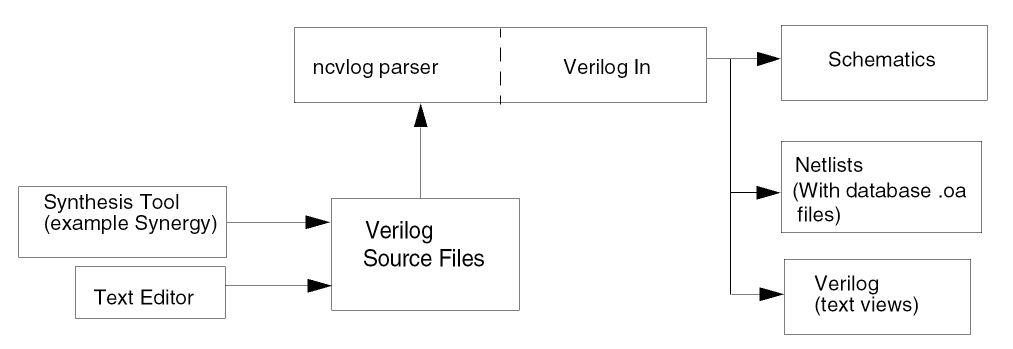
When you use Verilog In with Virtuoso® Studio Design Environment, you can convert structural Verilog netlists into one of the following forms:
In each case, the design is converted into a data format that can be used by Cadence tools. If you convert your Verilog design into schematics, you can edit them in Virtuoso.
The Verilog In software is located in the Cadence software hierarchy at
install_dir/tools/dfII/bin/ihdl, where install_dir is the directory where your Cadence software is installed.
Verilog In uses the ncvlog parser to analyze all designs before they are imported into Verilog.
ncvlog from the appropriate location because the PATH environment variable or LD_LIBRARY_PATH is not set correctly. In this case, Verilog In issues an error. Therefore, ensure that ncvlog is set in the path correctly. For details, see Verilog In with Verilog 2001 Support.The following figure shows how to use Verilog In with other steps in the Verilog design process:
You can use Verilog In to do the following:
- Import a Verilog HDL design into a Virtuoso Studio Design Environment library
- Import a Verilog ASIC library into a Virtuoso Studio Design Environment library
- Import a Verilog HDL design, minus modules that already exist in the library, into a Virtuoso Studio Design Environment library
- Import pieces of a hierarchical design into a Virtuoso Studio Design Environment library
- Import a combination of the above
The following figure shows the files Verilog In uses and generates. The ‘Required Files’ are the files that you must specify in the Verilog In form.
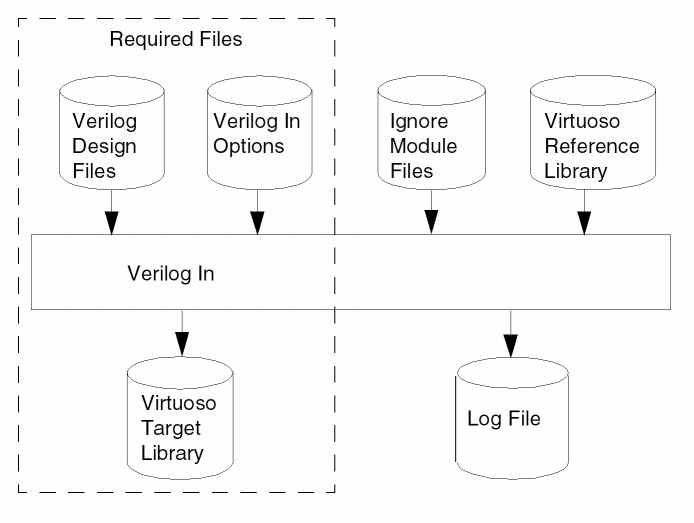
You can run Verilog In by using the Verilog In form as described in this topic. You access the Verilog In form from the CIW (command interpreter window) in Virtuoso Studio Design Environment.
Verilog In Command- Line Mode provides Information about running Verilog In in command-line mode. However, it is recommended that you use the Virtuoso Studio Design Environment user interface to run Verilog In.
Related Topics
Verilog In with Verilog 2001 Support
Return to top