
1
Introducing VHDL In
VHDL In lets you import the designs written in the VHDL language to Virtuoso database format. The import process converts the textual designs into the schematic, netlist, or textual form, depending on the options you set.
This user guide describes how to use VHDL In. It is aimed at the designers of digital circuits and assumes that you are familiar with:
- The Virtuoso Studio design environment and application infrastructure mechanisms designed to support consistent operations between all Cadence tools.
- The applications used to design and develop integrated circuits in the Virtuoso Studio design environment, notably Virtuoso Schematic Editor.
- Virtuoso technology data.
- Designing and simulating electronic designs based on VHDL with Cadence design and simulation software.
This chapter discusses the following:
- Licensing Requirements
- Uses of VHDL In
- Other Cadence Products Used with VHDL In
- Design Flow Using VHDL In
- VHDL In Software Directory
- Starting Options and Requirements
- Conversion Limitations
Licensing Requirements
VHDL In searches for the following licenses in the specified order and checks out one of them:
- 1 license of Virtuoso® Schematic Editor L
- 1 license of Virtuoso® Schematic Editor XL
- 1 license of Virtuoso® Layout Suite L
- 1 license of Virtuoso® Layout Suite XL
- 4 tokens of Virtuoso® Layout Suite GXL
For information on licensing in the Virtuoso Studio design environment, see Virtuoso Software Licensing and Configuration Guide.
Uses of VHDL In
When you use VHDL In for Virtuoso® Design Environment, you can convert a VHDL structural or behavioral description into one of the following forms in Cadence OpenAccess database (OA) storage format:
In every case, VHDL In imports the design from the VHDL format into a
You can import the following into a Virtuoso® Design Environment library:
- A VHDL design
- A VHDL ASIC library
- A VHDL design, minus modules that already exist in the Virtuoso® Design Environment library
- Pieces of a hierarchical design
- A combination of the above architecture
If you convert your VHDL design into schematics, you can edit the schematics with Virtuoso Schematic Editor L.
Other Cadence Products Used with VHDL In
VHDL In is available as part of the VHDL Interface product or by itself. VHDL Interface in Virtuoso® Design Environment is available as part of the VHDL Virtuoso Schematic Editor L software package, or in combination with only the Schematic Generator.
VHDL In is also available with the Virtuoso Schematic Editor L and Synergy™ products. If you do not have Virtuoso Schematic Editor L and Synergy to generate schematics, you can buy the Composer Schematic Generator product, which includes the VHDL In and Verilog In™ tools.
VHDL In requires a parser to parse the designs before these are created in OA database. The ncvhdl parser is a default parser for parsing the designs.
The ncvhdl Parser
The ncvhdl parser and other libraries, such as IEEE and STD required to parse the designs, are available in both hierarchies, IUS and dfII. However, IUS hierarchy contains the latest version of the ncvhdl parser and libraries. These are used from IUS hierarchy if either of the following IUS versions is available:
If none of these versions is available, the parser and libraries are used from the dfII hierarchy. To use the ncvhdl parser in the standalone mode, start VHDL In using the following command:
Design Flow Using VHDL In
The following diagram shows how you use VHDL In as part of the VHDL design process.
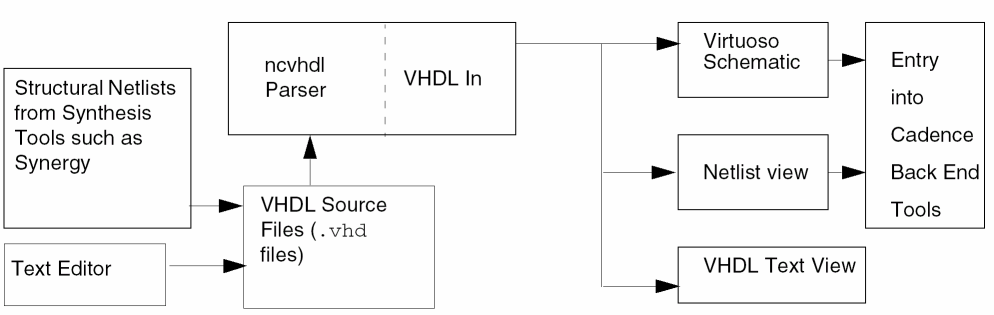
The .oa file generated by VHDL In is in OA database format, the design data storage format used by Cadence tools.
VHDL In Software Directory
The VHDL In software is located in
<dfII_install_dir>/tools/dfII/bin/vhdlin
<dfII_install_dir> is a variable signifying the directory where your Cadence software is installed.
To find out where the Cadence software is installed, enter cds_root at the UNIX command prompt.
cds_root is a utility that identifies the location of Cadence installation hierarchies. Startup scripts typically use it to find the location of Cadence installation hierarchies before starting tools.
cds_root requires one argument. This is an executable name.
Use the following syntax for cds_root:
cds_root executableName
Here, executableName is either an executable found in $PATH or is a full path name to an executable.
cds_root uses the executableName argument to identify the installation hierarchy of the tool and to check if it is a legal hierarchy. If you specify the full path to the executable, then cds_root checks only that location to see if it is a legal hierarchy.
If the executable is not found in $PATH or is not located in the hierarchy, cds_root displays the following error message:
Error! Cant determine installation root from PATH
Starting Options and Requirements
There are two ways to set up and run VHDL In. You must have several items ready before you start.
Starting Options
You can start VHDL In in two ways:
- From the menu in the Virtuoso Studio Design Environment Command Interpreter Window (CIW).
- In the standalone mode Chapter 1, “Getting Started with VHDL In,” describes these options in more detail.
Input Requirements
Before starting VHDL In in Virtuoso Studio Design Environment, you need these input elements:
To start VHDL In in standalone mode, you need
- A file listing the parameters
-
VHDL design files
You can place the file names in a file, or enter them directly at the command prompt.
Conversion Limitations
Due to some fundamental differences between the text files used in VHDL and the structural
Chapter 1, “Conversion Issues,” details the
Return to top