
1
Conversion Issues
This chapter discusses the following:
- Introduction
- Binding Issues
- Case Sensitivity Issues
- Other Issues
- Nontranslatable Structural VHDL Constructs
Introduction
Some
Binding Issues
A VHDL design can consist of
VHDL allows a design to be analyzed without all components being bound. A design is ready for import only if all of its component instances are bound or if there is a list of reference libraries that you specify to pick up components that are not bound.
If you do not specify the binding of a component and VHDL In cannot find it in any reference library, VHDL In creates a symbol cellview in the target library. VHDL In uses this new symbol cellview in the schematic view generation of the design that instantiates the component. VHDL In also creates a symbol cellview in reference libraries if the library to which the component instance is bound does not have a symbol cellview. This feature is available when the parameter writeInrefLibs is set to TRUE in the parameter file.
VHDL In creates a symbol cellview for unbound components only if there is no consistent symbol cellview for the
The two levels of binding produce ambiguities in designs. The examples that follow include descriptions of how the import process handles each case.
One Component, Multiple Entity/Architecture Pairs
The following is an example of multiple instances of the one component bound to multiple entity/architecture pairs.
COMPONENT a IS
PORT (
    input: IN std_logic
    output: OUT std_logic
);
FOR INSTANCE1: A USE ENTITY WORK.Ent1(Arch1);
FOR INSTANCE2: A USE ENTITY WORK.Ent1(Arch2);
FOR OTHERS: A USE ENTITY WORK.Ent2(Arch2);
VHDL In resolves the example as follows:
- If multiple instances of a component are bound to multiple entities, then VHDL In instantiates different cells. This is similar to instantiating different components.
- If multiple instances of a component are bound to multiple architectures of the one entity, then VHDL In instantiates the same cell.
For every instance, VHDL In adds the following property to specify which entity/architecture pair an instance is bound to:
Property Name: vhdlArchitectureName
Property Type: string
Property Value: libraryName.entityName(architecture name)
An example property name is design_lib.nand2(rtl).
One Entity, Multiple Components
The following is an example of instances of multiple components bound to one entity.
ENTITY and2 IS
PORT (
    in1     : IN std_logic;
 in2  : IN std_logic;
 Result  : OUT std_logic
);
END and2;
--BINDING SPECIFICATIONS
COMPONENT sn74And2
PORT (in1, in2: IN std_logic;
    Result: OUT std_logic
);
END COMPONENT
COMPONENT dn84And2
PORT (in1, in2: IN std_logic;
    Result: OUT std_logic
);
FOR ALL: sn74And2 USE ENTITY WORK.and2(TechSn74);
FOR ALL: dn84And2 USE ENTITY WORK.and2(TechDn84);
In the above case, the same symbol (and2) is used for all instances of the component.
For all resource libraries visible through the library clause, VHDL In creates a property on the generated schematic with the following attributes.
Property Name:vhdlLibraryNames
Property Type:ilList of strings
Property Value:(<library name>...)
Example property names for a ieee and myTestLib.
For all packages visible to the architecture, VHDL In creates a property on the generated schematic with the following attributes.
Property Name:vhdlPackageNames
Property Type:ilList of strings
Property Value:(<complete package name>...)
Example property names for a package are ieee.std_logic_1164.all and myTestLib.package.all.
Case Sensitivity Issues
The Cadence library structure and the OA format are case sensitive, whereas the VHDL library structure is case insensitive. The intermediate files generated by the parser do not preserve the case of the original declaration in OA format. Therefore, libraries that are recognized as distinct in the Cadence library structure are not distinguishable in VHDL.
Possible VHDL Design Import Errors
When you import a VHDL design, this difference in case sensitivity between the three formats might cause errors with design libraries, cells, or ports.
-
Design libraries
In a VHDL library, the design namesExample,EXAMPLE, andexamplemap to the same VHDL logical library, while in the Cadence library structure, each maps to a different Cadence library structure. This might cause an error if VHDL In preserves the original case of VHDL declarations. -
Cells
In VHDL, components bound to the entities namedandandANDare bound to same entity. In the Cadence library structure, the components are recognized as different cells. -
Ports
In a VHDL design, the name declared in the original definition of the port in the entity declaration and the name used for the formal part in the port map clause might not be expressed as both uppercase or as both lowercase. This causes an error when the design is imported to OA format. VHDL In maps actual ports to formal ports even if both names are not in the same case. The following VHDL example illustrates the point.entity Example is port (a: in bit); end entity;
INSTANCE: example port map (A =>actual_signal);
A search for port A in the symbol for entity Example succeeds in VHDL In while matching for symbol pins.
Object Search in OA
Object search in OA is case insensitive.
FOR ALL: and2 USE ENTITY sn74.AND2_GATE(TECH_TTL);
performs a case-insensitive search in the sn74 library for the and2_gate cell.
If you want to preserve the case of an identifier when searching a component symbol in a OA reference library, you can
- Use escape characters ( \ \ ), if you have specified binding for the component symbol you want to search
- Set a parameter in the parameter file
Case-Sensitive Search of an Identifier with Binding
If you have specified binding for the component symbol you want to search, you must surround the identifier with escape characters ( \ \ ).
For example, to make sure that VHDL In searches for the component INV0 as INV0 rather than inv0 in the OA reference library, indicate the component as \INV0\.
Case-Sensitive Search of an Identifier with No Binding
Include the following statement in your parameter file if you want the component search to be case insensitive:
caseSensitivity := False
VHDL In will pick up the component from the OA reference library provided the component interfaces match.
- Create symbols, entities, packages, configurations, or architectures
- Perform a case-sensitive search on an entire entity, package, configuration, or architecture
Repeated Instantiations of a Component
Once you have set the case-sensitivity flag to FALSE for the search of a component symbol, VHDL In uses the same process in searching for repeated instantiations of that component.
For example, if you specify the following instantiations for your search,
IO: IV120 PORT MAP(...
I1: Iv120 PORT MAP(...
VHDL In searches the ordered list of symbols in the target and reference libraries for both IV120 and Iv120, and returns the first case-insensitive match.
When neither instantiation IV120 or iv120 are present in the target library or the reference libraries, VHDL In creates a symbol for IV120 in the target library and bind the component IV120 to that symbol.
Library Names in All Uppercase
You must use escape characters ( \ \ ) to specify a library whose name is in all uppercase characters, even when you set the case-sensitive flag to ON.
For example, if the reference library refLib contains all the component symbols, you must use the following two statements:
LIBRARY \refLib\;
...
...
for GB3:IV120 use entity \refLib\.IV120(schematic);
Process Involved in a Case-Sensitive Search
The following process occurs when you perform a case-sensitive search on a component with no binding:
- VHDL In generates an ordered list of symbols present in the library for the component you want to search.
- VHDL In searches the target library for the symbol you specified by traversing the list of symbols and comparing each symbol listed with the symbol you specified.
- If VHDL In does not find the symbol you specified in the target library, it searches the list of reference libraries, using the same process it used to search the target library.
-
VHDL In performs a check on pin names corresponding to the component, searching first the target library, then the reference libraries.
VHDL In provides more flexibility in pin name searching than it does in component name searching.
For example, if you use the component declaration
    component IV120
    port(Y:out std_logic; a:in std_logic);
    end component;
and later use the component instantiation statement
GB3: IV120 port map(Y => y, A => b);
VHDL In will successfully find a match for the port name if IV120 is present in the reference library, and the ports for IV120 are Y and A.
Object Creation in OA
Object creation in OA preserves the original case of the declaration.
ENTITY AndGate IS
    PORT (a: IN std_logic; B: OUT std_logic);
END AndGate;
creates a cell called andgate with ports called a and b.
Other Issues
Signal Declarations
VHDL In can create schematic representations for only these two types of signal declarations:
For other types of signal declarations in VHDL, there is no mapping to the OpenAccess database (OA).
sigName1:sigType1, sigName2:sigType2, sigName3:sigType3. For example, you have defined two signals, sig1 and sig2 as, vhdlDataType : sig1:std_logic, then sig1 has std_logic as the datatype and sig2 has the default scalar datatype. If you have specified vhdlDataType : std_logic, both signals, sig1 and sig2, have std_logic as the datatype. If you do not specify the vhdlDataType then both the signals have the default scalar datatype defined in the VHDL Set Up Check dialog box.Vector Nets
The Cadence netlister cannot handle vector nets which are constrained to a single dimension, such as the following:
SUBTYPE constrained_singleDimension IS bit_vector(0 TO 9);
In a schematic, a vector net B<0:9> of type constrained_singleDimension is netlisted as
SIGNAL B: constrained_singleDimension(0 TO 9);
which is not correct VHDL. VHDL In adds a property with the following definition to indicate VHDL data type:
Property Name: vhdlDataType
Property Type: string
Property Value: <dataType>
An example VHDL data type is std_logic.
Noninteger Vector Indices
The following is an example of a vector type with an index subtype other than integer.
PACKAGE td IS
    TYPE foo is (apples, bananas, oranges, peaches);
    TYPE index_foo_vector is array (foo range <>) of bit;
END td;
USE work.td.all
ENTITY e IS
    PORT (a: IN index_foo_vector (apples to oranges));
END e;
ARCHITECTURE a OF e IS
    COMPONENT foo
    PORT (a: in bit);
    END component;
BEGIN
    inst_apples: foo PORT MAP(a (apples));
    inst_bananas: foo PORT MAP(a (bananas));
    inst_oranges: foo PORT MAP(a (oranges));
END a;
Importing the example produces a schematic with the following connectivity.
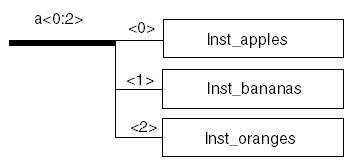
VHDL In creates a property on net a with these characteristics:
Property Name: vhdlVecIndexType
Property Type: string
Property Value: <index_type>
An example index type is libPack.td.foo.
Buffer Ports
VHDL In maps buffer ports in VHDL to INOUT ports on Virtuoso schematics and symbols and adds the following property.
Property Name: vhdlPortType
Property Type: string
Property Value: <portType>
An example port type is buffer.
Port Conversion Functions
For port conversion functions, VHDL In creates the following properties on the instance terminal.
For conversion applied on the formal port
Property Name: vhdlFormalPortFuncName
Property Type string
Property Value: <function name>
An example function name is bitToMvl for the port map (bitToMvl (A) => Net A, ...
For conversion applied on actual port:
Property Name: vhdlActualPortFuncName
Property Type string
Property Value: <function name>
An example function name for an actual port isbitToMvlfor the port map
(A => bitToMvl(Net A), ...
Attribute Specifications
Schematic generation deals with attribute specification on an object in an architecture by creating the following property on the corresponding object in the schematic.
Property Name: vhdlAttributeDefList
Property Type: ilList of strings
Property Value: (<attribute name>, <attribute value>)
For example, the property for the specification ((Capacitance \ 15.2F\)) on net net21 having the attribute Capacitance of net21: signal is 15.2F.
Importing Generics
A generic clause declared in a VHDL entity is mapped as a property called vhdlGenericDefList on the symbol. The syntax of such a property is:
Property Name: vhdlGenericDefList
Property Type: ilList
Property Value: ((<name><type>[<value>])...)
Example clauses are (delay, time) and (clock frequency, frequency, 45MHz).
A generic map clause in the component instantiation statement is also mapped as vhdlGenericMapList on the component instance in the schematic.
In addition to this, a generic clause declared in a VHDL entity is also translated to a Component Description Format (CDF) Parameter. The generics can be viewed through the Edit Component CDF form in icds. To display the Edit Component CDF form, select the Edit option from the CDF sub-menu in the Tools drop down menu.
The Edit Component CDF form displays the various options for displaying the generics. You
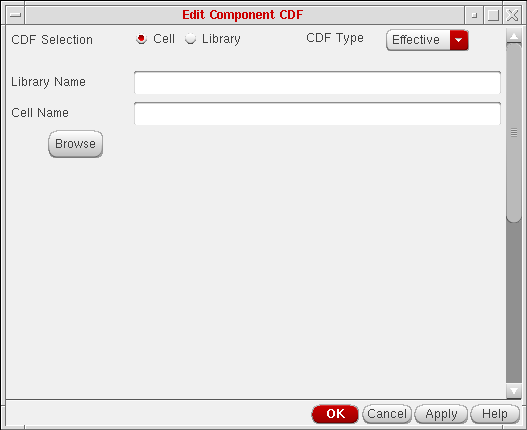
can choose the CDF Selection default value, Cell, and specify the Library Name and the cell name of the cell which contains the generic clause. Next, you select the CDF Type to be Base.
This will display any generics specified in the VHDL entity description of the cell with their default values.
The cell CDF parameters are inherited by the corresponding component instantiations as CDF Properties. Therefore they can be viewed by selecting the component in the schematic opened through the Library Manager and selecting the Edit Properties button.
In case the component instance has a generic map clause giving its own value for the generic, this value overrides the value inherited from the cell.
Component Declarations
In VHDL, a component declaration can exist in an architecture. It has to be present in one of the referred packages or architecture declarations. It is an error in VHDL to have the same component declared in two places. The VHDL netlister does not support such cases. VHDL In adds the following property for instances of components whose declaration does not exist inside an architecture.
Property Name: vhdlPackageComponents
Property Type: ilList of strings
Property Value:(<componentName>...)
Example component names are And2Gate and Nand2Gate.
Port Maps
If a port map other than a simple port map is present on a
The following binding specification is imported as a schematic.
for all: and2 use entity CellsLib.And2(Structure) port map
    (A => A, B => B, Y => Y);
The following binding specification is imported as a VHDL view.
for all: and2 use entity CellsLib.MyAnd2(Structure2) port
    map(Input1 => A, Input2 => B, Output => Y);
VHDL In supports port maps on the component instance statement.
Concurrent Assignment Statements
VHDL In supports only simple concurrent assignment statements on the schematic view. A simple concurrent assignment has only one waveform element and no timing expression, or the right-hand side (
a <= b(3 to 6); a <= b;
Assignments that are not simple
a <= b after 5 ns; c <= function (d);
For imported simple concurrent assignment statements, VHDL In uses an instance of a patch symbol. The patch expression for such an instance is
Connection Expression 0:size-1 0: size-1.
VHDL In adds the following property to the patch instance.
Property Name: vhdlAssignInstance
Property Type: Boolean
Property Value: <true/false>
An example property value is TRUE.
VHDL In also supports signal concatenation. For example, if a concurrent statement is
selectx <= Sel(2) & Sel(1) & Sel(0);
VHDL In represents this assignment as three separate bit-by-bit assignments.
Behavioral View for Continuous Signal Assignment Statements
To create a schematic view, VHDL In requires the patch cord symbol from the basic library if the design contains Continuous Signal Assignment statements. It creates a behavioral view if any one of the following conditions is true:
-
The
basiclibrary is not defined in thecds.lib. -
The cell
patchview symbol is not present in thebasiclibrary. -
The value of the Parameter File entry for
contAssignSymbolis notbasic patchsymbol,and the patch symbol is not available in the desired library. This is applicable if you are running VHDL In in stand-alone mode.
The log file displays the relevant messages.
Power and Ground Signals
In VHDL designs, power and ground nets are represented as continuous assignments where the left-hand side (LHS) is an
a <= ‘1’
indicates that net a is a power net, and
b <= ‘0’
indicates that net b is a ground net.
You need to supply the enumeration literals designated for power and ground.
Nontranslatable Structural VHDL Constructs
Some elements of VHDL simply cannot be converted into schematics or netlists. If you run VHDL In on a design that contains one or more of these elements, VHDL In automatically switches the output to a Cadence VHDL text cellview and issues warnings that other conversions are not possible.
The following section describes the structural VHDL constructs that VHDL In cannot convert into OA objects. Check your design for these constructs, and try to change them or remove them before importing the design.
Port Subtypes and Modes
VHDL In cannot convert the following port subtypes:
- Globally static arrays
- Unconstrained arrays
- Arrays of composite objects
- Record types
- Multidimensional array of scalar objects
VHDL ports have five modes: in, out, inout, linkage, and buffer, while OA allows three port modes: in, out, and inout.
Ports of mode in, out and inout in VHDL are directly mappable to corresponding ports in OA.
VHDL In cannot convert ports of mode linkage.
In VHDL, you can associate ports of mode buffer with only a signal or with only ports of mode buffer. In VHDL, modes inout and buffer have the same characteristics, but you can update ports of mode inout with zero or more sources, while you can update ports of mode buffer with at most one source. Therefore, VHDL In maps ports of mode buffer to ports of mode inout in OA and associates properties with them to indicate that these are buffer ports.
In VHDL, you can associate ports of mode linkage with ports of any mode. However, the value of the interface object can be read or updated only by appearing as an actual to an interface object of mode linkage, and no other reading or updating of the value is permitted. VHDL In cannot map ports of mode linkage to the modes of a OA port.
The following VHDL example shows constructs that are problematic for VHDL In and describes their resolution.
type multi_dim_array is array(1 to 10, 1 to 10) of bit;
type rec_type is record scalar_element: bit; vector_element:
   multi_dim_array; end record;
type sig_dim_array is array (integer range <>) of bit;
type comp_sig_dim_array is array (1 to 10) of rec_type;
type const_single_dim_array is array (1 to 10) of bit;
entity ISSUE is
port (a: in multi_dim_array;
    b: out rec_type;
    c: inout sig_dim_array(1 to 10);
    d: in sig_dim_array;
    e: buffer comp_sig_dim_array;
    f: linkage const_single_dim_array;
    g: integer range 1 to 10);
end ISSUE;
Constructs in Architectures
VHDL In cannot convert the following VHDL constructs that occur in an
- Binding specifications other than simple ones
- Disconnection specifications
- Signal declarations of these types:
- Concurrent versions of these statements:
- Primary units with inconvertible entities
Support of concurrent assignment statements is restricted to simple concurrent assignment statements. A simple signal assignment statement generated by a synthesis tool has only one waveform element. The value expression of the waveform element is a simple or selected name. The value expression cannot contain operators, function calls, or function- or signal-valued attributes.
Expressions associated with the formal part can be signal-valued attributes. Signal-valued attributes do not have an explicit place holder for the declaration of the signal. This signal is related to the signal prefix of the attribute. Signal-valued attributes can occur recursively. OA does not define such relationships between nets. VHDL In cannot generate a schematic view if signal-valued attributes are associated with the formal_part in a port map clause.
Blocks are logical partitions in VHDL design. Multiple sheet schematics in OA represent mapping to blocks. Because OA sheets have a finite size, a block might not fit in one sheet. The presence of guarded expressions on the block causes an implicit declaration of a signal named guard. This signal might control the operation of a concurrent signal assignment statement. VHDL In cannot map this behavior to objects in a OA schematic.
Return to top