
A
Virtuoso Visualization and Analysis XL Tool Environment Variables
The variables and values that specify the basic behavior of the components of the Virtuoso Visualization and Analysis XL are part of the .cdsenv file. For information about the order in which the tool reads the .cdsenv file, see Creating the .cdsenv File in Chapter 10 of the Cadence Design FrameworkII User Guide.
This appendix describes the Virtuoso Visualization and Analysis XL tool variables in the .cdsenv file. In each entry, the first column is the tool, the second column is the variable, the third column is the data type, and the fourth column contains the value to be used.
In the SKILL mode, you can use the envGetVal and envSetVal functions to retrieve and set the .cdsenv variables in the CIW. For more information on the CIW or the envGetVal and envSetVal functions, see Chapter 2 in the Cadence User Interface SKILL Functions Reference.
envSetVal settings work for the expressions that are plotted from ADE or from Virtuoso Visualization and Analysis XL when opened in the stand-alone mode. These settings also work for the signals that are plotted when Virtuoso Visualization and Analysis XL is opened in the stand-alone mode. On the other hand, the signals plotted from ADE follow the display.drf settings.The environment variables for Results Browser and Calculator are included in the .cdsenv file at the following location:
./tools.lnx86/dfII/samples/wavescan/.cdsenv
The environment variables for graph are included in the .cdsenv file at the following location:
./tools.lnx86/dfII/samples/viva/.cdsenv
This chapter includes the following sections that decsribes the environement variable for Virtuoso Visualization and Analysis XL:
Graph Variables
This section describes the environment variables that are used to set the graph properties:
- Font String
- Graph Frame Variables
- Graph Environment Variables
- Rectangular Graphs Environment Variables
- Strip Environment Variables
- Digital Strip Environment Variables
- Circular Graph Environment Variables
- Axis Environment Variables
- Dependent Axis Environment Variables
- Independent Axis Environment Variables
- String Independent Axis Environment Variables
- Trace Environment Variables
- Trace Legend Environment Variables
- Digital Trace Environment Variables
- Digital Bus Trace Environment Variables
- Histogram Environment Variables
- Horizontal Marker Environment Variables
- Reference Line Marker Environment Variables
- Vertical Marker Environment Variables
- Point Marker Environment Variables
- Reference Point Marker Environment Variables
- Specification Marker Environment Variables
- Intercept Marker Environment Variables
- Circle Marker Environment Variables
- Delta Marker Environment Variables
- Graph Label Environment Variables
- Probe Environment Variables
- Polar Grid Environment Variables
- Smith Grid Environment Variables
- Application Environment Variables
- XRange Bookmark Variables
- YRange Bookmark Variables
- Region Bookmark Variables
Font String
The font values for Virtuoso Visualization and Analysis XL is displayed in the following format:
The various fields in the font string are as follows:
<Font family>, <Point size>, <Pixel size>, <Style hint>, <Weight>, <Style>, <Underline>, <Strikeout>, <Fixed pitch>, <Raw mode>
Point size—Specifies point size of the font. If the font size is specified using pixels, it should be -1.
Pixel size—Specifies pixel size of the font. The font size value is -1 if it is specified using pixels. The pixel size makes the font device dependent. If you want to set the size of the font in a device independent You can use Point size to set the size of the font in a device independent manner.
Style hint—Specifies the style hint that is used by the font matching algorithm to find an appropriate default family if a selected font family is not available in the system. Style hints are not supported on X11 since this information is not provided by the window system. The value of '5' represents the enumeration:
QFont—Any Style. Any value other than 5 is ignored on X11 based systems, which means on(i.e., essentially on most unix systems).
Weight—Weighting scale for font rendering, which ranges from 0 to 99. This is similar to the scales used in Windows or CSS. A weight of 0 is ultralight and 99 is black.
Following values can be used for this aspect:
| Enumeration | Value |
|---|---|
Style—This aspect describes the different styles of glyphs that are used to display text. Following values are supported for this aspect:
| Enumeration | Value | Description |
|---|---|---|
|
Italic glyph that are typically based on the graphs with no style. However, these glyphs are not fine-tuned for representing italicized text. |
Underline—Set the value to 1 if you want to underline the text. Set the value to 0 if you do not want to underline the text.
Strikeout—Set the value to 1 if you want to strikeout the text. Set the value to 0 if you do not want to strikeout the text.
Fixed pitch—Set the value to 1 if you want to set the for the fixed pitch preference. Set the value to 0 if you do not want to set the fixed pitch.
Raw mode—Set the value to 1 if you want to use raw mode for font name matching. Otherwise, set the value to 0. This option is applicable only for the X11 systems. If the raw mode is enabled, the X font with a complete font name that matches with the family name is searched and all other values set for QFont are ignored. If the font name matches multiple fonts, the first font returned by X window system is used.
envSetVal command, you first need to load the viva context before setting the variable. For this, you can add the following command in your .cdsinit file:loadContext(strcat(prependInstallPath("etc/context/") "viva.cxt"))
callInitProc("viva")
Now, you can use the envSetVal command to set the font variable in the .cdsinit file.
Graph Frame Variables
-
viva.graphFrame width string "1000" -
viva.graphFrame height string "800" -
viva.graphFrame autoTraceSelect string "true" -
viva.graphFrame rightMouseZoom string "false" -
viva.graphFrame selectBySweep string "false" -
viva.graphFrame useSplitter string "true" -
viva.graphFrame title string "Window" - viva.graphFrame graphMinWidth string "200"
- viva.graphFrame graphMinHeight string "140"
- viva.graphFrame graphLayoutType string "Auto"
-
viva.graphFrame useSpacer string "true" - viva.graphFrame background string "black"
- viva.graphFrame useGradient string "false"
width
Controls the width of the Graph Window.
Syntax
viva.graphFrame width string "width_pixels"
Values
Example
viva.graphFrame width string "1000"
height
Controls the height of the Graph Window.
Syntax
viva.graphFrame height string "height_pixels"
Values
Example
viva.graphFrame height string "800"
autoTraceSelect
Specifies whether the tool selects the trace closest to the system cursor.
Syntax
viva.graphFrame autoTraceSelect string "true" | "false"
Values
|
The tool automatically selects the trace closest to the system cursor. This is the default value. |
|
Example
viva.graphFrame autoTraceSelect string "true"
rightMouseZoom
Specifies whether you can use the right mouse button to zoom your graph.
Syntax
viva.graphFrame rightMouseZoom string "true" | "false"
Values
|
Use the right mouse button to zoom your graph.This is the default value. |
|
|
Use the middle mouse button to zoom your graph. This enables the right mouse pop-up menu in the Graph Window. |
Example
viva.graphFrame rightMouseZoom string "false"
selectBySweep
Specifies whether traces from parametric sweeps are selected by family or by individual leaf.
Syntax
viva.graphFrame selectBySweep string "true" | "false"
Values
|
The Trace – Select by Family command is not selected. This is the default value. |
Example
viva.graphFrame selectBySweep string "false"
useSplitter
Syntax
viva.graphFrame useSplitter string "true" | "false"
Values
Example
viva.graphFrame useSplitter string "true"
title
Specifies the title of the graph window.
viva.graphFrame title string "window_title"
Values
Example
viva.graphFrame title string "Window"
graphLayoutType
Specifies the subwindow display layout type of the graph window.
viva.graphFrame graphLayoutType string "Auto"
Default Value
Valid Values
useSpacer
Adds an empty spacer widget to make the number of open subwindows even.
viva.graphFrame useSpacer 'string " true"
Default Value
Valid Values
-
true—Adds an empty spacer widget. -
false—Restores the legacy behavior of not adding an empty spacer widget.
background
Controls the background color of the window/subwindow.
viva.graphFrame background 'string "color_value"
Default Value
|
Valid values: A valid color name, Hex color code, or HTML color code. |
Example
viva.graphFrame background string "black"
viva.graphFrame background string "#FFFFFF"
useGradient
Specifies whether the subwindow uses gradient color in the background.
viva.graphFrame useGradient 'string "true" | "false"
Default Value
Valid Values
-
true—Enables gradient in the subwindow background. -
false—Disables gradient in the subwindow background.
Example
viva.graphFrame useGradient string "false"
linkDepAxes
viva.graphFrame linkDepAxes string {"true" | "false"}
Description
Specifies whether to link dependent axes (y axes) of graphs in the linked subwindows. The default value is true, which indicates that dependent axes (y axes) that have the same base unit are linked together.
GUI Equivalent
The Link Dependent (Y) Axes check box in the Link Options form.
Examples
envGetVal("viva.graphFrame" "linkDepAxes")
envSetVal("viva.graphFrame" "linkDepAxes" 'string "false")
Related Topics
Unlinking Graphs in Subwindows
linkIndepAxes
viva.graphFrame linkIndepAxes string {"true" | "false"}
Description
Specifies whether to link independent (x) axes of graphs in the linked subwindows. The default value is true, which indicates that independent axes (x axes) that have the same base unit are linked together.
GUI Equivalent
The Link Independent (X) Axes check box in the Link Options form.
Examples
envGetVal("viva.graphFrame" "linkIndepAxes")
envSetVal("viva.graphFrame" "linkIndepAxes" 'string "false")
Related Topics
Unlinking Graphs in Subwindows
useLinkAxesUnitFilter
viva.graphFrame useLinkAxesUnitFilter string {"true" | "false"}
Description
Specifies whether to link only those axes that have the base units specified by the environment variable linkAxesUnitFilterSet. The default value is false, which indicates that the selective linking of dependent and independent axes is disabled.
GUI Equivalent
The Only Link Axes with These Units check box in the Link Options form.
Examples
envGetVal("viva.graphFrame" "useLinkAxesUnitFilter")
envSetVal("viva.graphFrame" "useLinkAxesUnitFilter" 'string "true")
Related Topics
Unlinking Graphs in Subwindows
linkAxesUnitFilterSet
viva.graphFrame linkAxesUnitFilterSet string "listOfBaseUnits"
Description
Specifies base units of the axes that you want to link together. You can specify multiple base units as a list of comma-separated values. The default value is "".
This environment variable is considered only when the environment variable useLinkAxesUnitFilter is set to true.
GUI Equivalent
The text field below the Only Link Axes with These Units check box in the Link Options form.
Examples
envGetVal("viva.graphFrame" "linkAxesUnitFilterSet")
envSetVal("viva.graphFrame" "linkAxesUnitFilterSet" 'string "V,A,Hz,s")
Related Topics
Unlinking Graphs in Subwindows
graphMinWidth
viva.graphFrame graphMinWidth string "minimumWidthOfSubwindow"
Description
Specifies the minimum width of subwindows in a new graph window. The default value is 250.
GUI Equivalent
The Subwindow Minimum Size Width field in the Window Properties form.
Examples
envGetVal("viva.graphFrame" "graphMinWidth")
envSetVal("viva.graphFrame" "graphMinWidth" 'string "250")
Related Topics
graphMinHeight
viva.graphFrame graphMinHeight string "minimumHeightOfSubwindow"
Description
Specifies the minimum height of subwindows in a new graph window. The default value is 250.
GUI Equivalent
The Subwindow Minimum Size Height field in the Window Properties form.
Examples
envGetVal("viva.graphFrame" "graphMinHeight")
envSetVal("viva.graphFrame" "graphMinHeight" 'string "300")
Related Topics
Graph Environment Variables
-
viva.graphtitleFontstring "Default,10,-1,5,50,0,0,0,0,0" -
viva.graphsubTitlestring "" -
viva.graphdisplayDate string "true" -
viva.graphuseDefaultTitle string "true" -
viva.graphdefaultSubtitle string "true" -
viva.graphtraceMarkerOnstring "true" -
viva.graph traceMarkerSignificantDigits string "4" - viva.graph traceMarkerSigDigitsMode string "Auto"
-
viva.graphsnapOn string "snapOff"
The other valid value forSnapOnenvironment variable is:snapToData. -
viva.graph selectByFamily string "false" -
viva.graph useCurrentContext string "true" -
viva.graph colorByParameter string "trace" -
viva.graph symbolByParameter string "family" -
viva.graph stripByParameter string "VDD" -
viva.graph colorBank string "default"
You can use this variable to customize the set of trace colors in a Virtuoso Visualization and Analysis XL session. The default value of this environment variable is the default color bank that is specified in thedisplay.drffile.This variable does not change the colors defined in theThe color names should be separated by a comma, a semicolon, or a space. The color name can be a list of colors defined in the SVG color keyword, such as steelblue, azzure, or the RGB hexadecimal value of the color in thedisplay.drffile. Also, when you plot simulation results from ADE, the color bank from thedisplay.drffile is honored.#RRGGBBformat.
viva.graph colorBank string "red; blue; green; yellow"
viva.graph colorBank string "#ff0000, #0000ff, #008000, #ffff00"
You can specify any number of colors names using this variable. However, it is recommended that you should not specify more than 18 colors because lot of colors might lead to confusion.
The legal color name and corresponding RGB value is listed at the following link:
http://www.w3.org/TR/SVG/types.html#ColorKeywords -
titleDisplayMode
Determines how the graph title is to be wrapped around if it exceeds the space available on the graph.
viva.graph titleDisplayMode string "elideMiddle"
Default value:elideMiddle
Valid Values: -
reloadSingleStyle: -
undoStackSize
Specifies the maximum number of commands that can be undone in the graph window.
viva.graph undoStackSize string "30"envSetVal("viva.graph" "undoStackSize" 'string "30") -
enableDirectMeasurementAssistant
-
dimOnSelection
Specifies whether to dim the unselected traces in a graph window or subwindow.
viva.graph dimOnSelection string "true"envSetVal("viva.graph" "dimOnSelection" 'string "true")
Rectangular Graphs Environment Variables
-
viva.rectGraph useGradient string "false" -
viva.rectGraph traceMarkerDisplay string "(%X, %Y)" -
viva.rectGraph referenceLinesOn string "true" -
viva.rectGraph enableEdgeMeasurement string "false" -
viva.rectGraph legendPosition string "left" -
viva.rectGraph eyeDiagramLegendPosition string "above"
The defalt trace legend position for an eye diagram is at the top of the plot. When you specify thelegendPositionoption asleft, the trace legend is displayed on the left of the graph. To move the trace legend inside the graph, specifyinside. -
viva.rectGraph showDeltaChildLabels string "false"
When you set this variable tofalse, the labels are not displayed for the point markers that are part of a delta marker. -
viva.rectGraph showZoomBar string "false"
When this variable is set tofalse, the zoom bar is not displayed on graph. To display the zoom bar, set this variable totrue. -
envSetVal("viva.rectGraph" "showEdgeBrowser" 'string "true")
When this variable is set tofalse, the Edge Browser is not displayed on the graph. This works only if theenableEdgeMeasurementenvironment variable is set totrue.
Strip Environment Variables
-
viva.rectGraph stripChartOn 'string "true"
When you set this variable, all the new signals are plotted in a new strip. -
viva.rectGraphstripChartOn string "false" -
viva.rectGraphstripByFamilystring "false" -
viva.rectGraphstripHeight string "50" -
viva.rectGraphminStripHeightstring "32" -
viva.rectGraphactiveStripCuestring "Vertical Bar" -
viva.rectGraphactiveStripCueColor string "yellow"
Digital Strip Environment Variables
-
viva.rectGraphdigitalStripHeightstring "32" -
viva.rectGraphmaxDigitalStripHeight string "40" -
viva.rectGraphminDigitalStripHeight string "32"
Circular Graph Environment Variables
-
viva.circGraphuseGradient string "false" -
viva.circGraphgridTypestring "Polar" -
viva.circGraph characteristicImpedance string "50" -
viva.circGraph normalizeSmithValues string "true" -
viva.circGraph traceMarkerAlwaysVisible string "false" -
viva.circGraph flexibleAxis string "false"
Determines whether the circular graphs with different dependent axes can be plotted in the same window. When set tofalse(default value), graphs with matching axis units can only be plotted in the same window. In case you use the drag operation, a new window is created. When this variable is set totrue, graphs with different axis units can be plotted together in the same window.
legendPosition
viva.circGraph legendPosition string {"above" | "left" | "inside"}
Description
Specifies the position of the trace legend in a circular graph. The valid values are as follows:
-
left: The trace legend is displayed to the left of a circular graph. This is the default value. -
above: The trace legend is displayed at the top of a circular graph. -
inside: The trace legend is displayed inside a circular graph.
GUI Equivalent
|
The Graph Options tab of the Circular Graph Properties form. |
|
Examples
envGetVal("viva.circGraph" "legendPosition")
envSetVal("viva.circGraph" "legendPosition" 'string "above")
envSetVal("viva.circGraph" "legendPosition" 'string "inside")
Related Topics
Editing Circular Graph Properties
plotToSmithView
viva.circGraph plotToSmithView string {"true" | "false"}
Description
Specifies how a Smith chart is plotted initially. Valid values are as follows:
-
true: The Smith chart fits to the extent of the standard Smith grid. This is the default value. -
false: The Smith chart fits to data when opened for the first time.
If a compressed Smith grid is required to show data, the initial plot shows the full extent of the compressed Smith regardless of the value of this environment variable.
GUI Equivalent
Examples
envGetVal("viva.circGraph" "plotToSmithView")
envSetVal("viva.circGraph" "plotToSmithView" 'string "false")
showFreqFilterBar
viva.circGraph showFreqFilterBar string {"false" | "true"}
Description
Specifies whether to show the frequency filter bar in a circular graph window or subwindow. The valid values are as follows:
-
false: The frequency filter bar is not displayed in a circular graph. This is the default value. -
true: The frequency filter bar is displayed in a circular graph.
GUI Equivalent
|
The Graph Options tab of the Circular Graph Properties form. |
|
Examples
envGetVal("viva.circGraph" "showFreqFilterBar")
envSetVal("viva.circGraph" "showFreqFilterBar" 'string "true")
Related Topics
Editing Circular Graph Properties
Filtering Data Using the Frequency Slider Bar
traceMarkerDisplay
viva.circGraph traceMarkerDisplay string formatOfTraceMarker
Description
Specifies the format in which trace marker values are displayed. The possible values are as follows:
-
%C: Displays the real and imaginary Cartesian values. -
%P: Displays the polar values, such as magnitude and angle. -
%Z: Displays the impedance values for resistance and reactance. -
%A: Displays the admittance values for as conductance and susceptance. -
%R: Displays the reflection coefficients, such as Gamma (magnitude) and angle (degree). The range of angle is0–±180degree. For the upper-half of the circle, the values of angle vary from0–180degree. For the lower-half of the circle, values of angle vary from-180–0degree. -
%F: Displays the frequency value, which includes the independent axis data.
The default value is an empty string, which indicates that the information displayed in the label of a tracking marker depends upon the type of circular grid:
-
Polar grid:
%F%n%C
Frequency and real and imaginary Cartesian values are displayed in the label text of a tracking marker. %n indicates that values are displayed in a new line. -
Impedance (Z Smith) grid:
%F%n%Z
Frequency and impedance values, such as resistance and reactance are displayed in the label text of a tracking marker. -
Admittance (Y Smith) grid:
%F%n%A
Frequency and admittance values, such as conductance and susceptance are displayed in the label text of a tracking marker. -
Immittance (ZY Smith) grid:
%F%n%Z%n%A
Frequency, impedance, and admittance values are displayed in the label text of a tracking marker.
GUI Equivalent
|
The Markers tab of the Graph Properties form for circular graph. |
|
Examples
envGetVal("viva.circGraph" "traceMarkerDisplay")
envSetVal("viva.circGraph" "traceMarkerDisplay" 'string "%Z, %P")
envSetVal("viva.circGraph" "traceMarkerDisplay" 'string "%Z %P")
envSetVal("viva.circGraph" "traceMarkerDisplay" 'string "(%Z) %P")
Related Topics
Editing Circular Graph Properties
Axis Environment Variables
-
viva.axismajorGridsOnstring "true" -
viva.axisminorGridsOnstring "true" -
viva.axismajorGridForeground string "gray" -
viva.axisminorGridForeground string "lightGray" -
viva.axisautoAxisColorstring "true" -
viva.axisforegroundstring "white" -
viva.axisbackgroundstring "black" -
viva.axisfontstring "Default,10,-1,5,50,0,0,0,0,0" -
viva.axismajorTicsOn string "true" -
viva.axisminorTicsOn string "true"
Dependent Axis Environment Variables
-
viva.depAxis baseAndToplineReferenceHint string "0.0,5.0" - viva.depAxis threshold string "20,80"
-
viva.depAxis logScale string "false" -
viva.depAxis forceOrigin string "false" -
viva.depAxis notation string "suffix" -
viva.depAxis showUnits string "true"
TheshowUnitsvariable is used to show or hide the units on the Y-axis -
viva.depAxis flexible string "false"
Specifies whether a new trace is to be plotted in an existing window or subwindow that share the same Y-axis units with the trace being appended.
When this variable is set tofalse, which is the default value, and if the Y-axis units of the existing trace do not match with the corresponding X-axis units of the trace being appended, a new Y-axis is added to display the .
When this variable is set totrue, the new trace is appended to the existing graph irrespective of the Y-axis units.
For example, consider the waveforms for the two signals shown in the figure below, /OUT and /V0/PLUS. These waveforms have same X-axis, but Y-axes are different.
If the variable is set to false and you combine the two waveforms, a new Y-axis is added to the right. In the figure below, two Y-axes are shown for Mag (V) and Mag (mA).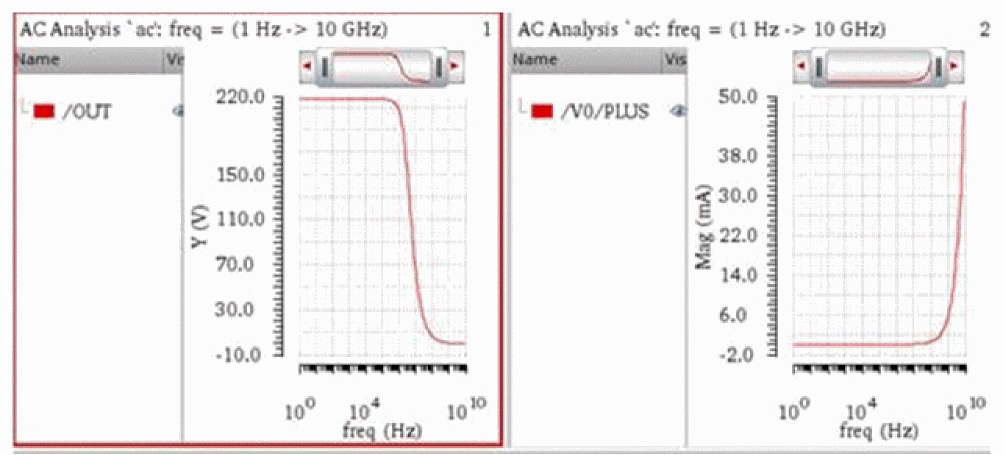
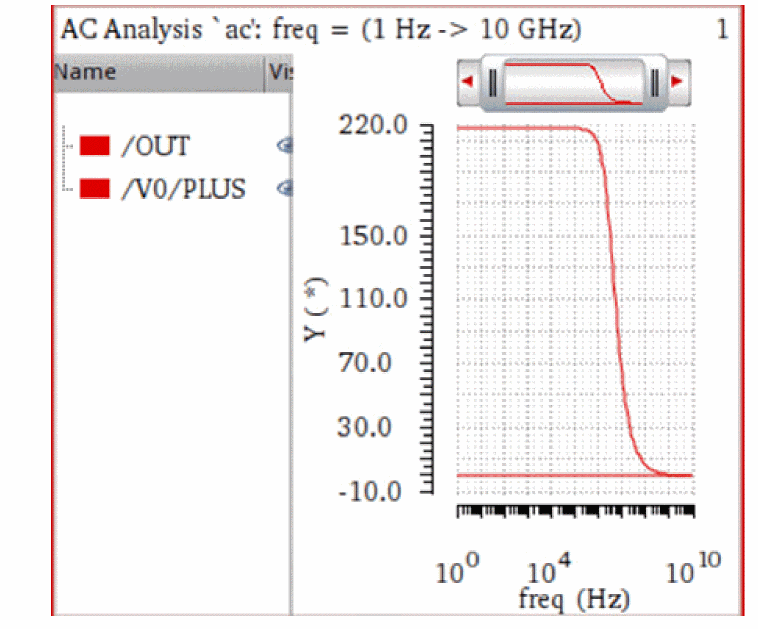
If the variable is set to true, and you combine the two waveforms, one Y-axis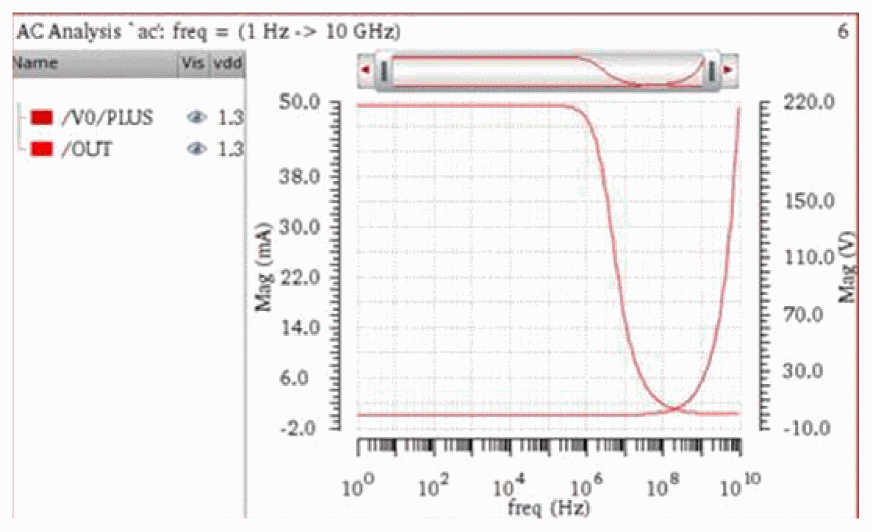
Y(*)is used.
-
viva.depAxis labelAngle string "0"
labelAngle
Specifies the angle through which labels of the dependent axis are rotated.
viva.depAxis labelAngle string "0" |
||
envSetVal("viva.depAxis" "labelAngle" 'string "0")
|
||
"0" |
||
Independent Axis Environment Variables
-
viva.indepAxis logScale string "false" -
viva.indepAxis forceOrigin string "false" -
viva.indepAxis notation string "suffix" -
viva.indepAxis showUnits string "true"
TheshowUnitsvariable is used to show or hide the units on the X-axis. -
viva.indepAxis flexible string "false"
Specifies whether a new trace is to be plotted in a new window or subwindow or in an existing window or subwindow based on the X-axes units.
When this variable is set tofalse, which is the default value, and if the X-axis units of the existing trace do not match with the corresponding X-axis units of the trace being appended, the new trace is plotted in a new window. In addition, if you drag trace from one graph to another, an icon appears that prevents the traces to be appended.
When this variable is set totrue, the new trace is appended to the existing graph irrespective of the X-axis units.
For example, consider the following traces with different X-axis units,freq(Hz)andtime(ns):
Now, if this variable is set to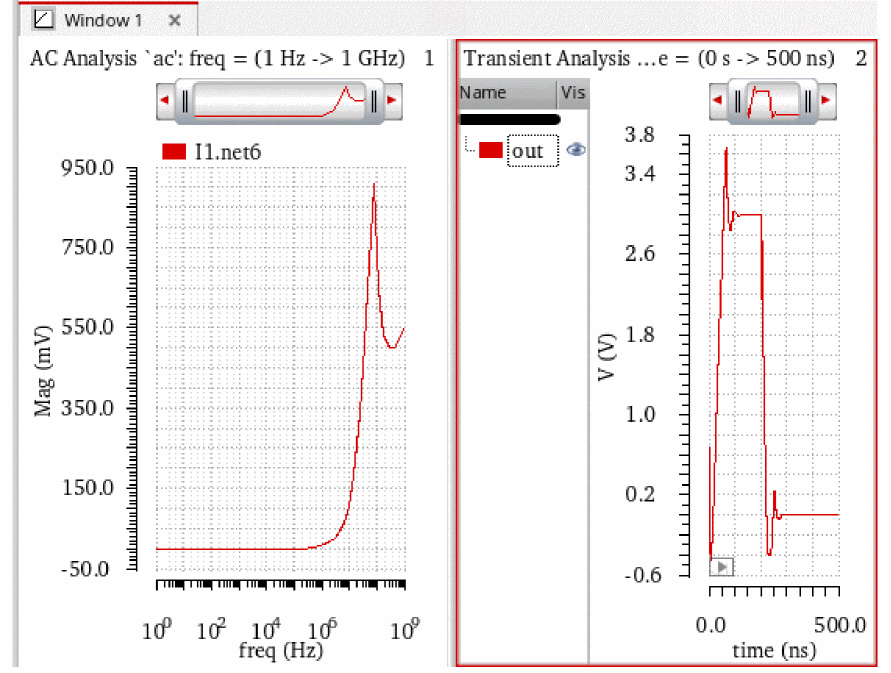
false, these traces will be plotted in different subwindows even if the plotting mode is set to append, and you cannot move them together because their X-axes are not the same.
On the other hand, if you set the variable totrue, these traces will be plotted in one subwindow irrespective of the different X-axes values, given that the plotting mode is append.
Notice that X-axis unit label changes to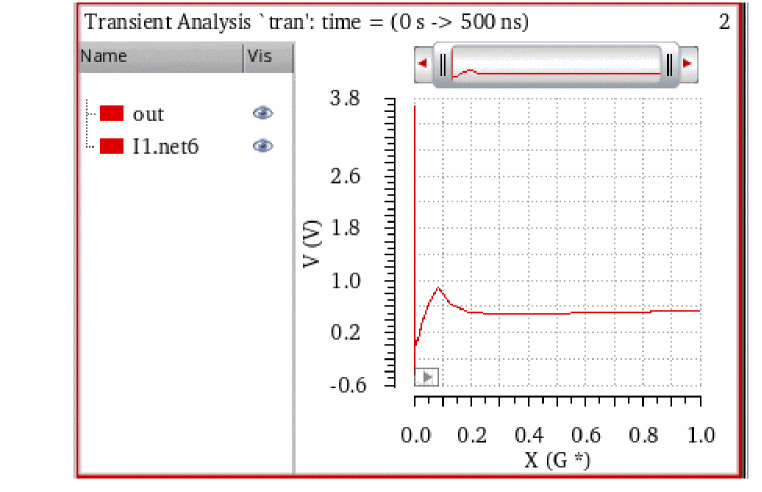
X(G*)indicating that the two X-axes are combined. -
viva.indepAxis sameName string "false"
When this variable is set totrue, a new trace is plotted in a new window or subwindow if the X-axis units and name of the active graph do not match with the corresponding X-axis units and name of the graph being appended. When set tofalse, the new trace is appended to the active graph irrespective of the unit names. By default, this variable is set tofalse.
For example, the figures below show how this environment variable works for signals with different X-axis names,X_AxisandX_Axis_1, respectively.
When set tofalse, both the signals are plotted in the active window irrespective of the X-axis units and names.When set to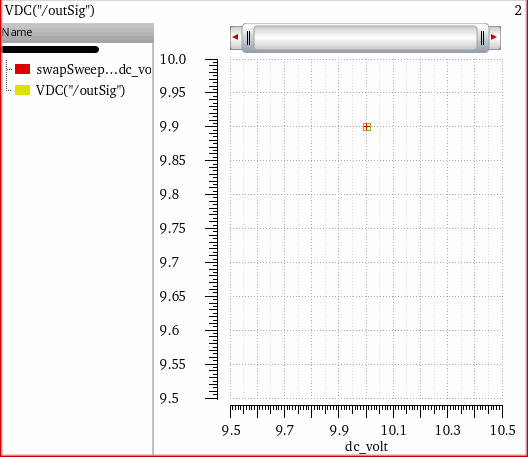
true, the signals are plotted in different subwindows because the X-axis names are different.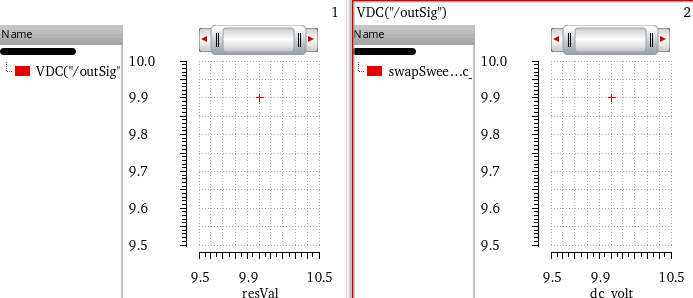
-
viva.indepAxis labelAngle string "0"
labelAngle
Specifies the angle through which labels of the independent axis are rotated.
viva.indepAxis labelAngle string "0" |
||
envSetVal("viva.indepAxis" "labelAngle" 'string "0")
|
||
"0" |
||
String Independent Axis Environment Variables
-
viva.stringIndepAxis traceStyle string "points"
This variable controls the default line style for X-axis with strings or corners.
Trace Environment Variables
-
viva.tracehiliteColor string "lime" -
viva.traceuseGlowstring "false" -
viva.tracelineThicknessstring "fine" -
viva.tracelineStylestring "solid" -
viva.tracedepModifierstring "Magnitude" -
viva.traceindepModifierstring "Magnitude" -
viva.tracesymbolsOnstring "false" -
viva.tracesymbolStyle string "plus" -
viva.tracetoplineOnstring "true" -
viva.tracemidlineOnstring "true" -
viva.tracebaselineOnstring "true" -
viva.tracedToAHiVoltage string "5.0" -
viva.tracedToALoVoltagestring "0.0" -
viva.tracedToAXVoltagestring "(vhi + vlo)/2" -
viva.tracedToAUnitstring "V" -
viva.traceautoReferenceLinesstring "true" -
viva.trace baseAndtoplineReferenceHintstring "5.0" -
viva.tracethresholdstring "20_80"
Trace Legend Environment Variables
showVisColumn
Controls the display of the column containing the visibility buttons for each signal plotted on the graph.
Syntax
viva.traceLegend showVisColumn string "true"
Default Value
Valid Values
font
Sets the font for the trace legend.
Syntax
viva.traceLegend font string ""
Default Value
Valid values
viva.traceLegend font string "Default,18,-1,5,55,0,0,0,0,0"
For more details, see Font String.
printSaveImageFont
Sets the font for saving and printing the graph image.
Syntax
viva.traceLegend printSaveImageFont string ""
Default Value
Valid Values
For more details, see Font String.
showTraceTooltips
Determines whether to display tooltips when you move the mouse pointer over trace names in the trace legend.
Syntax
viva.traceLegend showTraceTooltips string "true"
Default Value
Valid Values
-
true—Tooltips are displayed when you move mouse pointer over trace names in the trace legend. -
false—No tooltips are displayed when you move mouse pointer over trace names in the trace legend.
Digital Trace Environment Variables
Digital Bus Trace Environment Variables
-
viva.digitalBusTrace radix string "hex" -
viva.digitalBusTrace foreground string "green" -
viva.digitalBusTrace font string "Default,8,-1,5,50,0,0,0,0,0"
font
viva.digitalBusTrace font string "fontProperties"
Description
Specifies the font properties of the bus values. The font string lists the following properties:
Font family, Point size, Pixel size, Style hint, Weight, Style, Underline, Strikeout, Fixed pitch, Raw mode
The default value is "Default,8,-1,5,50,0,0,0,0,0"
The description of these font properties are as follows:
-
Font family: Specifies the family of fonts. The default value is
Default, which indicates that the default font family of the system is used. -
Point size: Specifies the point size of the font. If the font size is specified in pixels, it must be set to
-1. Default value is8. -
Pixel size: Specifies the pixel size of the font. Setting pixel size makes the font device dependent. You can use point size to set the size of the font in a device-independent manner. The default value is
-1. -
Style hint: Specifies the style hints that are used by the font-matching algorithm to find an appropriate default font family if the selected font family is not available in the system.
Style hints are not supported on X11 since this information is not provided by the windows system.
The default value is5. -
Weight: Uses a weighting scale from
0–99similar to the scales used in Windows or CSS. A weight of0is ultralight, while99is black. The default value is50.
This enumeration contains the following predefined font weights.Enumeration Value -
Style: Specifies the different styles of glyphs that are used to display text.
This enumeration contains the following predefined styles. -
Underline: Specifies whether to underline the text in the Smith grid labels. The default value is
0, which indicates that the text is not underlined. To make the text underlined, set this value to1. -
Strikeout: Specifies whether to strike through the text in the point marker label. The default value is
0, which indicates that the text is not strike-through. To make the text strike-through, set this value to1. -
Fixed pitch: Specifies whether to set a fixed pitch. The default value is
0, which indicates that the fixed pitch is not set. To set a fixed pitch, set this value to1. -
Raw mode: This options is applicable only for X11 systems. It specifies whether to enable or disable raw mode. The default value is
0, which indicates that raw mode is disabled.
To enable raw mode, set this value to1. If raw mode is enabled, the X font with a complete font name that matches with the family name is searched and all other values set for QFont are ignored. If the font name matches multiple fonts, the first font returned by X window system is used.When you set the font-related environment variables in the.cdsinitusing theenvSetValcommand, you first need to load the viva context before setting the variable. For this, you can add the following command in your.cdsinitfile:loadContext(strcat(prependInstallPath("etc/context/") "viva.cxt"))
callInitProc("viva")
Now, you can use theenvSetValcommand to set the font variable in the.cdsinitfile.
GUI Equivalent
The Value Font field in the Digital Bus Trace Properties for nameOfBus form.
Examples
envGetVal("viva.digitalBusTrace" "font")
envSetVal("viva.digitalBusTrace" "font" 'string "Default,10,-1,5,50,0,1,1,0,0")
Histogram Environment Variables
-
viva.histogramTrace densityEstimator string "true"
Plots a curve that estimates the distribution concentration. By default, this variable is set totrue. -
viva.histogramTrace deviationLines string "true"
Shows the standard deviation lines in the graph indicating the mean, (mean - standard deviation), and (mean + standard deviation) values. The standard deviation is a sample standard deviation. By default, this variable is set totrue. -
viva.histogramTrace yieldLines string "false"
Shows the markers associated with the histogram. By default, this variable is set tofalse. -
viva.histogramTrace maxPoints string "10000"
Controls the maximum number of Histogram points that are to be displayed in the plot. By default, this variable is set to1000. -
viva.histogramTrace combinedLegendPosition string "left"
Controls the position of the trace legend. The default position when plotting combined histograms is at the left. To move the trace legend inside the graph, specifyinside. To move the trace legend to be displayed at the top of each strip, specifyabove.
Horizontal Marker Environment Variables
This section describes the environment variables for horizontal marker:
- font
- notation
- foreground
- interceptStyle
- lineStyle
- maxIntercepts
- significantDigits
- sigDigitsMode
- snapPoint
font
Specifies the font of the horizontal marker.
viva.horizMarker font string "Default,10,-1,5,50,0,0,0,0,0"
See Font String.
notation
Specifies the notation of the horizontal marker.
Syntax
viva.horizMarker notation string " suffix"
Default Value
Valid Values
defaultLabel
Specifies the default label of the horizontal marker.
Syntax
viva.horizMarker defaultLabel string "%M"
Default Value
Valid Values
For information about valid values, see Adding a Point Marker.
foreground
Specifies the foreground color of the horizontal marker.
Syntax
viva.vertMarker foreground string "black"
Default Value
Valid Values
All the values defined at the following location:
interceptStyle
Specifies the intercept style of the horizontal marker. This variable also controls the visibility of axes intercepts.
Syntax
viva.horizMarker interceptStyle string "OnWhenHover"
Default Value
|
Displays the intercepts when you hover mouse pointer on the horizontal marker. |
Valid Values
-
On: Always displays intercepts on the horizontal marker. -
Off: Does not display intercepts on the horizontal marker.
lineStyle
Specifies the line style of the horizontal marker.
Syntax
viva.horizMarker lineStyle string "dash"
Default Value
Valid Values
maxIntercepts
viva.horizMarker maxIntercepts string numberOfMaxIntercepts
Description
Specifies the maximum number of intercepts displayed by a horizontal marker. The default value is 20. You can specify any integer value between 0–200.
GUI Equivalent
The Max Intercepts field in the Horizontal Marker Properties for markerName form.
Examples
envGetVal("viva.horizMarker" "maxIntercepts")
envSetVal("viva.horizMarker" "maxIntercepts" 'string "4")
significantDigits
Specifies the significant digits for the horizontal marker.
Default value
Valid Values
sigDigitsMode
Sets the mode to be used to specify significant digits. When this variable is set to Manual, the settings defined in the significantDigits variable is applied. When it is set to Auto, the default value for significantDigits is used.
viva.horizMarker sigDigitsMode string "Auto"
Default Value
Valid Values
snapPoint
Specifies the snap data point of the horizontal marker.
Syntax
viva.horizMarker snapPoint string "Data Point"
Default Value
Data Point: Shifts the marker to a specific data point on the curve.
Valid Values
-
Local Maxima: Shifts the marker to the maxima value (peak) local to the curve. -
Local Minima:Shifts the marker to the minima value local to the curve. -
Local Max or Min:Shifts the marker to either maxima or minima value local to the curve. -
Specific Y value:Shifts the marker to a specific Y-axis value. -
Specific X value:Shifts the marker to a specific X-axis value. -
Global Maxima: Shifts the marker to the maxima value (peak) global to the curve. -
Global Minima: Shifts the marker to the minima value global to the curve.
Reference Line Marker Environment Variables
This section describes the environment variables for reference line marker:
font
Specifies the font of the Reference Line marker.
viva.referenceLineMarker font string "Default,10,-1,5,50,0,0,0,0,0"
See Font String.
interceptStyle
Specifies the intercept style of the reference line marker.
Syntax
viva.referenceLineMarker interceptStyle string "off"
Valid Values
-
off:Turns off the intercepts on the reference line marker. This is the default value. -
on:Turns on the intercepts on the reference line marker.
lineStyle
Specifies the line style of the reference line marker.
Syntax
viva.referenceLineMarker lineStyle string "Dot"
Default Value
foreground
Specifies the foreground color of the reference line marker.
Syntax
viva.referenceLineMarker foreground string "aquamarine"
Default Value
All the values defined at the following location:
defaultLabel
Specifies the default label of the vertical marker.
Syntax
viva.referenceLineMarker defaultLabel string "%Y"
Default Value
Valid Values
For information about valid values, see Adding a Point Marker.
significantDigits
Specifies the significant digits for the reference line marker.
Default value
Valid Values
sigDigitsMode
Sets the mode to be used to specify significant digits. When this variable is set to Manual, the settings defined in the significantDigits variable is applied. When it is set to Auto, the default value for significantDigits is used.
viva.referenceLineMarker sigDigitsMode string "Auto"
Default Value
Valid Values
Vertical Marker Environment Variables
This section describes the environment variables for vertical marker:
- font
- notation
- defaultLabel
-
foreground - interceptStyle
- lineStyle
- significantDigits
- sigDigitsMode
- snapPoint
font
Specifies the font of the Vertical marker.
viva.vertMarker font string "Default,10,-1,5,50,0,0,0,0,0"
See Font String.
notation
Specifies the notation of the vertical marker.
Syntax
viva.vertMarker notation string " suffix"
Default Value
Valid Values
defaultLabel
Specifies the default label of the vertical marker.
Syntax
viva.vertMarker defaultLabel string "%M"
Default Value
Valid Values
For information about valid values, see Adding a Point Marker.
foreground
Specifies the foreground color of the vertical marker.
Syntax
viva.vertMarker foreground string "black"
Default Value
Valid Values
All the values defined at the following location:
interceptStyle
Specifies the intercept style of the vertical marker. This variable also controls the visibility of axes intercepts.
Syntax
viva.vertMarker interceptStyle string "OnWhenHover"
Default Value
OnWhenHover: Displays the intercepts when you hover mouse pointer on the vertical marker.
Valid Values
-
OnAlways displays intercepts on the vertical marker. -
OffDoes not display intercepts on the vertical marker.
lineStyle
Specifies the line style of the vertical marker.
Syntax
viva.vertMarker lineStyle string "dash"
Default Value
Valid Values
maxIntercepts
viva.vertMarker maxIntercepts string numberOfMaxIntercepts
Description
Specifies the maximum number of intercepts displayed by a vertical marker. The default value is 20. You can specify any integer value between 0–200.
GUI Equivalent
The Max Intercepts field in the Vertical Marker Properties for markerName form.
Examples
envGetVal("viva.vertMarker" "maxIntercepts")
envSetVal("viva.vertMarker" "maxIntercepts" 'string "4")
significantDigits
Specifies the significant digits for the vertical marker.
Default value
Valid Values
sigDigitsMode
Sets the mode to be used to specify significant digits. When this variable is set to Manual, the settings defined in the significantDigits variable is applied. When it is set to Auto, the default value for significantDigits is used.
viva.vertMarker sigDigitsMode string "Auto"
Default Value
Valid Values
snapPoint
Specifies the snap data point of the vertical marker.
Syntax
viva.vertMarker snapPoint string "Data Point"
Default Value
Data Point: Shifts the marker to a specific data point on the curve.
Valid Values
-
Local Maxima:Shifts the marker to the maxima value (peak) local to the curve. -
Local Minima:Shifts the marker to the minima value (peak) local to the curve. -
Local Max or Min:Shifts the marker to either maxima or minima value local to the curve. -
Specific Y value:Shifts the marker to a specified Y value. -
Specific X valueShifts the marker to a specific X-axis value. -
Global Maxima:Shifts the marker to the maxima value (peak) global to the curve. -
Global Minima:Shifts the marker to the minima value global to the curve.
Point Marker Environment Variables
This section describes the environment variables for point marker:
- font
- notation
- defaultLabel
-
foreground - significantDigits
- sigDigitsMode
- snapPoint
- drawCrossHairs
- circDefaultLabel
font
Specifies the font of the point marker.
viva.pointMarker font string "Default,10,-1,5,50,0,0,0,0,0"
See Font String.
notation
Specifies the notation of the point marker.
Syntax
viva.pointMarker notation string "suffix"
Default Value
Valid Values
defaultLabel
Specifies the default label of the point marker.
Syntax
viva.pointMarker defaultLabel string "%M: %X %Y %D"
Default Value
-
%M—Name of the point marker -
%X—X-axis coordinates -
%Y—Y-axis coordinates -
%D—Absolute path to the results directory from where the signal is plotted
Valid Values
For information about valid values, see Adding a Point Marker.
foreground
Specifies the foreground color of the point marker.
Syntax
viva.pointMarker foreground string "black"
Default Value
Valid Values
All the values defined at the following location:
significantDigits
Specifies the significant digits for the point marker.
Default value
Valid Values
sigDigitsMode
Sets the mode to be used to specify significant digits. When this variable is set to Manual, the settings defined in the significantDigits variable is applied. When it is set to Auto, the default value for significantDigits is used.
viva.pointMarker sigDigitsMode string "Auto"
Default Value
Valid Values
snapPoint
Specifies the snap point of the point marker.
Syntax
viva.pointMarker snapPoint string "Data Point"
Default Value
Data Point Shifts the marker to a specific data point on the curve.
Valid Values
-
Local Maxima:Shifts the marker to the maxima value (peak) local to the curve. -
Local Minima: Shifts the marker to the minima value (peak) local to the curve. -
Local Max or Min: Shifts the marker to either maxima or minima value local to the curve. -
Specific Y value: Shifts the marker to a specified Y value. -
Specific X value: Shifts the marker to a specific X-axis value. -
Global Maxima:Shifts the marker to the maxima value (peak) global to the curve. -
Global Minima:Shifts the marker to the minima value global to the curve.
drawCrossHairs
Specifies whether to display the X and Y intercepts for point markers in the graph.
Syntax
viva.pointMarker drawCrossHairs string "Dynamic"
Default Value
Valid Values
circDefaultLabel
Specifies the default label of the point marker on a circular graph.
Syntax
viva.pointMarker circDefaultLabel string "%M: %F (%Z)"
Default Value
An empty string, which indicates that the information displayed in the label of a point marker depends upon the type of circular grid:
-
Polar grid:
%M: %F%n%C
Name of the point marker, frequency, and real and imaginary Cartesian values are displayed in the label text of a point marker on a circular graph. %n indicates that values are displayed in a new line. -
Impedance (Z Smith) grid:
%M: %F%n%Z
Name of the point marker, frequency, and impedance values, such as resistance and reactance are displayed in the label text of a point marker on a circular graph. -
Admittance (Y Smith) grid:
%M: %F%n%A
Name of the point marker, frequency, and admittance values, such as conductance and susceptance are displayed in the label text of a point marker on a circular graph. -
Immittance (ZY Smith) grid:
%M: %F%n%Z%n%A
Name of the point marker, frequency, impedance, and admittance values are displayed in the label text of a point marker on a circular graph.
Valid Values
For information about all the valid values, see Adding a Point Marker.
Reference Point Marker Environment Variables
This section describes the environment variables for reference point marker:
- font
- notation
- foreground
- defaultLabel
- circDefaultLabel
- drawCrossHairs
- significantDigits
- sigDigitsMode
font
Specifies the font of the reference point marker.
viva.refPointMarker font string "Default,10,-1,5,50,0,0,0,0,0"
See Font String.
notation
Specifies the notation of the reference point marker.
Syntax
viva.refPointMarker notation string "suffix"
Default Value
Valid Values
foreground
Specifies the foreground color of the reference point marker.
Syntax
viva.refPointMarker foreground string "black"
Default Value
Valid Values
All the values defined at the following location:
defaultLabel
Specifies the default label of the reference point marker.
Syntax
viva.refPointMarker defaultLabel string "%X %Y"
Default Value
Valid Values
For information about valid values, see Adding a Point Marker.
circDefaultLabel
Specifies the circular default label of the reference point marker.
Syntax
viva.refPointMarker circDefaultLabel string "%F (%Z)"
Default Value
Valid Values
For information about valid values, see Adding a Point Marker.
drawCrossHairs
Specifies whether to display the X and Y intercepts for reference point markers in the graph.
Syntax
viva.refPointMarker drawCrossHairs string "Dynamic"
Default Value
Valid Values
significantDigits
Specifies the significant digits for the reference point marker.
Default value
Valid Values
sigDigitsMode
Sets the mode to be used to specify significant digits. When this variable is set to Manual, the settings defined in the significantDigits variable is applied. When it is set to Auto, the default value for significantDigits is used.
viva.refPointMarker sigDigitsMode string "Auto"
Default Value
Valid Values
Specification Marker Environment Variables
This section describes the environment variables for specification marker:
- font
- passcolor
- failcolor
- lineStyle
- lineThickness
- lineColor
- displayMode
- significantDigits
- showLabel
- rule
- type
- visibility Mode
font
Specifies the font of the spec marker.
viva.specMarker font string "Default,10,-1,5,50,0,0,0,0,0"
See Font String.
passcolor
Specifies the color of the pass region of the spec marker.
Syntax
viva.specMarker passcolor string "#00CC00"
Valid Values
All values defined at the following location:
failcolor
Specifies the color of the fail region of the spec marker.
Syntax
viva.specMarker failcolor string "#CC0000"
Valid Values
All values defined at the following location:
Color values are specified in the #RRGGBB format. For example, the cyan color in RGB format is (0,255, 255) and in hexadecimal format, it is written as #00FFFF.
lineStyle
Specifies the line style of the spec marker.
Syntax
viva.specMarker lineStyle string "solid"
Valid Values
lineThickness
Specifies the line thickness of the spec marker.
Syntax
viva.specMarker lineThickness string "medium"
Valid Values
lineColor
Specifies the line color of the spec marker.
Syntax
viva.specMarker lineColor string "white"
Valid Values
displayMode
Specifies the spec marker region display mode of the spec marker.
Syntax
viva.specMarker displayMode string "both"
Valid Values
- none—Displays no spec marker on the graph
-
pass—Displays only pass spec marker region on the graph -
fail—Displays only fail spec marker region on the graph -
thresholdOnly—Displays threshold region on the graph
significantDigits
Specifies the significant digits for the specification marker.
Default value
Valid Values
showLabel
Displays the spec marker labels on the graph.
Syntax
viva.specMarker showLabel string "true"
rule
Sets the specifictaion type to be used for the spec marker.
Syntax
viva.specMarker rule string "range"
Valid Values
type
Specifies whether the specification type of spec waveform is drawn normally or in a sampleHold style.
Syntax
viva.specMarker type string "line"
Valid Values
visibility Mode
Specified whether to display specification markers on the graph.
Syntax
Default Value
Valid Values
Intercept Marker Environment Variables
This section describes the environment variables for Intercept marker:
foreground
Specifies the foreground color of the intercept marker.
Syntax
viva.interceptMarker foreground string "black"
Default Value
Valid Values
All the values defined at the following location:
lineStyle
Specifies the line style of the intercept edge marker.
Syntax
viva.interceptMarker lineStyle string "solid"
Default Value
Valid Values
Circle Marker Environment Variables
This section describes the environment variables for circular marker:
font
Specifies the font of the circular marker.
viva.circleMarker font string "Default,10,-1,5,50,0,0,0,0,0"
See Font String.
notation
Specifies the notation of the circular marker.
Syntax
viva.circleMarker notation string "suffix"
Default Value
Valid Values
defaultLabel
Specifies the mnemonic label for the circular markers.
Syntax
viva.circleMarker defaultLabel string "%M: %X %Y"
Default Value
Valid Values
For information about valid values, see Adding a Point Marker.
foreground
Specifies the foreground color of the circular marker.
Syntax
viva.cicleMarker foreground string "red"
Default Value
Valid Values
All the values defined at the following location:
background
Specifies the background color of the circular marker.
Syntax
viva.circleMarker background string "#8e8a8e"
Default Values
Valid Values
All the values defined at the following location:
Delta Marker Environment Variables
This section describes the environment variables for delta markers:
foreground
Specifies the foreground color of the delta marker.
Syntax
viva.multiDeltaMarker foreground string "black"
Default Value
Valid Values
All the values defined at the following location:
notation
Specifies the notation of the delta marker.
Syntax
viva.multiDeltaMarker notation string "suffix"
Default Value
Valid Values
showChildLabels
Shows or hides marker labels for the delta markers.
Syntax
viva.multiDeltaMarker showChildLabels string "true"
Values
-
true—Shows the labels for all markers that combine to form the delta marker. -
false—Hides the labels for all markers that combine to form the delta marker.
defaultLabel
Specifies the mnemonic label for the delta markers.
Syntax
viva.multiDeltaMarker defaultLabel string "[dx:%W] [dy:%H] [s:%S]"
Default Value
-
dx:%W—Delta value on X-axis -
dy:%H—Delta value on Y-axis -
s:%S—Slope (dy/dx)If you do not enclose these labels in parenthesisThe following table shows how values are displayed in the marker labels of a delta marker when format strings are specified with and without parenthesis,[ ], the corresponding information is displayed without suffix notations in the marker label.[].
Format String Values in the Marker Label 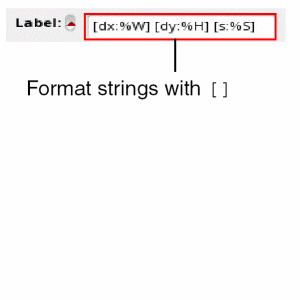
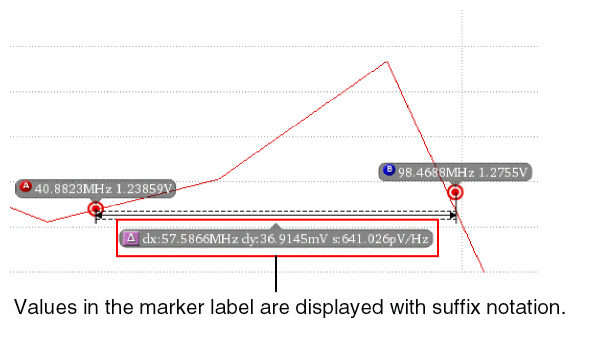
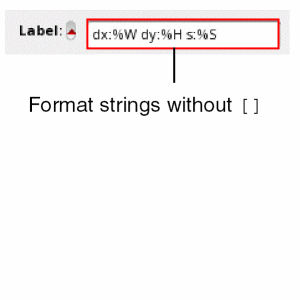
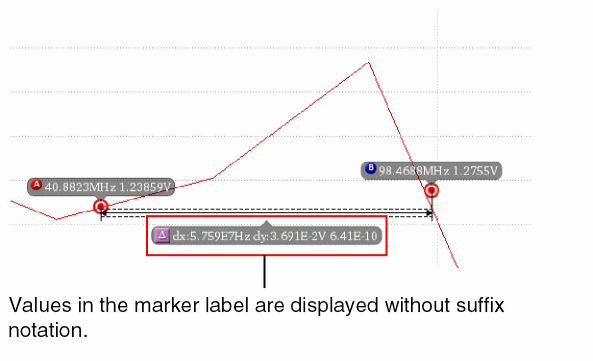
For more information about the values that you can use for marker labels, see Marker Labels.
Valid Values
For information about valid values, see Adding a Point Marker.
significantDigits
Specifies the significant digits for the delta marker.
Default value
Valid Values
sigDigitsMode
Sets the mode to be used to specify significant digits. When this variable is set to Manual, the settings defined in the significantDigits variable is applied. When it is set to Auto, the default value for significantDigits is used.
viva.multiDeltaMarker sigDigitsMode string "Auto"
Default Value
Valid Values
deltaMeasure
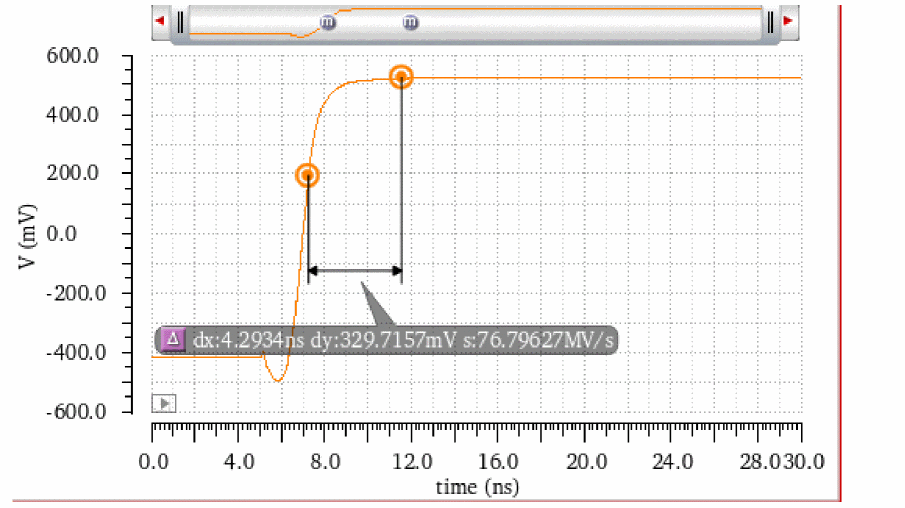
Determines the axis for which the delta measurement values are to be displayed in the delta marker label. Valid values of this variable include the change in X-axis value, Y-axis value, or both X- and Y-axes values. You can also use the delta marker properties form to control the display of these measurement values.
In addition, Virtuoso Visualization and Analysis XL controls the display of these measurement values depending on the markers between which the delta marker is created. For example, if a delta marker is created between two or more vertical markers, then only the change in X-axis value is displayed.
Syntax
viva.multiDeltaMarker deltaMeasure string "X Only"
Default Value
Valid Values
-
X Only—Shows the change in X-axis only.
-
Y Only—Shows the change in Y-axis only.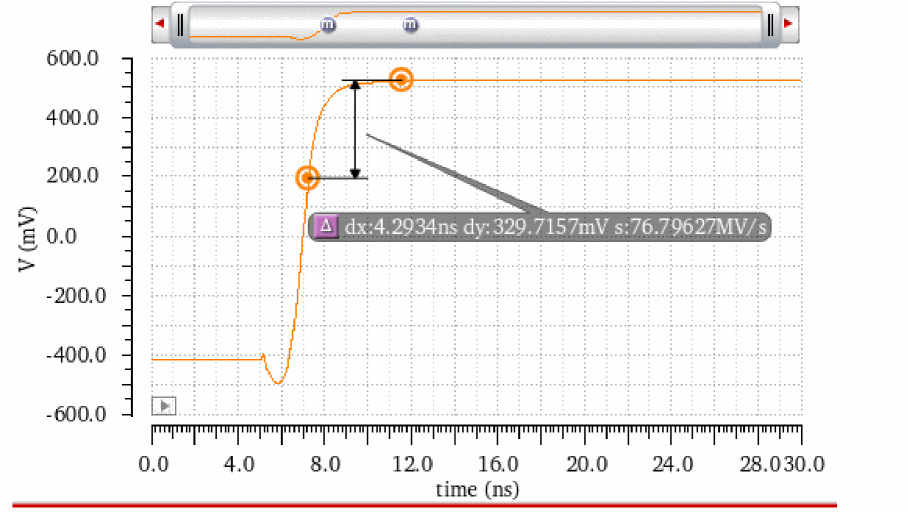
-
X and Y—Shows the change in both X- and Y-axes.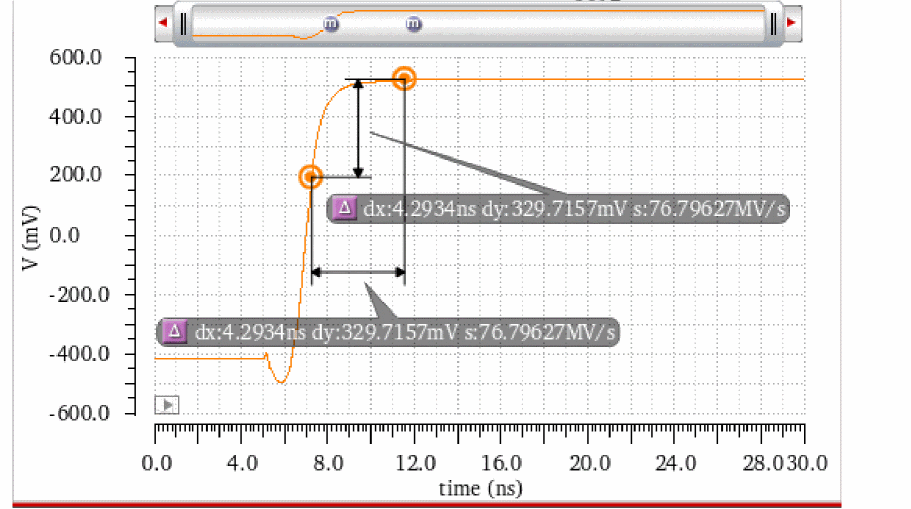
Transient Edge Markers Environment Variables
This section describes the environment variables for transient edge markers:
- defaultLabel
- font
- foreground
- lineStyle
- notation
- showMeasSummary
- significantDigits
- snapPoint
- threshold
defaultLabel
viva.transEdgeMarker defaultLabel string defaultLabel
Description
Specifies the default label for the transient edge marker. The default value is "%M", which indicates that the default label for the transient edge marker is the shorthand name of the edge marker.
The shorthand name of an edge marker is E: edgeNumber. For example, if you apply a transient marker on the first edge of a trace, the default label is E:1. If you apply a transient marker on the fourth edge of a trace, the default label is E:4.
GUI Equivalent
Examples
envGetVal("viva.transEdgeMarker" "defaultLabel")
envSetVal("viva.transEdgeMarker" "defaultLabel" 'string "%M")
significantDigits
viva.transEdgeMarker significantDigits string numberOfSignificantDigits
Description
Specifies the number of significant digits for the transient edge marker. The default value is "4".
GUI Equivalent
The Significant Digits field on the Transient Edge Marker Properties for Edge edgeNumber form.
Examples
envGetVal("viva.transEdgeMarker" "significantDigits")
envSetVal("viva.transEdgeMarker" "significantDigits" 'string "3")
font
viva.transEdgeMarker font string fontProperties
Description
Specifies the font properties of the transient edge marker. The default value is "Default,10,-1,5,50,0,0,0,0,0".
For more information about the format of the font properties, see Font String.
GUI Equivalent
The Font/Color field on the Transient Edge Marker Properties for Edge edgeNumber form.
Examples
envGetVal("viva.transEdgeMarker" "font")
envSetVal("viva.transEdgeMarker" "font" 'string "Default,20,-1,5,50,0,0,0,0,0")
notation
viva.transEdgeMarker notation string {"suffix" | "engineering" | "scientific"}
Description
Specifies the notation to be used in the transient edge marker. The default value is "suffix".
Possible values are: suffix, engineering, and scientific.
GUI Equivalent
The Notation field on the Transient Edge Marker Properties for Edge edgeNumber form.
Examples
envGetVal("viva.transEdgeMarker" "notation")
envSetVal("viva.transEdgeMarker" "notation" 'string "scientific")
threshold
viva.transEdgeMarker threshold string {"10_90" | "20_80" | "30_70"}
Description
Specifies the threshold levels of signal where the transient edge marker is applied on the rising or the falling edge of the signal. The default value is "20_80".
GUI Equivalent
- The Threshold field on the Transient Edge Marker Properties for Edge edgeNumber form.
- The Threshold command when you right-click a transient edge marker.
Examples
envGetVal("viva.transEdgeMarker" "threshold")
envSetVal("viva.transEdgeMarker" "threshold" 'string "10_90")
envSetVal("viva.transEdgeMarker" "threshold" 'string "30_70")
foreground
viva.transEdgeMarker foreground string foregroundColor
Description
Specifies the foreground color of the transient edge marker. The default value is "black".
GUI Equivalent
The Foreground field on the Transient Edge Marker Properties for Edge edgeNumber form.
Examples
envGetVal("viva.transEdgeMarker" "foreground")
envSetVal("viva.transEdgeMarker" "foreground" 'string "red")
lineStyle
viva.transEdgeMarker lineStyle string {"dash" | "solid" | "dot" | "dashdot" | "dashdotdot"}
Description
Specifies the line style of the transient edge marker. The default value is "solid".
Possible values are: dash, solid, dot, dashdot, and dashdotdot.
GUI Equivalent
Examples
envGetVal("viva.transEdgeMarker" "lineStyle")
envSetVal("viva.transEdgeMarker" "lineStyle" 'string "dashdotdot")
showMeasSummary
viva.transEdgeMarker showMeasSummary string {"on when hover" | "on" | "off"}
Description
Specifies when to show the measurement labels on the transient edge marker.
-
onwhenhover: (Default value) Measurement labels are shown only when you hover over the transient edge marker. -
on: Measurement labels are always shown. -
off: Measurement labels are always hidden.
GUI Equivalent
- The Annotation field on the Transient Edge Marker Properties for Edge edgeNumber form.
- The Show Measurement command when you right-click a transient edge marker.
Examples
envGetVal("viva.transEdgeMarker" "showMeasSummary")
envSetVal("viva.transEdgeMarker" "showMeasSummary" 'string "on")
snapPoint
viva.transEdgeMarker snapPoint string snapPoint
Description
Specifies the snap point of the transient edge marker. The default value is "Data Point".
GUI Equivalent
Examples
envGetVal("viva.transEdgeMarker" "snapPoint")
envSetVal("viva.transEdgeMarker" "snapPoint" 'string "Data Point")
Graph Label Environment Variables
-
viva.graphLabel font string "Default,10,-1,5,50,0,0,0,0,0" -
viva.graphLabel foreground string "white" -
viva.graphLabel background string "lightGray"
Probe Environment Variables
-
viva.probefontstringDefault,10,-1,5,50,0,0,0,0,0" -
viva.probeforegroundstring "black" -
viva.probebackground string "white" -
viva.probeautoTopBaselinestring "true" -
viva.probetopLinestring "0.0" -
viva.probebaseLinestring "0.0" -
viva.probeautoMinMaxstring "true" -
viva.probeminValue string "0.0" -
viva.probemaxValue string "0.0"
Polar Grid Environment Variables
-
viva.polarGridfontstring "Default,10,-1,5,50,0,0,0,0,0" -
viva.polarGridnumCirclesstring "4" -
viva.polarGridcirclesForeground string "gray" -
viva.polarGridcirclesOn string "true" -
viva.polarGridcirclesLabelsOn string "true" -
viva.polarGridnumRadialsstring "2" -
viva.polarGridradialsOn string "true" -
viva.polarGridradialsLabelsOn string "true"
Smith Grid Environment Variables
The Smith grid environment variables are used to define properties of the Smith grid. The Smith grid environment variables are identified by the partition name viva.smithGrid.
font
viva.smithGrid font string "fontProperties"
Description
Specifies the font properties for the labels on the Smith grid in a string format. The font string lists the following properties:
Font family, Point size, Pixel size, Style hint, Weight, Style, Underline, Strikeout, Fixed pitch, Raw mode
The description of these font properties are as follows:
-
Font family: Specifies the family of fonts. The default value is
Default, which indicates that the default font family of the system is used. -
Point size: Specifies the point size of the font. If the font size is specified in pixels, it must be set to
-1. - Pixel size: Specifies the pixel size of the font. Setting pixel size makes the font device dependent. You can use point size to set the size of the font in a device-independent manner.
-
Style hint: Specifies the style hints that are used by the font-matching algorithm to find an appropriate default font family if the selected font family is not available in the system.
Style hints are not supported on X11 since this information is not provided by the windows system. -
Weight: Uses a weighting scale from
0–99similar to the scales used in Windows or CSS. A weight of0is ultralight, while99is black.
This enumeration contains the following predefined font weights.Enumeration Value -
Style: Specifies the different styles of glyphs that are used to display text.
This enumeration contains the following predefined styles. -
Underline: Specifies whether to underline the text in the Smith grid labels. The default value is
0, which indicates that the text is not underlined. To make the text underlined, set this value to1. -
Strikeout: Specifies whether to strike through the text in the point marker label. The default value is
0, which indicates that the text is not strike-through. To make the text strike-through, set this value to1. -
Fixed pitch: Specifies whether to set a fixed pitch. The default value is
0, which indicates that the fixed pitch is not set. To set a fixed pitch, set this value to1. -
Raw mode: This options is applicable only for X11 systems. It specifies whether to enable or disable raw mode. The default value is
0, which indicates that raw mode is disabled.
To enable raw mode, set this value to1. If raw mode is enabled, the X font with a complete font name that matches with the family name is searched and all other values set for QFont are ignored. If the font name matches multiple fonts, the first font returned by X window system is used.When you set the font-related environment variables in the.cdsinitusing theenvSetValcommand, you first need to load the viva context before setting the variable. For this, you can add the following command in your.cdsinitfile:loadContext(strcat(prependInstallPath("etc/context/") "viva.cxt"))
callInitProc("viva")
Now, you can use theenvSetValcommand to set the font variable in the.cdsinitfile.
GUI Equivalent
The Font field in the Labels section on the Grid tab of the Graph Properties form for the circular graphs. This field is not available for Polar grids.
Examples
envGetVal("viva.smithGrid" "font")
envSetVal("viva.smithGrid" "font" 'string "Default,10,-1,5,50,0,1,1,0,0")
autoSizeLabels
viva.smithGrid autoSizeLabels string {"true" | "false"}
Description
Specifies whether to automatically adjust the font size for the Smith grid labels.
-
true: (Default) Automatically adjusts the font size for the Smith grid labels. -
false: Uses the font size specified the font environment variable.
GUI Equivalent
The Text Size field in the Labels section on the Grid tab of the Graph Properties form for the circular graphs. This field is not available for Polar grids.
Examples
envGetVal("viva.smithGrid" "autoSizeLabels")
envSetVal("viva.smithGrid" "autoSizeLabels" 'string "false")
showDetailed
viva.smithGrid showDetailed string {"auto" | "off" | "on"}
Description
Specifies when to display detailed grid lines on the Smith chart. Possible values are:
-
auto: (Default) Detailed grid lines are automatically displayed when zooming in on the Smith chart. -
off: Detailed grid lines are always hidden. -
on: Detailed grid lines are always displayed.
GUI Equivalent
The Detailed Grid field in the Display section on the Grid tab of the Graph Properties form for a Smith chart. This field is not available for polar grids.
Examples
envGetVal("viva.smithGrid" "showDetailed")
envSetVal("viva.smithGrid" "showDetailed" 'string "off")
showLabels
viva.smithGrid showLabels string {"true" | "false"}
Description
Specifies whether to display labels on the Smith grid. The default value is true, which indicates that labels are displayed on the Smith grid.
GUI Equivalent
The Grid Labels field in the Display section on the Grid tab of the Graph Properties form for a Smith chart. This field is not available for polar grids.
Examples
envGetVal("viva.smithGrid" "showLabels")
envSetVal("viva.smithGrid" "showLabels" 'string "false")
showCompressed
viva.smithGrid showCompressed string {"true" | "false"}
Description
Specifies whether to display extra horizontal grid lines (arcs) outside the Smith chart boundary. The default value is false, which indicates that grid lines outside the Smith unit circle are not displayed.
GUI Equivalent
The Compressed Smith field in the Display section on the Grid tab of the Graph Properties form for a Smith chart. This field is not available for polar grids.
Examples
envGetVal("viva.smithGrid" "showCompressed")
envSetVal("viva.smithGrid" "showCompressed" 'string "true")
showCoefficientRing
viva.smithGrid showCoefficientRing string {"true" | "false"}
Description
Specifies whether to display the angles of reflection coefficient in the outer ring. The default value is false, which indicates that reflection coefficient and outer ring are not displayed on the Smith grid.
GUI Equivalent
The Coefficient Ring field in the Display section on the Grid tab of the Graph Properties form for a Smith chart. This field is not available for polar grids.
Examples
envGetVal("viva.smithGrid" "showCoefficientRing")
envSetVal("viva.smithGrid" "showCoefficientRing" 'string "true")
showVSWRCircles
viva.smithGrid showVSWRCircles string {"true" | "false"}
Description
Specifies whether to display VSWR circles for the specified VSWR values. The default value is false, which indicates that VSWR circles are not displayed on the Smith grid.
GUI Equivalent
The VSWR Circles field in the Smith Chart section on the Annotations tab of the Graph Properties form for a Smith chart. This field is not available for polar grids.
Examples
envGetVal("viva.smithGrid" "showVSWRCircles")
envSetVal("viva.smithGrid" "showVSWRCircles" 'string "true")
VSWRCircleValues
viva.smithGrid VSWRCircleValues string VSWRvalues
Description
Specifies the VSWR values for which you want to draw the VSWR circles on the Smith grid.
The default value is "", which indicates that no VSWR circles are drawn on the Smith grid.
VSWR circles for the specified VSWR values are drawn only when the showVSWRCircles environment variable is set to true.
GUI Equivalent
The VSWR field in the Smith Chart section on the Annotations tab of the Graph Properties form for a Smith chart. This field is not available for polar grids.
Examples
envGetVal("viva.smithGrid" "VSWRCircleValues")
envSetVal("viva.smithGrid" "VSWRCircleValues" 'string "6, 8")
VSWRCirclePenColor
viva.smithGrid VSWRCirclePenColor string hexColorCode
Description
Specifies the color of the VSWR circles.
VSWR circles for the specified VSWR values are drawn only when the showVSWRCircles environment variable is set to true.
GUI Equivalent
The Color field in the VSWR Circles section on the Annotations tab of the Graph Properties form for a Smith chart. This field is not available for polar grids.
Examples
envGetVal("viva.smithGrid" "VSWRCirclePenColor")
envSetVal("viva.smithGrid" "VSWRCirclePenColor" 'string "#0000FF")
VSWRCirclePenWidth
viva.smithGrid VSWRCirclePenWidth string widthOfVSWRCircles
Description
Specifies the width of the VSWR circles.
Valid values are fine, medium, thick, extraThick, and extraFine. The default value is fine.
VSWR circles for the specified VSWR values are drawn only when the showVSWRCircles environment variable is set to true.
GUI Equivalent
The Width field in the VSWR Circles section on the Annotations tab of the Graph Properties form for a Smith chart. This field is not available for polar grids.
Examples
envGetVal("viva.smithGrid" "VSWRCirclePenWidth")
envSetVal("viva.smithGrid" "VSWRCirclePenWidth" 'string "extraThick")
VSWRCirclePenStyle
viva.smithGrid VSWRCirclePenStyle string widthOfVSWRCircles
Description
Specifies the style of the VSWR circles.
Valid values are solid, dot, dash, dashDot, and dashDotDot. The default value is solid.
VSWR circles for the specified VSWR values are drawn only when the showVSWRCircles environment variable is set to true.
GUI Equivalent
The Style field in the VSWR Circles section on the Annotations tab of the Graph Properties form for a Smith chart. This field is not available for polar grids.
Examples
envGetVal("viva.smithGrid" "VSWRCirclePenStyle")
envSetVal("viva.smithGrid" "VSWRCirclePenStyle" 'string "dashDotDot")
showQContours
viva.smithGrid showQContours string {"true" | "false"}
Description
Specifies whether to display Q contours for the specified Q values. The default value is false, which indicates that Q contours are not displayed on the Smith grid.
GUI Equivalent
The Q Contours field in the Smith Chart section on the Annotations tab of the Graph Properties form for a Smith chart. This field is not available for polar grids.
Examples
envGetVal("viva.smithGrid" "showQContours")
envSetVal("viva.smithGrid" "showQContours" 'string "true")
QContourValues
viva.smithGrid QContourValues string VSWRvalues
Description
Specifies the Q values for which you want to draw the Q contours on the Smith grid.
The default value is "", which indicates that no Q contours are drawn on the Smith grid.
Q contours for the specified Q values are drawn only when showQContours environment variable is set to true.
GUI Equivalent
The Q field in the Smith Chart section on the Annotations tab of the Graph Properties form for a Smith chart. This field is not available for polar grids.
Examples
envGetVal("viva.smithGrid" "QContourValues")
envSetVal("viva.smithGrid" "QContourValues" 'string "3, 5")
QContourPenColor
viva.smithGrid QContourPenColor string hexColorCode
Description
Specifies the color of the Q contours.
Q contours for the specified Q values are drawn only when the showQContours environment variable is set to true.
GUI Equivalent
The Color field in the Q Contours section on the Annotations tab of the Graph Properties form for a Smith chart. This field is not available for polar grids.
Examples
envGetVal("viva.smithGrid" "QContourPenColor")
envSetVal("viva.smithGrid" "QContourPenColor" 'string "#0000FF")
QContourPenWidth
viva.smithGrid QContourPenWidth string widthOfVSWRCircles
Description
Specifies the width of the Q contours.
Valid values are fine, medium, thick, extraThick, and extraFine. The default value is fine.
Q contours for the specified Q values are drawn only when the showQContours environment variable is set to true.
GUI Equivalent
The Width field in the Q Contours section on the Annotations tab of the Graph Properties form for a Smith chart. This field is not available for polar grids.
Examples
envGetVal("viva.smithGrid" "QContourPenWidth")
envSetVal("viva.smithGrid" "QContourPenWidth" 'string "extraThick")
QContourPenStyle
viva.smithGrid QContourPenStyle string widthOfVSWRCircles
Description
Specifies the style of the Q contours.
Valid values are solid, dot, dash, dashDot, and dashDotDot. The default value is solid.
Q contours for the specified Q values are drawn only when the showQContours environment variable is set to true.
GUI Equivalent
The Style field in the Q Contours section on the Annotations tab of the Graph Properties form for a Smith chart. This field is not available for polar grids.
Examples
envGetVal("viva.smithGrid" "QContourPenStyle")
envSetVal("viva.smithGrid" "QContourPenStyle" 'string "dashDotDot")
impedanceStandardGridPenColor
viva.smithGrid impedanceStandardGridPenColor string colorOfImpedanceStandardGrid
Description
Specifies the color of standard grid lines in an Impedance (Z) Smith chart.
GUI Equivalent
The Color field in the Standard Grid Lines section on the Grid tab of the Graph Properties form for an Impedance (Z) Smith chart. This field is available when Impedance is selected as the Grid Type.
Examples
envGetVal("viva.smithGrid" "impedanceStandardGridPenColor")
envSetVal("viva.smithGrid" "impedanceStandardGridPenColor" 'string "#FF0000")
impedanceStandardGridPenWidth
viva.smithGrid impedanceStandardGridPenWidth string widthOfImpedanceStandardGrid
Description
Specifies the width of standard grid lines in an Impedance (Z) Smith chart.
Valid values are fine, medium, thick, extraThick, and extraFine. The default value is extraFine.
GUI Equivalent
The Width field in the Standard Grid Lines section on the Grid tab of the Graph Properties form for an Impedance (Z) Smith chart. This field is available when Impedance is selected as the Grid Type.
Examples
envGetVal("viva.smithGrid" "impedanceStandardGridPenWidth")
envSetVal("viva.smithGrid" "impedanceStandardGridPenWidth" 'string "extraThick")
impedanceStandardGridPenStyle
viva.smithGrid impedanceStandardGridPenStyle string styleOfImpedanceStandardGrid
Description
Specifies the style of standard grid lines in an Impedance (Z) Smith chart.
Valid values are solid, dot, dash, dashDot, and dashDotDot. The default value is solid.
GUI Equivalent
The Style field in the Standard Grid Lines section on the Grid tab of the Graph Properties form for an Impedance (Z) Smith chart. This field is available when Impedance is selected as the Grid Type.
Examples
envGetVal("viva.smithGrid" "impedanceStandardGridPenStyle")
envSetVal("viva.smithGrid" "impedanceStandardGridPenStyle" 'string "dashDot")
impedanceDetailedGridPenColor
viva.smithGrid impedanceDetailedGridPenColor string colorOfImpedanceDetailedGrid
Description
Specifies the color of detailed grid lines in an Impedance (Z) Smith chart.
GUI Equivalent
The Color field in the Detailed Grid Lines section on the Grid tab of the Graph Properties form for an Impedance (Z) Smith chart. This field is available when Impedance is selected as the Grid Type.
Examples
envGetVal("viva.smithGrid" "impedanceDetailedGridPenColor")
envSetVal("viva.smithGrid" "impedanceDetailedGridPenColor" 'string "#FF0000")
impedanceDetailedGridPenWidth
viva.smithGrid impedanceDetailedGridPenWidth string widthOfImpedanceDetailedGrid
Description
Specifies the width of detailed grid lines in an Impedance (Z) Smith chart.
Valid values are fine, medium, thick, extraThick, and extraFine. The default value is extraFine.
GUI Equivalent
The Width field in the Detailed Grid Lines section on the Grid tab of the Graph Properties form for an Impedance (Z) Smith chart. This field is available when Impedance is selected as the Grid Type.
Examples
envGetVal("viva.smithGrid" "impedanceDetailedGridPenWidth")
envSetVal("viva.smithGrid" "impedanceDetailedGridPenWidth" 'string "extraThick")
impedanceDetailedGridPenStyle
viva.smithGrid impedanceDetailedGridPenStyle string styleOfImpedanceDetailedGrid
Description
Specifies the style of detailed grid lines in an Impedance (Z) Smith chart.
Valid values are solid, dot, dash, dashDot, and dashDotDot. The default value is dot.
GUI Equivalent
The Style field in the Detailed Grid Lines section on the Grid tab of the Graph Properties form for an Impedance (Z) Smith chart. This field is available when Impedance is selected as the Grid Type.
Examples
envGetVal("viva.smithGrid" "impedanceDetailedGridPenStyle")
envSetVal("viva.smithGrid" "impedanceDetailedGridPenStyle" 'string "dashDot")
impedanceCompressedGridPenColor
viva.smithGrid impedanceCompressedGridPenColor string colorOfImpedanceCompressedGrid
Description
Specifies the color of the compressed grid lines in an Impedance (Z) Smith chart.
This environment variable works only when the environment variable showCompressed is set to true.
GUI Equivalent
The Color field in the Compressed Grid Lines section on the Grid tab of the Graph Properties form for an Impedance (Z) Smith chart. This field is available when the Compressed Smith check box is selected and Impedance is selected as the Grid Type.
Examples
envGetVal("viva.smithGrid" "impedanceCompressedGridPenColor")
envSetVal("viva.smithGrid" "impedanceCompressedGridPenColor" 'string "#FF0000")
impedanceCompressedGridPenWidth
viva.smithGrid impedanceCompressedGridPenWidth string widthOfImpedanceCompressedGrid
Description
Specifies the width of compressed grid lines in an Impedance (Z) Smith chart.
Valid values are fine, medium, thick, extraThick, and extraFine. The default value is extraFine.
This environment variable works only when the environment variable showCompressed is set to true.
GUI Equivalent
The Width field in the Compressed Grid Lines section on the Grid tab of the Graph Properties form for an Impedance (Z) Smith chart. This field is available when the Compressed Smith check box is selected and Impedance is selected as the Grid Type.
Examples
envGetVal("viva.smithGrid" "impedanceCompressedGridPenWidth")
envSetVal("viva.smithGrid" "impedanceCompressedGridPenWidth" 'string "extraThick")
impedanceCompressedGridPenStyle
viva.smithGrid impedanceCompressedGridPenStyle string styleOfImpedanceCompressedGrid
Description
Specifies the style of compressed grid lines in an Impedance (Z) Smith chart.
Valid values are solid, dot, dash, dashDot, and dashDotDot. The default value is dot.
This environment variable works only when the environment variable showCompressed is set to true.
GUI Equivalent
The Style field in the Detailed Grid Lines section on the Grid tab of the Graph Properties form for an Impedance (Z) Smith chart. This field is available when the Compressed Smith check box is selected and Impedance is selected as the Grid Type.
Examples
envGetVal("viva.smithGrid" "impedanceCompressedGridPenStyle")
envSetVal("viva.smithGrid" "impedanceCompressedGridPenStyle" 'string "dashDot")
admittanceStandardGridPenColor
viva.smithGrid admittanceStandardGridPenColor string colorOfAdmittanceStandardGrid
Description
Specifies the color of standard grid lines in an Admittance (Y) Smith chart.
GUI Equivalent
The Color field in the Standard Grid Lines section on the Grid tab of the Graph Properties form for an Admittance (Y) Smith chart. This field is available when Admittance is selected as the Grid Type.
Examples
envGetVal("viva.smithGrid" "admittanceStandardGridPenColor")
envSetVal("viva.smithGrid" "admittanceStandardGridPenColor" 'string "#FF0000")
admittanceStandardGridPenWidth
viva.smithGrid admittanceStandardGridPenWidth string widthOfAdmittanceStandardGrid
Description
Specifies the width of standard grid lines in an Admittance (Y) Smith chart.
Valid values are fine, medium, thick, extraThick, and extraFine. The default value is extraFine.
GUI Equivalent
The Width field in the Standard Grid Lines section on the Grid tab of the Graph Properties form for an Admittance (Y) Smith chart. This field is available when Admittance is selected as the Grid Type.
Examples
envGetVal("viva.smithGrid" "admittanceStandardGridPenWidth")
envSetVal("viva.smithGrid" "admittanceStandardGridPenWidth" 'string "extraThick")
admittanceStandardGridPenStyle
viva.smithGrid admittanceStandardGridPenStyle string styleOfAdmittanceStandardGrid
Description
Specifies the style of standard grid lines in an Admittance (Y) Smith chart.
Valid values are solid, dot, dash, dashDot, and dashDotDot. The default value is solid.
GUI Equivalent
The Style field in the Standard Grid Lines section on the Grid tab of the Graph Properties form for an Admittance (Y) Smith chart. This field is available when Admittance is selected as the Grid Type.
Examples
envGetVal("viva.smithGrid" "impedanceStandardGridPenStyle")
envSetVal("viva.smithGrid" "impedanceStandardGridPenStyle" 'string "dashDot")
admittanceDetailedGridPenColor
viva.smithGrid admittanceDetailedGridPenColor string colorOfAdmittanceDetailedGrid
Description
Specifies the color of detailed grid lines in an Admittance (Y) Smith chart.
GUI Equivalent
The Color field in the Detailed Grid Lines section on the Grid tab of the Graph Properties form for an Admittance (Y) Smith chart. This field is available when Admittance is selected as the Grid Type.
Examples
envGetVal("viva.smithGrid" "admittanceDetailedGridPenColor")
envSetVal("viva.smithGrid" "admittanceDetailedGridPenColor" 'string "#FF0000")
admittanceDetailedGridPenWidth
viva.smithGrid admittanceDetailedGridPenWidth string widthOfAdmittanceDetailedGrid
Description
Specifies the width of detailed grid lines in an Admittance (Y) Smith chart.
Valid values are fine, medium, thick, extraThick, and extraFine. The default value is extraFine.
GUI Equivalent
The Width field in the Detailed Grid Lines section on the Grid tab of the Graph Properties form for an Admittance (Y) Smith chart. This field is available when Admittance is selected as the Grid Type.
Examples
envGetVal("viva.smithGrid" "admittanceDetailedGridPenWidth")
envSetVal("viva.smithGrid" "admittanceDetailedGridPenWidth" 'string "extraThick")
admittanceDetailedGridPenStyle
viva.smithGrid admittanceDetailedGridPenStyle string styleOfAdmittanceDetailedGrid
Description
Specifies the style of detailed grid lines in an Admittance (Y) Smith chart.
Valid values are solid, dot, dash, dashDot, and dashDotDot. The default value is dot.
GUI Equivalent
The Style field in the Detailed Grid Lines section on the Grid tab of the Graph Properties form for an Admittance (Y) Smith chart. This field is available when Admittance is selected as the Grid Type.
Examples
envGetVal("viva.smithGrid" "admittanceDetailedGridPenStyle")
envSetVal("viva.smithGrid" "admittanceDetailedGridPenStyle" 'string "dashDot")
admittanceCompressedGridPenColor
viva.smithGrid admittanceCompressedGridPenColor string colorOfAdmittanceCompressedGrid
Description
Specifies the color of the compressed grid lines in an Admittance (Y) Smith chart.
This environment variable works only when the environment variable showCompressed is set to true.
GUI Equivalent
The Color field in the Compressed Grid Lines section on the Grid tab of the Graph Properties form for an Admittance (Y) Smith chart. This field is available when the Compressed Smith check box is selected and Admittance is selected as the Grid Type.
Examples
envGetVal("viva.smithGrid" "admittanceCompressedGridPenColor")
envSetVal("viva.smithGrid" "admittanceCompressedGridPenColor" 'string "#FF0000")
admittanceCompressedGridPenWidth
viva.smithGrid admittanceCompressedGridPenWidth string widthOfAdmittanceCompressedGrid
Description
Specifies the width of compressed grid lines in an Admittance (Y) Smith chart.
Valid values are fine, medium, thick, extraThick, and extraFine. The default value is extraFine.
This environment variable works only when the environment variable showCompressed is set to true.
GUI Equivalent
The Width field in the Compressed Grid Lines section on the Grid tab of the Graph Properties form for an Admittance (Y) Smith chart. This field is available when the Compressed Smith check box is selected and Admittance is selected as the Grid Type.
Examples
envGetVal("viva.smithGrid" "admittanceCompressedGridPenWidth")
envSetVal("viva.smithGrid" "admittanceCompressedGridPenWidth" 'string "extraThick")
admittanceCompressedGridPenStyle
viva.smithGrid admittanceCompressedGridPenStyle string styleOfAdmittanceCompressedGrid
Description
Specifies the style of compressed grid lines in an Admittance (Y) Smith chart.
Valid values are solid, dot, dash, dashDot, and dashDotDot. The default value is dot.
This environment variable works only when the environment variable showCompressed is set to true.
GUI Equivalent
The Style field in the Compressed Grid Lines section on the Grid tab of the Graph Properties form for an Admittance (Y) Smith chart. This field is available when the Compressed Smith check box is selected and Admittance is selected as the Grid Type.
Examples
envGetVal("viva.smithGrid" "admittanceCompressedGridPenStyle")
envSetVal("viva.smithGrid" "admittanceCompressedGridPenStyle" 'string "dashDot")
immittanceZStandardGridPenColor
viva.smithGrid immittanceZStandardGridPenColor string colorOfImmittanceZStandardGrid
Description
Specifies the color of standard Impedance (Z Smith) grid in an Immittance (ZY) Smith chart.
GUI Equivalent
The Color field in the Standard Impedance Grid Lines section on the Grid tab of the Graph Properties form for an Immittance (ZY) Smith chart. This field is available when Immittance is selected as the Grid Type.
Examples
envGetVal("viva.smithGrid" "immittanceZStandardGridPenColor")
envSetVal("viva.smithGrid" "immittanceZStandardGridPenColor" 'string "#FF0000")
immittanceZStandardGridPenWidth
viva.smithGrid immittanceZStandardGridPenWidth string widthOfImmittanceZStandardGrid
Description
Specifies the width of standard Impedance (Z Smith) grid in an Immittance (ZY) Smith chart.
Valid values are fine, medium, thick, extraThick, and extraFine. The default value is extraFine.
GUI Equivalent
The Width field in the Standard Impedance Grid Lines section on the Grid tab of the Graph Properties form for an Immittance (ZY) Smith chart. This field is available when Immittance is selected as the Grid Type.
Examples
envGetVal("viva.smithGrid" "immittanceZStandardGridPenWidth")
envSetVal("viva.smithGrid" "immittanceZStandardGridPenWidth" 'string "extraThick")
immittanceZStandardGridPenStyle
viva.smithGrid immittanceZStandardGridPenStyle string styleOfImmittanceZStandardGrid
Description
Specifies the style of standard Impedance (Z Smith) grid in an Immittance (ZY) Smith chart.
Valid values are solid, dot, dash, dashDot, and dashDotDot. The default value is dot.
GUI Equivalent
The Style field in the Standard Impedance Grid Lines section on the Grid tab of the Graph Properties form for an Immittance (ZY) Smith chart. This field is available when Immittance is selected as the Grid Type.
Examples
envGetVal("viva.smithGrid" "immittanceZStandardGridPenStyle")
envSetVal("viva.smithGrid" "immittanceZStandardGridPenStyle" 'string "dashDot")
immittanceZDetailedGridPenColor
viva.smithGrid immittanceZDetailedGridPenColor string colorOfImmittanceZDetailedGrid
Description
Specifies the color of detailed Impedance (Z Smith) grid in an Immittance (ZY) Smith chart.
GUI Equivalent
The Color field in the Detailed Impedance Grid Lines section on the Grid tab of the Graph Properties form for an Immittance (ZY) Smith chart. This field is available when Immittance is selected as the Grid Type.
Examples
envGetVal("viva.smithGrid" "immittanceZDetailedGridPenColor")
envSetVal("viva.smithGrid" "immittanceZDetailedGridPenColor" 'string "#FF0000")
immittanceZDetailedGridPenWidth
viva.smithGrid immittanceZDetailedGridPenWidth string widthOfImmittanceZDetailedGrid
Description
Specifies the width of detailed Impedance (Z Smith) grid in an Immittance (ZY) Smith chart.
Valid values are fine, medium, thick, extraThick, and extraFine. The default value is extraFine.
GUI Equivalent
The Width field in the Detailed Impedance Grid Lines section on the Grid tab of the Graph Properties form for an Immittance (ZY) Smith chart. This field is available when Immittance is selected as the Grid Type.
Examples
envGetVal("viva.smithGrid" "immittanceZDetailedGridPenWidth")
envSetVal("viva.smithGrid" "immittanceZDetailedGridPenWidth" 'string "extraThick")
immittanceZDetailedGridPenStyle
viva.smithGrid immittanceZDetailedGridPenStyle string styleOfImmittanceZDetailedGrid
Description
Specifies the style of detailed Impedance (Z Smith) grid in an Immittance (ZY) Smith chart.
Valid values are solid, dot, dash, dashDot, and dashDotDot. The default value is dot.
GUI Equivalent
The Style field in the Detailed Impedance Grid Lines section on the Grid tab of the Graph Properties form for an Immittance (ZY) Smith chart. This field is available when Immittance is selected as the Grid Type.
Examples
envGetVal("viva.smithGrid" "immittanceZDetailedGridPenStyle")
envSetVal("viva.smithGrid" "immittanceZDetailedGridPenStyle" 'string "dashDot")
immittanceZCompressedGridPenColor
viva.smithGrid immittanceZCompressedGridPenColor string colorOfImmittanceZCompressedGrid
Description
Specifies the color of the compressed Impedance (Z Smith) grid in an Immittance (ZY) Smith chart.
This environment variable works only when the environment variable showCompressed is set to true.
GUI Equivalent
The Color field in the Compressed Impedance Grid Lines section on the Grid tab of the Graph Properties form for an Immittance (ZY) Smith chart. This field is available when the Compressed Smith check box is selected and Immittance is selected as the Grid Type.
Examples
envGetVal("viva.smithGrid" "immittanceZCompressedGridPenColor")
envSetVal("viva.smithGrid" "immittanceZCompressedGridPenColor" 'string "#FF0000")
immittanceZCompressedGridPenWidth
viva.smithGrid immittanceZCompressedGridPenWidth string widthOfImmittanceZCompressedGrid
Description
Specifies the width of compressed Impedance (Z Smith) grid in an Immittance (ZY) Smith chart.
Valid values are fine, medium, thick, extraThick, and extraFine. The default value is extraFine.
This environment variable works only when the environment variable showCompressed is set to true.
GUI Equivalent
The Width field in the Compressed Impedance Grid Lines section on the Grid tab of the Graph Properties form for an Immittance (ZY) Smith chart. This field is available when the Compressed Smith check box is selected and Immittance is selected as the Grid Type.
Examples
envGetVal("viva.smithGrid" "immittanceZCompressedGridPenWidth")
envSetVal("viva.smithGrid" "immittanceZCompressedGridPenWidth" 'string "extraThick")
immittanceZCompressedGridPenStyle
viva.smithGrid immittanceZCompressedGridPenStyle string styleOfImmittanceZCompressedGrid
Description
Specifies the style of compressed Impedance (Z Smith) grid in an Immittance (ZY) Smith chart.
Valid values are solid, dot, dash, dashDot, and dashDotDot. The default value is dot.
This environment variable works only when the environment variable showCompressed is set to true.
GUI Equivalent
The Style field in the Compressed Impedance Grid Lines section on the Grid tab of the Graph Properties form for an Immittance (ZY) Smith chart. This field is available when the Compressed Smith check box is selected and Immittance is selected as the Grid Type.
Examples
envGetVal("viva.smithGrid" "immittanceZCompressedGridPenStyle")
envSetVal("viva.smithGrid" "immittanceZCompressedGridPenStyle" 'string "dashDot")
immittanceYStandardGridPenColor
viva.smithGrid immittanceYStandardGridPenColor string colorOfImmittanceYStandardGrid
Description
Specifies the color of standard Admittance (Y Smith) grid in an Immittance (ZY) Smith chart.
GUI Equivalent
The Color field in the Standard Admittance Grid Lines section on the Grid tab of the Graph Properties form for an Immittance (ZY) Smith chart. This field is available when Immittance is selected as the Grid Type.
Examples
envGetVal("viva.smithGrid" "immittanceYStandardGridPenColor")
envSetVal("viva.smithGrid" "immittanceYStandardGridPenColor" 'string "#FF0000")
immittanceYStandardGridPenWidth
viva.smithGrid immittanceYStandardGridPenWidth string widthOfImmittanceYStandardGrid
Description
Specifies the width of standard Admittance (Y Smith) grid in an Immittance (ZY) Smith chart.
Valid values are fine, medium, thick, extraThick, and extraFine. The default value is extraFine.
GUI Equivalent
The Width field in the Standard Admittance Grid Lines section on the Grid tab of the Graph Properties form for an Immittance (ZY) Smith chart. This field is available when Immittance is selected as the Grid Type.
Examples
envGetVal("viva.smithGrid" "immittanceYStandardGridPenWidth")
envSetVal("viva.smithGrid" "immittanceYStandardGridPenWidth" 'string "extraThick")
immittanceYStandardGridPenStyle
viva.smithGrid immittanceYStandardGridPenStyle string styleOfImmittanceYStandardGrid
Description
Specifies the style of standard Admittance (Y Smith) grid in an Immittance (ZY) Smith chart.
Valid values are solid, dot, dash, dashDot, and dashDotDot. The default value is dot.
GUI Equivalent
The Style field in the Standard Admittance Grid Lines section on the Grid tab of the Graph Properties form for an Immittance (ZY) Smith chart. This field is available when Immittance is selected as the Grid Type.
Examples
envGetVal("viva.smithGrid" "immittanceYStandardGridPenStyle")
envSetVal("viva.smithGrid" "immittanceYStandardGridPenStyle" 'string "dashDot")
immittanceYDetailedGridPenColor
viva.smithGrid immittanceYDetailedGridPenColor string colorOfImmittanceYDetailedGrid
Description
Specifies the color of detailed Admittance (Y Smith) grid in an Immittance (ZY) Smith chart.
GUI Equivalent
The Color field in the Detailed Admittance Grid Lines section on the Grid tab of the Graph Properties form for an Immittance (ZY) Smith chart. This field is available when Immittance is selected as the Grid Type.
Examples
envGetVal("viva.smithGrid" "immittanceYDetailedGridPenColor")
envSetVal("viva.smithGrid" "immittanceYDetailedGridPenColor" 'string "#FF0000")
immittanceYDetailedGridPenWidth
viva.smithGrid immittanceYDetailedGridPenWidth string widthOfImmittanceYDetailedGrid
Description
Specifies the width of detailed Admittance (Y Smith) grid in an Immittance (ZY) Smith chart.
Valid values are fine, medium, thick, extraThick, and extraFine. The default value is extraFine.
GUI Equivalent
The Width field in the Detailed Admittance Grid Lines section on the Grid tab of the Graph Properties form for an Immittance (ZY) Smith chart. This field is available when Immittance is selected as the Grid Type.
Examples
envGetVal("viva.smithGrid" "immittanceYDetailedGridPenWidth")
envSetVal("viva.smithGrid" "immittanceYDetailedGridPenWidth" 'string "extraThick")
immittanceYDetailedGridPenStyle
viva.smithGrid immittanceYDetailedGridPenStyle string styleOfImmittanceYDetailedGrid
Description
Specifies the style of detailed Admittance (Y Smith) grid in an Immittance (ZY) Smith chart.
Valid values are solid, dot, dash, dashDot, and dashDotDot. The default value is dot.
GUI Equivalent
The Style field in the Detailed Admittance Grid Lines section on the Grid tab of the Graph Properties form for an Immittance (ZY) Smith chart. This field is available when Immittance is selected as the Grid Type.
Examples
envGetVal("viva.smithGrid" "immittanceYDetailedGridPenStyle")
envSetVal("viva.smithGrid" "immittanceYDetailedGridPenStyle" 'string "dashDot")
immittanceYCompressedGridPenColor
viva.smithGrid immittanceYCompressedGridPenColor string colorOfImmittanceYCompressedGrid
Description
Specifies the color of the compressed Admittance (Y Smith) grid in an Immittance (ZY) Smith chart.
This environment variable works only when the environment variable showCompressed is set to true.
GUI Equivalent
The Color field in the Compressed Admittance Grid Lines section on the Grid tab of the Graph Properties form for an Immittance (ZY) Smith chart. This field is available when the Compressed Smith check box is selected and Immittance is selected as the Grid Type.
Examples
envGetVal("viva.smithGrid" "immittanceYCompressedGridPenColor")
envSetVal("viva.smithGrid" "immittanceYCompressedGridPenColor" 'string "#FF0000")
immittanceYCompressedGridPenWidth
viva.smithGrid immittanceYCompressedGridPenWidth string widthOfImmittanceYCompressedGrid
Description
Specifies the width of compressed Admittance (Y Smith) grid in an Immittance (ZY) Smith chart.
Valid values are fine, medium, thick, extraThick, and extraFine. The default value is extraFine.
This environment variable works only when the environment variable showCompressed is set to true.
GUI Equivalent
The Width field in the Compressed Admittance Grid Lines section on the Grid tab of the Graph Properties form for an Immittance (ZY) Smith chart. This field is available when the Compressed Smith check box is selected and Immittance is selected as the Grid Type.
Examples
envGetVal("viva.smithGrid" "immittanceYCompressedGridPenWidth")
envSetVal("viva.smithGrid" "immittanceYCompressedGridPenWidth" 'string "extraThick")
immittanceYCompressedGridPenStyle
viva.smithGrid immittanceYCompressedGridPenStyle string styleOfImmittanceYCompressedGrid
Description
Specifies the style of compressed Admittance (Y Smith) grid in an Immittance (ZY) Smith chart.
Valid values are solid, dot, dash, dashDot, and dashDotDot. The default value is dot.
This environment variable works only when the environment variable showCompressed is set to true.
GUI Equivalent
The Style field in the Compressed Admittance Grid Lines section on the Grid tab of the Graph Properties form for an Immittance (ZY) Smith chart. This field is available when the Compressed Smith check box is selected and Immittance is selected as the Grid Type.
Examples
envGetVal("viva.smithGrid" "immittanceYCompressedGridPenStyle")
envSetVal("viva.smithGrid" "immittanceYCompressedGridPenStyle" 'string "dashDot")
Application Environment Variables
enableFlexibleBind
Determines whether the graph or trace settings, such as graph title, trace zoom in, trace visibility, delta and AB markers are to be saved while loading a graph file. The default value of this variable is true, which means these settings will be saved.
Syntax
Valid Values
VIVALicenseCheckoutOrder
Specifies the license checkout order preference for Virtuoso Visualization and Analysis XL. By default, this variable is set to ViVA, ADE, which results in the following license check out tasks being performed:
- Checks out the Virtuoso Visualization and Analysis XL license, if available.
- If the checkout operation in the previous step fails, checks out the ADE license according to the checkout order specified in the maestroCheckoutOrder .cdsenv variable.
If this variable is set to ADE, ViVA, the license check out tasks are performed in the following order:
- Checks out the ADE license according to the checkout order specified in the maestroCheckoutOrder .cdsenv variable.
- If the checkout operation in the previous step fails, checks out the Virtuoso Visualization and Analysis XL license.
Syntax
VIVALicenseCheckoutOrder environment variable can be set using viva.application and license tool partitions. However, the viva.application tool partition will be removed in a future release. It is recommended that you use the license tool partition to set this variable..cdsinit file or the .cdsenv file. Do not set this environment variable in the CIW.
For more information, see VIVALicenseCheckoutOrder in the CheckoutOrder Variables section of Virtuoso Software Licensing and Configuration User Guide.
Valid Values
Default Values
VIVA_UseNextLicense
Controls whether the prompt is to be displayed to confirm the checkout of next specified license in the variable when the first license checkout fails.
When this variable is set to prompt, which is the default value, if the first license specified in is not available, a prompt message appears to confirm if you want to check out the next specified license.
If this variable is set to always, no prompt message is displayed when the first license checkout fails and the next specified license is automatically checked out if available.
Syntax
VIVA_UseNextLicense environment variable can be set using viva.application and license tool partitions. However, the viva.application tool partition will be removed in a future release. It is recommended that you use the license tool partition to set this variable.
Valid Values
Default Values
maxTraceAge
Controls the maximum number of waveforms that are to be displayed in an info-balloon during the RTT simulation run in ADE Explorer. By default, a maximum of 4 waveforms is displayed in the info-balloon. The most recent waveform is displayed at the top of the legend.
Syntax
Valid Values
Default Value
confirmCloseWindow
viva.application confirmCloseWindow string {"true" | "false"}
Description
Specifies whether to display a confirmation dialog box when deleting a graph window or a subwindow by:
- Selecting the Edit – Delete command.
- Right-clicking a graph window or a subwindow, and then selecting Delete from the context-sensitive menu.
-
Pressing the bindkey
Delete.
-
true: (Default value) A confirmation dialog box appears before deleting the active graph window or subwindow:

-
false: The active graph window or the subwindow is deleted without displaying any confirmation dialog box.
GUI Equivalent
Examples
envGetVal("viva.application" "confirmCloseWindow")
envSetVal("viva.application" "confirmCloseWindow" 'string "false")
confirmDeleteAll
viva.application confirmDeleteAll string {"true" | "false"}
Description
Specifies whether to display a confirmation dialog box when the Edit – Delete All command is selected or the bindkey E is pressed. Valid values are as follows:
-
true: (Default value) A confirmation dialog box appears, displaying the count of objects (traces and markers) to be deleted in the active graph window or subwindow:

-
false: The objects are deleted without displaying any confirmation dialog box.
GUI Equivalent
Examples
envGetVal("viva.application" "confirmDeleteAll")
envSetVal("viva.application" "confirmDeleteAll" 'string "false")
confirmDeleteAllMarkers
viva.application confirmDeleteAllMarkers string {"true" | "false"}
Description
Specifies whether to display a confirmation dialog box when the Marker – Delete All command is selected or the bindkey Ctrl+E is pressed. Valid values are as follows:
-
true: A confirmation dialog box appears, displaying the count of markers to be deleted in the active graph window or subwnidow:

-
false: (Default value) The markers are deleted without displaying any confirmation dialog box.
GUI Equivalent
Examples
envGetVal("viva.application" "confirmDeleteAllMarkers")
envSetVal("viva.application" "confirmDeleteAllMarkers" 'string "true")
confirmDeleteAllTraces
viva.application confirmDeleteAllTraces string {"true" | "false"}
Description
Specifies whether to display a confirmation dialog box when the Trace – Delete All command is selected or the bindkey Shift+E is pressed. Valid values are as follows:
-
true: A confirmation dialog box appears, displaying the count of traces to be deleted in the active graph window or subwnidow:

-
false: (Default value) The traces are deleted without displaying any confirmation dialog box.
GUI Equivalent
Examples
envGetVal("viva.application" "confirmDeleteAllTraces")
envSetVal("viva.application" "confirmDeleteAllTraces" 'string "true")
XRange Bookmark Variables
- defaultLabel
- font
- significantDigits
- sigDigitsMode
- foreground
- background
- fillColor
- notation
- lineStyle
- showLabel
- zoomScaleFactor
defaultLabel
viva.xrangeBookmark defaultLabel string labelText
Description
Specifies the text to be displayed on the x-range bookmark label. The default value is "", which indicates that no text is displayed on the x-range bookmark label by default.
This environment variable works only when it is set in the .cdsinit file.
GUI Equivalent
The Label Text field on the XRange Bookmark Properties for bookmark form.
Examples
envGetVal("viva.xrangeBookmark" "defaultLabel")
envSetVal("viva.xrangeBookmark" "defaultLabel" 'string "myBookmark")
font
viva.xrangeBookmark font string fontProperties
Description
Specifies the font properties of the x-range bookmark. The default value is "Default,10,-1,5,50,0,0,0,0,0".
For more information about the format of the font properties, see Font String.
This environment variable works only when it is set in the .cdsinit file.
GUI Equivalent
The Font/Color field on the XRange Bookmark Properties for bookmark form.
Examples
envGetVal("viva.xrangeBookmark" "font")
envSetVal("viva.xrangeBookmark" "font" 'string "Default,20,-1,5,50,0,0,0,0,0"")
significantDigits
viva.xrangeBookmark significantDigits string numberOfSignificantDigits
Description
Specifies the number of significant digits for the x-range bookmark. The default value is "4".
This environment variable works only when it is set in the .cdsinit file.
GUI Equivalent
The Significant Digits field on the XRange Bookmark Properties for bookmark form.
Examples
envGetVal("viva.xrangeBookmark" "significantDigits")
envSetVal("viva.xrangeBookmark" "significantDigits" 'string "3")
sigDigitsMode
viva.xrangeBookmark sigDigitsMode string {"Auto" | "Manual"}
Description
Sets the mode to be used to specify the significant digits for the x-range bookmark.
-
Auto: (Default value) When it is set toAuto, the default value forsignificantDigitsis used. -
Manual: When it is set toManual, the settings defined in thesignificantDigitsvariable is applied.
This environment variable works only when it is set in the .cdsinit file.
GUI Equivalent
The Significant Digits field on the XRange Bookmark Properties for bookmark form.
Examples
envGetVal("viva.xrangeBookmark" "sigDigitsMode")
envSetVal("viva.xrangeBookmark" "sigDigitsMode" 'string "Manual")
foreground
viva.xrangeBookmark foreground string foregroundColor
Description
Specifies the foreground color of the x-range bookmark. The default value is "lightblue".
This environment variable works only when it is set in the .cdsinit file.
GUI Equivalent
The Foreground field on the XRange Bookmark Properties for bookmark form.
Examples
envGetVal("viva.xrangeBookmark" "foreground")
envSetVal("viva.xrangeBookmark" "foreground" 'string "red")
background
viva.xrangeBookmark background string backgroundColor
Description
Specifies the background color of the x-range bookmark. The default value is "black".
This environment variable works only when it is set in the .cdsinit file.
GUI Equivalent
Examples
envGetVal("viva.xrangeBookmark" "background")
envSetVal("viva.xrangeBookmark" "background" 'string "yellow")
fillColor
viva.xrangeBookmark fillColor string fillColor
Description
Specifies the foreground color of the x-range bookmark. The default value is "blue".
All possible values are defined at the following location:
This environment variable works only when it is set in the .cdsinit file.
GUI Equivalent
The Foreground field on the XRange Bookmark Properties for bookmark form.
Examples
envGetVal("viva.xrangeBookmark" "fillColor")
envSetVal("viva.xrangeBookmark" "fillColor" 'string "red")
notation
viva.xrangeBookmark notation string {"suffix" | "engineering" | "scientific"}
Description
Specifies the notation to be used in the x-range bookmark. The default value is "suffix".
Possible values are: suffix, engineering, and scientific.
This environment variable works only when it is set in the .cdsinit file.
GUI Equivalent
The Notation field on the XRange Bookmark Properties for bookmark form.
Examples
envGetVal("viva.xrangeBookmark" "notation")
envSetVal("viva.xrangeBookmark" "notation" 'string "scientific")
lineStyle
viva.xrangeBookmark lineStyle string {"dash" | "solid" | "dot" | "dashdot" | "dashdotdot"}
Description
Specifies the line style of the x-range bookmark. The default value is "dash".
Possible values are: dash, solid, dot, dashdot, and dashdotdot.
This environment variable works only when it is set in the .cdsinit file.
GUI Equivalent
Examples
envGetVal("viva.xrangeBookmark" "lineStyle")
envSetVal("viva.xrangeBookmark" "lineStyle" 'string "dashdotdot")
showLabel
viva.xrangeBookmark showLabel string {"on when hover" | "on" | "off"}
Description
Specifies when to show bookmark label on the x-range bookmark.
-
onwhenhover: (Default value) Bookmark labels are shown only when you hover over the bookmark. -
on: Bookmark labels are always shown. -
off: Bookmark labels are always hidden.
This environment variable works only when it is set in the .cdsinit file.
GUI Equivalent
The Annotation field on the XRange Bookmark Properties for bookmark form.
Examples
envGetVal("viva.xrangeBookmark" "showLabel")
envSetVal("viva.xrangeBookmark" "showLabel" 'string "on")
zoomScaleFactor
viva.xrangeBookmark zoomScaleFactor string zoomScaleFactor
Description
Specifies the scale factor to be used when zooming the x-range bookmark. The default value is "1.5".
This environment variable works only when it is set in the .cdsinit file.
GUI Equivalent
Examples
envGetVal("viva.xrangeBookmark" "zoomScaleFactor")
envSetVal("viva.xrangeBookmark" "zoomScaleFactor" 'string "2.0")
YRange Bookmark Variables
- defaultLabel
- font
- significantDigits
- sigDigitsMode
- foreground
- background
- fillColor
- notation
- lineStyle
- showLabel
- zoomScaleFactor
defaultLabel
viva.yrangeBookmark defaultLabel string labelText
Description
Specifies the text to be displayed on the y-range bookmark label. The default value is "", which indicates that no text is displayed on the y-range bookmark label by default.
This environment variable works only when it is set in the .cdsinit file.
GUI Equivalent
The Label Text field on the YRange Bookmark Properties for bookmark form.
Examples
envGetVal("viva.yrangeBookmark" "defaultLabel")
envSetVal("viva.yrangeBookmark" "defaultLabel" 'string "myBookmark")
font
viva.yrangeBookmark font string fontProperties
Description
Specifies the font properties of the y-range bookmark. The default value is "Default,10,-1,5,50,0,0,0,0,0".
For more information about the format of the font properties, see Font String.
This environment variable works only when it is set in the .cdsinit file.
GUI Equivalent
The Font/Color field on the YRange Bookmark Properties for bookmark form.
Examples
envGetVal("viva.yrangeBookmark" "font")
envSetVal("viva.yrangeBookmark" "font" 'string "Default,20,-1,5,50,0,0,0,0,0"")
significantDigits
viva.yrangeBookmark significantDigits string numberOfSignificantDigits
Description
Specifies the number of significant digits for the y-range bookmark. The default value is "4".
This environment variable works only when it is set in the .cdsinit file.
GUI Equivalent
The Significant Digits field on the YRange Bookmark Properties for bookmark form.
Examples
envGetVal("viva.yrangeBookmark" "significantDigits")
envSetVal("viva.yrangeBookmark" "significantDigits" 'string "3")
sigDigitsMode
viva.yrangeBookmark sigDigitsMode string {"Auto" | "Manual"}
Description
Sets the mode to be used to specify the significant digits for the y-range bookmark.
-
Auto: (Default value) When it is set toAuto, the default value forsignificantDigitsis used. -
Manual: When it is set toManual, the settings defined in thesignificantDigitsvariable is applied.
This environment variable works only when it is set in the .cdsinit file.
GUI Equivalent
The Significant Digits field on the YRange Bookmark Properties for bookmark form.
Examples
envGetVal("viva.yrangeBookmark" "sigDigitsMode")
envSetVal("viva.yrangeBookmark" "sigDigitsMode" 'string "Manual")
foreground
viva.yrangeBookmark foreground string foregroundColor
Description
Specifies the foreground color of the y-range bookmark. The default value is "lightblue".
This environment variable works only when it is set in the .cdsinit file.
GUI Equivalent
The Foreground field on the YRange Bookmark Properties for bookmark form.
Examples
envGetVal("viva.yrangeBookmark" "foreground")
envSetVal("viva.yrangeBookmark" "foreground" 'string "red")
background
viva.yrangeBookmark background string backgroundColor
Description
Specifies the background color of the y-range bookmark. The default value is "black".
This environment variable works only when it is set in the .cdsinit file.
GUI Equivalent
Examples
envGetVal("viva.yrangeBookmark" "background")
envSetVal("viva.yrangeBookmark" "background" 'string "yellow")
fillColor
viva.yrangeBookmark fillColor string fillColor
Description
Specifies the foreground color of the y-range bookmark. The default value is "blue".
All possible values are defined at the following location:
This environment variable works only when it is set in the .cdsinit file.
GUI Equivalent
The Foreground field on the YRange Bookmark Properties for bookmark form.
Examples
envGetVal("viva.yrangeBookmark" "fillColor")
envSetVal("viva.yrangeBookmark" "fillColor" 'string "red")
notation
viva.yrangeBookmark notation string {"suffix" | "engineering" | "scientific"}
Description
Specifies the notation to be used in the y-range bookmark. The default value is "suffix".
Possible values are: suffix, engineering, and scientific.
This environment variable works only when it is set in the .cdsinit file.
GUI Equivalent
The Notation field on the YRange Bookmark Properties for bookmark form.
Examples
envGetVal("viva.yrangeBookmark" "notation")
envSetVal("viva.yrangeBookmark" "notation" 'string "scientific")
lineStyle
viva.yrangeBookmark lineStyle string {"dash" | "solid" | "dot" | "dashdot" | "dashdotdot"}
Description
Specifies the line style of the y-range bookmark. The default value is "dash".
Possible values are: dash, solid, dot, dashdot, and dashdotdot.
This environment variable works only when it is set in the .cdsinit file.
GUI Equivalent
Examples
envGetVal("viva.yrangeBookmark" "lineStyle")
envSetVal("viva.yrangeBookmark" "lineStyle" 'string "dashdotdot")
showLabel
viva.yrangeBookmark showLabel string {"on when hover" | "on" | "off"}
Description
Specifies when to show bookmark label on the y-range bookmark.
-
onwhenhover: (Default value) Bookmark labels are shown only when you hover over the bookmark. -
on: Bookmark labels are always shown. -
off: Bookmark labels are always hidden.
This environment variable works only when it is set in the .cdsinit file.
GUI Equivalent
The Annotation field on the YRange Bookmark Properties for bookmark form.
Examples
envGetVal("viva.yrangeBookmark" "showLabel")
envSetVal("viva.yrangeBookmark" "showLabel" 'string "on")
zoomScaleFactor
viva.yrangeBookmark zoomScaleFactor string zoomScaleFactor
Description
Specifies the scale factor to be used when zooming the y-range bookmark. The default value is "1.5".
This environment variable works only when it is set in the .cdsinit file.
GUI Equivalent
Examples
envGetVal("viva.yrangeBookmark" "zoomScaleFactor")
envSetVal("viva.yrangeBookmark" "zoomScaleFactor" 'string "2.0")
Region Bookmark Variables
- defaultLabel
- font
- significantDigits
- sigDigitsMode
- foreground
- background
- fillColor
- notation
- lineStyle
- showLabel
- zoomScaleFactor
defaultLabel
viva.regionBookmark defaultLabel string labelText
Description
Specifies the text to be displayed on the region bookmark label. The default value is "", which indicates that no text is displayed on the region bookmark label by default.
This environment variable works only when it is set in the .cdsinit file.
GUI Equivalent
The Label Text field on the Region Bookmark Properties for bookmark form.
Examples
envGetVal("viva.regionBookmark" "defaultLabel")
envSetVal("viva.regionBookmark" "defaultLabel" 'string "myBookmark")
font
viva.regionBookmark font string fontProperties
Description
Specifies the font properties of the region bookmark. The default value is "Default,10,-1,5,50,0,0,0,0,0".
For more information about the format of the font properties, see Font String.
This environment variable works only when it is set in the .cdsinit file.
GUI Equivalent
The Font/Color field on the Region Bookmark Properties for bookmark form.
Examples
envGetVal("viva.regionBookmark" "font")
envSetVal("viva.regionBookmark" "font" 'string "Default,20,-1,5,50,0,0,0,0,0"")
significantDigits
viva.regionBookmark significantDigits string numberOfSignificantDigits
Description
Specifies the number of significant digits for the region bookmark. The default value is "4".
This environment variable works only when it is set in the .cdsinit file.
GUI Equivalent
The Significant Digits field on the Region Bookmark Properties for bookmark form.
Examples
envGetVal("viva.regionBookmark" "significantDigits")
envSetVal("viva.regionBookmark" "significantDigits" 'string "3")
sigDigitsMode
viva.regionBookmark sigDigitsMode string {"Auto" | "Manual"}
Description
Sets the mode to be used to specify the significant digits for the region bookmark.
-
Auto: (Default value) When it is set toAuto, the default value forsignificantDigitsis used. -
Manual: When it is set toManual, the settings defined in thesignificantDigitsvariable is applied.
This environment variable works only when it is set in the .cdsinit file.
GUI Equivalent
The Significant Digits field on the Region Bookmark Properties for bookmark form.
Examples
envGetVal("viva.regionBookmark" "sigDigitsMode")
envSetVal("viva.regionBookmark" "sigDigitsMode" 'string "Manual")
foreground
viva.regionBookmark foreground string foregroundColor
Description
Specifies the foreground color of the region bookmark. The default value is "lightblue".
This environment variable works only when it is set in the .cdsinit file.
GUI Equivalent
The Foreground field on the Region Bookmark Properties for bookmark form.
Examples
envGetVal("viva.regionBookmark" "foreground")
envSetVal("viva.regionBookmark" "foreground" 'string "red")
background
viva.regionBookmark background string backgroundColor
Description
Specifies the background color of the region bookmark. The default value is "black".
This environment variable works only when it is set in the .cdsinit file.
GUI Equivalent
Examples
envGetVal("viva.regionBookmark" "background")
envSetVal("viva.regionBookmark" "background" 'string "yellow")
fillColor
viva.regionBookmark fillColor string fillColor
Description
Specifies the foreground color of the region bookmark. The default value is "blue".
All possible values are defined at the following location:
This environment variable works only when it is set in the .cdsinit file.
GUI Equivalent
The Foreground field on the Region Bookmark Properties for bookmark form.
Examples
envGetVal("viva.regionBookmark" "fillColor")
envSetVal("viva.regionBookmark" "fillColor" 'string "red")
notation
viva.regionBookmark notation string {"suffix" | "engineering" | "scientific"}
Description
Specifies the notation to be used in the region bookmark. The default value is "suffix".
Possible values are: suffix, engineering, and scientific.
This environment variable works only when it is set in the .cdsinit file.
GUI Equivalent
The Notation field on the Region Bookmark Properties for bookmark form.
Examples
envGetVal("viva.regionBookmark" "notation")
envSetVal("viva.regionBookmark" "notation" 'string "scientific")
lineStyle
viva.regionBookmark lineStyle string {"dash" | "solid" | "dot" | "dashdot" | "dashdotdot"}
Description
Specifies the line style of the region bookmark. The default value is "dash".
Possible values are: dash, solid, dot, dashdot, and dashdotdot.
This environment variable works only when it is set in the .cdsinit file.
GUI Equivalent
Examples
envGetVal("viva.regionBookmark" "lineStyle")
envSetVal("viva.regionBookmark" "lineStyle" 'string "dashdotdot")
showLabel
viva.regionBookmark showLabel string {"on when hover" | "on" | "off"}
Description
Specifies when to show bookmark label on the region bookmark.
-
onwhenhover: (Default value) Bookmark labels are only shown when you hover over the bookmark. -
on: Bookmark labels are always shown. -
off: Bookmark labels are always hidden.
This environment variable works only when it is set in the .cdsinit file.
GUI Equivalent
The Annotation field on the Region Bookmark Properties for bookmark form.
Examples
envGetVal("viva.regionBookmark" "showLabel")
envSetVal("viva.regionBookmark" "showLabel" 'string "on")
zoomScaleFactor
viva.regionBookmark zoomScaleFactor string zoomScaleFactor
Description
Specifies the scale factor to be used when zooming the region bookmark. The default value is "1.5".
This environment variable works only when it is set in the .cdsinit file.
GUI Equivalent
Examples
envGetVal("viva.regionBookmark" "zoomScaleFactor")
envSetVal("viva.regionBookmark" "zoomScaleFactor" 'string "2.0")
Results Browser Variables
This section describes the following Results Browser environment variables:
- historyLength
- plotstyle
- dataDirHome
- ignorePathsForDirValidityCheck
- ignoreDirLevelForDirValidityCheck
historyLength
Specifies the maximum number of dataset paths saved in the Location pull-down in the Results Browser.
Syntax
viva.browser historyLength string " maxDirectories"
Values
|
Maximum number of data directories that fit in the Location field. |
plotstyle
Specifies the default plotting style for a new graph. This sets the default value for the plot style pull-down in the top right corner of the Results Browser.
Syntax
viva.browser plotStyle string "Append" |"Replace" |"New SubWin" |"New Win"
Values
|
Replaces the current graph with the new graph. This is the default value. |
|
dataDirHome
Specifies the default directory for the Choose Data Directory dialog box.
Syntax
viva.browser dataDirHome string " directory"
Values
|
Directory which the Choose Data Directory dialog box defaults to. Default: |
ignorePathsForDirValidityCheck
Specifies the results directory paths that are to be ignored by the Select Waveform database while checking the validity of results directories. This variable can help increase the performance of the Select Waveform Database form by not checking if the specified paths are valid simulation results directories or files.
Syntax
viva.browser ignorePathsForDirValidityCheck string "directoryPath"
Values
|
Directory paths that are to be ignored. |
ignoreDirLevelForDirValidityCheck
Specifies the hierarchy level below which the results directory or files are to be ignored by the Select Waveform Database form while checking the validity of results directories or files. This variable can help increase the performance of the Select Waveform Database.
For example, if you specify this variable as 3, then all the paths below /././. hierarchy level will be ignored for checking. The default value is 2.
Syntax
viva.browser ignoreDirLevelForDirValidityCheck string "hierarchy"
Values
|
Hierarchy level below which paths are to be ignored |
Calculator Variables
This section describes the following Calculator environment variables:
- usePreviousGuiSettings
- rpnMode
- clipSelectionMode
- displayContext
- plotStyle
- signalselection
- familyMode
- defaultCategory
- sizeKeyPad
- stackSize
- undoStackSize
- signalHistorySize
- xLocation
- yLocation
- width
- height
- showKeypad
- showStack
- mathToolBar
- trigToolBar
- schematicToolBar
- schematicAnalyses
- userButton
- restoreCustomCalcFunctions
usePreviousGuiSettings
Specifies whether the local defaults are to override the .cdsenv settings.
Syntax
viva.calculator usePreviousGuiSettings string "true" |"false"
Values
rpnMode
Specifies whether the Calculator is in the rpn mode by default. You can change this setting through the Options menu in the Calculator window (Options–Set RPN).
Syntax
viva.calculator rpnMode string "true" |"false"
Values
clipSelectionMode
Controls whether the Clip check box is selected by default in the Calculator window.
Syntax
viva.calculator clipSelectionMode string "true" |"false"
Values
displayContext
Specifies whether the test or results directory is displayed.
Syntax
viva.calculator displayContext string "true" |"false"
Values
|
Test and Results Dir are displayed. If there is no current test, only the results directory is displayed. |
|
plotStyle
Controls the plot destination for graphs from the Calculator window.
Syntax
viva.calculator signalselection string "append" |"replace" |"new Subwindow" |"New Window"
Values
|
The trace is appended to an existing graph. This is the default value. |
|
signalselection
Controls the Selection choices in the Calculator window.
Syntax
viva.calculator signalselection string "off" |"wave" |"family"
Values
|
Selection choice in the Calculator window is set to off. This is the default value. |
|
familyMode
Controls whether the Family button is selected by default in the Calculator window.
Syntax
viva.calculator familyMode string "true" |"false"
Values
|
The Family button is not selected. This is the default value. |
defaultCategory
Specifies the function category to be displayed.
Syntax
viva.calculator defaultCategory string "All" |"Favorites" |"Math" |"Modifier" |"Programmed Keys" |"RF Functions" |"Special Functions" |"Trigonometric" |"AWD Programmed Keys" |"SKILL Defined User Functions" |"Memories"
Values
sizeKeyPad
Controls the size of buttons of numeric keypad. It can be defined in small, medium or large sizes.
Syntax
viva.caculator sizeKeyPad string "small" "medium" "large"
Values
stackSize
Controls the maximum number of expressions displayed in the Calculator stack. A scrollable list is displayed after this number is exceeded.
Syntax
viva.calculator stackSize string " stack_number"
Values
|
Number of expressions displayed in the Calculator. |
undoStackSize
Controls the maximum number of commands that can be undone.
Syntax
viva.calculator undoStackSize string " undo_stack_number"
Values
|
Number of commands that can be undone. |
signalHistorySize
Controls the maximum number of items stored in the Signal field drop-down.
Syntax
viva.calculator signalHistorySize string " signal_history_size"
Values
|
Number of items stored in the Signal field drop-down in the function panel of the Calculator. |
xLocation
Controls the position where the Calculator window appears.
Syntax
viva.calculator xLocation string " x_position"
Values
|
Horizontal distance of the Calculator window from the left of the screen. |
yLocation
Controls the position of the Calculator window.
Syntax
viva.calculator yLocation string " y_position"
Values
|
Vertical distance of the Calculator window from the top of the screen. |
width
Controls the width of the calculator window.
Syntax
viva.calculator width string " width_pixels"
Values
|
Width of the Calculator window. |
height
Controls the height of the Calculator window.
Syntax
viva.calculator height string " height_pixels"
Values
|
Height of the Calculator window. |
showKeypad
Specifies whether the keypad is displayed.
Syntax
viva.calculator showKeypad string "true" |"false"
Values
showStack
Specifies whether the stack (in RPN mode) or history (in Algebraic mode) is displayed.
Syntax
viva.calculator showStack string "true" |"false"
Values
mathToolBar
Specifies whether the Math tool bar is displayed by default.
Syntax
viva.calculator schematicToolBar string "true" |"false"
Values
trigToolBar
Specifies whether the trigonometric tool bar is displayed by default.
Syntax
viva.calculator schematicToolBar string "true" |"false"
Values
|
Trigonometric tool bar is not displayed. This is the default value. |
schematicToolBar
Specifies whether the schematic access buttons are displayed.
Syntax
viva.calculator schematicToolBar string "true" |"false"
Values
|
Schematic access buttons are displayed. This is the default value |
|
schematicAnalyses
Controls the analyses for which the schematic access buttons are displayed. This variable is active only when the schematicToolBar variable is set to True.
Syntax
viva.calculator schematicAnalyses string "tran" |"ac" |"dc" |"sweptDc" |"info" |"noise" |"rf"
Values
|
Displays the sp, zp, vswr, yp, hp, gd, zm, and data buttons. |
userButton
Associates a function with the user button.
Syntax
viva.calculator userButton1 string " abbreviation;function_name"
viva.calculator userButton2 string " abbreviation;function_name"
viva.calculator userButton3 string " abbreviation;function_name"
viva.calculator userButton4 string " abbreviation;function_name"
viva.calculator userButton5 string " abbreviation;function_name"
viva.calculator userButton6 string " abbreviation;function_name"
viva.calculator userButton7 string " abbreviation;function_name"
viva.calculator userButton8 string " abbreviation;function_name"
viva.calculator userButton9 string " abbreviation;function_name"
viva.calculator userButton10 string " abbreviation;function_name"
viva.calculator userButton11 string " abbreviation;function_name"
viva.calculator userButton12 string " abbreviation;function_name"
Values
|
Name to be displayed on the user button. You can enter up to 6 characters for the abbreviation. |
|
Example
viva.calculator userButton1 string "bw;bandwidth"
restoreCustomCalcFunctions
viva.calculator restoreCustomCalcFunctions string {"true" | "false"}
Description
Specifies whether to disable loading of the custom functions from the customFunctions.ini file. Valid values are as follows:
-
true: The custom functions are loaded from thecustomFunctions.inifile. This is the default value. -
false: The custom functions are not loaded from thecustomFunctions.inifile.
Yo must set this environment variable in .cdsenv file for the settings to take effect.
GUI Equivalent
Examples
envGetVal("viva.calculator" "restoreCustomCalcFunctions")
envSetVal("viva.calculator" "restoreCustomCalcFunctions" 'string "false")
useD2A
Controls how the calculation results are represented for digital buses. When this variable is set to t, the digital to analog (D2A) method is used, in which the results are displayed as a number scaled between 0-5V. When this variable is set to nil (default value), the results are displayed as a string representing the bus value in binary format, for example 0b1z01.
Syntax
calculator.bus useD2A boolean nil
Values
|
(Default value) Results are displayed as a string representing the bus value in binary format. |
autoCorrectNoSpaceAfterMinus
Adds a space character after minus operator while evaluating the expressions of type a -b. By default, such expressions are automatically corrected and a warning message is displayed.
Syntax
viva.calculator autoCorrectNoSpaceAfterMinus string "true"
Values
a -b. If you have nested expressions, auto-correction using this variable does not work. For example, this variable will not work for the following expression:
func1(func2(func1((VT("out1 -VT("out"))arg1)arg1 arg2)arg1 ar2 arg3)maxEyePeriods
Specifies the maximum number of eye periods for the selected eye diagram. When the specified limit is reached, the eye diagram cannot be plotted and an error message is displayed.
Syntax
calculator.eyeDiagram maxEyePeriods string "1e6"
Default Value
Valid Values
Example
calculator.eyeDiagram maxEyePeriods string "10e6"
Table Environment Variables
This section describes the following Table environment variables:
notation
Specifies the notation to be used for the table data. The Format Attributes form in the table still displays the default value for notation.
Syntax
viva.table notation string "suffix"
Default Value
Valid Values
significantDigits
Specifies the significant digits to be used for the table data. The Format Attributes form in the table still displays the default value for significant digits.
Default value
Valid Values
Return to top