
Instance Snapping
When an instance overlaps a snap pattern shape and the master does not contain a snap pattern shape on the same layer-purpose pair (LPP), then the instance is snapped based on its shapes, assuming it contains a shape on an LPP that snaps to the snap pattern shape.
For example, consider a Pcell instance that does not contain a snap pattern, but it contains a shape on the Active layer. If this Pcell instance is moved over a snap pattern shape that applies to the Active layer, then the instance is snapped to the grid based on the shape on the Active layer using the enclosures attribute of the snap pattern definition.
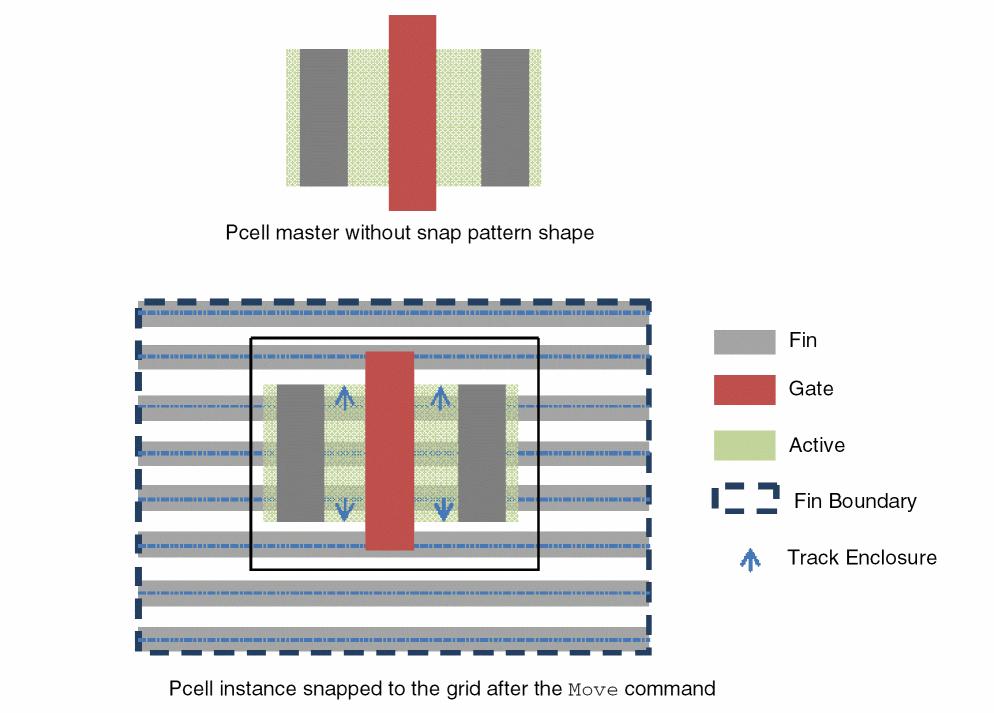
If there are multiple matching shapes, snapping is done based on the first LPP combined bounding box that is found, where the relevant edge overlaps the snap pattern shape. The relevant edge is the lower edge for vertical snapping and the left edge for horizontal snapping.
If the snap pattern shape applies to shapes on multiple LPPs and the instance master contains shapes on several such LPPs, the snapping algorithm performs snapping based on any one of the LPPs.
If the instance overlaps multiple snap pattern shapes that are Active, then the algorithm performs snapping based on just one snap pattern shape.
The layout editor automatically snaps the Pcells in modgens to the snap pattern. Therefore, the entire modgen block is snapped to the top-level snap pattern shape. A modgen comprises multiple Pcell instances in the form of a complex, structured array.
Related Topics
Object Snapping to Local Snap Pattern Shapes
Return to top