
Shape Snapping
Shapes that overlap a snap pattern shape are snapped to the grid after a copy or move command. For example, consider a snap pattern shape that applies to the Active layer and it is moved over a snap pattern shape. The shape is snapped to the grid based on the enclosures attribute of the snap pattern definition.
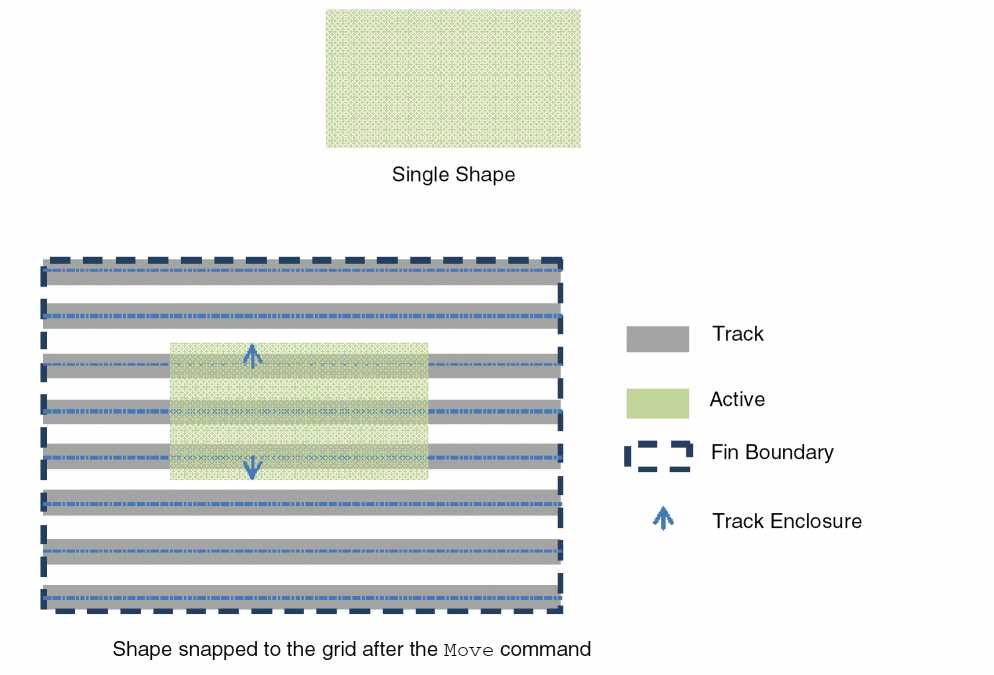
A shape may overlap multiple snap pattern shapes and more than one of those may apply to it. In this case, the snapping algorithm performs snapping based on one snap pattern shape. If a shape overlaps multiple snap pattern shapes, snapping is done only if all the snap pattern shapes are aligned.
When you are creating a rectangle and the rectOnSnapPatternGrid environment variable is enabled, a DRC-correct rectangle is created.
Related Topics
Object Snapping to Local Snap Pattern Shapes
Return to top