
Points Entered Incorrectly
While creating an object if you entered a point incorrectly, you can delete the point.
To delete the last point entered:
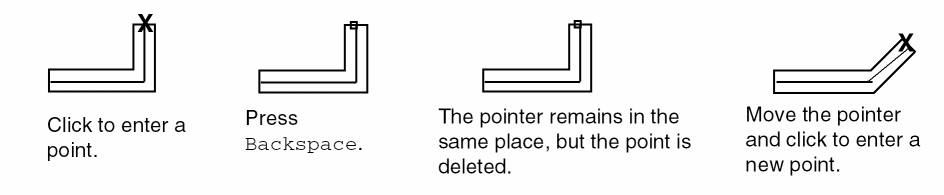
If you finish creating an object and then find it is incorrect, remove the object by undoing the last command by choosing Edit – Undo.
You create objects on layers that represent the layers of your physical design. If you notice you are creating objects on the wrong layer, then click the layer that you want in the Layers panel of the Palette assistant. The current entry layer changes to the one you choose.
If you finish creating an object and notice it is on the wrong layer, change the layer for that object by doing either of the following:
- To move the object to a new layer, use the Edit – Move command.
- To change the layer property of the object, use the Edit – Basic – Properties command.
Related Topics
Object Creation by Entering Points
Troubleshoot Entered-Points Issues
Troubleshoot Basic Editing Issues in Layout XL
Return to top