
Sets of Subrectangles
You can define one or more sets of subrectangles in relation to the centerline of any master path. A set can contain one or more subrectangles.
You can specify the width and length of the subrectangles or let them default to the minWidth rule for the subrectangle layer from the technology file. You can offset the centerline of the subrectangles from the master path centerline, and you can offset the edge of the first and last subrectangles from the ends of the master path.
You can define connectivity for a set of subrectangles. When you specify that a set of subrectangles is a pin, each rectangle in the set becomes a pin. In the layout editor, the whole multipart path (master path and all subparts) is treated as a single object.
The location of a set of subrectangles in relation to the master path depends on the values of the Separation and Justification fields, in relation to the direction of the master path.
When you create a subpart consisting of a set of subrectangles, the system creates a subrectangle in the corner formed by each segment of the subrectangle subpath, and then fills in the rest of the segment with subrectangles, following the spacing you specify.
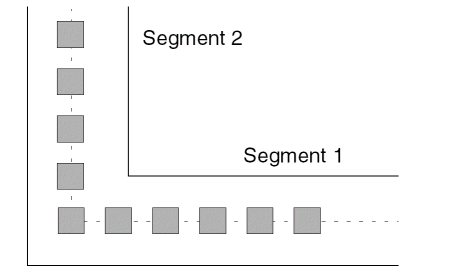
There are several reasons that you might want to keep rectangles out of the corners of your subrectangle subpaths. For example, when you specify multiple subrectangle subpaths, placing rectangles in the corners of segments might cause individual subrectangles to be out of alignment vertically or horizontally with the subrectangles in the other subrectangle subpaths.
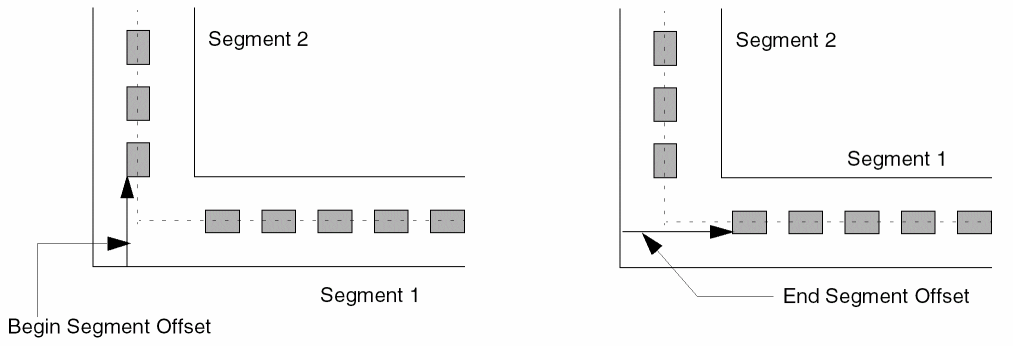
If you do not want rectangles in the corners of segments, you can keep them out by specifying the Begin Segment Offset and End Segment Offset options in the ROD Subpart form. The system measures the segment offset values from the edge of the master path, as shown below.
When setting values for the segment offset options, keep in mind the following:
- The Begin Segment Offset value does not apply to the first segment; the position of the first rectangle in the first segment is determined by the value of the Begin Offset option.
- The End Segment Offset value does not apply to the last segment; the position of the last rectangle in the last segment is determined by the value of the End Offset argument.
- The segment offset arguments work in combination with the Begin Offset and End Offset arguments.
- If the segment begins before the full distance specified by the Begin Segment Offset option, then the Begin Segment Offset is not applied, and a subrectangle could be placed at the corner of the subrectangle subpath.
- If the segment ends before the full distance specified by the End Segment Offset option, then the End Segment Offset is not applied, and a subrectangle could be placed at the corner of the subrectangle subpath.
- When applying the Offset options, the system will not create a spacing error. If the first rectangle in a subrectangle subpath segment would be too close to the last rectangle in the previous segment, the system discards the last rectangle in the previous segment.
When you specify the offset options, you need to check the results to make sure the corners are as desired. If they are not, you should change the values of the offset arguments and try again.
Related Topics
Flow for Creating Multipart Paths
Return to top