
Creating Bond Finger Definitions
The Virtuoso RF solution supports the creation and reuse of bond fingers. When creating bond wires, instead of specifying bond finger parameters each time, you can choose from a list of predefined bond fingers. To define bond fingers:
- Open the Create Bond Wire form.
-
Click Add next to the Definition option in the Bond Finger section. The Add Bond Finger Definition form is displayed.
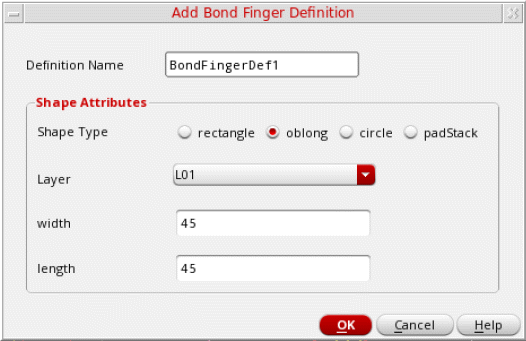
- Specify a unique value for Definition Name.
- Select a shape for the bond wire: rectangle, oblong, circle, or padStack. Depending on the selected shape, the remaining options vary.
- Click OK.
Related Topics
Bond Wires and Bond Fingers Creation
Creating Bond Wires and Bond Fingers
Return to top