
Setting a Bond Wire Profile
A bond wire profile defines the properties and curvature of a bond wire. Bond wire profiles can be applied to existing bond wires to update their structures and properties.
In the Virtuoso RF Solution, bond wire profiles are defined in the technology file. You can create bond wire profiles that match your specific design needs.
To apply a bond wire profile to a bond wire:
- Select the required bond wires in the layout canvas.
-
Choose Module – Bond Wire – Set Bond Wire Profile. The Set Bond Wire Profile form appears.
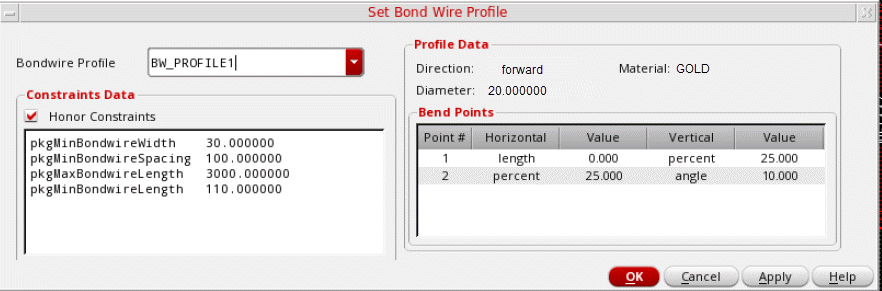
- Select the required profile from the Bondwire Profile list.
-
Select Honor Constraints to specify that the bond wires are to honor the listed constraints. To deviate from the specified constraints, turn off Honor Constraints.
For example, in the profile shown above, the wire profile Diameter is set to20.00andpkgMinBondWireWidthconstraint is30.00. To override the profile-specified values over constraints, turn off Honor Constraints. In the above example, the correct value is30.00. However, to assign the value as20.00, turn off Honor Constraints. - Verify the following settings in the Profile Data section:
-
Verify the settings in the Bond Points section.
Click OK to apply the bond wire profile to the selected bond wire.
Alternatively, to set the bond wire profile quickly without opening the form, select the required bond wire, right-click, and select a bond wire profile from the Set Bond Wire Profile command in the shortcut menu.
Related Topics
Moving Bond Wires and Bond Fingers
Updating the Finger Attach Point
Return to top