Key Edit-in-Concert Views
The following table shows the key views in Edit-in-Concert mode and their descriptions.
|
Views
|
Description
|
|
Die layout
|
Layout view of an unpackaged chip
|
|
Die symbol
|
Symbol view of an unpackaged chip
|
|
Die schematic
|
Schematic view of an unpackaged chip
|
|
Package schematic
|
Schematic view of the package
A package contains the padstacks, labels, outline, TILPs, and so on. It visually represents the component in Layout MXL. Note that a single package may consist of a symbol or multiple logical symbols.
|
|
Package layout
|
Layout view of the non-IC fabric
|
|
Die abstract
|
One of the results of exporting the die along with a TILP, schematic, and symbol view for instantiation in a package.
|
|
TILP
|
Technology Independent Layout Pcells (TILPs) are created from the die symbols, which have been created from exporting the die. TILPs are added to the libraries from importing into the package layout.
|
|
Die abstract symbol
|
Symbol view of the die abstract created while exporting the die
|
|
Die abstract Schematic
|
Schematic view of the die abstract created while exporting the die
|
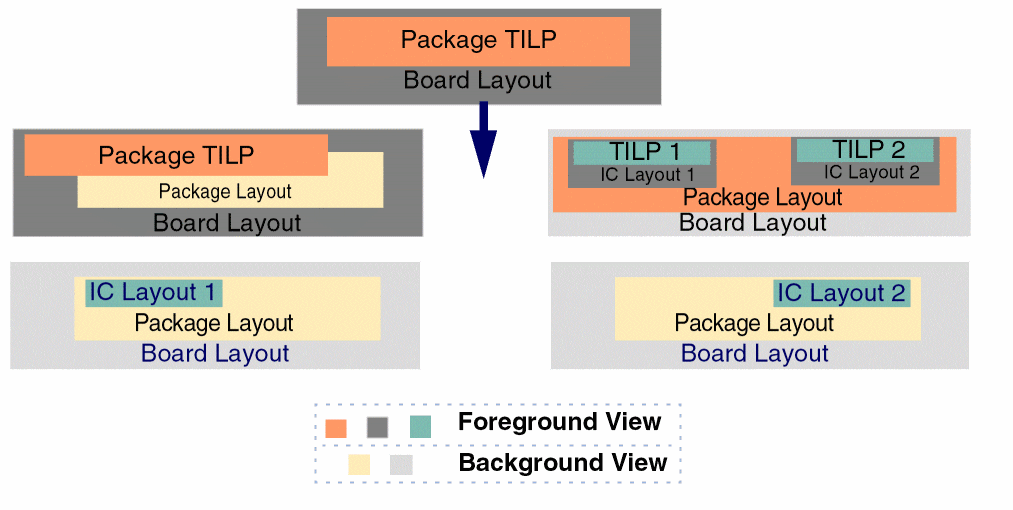
The Edit-in-Concert command processes the source layout for more than one hierarchal level. In the following example, the launch pad for the command is a board layout that includes a package TILP. The Edit-in-Concert command processes the corresponding package layout and opens separate tabs for all the constituent IC layouts, with the package and board layouts in the background view.
|
Launch Pad
|
Package Tab
|
Package Layout Tab
|
IC Layout Tab
|
IC Layout Tab
|
|
BG View
|
FG View
|
BG View
|
FG View
|
BG View
|
FG View
|
BG View
|
FG View
|
BG View
|
FG View
|
|
|
Board Layout
Package TILP
|
Package Layout
|
Board Layout
Package TILP
|
Board Layout
IC Layout1
IC Layout2
|
Package Layout
TILP1
TILP2
|
Board Layout
Package Layout
|
IC Layout1
|
Board Layout
Package Layout
|
IC Layout2
|
Related Topic
Packaging-Related Terminology
Die/TILP Instantiation
Return to top