
Viewing Die Instance Annotations
In very complex package designs, it might be difficult to visually distinguish the die instances from other die components. The Module menu includes the Die Instance Annotations command, which lets you highlight the die instances and display annotations that provide basic information about the die instances.
Die instance annotations display the following information:
- Name of the die instance. The instance to which it is bound is displayed within brackets.
- Mirroring state of the die instance.
- Flipped state of the die instance.
- Optical shrink factor of the die instance.
To view die instance annotations:
-
Choose Module – Die Instance Annotations. The Die Instance Annotations form appears. Use the options in this form to customize the way in which die instance annotations are displayed.
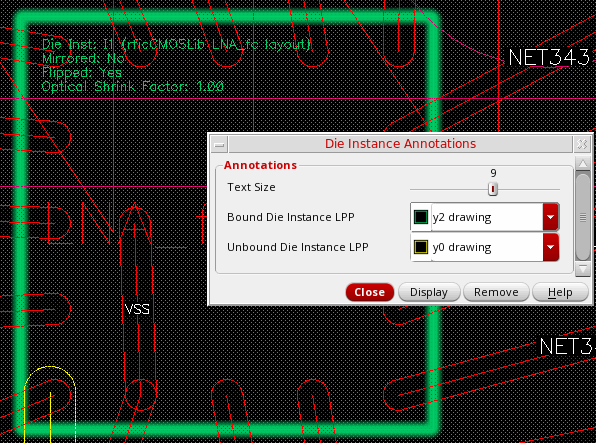
- Drag the Text Size slider to adjust the size of annotation text.
- Use the Bound Die Instance LPP and Unbound Die Instance LPP options to assign different highlight colors to bound and unbound die instance LPPs to facilitate easy visual distinction in complex designs.
- Click Display to view the annotations on the canvas.
Return to top