
Performing LRP Analysis
You can view the LRP plot for a net using the Voltus-XFi Results Browser assistant. Perform the following steps after loading the IR drop analysis results:
-
Select a net for which you want to perform the LRP analysis in the Net Summary (top) section and click Load Nets.
 .
. -
In the LRP tab, click Shorted Layers
 to short specific layers for LRP analysis.
 -
Click Compute LRP
 to compute LRP values for all nodes of the selected net.
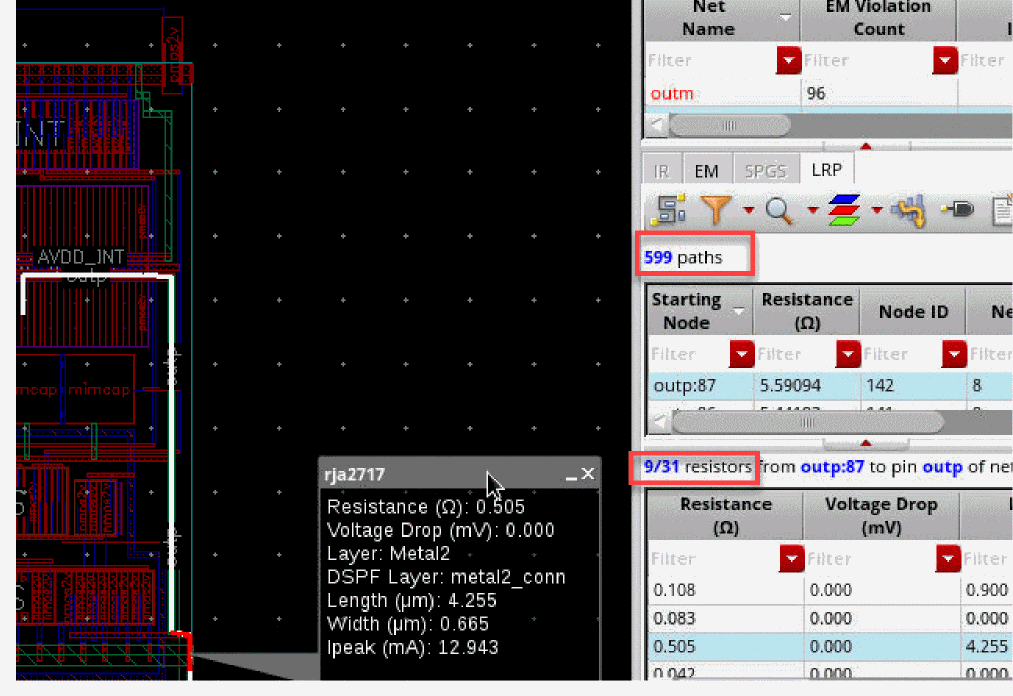
The LRP information is populated in the Starting Node, Node ID, and Resistance columns of the paths table in the LRP tab. - Select a node in the paths table to view its LRP in the layout. When a node is clicked, the LRP path is highlighted in white in the Virtuoso layout.
-
In the resistors table of the LRP tab, you can view the list of resistors for a path. The LRP path is highlighted with a white border and the resistor from the path is highlighted in red, as shown below:
Related Topics
- The Voltus-XFi Results Browser Graphical User Interface
- Visualizing EM-IR Analysis Results using Voltus-XFi Results Browser
- Shorting Layers for LRP Analysis
- Selecting a Node for LRP Analysis from the IR Tab
Return to top