
proute_block_ring
proute_block_ring
-layers {s_layerName s_layerName …}
-nets {s_netName…}
{-net_width f_userunit | -layer_width {f_width…}}
{-set d_setObj | -instances {s_instName…}}
[ -block_clearance {f_userunit | {f_left f_bottom f_right f_top}} |-in_block_clearance f_userunit ]
[ -contour [ true | false ] [ -min_jog f_length ] ]
[ -channels [ true | false ] ]
[ -depopulate {[L] [B] [R] [T] [H] [V]} ]
[ -ignore_obstacles [ true | false ] | -ignore_purposes {s_purposeName…} ]
[ -lattice [ true | false ] ]
[ -net_clearance f_userunit ]
[ -power_only [ true | false ] ]
[ -silent [ true | false ] ]
[ -undoable [ true | false ] ]
Description
Adds rings for the selected set of instances.
To add interlayer connections for the block rings, use proute_via_insertion.
Arguments
|
|
||
|
If one argument value is given, it must be a non-negative number for the clearance outward from the block boundary to the innermost ring. If four values are given, they may be any real numbers for clearances to the left, bottom, right, and top, respectively. Positive values are measured outward from the block boundary to the innermost ring. Negative values indicate distance inward from the block boundary to the innermost edge of the innermost ring.
By default, the clearance is the greater of the minimum clearance of the two layers specified by |
||
|
When |
||
|
If true, the block ring will follow the contour of the selected blocks. By default, the block ring will be rectangular. |
||
|
Prevents one or more segments of the block ring from being added. This argument does not apply to channel segments between blocks. |
||
|
When |
||
|
Similar to |
||
|
Specifies the clearance inward from the block boundary to the outermost ring. The value must be non-negative. The block rings will be added inside the block boundary and will be rectangular. |
||
|
When |
||
|
Specifies the width, in microns, to use for each layer given in the |
||
|
Specifies at least two orthogonal metal layers to use for the block ring of each net. One layer must have a preferred horizontal direction and one other layer must have a preferred vertical direction. |
||
|
Removes contour jogs shorter than the given length. The default value is equal to |
||
|
Specifies the spacing between the power nets routed. By default, this value is the greater of the minimum clearance of the two layers. |
||
|
Specifies the total width for each net routed. By default, this value is the greater of the minimum widths of the two layers.
If you specify a net width value that is greater than the |
||
|
Specifies the nets to route. One or more nets can be given. When more than one net is given, the list order of the nets determines the placement of the rings, with the first net on the innermost ring, followed by the second, and so on, to the last net of the list on the outermost ring. |
||
|
If |
||
|
When |
||
|
Permits this command to be undone. Default is the current setting for the |
||
Examples
In the following examples, block rings are created for two blocks, A and B. In these examples, BLKA is the set containing block A, BLKB is the set containing block B.
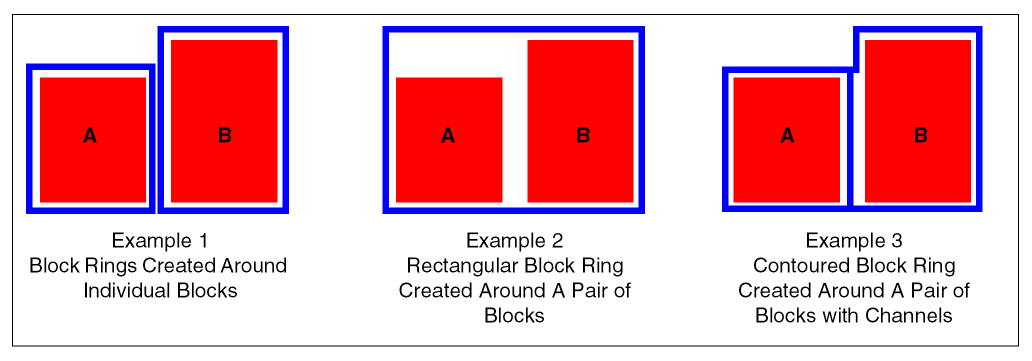
Example 1 — Block Rings Created Around Individual Blocks
proute_block_ring -set $BLKA -layers {met2 met3} -net_width 8 -net_clearance 2 -nets {VDD VSS}
proute_block_ring -set $BLKB -layers {met2 met3} -net_width 8 -net_clearance 2 -nets {VDD VSS}
Example 2 — Rectangular Block Ring Created Around a Pair of Blocks - No Contouring
set BLKA_B [or_sets -set1 $BLKA -set2 $BLKB]
proute_block_ring -set [$BLKA_B] -layers {met2 met3} -net_width 8 -net_clearance 2 -nets {VDD VSS}
Example 3 — Contoured Block Ring Created Around a Pair of Blocks with Channels
set BLKA_B [or_sets -set1 $BLKA -set2 $BLKB]
proute_block_ring -set [$BLKA_B] -layers {met2 met3} -net_width 8 -net_clearance 2 -nets {VDD VSS} -contour -channels
The next examples illustrate how to configure block rings as concentric rings or latticed rings. This option is only effective when you specify duplicate nets surrounding a block. For these examples, four rings are created around a block, two for VDD and two for VSS. The list order determines the placement of the rings from the innermost ring to the outermost ring: VDD, VSS, VDD, VSS.
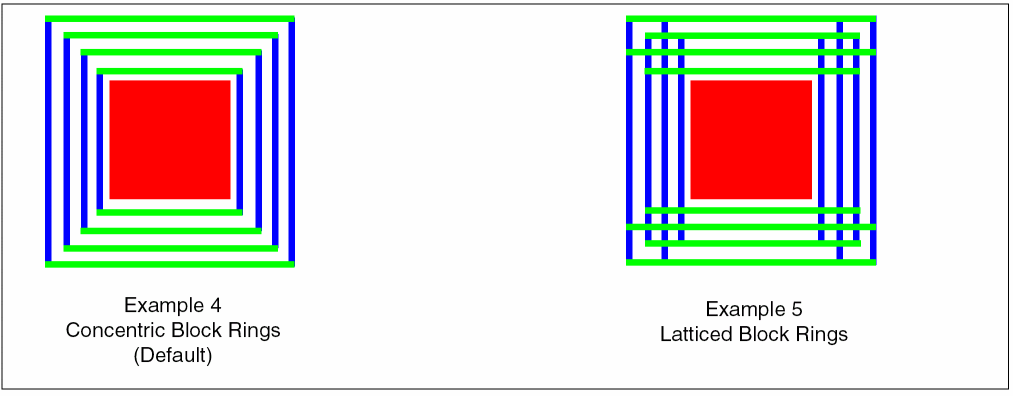
Example 4 — Concentric Block Rings (Default)
proute_block_ring -set $BLKA -layers {met2 met3} -net_width 8 -net_clearance 2 -nets {VDD VSS VDD VSS}
Example 5 — Latticed Block Rings
proute_block_ring -set $BLKA -layers {met2 met3} -net_width 8 -net_clearance 2 -nets {VDD VSS VDD VSS} -lattice
Related Topics
Return to top