
minDirectionalOverlap
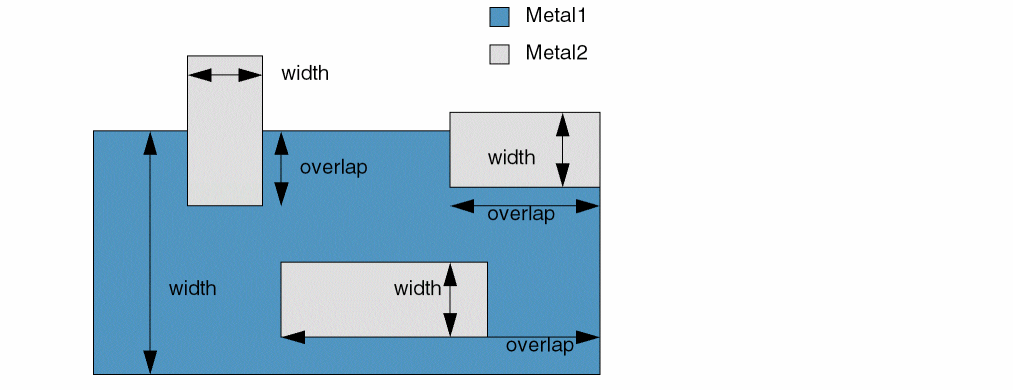
Specifies the required overlap in a given direction between two shapes on different layers. In this case:
- The width of a shape is the smaller of its two dimensions.
- The overlap between the layer1 and layer2 shapes is measured in the length direction of the layer2 shape, that is, between the outside edge of the layer1 shape and the innermost edge of the layer2 shape.
The constraint can optionally apply only:
- When the layer1 or the layer2 shape is within a specified width range.
- When the layer1 and layer2 shapes are on the same net.
-
For overlaps measured in the horizontal or vertical direction. By default, the constraint applies to overlaps in either direction.
minDirectionalOverlap Quick Reference
Value Type
Optional Parameters
|
Specifies the overlap measurement direction for which the constraint applies.
Type: |
|
|
Specifies that the constraint applies only to layer1 shapes with widths in this range.
Type: |
|
|
Specifies that the constraint applies only to layer2 shapes with widths in this range.
Type: |
|
|
Specifies that the constraint applies only if the layer1 and layer2 shapes are on the same net. The default value of this parameter is
Type: |
|
Example: minDirectionalOverlap using overlapDirection
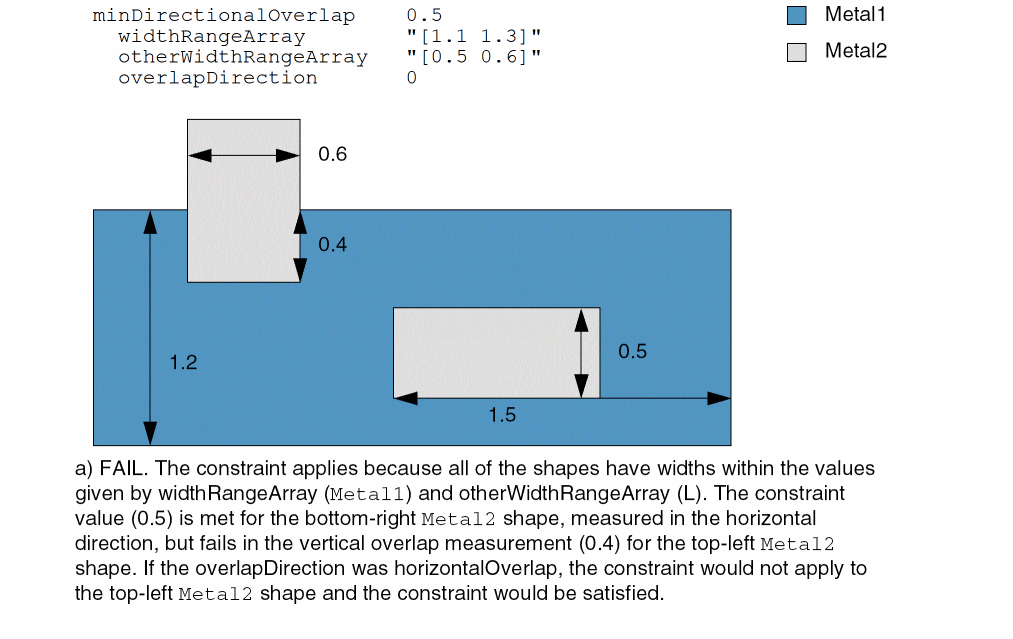
Sets the minimum overlap between the shapes on Metal1 and Metal2 to 0.5 user units under the following conditions:
-
The width of the
Metal1shapes is greater than or equal to 1.1 and less than or equal to 1.3. -
The width of the
Metal2shapes is greater than or equal to 0.5 and less than or equal to 0.6. - The overlap direction is horizontal and vertical.
set_constraint_parameter -name widthRangeArray -RangeArrayValue {"[1.1 1.3]"}
set_constraint_parameter -name otherWidthRangeArray -RangeArrayValue {"[0.5 0.6]"}
set_constraint_parameter -name overlapDirection -IntValue 0
set_layerpair_constraint -layer1 Metal1 -layer2 Metal2 \
  -constraint minDirectionalOverlap -Value 0.5
Related Topics
Return to top