
Connectivity from stampLabels During Extraction
If a top-level shape or a substrate region overlaps the origin of a label, you can choose to automatically assign the shape (or the substrate region) to the net referenced by the label text. However, for the shape (or the substrate region) to be connected to the label, a valid stampLabelLayer association should be defined in the technology file for the layer of the shape (or the substrate region) and that of the label.
To enable the feature, you must select the Assign shapes from overlapping labels as defined by 'stampLabelLayers' rule option on the Connectivity Form. If the stampLabelLayers rule is not defined in the technology file, the option appears disabled.
Let us now consider some scenarios that detail how the overlap with a label is processed by the extractor.
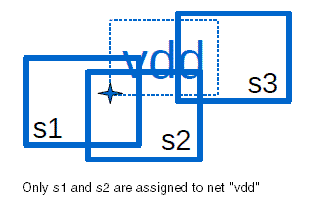
Scenario 1: If a label is overlapped by several shapes, only those shapes that overlap the origin of the label are connected to the net referenced by the label text.
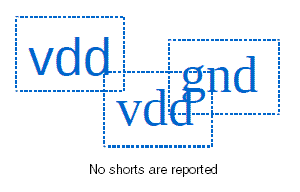
Scenario 2: If a label is overlapped by other labels due to space constraints, no shorts are reported.
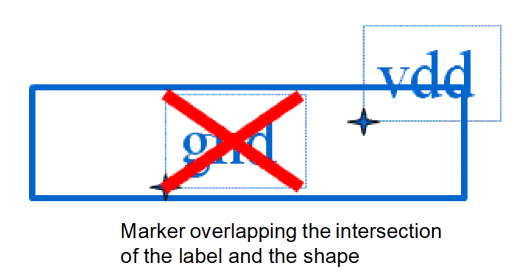
Scenario 3: If a shape overlaps a label that has sticky connectivity to another net, a short marker is created.
For more information about stamp labels, see in the Virtuoso Technology Data ASCII Files Reference User Guide and the Auto option under Label Layer/Purpose in the Create Label form
Related Topics
Return to top