
Set Instance as Transparent
Legacy designs that have additional levels of layout hierarchy compared to the schematic can be made XL-compliant if the additional layout hierarchy is made transparent. This enables the binder to bind to the instances and nets within the instance that was earlier considered to be a leaf-level instance.
You can use the Set Transparent command to manually make an existing layout instance transparent.
In some cases, an existing layout instance may be automatically set as transparent during an Update Binding run. This can be done to improve the Layout XL compliance of the design, while preserving the layout hierarchy.
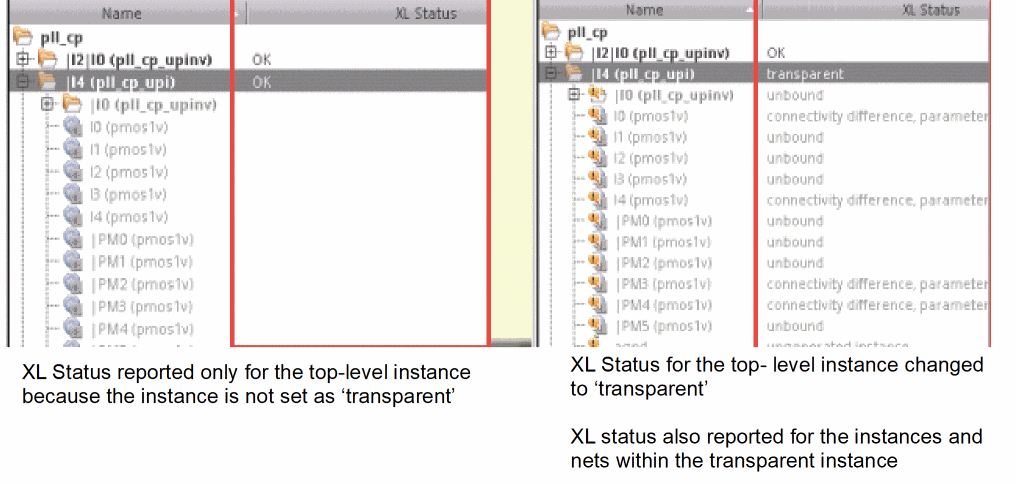
Alternatively, if a new level of hierarchy needs to be introduced in the layout without losing XL-compliance, the Make Cell command is more appropriate to use.
Irrespective of the method in which a transparent instance is created, Layout XL allows these instances to be copied and replicated in the design. The transparent instances so created continue to be transparent. However, the instances and nets within the transparent instance copy might be unbound and lack XL-compliance until sufficient connectivity is added to bind them.
To identify the connectivity and binding differences between the instances and nets within a transparent instance and their schematic counterparts, you can run the Check Against Source command at the top level. The Check Against Source command reports the binding differences for instances and nets within a transparent instance in the same way as it does for regular instances and nets at the top level.
To resolve the connectivity and binding issues with the transparent instance, you can modify the transparent instance at the top level, or descend into the hierarchy by using the Edit In Place command. Using the Edit In Place command to modify the transparent instance ensures that only the selected occurrence of the transparent instance is updated, not the transparent instance master.
When you descend edit into a transparent instance master, no new schematic is opened and no new binder is launched. Layout XL remains in the context of the current schematic, binder, and the physConfig. This is unlike when descending into a nontransparent instance, which causes Layout XL to launch a new binder, a Layout XL session, and a corresponding schematic and physConfig.
When you descend edit into a transparent instance master, you cannot open the master independently in another window and launch another Layout XL session from that window. Layout XL issues a warning message indicating the operation is not supported.
In some design situations, instead of updating the instance and nets within a transparent instance, Layout XL compliance can be achieved by ignoring the additional layout hierarchy. For such designs, you can set the layout instance as nontransparent by using the Unset Transparent command.
Related Topics
Creating a Transparent Instance
Return to top