
Update Binding Form
Use the Update Binding form to increase Layout XL-compliance by improving the binding between the schematic and the layout instances at the current level or within the hierarchy.
If your design is largely LVS clean but the bindings are incorrect, you can clear the logical connectivity and re-extract the design. If you are sure that any user-defined bindings you created using the Define Device Correspondence Form form are correct, you can choose to preserve existing user-defined bindings. Alternatively, you can bind the instances based on a binding file.
| Field | Description |
|---|---|
|
This section lets you specify the type of binding to be applied. |
|
|
Binds the schematic and layout instances that have matching names. Environment variable: bindNameOnly |
|
|
Runs the Update Binding command at the current level for each layout and schematic cellview pair found in the design hierarchy. At the end of the command, the XL status is displayed for each layout cellview with connectivity reference, and a list of layout cellviews with no connectivity reference is also displayed. Environment variable: bindAllCellsInDesign For backward compatibility, the ?hierarchical argument is also supported. |
|
|
This section lets you specify the type of Connectivity for the design. |
|
|
Deletes all logical connectivity from the design and re-extracts the layout to derive the physical connectivity so that the binder can bind using the correct connectivity. Physical connectivity is the connectivity derived from overlapping physical objects (or shapes) in the layout. It is recommended to use physical connectivity for updating bindings if the design is LVS clean but the layout was created outside Layout XL. If the logical connectivity is cleared, the Extract to level must be specified for the re-extraction. If the Clear option is deselected, the Update Binding command uses both logical and physical connectivity to improve the bindings. To clear all the bindings before attempting to rebind, deselect both the Preserve binding options. Environment variable: bindClearConn |
|
|
Extracts the layout down to the specified level. By default, the command is set to extract only the top level. However, you can update the field to choose extracting up to a specific hierarchical level. For example, if the design has route cells and the extraction level is set to 0, the binder cannot improve the bindings unless the extraction depth is manually increased and the layout is extracted again. When extracting hierarchically, it is recommended that you define stopLayers in your technology file before running Update Binding so that the extractor ignores the layers that are being used to cut other layers and any undesirable violations can be avoided. Environment variable: bindExtract |
|
|
Creates pins from labels in Layout XL, if the label text or text display matches an ungenerated schematic terminal name. Pins are also created for terminals that already have pins but labels are swapped in the layout. Environment variable: createPinsFromLabels |
|
|
Removes duplicate instances, shapes, and vias from the layout cellview. Environment variable: removeDuplicateObjects |
|
|
Binds schematic instances with those layout instances that have the master defined using the Configure Physical Hierarchy Window. By default, the option is ON. The Physical bindings option is disabled in the Hierarchical mode when binding based on a Binding file or an Instance Cross Reference file.
By default, the bindCorrectMaster environment variable needs to be
The Physical bindings field cannot be used to change the value of the Environment variable: updateBindUsePhysicalBinding |
|
|
Updates the physical bindings in CPH if the current physical binding does not match the bound layout instance. The Update – Physical bindings option is disabled when the Use – Physical bindings option is selected. Environment variable: updateBindPhysicalBinding |
|
|
Adds an ignore property on the layout instances that are identified as route cells to ignore the instances for binding. Route cells are identified as cells that have no devices using extract stop layers. For cases when no extract stop layers are defined, route cells are identified as the ones that have no terminals but only metal or cut shapes. By default, the option is OFF. Environment variable: bindIgnoreRouteCells If the route cells exist within a transparent layout hierarchy, the ignore property cannot be added during an Update Binding run. Adding the ignore property on route cells within a transparent hierarchy requires editing the transparent instance master. The Update Binding command does not support such edits that require modifying the layout cellviews other than at the top level. |
|
|
Ignores any unbound, potential dummy instances that are identified during a binding run. By default, the option is OFF. Alternatively, you can ignore the unbound instances by selecting the instances and choosing Add Ignore from the shortcut menu. Environment variable: bindIgnoreDummies |
|
|
This section lets you specify the preserve options for bindings. |
|
|
Preserves the user-defined bindings of devices between the schematic and the layout. This option preserves user-defined one-to-one, many-to-many, many-to-one, and one-to-many device correspondences defined in the Define Device Correspondence Form form. If the option is deselected, the Update Binding command deletes any existing device correspondence before processing the bindings. Environment variable: bindPreserveUserBindings |
|
|
Preserves not only the user-defined bindings but also any other existing bindings between the schematic and the layout devices. If the option is deselected, the Update Binding command recreates all bindings. Environment variable: bindPreserveExistingBindings |
|
|
Traverses through the hierarchy, binding the schematic and the layout instances along the way. |
|
|
Flattens the layout instances, if required, when binding hierarchically and creates leaf-level bindings. Since the leaf-level bindings have a one-to-one correspondence, full Engineering Change Order (ECO) capability is available for the design. If the Flatten layout instances option is deselected, the layout hierarchy is preserved and you can choose to create either complex bindings to resolve hierarchy mismatches between the schematic and the layout or create transparent instances. If you choose to create complex bindings, ECO capability of the design is restricted. Environment variable: bindPreserveLayoutHierarchy (determines whether the layout hierarchy will be preserved or the layout instances will be flattened to create leaf-level bindings). The Flatten layout instances option is enabled only when Hierarchy – Binding is selected. Depending on the value of the Create option, the flattened instances can exist as free objects or can be formed into a synchronized family or a regular figure group. |
|
|
Generates transparent instances or complex bindings during hierarchical binding when Flatten layout instances is OFF. Alternatively, the Create option can create a synchronized family, a figure group, or let the flattened instances to exist as free objects, when Flatten layout instances is ON. By default, transparent instances are created when binding hierarchically. The options that you see in the Create field depend on the value of the Flatten layout instances option. If Flatten layout instances is OFF, Create displays the following options: Transparent Instances and Complex Bindings. The default is to create transparent instances. If Flatten layout instances is ON, Create displays the following options: Synchronized Family, Grouped Objects, and Free Objects. The default is to create Synchronized Family. Environment variable: bindFlattenLayoutCreate |
|
|
Converts layout instances into transparent instances such that the binder can bind the instances within the transparent instance to the corresponding schematic instances. By allowing such one-to-one bindings, the original layout hierarchy is preserved. The Create – Transparent Instances option is only enabled in the Hierarchical mode when the Flatten layout instances option is disabled and the Create option is set to Transparent Instances. In other words, the Create – Transparent Instances option can help improve binding by allowing the layout instances to be made transparent instead of flattening them. If Update Binding is run at the current level and the layout design already has a transparent hierarchy, the Update Binding command considers the transparent layout hierarchy for binding. This means, wherever possible, the Update Binding command binds to the layout instances that exist within the transparent hierarchy in the design. |
|
|
This section lets you specify options available in the Read File drop-down menu. |
|
|
Specifies that the binder performs an automatic hierarchy match and creates complex bindings to improve the schematic versus layout bindings. Environment variables: bindFile, bindCrossRefFile, and bindExtractedNetlistFile If all the environment variables are set to "", Read File sets to None. If bindFile is set to a valid value, and the environment variable takes precedence over the other associated environment variables, Read File sets to Binding. Else, if bindCrossRefFile or bindExtractedNetlistFile are set, Read File sets to PVS. |
|
|
Provides the path to the binding file to be used for improving the schematic versus layout bindings. 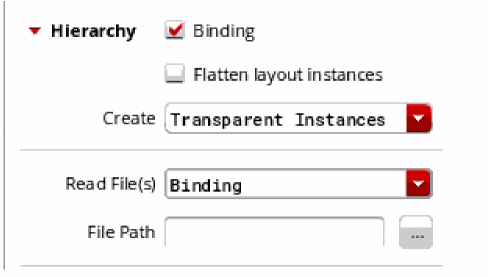 If the Binding option is selected and a binding file is selected in the File Path field, the binder uses the binding file to improve the bindings across the schematic and the layout. However, if the Binding option is selected but no binding file is specified, the Update Binding run does not proceed. Environment variable: bindFile |
|
|
Specifies that the input from a PVS LVS run will be used for running Update Binding. 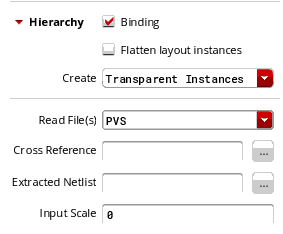 |
|
|
Provides path to the PVS LVS If the PVS LVS instance cross reference file is specified, the binder uses the specified file to improve the bindings across the schematic and the layout. If any mismatched instances are encountered while parsing the.ixf file, they are ignored. If the PVS LVS instance cross reference file is not specified, Update Binding run does not proceed. Environment variable: bindCrossRefFile |
|
|
Provides the path to the PVS LVS If the path to the instance cross-reference file has been specified, the path to the extracted netlist file must also be provided for the binder to improve the existing bindings. Environment variable: bindExtractedNetlistFile |
|
|
Specifies the floating point input scale for running PVS. By default, input_scale is 0, which means that dbuPerUu for the layout is used. But, if the PVS input scale is different from that of the layout, and the PVS rule file is specified, the PVS rule deck is parsed to determine the appropriate value. Alternatively, you can specify the PVS input scale to be used. Environment variables: bindPVSScale, bindPVSRulesFile |
|
|
Reports cells that have no permute rules defined. Environment variable: checkPermute |
|
|
Reports cells that have a missing component type. Environment variable: checkCompType |
|
|
Reports parasitic devices that could be ignored. Environment variable: checkRemoveDevice |
|
|
Reports unbound dummy layout instances. Environment variable: bindReportDummies |
|
|
Reports layout instances that have an ignore property set. Environment variable: bindReportRouteCells |
|
|
Reports the schematic and layout cellviews that are being descended into to create the bindings. Environment variable: bindReportHierarchy |
|
|
Reports instances that have an unconnected instance terminal. Environment variable: bindReportUnconnInstTerms |
|
|
Reports cellviews with instance terminals that do not match any instances in the corresponding schematic view. Environment variable: bindReportTerminalMismatch |
|
|
Reports cellviews with shorts between instance terminals and opens between strongly- or weekly-connected pins. Environment variable: checkShortsAndOpens |
|
|
Reports cellviews with no terminals. Environment variable: bindReportCellsNoTerms |
|
|
Reports instance terminals with no pins. Environment variable: checkMissingTermPins |
|
|
Checks and reports duplicate instances, shapes, and vias in the layout cellview. Environment variable: checkDuplicateObjects |
Related Topics
Configure Physical Hierarchy Window
Transparent Layout Hierarchy Generation
Issues Faced when Setting up the PDK to Improve Layout XL Compliance
Return to top