
Troubleshoot Connectivity Extraction
You can face following issues during connectivity extraction in Layout XL:
- Connections Not Made
- Markers for Nonexistent Overlaps and Shorts Appear
- Path Ends Not Accepted
- Placement and Routing Do Not Run
- Layout XL Does Not Recognize Physical Vias
- Moving Software Executables To a New Location
- Unmatched Instance Terminals are Automatically Removed
Layout XL Commands Requiring Schematic Extraction
Connections Not Made
If the software does not accept an electrical connection you make, make sure that the following information is set in the technology file. For more information, see Technology File Requirements for Layout XL and in particular Connectivity Rules.
-
Connectivity information in the appropriate constraint group, for example
virtuosoDefaultExtractorSetup. -
Layer information in the
layerRulessection.
Also check that the layer properties were set when you made the connection.
Markers for Nonexistent Overlaps and Shorts Appear
If there are markers for nonexistent overlaps and shorts in the layout, make sure that the appropriate layer was active when the path was created.
If this does not fix the problem, make sure that the layer information and connectivity information are set correctly in the technology file. For more information, see Technology File Requirements for Layout XL
Path Ends Not Accepted
If the software rejects the final segment of a path or wire connection and displays the following message.
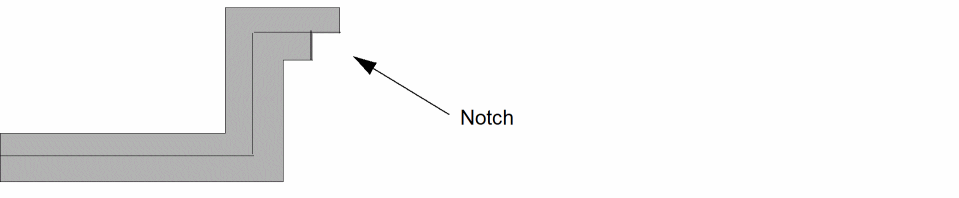
First or last segment of created path has length less than or equal to half the path width
-
Press
Returnto end a path instead of double clicking the mouse (do not double click to end a path).
-
From the layout window menu bar, choose Options – Display and set the Snap Mode for Create commands to something other than L90XFirst or L90YFirst.
When you use the L90XFirst or L90YFirst snap modes, the double click often makes a notch in the path, which triggers the error message and can cause errors in mask layout.
Placement and Routing Do Not Run
Layout XL does not let you place or route the elements of a design unless you have defined which layers of your layout design are conducting layers.
If you try to place or route your design before defining the conducting layers, you get an error message.
Define the layers you want to be conducting layers in the viaLayers constraint in the technology file.
See Technology File Requirements for Layout XL.
Layout XL Does Not Recognize Physical Vias
If you have an existing design in which Layout XL does not recognize physical vias, you need to add a property with name function and value via to the master cellview of the via or to the component description format (CDF) for via layout.
See
Moving Software Executables To a New Location
If you move software executables to a different location other than specified by manufacturing, the custom placer function may take longer to start because it is searching for the executable.
Unmatched Instance Terminals are Automatically Removed
When loading designs that have been edited outside Layout XL, the connectivity extractor silently cleans up any instance terminals that have no associated terminal in the cell master. This can mean that you are asked to save your design, even though nothing has visibly changed.
Layout XL Commands Requiring Schematic Extraction
Certain Layout XL commands, such as Update Components And Nets, Pick From Schematic, Generate All From Source, check that the schematic connectivity is up-to-date before proceeding. If the schematic has been changed since it was last extracted, you see a message indicating that it needs to be re-extracted.
If you see this message every time you run one of these commands, it is likely that there are errors in the schematic that have prevented the previous extraction from completing successfully.
If this is the case, you need to run extraction again, fix any errors highlighted, and save the schematic. The next time you run a Layout XL command, you will not be prompted to re-extract the schematic.
Related Topics
Technology File Requirements for Layout XL
Connectivity Extraction in Layout XL
Return to top