
A
auCdl Netlisting
This appendix describes the auCdl (Analog and Microwave Circuit Description Language) netlisting procedure. It contains details on parameters required for auCdl and also the different ways to netlist to auCdl. This information is applicable to any 4.4 version of the Virtuoso® design framework II (DFII).
This appendix covers the following topics:
- What Is auCdl and Why Do You Need It?
- Licensing Requirements
- Running auCdl
- Customization Using the .simrc File
- Support for HED Features
- Custom Netlisting Procedures
- Blackbox Netlisting
- Additional Customizations
- CDF Simulation Information for auCdl
- Complete Example
What Is auCdl and Why Do You Need It?
To compare a layout versus a schematic (LVS) using LOGLVS, you need a netlist representation of the schematic for a design for LOGLVS. The netlist must be in CDL (Circuit Description Language) format. To create a CDL netlist for an analog circuit, you use a netlister called auCdl (Analog and Microwave Circuit Description Language).
Licensing Requirements
You must have one of the following licenses to run auCdl from DFII or from the command-line. If one of these licenses are not already checked out, the first available license will be checked out in the following order when you run auCdl:
- 95100 Virtuoso® Schematic Editor L
- 95115 Virtuoso® Schematic Editor XL
- 206 Virtuoso® Simulation Environment
Running auCdl
You can run auCdl from within or outside the DFII environment.
To translate files from the DFII database format into an auCdl netlist,
-
Set the
CDS_Netlisting_Modeenvironment variable as given below:setenv CDS_Netlisting_Mode "Analog"
- Create an auCdl view for the cell. For more information, see Creating a config view for auCdl.
- Add the auCdl simulation information to the cell’s CDF. For more information, see CDF Simulation Information for auCdl.
You can customize the auCdl Netlister using the simulation run control (.simrc) file. For more information, see Customization Using the .simrc File.
Running auCdl from within DFII
In DFII, you can extract the auCdl netlist by doing the following:
- In the CIW, choose File – Export – CDL.
- In the CDL Out form, fill in the appropriate fields and click OK or Apply.
For more information about using CDL Out, read the Translating CDL Files section in the Design Data Translator’s Reference.
Running auCdl from the Command-Line
To run CDL Out from the command-line, you must create a simulation environment (si.env) file in advance and name the file as a command argument. Run CDL Out interactively once to create the si.env file. Once the si.env file is created,
-
Copy the
cds.libfile to the run directory. -
Enter the following command:
si -batch -command netlist
the-batchoption runs CDL in batch mode and the-command netlistoption generates an ASCII netlist file.
CDL Out can generate a hierarchical netlist. CDL Out generates a netlist hierarchy that duplicates the hierarchy of your design. Each cell in your schematic becomes a separate subcircuit in the netlist. The hierarchical netlister automatically prefixes each instance name with the proper character for its element type; for example, "M" for MOSFET and "R" for resistor. This prefixing minimizes mapping and name translation.
The si.env File
The following is an example of a si.env file followed by description of each of these properties.
simLibName = "testLib"
simCellName = "testTop"
simViewName = "schematic"
simSimulator = "auCdl"
simNotIncremental = nilsimReNetlistAll = nil
simViewList = '("auCdl" "schematic" "gate.sch" "cmos.sch")
simStopList = '("auCdl")
simNetlistHier = t
hnlNetlistFileName = "netlist"
simRunDir = "/cds/1.0/test/translator/cdlout/paramCase/"
resistorModel = " "
shortRES = 2000.0
preserveRES = 'nil
checkRESVAL = 'nil
checkRESSIZE = 'nil
preserveCAP = 'nil
checkCAPVAL = 'nil
checkCAPAREA = 'nil
preserveDIO = 'nil
checkDIOAREA = 'nil
checkDIOPERI = 'nil
displayPININFO = 'nil
preserveALL = 'nil
Description of si.env Properties
lvsIgnore equal to FALSE on some of the instances of resistors, then you should use the SKILL variables preserveRES and shortRES as follows:Defining cdlSimStopList and simStopList in the si.env File
The behavior of cdlSimStopList and simStopList properties are interdependent:
-
When
cdlSimStopListis defined with some value, the value ofsimStopListbecomes the same as the value ofcdlSimStopList. -
When only
simStopListis defined with some value, the value ofcdlSimStopListbecomes the same as the value ofsimStopList. -
When both properties are defined, the value of
simStopListbecomes the same as the value ofcdlSimStopList. -
When both properties are not defined, the default value
list("auCdl")is set for both.
-
When
Creating a config view for auCdl
To create a config view for auCdl:
-
In CIW, choose File - New - Cellview.
The Create New File form appears. - In the Cell Name field, enter the name of the cell in which you want to create the config view.
-
In the View Name field, enter the name of the view you want to create—for example,
config_aucdl. - In the Tool cyclic field, select Hierarchy - Editor.
- Click OK.
- Specify the top-level cell name and its view.
-
Click Use Template.
The Use Template form appears. - In the Name cyclic field, choose auCdl.
-
Click OK to display the New Configuration form.
You can modify the view list. - Click OK to create the view.
- Choose File – Save to save the configuration.
How to include partial netlist file in SUBCKT calls
You can automatically bind your cells to source files which will then be included in the .subckt statements.
Add following in your .simrc file
hnlReadHdbProps = 't
ansCdlHdbFilePathProp = "<property name>"
Using Hierarchy Editor, add the property to the lib/cell/view as cell property in which the netlist needs to be included. In the value field of this property, define full path of the partial netlist file and netlist the config view of the top cell. After the netlist is complete the information is added to the subckt file.
Example
In the given example, you want to include the file "/tmp/netlist/dummy_top1.net" inside LIB5/top1/schematic subckt. The contents to be added are
: X17 A B / dummytop1.
The original subckt in the netlist looks like:
************************************************************************
* Library Name: LIB5
* Cell Name: top1
* View Name: schematic
************************************************************************

.SUBCKT top1 A B
*.PININFO A:I B:O
XI0 A B / mid

.ENDS
In .simrc, set ansCdlHdbFilePathProp = "abc"
In the Hierarchy Editor for LIB5/top1/schematic, define a property "abc" with value "/tmp/netlist/dummy_top1.net"
After netlisting the top cell using Hierarchy Editor, the subckt file will read as follows:
************************************************************************
* Library Name: LIB5
* Cell Name: top1
* View Name: schematic
************************************************************************

.SUBCKT top1 A B
*.PININFO A:I B:O
XI0 A B / mid

.ENDS
************************************************************************
* This auCdl Netlist has been included for cell top1:
* NOTE: The connectivity in this netlist has not been verified by auCDL
*
X17 A B / dummytop1
*************************************************************************
.ENDS
Verification
After adding the property, the Check prop.cfg should read as:
cell LIB5.top1
{
string prop abc = "/tmp/netlist/dummy_top1.net"
}
Generating individual SUBCKT netlists
By default, auCDL netlisting generates a CDL top-level subckt netlist. This netlist comprises the netlists of all subcircuits in the design.
To generate individual subckt netlists, you need to set one of the following properties in the simrc or si.env file, based on your requirement:
-
cdlPrintIndividualSubckt = t
When you use this option, netlists for all individual circuits is generated in theihnldirectory. The files are namedcds0,cds1, and so on. This feature is similar to other netlisters such as Spectre and Verilog.
Additionally, you can sethnlSoftLineLengthto different values, such as72,80,90, and so on, to specify the desired formatting of the individual subckt netlists. -
cdlSubcktsDir = <directory_name>
When you set this property, a directory with the name you specify is created in the run directory. All individual netlists are stored in this directory with the file name as<cell_name>.cdl.
Additionally, the top header of each individual netlist file will include the same header as that for the top-level netlist. For example, when you use this option, all individual will comprise the following information in the header:*.BIPOLAR *.RESSIZE *.CAPPERI *.DIODE *.EQUATION *.SCALE METER *.MEGA .PARAM *.GLOBAL soisub! *.PIN soisub!
You can also set the cdlPrintBusDelimiter = t and auCdlPParEvaluation = t flags to further customize the generation of individual netlists.
-
allowNetNamesBeginningWithDigits = t
Prints net names starting with numeric characters as displayed in the schematic, without renaming them in the CDL netlist output.By default, the value of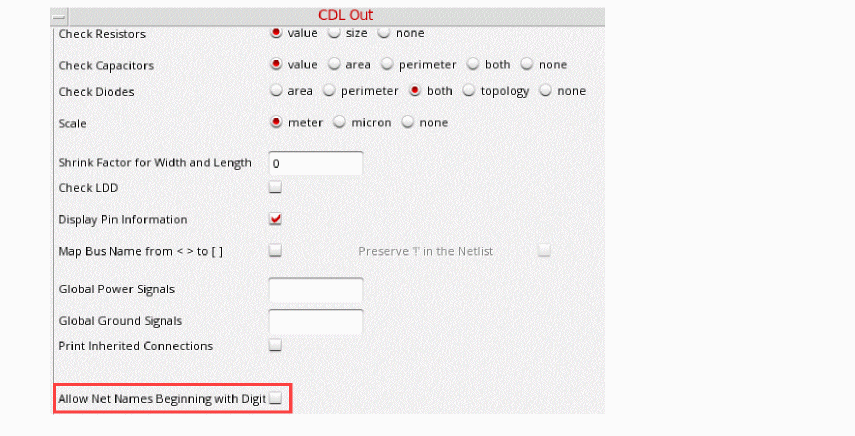
allowNetNamesBeginningWithDigitsisnil, and net names starting with numeric characters are renamed asN0,N1,and so on.
WhenallowNetNamesBeginningWithDigitsis set to t, net names starting with numeric characters are printed as they appear on schematic,1netxand2nety, and not renamed asN0,N1.
Customization Using the .simrc File
The behavior of the netlist can be further controlled using the simulation run control (.simrc) file. The parameters that you can include in the .simrc file are described in this section. The parameters you can set in the .simrc file are the same as those that are defined using the simSetDef SKILL function. This SKILL function defines variables only if they have not been defined previously (that is, during initialization when the si.env and .simrc files are read).
auCdl-Specific Parameters
These auCdl parameters can be set in the .simrc file:
| Parameter | Description |
|---|---|
|
Allows CDF |
|
|
Prints
If no value is defined in the |
|
|
Turns on LDD device checking by printing |
|
|
Disables printing of CDF parameters in |
|
|
Allows defining a property that can be used to specify the model name for instances. |
|
|
Enables printing of empty subcircuit for all the subcircuits that are stopping cells in the netlist. Name of the empty subcircuit is either the value of CDF parameter named model, if exists, or the device cell name. To know more about printing empty netlist of subcircuits, refer to Printing Empty Subcircuits. |
|
|
Enables printing of parameter
This variable does not control the printing of parameter |
|
|
Prints *. |
|
|
Stops the pPar evaluation at the instance lines in a top cell. |
|
|
Controls Garbage Collector (gc) during netlisting.
This option should be used only to improve performance when netlisting a design with more than a million pins.
To further improve performance, set the displayPININFO property to nil, or deselect the Display Pin Information check box on the CDL Out form. |
|
|
Enables adding mathematical expressions for parameters within single quotes. |
|
|
Adds comments to the subckt header. The parameter always takes two arguments: file pointer ( procedure(auCdlPrintAdditionalCommentsOnSubcktHeader( fp cv ) let( ( ) artFprintf( fp "* Following are additional comments:\n" ) artFprintf( fp "* Create time of cv is :%s\n" cv~>createTime ) artFprintf(fp "* fileName is %s\n" cv~>fileName ) ) ) ) |
|
|
Prints cellname at the subckt footer.
In the following example, |
|
|
|
|
Does not print forward slash (
The following example shows when |
|
|
|
|
By default |
|
|
|
|
Prints the By default, the statements are printed at the top of the netlist. |
|
|
Replaces the angle brackets |
|
|
Sets the severity of a message when a file specified in the |
|
|
Prints the model name for a resistor.
By default, it prints the model name with the prefix Rr1 O3 vssx $[rm0fm1] m=1 w=16n l=8n
If Rr1 O3 vssx rm0fm1 m=1 w=16n l=8n If Rr1 O3 vssx model=rm0fm1 m=1 w=16n l=8n |
|
|
Enables Example
If you want to always add a prefix in hierarchical instance name but not in the primitive instance name then define the procedure(auCdlAlwaysAddPrefixInInstName() ;;do not always add prefix to primitives if(hnlIsAStoppingCell( hnlCurrentMaster ) then simAlwaysAddPrefixInInstName = nil else ;;always add prefix to hierarchical instances simAlwaysAddPrefixInInstName = t ) |
|
|
Replaces the net with its surviving net as a result of shorting. |
|
|
Reports an error for auCdl and stops netlisting. By default, the auCdl netlist reports a warning and continues netlisting. |
|
View List, Stop List, Netlist Type, and Comments
You can use the following variables to define the standard view list, stop list, and netlist type and specify the value of the print comments flag.
| Variable | Description |
|---|---|
|
Netlist type hierarchical ( |
|
The following variables are used for instance-based switch list configuration and also can be set:
simInstViewListTable
simInstStopListTable
Preserving Devices in the Netlist
The si.env file defines the following variables that determine if resistors, capacitors, diodes, or all devices must be preserved in the netlist.
preserveRES      preserveCAP
preserveDIO      preserveALL
Removing Devices in the Netlist
During hierarchical netlisting, you can short the terminals of a device and replace that device with a surviving net. For example, you can short terminals of parasitic devices to remove them from the netlist.
The terminals of a device can be short using any of the following methods:
- Setting the lxRemoveDeviceProperty string property at the instance level.
-
Using the
hnlUserMultiTermShortCVListSKILL variable. -
Using the
hnlUserShortCVListSKILL variable.
For more information on shorting devices, see
Printing CDL Commands
The following variables let you print the associated CDL commands.
checkRESVAL      checkDIOAREA
checkCAPVAL      displayPININFO
checkDIOPERI     shortRES
checkRESSIZE     resistorModel
checkCAPAREA
Defining Power Node and Ground Node
You can define powerNets and groundNets in the .simrc file. For example, if you enter the following lines in your .simrc file
powerNets  = '("VCC!")
groundNets = '("GND!" "gnd!" )
the auCdl netlist will show the following line:
*.GLOBAL VCC!:P GND!:G gnd!:G
auCdlSkipMEGA flag for conditional printing of the *.MEGA statement in the auCdl netlist.This flag can be placed in the .simrc file, which is read by the netlister.
The auCdlSkipMEGA flag is used as follows:
auCdlSkipMEGA = ’nil
This is the default value. This enables printing of the statement in the netlist.
auCdlSkipMEGA = ’t
When set, the *.MEGA statement is not printed in the auCdl netlist.
Support for Global Power and Ground Signals from CDL UI
You can now use the Export CDL form to declare global power signal and global ground signals by following the steps given below:
- In the CIW, choose File – Export – CDL.
- In the fields, Global Power Signals field and Global Ground Signals, enter signal names respectively.
The values that you enter using the form will be added to *.GLOBAL and *.PIN statement.
:G and :P will be appended to the signal names based on the nets presence in the variables simPowerNets and simGroundNets in .simrc file.
Evaluating Expressions
You might want to evaluate design variables that have been copied to the cellview using ADE and whose values are needed during verification. The Analog Expression Language mode using which auCdl evaluates expressions is determined by the setting of the SKILL environmental flag auCdlSetTopLevelEvalMode. Its valid values are ’t and nil. The default value is nil and it causes auCdl to evaluate expressions by using inheritance operators. You can change the mode to full evaluation by setting the value of this flag to ’t.
For more information on evaluation modes, refer to the Cadence document Analog Expression Language Reference.
NLP Expressions
Netlisting Properties (NLP) expressions provide support for user defined properties in auCDL netlisting. You can use different NLP expressions depending on your requirements. Details about each NLP expression is described below:
-
NLP expression beginning with
“[+”is equivalent topParin AEL expression. For example, if property“myprop”has value“[+subProp]”, it will appear in auCDL netlist asmyProp = subProp. The netlister prints the value ofsubPropfor theSUBCKTon which it is defined. -
NLP expression beginning with
“[@”is equivalent toatParin AEL expression. For example, if property“myprop”has value“[@subProp]”, it will appear in auCDL netlist asmyProp = subProp. -
NLP expression beginning with
“[~”is equivalent toiParin AEL expression. For example, if property“myprop”has value“[~subProp:new value %: not found]”and subProp has a value of 10 for the instance being netlisted, it will be printed in the netlist asmyProp = new value 10. However, if subProp is not defined at instance level, it will be printed in the netlist asmyProp = not found.
Mapping Global Pins
In the DFII environment, global signals in a netlist end with a ! character. If you do not want global signals to end with !, you can specify this by using either one of the following methods:
- Click File – Export – CDL to open the CDL Out Run form and select the Map Pin Names from <> to [] option button.
-
In the
.simrcfile, set the SKILL environmental variablepinMapto’t. This is a boolean variable and can have the value’tor’nil. This variable when set to’tuses the following rules to map net names:"+" -> nil
"(" -> nil
")" -> nil
"," -> nil
"/" -> nil
"." -> nil
$" -> nil
"[" -> nil
"]" -> nil
"<" -> "["
">" -> "]"
"!" -> nil
Default direction of global power and ground pins is INPUT.
The SKILL environmental variable hnlMapNetInName can be used similarly. For example:
pinMap = ’t
hnlMapNetInName = list(’("+" nil) ’("(" nil) ’(")" nil) ’("," nil) ’("/" nil) ’("." nil) ’("$" nil) ’("[" nil) ’("]" nil) ’("<" "[") ’(">" "]") ’("!" nil) )
To enable Map Bus Name from <> to [] in the CDL Out form when hnlMapNetInName is overridden by other values in the .simrc file, specify the following in the.simrc file:
when(pinMAP && boundp('hnlMapNetInName)
hnlMapNetInName = append( hnlMapNetInName list('("<" "[") '(">" "]")))
)
Renaming Cell Names
You can define the auCdlModuleNameMapFunc SKILL variable in the .simrc file to rename cell names in the auCdl netlist.
For example, to add a prefix AAA_ to the cell names in the auCdl netlist, add the following entries in the .simrc file:
auCdlModuleNameMapFunc = ’myPoCellNameMap

procedure(myPoCellNameMap( cvID )
poCellNameMap( cvID~>libName cvID~>cellName cvID~>viewName)
)

procedure( poCellNameMap(lib cell view)
   prog((mapname)
   sprintf(mapname "AAA_%s"  cell)
   return(mapname)
       )
   )
Renaming Pcell Subcircuits
You can define the nlSetPcellName SKILL procedure in the .simrc file to customize renaming of Pcell subcircuits in the auCdl netlist.
For more information about the nlSetPcellName procedure, see the Virtuoso Analog Design Environment SKILL Language Reference.
Customizing Bulk Node Search
Bulk node connection or the substrate connection on a device is specified by using the CDF property of the form (progn bn). If the bulk node property is found on the instance terminal, then the net name connected to the instance terminal, which has the same name as the value of bulk node property on the instance, is printed as the bulk node connection in the netlist.
When the bulk node property is found on both instance terminal and cellview terminal, then by default, preference is given to the instance terminal. However, in this case, user can also specify how the bulk node property should be selected. For example, user can give preference to cellview terminal over instance terminal for bulk node connection by adding the following in the .simrc file:
auCdl.bulkNodeLookUp = `("cvTerm")
Support for HED Features
In addition to supporting the basic features of HED, auCdl also supports its following advanced features.
- Nested/Sub-Configurations – A nested configuration, also known as a sub-configuration is a configuration that is defined within another configuration. A sub-config can be nested at any level in a parent configuration.
-
Occurrence Binding – Occurrence bindings are configuration rules that are defined at the occurrence level. An occurrence is an object that is defined by the full path from the top-level design to that object. In the hierarchy editor, setting any of the following attributes identifies the object as an occurrence:
- Occurrence binding, that is, library, cell, and view binding
- Occurrence stop point. See the subsection Occurrence Level under Stop Points.
- Occurrence-Level Bind-to-Open. You can specify that an occurrence is unbound, that is, it is not bound to a specific library, cell or view, by setting a bind-to-open attribute on it. The bindings for the occurrence can be set later by other tools that use the configuration.
-
Stop Points – A stop point on a design unit prevents the design unit from being expanded when the hierarchy is expanded. It can be applied at three levels:
-
Cell level – A stop point on a cell prevents the cell from being expanded when the hierarchy is expanded.
- Instance (within a cell) level – You can specify a stop point on a single instance within a cell to prevent the instance from being expanded when the hierarchy is expanded. A stop point on an instance can be applied to multiple objects. If the cell that contains the instance is used in multiple places in the design, the stop point can be applied to the instance in all these places.
- Occurrence level – An occurrence stop point is a stop point on a specific path and applies only to one instance in the design. If an object has already been defined as an occurrence, when you add a stop point you are automatically adding it to the occurrence and not to the instance.
Cell and instance level stop points may also be specified using thenlActionproperty on a cell and instance, respectively, whereas there an occurrence stop point may be specified only through HED. -
Cell level – A stop point on a cell prevents the cell from being expanded when the hierarchy is expanded.
Custom Netlisting Procedures
You can use the following netlisting procedures in the device CDF to customize how instance lines are printed within a .SUBCKT definition in the auCdl netlist.
To use the netlisting procedures, do the following:
- From CIW, choose Tools – CDF – Edit to open the Edit Component CDF form.
- Select Base as CDF type.
- Select master cell for the instance.
- Select simulation information and choose auCDL as simulator.
The following section describes the format of instance lines for different netlisting procedures.
ansCdlSubcktCall
The procedure ansCdlSubcktCall prints:
- instance name appended to “X”.
-
terminals of instance. To change terminal order, use
auCdlCDFPinCntrland define termOrder in CDF simInfo section. - cell name. In case of P cell and non-stopping cells, mapped module name is printed.
- user defined properties inherited by cells down the hierarchy.
-
print instance parameters from simulation information section of the cell in
name = valuepair for stopping cell. For non-stopping cells, print ‘m’ and ‘M’ as “M=...” -
inherited connection attributes for non-stopping cells if
simPrintInhConnAttributesis set tot.
ansCdlCompPrim
ansCdlCompPrim()
Description
The procedure ansCdlCompPrim is used for printing primitive devices. It prints:
- mapped current instance names with device prefix, which represents the namePrefix from auCdl simInfo of the device.
- net names on the instance in the same order of terminals as specified in device CDF termOrder. It also prints error message in case of error on CDF termOrder of the device.
-
Inherited connections attributes for non-stopping cells if
simPrintInhConnAttributesis set tot. If device instance has some of the inherited terminals explicitly overridden, $PINS statement is printed along with termName=netName pairs.
ansCdlCompParamPrim
ansCdlCompParamPrim()
Description
The procedure ansCdlCompParamPrim() is used for printing primitive device.
-
if DOTMODEL property is present in CDF- simINfo - instParams,
"$.MODEL=<property_val>"is printed. - it supports all instance parameters present in CDF - simInfo - instParams even if they are not recognized.
-
if some parameters are specified in CDF - simInfo - dollarParams, they are printed as
"$<param_value>". -
if some parameters are specified in CDF - simInfo - dollarEqualsParams, they are printed as
"$<param_name>=<param_val>".
ansCdlSpecParamPrim
ansCdlSpecParamPrim()
Description
The procedure ansCdlSpecParamPrim() is used for printing primitive device. This is same as ansCdlCompPrim except the following :
-
If DOTMODEL property is present in CDF- simINfo - instParams,
"$.MODEL=<property_val>"is printed. - Supports all parameters present in CDF - simInfo - instParams even if they are not recognized.
-
If some parameters are specified in CDF - simInfo - dollarParams, they are printed as
"$<param_value>". -
If some parameters are specified in CDF - simInfo - dollarEqualsParams, they are printed as
"$<param_name>=<param_val>". - Prints component name of the device if 'component param is present in CDF - simInfo - instParams.
ansCdlSubcktCallExtended
Description
The procedure ansCdlSubcktCallExtended() is used for printing of subcircuit instances. It prints:
- mapped instance name that is prefixed with "X".
- nets on the instance in the same order as specified in CDF - simINfo - termOrder for device terminals.
-
modelname of the device. It honors flag
auCdlPrintModelEquals. SetauCdlPrintModelEquals = `tin the .simrc file, to print the string "model=" during explicit or implicit netlisting. - component name of the device if 'component is present in CDF - simInfo - instParams.
-
prints comment coded parameters, such as, $.MODEL=<model_name>, if DOTMODEL is present in CDF - simInfo - instParams. However if 'tsmcmodel is present in instParams, its value overrides in $.MODEL statement. These parameters are printed after the regular parameters. To print the comments coded parameters in the default order, set the
auCdlPrintDollarParamsInEndvariable asnilin the .simrc file. - prints multiplier(m-factor) if 'm or 'M is present in instParams.
- prints all remaining instParameters in CDF - simInfo.
ansCdlHnlPrintInst
You can specify the ansCdlHnlPrintInst netlist procedure in the CDF for devices and then use the following SKILL procedures and variables in the simulation run control (.simrc) file to customize how device information is written in the instance lines in the auCdl netlist. For more information about these SKILL procedures and variables, see the Virtuoso Analog Design Environment SKILL Language Reference.
| SKILL Procedure/Variable in .simrc File | Description |
|---|---|
|
By default, auCdl uses the following order to write the device information for each instance in the netlist:
You can customize this order using the |
|
|
Reorders the printing of instance, connections, model name, instance properties, and instance parameters in netlist. |
|
|
By default, auCdl prints the mapped instance name and prefixes the value of the For example, auCdl prints the instance name in the format:
Where
You can customize this format using the |
|
|
By default, auCdl searches for model names for instances of a primitive in the following order:
and prints first available model name in the following format in the netlist:
Use the |
|
|
By default, auCdl searches for the mapped module name for subcircuit instances in the following order:
and prints the first available module name in the following format:
Use the |
|
|
By default, auCdl prints the information about inherited parameters (
You can customize this format using the |
|
|
By default, auCdl prints instance parameters in the following format:
You can customize this format using the |
|
|
By default, auCdl does not print user-defined instance properties in the netlist.
Use the
To print user-defined properties in the netlist, you must also use the
‘instProps argument in the auCdlInstPrintOrder SKILL variable defined in the .simrc file. |
|
|
By default, auCdl prints the information about nets connected to a device in the following format:
Where
You can customize this format using the |
|
|
Prints comment strings in the device information for instances in the auCdl netlist.
To print comment strings in the device information, you must also use the
‘string argument in the auCdlInstPrintOrder SKILL variable defined in the .simrc file. |
|
|
By default, auCdl might not print all global signals in the flat netlisting mode correctly.
To print all global signals, such as |
|
|
Prints ports for the top cell in the netlist. This option is not supported for subcircuit instances in flat auCdl netlists. |
|
|
Prints the instance names with hierarchical path during the flat auCdl netlisting. |
|
|
Prints the auCDL netlist with the specified delimiter for the node names. |
|
auCdlInstPrintOrder
You can use the auCdlInstPrintOrder variable in the .simrc file to customize the order in which device information is written in the netlist.
The auCdlInstPrintOrder variable supports the following arguments.
| Argument | Description |
|
Prints the instance parameters (as defined in the device CDF). |
|
|
Prints user-defined instance properties.
By default, auCdl does not print user-defined instance properties in the netlist if you use the |
|
|
Prints comment strings in the device information.
By default, auCdl does not print comment strings in the device information. You must define the |
By default, auCdl uses the following order of arguments to print the device information for an instance in the netlist.
(’instName ’model ’moduleName ’inheritedParams ’instParams ’instProps ’connections)
You can customize this order by changing the order of the arguments specified for the auCdlInstPrintOrder variable in the .simrc file.
For example, you can use theauCdlInstPrintOrdervariable to write the instance name first, followed by the names of nets connected to the instance, a comment string for the nets, the module name and a comment string for the module name, by inserting the following line in the.simrcfile:
auCdlInstPrintOrder=list(’instName ’connections ’string ’moduleName ’string)
Netlist Customization Using netlistProcOpts
The netlistProcOpts feature allows you to specify or override any of the options provided from one of the existing functions to the internal function.
If you use ansCdlCompParamPrim to print DevModel=my_model instead of $.MODEL=my_model, which is a default behaviour.
Specify netlistProcOpts = "((?printDotModel \"DevModel\"))" in auCdl simInfo to override the default DOTMODEL syntax provided from ansCdlCompParamPrim to the internal printing function.
If you want to print $SUB after the model name in the instance line of a three-terminal resistor device, specify (?paramOrder CDLResSUBLast) in the netlistProcOpts field.The following gets printed:
.SUBCKT new1 n0 n1
* net n0 = /A
* net n1 = /B
* net n2 = /net1
R0 n0 n1 1e3 RP $SUB=n2
When the value of netlistProcOpts is not specified, the default netlist gets printed as follows:
.SUBCKT new1 n0 n1
* net n0 = /A
* net n1 = /B
* net n2 = /net1
R0 n0 n1 1e3 $SUB=n2 RP
.ENDS
The following options are available in netlistProcOpts:
Blackbox Netlisting
The term blackbox signifies a macro treated as a cell with only an interface definition and no internal details specified. For example, a block to be used by a customer, C, is being designed by a vendor, V. V has formally announced the characteristics of the block and passed on an interface for it to C. C should be able to netlist this block as a blackbox for initial rounds of verification and plug in the V-supplied netlist, when available, and run a final cycle of verification. This would save C time that would otherwise have been spent waiting for the block. C can specify a property on the master instance of the cell instantiated and the cell will be netlisted as a blackbox; that is, only the interface of the cell is printed in the netlist and the instances within it are skipped.
The description of the SKILL environment variable flag to enable or disable the feature is:
The default value of the variable is ‘nil. This will mean that the blackbox netlisting feature is enabled, by default.
A boolean property needs to be added on the cellview that is to be treated as a blackbox. The descriptions of the valid values of this property are:
The steps to be followed to work with this feature are:
-
Ensure that in the
.simrcfile, the SKILL flag has the lineauCdlDisableBlkBox=‘nil. -
Specify the cell to be treated as a blackbox and open the Edit Cellview Properties form. Add the boolean property
auCdlPrintBlkBoxand set its value to‘t. - Check and save the cellview.
- Generate the netlist using File – Export – CDL.
Additionally, you can specify CDL simInfo to have a custom pin order for a blackbox and/or to print parameters on instance call of a blackbox.
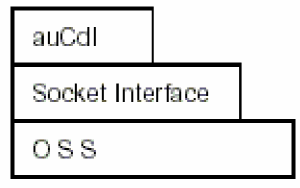
The following figure describes the location of auCdl in DFII with regard to OSS and Socket Interface.
The property to be added on the cellview is a boolean property. Any incorrect property type will be flagged as an error with the following error message in the si.log file:
Netlister Error: Incorrect property type defined for property “auCdlPrintBlkBox” on cellview libname/cellname/viewname. The type of the property can only be a boolean.
Sample Hierarchical Cell Using Blackboxing
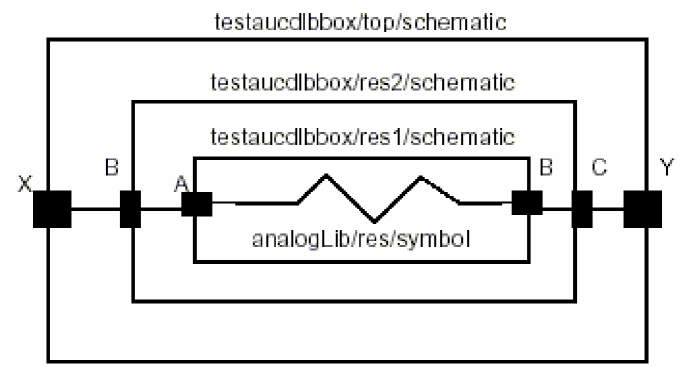
Default Netlist
********************************************
* auCdl Netlist:
* Library Name: testaucdlbbox
* Top Cell Name: test
* View Name: schematic
* Netlisted on: Feb 6 16:32:46 2003
********************************************
*.EQUATION
*.SCALE METER
*.MEGA
.PARAM
********************************************
* Library Name: testaucdlbbox
* Cell Name: res1
* View Name: schematic
********************************************
.SUBCKT res1 A B
*.PININFO A:I B:O
RR0 A B 1K $[RP]
.ENDS
********************************************
* Library Name: testaucdlbbox
* Cell Name: res2
* View Name: schematic
********************************************
.SUBCKT res2 B C
*.PININFO B:I C:O
XI0 B C / res1
.ENDS
********************************************
* Library Name: testaucdlbbox
* Cell Name: test
* View Name: schematic
********************************************
.SUBCKT test X Y
*.PININFO X:O Y:I
XI1 X Y / res2
.ENDS
********************************************
Netlist when auCdlPrintBlkBox=‘t on testaucdlbbox/res2/schematic:
********************************************
* auCdl Netlist:
* Library Name: testaucdlbbox
* Top Cell Name: test
* View Name: schematic
* Netlisted on: Feb 5 14:57:30 2003
********************************************
*.EQUATION
*.SCALE METER
*.MEGA
.PARAM
********************************************
* Library Name: testaucdlbbox
* Cell Name: res1
* View Name: schematic
********************************************
.SUBCKT res1 A B
*.PININFO A:I B:O
RR0 A B 1K $[RP]
.ENDS
********************************************
* Library Name: testaucdlbbox
* Cell Name: res2
* View Name: schematic
********************************************
.SUBCKT res2 B C
*.PININFO B:I C:O
.ENDS
********************************************
* Library Name: testaucdlbbox
* Cell Name: test
* View Name: schematic
********************************************
.SUBCKT test X Y
*.PININFO X:O Y:I
XI1 X Y / res2
.ENDS
********************************************
Notice that the macro res2 has been generated as a blackbox with only its interface, that is terminal information, being printed in the netlist. The difference in the netlists is marked in bold typeface.
Additional Customizations
This section describes the following additional customizations that you can make:
- Automatically Including a Partial Netlist File within the .SUBCKT Definition for the Top or Mid-Level Cells in your Design
- Including a ROM-Insert Netlist Automatically Into the auCdl Netlist
- PININFO for Power and Ground Pins
- .PARAM Statement
- Specifying Terminal Order for auCDL Netlisting in the Edit CDF Form
- Specifying the Terminal Order for Terminals in .simrc
- Rules followed to Print Terminal Order during Netlisting
- Changing the Pin Order
- Arranging the Terminal Ordering
- Notification about Net Collision
- Making a Stop Cell at Subcircuit Level
- Printing Empty Subcircuits
- Passing Parameter
- Netlisting the Area of an npn
Automatically Including a Partial Netlist File within the .SUBCKT Definition for the Top or Mid-Level Cells in your Design
If a block instantiated in your design has a CDL netlist, you can automatically include the CDL netlist for the block within the .SUBCKT definition for the top or mid-level cells in your design and disable printing of subcircuit instances in the netlist.
For example, consider a two level hierarchical design that has the following netlist. The original .SUBCKT definition for the top-level cell LIB5/top/schematic appears in the netlist as shown in bold text below:
*******************************************************************
* Library Name: LIB5
* Cell Name: mid
* View Name: schematic
************************************************************************

.SUBCKT mid A B
*.PININFO A:I B:O
XI0 A B / bot
.ENDS
************************************************************************
* Library Name: LIB5
* Cell Name: top
* View Name: schematic
************************************************************************

.SUBCKT top A B
*.PININFO A:I B:O
XI0 A B / mid
.ENDS
This procedure describes how you can include a partial CDL netlist file dummy_top1.net located at /tmp/netlist within the .SUBCKT definition for the top-level cell LIB5/top/schematic and disable the printing of instances in the subcircuit in the netlist, such that netlist is created as shown below:
************************************************************************
* Library Name: LIB5
* Cell Name: top
* View Name: schematic
************************************************************************

.SUBCKT top A B
*.PININFO A:I B:O
************************************************************************
* This auCdl Netlist has been included for cell top from file
+ ’/tmp/netlist/dummy_top1.net’.
* NOTE: The connectivity in this netlist has not been verified by auCDL
*
*************************************************************************
X17 A B / dummytop1
*************************************************************************
.ENDS
The bold text in the above netlist indicates the contents of the/tmp/netlist/dummy_top1.netfile that is written within the .SUBCKT definition for the top-level cellLIB5/top/schematic.
To include the CDL netlist file dummy_top1.net within the .SUBCKT definition for the top-level cell LIB5/top/schematic and disable printing of the instance and .SUBCKT definition for the mid block in the netlist, do the following:
-
Add the following entries in your
.simrcfile:hnlReadHdbProps = 't
ansCdlHdbFilePathProp = "<
property_name>" -
Create an auCdl view, say,
config_aucdl, for the top-level cell. For more information, see Creating a config view for auCdl.
When you create the auCdl view, ensure that the view for the top-level cell is set toschematic, as shown below: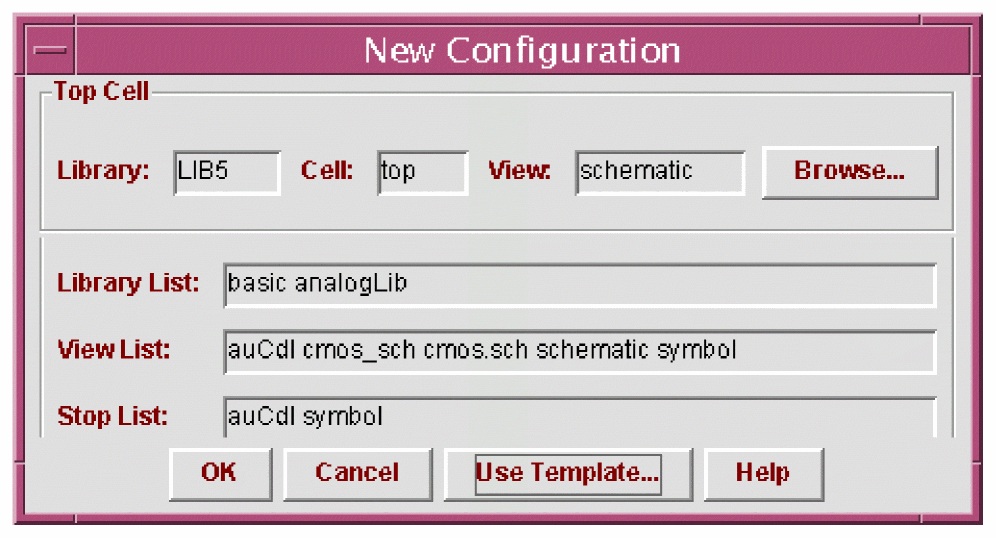
-
In Hierarchy Editor, add the property specified as the value of the
ansCdlHdbFilePathPropvariable in the.simrcfile on the schematic view of the top-level cell.
For example, if the value of theansCdlHdbFilePathPropvariable isfilepath, do the following to add thefilepathproperty:- In Hierarchy Editor, choose View – Properties.
-
Choose Edit – Add Property Column.
The Add a Property Column form appears. -
Enter
filepathin the Property Name field. -
In the Property Type cyclic field, select
String. -
Click OK to add a column for the
filepathproperty. - Right click the filepath column and choose Set "filepath" Cell Property.
-
Enter the path to the CDL netlist file for the block. For example, enter:
/tmp/netlist/dummy_top1.net. -
Click OK.
You can verify that the property is added by opening theprop.cfgfile in the config view for the cell. In this example, theprop.cfgfile will contain the following text:cell LIB5.top
{
string prop filepath = "/tmp/netlist/dummy_top1.net"
}
Including a ROM-Insert Netlist Automatically Into the auCdl Netlist
You can include CDL netlist in top-level netlist by either concatenating the netlist or by adding .include statement.
-
Set the SKILL environmental variable
auCdlEnableNetlistInclusionin the.simrcfile. - Create an auCdl view for the instance whose netlist you want included in the top-level netlist. The view can be created by copying over the existing symbol view of the cell as the auCdl view.
-
Add the cellview property
CDL_NETLIST_FILEto the auCdl view with itsvalueTypeasstringand value as either of the following: -
Set the value of
auCdlEnableNetlistInclusionto one of the values: -
The default value of
auCdlEnableNetlistInclusionisnil, which means the file specified byCDL_NETLIST_FILEis not considered.
Related Topics
PININFO for Power and Ground Pins
If you want power and ground pin names to appear with :P and :G, respectively, in the *.PININFO line in the CDLOut netlist for non-global signals, you can specify this with the cellViewPowerPins and cellViewGroundPins properties.
For example, you may have four pins in the cellView, namely A, B, VSS, and VDD, and you want the PININFO lines to appear as follows:
.SUBCKT test A B VDD VSS
*.PININFO B:P VSS:G A:G VDD:P
.ENDS
From the schematic cellView, click Edit – Properties – CellView. Click Add in the User Property section and add the following properties:
-
cellViewPowerPins, with Type asilListand Value as("B" "VDD") -
cellViewGroundPins, with Type asilListand Value as("A" "VSS")
Then, check and save the cellView.
When you run the netlister, CDL Out checks for two properties of the type ilList in the cellview, namely cellViewPowerPins and cellViewGroundPins, and generates the netlist according to information specified with them. The PININFO lines in the netlist appear as mentioned above.
.PARAM Statement
The design variables specified on Top cell of the design being netlisted will be printed in .PARAM statement each per line.
For example, if the designVarList property specified on top cell has the following value:
( ("CAP" "0.8p") ("RES" "20") ("X" "35") )
the .PARAM will be printed as:
.PARAM CAP=0.8p
+ RES=20
+ X=35
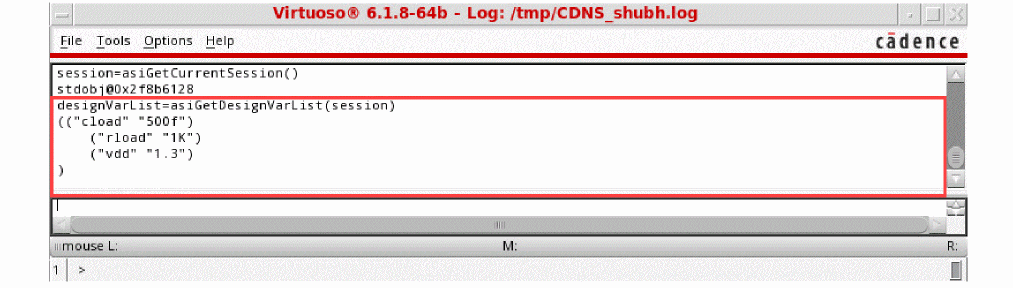
To use the designVarList property, follow these steps:
- Open a maestro view with one or more design variables.
-
Get the session id as follows:
session=asiGetCurrentSession() -
Use the following call to get the list of design variables:
designVarList=asiGetDesignVarList(session)
Specifying Terminal Order for auCDL Netlisting in the Edit CDF Form
To specify the terminal order:
- In CIW, click Tools – CDF – Edit.
- Specify the library and cell names.
- Set CDF Type to Base.
- Open the Simulation Information tab.
- In the Choose Listing field, select By Simulator and then select auCdl in the drop-down list.
- In the termOrder field, enter the terminals in the order in which you want them in the netlist.
- Click Apply and OK to close the implement the changes and close the dialog box.
-
Set the SKILL flag
auCdlCDFPinCntrlto 'tin the.simrcfile. For more information, see The .simrc File. - Build the netlist using auCdl.
Specifying the Terminal Order for Terminals in .simrc
You can define the auCdlCDFPinCntrl parameter in the .simrc file to have custom terminal order for a cell.This parameter supports various combinations using the values cdfTermOrder, masterTermOrder, and userDefinedFunctionNameSymbol. The following table shows how you can define the auCdlCDFPinCntrl parameter:
Rules followed to Print Terminal Order during Netlisting
When auCdlCDFPinCntrl is set to t or "cdfTermOrder", the following rules are obeyed during netlisting, when:
Terminal order in CDF is missing: The default terminal list is used to print the netlist for that cell or instance.
Terminal order is CDF has fewer terminals than the default terminal list: The terminals are printed in the following sequence:
- The terminals specified according to the order specified in the CDF terminal order.
- The remaining terminals sorted alphanumerically.
- The inherited terminals.
For example, consider there are ten terminals, and only six terminals have been specified in CDF termOrder. In this case, during netlisting these six terminals are printed according to the CDF terminal order and the remaining four terminals are printed alphanumerically. Finally, any inherited terminals are printed in the netlist.
Terminal order has duplicate terminals: A warning message is issued as described in the section Error Handling and the terminals are printed in the following way:
- For non-leaf level cells, the terminal order is ignored and the default terminal list is used for netlisting.
- For stopping cells (leaf level cells), the terminals are printed in the terminal order and are followed by the inherited terminals, if any.
Terminal in the terminal order is not valid: A warning message is issued as described in the section Error Handling and the default terminal list is used for netlisting.
auCdlCDFPinCntrl is set to t or "masterPortOrder", where instead of CDF terminal order, master port order is followed to print the terminals. You can also specify any of the following additional existing options to control the terminal order of bus members:- Individual members of a bus to be specified in any order in the termOrder
- Split buses to be specified in any order in the termOrder
Example for CDF termOrder
Consider a hierarchical design of the cell mytop using mycell as a sub-cell. Here, mycell has been set as a stopping cell to make the example compact.
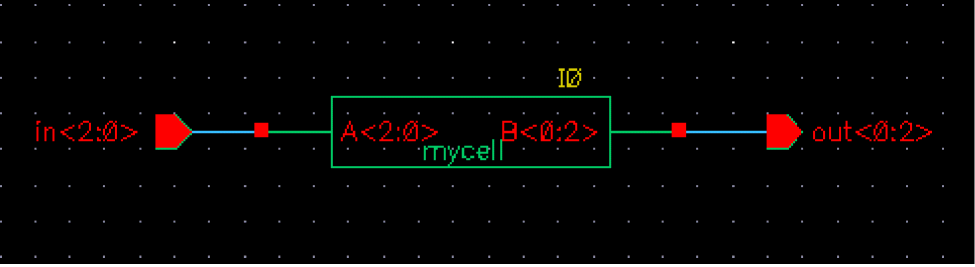
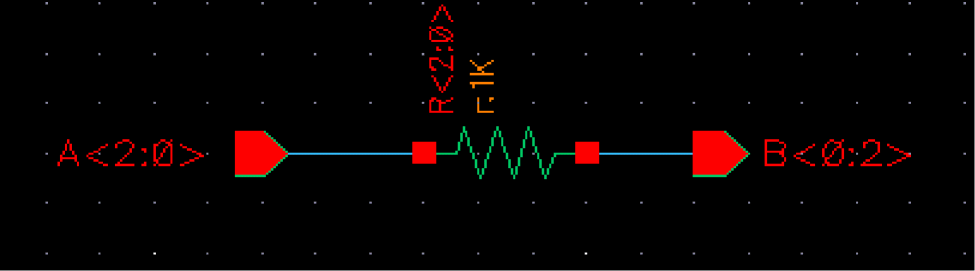
Assuming that the top schematic is mytop, consider the following cases:
Default netlist (No termOrder Is Specified)
************************************************************************
* auCdl Netlist:
*
* Library Name: mylib
* Top Cell Name: mytop
* View Name: schematic
* Netlisted on: Apr 10 14:31:28 2003
************************************************************************
*.EQUATION
*.SCALE METER
*.MEGA
.PARAM
************************************************************************
* Library Name: mylib
* Cell Name: mytop
* View Name: schematic
***********************************************************************
.SUBCKT mytop in<2> in<1> in<0> out<0> out<1> out<2>
*.PININFO in<2>:I in<1>:I in<0>:I out<0>:O out<1>:O out<2>:O
XI0 in<2> in<1> in<0> out<0> out<1> out<2> / mycell
.ENDS
Using the CDF termOrder Features
For case 1, termOrder is specified as follows:
Case 1: Missing Terminals in termOrder
************************************************************************
* Library Name: mylib
* Cell Name: mytop
* View Name: schematic
************************************************************************
.SUBCKT mytop in<0> in<1> out<2> out<1> in<2> out<0>
*.PININFO in<2>:I in<1>:I in<0>:I out<0>:O out<1>:O out<2>:O
XI0 in<1> in<0> out<0> out<1> / mycell
.ENDS
- As mytop is not a leaf-level cell, the terminals in the termOrder are followed by the missing terminals in the netlist.
- As mycell is a leaf-level cell, the missing terminals will not be printed in the netlist.
When auCdlCDFPinCntrl is set to ’t and termOrder for mytop is set as:
“in<0:1>” “out<2:1>” “T”
TermOrder will be ignored and the default terminal list will be printed for mytop along with the warning message.
************************************************************************
* Library Name: mylib
* Cell Name: mytop
* View Name: schematic
************************************************************************
.SUBCKT mytop in<2> in<1> in<0> out<0> out<1> out<2>
*.PININFO in<2>:I in<1>:I in<0>:I out<0>:O out<1>:O out<2>:O
XI0 in<1> in<0> out<0> out<1> / mycell
.ENDS
si.log has the following warning message:
*Warning* Could not determine the node name for terminal ’"T"’. This may be caused by an error in the CDF specified on:
component : mytop
in cellview : schematic
of library : mylib
When auCdlCDFPinCntrl=’t and termOrders are set as follows:
Note the use of individual bus bit “in<0>” and “B<1>” in the termOrder for mytop and mycell, respectively. When the termOrder is expanded, they become duplicate terminals.
************************************************************************
* Library Name: mylib
* Cell Name: mytop
* View Name: schematic
************************************************************************
.SUBCKT mytop in<2> in<1> in<0> out<0> out<1> out<2>
*.PININFO in<2>:I in<1>:I in<0>:I out<0>:O out<1>:O out<2>:O
XI0 in<1> in<0> out<1> out<0> out<1> / mycell
.ENDS
The si.log file has the following warning message
*Warning* Could not determine the node name for terminal ’"in<0>"’. This may be caused by an error in the CDF specified on:
component : mytop
in cellview : schematic
of library : mylib
*Warning* Could not determine the node name for terminal ’"B<1>"’. This may be caused by an error in the CDF specified on:
component : mycell
in cellview : schematic
of library : mylib
The points to be noticed here are:
-
As
mytopis not a leaf-level cell, the termOrder is ignored and the default terminal list formytopis printed in the netlist. -
As
mycellis a leaf-level cell, duplicate terminals are allowed in the termOrder.
Error Handling
A warning message is generated if there are invalid or duplicate terminals in the terminal order. The message informs that the node name for the terminal could not be determined because of an error in the CDF. The message also lists the information regarding the component (cell name), cellview (view name), and library (library name) in which the error occurred.
Changing the Pin Order
You need to do the following to modify the pin order:
-
In the
SimInfosection of CDF for the auCdl view, add the following lines to the file.netlistProcedure: ansCdlSubcktCall componentname: subcircuit termOrder: "my_pin_1" "my_pin_2" "my_pin_3" namePrefix: X
-
Add the following line to the
.simrcfile:auCdlCDFPinCntrl = t
If a.simrcfile does not exist, you need to create one, add the above line, and save the file in your current directory. For more information, see The .simrc File.
.simrc file and you want the explicit inherited terminals of stop cells to be printed in the netlist, you must specify the explicit inherited terminal names in the CDF termOrder field. If you want explicit inherited terminals of stop cells to be printed in the netlist even when they are not specified in the CDF termOrder field, add the following line in the .simrc file:auCdlNoInhTermInTermOrder = ’t
Arranging the Terminal Ordering
You can use the auCdlTermOrderStr variable to arrange the netlist in ascending or descending order when the auCdlCDFPinCntrl parameter is set to t.
The possible values for the auCdlTermOrderStr variable that you can define in the .simrc file or specify in the CIW are:
auCdlCDFPinCntrl=t and auCdlTermOrderStr = "a"/"A"/'A/'a, then the SUBCKT line is printed in ascending order.
-
auCdlCDFPinCntrl=tandauCdlTermOrderStr = "d"/"D"/'D/'d, then theSUBCKTline is printed in descending order.
auCdlTermOrderStr remains unbound and works only when auCdlCDFPinCntrl is set to non-nil.Notification about Net Collision
Sometimes a net name may get mapped to a new name, such as when there are invalid characters in the original name. This new name may collide with another existing or mapped net name. Due to this collision, one of the net names is mapped to a new name.
To ensure that you get warnings or error messages for such collisions and mapping, set the SKILL variable simCheckNetCollisionAction as per the following table:
If you want the simCheckNetCollisionAction to operate in the batch mode or the background mode, set it in the .simrc file. If you want it to operate in the foreground mode, set it in the CIW.
Consider the following schematic view of the autest cell of a hierarchical design mycdltest.
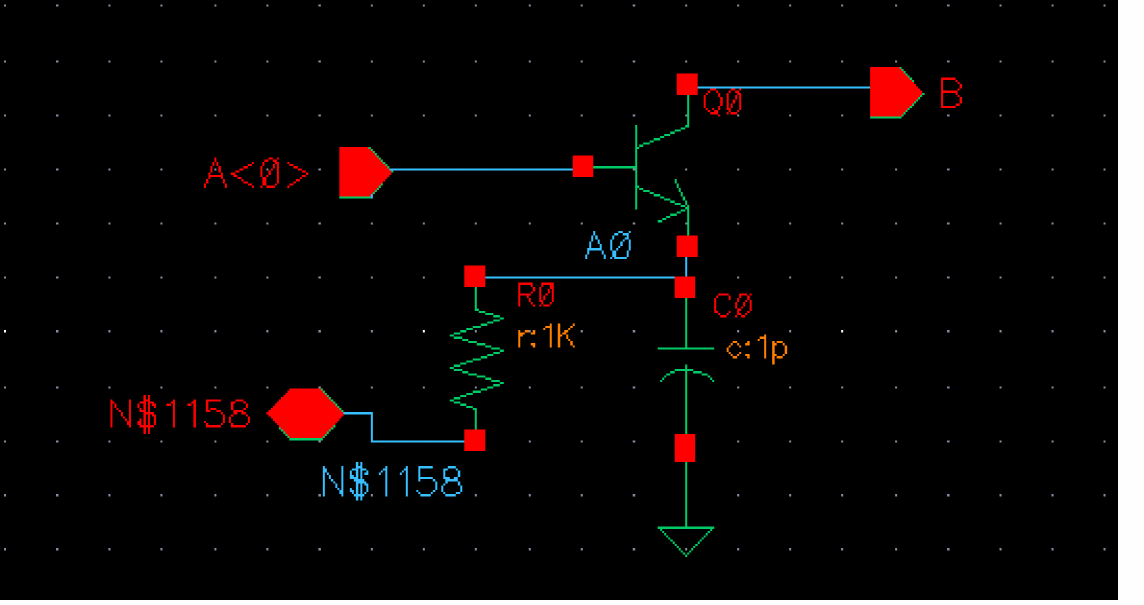
Assume that the .simrc file is set as follows:
hnlMapNetInName = ’( ("<" "") (">" ""))
simNetNamePrefix = "M"
The auCdl netlist obtained is as shown below.
A<0> is mapped to A0 because the hnlMapNetInName variable set in .simrc. So, it collides with the original net A0. After collision, the original net is mapped to M0 because simNetNamePrefix is set to M.************************************************************************
* auCdl Netlist:
*
* Library Name: mycdltest
* Top Cell Name: autest
* View Name: schematic
* Netlisted on: Apr 21 16:12:26 2003
************************************************************************
*.EQUATION
*.SCALE METER
*.MEGA
.PARAM
*.GLOBAL gnd!
*.PIN gnd!
************************************************************************
* Library Name: mycdltest
* Cell Name: autest
* View Name: schematic
************************************************************************
.SUBCKT autest A0 B N$1158
*.PININFO A0:I B:O N$1158:B
RR0 M0 N$1158 1K $[RP]
CC0 M0 gnd! 1p $[CP]
QQ0 B A0 M0 NP
.ENDS
Case 1
When simCheckNetCollisionAction is set to warning and the file .simrc has the following settings:
hnlMapNetInName = ’( ("<" "") (">" ""))
simNetNamePrefix = "M"
simCheckNetCollisionAction="warning"
the netlist generated is the same as mentioned earlier but the log file has the following message:
Running Artist Hierarchical Netlisting ...
WARNING: Netlister : Net ’A0’ has collided with an existing net name, will be remapped to M0.
End netlisting <Date Time>
Case 2
When simCheckNetCollisionAction is set to error and the file .simrc has the following settings:
hnlMapNetInName = ’( ("<" "") (">" ""))
simNetNamePrefix = "M"
simCheckNetCollisionAction="error"
a netlist is not generated and the log file has the following message:
Running Artist Hierarchical Netlisting ...
ERROR: Netlister : Net ’A0’ has collided with an existing net name, exiting...
End netlisting <Date Time >
"Netlister: There were errors, no netlist was produced."
Making a Stop Cell at Subcircuit Level
To make the netlister stop at the subcircuit level for a specific block (and to prevent it from netlisting down to the primitive cells for the given block), copy the symbol view of the subckt to an auCdl view. Then make the following modification to the .simrc file:
cdlsimViewList = list( "auCdl" "symbol" "schematic" )
cdlsimStopList = list( "auCdl" )
By default, the netlister does not print subcircuits for stop cells. To know how to print empty subcircuits, refer to Printing Empty Subcircuits.
Printing Empty Subcircuits
This section describes the procedure to print empty subcircuits for various cases.
Printing empty subcircuits for Stopping Cells
By default, the netlister does not print subcircuits for stop cells, but you can set the auCdlPrintEmptySUBCKT variable to print an empty subcircuit. Consider the following schematic view of the cell, test.

In this example, cell res1 is a stop cell. if you set the auCdlPrintEmptySUBCKT variable as t in the .simrc file, the generated netlist appears as follows:
.SUBCKT res2 B C
*.PININFO B:I C:O
.ENDS


.SUBCKT test X Y
*.PININFO Y:I X:O
XI1 net4 X / res2
XI2 Y net4 res1_model
.ENDS


.SUBCKT res1_model A B
.ENDS
In this netlist, an empty subcircuit is printed for cell res1. Here, res1_model is the model name applied to the cell.
If the stop cell has CDF, and has non-empty termOrder defined in auCdl simInfo section of CDF, terminals in termOrder are printed as ports when writing empty subcircuit definition.
However, when a stop cell or primitive has no CDF available, or does not have auCdl simInfo section in device CDF, auCdl prints device (cellview) terminals as ports when writing empty subcircuit definition.
Even when CDF/simInfo is available for device, but termOrder field in simInfo section is empty, cellview terminals are written in empty subcircuit definition.
When termOrder is not available, and cellview terminals are written, they are sorted such that first non-inherited terminals are alphanumerically sorted and printed, followed by inherited terminals alphanumerically sorted and printed.
Also, any vector/bus terminals in cellview are expanded and printed.
auCdlPrintEmptySUBCKT to t generates an auCDL-55 warning message. To avoid this warning message, use ansCdlSubcktCall or a non-primitive netlist procedure for empty cells.Printing Empty Subcircuits for Blank Cells
To print the filler cell instances, which have blank or empty cells, add the following environment variable in the appropriate .simrc file:
hnlEmptySwitchMasterAction="honor"
As a result, these cells get printed in the netlist:
.SUBCKT mycell IN OUT
*.PININFO IN:I OUT:O
MM1 net1 net3 net4 net2 PM
MM0 net5 net7 net8 net6 PM
X10 / filler
.ENDS
Considering that the instance switch view does not have any pins and instances, no subckt gets printed for this cell in the netlist. To get an empty subcircuit in the netlist, add the following environment variable in the appropriate .simrc file:
As a result, empty subcircuit gets printed in the netlist:
.SUBCKT mycell IN OUT
*.PININFO IN:I OUT:O
MM1 net1 net3 net4 net2 PM
MM0 net5 net7 net8 net6 PM
X10 / filler
.ENDS
.SUBCKT filler
*.PININFO
.ENDS
Passing Parameter
Parameters can be passed to daughter cells of a subcircuit by passing m (M factor) to the MOS transistors that make up an inverter.
on the parent inverter: m = 2
on the MOS transistors:
MOS: m = pPar("m")
PMOS: m = pPar("m")
In the evaluation of a parameter, if the value of another parameter is to be incorporated, then it can be done by using the following method:
If the parameter AD of a MOS transistor is to be a function of its channel width, AD can be defined as
AD = iPar("w")*5u
Netlisting the Area of an npn
To add a CDF parameter called Emiter Area (EA) to the CDF of your npn, fill out the CDF form with the following values:
paramType = string
parseAsNumber = yes
units = don't use
parseAsCEL = yes
storeDefault = no
name = EA
prompt = EA
defValue = iPar("area")
...
If you do not want to display the parameter on the form, you can set display = nil.
CDF Simulation Information for auCdl
The auCdl netlisting procedure ansCdlCompPrim supports the following devices: FET, CAP, IND, DIODE, BJT, RES, and MOS. To use CDL Out to generate the correct name for the component, its terminal, and parameters, you need to attach auCdl CDF simulation information (siminfo) to cells. This can be set using Tools – CDF – Edit menu commands and then choosing the library/cell.
The dollarParams and dollarEqualParams fields specify the parameters whose values have to be printed with a dollar ($) prefix.
The parameters specified in the dollarParams section are used to print the values of these parameters with a $ sign prefixed with the value. For example, if the dollarParams field contains param1, whose value on the instance L0 of type inductor (or its master or the library) is value1, then the netlist contains the instance statement as given below
LL0 net1 net2 $value1
The parameters specified in the dollarEqualParams are used to print the values on the corresponding instance, its master, or its library along with parameters with the $ prefix. For example, if the dollarEqualParams field in the CDF simInfo section contains param1, whose value on the instance L0 of type inductor or on its master or the library is value1, then the statement for the instance in the netlist is as follows:
LL0 net1 net2 $param1=value1
The values for the dollarParams and dollarEqualParams fields use the following precedence: the Instance value overrides the Master value, which overrides the Library value.
To print modelName with a $ sign prefixed to it, add the parameter TSMCMODEL in the instParameters dialog box in the auCdl – simInfo section. The same precedence as specified for the dollarParams and dollarEqualParams fields is used for the model value. For example, if the instance value of TSMCMODEL has a value LP of the type String, then the corresponding instance line in the netlist will contain the model description as:
LL0 net1 net2 $.MODEL=LP
The following is a comprehensive list of auCdl siminfo for all the supported devices.
Device CDF Values
| FET | |
|---|---|
| CAP | |
|---|---|
| IND | |
|---|---|
| DIODE | |
|---|---|
| BJT | |
|---|---|
| RES | |
|---|---|
| Subcircuits | |
|---|---|
| MOS | |
|---|---|
Netlist Examples
Here are some netlist examples:
| Type | Example |
|---|---|
auCdl has been enhanced such that while printing the instance of a cell whose switch master is a stopping view, the instParameters specified in the CDF siminfo section are also printed.Support of Inherited Connection on Device Substrate
In such situations, the extra terminal (the third terminal on devices like resistors, capacitors etc. or the fourth terminal on devices like transistors) is found on the stopping view rather than the symbol view (instantiated view). So the substrate connection is resolved by finding the net attached to the first extra terminal on the stopping view in comparison to termOrder in the CDF.
progn(bn) is in the termOrder, then precedence would be given to progn(bn)and SUB would not be printed at all. Therefore for MOS devices, in order to use inherited connections on a substrate, you have to remove progn(bn) from the termOrder of the siminfo section of the base CDF of the device.useCDFTermOrder in the otherParameters field of the auCdl siminfo of a cell, the connectivity order is according to the CDFtermOrder for this cell and its instance calls.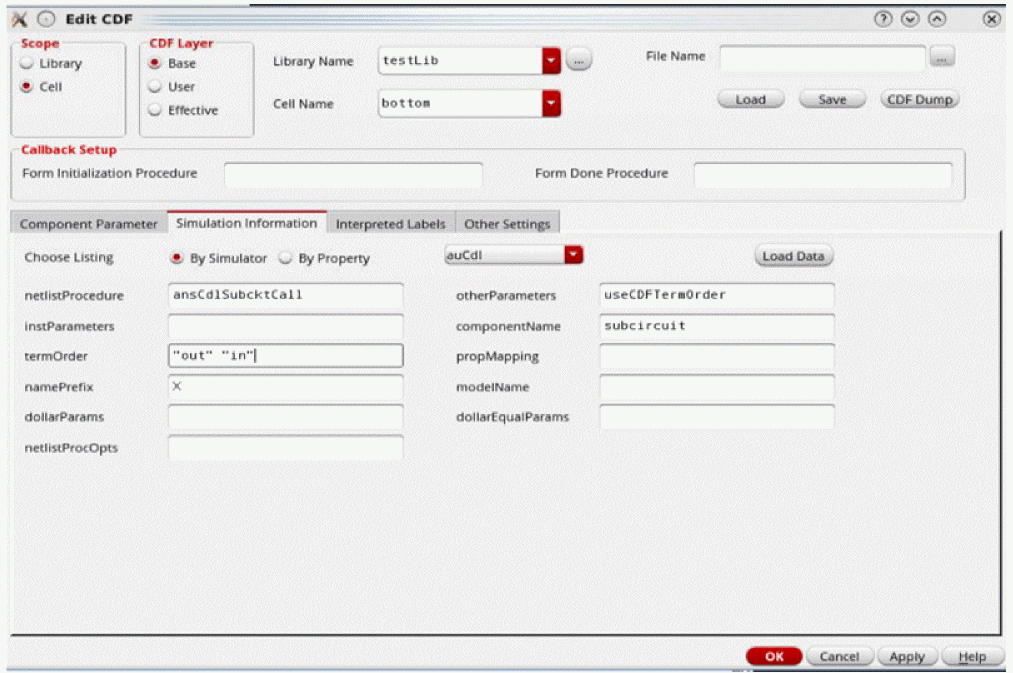
What is Different in the 4.3 Release
An auCdl netlist can be extracted by following these steps:
- In the CIW, click File – Export – CDL
- In the CDL Out Run form, fill in the appropriate fields and click OK or Apply.
For more information about using CDL Out, read the Translating CDL Files section in the Design Data Translator’s Reference.
The following si.env parameters are used in the 4.3.x release only.
Complete Example
The following example shows the schematic captures and the auCdl netlists.
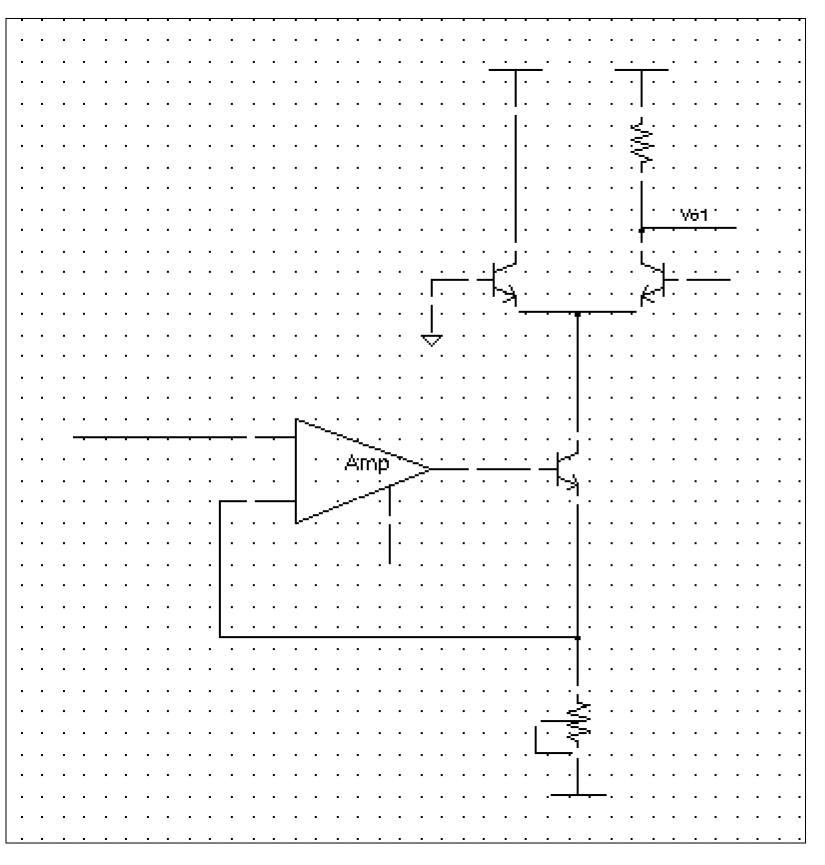
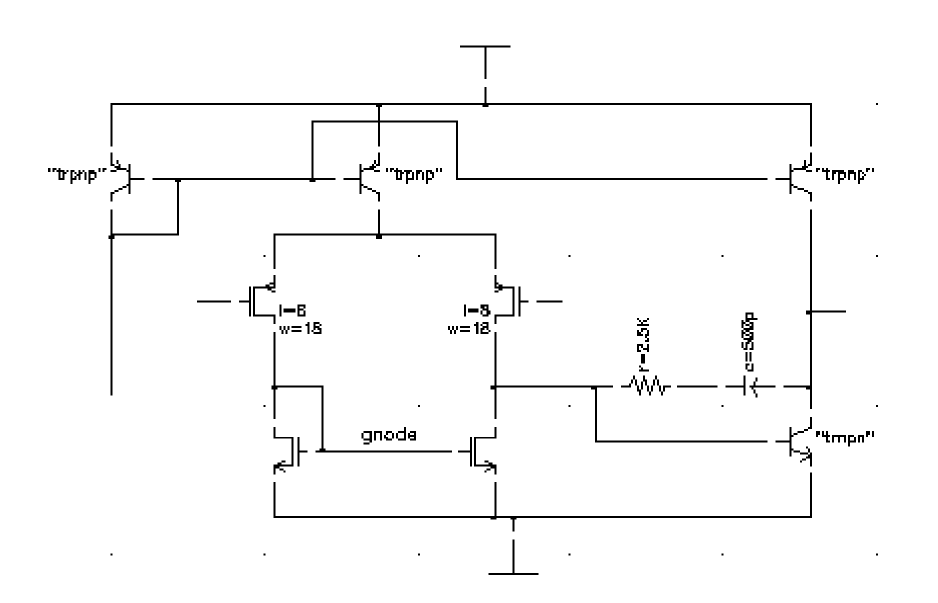
**************************************************************
*auCdl Netlist:
*
* Library Name: test_auCdl
* Top Cell Name: AMckt.auCdlonly
* View Name: schematic
* Netlisted on: Nov 1 16:12:40 1997
**************************************************************
*.BIPOLAR
*.RESI = 2000 resmod
*.RESVAL
*.CAPVAL
*.DIOPERI
*.DIOAREA
*.EQUATION
*.SCALE METER
.PARAM

*.GLOBAL vdd!
+ vss!
+ vcc!
+ vee!
+ gnd!

*.PIN vdd!
*+ vss!
*+ vcc!
*+ vee!
*+ gnd!

**************************************************************
* Library Name: test_auCdl
* Cell Name: amplifier
* View Name: schematic
**************************************************************
.SUBCKT amplifier inm inp iref out
*.PININFO inm:I inp:I iref:I out:O
RR0 net52 net6 2.5K $[RP]
CC0 net6 out CAP $[CP]
QQ0 out net52 vss! NP M=1
MM1 net52 inp net26 vdd! PM W=128e-6 L=8u M=1
MM3 gnode inm net26 vdd! PM W=128u L=8e-6 M=1
MM5 gnode gnode vss! vss! NM W=100u L=10u M=1
MM2 net52 gnode vss! vss! NM W=100u L=10u M=1
QQ4 out iref vdd! PN
QQ2 iref iref vdd! PN
QQ3 net26 iref vdd! PN
.ENDS

**************************************************************
* Library Name: test_auCdl
* Cell Name: AMckt.auCdlonly
* View Name: schematic
**************************************************************

.SUBCKT AMckt.auCdlonly Iref Vlo Vo1 Vs
*.PININFO Iref:I Vlo:I Vo1:O Vs:I
XI3 net28 Vlo Iref net9 / amplifier
QQ2 net15 net9 net28 NP M=1.0
QQ1 vcc! gnd! net15 NP M=1.0
QQ0 Vo1 Vs net15 NP M=1.0
RR0 vcc! Vo1 10e3 $[RP]
RR1 net28 vee! 4e3 $SUB=vee! $[RP]
.ENDS
Return to top