
5
Design Translation Using CDL Out
This chapter contains the following sections:
Overview
Circuit Description Language (CDL) is a subset of Simulation Program Integrated Circuit Emphasis (SPICE) language.
Since CDL Out is an OSS based netlister, it obeys the OSS licensing scheme. For more information on OSS licensing scheme, refer to the
Using CDL Out
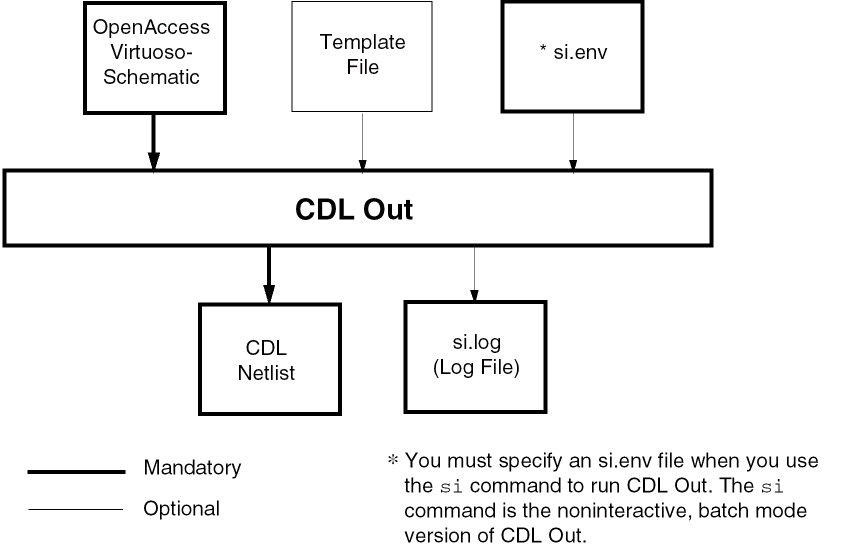
CDL Out translates an OpenAccess Virtuoso-Schematic view into a CDL netlist. The following figure shows the inputs and outputs of CDL Out.
Preparing the Virtuoso-Schematic
The lowest levels of the schematic must contain primitives that CDL Out recognizes; for example, transistors, resistors, and capacitors. You must extract and save all levels of the schematic hierarchy before you netlist your design using CDL Out.
If you work on a circuit-level schematic and you create a circuit cell, which uses different parameter values for different instances of that cell, “parameter inheritance is important. For example, you might generate an inverter in your library and use it with 1X drive strength in one cell and with 2X drive strength in another. To ensure that the correct parameter values are passed to the appropriate instances, pass them through the hierarchy.
When you use hierarchical netlisting and parameter inheritance at the same time, special limitations apply. For information about these limitations, see the section
Creating an Instance Array
CDL Out lets you make an array from an instance. The specific instance is expanded with the name and property type. You can choose the number of times you want CDL Out to expand the instance.
| Name | Property Type |
|---|---|
For example, if CDLMultiplier = 3 on instance MP8, the netlist appears as follows:
MN8.1         VDD       IN      OUT      C21PLUS            P
MN8.2         VDD       IN      OUT      C21PLUS            P
MN8.3         VDD       IN      OUT      C21PLUS            P
Creating a Black Box
Using black box properties, you can direct CDL Out to not netlist various blocks in a design. You add the black box properties directly to the property list of the symbol view.
The black box feature blocks out a particular cell by adding properties from the symbol view.
You can add the following properties to the symbol view of the instance master:
| Name | Property Type |
|---|---|
CDLBlackBox
If CDLBlackBox does not exist or is equal to nil, CDL processing occurs as normal for that block. If the property exists and is equal to t, the CDL netlister checks the following properties:
| Name | Property Type |
|---|---|
CDLGenerateSubcircuitCard
If you set the property CDLGenerateSubcircuitCard to nil, the CDL netlister does not generate a subcircuit. The CDL netlister orders the connections for all instances of a block according to the CDLPinList value. If you do not set the CDLPinList property, or set it to a null string, the CDL netlister orders the connections for all instances of a block alphabetically, using outputs, followed by bidirectionals, followed by inputs.
If you set the property CDLGenerateSubcircuitCard to t, the CDL netlister generates an empty subcircuit model card in the following form:
.SUBCKT  AX  PIN1   PIN2...PINN
.ENDS
CDLPinList
The property CDLPinList lists the order of connections for all instances in the block. If you do not set the CDLPinList property or set it to a null string, the CDL netlister makes the connections for all instances in the block alphabetically, using outputs, followed by bidirectionals, followed by inputs.
An example of the CDLPinList property format is as follows:
pin1 pin2 ...
The format is a string data type. You do not need to use double quotes. Separate each pin name by one or more blanks. If you do not need the CDLPinList, do not specify a value.
CDLPinList order in the CDL view of the master cell.CDLParameterNameList
The property CDLParameterNameList defines the parameters of the block with values specified by CDLParameterValueList. These values are overridden by explicit Name=Value assignments in each instance of the block. The netlister does not assign parameters to instances unless the parameters are defined in CDLParameterNameList. See the example in the section
CDLParameterValueList
The property CDLParameterValueList defines the value of the parameters listed by CDLParameterNameList. CDLParameterNameList is optional. If you do not list the values, CDL Out uses default values.
Running CDL Out from the GUI
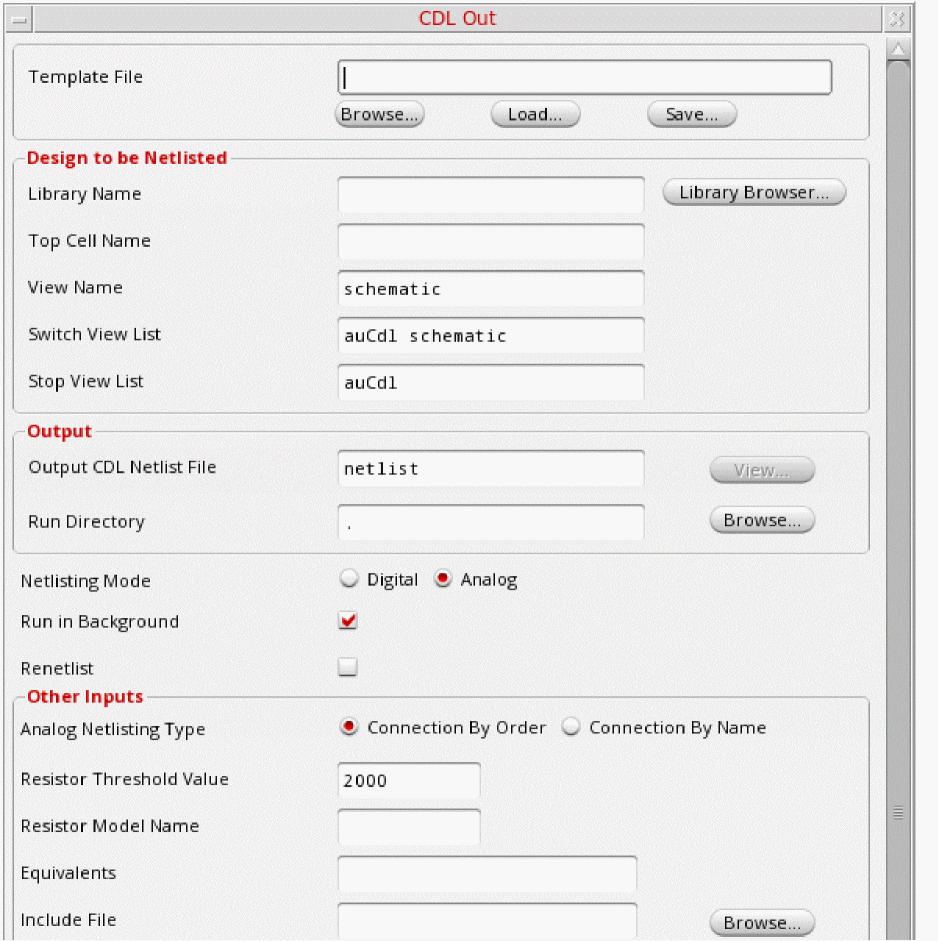
In the CIW of a Virtuoso workbench, select File – Export – CDL. This displays the CDL Out form.
Template File
Specify the name of the template file in the Template File field. If the file is not located in the current working directory, specify the absolute path of the file. The template file is used to save values for the various fields in the form, thereby allowing the values used in one session to be reused in another session.
Library Name
Specify the name of the library that contains the view you want to translate from OpenAccess database into CDL format in the Library Name field. You can also select a library from a list in the Library Browser window that opens when you click the Library Browser window.
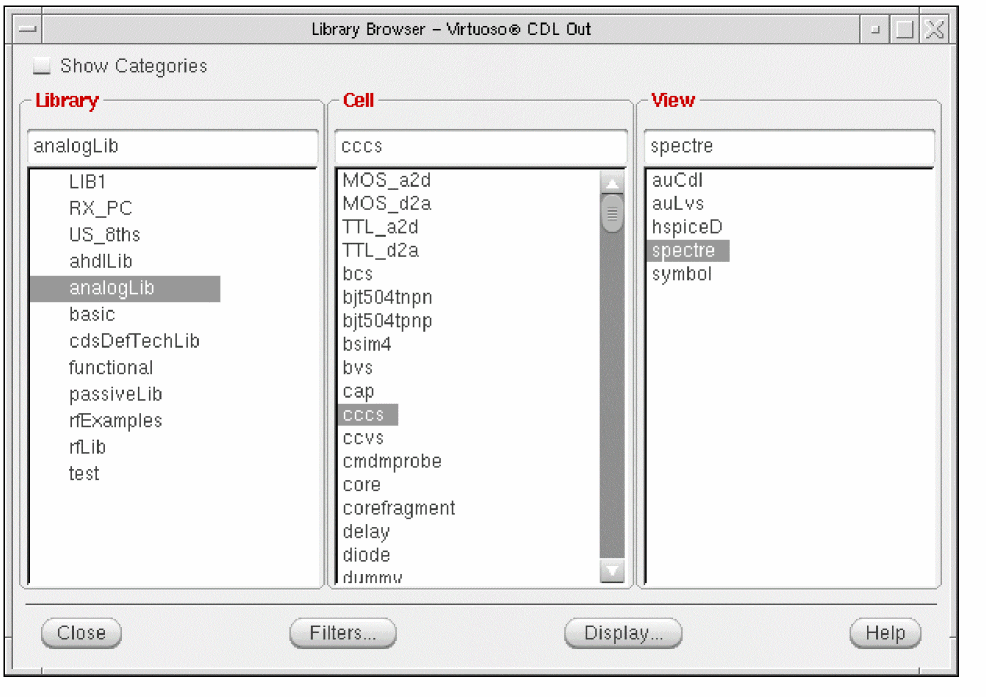
Select the library name, top cell name, and the view name in the Library Browser window, and click the Close button. The selected values appear in the Library Name, Top Cell Name, and View Name fields in the CDL Out form, respectively.
Top Cell Name
Specify the name of the cell at the top of the hierarchy that you want to netlist in the Top Cell Name field. For example, assume the cell hierarchy is as follows:
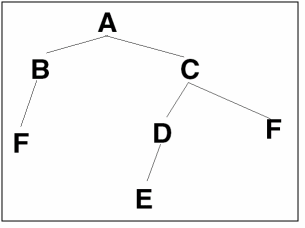
If you want to translate all cells to the output file, enter A in this field. If you want to translate just cells C, D, E, and F, but not A and B, type C in this field.
You can also populate this field by using the Library Browser window.
Specify the view name of the design you want to translate in the View Name field. You can also populate this field by using the Library Browser window.
Specify a list of the views that the software switches into when searching for design variables.
Specify a list of views that identify the stopping view to be netlisted.
Specify the name of the output file in the Output CDL NetList File. CDL Out creates the output file in the run directory you specify in the Run Directory field.
Specify the path of the directory in which you want CDL Out to place the intermediate files in the Run Directory field. Alternatively, you can also search for the directory in the Run Directory window that opens when you click the Browse button. In the Run Directory window, search for the directory in which you want CDL Out to place the intermediate files, select it, and click either Open or Apply. The name of the directory along with its absolute path appears in the Run Directory field.
Default value: current working directory (.)
Netlisting Mode
By default, CDL Out supports two netlisting modes, Digital and Analog. The Digital mode is selected by default if CDS_Netlisting_Mode environment variable is not set. If the CDS_Netlisting_Mode environment variable is set, the value of CDS_Netlisting_Mode is considered.
Run In Background
Runs CDL Out in background mode. When this option is selected, the settings specified in the CDL Out form gets copied in thesi.env file and then these settings are used to run the netlister, the options specified by variables in CIW gets ignored. It is selected by default.
This mode is useful when you run CDL Out on large designs.
Renetlist
Select the Renetlist option to set the value of the parameter simReNetlistAll in the si.env file to t. By selecting the Renetlist option, incremental netlisting is turned off and complete design is netlisted even if some of the cells in the design have not been modified since last netlisting.
If the Netlisting Mode is Analog, select either of the two analog netlisting types. The supported types are Connection By Order and Connection by Name.
Default value: Connection By Order
If the auCdlOverrideNetlistProcForAll .simrc variable is set to t, and Connection by Name is selected, then the stopping cells are also netlisted explicitly.
If a cell CDF contains netlist procedure ansCdlHnlPrintInst, then this procedure will be used irrespective of the type of netlisting selected, implicit or explicit.
For command mode, the value of the variable auCdlDefNetlistProc should be set to ansCdlHnlPrintInst for explicit netlisting and ansCdlSubcktCall for implicit netlisting.
Resistor Threshold Value
Specify the threshold value at which the resistors should short in the Resistor Threshold Value field. You can change the default value by declaring a variable in the .cdsinit file. In a situation where you require a Resistor Threshold Value of 500 as the default, enter the following line in the .cdsinit file:
CdlDefaultShortResi = 500.00
Resistor Model Name
Specify the resistor model that you want to check in the Resistor Model Name field.
Equivalents
Specifying the equivalent item informs the layout versus schematic comparison (LVS) tool that some nets or device models are electrically equivalent. List any equivalent items in the Equivalents field. Everything you type in this field appears in the netlist following the keyword *.EQUIV. For example, if you type a=b c=d in the Equivalents field, the line in the netlist shows:
*.EQUIV a=b c=d
Include File
List the file names to be included during the run in the Include File field. Each file name appears on a separate line following the keyword .INCLUDE. For example, if you enter the two file names abc def in the Include File field, the netlist shows:
.INCLUDE abc
.INCLUDE def
Alternatively, you can also search for a file in the Include File window that opens when you click the Browse button. In the Include File window, search for the file you want to include during the run and click either Open or Apply. The name of the file is displayed in the Include File field.
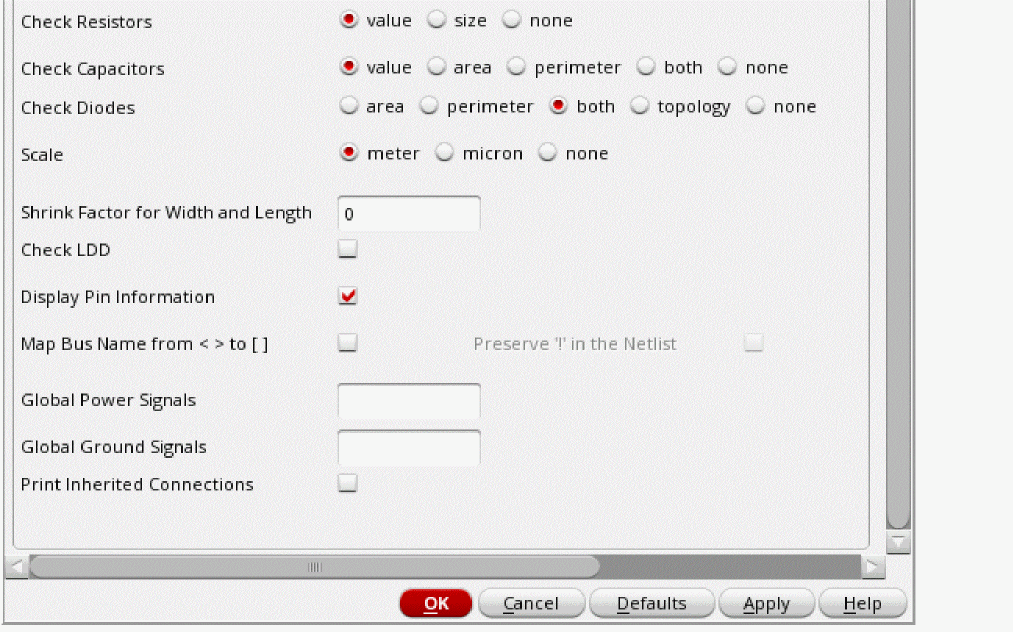
Check Resistors
Specify whether CDL Out should print a CDL control command related to resistors in the output CDL netlist file.
Check Capacitors
Specify whether CDL Out should print a CDL control command related to capacitors in the output CDL netlist file.
Check Diodes
Specify whether CDL Out should print a CDL control command related to diodes in the output CDL netlist file.
During translation, the use of Check Resistors, Check Capacitors, and Check Diodes options determines which of the following statements are written to the output netlist.
*.BIPOLAR
*.RESI
*.RESSIZE
*.RESVAL
*.CAPA
*.CAPVAL
*.CAPAREA
*.CAPPERI
*.DIODE
*.DIOAREA
*.DIOPERI
These statements appear in different combinations depending on the values selected for the Check Resistors, Check Capacitors, and Check Diodes options. This is shown in the following table.
| Check Resistors | Check Capacitors | Check Diodes | Output Netlist Statements |
|---|---|---|---|
Scale
Specify the scale to be used in the generated netlist by CDL Out.
Shrink Factor for width and length
Specify the percentage by which you want the design to shrink in the Shrink Factor for width and length field. This field takes a real number. For example, if the transistor width is 10 and length is 1 and you require to shrink the transistor by 80%, then in the generated netlist, the width is 2 and the length is 0.2.
Check LDD
Select the Check LDD option to enable CDL Out to print the statement *.LDD in the netlist.
Display Pin Information
Select the Display Pin Information option to enable CDL Out to display the pin type information.
Map Bus Name From <> To []
Select the Map Bus Name from <> to [] option to set the mapping of bus pins to []. Once set, the netlister will generate the netlist with that bus mapping only. To change the mapping, you have to exit and restart the application and set the required bus mapping again.
Preserve "!" in the Netlist
Select the Preserve "!" in the Netlist option to retain the bang character “!” in the netlist. If you do not select this option, “!” will be removed when creating the netlist.”
Global Power Signals
Specify a list of global power signals in the Global Power Signals field. The global power signals specified here will have a designator :P attached to them in the netlist.
Global Ground Signals
Specify a list of global ground signals in the Global Ground Signals field. The global ground signals specified here will have a designator :G attached to them in the netlist.
Print Inherited Connections
Select the Print Inherited Connections to print the constructs associated with inherited connections in the output CDL netlist file. This option is the GUI equivalent of the variable simPrintInhConnAttributes, which can be set in the .simrc file.
To run CDL Out, perform the following steps by using the CDL Out form:
-
Select File – Export – CDL.
The CDL Out form appears. - In the Top Cell Name field, type the name of the top cell.
- In the Library Name field, type the name of the OpenAccess library containing the view you want to netlist.
- Specify values for the optional fields you want.
-
Click Apply or OK.
CDL Out begins the translation.When you click OK, all settings you made in the CDL Out form are saved into thesi.envfile, which is created inside the run directory. The information in thesi.envfile is overwritten every time you change the field value. However, if a.simrcfile exists, then.simrcoverrides the currentsi.envvalues from the CDL Out form. For more information onsi.envand.simrcfiles, see How SE Locates Customization Files.
Related topic
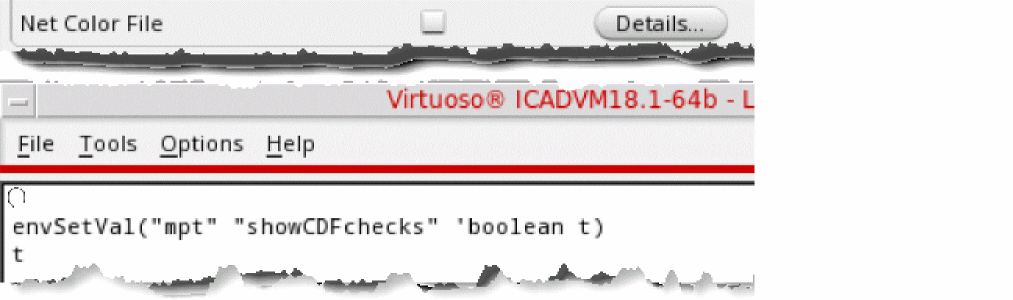
Net Color File
Select the Net Color File option to generate the color constraint file to perform Layout Versus Schematic (LVS) coloring checks.
This option is displayed when the showCDFchecks environment variable is set to t.
Details
Click Details to display the
Support for Virtuoso Schematic and Verilog Driven Mixed-Signal Flow
Using the Mixed Signal netlisting mode, included to support the VMS flow, the Embedded Module Hierarchy (EMH) CDL netlister generates the digital and analog CDL netlists, simultaneously.
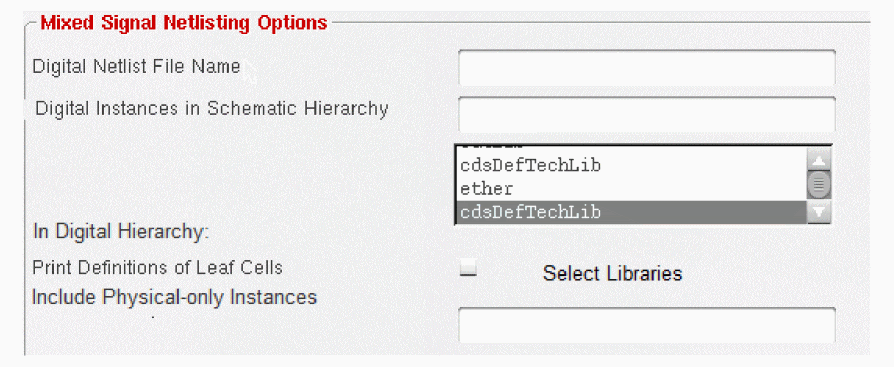
Digital Netlist File Name
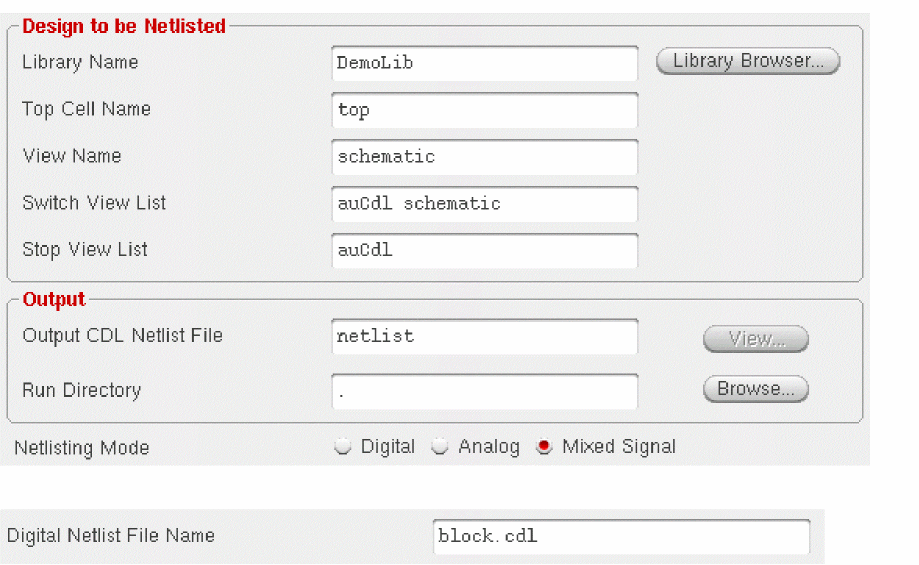
When the Mixed Signal netlisting mode is used in the CDL Out form, two netlist files are created. One netlist file is for the top-level mixed signal schematic, and the other netlist file is for the digital module in the Embedded Module Hierarchy (EMH). The digital netlist file is included in the top-level netlist using the .INCLUDE statement.
For example, if top is the Top Cell Name for which the netlist is being generated, the Digital Netlist File Name text box will be populated with block.cdl, by default, as shown in the following figure. In addition, the Output CDL Netlist File text box will be populated with the default filename, netlist.
Default value: <top_cell_name>.cdl
List of Digital Instances in Schematic Hierarchy
This text box contains a list of digital instances that exist in the schematic hierarchy. The list is automatically populated when you specify a top-level design and select the Netlisting Mode as Mixed Signal.
This field is automatically populated if the top-level design contains instances with the lxEMHStart property. You will need to update the mapped name to ensure the mapping is correct. For example, (“DemoLib/Top/schematic ” “I0” “DemoLib/Top/Layout”) should be replaced with (“DemoLib/Top/schematic” “I0” “DemoLib/Top/Layout” “|I0”) if names are mapped with a pipe (|) prefix in the Layout. This happens when the following environment variable is used during Schematic-to-Layout generation:
envSetVal("layoutXL" "prefixLayoutInstNamesWithPipe" 'boolean t)
If the top-level design does not contain any instance having the lxEMHStart Boolean property, the List of digital instances in schematic hierarchy text box is automatically populated without the instance names. For example, if (“DemoLib/top/schematic” “” “DemoLib/top/layout”), you need to update the instance names in this text box.
It is recommended that before generating a netlist, you review the list to verify that it contains only valid SKILL forms and update accordingly. You can chose to generate the netlist in any one of the following way:
- Generate the netlist for the entire EMH contained in the specified layout view.
- Generate the netlist for the module hierarchy corresponding to the digital instances listed in this text box.
(("DemoLib/top/schematic" "I1" "DemoLib/block/layout") ("DemoLib/mid/schematic" "I0" "DemoLib/top/layout"))
-
I0is a digital instance in schematic, but has a mapped nameI0in the target layout cellview. This means thatI0is bound to the master module of the instanceI0in the layout module hierarchy.
(("DemoLib/top/schematic" "I0" "DemoLib/block/layout" “|I0”))
-
I0is a digital instance in top-level schematic, and is bound to the top-level module in the layout-embedded module hierarchy.
(("DemoLib/block/schematic" "I0" "DemoLib/block/layout" t))
Netlist Macro Instances from These Libraries
Lists all the libraries from the cds.lib file.
You can select multiple libraries from the list box. By default, no library is selected.
The digital module hierarchy in layout can contain some instances of analog schematic cells. By default, these instances are considered as stopping instances, and the mixed signal netlister does not print subcircuit definition for master cells of these instances. However, if the Print Definition of Leaf Cells in Digital Hierarchy option is selected, an empty leaf cell definition is printed for the master cells of these instances.
However, if one or more libraries are specified in the Netlist macro instances from these libraries field, the instances of analog schematic cells from these libraries are considered as hierarchical instances. The mixed signal netlister descends into these schematic cells and netlists them hierarchically.
Print Definition of Leaf Cells in Digital Hierarchy
The digital module hierarchy in the layout contains instances of standard cells. By default, these instances are considered as stopping instances, and the mixed signal netlister does not print the subcircuit definition for standard cells. If you have the standard cell definitions available from the foundry, you can directly include these definitions during LVS or SVS.
However, if the Print Definition of Leaf Cells in Digital Hierarchy option is selected, the mixed signal netlister prints the empty standard cell definitions in the digital netlist.
Only Include Instances of These Physical Cells
The digital module hierarchy in layout may contain physical-only instances, such as filler cell instances. By default, the mixed signal netlister prints all the physical-only instances in the digital hierarchy. If no value is specified in the Only Include Instances of These Physical Cells field, all physical instances are printed in the netlist.
You can also use * wild card as a suffix when specifying cell names, such as FILL*, MFILL*. The physical instances of cells matching the specified pattern are printed in the netlist. However, the other physical-only instances are ignored.
The following table describes the variables that need to be defined in .simrc file to control the EMH netlisting behavior:
Table 5-1 Variables that Control Mixed Signal Netlisting Behavior
Table 5-2 Common Options in the CDL Out Form
Running CDL Out from the Command Line
-
Prepare the
si.envfile. Among other information, thesi.envfile carries the name of the design to be netlisted.
For more information, see the section Preparing the si.env File. -
Type the following at the command line:
si -batch -command netlist
Automatic Netlist Inclusion
This feature allows you to include the CDL netlist of the blocks, which do not have a schematic view, in the final top level CDL netlist. During CDL Out, it is helpful if some of the blocks in the design do not have a schematic view but their CDL netlist is available. For such blocks, perform the following steps:
- Create a blank schematic view.
- In the schematic view, create dummy pins. The pin names should match with the pins present in the corresponding symbol view.
-
Create the string property
nlActionon the schematic and symbol view and set its value tostop. -
Create a boolean property
CDL_INCLUDE_FILEon the schematic view and set its value toTRUE. -
Copy the CDL netlist file
cdlNetlistof this cell in the schematic view directory.
Now, if you run CDL out on the top level cell, then it will not create the .subckt in the netlist for the cellviews which have property nlAction set as stop. For such cellviews, if the CDL_INCLUDE_FILE property is set to true, then its netlist file cdlNetlist is copied as:
./includeFiles/libName_cellName_viewName
All these files are included at the bottom of the netlist with the help of INCLUDE statement.
Preparing a Template File
A template file is a collection of file names and option values that you can load into the CDL Out form. You can create a CDL Out template file in one of two ways:
- Enter values in the CDL Out form and click the Save command to save the option values to the file you specify as the template file.
-
Create a text file. You can copy the sample template file
cdlOut.ilin thesamples/transUIdirectory and modify the file.
The required values in the CDL Out template file are the name of the OpenAccess library containing the top level cellview and the top cell name to translate. The other values are optional.
Sample of a Template File
The following is the sample CDL Out template file Cadence supplies in samples/transUI/CDLOut.il:
cdlOutKeys = list(nil
  ’simLibName           "opus"
  ’simCellName          "latch.cdl"
  ’simViewName          "schematic"
  ’hnlNetlistFileName   "netlist"
  ’simRunDir            "."
  ’shortRES             2000.000000
  ’resistorCheck        "value"
  ’capacitorCheck       "value"
  ’diodeCheck           "both"
  ’displayPININFO       t
)
Pin Order for Top Cells
In analog mode, CDL Out prints subcircuit pins in alphabetical order. You can add the following statement in the .simrc file to enable CDL Out to use termOrder information specified in the CDF section of the auCdl netlist.
auCdlCDFPinCntrl=t
In digital mode, CDL Out by default, prints the subcircuit pins in the following order:
Output Bidirectional Input
The pin order shown is applicable for all the subcircuits in the design including the top cell. You can override the default pin order for the top cell by defining the SKILL variable cdlTopCellPinOrder in the .simrc file. The cdlTopCellPinOrder variable must have a string that fulfills the following format requirements:
- The string must consist of O, B, I, and / characters.
- The characters O, B, and I must appear once in a string.
- The characters O, B, and I can appear multiple number of times.
- The character / can be used between other characters.
Example: Assume that you want to specify the pin order for top cells as: input pins, followed by bidirectional pins, followed by /, and then by bidirectional pins and output pins. To do this, set the cdlTopCellPinOrder variable in the .simrc file as follows:
Mapping Template File Options with the CDL Out GUI Options
The following table provides a list of all the CDL Out template file options and their corresponding CDL Out GUI options.
Preparing the si.env File
To run CDL Out from command line, you must prepare an si.env file. The si.env file contains few mandatory and few optional variables. If you run CDL Out from the CIW, CDL Out creates an si.env file automatically in the run directory. For more information about the si.env file, see the Open Simulation System (OSS) Reference.
simrc control file, which can be searched using the CSF mechanism, always overwrites the values in the si.env file, set either manually or by using the CDL Out form, in the run directory. For more information on, see How SE Locates Customization Files.
In case, the netlister is invoked from the command line by using the si -batch -command netlist command, and checkScale is set to nil in si.env then CDL Out does not print *.SCALE statement in the netlist.
Sample of an si.env File
simLibName = “opus”
simCellName = “latch.cdl”
simViewName = “schematic”
hnlNetlistFileName = “netlist”
simRunDir = “/cds/1.0/test/translator/cdlout/paramCase/”
simSimulator = “cdl”
simViewList = ’(“cdl” “schematic” “gate.sch” “symbol”)
simPrintInhConnAttributes = ´nil
simNetNamePrefix          = N
simInstNamePrefix         = X
simModelNamePrefix        = M
hnlMaxLineLength          = 79


preserveALL  = t
preserveRES  = t [XX]
shortRES     = 250.000000
checkRESSIZE = t
preserveCAP  = t
checkCAPAREA = t
preserveDIO  = t
checkDIOAREA = t
retainBusses = t
CDLUsePortOrderForPinList = ´nil
Variables in the si.env File
A few of these variables are the same as the template file options. Some others are described below.
preserveALL
If the property preserveALL is set to t, instances of resistors, capacitors, and diodes in the input schematic are netlisted. However, if preserveALL is set to nil, CDL Out does not print instance definitions of resistors, capacitors, and diodes in the output CDL netlist.
preserveRES
If you set the property preserveRES to t, resistors are preserved for checking in LVS. You can define the variables shortRES and checkRESSIZE if preserveRES = t. Using the optional variable [XX], you can specify a model name that preserves only the specified type of resistor.
shortRES
The value you set for shortRES defines the threshold of the resistors that are shorted.
checkRESSIZE
The value you set for checkRESSIZE is the resistor size. If you set a value for checkRESSIZE, LVS will check the resistor size when you run it.
preserveCAP
If you set the property preserveCAP to t, CDL Out preserves capacitors for checking in LVS. You can define the variable checkCAPAREA if preserveCAP = t.
checkCAPAREA
If you set the property checkCAPAREA to t, LVS will check the capacitor area when you run it.
preserveDIO
If you set the property preserveDIO to t, CDL Out preserves the diodes for checking in LVS. You can define the variable checkDIOAREA if preserveDIO = t.
checkDIOAREA
If you set the property checkDIOAREA to t, LVS will check the diode area when you run it.
retainBusses
If you set the property retainBusses to t, busses are printed in the same way in the output CDL netlist file as they are in the input schematic. When set to nil, CDL Out expands the busses in the schematic to individual scalars.
The following example shows how the display of the busses differs in the output CDL netlist file with the use of this property:
BUS<0:3>
BUS<0> BUS<1> BUS<2> BUS<3>
CDLUsePortOrderForPinList
You can set the SKILL variable CDLUsePortOrderForPinList in si.env or .simrc. If you set CDLUsePortOrderForPinList to t, then the netlist pin order is determined from the portOrder property present on the schematic view of a cell, otherwise, the portOrder property is ignored. The CDLUsePortOrderForPinList option is applicable to all the cells, including blackboxes.
If the CDLPinList property is set on a cellview, then for the corresponding subcircuit in the CDL netlist, pin ordering will be done by the order in which CDLPinList has been specified. This overrides the portOrder property. If the CDLUsePortOrderForPinList is not set to t and the CDLPinList property has not been specified on a cellview, then the pin order is printed as is available in the database: the output pin first, followed by the input-output and the input pins.
For example, consider the portOrder of the cellview testLib/cell/schematic to be ("A" "H" "Y") and assume that the property CDLUsePortOrderForPinList is either not set or set to nil. In this case, the list of terminals as retrieved from the database would be ("H" "A" "Y"), with the directions "inputOutput", "input", and "output" respectively. The pin list in the output CDL netlist would be "Y H A", with the output terminal appearing first.
How CDL Out Translates Data
There are important differences between CDL format and the OpenAccess Virtuoso-Schematic view. CDL Out generates a netlist hierarchy that duplicates the hierarchy of your design. Each cell in the schematic becomes a separate subcircuit in the netlist. The hierarchical netlister automatically prefixes each instance name with the proper character for its element type; for example, “M” for MOSFET and “R” for resistor. This minimizes mapping and name translation.
CDL Out names instances and nets differently than a flat netlister. A flat netlister maps all the names to unique names. This avoids naming conflicts if you use identical names for instances in different cells of your schematic.
Unlike a flat netlister, CDL Out maps only illegal names to new names in the hierarchical netlist. CDL Out considers a name illegal if it contains illegal characters or is more than 60 characters. CDL Out searches first for illegal characters, which it maps, as shown in the following table.
| First Character | Net | Instance |
|---|---|---|
For example, if $333 is a net name, CDL Out maps it to N333. If $333 is an instance name, CDL Out maps it to X333.
X1<0> would be mapped to X1_0.If a name has more than 60 characters, CDL Out maps it to a unique number preceded by one of the following letters:
CDL Out strips the following middle illegal characters from the instance names and net names:
CDL Out strips the following middle illegal characters from the net names:
This section describes how CDL Out translates the following:
How CDL Out Translates Parameters
This section explains the rules for using different types of parameters and parameter inheritance.
Circuit-level simulations frequently involve element and model parameters. When combining parameter inheritance and hierarchical netlisting, Design Framework II parameter inheritance mechanisms are more general than those that CDL supports. The graphic display of the schematic might show different parameter values than those printed in the netlist.
To avoid this problem, when you create your schematics follow the guidelines in this section for assigned parameters, inherited parameters, and inheritance of inherited parameters.
Fixed-Value Inheritance
Most parameters have a fixed value for simple circuits. For example, if you want the instance m10 transistor in your schematic to have a width of 20 microns, add
w = 20u
to the property list of the instance representing the m10 transistor.
In more complex circuits, parameters can be inherited through the schematic hierarchy. Instead of assigning a fixed value to a parameter, use an nlpExpr value enclosed in brackets and separated by colons.
Now if you set the w parameter of the m10 transistor to the following:
w = [@wn:%:5u]
the w property is an nlpExpr type, indicating to CDL Out that w is an inherited parameter. CDL Out assigns the wn value to w, if it exists, or assigns the default value of 5u if w does not exist.
The arguments in the parameter assignment are as follows:
Separate these arguments with colons (:).
The following table shows the parameters to use for sizing the width of a pmos device that is used in building a hierarchy. CDL Out requires the parameters w and l at the bottom level. The names at higher levels can be different as long as they are legal names.
| Level | Symbol | Instance |
|---|---|---|
For further information about inherited property syntax, refer to the Open Simulation System Reference Manual.
Assigned Parameters
You can also assign default values to parameters. If you want all transistors to have a length of 1.2 microns, add the l = 1.2u property to the CDL view of the transistor master. CDL Out uses this default length unless you add the l property to a particular transistor to override it for that instance.
To assign default properties for netlisting, add them to the CDL view of the element. To assign default parameters for graphic display, add them to the symbol view of the element.
CDL Out prints the assigned parameters for instances, nets, and macro elements on the corresponding lines in the netlist.
Any user property defined on an instance in the schematic is printed along with its value in the instance definition of that subcircuit in the output CDL netlist file. This is true for instances of both primitive and non-primitive devices.
If an instance has some inherited properties (defined by NLP expressions) from its switch master, CDL Out used to print only those inherited properties. However, in the 5.1.41.500.5.122 and above releases all the user properties, where the value is other then NIL, will be printed on the instance.
For example, we have an instance I0 with property user_prop = 8.
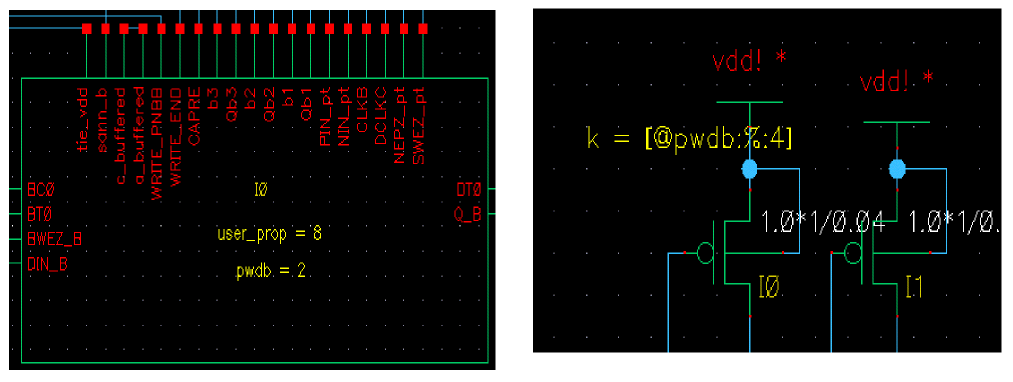
This instance has inherited the pwdb property from its switch master. Prior to 5.1.41.500.5.122 release, the property was not printed on the instance, as shown below:
XI0 net95 net19 net91 net18 QNR_B_k vss! dclkb_m8 vss! vss! vss! vss!
CAPRE_k +WRITE_PNB_k buffered sann_b_m8 vdd! vdd! vss! net98 net17
net96 net16 +SUEZ_B_k DINNR_B_k io_bot pwdb = 2
However, in 5.1.41.500.5.122 and above release all the user properties are printed on the instance as shown below:
XI0 net95 net19 net91 net18 QNR_B_k vss! dclkb_m8 vss! vss! vss! vss!
CAPRE_k +WRITE_PNB_k buffered sann_b_m8 vdd! vdd! vss! net98 net17
net96 net16 +SUEZ_B_k DINNR_B_k io_bot user_prop = 8 pwdb = 2
Also, if you do not want to print certain properties, you can list the properties in the cdlOutSkipInstProps SKILL variable in the .simrc file. For example, including the following line in the .simrc file does not print the partName and vendorName properties in the output CDL netlist file.
cdlOutSkipInstProps=list(“partName” “vendorName”)
In addition, if you do not want to print any property, you can include the following line in the .simrc file.
Parameter-Value Inheritance
You assign an inherited parameter on the element or model line, the same way you would with fixed parameter assignments. However, instead of assigning a fixed value to the parameter, assign the value of another parameter. For example, if the hierarchical netlist represents m10 as
m10 d g s b nmos w = wn...
CDL Out sets the width of transistor m10 equal to the value of the wn parameter.
For subcircuit-level cells, place the default value of the w parameter’s nlpExpr property on the .subckt definition line for subcircuit-level m10 cells. If the cell containing m10 is in the top-level schematic, place the value in a .param statement. For example, if the nlpExpr property specifies a default value of 5u, and the m10 cell is part of a subcircuit, write the subcircuit definition line in the hierarchical netlist as follows:
.subckt xxx node1 node2 ... wn = 5u ...
m10 d g s b nmos w = wn
If m10 is in the top-level schematic, place a .param line in the hierarchical netlist:
.param ... wn = 5u ...
Both of these lines assign a default value of 5u to wn.
Parameter-Value Inheritance and Schematic Levels
If you want an element to inherit a parameter value from another element, that parameter must come from a higher schematic level.
For example, if you have an inv inverter in your schematic that contains transistor w10, and you place an instance of that inverter named inv1, transistor w10 in inv1 inherits the width specified in the property list of the original inv inverter. If you want transistor w10 of inverter inv1 to have a width of 25u, you must add the following property to the inv property list:
wn=25u
The hierarchical netlist reflects this specification as follows:
xinv1 node1 node2 ... inv ... wn = 25u ...
The width assignment in the inv property list overrides the default value for width on the .subckt definition of the inv1 schematic. You are not limited to making these assignments within individual instances of inv. You can make the wn assignment at any level above where inv1 is used because parameter assignments apply down through the hierarchy.
To assign a default value to a parameter that another element inherits, you must add it to the nlpExpr of that parameter or it is ignored by CDL Out.
Inheritance of Inherited Parameters
You can assign the value of an inherited parameter to the value of another inherited parameter if you make the assignments at different levels and if the second assignment is at a higher level in the schematic. For example, you cannot assign w = [@wn:%:5u] on the instance representing transistor m10, and also assign wn = 25u on the same instance, because they are on the same level.
Enhanced Support for Inherited Connections
When CDL Out netlists a design that contains inherited connections, it creates dummy ports (or pseudo ports) to maintain connectivity across modules and their instantiations. These dummy ports introduce unwanted nets in the hierarchy and also result in the loss of data when design information is shared across various EDA tools in the flow.
The switch is a SKILL environment variable named.
You can turn off the creation of the dummy ports by using the CDL Out GUI check box option Print Inherited Connections. The corresponding switch in the si.env file is simPrintInhConnAttributes. It is a boolean variable with the default value nil. This means that in the default state CDL Out will continue to create the dummy ports for inherited connections in a design. You can turn off the creation of the dummy ports by setting this variable to t. You can set this environment variable in the .simrc file.
The two statements to be used in conjunction with the simPrintInhConnAttributes variable are *.NETEXPR and $netSet.
| Statement | Syntax | Example |
*.NETEXPR vdd vdd! vdd! |
||
$netSet vdd = VDD! |
Support for Inheritance and Transfer of Supply Sensitivity Data
CDL Out supports the SUPPLYSENSITIVITY constructs that enable you to combine logical and physical data in the flow. The use of these constructs ensures that there is no loss of supply sensitivity data when information is passed across various EDA tools in the design flow from the design entry to the verification stage.
The SUPPLYSENSITIVITY constructs include *.SUPPLYSENSITIVITY and *.GROUNDSENSITIVITY. These constructs have the following syntax:
*.SUPPLYSENSITIVITYnetNamevalue
*.GROUNDSENSITIVITYnetNamevalue
Since CDL Out does not distinguish between terminals and the nets that connect to these terminals, CDL Out uses the *.PINMAP statement that defines the mapping between a net and the cell terminal to which it is connected.
*.PINMAPnet1:cell_terminal1net2:cell_terminal 2...
*.PINMAP GND1:gnd! VDD1:vdd!
How CDL Out Translates Instances of Primitive Devices
This section describes how you must define an instance of a primitive device in the schematic so that CDL Out netlists the instance. CDL Out recognizes instances of only those cells that have both a symbol view and a CDL view.
You can store default values of parameters in the symbol view so that they are displayed in the schematic. In the CDL view, store the default values so that they are printed in the output CDL netlist.
To create CDL views, use the Symbol/Simulation Library Generator (S/SLG) described in the Virtuoso Schematic Editor User Guide.
Given below is a complete list of formatting functions (hnlCDLFormatInst) and parameter list variables (hnlCDLParamList) for all the primitive cells supported by CDL Out:
| Component | hnlCDLFormatInst | hnlCDLParamList |
|---|---|---|
For more information on SKILL functions mentioned above, see How to Customize CDL Netlist.
The following example shows part of a file that creates CDL views with values of these three properties for different components.
lmDefViewProp(cap cdl
   hnlCDLParamList = "hnlCDLCapParamList"
   hnlCDLFormatInst = "hnlCDLPrintCapElement()"
   hnlCDLElementSubType = "c1"
)
lmDefViewProp(capacitor cdl
   hnlCDLParamList = "hnlCDLCapacitorParamList"
   hnlCDLFormatInst = "hnlCDLPrintCapacitorElement()"
   hnlCDLElementSubType = "c2"
)
lmDefViewProp(diode cdl
   hnlCDLParamList = "hnlCDLDiodeParamList"
   hnlCDLFormatInst = "hnlCDLPrintDiodeElement()"
   hnlCDLElementSubType = "di"
)
The complete parameter list that can be present for each component is given in the CDL Out Formats section.
How CDL Out Translates Global Signals
CDL Out interprets a signal that ends with a ! as a global signal. The signal name appears in the .global and .pin statements. If the global signal is associated with a component, the signal does not appear in the I/O signal list of a subcircuit definition.
Do not use global signals with a hierarchical input connector unless the schematic is the top-level block of the design. If you use the global signal with a hierarchical input connector, the signal appears in the I/O signal list of a subcircuit definition and creates warnings when you run LOGLVS. Assign wire or label connections directly to instances in the schematic (for example, when you use globals with components.)
For nmos, pmos, and cap devices in the Cadence Library, by default a substrate connection to power or ground is made in the netlist. To override the VDD and GND defaults for these connections, include the following declarations in the .simrc file:
hnlCDLNMOSBulkNetName="cvss!"
hnlCDLPMOSBulkNetName="cvdd!"
hnlCDLCAPBulkNetName="dvss!"
In this example, cvss is the bulk connection for the nmos device, cvdd is the bulk connection for the pmos device, and dvss is the bulk connection for the cap device. The signals appear as CVSS!, CVDD!, and DVSS! in the netlist.
Just like in the schematic where the global signal names are suffixed with !, the global signal names in the output CDL netlist file also end with !.
CDL Out Formats
The CDL view for primitive cells must contain hnlCDLFormatInst, hnlCDLParamList and hnlCDLElementSubType in its property list. This section documents the CDL Out formats for the primitive components generated by CDL Out and the cdslib components that use them.
BJT Element Format
Used by npns and pnps component types.
QInstanceNameCBE[SUB]cellName$EA=@area$L=@l$W=@w{$SUB=@sub}@offic=@icm=@m
BSIM3SOI Element Format
Used by BSIM3SOI component types.
M<name><D><G><S><E><model>l=@lw=@wad=@adas=@aspd=@pdps=@psnrs=@nrsnrd=@nrdnrb=@nrb@offbjtoff=@bjtoffic=@icrtho=@rthoctho=@cthodebug=@debugnbc=@nbcnseg=@nsegpdbcp=@pdbcppsbcp=@psbcpagbcp=@agbcpaebcp=@aebcpvbsusr=@vbsusrtnodeout=@tnodeout
Cap Element Format
CInstanceNameYglobal_gnd@cm=@m$[cellName]{$SUB=@sub}@ns@tc1@tc2@scale@cjic=@ic
Capacitor Element Format
Used by capacitor and pcapacitor component types.
CInstanceNamePLUS MINUS@c$[cellName]{$SUB=@sub}@ns@tc1@tc2@scale @cjic=@icm=@m{$SUB=@sub}
Diode Element Format
Used by diode and pdiode component types.
DInstanceNamePLUS MINUScellName@areaPJ=@pjw=@wl=@lwp=@wplp=@lpwm=@wm@offic=@ic{@area}{@periphery}{$SUB=@sub}
Inductor Element Format
Used by inductor component types.
LInstanceNamePLUS MINUS@l@tc1@tc2@ntic=@ic
JFET Element Format
Used by njfet and pjfet component types.
JInstanceNameDGScellNamew=@wl=@l@offic=@icm=@m
MOSFET Element Format
Used by sdalib ndepl, nfet, nsftn, pdepl, pfet, and psftn component types.
MInstanceName DGSBcellNamew=@wl=@lad=@adas=@aspd=@pdps=@psnrd=@nrdnrs=@nrs@offic=@icm=@m$LDD[@LDD] {$NONSWAP}
NMOSFET Element Format
Used by nxfr, Nmos, nmosd, and nmose component types.
MInstanceNameDGSglobalgnd,cellNamew=@wl=@lad=@adas=@aspd=@pdps=@psnrd=@nrdnrs=@nrs@offic=@icm=@m$LDD[@LDD]
NPN Element Format
QInstanceNameCBEcellNameM=@m$EA=@area
PMOSFET Element Format
Used by pxfr, Pmos, pmosd, and pmose component types.
MInstanceNameDGSglobal_VddcellNamew=@wl=@lad=@adas=@aspd=@pdps=@psnrd=@nrdnrs=@nrs@offic=@icm=@m$LDD[@LDD]
PNP Element Format
QInstanceNameCBEcellNameM=@m $EA=@area
Res Element Format
RInstanceNameAY@ns|@r$[cellName]$SUB=@sub$w=@w$l=@l@ns@tc1@tc2@scale@rshac=@acm=@m
Resistor Element Format
Used by resistor component types.
RInstanceNamePLUSMINUS@ns|@r$[cellName]m=@m{$SUB=@sub}$w=@w$l=@l@ns@tc1@tc2@scale@rshac=@ac{$SUB=@sub}
Transmission Line Element Format
Used by tline component types.
TInstanceNameN1N2N3N4z0=@z0td=@tdf=@fnl=@nlic=@ic
Voltage Source Element Format
V<InstanceName> N+ N- @DCValue @TRANValue @ACMag @ACPhase
Voltage Controlled Current Source Element Format
G<InstanceName> N+ N- NC+ NC- @value
Voltage Controlled Voltage Source Element Format
E<InstanceName> N+ N- NC+ NC- @value
Current Controlled Current Source Element Format
F<InstanceName> N+ N- V<controlNum> @value
Specify the controlNum property at the instance or the cdl view of the master. The instance property takes higher precedence.
Current Controlled Voltage Source Element Format
H<InstanceName> N+ N- V<controlNum> @value
Specify the controlNum property at the instance or the cdl view of the master. The instance property takes higher precedence.
Current Source Element Format
I<InstanceName> N+ N- @DCValue @TRANValue @ACMag @ACPhase
CDL Out Output Files
Examples earlier in this chapter show what the output Design Framework II file looks like after translation. Depending on what output files you specified in the Virtuoso® CDL Out form or template file, CDL Out produces one or more of the following files. CDL Out writes all messages to the si.log file.
-
Error messages, preceded by “*
Error*”, indicate serious, unrecoverable conditions.The converted file is incorrect. For example, if a cell instance is called but its master cell does not exist, CDL Out writes an error message to thesi.logfile. -
Warning messages preceded by “*
Warning*” indicate unexpected but recoverable conditions. The converted file is usable. For example, if a string is too long and has been truncated, CDL Out writes a warning message to thesi.logfile. -
Information messages, preceded by “*
Info*”, indicate the status of a process that is running or the results of a completed process. Information messages are written to the filesi.log. -
Statistical messages that CDL Out generates as it runs are also written to the
si.logfile. You can use these messages to estimate the size of the file based on information such as the number of cells and terminals.
How to Customize CDL Netlist
CDL Out defines various hnl functions and variables that control the CDL Out netlist format. If these func tions and variables are already defined, CDL Out does not overwrite them. You can override the value of variables or functions used in CDL Out by defining them before invoking CDL Out. This can be done by loading a SKILL file before running CDL Out or by defining the variables in .simrc or .cdsinit file.To see details about the various variables and functions that can be overridden, refer to Chapter 5, Open Simulation System Reference.
Example - Customizing CDL Netlist
The variable hnlCommentStr defines the string that is placed at the beginning of a comment in the output netlist file. By default, ‘*’ is used by CDL Out to represent the comments. If you put the value of hnlCommentStr variable to ‘>’ in the .simrc file, then the comments start with ‘>’.
For information about CDL Out SKILL functions, see the Design Data Translator’s SKILL Reference.
Return to top