
5
Customizing the Hierarchical Netlister (HNL)
Most simulators and design analysis tools require a textual description of the design to be analyzed as input. This textual description can be either a flat or a hierarchical description of the design. A hierarchical description contains sub-circuit or macro definitions for each level of the design hierarchy and then references these descriptions in higher level portions of the design. The Hierarchical Netlister (HNL) is the Cadence-provided tool to simplify creation of a hierarchical network description. HNL traverses the design database and simplifies the connectivity information for use by the output-formatting instructions. You provide the output functions written in the Cadence standard language, SKILL, to write the connectivity information to the netlist file in the syntax required by your simulator.
This chapter contains the following sections.
-
How the Netlister Works
Provides information for the CAD developer to customize the netlister to generate the desired output. -
Support for Inherited Connections
Provides information on how OSS handles inherited connections and supply sensitivity information. -
Support for Iterated Instances
Provides information on how to netlist iterated instances without any expansion. -
Writing a Formatter
Describes the order in which netlister functions are executed and guides you through the functions you must write to format the netlister output in a new syntax. -
HNL Global Variables
Provides a list of the global variables defined by the netlister. -
HNL Access Functions
Provides a list of access functions divided into the following categories: property, database, print, miscellaneous, name-mapping. -
Incremental Hierarchical Netlisting
Overview of incremental hierarchical netlisting. -
Writing an Incremental Netlist Formatter
Shows you how to design a formatter that netlists incrementally.
How the Netlister Works
This section details the following topics:
- Introduction
- Defaults Setup
- Handling Designs with Instances of Different Place Masters Having the Same Switch Master
- Property Inheritance Warning
- Instance Ignore Conventions
- Skipping Terminals
- Output Formatting
- Map File
- Naming Conventions
- Source Code
Introduction
HNL, the hierarchical netlister, consists of two parts. The first part is the database traversal routines, or the driver; the second part is the output formatter.
Figure 5-1 The Hierarchical Netlister (HNL) Structure
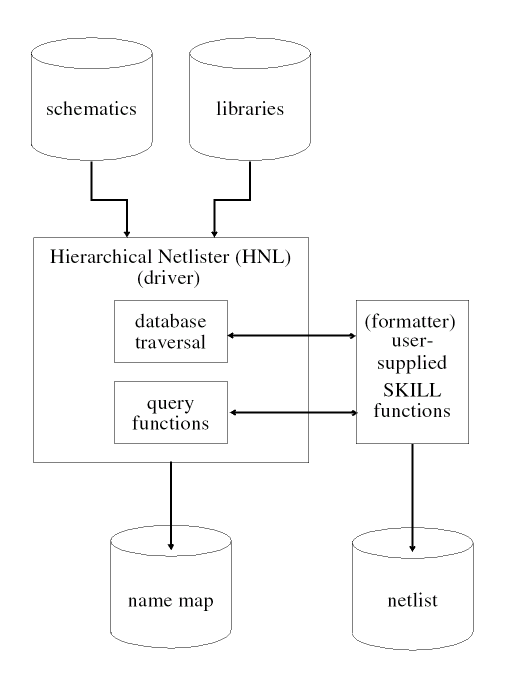
Because Cadence cannot support all the netlist syntaxes that customer simulators may require, the company provides the driver functions for the database traversal and supports output formats (formatters) for a few of the popular simulators used in the integrated circuit computer-aided design (IC CAD) industry. To address non-Cadence-supported netlist syntaxes, you can customize the netlister output by providing SKILL functions to output the textual netlist. These output functions are referred to as the output formatter. SKILL provides you with the ability to do flexible formatting; however, the database traversal functions required to netlist designs generated with the Cadence schematics system can be extremely complex. As a result, Cadence provides you with the database traversal and lets you write the formatting instructions to output the netlist.
The new Hierarchy Editor lets you specify instance-specific view lists to use for instances in the design. Two instantiations of the same master can carry different view lists which define how the hierarchy below should be traversed. In the past the hierarchical netlister needed to look at a unique cellview once. Now it might need to look at the same cell view more than once since the hierarchy below it can be different in a different branch of the design. To do that, HNL uses the view list (in the simplest term) as the distinguishing factor.
The traversal functions provided in the netlister are generic and suffice for most netlist syntaxes. To provide for any potential exceptions, you can override any of the functions used to traverse the database. In most cases, to modify the netlister output, you need to write the output functions for each portion of the netlist, but you do not need to write, or even modify, any of the database traversal functions. This significantly reduces the time required to write “your own netlister.” In addition, little knowledge of the Cadence database, or design storage within it, is required.
For each aspect of a design, the traversal functions call an output-formatting function to handle outputting that portion of the design. If the target netlist syntax does not require any information on that aspect, the function can return a SKILL true(t) and not output anything. For example, some simulators require a header and a trailer for the netlist. As a result, the driver functions call a formatter function at the beginning and end of netlist generation. When netlisting for SILOS, the function that outputs netlist header information prints out a GLOBAL statement for the nets connected globally by name throughout the design. The output functions that format the end of the netlist for SILOS automatically generate clock statements for the global nets vdd! and gnd! if they are used in the design. Similarly, output-formatting functions are called at the beginning and end of the description for each cell used in the design and for each instance (reference) to a cell or gate.
The output-formatting functions also have access to certain information used or generated by the traversal functions, for example, the name of the current instance (device), the current instance, and the master of the current instance. For a full description of each variable available to the formatting functions and for a detailed description on how to customize netlister output, refer to “HNL Global Variables”” and “HNL Access Functions” in this chapter.
To further simplify the process of writing output-formatting functions, a library of frequently needed functions is included as part of the netlister. These functions can be called by any of the output-formatting functions, and all have access to the current environment and status of the traversal functions. Included in this library are functions to determine the name of the net attached to a given terminal, a function to get the value of a property of given name, and functions to map names used in the design that may not be valid in the target netlist syntax. Using this library of functions, and the supplied database traversal functions, the output functions do not need to differentiate between busses and single-wire nets, one of the most difficult aspects of netlister development.
Defaults Setup
The netlister only sets variables and defines functions that have not been defined when it is loaded. This enables you to set variables and define any functions you want the netlister to use before loading or running it. For example, you can set default values for netlisting in the .simrc file in your home login directory. Then, when you load the netlister, a warning is generated if you have set any variables the netlister normally defines. This is only a warning to remind you that you have modified the defaults; it does not hinder the running of the netlister. Replacing netlister functions is considered an advanced capability and should only be done after you have a thorough understanding of how the netlister works and of the SKILL language. If you define netlister functions, the netlister uses those definitions instead of its own internal definitions for the functions. No warning is generated when you run the netlister if you define any of these functions, a feature which allows CAD developers to customize the netlister functionality to your site.
Setting defaults for the netlister in SE is the same as setting other SE defaults. For information on setting defaults in SE, refer to the Simulation Environment Help.
Handling Designs with Instances of Different Place Masters Having the Same Switch Master
It is possible that a design has instances of different place masters that are bound to the same switch master. If such place masters have the same terminal representations, the OSS-based netlister continues to generate the netlist correctly. If the place masters have different terminal representations, the netlist generation process stops because it can result in an incorrect netlist. For example, the netlist can be incorrect if the netlist generation process continues when one of the place masters has descending bus terminal, while the other has split bus terminals. If such a situation is encountered, apply occurrence binding to one of the instances of the switch master and regenerate the netlist.
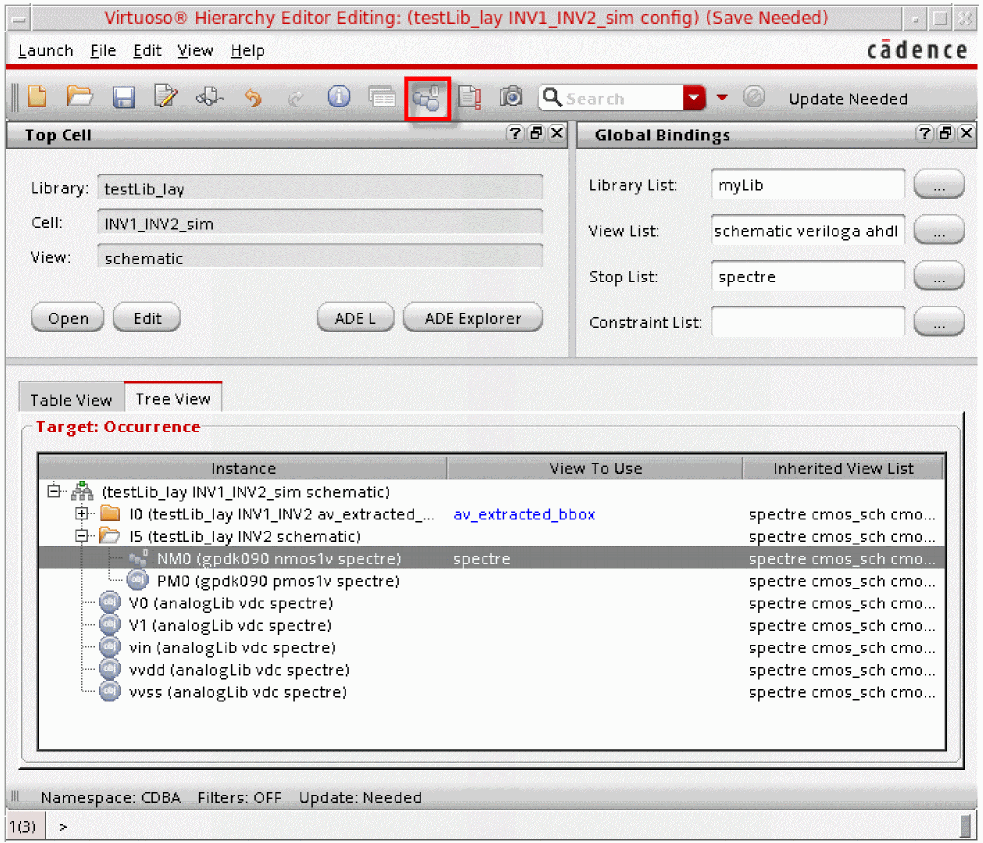
Design example: Consider that a design has instances /I5 and /I0/I2 with different place master and the same switch master. /I5 has bus terminals, while /I0/I2 has flattened terminals. When you generate the netlist, the netlist generation process reports the issue and stops generating the netlist.
To netlist the design correctly, apply occurrence binding using Hierarchy Editor, as illustrated below, so that instance /I5/NM0 is bound to spectre.
Property Inheritance Warning
Because of the inherent differences in hierarchical and flat netlist structure, HNL and FNL provided in SE handle simulation properties differently. Whereas properties placed throughout the design hierarchy can be used to set property values lower in the hierarchy for flat netlists, this is not possible in HNL.
In all other respects, the default libraries provided for FNL and HNL are identical. The same delay properties, time scale values, and gates are supported in each. The difference is the syntax of the commands used to format the netlist. Whereas FNL supports its own compact substitution expressions as well as SKILL formatting, HNL provides the full power of SKILL to netlist formatting instructions but does not support the substitution expression syntax supported by FNL.
Instance Ignore Conventions
This section details the following topics on removing devices:
-
Ignoring Devices (using the
nlActionproperty) -
Removing Devices with Two Terminals (using the
lxRemoveDeviceproperty) -
Removing Devices with Multiple Terminals (using the
hnlHonorLxRemoveDeviceandhnlUserShortCVListSKILL variables)
You can also ignore devices using the following SKILL variable and properties:
-
hnlUserIgnoreCVListSKILL variable
Set this SKILL variable to specify the list of user-specified cellviews (instances having place master or switch master in the specified library and cell), which OSS must ignore when netlisting a design. For details, see “hnlUserIgnoreCVList”. -
nlIgnoreproperty
Set this property on an instance, or its place master or switch master, to ignore that instance when netlisting for a particular simulator. For example, when you set the property as shown below, the instance will be ignored by theauCdlandvhdlnetlisters. For details, see “nlIgnore”.
nlIgnore = "vhdl auCdl" -
lvsIgnoreproperty
Set this property toTRUEon an instance or its place master that you want to ignore when using the CDL netlister only.
lvsIgnore = "TRUE"
Ignoring Devices
Sometimes you may want to place instances of symbols that do not represent components of the circuit. For example, your company might have a policy that requires its corporate logo to appear on all schematics drawn by its designers. The logo symbol can be stored in a cellview in a library along with the symbols of the circuit components such as a NAND gate or an INVERTER.
Clearly, the logo should not appear as a component in any netlists generated from the schematic, so the netlister must be told to ignore the symbol. Do this by adding a property whose name is nlAction on the instance, or its place master or switch master, that you want the netlister to ignore. The nlAction property must have a property type of string and the value ignore.
For example, suppose you want to generate a SILOS netlist from a schematic containing the logo symbol. You must have a cell called logo in your library with both a symbol view and a SILOS view. The SILOS view must have the nlAction property set to the string value of ignore, as shown below.
Removing Devices with Two Terminals
The lxRemoveDevice is a property which when defined on an instance with two or more terminals in the schematic, shorts the instance terminals and replaces the same with a surviving net. You can use this property to remove devices, like parasitic devices.
The following figure describes the scenario and the outcome after implementing the changes.
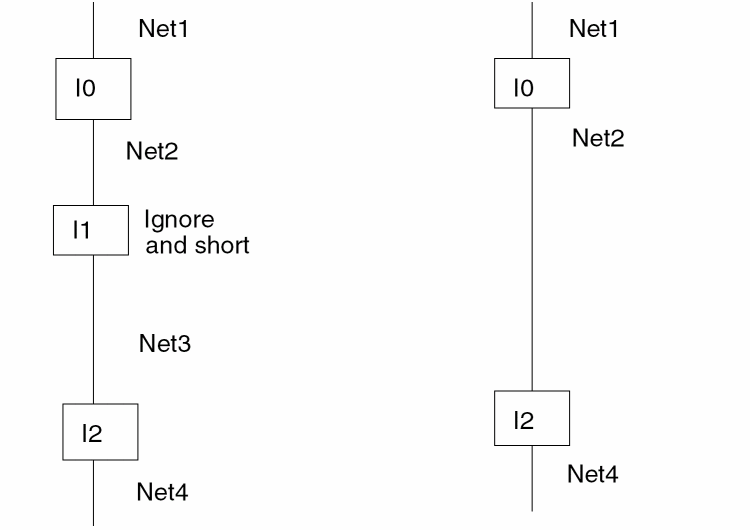
The above figure depicts the diagrammatic representation of how the instance is removed. It shows Net2 as the surviving net. Instance I1 is the parasitic device which has the property lxRemoveDevice specified on it with any value which is not equivalent to an empty string.
The netlister determines the surviving net based on
nlAction=ignore setting. The only difference will be the replacement of the removed instance by the surviving net.hnlUserShortCVList SKILL variable to specify the cellview names in a list to remove the devices that have two terminals. Error Handling
While using this functionality, you encounter some warnings in the following scenarios:
-
Invalid value of instance parameter
lxRemoveDevicewhich are either NULL or empty "" strings. -
lxRemoveDevicehas a valid string value, but the instance has more than two terminals. In this case, ensure that the shorting rule for shorting multiple terminals is specified correctly. -
lxRemoveDevicehas a valid string value and the instance has two terminals. However, the nets connected to the terminal do not follow the defined criteria. It is possible that both the nets are global or connected to I/O pins or one is global and one is connected to an I/O pin.
Example of Removing a Device
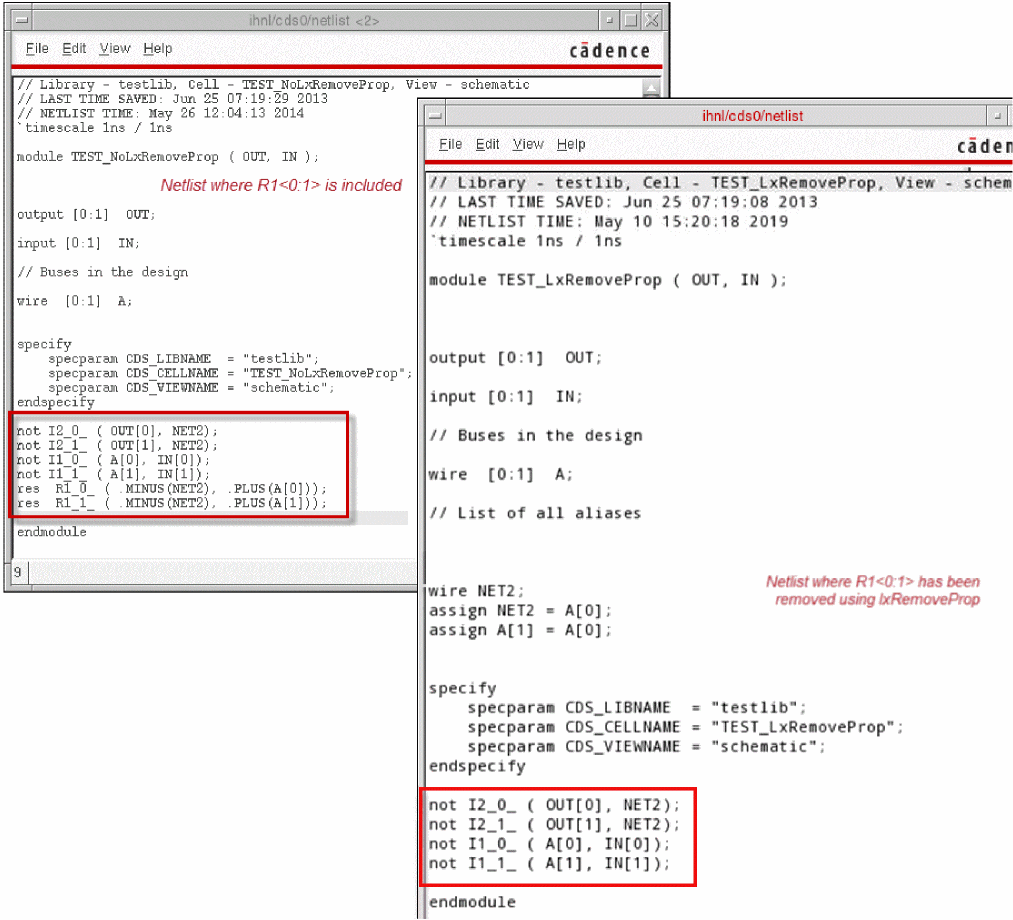
The following figure illustrates a schematic design where instance R1<0:1> is configured to be removed from the netlist using the lxRemoveDevice property.
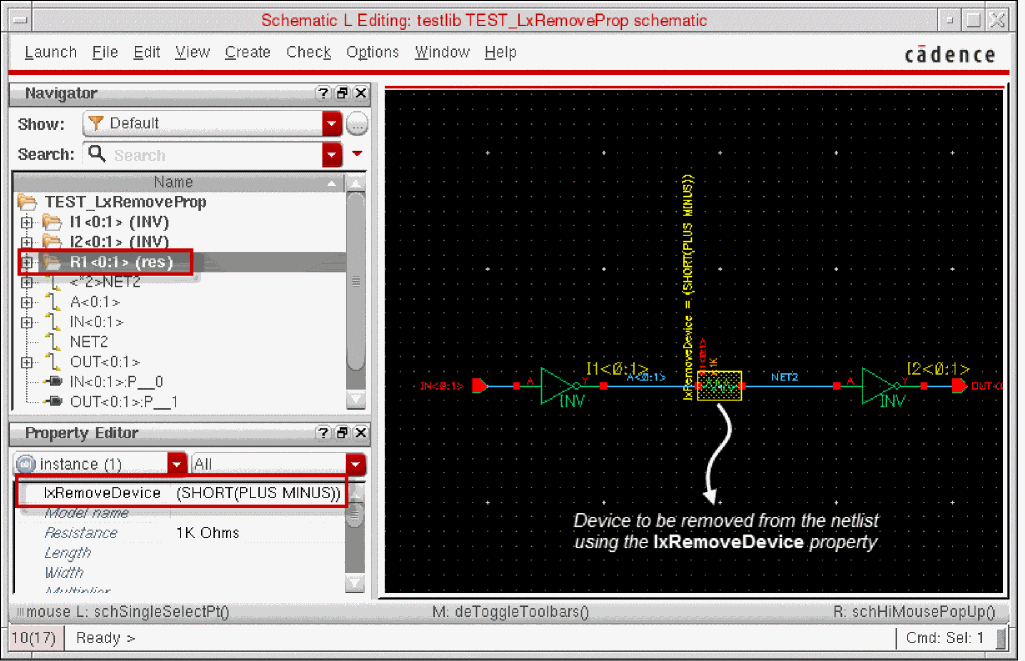
When you netlist the design using the NC-Verilog Integration Environment, R1<0:1> is removed from the resulting netlist. The scalar net NET2 becomes the surviving net for the shorted connection between I1<0:1> and I2<0:1>, as illustrated in the following figure.
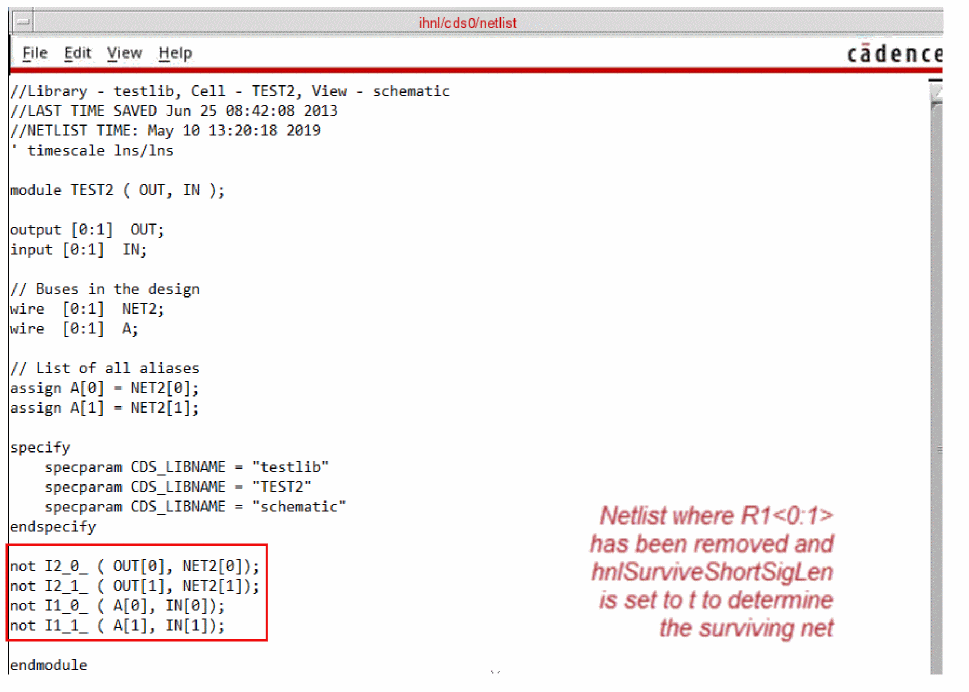
If hnlSurviveShortSigLen was set to t in .simrc or Virtuoso CIW, before the netlist was generated, the surviving net would be A<0:1> because it has the shorter length. See the following figure.
For details on the NC-Verilog Integration Environment, see Virtuoso NC-Verilog Environment User Guide.
Removing Devices with Multiple Terminals
During hierarchical netlisting, you can short the terminals of a device. For example, you can remove parasitic devices by shorting terminals. The following figure illustrates how you can short the terminals of a device.
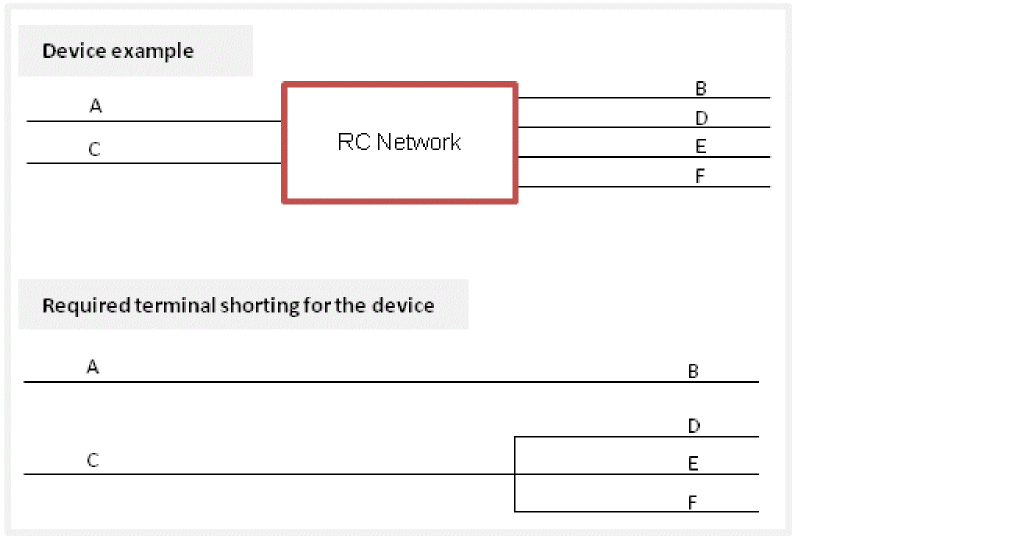
To short the terminals of a device, set the hnlHonorLxRemoveDevice SKILL variable to t and use one of the following methods.
-
Set the
lxRemoveDevicestring property at the instance level.
Example:
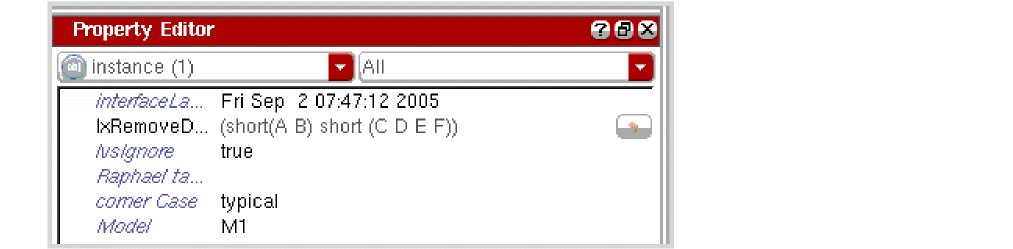
lxRemoveDevice(short(A B) short(C D E F))
In this example:
The following figure illustrates how you use thelxRemoveDeviceproperty in the Property Editor assistant of Schematic Editor.
-
Use the
hnlUserMultiTermShortCVListSKILL variable to specify the cellview names and pin information in a list in the following syntax:
You must provide values for all the fields of this variable. Otherwise, the netlister reports an error.hnlUserMultiTermShortCVList= ‘(("lib" "cell" "view" "(short(A B) short(C D E)" ))
Examples:hnlUserMultiTermShortCVList = ‘(("sample" "dffpp_c_" "symbol" "(short(in1 out3 out4))") ("testLib" "bottom" "symbol" "(short(in1 out2) short(in2 out3 out4 out5))"))
hnlUserMultiTermShortCVList = ‘(("sample" "dffpp_c_" "symbol" "(short(in1 out5))"))
-
Use the
hnlUserShortCVListSKILL variable in the following syntax to specify the cellview names in a list to remove the devices that have two terminals only.hnlUserShortCVList = list(
;;; all cells from this library
"libN"
;;; cell1, cell2 and cell3 from lib1
list("lib1" "cell1" "cell2" "cell3")
;;; all cells from this library
list("libM") )
)
You can specify any of the elements in the list and keep the remaining elements blank.
Examples:hnlUserShortCVList = ‘("sample" "dffpp_c" "symbol")
hnlUserShortCVList = ‘("sample" "dffpp_c" "")
If your shorting rule for a device results in the shorting of two pins, the netlister displays a warning and continues to generate the netlist without removing the device. If you want to remove the device in such cases, set hnlEnableTerminalShort to t.
When you remove a device using any of the specified methods, the application uses the following criteria to determine the surviving net:
-
If
hnlEnableDriverLoadBasedShortRuleis set tot, the shorting is done on the basis of the load and the driver net. The driver net is always displayed on the right.
For example, consider that you remove deviceAin the following design.

In this case, the shorting is as indicated below becausenet1is the driver net.
net2 <= net1 -
If
hnlEnableDriverLoadBasedShortRuleis set totand the load and driver net cannot be determined, then the net with the shorter name survives. In case,hnlSurviveShortSigLenis set tonil, the net with the smaller ASCII values of the name survives. -
If
hnlEnableDriverLoadBasedShortRuleis not set:- Nets connected to I/O pins or global nets survive.
-
If the nets are at the same level of the hierarchy and
hnlSurviveShortSigLenis set totin Virtuoso CIW or the.simrcfile, then the net with the shorter name survives. If the length of the names is also the same, then the net with the smaller ASCII values of the name survives. For example, between the following net pairs, the first net in bold text survives when thehnlSurviveShortSigLenis set tot:
("net1<0:1>" "net00<1:0>") ("A<1:0>" "<*2>net2") ("net7<1:0>" "netF<0:1>") ("net3<0:1>" "netE<1:0>") -
If
hnlSurviveShortSigLenis not set and the nets are at the same level of the hierarchy, then the nets with the shorter name is selected. If the length is also the same, their alphabetic sorting is done to find the surviving net.
-
Cadence recommends that you use
hnlUserMultiTermShortCVListinstead ofhnlUserShortCVList. If required, usehnlUserShortCVListfor devices that have only two terminals. -
OSS gives precedence to
hnlUserMultiTermShortCVListorhnlUserShortCVListoverlxRemovedDevice.
The netlister performs the following checks when processing a design that uses lxRemoveDevice, hnlUserMultiTermShortCVList, or hnlUserShortCVLis to remove devices:
- Property syntax.
-
Mismatch in the terminals on the place master and property values.
The netlister performs shorting on terminals that are set on the property and map to a master. It ignores other terminals.
If any of the checks fail, the netlister processes the design using the severity defined using the variable simCheckShortCVMismatchAction. An example of the variable definition is as follows:
simCheckShortCVMismatchAction="error"
The simCheckShortCVMismatchAction variable can have the following values:
-
ignore
-
warning
-
error
The auCdL netlister is an exception and honors the lxRemoveDevice property even if the hnlHonorLxRemoveDevice SKILL variable is not set. If you do not want auCdL to honor the lxRemoveDevice property, set hnlHonorLxRemoveDevice to nil.
nlAction property directs the netlister to perform specific actions, such as ignoring instances of discreet components to prevent them from being netlisted. This property has a higher priority than the lxRemoveDevice property. Therefore, if nlAction is set to ignore, the devices are not shorted even when the lxRemoveDevice property is set. Skipping Terminals
If there is a mismatch in the number of terminals or the direction of any terminal between the switched master and its placed master, you can choose to ignore or drop such terminals from the netlist. The following points explain how the netlister behaves in such cases and how you can ignore such terminals:
- If there are extra terminals on the switched master or the schematic view that are not on the placed master or symbol, the netlister ignores those extra terminals and does not print them in the netlist. This behavior cannot be changed through any variable.
-
If there are terminals on the placed master or symbol view but not in the switched master or schematic view, the netlister action depends on the value of the
simCheckTermMismatchActionenvironment variable. The following table lists the values that this variable can have, along with the netlister action.Value of the Variable Netlister Action Drops the mismatched terminal from the netlist and prints a warning message.
The formatter is usually configured to set the value ofsimCheckTermMismatchAction. You can also set the value of this variable in.simrc,si.env, or Virtuoso CIW.
If the value of this variable is not set, OSS uses the default valueerror. In this case, the netlist generation is stopped and an error message is displayed. To continue netlist generation and ignore such terminals from the netlist, set thenlActionstring property for such terminals toignoreand setsimCheckTermMismatchActiontoignoreorwarning. -
If the direction of a terminal on the place master and its corresponding terminal on the switch master does not match, by default, the netlister prints the terminal in the netlist. This is because, by default, the
simCheckTermDirectionMismatchenvironment variable is set asignoreand the netlister ignores the mismatch in the terminal directions.
If you do not want to ignore the mismatch in the terminal directions, set the simCheckTermDirectionMismatch variable to any of the following values:
Output Formatting
Netlister output formatting is produced by SKILL functions either written by you or released as part of the standard library with the purchase of an interface for the target simulator. These functions consist of user-defined function calls and references to documented netlister variables and functions.
and2 cell and silos view contain a hnlSilosFormatInst property whose value is the hnlSilosPrintLogGate("AND") string. To produce format strings for and3, and4, and5, and and* cells you place the same property on silos views of the corresponding cells. To produce XNOR*, NOR*, OR*, NAND*, and INV formats add the same property on each of the primitives for those devices and change the name argument to the name of each device.
Functions not defined in this example are defined in the hierarchical netlist driver. For details, refer to “HNL Global Variables” and “HNL Access Functions” in this chapter.
When a two-input AND gate is encountered in the schematic being netlisted, the following type of entry results in the netlister output file by execution of the functions in
andout .AND 2 3 in1 in2
Figure 5-2 Formatting Functions for Hierarchical Netlisting
; The following functions would be defined in the formatting file
; for the target simulator. For SILOS this would be
; install_dir/tools/dfII/etc/skill/hnl/silos.ile.
;
; Set the lists of variables and functions that must be
; unbound when environments (simulators) are switched.
hnlFormatterUnbindVars = nil
hnlSetDef('hnlFormatterUnbindFuncs '(hnlSilosPrintTimeProp
hnlSilosPrintMarginalProp
hnlSilosPrintDelays
hnlSilosPrintGateParams
hnlSilosPrintLoad
hnlSilosPrintOutputs
hnlSilosPrintInputs
hnlSilosPrintLogGate
hnlSilosPrintStoppingRef
hnlPrintInst
)
)
; This procedure uses the hnlScaleTimeUnit function to locate
; and scale the named property. If found, then prefixString is
; printed if not null, followed by the integer value of the
; property. t is returned if the property was printed, else nil.
;
procedure( hnlSilosPrintTimeProp( propName prefixString )
prog( (valuetmp)
value = hnlScaleTimeUnit( propName )
if( value != nil then
if( prefixString == nil then
sprintf(tmp "%d" value)
else
sprintf(tmp "%s%d" prefixString value)
)
hnlPrintString(tmp)
return( t )
)
return( nil )
)
)
; This procedure uses the hnlScaleMarginalDelay function to
; locate and scale the named property. If found, then
; prefixString is printed if not null, followed by the float
; value of the property, with one digit after the decimal. t is
; returned if the property was printed, else nil.
;
procedure( hnlSilosPrintMarginalProp( propName prefixString )
prog( (value tmp)
value = hnlScaleMarginalDelay( propName )
if( value != nil then
if( prefixString == nil then
sprintf(tmp "%.1f" value)
else
sprintf(tmp "%s%.1f" prefixString value)
)
hnlPrintString(tmp)
return( t )
)
return( nil )
)
)
; This function prints out the delays for a basic logic gate in
; SILOS netlist syntax.
; Sample:
; tr,mr tf,mf
; tr,trs tf,tfc
; tr tf
;
procedure( hnlSilosPrintDelays()
hnlSilosPrintTimeProp("tr" " ")
if( ! hnlSilosPrintMarginalProp("mr" ",") then
hnlSilosPrintMarginalProp("trc" ",")
)
hnlSilosPrintTimeProp("tf" " ")
if( ! hnlSilosPrintMarginalProp("mf" ",") then
hnlSilosPrintMarginalProp("tfc " ",")
)
)
; This function prints out the strength followed by the delays
; for a basic logic gate in SILOS netlist syntax.
;
procedure( hnlSilosPrintGateParams()
let( (propVal)
      propVal = hnlGetPropVal("strg" hnlCurrentMaster
         hnlCurrentInst)
if( propVal != nil then
hnlPrintString("/")
hnlPrintString(propVal)
)
hnlSilosPrintDelays()
)
)
; Print a blank, followed by the load factor for the
; terminal of given name if it is defined.
;
procedure( hnlSilosPrintLoad( termName )
let( ( propName propVal tmp)
sprintf( propName "lf%s" termName )
      propVal = hnlGetPropVal(propName hnlCurrentMaster
         hnlCurrentInst)
if( propVal != nil then
if( floatp( propVal ) then
sprintf(tmp " %.1f*" propVal)
else
sprintf(tmp " %d*" propVal)
)
hnlPrintString(tmp)
else
hnlPrintString(" ")
)
)
)
; This function writes the list of output names for the current
; instance to the netlist file. Names are automatically mapped to
; be valid for simulator input,
; the line is automatically continued if its length would exceed
; the simulator limit.
;
procedure( hnlSilosPrintOutputs()
let( (name)
foreach( name hnlCurrentOutputs
hnlPrintString( hnlMapName( name ))
hnlPrintString( " " )
)
)
)
; This function writes the list of input names for the current
; instance to the netlist file. Names are automatically mapped to
; be valid for simulator input, the line is automatically
; continued if its length would exceed the simulator limit.
;
procedure( hnlSilosPrintInputs()
let( (termlist)
foreach( termlist hnlSortTermsToNets( hnlCurrentInTerms )
hnlSilosPrintLoad( car(termlist) ~> name )
hnlPrintString(hnlMapName(cadr(termlist)))
)
hnlPrintString("\n")
)
)
; This function prints the SILOS syntax connectivity for a basic
; logic gate:
;
;output_net_names.name/strengthdelay_valuesinput_net_names
;
; The line is automatically continued if the line's length would
; exceed the simulator limit.
;
procedure( hnlSilosPrintLogGate( name )
hnlSilosPrintOutputs()
hnlPrintString(" .")
hnlPrintString(name)
hnlSilosPrintGateParams()
hnlSilosPrintInputs()
)
; This function prints out the connectivity for a stopping
; cellview reference in the netlist file. The connectivity
; for the device is formatted by evaluating the
; hnlSilosFormatInst property if it is found on the master of
; the current instance. If no such property exists, an error is
; printed, and hnlError is set to t.
;
procedure( hnlSilosPrintStoppingRef()
let( ( foundProp )
foundProp = hnlCurrentMaster ∼> hnlSilosFormatInst
if( foundProp != nil then
evalstring( foundProp )
else
hnlPrintString("\n")
         sprintf(errorMessage"Netlister: No format property for
            '%s'\n" hnlCurrentType)
println(errorMessage)
hnlError = t
)
t
)
)
; This function writes the connectivity for an instance in the
; design to the netlist file. The instance can be either a
; primitive, or a macro reference.
;
; This function must be defined, and must be called
; hnlPrintInst(). It is called by the hierarchical
; netlister to format the reference to each instance.
;
procedure( hnlPrintInst()
prog( ()
; Macro references and primitives must be formatted differently.
if( hnlCurrentMaster != nil then
if( hnlIsAStoppingCell(hnlCurrentMaster) then
return( hnlSilosPrintStoppingRef() )
else
;
; Output connectivity for a macro references.
;
)
)
)
)
Map File
Full path names to an instance or a net are not required in a hierarchical netlist. Therefore, the names generated by the netlister do not become as long as they can with FNL. Names in HNL are usually the same as those you enter. This reduces, but does not eliminate, the problem of name lengths acceptable to the simulator. There is also a second problem created by names containing characters not valid in names for certain target simulators. This problem arises from the following two sources:
- The designer enters a character not valid for the target simulator, for example, “+” in the name of an instance or a net in the schematic.
- The designer does not name a net or instance; the schematics extractor or graphics editor names it with a number. Many simulators do not allow a name to begin with a digit.
These two sources, in addition to names that exceed a maximum limit, force name modification in the netlister output. Invalid characters are handled by a fast character-mapping array where invalid characters are mapped to unused (or seldom used) valid strings. When a valid name cannot be generated by character mapping, a unique number is assigned and optionally prefixed by a string of alphabetic characters to produce a valid name.
Since the netlist is hierarchical, you do not need to have a unique name for each node in the hierarchy. In HNL a simple name-mapping table is used. If a name is invalid, a valid name is created. Both the new and old names are added to the name-map table. Then, if the same invalid character string is encountered elsewhere in the hierarchy, even if the name is for a different node or instance, the same mapped name is reused. The simulator creates a unique name for each node in the hierarchy when it flattens the design internally. This makes the name cross-reference table (or map) compact.
Naming Conventions
The names of all variables and functions not declared local to a particular function are prefixed with the package name hnl. The remainder of the name is lowercase except for the first character of each word, which is uppercase.
Source Code
Source code is only provided for the HNL entry-point functions. All other code is provided in a separate file, which is encrypted and not user-readable. The interfaces and the functionality of these encrypted functions are described in the “Access Functions” section in this chapter.
Support for Inherited Connections
Inherited connections in the design provide you the flexibility to specify power and ground signals at a higher level of the hierarchy and inherit these signals as connections at a lower level using netExpressions and netSet properties. This way you need not create explicit power and ground terminals at the macro level instead use inherited connections.
OSS-based hierarchical netlisters resolve these connections at the time of netlisting by introducing dummy ports or psuedo ports. These dummy ports are created to maintain connectivity across modules and their instantiations. These dummy ports introduce unwanted nets in the hierarchy in place of netExpressions and netSet properties. This results in a loss of data while sharing design information across the flow. In addition, these dummy ports cause problems on a round trip when you want to edit the design specified at the time of design entry. There is also a loss of ground and power sensitivity information when using tools, such as ASSURA which can interpret logical and physical connectivity. This occurs because the *.GROUNDSENSITIVITY and *.POWERSENSITIVITY statements for power and ground terminals do not get added to the netlist.
The SKILL environment variable, simPrintInhConnAttributes, lets you prevent the creation of pseudo ports and get the inherited connections information in the netlists which you started off with at the time of the design entry.
simPrintInhConnAttributes is a boolean variable and the default value is nil. You can set this environment variable in the .simrc file. The syntax of simPrintInhConnAttributes is as follows:
simPrintInhConnAttributes = t/nil
As the default value is nil by default OSS creates pseudo terminals for intermediate levels of the hierarchy.
The following figure shows an example of a buffer that uses explicit terminals with inherited connections for the power and the ground supplies. This example illustrates the changes in the netlist due to the simPrintInhConnAttributes flag.
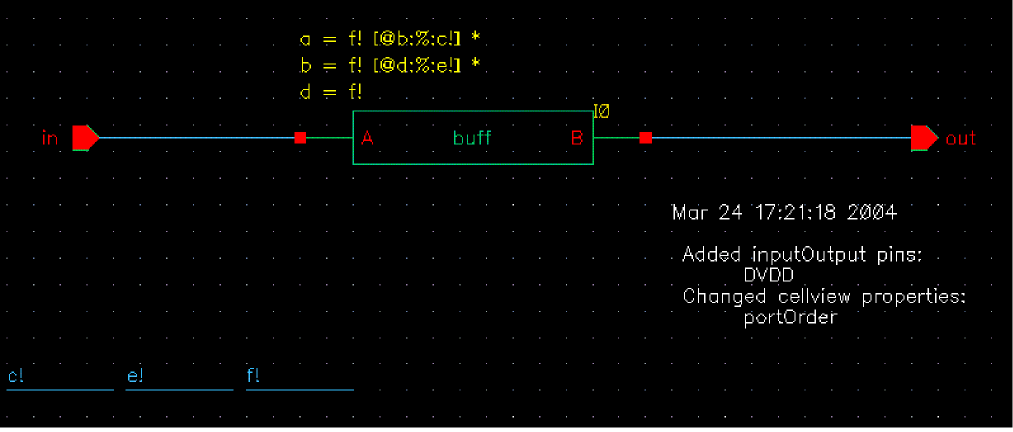
The above figure shows the top cell of buff with the following netSet properties:
a = [@b:%:c!] *
b = [@d:%:e!] *
d = f!
In the above example, a, b, and d will all resolve to f!.
The following figure shows the buff schematic has 3 instances of inverters.
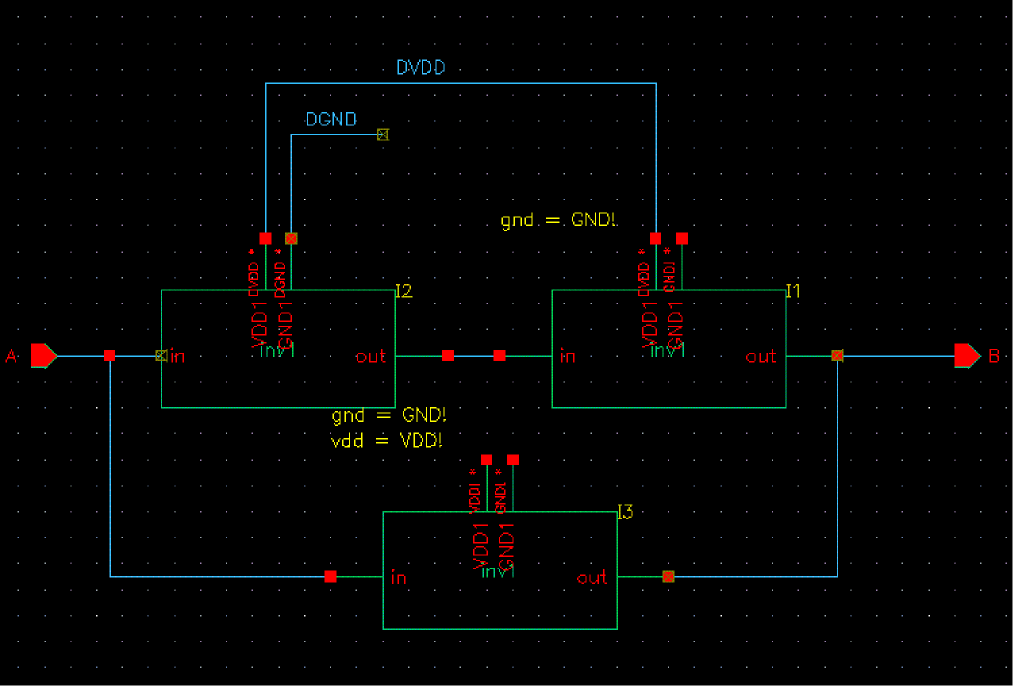
In the case of I1, one terminal is overridden and resolves to DVDD while one terminal is resolved using netSet property as follows.
In the case of I2, both the terminals are physically overridden in the buff schematic by explicit connections to DVDD and DGND.
In the case of I3, both the terminals are resolved using netSet expressions as follows.
In the following figure, inv1 from the buff schematic has explicit connections to the power and the ground supplies. Both the explicit terminals are inherited with the power (VDD1) terminal having the netExpression [@vdd:%:vdd!] and the ground terminal (GND1) having the netExpression [@gnd:%:gnd!]. These types of terminals are referred to as Inherited Ports.
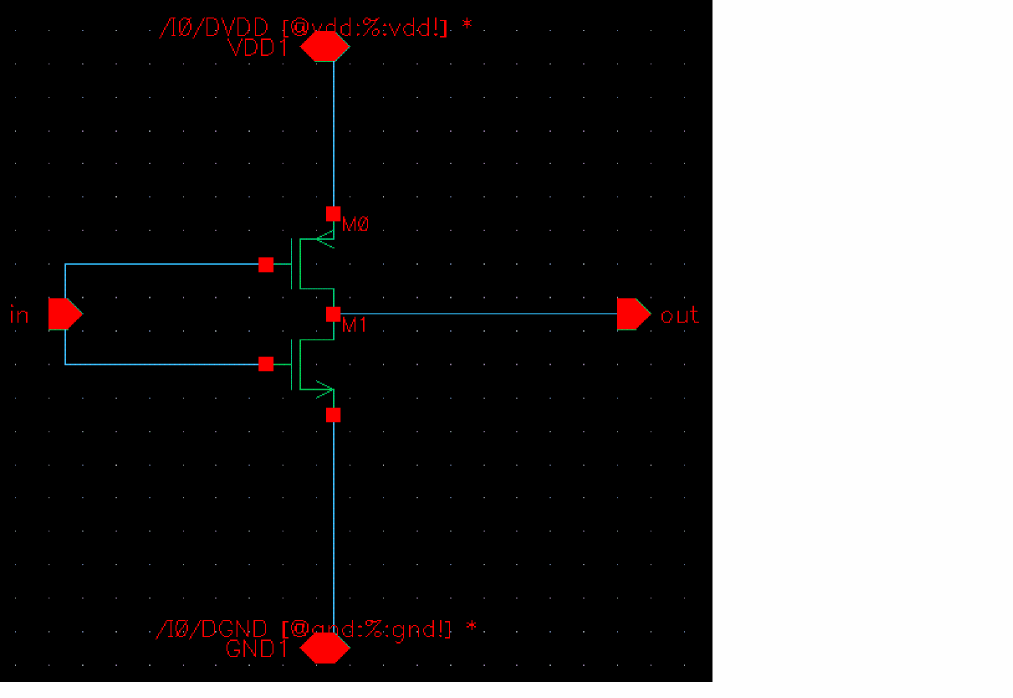
The symbol which is created now has 4 terminals instead of 2 and this symbol is used in I1, I2, and I3.
When you netlist top/test cellview using auCdl, you get the following netlist. The pseudo ports created due to the presence of implicit terminals (inherited connections) are highlighted in bold.
************************************************************************
* auCdl Netlist:
*
* Library Name: test
* Top Cell Name: top
* View Name: schematic
* Netlisted on: Jun 28 15:50:13 2005
************************************************************************
*.EQUATION
*.SCALE METER
*.MEGA
.PARAM

*.GLOBAL GND!
+ VDD!
+ f!
+ e!
+ c!

*.PIN GND!
*+ VDD!
*+ f!
*+ e!
*+ c!

************************************************************************
* Library Name: test
* Cell Name: inv1
* View Name: schematic
************************************************************************

.SUBCKT inv1 in out inh_gnd inh_vdd
*.PININFO in:I out:O inh_gnd:B inh_vdd:B
MM1 out in inh_gnd inh_gnd NM
MM0 out in inh_vdd inh_vdd PM
.ENDS

************************************************************************
* Library Name: test
* Cell Name: buff
* View Name: schematic
************************************************************************

.SUBCKT buff A B
*.PININFO A:I B:O
XI3 A B GND! VDD! / inv1
XI1 net6 B GND! DVDD / inv1
XI2 A net6 DGND DVDD / inv1
.ENDS

************************************************************************
* Library Name: test
* Cell Name: top
* View Name: schematic
************************************************************************

.SUBCKT top in out
*.PININFO in:I out:O
XI0 in out / buff
.ENDS
When you set simPrintInhConnAttributes to t the netlist produced is as follows:
************************************************************************
* auCdl Netlist:
*
* Library Name: test
* Top Cell Name: top
* View Name: schematic
* Netlisted on: Oct 14 12:25:05 2004
************************************************************************

*.EQUATION
*.SCALE METER
*.MEGA
.PARAM

*.GLOBAL GND!
+ VDD!
+ f!
+ e!
+ c!

*.PIN GND!
*+ VDD!
*+ f!
*+ e!
*+ c!

************************************************************************
* Library Name: test
* Cell Name: inv1
* View Name: schematic
************************************************************************

.SUBCKT inv1 gnd! vdd! in out
*.PININFO in:I out:O gnd!:B vdd!:B
*.PINMAP GND1:gnd! VDD1:vdd!
*.GROUNDSENSITIVITY gnd! GND1
*.POWERSENSITIVITY vdd! VDD1
*.NETEXPR vdd vdd! vdd!
*.NETEXPR gnd gnd! gnd!
MM1 out in gnd! gnd! NM
MM0 out in vdd! vdd! PM
.ENDS

************************************************************************
* Library Name: test
* Cell Name: buff
* View Name: schematic
************************************************************************

.SUBCKT buff A B
*.PININFO A:I B:O

XI3 GND! VDD! A B / inv1 $NETSET vdd="VDD!" gnd="GND!"
XI1 GND! DVDD net6 B / inv1 $NETSET gnd="GND!"
XI2 DGND DVDD A net6 / inv1
.ENDS

************************************************************************
* Library Name: test
* Cell Name: top
* View Name: schematic
************************************************************************

.SUBCKT top in out
*.PININFO in:I out:O

XI0 in out / buff $NETSET a="b c!" d="f!" b="d e!"
.ENDS
Support for Supply Sensitivity
The OSS-based netlisters netlist SUPPLYSENSITIVITY information along with *.NETEXPR and $netSet statements when Verilog modules interface with CDL sub-circuits. You need to add this information on the terminals of the cellview by using the SUPPLYSENSITIVITY constructs, *.POWERSENSITIVITY and *.GROUNDSENSITIVITY. These constructs have the following syntax:
*.POWERSENSITIVITYnetNamevalue
*.GROUNDSENSITIVITYnetNamevalue
These statements can be entered in either upper, lower or even mixed case.
Following is an example to explain this feature.
.SUBCKT OR2 A B Z PWR GND
*.POWERSENSITIVITY A PWR
*.GROUNDSENSITIVITY A GND
*.POWERSENSITIVITY B PWR
*.GROUNDSENSITIVITY B GND
.ENDS
These terminals and their sensitivity information is stored as terminal properties and is included in the netlist. The names of the properties are groundSensitivity and powerSensitivity. These properties are of type String. For example, Terminal A has a property value pair on a terminal SUP as groundSensitivity = gnd_io7 and powerSensitivity = pwr_io7 then the CDL netlist contains following statements:
*.POWERSENSITIVITY SUP pwr_io7
*.GROUNDSENSITIVITY SUP gnd_io7
In situations when some of the inherited terminals are overridden at the instance level in a macro and some are not, then the $PINS statement is used to define the termOrder. Refer to the Instance I1 in the buff schematic shown in the following figure.
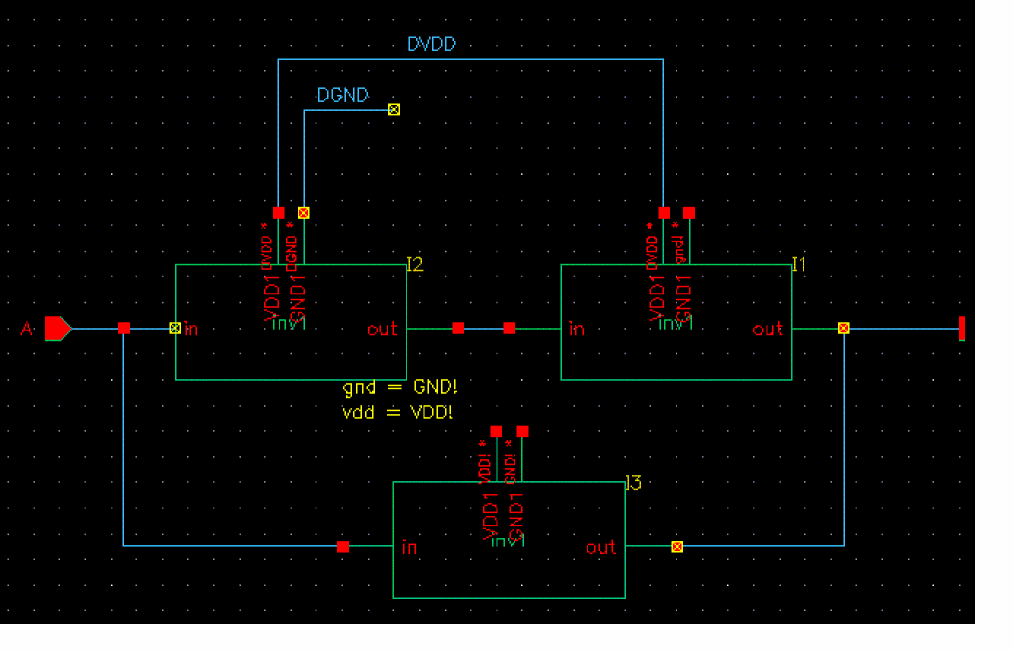
I1 has only one terminal which is overridden. Therefore all the terminals are indicated in the netlist using the $PINS statement for the instance I1.
The netlist for the above example is as follows:
************************************************************************
* Library Name: test
* Cell Name: buff
* View Name: schematic
************************************************************************

.SUBCKT buff A B
*.PININFO A:I B:O

*.NETEXPR gnd gnd! gnd!
XI3 GND! VDD! A B / inv1 $NETSET vdd="VDD!" gnd="GND!"
XI1 / inv1 $PINS VDD1=DVDD GND1=gnd! in=net6 out=B
XI2 DGND DVDD A net6 / inv1
.ENDS

************************************************************************
* Library Name: test
* Cell Name: top
* View Name: schematic
************************************************************************

.SUBCKT top in out
*.PININFO in:I out:O

XI0 in out / buff $NETSET a="b c!" d="f!" b="d e!"

.ENDS
Notice in the above netlist the $PINS statement indicates all the terminals and their resolutions as well as the unresolved terminal names, in this case in=net6 and out=B.
Ignoring Mismatch in Inherited Connections
The OSS-based netlisters, do not support mismatch in inherited connection between the placed and switched masters of an instance. If one of the masters of an instance has a terminal with net expression, which is a case of explicit inherited connection, and the other has a wire with net expressions, which is a case of implicit inherited connection, OSS flags an error and stops netlisting.
A SKILL environment variable, hnlAllowExplicitImplicitInhMismatch, lets you ignore this mismatch while printing netlist. hnlAllowExplicitImplicitInhMismatch is a boolean variable with a default value as nil. You can set this variable in the .simrc file or in the CIW as follows:
hnlAllowExplicitImplicitInhMismtach = t
The following figure shows an example of an instance that has an implicit connection, VSS!, in the switched master or the schematic view.
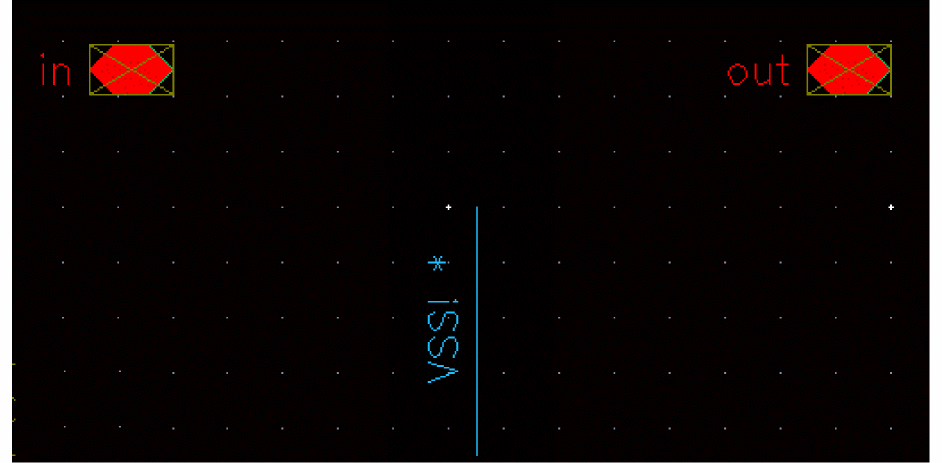
This connection is taken as an explicit connection in the placed master or the symbol view of the instance, shown in the following figure.
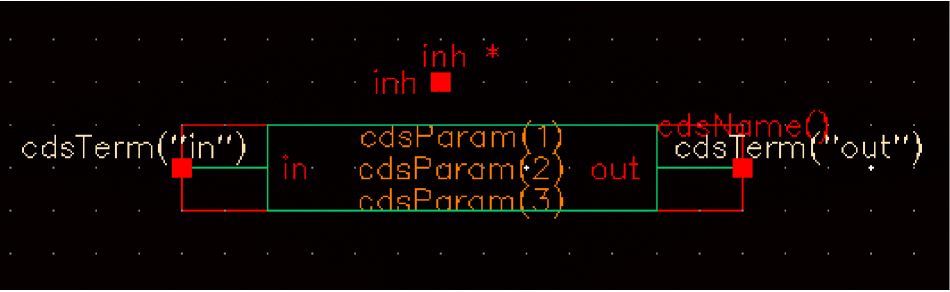
By default, OSS does not support such mismatch. You can use the hnlAllowExplicitImplicitInhMismatch variable to ensure that OSS generates netlist for such connections.
Support for Iterated Instances
OSS supports netlisting of iterated instances without any expansion. An iterated instance refers to an array of multiple instances. This feature specifies that there is one to one mapping between a composer design and a netlist with respect to iterated instances. Iterated instances feature reduces netlist size, which further results in significant decrease in the time taken to generate a netlist. For example, in a Verilog design with an iterated instance of 8K range, a netlist is generated in approximately 4 minutes. This is an improvement over the 9 hours taken earlier without iterated instances support.
The following figure shows a design with iterated instance, I3<2:0>.
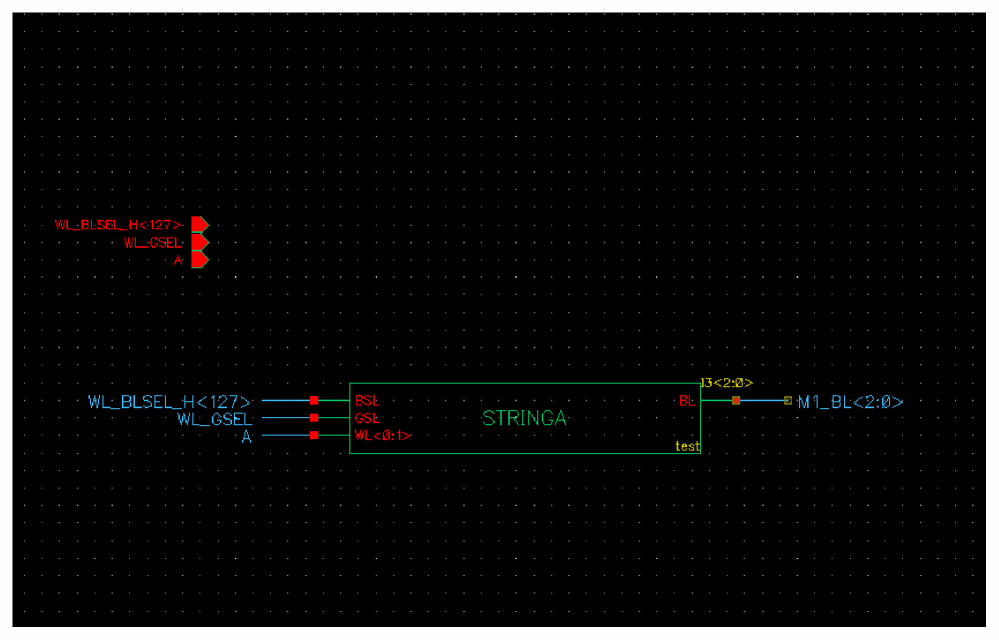
Earlier, each iterated instance was expanded to a list of individual instances and netlisted separately. The following example shows an iterated instance, I3<2:0>, which is expanded as three individual instances, I3_2_, I3_1_, and I3_0_:
STRINGA I3_2_(M1_BL[2], WL_BLSEL_H[127], WL_GSEL, {A,A});
STRINGA I3_1_(M1_BL[1], WL_BLSEL_H[127], WL_GSEL, {A,A});
STRINGA I3_0_(M1_BL[0], WL_BLSEL_H[127], WL_GSEL, {A,A});
The iterated instance netlisting feature is enabled by default. You can also set this feature.
To enable the iterated instance netlisting, set the hnlSupportIterInst flag to true in the .simrc file or on CIW command line:
hnlSupportIterInst = t
simVerilogPrint2001Format flag to true in the .simrc file or on CIW command line:simVerilogPrint2001Format = t
The following example shows an array of iterated instances, which is netlisted as a single instance, I3<2:0> when you set the variable to t:
STRINGA I3[2:0](M1_BL[2:0], WL_BLSEL_H[127], WL_GSEL, {A,A});
To disable the iterated instance netlisting and print the iterated instances in the expanded form, set the vlogExpandIteratedInst flag to t in the .simrc file or at CIW as:
If a design module has multiple iterated instances with the same base name, the netlister prints them in the expanded form, even if the logExpandIteratedInst flag is not set to t. For example, consider a schematic that contains split iterated instances I0<2:0> and I0<3>. In this case, the netlister prints the instances in the expanded form, as illustrated in the following Verilog netlist snippet:
dummy I0_2_ ( cds_globals.gnd_, net3);
dummy I0_1_ ( cds_globals.gnd_, net3);
dummy I0_0_ ( cds_globals.gnd_, net3);
dummy I0_3_ ( net2, cds_globals.gnd_);
If there are no aliases in a design, you can stop alias processing to further improve OSS performance. For example, if you set the hnlIgnoreAlias flag to true in a Verilog design with an iterated instance of 8K range, a netlist is generated in approximately 1 second. This is a further improvement over the 4 minutes taken when the flag value is false. The hnlIgnoreAlias flag is set to true as:
Writing a Formatter
Several output functions must exist for the netlister to run. Depending on the output syntax required, the functions may or may not produce any output. This section describes the order in which data is presented by the netlister traversal functions and the output functions expected. These functions are
-
stored in a file, whose name is that of the simulator concatenated with the string
.ile -
placed in the install_dir
/tools/dfII/local/hnldirectory, where install_dir is the directory in which the Cadence software has been installed
This file must be encrypted for HNL to execute correctly on a non-development system.
Set Output Variables
When the netlister starts to execute, it calls an hnlSetOutputVars() formatter function. This function takes no arguments and sets any target format-specific variables. This function is called before the netlister starts traversing the database.
Create Netlister Data Structures
After setting the output variables, the netlister traverses the database and constructs a list of all the cellviews (schematics) that need to be placed in the netlist. At the same time, a list of global signals used throughout the design is created. No format functions are called until all the data has been read in and checked for basic integrity. Although the formatter is not called at this point, it is possible to override certain netlister functions. Refer to the “Access Functions” section in this chapter for a description of these functions, their names, and their argument lists to help determine how to modify the netlister. Most of these functions do not need to be modified, as they simply assemble and verify the data. However, certain ones can be replaced to drastically modify the netlister.
Print Netlist Header
Once all the data has been collected, the netlister calls the hnlPrintNetlist() netlister-defined function. This function, in turn, calls hnlPrintNetlistHeader(), a function which must be defined as one of the formatting functions to print any header information at the beginning of the netlist file.
Print Connectivity for Subcircuits
Next, another netlister-defined function hnlDoInstBased() is called. This function sets the following global variables:
hnlCurrentCell
hnlCellInputs
hnlCellOutputs
hnlCellOthers
hnlCellOutTerms
hnlCellInTerms
hnlCellOtherTerms
hnlCellNetsOnTerms
These variables are set for each macro definition to be output to the netlist as well as for the top-level design. The hnlDoInstBased() function calls output-formatter-defined functions for each cell needed to define the netlist. First, format functions are called for all of the devices used in the design that are not stopping cells. These devices are frequently called macros or sub-circuits. Then, format functions are called to output the top-level design being netlisted. The functions called are determined by the hnlMacroCellFuncs and hnlTopCellFuncs global variables. These lists can be modified to alter the order of the output functions called to eliminate unneeded portions of the netlist or to add calls to the formatter functions you define.
Print Subcircuit Header
For each device that is not the top-level design, the hnlCurrentCell global variable is set to the current device being expanded. Then the hnlPrintDeviceHeader() formatter-defined function is called. This function typically outputs a macro or subcircuit statement.
Print External Connections for Subcircuit
Next, formatter functions are called to print any needed declarations for external connections to this device. All of these functions must be defined, although they do not need to output anything. The hnlPrintPorts() function, which takes no arguments, is then called to output any port declarations for this cell that may be required by the target simulator. To help output these declarations, the following global variables have been set prior to calling this function:
hnlCurrentCell
hnlCellInputs
hnlCellOutputs
hnlCellOthers
hnlCellOutTerms
hnlCellInTerms
hnlCellOtherTerms
hnlCellNetsOnTerms
Of particular importance is the hnlCellNetsOnTerms variable. This is a list of the nets attached to the terminals/ports of this cell sorted alphanumerically by terminal name. These nets have been separated into single-wire nets before sorting. This list can be used to output the ports in order so that they positionally correspond to references to this cell that may be output later in the netlist. If the hnlCurrentTermsOnInst global variable is used, when later outputting references to macros, the order of the nets attached to the macro definition and the macro reference match.
Print Connectivity for Instances in Subcircuit
After the external connections section of the netlist has been completed, the hnlPrintDevices() netlister-defined function is called. This function sets the following global variables for use by the format function:
hnlCurrentOutTerms
hnlCurrentInTerms
hnlCurrentOutputs
hnlCurrentInputs
hnlCurrentOtherTerms
hnlCurrentOthers
hnlCurrentType
hnlCurrentInst
hnlCurrentInstName
hnlCurrentIteration
hnlCurrentTermsOnInst
hnlCurrentMaster
For each iteration of each device used in the current cell being expanded, these variables are set, and the hnlPrintInst() formatter function is called. This function takes no arguments. It has access to the listed global variables and various netlister query functions. These variables and functions provide information needed to output the connectivity for this instance (reference) to the device. The hnlPrintInst() function is probably the most complex that you must write. It must print the connectivity for each device used in the design, and must be able to differentiate and handle both macro/subcircuit references and the formatting of primitive devices. It is the core entry point for the output formatter, and is also later called for each device referenced in the top-level cell being netlisted.
Print Subcircuit Footer
When the connectivity for each instance (reference) in this cell has been output, the hnlPrintDeviceFooter() formatter function is called to output any macro completion information required. This information is typically an end-of-macro or subcircuit statement.
Print Connectivity for Top Cells
Once the definitions for each level of the hierarchy have been output, the hnlDoInstBased( ) function calls formatter functions to output the connectivity for the top-level schematic as specified by the hnlTopCellFuncs variable.
Print Top Cell Header
First, the hnlPrintTopCellHeader() function is called. This function handles any description signaling the beginning of the connectivity for the top-level design.
Print Connectivity for Instances in Top Cell
Next, the hnlPrintDevices() netlister-defined function is called as it was for each subcircuit in the design.
Print Top Cell Footer
When all the connectivity has been output, the hnlPrintTopCellFooter() formatter function is called to signal the end of connectivity for the top-level design.
Print Netlist Footer
The last formatter function to be called is hnlPrintNetlistFooter(). This function outputs any information needed to complete the netlist.
Unbind Variables
So designers can switch between two different simulators in the Cadence graphics environment, you must specify the functions and variables you define in your formatting instructions for HNL. To do this, define the hnlFormatterUnbindVars and the hnlFormatterUnbindFuncs variables in your simulator-specific HNL formatting file.
hnlFormatterUnbindVars
Specifies the variables you define in your simulator-specific hnl file that must be unbound when simulators are switched. You must include any variables you define in this list. If you do not include a variable in this list, the correct value may not be used when the designer switches to a different simulator.
Set this variable to a list containing the names of all of the variables you define. Define the variable in the hnl file for your netlist formatter outside of any function definition. The following is an example of how to set this variable in the hnl/silos.ile file for the SILOS netlist formatter:
simSetDef( 'hnlFormatterUnbindVars, ' (hnlMaxNameLength
      hnlMapIfFirstChar
      hnlMapIfInName
      hnlHierarchyDelimeter
   )
)
hnlFormatterUnbindFuncs
Specifies the functions you define in your simulator-specific hnl file that must be unbound when simulators are switched. You must include any functions you define in this list. If you do not include a function in this list, the correct function may not be used when the designer switches to a different simulator.
Set this variable to a list containing the names of all of the functions you define. Define this variable in the hnl file for your netlist formatter outside of any function definition. The following is an example of how to set this variable in the hnl/silo.ile file for the SILOS netlist formatter. This example is only a partial list of what is used in the silos interface.
hnlSetDef('hnlFormatterUnbindFuncs,'(hnlSilosPrintInputs
      hnlPrintInst
      hnlSilosPrintMacroRef
      hnlPrintPorts
      hnlSetOutputVars
      hnlPrintTopCellFooter
   )
)
Required Formatter Functions and Variables
The following is the complete list of all the functions that must be defined in any output formatter written for the hierarchical netlister:
hnlPrintNetlistFooter( )
hnlPrintNetlistHeader( )
hnlSetOutputVars( )
hnlPrintTopCellHeader( )
hnlPrintTopCellFooter( )
hnlPrintPorts( )
hnlPrintDeviceHeader( )
hnlPrintDeviceFooter( )
hnlPrintInst( )
In addition, the following variables should be defined by the formatter:
hnlHierarchyDelimiter
hnlDriverWillPrint
hnlCommentStr
hnlLinePostfix
hnlLinePrefix
hnlMaxLineLength
hnlMaxNameLength
hnlMapIfInName
hnlMapIfFirstChar
hnlHierarchyDelimeter
hnlFormatFuncsLoaded
hnlFormatterUnbindVars
hnlFormatterUnbindFuncs
Instead of setting the hnlMapIfInName and hnlMapIfFirstChar variables, you may want to set the following variables, depending on the name mapping functions you use:
hnlMapInstFirstChar
hnlMapInstInName
hnlMapModelFirstChar
hnlMapModelInName
hnlMapNetFirstChar
hnlMapNetInName
hnlMapTermFirstChar
hnlmapTermInName
For an explanation of the meaning of each of these variables, refer to “HNL Global Variables” in this chapter.
Figure 5-3 is a sample set of formatting functions to textually output a design in human-readable form. Figure 5-3 is the output generated when the sample formatter functions are loaded into the netlister and the netlister is run on a 74LS169A schematic.
; This file contains the functions to format a sample netlister
; output.
;
; Set so this file is only loaded the first time the netlister is
; run.
hnlFormatFuncsLoaded = t
; Set the lists of variables and functions that must be unbound
; when environments (simulators) are switched.
hnlFormatterUnbindVars = nil
hnlSetDef('hnlFormatterUnbindFuncs '   ( hnlPrintNetlistHeader
                           hnlPrintNetlistFooter
                           hnlSetOutputVars
                           hnlPrintTopCellHeader
                           hnlPrintTopCellFooter
                           hnlPrintPorts
                           hnlPrintDeviceHeader
                           hnlPrintDeviceFooter
                           UserSamplePrintMacroRef
                           UserSamplePrintStoppingRef
                           hnlPrintInst
)
)
; This function prints the netlist header to the netlist file.
; Currently, it writes the global statement for all global nets
; used in the design.
;
hnlIfNoProcedure( hnlPrintNetlistHeader()
let( (name)
if( hnlAllGlobals != nil then
hnlPrintString("The following global nets are used:")
foreach( name hnlAllGlobals
hnlPrintString(" ")
hnlPrintString(name)
)
hnlPrintString("\n")
)
t
)
)
; This function prints the netlist footer to the netlist file.
; None is needed.
;
hnlIfNoProcedure( hnlPrintNetlistFooter()
t
)
; This function sets the simulator-specific output variables. None
; are needed for this syntax.
;
hnlIfNoProcedure( hnlSetOutputVars()
hnlDriverWillPrint = t
t
)
; This function outputs any special information to designate the
; beginning of the top-level schematic.
;
hnlIfNoProcedure( hnlPrintTopCellHeader()
let( (tmp)
sprintf(tmp "\nBegin description of schematic '%s'\n"
hnlTopCell ∼> cellName )
hnlPrintString(tmp)
t
)
)
; This function outputs any special information to designate the
; end of the top-level schematic.
;
hnlIfNoProcedure( hnlPrintTopCellFooter()
let( (tmp)
sprintf(tmp "End description of schematic '%s'\n"
hnlTopCell ∼> cellName )
hnlPrintString(tmp)
t
)
)
; This function outputs a blank followed by the name of the net
; attached to each bit of the terminals of this macro. The
; ordering is matched to macro references because the names in
; hnlCellNetsOnTerms are used. The function
; then outputs a new line.
;
hnlIfNoProcedure( hnlPrintPorts()
let( ( name )
hnlPrintString( " External connections =")
; Print connections in sorted order.
foreach( name hnlCellNetsOnTerms
hnlPrintString(" ")
hnlPrintString(name)
)
hnlPrintString("\n")
t
)
)
; This function writes a cell definition header to the netlist
; file.
;
hnlIfNoProcedure( hnlPrintDeviceHeader()
sprintf(tmp"\nBegin description of cell '%s'\n"
hnlCurrentCell ∼> cellName )
hnlPrintString(tmp)
t
)
; This function completes a macro definition in the netlist file.
;
hnlIfNoProcedure( hnlPrintDeviceFooter()
let( (tmp)
sprintf(tmp"End description of cell '%s'\n"
hnlCurrentCell ∼> cellName )
hnlPrintString(tmp)
t
)
)
; This function prints out the connectivity for a macro reference
; in the netlist file.
;
hnlIfNoProcedure( UserSamplePrintMacroRef()
let( ( name tmp)
sprintf(tmp" Instance '%s' references cell '%s'\n"
hnlCurrentInstName hnlCurrentType)
hnlPrintString(tmp)
hnlPrintString( " Connections = ")
; Print connections in sorted order.
foreach( name hnlCurrentTermsOnInst
hnlPrintString(" ")
hnlPrintString(name)
)
hnlPrintString("\n")
t
)
)
; This function prints out the connectivity for a stopping
; cellview(primitive) reference in the netlist file.
;
hnlIfNoProcedure( UserSamplePrintStoppingRef()
let( (tmp)
sprintf(tmp" Instance '%s' is a '%s'\n"
hnlCurrentInstName hnlCurrentType)
hnlPrintString(tmp)
hnlPrintString("\n Outputs = ")
foreach( name hnlCurrentOutputs
hnlPrintString(" ")
hnlPrintString(name)
)
hnlPrintString("\n Inputs = ")
foreach( name hnlCurrentInputs
hnlPrintString(" ")
hnlPrintString(name)
)
hnlPrintString("\n")
t
)
)
; This function writes the connectivity for an instance in the
; design to the netlist file. If the instance is a
; stopping cellview ( determined by hnlIsAStoppingCell() ) then
; UserSamplePrintStoppingRef() is called, otherwise
; UserSamplePrintMacroRef() is called. The netlist driver expects
; this function to exist with the given name and to output the
; needed connectivity for each instance.
;
hnlIfNoProcedure( hnlPrintInst()
prog( ()
      ; Macro references and primitives must be formatted
      ; differently.
if( hnlCurrentMaster != nil then
if( hnlIsAStoppingCell(hnlCurrentMaster) then
return( UserSamplePrintStoppingRef() )
else
return( UserSamplePrintMacroRef() )
)
)
)
)
Figure 5-3 Output From Sample Formatter Functions
Begin description of cell '@/fflop'
External connections = CLK D Q Q*
   Instance '14' is a 'nand2'
      Outputs = 14.Y
      Inputs = 11.Y D
   Instance '7' is a 'nand2'
      Outputs = Q
      Inputs = 2.Y Q*
   Instance '1' is a 'nand2'
      Outputs = 1.Y
      Inputs = 14.Y 2.Y
   Instance '8' is a 'nand2'
      Outputs = Q*
      Inputs = Q 11.Y
   Instance '2' is a 'nand2'
      Outputs = 2.Y
      Inputs = 1.Y CLK
   Instance '11' is a 'nand3'
      Outputs = 11.Y
      Inputs = 2.Y CLK 14.Y
End description of cell '@/fflop'
Begin description of schematic '74LS169A'
   Instance '32' is a 'inv'
      Outputs = 32.Y
      Inputs = 48.Y
   Instance '2' is a 'inv'
      Outputs = 2.Y
      Inputs = CLK
   Instance '25' is a 'inv'
      Outputs = 25.Y
      Inputs = UP
   Instance '6' is a 'inv'
      Outputs = 6.Y
      Inputs = P*
   Instance '43' is a 'inv'
      Outputs = 43.Y
      Inputs = 25.Y
   Instance '11' is a 'inv'
      Outputs = 11.Y
      Inputs = 2.Y
   Instance '52' is a 'inv'
      Outputs = 52.Y
      Inputs = T*
   Instance '48' is a 'inv'
      Outputs = 48.Y
      Inputs = LOAD*
   Instance '39' is a 'inv'
      Outputs = 39.Y
      Inputs = 56.Y
   Instance '55' is a 'and2'
      Outputs = 55.Y
      Inputs = 48.Y A
   Instance '15' is a 'and2'
      Outputs = 15.Y
      Inputs = 48.Y D
   Instance '58' is a 'and2'
      Outputs = 58.Y
      Inputs = 48.Y B
   Instance '40' is a 'and2'
      Outputs = 40.Y
      Inputs = 48.Y C
   Instance '9' is a 'and2'
      Outputs = 9.Y
      Inputs = 43.Y 50.Q*
   Instance '36' is a 'and2'
      Outputs = 36.Y
      Inputs = 25.Y QD
   Instance '28' is a 'and2'
      Outputs = 28.Y
      Inputs = 43.Y 14.Q*
   Instance '3' is a 'and2'
      Outputs = 3.Y
      Inputs = 25.Y QC
   Instance '41' is a 'and2'
      Outputs = 41.Y
      Inputs = 43.Y 35.Q*
   Instance '16' is a 'and2'
      Outputs = 16.Y
      Inputs = 25.Y QB
   Instance '53' is a 'and2'
      Outputs = 53.Y
      Inputs = 43.Y 20.Q*
   Instance '42' is a 'and2'
      Outputs = 42.Y
      Inputs = 56.Y 20.Q*
   Instance '19' is a 'and2'
      Outputs = 19.Y
      Inputs = 25.Y QA
   Instance '44' is a 'and3'
      Outputs = 44.Y
      Inputs = 27.Y 32.Y QD
   Instance '56' is a 'and3'
      Outputs = 56.Y
      Inputs = 52.Y 6.Y LOAD*
   Instance '7' is a 'and3'
      Outputs = 7.Y
      Inputs = 32.Y 38.Y QC
   Instance '54' is a 'and3'
      Outputs = 54.Y
      Inputs = 35.Q* 17.Y 56.Y
   Instance '33' is a 'and3'
      Outputs = 33.Y
      Inputs = 32.Y 34.Y QB
   Instance '49' is a 'and3'
      Outputs = 49.Y
      Inputs = 32.Y 39.Y QA
   Instance '57' is a 'or3'
      Outputs = 57.Y
      Inputs = 49.Y 55.Y 42.Y
   Instance '10' is a 'or3'
      Outputs = 10.Y
      Inputs = 44.Y 15.Y 31.Y
   Instance '51' is a 'or3'
      Outputs = 51.Y
      Inputs = 33.Y 58.Y 54.Y
   Instance '37' is a 'or3'
      Outputs = 37.Y
      Inputs = 7.Y 40.Y 26.Y
   Instance '12' is a 'nor2'
      Outputs = 12.Y
      Inputs = 9.Y 36.Y
   Instance '22' is a 'nor2'
      Outputs = 22.Y
      Inputs = 28.Y 3.Y
   Instance '47' is a 'nor2'
      Outputs = 47.Y
      Inputs = 41.Y 16.Y
   Instance '17' is a 'nor2'
      Outputs = 17.Y
      Inputs = 53.Y 19.Y
   Instance '14' references cell '@/fflop'
      Connections = 11.Y 37.Y QC 14.Q*
   Instance '20' references cell '@/fflop'
      Connections = 11.Y 57.Y QA 20.Q*
   Instance '50' references cell '@/fflop'
      Connections = 11.Y 10.Y QD 50.Q*
   Instance '35' references cell '@/fflop'
      Connections = 11.Y 51.Y QB 35.Q*
   Instance '26' is a 'and4'
      Outputs = 26.Y
      Inputs = 47.Y 14.Q* 17.Y 56.Y
   Instance '27' is a 'nand4'
      Outputs = 27.Y
      Inputs = 17.Y 56.Y 47.Y 22.Y
   Instance '31' is a 'and5'
      Outputs = 31.Y
      Inputs = 47.Y 22.Y 50.Q* 17.Y 56.Y
   Instance '24' is a 'nand5'
      Outputs = RCO
      Inputs = 47.Y 22.Y 12.Y 17.Y 52.Y
   Instance '38' is a 'nand3'
      Outputs = 38.Y
      Inputs = 56.Y 17.Y 47.Y
   Instance '34' is a 'nand2'
      Outputs = 34.Y
      Inputs = 56.Y 17.Y
End description of schematic '74LS169A'
Formatter-Specific Triggers that Customize the Netlist
The netlisting process typically involves the following stages:
- Formatter is invoked
- Formatter invokes the core netlister, OSS
- OSS begins generation of data for formatters
- OSS run is completed
- Formatter run is completed
In this flow, you use the simSimulator variable to apply conditions for a specific formatter by specifying (simSimulator == formatterName).
Pre- and post-netlist triggers are used to customize netlists. Earlier, these triggers were only OSS-specific.This means that pre-netlist triggers were called before OSS started generation of data and post-netlist triggers were called after OSS finished generation of data.
Integrating the pre- and post-netlist triggers in the netlisting process results in the following netlisting flow:

The above flow diagram explains that formatter-specific changes need to be made before OSS begins execution of data. This is the stage when you can set defaults for, or override, the formatter-related settings before using OSS-specific triggers.
Benefits of Formatter-Specific Triggers
Formatter-specific triggers have the following main benefits:
- You can set or override the default settings of formatters
-
You can bypass the use of the error-prone
(simSimulator == formatterName)check - You can ensure that netlisting variables are cleared after netlisting completes
Order of Calls for Formatter-Specific Triggers and OSS-Specific Triggers
With the introduction of formatter-specific triggers, the order in which the triggers are called is as follows:
- Formatter-specific pre-netlist triggers
- OSS-specific pre-netlist triggers
- OSS-specific post-netlist triggers
- Formatter-specific post-netlist triggers
Registering Formatter-Specific Triggers
To register formatter-specific triggers:
-
Provide the formatter name as the second argument in the
simRegPreNetlistTriggerorsimRegPostNetlistTriggerfunctions.
The following examples describe how you can register formatter-specific triggers for the auCdl and hspiceD formatters:
-
auCdl
simRegPreNetlistTrigger('triggerFunction "auCdl")
simRegPostNetlistTrigger('triggerFunction "auCdl")
-
hspiceD
simRegPreNetlistTrigger('triggerFunction "hspiceD")
simRegPostNetlistTrigger('triggerFunction "hspiceD")
Similarly, to specify triggers for other formatters, you can replace the second argument with the formatter name to register the corresponding triggers. Valid values for specifying formatters are auCdl, hspiceD, verilog, and spectre.
Various tools such as Verilog Out, SystemVerilog Netlister, Virtuoso SystemVerilog Netlister (VSVN), and Unified Netlister (UNL) use the verilog formatter, whereas tools such as ADE Assembler, ADE Explorer, and ADE Verifier use the spectre formatter.
Formatter-Specific Triggers and simSimulator
You use the simSimulator variable to apply conditions for a specific formatter. With formatter-specific triggers, use of (simSimulator==formatterName) becomes unnecessary.
Consider an example where you want to set hnlSimStopList for cell mid using the auCdl formatter. Using the simSimulator variable in the .simrc file, the setting would be applied as follows and would be applicable for all formatters, which is not needed.
    when(simSimulator == "auCdl"
      hnlUserStopCVLIst = list( list("lib" "mid" ))
    )
Here, the specified setting is applied for cell mid, but you cannot ensure whether hnlUserStopCVList is set to unbound after auCdl netlisting is complete.
Consider the following example:
when(simSimulator == "auCdl"
  hnlMapNetFirstChar = list( "$" "," ";" ":" "=" "/" " " "\t")
)
When you specify these settings in the .simrc file, the value of hnlMapNetFirstChar is retained as list( "$" "," ";" ":" "=" "/" " " "\t"), even after the value of simSimulator changes during subsequent netlisting, which means that these settings are also applied for all netlisters if they are run after auCdl netlister.
However, when you use a formatter-specific trigger, the usage would be as follows:
   procedure(initFunction()
      hnlUserStopCVList = list( list("lib" "mid" )
   )
   simRegPreNetlistTrigger(initFunction "auCdl")
Here, registration of the auCdl trigger is done
   procedure(clearFunction()
      hnlUserStopCVList = nil
   )
   simRegPostNetlistTrigger(clearFunction "auCdl")
The formatter-specific trigger clearFunction ensures that hnlUserStopCVList is set to nil for auCdl after netlisting, and therefore, lets you avoid error-prone simSimulator checks that cause the same setting to be used for other netlisters.
Examples
The following example describes the definition of a trigger allowNetNamesBeginingWithADigit.
procedure(allowNetNamesBeginingWithADigit()
         let((invalidFristCharsList)
Here, the default values of invalidFirstCharsList are overridden by the specified values. By default, invalidFirstChars for auCdl is list( "$" "," ";" ":" "=" "/" " " "\t" "0" "1" "2" "3" "4" "5" "6" "7" "8" "9").
         invalidFirstCharsList = list( "$" "," ";" ":" "=" "/" " " "\t")
             asiSetNetlistOption(tool 'ihnlMapNetFirstChar invalidFirstCharsList )))
The following command performs registration of the trigger function.
simRegPreNetlistTrigger('allowNetNamesBeginingWithADigit "auCdl")
In this example, the trigger function allowNetNamesBeginingWithADigit lets you override the default values of invalidFirstChars and generate a netlist that contains numbers at the beginning of net names such as 1net, 2net. Without this trigger function, 1net will netlist as N0 and 2net as N1, which might not be the desired output.
Related Topics
HNL Specific Properties
nlIgnore
When this property is set on an instance, the instance will be ignored while netlisting for a particular simSimulator.
nlIgnore = "vhdl auCdl"
In this example, instances on which the nlIgnore property is set will be ignored during vhdl and auCdl netlisting.
HNL Variables
hnlEmptySwitchMasterAction
Use the hnlEmptySwitchMasterAction variable to define how you want to generate the netlist for an instance containing an empty switch master. The following table describes the possible values of this variable.
| Value | Description |
|---|---|
|
OSS generates an error for the instance and does not generate the netlist. |
hnlEmptySwitchMasterAction="honor"
hnlComparePmAndInstTermMisMatch
A design can have an instance where the representation of the instance terminals (instTerm) and the terminals of the place master of that instance are different. For example, the instance instTerm can be of the type scalar, while the corresponding place master terminal can be a bus.
To generate the netlist correctly in such cases, set the hnlComparePmAndInstTermMisMatch variable to t in the simulation configuration file, such as .simrc, or Virtuoso CIW.
hnlComparePmAndInstTermMisMatch = t
hnlPseudoTermSortOnNet
When set to t, sorts the inherited terminals as described below and prints the nets attached to these terminals according to the sorting.
-
Sort explicit inherited terminals based on the
termname - Sort implicit inherited terminals based on the net expression
hnlPseudoTermSortOnNet = t
hnlRegenerateCellNames
Regenerates cell names during incremental netlisting.
-
All: Default. Regenerates names for all the cell names irrespective of whether a cell name is unique or duplicate. -
OnlyDuplicates: Regenerates names only for duplicate cell names. -
nil: Mapped names are picked from theihnl/globalmapfile. Names are not regenerated for cell names that exist in the file.
hnlRegenerateCellNames = OnlyDuplicates
hnlRegenerateCellNames = nil
hnlResolveBusRangeByTermRange
When set to t, declares the bus range on the basis of the pin direction instead of the internal bus, if their range is equal.
hnlResolveBusRangeByTermRange = t
If bus in[7:0] is connected to a pin and bus in[0:7] is an internal bus, then the bus range will be defined as in[7:0].
hnlRetainInstanceNetsInShorting
When a device with the lxRemoveDevice component (For example, basic/cds_thru ) is removed during netlisting, the instance connected to this device can have connectivity according to the two nets of the two terminals of this component. Only one net survives, while the other is eliminated.
When hnlRetainInstanceNetsInShorting is set to t, the instance will have connectivity according to the net in which it is connected to the lxRemoveDevice component. For example, if instance 'I1' is connected to the lxRemoveDevice component 'via net net', then in netlist, instance 'I1' will have connectivity 'via net1'.
If hnlRetainInstanceNetsInShorting is set to nil, then in the netlist, instance 'I1' will have connectivity according to the survived net. Consider two terminal lxRemoveDevice components with nets 'net1' and 'net2'. If 'net2' is the survived net, then instance 'I1' will have connectivity 'via net2'.
hnlRetainInstanceNetsInShorting is set to t, then the netlist shorting connectivity will be shown by the assign statement in the verilog and vhdl netlist and via *.CONNECT statement in CDL netlist.hnlRetainInstanceNetsInShorting = nil
hnlSortPseudoTermsOnDefSigName
When set to t, sorts the inherited terminals based on their default signal names in the net expression, and prints the nets attached to these terminals according to the sorting.
hnlSortPseudoTermsOnDefSigName = t
hnlPseudoTermSortOnNet and hnlSortPseudoTermsOnDefSigName) are set, the inherited terminals are sorted based on the property name in the net expressions, and the attached nets are printed according to this sorting.hnlOptimizeCellGenerationInConfig
Optimizes cell generation by restricting the creation of variants for sub-configurations.
When set to t, variants of cells in sub-configurations are not created if two sub-configurations have the same global binding rules. Special binding rules are used for changes in view list, instance specific binding, occurrence binding, instance or occurrence specific properties and are not applicable for sub-configuration views.
hnlOptimizeCellGenerationInConfig = t
HNL Global Variables
The following are global variables you can access. Which variables are set depends on the formatter functions being used.
The contents of certain HNL variables need to be changed to support inherited connection, and are noted below. For inherited net expression, there is not sufficient information to determine the drive direction of the net, so all pseudo connections created for inherited signals are assumed to be inout connections. What this means is that these pseudo connections will be found in the HNL variable hnlCellOthers.
For any inherited terminal, the drive direction of the terminal is given. Thus inherited terminals can be found in any of the three HNL variables: hnlCellInputs, hnlCellOutputs, and hnlCellOthers.
Additionally, inherited terminals and inherited signals present another problem. As the default clause of the inherited net expression implies, the signal connected to the inherited terminal, if there is no inherited connection, is global by definition. However, when the cellview is being netlisted, the default signal name cannot be used when netlisting the connection to an inherited terminal. This is because if there is an inherited connection and the inherited signal is another global signal then we are allowing two globals to short together as a result. This is illegal in OA connectivity data and would generate wrong connection in most netlist syntaxes. To resolve this, a netlister-generated name is created for this connection with each inherited terminal. The same can be said for inherited signals. For readability, the netlister-generated names are derivatives of the property names specified in the inherited net expressions.
hnlAllGlobals
List of all of the global signals used in the design.
hnlAllowExplicitImplicitInhMismatch
Allows the placed and switched masters of an instance to have mismatch in terms of explicit and implicit inherited connections if the net expressions on terminal and wire match with each other.
hnlAllSingleBitBusDirection
Specifies the direction of a bus where each constituent is a single bit. Possible values include the following:
-
"UsehnlSetBusDirectionDescending": Allows individual direction setting for all single-bit busses. -
"Ascending": Allows setting direction to ascending for all single-bit busses. -
"Descending": Allows setting direction to descending for all single-bit busses.
Default: "UsehnlSetBusDirectionDescending"
hnlBusDirectionPolicy
Specifies the direction of all busses in a range. Possible values include the following:
-
"RangeSingleBitOmit": Omits single bits in the range. -
"RangeSingleBitAddsToAscending": Adds the single bits to ascending. -
"RangeSingleBitAddsToDescending": Adds the single bits to descending. -
"RangeSingleBitAddsToBoth": Adds the single bits to ascending and descending. -
"Contiguous": Identifies the direction which has the largest contiguous range. -
"LargestSingleSpread": Identifies the largest spread. -
"SummedSpread": Accumulates the spreads.
hnlInhConnUseDefSigName
Prints pseudo ports for the inherited connections with the default net names of the NetExpression.
hnlCellInTerms
List of the terminals on the current cell being expanded whose term ~> io == input. The current cell being expanded can be either a macro or the top cell. This variable is valid throughout evaluation of the functions specified by the hnlTopCellFuncs and hnlMacroCellFuncs variables. This list is alphabetically sorted by the terminal names.
Inherited terminals can be found in this list but since these are real terminals there are db id. associated with them. Here for inherited terminals the relationship with the entries in hnlCellInputs are db id. to netlister-generated names. These netlister-generated names are the same ones that appeared in hnlCellInputs.
For module buffer, the value is list( db_id_IN ).
hnlCellInputs
List of the signal names attached to the input terminals of the current cell being expanded. This cell can be either a macro or the top cell. This variable is valid throughout evaluation of the functions specified by the hnlTopCellFuncs and hnlMacroCellFuncs variables. This list is alphabetically sorted by the terminal names.
If inherited terminal is present, a netlister-generated name is inserted into this list for each inherited terminal to distinguish it from a normal (non-inheriting) terminal.
For module buffer, the value is list( “IN” )
hnlCellNetsOnTerms
List of the signals attached to all of the bits of the terminals on the current cell being netlisted. The list is sorted alphabetically by terminal name, not by signal name. The current cell being expanded can be either a macro or the top cell. This variable is valid throughout evaluation of the functions specified by the hnlTopCellFuncs and hnlMacroCellFuncs variables.
As a result of inherited connections and inherited terminals, netlister-generated names can be found in this SKILL list.
hnlCellOtherTerms
List of the terminals on the current cell being expanded whose term ~> io != input and term ~> io != output. The current cell being expanded can be either a macro or the top cell. This variable is valid throughout evaluation of the functions specified by the hnlTopCellFuncs and hnlMacroCellFuncs variables. This list is alphabetically sorted by the terminal names.
Logically there is no db id. for pseudo port created as a result of inherited signal. A netlister-generated-name generated by HNL is used as a place-holder instead. Inherited terminals can be found in this list but since these are real terminals there are db id. associated with them. Here for inherited terminals the relationship with the entries in hnlCellOutputs are db id. to netlister-generated names. These netlister-generated names are the same ones that appeared in hnlCellOthers.
For module buffer, there are no db ids for the pseudo ports created but pseudo-names generated by HNL are used as the place holders for the inherited connections. The value is list ( “inh_gnd” “inh_vdd”)
hnlCellOthers
List of the signal names attached to the terminals of the current cell being expanded that are not inputs or outputs, for example, bidirectional and inputOutput terminals. The current cell being expanded can be either a macro or the top cell. This variable is valid throughout evaluation of the functions specified by the hnlTopCellFuncs and hnlMacroCellFuncs variables. This list is alphabetically sorted by the terminal names.
Pseudo ports may be inserted into this list as a direct result of inherited connection. If inherited terminal is present, a netlister generated name is also inserted into this list for each inherited terminal to distinguish it from a normal (non-inheriting) terminal.
For module buffer, the value is list( “inh_gnd” “inh_vdd” ). These two are pseudo ports due to inherited connection.
hnlCellOutTerms
List of the terminals on the current cell being expanded whose term ~> io == output. The current cell being expanded can be either a macro or the top cell. This variable is valid throughout evaluation of the functions specified by the hnlTopCellFuncs and hnlMacroCellFuncs variables. This list is alphabetically sorted by the terminal names.
Inherited terminals can be found in this list but since these are real terminals there are db id. associated with them. Here for inherited terminals the relationship with the entries in hnlCellOutputs are db id. to netlister-generated names. These netlister-generated names are the same ones that appeared in hnlCellInputs.
For module buffer, the value is list( db_id_OUT ).
hnlCellOutputs
List of the signal names attached to the output terminals of the current cell being expanded. This cell can be either a macro or the top cell. This variable is valid throughout evaluation of the functions specified by the hnlTopCellFuncs and hnlMacroCellFuncs variables. This list is alphabetically sorted by the terminal names.
If inherited terminal is present, a netlister-generated name is inserted into this list for each inherited terminal to distinguish it from a normal (non-inheriting) terminal.
For module buffer, the value is list( “OUT” ).
hnlCheckInstParamDparMismatch
While sweeping parameter values during netlisting, checks whether the parameter that is being parameterized or swept in the setup is of string type. The tool creates intermediate values, called DPARs, for the sweep parameters in the format DPAR_n, where n is an incrementing integer. DPARs are expected to be of string type. During netlist generation is in progress, an error is reported if the tool detects that the CDF value of the swept parameter is not of type string. Such errors can help in identifying the parameters that must be updated in the CDF to string type.
The hnlCheckInstParamDparMismatch variable can have the following values:
-
error: Reports the errors detected during netlisting -
ignore: Sweeps parameters using the DPAR values in the netlist -
warning: Reports warnings but continues to sweep parameters using the DPAR values in the netlist
hnlCommentStr
String used by the simulator to indicate a comment. This variable is used by the hnlPrintString() function to determine if the current line being output to the netlist is a comment. If a comment exceeds the maximum line length of the target simulator, the comment is split into two or more single-line comments with the appropriate comment string at the beginning of each line.
hnlConfigMissingViewAction
Specifies the action to be taken if the view to be used, specified in the Hierarchy Editor, is missing from library. If the variable is not defined in the si.env file or is set to warning, the netlister displays a warning message and uses the next available view. When this flag is set using its default value error, the netlister displays an error and stops further processing.
hnlCurrentInTerms
List of the terminals on the current device whose term ~> io == input. This list is alphabetically sorted by the terminal names.
Logically there is no db id for the pseudo port created as a result of inherited connection. A netlister-generated name is used as a place-holder instead. This name is the same one used in hnlCurrentInputs.
For instance I1 in module top, the value is list( db_id_A ).
hnlCurrentInputs
List of the signal names attached to the input terminals of the current instance. This list is alphabetically sorted by the terminal names.
As a result of inherited terminal, a netlister-generated name used to propagate the connection out of the module can be included if the connection of the inherited terminal cannot be resolved in the current instance. In the case when the connection for the inherited terminal is resolved in this instance then the real signal name (mapped if illegal) is used.
For instance I1 in module top, the value is list( “IN” ).
hnlCurrentInst
Current instance being netlisted.
hnlCurrentInstName
Name of the current instance. This name may differ from hnlCurrentInst ~> name, as in the case of iterated instances, where hnlCurrentInstName is the member name of the current iteration.
hnlCurrentIteration
Iteration number of the current instance being netlisted.
hnlCurrentMaster
Cellview that is the “view switched” master of the current instance. For example, if an instance of the and2 symbol gate were placed in the current schematic being traversed by the netlister, this variable might be set to the dbCellViewId of the and2 silos cellview (depending on the settings of the view list used during netlisting).
hnlCurrentOtherTerms
List of terminals on the current device whose term ~>io != input and term ~> io != output. The list also includes the terminals when simPinGlobals is set to t. This list is alphabetically sorted by the terminal names.
Logically there is no db id. for the pseudo port created as a result of inherited connection. A netlister-generated name is used as a place-holder instead. This name is the same one used in hnlCurrentOthers.
For instance I1 in module top, there are no db ids for the pseudo ports but netlister-generated by HNL are used as the place holders for the inherited connections. The value is list( “myagnd!” “avdd!” ).
hnlCurrentOthers
List of the signal names attached to the terminals of the current instance that are not inputs or outputs, for example, bidirectional and inputOutput terminals. This list is alphabetically sorted by the terminal names.
As a result of inherited terminal or inherited connection, a netlister-generated name can be included if the connection of the inherited terminal cannot be resolved in the current instance. In the case when the connection for the inherited terminal is resolved in this instance then the real signal name (mapped if illegal) is used.
For instance I1 in module top, the value is list ( “myagnd!” “avdd!” ). These two are added due to inherited connections found in the schematic view of cell inv and the inherited terminals in the spice views of the cells pmos and nmos.
hnlCurrentOutTerms
List of the terminals on the current device whose term ~> io == output. This list is alphabetically sorted by the terminal names.
Logically there is no db id. for the pseudo port created as a result of inherited connection. A netlister-generated name is used as a place-holder instead. This name is the same one used in hnlCurrentOutputs.
For instance I1 in module top, the value is list( db_id_Y ).
hnlCurrentOutputs
List of the signal names attached to the output terminals of the current instance. This list is alphabetically sorted by the terminal names.
As a result of inherited terminal, a netlister-generated name can be included if the connection of the inherited terminal cannot be resolved in the current instance. In the case when the connection for the inherited terminal is resolved in this instance then the real signal name (mapped if illegal) is used.
For instance I1 in module top, the value is list( “net1” ).
hnlCurrentCell
dbCellViewId of the current cellview being netlisted.
hnlCurrentTermsOnInst
List of the signals attached to all of the terminals on the current instance being netlisted. The list is sorted alphabetically by terminal name, not by net name.
For inherited terminals and inherited connections, netlister-generated names are inserted. These names are the same names found in hnlCurrentInputs, hnlCurrentOutputs, and hnlCurrentOthers.
hnlCurrentType
cellName of the master of the current instance.
hnlDriverWillPrint
Boolean flag that indicates whether the hnlPrintString function is used. If set to nil, the file specified by hnlNetlistFileName is opened, and the hnlNetlistFile variable is set to the port. If this variable is set to t, the HNL-supplied print functions are initialized instead of opening the port. The formatting instructions cannot use the hnlNetlistFile port to write to the netlist file; use the hnlPrintString function instead.
hnlError
Global flag to signal an error during netlisting. Set this flag to t if your formatter detects an error.
hnlEnableDriverLoadBasedShortRule
Global flag to short a terminal on the basis of the load and the driver net when removing a device. For details, see the
hnlEnableTerminalShort
Global flag to enable the shorting of terminals when removing a device.
If this flag is not set, the OSS netlister does not let two terminals to short. It displays a warning and continues to generate the netlist without removing a device.
hnlFormatFuncsLoaded
Global flag to signal that the output-formatting functions have been loaded. Set this flag to t in your simulator-specific hnl file outside of any function definitions.
hnlFormatterUnbindFuncs
List of functions you define in your simulator-specific hnl file that must be unbound when the designer switches simulators. Define this variable in the hnl file for your netlist formatter outside of any function definition.
hnlFormatterUnbindVars
List of variables you define in your simulator-specific hnl file that must be unbound when the designer switches simulators. Define this variable in the hnl file for your netlist formatter outside of any function definition.
hnlHandleMultiplePlaceMaster
Checks the terminal representation of two or more placed masters that are mapped to the same switch master and reports errors if the terminal representations are not the same. When you set this flag to ignore, netlisting completes without any errors. However, ignoring such errors can result in an incorrect netlist.
To generate a correct netlist, apply occurrence binding to one of the instances of the switch master using Hierarchy Editor. To generate the netlist without applying any occurrence binding, set hnlHandleMultiplePlaceMaster to ignore.
This variable does not work if you set it in si.env file. You can set it only in the .simrc file.
hnlHierarchyDelimeter
Character used by the target simulator for delimiting levels of hierarchy when it flattens the hierarchical netlist. For the SILOS simulator, this is an opening parenthesis(( ). This variable must be set by the output formatter. It is used by the name translation functions.
hnlHonorInhConnEscapeName
Supports the escape name mapping for inherited connection names. When set to t along with simVerilogEnableEscapeNameMapping, this variable allows the inherited connection names to also be the escaped name.
hnlHonorLxRemoveDevice
Specifies if the lxRemoveDevice property of instances should be honored to remove devices. This variable must be set to t to honor the lxRemoveDevice property.
hnlIgnoreEditsOnReadOnlyCells
Specifies whether the edits made to the schematic of a read-only design that does affect the connectivity of the design should be ignored. This variable must be set to t to ignore the edits and continue netlisting.
hnlInstNameDifferentFrom
List of name spaces from which the Instance name should be different.
hnlInstNameDifferentFrom = ‘ (“net” “terminal” “model”)
hnlInvalidInstNames
List of strings that are invalid instance names when you use the hnlMapInstName() function to map names. This list can contain strings or lists. If the list contains a string, the string must be the name that is invalid as an instance name. If the invalid name is used, the netlister replaces the invalid name with a new name. If the list contains a sublist, the first element of the sublist must be a string that is the invalid name. If the sublist does not contain a second element, or the second element is nil, the netlister replaces the invalid name with a new name. If the second element of the sublist is a string, this string replaces the string that was specified as the first element. The second string can contain one or more characters.
hnlInvalidInstNames = list(‘("begin" "begin_") ‘("end" "end_") "input" "output")
hnlInvalidModelNames
List of strings that are invalid model names when you use the hnlMapModelName() function to map names. This list can contain strings or lists. If the list contains a string, the string must be the name that is invalid as a model name. If the name is used, the netlister replaces the invalid name with a new name. If the list contains a sublist, the first element of the sublist must be a string that is the invalid name. If the sublist does not contain a second element, or the second element is nil, the netlister replaces the invalid name with a new name. If the second element of the sublist is a string, this string replaces the string that was specified as the first element. The second string can contain one or more characters.
hnlInvalidModelNames = list(‘("begin" "begin_") ‘("end" "end_") "input" "output")
hnlInvalidNames
List of strings that are invalid names when you use the hnlMapName() function to map names. This list can contain strings or lists. If the list contains a string, the string must be the name that is invalid. If the name is used, the netlister replaces the invalid name with a new name. If the list contains a sublist, the first element of the sublist must be a string that is the invalid name. If the sublist does not contain a second element, or the second element is nil, the netlister replaces the invalid name with a new name. If the second element of the sublist is a string, this string replaces the string that was specified as the first element. The second string can contain one or more characters.
hnlInvalidNames = list(‘("begin" "begin_") ‘("end" "end_") "input" "output")
hnlInvalidNetNames
List of strings that are invalid net names when you use the hnlMapNetName() function to map names. This list can contain strings or lists. If the list contains a string, the string must be the name that is invalid as a net name. If the name is used, the netlister replaces the invalid name with a new name. If the list contains a sublist, the first element of the sublist must be a string that is the invalid name. If the sublist does not contain a second element, or the second element is nil, the netlister replaces the invalid name with a new name. If the second element of the sublist is a string, this string replaces the string that was specified as the first element. The second string can contain one or more characters.
hnlInvalidNetNames = list(‘("begin" "begin_") ‘("end" "end_") "input" "output")
hnlInvalidTermNames
List of strings that are invalid terminal names when you use the hnlMapNetName() function to map names. This list can contain strings or lists. If the list contains a string, the string must be the name that is invalid as a terminal name. If the name is used, the netlister replaces the invalid name with a new name. If the list contains a sublist, the first element of the sublist must be a string that is the invalid name. If the sublist does not contain a second element or the second element is nil, the netlister replaces the invalid name with a new name. If the second element of the sublist is a string, this string replaces the string that was specified as the first element. The second string can contain one or more characters.
hnlInvalidTermNames = list('("begin" "begin_") '("end" "end_") "input" "output")
hnlListOfAllCells
List of cells which are not stopping points. This is a list of lists. The first element of each sublist is the cell (dbId). If configuration is used, remaining members of sublist are a string which is list of views separated by spaces, occurrence path string, a boolean parameter indicating if the cell is a top cell and configuration. The occurrence path string is visible only when an occurrence binding is created on an instance in the configuration.
When hierarchical HDB configuration is used, the syntax is as follows:
hnlListOfAllCells = list(list(cvId1 "spice spectre schematic" nil "TRUE" "cofigId1")
list(cvId2 "spice schematic" "FALSE" "") . . . )
When only Top level HDB configuration is used:
hnlListOfAllCells = list(list(cvId1 "spice spectre schematic") list(cvId2 "spice schematic")...)
hnlLinePostfix
String placed at the end of the current line when a line output to the netlist exceeds the maximum line length of the simulator and must be split into two lines. This variable is used by the hnlPrintString function.
hnlLinePrefix
String placed at the beginning of the next line when a line output to the netlist exceeds the maximum line length of the simulator and must be split into two lines. This variable is used by the hnlPrintString function.
hnlListOfAllStopCells
List of the cellviews that are stopping points. This is a list of lists. The first element of each sublist is the cellview. This list can be used to output model statements for simulators such as HSPICE during printing of the netlist header.
hnlLxRemovePropertyOrder
Specifies the lookup set and order when determining to short a device in the netlist. This variable can be set in the .simrc file.
Default: list("hnlUserShortCVList" "hnlUserMultiTermShortCVList" "Instance" "PlaceMaster")
hnlLxRemovePropertyOrder = list("hnlUserShortCVList" "hnlUserMultiTermShortCVList" "Instance" "PlaceMaster" "CDF" "SwitchMaster")
hnlUserShortCVList: Checks whether the hnlUserShortCVList variable specifies that this instance is to be shorted.
hnlUserMultiTermShortCVList: Checks whether the hnlUserMultiTermShortCVList variable specifies that this instance is to be shorted.
Instance: Checks whether the instance has an lxRemoveDevice database property.
PlaceMaster: Checks whether the database place master (typically symbol) has an lxRemoveDevice database property.
SwitchMaster: Checks whether the database switch master (for example, schematic) has an lxRemoveDevice database property.
CDF: Checks whether the CDF has defined a lxRemoveDevice string parameter. The value of this CDF parameter is processed in the same way as the database property.
The associated global variables can be eliminated from the lookup order for a minor performance improvement.
-
Cadence does not recommend the use of
hnlUserShortCVListbecause it only supports two-terminal devices and can potentially mask multi-terminal devices specified inhnlUserMultiTermShortCVList. RemovinghnlUserShortCVListfrom this setting can eliminate potential errors. -
Adding
CDFenables retrieval of the parameter from the CDF, which is useful if all instances of a cellview should be shorted. This can eliminate the requirement to setStore Default=yeson thelxRemoveDeviceparameter of the cellview CDF. SettingStore Default=yeson thelxRemoveDeviceparameter causes each database instance to be created with a database propertylxRemoveDevice, which is required when retrieval is performed onInstance. -
Adding
SwitchMastercan be useful for shorting based on config-view binding. - The lookup terminates when the first parameter is found, for example, if
hnlMacroCellFuncs
Functions to call to output the connectivity for each macro or subcircuit. This variable can be modified to alter the order of output functions called and, thus alter the appearance of the netlist. Extra output functions may also be added to this list.
("hnlPrintDeviceHeader()"
"hnlPrintPorts()"

"hnlPrintDevices()"
"hnlPrintDeviceFooter()"
)
hnlMapDirName
Name of the directory containing the map file.
hnlMapFileName
hnlMapIfFirstChar
List of characters that are invalid as the first character of a name when the hnlMapName() function is used to map names. This list can contain either strings or lists. If the list contains a string, the string must contain a single character that indicates the character is invalid. If the character is used, the name is replaced by a new netlister-generated name. If the list contains a sublist, the first element of the sublist should be a string containing a single character that is the invalid character. If the sublist does not contain a second element or the second element is nil, the character is deleted when used as the first character of a name. If the second element of the sublist is a string, the string will replace the character specified as the first element. The second string can contain one or more characters.
hnlMapIfFirstChar = list("0" "1" "2 " "3" "4 " "5" "6" "7" "8"
("@" "_"))
This variable must be set by the output formatter.
hnlMapIfInName
List of characters that are invalid internal to a name when the hnlMapName() function is used to map names. This list can contain either strings or lists. If the list contains a string, the string must contain a single character that indicates the character is invalid. If the character is used, the name is replaced by a new netlister-generated name. If the list contains a sublist, the first element of the sublist should be a string containing a single character that is the invalid character. If the sublist does not contain a second element or the second element is nil, the character is deleted when used internal to a name. If the second element of the sublist is a string, the string will replace the character specified as the first element. The second string can contain one or more characters.
hnlMapIfInName = list(("/" "|") ("@" "_") "(" ")")
This variable must be set by the output formatter.
hnlMapInstFirstChar
List of characters that are invalid as the first character of a name when the hnlMapInstName() function is used to map names. This list can contain either strings or lists. If the list contains a string, the string must contain a single character that indicates the character is invalid. If the character is used, the name is replaced by a new netlister-generated name. If the list contains a sublist, the first element of the sublist should be a string containing a single character that is the invalid character. If the sublist does not contain a second element or the second element is nil, the character is deleted when used as the first character of a name. If the second element of the sublist is a string, the string will replace the character specified as the first element. The second string can contain one or more characters.
hnlMapInstFirstChar = list("0" "1" 2" "3" "4" "5" "6" "7" "8" "9" '("@" "-"))
Default: nil
hnlMapInstInName
List of characters that are invalid internal to a name when the hnlMapInstName( ) function is used to map names. This list can contain either strings or lists. If the list contains a string, the string must contain a single character that indicates the character is invalid. If the character is used, the name is replaced by a new netlister-generated name. If the list contains a sublist, the first element of the sublist should be a string containing a single character that is the invalid character. If the sublist does not contain a second element or the second element is nil, the character is deleted when used internal to a name. If the second element of the sublist is a string, the string will replace the character specified as the first element. The second string can contain one or more characters.
hnlMapInstInName = list( '("/" "|") '("@" "-") "(" ")")
Default: nil
hnlMapTermInName
List of characters that are invalid internal to a name when the hnlMapTermName() function is used to map names. This list can contain either strings or lists. If the list contains a string, the string must contain a single character that indicates the character is invalid. If the character is used, the name is replaced by a new netlister-generated name. If the list contains a sublist, the first element of the sublist should be a string containing a single character that is the invalid character. If the sublist does not contain a second element or the second element is nil, the character is deleted when used internal to a name. If the second element of the sublist is a string, the string will replace the character specified as the first element. The second string can contain one or more characters.
hnlMapTermInName = list( '("/" "|") '("@" "-") "(" ")")
Default: nil
hnlMapTermFirstChar
List of characters that are invalid for the first character of a name when the hnlMapTermName( ) function is used to map names. This list can contain either strings or lists. If the list contains a string, the string must contain a single character that indicates the character is invalid. If the character is used, the name is replaced by a new netlister-generated name. If the list contains a sublist, the first element of the sublist should be a string containing a single character that is the invalid character. If the sublist does not contain a second element or the second element is nil, the character is deleted when used as the first character of a name. If the second element of the sublist is a string, the string will replace the character specified as the first element. The second string can contain one or more characters.
hnlMapTermFirstChar = list("0" "1" 2" "3" "4" "5" "6" "7" "8" "9" '("@" "-"))
Default: nil
hnlMapModelFirstChar
List of characters that are invalid as the first character of a name when the hnlMapModelName() function is used to map names. This list can contain either strings or lists. If the list contains a string, the string must contain a single character that indicates the character is invalid. If the character is used, the name is replaced by a new netlister-generated name. If the list contains a sublist, the first element of the sublist should be a string containing a single character that is the invalid character. If the sublist does not contain a second element or the second element is nil, the character is deleted when used as the first character of a name. If the second element of the sublist is a string, the string will replace the character specified as the first element. The second string can contain one or more characters.
hnlMapModelFirstChar = list("0" "1" 2" "3" "4" "5" "6" "7" "8" "9" '("@" "-"))
Default: nil
hnlMapModelInName
List of characters that are invalid internal to a name when the hnlMapModelName() function is used to map names. This list can contain either strings or lists. If the list contains a string, the string must contain a single character that indicates the character is invalid. If the character is used, the name is replaced by a new netlister-generated name. If the list contains a sublist, the first element of the sublist should be a string containing a single character that is the invalid character. If the sublist does not contain a second element or the second element is nil, the character is deleted when used internal to a name. If the second element of the sublist is a string, the string will replace the character specified as the first element. The second string can contain one or more characters.
hnlMapModelInName = list( '("/" "|") '("@" "-") "(" ")")
Default: nil
hnlMapNetFirstChar
List of characters that are invalid for the first character of a name when the hnlMapNetName() function is used to map names. This list can contain either strings or lists. If the list contains a string, the string must contain a single character that indicates the character is invalid. If the character is used, the name is replaced by a new netlister-generated name. If the list contains a sublist, the first element of the sublist should be a string containing a single character that is the invalid character. If the sublist does not contain a second element or the second element is nil, the character is deleted when used as the first character of a name. If the second element of the sublist is a string, the string will replace the character specified as the first element. The second string can contain one or more characters.
hnlMapNetFirstChar = list("0" "1" 2" "3" "4" "5" "6" "7" "8" "9" '("@" "-"))
Default: nil
hnlMapNetInName
List of characters that are invalid internal to a name when the hnlMapNetName( ) function is used to map names. This list can contain either strings or lists. If the list contains a string, the string must contain a single character that indicates the character is invalid. If the character is used, the name is replaced by a new netlister-generated name. If the list contains a sublist, the first element of the sublist should be a string containing a single character that is the invalid character. If the sublist does not contain a second element or the second element is nil, the character is deleted when used internal to a name. If the second element of the sublist is a string, the string replaces the character specified as the first element. The second string can contain one or more characters.
hnlMapNetInName = list( '("/" "|") '("@" "-") "(" ")")
Default: nil
hnlMaxLineLength
Maximum number of characters that a line output to the netlist file can contain, when using the hnlPrintString function. If the number of characters exceeds the specified limit, the line splits and a line continuation character is placed at the end of the line. In case you have longer expressions to be evaluated by a simulator, you can use the hnlSoftLineLength variable to prevent split of a line. You need to set the hnlMaxLineLength variable to nil while using the hnlSoftLineLength variable.
Maximum length of a line of output after which folding and continuation of the line needs to be considered. If 0, this is ignored and the behavior is the same as before taking into account only the hnlMaxLineLength.
hnlMaxNameLength
Maximum number of characters allowed in a name. This variable must be set by the output formatter. It is used by the name translation functions.
The following table lists the default values applicable for hnlMaxNamelength in case of different formatters:
| Formatter | Default Value of hnlMaxNamelength |
|---|---|
hnlMaxInstNameLength
Maximum number of characters allowed in an instance name. This variable must be set by the output formatter. It is used by the name translation functions.
hnlMaxNetNameLength
Maximum number of characters allowed in a net name. This variable must be set by the output formatter. It is used by the name translation functions.
simHnlDropUnusedInheritedPorts
Removes all unused inherited connections from a netlist. This is a boolean variable and can set in the .simrc file. Set the value of the variable as t to remove the unused inherited connections.
hnlModelNameDifferentFrom
List of name spaces from which the Model name should be different.
hnlModelNameDifferentFrom = ‘ (“parameter” “model”)
hnlMsgSeverity
Promotes or demotes the severity level of messages displayed by the netlister. Messages that report errors, which result in the netlist generation being terminated, cannot be suppressed. Pre-existing verbosity modifications will still apply and this capability may duplicate their functionality.
hnlMsgSeverity = (list (list 924 "error") (list 917 "ignore")(list 400 "warning") (list 410 "info"))
This will promote the error message OSSHNL-924 from a warning to an error, demote OSSHNL-917 from a warning to ignore, promote OSSHNL-400 from an info to a warning, and demote OSSHNL-410 from an error to info.
hnlNamePrefix
String used to prefix system-generated names for names requiring complete remapping when using the hnlMapName function.
hnlNetlistFile
Output port for the netlist file if the hnlDriverWillPrint variable was set to nil.
hnlNetlistFileName
Name of the text netlist file.
hnlNetNameDifferentFrom
List of name spaces from which the Net name should be different.
hnlNetNameDifferentFrom = ' ("terminal" "model")
hnlViewList
List of strings that are the names of the valid views to switch into when expanding a cell.
hnlStopList
List of strings that are the names of the valid stopping view names.
hnlTermNameDifferentFrom
List of name spaces from which the terminal name must be different.
hnlTermNameDifferentFrom = ' ("net" "model")
hnlParamNameDifferentFrom
List of name spaces from which the parameter name must be different.
hnlParamNameDifferentFrom = ' ("net" "terminal" "model")
hnlPcdbErrorCheck
Detects all pc.db sync errors in the netlist. If this flag is not set, netlisting aborts on all pc.db errors. The hnlPcdbErrorCheck flag can have the following values:
-
ignore: All errors are ignored and netlisting continues. -
open: Reports only those pc.db errors that occur when reading the pc.db file for the cell in the design library and aborts the netlisting process. -
write: Reports pc.db errors related to writing and updating the pc.db file for the cell in the design library and aborts the netlisting process. -
catchall: Reports all pc.db errors and aborts the netlisting process.
hnlPrintInhConAtTop
Boolean flag that indicates whether the inherited connection is printed at the top cell or not.
hnlProcessDifferentPmAndInstTerminalRepresentation
Prints nets in same order for the subckt and its instance when the terminal representations of the placed master differ from the instTerm of the instance. The netlist displays an error if the placed master contains bundle terminals.
hnlSurviveNetLabel
Retains shorted nets that are explicitly labeled after the device has been removed from the netlist. If the label is set on both nets, then both nets are retained according to standard rules for net retention.
hnlTerminalGlobalNetShort
Enables the shorting between terminals and global nets when removing a device.
If this flag is not set, the OSS netlister does not let the terminals and global nets short. It displays a warning and continues to generate the netlist without removing the device.
The following table describes the possible values of this variable.
| Value | Description |
|---|---|
|
Does not set any value and displays an appropriate message. Continues with the previous behavior. This is the default. |
|
|
Determines the survivor based on rules specified for other variables, such as hnlEnableDriverLoadBasedShortRule. |
hnlTopCell
dbCellViewId of the top cellview being netlisted.
hnlTopCellFuncs
List of functions to call to output the connectivity for the top-level schematic. This list can be modified to alter the order of functions called and, thus, alter the appearance of the netlist. Extra output functions may also be added to this list.
"hnlPrintTopCellHeader()"
"hnlPrintDevices()"
"hnlPrintTopCellFooter()"
hnlUserMultiTermShortCVList
Use this variable to short the terminals of a device during hierarchical netlisting. You can specify the cellview names and pin information in a list in the following syntax:
hnlUserMultiTermShortCVList= '(("lib" "cell" "view" "(short(A B) short(C D E)" ))
You must provide values for all the fields of this variable. Otherwise, the netlister reports an error.
-
Multiple cells with multiple terminals
hnlUserMultiTermShortCVList = '(("sample" "dffpp_c_" "symbol" "(short(in1 out3 out4))") ("testLib" "bottom" "symbol" "(short(in1 out2) short(in2 out3 out4 out5))"))
-
A cell with two terminals
hnlUserMultiTermShortCVList = '(("sample" "dffpp_c_" "symbol" "(short(in1 out5))"))
For details, see “Removing Devices with Multiple Terminals”.
hnlUserShortCVList
Use this variable to short the terminals of a device during hierarchical netlisting. Use the variable in the following syntax to specify the cellview names in a list to remove the devices that have two terminals only.
hnlUserShortCVList = list(
;;; all cells from this library
"libN"
;;; cell1, cell2 and cell3 from lib1
list("lib1" "cell1" "cell2" "cell3")
;;; all cells from this library
list("libM") )
)
You can specify any of the elements in the list and keep the remaining elements blank.
hnlUserShortCVList = '("sample" "dffpp_c" "symbol")
hnlUserShortCVList = '("sample" "dffpp_c" "")
For details, see “Removing Devices with Multiple Terminals”.
hnlUserStopCVList
List of user specified cellviews, which OSS treats as stop views while netlisting a design. You can specify this list in the .simrc file. Although instances of such a cellview appear in a netlist, the cellview module is not printed in the netlist.
hnlUserStopCVList = list
(
;;; all cells from this library
"libN"
;;; cell1, cell2 and cell3 from lib1
list("lib1" "cell1" "cell2" "cell3")
)
In this example, all the cellviews in the libN library will be treated as stop views. However, in the lib1 library, only the cell1, cell2, and cell3 cellviews will be treated as stop views.
hnlUserStubCVList
Specifies the list of stub cellviews and the option to print those cellviews with their interface details to resolve any inherited connections or power and ground net expressions. An OSS-based netlister treats stub cellviews as stop cellviews when netlisting a design. The netlister does not print the netlist of the instances under the stub cellviews.
Based on the arguments provided, the netlister traverses the design hierarchy below the stub cellviews and selectively prints the stub cellviews and their interface details.
Specify the stub cellviews using the format given below.
hnlUserStubCVList = list(("lib1" "cell1" "view1" "PrintAndTraverse"|"OmitAndTraverse"|"PrintAndStopTraversal")("lib2" "" "" "PrintAndTraverse"|"OmitAndTraverse"|"PrintAndStopTraversal"))
The string values can be interpreted as given below:
-
PrintAndTraverseortprints the instance line of the stub and its module definition, but without the instances under the stub cellviews, and continues traversing to identify inherited connections. -
OmitAndTraverseornilor no value specified omits the stub from the netlist but prints only the instance line for the stub, and continues traversing to identify inherited connections. When no value is specified, the list contains only three elements. -
PrintAndStopTraversalprints the stub and stops traversing to improve performance.
If an empty string is provided for the library, cell, or view name, the specified format value is applied to all possible values for that field.
hnlUserStubCVList = '(("lib1" "" "view1" t) ("lib2" "cell2" "") ("" "cell3" "" "PrintAndStopTraversal") ("lib4" "cell4" "" "OmitAndTraverse"))"
-
The entry
("lib1" "" "view1" t)indicates that all the cells in the librarylib1with the view nameview1are treated as stub cellviews, which will be printed in the netlist with their interface details to resolve inherited connections. -
The entry
("lib3" "cell2" "")indicates that the specified format is applied to all possible views forcell2in librarylib3. -
The entry
("" "cell3" "" "PrintAndStopTraversal")indicates that for all libraries and views within cells namedcell3, the netlister prints the instance line of the stub and its module definition without instances, but stops traversing the design hierarchy below the stub cellviews. -
The entry
("lib4" "cell4" "" "OmitAndTraverse")indicates that the netlister omits all stub views incell4oflib4and continues descending the design hierarchy to identify inherited connections. It prints only the instance line for the stub cellview.
If your design contains empty switch masters that are declared as stub cellviews, set hnlEmptySwitchMasterAction to "honor" to ensure that they are not ignored.
hnlUserIgnoreCVList
List of user specified cellviews, which OSS ignores while netlisting a design. You can specify this list in the .simrc file. If the list contains an entry of a cell, the instance or subckt of the cell is not printed. When an instance is ignored, it is in the open state.
hnlUserIgnoreCVList = list
(
;;; all cells from this library
"libN"
;;; cell1, cell2 and cell3 from lib1
list("lib1" "cell1" "cell2" "cell3")
In this example, all the cellviews in the libN library will be ignored when the design is netlisted. However, in the lib1 library, only the cell1, cell2, and cell3 cellviews will be ignored.
simCapUnit
Refer to the “Customizing the Simulation Environment (SE)” chapter in this manual.
simTimeUnit
Refer to the “Customizing the Simulation Environment (SE)” chapter in this manual.
hnlNmpRemoveGlobalNetSuffix
Specifies that the ! character would be removed from a global net name before mapping the map name through nmp. However, the ! character is treated as a part of the global net name if the value of this variable is nil. A formatter should set the value of the variable to t while netlisting. If formatter does not set it, you can set the value of the hnlNmpRemoveGlobalNetSuffix variable in the .simrc file.
hnlRemoveGlobalNetPrefix = nil
In this example, glob! is treated as an identifier and the ! character is not removed from the net name, glob before mapping. As a result, the glob! net name is mapped to \glob!\. If you set the value of the hnlRemoveGlobalNetPrefix variable to t , OSS removes the ! character from the global net name, glob! and the mapped name will be glob.
HNL Access Functions
HNL supports various property, database, and print SKILL functions. For details on the HNL SKILL functions, see OSS Functions in the Digital Design Netlisting and Simulation SKILL Reference.
Incremental Hierarchical Netlisting
With the Incremental Hierarchical Netlister (IHNL) you can design a formatter that netlists incrementally. An incremental formatter checks each cellview in the design and netlists only the cellviews that the designer has modified since the previous netlisting. IHNL is simply an option to HNL; it is not a separate netlister. It is important that you read the basic HNL documentation first, before reading this section, which describes only additional functionality to allow your formatter to be used in the incremental netlisting mode. For simplicity, IHNL will be referred to as the hierarchical netlister running with the incremental feature.
How IHNL Works
IHNL automatically sets up an incremental netlisting directory whose name is stored in a variable named hnlIncrementalDirectory. The incremental netlisting directory is a subdirectory of the current netlisting directory. The incremental netlisting directory contains a subdirectory for each cellview (including the root cellview) referenced by the design. Each subdirectory contains a netlist, map and control file.
IHNL checks the control file to determine the cellviews for which it must create a new netlist file. IHNL netlists a cellview in the following cases:
- The designer has modified the cellview since the last netlisting.
- The designer has modified the symbol for an instance contained in the cellview.
-
IHNL cannot find the
netlist,map, orcontrolfile for the cellview.
IHNL creates new control and map files for the new netlist file. IHNL also creates the map/current name mapping file and an include file in the current netlisting directory. The include file lists the names and locations of the netlist files that the simulator must read for the simulation, or, if required by your simulator, the include file can contain a merged netlist of all the netlists for the sub-cells.
nlAction=stop for a component in a configuration-based design, the design hierarchy changes. However, the changes in the design hierarchy are not reflected in the design configuration, which can result in the generation of an incorrect netlist. To ensure that the updated design configuration is used, recompute the hierarchy and save the updates before netlisting the configuration-based design.
For details on using Hierarchy Editor to work with configuration-based designs and recompute the design hierarchy, see Virtuoso Hierarchy Editor User Guide. Terms You Need To Know
The terms cell name and module name mean the following:
|
Name of the netlist of a |
Name Mapping in IHNL
IHNL has all of the name mapping features of HNL. IHNL also performs name creation and character substitution in the same way as HNL. However, IHNL treats the following differently than HNL:
IHNL makes the names of all cells and global nets globally accessible. This means that you can use an IHNL function (such as hnlMapCellModuleName or hnlGetGlobalMappedName) to get the name of any cell or global net during an IHNL run, even if it is not in the cell you are netlisting. IHNL names netlist modules after their cell names, maps globally accessible names automatically, and records them in a global name table. IHNL makes subsequent references to globally accessible names from this table. The names of instances are locally accessible. This means you can only get the name of an instance when you netlist the cell in which it exists.
Figure 5-4 File Structure for an IHNL Run
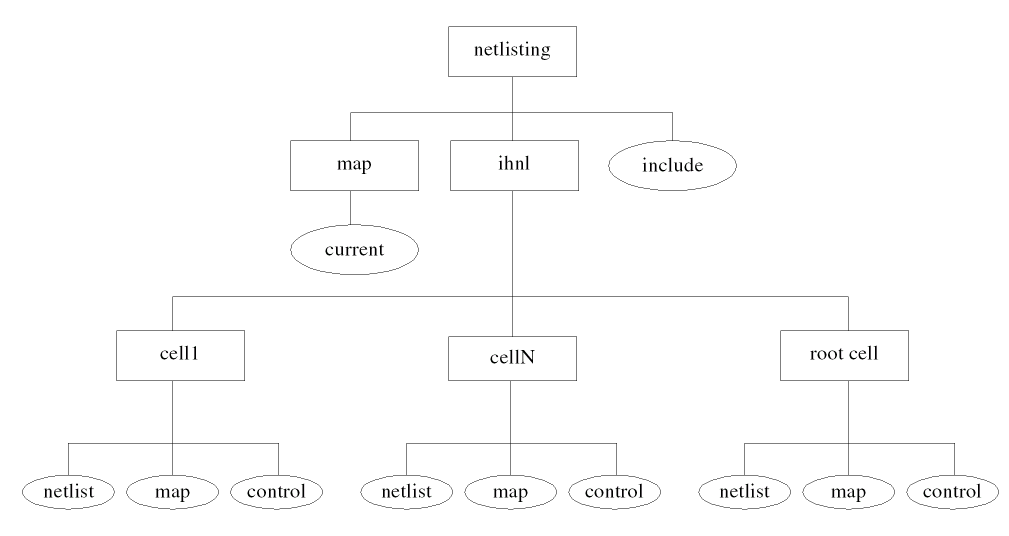
Netlist Module Names
You use the hnlModulePrefix, hnlMapModelFirstChar, and hnlMapModelInName variables to create the names of the netlist modules. When running in incremental mode, HNL uses the hnlModulePrefix, hnlMapModelFirstChar, and hnlMapModelInName variables to map invalid names to valid module names using the same name mapping rules as all other HNL name mapping functions such as hnlMapNetName(). Refer to the hnlMapName and the hnlMapIfFirstChar variable descriptions or to the hnlMapName() and hnlInitMap() function descriptions for additional information.
You cannot determine the order in which your formatter maps module names. IHNL automatically maps module names during design tree traversal. Your formatter can access the netlist module name of a design cell by calling the hnlMapCellModuleName() function.
Global Signals
You use the hnlGlobalNetPrefix, hnlMapNetFirstChar, and hnlMapNetInName variables to map global signals during design tree traversal. (The hnlGlobalNetPrefix lets you set the prefix string used when creating new names.) When running in incremental mode, IHNL uses the hnlGlobalNetPrefix, hnlMapNetFirstChar, and hnlMapNetInName variables to map invalid names to valid names using the same name mapping rules as all other HNL name mapping functions. Refer to the hnlMapName and the hnlMapIfFirstChar variable descriptions or to the hnlMapName() and hnlInitMap() function descriptions for additional information.
When you specify a prefix for a globally accessible name, make sure that prefix is different from prefixes for names that are not globally accessible. If you do not do this, your incremental formatter may create redundant names because it netlists only part of the design. Also, we recommend that you use only simple substitutions with IHNL (for example, substituting uppercase for lowercase letters). If you use complex substitutions (such as string substitutions) that are harder for you to remember, you may accidentally use the same prefix for globally accessible names and names that are not globally accessible. Use the hnlGetGlobalMappedName() function to access the results of the mapping.
Known Problems
If you redesign the netlist formatter for a simulator, the previous netlist may not reflect the new design of the formatter.
To correct this problem, purge the existing IHNL directory (hnlIncrementalDirectory) for the design before you netlist again, or you can set simReNetlistAll to t and netlist again.
Writing an Incremental Netlist Formatter
To write an incremental netlist formatter, you must
- Decide how your formatter will netlist global nets and order netlist files, and how the target simulator will read the netlist files.
- Write an HNL formatter.
- Convert the HNL formatter to also function in incremental mode.
Configuring an Incremental Netlist Formatter
When you design an incremental formatter, you must decide the following issues:
-
How the formatter netlists global nets
We recommend that you netlist the global nets in the include file or in one file. You can also write global nets to a netlist file. However, if you do this, the netlist file that contains the global net definition may not be recreated in a subsequent IHNL run. This may result in name collision if the global net is renamed. -
How the formatter orders netlist files
IHNL automatically determines the order of the netlist files. The netlist files are ordered so that a netlist filename appears before it is instantiated in other netlists. IHNL stores the names of all the netlist files in thehnlNetlistFileListvariable. If you want to reverse the order of these files, use thereverseSKILL function. -
How the target simulator reads the netlist files
For most simulators it is best to design your formatter so that it generates anincludefile that tells the simulator to use all the netlist files. You can also design your formatter so that theincludefile combines all of the netlist files in one file before passing it to the simulator.
Writing the HNL Formatter
Write your HNL formatter as described in “Writing a Formatter,” but do not redefine the hnlFindAllCells() function.
Converting to an IHNL Formatter
To convert your HNL formatter to an IHNL formatter, do the following:
-
Add the following four statements to your HNL formatter:
hnlSetDef( 'hnlIncremental t )
hnlSetDef( 'hnlModulePrefix "prefix1" )
hnlSetDef( 'hnlGlobalNetPrefix "prefix2" )
hnlSetDef( 'hnlIncludeFileName "name" )
hnlSetDef( 'hnlIncrementalOnly t )
where
prefix1is the prefix string for a mapped module name.
prefix2is the prefix string for a mapped global net name.
nameis the name of theincludefilehnlGenIncludeFile()creates. -
Define
hnlMapNetFirstChar,hnlMapNetInName,hnlMapModelFirstChar,hnlMapModelInName,hnlMapTermFirstChar, andhnlMapTermInNameif they are not already defined. -
Convert any formatter code that prints out a declaration of global nets. Example: convert the following code for a formatter for the SILOS simulator:
if( hnlAllGlobals != nil the
hnlPrintString( ".GLOBAL" )
foreach( name hnlAllGlobals
hnlPrintString( " " )
hnlPrintString( hnlMapName( name )
)
to the following, where the
hnlGetGlobalMappedName( )function is used to find the mapped names of all global nets:if( hnlAllGlobals != nil then
fprintf( hnlIncludeFile ".GLOBAL" )
foreach( name hnlAllGlobals
      fprintf( hnlIncludeFile " %s"

hnlGetGlobalMappedName( name ) )
)
This code netlists global nets in anincludefile. Remember thathnlIncludeFilecan only be written byfprintf()because thehnlPrintString()function writes to the netlist file for the currently active cell being output. -
Add code to instruct the simulator to read each of the netlist files. Example: use the following code to make SILOS read all netlist files by following the instructions in the
includefile:foreach( name hnlNetlistFileList
   fprintf( hnlIncludeFile "!INPUT %s/%s/%s\n" hnlNetlistDirectory
hnlIncrementalDirectory name )
)
-
Change calls to
hnlMapModelName()tohnlMapCellModuleName()for all references to a model (or module name of a netlist). However, this should not be done for stopping cells.-
Do not write a formatter that redefines the
hnlFindAllCells()function. - Be aware of the name restrictions for your simulator. Do not use prefixes that will result in illegal names for your simulator.
-
Never use the
hnlGetGlobalMappedName()function to find a netlist module name by using its cell name. You cannot find the module name with the cell name because IHNL supports multiple definitions of cell names (by using multiple reference libraries). UsehnlMapCellModuleName()instead. -
If you plan to use remote simulation, all of the netlist files generated must be accessible on the file server. For Cadence standard remote simulation, this means the entire netlist for all subcircuits as well as the top-level cell view must be in a single file called
netlist. The following sample does not do this, and, therefore, could not be used in conjunction with remote simulation. -
If you simply use the replacement functions discussed, your netlist formatter will work only in incremental mode. You can write a formatter that works in basic HNL mode as well as in incremental, but you must perform extra checking. For example, you would only use the
hnlMapCellModuleName()function when running in incremental mode, and continue to usehnlMapModelName()orhnlMapName( )in non-incremental mode.
This could be done as follows:if (hnlIncrementalMode then hnlPrintString (hnlMapCellModuleName (hnlCurrentMaster))
else
     hnlPrintString (hnlMapName (hnlCurrentMaster~>cellName))
)
-
Do not write a formatter that redefines the
Example
This example shows you how to convert an existing HNL SILOS formatter to an incremental formatter. The first section of the example shows you the sections of the existing HNL formatter that you must modify for incremental netlisting. The second part shows you the changes you must make.
HNL Code To Change
This HNL formatter netlists the .MACRO definition for a netlist module with the hnlPrintDeviceHeader() function. It netlists the .EOM (end of macro) definition of the module with the hnlPrintDeviceFooter() function and netlists references to all macros with the hnlSilosPrintMacroRef( ) function. It netlists global nets (.GLOBAL) with the hnlPrintNetlistHeader() and the power net definition with hnlPrintNetlistFooter(). The formatter records name mapping in the generic section of the name mapping file.
; This procedure prints the .GLOBAL statement as the first entry
; in the netlist file.
;
hnlIfNoProcedure( hnlPrintNetlistHeader()
let( ( name )
if( hnlAllGlobals != nil then
hnlPrintString( ".GLOBAL" )
foreach( name hnlAllGlobals
hnlPrintString( " " )
hnlPrintString( hnlMapName( name ) )
)
)
)
)
; This procedure prints the VDD and GND definitions
; at the end of the netlist file.
;
hnlIfNoProcedure( hnlPrintNetlistFooter()
let( ( name )
foreach( name hnlAllGlobals
if( name == "vdd!" then
hnlPrintString( hnlMapName(name) )
hnlPrintString( " .CLK 0 S1\n" )
)
if( name = "gnd!" then
hnlPrintString( hnlMapName(name) )
hnlPrintString( " .CLK 0 S0\n" )
)
)
)
)
; This procedure prints the netlist module definition in the
; form of .MACRO cellName.
; If cellName is multiply defined, use the full path name.
hnlIfNoProcedure( hnlPrintDeviceHeader()
hnlPrintString( "\n.MACRO " )
if( hnlMultipleCells( hnlCurrentCell ~> cellName ) then
hnlPrintString( hnlMapName( hnlCurrentCell ~> fullPathName ) )
else
hnlPrintString( hnlMapName( hnlCurrentCell ~> cellName ) )
)
)
; This procedure prints the netlist module definition in the
; form of .EOM cellName.
; This procedure also verifies the multiplicity of the
; cell name.
hnlIfNoProcedure( hnlPrintDeviceFooter()
hnlPrintString( "\n.EOM " )
if( hnlMultipleCells( hnlCurrentCell ~> cellName ) then
hnlPrintString( hnlMapName( hnlCurrentCell ~> fullPathName ) )
else
hnlPrintString( hnlMapName( hnlCurrentCell ~> cellName ) )
)
)
; This procedure prints the module reference in the form of
; (instName moduleName.
hnlIfNoProcedure( hnlSilosPrintMacroRef()
hnlPrintString( "(" )
hnlPrintString( hnlMapName( hnlCurrentInstName ) )
hnlPrintString( " " )
if( hnlMultipleCells( hnlCurrentMaster ~> cellName ) then
hnlPrintString( hnlMapName( hnlCurrentMaster ~> fullPathName ) )
else
hnlPrintString( hnlMapName( hnlCurrentMaster ~> cellName ) )
)
)
IHNL Code To Add
In this example, the include file is called netlist. The prefix for mapping netlist module names is SILOS, and the prefix for global net mapping is SNG. The hnlMapModelFirstChar, hnlMapModelInName, hnlMapNetFirstChar, and hnlMapNetInName variables are set to values acceptable for formatting a netlist for the SILOS simulator. The global and power net definitions are written to the include file.
Add the following statements to your formatter:
hnlSetDef( 'hnlIncremental t )
hnlSetDef( 'hnlIncrementalOnly t )
hnlSetDef( 'hnlModulePrefix "SILOS" )
hnlSetDef( 'hnlGlobalNetPrefix "SNG" )
hnlSetDef( 'hnlMapModelFirstChar "0" "1" "2" "3" "4" "5" "6" "7" "8" "9" "*" ("a" "A"))
hnlSetDef( 'hnlMapModelInName "-" "*")
hnlSetDef( 'hnlMapNetFirstChar "0" "1" "2" "3" "4" "5" "6" "7" "8" "9" "*" ("a" "A") ("b" "B"))
hnlSetDef( 'hnlMapNetInName "*" "-" )
; This procedure prints no header for IHNL.
;
hnlIfNoProcedure( hnlPrintNetlistHeader()
t
)
; This procedure prints no footer for IHNL.
;
hnlIfNoProcedure( hnlPrintNetlistFooter()
t
)
; This procedure prints the netlist module definition in the
; form of .MACRO cellName.
hnlIfNoProcedure( hnlPrintDeviceHeader()
hnlPrintString( "\n.MACRO " )
hnlPrintString( hnlMapCellModuleName( hnlCurrentCell ) )
)
; This procedure prints the netlist module definition in the
; form of .EOM cellName.
hnlIfNoProcedure( hnlPrintDeviceFooter()
hnlPrintString( "\n.EOM " )
hnlPrintString( hnlMapCellModuleName( hnlCurrentCell ) )
)
; This procedure prints the module reference in the form of
; (instName moduleName.
hnlIfNoProcedure( hnlSilosPrintMacroRef()
hnlPrintString( "("
hnlPrintString( hnlMapName( hnlCurrentInstName ) )
hnlPrintString( " " )
hnlPrintString( hnlMapCellModuleName( hnlCurrentMaster ) )
)
; This procedure creates the include file. The .GLOBAL and
; power net definitions are written into the include file as the
; first and last commands.
; Create the !INPUT SILOS command to read in all
; the netlist files.
; Use full path names.
; You must define this procedure to create a file instructing
; the simulator how to read in the netlist files for each
; cellview.
hnlIfNoProcedure( hnlGenIncludeFile( ()
let( ( name )
if( hnlAllGlobals != nil then
fprintf( hnlIncludeFile ".GLOBAL" )
foreach( name hnlAllGlobals
fprintf( hnlIncludeFile " %s" hnlGetGlobalMappedName( name ) )
)
)
foreach( name hnlNetlistFileList
      fprintf( hnlIncludeFile "!INPUT %s/%s/%s\n"
         hnlNetlistDirectory hnlIncrementalDirectory name )
)
if( hnlAllGlobals != nil then
if( name == "vdd!" then
         fprintf( hnlIncludeFile "%s .CLK 0 S1\n"
            hnlGetGlobalMappedName( name ) )
)
if( name == "gnd!" then
fprintf( hnlIncludeFile "%s .CLK 0 S0\n" hnlGetGlobalMappedName( name ) )
)
)
)
)
Variables and Functions for Incremental Netlisting
Use the following variables and functions when you write an incremental netlister. The meanings of some HNL variables and functions change when the formatter is running in incremental mode.
Definable Variables
The following are the variables that you can define in the netlist formatter or the designer can define through SKILL or with a form at run time.
hnlGlobalNetPrefix
Specifies the string the formatter should use as the prefix for all global nets in a netlist.
The netlister uses no prefix by default when it creates mapped global net names.
hnlIncludeFileName
Name of the include file. Use the include file to instruct the simulator to read all netlist files from the design during simulation. This variable should be defined in the global section of the caplib file for the tool. The designer should not change this variable.
hnlIncremental
Boolean flag specifying that the formatter can function in incremental mode. If your formatter has the necessary functions for incremental netlisting, then set this variable to t in your formatter.
hnlModulePrefix
Specifies the string the formatter uses as the prefix for a mapped module name in a netlist. A SILOS formatter uses the string cds for this variable. Example: .MACRO cds12 <pins>.
The netlister uses no prefix by default when it creates mapped module names.
hnlReNetlistAll
Specifies that IHNL should netlist all cellviews used in the design when set to t. Do not write your formatter to set this variable. It is a run time option that the designer can set. The designer can set this variable through SKILL or with a form.
hnlIncrementalOnly
Global flag to indicate that your formatter can only function in incremental mode, and is not capable of functioning in non incremental mode. Set this variable to t in your formatter if the formatter can only run in incremental mode, and the user setting of the simNotIncremental variable will be ignored, enforcing incremental netlisting. If you set this variable to t, you should also set the hnlIncremental variable to t.
hnlReservedNameList
Usually, when you use reserved words or keywords of a simulator as design variable names, then OSS automatically remaps these design variables. These variables then appear as mapped in expressions and parameter lists in the netlist. If you want to prevent the automatic name mapping, then use the SKILL list variable, hnlReservedNameList, to specify a list of simulator-specific reserved words. For example, in the case of hspice, if you are using temper, Temper, or TEMPER in the design, you would need to include the valid mapping of the word. In this case, it would be the word, temper.
Variables IHNL Defines
The following are the variables that the formatter can use to extract information from the design for the netlist. IHNL defines these variables. Do not redefine them. Many of these variables do not have defaults because the values change from run to run.
hnlIncludeFile
File pointer to the include file. You must use fprintf in your formatter to write the include file. IHNL opens this file after it traverses the design and closes it at the end of the netlisting session.
hnlIncrementalDirectory
Name of the incremental directory, which is a subdirectory of the current netlisting directory and contains the output of IHNL. The hnlIncrementalDirectory is a relative path name in the current netlisting directory.
hnlIncrementalMode
Signals if a formatter is in fact running in incremental mode. Because you can design your formatter to netlist in incremental and/or non incremental mode, you must use this variable to decide if your formatter is in fact running in incremental mode. If you design your formatter to run in incremental mode only, this variable is always set to t.
Default: the value of this variable is derived using the following expression:
hnlIncremental && (hnlIncrementalOnly||simNotIncremental==nil)
hnlListOfAllCells
List of all the cellviews in the design that need to be renetlisted.
hnlMacroBlockFuncs
Defines the procedures to execute when netlisting a macro cell. When you define this variable, call the hnlSetCellFiles() and hnlCloseCellFiles() functions. If you do not do this, your netlister will be unable to netlist incrementally. The hnlSetCellFiles() and hnlCloseCellFiles() functions simply return if your netlister is not running in incremental mode.
hnlSetDef( 'hnlMacroCellFuncs
            '( "hnlSetCellFiles( )"
               "hnlPrintMacroCellHeader( )"
               "hnlPrintDevices( )"
               "hnlPrintMacroCellFooter( )"
               "hnlCloseCellFiles( )"
             )
         )
hnlNetlistDirectory
The full path name of the current netlisting directory.
hnlNetlistFile
File pointer for writing the netlist. Use hnlMakeNetlistFileName to get the relative path name of this file. In HNL, you use the hnlNetlistFileName variable to specify this file pointer.
hnlNetlistFileList
List of all the netlist file names. The file names in this list are the relative file names in hnlIncrementalDirectory. The list is ordered so that a netlist file name appears before a file name that references the cell it describes.
hnlCellSeenList
List of all the cellviews in the design. The list is ordered so that a cellview appears before the cellview that references the cellview it describes.
hnlTopCellFuncs
Defines the procedures to execute when netlisting the top-level cellview. When you define this variable, call the hnlSetCellFiles() function before other formatting procedures. Call the hnlCloseCellFiles() function after any other formatting procedures. If you do not do this, your netlister will be unable to netlist incrementally. The hnlSetCellFiles() and hnlCloseCellFiles( ) functions simply return if your netlister is not running in incremental mode.
   hnlSetDef( 'hnlTopCellFuncs
             '( "hnlSetCellFiles( )"
               "hnlPrintTopCellHeader( )"
               "hnlPrintDevices( )"
               "hnlPrintTopCellFooter( )"
               "hnlCloseCellFiles( )"
            )
         )
Return to top