
The Mixed Net Browser window lists all the mixed-signal nets in the Mixed Nets sidebar. Each net in the Mixed Nets sidebar lists the connect modules in a mixed-signal design and gives you a picture of whether the connect modules are working as expected. By analyzing the values of the connect module variables, you can decide if the design needs optimization.
To invoke the Mixed Net Browser, do one of the following in other SimVision MS windows:
- Click the Send to Mixed Net Browser (
 ) icon on the toolbar
 - Right-click a net and choose Send to Mixed Net Browser
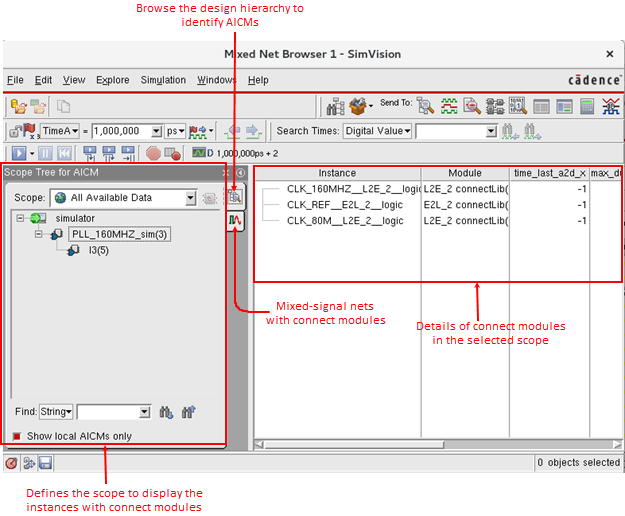
The following figure describes the various elements of the Mixed Net Browser user interface:
Related Topics
- Defining Scope for Mixed-Signal Modules in Design Hierarchy
- Viewing the Mixed-Signal Nets in the Defined Scope
- Connect Module Instances Table
- Customizing the Connect Modules Instances Table
- Generating the Direct Waveform Plot
- Viewing Mixed Nets on Schematic Tracer
- Highlighting the Conversion Point in Schematic Tracer