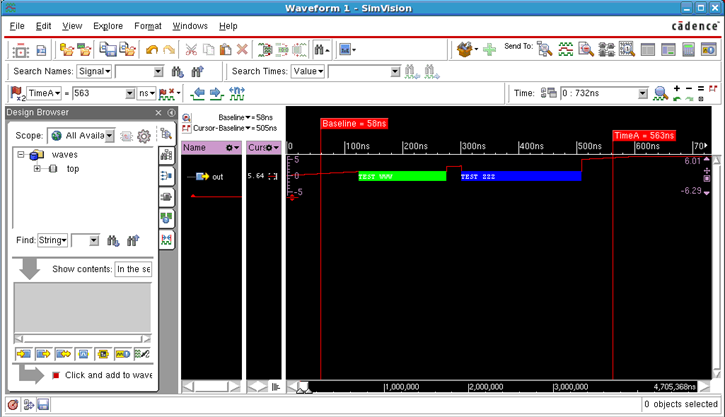
Mnemonic maps associate signal values with strings, colors, line shapes, and icons. For example, you can define a mnemonic map to associate a name with each state of a state machine or a mnemonic map to display all x values with a background color of your choice.
When you create an analog mnemonic map, you define not only the text that is displayed for a signal value, but also the background color of the waveform in the SimVision Waveform window.
You can create analog mnemonic maps in one of the following methods:
- Use the SimVision TCL command. You must use the
-analogoption with themmapnew SimVision command. The syntax is:
mmap new -analog -name label -contents {{- range { <lowValue> <highValue>} -label “name” -bgcolor}You can define one or more ranges for a given mnemonic map entry using
-range {<lowValue> <highValue>}. Each entry is specified as a list with a range, a label, and background color that specifies how a waveform is drawn when its value matches one of the value ranges for the mnemonic map entry.So, for a signal set with a map with value in one of the value ranges, a box with a label is displayed in the Waveform trace.
For more information on the
mmapcommand, refer to the SimVision Tcl Commands Guide.
- Define analog mnemonic maps in a script file and source it to SimVision. In the SimVision GUI, choose File – Source Command Script; and in the Select SimVision Command Script dialog box select the command file with Analog Mnemonic Maps.
Analog Mnemonic Map Application
To apply a mnemonic map to a signal, perform one of the following methods:
- In the SimVision Waveform window, then click Format – Radix/Mnemonic and choose the analog mnemonic map.
- In the SimVision Waveform window, right-click the signal value in the Cursor column and choose Radix/Mnemonic – analog mnemonic map.
Limitations
The following limitations exist with the analog mnemonic map feature:
- Analog mnemonic maps are not listed in the Mnemonic Maps tab of the Properties window.
- Analog mnemonic maps cannot be applied to non-analog traces such as integers.
- Analog Mnemonic Maps cannot be applied on composite types such as SV UDN wreal/vams, wreal/var real, and SV UDT/UDN structures. You can only select members of a composite type (individually or as a group) and then apply the analog mnemonic map to those selected signal(s).
- You cannot apply an analog mnemonic map to a group of signals from a SV UDT/UDN structure, if one or more of the signals in that group are of a non- analog type (logic type or integer type).
- Only the
-label,-bgcoloroptions of themmapTcl command are supported. The othermmapoptions documented in the SimVision Tcl Commands Guide are not supported.
Example
The following example illustrates using the mmap TCL command. It creates an analog mnemonic map, Analog Mnemonic Map and creates two entries for the mnemonic map. Each entry is specified with a range, a label, and the background color for the mnemonic map.
mmap new -analog -name "Analog Mnemonic Map" -contents {{-range {1.25 2.76} -label "TEST WWW" -bgcolor green}{-range {3.01 5.09} -label "TEST ZZZ" -bgcolor blue}