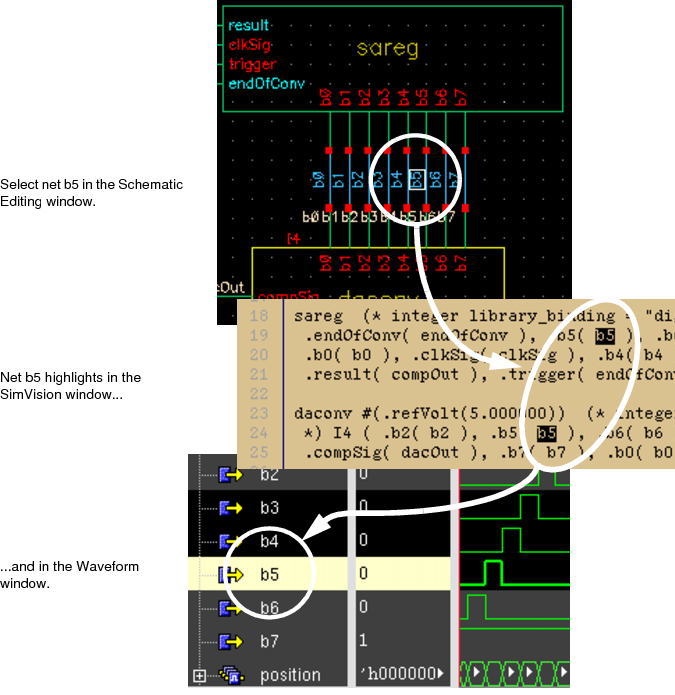
Many of the applications that are part of the AMS Designer software support cross-probing. Cross-probing means selecting an instance or net in one application and having the same instance or net automatically selected in another application. For example, you can highlight an instance in the Cadence hierarchy editor (HED) and have the same instance appear highlighted in the schematic editing window. Similarly, you can highlight a net in the SimVision Design Browser and have the same net appear highlighted in the Waveform window.
See the following topics for more information:
Cross-Probing Instances
In AMS Designer, the applications that support cross-probing instances are SimVision, the Cadence , and the Cadence schematic editor. To enable cross-probing in the hierarchy editor and the schematic editor, do the following:
-
In the Cadence hierarchy editor window, choose View - Tree.
Instances in the design appear on the Tree View tab.You can view cell bindings instead of instances by choosing View - Parts Table.
- In the Virtuoso®Schematic Editor window, choose Options - Editor.
The Editor Options window appears.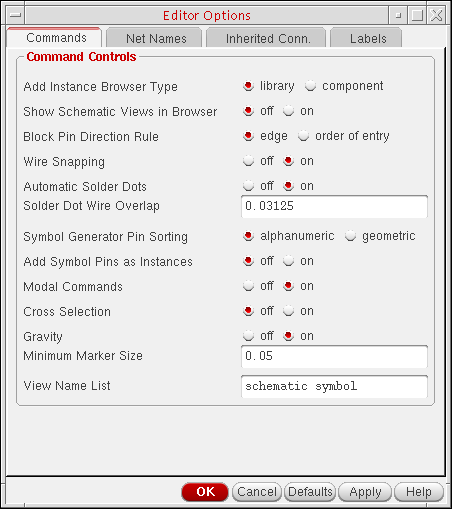
- Turn on Cross Selection.
- Click OK.
With these options set, you can cross-probe module instances as summarized in the following table. The first entry in each cell, marked withp, refers to probing primitives. The second entry, marked withm, refers to probing modules.
|
|
Responding Application | |||
|---|---|---|---|---|
|
Hierarchy Editor |
Schematic Editor |
SimVision |
||
|
Initiating Application |
Hierarchy Editor |
|
Yesp Yesm |
Nop Yesm |
|
Schematic Editor |
Yesp Yesm |
|
Nop Yesm |
|
|
SimVision |
Nop Yesm |
Nop Yesm |
|
|
For example, if you select an instance in the schematic editor, the same instance is automatically selected in SimVision. Similarly, if you highlight a primitive in the hierarchy editor, the corresponding primitive in the schematic editor appears highlighted as well, and vice versa.
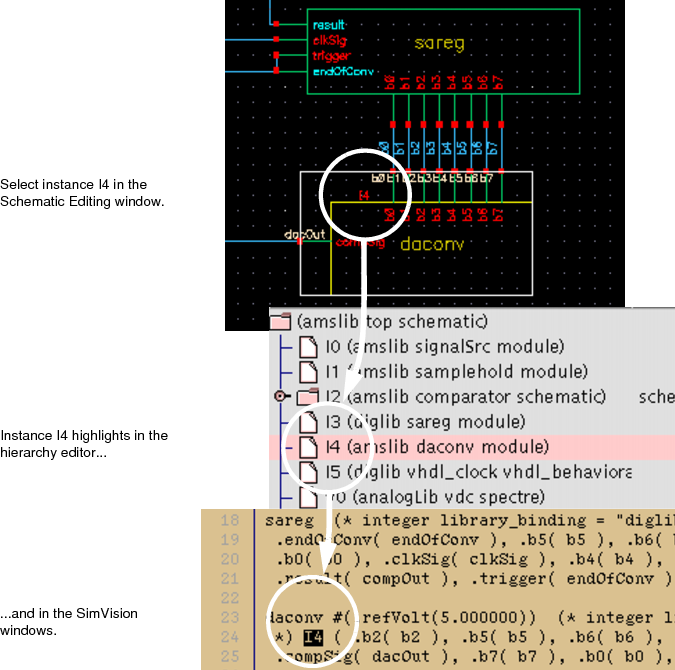
The following illustrates the cross-probing that occurs when the daconv component (instance I4) is selected in the Schematic Editing window.
Cross-Probing Nets
In AMS Designer, the applications that support cross-probing nets are SimVision, the schematic editor, and the Waveform window. You can enable cross-probing in the schematic editor by following steps 2 through 4 in "Cross-Probing Instances". With these options set, you can cross-probe nets as summarized in the following table.
|
|
|
Responding Application | ||
|---|---|---|---|---|
|
|
|
Schematic Editor |
SimVision |
Waveform |
|
Initiating Application |
Schematic Editor |
|
Yes |
Yes |
|
SimVision |
Yes |
|
Yes |
|
|
Waveform |
No |
Yes |
|
|
For example, if you select a net in the schematic editor, the same net automatically highlights in the SimVision window. However, if you select a net in the Waveform window, the schematic editor window does not reflect the selection.
You cannot cross-probe global signals with AMS Designer.
The following illustrates the cross-probing that occurs when the b5 net is selected in the Schematic Editing window.