
minCutRoutingSpacing (Two layers)
orderedSpacings( ( minCutRoutingSpacingtx_layer1tx_layer2['overlappingLayerlayer1] ['horizontal | 'vertical] ['cutClass {f_width| (f_widthf_length) |t_name}] ['exceptSameNet ['shortEdge ['shortEdgePrlf_prl]] | 'toConcaveCorner ['prlf_prl] | 1 'toDiffConcaveCorner ] ['enclosingLayertx_enclLayer['viaEdgeTypex_viaEdgeType] ['enclosingLayerWidthf_enclWidth['anyOppositeExtensionf_oppExtension] ] ] ['widthHorizontal | 'widthVertical] ['parallelEdgeWithinf_parWithin'otherExtensionf_otherExtension] ['parallelExtensionf_parExtension] ['maskOverlap | 'metalOverlap] ['insideLayers (tx_layer3tx_layer4…tx_layerN) ['insidePurposes (t_purpose1t_purpose2…t_purposeN)] | 'outsideLayers (tx_layer3tx_layer4…tx_layerN) ['outsidePurposes (t_purpose1t_purpose2…t_purposeN)] ] ['deltaVoltagef_voltage]f_spacing)
) ;orderedSpacings
Specifies the minimum spacing between a shape on a cut layer (layer1) and a shape on a routing layer (layer2). This constraint can be used to define the spacing between specific cut classes and neighboring metal shapes.
The cut shape to concave corner spacing applies only for a wire with default wire width containing the cut if all of the following conditions are true:
- The cut has zero extension on two opposite sides and a layer2 extension less than otherExtension on one of the other two opposite sides.
- The via cut has two different-metal shapes on two opposite sides—the sides with zero extension—with parallel run length greater than prl with the via cut.
- The spacing from a cut edge with zero extension to the below-metal shape is equal to (parWithin - 0.001) and to the above-metal shape is less than parWithin.
Values
|
The first layer (cut layer) on which the constraint is applied. |
|
|
The second layer (routing layer) on which the constraint is applied. |
|
|
The minimum required Euclidean spacing between the two layers. |
Parameters
|
The constraint applies only when this metal layer overlaps both via and metal. |
|
|
(Virtuoso Layout Suite EXL and higher tiers) The direction in which spacing is measured. If the direction is not specified, the spacing is measured in all applicable directions. |
|
|
The cut class to which the constraint applies, specified by width, by width and length, or by name (as defined in a cutClasses constraint). |
|
|
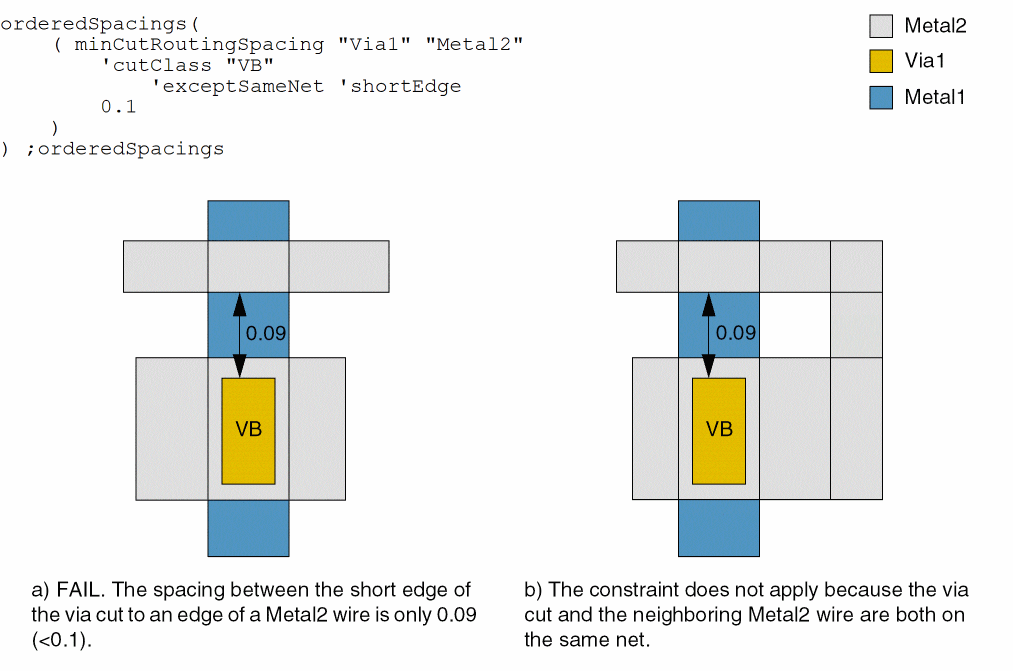
The constraint applies only between a metal edge and a short edge of a rectangular cut shape. |
|
|
(Virtuoso Advanced Node for Layout Only) The constraint applies between a metal edge and a short edge of a rectangular cut shape only if the parallel run length between them is greater than this value. |
|
|
The constraint applies between a cut shape and a concave corner of the enclosing metal shape. |
|
|
(Virtuoso Advanced Node for Layout Standard) The constraint applies only if the cut edges with zero extension have parallel run length greater than this value with the neighboring shapes on the layers above and below the cut layer. The parallel run length is measured in an orthogonal direction to the spacing direction, if specified. |
|
|
(Virtuoso Layout Suite EXL and higher tiers) The constraint applies only between a cut and a different-metal concave corner. 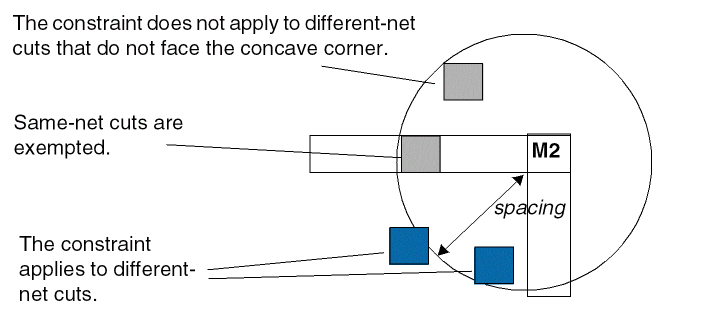 |
|
|
(Virtuoso Advanced Node for Layout Standard) The enclosing layer for |
|
|
(Virtuoso Advanced Node for Layout Standard) The constraint applies only to the cut edges of this type (the type is defined in the |
|
|
(Virtuoso Advanced Node for Layout Standard) The constraint applies only if the width of the enclosing shape on layer enclLayer is greater than or equal to this value. |
|
|
(Virtuoso Advanced Node for Layout Standard) The constraint applies only if a cut shape has extensions less than this value on any two opposite sides. |
|
|
(Virtuoso Advanced Node for Layout Only) The direction in which the width of the wire specified by |
|
|
(Virtuoso Advanced Node for Layout Standard) The constraint applies only if the neighboring shape on the metal layer below is at a distance equal to this value minus 0.001 (parWithin - 0.001) and the neighboring shape on the metal layer above is at a distance less than this value from the cut shape edges with zero extension. |
|
|
(Virtuoso Advanced Node for Layout Standard) The constraint applies only if a cut shape with zero extension on two opposite sides has an extension less than this value on the other two opposite sides. |
|
|
(Virtuoso Advanced Node for Layout Standard) The cut edges that do not fulfill the overhang requirement specified by |
|
|
The constraint applies as follows:
|
|
|
|
|
|
Determines if the constraint applies, based on the presence or absence of one or more layers.
For more information, see |
|
|
|
|
|
The |
|
|
(Virtuoso Advanced Node for Layout Only) The constraint applies if both the cut shape and the metal shape have voltages and the delta voltage between layer1 (the cut shape) and layer2 (the metal shape) is greater than this value. |
|
Examples
- Example 1: minCutRoutingSpacing with cutClass, exceptSameNet and shortEdge
- Example 2: minCutRoutingSpacing with cutClass, toConcaveCorner, prl, parallelEdgeWithin, and otherExtension
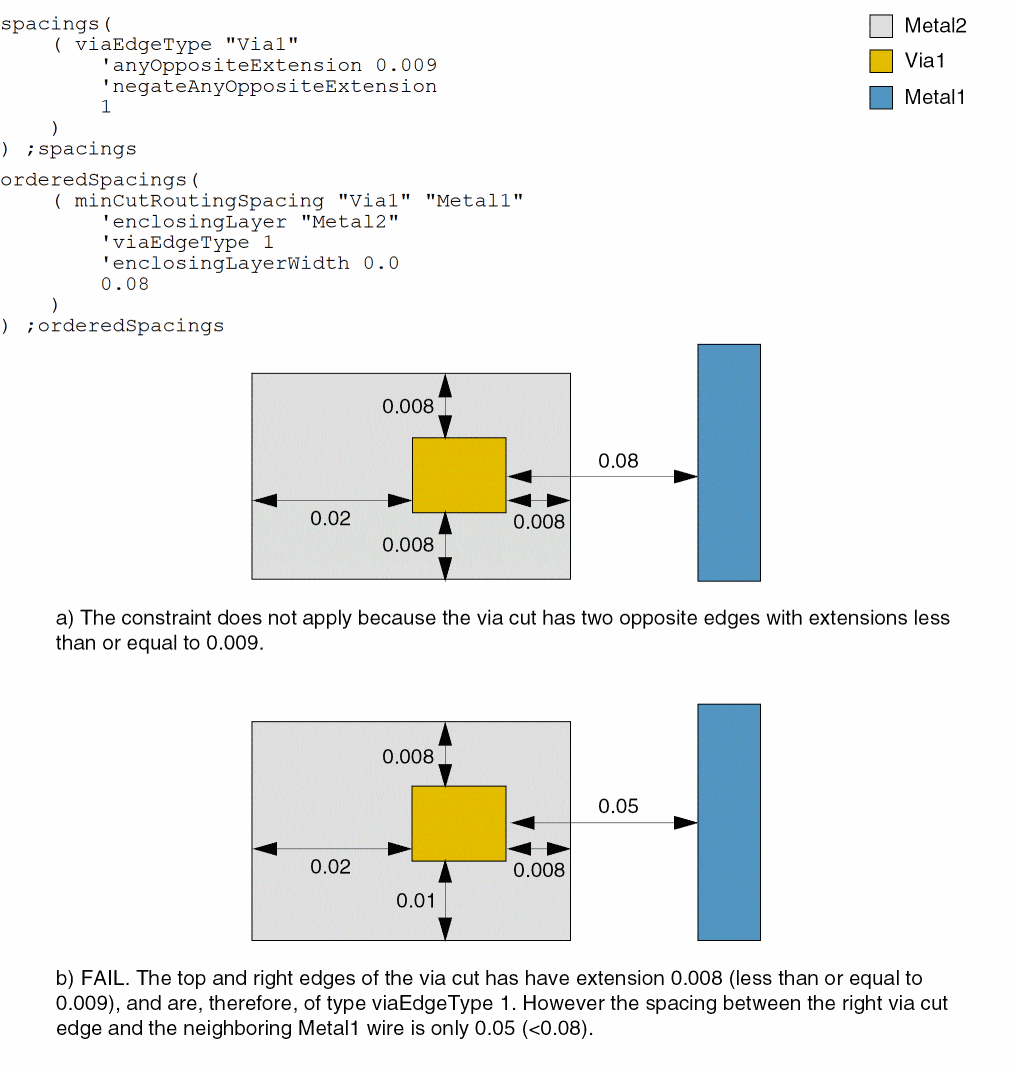
- Example 3: minCutRoutingSpacing with enclosingLayer, viaEdgeType, and enclosingLayerWidth
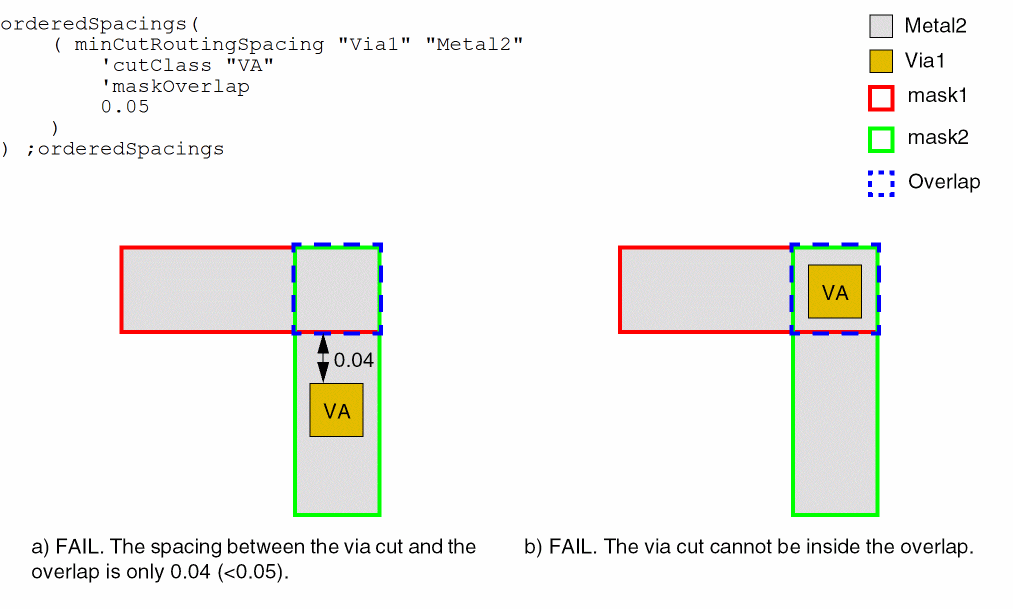
- Example 4: minCutRoutingSpacing with cutClass and maskOverlap
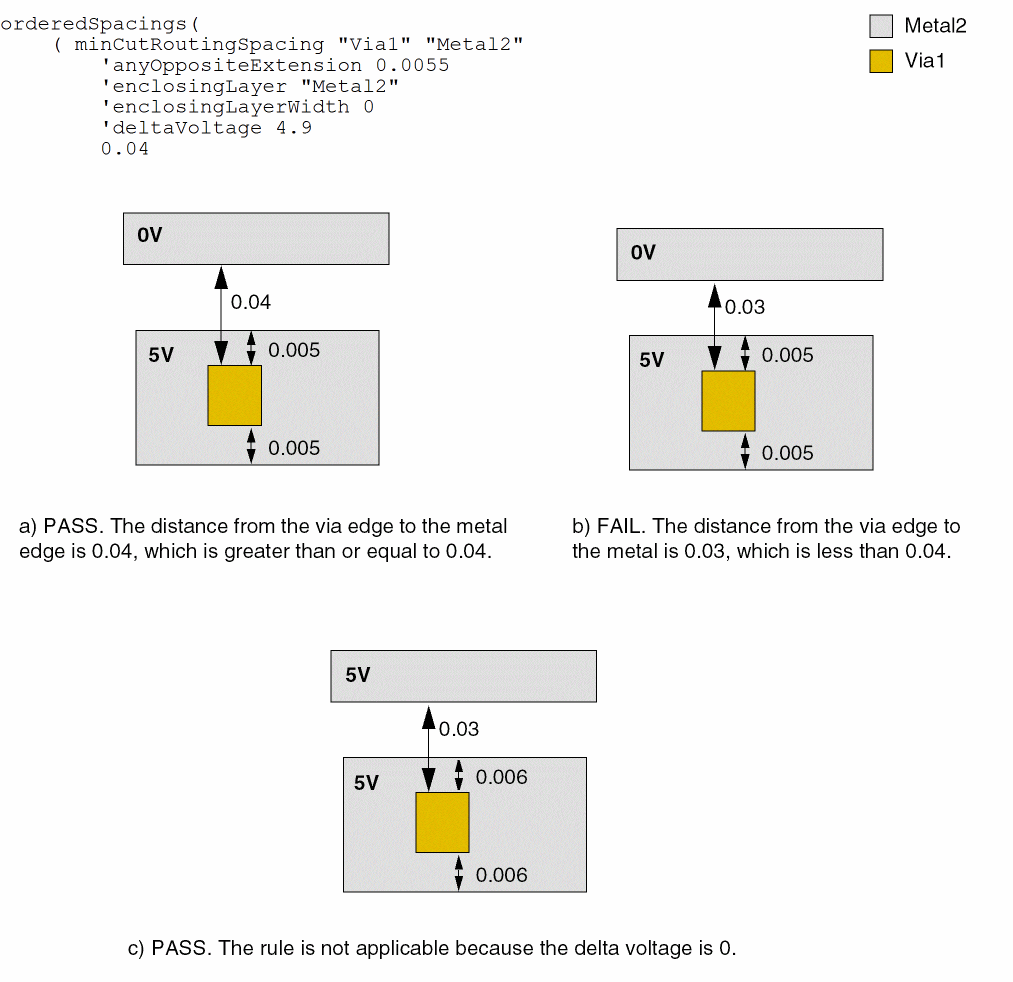
- Example 5: minCutRoutingSpacing with anyOppositeExtension and deltaVoltage
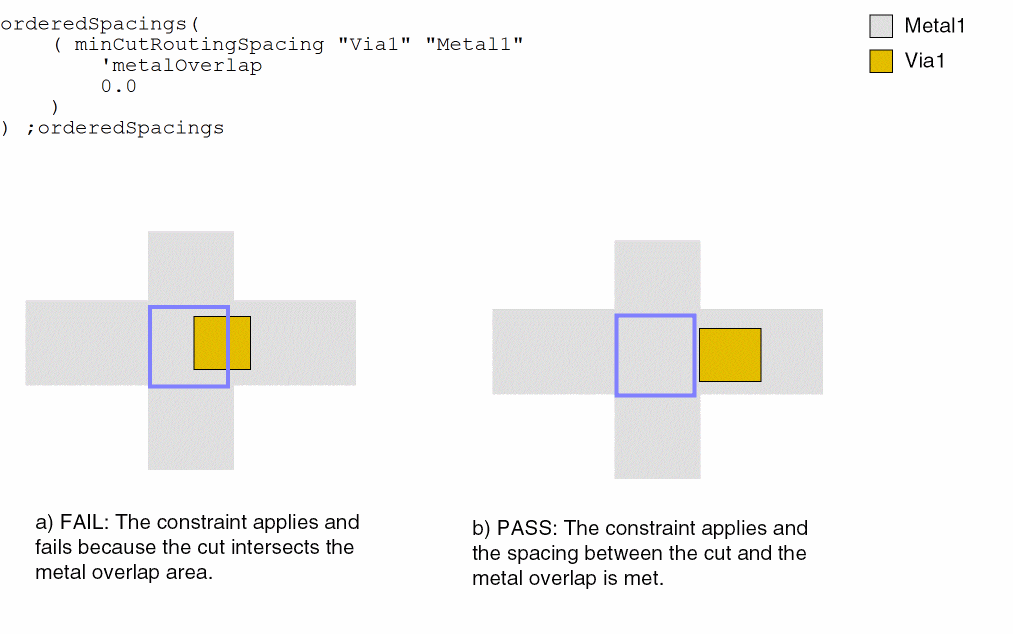
- Example 6: minCutRoutingSpacing with metalOverlap
Example 1: minCutRoutingSpacing with cutClass, exceptSameNet and shortEdge
The spacing between the short edge of a Via1 via cut of type VB (0.4x0.6) and a Metal2 shape must be at least 0.1 if the via cut and the Metal2 wire are not on the same net.
Example 2: minCutRoutingSpacing with cutClass, toConcaveCorner, prl, parallelEdgeWithin, and otherExtension
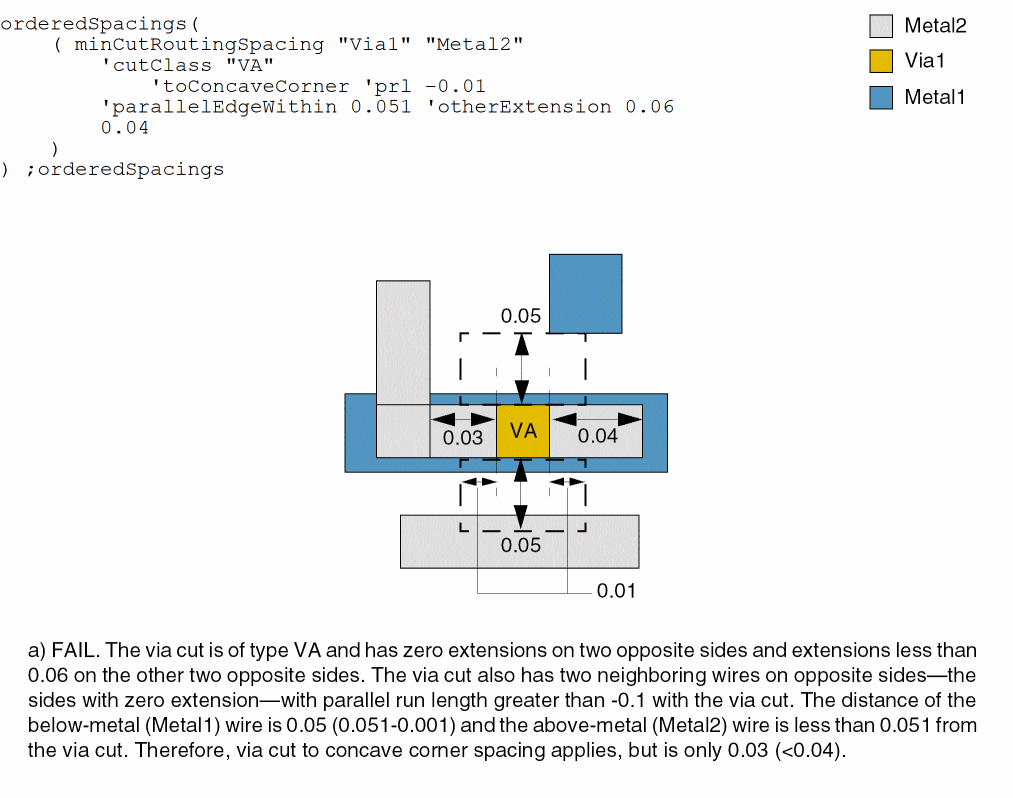
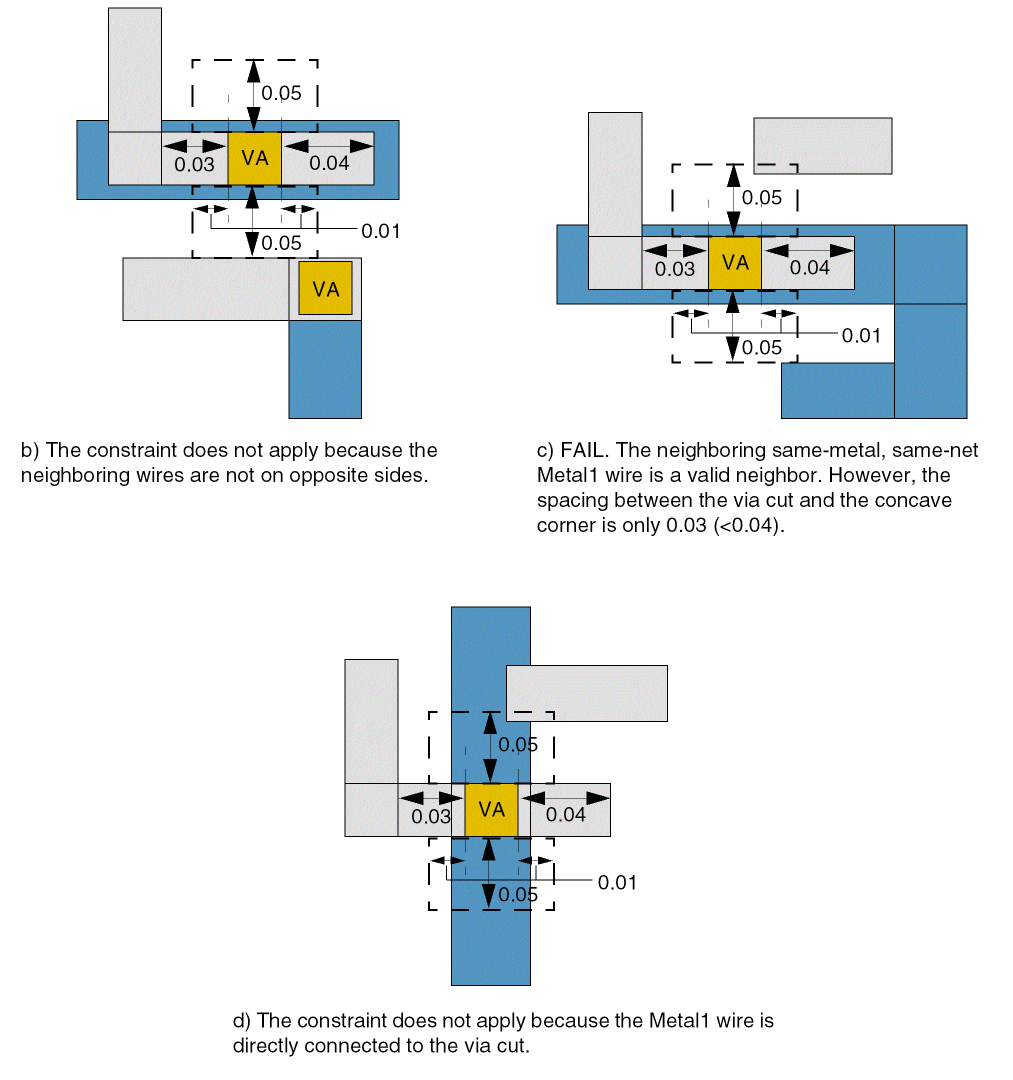
The spacing between a Via1 via cut of type VA and a concave corner of an enclosing Metal2 wire must be at least 0.04 if all of the following conditions are satisfied:
- The via cut has zero extension on two opposite sides and a Metal2 extension less than 0.06 on one of the two other opposite sides.
- The via cut has two different-metal wires on two opposite sides—the sides with zero extension—with parallel run length greater than -0.1 with the via cut.
-
The spacing from a cut edge with zero extension to the below-metal (Metal1) wire is equal to 0.05 (0.051- 0.001) and to the above-metal (Metal2) wire is less than 0.051.
Example 3: minCutRoutingSpacing with enclosingLayer, viaEdgeType, and enclosingLayerWidth
The spacing between a Via1 via cut and a neighboring Metal1 wire must be at least 0.08. The constraint applies only to via cuts that do not have two opposite edges with extensions less than or equal to 0.009.
Example 4: minCutRoutingSpacing with cutClass and maskOverlap
The spacing between a Via1 via cut of type VA and the overlap of two Metal2 shapes on different masks must be at least 0.05.
Example 5: minCutRoutingSpacing with anyOppositeExtension and deltaVoltage
The spacing between a Via1 via cut and a neighboring Metal1 wire must be at least 0.04. The constraint applies only to via cuts that do not have two opposite edges with extensions less than or equal to 0.0055. The distance between the via edge to another metal must be more than or equal to 0.04.
Example 6: minCutRoutingSpacing with metalOverlap
The Via1 cut shape is not allowed to intersect the overlap area of the Metal1 shapes.
Return to top