
minViaSpacing (Two layers)
spacings( ( minViaSpacingtx_cutLayer1tx_cutLayer2['centerToCenter] ['sameNet | 'sameMetal] ['stack] ['areaf_area] ['cutClass {f_width| (f_widthf_length) |t_name}] ['otherCutClass {f_width| (f_widthf_length) |t_name}]| ['fixedCutClassListl_fixedCutClassNames['otherFixedCutClassListl_otherFixedCutClassNames]] ] ['enclosingLayertx_enclosingLayer['viaEdgeTypex_edgeType['extendByf_extendBy] ] ['sizeByf_sizeBy] ['exceptSameNet | 'exceptSameMetal] ['overlapNotAllowed] ['horizontal | 'vertical ['prlf_prl['oppositeSides] | 'prlRangef_prlRange] ['insideLayers (tx_layer3tx_layer4…tx_layerN) ['insidePurposes (t_purpose1t_purpose2…t_purposeN)] | 'outsideLayers (tx_layer3tx_layer4…tx_layerN) ['outsidePurposes (t_purpose1t_purpose2…t_purposeN)] ] | ['cornerEuclidian] ['deltaVoltagef_voltage]f_spacing)
) ;spacings
spacingTables( ( minViaSpacingtx_cutLayer1tx_cutLayer2(( "width" nil nil ["width" nil nil] ) ['centerToCenter] ['sameNet | 'sameMetal] ['stack] ['areaf_area] ['cutClass {f_cutWidth| (f_cutWidth f_cutLength) |t_name}] ['otherCutClass {f_width| (f_widthf_length) |t_name}] ['enclosingLayertx_enclosingLayer['viaEdgeTypex_edgeType['extendByf_extendBy] ] ['sizeByf_sizeBy] ['exceptSameNet | 'exceptSameMetal] ['overlapNotAllowed] ['horizontal | 'vertical ['prlf_prl['oppositeSides] | 'prlRangef_prlRange] ] [f_default] ['insideLayers (tx_layer3tx_layer4…tx_layerN) ['insidePurposes (t_purpose1t_purpose2…t_purposeN)] | 'outsideLayers (tx_layer3tx_layer4…tx_layerN) ['outsidePurposes (t_purpose1t_purpose2…t_purposeN)] ] | ['cornerEuclidian] ['deltaVoltagef_voltage] ) (g_table) )
) ;spacingTables
Specifies the minimum spacing required between via cuts on different layers. The required spacing can be independent of the width of the via cuts or can be dependent on the width of one or both via cuts.
Optional parameters determine whether spacing is measured center-to-center or edge-to-edge, whether the constraint applies to a certain connectivity type, whether same-net via cuts on different layers can be stacked if aligned, and whether the constraint applies to via cuts that have an area greater than or equal to the specified value.
Values
Parameters
|
The spacing is measured center-to-center. Otherwise, the spacing is measured edge-to-edge. |
|
|
The connectivity type. If connectivity type is not specified, the constraint applies to any connectivity type, including any two cuts on the same cut layer with no common metal or net. |
|
|
The via cuts on two different layers can be stacked if their center points are exactly aligned. Otherwise, the via cuts cannot be stacked. |
|
|
The constraint applies only if the area of a via cut is greater than or equal to this value. The value for this parameter is assumed to be greater than the default spacing value. |
|
|
(Virtuoso Advanced Node for Layout Standard) The cut class to which the constraint applies on cutLayer1, specified by width, by width and length, or by name (as defined in a cutClass constraint). |
|
|
(Virtuoso Advanced Node for Layout Standard) The cut class to which the constraint applies on cutLayer2, specified by width, by width and length, or by name (as defined in a cutClasses constraint). |
|
|
The constraint applies to the edges of this list of cut classes if their type is as specified by x_edgeType. |
|
|
The constraint applies to all cut classes in l_fixedCutClassNames that have the specified spacing with any cut classes in l_otherFixedCutClassNames and are of the type specified by x_edgeType2. If not specified, the constraint applies to all cut classes in l_fixedCutClassNames. |
|
|
(Virtuoso Advanced Node for Layout Standard) The enclosing layer for |
|
|
(Virtuoso Advanced Node for Layout Standard) The constraint applies only to the via cut edges of this type on cutLayer1 (the type is defined in the |
|
|
(Virtuoso Advanced Node for Layout Standard) An extension equal to this value is applied to the via cut edges that satisfy
If |
|
|
(Virtuoso Advanced Node for Layout Standard) The constraint is applied after sizing all the edges of the via cut on cutLayer1 by this value.
If both |
|
|
(Virtuoso Advanced Node for Layout Only) The constraint does not apply to via cuts with certain connectivity types. |
|
|
If specified, the constraint applies when vias overlap except when the center points of overlapping vias are aligned with the |
|
|
(Virtuoso Advanced Node for Layout Only) If a spacing direction is specified for the constraint, then the parallel run length is measured in the orthogonal direction. When the spacing direction is specified, f_prl can also be specified. In this case, the constraint applies only if the parallel run length is equal to or greater than the f_prl value, which is measured orthogonally to the spacing direction.
When f_prl is specified, the |
|
|
(Virtuoso Advanced Node for Layout Only) The constraint applies only when the parallel run length between two shapes is in this range. The parallel run length is measured orthogonal to the direction parameter. |
|
|
|
|
|
The presence or absence of one or more specified layers determines if the constraint applies.
For more information, see |
|
|
The |
|
|
The |
|
|
(Virtuoso Advanced Node for Layout Only) The corner-to-corner spacing (that is, when parallel run length is less than zero) between shapes is measured using Euclidean measure type (the spacing halo has rounded corners). |
|
|
(Virtuoso Layout Suite EXL and higher tiers) The constraint applies if both the cut shape and the metal shape have voltages and the delta voltage between the layer1 shape and the layer2 shape is greater than this value. |
|
Examples
- Example 1: minViaSpacing with centerToCenter, enclosingLayer, and viaEdgeType
- Example 2: minViaSpacing with edgeType, enclosingLayer, sizeBy, and extendBy
- Example 3: minViaSpacing with stack and overlapNotAllowed
- Example 4: minViaSpacing with direction and prl
- Example 5: minViaSpacing with direction, prl, and oppositeSides
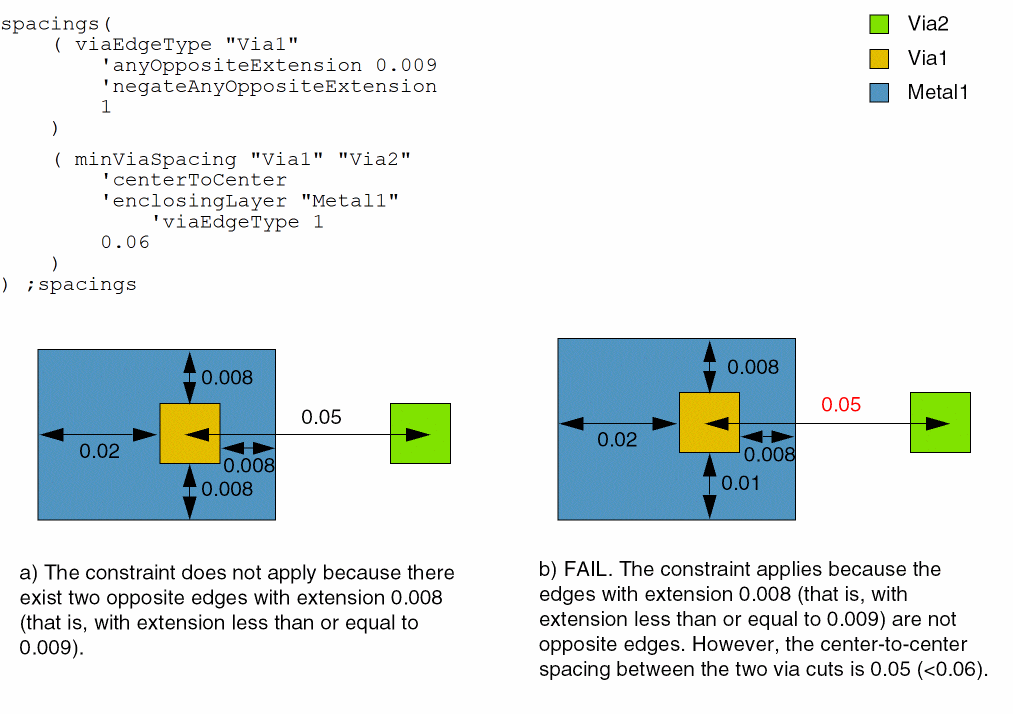
Example 1: minViaSpacing with centerToCenter, enclosingLayer, and viaEdgeType
The center-to-center spacing between a Via1 cut that satisfies viaEdgeType 1 (the constraint applies only to via cuts that do not have two opposite edges with extensions less than or equal to 0.009) and a Via2 cut must be at least 0.06.
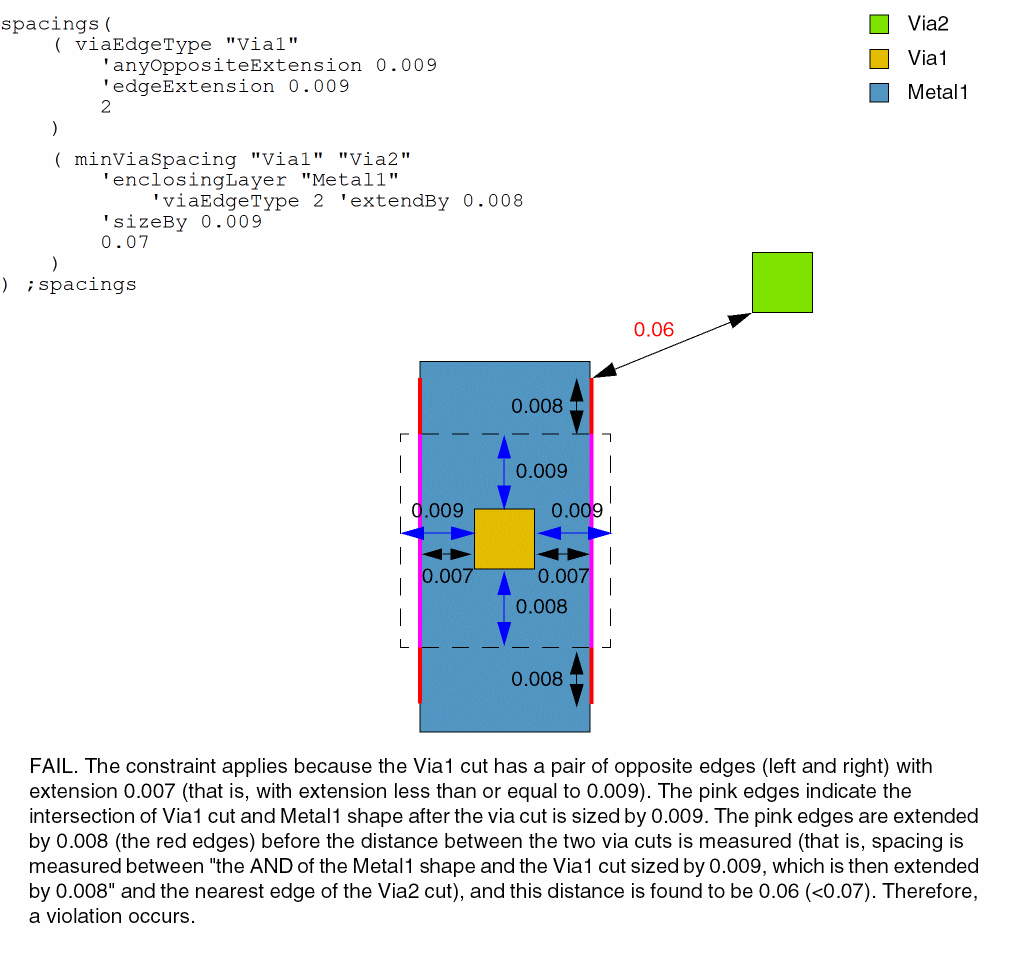
Example 2: minViaSpacing with edgeType, enclosingLayer, sizeBy, and extendBy
The edge-to-edge spacing between a viaEdgeType 2 Via1 cut edge and a Via2 cut must be at least 0.07 when the Via1 cut is sized by 0.009 and extended by 0.008. The constraint applies only to Via1 cuts with opposite edge extensions less than or equal to 0.009 (any edges on those via cuts with extension less than or equal to 0.009 are viaEdgeType 2).
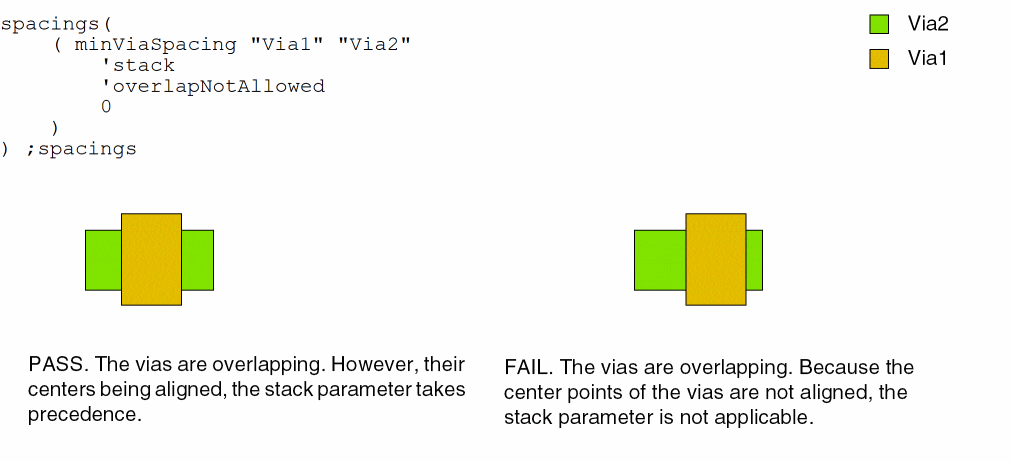
Example 3: minViaSpacing with stack and overlapNotAllowed
The constraint applies only if the via cuts are overlapping without the center points being aligned.
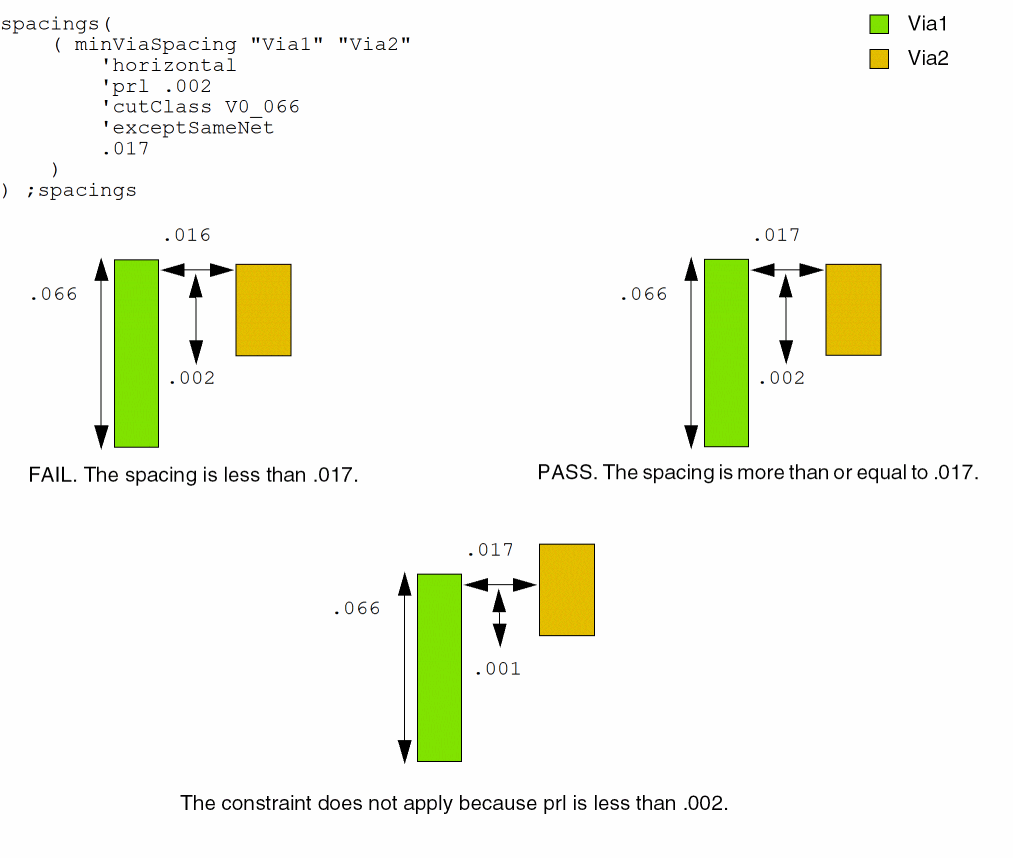
Example 4: minViaSpacing with direction and prl
The constraint applies only if the spacing between the vias is more than or equal to .017 and prl is greater than or equal to .002.
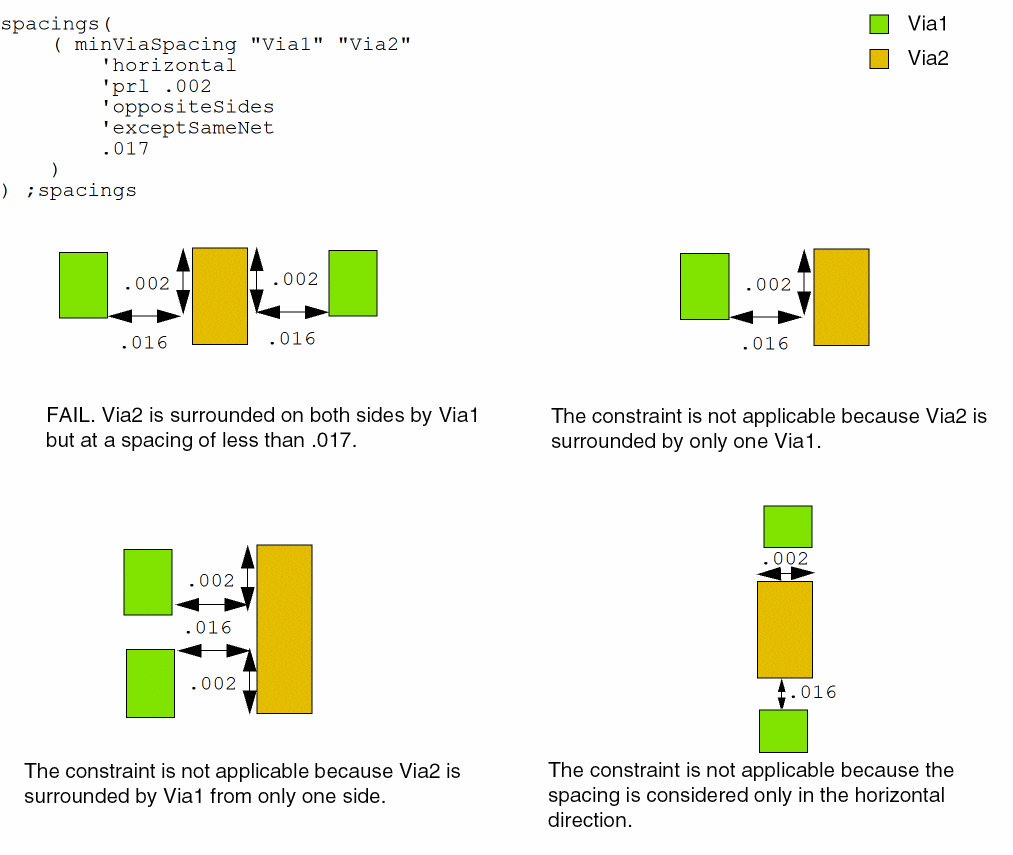
Example 5: minViaSpacing with direction, prl, and oppositeSides
The constraint applies only if the spacing between the vias is more than or equal to .017, prl is greater than or equal to .002, and the Via1 shape is surrounded by the Via2 shape on opposite sides.
Return to top