
minViaSpacing (One layer)
spacings( ( minViaSpacingtx_cutLayer['shortSideToShortSide | 'shortSideToLongSide | 'shortSideToAnySide | 'longSideToLongSide | 'longSideToAnySide | 'anySideToAnySide ] ['centerToCenter] ['horizontal | 'vertical] ['sameNet | 'sameMetal | 'sameVia] ['viasOnSameNet | 'viasOnSameMetal | 'viasOnSameVia] ['exceptSameNet | 'exceptSameMetal] ['exceptViasOnSameNet | 'exceptViasOnSameMetal | 'exceptViasOnSameVia] ['sameMask | 'diffMask] ['areaf_area] ['overLayertx_layer['overLayerWidthf_layerWidth] ['exceptGapf_gap] ['exceptSameMetalOverlap] ] ['lengthf_length| 'exactLengthf_length['exactSpacing] | 'prlRangef_prlRange] [ ['cutClass {f_width| (f_widthf_length) |t_name} ['otherCutClass {f_width| (f_widthf_length) |t_name}]] | ['fixedCutClassListl_fixedCutClassNames['otherFixedCutClassListl_otherFixedCutClassNames]] ] ['enclosingLayertx_enclosingLayer['viaEdgeTypex_edgeType['bothCuts | 'otherViaEdgeTypex_edgeType2] ['sizeByTouchedCorners (f_sizeBy1f_sizeBy2) ['includedEdgeAligned ['alignedHorizontal|'alignedVertical]]] ['orthogonalEdgePair ['orthogonalEnclosingMetal]] ] ] ['sizeByf_sizeBy] ['exceptExactAligned] ['exceptRangesl_exceptRanges] ['insideLayers (tx_layer1tx_layer2…tx_layerN) ['insidePurposes (t_purpose1t_purpose2…t_purposeN)] | 'outsideLayers (tx_layer1tx_layer2…tx_layerN) ['outsidePurposes (t_purpose1t_purpose2…t_purposeN)] ] [ 'ignoreRegion ] | [ 'abutRegion ] ['facingEdges] ['deltaVoltagef_voltage] ['horizontalSpacingRangef_spacingRange] ['verticalSpacingRangef_spacingRange] ['farEnds]f_spacing['manhattan] )
) ;spacings
spacingTables( ( minViaSpacingtx_cutLayer(( "width" nil nil ["width" nil nil] ) ['shortSideToShortSide | 'shortSideToLongSide | 'shortSideToAnySide | 'longSideToLongSide | 'longSideToAnySide | 'anySideToAnySide ] ['centerToCenter] ['horizontal | 'vertical] ['sameNet | 'sameMetal | 'sameVia] ['viasOnSameNet | 'viasOnSameMetal | 'viasOnSameVia] ['exceptSameNet | 'exceptSameMetal] ['exceptViasOnSameNet | 'exceptViasOnSameMetal | 'exceptViasOnSameVia] ['sameMask | 'diffMask] ['areaf_area] ['overLayertx_layer['overLayerWidthf_layerWidth] ['exceptGapf_gap] ['exceptSameMetalOverlap] ] ['lengthf_length| 'exactLengthf_exactLength['exactSpacing] 'prlRangef_prlRange] [ ['cutClass {f_width| (f_widthf_length) |t_name} ['otherCutClass {f_width| (f_widthf_length) |t_name}]] | ['fixedCutClassListl_fixedCutClassNames['otherFixedCutClassListl_otherFixedCutClassNames]] ] ['enclosingLayertx_enclosingLayer['viaEdgeTypex_edgeType['bothCuts | 'otherViaEdgeTypex_edgeType2] ['sizeByTouchedCorners (f_sizeBy1f_sizeBy2) ['includedEdgeAligned ['alignedHorizontal|'alignedVertical]]] ['orthogonalEdgePair ['orthogonalEnclosingMetal]] ] ] ['sizeByf_sizeBy] ['exceptExactAligned] ['above | 'below | 'bothAboveBelow] ['exceptRangesl_exceptRanges] ['insideLayers (tx_layer1tx_layer2…tx_layerN) ['insidePurposes (t_purpose1t_purpose2…t_purposeN)] | 'outsideLayers (tx_layer1tx_layer2…tx_layerN) ['outsidePurposes (t_purpose1t_purpose2…t_purposeN)] ] [ 'ignoreRegion ] | [ 'abutRegion ] ['facingEdges] ['deltaVoltagef_voltage] ['horizontalSpacingRangef_spacingRange] ['verticalSpacingRangef_spacingRange] ['farEnds] [f_default] ) (g_table) ['manhattan] )
) ;spacingTables
Specifies the minimum spacing between via cuts that are on the same net, metal, or via. The required spacing can be independent of the width of the enclosing metal shape or can be dependent on the width of the enclosing metal shapes on the layers above or below, or both. If the enclosing metal shape is rectilinear, the width of the narrowest portion of the shape is considered.
Optional parameters determine whether the spacing is measured center-to-center or edge-to-edge, whether the constraint applies to a certain connectivity type, and whether the constraint applies to via cuts that have an area larger than the specified value. In some processes, the constraint applies only if the via cuts have a parallel run length greater than or equal to the specified value or exactly equal to the specified value, and, in some processes, the constraint does not apply to via cuts that are exactly aligned. You can also use this constraint to define the spacing for a cut class.
Values
Parameters
|
|
|
|
(ICADVM20.1 Only – 95511) The sides between which spacing is measured.
|
|
|
The spacing is measured center-to-center. Otherwise, the spacing is measured edge-to-edge. |
|
|
(ICADVM20.1 Only – 95512) If a spacing direction is specified for the constraint, then the parallel run length is measured in the orthogonal direction. If direction is not specified, the constraint applies in any direction. |
|
|
The connectivity type. If the connectivity type is not specified, the constraint applies to any connectivity type, including any two cuts on the same cut layer with no common metal or net.
This parameter may be specified only if another connectivity type (including |
|
|
(ICADVM20.1 Only – 95511) The constraint applies selectively to vias of the specified connectivity type. If none of these connectivity types are specified, the constraint applies to any connectivity type, including any two cuts on the same cut layer with no common metal or net.
This parameter may be specified only if another connectivity type (including |
|
|
(ICADVM20.1 Only – 95512) The constraint does not apply to via cuts with the specified connectivity type. If neither of these connectivity types are specified, the constraint applies to any connectivity type, including any two cuts on the same cut layer with no common metal or net.
This parameter may be specified only if another connectivity type (including |
|
|
|
|
|
(ICADVM20.1 Only – 95511) The constraint does not apply to vias of the specified connectivity type. If none of these connectivity types are specified, the constraint applies to any connectivity type, including any two cuts on the same cut layer with no common metal or net.
This parameter may be specified only if another connectivity type (including |
|
|
The mask type. If mask type is not specified, the constraint applies to all cuts on the layer. |
|
|
The constraint applies only if the area of a via cut is greater than this value. |
|
|
(ICADVM20.1 Only – 95512) The constraint applies only if both via cuts overlap a single shape on this layer. If |
|
|
(ICADVM20.1 Only – 95512) The constraint applies only if the width of the overlapping shape is less than or equal to this value. |
|
|
(Virtuoso Layout Suite EXL and higher tiers) The constraint does not apply if there is a gap of exactly this value between the via cuts that overlap the shape on the |
|
|
(Virtuoso Layout Suite EXL and higher tiers) The constraint does not apply if the via cuts that overlap the shape on the |
|
|
The constraint applies only if the parallel run length (prl) between the two via cuts is greater than or equal to this value. Both positive and negative values are allowed.
If multiple Actual length (prl) Use constraint value for length |
|
|
The constraint applies only if the parallel run length between the two via cuts is equal to this value. |
|
|
The spacing between the via cuts must be equal to the constraint value. |
|
|
(ICADVM20.1 Only – 95511) The constraint applies only when the parallel run length between two shapes is in this range. The parallel run length is measured orthogonal to the direction parameter, when it is specified. |
|
|
The cut class to which the constraint applies, specified by width, by width and length, or by name (as defined in a cutClasses constraint). The constraint applies to edges specified by x_edgeType. |
|
|
(Virtuoso Layout Suite EXL and higher tiers) The constraint applies if one cut class is of the type |
|
|
(Virtuoso Layout Suite EXL and higher tiers) The constraint provides the list of cut classes for which this constraint specifies the spacing. |
|
|
(Virtuoso Layout Suite EXL and higher tiers) The constraint provides the list of cut classes. A cut in |
|
|
(ICADVM20.1 Only – 95512) The enclosing layer for |
|
|
(Virtuoso Advanced Node for Layout Standard) The constraint applies only to the via cut edges of this type (the type is defined in the |
|
|
(Virtuoso Advanced Node for Layout Standard) The constraint applies only if both via cuts satisfy |
|
|
(Virtuoso Layout Suite EXL and higher tiers) (Virtuoso Layout Suite EXL and higher tiers) The constraint applies between via edges where one via edge is of the type |
|
|
|
|
|
(ICADVM20.1 Only – 95511) The constraint is applied after expanding by sizeBy1 the pair of opposite edges that satisfy
The |
|
|
(Virtuoso Advanced Node for Layout Standard) The constraint checks for orthogonal pairs of edges when |
|
|
(Virtuoso Layout Suite EXL and higher tiers) The constraint applies only to orthogonal enclosing metal shapes. |
|
|
(Virtuoso Advanced Node for Layout Standard) The constraint is applied after expanding all via cut edges by this value.
If both |
|
|
(Virtuoso Advanced Node for Layout Standard) The constraint applies only to those via cuts that are not exactly aligned. |
|
|
(ICADVM20.1 Only – 95511) The metal shape that is used to determine the spacing between the via cuts. By default, the required spacing is determined based on the width of the wider of the two metal shapes. Only those metal shapes that overlap both via cuts are considered.
|
|
|
The constraint does not apply if the spacing between via cuts is in this range.
Type: A list of floating-point values specifying a |
|
|
|
|
|
The presence or absence of one or more specified layers determines if the constraint applies.
For more information, see |
|
|
The |
|
|
The |
|
|
(Virtuoso Layout Suite EXL and higher tiers) The constraint applies if the shapes on the |
|
|
(Virtuoso Layout Suite EXL and higher tiers) The constraint applies if the shapes on the |
|
|
(Virtuoso Layout Suite EXL and higher tiers) The constraint applies if both the cut shape and the metal shape have voltages and the delta voltage between the layer1 shape and the layer2 shape is greater than this value. |
|
|
(Virtuoso Advanced Node for Layout Standard) The constraint applies only when there is no obstruction between edges. |
|
|
(Virtuoso Layout Suite EXL and higher tiers) The constraint applies only when the horizontal spacing between two shapes is in the specified range. |
|
|
(Virtuoso Layout Suite EXL and higher tiers) The constraint applies only when the vertical spacing between two shapes is in the specified range. |
|
|
(Virtuoso Layout Suite EXL and higher tiers) If specified, spacing is calculated between the far ends, including edges, of the vias and the constraint is applicable only for positive parallel run lengths between shapes. |
|
|
The constraint uses Manhattan distance, which allows a larger spacing at the corners. By default, the constraint uses Euclidean measurement. See Euclidean and Manhattan Spacing Constraints. |
|


Examples
- Example 1: minViaSpacing with overLayer and overLayerWidth
- Example 2: minViaSpacing with centerToCenter, enclosingLayer, and viaEdgeType
- Example 3: minViaSpacing with exactLength, enclosingLayer, viaEdgeType, bothCuts, and sizeBy
- Example 4: minViaSpacing with fixedCutClassList and otherFixedCutClassList
- Example 5: minViaSpacing with exceptExactAligned
- Example 6: minViaSpacing with centerToCenter, cutClass, enclosingLayer, and sizeByTouchedCorners
- Example 7: minViaSpacing with orthogonalEdgePair
- Example 8: minViaSpacing with orthogonalEdgePair and orthogonalEnclosingMetal
- Example 9: minViaSpacing with exceptRanges
- Example 10: minViaSpacing with exceptRanges and facingEdges
- Example 11: minViaSpacing with exceptGap and exceptSameMetalOverlap
- Example 12: minViaSpacing with type of spacing
- Example 13: minViaSpacing with overLayer
- Example 14: minViaSpacing with verticalSpacingRange and horizontalSpacingRange
- Example 15: minViaSpacing with farEnds
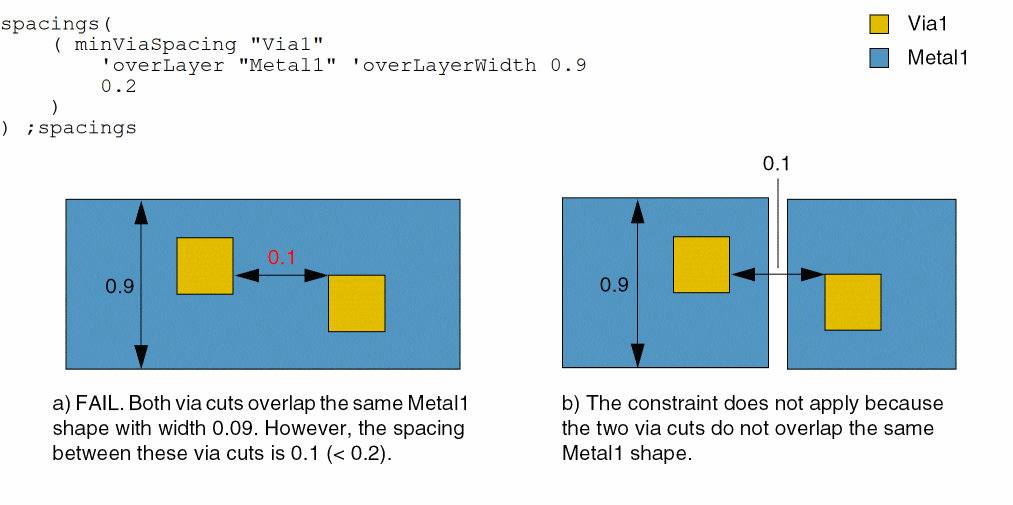
Example 1: minViaSpacing with overLayer and overLayerWidth
The spacing between two via cuts must be at least 0.2 if they overlap a Metal1 shape with width less than or equal to 0.09.
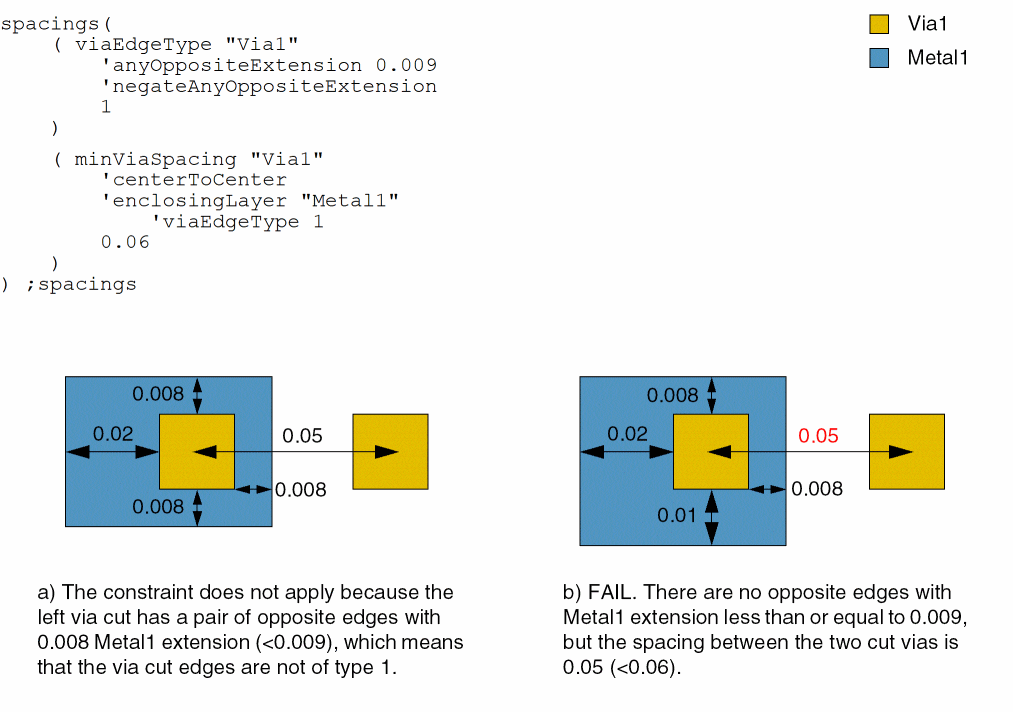
Example 2: minViaSpacing with centerToCenter, enclosingLayer, and viaEdgeType
The center-to-center spacing between two via cuts must be at least 0.06. The constraint applies only to via cuts that do not have two opposite edges with extensions less than or equal to 0.009.
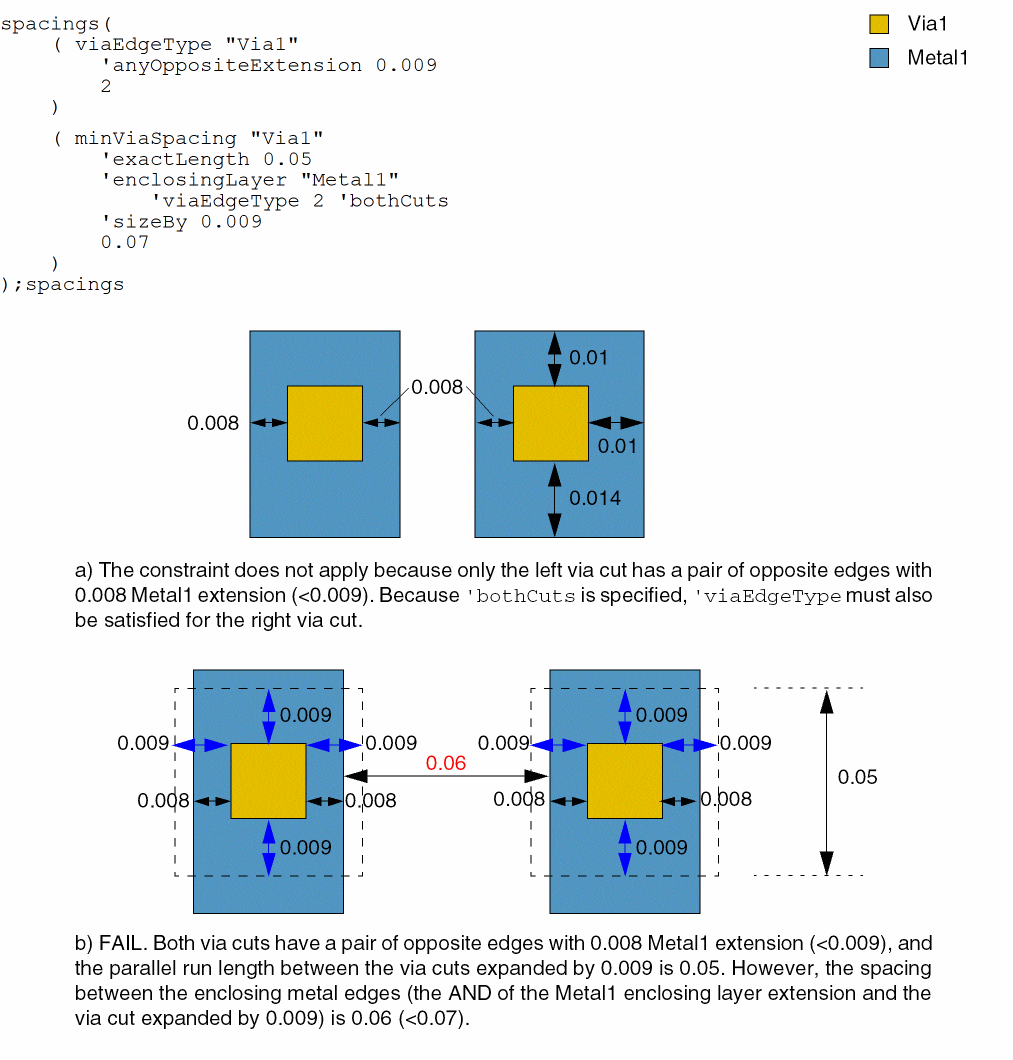
Example 3: minViaSpacing with exactLength, enclosingLayer, viaEdgeType, bothCuts, and sizeBy
The spacing between two via cuts expanded by 0.009 must be at least 0.07 if both via cuts have Metal1 extensions less than or equal to 0.009 on a pair of opposite edges and the parallel run length between them is 0.05.
Example 4: minViaSpacing with fixedCutClassList and otherFixedCutClassList
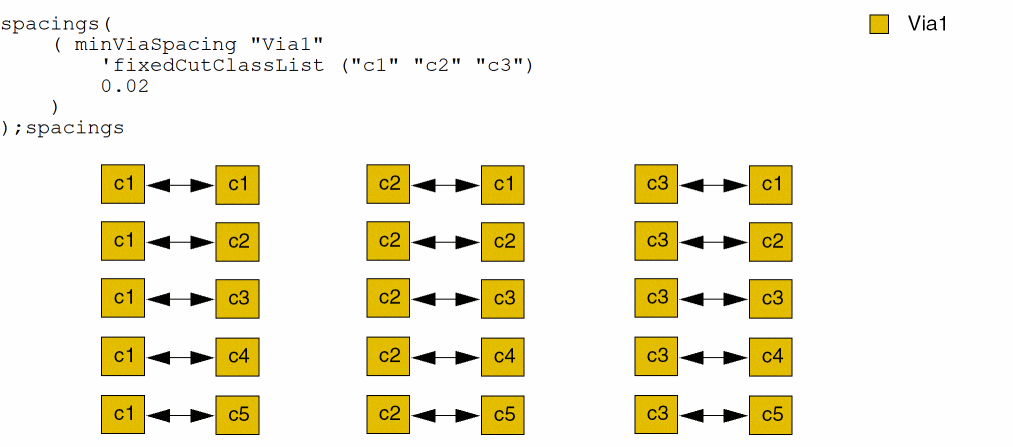
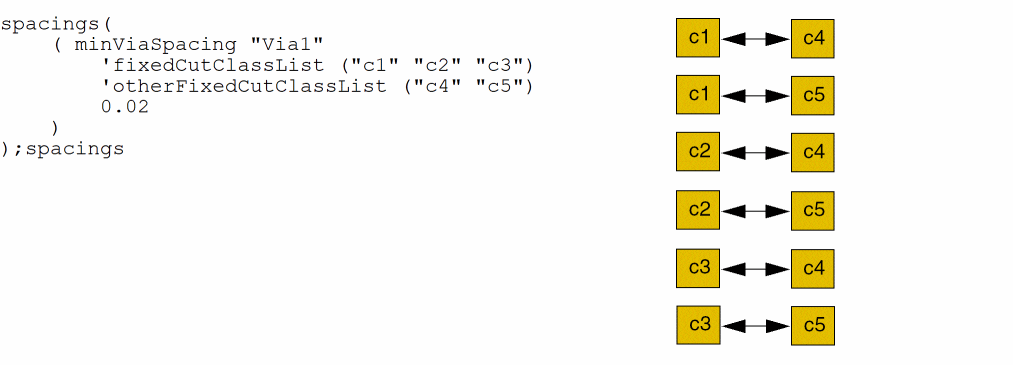
Consider the following scenarios that illustrate the use of the fixedCutClassList and otherFixedCutClassList parameters.
In the following case, the spacings between all combinations of the specified cut classes must be >= 0.02.
In this case, because otherFixedCutClassList is also specified, the spacings between only the indicated combinations of cut classes must be >= 0.02.
Example 5: minViaSpacing with exceptExactAligned
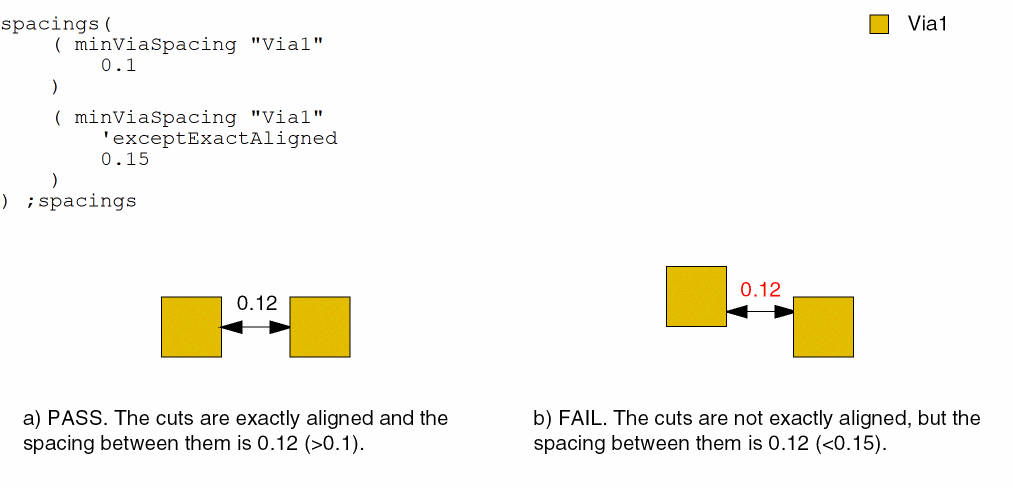
The spacing must be greater than or equal to 0.1 between exactly aligned via cuts and greater than or equal to 0.15 between via cuts that are not exactly aligned.
Example 6: minViaSpacing with centerToCenter, cutClass, enclosingLayer, and sizeByTouchedCorners
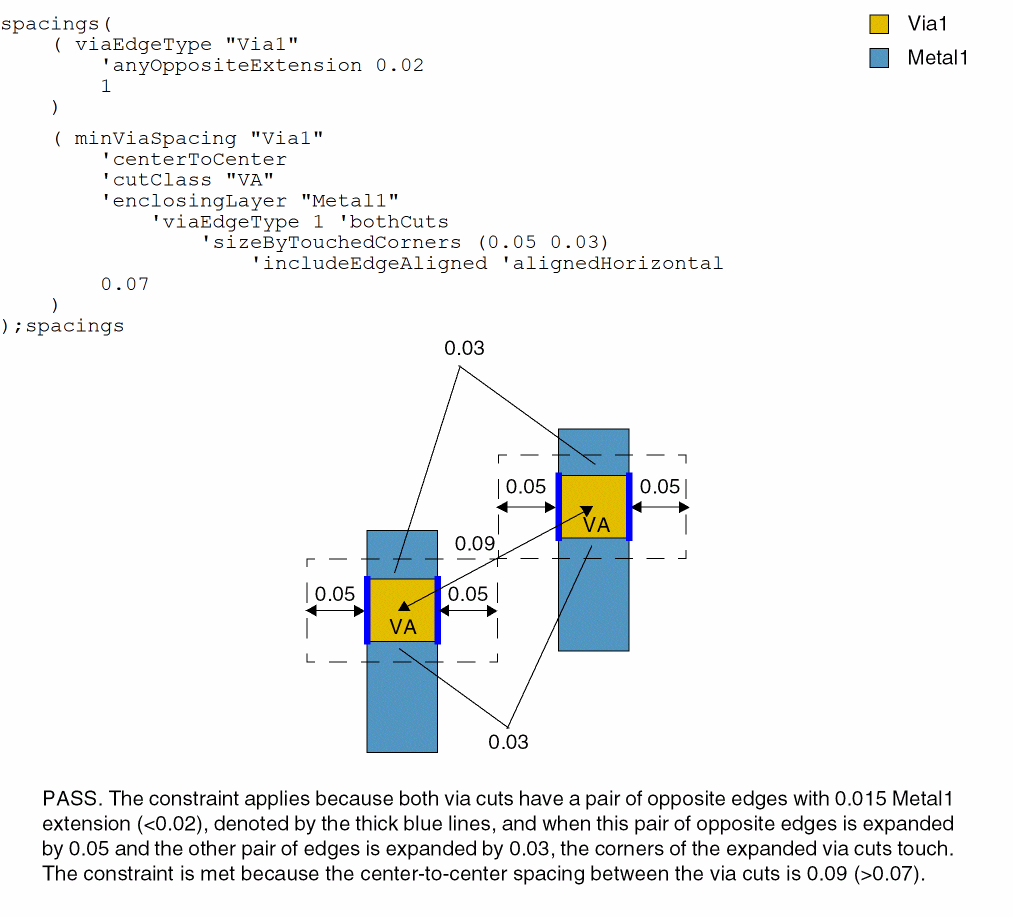
The center-to-center spacing between two VA via cuts must be at least 0.07 if both via cuts have Metal1 extensions less than or equal to 0.02 on a pair of opposite edges and the corners of the two vias touch when the pair of edges that satisfy the specified via edge type is expanded by 0.05 and the other pair of edges is expanded by 0.03.
Example 7: minViaSpacing with orthogonalEdgePair
The following diagram illustrates cases of orthogonal pairs where the constraint applies. All the distances must be greater than f_spacing. The arrows indicate the distance between the cut shapes having orthogonal pairs of edges.
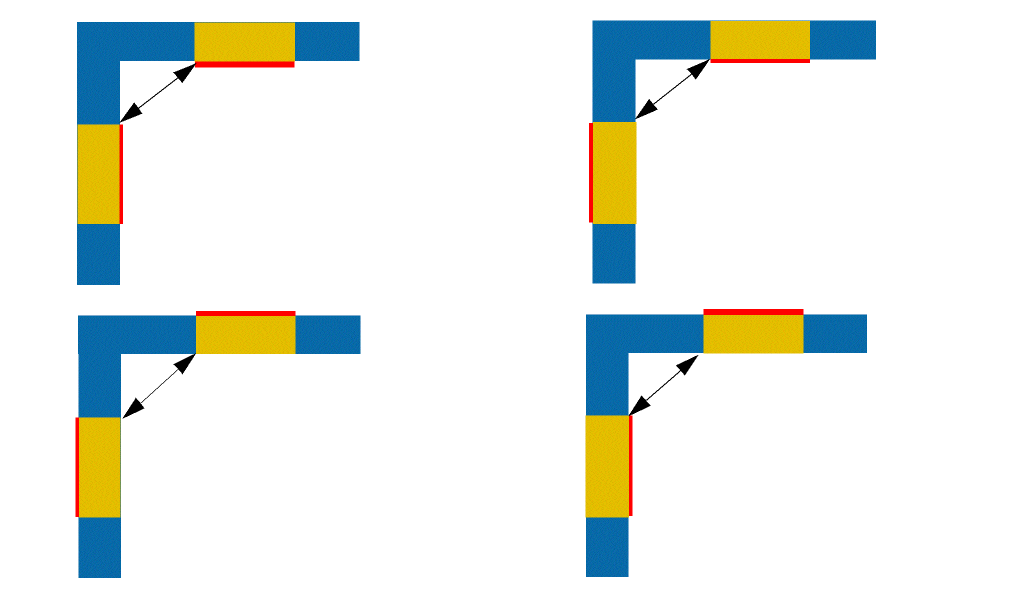
The following diagram illustrates cases where the constraint will not apply because the edges are parallel and not orthogonal.

Example 8: minViaSpacing with orthogonalEdgePair and orthogonalEnclosingMetal
The following example illustrates the use of orthogonalEdgePair and orthogonalEnclosingMetal.
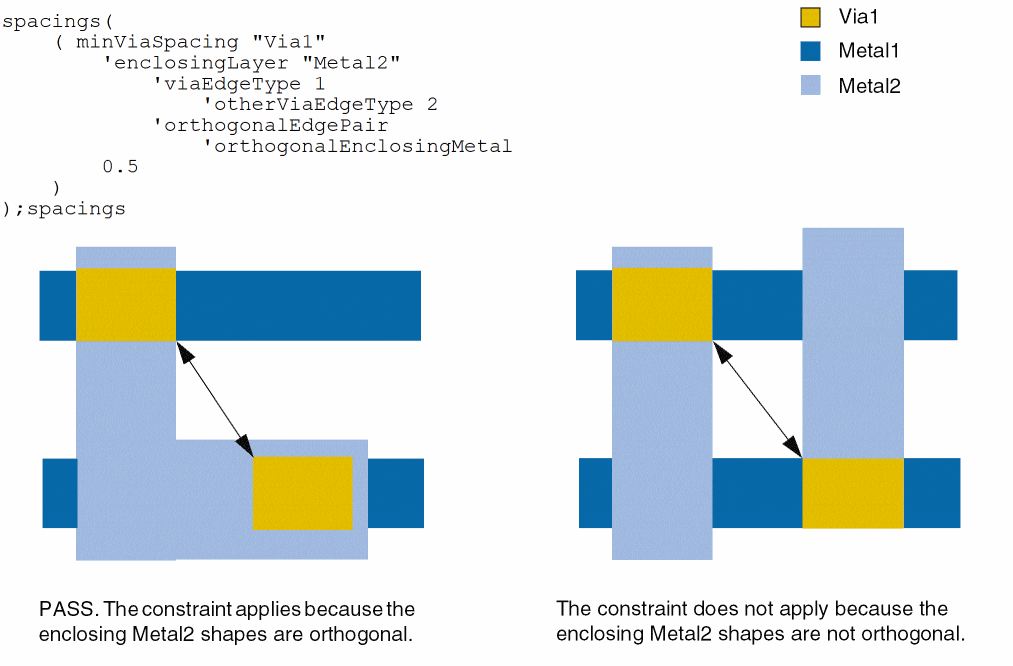
Example 9: minViaSpacing with exceptRanges
The spacing between a pair of via cuts on Via1 must be at least 0.5. The vias are exempt from the rule if the spacing between them is equal to 0.1 or greater than 0.15 and less than 0.16.
spacings(
    ( minViaSpacing "Via1"
     'exceptRanges (0.1 "(0.15 0.16)")
  0.5
 )
) ;spacings
Example 10: minViaSpacing with exceptRanges and facingEdges
The spacing between a pair of via cuts on Via1 must be at least 0.8. The vias are exempt from the rule if the spacing between them is equal to 0.2 and their edges are not facing each other.
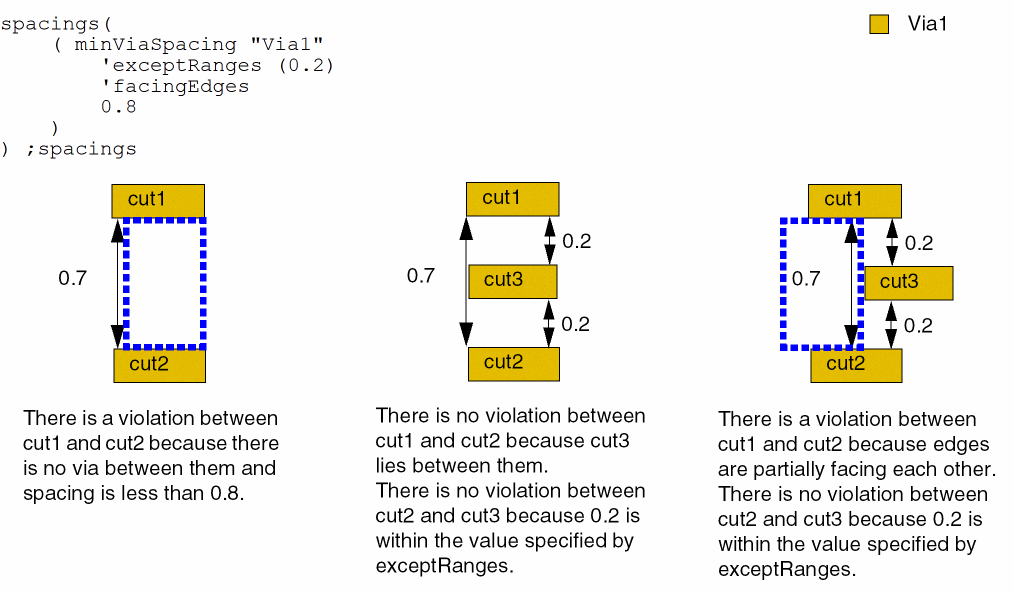
Example 11: minViaSpacing with exceptGap and exceptSameMetalOverlap
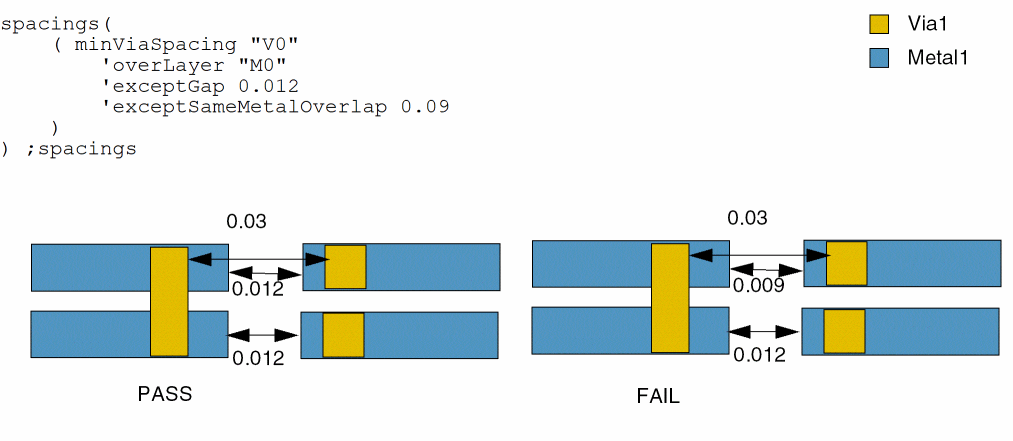
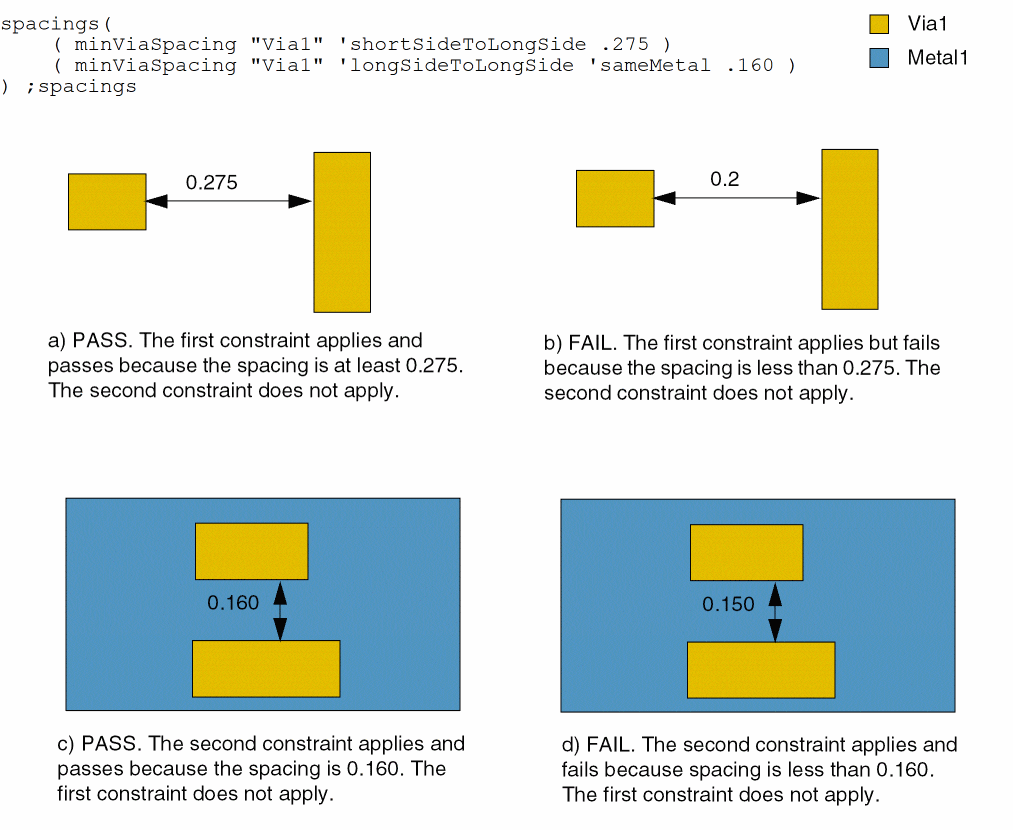
Example 12: minViaSpacing with type of spacing
The spacing between two via cuts is checked using the following constraints.
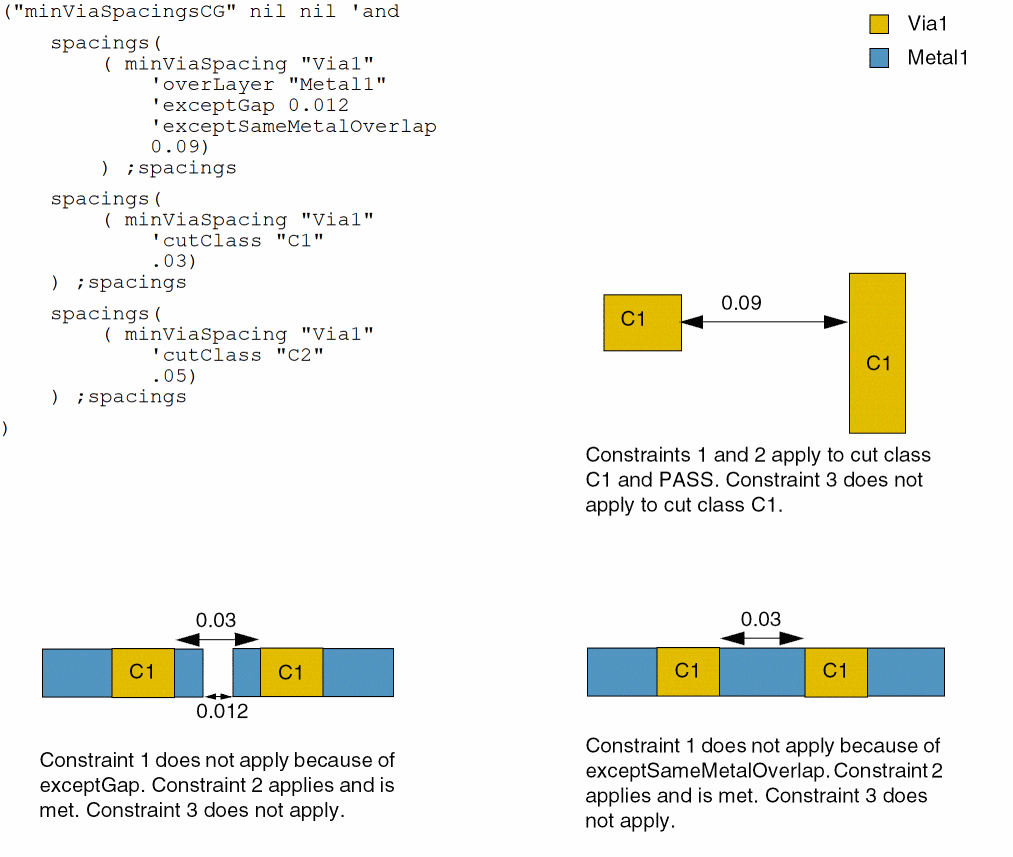
Example 13: minViaSpacing with overLayer
The spacing between two via cuts is checked using the following constraints. Let’s assume that all cuts belong to the C1 cut class.
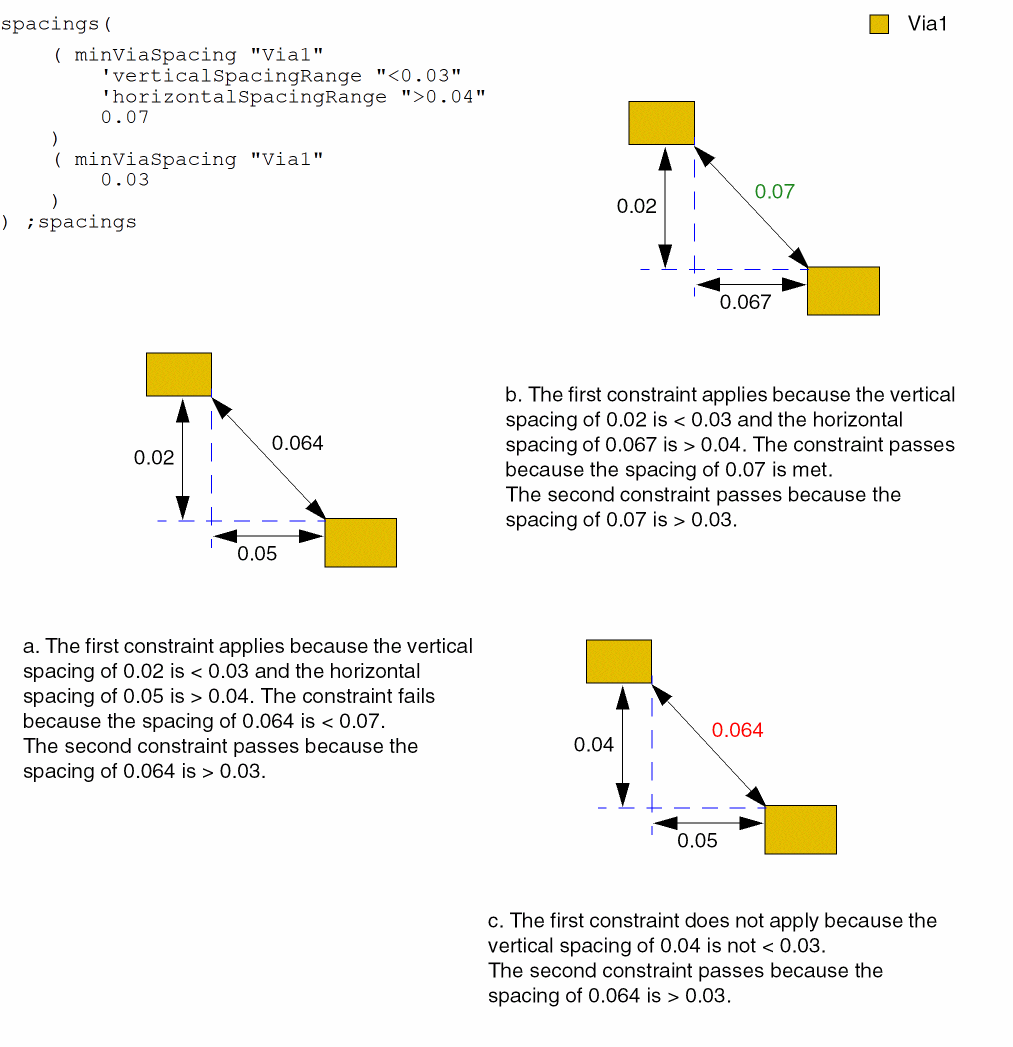
Example 14: minViaSpacing with verticalSpacingRange and horizontalSpacingRange
Two constraints are specified. The first constraint requires that the vertical spacing between two shapes be less than 0.03 and the horizontal spacing be more than 0.04. The second constraint does not specify vertical or horizontal spacing.
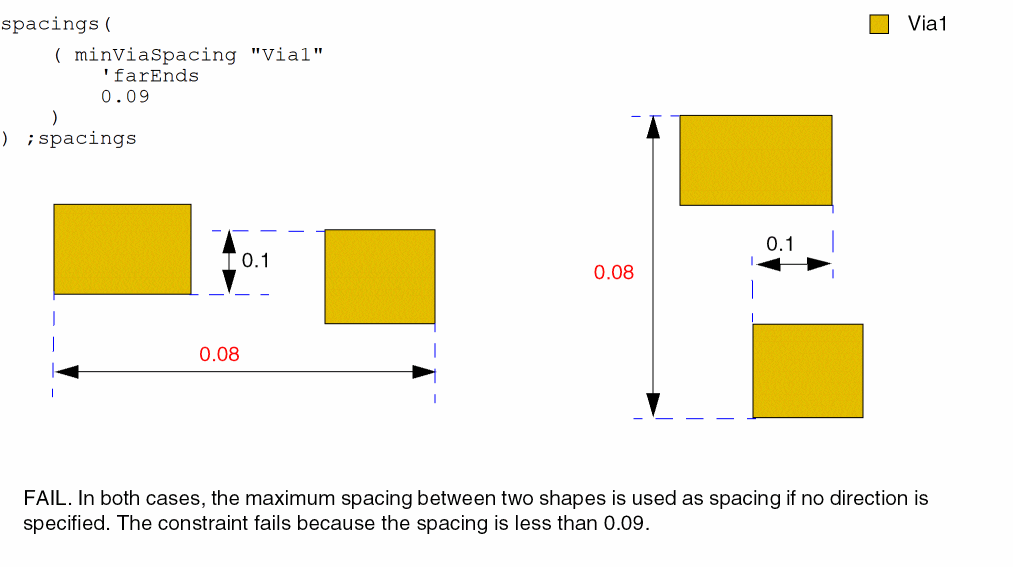
Example 15: minViaSpacing with farEnds
The spacing between the far ends of vias must be greater than or equal to 0.09.
Return to top