
Concurrent Layout Options Form
Modifies the configuration settings related to the Concurrent Layout assistant and for opening, saving, and merging the design partition views.
|
This section provides options to customize the Concurrent Layout assistant. |
|
|
Lets you specify the following preview options:
|
|
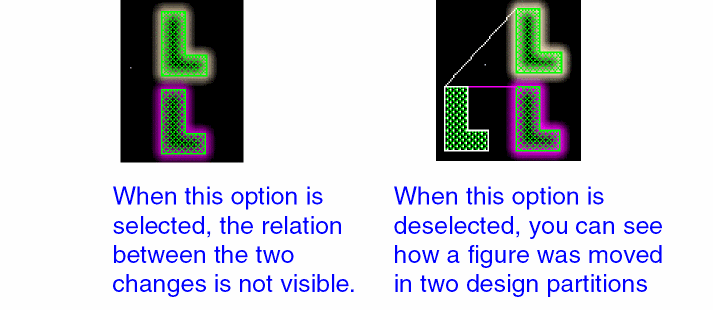
Environment variable: |
|
|
Provides the following options to configure the editing and alert information shown on the Concurrent Layout assistant and in the canvas.
|
|
|
Sets the edit mode inside the current partition.
Environment variable: |
|
|
Specifies the mode for hierarchical editing.
Environment variable: |
|
|
This section provides options to configure the actions that occur when you open a design partition view. |
|
|
Specifies actions to take when importing updates made in peer design partitions.
Environment variable: |
|
|
Filters updates to the objects you do not own. This option is applicable only for object-based partitions and is deselected by default.
Environment variable: |
|
|
Specifies whether to display the log of edit conflicts while opening design partition views. This option is deselected by default, which means that the edit conflict log is not displayed when a design partition view opens.
Environment variable: |
|
|
Specifies the action to take when errors are found while opening a design partition view.
Environment variable: |
|
|
Specifies the error message IDs for which the import of a design partition view is stopped. This option is available only when the Error Action is specified as StopOnID.Environment variable: |
|
|
Increases the severity of warnings to the same level as errors so the specified error action can apply to them equally. This option is available only when the Error Action is specified as StopOnID. |
|
|
This section provides options to configure actions to take when saving a design partition view |
|
|
Specifies whether to filter changes for objects that the user does not own while saving a design partition view. This option is applicable only for object-based partitions. This option is deselected by default, which means that the changes made to the objects not owned by the user are not filtered and are saved in the design partition view.
Environment variable: |
|
|
Displays a warning to merge the design partition view when the number of objects being modified in the design partition view exceeds the specified value. You can disable this warning by setting the value to
Environment variable: |
|
|
This section provides options that can be set in the manager mode. |
|
|
Specifies whether edits in manager mode should be allowed only outside design partition areas. The check box is deselected by default, which means that users can edit the top design from inside any design partition area. When selected, users cannot edit any object inside design partition area.
Environment variable: |
|
|
Deletes design partition views when Clear All Design Partitions or Delete command is run. When deselected, the design partition views are reset to be reused when these commands are run. The check box is deselected by default.
Environment variable: |
|
|
When Create is clicked on the Define Design Partition Form form, checks the design partitions for area overlaps and reports them in CIW. The check box is deselected by default.
Environment variable: |
|
|
Adds the non-maskable layer column on the Partition Layers Form form and lets you can include non-maskable layers in layer-based design partitions.
Environment variable: |
|
|
Displays a message when a cellview opens in manager mode.
Environment variable: |
|
|
Displays a message when creating design partitions to assign any unassigned clone in the top design. Environment variable: promptAssignCloneOwner |
|
|
Specifies whether DM Mode should be enabled. DM Mode ensures all users are in a consistent design environment.
If a DM is detected, name of the DM is displayed in the form.  If no DM is detected, the label says (DM not detected).  |
|
|
Displays the DM Sanity Checker form that lets you check the compatibility of your DM system with Virtuoso Concurrent Layout. See DM Sanity Checker. |
|
|
This section provides options to configure the actions that occur when you merge a design partition view. |
|
|
Resets a design partition view on the disk after the changes are committed. Status of the design partition view changes to Reset, instead of Commit.
Environment variable: |
|
|
Specifies the number of objects that perform post-edit checks after a design partition view is merged. Objects exceeding this limit are skipped and a warning is displayed. The default is 50000 objects.
Environment variable: |
|
|
Specifies the number of objects to add to the selection set when a design partition view is merged. The default is 50000 objects.
Environment variable: |
|
|
Specifies the action to take when conflicts are found while merging design partition views. This option is used to resolve issues with connectivity objects with duplicate names.
Environment variable: |
|
|
The section lets you specify the path to the Concurrent Layout configuration file. You can use this file to save or load the current Concurrent Layout configuration. |
|
|
Specifies the path to the Concurrent Layout configuration file. |
Related Topics
Concurrent Layout Editing in Manager Mode
Merging a Submitted Design Partition
Importing a Peer Partition after Concurrent Layout Editing
Edit Scope of a Design Partition
Return to top