
Assigning Clones in Concurrent Layout
Clones are auto assigned to a design partition when new design partitions are created. However, there might be some clones straddling multiple design partitions and cannot be auto assigned. To be able to assign a design partition as the owner for these unassigned clones:
-
In the Concurrent Layout Options form, choose Prompt to assign clone owner in the Manager Only section and click OK.
This update is applied to all existing design partitions and the new design partitions when they are created. -
Open the Define Design Partition form, create new design partitions, and click Create.
If there are unassigned clones in the design partitions being created, a message is displayed that unassigned clones have been found and whether you want to assign them to a specific design partition. -
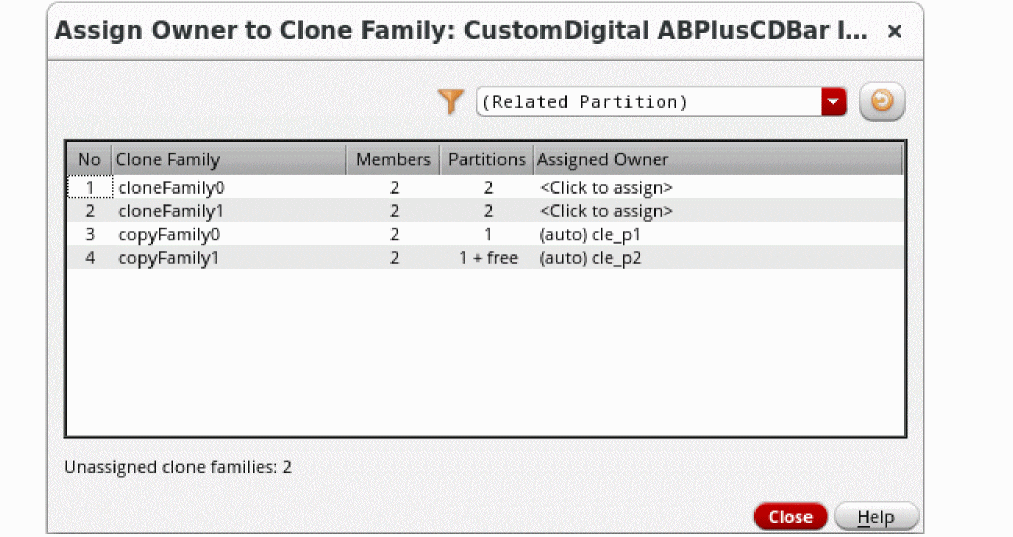
Select Yes to display the Assign Owner to Clone Family form.
This form consolidates all unassigned clone alerts in one place by each clone family.
-
Select an unassigned clone family in this form, and then from the dialog box that displays, select the owner design partition from the Owner Partition dropdown list and click OK.
You can select (Unassigned) to unassign an owner.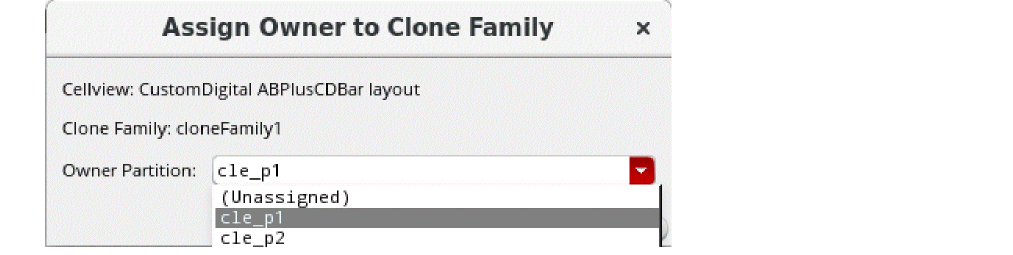
Related Topics
Concurrent Layout Options Form
Assign Owner to Clone Family Form
Rules for Editing Clones in Design Partitions
Return to top