
2
OpenAccess Adoption with CDBA
This document contains information for Virtuoso Studio design environment application developers updating their code, tests, and data to work with OpenAccess.
Using OpenAccess Code and Extensions
Development Environment
The OpenAccess infrastructure packages are written in C++. Header files exported by the OpenAccess-based CDBA procedural interface have been changed to make them more ANSI-C compliant and compatible in C++ code. Linking executables require the C++ linker (CC).
Conditionally Compiling Code
The convention for conditionally compiling code differs on CDB and OpenAccess. To compile code, use an ifdef statement similar to the following:
#ifdef OPENACCESSOpenAccess_version_of_code#elseCDBA_version_of_code#endif
To pass the OPENACCESS directive to the code, add -DOPENACCESS to the compile line. For example,
CC -DOPENACCESS myFile.cpp
Using OpenAccess Code and Extensions
The OpenAccess database is structured to be used in many different environments; each environment has its own requirements. Most of the time, you will be able to use native OpenAccess API functions to create, access, and manipulate database objects in your specific environment. For the few areas that are specific to an environment or graphical application, you will need application extension code to fulfill the unique requirements of the applications you are using.
For example, Virtuoso and third-party vendor applications might display data differently. These display methods are independent of the data itself. For the Virtuoso Studio design environment, there is a set of OpenAccess application extension objects containing information that controls the Virtuoso environment on OpenAccess, including layer-purpose pairs, display packets, selectability, and visibility.
For the Virtuoso Studio design environment, layer-purpose pairs (LPPs) are stored as application extension data. The public C-level emulation functions (for example, techCreateLP and techAddLP) handle internal conventions and extension data management; other C-level functions control layer-purpose attribute information, including drawing priority, packet, selectability, and visibility.
Examples of situations requiring application extension code:
-
The OpenAccess extensions for technology LPP information such as packetName and priority are not included in native OpenAccess technology database definitions. This LPP information is required only by Virtuoso. Therefore, a technology file and database generated using native OpenAccess API functions, will not be able to view this LPP-specific information stored as OpenAccess extensions with the Virtuoso® editors, even though the data is there.
To solve this problem, use Integrator’s Toolkit (ITK) public functions (or SKILL) to add the required Virtuoso-specific additions/extensions for data such as LPPs. Then build on your Virtuoso-specific code to create thedisplay.drffile required by Virtuoso.
For information about ITK functions, see the Cadence Integrator’s Toolkit Database Reference. -
Virtuoso Studio design environment LEF/DEF and Stream translators were written to share common functionality from core OpenAccess database requirements. New versions of the translators can be created and customized to handle the specific requirements of any vendor’s application environment and extensions. The native OpenAccess LEF translator (
lef2oa) and the customized version,lefin, both share the same code base; thelefintranslator was extended to handle Virtuoso-specific requirements, including layer-purpose and special via processing.
Structuring Your Code
Code written to support an application needs to be kept separate from code written using OpenAccess APIs. This allows code written to support an environment to be updated without impacting the OpenAccess code.
Native OpenAccess code interfaces directly with the objects in the OpenAccess database. Application-specific code can access the extensions that are also stored in the OpenAccess database. The Virtuoso Studio design environment uses application-specific extensions.
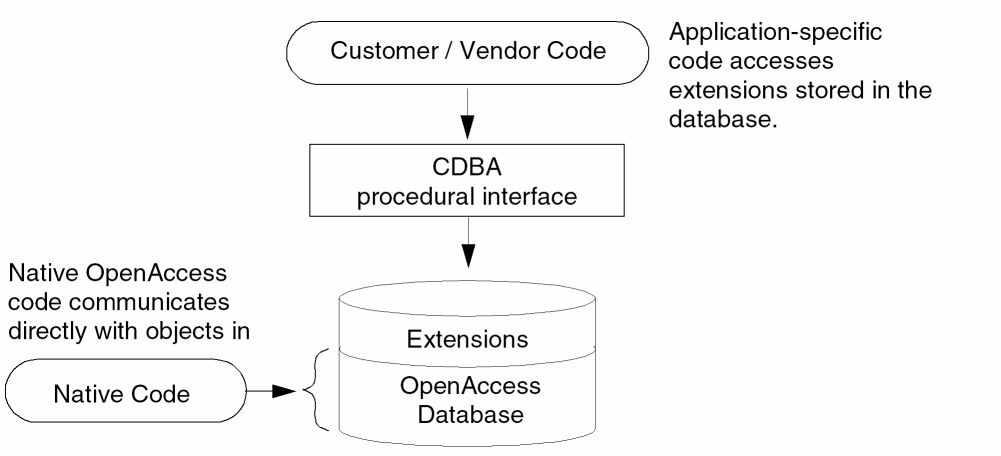
Application-specific information can also be stored in separate files, such as the Virtuoso-specific display.drf ASCII file.
Return to top