
3
CDB/OpenAccess Database Differences
This chapter describes differences in behavior between CDB and OpenAccess for the following subjects:
Using Function Calls on Standard Vias
Using the Schematic Bus Range Order Option
Calls to dbReplaceProp for Abutment Groups
Enhancements in the Design Summary Form
Calls to the cdsInit and dbInit Functions
Database Size Differences Using Paths Versus PathSegs
Instance Magnification Differences
Instance Masters on OpenAccess
Instance Pin (instPin) Objects
Terminal Required on Instances
Bus Nets, Bundle Net, and Bus Net Bit
Embedded Module Hierarchy (EMH)
Differences in Storage and Data Models
Virtuoso Studio design environment Libraries
Determining the Library Structure
Combining CDB and OpenAccess Libraries
Using dbWriteCellView and dbCopyCellview
Opening a Cellview with dbGetAnyInstSwitchMaster
Mapping of Cellview Types from CDB to OpenAccess
Custom Virtuoso Studio design environment View Types
Properties of Libraries, Cells, and Views
Calls to dbBag SKILL Functions
Properties versus Parameterized Cell Parameters
Command Interpreter Window (CIW)
Changing the Name of an Object
Changing an Instance Name to the Same Name
How CDB Uses Timestamp Properties
How the Virtuoso Studio design environment Uses Counters
Counters Provide Finer Resolution
Currency of an Instance and Its Master
Both Counters and Timestamps Needed in Some Applications
General Differences
Using Function Calls on Standard Vias
In the Virtuoso Studio design environment, the masters of standard vias are not associated with a library, cell, or view name. A viaSubMaster is opened by OpenAccess in virtual memory only.
The SKILL API dbIsCellViewStdViaMaster is used to determine whether a cellview is a standard via master.
The following return values are given for SKILL and C functions calls to standard vias.
Using Database (db) Function Calls
| Function | Return Value |
|---|---|
|
Returns the techLibName where the standard via definition is defined |
|
Using Design Management (dd) Function Calls
A NULL value is returned when attempting to use dd function calls to return the master ID of standard vias.
Calls to dbRefreshCellView
The function dbRefreshCellView has been changed on OpenAccess such that, when a cellview in virtual memory is updated with the copy from disk, the access mode is changed to 'a'. In CDB, the access mode was not changed by dbRefreshCellView.
This change has been incorporated because the method in which the OpenAccess database refreshes a design is mode dependent. The design is returned to the state it was in when it was first opened. If the design was opened in 'w' mode, it will be truncated with no reloading from disk.
Using the Schematic Bus Range Order Option
In CDB, changing the Virtuoso Schematic Editor option, Bus Range Order in the Editor Options form, would prompt you to save your edits. This was also seen when using the SKILL function dbSetNetNameDescend which sets the direction of the net name vector expression to descending or ascending. In CDB, changing the bus range order would indicate that the cellview had been modified and therefore needed to be saved.
In the Virtuoso Studio design environment, when changing the bus range order using the Bus Range Order option or dbSetNetNameDescend, you will not be prompted to save changes. The cellview read-in counter does not change, which means the cellview is not flagged as modified.
Calls to dbReplaceProp for Abutment Groups
When using the function dbReplaceProp, you must call dbReplaceProp for abutment groups before calls to dbReplaceProp for Pcell properties. This is true for CDB and the Virtuoso Studio design environment. The ID of the objects before and after abutment occurs will not be the same. In some situations on CDB, it was possible to reference the same pin IDs and instance masters in virtual memory after Pcell re-evaluation, but because of changes to complex pin models and when data is purged in OpenAccess (see Complex Pin Modeling and Instance Masters on OpenAccess) you can not rely on the same data or IDs after Pcell re-evaluation.
Mark Net Command
In CDB, the Mark Net command relied on the viaLayers section of the technology file to determine interconnecting layers.
In the Virtuoso Studio design environment, the Mark Net command relies on the viaDefs section of the technology file to determine interconnecting layers. Most CDB technology file contacts device definitions are converted to via master definitions (viaDefs) in OpenAccess. Via definitions consist of two types of vias, customViaDefs and standardViaDefs. For more information about via definitions, see Technology File Via Definitions and Via Specifications.
Enhancements in the Design Summary Form
The Design Summary form has been enhanced to show, row objects, wire statistics, marker objects, track patterns, blockage objects and boundary objects.
unplaced attribute is maintained by P&R applications. An unplaced instance is not displayed in the Virtuoso layout window, it is however present in the database. See Placement Status for more information. Calls to the cdsInit and dbInit Functions
Programs using the OpenAccess C++ layer must call the cdsInit or cdsInitNonCDSApp function explicitly in order to specify how the lower-level library search mechanism will work. When using ITKdb, the dbInit function must be explicitly called. The dbInit function registers the SKILL language interface so that Pcells will work.
Defragmentation in OpenAccess
The dbDefragCellView function has not been implemented in Virtuoso Studio design environment. The user interface command and SKILL function are not available.
Maximum Cellview Bounding Box
OpenAccess and the Virtuoso Studio design environment allow a larger range of coordinates for cellviews. This limit is stored in the constant dbcMaxCoord.
-
OpenAccess and the Virtuoso Studio design environment let you create 32-bit coordinates in the range of
-( 231 - 1 ) through +( 231 -1 ) database units
(or in hexadecimal,7fff ffff). -
In OpenAccess is:
-2,147,483.65 through +2,147,483.65 user units
The Virtuoso Studio design environment currently limits the windowing range to approximately plus or minus 700,000 user units.
Name Space Differences
The OpenAccess name space is different from the CDB name space. For example, in OpenAccess, square brackets are used as the vector expression delimiters for bus names. The CDBA procedural interface will continue to present the CDB type name space, including the use of “< >” for vector indexes.
An oaName object encapsulates all of the mechanics of name mapping. This effectively hides the internal representation of the name from the caller and allows mapping between name spaces.
Database Size Differences Using Paths Versus PathSegs
Converting CDB data containing paths to OpenAccess data with paths creates an OpenAccess database larger in size than the CDB database. The paths explode the size of the database, especially in the case of digital data. In contrast, OpenAccess data with pathSegs creates a size-efficient OpenAccess database. Therefore, when converting data from CDB, DEF or GDSII to OpenAccess, always use the options to create pathSegs instead of two-point orthogonal paths, especially for digital data.
In addition, it is recommended to bring in via placements after conversion as vias instead of cell placements. This may require you to create an ITDB library for the design, which can hold the required standard and custom via definitions. This will also shrink the OpenAccess database to smaller than the CDB data.
Escape Sequences in Names
Except for pin names, escape sequences are now required in names to represent a printable character.
a\142c
is a legal name because it is the same as “abc”, but
a\006c
is not a legal name, because the \006 represents the ACK control character, which is not printable.
Backquote Character in Names
Tools that convert data from a logical design to physical data frequently need to flatten the logical hierarchy. In doing so, they attempt to create names for objects that make it easier to map the objects back to their original logical hierarchy. One example of this is PRflatten. This tool takes the original path names to objects, such as
"/top_inst/mid_inst/netA"
and convert them to names such as
"|top_inst|mid_inst|netA"
in a single flat cellview. The pipe character ( | ) in this flat name is used to represent the original hierarchy and is therefore called a pseudohierarchy character.
OpenAccess formally supports the concept of pseudo hierarchy in name mapping. The CDBA procedural interface uses the backquote character ( ‘ ) as the pseudo hierarchy character. Therefore, do not use the backquote character ( ‘ ) in names unless you intend that it be interpreted as pseudo hierarchy by other tools, such as the DEF translator. The pipe character ( | ) is used to represent pseudo hierarchy by convention between the PRflatten and Preview tools.
On many keyboards, the backquote character ( ‘ ) is located under the tilde character ( ~ ). In ASCII code, the backquote is represented by the following numbers:
Translators in the physical domain will consider the backquote character ( ‘ ) as hierarchy when mapping to languages, such as spef and SDF, that treat pseudo hierarchy as real hierarchy.
In the ASCII technology file, the single quote (forward tick ') is the SKILL sign for symbol. Do not use the backquote. For example,
orderedSpacings(
("minOppExtension" "poly1" "metal2" (2.1 0.7) 'soft)
...
)
Using Instance Parameters
If an instance of a Pcell has instance parameters and CDF parameters that overlap in their names, types, and default values, you can use the Store Default attribute to determine which of the two parameters should take precedence.
If you want the CDF parameter of a Pcell to use the evaluated result of an expression string, set its Parse as CEL value to yes. Also set the CDS_NETLISTING_MODE value to Analog.
Example
Consider the following NLP expression as a CDF parameter of a Pcell instance:
where, nw has been set as nw = "3u".
In this situation if Parse as CEL value is yes, the instance parameter will be set to "3u". (If Parse as number is also set to yes, the expression will be evaluated to 3e-06). If Parse as CEL is set to no, then the parameter expression will not be evaluated and will be set to "[@nw]".
You can update both Store Default and Parse as CEL values in the Edit CDF form (In the CIW, click Tools - CDF - Edit).
Instance Magnification Differences
OpenAccess does not support instance magnification.
The Property Editor and Create Instance forms no longer contain fields for magnification. Both the Virtuoso Layout L Editor and the Virtuoso Schematic L Editor handle magnification on OpenAccess as described below.
The Virtuoso Studio design environment supports the translation of magnified instances, including that of hierarchical and Pcell instances, from CDB and Stream to OpenAccess. Translation is done by creating special parameterized cells that emulate magnification and any-angle rotation. In the future, this method will facilitate better handling of all angles of rotated instances (srefs) in Stream.
Each of these special Pcells contain SKILL code that:
- Creates an instance of the original instance master.
- Flattens the instance.
-
Transforms all the resultant shapes by the magnification of the original instance (the
magparameter of this Pcell).
The Pcell master created in OpenAccess for a translated magnified instance will have library, cell, and view names based on the names of the original instance master. The cell name will be identical to the original, and the view name will be appended with _xform.
If the library of the original instance’s master is writable, it is used; otherwise, the library of the cellview in which the instance is instantiated is used.
For example, when the master of the magnified instance is
The Pcell master has two parameters, mag and angle.
When you run a netlister, the current method of translation of magnified instances involves two restrictions:
- The viewname_xform cellview should be translated to the instance’s master library. This means you MUST have write permission for the instance’s master library.
-
You have to add viewName
_xformto the netlister’s view name list before running the netlister, for example, addsymbol_xformto the view name list.
ITK Read-in Triggers
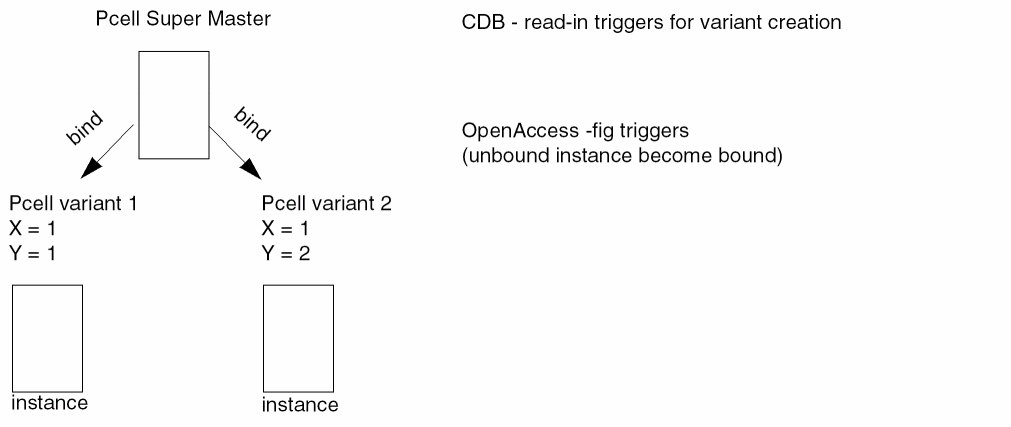
Customer application code that relies on read-in triggers to fire for instance creation, must now use fig triggers for instance binding. On OpenAccess, fig triggers are fired in the event of instance binding changes and are not fired for Pcell submasters evaluation.
Instance Masters on OpenAccess
CDB did not purge instance masters even when there were no instances referring to the master. In the Virtuoso Studio design environment, the instance master is purged as soon as the instance reference count associated with the instance master becomes zero.
On CDB, an instHeader ID remains the same when making changes to the instHeader master. On OpenAccess, there is no equivalent of setting the master for instHeader natively. In the Virtuoso Studio design environment, this is emulated by setting the master of individual instance on the instHeader to the new master. All the instances are removed from the old instHeader and moved to the new instHeader, which could or could not exist.
However, when an instHeader is empty, meaning it does not have any instance on this instHeader, the instHeader is removed and the ID is no longer valid. This change has effected the behavior of the SKILL function dbSetInstHeaderMaster.
The following code is an example of retrieving the instHeader after setting the master. In this example, the instance should be retrieved first. Then, set the instHeader after the master is reset.
inst = car(ih~>instances);
dbSetInstHeaderMasterName(ih newLib ih~>cellName ih~>viewName);
set ih = inst~>instHeader; ;; Changes to instHeader
Order of Generating Objects
In CDB, the order in which objects were returned by the different generators depended on the type of object and whether the objects was new and had not yet been saved to disk. If a number of objects were created, they were generated in the order they were created. However, after the data had been saved, purged from memory, and then opened and read in, the order would be different than before but consistent from this point forward.
OpenAccess is consistent in the order that objects are generated. The generators always generate shapes in the same order.
Undo/Redo
The following table describes the differences for the Undo and Redo commands on CDB and the Virtuoso Studio design environment.
techFindViaDefByName vs leIsContactName SKILL API
The techFindViaDefByName API is available in OpenAccess (OA) and its corresponding API is leIsContactName, which was only supported in CDB.
Some observations on inconsistency in CDB and OA translation are given below regarding via and contacts across LEF, VLE, and technology file.
-
If via,
via1is displayed asVIA DEFAULTorVIAin the LEF file, then, after LEF In: -
If via,
via2is displayed asVIARULE GENERATEin the LEF file, then, after LEF In:CDB OA Does not show up in the list in the Create Contact form in VLE.
Shows up as a contact in the list in the Create Contact form in VLE.
Files
- Set-up Files New in the Virtuoso Studio design environment
- Files that Have Changed
- Files that No Longer Exist
- Files that Are the Same
Set-up Files New in the Virtuoso Studio design environment
-
data.dm
The data.dm file is a design management data file used, in part, for storing properties when using the DMFileSys plug-in. For more information, see Properties of Libraries, Cells, and Views. -
.oalib
The .oalibfile is created to store information that is used by OpenAccess for library management. If a.oalibfile does not exist when a library is opened by OpenAccess, it will be created. You must have write access to the library in order for a.oalibfile to be created.
Files that Have Changed
-
layout.cdb,sch.cdb, etc.
Name change only. The file extension for design database files is.oa.
In CDB, the cellview data filename did not need to reflect the view type stored in the cellview data file. For example, CDB allowed a cellview with the stored view typemaskLayoutto be calledsymbol.cdb.
The Virtuoso Studio design environment expects a cellview filename to reflect the stored view type and will not allow a conflict in naming and type.
For information about cellview type mapping, see Mapping of Cellview Types from CDB to OpenAccess. -
tech.db
The technology database filename changes fromtechfile.cdstotech.db. Application code must be changed to no longer refer to the technology database file by name. For information on how to retrieve the technology database filename, see Chapter 4, “OpenAccess Technology Data Changes.” -
pc.db
Thepc.dbfile typically resides in the cellview directory and stores the hierarchical relationships for that cellview. It is a derived file that allows hierarchy functions to navigate descriptions other than CDB; for example, VHDL and Verilog.
Files that No Longer Exist
-
prop.xx
See Properties of Libraries, Cells, and Views. -
lib.defs
Thelib.defsfile is no longer a supported library definition file. See Library Definition Files for more information.
Files that Are the Same
-
cdsinfo.tag -
name
.Cat(category registry) -
libInit.il(SKILL loader) -
master.tag
Themaster.tagfile contains the name of the master (or primary) data file, and optionally, a comment such as the version number.
A cellview will fail to open if it is created without amaster.tagfile. If you create a new cellview using the UNIXmkdircommand and then copy the files into the cellview in a random order, you will not be copying themaster.tagand master files first. If during the copy, you or some other process request OpenAccess to evaluate the cellview (and it does not contain amaster.tagfile) an error message will be issued.
Pins
Complex Pin Modeling
Converting CDB Subnet Pin Model to OpenAccess Pin Group Model
Pin Group Conversion During Pcell Evaluation
How Undefined Pin Groups are Converted
Reloading Pcells After CDB to Virtuoso Studio design environment Translation
Changes to C Functions for OpenAccess Pin Group Model
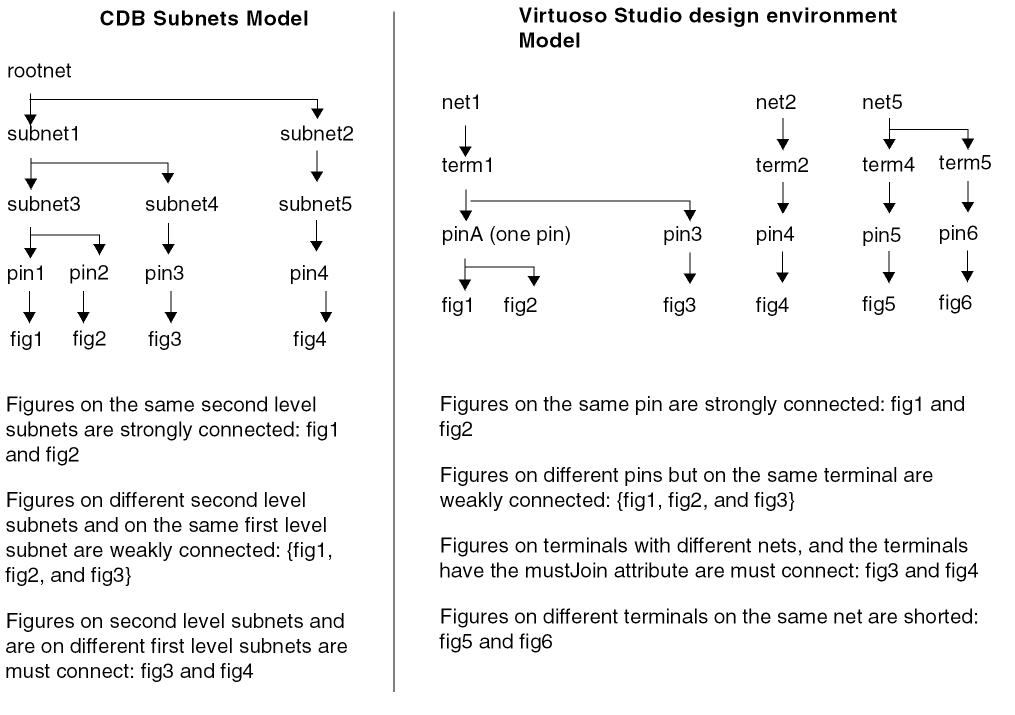
In CDB, subnets are used to implement the pin group relations of strong, weak, or mustJoin. Subnet extensions are represented by a two level subnet structure. Pins are placed at the second level subnets and the connection status of the pin group is determined by their relative location in the structure. Also, there is a one-to-one relationship between the pin and the physical implementation figure.
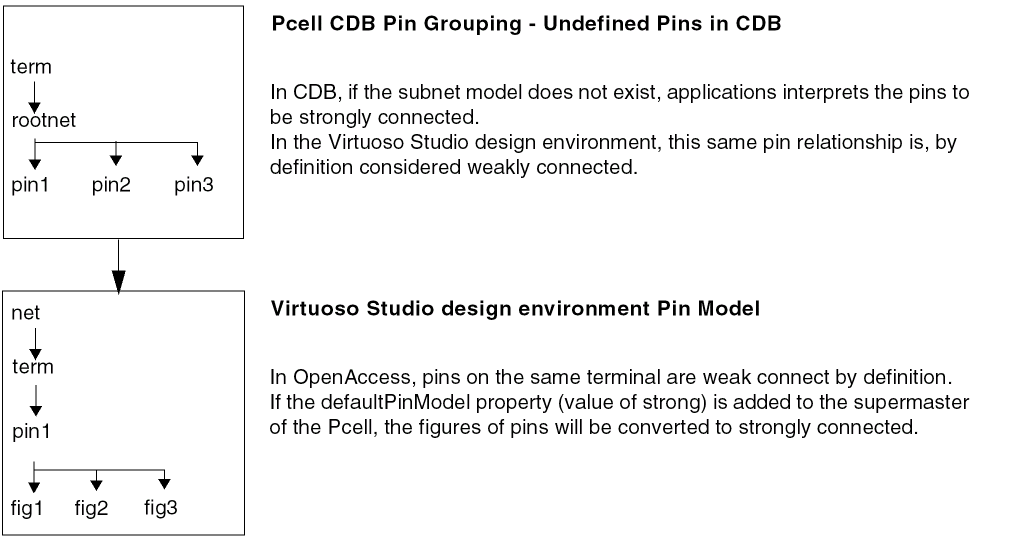
Pin models in the Virtuoso Studio design environment allow multiple figures per pin, as well as multiple pins per terminal. Subnets are no longer used to represent pin group relationships.
The oaPinFig class allows the figures (instances, shapes and vias) to be added to a pin. Pins can be created with 0 to n figures attached. When writing SKILL code, pins can be initially create with no figures. You can then add or remove figures from the pins in subsequent calls.
The following diagram describes CDB pin grouping versus the Virtuoso Studio design environment pin modeling.
Converting CDB Subnet Pin Model to OpenAccess Pin Group Model
Two types of situation exist where the CDB subnet pin group relationship is converted to the Virtuoso pin model.
-
CDB data
Subnet pin modeling is converted to OpenAccess pin modeling. -
SKILL Pcell code
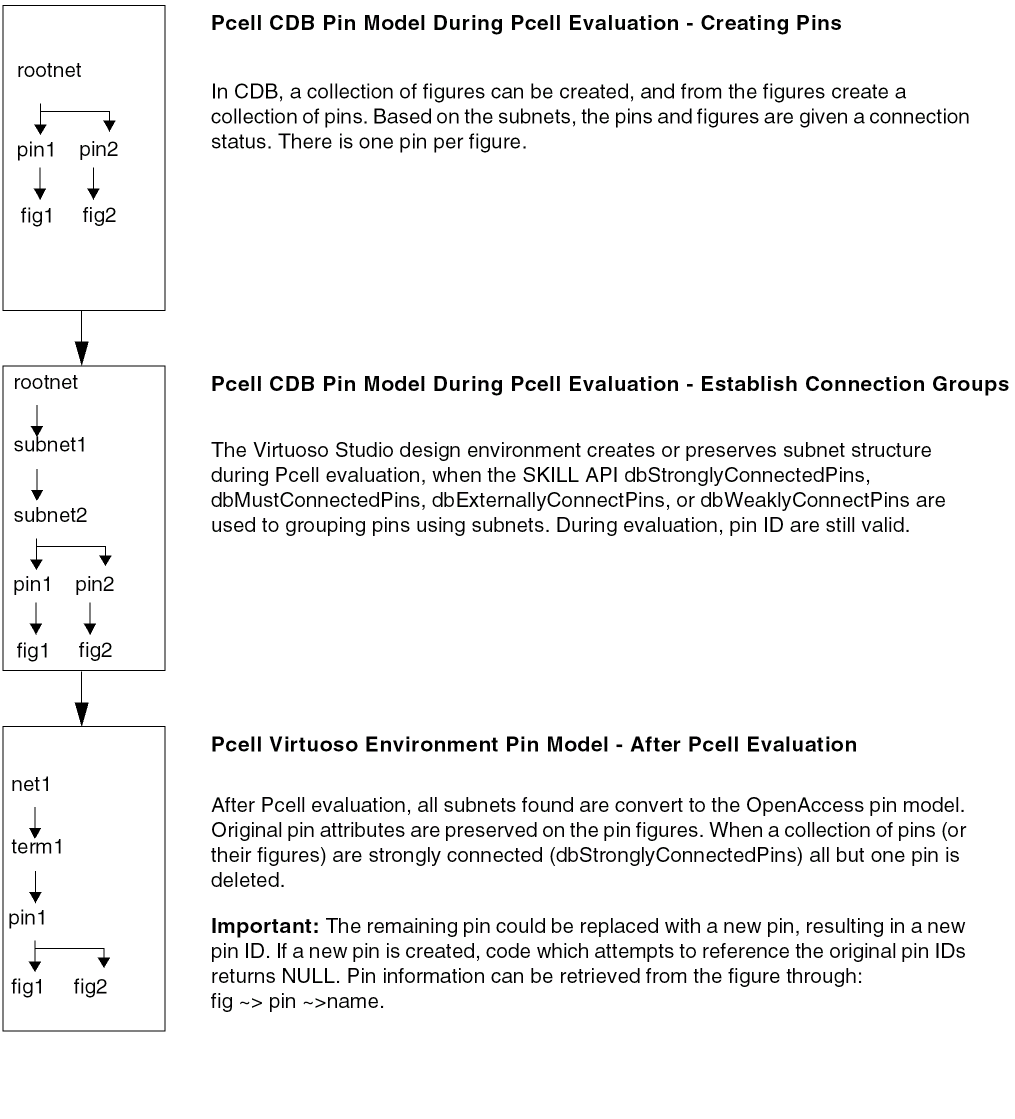
Any Pcell code dependent on the subnet structure is still valid in the Virtuoso environment. Once the Pcell code is evaluated, the subnet pin model in the subMaster is dynamically converted to OpenAccess pin model in virtual memory. This may slow down the performance. Therefore, although it is not required, re-writing your Pcell code using the following functions to define and retrieve the name, access the direction, and the placement status of pins will provide better performance.
dbGetPinFigName
dbGetPinFigAccessDirection
dbGetPinFigPlacementStatus
dbSetPinFigName
dbSetPinFigAccessDirection
dbSetPinFigPlacementStatus
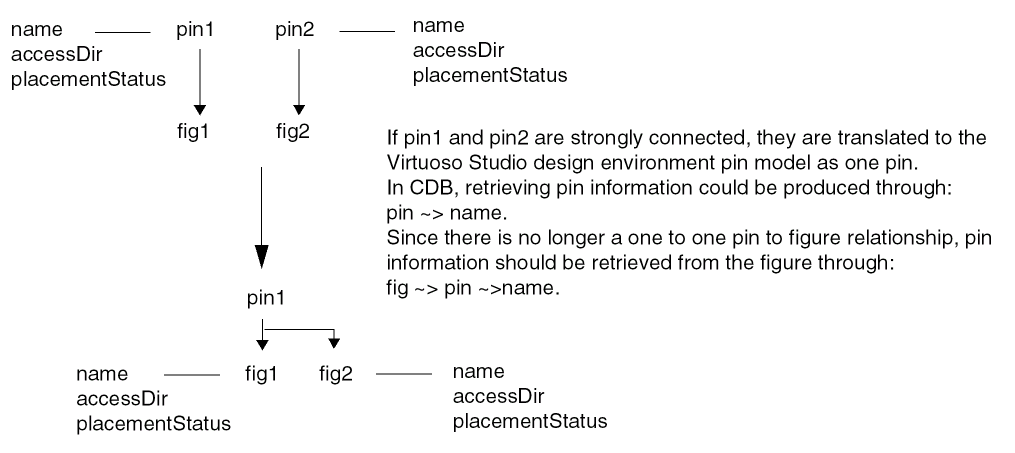
Attributes on Pins
In CDB, pin physical attributes are stored on the pin object even though they apply to the pin figure because of the one-to-one relationship between a pin and the physical implementation figure. These attributes are used to access the name, access direction, and placement status. During translation to the Virtuoso Studio design environment, the attribute information is moved down to the figure. The following functions are provided to access pin information from the figure: dbGetPinFigName, dbGetPinFigAccessDirection, dbGetPinFigPlacementStatus, dbSetPinFigName, dbSetPinFigAccessDirection, dbSetPinFigPlacementStatus.
Pin Group Conversion During Pcell Evaluation
The following describes how CDB pin group connection status in the subMasters of Pcells are converted to the Virtuoso environment pin model.
How Undefined Pin Groups are Converted
When Pcells are created in CDB without an explicit pin model (without subnets), by convention, the CDB application would interpret the connection status. In the case of VXL in CDB, these pins would be considered strongly connected.
To resolve ambiguous or undefined pin status, the property defaultPinModel with a value of strong is added to all super-masters of maskLayout cellviews which do not have explicit pin model information (subnets). This allows undefined DFII on CDB pins to be explicitly modeled as strongly connected in the Virtuoso Studio design environment. If the subnets do exist, the pin connection status is evaluated based on subnets.
Reloading Pcells After CDB to Virtuoso Studio design environment Translation
When loading SKILL Pcells that do not explicitly state the connection status, you must either change your SKILL Pcells to explicitly describe the pin connection status or add the defaultPinModel property to the Pcell master. The recommended solution is to modify Pcells to correctly describe the pin model.
-
To describe the pin connection status in SKILL Pcells, create pin figures using
dbCreatePinand then add figures to the pin usingdbAddFigsToPin(ordbAddFigToPinfor adding a single figure). Define the pin figure properties by usingdbSetPinFigName. Additionally, you can usedbSetPinFigAccessDirectionanddbSetPinFigPlacementStatusfor defining complex connectivity model for Pcell abutment. -
If you want to temporary add the property to the Pcell master, define the
defaultPinModelproperty in the technology file. For example,tfcDefineDeviceProp( (layout m1_m2 defaultPinModel "strong") )
Valid values fordefaultPinModelarestrong,weak, andmust.
Changes to C Functions for OpenAccess Pin Group Model
This function creates a new pin using a supplied name. In CDB, there was a one to one relationship between pin and figure. Pins could not be created without a figure and were uniquely named per the terminal.
In OpenAccess, it is possible to have a pin with 0 or more figures. When using dbCreatePinOnTerm the figure on a pin is now optional. If the figure is not supplied when creating a pin, an empty pin created. The behavior of dbCreatePinOnTerm is:
- Creates an empty pin if the named pin does not already exist.
- Creates an empty pin with a specified figure ID if the named pin does not already exist.
-
Gives a warning and returns
dbcNullIdif the named pin already exist.
For more information, see
Symbolic Device Masters
Symbolic device masters (syContact, syPin, and syRectPin) are obsolete in the Virtuoso Studio design environment. When translating DFII on CDB technology data to the Virtuoso environment, device definitions are deleted from the technology file, device masters are optionally deleted from disk (Keeping Device Masters) and all instances are mapped to vias or converted to rectangular shapes with pins.
For information about how CDB symbolic devices masters are mapped and how to enable a preservation of symbolic device masters, see Mapping CDB Symbolic Device Masters.
Instance Pin (instPin) Objects
Because pins are now allowed to have several figures, the instance pin (instPin) object is obsolete. In CDB, an instPin was a database object that represents a pin of a terminal in the master of an instance. Any existing user code that refers to instance pins must be updated.
syPin devices. syPin devices are now converted to rectangles as pins in the Virtuoso Studio design environment. See Symbolic Device Masters. InstTerms and Terminals
Iterated Instances
If an instance is changed to be an iterated instance, for example I1 to I1<0>, the object type is changed. Be aware that object types such as I1 are a scalar instance and if changed to I1<0>, the object type is a vector instance. User SKILL or C code that change instances to be an iterated instances, will no longer return the same object ID.
Net Width and Terminal Width
When an instance terminal (instTerm) is created, the net width and terminal width must be the same. If they are different, a warning is issued indicating that the net width does not match the instance/terminal width.
Terminal Required on Instances
To allow an instance to be assigned to a net in OpenAccess, an instance terminal is created on the instance and connects that instance terminal to the net. However, this can only be done if the instance master has one or more terminals. If you need to be able to associate an instance with nets, add at least one terminal to the instance master in CDB and then run the translator again.
Terminal Ordering
In the Virtuoso Studio design environment, terminals can be created and referenced by position rather than by name only. This allows better support to the connection semantics of Verilog and other netlist formats.
In the following example, the terminals are referenced by their position for connectivity, or the order in which they are specified in the Verilog statement.
subModule M1(net1, net2)
M1 is the instance of the master subModule. net1 is connected to the first terminal, and net2 is connected to the second terminal. Even if the names of the terminals are change in the master, the connection is reference by the terminal order.
To further support terminal ordering, the following functionality is supported at the API level.
- Assign the position to a terminal
- Remove the position from a terminal
- Query the position of a terminal
- Find a terminal based on position
- Create an instTerm based on position
- Find an instTerm based on position
- Query an instTerm terminal based on position
For more information, see
Bus and Bundle Nets
Bus Nets, Bundle Net, and Bus Net Bit
CDB connectivity is represented by signals, the nets that implement those signals, instance terminals, and terminals. In OpenAccess, there is a net base class from which are derived the scalar and multi-bit nets.
-
The bus net is a multi-bit net that represents a collection of logical connections. It is associated with a single base name and vector range specification. A bus net has a corresponding
busNetDefthat manages all bus nets that share the same base name. - The bundle net is a multi-bit net composed of one or more scalar nets, bus nets, or a combination of both. The bundle net object can be viewed as a collection of single bit net members and represents a collection of logical connections. The index and ordering of each member of a bundle net is indicated by the bundle name representation.
- The bus net bit represents a single bit of an bus net. When a bus net is created, a corresponding set of bus net bits are automatically created. An implicitly created bus net bit cannot be used to connect to terminals or instTerms, nor can it be associated with shapes or routes.
You can change a net from implicit to explicit by creating a net with the same name as an implicit net or by scalarizing the multi-bit nets. If you scalarize a multi-bit net, all the associated implicit bitNets become explicit and the multi-bit net becomes implicit. A scalarized multi-bit net can be referenced, but not modified.
Bus Definitions
There are three types of bus definitions objects which define the vectored objects busNet, busTerm, and vectorInst. The definition includes base name, bit range, and bit order. The same bus definition manages all vectored objects in a block with the same base name.
The bus definition class tracks the minimum and maximum indexes referred to by all the corresponding bus and busBit objects. A bus definition can have missing bits. Buses need not start or end at zero, but the indexes must be greater than or equal to zero.
If an implicit or explicit bus definition object does not already exist when a bus object is created, the database automatically creates an implicit bus definition object. The database adds vectored objects with the same base name to the vector definition.
For more information, see
Nets with Equivalent Names
The overall connectivity is the same between OpenAccess and CDB. However, the two databases store net names differently, and OpenAccess does not support complex bundle names.
How Net Name Variations Are Stored
The variations on a net name are stored as follows:
- CDB stores each variation on a net name separately
- OpenAccess stores all equivalent variations on a net name as one net name
For example, when you create the following three nets:
which all have a in common, CDB stores each of the three variations separately, while OpenAccess stores all three as one net name, a.
As a second example, the following net names:
a,b
(a),b
a,(b)
(a),(b)
are stored as four different names by CDB, but by OpenAccess a single net name:
Complex Bundle Names Not Supported by OpenAccess
OpenAccess does not support complex bundle names, including repeated or nested bundle names. OpenAccess expands complex bundle names. If a bundle net or terminal is a complex name, OpenAccess returns the expanded name the next time it is queried. For example, OpenAccess expands the following repeated bundle name,
<*1024>(a,b)
to 1024 occurrences of a, b, such as this:
a,b,a,b,a,b,a,b,a,b,...
and OpenAccess expands the following nested bundle name,
gnd!,<*1024>(a,b)
to gnd!, followed by 1024 occurrences of a, b, such as this:
gnd!,a,b,a,b,a,b,a,b,a,b,...
Looking for a Net by Name
When you look for a net by name using the dbFindNetByName function, the results are different in CDB and the Virtuoso Studio design environment. In CDB, dbFindNetByName returns a different result for each variation of the net name (or fails if the name is not a literal match), while on OpenAccess, dbFindNetByName returns a single net for all variations of the name that are equivalent.
dbFindNetByName can not be used to find the net name of subnets. dbFindNetByName only returns the matching root net name.
For example, when dbFindNetByName on CDB returns
<*1>a
dbFindNetByName on OpenAccess returns
a
SKILL Access for Nets/Signals
CDB distinguishes between nets and signals. In CDB, querying attributes with SKILL returns different attributes for nets than for signals. In OpenAccess, there are no signals. The various signal-specified functions in the CDBA procedural interface will process all single-bit nets as a signal. The attribute access has been modified in the following way:
- For a multi-bit net, only net attributes are presented/processed.
-
For implicit single-bit nets (for example, scalar members of a
bundleNetthat do not exist as independent scalar nets), only signal attributes are presented/processed. - For single-bit nets, both net and signal attributes will be presented/processed.
Net Status Attribute
The Net Status attribute has been removed from the Property Editor form for OpenAccess because OpenAccess does not support this attribute.
Embedded Module Hierarchy (EMH)
Embedded Module Hierarchy (EMH), is a model for storing hierarchical design data supported at the OpenAccess database level.
EMH lets applications preserve a consistent relationship between the logical and physical hierarchy through the implementation flow, and it provides an occurrence model for annotating data specific to each distinct unfolded object in a design.
For information about specific OpenAccess support, go to the following URL. Login accounts are required for file downloads and many site features.
Inherited Connections
In CDB, an inherited connection is created when a net expression is associated with either a signal or a terminal. The connection is overridden by a netSet property placed on an instance somewhere in the hierarchy above. The net expression specifies the name of a netSet property to search for in the hierarchy above and a default name to use.
- In the case of an inherited signal, the net expression specifies the name to use for the corresponding signal.
- In the case of an inherited terminal, the net expression specifies the name of the net that is to connect externally to the terminal if there is no corresponding physical connection through an instance terminal.
CDBA emulates a net that has an associated oaNetConnectDef as an inherited signal and a terminal with an associated oaTermConnectDef as an inherited terminal.
Mosaics
CDB supports objects called mosaics, which are two-dimensional arrays of cellview placements. They can be simple or complex. A simple mosaic has only one type of instance master cellview, and the space between its rows and between its columns is the same. A complex mosaic can have a variety of instance master cellviews at different locations in the array, and the space between its rows and between its columns can vary.
Complex mosaics were created by the structure compiler application. For a description of simple and complex mosaics, see the Cadence Integrator’s Toolkit Database Reference.
OpenAccess does not support mosaics in the same way that CDB does. OpenAccess has only instances, which can have row and column attributes of one or greater. When the attribute of a row or column is greater than one, the instance is an called an arrayed instance. CDB simple mosaics are emulated by using OpenAccess arrayed instances.
Naming of Mosaic Instances
For mosaics, CDB uses more instance names than OpenAccess uses. CDB assigns mosaics a unique name of the format Mn, where n is 1 for the first mosaic and n+1 for the subsequent mosaics; CDB then assigns the resulting mosaic instance the name In+1. OpenAccess assigns mosaics a unique name of the format Mn, and assigns the same name to the resulting mosaic instance.
For example, if you open a cellview in the layout editor and use the Create Instance command to create two instances, then a mosaic, and then another instance, the resulting default instance names are as follows:
-
For CDB:
First instance is namedI0.
Second instance is namedI1.
Mosaic is namedM1and mosaic instance (mosaicInst) is namedI2.
Third instance is namedI3. -
For OpenAccess:
First instance is namedI0.
Second instance is namedI1.
Mosaic is namedM1and mosaic instance (mosaic = mosaicInst = OA arrayed instance) is also namedM1.
Third instance is namedI2.
Binding of Mosaic Instances
In CDB, the master cells for mosaic instances are automatically bound (opened); in OpenAccess, the master cells for mosaic instances are not automatically bound. Therefore, for OpenAccess, applications and customer code must bind mosaic master cells explicitly.
For example, for the mosaicSwitcher argument of the dbHierInfo structure, you provide your own, user-defined mosaic switcher code, which you have registered. For OpenAccess, use the dbGetAnyInstMaster function to bind a mosaic.
The code example below works for both CDB and OpenAccess. For OpenAccess, the following line was added:
masterId = dbGetAnyInstMaster(info->id);
Code Example
Boolean
myMosaicSwitcher( dbHierInfo *info )
{
 travArgs *a;
 a = (travArgs*)info->pSArg;
 mosaicSwitcher++;
 info->toExpand = FALSE;
 info->toProduce = FALSE;
 if(a->expand){
  dbCellViewId masterId;
  /****** Add the following line for OpenAccess: *****/
  masterId = dbGetAnyInstMaster(info->id);
  if( !a->baseMosaic ) info->toExpand = TRUE;
  if( a->baseMosaic == info->id ){
   info->toExpand = TRUE;
  }
 }
 return TRUE;
}
Rotation of Mosaics
The difference between simple mosaics in CDB and emulated mosaics in the Virtuoso environment is the effect of rotation. For CDB, rotation is applied to the individual elements of the array, whereas in the Virtuoso Studio design environment, the rotation is applied to the complete array.
For example, for two arrays, one with angle 0 and the other with angle 90, the effect of rotation during creation is as follows:
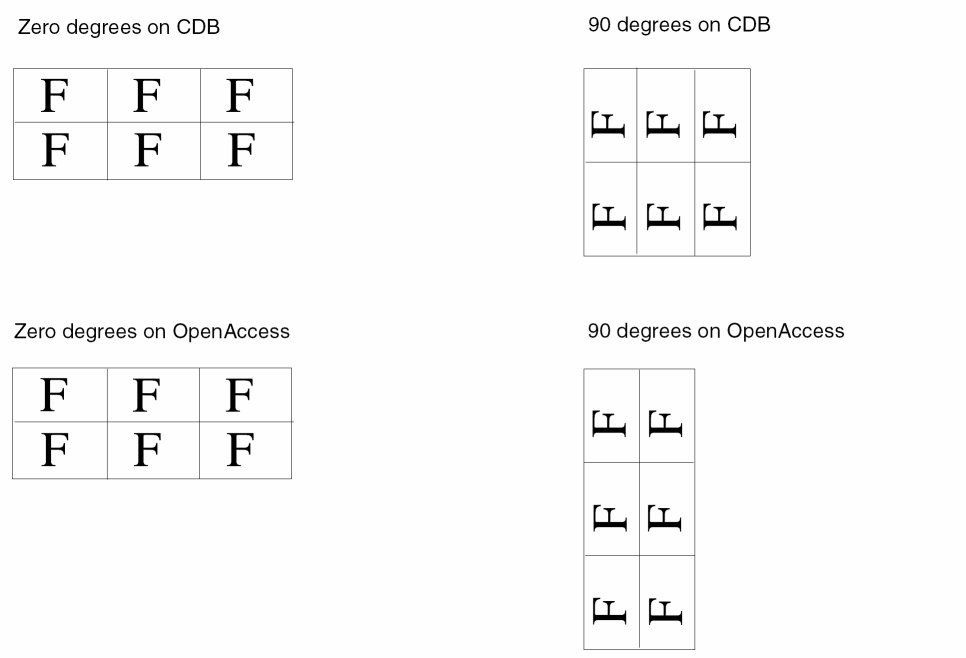
Therefore, the coordinates of the bounding box around a rotated mosaic instance are different for each database. Also, in CDB, the numbers in the Delta X and Delta Y fields on the Create Instance form were swapped.
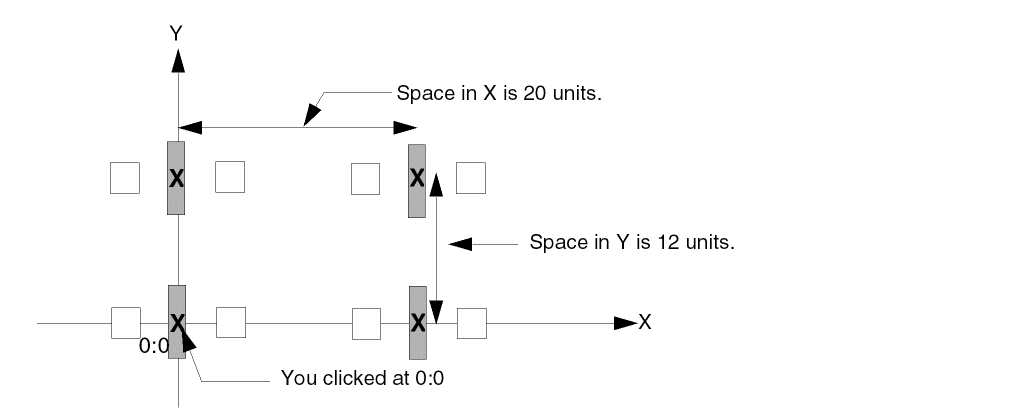
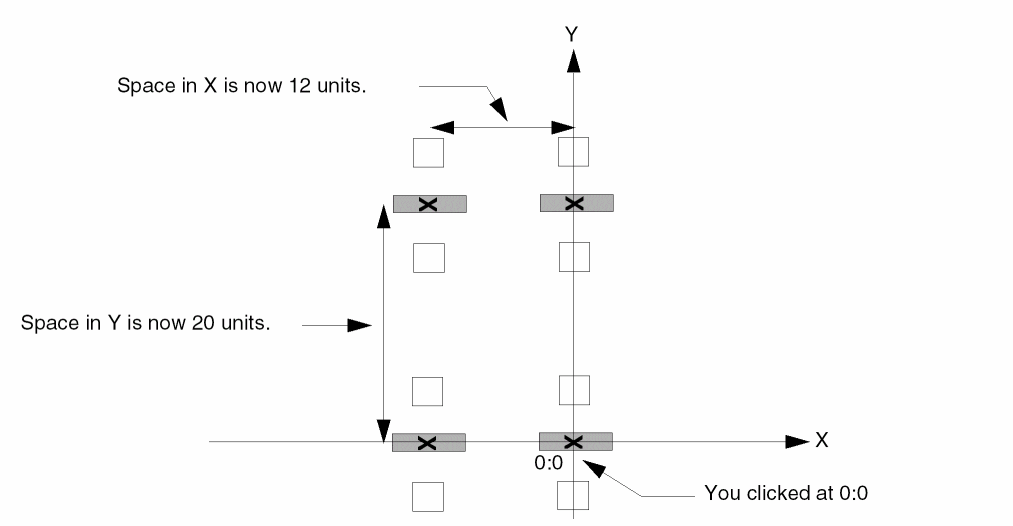
In the following examples, the mosaic instance contains two rows and two columns of the following element:

When you place the example mosaic instance without rotation, the results are the same for CDB and OpenAccess, as shown below. In the example, the space between the centers of the elements is 20 units along the X axis and 12 units along the Y axis. The centers of the left column of elements falls on the Y axis.
Figure 3-1 No Rotation: Results Are Same for OpenAccess and CDB
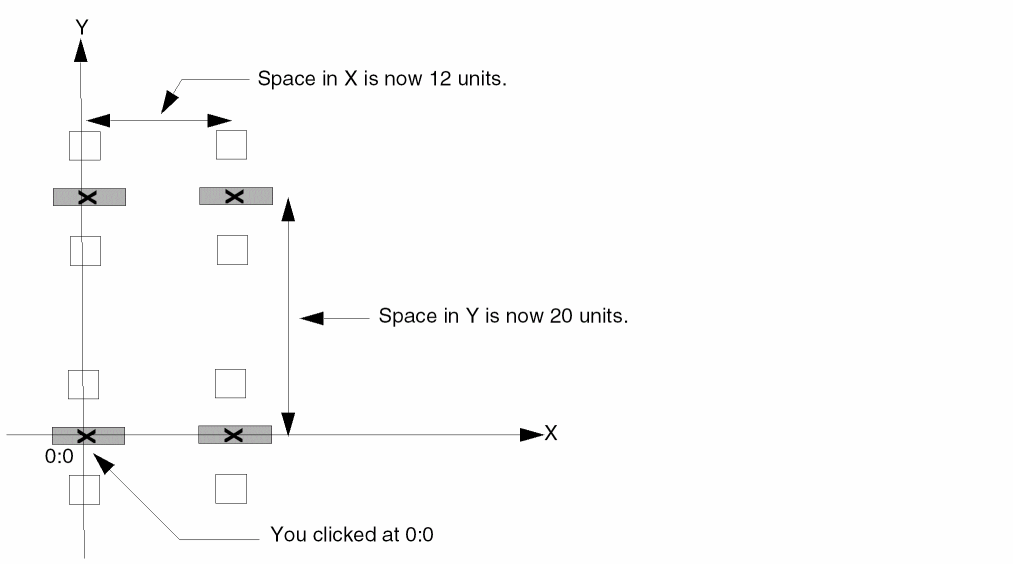
In CDB, when you placed the example mosaic instance with a 90 degree rotation, the space between the centers of the elements would change to 12 units along the X axis and 20 units along the Y axis, and the centers of the left column of elements would fall on the Y axis.
Figure 3-2 With Rotation: Location in CDB
In the Virtuoso environment, when you place the example mosaic instance with a 90 degree rotation, the centers of the right column of elements falls on the Y axis.
Figure 3-3 With Rotation: Location in OpenAccess
Also, dbGetInstOrient supports both regular and mosaic instances. On CDB, dbGetInstOrient supported only regular instances.
Design Management
In OpenAccess the phrase “Design Management” refers to library management, work-space synchronization, file management, and version control management.
Different types of design management systems are supported using plug-in executables (the Virtuoso Studio design environment only supports the DMFileSys plug-in).
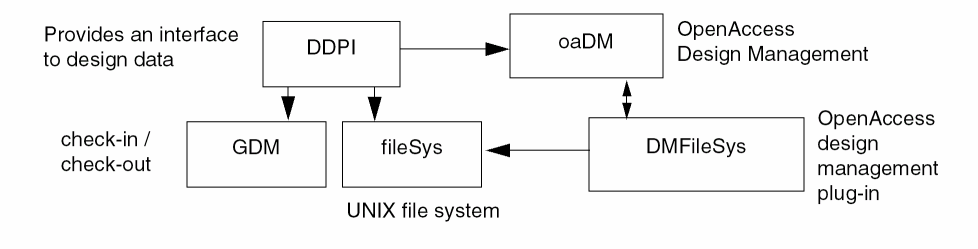
In the Virtuoso Studio design environment the phase “Design Management” refers to checkin and checkout type operations, which are handled by Cadence Generic Design Management (GDM). This is in contrast to OpenAccess where the term Design Management refers to all access, and to any object in the library (not just checkin an checkout.) In OpenAccess, there is a plug-in called Version Control which is the equivalent of GDM in the Virtuoso environment.
In the Virtuoso environment, GDM interfaces with applications, making direct design management system calls which handle version control (checkin and checkout). The data management system called Design Data Procedural Interface (DDPI) handles the low-level manipulation of the libraries, cells, and views. The mapping of OpenAccess design management to the Virtuoso environment is done through the DMFileSys plug-in which is implementing 5.X compatibility.
Figure 3-4 DMFileSys Interface with OpenAccess Design Management System
Differences in Storage and Data Models
Different types of OpenAccess design management plug-ins support different types of storage mechanisms. The Virtuoso Studio design environment relies on a specific storage mechanism that is consistent with the 5.X library structure implemented on OpenAccess with the DMFileSys plug-in.
The 5.X library structure leverages the UNIX directory structure. The overriding organization of library data is lib/cell/view. Each library is a separate UNIX directory. Each cell within a library is a separate file system directory. Each view within a cell is a separate file system directory. Each view directory contains application files. Files specific to a cell (and all views of that cell) can be placed in the cell directory. Files specific to a library can be placed in the library directory.
The data model in OpenAccess design management is slightly different than the data model in 5.X. The OpenAccess design management supports a cellview (combination of cell and view) that maps to a view in 5.X. The concepts of library and cell are the same. The concept of a master in the 5.X library structure maps to what is called a primary in OpenAccess design management.
The OpenAccess design management system is compatible with the Virtuoso environment through the DMFileSys plug-in. The 5.X storage structure is understood and maintained as well as cells and views are represented as directories.
For more information, see
Region Query Functions
In the Virtuoso Studio design environment the functions used to query regions have been re-implemented. A region query function has been provided for each type of the following objects; blockage, boundary, guide, instance, marker, row, shape steiner, and via. Also, the types of objects that are produced by these functions and the control actions have been changed.
For more information, see
dbOpenHier can be used to load all required cellviews. Changes to C Functions for Region Query
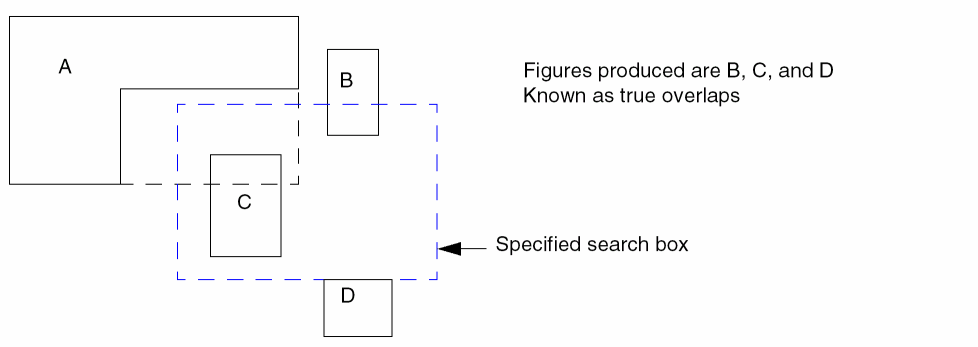
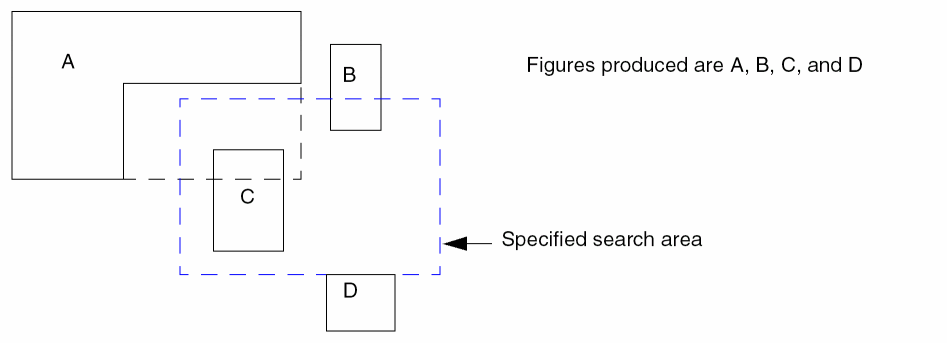
The procedural interface function, dbProduceOverlap2 produces figures within a given search box. In the Virtuoso environment, the functions that produced figures in a given searching box will only produce figures that overlap the area specified by the searching box.
In CDB, the dbProduceOverlap2 function can be set to either; only produce figures contained within a specified search box Figure 3-5, or produce any figure whose bounding box overlaps the specified search box Figure 3-6. This behavior in CDB is controlled by setting the trueOverlap member of the dbHierInfo structure which is passed to dbProduceOverlap2.
In the Virtuoso environment, dbProduceOverlap2 will only produce figures contained within the specified search box Figure 3-5. This behavior is know as producing true overlaps.
The true overlap behavior in CDB only applied to the line, path, and polygon shapes. In the Virtuoso environment, true overlaps applies to all figures and not just these three shapes.
Changes to SKILL Functions for Region Query
The SKILL functions; dbGetTrueOverlaps, dbGetOverlaps, and dbProduceOverlap. have been changed.
In CDB the SKILL function dbGetTrueOverlaps, which returns a list of figures within a specified search box, is applicable to only lines, paths, and polygons. In the Virtuoso environment, all shapes are applicable.
In CDB the SKILL functions dbGetOverlaps and dbProduceOverlap return a list of all figures whose bounding box overlaps the specified search box. In the Virtuoso environment, dbGetOverlaps and dbProduceOverlap will produce the same results as dbGetTrueOverlaps (Figure 3-1).
For more information, see
Placement Status
The following describes the placement status supported in the Virtuoso Studio design environment.
In CDB, the status of firm was the default placement status and was used to represent an object should not be changed by an automatic placement tool. On OpenAccess, the default placement status is none.
unplaced. This attribute is maintained by P&R applications. An unplaced instance is not displayed in the Virtuoso layout window, it is however present in the database.The following describes the placement status mapping from CDB to OpenAccess.
Virtuoso Studio design environment Libraries
Determining the Library Structure
When a library is created, the library structure is determined by which plug-in is used. The Virtuoso environment only supports the DMFileSys plug-in. In order to be understood as a 5.X library, the library must be defined as a 5.X library in the library definition. Any library defined in a cds.lib file is assumed to be a 5.X library.
The ddLibIs5X C and SKILL functions determine if a library was created with 5.X library structure or not. ddLibIs5X(ddId libId) uses a library ID as an argument and returns TRUE if the library was created as a 5.X library otherwise it returns FALSE.
Using Nested Libraries
Although both CDB and OpenAccess allow hierarchical library structures to be defined, using nested libraries (libraries within other libraries) can cause unpredictable behavior and cryptic errors in applications. OpenAccess issues warnings about nested libraries; CDB does not.
In OpenAccess, there are a number of conditions that result in warnings related to nested libraries. For example, when a library list file containing nested libraries is read, OpenAccess issues a warning saying that the directory has been used multiple times.
Library Definition Files
In CDB, the cds.lib is the only library definition file used by applications. In the OpenAccess Virtuoso Studio design environment, the cds.lib is the only supported library definition file. The CdsLib plugin (release 31.09) allows OpenAccess applications to read cds.lib files, where previously they required to use lib.defs.
Combining CDB and OpenAccess Libraries
Cellviews containing .oa files must not coexist in libraries whose cellviews contain .cdb files. Similarly, CDB libraries can contain a techfile.cds file and Virtuoso Studio design environment libraries can contain a tech.db file, but not a combination of these types of files.
Cellviews
Creating Cellviews
In the Virtuoso Studio design environment, a cellview is not created unless a master (layout.oa, sch.oa, verilog.v etc.) has been specified. For example:
ddGetObj(.... "verilog.v", "w")
dbOpenCellViewByType(.... "netlist" "wc")
The above would results in verilog.v as the master and the netlist.oa as a separate file.
dbOpenCellViewByType(.... "netlist" "w")
ddGetObj(.... "verilog.v" "wc")
The above would results in netlist.oa as the master and verilog.v as a separate file.
For more information, see
Saving Cellviews Using SKILL
You can edit the contents of a cellview with SKILL functions in the CIW or by running SKILL programs, but you cannot save your edits while in read (r) mode. To save edits made with SKILL, change to edit mode either before or after making the edits to the cellview.
Panic Cellviews
Panic cellviews are supported in the Virtuoso Studio design environment. In addition, the SKILL functions, dbOpenPanicCellView and dbOpenAutoSavedCellView are also supported.
Scratch Cellviews
CDB provided a scratch cellview mode, "s", that let you create temporary cellviews in virtual memory; you could edit them, but not save them to disk. In the Virtuoso environment, you need to use the editable read-only capability instead. See Cellview Reference Count.
On CDB, the following SKILL example created a scratch cellview:
cvId = dbOpenCellViewByType( "myLib" "myCell" "myView" "maskLayout" "s" )
The Virtuoso environment provides editable read-only cellviews that cannot be saved to disk; therefore, scratch cellviews are redundant and are being retired (with the exception of Pcell submasters, see Pcell Submaster are Opened in "s" Mode).
The following SKILL code creates a cellview that provides the same functionality as a scratch cellview on CDB:
cvId = dbOpenCellViewByType( "myLib" "myCell" "myView" "maskLayout" "w" )
dbReopen( cvId "r" )
"s" scratch cellview mode needs to be updated to use the editable read-only mode, as shown above, when running on OpenAccess.Scratch Cellviews Can Have Null Library in OpenAccess
On CDB, scratch cellviews were associated with a specific library; in the Virtuoso environment, the equivalent of scratch cellviews, editable read-only cellviews, are not associated with a library.
In the Virtuoso environment, standard vias (stdVia) do not have an associated library. The data translated from LEF In or DEF contain routes and standard vias, and therefore, master cellviews for standard vias that do not have libraries.
If you have SKILL or C code that requires the library for a cellview, you must to update your code. For example, dbGetOpenCellViews returns a list of all open cellviews, which could include scratch cellviews without associated libraries.
Currently, the absence of an associated library only applies to standard vias. The Virtuoso Studio design environment provides the SKILL API dbIsCellViewStdViaMaster to determine whether a cellview is a stdViaMaster.
Pcell Submaster are Opened in "s" Mode
Scratch mode, "s", still exists for Pcell submasters. Pcell submasters now are opened in "s" mode whereas they were opened in "a" mode on CDB. The "s" mode is for internal use only and cannot be set by the user.
Code that checks for write access can check the mode as follows:
Standard Via Masters
In the Virtuoso Studio design environment, the masters of standard vias are not associated with a library, cell, or view name. A NULL value is returned when attempting to use dd function calls to return the master ID of standard vias. The SKILL function dbIsCellViewStdViaMaster is provided to determine whether a cellview is a standard via master or not.
For more information, see Using Function Calls on Standard Vias.
Behavior in Read-Only Mode
-
CDB and the Virtuoso Studio design environment respond differently when you switch from edit to read-only mode using the
dbReopenfunction.
In CDB, when you open a cellview in edit mode, edit the cellview, and then change to read mode using thedbReopenfunction, your changes are retained in virtual memory (VM). When the edited cellview is purged from VM or you exit the editing session, the changes are lost. You can preserve your changes by saving the cellview under a new name (Save As).
In Virtuoso Studio design environment, when thedbReopenfunction is used to change from edit to read-only mode, the changes are discarded immediately.
In both CDB and Virtuoso Studio design environment, when the graphical user interface is used to change from edit to read-only mode, the system displays a dialog box asking if you want to save your changes.
-
CDB and the Virtuoso Studio design environment respond differently when you delete an object from a read-only cellview.
In CDB, you cannot modify or delete an object from a read-only cellview.
In the Virtuoso Studio design environment, you can delete an object from a read-only cellview by using the geDeleteSelSet function.If you want to prevent deletion of objects from a read-only cellview, use the leHiDelete function. You will be warned to open the cellview with write permission.If you want to prevent deletion of objects from a read-only schematic cellview, use the schHiDelete function. If you try to delete the object, the SCH-1007 message will be displayed.
Using dbWriteCellView and dbCopyCellview
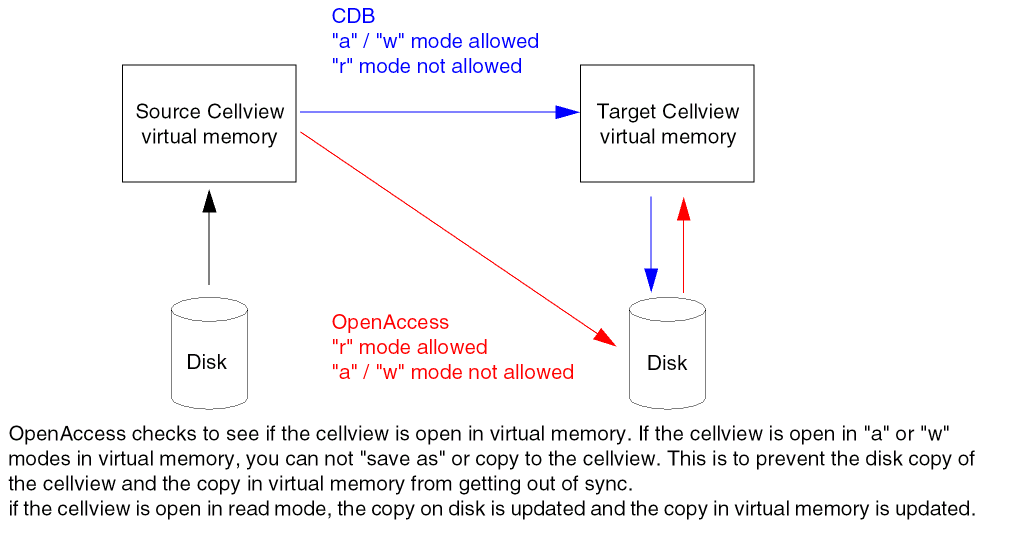
When saving a cellview using the command Design – Save As, the target cellview cannot be open in virtual memory. When attempting to use the Save As command on a cellview that is open, the cellview is considered a locked file. The Save As command is designed to be used to save a source cellview to a different target cellview without overwriting the original.
When using the functions dbWriteCellView or dbCopyCellView the following warning message will be issued when attempting to “save as” or copy to a cellview which is open in virtual memory in append (a), or write (w) mode.
*WARNING*dbWriteCellView: Unable to lock database file forlibrary/cell/view
If the target cellview is open in read (r) mode, the target cellview is saved to disk and updated in virtual memory.
CDB allowed the target cellview to be open in append (a), or write (w) mode when using when using dbWriteCellView or dbCopyCellView. The target cellview was updated in virtual memory but not saved to disk.
Opening a Cellview with dbGetAnyInstSwitchMaster
The Virtuoso Studio design environment behaves differently than CDB when choosing which view to open based on an instance’s switch master.
-
In CDB, the
dbGetAnyInstSwitchMasterfunction uses the instance’s library and cell names to access the list of view names, and opens the first view that contains CDB data; the function returns a handle to the cellview. In addition, for Pcells, the system uses each parameter on the instance to check whether it is a parameter of the matching cellview, and returns a handle to a submaster. - The Virtuoso Studio design environment opens the first view in the list of views that matches. If the matching view does not contain OpenAccess data, the system issues a warning message and the function returns NULL. The list of views is not searched for a view containing OpenAccess data; it stops when it finds the first view in the list of view names on disk.
This behavior change makes the Virtuoso Studio design environment consistent with other applications that could be using the Hierarchy database and Hierarchy Editor to access the list of view names. In a hierarchical traversal of data, the first view matching in the view name list would be used regardless of the data stored in it.
Maximum Number of Open Files
OpenAccess avoids problems caused when other processes write to a file that has been partially read by keeping partially read files open. The maximum number of open files is limited by the operating system: in Solaris 7, the maximum number of open files is 1024. You can set the number from 1 to the maximum of 1024 with the following UNIX shell command:
limit descriptors your_maximum
For example, to set the maximum number of open files to 512, type:
limit descriptors 512
To reset the number to the maximum of 1024, type:
unlimit descriptors
Refer to the OpenAccess documentation for the minimum number of descriptors expected by OpenAccess. Currently, the minimum limit is 512. Do not use less than the minimum, as the system might not behave as expected.
OpenAccess always completely reads small files, and partially reads large files, as long as the total number of open files does not exceed the current limit. When the number of open files would exceed the limit, OpenAccess completely reads large files. The intention is to partially read large files whenever possible.
Cellview Reference Count
CDB does not close instance masters even when there are no instances referring to them. OpenAccess purges the instance master as soon as the reference count associated with the instance master becomes zero. This happens when no open cellview has an instance of the master.
Frequent opening and closing of instance masters adversely affects the performance of Virtuoso tools. To avoid this problem, Virtuoso increments the cellview reference count twice when a cellview is explicitly opened.
The dbGetRefCount C function has been updated as follows: When the OpenAccess reference count is two (2) or greater, one (-1) is subtracted from the OpenAccess reference count. The function dbGetRefCount now returns a different count than the native OpenAccess oaCellView::getRefCount() function: when the reference counter is greater than zero (0), the OpenAccess function count is higher by one (1).
For the Virtuoso Studio design environment, the C and SKILL dbClose SKILL functions have been modified to close the cellview twice when the reference count is two (2), thereby removing the cellview from virtual memory.
CellViewType Attribute
In CDB, the cellview attribute cellViewType could be modified. In OpenAccess, the cellViewType attribute cannot be modified. The cellViewType attribute must be set to its correct value when the cellview is initially opened for write access.
Mapping of Cellview Types from CDB to OpenAccess
There are several differences in the support of view types for CDB and OpenAccess, the most important of which is that OpenAccess supports fewer view types than CDB. View types are mapped to one of the four OpenAccess view types, as shown in Mapping of CDB View Types to OpenAccess View Types.
- OpenAccess does not use the data registry; it uses its own filename-to-view type mapping, which is different from the mapping defined in the data registry.
- OpenAccess enforces the built-in mapping from filename-to-view type; it does not allow data filenames that do not match the view type stored internally in the data.
-
The
dbOpenCellViewByTypefunction maps all CDB view types to one of the four OpenAccess view types. -
The
strangerview type is not supported.
The mapping of view types between CDB and OpenAccess if given in the table below.
| CDB enum | OA enum | CDB Filename | OA Filename | CDB View Type | OA View Type |
|---|---|---|---|---|---|
Custom Virtuoso Studio design environment View Types
The Virtuoso environment supports the creation of custom, user-defined view types through the data registry. You can store and manage any non-design data (non-dbObject) in cellviews in your design library for use by third-party (non-Cadence) applications within the Cadence 5.x architecture library structure. A typical use for custom user-defined view types is to store files or documentation in ASCII text, PDF, or HTML format.
Customer code using registered, non-design, user-defined is supported. However, code using user-defined view types must not use database calls, such as dpOpenCellViewByType.
The Virtuoso environment introduces no new restrictions for user-defined view types used to store non-OpenAccess data. Follow the standard documented procedures to register a tool, data format, and view alias for your user-defined view type in a data.reg file. For more information, see “
Properties of Libraries, Cells, and Views
In CDB, properties of libraries, cells and views are stored in files called prop.xx. To access the properties, the application would call dbOpenBag. The property bag is explicitly or implicitly opened to create properties on library, cell or view.
In the Virtuoso environment, when using the prop.xx file has been replaced by a data.dm file. In OpenAccess the properties of objects such as library, cell or view are created directly in this file and accessed through the corresponding objects. In the Virtuoso environment, the emulation code provides access to this information through the emulate property bag SKILL and C functions.
Calls to dbBag SKILL Functions
In CDB, SKILL functions such dbReplaceProp would automatically open the property bag of a database object. In the Virtuoso environment, applications calling functions must call dbOpenBag first, then dbSaveBag and dbCloseBag when all property modifications have been completed.
When using a SKILL API such as dbGetPropByName on a dd ID when the property bag is not open, the function fails and issues a warning message.
The mode argument for dbOpenBag differs for CDB versus OpenAccess. For more information, see
Property Type dbcFileNameType
One CDB property type, dbcFileNameType, is not supported. The translator issues a warning on encountering this property and converts it to dbcStringType.
Properties versus Parameterized Cell Parameters
CDB implemented parameters as properties, which implies that a parameter has an associated ID. In OpenAccess, parameters are objects, which while being distinct from properties, are not first class objects (an OpenAccess parameter object does not have an ID). For applications and customer SKILL code to work as before, the CDBA procedural interface layer produces IDs for parameters as if they were properties. A dbProp class creates a filter to determine whether a property, based on original perspective, represents an OpenAccess property or an OpenAccess parameter, and to act appropriately.
In CDB, you must not change the value of a parameter for a Pcell supermaster using SKILL because the submasters will not be properly updated.
Semantics of an Instance Property that Matches the Supermaster Parameter Default Value
On OpenAccess, when a Pcell supermaster is recompiled, default parameter values may change. Instances that have explicit properties that match the old supermaster parameter default values retain their original values. Instances that inherit the property values from the supermaster are updated to reflect the new supermaster defaults.
The complete set of properties explicitly set on the instance determines its binding to the Pcell submaster. An instance that has a single property whose value matches the parameter value in the supermaster binds to a different submaster than an instance that has no explicit properties and which inherits all of the parameter values from the supermaster, even though both instances appear to have the same value for the property.
Command Interpreter Window (CIW)
For information about CIW user preferences, see “Specifying CIW Controls” in Chapter 8, of the Virtuoso Design Environment User Guide.
For information about CIW control environment variables, see “Specifying CIW Controls in the .cdsenv" in Chapter 9, of the Virtuoso Design Environment User Guide.
Removed User Preference Environment Variables
The environment variables formButtonLocation and textFont are no longer used by Virtuoso applications.
Objects
The following sections describe differences when modifying objects for CDB and OpenAccess.
Changing Object Types
CDB supported many functions that would convert an object from one type to another. For example, dbConvertPathToPolygon, dbConvertEllipseToPolygon, and dbConvertLineToPath. In CDB, the object identifier returned by the specific conversion function was the same as the object identifier that was passed in. However, the CDBA layer cannot guarantee this behavior; the object identifier returned might be different from what was passed in. dbConvertLineToPath is one function in particular where the path identifier returned will be different from the line identifier the function was given.
Another function that will change the underlying database object is dbSetLabelType. A normal label in CDB is equivalent to an OpenAccess oaText. However, an IL or NLP label is equivalent to an OpenAccess oaEvalText. In CDB, the dbSetLabelType function returned a Boolean indicating whether the operation was successful or not; in OpenAccess, dbSetLabelType returns an ID, which changes when the label type changes. Applications calling this function should be reviewed to see whether they refer to the given identifier argument after calling it.
Changing the Name of an Object
In CDB, the name of an object is merely another attribute of the object. Therefore, changing the name of an object does not change the object or its resulting identifier. This is true even when the new name implies a different number of bits than the old name.
In the Virtuoso environment, changing the name of an object might result in a different object. For example, if the name of an instance is changed from I10<0:4> to I10, the result is replacing the vector instance named I10<0:4> with a scalar instance I10. Many of the CDBA procedural interface functions return a Boolean, indicating only whether the operation was successful or not. Applications that call functions which set the name of an object must be reviewed in case they rely on the object identifier to remain the same.
Some functions, including dbSetTermName, dbSetInstName, dbSetAnyInstName, and dbSetAnyInstNumInst, have been modified to return an ID rather than just a Boolean value. The dbSetTermName function has the restriction that the new name must imply the same number of bits as the net that is associated with the terminal. There are cases where the ID will be same, but applications that cache the identifier should be reviewed for their use of these functions.
Changing an Instance Name to the Same Name
The Virtuoso environment and CDB database behave differently when you change the name of an instance to its existing name.
-
The Virtuoso environment checks to see whether an instance already exists with the same name, and finding that it does, issues the following warning message:
*WARNING* (dbSetAnyInstName) Instance with name ’instance_name’ already exists
- CDB did not check to see whether an instance already exists with the same name. The name would be replaced with the identical name and no warning message was issued.
Timestamps
For timestamps, the primary difference between CDB and the Virtuoso Studio design environment is that CDB used the instancesLastChanged property to save the time that a cellview was updated, while the Virtuoso environment uses counter objects (such as oaTimeStamp), and increments them when their associated objects are updated.
How CDB Uses Timestamp Properties
CDB maintained several time properties in the database, the most prominent of which was called instancesLastChanged. This property was updated every time a modification to the database was made.
CDB and all of its connectivity extractors, including Virtuoso XL and the Virtuoso Schematic Editor, used the following timestamp properties:
-
instancesLastChanged: This property was maintained solely by CDB and updated whenever an edit was made to a cellview. All applications use this property to determine whether the database has been edited. -
lastSchematicExtraction: To designate that the cellview had been extracted, and thus the connectivity data had been created or updated, extractors placed this cellview property in the database. The database stored two major types of data: graphical data and connectivity data. For a schematic cellview, the connectivity was extracted from the graphical data by the Virtuoso Schematic Editor extractor.
To determine whether the connectivity of a cellview was current, applications compared the timestamp property lastSchematicExtraction against the timestamp property instancesLastChanged. If the value of lastSchematicExtraction was later than that of instancesLastChanged, the connectivity data was current.
How the Virtuoso Studio design environment Uses Counters
In the Virtuoso Studio design environment, the method for tracking whether the database has been edited is by updating unsigned integer counters.
In addition to maintaining a counter for each cellview, the Virtuoso environment maintains counters for many other database objects. Whenever an edit is made the counter increments the cellview by 1 and the counter for the object by 1.
Counters Provide Finer Resolution
An advantage of counters over timestamp properties is finer resolution. Time values are calibrated to one-second intervals. Where an edit and a “Check and Save” are completed quickly, the values of the instancesLastChanged and lastSchematicExtraction properties can remain the same, even through the cellview and connectivity data had changed. This stymied applications, particularly incremental netlisting, which relies on the comparison of these properties as a preliminary test to control whether the cellview needs to be re-netlisted. Using counters prevents this problem because counter values are increased by 1 as soon as an edit is made.
Instance Time Stamps
Virtuoso applications determine that connectivity data is up to date using the cellview counter maintained by OpenAccess. The cellview counter is the OpenAccess equivalent of the CDB property instancesLastChanged. The following new database C and SKILL APIs have been supplied for this purpose:
Boolean dbIsConnCurrent(dbCellViewIdcellViewID)
dbIsConnCurrent(d_cellViewId)=> t | nil
At the end of the extraction process, the Virtuoso Schematic Editor extractor creates a signed integer cellview property named connectivityLastUpdated. This is the OpenAccess equivalent to the CDB property lastSchematicExtraction.
To tell whether connectivity data is up to date, applications compare the value of the cellview counter against the value of the connectivityLastUpdated property. If the value of the cellview counter is not equal to the value of connectivityLastUpdated, the connectivity data is out of date and needs to be re-extracted.
Currency of an Instance and Its Master
After an instance is placed, its master could change. Important examples of changes include swapping pin locations and adding, deleting, or renaming pins. As masters can be instantiated in many designs residing in libraries separate from the libraries containing the masters, users need to be reminded of changes to masters. The Virtuoso Schematic Editor does this by placing blinking yellow markers on instances having changed masters when the schematic is opened (and only when the schematic is opened). It does this as follows:
-
In CDB: When a schematic was opened, the value of the
instancesLastChangedproperty was retrieved from the master during instance binding. This value was compared to the value of theinstancesLastChangedproperty from the schematic. If the value from the master was later than the value from the schematic, the master had been edited. When the master had been edited, the Virtuoso Schematic Editor placed blinking yellow markers on the instances. Blinking yellow markers might have also indicated that the schematic needs to be re-extracted to update connectivity. -
In the Virtuoso environment: the value of the cellview counter from the master is stored in the instHeader for instances, under the name
masterChangeCount. When the schematic is opened again, the cellview counter from the master is compared to themasterChangeCountcounter from the instHeader. If the values are not equal, then the master has been edited; the Schematic Editor places blinking yellow markers on the instances.
Both Counters and Timestamps Needed in Some Applications
For some applications, like incremental netlisting, using counters to track what is up to date is not enough; these applications need to use file timestamps as well. The result is that after migration, while the extraction is up to date, the netlister will probably consider the design as modified and do a full re-netlisting, as opposed to an incremental run.
Return to top