
1
Introduction to OpenAccess Adoption
The Virtuoso® Studio Design Environment Adoption provides the information needed to move an IC development environment, including C and SKILL code, from the CDB database to the Virtuoso Studio design environment on OpenAccess database.
With the help of this guide, you should be able to translate your data, convert your SKILL and C code, and successfully adopt OpenAccess.
This guide includes information about the following areas:
- Technology file changes
- Behavioral changes
- Object support and creation
- Connectivity changes and enhancements
- C and SKILL function changes and new functions
- Development of the Virtuoso Studio design environment on OpenAccess
- CDB features not supported in OpenAccess
- Known conversion issues
This user guide is aimed at developers and designers of integrated circuits and assumes that you are familiar with:
- The Virtuoso Studio design environment and application infrastructure mechanisms designed to support consistent operations between all Cadence® tools.
- The applications used to design and develop integrated circuits in the Virtuoso Studio design environment, notably, the Virtuoso Layout Suite, and Virtuoso Schematic Editor.
- The Virtuoso Studio design environment technology file.
- Component description format (CDF), which lets you create and describe your own components for use with Layout XL.
This chapter describes the relationships among the Virtuoso® Studio Design Environment on OpenAccess database components and how to convert data to Virtuoso Studio design environment.
Virtuoso Studio Design Environment on OpenAccess
How Programmers Can Access Data
New, Changed, and Removed Functions
Finding the Database, Build, and Release Number
Finding the Build and Release Number
Finding the Database Type for a Virtuoso Executable
Finding the OpenAccess Version
Using Shareable OpenAccess Libraries
Virtuoso Studio Design Environment Specific Translators
Acronyms and Terminology
What Is OpenAccess?
OpenAccess is an application programming interface (API) and reference database created as an interoperability platform for complex digital, analog, and mixed signal IC design. It is uniquely offered through a secure, open-community source program.
Both the suppliers and integrators of design automation tools benefit from the innovations in OpenAccess. OpenAccess provides electronic design suppliers with a versatile, high performance, high capacity database engineered for fast development. By using OpenAccess, electronic design suppliers can better focus on innovation while lowering development costs. When used as a common API and unified database, OpenAccess offers flow integrators an unprecedented ability to tailor distinctive flows using electronic design applications from multiple sources. Flows are integrated quickly and perform with greater efficiency.
OpenAccess is composed of various subsystems. The subsystems pertinent to the Virtuoso Studio design environment development are briefly described in the following sections. The infrastructure packages are designed with as few external dependencies as possible to minimize the number of packages that have to be published with OpenAccess.
For more information about OpenAccess, go to the following URLs.
Sponsored by Silicon Integration Initiative, Inc [Si2], OpenEDA.Si2.org is a restricted access site for the distribution of files from Si2 development groups (councils, projects, boards, or workgroups). Login accounts are required for file downloads and many site features.
Release notes are available which describe the product changes for each release of OpenAccess APIs.
The Database Infrastructure
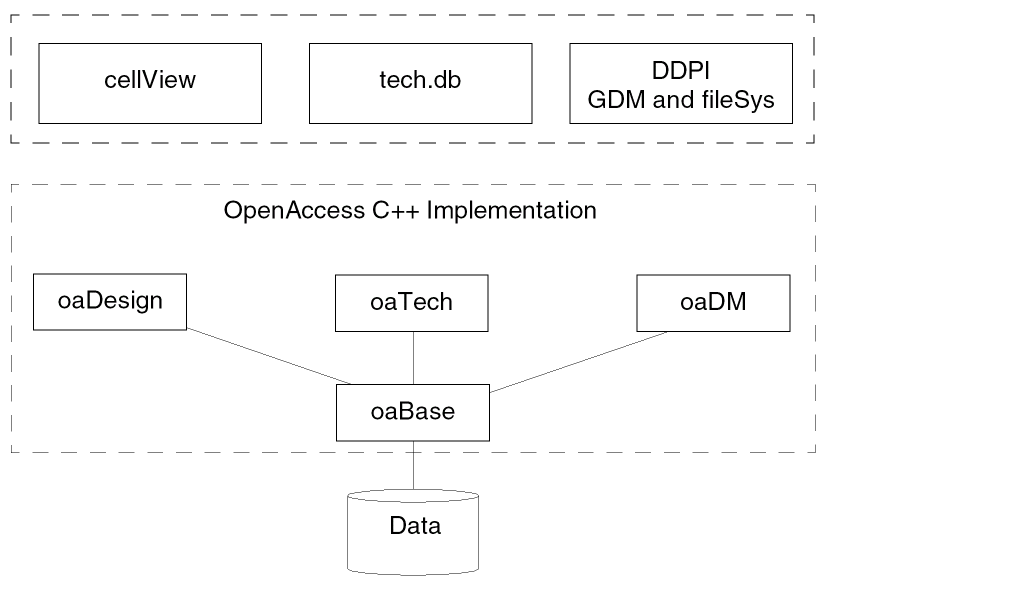
The following diagram shows the relationships between the Virtuoso Studio design environment on OpenAccess components and the OpenAccess database components.
-
oaDesign— This subsystem defines the objects that can exist in a design database.
In OpenAccess, a design is just one of several types of cellviews. The OpenAccessoaDesignholds all the design data that describes a part of a design. It is a container for the connectivity, geometry, hierarchy, parasitics, and floorplanning information about a design.
A Virtuoso database cellview ID (for example thedbIdreturned from a call todbOpenCellView()) is the object associated with anoaDesign.
A Virtuoso design data cellview ID (for example theddIdreturned from a call toddGetObj()) is the object associated with anoaCellview. -
oaTech—This subsystem defines the objects that support the OpenAccess technology database. -
oaDM—This subsystem defines design management.
For more information, see Design Management.
Virtuoso Studio Design Environment on OpenAccess
The Virtuoso Studio design environment on OpenAccess is a system comprising the Virtuoso software tools, with access to the OpenAccess database through C and SKILL APIs.
The acronym CDB (Cadence Database) refers to the physical Cadence proprietary database, which previously was the only database that was supported for use with Virtuoso applications. The acronym CDBA (Cadence Database API) refers to the C and SKILL procedural interface extended to work on both CDB and OpenAccess. Previously implemented on Cadence proprietary technology, CDBA is now implemented on top of the OpenAccess database and has been significantly expanded to offer direct access to many new native OpenAccess objects.
Configuring OpenAccess
If the Cadence product you are using requires OpenAccess DM4, it will automatically install OpenAccess in the following directory:
<cadence_install_dir>/oa_v22.04.<xxx>
where xxx denotes the build number such as 001.
You can override the default OpenAccess installation by using the OA_HOME environment variable. You can also specify a different default OpenAccess installation by using the Configure utility available though InstallScape. For information about both these options, see the OpenAccess Configuration Guide.
How Programmers Can Access Data
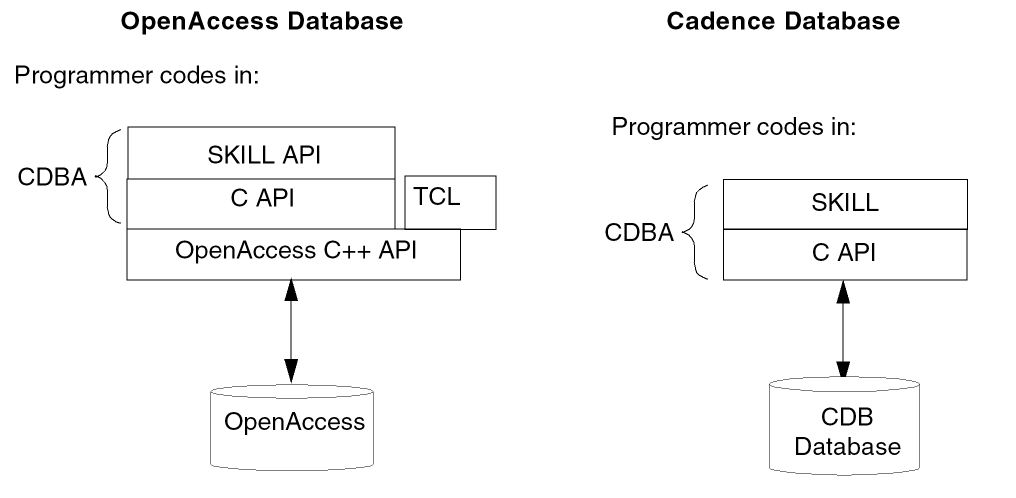
Examples of accessing the OpenAccess database.
techGetSpacingRules(
d_techFileID)
techGetSpacingRule(
techFileIdtechfile,
StringruleName,
techLayerNumlayer1Num,
techPurposepurpose1,
techLayerNumlayer2Num,
techPurposepurpose2,
techPropType *pType,
techPropValue *pValue,
);
const oaString & oaLayerConstraintType::getName ( ) const [inline]
New, Changed, and Removed Functions
For information about new, changed, and obsolete C functions, see the Cadence Integrator's Toolkit Database What’s New documentation.
For information about new, changed, and obsolete SKILL functions, see the Virtuoso Design Environment SKILL Reference.
Finding the Database, Build, and Release Number
Finding the Build and Release Number
Finding the Database Type for a Virtuoso Executable
Finding the OpenAccess Version
Using Shareable OpenAccess Libraries
Determining the Database Type
Use the C function dbGetDatabaseType to determine the database type. The function returns either dbcCDBADbType or dbcOpenAccessDbType, depending on the build hierarchy against which the code was compiled.
The SKILL function dbGetDatabaseType returns a string that is either "CDBA" or "OpenAccess" depending on the database being supported.
Because the dbGetDatabaseType SKILL function is relatively new for both CDB and OpenAccess, you can include a test for its availability in your database-specific code. For example, the following SKILL code conditionally handles a database-specific variation in database unit access:
if( ! getd('dbGetDatabaseType) || dbGetDatabaseType() == "CDBA" then
    bag = dbOpenBag( lib "a" )
    lib~>DBUPerUU~>maskLayout = 2000.0              ; CDB code
 dbSaveBag()
 dbCloseBag()
else            ; OpenAccess
    techSetDBUPerUU(techGetTechFile(lib) "maskLayout" 2000.0)              ; OpenAccess code
)
This code works both on CDB and on OpenAccess.
Finding the Build and Release Number
Use the following functions to check the build information and release number of the current database:
Finding the Database Type for a Virtuoso Executable
You can determine the database type that a Virtuoso executable will read or write by typing the -dbType option in a terminal window, as follows:
name_of_executable -dbType
This option returns either OPENACCESS or CDB.
For example, to find the database type for the virtuoso executable, type the following command in a terminal window:
virtuoso -dbType
Finding the OpenAccess Version
The installDir/tools/bin/cdsGetOAVersion script can be used to display the OpenAccess database component versions. The following is an example of the return value of cdsGetOAVersion.
Library:    oaBase      22.04-005    Tue Sep 11 00:00:17 2007
Library:    oaDM        22.04-005    Tue Sep 11 00:00:17 2007
Library:    oaDesign    22.04-005    Tue Sep 11 00:00:17 2007
Library:    oaTech      22.04-005    Tue Sep 11 00:00:17 2007
Library:    oaWafer     22.04-005    Tue Sep 11 00:00:17 2007
Finding the OpenAccess Data Model Version
You can run the standalone cdsPrintOAFeatures utility on a design or technology database to find its OpenAccess data model level and the associated features.
Syntax
cdsPrintOAFeatures -lib <t_libName> <options>
Examples
-
To query a technology database:
cdsPrintOAFeatures -lib gpdk090
Returns:
Data model revision of tech gpdk090: DM 4 List of Features: DM 2: New Constraint DM 4: Purpose Aware Constraint -
To query a design database:
cdsPrintOAFeatures -lib tiny -cell tiny -view layout
Returns:
Data model revision of design tiny tiny layout: DM 0
List of Features:
No list of features is returned implying that the cellview has no features. -
To query all layout cellviews at data model level 2 and above:
cdsPrintOAFeatures -lib gpdk090 -cell \* -view layout -level 2+
Returns:
Data model revision of design gpdk090 cell_2 layout: DM 4
List of Features:
           DM 4: New Value Type

Data model revision of design gpdk090 cell_5 layout: DM 2
List of Features:
           DM 2: Reference to FigGroup
Using Shareable OpenAccess Libraries
Shareable OpenAccess libraries are supplied in your_install_dir/tools/lib directory of the Cadence software. The .so extension applies to the Solaris operating system.
Translators
Converting CDB Data
Support for the cdb2oa translator was removed from IC6.1.8 ISR13. If you still require to migrate design data from CDB to OpenAccess, contact Cadence Customer Support to discuss how to proceed.
Virtuoso Studio Design Environment Specific Translators
The following translators are the Virtuoso on OpenAccess custom translators which provide the required technology file information and physical data for Virtuoso specific flows. These translators are the customized applications for the Virtuoso translators created by extending the base C++ classes, APIs, and the infrastructure supplied by OpenAccess libraries.
LEFDEF: lefin, defin, lefout, defout
XStream: strmin, strmout, strminui, strmoutui
The following translators are the OpenAccess translators that are released as part of OpenAccess tarkits and can be found in the your_inst_dir/tools/bin of the respective hierarchies. These translators accomplish only the basic Stream In/Out and LEF/DEF In/Out functionality and do not create Virtuoso specific data needed for display.
LEFDEF: lef2oa, def2oa, oa2lef, oa2def
XStream: oaStrmIn, oaStrmOut, oaStrmInUI, oaStrmOutUI
XStream Translator Replaces PIPO
XStream, a high-performance Stream for OpenAccess, replaces the Stream translator PIPO. XStream has been developed using the native OpenAccess APIs.
For information about how stream translation rules are mapped between CDB and OpenAccess, see Conversion of Technology File devices Class.
For information about the differences in the functionality and use model of PIPO and XStream, see Migrating from PIPO to XStream.
For information about the XStream and LEF/DEF translators, see the Design Data Translator’s Reference.
Application
Virtuoso Chip Assembly Router
The Virtuoso Chip Assembly Router reads and writes OpenAccess 2.2 designs. The router operates primarily on a single, top-level cellview in the OpenAccess database. Routing rules for the Virtuoso Chip Assembly Router can be stored in the CDB technology file or in a separate ASCII file.
Encounter
The Encounter 4.2.1 software supports OpenAccess 2.2. For information about saving, importing, and restoring OpenAccess designs in the Encounter software, see Encounter User Guide version 4.2.1. Encounter 4.2 release requires OpenAccess version 2.2.4 or later.
Return to top