
6
DEF Syntax
This chapter contains information about the following topics:
- About Design Exchange Format Files
- DEF Statement Definitions
About Design Exchange Format Files
A Design Exchange Format (DEF) file contains the design-specific information of a circuit and is a representation of the design at any point during the layout process. The DEF file is an ASCII representation using the syntax conventions described in “Typographic and Syntax Conventions”.
DEF conveys logical design data to, and physical design data from, place-and-route tools. Logical design data can include internal connectivity (represented by a netlist), grouping information, and physical constraints. Physical data includes placement locations and orientations, routing geometry data, and logical design changes for back-annotation. Place-and-route tools also can read physical design data, for example, to perform ECO changes.
For standard-cell-based/ASIC flow tools, floorplanning is part of the design flow. You typically use the various floorplanning commands to create a floorplan interactively. This data then becomes part of the physical data output for the design using the ROWS, TRACKS, GCELLGRID, and DIEAREA statements. You also can manually enter this data into DEF to create the floorplan.
It is legal for a DEF file to contain only floorplanning information, such as ROWS. In many cases, the DEF netlist information is in a separate format, such as Verilog, or in a separate DEF file. It is also common to have a DEF file that only contains a COMPONENTS section to pass placement information.
General Rules
Note the following information about creating DEF files:
- Identifiers like net names and cell names are limited to 2,048 characters.
-
DEF statements end with a semicolon (
;). You must leave a space before the semicolon. -
Each section can be specified only once. Sections end with
ENDSECTION. -
You must define all objects before you reference them except for the
+ ORIGINALargument in theNETSsection.
Character Information
LEF and DEF identifiers can contain any printable ASCII character, except space, tab, or new-line characters. This means the following characters are allowed along with all alpha-numeric characters:
! “ # $ % & ‘ ( ) * + , / : ; < = > ? @ [ \ ] ^ _ ` { | } ~
A LEF or DEF property string value is contained inside a pair of quotes, like this "<string>". The <string> value can contain any printable ASCII character as shown above, including space, tab, or new-line characters.
Some characters have reserved meanings unless escaped with \.
You can use the backslash (\) as an escape character before each of the special characters shown above. When the backslash precedes a character that has a special meaning in LEF or DEF, the special meaning of the character is ignored.
Name Escaping Semantics for Identifiers
Here are some examples depicting the use of the escape character (\) in identifiers:
-
A DEF file with
BUSBITCHARS "[]"and net or pin name: -
A DEF file with
DIVIDERCHAR "/"and net or component names like:is a 3-level hierarchical name, where C is inside B and B is inside A
-
The
"character has no special meaning for an identifier. So an identifier would not need a\before a". An identifier like:
name_with_"_in_it
or even
"_name_starts_with_qoute
is legal without a\. -
An identifier that starts with
#would be treated as a comment unless the\is present like this:
\#_name_with_hash_for_first_char
Note, the#needs to be preceded by white-space to be treated as a comment char, so it has no special meaning inside an identifier. So an identifier like
name_with_#_in_it
is legal without a\. -
Pattern matching characters
*or%insideSPECIALNETSorGROUPScomponent identifiers can be disabled like this:
GROUPS 1 ;
- myGroup i1/i2/\* ...
or
SPECIALNETS 1 ;
- VDD ( i1/i2/\* VDD ) ...
These will match the exact namei1/i2/*and not matchi1/i2/i3or other components starting withi1/i2/.
Note, the*and%have no special meaning in other identifiers, so no\is needed for them. -
A real
\char in an identifier needs to be escaped like this:
name_with_\\_in_it ....
The first\escapes the second\, so the real name is justname_with_\_in_it.
Escaping Semantics for Quoted Property Strings
Properties may have string type values, placed within double quotes ("). However, if you need to use a double quote as a part of the string value itself, you would need to precede it with the escape character (\) to avoid breaking the property syntax. The escape sequence ‘\"’ is converted to ‘"’ during parsing.
The example below depicts the use of the escape character in a quoted property string:
PROPERTY stringQuotedProp "string with \" quote and single backslash \and double backslash \\" ;
The actual value of the property in the database will be:
string with " quote and single backslash and double backslash\
-
The first
\escapes the"so it does not end the property string. -
The next
\has no effect on the subsequentacharacter. -
The first
\in\\escapes the second\character. This means that the second\in\\is treated as a real\character, and it does not escape the final"character, which ends the property string.
Note that the other special characters like [ ] / # * % have no special meaning inside a property string and do not need to be escaped.
LEF/DEF to LEF/DEF Equivalence
In DEF syntax, \ is only used to escape characters that have a special meaning if they are not escaped.
Consider the following LEF/DEF header specification:
-
LEFDEF/[]is equivalent to LEF or DEF withDIVIDERCHAR "/"andBUSBITCHARS "[]" -
LEFDEF|<>is equivalent to LEF or DEF withDIVIDERCHAR "|"andBUSBITCHARS "<>"
In the following examples, <> are not special characters for LEFDEF/[] files and [] are not special characters for LEFDEF|<> files. Observe how the header settings (listed above) affect the semantic meaning of the names:
-
A<0>withLEFDEF/[]is not equivalent toA<0>withLEFDEF|<> -
A<0>withLEFDEF/[]is equivalent toA\<0\>withLEFDEF|<> -
A[0]withLEFDEF/[]is equivalent toA<0>withLEFDEF|<>
Verilog and DEF Equivalence
For Verilog and DEF equivalence, consider the following DEF header specification:
-
DEF/[]is equivalent to DEF withDIVIDERCHAR "/"andBUSBITCHARS "[]" -
DEF|<>is equivalent to DEF withDIVIDERCHAR"|"andBUSBITCHARS "<>"
In the following examples (showing net names), <> are not special characters for DEF/[] files and [] are not special characters for DEF|<> files:
-
A<0>inDEF/[]is equivalent to\A<0>in Verilog
A<0>inDEF|<>is equivalent toA[0]in Verilog (bit 0 of busA) -
A[0]inDEF/[]is equivalent toA[0]in Verilog (bit 0 of busA)
A[0]inDEF|<>is equivalent to\A[0]in Verilog -
A\<0\>inDEF/[]is equivalent to\A<0>in Verilog
A\<0\>inDEF|<>is equivalent to\A<0>in Verilog -
A\[0\]inDEF/[]is equivalent to\A[0]in Verilog
A\[0\]inDEF|<>is equivalent to\A[0]in Verilog *
The following example shows instance path names for Verilog and DEF equivalence:
-
A/BinDEF/[]represents instance pathA.B(instanceAin the top module, with instanceBinside the module referenced by instanceA) in Verilog. -
A\/BinDEF/[]represents instance\A/Bin Verilog. -
A\/B/CinDEF/[]represents\A/B .Cin Verilog (escaped instance\A/Bin the top module, with instanceCinside the module referenced by instance\A/B). -
The net and instance path
A\/B/C/D[0]inDEF/[]will represent\A/B .C.D[0]in Verilog (escaped instance\A/Bin the top module, with instanceCinside the module referenced by instance\A/B, and busDin that module with bit 0 being specified).
Comparison of DEF and Verilog Escaping Semantics
The DEF escape \ applies only to the next character and prevents the character from having a special meaning.
The Verilog escape \ affects the complete "token" and is terminated by a trailing white space (" ", Tab, Enter, etc.).
Order of DEF Statements
Standard DEF files can contain the following statements and sections. You can define the statements and sections in any order; however, data must be defined before it is used. For example, you must specify the UNITS statement before any statements that use values dependent on UNITS values, and VIAS statements must be defined before statements that use via names. If you specify statements and sections in the following order, all data is defined before being used.
     [ VERSION statement ]
[ DIVIDERCHAR statement ]
[ BUSBITCHARS statement ]
DESIGN statement
[ TECHNOLOGY statement ]
[ UNITS statement ]
[ HISTORY statement ] ...
[ PROPERTYDEFINITIONS section ]
[ DIEAREA statement ]
[ ROWS statement ] ...
[ TRACKS statement ] ...
[ GCELLGRID statement ] ...
[ VIAS statement ]
[ NONDEFAULTRULES statement ]
[ REGIONS statement ]
[ COMPONENTMASKSHIFT statement ]
[ COMPONENTS section ]
[ PINS section ]
[ BLOCKAGES section ]
[ FILLS section ]
[ SPECIALNETS section ]
[ NETS section ]
[ SCANCHAINS section ]
[ GROUPS section ]
END DESIGN statement
DEF Statement Definitions
The following definitions describe the syntax arguments for the statements and sections that make up a DEF file. The statements and sections are listed in alphabetical order, not in the order they must appear in a DEF file. For the correct order, see Order of DEF Statements.
Blockages
[BLOCKAGESnumBlockages; [- LAYERlayerName[+ NAMEname] [+ PROPERTYpropName propVal] ... [+ PARTIALdensity] [ + SPACINGminSpacing] [ + MASKmaskNum] [ + COMPONENTcompName| + FILLS | + PUSHDOWN | + EXCEPTPGNET | + ONLYPGNET] {RECTptpt| POLYGONptptpt...} ... ;] ... [- PLACEMENT [+ NAMEname] [+ PROPERTYpropName propVal] ... [+ ONLYBLOCKS | + SOFTdensity| + PARTIALdensity[NOFLOPS] ] [ + PUSHDOWN] [ + COMPONENTcompName{RECTptpt} ... ;] ...
END BLOCKAGES]
Defines placement and routing blockages in the design. You can define blockages for a specific area, or blockages that are associated with specific instances (components). Only placed instances can have instance-specific blockages. If you move the instance, its blockage moves with it. Some of the keywords apply only to routing blockages, and some apply only to placement blockages.
Example 6-1 Blockages Statements
-
The following
BLOCKAGESsection defines eight blockages in the following order: two metal2 routing blockages, a pushed down routing blockage, a routing blockage attached to componenti1/i2, a floating placement blockage, a pushed-down placement blockage, a placement blockage attached to componenti3/i4, and a fill blockage.
BLOCKAGES 7 ;
- LAYER metal1
     RECT ( -300 -310 ) ( 320 330 )
RECT ( -150 -160 ) ( 170 180 ) ;
- LAYER metal1 + PUSHDOWN
RECT ( -150 -160 ) ( 170 180 ) ;
- LAYER metal1 + COMPONENT i1/i2
RECT ( -150 -160 ) ( 170 180 ) ;
- PLACEMENT
RECT ( -150 -160 ) ( 170 180 ) ;
- PLACEMENT + PUSHDOWN
RECT ( -150 -160 ) ( 170 180 ) ;
- PLACEMENT + COMPONENT i3/i4
RECT ( -150 -160 ) ( 170 180 ) ;
- LAYER metal1 + FILLS
RECT ( -160 -170 ) ( 180 190 ) ;
END BLOCKAGES
-
The following routing blockage requires a minimum spacing of 1000 database units between both the rectangle and polygon on
metal1and any other routing shapes onmetal1.- LAYER metal1
+ SPACING 1000 #RECT and POLYGON require at least 1000 dbu spacing
RECT ( -300 -310 ) ( 320 300 )
POLYGON ( 0 0 ) ( * 100 ) ( 100 * ) ( 200 200 ) ( 200 0 ) ; #Has 45-degree #edge
Bus Bit Characters
BUSBITCHARS "delimiterPair" ;
Specifies the pair of characters used to specify bus bits when DEF names are mapped to or from other databases. The characters must be enclosed in double quotation marks. For example:
BUSBITCHARS "()" ;
If one of the bus bit characters appears in a DEF name as a regular character, you must use a backslash (\) before the character to prevent the DEF reader from interpreting the character as a bus bit delimiter.
If you do not specify the BUSBITCHARS statement in your DEF file, the default value is “[]”.
Component Mask Shift
[COMPONENTMASKSHIFTlayer1[layer2...] ;]
Defines which layers of a component may potentially be shifted from the original mask colors in the LEF. This can be useful to shift all the layers of a specific component in order to align the masks with other component or router mask settings to increase routing density. This definition allows a specific component to compactly describe the mask shifting for that component.
All the listed layers must have a LEF MASK statement to indicate that the specified layer is either a two or three mask layer. The order of the layers must be increasing from the highest layer down to the lowest layer in the LEF layer order.
Example 6-2 Component Mask Shift
The following example indicates that any given component can shift the mask on layers M3, M2, VIA1, or M1:
COMPONENTMASKSHIFT M3 M2 VIA1 M1 ;
This layer list is used to interpret the + MASKSHIFT shiftLayerMasks value for a specific component as shown in the example given below:
- i1/i2 AND2
+ MASKSHIFT 1102 #M3 shifted by 1, M2 by 1, VIA1 by 0, M1 by 2
...
For details on components, see the Components section.
Components
COMPONENTSnumComps;
[–compName modelName
[+ EEQMASTERmacroName]
[+ UNPLACED | {FIXED | SOFTFIXED | COVER | PLACED}pt orient]
[+ MASKSHIFTshiftLayerMasks]
[+ HALO [SOFT]leftbottomrighttop]
[+ ROUTEHALOhaloDistminLayermaxLayer]
[+ PINPROPERTYpinName propName propVal] ...
[+ PHYSICAL]
[+ PROPERTY {propName propVal} ...]...
;] ...
END COMPONENTS
Defines design components, their location, and associated attributes.
Specifies the component name in the design, which is an instance of modelName, the name of a model defined in the library. A modelName must be specified with each compName.
Specifies that the component being defined should be electrically equivalent to the previously defined macroName.
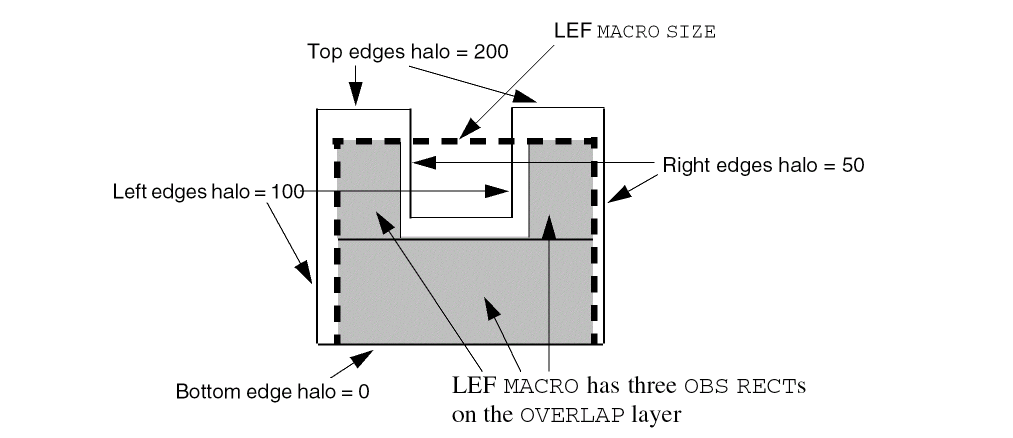
HALO [SOFT] left bottom right top
Specifies a placement blockage around the component. The halo extends from the LEF macro’s left edge(s) by left, from the bottom edge(s) by bottom, from the right edge(s) by right, and from the top edge(s) by top. The LEF macro edges are either defined by the rectangle formed by the MACRO SIZE statement, or, if OVERLAP obstructions exist (OBS shapes on a layer with TYPE OVERLAP), the polygon formed by merging the OVERLAP shapes.
If SOFT is specified, the placement halo is honored only during initial placement; later phases, such as timing optimization or clock tree synthesis, can use the halo area. This can be used to preserve certain areas (such as small channels between blocks) for buffer insertion.
See Example 6-3.
Type: Integer, specified in DEF database units
Specifies shifting the cell-master masks used in double or triple patterning for specific layers of an instance of the cell-master. This is mostly used for standard cells where the placer or router may shift one or more layer mask assignments for better density.
The shiftLayerMasks variable is a hex-encoded digit, with one digit per multi-mask layer:
...<thirdLayerShift><secondLayerShift><bottomLayerShift>
The bottomLayerShift value is the mask-shift for the bottom-most multi-mask layer defined in the COMPONENTMASKSHIFT statement. The secondMaskShift, thirdMaskShift, and so on, are the shift values for each layer in order above the bottom-most multi-mask layer. The missing digits indicate that no shift is needed so 002 and 2 have the same meaning.
For 2-mask layers, the LayerShift value must be 0 or 1 and indicates:
For 3-mask layers, the LayerShift value can be 0, 1, 2, 3, 4, or 5 that indicates:- 0 - No mask shift
- 1 - Shift by 1 (1->2, 2->3, 3->1)
- 2 - Shift by 2 (1->3, 2->1, 3->2)
- 3 - Mask 1 is fixed, swap 2 and 3
- 4 - Mask 2 is fixed, swap 1 and 3
- 5 - Mask 3 is fixed, swap 1 and 2
The purpose of 3, 4, 5 is for standard cells that have a fixed power-rail mask color, but the pins between the power-rails can still be shifted. Suppose you had a standard cell with mask 1 power rails, and three signal pins on mask 1, 2, and 3. A LayerShift of 3, will keep the mask 1 power rails and signal pin fixed on mask 1, while mask 2 and mask 3 signal pin shapes will swap mask colors.
Note: TheMASKSHIFTdefinition does not depend on the LEF constructs ofFIXEDMASKorLAYERMASKSHIFT. However, the LEF and DEF definitions should be consistent. For example, ifFIXEDMASKis defined in LEF andLAYERMASKSHIFTis not, none of the components should haveMASKSHIFTbecause the instance color should always be the same as the cell-master. IfLAYERMASKSHIFTis defined in LEF, non-zeroMASKSHIFTvalues for a component should be specified only on the layers that are allowed to have mask shift inLAYERMASKSHIFT.
See Example 6-4.
Specifies the number of components defined in the COMPONENTS section.
The component is a physical-only cell, and is not part of the logical netlist. It is not seen by timing analysis or other logical analysis tools. The LEF MACRO should have no signal pins, although power/ground pins are allowed. In addition, the component should not be connected to any signal net from the logical netlist. It is normally used to identify filler cells (in core rows, or IO rows), well-tap cells, and so on.
PINPROPERTY pinName propName propVal
Specifies one or more properties on a pin of this component. The pinName must be one of the LEF PIN names for this COMPONENT while propName and propVal must match a property name and data type, such as STRING or INTEGER, from the PROPERTYDEFINITIONS section for a COMPONENTPIN object.
For example:
- inst1 BUFX1
+ PLACED ( 10 10 ) N
+ PINPROPERTY in prop1 100
+ PINPROPERTY in prop2 "test" ;
Adds the prop1 and prop2 properties to the “in” pin of component inst1.
Specifies a numerical or string value for a COMPONENT property defined in the PROPERTYDEFINITIONS statement. The propName you specify must match the propName listed in the PROPERTYDEFINITIONS statement.
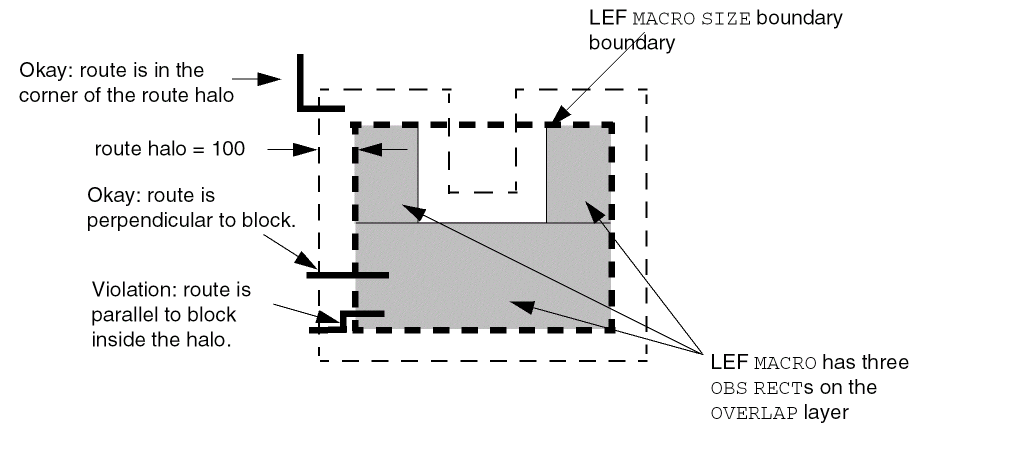
ROUTEHALO haloDist minLayer maxLayer
Specifies that signal routing in the “halo area” around the block boundary should be perpendicular to the block edge in order to reach the block pins. The halo area is the area within haloDist of the block boundary (see the Figure below). A routing-halo is intended to be used to minimize cross coupling between routing at the current level of the design, and routing inside the block. It has no effect on power routing. Note that this also means it is allowed to route in the “halo corners” because routing in the “halo corner” is not adjacent to the block boundary, and will not cause any significant cross-coupling with routing inside the block.
The routing halo exists for the routing layers between minLayer and maxLayer. The layer you specify for minLayer must be a lower routing layer than maxLayer.
Type: Integer, specified in DEF database units (haloDist); string that matches a LEF routing layer name (minLayer and maxLayer)
See Example 6-5.
UNPLACED | {PLACED | SOFTFIXED | FIXED | COVER} pt orient
Specifies the placement status, location and orientation (if not UNPLACED) of a component. The placement status values mean:
The following statement creates a placement blockage for a “U-shaped” LEF macro, as illustrated in Figure 6-1:
- i1/i2
+ PLACED ( 0 0 ) N
+ HALO 100 0 50 200 ;
Example 6-4 Mask Shift Layers for Components
The following example shows a LEF section that has a three-mask layer defined for M1, and two-mask layer defined for layers VIA1 and M2:
COMPONENTMASKSHIFT M2 VIA1 M1 ;
COMPONENTS 100 ;
- i1/i2 AND2
+ MASKSHIFT 2 #M1 layer masks are shifted by 2, no shift for others
...
- i1/i3 OR2
+ MASKSHIFT 103 ##M1 layer has shift 3, VIA1 0, M2 1
...
If an application shifts the layers M1, VIA1, and M2, then the above example indicates that the instance of AND2 cell shifts the M1 layer masks by 2. Since M1 is a three-mask layer, this shows that the cell-master M1 layer mask 1 shifts to 3, mask 2 shifts to 1, and mask 3 shifts to 2. The other layer masks are not shifted. The instance of OR2 cell shifts the M1 layer masks by 3. For a 3-mask layer this means keep mask 1 fixed, mask 2 shifts to 3, and mask 3 shifts to 2). The VIA1 layer does not shift and the M2 layer masks are shifted by 1 (for a two-mask layer this means that mask 1 shifts to 2, and 2 shifts to 1).
Example 6-5 Route Halo Example
For a U-shaped macro, the following component description results in the halo shown in Figure 6-2.
- il/i2
+ PLACED ( 0 0 ) N
+ ROUTEHALO 100 metal1 metal3 ;
Specifying Orientation
If a component has a location, you must specify its location and orientation. A component can have any of the following orientations: N, S, W, E, FN, FS, FW, or FE.
Orientation terminology can differ between tools. The following table maps the orientation terminology used in LEF and DEF files to the OpenAccess database format.
| LEF/DEF | OpenAccess | Definition |
|---|---|---|


Components are always placed such that the lower left corner of the cell is the origin (0,0) after any orientation. When a component flips about the y axis, it flips about the component center. When a component rotates, the lower left corner of the bounding box of the component’s sites remains at the same placement location.
Design
DESIGN designName ;
Specifies a name for the design. The DEF reader reports a warning if this name is different from that in the database. In case of a conflict, the just specified name overrides the old name.
Die Area
[DIEAREAptpt[pt] ... ;]
If two points are defined, specifies two corners of the bounding rectangle for the design. If more than two points are defined, specifies the points of a polygon that forms the die area. The edges of the polygon must be parallel to the x or y axis (45-degree shapes are not allowed), and the last point is connected to the first point. All points are integers, specified as DEF database units.
Geometric shapes (such as blockages, pins, and special net routing) can be outside of the die area, to allow proper modeling of pushed down routing from top-level designs into sub blocks. However, routing tracks should still be inside the die area.
Example 6-6 Die Area Statements
The following statements show various ways to define the die area.
DIEAREA ( 0 0 ) ( 100 100 ) ; #Rectangle from 0,0 to 100,100
DIEAREA ( 0 0 ) ( 0 100 ) ( 100 100 ) ( 100 0 ) ; #Same rectangle as a polygon
DIEAREA ( 0 0 ) ( 0 100 ) ( 50 100 ) ( 50 50 ) ( 100 50 ) ( 100 0 ) ; #L-shaped polygon
Divider Character
DIVIDERCHAR "character" ;
Specifies the character used to express hierarchy when DEF names are mapped to or from other databases. The character must be enclosed in double quotation marks. For example:
DIVIDERCHAR "/" ;
If the divider character appears in a DEF name as a regular character, you must use a backslash (\) before the character to prevent the DEF reader from interpreting the character as a hierarchy delimiter.
If you do not specify the DIVIDERCHAR statement in your LEF file, the default value is “/”.
Fills
[FILLSnumFills; [- LAYERlayerName[+ PROPERTYpropName propVal] ... [+ MASKmaskNum] [+ OPC] {RECTptpt| POLYGONptptpt...} ... ;] ... [- VIAviaName[+ PROPERTYpropName propVal] ... [+ MASKviaMaskNum] [+ OPC][orient]pt[[orient]pt] ... ;] ...
END FILLS]
Defines the rectangular shapes that represent metal fills in the design. Each fill is defined as an individual rectangle.
|
Specifies which mask for double or triple patterning lithography to use for the given rectangles or polygons. The maskNum variable must be a positive integer. Most applications support values of 1, 2, or 3 only. Shapes without any defined mask have no mask setting (are uncolored). |
|
|
Specifies which mask for double or triple patterning lithography to be applied to via shapes on each layer. The viaMaskNum variable is a hex-encoded three digit value of the form:
For example, MASK 113 means that the top metal and cut layer maskNum is 1, and the bottom metal layer maskNum is 3. A value of 0 means the shape on that layer has no mask assignment (is uncolored), so 013 means the top layer is uncolored. If either the first or second digit is missing, they are assumed to be 0, so 013 and 13 mean the same thing. Most applications support maskNums of 0, 1, 2, or 3 for double or triple patterning. The topMaskNum and bottomMaskNum variables specify which mask the corresponding metal shape belongs to. The via-master metal mask values have no effect. For the cut layer, the cutMaskNum defines the mask for the bottom-most, and then the left-most cut. For multi-cut vias, the via-instance cut masks are derived from the via-master cut mask values. The via-master must have a mask defined for all the cut shapes and every via-master cut mask is "shifted" (from 1 to 2, 2 to1 for two mask layers, and from 1 to 2, 2 to 3, and 3 to 1 for three mask layers) so the lower-left cut matches the cutMaskNum value. Similarly, for the metal layer, the topMaskNum/bottomMaskNum would define the mask for the bottom-most, then leftmost metal shape. For multiple disjoint metal shapes, the via-instance metal masks are derived from the via-master metal mask values. The via-master must have a mask defined for all of the metal shapes, and every via-master metal mask is “shifted” (1->2, 2->1 for two mask layers, 1->2, 2->3, 3->1 for three mask layers) so the lower-left cut matches the topMaskNum/bottomMaskNum value. See Example 6-8. |
|
|
Specifies the number of |
|
|
Indicates that the |
|
|
Specifies a sequence of at least three points to generate a polygon geometry. Most fab DRC rules require each polygon edge to be parallel to the x or y axis, or at a 45-degree angle. However, odd-angles are allowed sometimes on a few layers, such as bump layers. Each
The pt syntax corresponds to a coordinate pair, such as x y. Specify an asterisk ( |
|
|
Specifies a property for this |
|
|
Specifies the lower left and upper right corner coordinates of the fill geometry. |
|
|
Places the via named viaName with orientation of orient at the specified pt location. viaName must be a previously defined via in the DEF VIAS or LEF VIA section.
orient must be one of the DEF orient values of pt is the ( x y ) values for the via origin. They are integers in DEF database units. - VIA myVia ( 100 100 ) E (200 200 ) ;
Places an instance of |
|
-
The following
FILLSstatement defines fill geometries for layers metal1 and metal2:FILLS
2;- LAYER metal1
RECT ( 1000 2000 ) ( 1500 4000 )
RECT ( 2000 2000 ) ( 2500 4000 )
RECT ( 3000 2000 ) ( 3500 4000 ) ;
- LAYER metal2
RECT ( 1000 2000 ) ( 1500 4000 )
RECT ( 1000 4500 ) ( 1500 6500 )
RECT ( 1000 7000 ) ( 1500 9000 )
RECT ( 1000 9500 ) ( 1500 11500 ) ;
END FILLS
-
The following
FILLSstatement defines two rectangles and one polygon fill geometries:FILLS 1 ;
-LAYER metal1
RECT ( 100 200 ) ( 150 400 )
POLYGON ( 100 100 ) ( 200 200 ) ( 300 200 ) ( 300 100 )
RECT ( 300 200 ) ( 350 400 ) ;
END FILLS
-
The following
FILLSstatement defines fill geometries with properties:FILLS 3 ;
- LAYER M1
+ PROPERTY prop1 100 #Applies until ";" ends the LAYER statement
+ PROPERTY prop2 "test"
RECT ( 100 100 ) ( 200 200 ) #prop1, prop2 on this RECT
RECT ( 200 200 ) ( 300 300 ) ; #prop1, prop2 on this RECT
- LAYER M1
RECT ( 400 400 ) ( 500 500 ) ; #No properties
- VIA myVia
+ PROPERTY prop1 200
( 100 100 ) (200 200) ; #Two vias in one VIA statement
#Both vias have prop1
END FILLS
-
Shapes on the
TRIMMETALlayers are written out in theFILLSsection in DEF in the following format:- LAYER TM1 + MASK
The followingxRECT (x x) (x x) ;FILLSstatement defines two rectangular shapes on theTRIMMETALlayerTM1, which is defined in a property statement in the masterslice layer section in LEF:FILLS 2 ;
- LAYER TM1 + MASK 1 RECT (30 28) (33 38)
- LAYER TM1 + MASK 2 RECT (36 23) (39 33)
...
END FILLS
Figure 6-3 Trim Metal Layer Shapes in the FILLS Section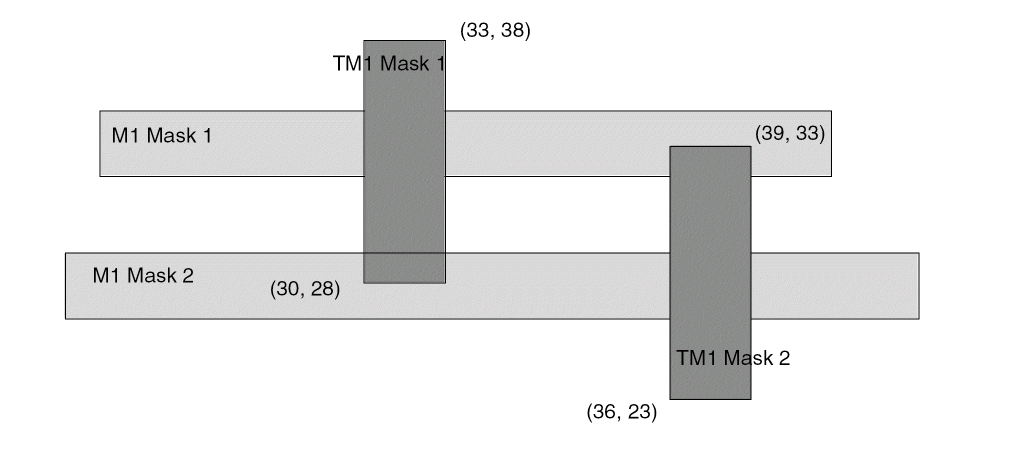
-
The following
FILLSstatement defines two rectangles and two via fill geometries for layer metal1. The rectangles and one of the via fill shapes require OPC correction.FILLS 3 ;
-LAYER metal1 + OPC
RECT ( 0 0 ) ( 100 100 )
RECT ( 200 200 ) ( 300 300 ) ;
-VIA via26
( 500 500 )
( 800 800 ) ;
-VIA via28 + OPC
( 900 900 ) ;
END FILLS
Example 6-8 Multi-Mask Patterns for Fills
The following example shows multi-mask patterning for fills:
- LAYER M1 + MASK 1 RECT ( 10 10 ) ( 11 11 ) ; #RECT on MASK 1
- LAYER M2 RECT ( 10 10 ) ( 11 11 ) ; #RECT is uncolored
- VIA VIA1_1 + MASK 031 ( 10 10 ) ; #VIA with top-cut-bot mask 031
-
M1rectangle shape is onMASK 1 -
M2rectangle shape has no mask set and is uncolored -
VIA1_1via will have:- no mask set for the top metal shape - it is uncolored (topMaskNum is 0 in the 031 value). Note that the via-master color of the top metal shape does not matter.
-
mask 1for the bottom metal shape (bottomMaskNum is 1 in the 031 value) -
for the cut layer, the bottom-most, and then the left-most cut of the via-instance is mask 3. The mask for the other cuts of the via-instance are derived from the via-master by "shifting" the via-master cut masks to match. So if the via-master's bottom- left cut is
MASK 1, then the via-master cuts on mask 1 become mask 3 for the via-instance, and similarly cuts on 2 become 1, and cuts on 3 become 2. See Figure 6-8.
GCell Grid
[GCELLGRID
{X start DO numColumns+1 STEP space} ...
{Y start DO numRows+1 STEP space ;} ...]
Defines the gcell grid for a standard cell-based design. Each GCELLGRID statement specifies a set of vertical (x) and horizontal (y) lines, or tracks, that define the gcell grid.
Typically, the GCELLGRID is automatically generated by a particular router, and is not manually created by the designer.
Specifies the number of columns in the grid.
Specifies the number of rows in the grid.
Specifies the spacing between tracks.
Specify the location of the first vertical (x) and first horizontal (y) track.
GCell Grid Boundary Information
The boundary of the gcell grid is the rectangle formed by the extreme vertical and horizontal lines. The gcell grid partitions the routing portion of the design into rectangles, called gcells. The lower left corner of a gcell is the origin. The x size of a gcell is the distance between the upper and lower bounding vertical lines, and the y size is the distance between the upper and lower bounding horizontal lines.
For example, the grid formed by the following two GCELLGRID statements creates gcells that are all the same size (100 x 200 in the following):
GCELLGRID X 1000 DO 101 STEP 100 ;
GCELLGRID Y 1000 DO 101 STEP 200 ;
A gcell grid in which all gcells are the same size is called a uniform gcell grid. Adding GCELLGRID statements can increase the granularity of the grid, and can also result in a nonuniform grid, in which gcells have different sizes.
For example, adding the following two statements to the above grid generates a nonuniform grid:
GCELLGRID X 3050 DO 61 STEP 100 ;
GCELLGRID Y 5100 DO 61 STEP 200 ;
When a track segment is contained inside a gcell, the track segment belongs to that gcell. If a track segment is aligned on the boundary of a gcell, that segment belongs to the gcell only if it is aligned on the left or bottom edges of the gcell. Track segments aligned on the top or right edges of a gcell belong to the next gcell.
GCell Grid Restrictions
Every track segment must belong to a gcell, so gcell grids have the following restrictions:
- The x coordinate of the last vertical track must be less than, and not equal to, the x coordinate of the last vertical gcell line.
- The y coordinate of the last horizontal track must be less than, and not equal to, the y coordinate of the last horizontal gcell line.
Gcells grids also have the following restrictions:
-
Each
GCELLGRIDstatement must define two lines. - Every gcell need not contain the vertex of a track grid. But, those that do must be at least as large in both directions as the default wire widths on all layers.
Groups
[GROUPSnumGroups; [–groupName[+ POWERDOMAIN] [+ GROUPSgroup1[group2] ...] [+ HINSTShinst1[hinst2] ...] [+ COMPONENTScomp1[comp2] ...] [+ REGIONregionNam] [+ PROPERTY {propName propVal} ...] ... ;] ...
END GROUPS]
Defines groups in a design. A group is a list of hinsts, insts, and/or other groups. An hinst is a hierarchical instance name for an intermediate Verilog module in the logical netlist, while an inst is a leaf cell in the Verilog netlist (an inst is called a COMPONENT in DEF). The semantics for GROUPS are as follows:
-
A specific inst can only be in one group’s
COMPONENTSlist. -
A specific hinst can only be in one group’s
HINSTSlist. -
A group can only be in one group’s
GROUPSlist, and “loops” are not allowed. For example, ifgp1is ingp2, andgp2is ingp3, thengp3cannot be ingp1. - An inst inside an hinst can be in a different group than the hinst. The placer and DB should be able to handle this.
Specifies individual component names (inst names) that are in this group. A component can be assigned to only one group. You can specify any of the following:
Note that this setting overrides any+ HINSTSsetting. For example, consider the following group definitions:-myGroup1 + HINSTS h1 ;
-myGroup2 + COMPONENTS h1/i1 ;
Then the component h1/i1 is inside myGroup2, and all the other components inside h1 are in myGroup1.
Specifies the name of the group.
Specifies other individual groups that are part of this group. This allows a “hierarchical group” to be constructed from other groups. A group can be inside only one other group, and loops like group1 inside group2, and group2 inside group1 are not allowed. Note that a group name may be used before it is defined, but it must be defined in the same DEF file.
Specifies hierarchical instance names that are part of this group. All the components inside this hinst are part of the group, unless lower-level components or a lower-level hinst are explicitly assigned to some other group. An hinst can only be assigned to one group.
For example, consider the following group definitions:
-myGroup1 + HINSTS h1 h3 ;
-myGroup2 + HINSTS h1/h2 ;
-myGroup3 + COMPONENTS h1/i1 ;
In this case, all the components inside h1/h2 are inside myGroup2, and the component h1/i1 is inside myGroup3, while myGroup1 has all the other components inside h1 and all the components inside h3.
The hinst names must be an intermediate hierarchical name in the logical netlist and should not include any leaf-level component names. For example, if you have a leaf-level AND2 component named h1/h2/i1, either h1 or h1/h2 are allowed as an HINSTS name, but h1/h2/i1 is not allowed.
Specifies the number of groups defined in the GROUPS section.
Specifies that this group is defined as a power domain with the same name in IEEE 1801. A DEF writer should write out any HINSTS or COMPONENTS currently defined for this power-domain group from IEEE 1801. But a DEF reader should normally rely on the IEEE 1801 definition, and just warn if the DEF definition does not match the current power-domain definition; the IEEE 1801 definition overrides the DEF definition if there is a conflict.
Specifies a numerical or string value for a group property defined in the PROPERTYDEFINITIONS statement. The propName you specify must match the propName listed in the PROPERTYDEFINITIONS statement.
Specifies a rectangular region in which the group must lie. regionName specifies a region previously defined in the REGIONS section.
The following example defines a group with two components using + REGION R1 :
GROUPS 100 ;
- G1
+ COMPONENTS i1/i2 i1/i3
+ REGION R1 ;
...
History
[HISTORYanyText;] ...
Lists a historical record about the design. Each line indicates one record. Any text excluding a semicolon (;) can be included in anyText. The semicolon terminates the HISTORY statement. Linefeed and Return do not terminate the HISTORY statement. Multiple HISTORY lines can appear in a file.
Nets
NETSnumNets; [– {netName[ {compNamepinName} | PINpinName] ... | MUSTJOIN (compName pinName) } [+ SHIELDNETshieldNetName] ... [+ NONDEFAULTRULEruleName] [regularWiring] ... [+ FIXEDBUMP] [+ FREQUENCYfrequency] [+ USE {ANALOG | CLOCK | GROUND | POWER | RESET | SCAN | SIGNAL | TIEOFF}] [+ PATTERN {STEINER | TRUNK}] [+ WEIGHTweight] [+ PROPERTY {propName propVal} ...] ... ;] ...
END NETS
Defines netlist connectivity and regular-routes for nets containing regular pins. These routes are normally created by a signal router that can rip-up and repair the routing. The SPECIALNETS statement defines netlist connectivity and routing for special-routes that are created by "special routers" or "manually" and should not be modified by a signal router. Special routes are normally used for power-routing, fixed clock-mesh routing, high-speed buses, critical analog routes, or flip-chip routing on the top-metal layer to bumps.
Input arguments for a net can appear in the NETS section or the SPECIALNETS section. In case of conflicting values, the DEF reader uses the last value encountered. NETS and SPECIALNETS statements can appear more than once in a DEF file. If a particular net has mixed wiring or pins, specify the special wiring and pins first.
Arguments
Specifies the name of a regular component pin on a net or a subnet. LEF MUSTJOIN pins, if any, are not included; only the master pin (that is, the one without the MUSTJOIN statement) is included. If a subnet includes regular pins, the regular pins must be included in the parent net.
Indicates that the bump net cannot be reassigned to a different pin.
It is legal to have a pin without geometry to indicate a logical connection, and to have a net that connects that pin to two other instance pins that have geometry. Area I/Os have a logical pin that is connected to a bump and an input driver cell. The bump and driver cell have pin geometries (and, therefore, should be routed and extracted), but the logical pin is the external pin name without geometry (typically the Verilog pin name for the chip).
Because bump nets are usually routed with special routing, they also can be specified in the SPECIALNETS statement. If a net name appears in both the NETS and SPECIALNETS statements, the FIXEDBUMP keyword also should appear in both statements. However, the value only exists once within a given application’s database for the net name.
Because DEF is often used incrementally, the last value read in is used. Therefore, in a typical DEF file, if the same net appears in both statements, the FIXEDBUMP keyword (or lack of it) in the NETS statement is the value that is used, because the NETS statement is defined after the SPECIALNETS statement.
For an example specifying the FIXEDBUMP keyword, see “Fixed Bump”.
Specifies the frequency of the net, in hertz. The frequency value is used by the router to choose the correct number of via cuts required for a given net, and by validation tools to verify that the AC current density rules are met. For example, a net described with + FREQUENCY 100 indicates the net has 100 rising and 100 falling transitions in 1 second.
Type: Float
Specifies that the net is a mustjoin. If a net is designated MUSTJOIN, its name is generated by the system. Only one net should connect to any set of mustjoin pins. Mustjoin pins for macros are defined in LEF. The only reason to specify a MUSTJOIN net in DEF (identified arbitrarily by one of its pins) is to specify prewiring for the MUSTJOIN connection.
Otherwise, nets are generated automatically where needed for mustjoin connections specified in the library. If the input file specifies that a mustjoin pin is connected to a net, the DEF reader connects the set of mustjoin pins to the same net. If the input file does not specify connections to any of the mustjoin pins, the DEF reader creates a local MUSTJOIN net.
Specifies the name for the net. Each statement in the NETS section describes a single net. There are two ways of identifying the net: netName or MUSTJOIN. If the netName is given, a list of pins to connect to the net also can be specified. Each pin is identified by a component name and pin name pair (compName pinName) or as an I/O pin (PIN pinName). Parentheses ensure readability of output. The keyword MUSTJOIN cannot be used as a netName.
By default the width of any route segment in the NETS regularWiring section is defined by the default width (LEF WIDTH statement value for the routing layer).
This keyword specifies a nondefault rule to use instead of the default rule when creating the net and wiring. When specified with SUBNET, identifies the nondefault rule to use when creating the subnet and its wiring.
The width of any route segment is defined by the corresponding NONDEFAULTRULE WIDTH for that layer.
Specifies the number of nets defined in the NETS section.
Specifies the routing pattern used for the net.
Default: STEINER
Value: Specify one of the following:
Specifies the name of an I/O pin on a net or a subnet.
Specifies a numerical or string value for a NET property defined in the PROPERTYDEFINITIONS statement. The propName you specify must match the propName listed in the PROPERTYDEFINITIONS statement.
Specifies the regular physical wiring for the net or subnet. For regular wiring syntax, see “Regular Wiring Statement”.
Specifies the name of a special net that shields the regular net being defined. A shield net for a regular net is defined earlier in the DEF file in the SPECIALNETS section.
USE {ANALOG | CLOCK | GROUND | POWER | RESET | SCAN | SIGNAL | TIEOFF}
Specifies how the net is used.
Value: Specify one of the following:
Specifies the weight of the net. Automatic layout tools attempt to shorten the lengths of nets with high weights. A value of 0 indicates that the net length for that net can be ignored. The default value of 1 specifies that the net should be treated normally. A larger weight specifies that the tool should try harder to minimize the net length of that net.
For normal use, timing constraints are generally a better method to use for controlling net length than net weights. For the best results, you should typically limit the maximum weight to 10, and not add weights to more than 3 percent of the nets.
Default: 1
Type: Integer
Regular Wiring Statement
{+ COVER | + FIXED | + ROUTED }
layerName
   [SHIELD]
   [PROPERTY propName propVal] ...
   routingPoints
[NEW layerName
   [SHIELD]
   [PROPERTY propName propVal] ...
   routingPoints
] ...
Specifies regular wiring for the net.
Specifies that the wiring cannot be moved by either automatic layout or interactive commands. If no wiring is specified for a particular net, the net is unrouted. If you specify COVER, you must also specify layerName.
Specifies that the wiring cannot be moved by automatic layout, but can be changed by interactive commands. If no wiring is specified for a particular net, the net is unrouted. If you specify FIXED, you must also specify layerName. See Example 6-10.
Specifies the layer on which the wire lies. You must specify layerName if you specify COVER, FIXED, ROUTED, or NEW. Specified layers must be routable; reference to a cut layer generates an error.
Indicates a new wire segment (that is, there is no wire segment between the last specified coordinate and the next coordinate), and specifies the name of the layer on which the new wire lies. Noncontinuous paths can be defined in this manner.
Specifies a property on the subsequent routingPoints statement. Use this keyword to mark specific wires and vias in the NETS routing data, when required. The propName and propVal must match a name and data type, such as STRING or INTEGER, from the PROPERTYDEFINITIONS section for a ROUTE object. See Example 6-10.
Specifies that the wiring can be moved by the automatic layout tools. If no wiring is specified for a particular net, the net is unrouted. If you specify ROUTED, you must also specify layerName.
Defines the center line coordinates of the route on layerName. For information about using routing points, see “Defining Routing Points”.
The routingPoints syntax is defined as follows:{ ( x y [extValue] ) maskNum
{[MASK ] [WIDTH width] ( x y [extValue] )viaMaskNum
|[MASK ] viaName [orient]maskNum
|[MASK ] RECT ( deltax1 deltay1 deltax2 deltay2 ) x
| VIRTUAL ( y ) } } ...
|
Specifies the amount by which the wire is extended past the endpoint of the segment. The extension value must be greater than or equal to
Some tools only allow |
|
|
Specifies which mask for double or triple patterning lithography to use for the next wire or |
|
|
Specifies which mask for double or triple patterning lithography is to be applied to the next via's shapes on each layer. The viaMaskNum variable is a hex-encoded three-digit value of the form:
For example, MASK 113 means that the top metal and cut layer maskNum is 1, and the bottom metal layer maskNum is 3. A value of 0 means that the shape on the layer has no mask assignment (is uncolored), so 013 means the top layer is uncolored. If either the first or second digit is missing, they are assumed to be 0, so 013 and 13 mean the same thing. Most applications support maskNums of 0, 1, 2, or 3 only for double or triple patterning. |
|
|
The topMaskNum and bottomMaskNum variables specify which mask the corresponding metal shape belongs to. The via-master metal mask values have no effect. For the cut layer, the cutMaskNum variable defines the mask for the bottom-most, and then the left-most cut. For multi-cut vias, the via-instance cut masks are derived from the via-master cut mask values. The via-master must have a mask defined for all the cut shapes and every via-master cut mask is "shifted" (from 1 to 2, and 2 to 1 for two mask layers, and from 1 to 2, 2 to 3, and 3 to1 for three mask layers), so the lower-left cut matches the cutMaskNum value. Similarly, for the metal layer, the topMaskNum/bottomMaskNum would define the mask for the bottom-most, then leftmost metal shape. For multiple disjoint metal shapes, the via-instance metal masks are derived from the via-master metal mask values. The via-master must have a mask defined for all of the metal shapes, and every via-master metal mask is “shifted” (1->2, 2->1 for two mask layers, 1->2, 2->3, 3->1 for three mask layers) so the lower-left cut matches the topMaskNum/bottomMaskNum value. See Example 6-11. |
|
|
Specifies the orientation of the viaName that precedes it, using the standard DEF orientation values of
If you do not specify orient, |
|
|
Indicates that a rectangle is created from the previous ( x y ) routing point using the delta values. The See Example 6-12. |
|
|
Specifies a via to place at the last point. If you specify a via, layerName for the next routing coordinates (if any) is implicitly changed to the other routing layer for the via. For example, if the current layer is metal1, a via12 changes the layer to metal2 for the next routing coordinates. |
|
|
Indicates that there is a virtual (non-physical zero-width) connection between the previous point and the new ( x y ) point. An ’ You can use this keyword to retain the symbolic routing graph. See Example 6-12. |
|
|
If present, this overrides the net
The See Example 6-13. |
|
|
Specifies the route coordinates. You cannot specify a route with zero length.
For more information, see “Specifying Coordinates”. |
|
Specifies that the subsequent routingPoints statement contains routing that is used as a SHIELD net. This is normally used only on the PG net routing that is used to shield a signal net. This makes it easier to remove shield nets, when required, without disturbing the PG network because the shield nets can be easily identified and differentiated from the PG net routes that are carrying power to PG pins and are therefore part of the PG network. See Example 6-10.
Example 6-10 Routing Points - Usage of Routed/Cover/Fixed, Shield, and Property
The following example shows how the ROUTED/COVER/FIXED, SHIELD, and PROPERTY values are applied to the subsequent routingPoints statements.
+ FIXED # FIXED applies until next ROUTED/FIXED/COVER
M1
SHIELD #SHIELD applies only to next routingPoints
PROPERTY prop1 100 #prop1 applies only to next routingPoints
PROPERTY prop2 "test" #Same for prop2
( 100 100 ) ( 100 200 ) ( 200 200 ) via1 #Two wires and one via
#All have FIXED, SHIELD, prop1, prop2
NEW M2
( 100 200 ) ( 200 200 ) via2 #Wire and via only have FIXED
#No SHIELD, no properties
+ ROUTED
M3
( 200 200 ) (200 300 ) ; #The wire has ROUTED, no SHIELD, no properties
Example 6-11 Multi-mask Patterns for Routing Points
The following example shows a routing statement that specifies three-mask layers M1 and VIA1, and a two-mask layer M2:
+ ROUTED M1 (10 0 ) MASK 3 (10 20 ) VIA1_1
NEW M2 ( 10 10 ) (20 10) MASK 1 ( 20 20 ) MASK 031 VIA1_2 ;
-
M1wire shape (10 0) to (10 20) belongs to mask 3 -
VIA1_1via has no precedingMASKstatement so all the metal and cut shapes have no mask and are uncolored -
first
NEW M2wire shape (10 10) to (20 10) has no mask set and is uncolored -
second
M2wire shape (20 10) to (20 20) is on mask 1 -
VIA1_2via has a MASK 031 (it can be MASK 31 also) so:-
topMaskNum is 0 in the 031 value, so no mask is set for the top metal (
M2) shape -
bottomMaskNum is 1 in the 031 value, so mask 1 is used for the bottom metal (
M1) shape -
cutMaskNum is 3 in the 031 value, so the bottom-most, and then the left-most cut of the via-instance is mask 3. The mask for the other cuts of the via-instance are derived from the via-master by "shifting" the via-master's cut masks to match. So if the via-master's bottom-left cut is mask 1, then the via-master cuts on mask 1 become mask 3 for the via-instance, and similarly cuts on 2 shift to 1, and cuts on 3 shift to 2, as shown in Figure 6-4.
Figure 6-4 Via-master multi-mask patterns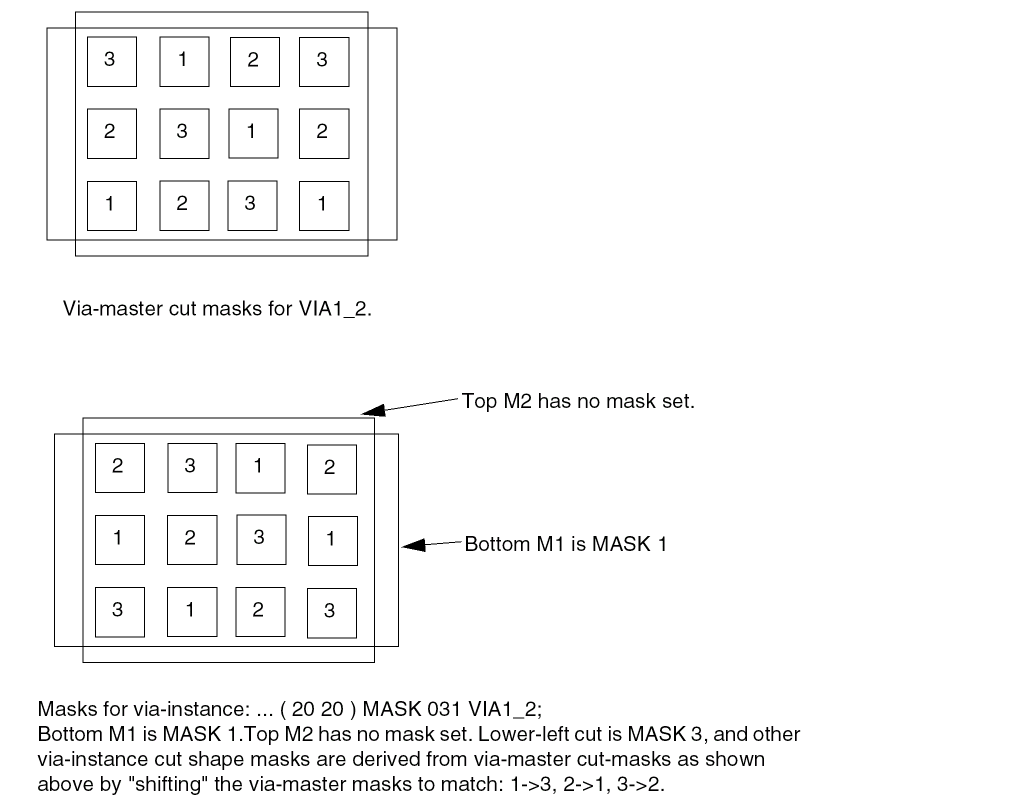
-
topMaskNum is 0 in the 031 value, so no mask is set for the top metal (
Example 6-12 Routing Points - Usage of Virtual and Rect
Figure 6-5 shows the results of the following routing statement:
+ ROUTED M1 ( 0 0 ) ( 5 0 ) VIRTUAL ( 7 1 ) RECT ( -3 0 -1 2 ) ( 7 7 ) ;
Figure 6-5 Routing Points - Usage of Virtual and Rect
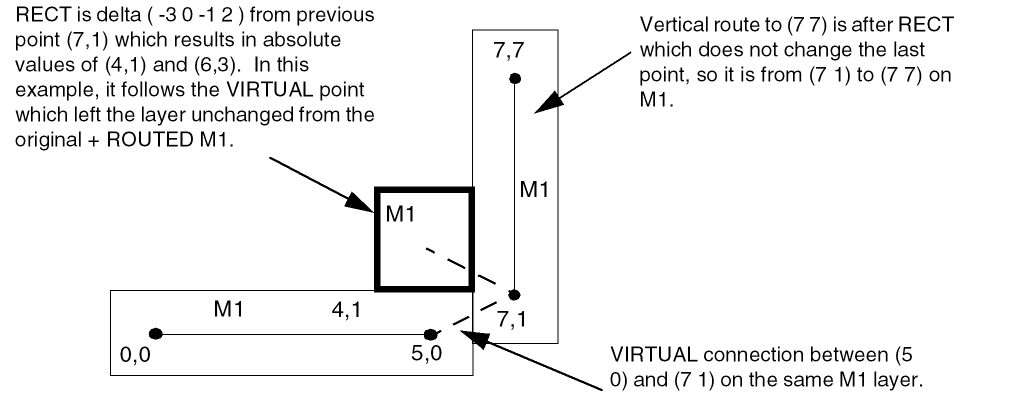
Example 6-13 Routing Points - Usage of Width
Assume the DEFAULT routing width for M1 is 20. Then the following creates three M1 route segments as explained below:
- my_net (i1 clk ) ( i2 out )
+ ROUTED M1 ( 0 0 ) WIDTH 40 ( 100 0 10 ) (100 60 )
+ NEW M1 ( 100 60 ) ( 150 60 ) ;
-
Segment
( 0 0 ) WIDTH 40 ( 100 0 10 )has a width of40with a default start extension of half-width equal to20and a custom end extension of10. -
Segment
( 100 0 10 ) ( 100 60 )reverts back to theDEFAULTwidth of20, with a custom start extension of10and an end extension with the default half-width extension of10. -
Segment
( 100 60 ) ( 150 60 )has aDEFAULTwidth of20and both extensions use the default half-width value of10.
The three segments are depicted in Figure 6-6:
Figure 6-6 Routing Points - Usage of Width
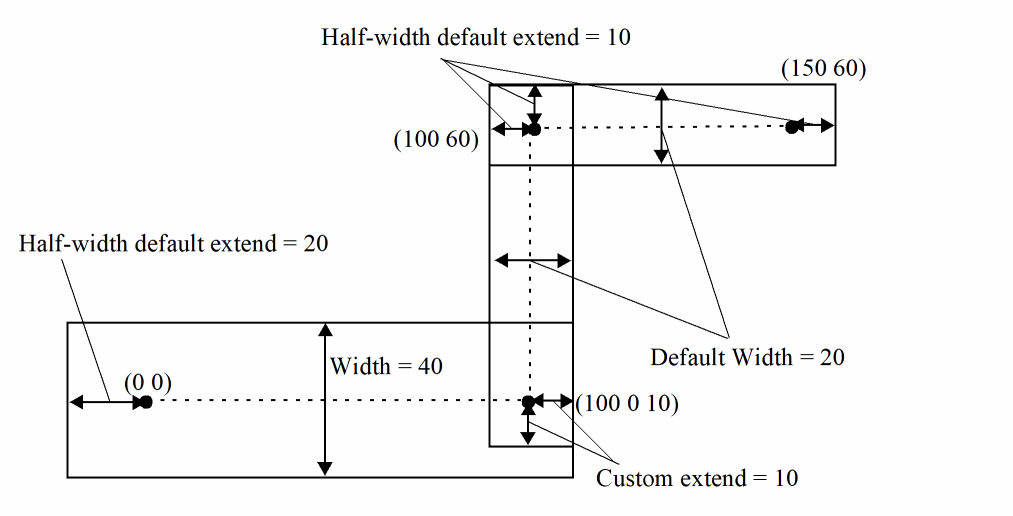
Defining Routing Points
Routing points define the center line coordinates of the route for a specified layer. Routes must be parallel to the X or Y axis, have a width defined by the routing rule for this wire unless overridden by a WIDTH statement, and extend from one coordinate (x y) to the next coordinate.
If either endpoint has an extension value (extValue), the wire is extended by that amount past the endpoint. Some applications require the extension value to be 0, half of the wire width, or the same as the routing rule wire extension value. If you do not specify an extension value, the default value of half of the wire width is used.
If a coordinate with an extension value is specified after a via, the wire extension is added to the beginning of the next wire segment after the via (zero-length wires are not allowed).
Specifying Coordinates
To maximize compactness of the design files, the coordinates allow for the asterisk ( * ) convention. Here, ( x * ) indicates that the y coordinate last specified in the wiring specification is used; ( * y ) indicates that the x coordinate last specified is used. Use
( * * extValue ) to specify a wire extension at a via.
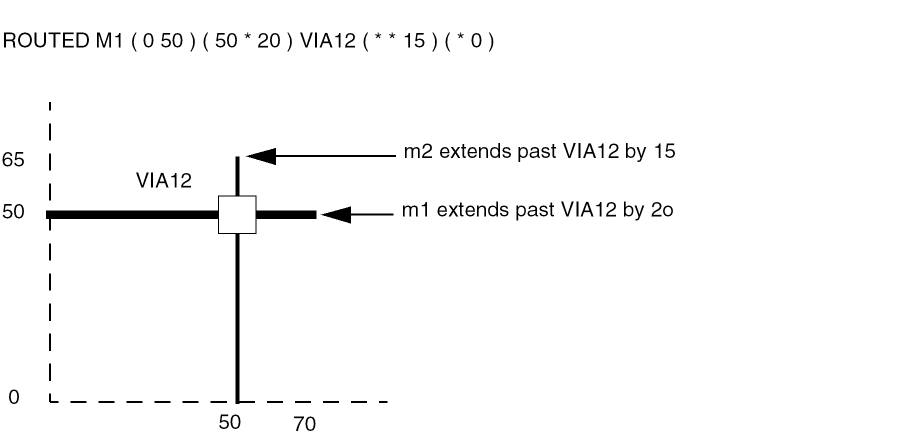
Each coordinate sequence defines a connected orthogonal path through the points. The first coordinate in a sequence must not have an * element.
Because nonorthogonal segments are not allowed, subsequent points in a connected sequence must create orthogonal paths. For example, the following sequence is a valid path:
( 100 200 ) ( 200 200 ) ( 200 500 )
The following sequence is an equivalent path:
( 100 200 ) ( 200 * ) ( * 500 )
The following sequence is not valid because it represents a nonorthogonal segment.
( 100 200 ) ( 300 500 )
Specifying Orientation
If you specify the pin’s placement status, you must specify its location and orientation. A pin can have any of the following orientations: N, S, W, E, FN, FS, FW, or FE.
Orientation terminology can differ between tools. The following table maps the orientation terminology used in LEF and DEF files to the OpenAccess database format.
| LEF/DEF | OpenAccess | Definition |
|---|---|---|


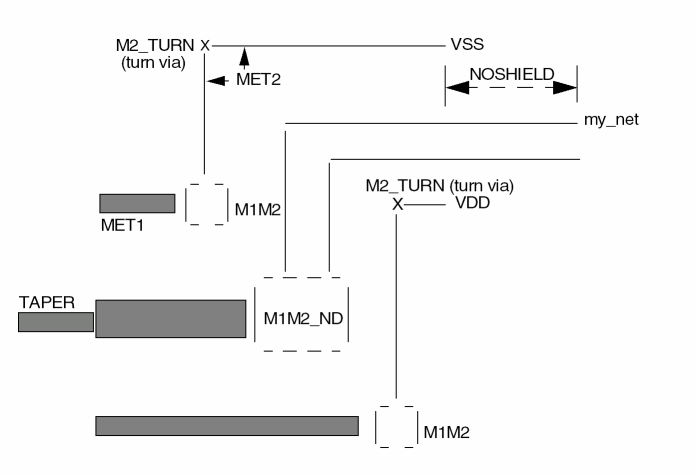
The following example defines a shielded net:
NETS 1 ;
- my_net ( I1 CLK ) ( BUF OUT )
+ SHIELDNET VSS
+ SHIELDNET VDD
ROUTED
MET2 ( 14000 341440 ) ( 9600 * ) ( * 282400 )
VIA2 ( 2400 * )
+ MET2 ( 14100 341440 ) ( 14000 * ) ;
END NETS
Nondefault Rules
NONDEFAULTRULESnumRules; {-ruleName[+ HARDSPACING] {+ LAYERlayerNameWIDTHminWidth[DIAGWIDTHdiagWidth] [SPACINGminSpacing] [WIREEXTwireExt] } ... [+ VIAviaName] ... [+ VIARULEviaRuleName] ... [+ MINCUTScutLayerNamenumCuts] ... [+ PROPERTY {propName propVal} ...] ... [PROPERTY LEF_CDN_USEVIACUTCLASS “USEVIACUTCLASScutLayerName className[ROWCOLnumCutRows numCutCols] ;... “ ;] ;} ...
END NONDEFAULTRULES
Defines any nondefault rules used in this design that are not specified in the LEF file. This section can also contain the default rule and LEF nondefault rule definitions for reference. These nondefault rule names can be used anywhere in the DEF NETS section that requires a nondefault rule name.
If a nondefault rule name collides with an existing LEF or DEF nondefault rule name that has different parameters, the application should use the DEF definition when reading this DEF file, though it can change the DEF nondefault rule name to make it unique. This is typically done by adding a unique extension, such as _1 or _2 to the rule name.
All vias must be previously defined in the LEF VIA or DEF VIAS sections. Every nondefault rule must specify a width for every layer. If a nondefault rule does not specify a via or via rule for a particular routing-cut-routing layer combination, then there must be a VIARULE GENERATE DEFAULT rule that it inherited for that combination.
Specifies the diagonal width for layerName, when 45-degree routing is used.
Default: 0 (no diagonal routing allowed)
Type: Integer, specified in DEF database units
Specifies that any spacing values that exceed the LEF LAYER ROUTING spacing requirements are “hard” rules instead of “soft” rules. By default, routers treat extra spacing requirements as soft rules that are high cost to violate, but not real spacing violations. However, in certain situations, the extra spacing should be treated as a hard, or real, spacing violation, such as when the route will be modified with a post-process that replaces some of the extra space with metal.
Specifies the layer for the various width and spacing values. layerName must be a routing layer. Each routing layer must have at least a minimum width specified.
Specifies the minimum number of cuts allowed for any via using the specified cut layer. All vias (generated or fixed vias) used for this nondefault rule must have at least numCuts cuts in the via.
Type: (numCuts) Positive integer
Specifies the number of nondefault rules defined in the NONDEFAULTRULES section.
Specifies a property for this nondefault rule. The propName must be defined as a NONDEFAULTRULE property in the PROPERTYDEFINITIONS section, and the propValue must match the type for propName (that is, integer, real, or string).
Specifies the name for this nondefault rule. This name can be used in the NETS section wherever a nondefault rule name is allowed. The reserved name DEFAULT can be used to indicate the default routing rule used in the NETS section.
Specifies the minimum spacing for layerName. The LEF LAYER SPACING or SPACINGTABLE definitions always apply; therefore it is only necessary to add a SPACING value if the desired spacing is larger than the LAYER rules already require.
Type: Integer, specified in DEF database units.
Specifies a previously defined LEF or DEF via to use with this rule.
Specifies a previously defined LEF VIARULE GENERATE to use with this routing rule. If no via or via rule is specified for a given routing-cut-routing layer combination, then a VIARULE GENERATE DEFAULT via rule must exist for that combination, and it is implicitly inherited.
Specifies the required minimum width allowed for layerName.
Type: Integer, specified in DEF database units
Specifies the distance by which wires are extended at vias. Enter 0 (zero) to specify no extension. Values other than 0 must be greater than or equal to half of the routing width for the layer, as defined in the nondefault rule.
Default: Wires are extended half of the routing width
Type: Integer, specified in DEF database units
The following NONDEFAULTRULES statement is based on the assumption that there are VIARULE GENERATE DEFAULT rules for each routing-cut-routing combination, and that the default width is 0.3 μm.
NONDEFAULTRULES 5 ;
- doubleSpaceRule #Needs extra space, inherits default via rules
+ LAYER metal1 WIDTH 200 SPACING 1000
+ LAYER metal2 WIDTH 200 SPACING 1000
+ LAYER metal3 WIDTH 200 SPACING 1000 ;
- lowerResistance #Wider wires and double cut vias for lower resistance
        #and higher current capacity. No special spacing rules,
     #therefore the normal LEF LAYER specified spacing rules
     #apply. Inherits the default via rules.
+ LAYER metal1 WIDTH 600 #Metal1 is thinner, therefore a little wider
+ LAYER metal2 WIDTH 500
+ LAYER metal3 WIDTH 500
+ MINCUTS cut12 2 #Requires at least two cuts
+ MINCUTS cut23 2 ;
- myRule             #Use default width and spacing, change via rules. The
       #default via rules are not inherited.
+ LAYER metal1 WIDTH 200
+ LAYER metal2 WIDTH 200
+ LAYER metal3 WIDTH 200
+ VIARULE myvia12rule
+ VIARULE myvia23rule ;
- myCustomRule       #Use new widths, spacing and fixed vias. The default
       #via rules are not inherited because vias are defined.
+ LAYER metal1 WIDTH 500 SPACING 1000
+ LAYER metal2 WIDTH 500 SPACING 1000
+ LAYER metal3 WIDTH 500 SPACING 1000
+ VIA myvia12_custom1
+ VIA myvia12_custom2
+ VIA myvia23_custom1
+ VIA myvia23_custom2 ;
END NONDEFAULTRULES
Use Via Cut Class Rule
You can use the use via cut class only rule to specify the cut class to be used with the routing rule.
You can create a use via cut class rule by using the following property definition:
PROPERTY LEF_CDN_USEVIACUTCLASS USEVIACUTCLASScutLayerName className[ROWCOLnumCutRows numCutCols] ;... “ ;
USEVIACUTCLASS cutLayerName className
[ROWCOL numCutRows numCutCols]
Specifies className cuts on cutLayerName, which must be a cut layer, to be used with this routing rule. ROWCOL specifies the number of cut rows and columns of a multiple-cut via of the cut class className to be used with this routing rule. By default, a single cut via or the given cut number defined in MINCUTS is used.
Pins
[PINSnumPins; [ –pinName+ NETnetName[+ SPECIAL] [+ DIRECTION {INPUT | OUTPUT | INOUT | FEEDTHRU}] [+ PROPERTYpropName propVal] ... [+ SUPPLYSENSITIVITYpowerPinName] [+ GROUNDSENSITIVITYgroundPinName] [+ USE {SIGNAL | POWER | GROUND | CLOCK | TIEOFF | ANALOG | SCAN | RESET}] [+ ANTENNAPINPARTIALMETALAREAvalue[LAYERlayerName]] ... [+ ANTENNAPINPARTIALMETALSIDEAREAvalue[LAYERlayerName]] ... [+ ANTENNAPINPARTIALCUTAREAvalue[LAYERlayerName]] ... [+ ANTENNAPINDIFFAREAvalue[LAYERlayerName]] ... [+ ANTENNAMODEL {OXIDE1 | OXIDE2 | OXIDE3 | OXIDE4}] ... [+ ANTENNAPINGATEAREAvalue[LAYERlayerName]] ... [+ ANTENNAPINMAXAREACARvalueLAYERlayerName] ... [+ ANTENNAPINMAXSIDEAREACARvalueLAYERlayerName] ... [+ ANTENNAPINMAXCUTCARvalueLAYERlayerName] ... [[+ PORT] [+ LAYERlayerName[MASKmaskNum] [PROPERTYpropName propVal] ...ptpt|+ POLYGONlayerName[MASKmaskNum] [PROPERTYpropName propVal] ...ptptpt... |+ VIAviaName[MASKviaMaskNum] [PROPERTYpropName propVal] ... [orient]pt] ... [+ COVER | FIXED | PLACED] ]... ; ] ...
END PINS]
Defines external pins. Each pin definition assigns a pin name for the external pin and associates the pin name with a corresponding internal net name. The pin name and the net name can be the same.
When the design is a chip rather than a block, the PINS statement describes logical pins, without placement or physical information.
ANTENNAMODEL {OXIDE1 | OXIDE2 | OXIDE3 | OXIDE4}
Specifies the oxide model for the pin. If you specify an ANTENNAMODEL statement, that value affects all ANTENNAGATEAREA and ANTENNA*CAR statements for the pin that follow it until you specify another ANTENNAMODEL statement. The ANTENNAMODEL statement does not affect ANTENNAPARTIAL*AREA and ANTENNADIFFAREA statements because they refer to the total metal, cut, or diffusion area connected to the pin, and do not vary with each oxide model.
Default: OXIDE1, for a new PIN statement
Because DEF is often used incrementally, if an ANTENNA statement occurs twice for the same oxide model, the last value specified is used.
Usually, you only need to specify a few ANTENNA values; however, for a block with six routing layers, it is possible to have six different ANTENNAPARTIAL*AREA values and six different ANTENNAPINDIFFAREA values per pin. It is also possible to have six different ANTENNAPINGATEAREA and ANTENNAPINMAX*CAR values for each oxide model on each pin.
See Example 6-16.
ANTENNAPINDIFFAREA value [LAYER layerName]
Specifies the diffusion (diode) area to which the pin is connected on a layer. If you do not specify layerName, the value applies to all layers. This is not necessary for output pins.
Type: Integer
Value: Area specified in (DEF database units)2
For more information on process antenna calculation, see Appendix B, “Calculating and Fixing Process Antenna Violations.”
ANTENNAPINGATEAREA value [LAYER layerName]
Specifies the gate area to which the pin is connected on a layer. If you do not specify layerName, the value applies to all layers. This is not necessary for input pins.
Type: Integer
Value: Area specified in (DEF database units)2
For more information on process antenna calculation, see Appendix B, “Calculating and Fixing Process Antenna Violations.”
ANTENNAPINMAXAREACAR value LAYER layerName
For hierarchical process antenna effect calculation, specifies the maximum cumulative antenna ratio value, using the metal area at or below the current pin layer, excluding the pin area itself. Use this to calculate the actual cumulative antenna ratio on the pin layer, or the layer above it.
Type: Integer
For more information on process antenna calculation, see Appendix B, “Calculating and Fixing Process Antenna Violations.”
ANTENNAPINMAXCUTCAR value LAYER layerName
For hierarchical process antenna effect calculation, specifies the maximum cumulative antenna ratio value, using the cut area at or below the current pin layer, excluding the pin area itself. Use this to calculate the actual cumulative antenna ratio for the cuts above the pin layer.
Type: Integer
For more information on process antenna calculation, see Appendix B, “Calculating and Fixing Process Antenna Violations.”
ANTENNAPINMAXSIDEAREACAR value LAYER layerName
For hierarchical process antenna effect calculation, specifies the maximum cumulative antenna ratio value, using the metal side wall area at or below the current pin layer, excluding the pin area itself. Use this to calculate the actual cumulative antenna ratio on the pin layer, or the layer above it.
Type: Integer
For more information on process antenna calculation, see Appendix B, “Calculating and Fixing Process Antenna Violations.”
ANTENNAPINPARTIALCUTAREA value [LAYER cutLayerName]
Specifies the partial cut area above the current pin layer and inside the macro cell on a layer. If you do not specify layerName, the value applies to all layers. For hierarchical designs, only the cut layer above the I/O pin layer is needed for partial antenna ratio calculation.
Type: Integer
Value: Area specified in (DEF database units)2
For more information on process antenna calculation, see Appendix B, “Calculating and Fixing Process Antenna Violations.”
ANTENNAPINPARTIALMETALAREA value [LAYER layerName]
Specifies the partial metal area connected directly to the I/O pin and the inside of the macro cell on a layer. If you do not specify layerName, the value applies to all layers. For hierarchical designs, only the same metal layer as the I/O pin, or the layer above it, is needed for partial antenna ratio calculation.
Type: Integer
Value: Area specified in (DEF database units)2
For more information on process antenna calculation, see Appendix B, “Calculating and Fixing Process Antenna Violations.”
ANTENNAPINPARTIALMETALSIDEAREA value [LAYER layerName]
Specifies the partial metal side wall area connected directly to the I/O pin and the inside of the macro cell on a layer. If you do not specify layerName, the value applies to all layers. For hierarchical designs, only the same metal layer as the I/O pin, or the layer above it, is needed for partial antenna ratio calculation.
Type: Integer
Value: Area specified in (DEF database units)2
For more information on process antenna calculation, see Appendix B, “Calculating and Fixing Process Antenna Violations.”
DIRECTION {INPUT | OUTPUT | INOUT | FEEDTHRU}
Specifies the pin type. Most current tools do not usually use this keyword. Typically, pin directions are defined by timing library data, and not from DEF.
Value: Specify one of the following:
|
Pin that can accept signals going either in or out of the cell. |
|
GROUNDSENSITIVITY groundPinName
Specifies that if this pin is connected to a tie-low connection (such as 1’b0 in Verilog), it should connect to the same net to which groundPinName is connected.
groundPinName must match another pin in this PINS section that has a + USE GROUND attribute. The ground pin definition can follow later in this PINS section; it does not have to be defined before this pin definition. It is a semantic error to put this attribute on an existing ground pin.
Note: GROUNDSENSITIVITY is useful only when there is more than one ground net connected to pins in the PINS section. By default, if there is only one net connected to all + USE GROUND pins, the tie-low connections are already implicitly defined (that is, tie-low connections are connected to the same net as any ground pin).
Specifies the number of pins defined in the PINS section.
Specifies the name for the external pin, and the corresponding internal net (defined in NETS or SPECIALNETS statements).
Indicates that the following LAYER, POLYGON, and VIA statements are all part of one PORT connection, until another PORT statement occurs. In a PIN definition without any PORT statement, all of the LAYER, POLYGON, and VIA statements are assumed to be part of a single implicit PORT for the PIN.
PORT usage commonly occurs for power and ground pins. All of the shapes of one port (rectangles, polygons, and vias) should already be connected within the port shapes; therefore, the router only needs to connect to one of the shapes for the port. Separate ports should each be connected by routing inside the block (and each DEF PORT should map to a single LEF PORT in the equivalent LEF abstract for this block).
The syntax for describing PORT statements is defined as follows:
    [[+ PORT]
 [+ LAYER layerName
     [MASK maskNum]
     [PROPERTY propName propVal] ...
       pt pt
 |+ POLYGON layerName
     [MASK maskNum]
     [PROPERTY propName propVal] ...
       pt pt pt ...
 |+ VIA viaName
     [MASK viaMaskNum]
     [PROPERTY propName propVal] ...
     [orient] pt
 ] ...
 [+ COVER | FIXED | PLACED]
]
|
A |
|
|
A |
|
|
Specifies the routing layer used for the pin, and the pin geometry on that layer. |
|
|
Specifies which mask from double or triple patterning to use for the specified shape. The maskNum variable must be a positive integer; most applications support values of 1, 2, or 3 only. Shapes without any defined mask do not have a mask set (are uncolored). |
|
|
Specifies which mask for double or triple patterning lithography is to be applied to via shapes on each layer.
The viaMaskNum variable is a hex-encoded three digit value of the form: For example, MASK 113 means the top metal and cut layer maskNum is 1, and the bottom metal layer maskNum is 3. A value of 0 indicates that the shape on that layer does not have a mask assignment (is uncolored), so 013 means the top layer is uncolored. If either the first or second digit is missing, they are assumed to be 0, so 013 and 13 mean the same thing. Most applications support maskNums of 0, 1, 2, or 3 for double or triple patterning. The topMaskNum and bottomMaskNum variables specify the mask to which the corresponding metal shape belongs. The via-master metal mask values have no effect. For the cut-layer, the cutMaskNum variable defines the mask for the bottom-most, then the left-most cut in the North (R0) orientation. For multi-cut vias, the via-instance cut masks are derived from the via-master cut mask values. The via-master must have a mask defined for all of the cut shapes and every via-master cut mask is "shifted" (from 1 to 2 and 2 to1 for two mask layers, and from 1 to 2, 2 to 3, and 3 to1 for three mask layers), so the lower-left cut matches the cutMaskNum value. See Example 6-18. |
|
|
Similarly, for the metal layer, the topMaskNum/bottomMaskNum would define the mask for the bottom-most, then leftmost metal shape. For multiple disjoint metal shapes, the via-instance metal masks are derived from the via-master metal mask values. The via-master must have a mask defined for all of the metal shapes, and every via-master metal mask is “shifted” (1->2, 2->1 for two mask layers, 1->2, 2->3, 3->1 for three mask layers) so the lower-left cut matches the topMaskNum/bottomMaskNum value. Shapes without any defined mask, that need to be assigned, can be assigned to an arbitrary choice of mask by applications. |
|
|
Specifies the pin’s location, orientation, and that its location is fixed but can be moved during automatic layout. |
|
|
Specifies the layer and a sequence of at least three points to generate a polygon for this pin. Some tools require that the polygon edges must be parallel to the x axis, the y axis, or at a 45-degree angle.
Each See Example 6-19. |
|
|
Specifies a property on the shape or via.The propName and propVal values must match a name and data type, such as See Example 6-19. |
|
|
Places the via named viaName with the given orientation at the specified (x y) location (pt). viaName must be a previously defined via in the DEF
See Example 6-19. |
|
PROPERTY propName propVal (For the logical PIN)
Specifies a property on the logical PIN object. The propName and propVal must match a name and data type, such as STRING or INTEGER, from the PROPERTYDEFINITIONS section for a PIN object.
For example:
- my_pin1 + NET my_net1
+ DIRECTION INPUT
+ PROPERTY prop1 100
+ PROPERTY prop2 "test"
+ LAYER M1 ( 100 100 ) ( 200 200 ) ;
Adds the prop1 and prop2 properties to the logical pin named my_pin1.
Identifies the pin as a special pin. Regular routers do not route to special pins. The special router routes special wiring to special pins.
SUPPLYSENSITIVITY powerPinName
Specifies that if this pin is connected to a tie-high connection (such as 1’b1 in Verilog), it should connect to the same net to which powerPinName is connected.
powerPinName must match another pin in this PINS section that has a + USE POWER attribute. The power pin definition can follow later in this PINS section; it does not have to be defined before this pin definition. It is a semantic error to put this attribute on an existing power pin. For an example, see Example 6-17.
Note: POWERSENSITIVITY is useful only when there is more than one power net connected to pins in the PINS section. By default, if there is only one net connected to all + USE POWER pins, the tie-high connections are already implicitly defined (that is, tie-high connections are connected to the same net as the single power pin).
USE {ANALOG | CLOCK | GROUND | POWER | RESET | SCAN | SIGNAL | TIEOFF}
Specifies how the pin is used.
Default: SIGNAL
Value: Specify one of the following:
|
Pin is used for connectivity to the chip-level ground distribution network. |
|
|
Pin is used for connectivity to the chip-level power distribution network. |
|
Example 6-16 Antenna Model Statement
The following example describes the OXIDE1 and OXIDE2 models for pin clock1. Note that the ANTENNAPINPARTIALMETALAREA and ANTENNAPINDIFFAREA values are not affected by the oxide values.
PINS 100 ;
- clock1 + NET clock1
...
+ ANTENNAPINPARTIALMETALAREA 1000 LAYER m1
+ ANTENNAPINDIFFAREA 500 LAYER m1
...
+ ANTENNAMODEL OXIDE1 #not required, but good practice
+ ANTENNAPINGATEAREA 1000
+ ANTENNAMAXAREACAR 300 LAYER m1
...
+ ANTENNAMODEL OXIDE2 #start of OXIDE2 values
+ ANTENNAPINGATEAREA 2000
+ ANTENNAMAXAREACAR 100 LAYER m1
...
Example 6-17 Supply Sensitivity
The following PINS statement defines sensitivity values for pins in the design myDesign:
DESIGN myDesign
...
PINS 4 ;
- in1 + NET myNet
...
+ SUPPLYSENSITIVITY vddpin1 ; #If in1 is connected to 1’b1, use
            #net that is connected to vddpin1.
         #No GROUNDSENSITIVITY is needed because
         #only one ground net is used by PINS.
         #Therefore, 1’b0 implicitly means net
         #from any +USE GROUND pin.
- vddpin1 + NET VDD1 + USE POWER
...
- vddpin2 + NET VDD2 + USE POWER
...
- gndpin1 + NET GND + USE GROUND
...
END PINS
Example 6-18 Multi-Mask Patterns for Pins
The following example shows via master masks:
clock + NET clock
+ LAYER M1 MASK 2 ( -25 0 ) ( 25 50 ) #m1 rectangle is on mask 2
+ LAYER M2 ( -10 0 ) ( 10 75 ) #m2 rectangle, no mask
+ VIA VIA1 MASK 031 ( 0 25 ) #via1 with mask 031
...
- no mask set for the top metal shape (topMaskNum is 0 in the 031 value)
-
MASK 1for the bottom metal shape (botMaskNum is 1 in the 031 value) -
the bottom-most, and then the left-most cut of the via-instance is
MASK 3. The mask for the other cuts of the via-instance are derived from the via-master by "shifting" the via-master cut masks to match. So if the via-master's bottom-left cut isMASK 1, then the via-master cuts onMASK 1becomeMASK 3for the via-instance. Similarly cuts on 2 shift to 1, and cuts on 3 shift to 2. See Figure 6-7.
Figure 6-7 Multi-Mask Patterns for Pins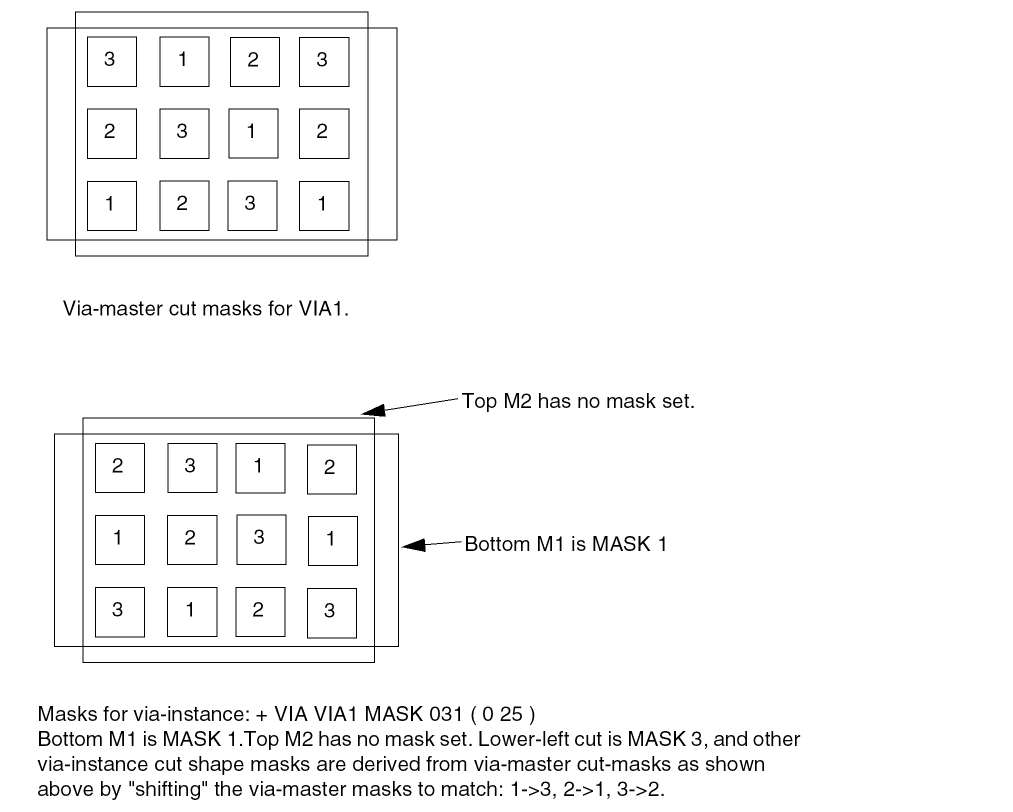
Example 6-19 Port Statement With Layer, Polygon, and Via Properties
PINS 1 ;
- CLK + NET CLK + DIRECTION IN + USE SIGNAL
+ LAYER M1 #M1 rect
PROPERTY test_prop "test1" #A property on this shape
PROPERTY test2_prop 10 #Another property on this shape
( 10 10 ) ( 20 20 ) #Rect from 10,10 to 20,20
+ POLYGON M2 #M2 polygon
PROPERTY test_prop "test2" #A property on this shape
( 0 0 ) ( 0 10 ) ( 5 10 ) ( 5 5 ) ( 10 5 ) ( 10 0 )
+ VIA via1 #Instance of via1_10
PROPERTY test_prop "test3" #A property on this via instance
S ( 20 20 ) #S orient (rotated 180 about the via
#origin and the via origin is at 20, 20)
+ PLACED ; #if no COVER, FIXED, PLACED, then is unplaced
END PINS
Extra Physical PIN(S) for One Logical PIN
In the design of place and route blocks, you sometimes want to add extra physical connection points to existing signal ports (usually to enable the signal to be accessed from two sides of the block). One pin has the same name as the net it is connected to. Any other pins added to the net must use the following naming conventions.
For extra non-bus bit pin names, use the following syntax:
N is a positive integer, incremented as the physical pins are added
For example:
PINS n ;
- a + NET a .... ;
- a.extra1 + NET a ... ;
For extra bus bit pin names, use the following syntax:
basename is simple part of bus bit pin/net name. N is a positive integer, incremented as the physical pins are added. [index] identifies the specific bit of the bus, if it is a bus bit.
For example:
PINS n ;
- a[0] + net a[0] ... ;
- a.extra1[0] + net a[0] ... ;
Property Definitions
[PROPERTYDEFINITIONS [objectType propName propType[RANGE min max] [value|stringValue] ;] ...
END PROPERTYDEFINITIONS]
Lists all properties used in the design. You must define properties in the PROPERTYDEFINITIONS statement before you can refer to them in other sections of the DEF file.
Specifies the object type being defined. You can define properties for the following object types:
-
BLOCKAGE -
COMPONENT -
COMPONENTPINOnly forPINPROPERTYinCOMPONENTin 6.0, not DEF PINs -
DESIGN -
GROUP -
NET -
NONDEFAULTRULE -
PINFor DEF PIN properties (e.g. the logical PIN object) -
PINSHAPEFor DEF PIN individual shapes or vias -
REGION -
ROUTE
-
ROW -
SCANCHAINFor SCANCHAINs and ORDERED sub-chains. -
SPECIALNET -
SPECIALROUTEFor SPECIALNETS and FILLS routing shapes and vias -
VIAFor a VIA definition (e.g. DEF VIAS section).ROUTEorSPECIALROUTE. -
TRACKS
-
Specifies a unique property name for the object type.
Specifies the property type for the object type. You can specify one of the following property types:
Limits real number and integer property values to a specified range.
Assigns a numeric value or a name to a DESIGN object.
Regions
[REGIONSnumRegions; [-regionName{pt pt} ... [+ TYPE {FENCE | GUIDE}] [+ PROPERTY {propName propVal} ...] ... ;] ...
END REGIONS]
Defines regions in the design. A region is a physical area to which you can assign a component or group.
Specifies the number of regions defined in the design.
Specifies a numerical or string value for a REGION property defined in the PROPERTYDEFINITIONS statement. The propName you specify must match the propName listed in the PROPERTYDEFINITIONS statement.
Names and defines a region. You define a region as one or more rectangular areas specified by pairs of coordinate points.
Specifies the type of region.
Default: All instances assigned to the region are placed inside the region boundaries, and other cells are also placed inside the region.
Value: Specify one of the following:
Example 6-20 Regions Statement
REGIONS 1 ;
- REGION1 ( 0 0 ) ( 1200 1200 )
+ PROPERTY REGIONORDER 1 ;
Rows
[ROWrowNamesiteNameorigXorigYsiteOrient[DOnumXBYnumY[STEPstepXstepY]] [+ PROPERTY {propNamepropVal} ...] ... ;] ...
Specifies a repeating set of sites that create the row. You must specify one of the values as 1. If you specify 1 for numY, then the row is horizontal. If you specify 1 for numX, the row is vertical.
Default: Both numX and numY equal 1, creating a single site at this location (that is, a horizontal row with one site).
Specifies the location of the first site in the row.
Type: Integer, specified in DEF database units
Specifies a numerical or string value for a ROW property defined in the PROPERTYDEFINITIONS statement. The propName you specify must match the propName listed in the PROPERTYDEFINITIONS statement.
Specifies the row name for this row.
Specifies the LEF SITE to use for the row. A site is a placement location that can be used by LEF macros that match the same site. siteName can also refer to a site with a row pattern in its definition, in which case, the row pattern indicates a repeating set of sites that are abutted. For more information, see
Specifies the orientation of all sites in the row. siteOrient must be one of N, S, E, W, FN, FS, FE, or FW. For more information on orientations, see “Specifying Orientation”.
Specifies the spacing between sites in horizontal and vertical rows.
Assume siteA is 200 by 900 database units.
ROW row_0 siteA 1000 1000 N ; #Horizontal row is one-site wide at 1000, 1000
ROW row_1 siteA 1000 1000 N DO 1 BY 1 ; #Same as row_0
ROW row_2 siteA 1000 1000 N DO 1 BY 1 STEP 200 0 ; #Same as row_0
ROW row_3 siteA 1000 1000 N DO 10 BY 1 ; #Horizontal row is 10 sites wide,
#so row width is 200*10=2000 dbu
ROW row_4 siteA 1000 1000 N DO 10 BY 1 STEP 200 0 ; #Same as row_3
ROW row_5 siteA 1000 1000 N DO 1 BY 10 ; #Vertical row is 10 sites high, so
#total row height is 900*10=9000 dbu
ROW row_6 siteA 1000 1000 N DO 1 BY 10 STEP 0 900 ; #Same as row_5
Scan Chains
[SCANCHAINSnumScanChains; [-chainName[+ PROPERTY propName propVal] ... [+ PARTITIONpartitionName[MAXBITSmaxbits]] [+ COMMONSCANPINS [ ( INpin)] [( OUTpin) ] ] + START {fixedInComp| PIN} [outPin] [+ FLOATING {floatingComp[ ( INpin) ] [ ( OUTpin) ] [ ( BITSnumBits) ]} ...] [+ ORDERED [+ NAMEorderName] [+ PROPERTY propName propVal] ... {fixedComp[ ( INpin) ] [ ( OUTpin) ] [ ( BITSnumBits) ]} ... ] ... + STOP {fixedOutComp| PIN} [inPin] ] ;] ...
END SCANCHAINS]
Defines scan chains in the design. Scan chains are a collection of cells that contain both scan-in and scan-out pins. These pins must be defined in the PINS section of the DEF file with + USE SCAN.
Specifies the name of the scan chain. Each statement in the SCANCHAINS section describes a single scan chain.
COMMONSCANPINS [( IN pin )] [( OUT pin )]
Specifies the scan-in and scan-out pins for each component that does not have a scan-in and scan-out pin specified. You must specify either common scan-in and scan-out pins, or individual scan-in and scan-out pins for each component.
FLOATING {floatingComp [( IN pin )] [( OUT pin )] [( BITS numBits )]}
Specifies the floating list. You can have one or zero floating lists. If you specify a floating list, it must contain at least one component.
Note: Scan chain reordering commands can use floating components in any order to synthesize a scan chain. Floating components cannot be shared with other scan chains unless they are in the same PARTITION. Each component should only be used once in synthesizing a scan chain.
When specified with chains that include the PARTITION keyword, sets the maximum bit length (flip-flop bit count) that the chain can grow to in the partition.
Default: 0 (tool-specific defaults apply, which is probably the number of bits in each chain)
Type: Integer
Value: Specify a value that is at least as large as the size of the current chain.
Specifies the number of scan chains to synthesize.
ORDERED
[+ NAME orderName]
[+ PROPERTY propName propVal] ...
{fixedComp [( IN pin )] [( OUT pin )] [( BITS numBits )]}...
Specifies an ordered list. You can specify none or several ordered lists. If you specify an ordered list, you must specify at least two fixed components for each ordered list.
Note: Scan chain reordering commands should synthesize these components in the same order that you specify them in the list. Ordered components cannot be shared with other scan chains unless they are in the same PARTITION. Each component should only be used once in synthesizing a scan chain.
Specifies a partition name. This statement allows reordering tools to determine inter-chain compatibility for element swapping (both FLOATING elements and ORDERED elements). It associates each chain with a partition group, which determines their compatibility for repartitioning by swapping elements between them.
Chains with matching PARTITION names constitute a swap-compatible group. You can change the length of chains included in the same partition (up to the MAXBITS constraint on the chain), but you cannot eliminate chains or add new ones; the number of chains in the partition is always preserved.
If you do not specify the PARTITION keyword, chains are assumed to be in their own single partition, and reordering can be performed only within that chain.
Specifies a property on the scan chain. The propName and propVal values must match a name and data type, such as STRING or INTEGER, from the PROPERTYDEFINITIONS section for a SCANCHAIN object.
The example below shows two properties on a scan chain:
- scan_block1
+ PROPERTY prop1 100
+ PROPERTY prop2 "test"
+ PARTITION ptn1
...
START {fixedInComp | PIN} [outPin]
Specifies the start point of the scan chain. You must specify this point. The starting point can be either a component, fixedInComp, or an I/O pin, PIN. If you do not specify outPin, the router uses the pin specified for common scan pins.
STOP {fixedOutComp | PIN} [inPin]
Specifies the endpoint of the scan chain. You must specify this point. The stop point can be either a component, fixedOutComp, or an I/O pin, PIN. If you do not specify inPin, the router uses the pin specified for common scan pins.
Example 6-22 Partition Scanchain
In the following definition, chain chain1_clock1 is specified without a MAXBITS keyword. The maximum allowed bit length of the chain is assumed to be the sequential length of the longest chain in any clock1 partition.
SCANCHAINS 77 ;
- chain1_clock1
+ PARTITION clock1
+ START block1/bsr_reg_0 Q
+ FLOATING
block1/pgm_cgm_en_reg_reg ( IN SD ) ( OUT QZ )
...
block1/start_reset_dd_reg ( IN SD ) ( OUT QZ )
+ STOP block1/start_reset_d_reg SD ;
In the following definition, chain chain2_clock2 is specified with a PARTITION statement that associates it with clock2, and a maximum bit length of 1000. The third element statement in the FLOATING list is a scannable register bank that has a sequential bit length of 4. The ORDERED list element statements have total bit lengths of 1 each because the muxes are specified with a maximum bit length of 0.
- chain2_clock2
+ PARTITION clock2
MAXBITS 1000
+ START block1/current_state_reg_0_QZ
+ FLOATING
block1/port2_phy_addr_reg_0_ ( IN SD ) ( OUT QZ )
block1/port2_phy_addr_reg_4_ ( IN SD ) ( OUT QZ )
block1/port3_intfc ( IN SD ) ( OUT MSB ) ( BITS 4 )
...
+ ORDERED
block1/mux1 ( IN A ) ( OUT X ) ( BITS 0 )
block1/ff1 ( IN SD ) ( OUT Q )
+ ORDERED
block1/mux2 ( IN A ) ( OUT X ) ( BITS 0 )
block1/ff2 ( IN SD ) ( OUT Q ) ;
In the following definition, chain chain3_clock2 is also specified with a PARTITION statement that associates it with clock2. This means it is swap-compatible with chain2_clock2. The specified maximum bit length for this chain is 1200.
- chain3_clock2
+ PARTITION clock2
MAXBITS 1200
+ START block1/LV_testpoint_0_Q_reg Q
+ FLOATING
block1/LV_testpoint_0_Q_reg ( IN SE ) ( OUT Q )
block1/tm_state_reg_1_ (IN SD ) ( OUT QZ )
...
In the following definition, chain chain4_clock3 is specified with a PARTITION statement that associates it with clock3. The second element statement in the FLOATING list is a scannable register bank that has a sequential bit length of 8, and default pins. The ORDERED list element statements have total bit lengths of 2 each because the mux is specified with a maximum bit length of 0.
- chain4_clock3
+ PARTITION clock3
+ START block1/prescaler_IO/lfsr_reg1
+ FLOATING
block1/dp1_timers
block1/bus8 ( BITS 8 )
...
+ ORDERED
block1/ds1/ff1 ( IN SD ) ( OUT Q )
block1/ds1/mux1 ( IN B ) ( OUT Y ) ( BITS 0 )
block1/ds1/ff2 ( IN SD ) ( OUT Q )
...
Scan Chain Rules
Note the following when defining scan chains.
- Each scan-in/scan-out pin pair of adjacent components in the ordered list cannot have different owning nets.
- No net can connect a scan-out pin of one component to the scan-in pin of a component in a different scan chain.
-
For incremental DEF, if you have a
COMPONENTSsection and aSCANCHAINSsection in the same DEF file, theCOMPONENTSsection must appear before theSCANCHAINSsection. If theCOMPONENTSsection andSCANCHAINSsection are in different DEF files, you must read theCOMPONENTSsection or load the database before reading theSCANCHAINSsection.
Example 6-23 Scan Chain Statements
SCANCHAINS 2; #Specified before scan chain ordering
- S1
+ COMMONSCANPINS ( IN SI ) ( OUT SO )
+ START SIPAD OUT
+ FLOATING C1 C2 ( IN D ) ( OUT Q ) C3 C4 C5...CN
+ ORDERED A1 ( OUT Q ) A2 ( IN D ) ( OUT Q ) ...
AM ( N D )
+ ORDERED B1 B2 ... BL
+ STOP SOPAD IN ;
- S2 ... ;
END SCANCHAINS
SCANCHAINS 2 ; #Specified after scan chain ordering
- S1
+ START SIPAD OUT
+ FLOATING C1 ( IN SI ) ( OUT SO )
C2 ( IN D ) ( OUT Q )
C3 ( IN SI ( OUT SO ) ... CN ( IN SI ) ( OUT SO )
+ ORDERED A1 ( IN SI ) ( OUT Q )
A2 ( IN D ) ( OUT Q ) ... AM ( IN D ) ( OUT SO )
+ ORDERED B1 ( IN SI ) ( OUT SO )
B2 ( IN SI ) ( OUT SO ) ...
+ STOP SOPAD IN ;
- S2 ... ;
END SCANCHAINS
Special Nets
[SPECIALNETSnumNets; [–netName[{compNamepinName} | PINpinName] ... [+ VOLTAGEvolts] [specialWiring] ... [+ FIXEDBUMP] [+ USE {ANALOG | CLOCK | GROUND | POWER | RESET | SCAN | SIGNAL | TIEOFF}] [+ PATTERN {STEINER | TRUNK}] [+ WEIGHTweight] [+ PROPERTY {propName propVal} ...] ... ;] ...
END SPECIALNETS]
Defines netlist connectivity and special-routes for nets containing special pins. Special-routes are created by "special routers" or "manually", and should not be modified by a signal router. Special routes are normally used for power-routing, fixed clock-mesh routing, high-speed buses, critical analog routes, or flip-chip routing on the top-metal layer to bumps.
Input parameters for a net can appear in the NETS section or the SPECIALNETS section. In case of conflicting values for an argument, the DEF reader uses the last value encountered for the argument. NETS and SPECIALNETS statements can appear more than once in a DEF file. If a particular net has mixed wiring or pins, specify the special wiring and pins first.
You can also specify the netlist in the COMPONENTS statement. If the netlist is specified in both NETS and COMPONENTS statements, and if the specifications are not consistent, an error message appears. On output, the writer outputs the netlist in either format, depending on the command arguments of the output command.
Specifies the name of a special pin on the net and its corresponding component. You can use a compNamePattern to specify a set of component names. During evaluation of the pattern match, components that match the pattern but do not have a pin named pinName are ignored. The pattern match character is * (asterisk). For example, a component name of abc/def would be matched by a*, abc/d*, or abc/def.
Indicates that the bump net cannot be reassigned to a different pin.
It is legal to have a pin without geometry to indicate a logical connection and to have a net that connects that pin to two other instance pins that have geometry. Area I/Os have a logical pin that is connected to a bump and an input driver cell. The bump and driver cell have pin geometries (and, therefore, should be routed and extracted), but the logical pin is the external pin name without geometry (typically the Verilog pin name for the chip).
Bump nets also can be specified in the NETS statement. If a net name appears in both the NETS and SPECIALNETS statements, the FIXEDBUMP keyword also should appear in both statements. However, the value only exists once within a given application’s database for the net name.
Because DEF is often used incrementally, the last value read in is used. Therefore, in a typical DEF file, if the same net appears in both statements, the FIXEDBUMP keyword (or lack of it) in the NETS statement is the value that is used because the NETS statement is defined after the SPECIALNETS statement.
See Fixed Bump.
Specifies the name of the net.
Specifies the routing pattern used for the net.
Default: STEINER
Value: Specify one of the following:
Specifies the name of an I/O pin on a net or a subnet.
Specifies a numerical or string value for a net property defined in the PROPERTYDEFINITIONS statement. The propName you specify must match the propName listed in the PROPERTYDEFINITIONS statement.
Specifies the special wiring for the net. For syntax information, see “Special Wiring Statement”.
sUSE {ANALOG | CLOCK | GROUND | POWER | RESET | SCAN | SIGNAL | TIEOFF}
Specifies how the net is used.
Value: Specify one of the following:
Specifies the voltage for the net, as an integer in units of .001 volts. For example, VOLTAGE 1500 in DEF is equal to 1.5 V.
Specifies the weight of the net. Automatic layout tools attempt to shorten the lengths of nets with high weights. Do not specify a net weight larger than 10, or assign weights to more than 3 percent of the nets in a design.
Note: The net constraints method of controlling net length is preferred over using net weights.
The following example describes a logical pin that is connected to a bump and an input driver cell. The I/O driver cell and bump cells are specified in the COMPONENTS statement. Bump cells are usually placed with + COVER placement status so they cannot be moved manually by mistake.
COMPONENTS 200
- driver1 drivercell + PLACED ( 100 100 ) N ;
...
- bumpa1 bumpcell + COVER ( 100 100 ) N ;
- bumpa2 bumpcell + COVER ( 200 100 ) N ;
The pin is assigned in the PIN statement.
PINS 100
- n1 + NET n1 + SPECIAL + DIRECTION INPUT ;
- n2 + NET n2 + SPECIAL + DIRECTION INPUT ;
In the SPECIALNETS statement, the net n1 is assigned to bumpa1 and cannot be reassigned. Note that another net n2 is assigned to bumpa2; however, I/O optimization commands are allowed to reassign bumpa2 to a different net.
SPECIALNETS 100
- n1 ( driver1 in ) ( bumpa1 bumpin ) + FIXEDBUMP ;
- n2 ( driver2 in ) ( bumpa2 bumpin ) ;
Special Wiring Statement
     [[+ COVER | + FIXED | + ROUTED]
     [+ SHIELD shieldNetName]
     [+ PROPERTY propName propVal] ...
     [+ SHAPE
               {RING | PADRING | BLOCKRING | STRIPE | FOLLOWPIN
               | IOWIRE | COREWIRE | BLOCKWIRE | FILLWIRE
               | FILLWIREOPC | DRCFILL}]
     [+ MASK maskNum]
      + POLYGON layerName pt pt pt ...
     | + RECT layerName pt pt
     | + VIA viaName [orient] pt ...
|{+ COVER | + FIXED | + ROUTED}
     layerName  routeWidth
          [+ SHIELD shieldNetName]
          [+ PROPERTY propName propVal] ...
          [+ SHAPE
               {RING | PADRING | BLOCKRING | STRIPE | FOLLOWPIN
               | IOWIRE | COREWIRE | BLOCKWIRE | FILLWIRE
               | FILLWIREOPC | DRCFILL}]
           routingPoints
     [NEW layerName routeWidth
          [+ SHIELD shieldNetName]
          [+ PROPERTY propName propVal] ...
          [+ SHAPE
               {RING | PADRING | BLOCKRING | STRIPE | FOLLOWPIN
               | IOWIRE | COREWIRE | BLOCKWIRE | FILLWIRE
               | FILLWIREOPC | DRCFILL}]
          routingPoints
        ] ...
] ...
Defines the wiring for both routed and shielded nets.
Specifies that the wiring cannot be moved by either automatic layout or interactive commands. If no wiring is specified for a particular net, the net is unrouted. If you specify COVER, you must also specify layerName width.
Specifies that the wiring cannot be moved by automatic layout, but can be changed by interactive commands. If no wiring is specified for a particular net, the net is unrouted. If you specify FIXED, you must also specify layerName width.
Specifies the width for wires on layerName. Normally, only routing layers use this syntax, but it is legal for any layer (cut layer shapes or other layers like masterslice layers normally use the RECT or POLYGON statements). For more information, see “Defining Routing Points”.
Vias do not change the route width. When a via is used in special wiring, the previously established routeWidth is used for the next wire in the new layer. To change the routeWidth, a new path must be specified using NEW layerName routeWidth.
Many applications require routeWidth to be an even multiple of the manufacturing grid in order to be fabricated, and to keep the center line on the manufacturing grid.
Type: Integer, specified in database units
Indicates a new wire segment (that is, that there is no wire segment between the last specified coordinate and the next coordinate) on layerName, and specifies the width for the wire. Noncontinuous paths can be defined in this manner. For more information, see “Defining Routing Points”.
Type: Integer, specified in database units
Specifies a sequence of at least three points to generate a polygon geometry on layerName. The polygon edges must be parallel to the x axis, the y axis, or at a 45-degree angle. Each polygon statement defines a polygon generated by connecting each successive point, then connecting the first and last points. The pt syntax corresponds to a coordinate pair, such as x y. Specify an asterisk (*) to repeat the same value as the previous x or y value from the last point.
Type: (x y) Integer, specified in database units
Specifies a property on the subsequent RECT/POLYGON/VIA or routingPoints statement. The propName and propVal values must match a name and data type, such as STRING or INTEGER, from the PROPERTYDEFINITIONS section for a SPECIALROUTE object.
Note that the usage of a user_class attribute for special-route objects is written to DEF using the reserved PROPERTY name DEF_CDN_USER_CLASS.
See Example 6-26.
Specifies a rectangle on layer layerName. The two points define opposite corners of the rectangle. The pt syntax corresponds to a coordinate pair, such as x y. You cannot define the same x and y values for both points (that is, a zero-area rectangle is not legal).
Type: (x y) Integer, specified in database units
Specifies that the wiring can be moved by automatic layout tools. If no wiring is specified for a particular net, the net is unrouted. If you specify ROUTED, you must also specify layerName width.
Defines the center line coordinates of the route on layerName. For information on using routing points, see “Defining Routing Points”. For an example of special wiring with routing points, see Example 6-25.
The routingPoints syntax is defined as follows:
( x y [extValue]) maskNum
{ [MASK ] ( x y [extValue]) viaMaskNum
| [MASK ] viaName [orient]numX
[DO BY numY STEP stepX stepY]
} ...
|
Creates an array of power vias of the via specified with viaName.
numX and numY specify the number of vias to create, in the x and y directions. Do not specify
stepX and stepY specify the step distance between vias, in the x and y directions, in DEF distance database units. For an example of a via array, see Example 6-27. |
|
|
Specifies the amount by which the wire is extended past the endpoint of the segment. |
|
|
Specifies which mask for double or triple patterning lithography to use for the next wire. The maskNum variable must be a positive integer. Most applications support values of 1, 2, or 3 only. Shapes without any defined mask have no mask set (that is, they are uncolored). |
|
|
Specifies which mask for double or triple patterning lithography is to be applied to the next via's shapes on each layer. The viaMaskNum variable is a hex-encoded three digit value of the form:
For example, MASK 113 means the top metal and cut layer maskNum is 1, and the bottom metal layer maskNum is 3. A value of 0 means the shape on that layer has no mask assignment (is uncolored), so 013 means the top layer is uncolored. If either the first or second digit is missing, they are assumed to be 0, so 013 and 13 mean the same thing. Most applications support maskNum values of 0, 1, 2, or 3 only for double or triple patterning. |
|
|
The topMaskNum and bottomMaskNum variables specify which mask the corresponding metal shape belongs to. The via-master metal mask values have no effect. For the cut-layer, the cutMaskNum variable will define the mask for the bottom-most, and then the left-most cut. For multi-cut vias, the via-instance cut masks are derived from the via-master cut mask values. The via-master must have a mask defined for all the cut shapes and every via-master cut mask is "shifted" (from 1 to 2, and 2 to 1 for two mask layers, and from 1 to 2, 2 to 3, and 3 to 1 for three mask layers), so the lower-left cut matches the cutMaskNum value. Similarly, for the metal layer, the topMaskNum/bottomMaskNum would define the mask for the bottom-most, then leftmost metal shape. For multiple disjoint metal shapes, the via-instance metal masks are derived from the via-master metal mask values. The via-master must have a mask defined for all of the metal shapes, and every via-master metal mask is “shifted” (1->2, 2->1 for two mask layers, 1->2, 2->3, 3->1 for three mask layers) so the lower-left cut matches the topMaskNum/bottomMaskNum value. See Example 6-28. |
|
|
Specifies the orientation of the viaName that precedes it, using the standard DEF orientation values of
If you do not specify orient, |
|
|
Specifies a via to place at the last point. If you specify a via, layerName for the next routing coordinates (if any) is implicitly changed to the other routing layer for the via. For example, if the current layer is metal1, a via12 changes the layer to metal2 for the next routing coordinates. |
|
|
Specifies the route coordinates. You cannot specify a route with zero length.
For more information, see “Specifying Coordinates”. |
|
Specifies a wire with special connection requirements because of its shape. This applies to vias as well as wires.
Value: Specify one of the following:
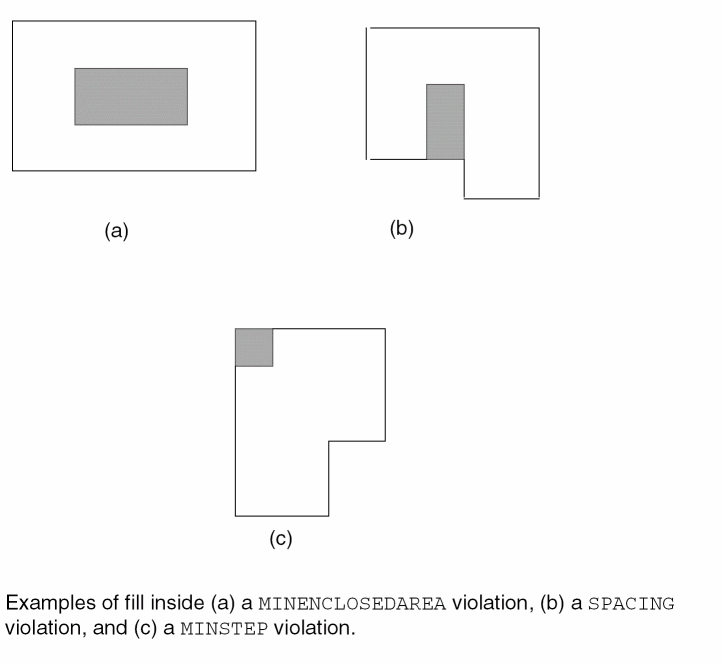
Specifies that these special-routes are used to shield other signal nets. It is applied to the next RECT/POLYGON/VIA or routingPoints statement.
These are normally special-routes of a ground net used to shield a signal net from the noise of other neighboring nets rather than being used as part of the ground distribution network.
The shieldNetName is the name of the signal net that is shielded by the special routes. In some cases, a shield route may not be for a specific signal net or it may be shared by more than one signal net to reduce routing congestion. For example, if two signal routes have only one routing track between them, the shield route in the middle is shared by both the signal nets. In such cases, shieldNetName is conventionally the same name as the ground net that is the shield. Example: + SHIELD VSS.
See Example 6-26.
Specifies the name of the via placed at every point in the list with an optional orientation. For example, the statement VIA myVia ( 0 0 ) ( 1 1 ) indicates an instance of myVia at 0,0 and at 1,1.
...
Example 6-25 Special Wiring With Routing Points
SPECIALNETS 1 ;
- vdd ( * vdd )
+ USE POWER
+ POLYGON metal1 ( 0 0 ) ( 0 100 ) ( 100 100 ) ( 200 200 ) ( 200 0 )
+ POLYGON metal2 ( 100 100 ) ( * 200 ) ( 200 * ) ( 300 300 ) ( 300 100 )
+ RECT metal1 ( 0 0 ) ( 100 200 )
+ ROUTED metal1 100 ( 0 0 50 ) ( 100 0 50 ) via12 ( 100 100 50 )
;
END SPECIALNETS
Example 6-26 Usage of Routed/Cover/Fixed, Shield, and Property
The following example shows how the ROUTED/COVER/FIXED, SHIELD and PROPERTY values are applied to the subsequent RECT/POLYGON/VIA statements.
#RECT/POLYGON/VIA usage
+ FIXED #FIXED applies only to the next RECT/POLYGON/VIA
+ SHIELD test_net
+ PROPERTY prop1 100
+ PROPERTY prop2 "test"
+ SHAPE STRIPE
+ RECT M1 ( 0 0 ) ( 100 0 ) #RECT has FIXED, SHIELD, prop1, prop2, STRIPE
+ RECT M2 ( 0 0 ) ( 100 0 ) #RECT defaults to ROUTED, nothing else is set
+ PROPERTY prop1 200
+ VIA via_test ( 0 0 ) ( 100 100 ) #Two vias with default ROUTED, and prop1
#routingPoints usage
+ FIXED M2 20 #FIXED until next FIXED/ROUTED/COVER
+ SHIELD test_net #Applies only to next routingPoints
+ PROPERTY prop1 100 #Applies only to next routingPoints
+ SHAPE STRIPE #Applies only to next routingPoints
( 0 0 ) ( 100 0 ) via_test ( 100 100 ) #Two wires and via in
#routingPoints, all have
#FIXED, SHIELD, prop1, STRIPE
NEW M3 20 #new routingPoints, so only FIXED applies
( 200 0 ) ( 200 200 ) #One wire with FIXED only
+ ROUTED M4 20
( 200 200 ) ( 200 300 ) ; #One wire with ROUTED only
The Innovus special-route user_class attribute uses the reserved DEF_CDN_USER_CLASS name and would look like this:
+ ROUTED M1 60 + PROPERTY DEF_CDN_USER_CLASS "test string"
+ SHAPE FOLLOWPIN ( 0 0 ) ( 100 * ) ;
The following example specifies arrays of via VIAGEN21_2 on metal1 and metal2.
SPECIALNETS 2 ;
-vdd ( * vdd )
+ ROUTED metal1 150 ( 100 100 ) ( 200 * )
NEW metal1 0 ( 200 100 ) VIAGEN21_2 DO 10 BY 20 STEP 10000 20000
NEW metal2 0 (-900 -30 ) VIAGEN21_2 DO 1000 BY 1 STEP 5000 0
...
As with any other VIA statement, the DO statement does not change the previous coordinate. Therefore, the following statement creates a metal1 wire of width 50 from ( 200 100 ) to ( 200 200 ) along with the via array that starts at ( 200 100 ).
NEW metal1 50 ( 200 100 ) VIAGEN21_2 DO 10 BY 20 STEP 1000 2000 ( 200 200 )
Example 6-28 Multi-Mask Layers with Special Wiring
The following example shows a routing statement that specifies three-mask layers M1 and VIA1, and a two-mask layer M2:
+ FIXED + SHAPE RING + MASK 2 + RECT M3 ( 0 0 ) ( 10 10 )
+ ROUTED M1 2000 (10 0 ) MASK 3 (10 20 ) VIA1_1
NEW M2 1000 ( 10 10 ) (20 10) MASK 1 ( 20 20 ) MASK 031 VIA1_2
+ SHAPE STRIPE + VIA VIA3_3 ( 30 30 ) ( 40 40 )
;
-
M3rectangle shape is on mask 2, hasFIXEDroute status, and shapeRING -
M1wire shape from (10 0) to (10 20) is on mask 3. -
VIA1_1via has no precedingMASKstatement so all the metal and cut shapes have no mask and are uncolored -
first
NEW M2wire shape (10 10) to (20 10) has no mask set and is uncolored -
second
M2wire shape (20 10) to (20 20) is on mask 1 -
VIA1_2via has a MASK 031 (it can be MASK 31 also) so:-
topMaskNum is 0 in the 031 value, so no mask is set for the top metal (
M2) shape -
bottomMaskNum is 1 in the 031 value, so mask 1 is used for the bottom metal (
M1) shape - cutMaskNum is 3 in the 031 value, so the bottom-most, then left-most cut of the via-instance is mask 3. The mask for the other cuts of the via-instance are derived from the via-master by "shifting" the via-master's cut masks to match. So, if the via-master's bottom-left cut is mask 1, then the via-master cuts on mask 1 become mask 3 for the via-instance, and similarly cuts on 2 shift to 1, and cuts on 3 shift to 2. See Figure 6-8.
-
topMaskNum is 0 in the 031 value, so no mask is set for the top metal (
The VIA3_3 has shape STRIPE, and the via is at both (30 30) and (40 40). There is no wire segment between (30 30) and (40 40). If the route status is not specified, it is considered as + ROUTED.
Figure 6-8 Multi-Mask Patterns with Special Wiring
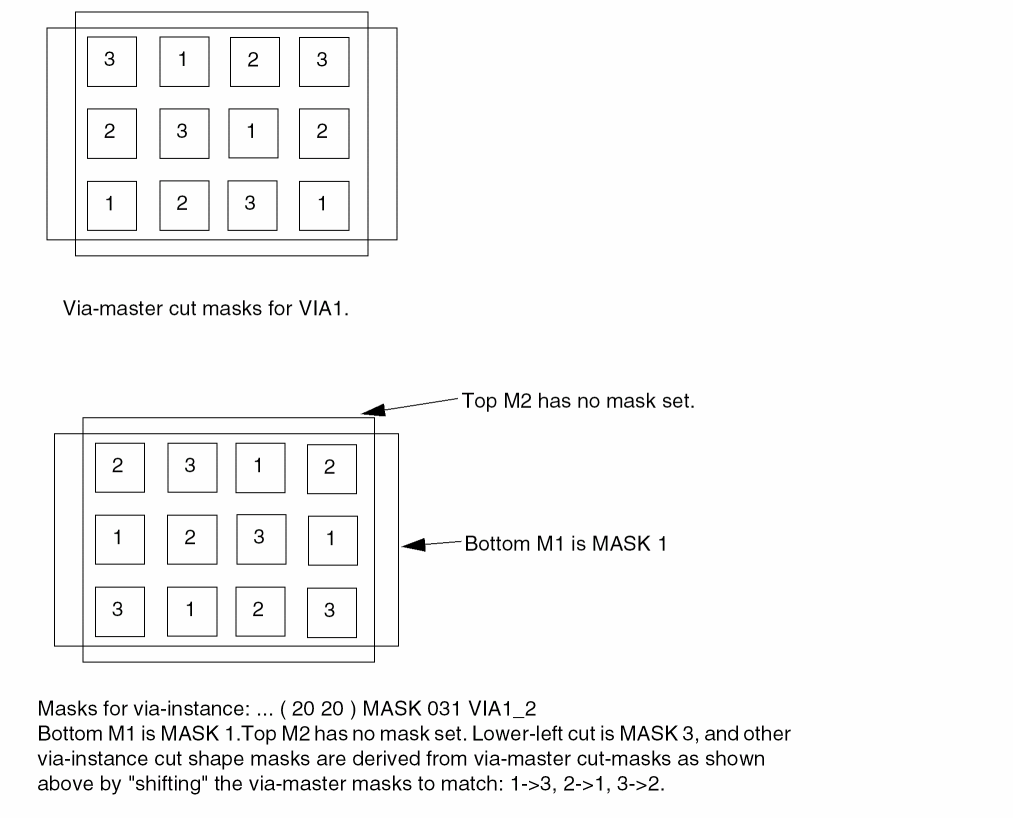
Example 6-29 Special Nets Statements
Signoff DRC tools may require metal shapes under the trim metal shapes to fill up the gaps between the line-end of wires sandwiched by the trim metal shape to be output in DEF. Those metal shapes would be written out in _TRIMMETAL_FILLS_RESERVED with the DRCFILL tag in the SPECIALNETS section in the following format:
- _TRIMMETAL_FILLS_RESERVED
+ ROUTED + SHAPE DRCFILL + MASKx+ RECT M1 (x x) (x x)
As trim metal shapes need to be aligned and merged, dummy patches are often added even on OBS and unconnected pins. Those patches would be written out in _SADP_FILLS_RESERVED with the DRCFILL tag in the SPECIALNETS section in the following format:
- _SADP_FILLS_RESERVED
+ ROUTED + SHAPE DRCFILL + MASK x + RECT M1 (x x) (x x)
The following SPECIALNETS statement defines two metal shapes under the trim metal shapes and a dummy patch written out with the DRCFILL tag:
SPECIALNETS 2 ;
- _TRIMMETAL_FILLS_RESERVED
+ ROUTED + SHAPE DRCFILL + MASK 1 + RECT M1 (30 32) (33 34)
+ ROUTED + SHAPE DRCFILL + MASK 2 + RECT M1 (36 27) (39 29)
- _SADP_FILLS_RESERVED
+ ROUTED + SHAPE DRCFILL + MASK 2 + RECT M1 (30 27) (36 29)
END SPECIALNETS
Figure 6-9 Trim Metal and SADP Fills in the SPECIALNETS Section
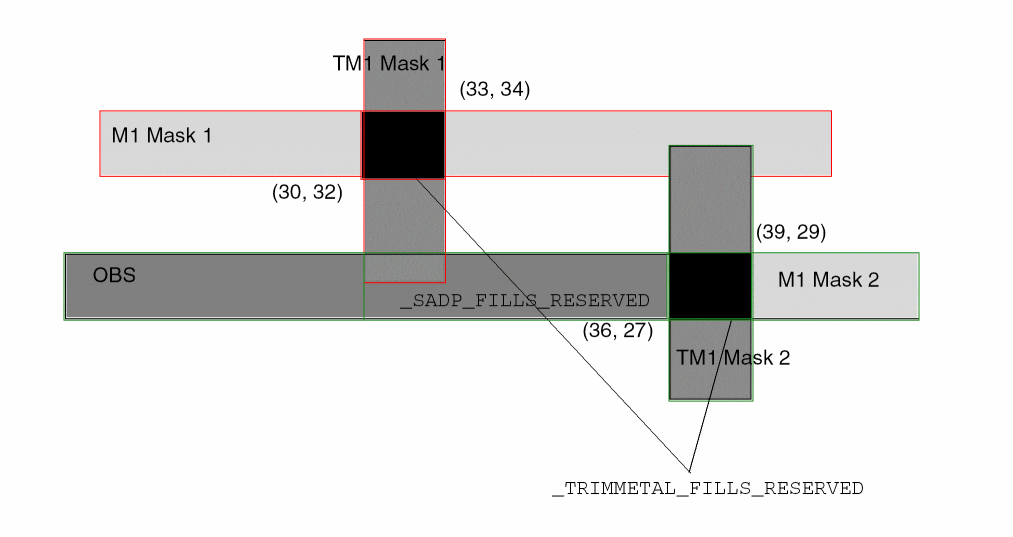
Defining Routing Points
Routing points define the center line coordinates of a route. If a route has a 90-degree edge, it has a width of routeWidth, and extends from one coordinate (x y) to the next coordinate.
If either endpoint has an optional extension value (extValue), the wire is extended by that amount past the endpoint. If a coordinate with an extension value is specified after a via, the wire extension is added to the beginning of the next wire segment after the via (zero-length wires are not allowed). Some applications convert the extension value to an equivalent route that has the x and y points already extended, with no extension value. If no extension value is defined, the wire extension is 0, and the wire is truncated at the endpoint.
The routeWidth must be an even value to ensure that the corners of the route fall on a legal database coordinate without round off. Because most vendors specify a manufacturing grid, routeWidth must be an even multiple of the manufacturing grid in order to be fabricated.
If the wire segment is a 45-degree edge, a default octagon (described below) is used for the endpoints. The routeWidth must be an even multiple of the manufacturing grid in order to keep all of the coordinates of the resulting outer wire boundary on the manufacturing grid. See Default Octagon for 45-degree SPECIALNET Routing.
Specifying Coordinates
To maximize compactness of the design files, the coordinates allow for the asterisk ( * ) convention. For example, ( x * ) indicates that the y coordinate last specified in the wiring specification is used; ( * y ) indicates that the x coordinate last specified is used.
Each coordinate sequence defines a connected orthogonal or 45-degree path through the points. The first coordinate in a sequence must not have an * element.
All subsequent points in a connected sequence must create orthogonal or 45-degree paths. For example, the following sequence is a valid path:
( 100 200 ) ( 200 200 ) ( 200 500 )
The following sequence is an equivalent path:
( 100 200 ) ( 200 * ) ( * 500 )
The following sequence is not valid because it is not an orthogonal or 45-degree segment.
( 100 200 ) ( 300 500 )
Special Pins and Wiring
Pins that appear in the SPECIALNETS statement are special pins. Regular routers do not route to these pins. The special router routes special wiring to special pins. If you use a component-based format to input the connectivity for the design, special pins to be routed by the special router also must be specified in the SPECIALNETS statement, because pins included in the COMPONENTS statement are considered regular.
The following example inputs connectivity in a component-based format, specifies VDD and VSS pins as special pins, and marks VDD and VSS nets for special routing:
COMPONENTS 3 ;
C1 AND N1 N2 N3 ;
C2 AND N4 N5 N6 ;
END COMPONENTS
SPECIALNETS 2 ;
VDD ( * VDD ) + WIDTH M1 5 ;
VSS ( * VSS ) ;
END SPECIALNETS
Shielded Routing
If, in a non-routed design, a net has + SHIELDNET attributes, the router adds shielded routing to this net. + NOSHIELD indicates the last wide segment of the net is not shielded. If the last segment is not shielded and is tapered, use the + TAPER keyword instead of + NOSHIELD. For example:
+ SHIELDNET VSS # both sides will be shielded with VSS
+ SHIELDNET VDD # one side will be shielded with VDD and
+ SHIELDNET VSS # one side will be shielded with VSS
After you add shielded routing to a special net, it has the following syntax:
+ SHIELD regularNetName
MET2regularWidth(xy)
A shield net specified for a regular net should be defined earlier in the DEF file in the SPECIALNETS section. After describing shielded routing for a net, use + ROUTED to return to the routing of the current special net.
SPECIALNETS 2 ;
- VSS
+ ROUTED MET2 200
...
+ ROUTED MET3 100
+ SHIELD my_net
+ RECT ( 100 100 ) ( 200 200 ) ;
- VDD
+ ROUTED MET2 200
...
END SPECIALNETS
Default Octagon for 45-degree SPECIALNET Routing
Default Orthogonal Routing Style
In SPECIALNETS for orthogonal segments, the wire segments default to a zero-extension.
Default Style for 45-Degree Routing
For 45-degree routing, a POLYGON can be used, but some applications prefer to keep a center-line model that is easier to modify and edit. To support this, DEF has a default “octagonal” end point for 45-degree routes in the SPECIALNETS routing section. The default style is implicitly included with any 45-degree routing segment. It is computed directly from the wire width and endpoints, at the expense of some loss in flexibility.
The default style is an octagon (shown in Figure 6-10) whose coordinates are computed from the wire width and the manufacturing grid.
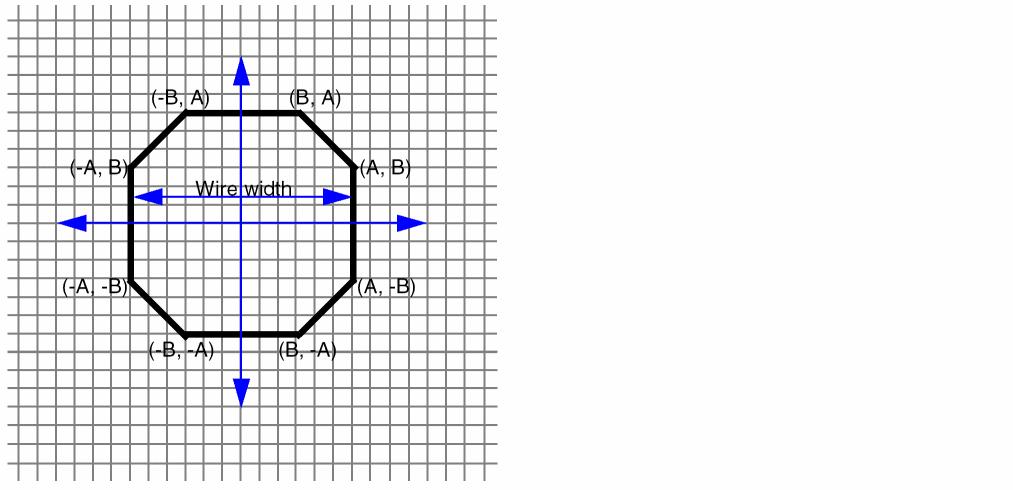
The octagon is always symmetric about the x and y axis. The coordinates are computed to be exactly the same wire width as equivalent horizontal or vertical wire widths, and as close as possible for the diagonal widths (they are always slightly bigger because of rounding of irrational values), while forcing the coordinates to remain on the manufacturing grid. The wire width must be an even multiple of the manufacturing grid in order to keep A and B on the manufacturing grid.
- W = wire width
-
M = manufacturing grid (mgrid). This is derived from the LEF
MANUFACTURINGGRIDstatement. - D = diagonal width
- ceiling = round up the result to the nearest integer
The octagon coordinates are computed as:
The derivation of B can be understood as:
The diagonal width (D) must be greater than or equal to the wire width (W), and B must be on the manufacturing grid, so D must be equal to W, which results in:
B
To force B to be on the manufacturing grid, and keep the diagonal width greater than or equal to the wire width:
B on mgrid =
Which results in the computation:
The following table lists examples of coordinate computations:
Table 6-1
The ‘octagon’ default style defined above applies only to 45-degree route segments; it does not apply to 90-degree route segments.
Note that point extension acts on both connected segments for internal DEF paths. In addition, diagonal segments and any orthogonal segments connected to them are not subject to point extension. If point extensions are specified for such segments, the application should ignore them.
Routing Point Extensions (x y extValue)
If a routing point has extValue, then the resulting routing geometry should be created with the following rules:
-
By default, the end extension of
SPECIALNETSsegments is zero. - DEF path start and endpoint extensions will be applied to start and end path ends.
-
Internal DEF path point extension acts on both the connected segments. If that is not desired, you need to use the
( * * <ext> )method to make them different. - Diagonal segments are not subject to endpoint extensions; if extValue exists, the application should ignore it.
In SPECIALNETS, points with extension 0 are equivalent to points without extensions. The following two routes produce identical routing shapes, as shown in Figure 6-11.
SPECIALNETS 1 ;
- VDD (* vdd)
+ ROUTED metal3 80 ( 0 0 ) ( 100 0 ) ( 200 100 ) ( 300 100 ) ;
- VSS (* vss)
+ ROUTED metal3 80 ( 0 0 0 ) ( 100 0 0 ) ( 200 100 0 ) ( 300 100 0 ) ;
END SPECIALNETS
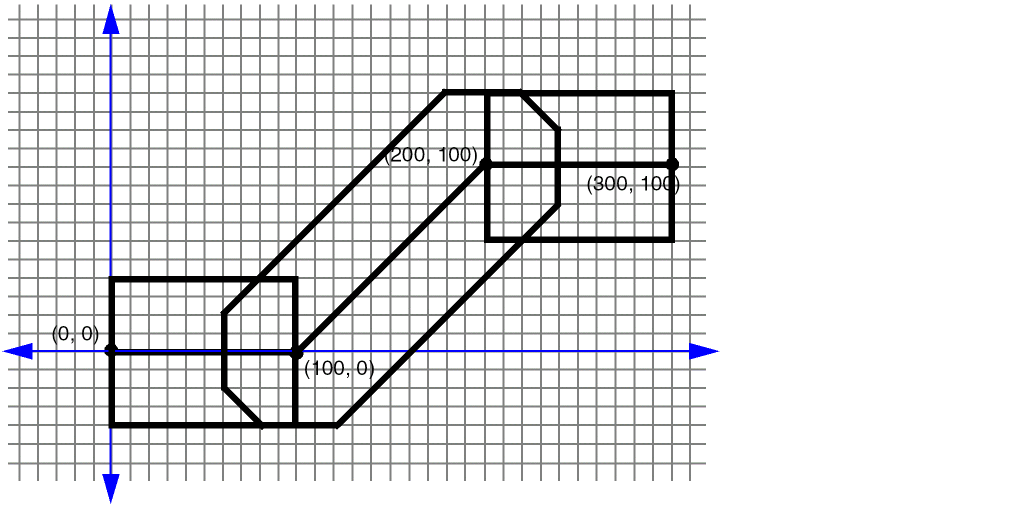
The following SPECIALNETS regular route definition, using an explicit ½ width extension produces the route shown in Figure 6-12.
SPECIALNETS 1;
- POWER (* power)
+ ROUTED metal3 80 ( 0 0 40 ) ( 100 0 ) ( 200 100 ) ( 300 100 40 ) ;
#Need to add half-width extensions to the start and
#end points explicitly.
END SPECIALNETS
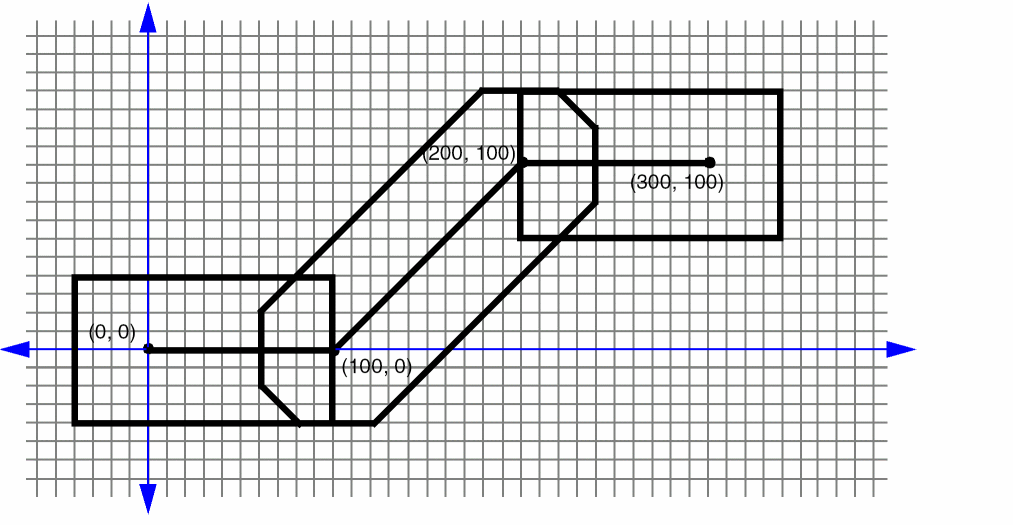
The following definition, using a wire extension of
SPECIALNETS 1 ;
- POWER (* power)
+ ROUTED metal3 80 ( 0 0 40 ) ( 100 0 40 ) ( 200 100 40 ) ( 300 100 40 ) ;
#The half-width extensions are given explicitly, they will be
#ignored for diagonal segments.
END SPECIALNETS
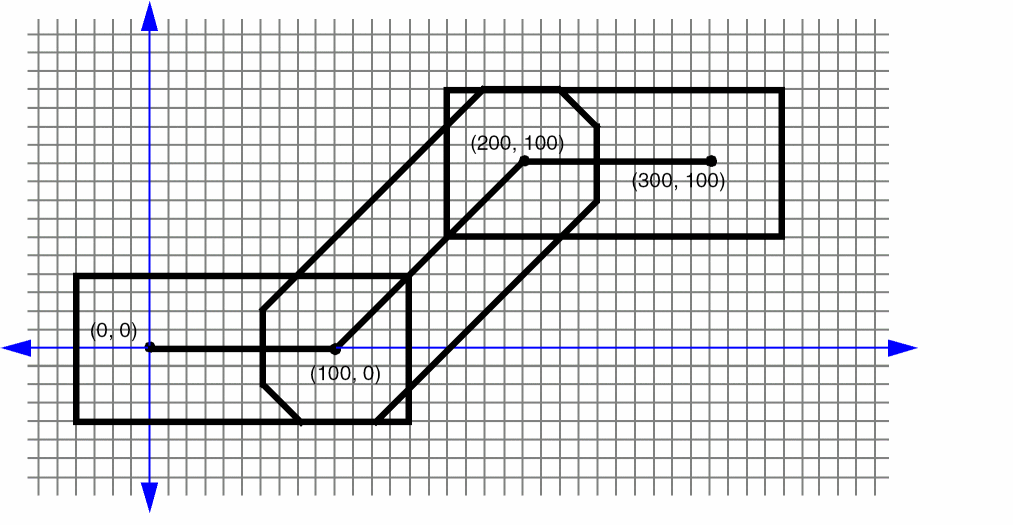
Technology
[TECHNOLOGY technologyName ;]
Specifies a technology name for the design in the database. In case of a conflict, the previous name remains in effect.
Tracks
[TRACKS
[{X | Y} start DO numtracks STEP space
  [PROPERTY propName propVal] ...
  [MASK maskNum [SAMEMASK]]
  [WIDTH width]
  [NDR ruleName]
  [LAYER layerName ...]
;] ...]
Defines the routing grid for a standard cell-based design. Typically, the routing grid is generated when the floorplan is initialized. The first track is located at an offset from the placement grid set by the OFFSET value for the layer in the LEF file. The track spacing is the PITCH value for the layer defined in LEF.
Specifies the number of tracks to create for the grid. You cannot specify 0 numtracks.
Specifies the routing layer used for the tracks. You can specify more than one layer.
Specifies which mask for double or triple patterning lithography to use for the first routing track. The maskNum variable must be a positive integer - most applications support values of 1, 2, or 3 only. The layer(s) must be declared as two or three mask layers in the LEF LAYER section.
By default, the tracks cycle through all the masks. So you will see alternating masks, such as, 1, 2, 1, 2, etc. for a two-mask layer and 1, 2, 3, 1, 2, 3, etc., for a three-mask layer.
If the SAMEMASK keyword is specified, then all the routing tracks are the same mask as the first track mask. Tracks without any defined mask do not have a mask set (that is, they are uncolored).
See Example 6-30.
Specifies a NONDEFAULTRULE ruleName, which must be defined in the LEF or DEF before the TRACKS statement, for all routes using these routing tracks. This is similar to the WIDTH control but uses an NDR rule instead.
Specifies a property on the TRACKS statement. The propName and propVal values must match a name and data type, such as STRING or INTEGER, from the PROPERTYDEFINITIONS section for a TRACKS object.
Here’s an example of two properties added to a TRACKS definition:
TRACKS X 0 DO 100 STEP 10
PROPERTY prop1 100
PROPERTY prop2 "test"
LAYER M1 M2 ;
Specifies the spacing between the tracks.
Specifies the width of all routes using these routing tracks. Some technologies do not allow different routing widths along one routing track for some of the lower routing layers. It can also be used to force wider routes to specific tracks if the standard-cell architecture is set up that way.
Specifies the location and direction of the first track defined. X indicates vertical lines; Y indicates horizontal lines. start is the X or Y coordinate of the first line. For example, X 3000 creates a set of vertical lines, with the first line going through (3000 0).
Example 6-30 Mask Assignments for Routing Tracks
-
The following example shows a three-mask layer
M1that has a first track of mask 2 with cycling mask numbers after that:TRACKS X 0 DO 20 STEP 5 MASK 2 LAYER M1 ;
This statement will result inM1vertical tracks atXcoordinates with mask assignments of 0 (mask 2), 5 (mask 3), 10 (mask 1), 15 (mask 2), etc., for 20 tracks. -
The following statement will result in
M1vertical tracks atXcoordinates with mask assignments of 0 (mask 1), 10 (mask 1), 20 (mask 1), 30 (mask 1), etc., for 20 tracks.TRACKS X 0 DO 20 STEP 10 MASK 1 SAMEMASK LAYER M1 ;
Track Properties
PROPERTYDEFINITIONS
DESIGN TRACKPROPERTIES STRING
"{TRACKS [{X | Y} start DO numtracks STEP space
[MASK maskNum [SAMEMASK]] [LAYER layerName ...]
[WIDTH width] [NDR ruleName]}...
;...";
END PROPERTYDEFINITIONS
Defines the routing grid for a standard cell-based design with additional definition of either the width of the tracks and/or the NDR to which the tracks belong.
Specifies the number of tracks to create for the grid. You cannot specify 0 numtracks.
Specifies the routing layer used for the tracks. You can specify more than one layer.
Specifies which mask for double or triple patterning lithography to use for the first routing track. The maskNum variable must be a positive integer - most applications support values of 1, 2, or 3 only. The layer(s) must be declared as two or three mask layers in the LEF LAYER section.
By default, the tracks cycle through all the masks. So you will see alternating masks, such as, 1, 2, 1, 2, etc. for a two-mask layer and 1, 2, 3, 1, 2, 3, etc., for a three-mask layer.
If the SAMEMASK keyword is specified, then all the routing tracks are the same mask as the first track mask. Tracks without any defined mask do not have a mask set (that is, they are uncolored).
See Example 6-30.
Specifies that the tracks belong to the NONDEFAULTRULE with name ruleName. See Example 6-31.
Specifies the spacing between the tracks.
Specifies the width of the tracks as width. See Example 6-31.
Specifies the location and direction of the first track defined. X indicates vertical lines; Y indicates horizontal lines. start is the X or Y coordinate of the first line. For example, X 3000 creates a set of vertical lines, with the first line going through (3000 0).
Example 6-31 Width/NDR Specification for Routing Tracks
Consider the following example:
PROPERTYDEFINITIONS
DESIGN TRACKPROPERTIES STRING "
TRACKS Y 560 DO 72 STEP 1120 LAYER M1 WIDTH 2400 ;
TRACKS X 2640 DO 46 STEP 1980 LAYER M2 NDR NDR1 ; " ;
END PROPERTYDEFINITIONS
This means that the tracks on M1 in the first statement has a width of 2400 and the tracks on M2 in the second statement belong to the NDR with the name NDR1.
Units
[UNITS DISTANCE MICRONS dbuPerMicron ;]
Specifies the database units per micron (dbuPerMicron) to convert DEF distance units into microns.
LEF supports values of 100, 200, 400, 800, 1000, 2000, 4000, 8000, 10,000, and 20,000 for the LEF dbuPerMicron. The LEF dbuPerMicron must be greater than or equal to the DEF dbuPerMicron, otherwise you can get round-off errors. The LEF convert factor must also be an integer multiple of the DEF convert factor so no round-off of DEF database unit values is required (e.g., a LEF convert factor of 1000 allows DEF convert factors of 100, 200, 1000, but not 400, 800).
The following table shows the valid pairings of the LEF dbuPerMicron and the corresponding legal DEF dbuPerMicron values.
| LEF dbuPerMicron | Legal DEF dbuPerMicron |
|---|---|
Using DEF Units
The following table shows examples of how DEF units are used:
| Units | DEF Units | DEF Value Example | Real Value |
|---|---|---|---|
The DEF reader assumes divisor factors such that DEF data is given in the database units shown below.
| Unit | Database Precision |
|---|---|
Version
[VERSION versionNumber ;]
Specifies which version of the DEF syntax is being used.
VERSION statement is optional. Most applications default to the 5.8 version of DEF. However, a default value of 5.8 is not formally part of the language definition; therefore, you cannot be sure that all applications use this default value. The recommended practice is to specify the VERSION statement in the DEF file. The latest version as described by this document is 6.0.Vias
[VIASnumVias; [–viaName[+ PROPERTYpropName propVal] ... [ + VIARULEviaRuleName+ CUTSIZExSizeySize+ LAYERSbotmetalLayercutLayertopMetalLayer+ CUTSPACINGxCutSpacingyCutSpacing+ ENCLOSURExBotEncyBotEncxTopEncyTopEnc[+ ROWCOLnumCutRowsNumCutCols] [+ ORIGINxOffsetyOffset] [+ OFFSETxBotOffsetyBotOffsetxTopOffsetyTopOffset] [+ PATTERNcutPattern] ] | [ + RECTlayerName[+ MASKmaskNum]ptpt| + POLYGONlayerName[+ MASKmaskNum]ptptpt] ...] ;] ...
END VIAS]
Lists the names and geometry definitions of all vias in the design. Two types of vias can be listed: fixed vias and generated vias. All vias consist of shapes on three layers: a cut layer and two routing (or masterslice) layers that connect through that cut layer.
A fixed via is defined using rectangles or polygons, and does not use a VIARULE. The fixed via name must mean the same via in all associated LEF and DEF files.
A generated via is defined using VIARULE parameters to indicate that it was derived from a VIARULE GENERATE statement. For a generated via, the via name is only used locally inside this DEF file. The geometry and parameters are maintained, but the name can be freely changed by applications that use this via when writing out LEF and DEF files to avoid possible via name collisions with other DEF files.
Specifies the required width (xSize) and height (ySize) of the cut layer rectangles.
Type: Integer, specified in DEF database units
CUTSPACING xCutSpacing yCutSpacing
Specifies the required x and y spacing between cuts. The spacing is measured from one cut edge to the next cut edge.
Type: Integer, specified in DEF database units
ENCLOSURE xBotEnc yBotEnc xTopEnc yTopEnc
Specifies the required x and y enclosure values for the bottom and top metal layers. The enclosure measures the distance from the cut array edge to the metal edge that encloses the cut array (see Figure 6-14).
Type: Integer, specified in DEF database units
LAYERS botMetalLayer cutLayer TopMetalLayer
Specifies the required names of the bottom routing/masterslice layer, cut layer, and top routing/masterslice layer. These layer names must be previously defined in layer definitions, and must match the layer names defined in the specified LEF viaRuleName.
Specifies which mask for double or triple patterning lithography is to be applied to the shapes defined in RECT or POLYGON statements of the via master. The maskNum variable must be a positive integer - most applications support values of 1, 2, or 3 only. For a fixed via made up of RECT/POLYGON statements, the cut-shapes must be either colored or uncolored. It is an error to have partially colored cuts for one via. Uncolored cut shapes should be automatically colored by the reader if the layer is a multi-mask layer.
The metal shapes of the via-master do not need colors because the via-instance has the mask color. Some readers may, however, color them for internal consistency (see Example 6-34). So a writer may write out MASK 1 for metal shapes even if they were read in with no mask value.
For uncolored fixed vias, or parameterized vias (with + VIARULE ...), the mask of the cuts are pre-defined as an alternating pattern starting with MASK 1 at the bottom-left. The mask cycles, from left-to-right and bottom-to-top, for the cuts are as shown in Figure 6-19.
Specifies the number of vias listed in the VIA statement.
OFFSET xBotOffset yBotOffset xTopOffset yTopOffset
Specifies the x and y offset for the bottom and top metal layers. These values allow each metal layer to be offset independently.
By default, the 0,0 origin of the via is the center of the cut array, and the enclosing metal rectangles. After the non-shifted via is computed, the metal layer rectangles are shifted by adding the appropriate values—the x/y BotOffset values to the metal layer below the cut layer, and the x/y TopOffset values to the metal layer above the cut layer.
These offset values are in addition to any offset caused by the ORIGIN values. For an example and illustration of this syntax, see Example 6-32.
Default: 0, for all values
Type: Integer, in DEF database units
Specifies the x and y offset for all of the via shapes. By default, the 0,0 origin of the via is the center of the cut array, and the enclosing metal rectangles. After the non-shifted via is computed, all cut and metal rectangles are shifted by adding these values. For an example and illustration of this syntax, see Example 6-32.
Default: 0, for both values
Type: Integer, in DEF database units
Specifies the cut pattern encoded as an ASCII string. This parameter is only required when some of the cuts are missing from the array of cuts, and defaults to “all cuts are present,” if not specified.
For information on and examples of via cut patterns, see “Creating Via Cut Patterns”.
The cutPattern syntax is defined as follows:
numRows_rowDefinition [_numRows_rowDefinition] ...
|
Specifies a hexadecimal number that indicates how many times to repeat the following row definition. This number can be more than one digit. |
|
The rowDefinition syntax is defined as follows:{[RrepeatNumber]hexDigitCutPattern} ...
For parameterized vias (with + VIARULE ...), the cutPattern has an optional suffix added to allow three types of mask color patterns. The default mask color pattern (no suffix) is a checker-board (see Figure 6-17). The other two patterns supported are alternating rows, and alternating columns (see Figure 6-18).
The optional suffixes are:
<cut_pattern>_MR alternating rows
<cut_pattern>_MC alternating columns
Defines the via geometry for the specified layer. You must specify at least three points to generate the polygon, and the edges must be parallel to the x axis, the y axis, or at a 45-degree angle.
Type: (x y) Integer, specified in database units
Each POLYGON statement defines a polygon generated by connecting each successive point, and then the first and last points. The pt syntax corresponds to a coordinate pair, such as (x y). Specify an asterisk (*) to repeat the same value as the previous x or y value from the last point.
For example, + POLYGON ( 0 0 ) ( 10 10 ) ( 10 0 ) creates a triangle shape.
All vias consist of shapes on three layers: a cut layer and two routing (or masterslice) layers that connect through that cut layer. There should be at least one RECT or POLYGON on each of the three layers.
Specifies a property on the VIA definition. The propName and propVal values must match a name and data type, such as STRING or INTEGER, from the PROPERTYDEFINITIONS section for a VIA object.
Here’s an example of two properties added to a VIA definition:
VIAS 1 ;
- myVia1
+ PROPERTY prop1 100
+ PROPERTY prop2 "test"
+ VIARULE via1rule
+ CUTSIZE ...;
Defines the via geometry for the specified layer. The points are specified with respect to the via origin. In most cases, the via origin is the center of the via bounding box. All geometries for the via, including the cut layers, are output by the DEF writer.
Type: (x y) Integer, specified in database units
All vias consist of shapes on three layers: a cut layer and two routing (or masterslice) layers that connect through that cut layer. There should be at least one RECT or POLYGON on each of the three layers.
Specifies the number of cut rows and columns that make up the cut array.
Default: 1, for both values
Type: Positive integer, for both values
Specifies the via name. Via names are generated by appending a number after the rule name. Vias are numbered in the order in which they are created.
Specifies the name of the LEF VIARULE that produced this via. This name must be specified before you define any of the other parameters, and must refer to a VIARULE GENERATE via rule. It cannot refer to a VIARULE without a GENERATE keyword.
Specifying the reserved via rule name of DEFAULT indicates that the via should use the previously defined VIARULE GENERATE rule with the DEFAULT keyword that exists for this routing-cut-routing (or masterslice-cut-masterslice) layer combination. This makes it possible for a tool that does not use the LEF VIARULE technology section to still generate DEF generated-via parameters by using the default rule.
The following via rule describes a non-shifted via (that is, a via with no OFFSET or ORIGIN parameters). There are two rows and three columns of via cuts. Figure 6-14 illustrates this via rule.
- myUnshiftedVia
+ VIARULE myViaRule
+ CUTSIZE 20 20 #xCutSize yCutSize
+ LAYERS metal1 cut12 metal2
+ CUTSPACING 30 30 #xCutSpacing yCutSpacing
+ ENCLOSURE 20 50 50 20 #xBotEnc yBotEnc xTopEnc yTopEnc
+ ROWCOL 2 3 ;
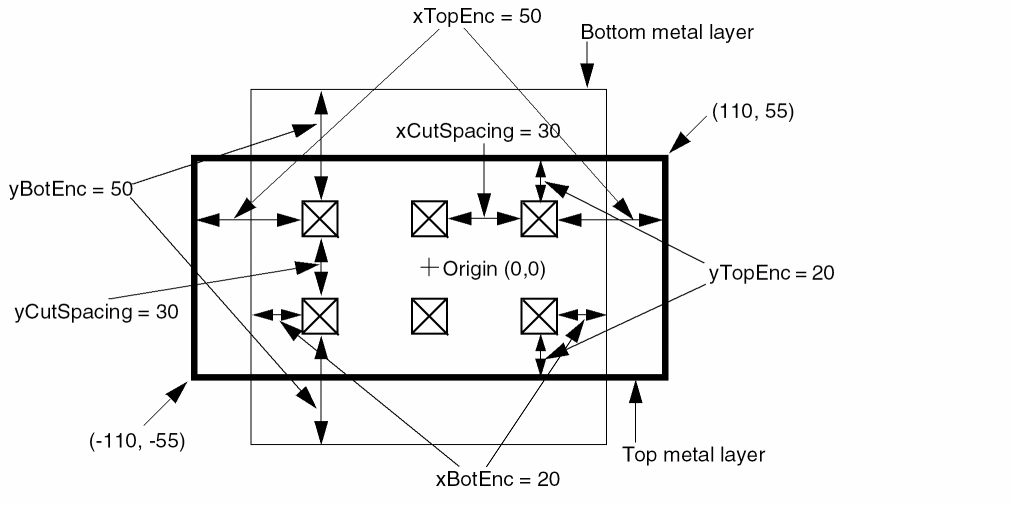
The same via rule with the following ORIGIN parameter shifts all of the metal and cut rectangles by 10 in the x direction, and by -10 in the y direction (see Figure 6-15):
+ ORIGIN 10 -10
Figure 6-15 Via Rule With Origin
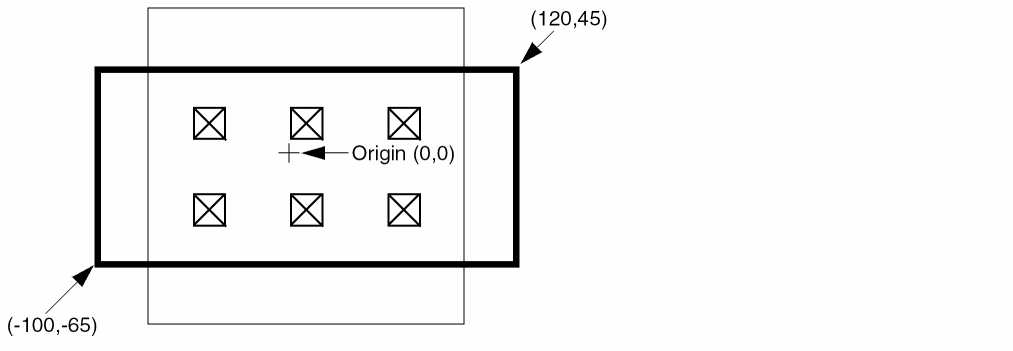
If the same via rule contains the following ORIGIN and OFFSET parameters, all of the rectangles shift by 10, -10. In addition, the top layer metal rectangle shifts by 20, -20, which means that the top metal shifts by a total of 30, -30.
+ ORIGIN 10 -10
+ OFFSET 0 0 20 -20
Figure 6-16 Via Rule With Origin and Offset
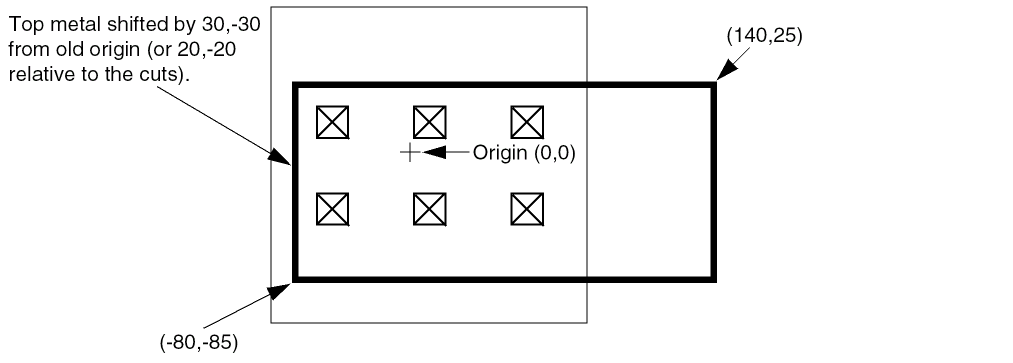
Example 6-33 Multi-Mask Patterns for Parameterized Vias with Via Rule
The following via rule describes a via cut mask pattern for a parameterized via:
- myParamVia1
+ VIARULE myGenVia1 + CUTSIZE 40 40
+ LAYERS M1 VIA1 M2 + CUTSPACING 40 40
+ ENCLOSURE 40 0 0 40 + ROWCOL 3 4
+ PATTERN 2_F_1_D ; #1 cut in top row is missing
Figure 6-17 Multi-Mask Patterns for Parameterized Vias
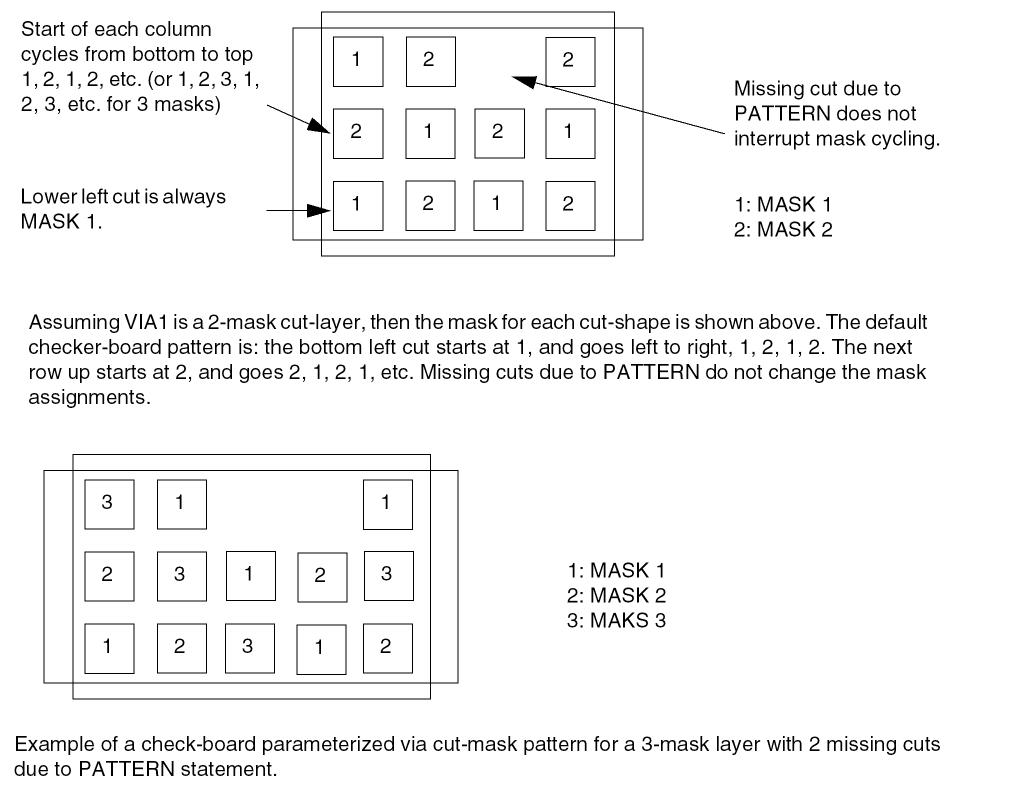
-
The following examples show a parameterized via with cut-mask patterns for a 3-mask layer and 2-mask layer using _MC and _MR suffixes:
Figure 6-18 Multi-Mask Patterns for Parameterized Vias using Suffixes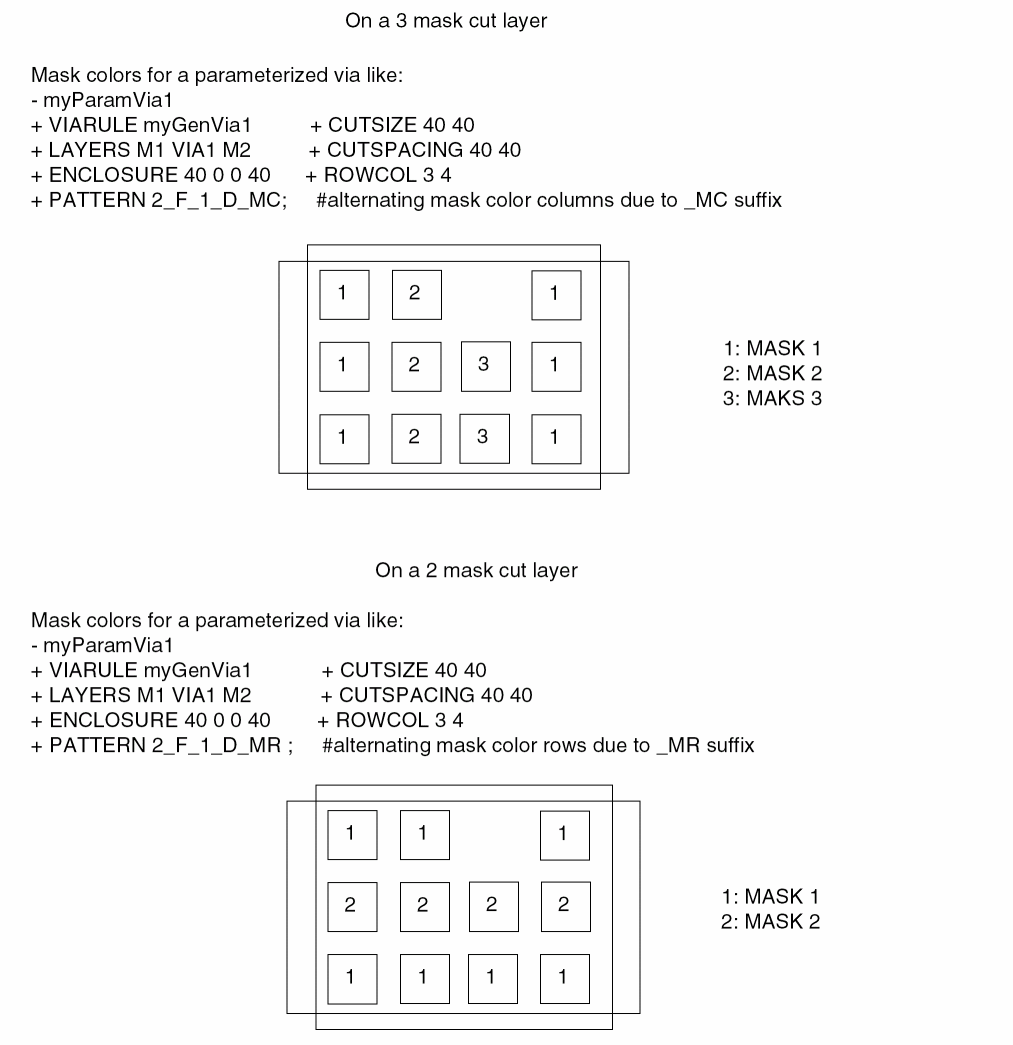
For a fixed via specified using RECT or POLYGON statements, the cut shapes must either be all colored or uncolored. If the cuts are not colored, they will be automatically colored in a checkerboard pattern as shown in Figure 6-17. Each via cut with the same lower-left Y value is considered as one row, and each via in one row is a new column. For common "array" style vias with no missing cuts, this coloring is a good one. For vias that do not have a row and column structure or are missing cuts, then this coloring may not be good (see Figure 6-19). If the metal layers are not colored, some applications will color them to mask 1 for internal consistency, even though the via master metal shape colors are not really used by LEF or DEF via instances.
Example 6-34 Multi-Mask Patterns for Fixed Via
The following example shows a fixed-via with pre-colored cut shapes:
- myVia1
+ RECT M1 ( -40 -20 ) ( 120 20 ) #no mask, some readers set to 1
+ RECT VIA1 + MASK 1 ( -20 -20 ) ( 20 20 ) #first cut on mask 1
+ RECT VIA1 + MASK 2 ( 60 -20 ) ( 100 20 ) #second cut on mask 2
+ RECT ( -20 -40 ) ( 100 40 ) #no mask, some readers set to 1
Figure 6-19 Multi-Mask Patterns for Fixed Via
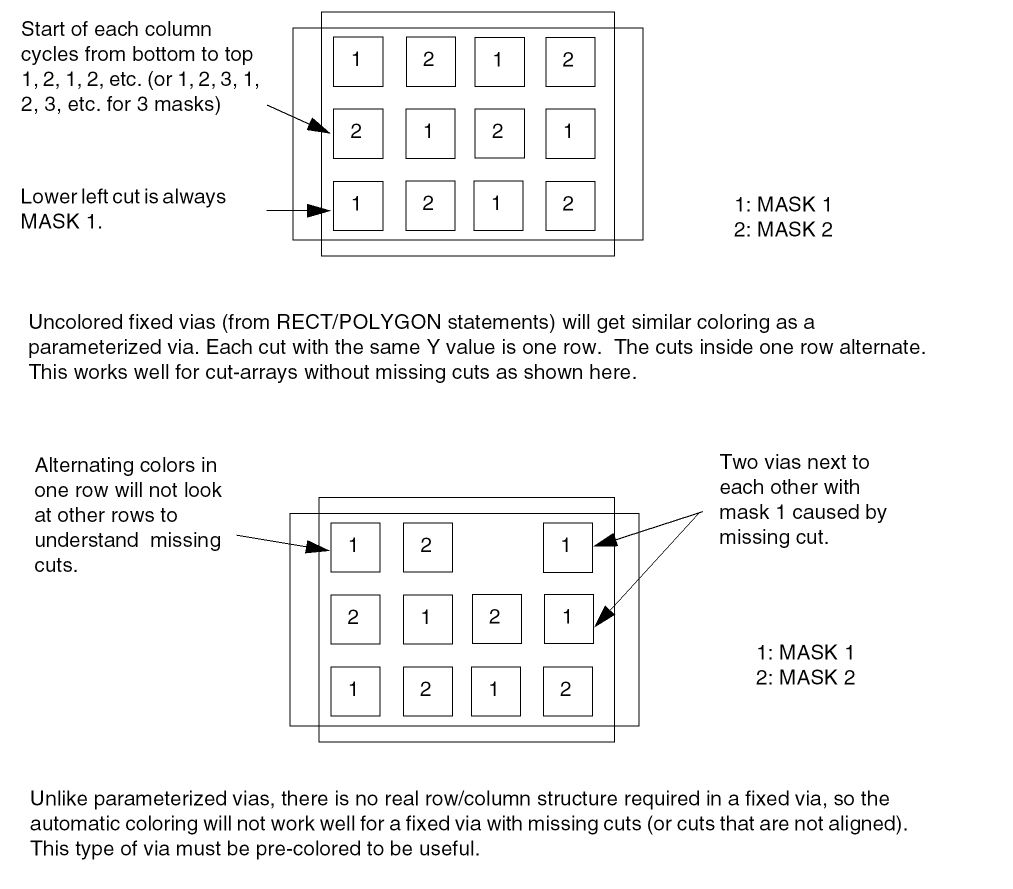
See the Fills, Nets, and Special Nets routing statements to see how a via instance uses these via-master mask values.
Creating Via Cut Patterns
Via cuts are defined as a series of rows, starting at the bottom, left corner. Each row definition defines one row of cuts, from left to right, and rows are numbered from bottom to top.
The PATTERN syntax that defines rows uses the ROWCOL parameters to specify the cut array. If the row has more bits than the numCutCols value in the ROWCOL parameter for this via, the last bits are ignored. The number of rows defined must equal the numCutRows value in the ROWCOL parameter.
Figure 6-20 illustrates the following via cut pattern syntax:
- myVia
+ VIARULE myViaRule
...
+ ROWCOL 5 5
+ PATTERN 2_F0_2_F8_1_78 ;]
The last three bits of F0, F8, and 78 are ignored because only five bits are allowed in a row. Therefore, the following PATTERN syntax gives the identical pattern:
+ PATTERN 2_F7_2_FF_1_7F
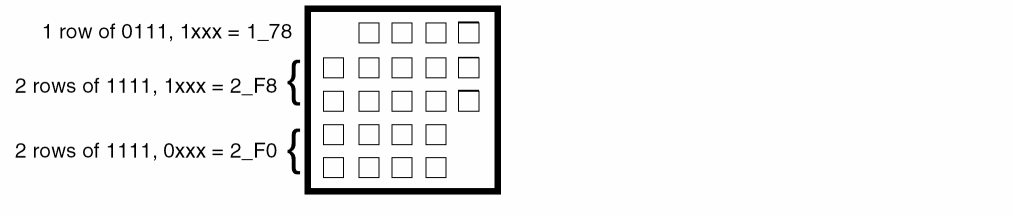
Figure 6-21 illustrates the following via cut pattern syntax:
- myVia
+ VIARULE myViaRule
...
+ ROWCOL 5 14
+ PATTERN 2_FFE0_3_R4F ;
The R4F value indicates a repeat of four Fs. The last two bits of each row definition are ignored because only 14 bits allowed in each row.
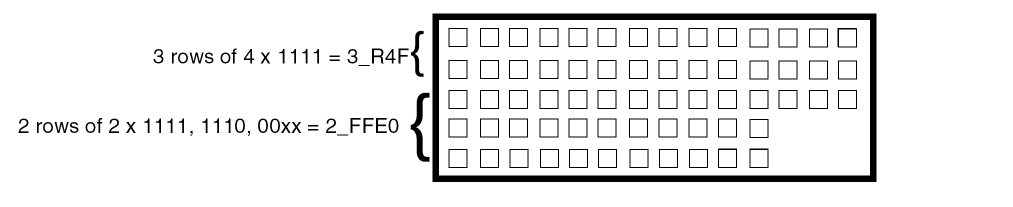
Return to top