
5
LEF Syntax - Layer (Routing)
This chapter contains information about the following topics:
-
Layer (Routing)
- Defining Routing Layer Properties to Create 32/28 nm and Smaller Nodes Rules
- Type Rule
- AC Current Density Rule
- Antenna Diff Gate PWL Rule
- Antenna Diff Only Area Ratio Rule
- Antenna Diff Protector Area Ratio Rule
- Antenna Gate PWL Rule
- Antenna Gate Plus Diffusion Rule
- Area Rule
- Backside Rule
- Boundary Blockage Rule
- Boundary EOL Blockage Rule
- Core EOL Blockage Rule
- Corner EOL Keep-out Rule
- Corner Fill Spacing Rule
- Corner Spacing Rule
- Enclosure Spacing Rule
- Enclosure with EOL Rule
- EOL Extension Spacing Rule
- EOL Keep-out Rule
- EOL Track Rule
- EOL Via Keep-out Rule
- Fill to Fill Spacing Rule
- Five Wires EOL Spacing Rule
- Forbidden Spacing Rule
- Gap Rule
- Joint Corner Spacing Rule
- Joint Forbidden Spacing Rule
- Line End Aligned With Cut Rule
- Line End Gap Rule
- Litho Macro Halo Rule
- Maximum Diagonal Length Rule
- Maximum Length with Cut Rule
- Maximum Overlap Length Rule
- Maximum Width Rule
- Minimum Cut Rule
- Minimum Length Parallel Rule
- Minimum Size Rule
- Minimum Step Rule
- Opposite EOL Spacing Rule
- Pin Connect Blockage Rule
- Pitch Rule
- Protrusion Width Rule
- Rectangle Only Rule
- Region Rule
- Right Way on Grid Only Rule
- Span Length Enclosure Spacing Rule
- Span Length Table Rule
- EOL Spacing Rule
- Convex Corners Spacing Rule
- Perpendicular EOL Spacing Rule
- Spacing Area Rule
- Spacing Layer Rule
- Same Mask Spacing Rule
- Wrong Direction Spacing Rule
- Notch Length Spacing Rule
- Notch Span Spacing Rule
- Jog to Jog Spacing Table Rule
- Direction Span Length Spacing Table Rule
- Two-Widths Spacing Table Rule
- Parallel Span Length Spacing Table Rule
- Two Wires Forbidden Spacing Rule
- Voltage Spacing Rule
- Width Table Rule
- Width Rule
- Wrong Direction EOL Keep Out Rule
- Routing Pitch
Layer (Routing)
LAYERlayerNameTYPE ROUTING ; [MANUFACTURINGGRIDvalue ;] [MASKmaskNum;] DIRECTION {HORIZONTAL | VERTICAL | DIAG45 | DIAG135} ; PITCH {distance|xDistanceyDistance} ; [DIAGPITCH {distance|diag45Distancediag135Distance} ;] WIDTHdefaultWidth; [OFFSET {distance|xDistanceyDistance} ;] [DIAGWIDTHdiagWidth;] [DIAGSPACINGdiagSpacing;] [DIAGMINEDGELENGTHdiagLength;] [AREAminArea;] [MINSIZEminWidthminLength[minWidth2minLength2] ... ;] [[SPACINGminSpacing[ RANGEminWidth maxWidth[ INFLUENCEvalue[RANGEstubMinWidthstubMaxWidth] | RANGEminWidth maxWidth] | ENDOFLINEeolWidthWITHINeolWithin[PARALLELEDGEparSpaceWITHINparWithin[TWOEDGES]] | SAMENET [PGONLY] | NOTCHLENGTHminNotchLength| ENDOFNOTCHWIDTHendOfNotchWidthNOTCHSPACINGminNotchSpacingNOTCHLENGTHminNotchLength] ;] ... [SPACINGTABLE [PARALLELRUNLENGTH {length} ... {WIDTHwidth{spacing} ...} ... ; [SPACINGTABLE INFLUENCE {WIDTHwidthWITHINdistanceSPACINGspacing} ... ;] |TWOWIDTHS {WIDTHwidth[PRLrunLength] {spacing} ...} ... ; ] ;" ;] [WIREEXTENSIONvalue; ] [MINIMUMCUTnumCutsWIDTHwidth[WITHINcutDistance] [FROMABOVE | FROMBELOW] [LENGTHlengthWITHINdistance] ;] ... [MAXWIDTHwidth;] [MINWIDTHwidth;] [MINSTEPminStepLength[ [INSIDECORNER | OUTSIDECORNER | STEP] [LENGTHSUMmaxLength] | [MAXEDGESmaxEdges] ;] [MINENCLOSEDAREAarea[WIDTHwidth] ;] ... [PROTRUSIONWIDTHwidth1LENGTHlengthWIDTHwidth2;] [RESISTANCE RPERSQvalue;] [CAPACITANCE CPERSQDISTvalue;] [HEIGHTdistance;] [THICKNESSdistance;] [SHRINKAGEdistance;] [CAPMULTIPLIERvalue;] [EDGECAPACITANCEvalue;] [MINIMUMDENSITYminDensity;] [MAXIMUMDENSITYmaxDensity;] [DENSITYCHECKWINDOWwindowLengthwindowWidth;] [DENSITYCHECKSTEPstepValue;] [FILLACTIVESPACINGspacing;] [ANTENNAMODEL {OXIDE1 | OXIDE2 | OXIDE3 | OXIDE4 | OXIDE5 | ... | OXIDE32} ;] ... [ANTENNAAREARATIOvalue;] ... [ANTENNADIFFAREARATIO {value| PWL ( (d1r1) (d2r2) ...) } ;] ... [ANTENNACUMAREARATIOvalue;] ... [ANTENNACUMDIFFAREARATIO {value| PWL ( (d1r1) (d2r2) ...) } ;] ... [ANTENNAAREAFACTORvalue[DIFFUSEONLY] ;] ... [ANTENNASIDEAREARATIOvalue;] ... [ANTENNADIFFSIDEAREARATIO {value| PWL ( (d1r1) (d2r2) ...) } ;] ... [ANTENNACUMSIDEAREARATIOvalue;] ... [ANTENNACUMDIFFSIDEAREARATIO {value| PWL ( (d1r1) (d2r2) ...) } ;] ... [ANTENNASIDEAREAFACTORvalue[DIFFUSEONLY] ;] ... [ANTENNACUMROUTINGPLUSCUT ;] [ANTENNAGATEPLUSDIFFplusDiffFactor;] [ANTENNAAREAMINUSDIFFminusDiffFactor;] [ANTENNAAREADIFFREDUCEPWL ( (diffArea1diffMetalFactor1) (diffArea2diffMetalFactor2) ...) ;] [PROPERTYpropName propVal;] ... [ACCURRENTDENSITY {PEAK | AVERAGE | RMS} {value| FREQUENCYfreq_1 freq_2 ...; [WIDTHwidth_1 width_2 ...;] TABLEENTRIESv_freq_1_width_1 v_freq_1_width_2 ...v_freq_2_width_1 v_freq_2_width_2 ...... } ;] [DCCURRENTDENSITY AVERAGE {value| WIDTHwidth_1 width_2 ...; TABLEENTRIESvalue_1 value_2 ...} ;] [PROPERTY LEF_CDN_ACCURRENTDENSITY "ACCURRENTDENSITY {PEAK | AVERAGE | RMS} [TEMPPWLtemp_1multi_1temp_2multi_2...] [HOURSPWLhours_1multi_1hours_2multi_2...] ; " ;] [PROPERTY LEF_CDN_ANTENNADIFFGATEPWL "ANTENNADIFFGATEPWL {OXIDE1 | OXIDE2 | OXIDE3 | OXIDE4 | OXIDE5 | ... | OXIDE32} ((gateArea1effectiveGateArea1) (gateArea2effectiveGateArea2) ... ) ;" ;] [PROPERTY LEF_CDN_ANTENNADIFFONLYAREARATIO “ANTENNADIFFONLYAREARATIO {OXIDE1 | OXIDE2 | OXIDE3 | OXIDE4 | OXIDE5 | ... | OXIDE32}value;..." ;] ;..." ;] [PROPERTY LEF_CDN_ANTENNADIFFPROTECTORAREARATIO “ANTENNADIFFPROTECTORAREARATIO {OXIDE1 | OXIDE2 | OXIDE3 | OXIDE4 | OXIDE5 | ...| OXIDE32}value;..." ;] [PROPERTY LEF_CDN_ANTENNAGATEPWL "ANTENNAGATEPWL {OXIDE1 | OXIDE2 | OXIDE3 | OXIDE4 | OXIDE5 | ... | OXIDE32} ((gateArea1effectiveGateArea1) (gateArea2effectiveGateArea2)... ) ;" ;] [PROPERTY LEF_CDN_ANTENNAGATEPLUSDIFF "ANTENNAGATEPLUSDIFF {OXIDE1 | OXIDE2 | OXIDE3 | OXIDE4 | OXIDE5 | ... | OXIDE32} {plusDiffFactor|PWL((diffArea1plusDiffProtect1) (diffArea1plusDiffProtect2)...)} ;" ;] [PROPERTY LEF_CDN_AREA "AREAminArea[MASKmaskNum] [EXCEPTMINWIDTHminWidth| [EXCEPTEDGELENGTH {minEdgeLengthmaxEdgeLength|edgeLength}] [EXCEPTMINSIZE {minWidthminLength}...] [EXCEPTSTEPlength1length2] | RECTWIDTHrectWidth| EXCEPTRECTANGLE | LAYERtrimLayerOVERLAP {1 | 2} ] ;..." ;] [PROPERTY LEF_CDN_BACKSIDE “BACKSIDE ;” ;] [PROPERTY LEF_CDN_BOUNDARYBLOCKAGE “BOUNDARYBLOCKAGEsize;” ;] [PROPERTY LEF_CDN_BOUNDARYEOLBLOCKAGE “BOUNDARYEOLBLOCKAGEsizeOFFSEToffset[PARALLELparLengthWITHINparWithinSPACINGspacing] ;” ;] [PROPERTY LEF_CDN_COREEOLBLOCKAGE “COREEOLBLOCKAGEoutwardSize inwardSize[SIDEEXTENSIONsideExtension] ;” ;] [PROPERTY LEF_CDN_CORNEREOLKEEPOUT “CORNEREOLKEEPOUT WIDTHeolWidthEOLSPACINGeolSpacing{ SPACINGspacing1spacing2WITHINwithin1 within2| EXTENSIONbackwardExt sideExt forwardExt} ;” ;] [PROPERTY LEF_CDN_CORNERFILLSPACING "CORNERFILLSPACINGspacingEDGELENGTHlength1length2ADJACENTEOLeolWidth; " ;] [PROPERTY LEF_CDN_CORNERSPACING "CORNERSPACING {CONVEXCORNER [SAMEMASK] [CORNERONLYwithin| CORNERTOCORNER] [EXCEPTEOLeolWidth[EXCEPTJOGLENGTHlength[EDGELENGTH] [INCLUDELSHAPE]] | EOLONLYeolWidth] |CONCAVECORNER [MINLENGTHminLength] [EXCEPTNOTCH [notchLength]] } [EXCEPTSAMENET | EXCEPTSAMEMETAL] {WIDTHwidthSPACINGspacing| WIDTHwidthSPACINGhorizontalSpacingverticalSpacing}... ; " ;] [PROPERTY LEF_CDN_ENCLOSURESPACING "ENCLOSURESPACING [CUTCLASScutClass[LONGEDGEONLY] ] [FROMABOVE | FROMBELOW] {ENCLOSUREenclosureSPACINGspacing}... ; ... " ;] [PROPERTY LEF_CDN_ENCLOSUREWITHEOL "ENCLOSUREWITHEOLeolWidth[CUTCLASSclassName] [FROMABOVE | FROMBELOW] {ENCLOSUREenclosureEXCEPTLINEENDSPACINGspacing| {ENCLOSURESPACINGspacing enclosure}... } ; ... " ;] [PROPERTY LEF_CDN_EOLEXTENSIONSPACING "EOLEXTENSIONSPACINGspacing[SAMEMASK] [PARALLELONLY] [NONEOL]] [OTHERWIDTHotherWidth] {ENDOFLINEeolWidthEXTENSIONextension[ENDTOENDendToEndExtension]} ... [MINLENGTHminLength[TWOSIDES]] ;" ;] [PROPERTY LEF_CDN_EOLKEEPOUT "EOLKEEPOUT {eolWidth|minEolWidth maxEolWidth} [RIGHTWAYONLY | WRONGWAYONLY] EXTENSIONbackwardExtsideExtforwardExt[EXCEPTWITHINlowSideExthighSideExt] [CLASSclassName[OTHERENDEOL]] [CORNERONLY [EXCEPTFROM { BACKEDGE [EXACTALIGNEDexactForwardExt] | FRONTEDGE } [MASKmaskNum[TWOSIDES] [SAMEMASK] | DIFFMASK | SAMEMASK] [EXCEPTSAMESIDEMETALbackwardExt1 sideExt1 forwardExt1] [EXCEPTNOOPPSIDEMETALbackwardExt2 sideExt2 forwardExt2] [EXCEPTLINEENDSPACINGspacing| EXCEPTLINEENDGAP] [EOLWITHINCUTwithinCut] [EXCEPTEOLSPACINGeolSpacing] ]] [EXCEPTSAMEMETAL] ; " ;] [PROPERTY LEF_CDN_EOLTRACK "EOLTRACKeolWidthPITCHpitchTRACKSDISTANCEdistance[EXCEPTEOLSPACINGeolSpacing[WITHINwithin]] ; " ;] [PROPERTY LEF_CDN_EOLVIAKEEPOUT "EOLVIAKEEPOUTeolWidthMASKmaskNumEXTENSIONbackwardExt sideExt forwardExtOTHERWIDTHotherWidthOTHERENDEXTENSIONotherEndExtension[EXCEPTBACKSIDEALIGNED] ; " ;] [PROPERTY LEF_CDN_FILLTOFILLSPACING “FILLTOFILLSPACINGspacing;” ;] [PROPERTY LEF_CDN_FIVEWIRESEOLSPACING “FIVEWIRESEOLSPACINGeolSpacingWITHINeolWithinPRLprlENCLOSECUT {BELOW|ABOVE}encloseDistCUTWITHINcutWithinNOMETALEOLEXTENSIONeolSideExtensioneolForwradExtension;...”;] [PROPERTY LEF_CDN_FORBIDDENSPACING "FORBIDDENSPACINGminSpacingmaxSpacing[minSpacing2maxSpacing2] [WIDTHminWidthWITHINwithinPRLprl| [SAMEMASK] WIDTHmaxWidthPRLprl[TWOEDGESwithin| EXACTSPACINGEDGEexactSpacing[IGNOREMIDDLEwidthspacing] [SPANLENGTHspanLength[WITHINwithin]] [EXCEPTWIREWIDTHSPACING {width spacing}...]] | EXACTWIDTHexactWidthPRLprlOTHERWIDTHotherWidthEXACTSPACINGEDGEexactSpacing| [SAMEMASK | MASKmaskNum] WIDTHRANGEminWidth maxWidthPRLprlOTHERWIDTHotherWidthWITHINwithin[OTHERSAMEMASK]] ; " ;] [PROPERTY LEF_CDN_GAP "GAP EXACTWIDTHexactWidthMAXLENGTHmaxLengthSPACING {{0 | 1 | 2}spacing}...[ENDTOENDendToEndSpacing] ; " ;] [PROPERTY LEF_CDN_JOINTCORNERSPACING "JOINTCORNERSPACINGspacing[SAMEMASK] JOINTWIDTHjointWidth[MINLENGTHminLength] JOINTLENGTHspanLength[EDGELENGTHedgeLength] ; " ;] [PROPERTY LEF_CDN_JOINTFORBIDDENSPACING "JOINTFORBIDDENSPACINGminSpacing maxSpacingWIDTHwidthWRONGDIRWIDTHwrongDirWidthOTHERWIDTHotherWidth[PRLprl] ; " ;] [PROPERTY LEF_CDN_LINEENDALIGNEDWITHCUT "LINEENDALIGNEDWITHCUTalignedDistanceENCLOSUREenclosure[CUTCLASSclassName] {FROMABOVE | FROMBELOW} [CUTONANYWIRES] ; " ;] [PROPERTY LEF_CDN_LINEENDGAP "LINEENDGAPgapWIDTHwidth[MASKmaskNum] ; " ;] [PROPERTY LEF_CDN_LITHOMACROHALO "LITHOMACROHALOhorizontalHalo verticalHalo{WIRESPACINGwireSpacing| NOSAMEMETALJOG} ; " ;] [PROPERTY LEF_CDN_MAXDIAGLENGTH "MAXDIAGLENGTHdiagonalLength manhattanLength; " ;] [PROPERTY LEF_CDN_MAXLENGTHWITHCUT "MAXLENGTHWITHCUTlengthWIDTHwidthWITHINcutDistance{FROMABOVE | FROMBELOW}OTHERWIDTHotherWidthEXCEPTOTHERLENGTHotherLength[LAYERsecondLayerNameSECONDWIDTHsecondWidthEXCEPTSECONDLENGTHsecondLength] ; " ;] [PROPERTY LEF_CDN_MAXOVERLAPLENGTH "MAXOVERLAPLENGTHlengthLAYERsecondLayerName; " ;] [PROPERTY LEF_CDN_MAXWIDTH "MAXWIDTHwidth[WRONGDIRECTION] ; " ;] [PROPERTY LEF_CDN_MINIMUMCUT "MINIMUMCUT {numCuts| {CUTCLASSclassNamenumCuts[DIFFCUTCLASS]} ... }WIDTHwidth[WITHINcutDistance] [FROMABOVE | FROMBELOW] [EXCEPTOTHERWIDTHotherWidth] [LENGTHlengthWITHINdistance|AREAarea[WITHINdistance] |SAMEMETALOVERLAP | FULLYENCLOSED] ; " ;] [PROPERTY LEF_CDN_MINLENGTHPARALLEL "MINLENGTHPARALLELminLengthMASKmaskNumWIDTHwidth{FROMABOVE|FROMBELOW} CUTCLASSclassNameEXCEPTEOLSPACINGeolSpacingEXCEPTWITHINwithin; " ;] [PROPERTY LEF_CDN_MINSIZE "MINSIZE [RECTONLY]minWidthminLength[minWidthminLength]... ;..." ;] [PROPERTY LEF_CDN_MINSTEP "MINSTEPminStepLength[[INSIDECORNER | OUTSIDECORNER | STEP] [LENGTHSUMmaxLength]] |[MAXEDGESmaxEdges] [EXCEPTRECTANGLE] [ MINADJACENTLENGTHminAdjLength[CONVEXCORNER [EXCEPTWITHINexceptWithin] |CONCAVECORNER |THREECONCAVECORNERS [CENTERWIDTHwidth] |minAdjLength2] | MINBETWEENLENGTHminBetweenLength[EXCEPTSAMECORNERS] | NOADJACENTEOLeolWidth] [EXCEPTADJACENTLENGTHminAdjLength|MINADJACENTLENGTHminAdjLength] [CONCAVECORNERS] | NOBETWEENEOLeolWidth| CONCAVEANDCONVEX] ] ; " ;] [PROPERTY LEF_CDN_OPPOSITEEOLSPACING "OPPOSITEEOLSPACING [SAMEMASK] WIDTHwidthENDWIDTHeolWidth[MINLENGTHminLength] [JOINTWIDTHjointWidth] JOINTLENGTHspanLength{[JOINTTOEDGEENDjointToEdgeEndLength][JOINTEXTENSIONjointExtension][JOINTCORNERONLY][SIDELENGTHlength[TOSIDEtoSideLength]][SIDEEXTENSIONsideExtension[TOSIDEtoSideExtension] ][SIDEEDGELENGTHsideEdgeLength][PRLprl]{[EXCEPTEDGELENGTHedgeLength[PRLmaxPRL]]}... ENDTOENDendSpacingendSpacing[PRLindividualPrl] ENDTOJOINTendSpacingjointSpacing[PRLindividualPrl] JOINTTOENDjointSpacing endSpacing[PRLindividualPrl] JOINTTOJOINTjointSpacingjointSpacing[PRLindividualPrl] [SIDETOENDsideSpacingendSpacing[PRLindividualPrl] SIDETOJOINTsideSpacingjointSpacing] [PRLindividualPrl] [JOINTTOSIDEjointSpacingsideSpacing] [PRLindividualPrl] [SIDETOSIDEsideSpacingsideSpacing] [PRLindividualPrl] ;" ;] [PROPERTY LEF_CDN_PINCONNECTBLOCKAGE "PINCONNECTBLOCKAGEsizeENCLOSEDLENGTHenclosedLength; " ;] [PROPERTY LEF_CDN_PITCH "PITCH {distance|xDistanceyDistance} [FIRSTLASTPITCHfirstLastPitch] ; " ;] [PROPERTY LEF_CDN_PROTRUSIONWIDTH "PROTRUSIONWIDTHwidth1{LENGTHlengthWIDTHwidth2| {WIDTHwidth2{MINSIZE {minWidthminLength|minLengthCUTCLASSclassName{FROMABOVE | FROMBELOW}} | MINLENGTHminLength[EXCEPTCUTcutDistance[FROMABOVE | FROMBELOW]]}...} ; " ;] [PROPERTY LEF_CDN_RECTONLY "RECTONLY [EXCEPTNONCOREPINS] [EXCEPTRIGHTWAYWIDTHmaxWidth] [PARTIALTRACKS] ;" ;] [PROPERTY LEF_CDN_REGION "REGIONregionLayerNameBASEDLAYERroutingLayerName; " ;] [PROPERTY LEF_CDN_RIGHTWAYONGRIDONLY "RIGHTWAYONGRIDONLY [CHECKMASK] [EXCEPTWIDTHexceptMinWidth] ; " ;] [PROPERTY LEF_CDN_SPACING "SPACINGeolSpaceEOLPERPENDICULAReolWidthperWidth;" ;] [PROPERTY LEF_CDN_SPACING "SPACINGminSpacingAREAmaxArea;" ;] [PROPERTY LEF_CDN_SPACING "SPACINGminSpacingLAYERtrimLayer[TRIMMASKtrimMaskNum] [MASKmaskNum] EXCEPTOVERLAPoverlapLength[TRIMENDSPACINGtrimEndSpacing[PRLprl]] ;" ;] [PROPERTY LEF_CDN_SPACING "SPACINGminSpacingSAMEMASK ;" ;] [PROPERTY LEF_CDN_SPACING "SPACINGminSpacing[WRONGDIRECTION [NONEOLeolWidth] [PRLprl]] ;" ;] [PROPERTY LEF_CDN_SPACING "SPACINGminSpacingNOTCHLENGTHminNotchLength[EXCEPTWITHINlowExcludeSpacing highExcludeSpacing] [WITHINwithinSPANLENGTHsideOfNotchSpanLength|{WIDTH | CONCAVEENDS}sideOfNotchWidth|NOTCHWIDTHnotchwidth] ;" ;] [PROPERTY LEF_CDN_SPACING "SPACINGminSpacingNOTCHSPANspanNOTCHSPACINGnotchSpacingEXCEPTNOTCHLENGTHnotchLength; " ; [PROPERTY LEF_CDN_SPACING "SPACINGeolSpaceENDOFLINEeolWidth{[EXACTWIDTH] [WRONGDIRSPACINGwrongDirSpace] {[OPPOSITEWIDTHoppositeWidth] WITHINeolWithin[wrongDirWithin] [SAMEMASK] [EXCEPTEXACTWIDTHexactWidthotherWidth] [FILLCONCAVECORNERfillTriangle] [WITHCUT [CUTCLASScutClass] [ABOVE]withCutSpace[ENCLOSUREENDenclosureEndWidth[WITHINenclosureEndWithin]]] [ENDPRLSPACINGendPrlSpacePRLendPrl] [ENDTOENDendToEndSpace[oneCutSpacetwoCutSpace] [EXTENSIONextension[wrongDirExtension]] [OTHERENDWIDTHotherEndWidth]] [MAXLENGTHmaxLength| MINLENGTHminLength[TWOSIDES]] [EQUALRECTWIDTH] [PARALLELEDGE [SUBTRACTEOLWIDTH]parSpaceWITHINparWithin[PRLprl] [MINLENGTHminLength] [TWOEDGES] [SAMEMETAL] [NONEOLCORNERONLY] [PARALLELSAMEMASK]] [ENCLOSECUT [BELOW | ABOVE]encloseDistCUTSPACINGcutToMetalSpace[ALLCUTS]] | TOCONCAVECORNER [MINLENGTHminLength] [MINADJACENTLENGTH {minAdjLength|minAdjLength1minAdjLength2}] | TONOTCHLENGTHnotchLength} ;..." ;] [PROPERTY LEF_CDN_SPACING "SPACING {spacing|minSpacing maxSpacing} CONVEXCORNERS EXTENSIONsideExtorthogonalExt[ SAMESIDEextension| SINGLEedgeForwardExtcornerForwardExtcornerBackwardExtSPANLENGTHspanLengthOPPOSITEWIDTHoppWidthOPPOSITEEXTENSIONoppSideExtoppForwardExt1oppForwardExt2| MIDDLEWIRES {0 | 1 | 2} [INCLUDEPARTIALOVERALP] [BACKWARDWIREsideExt backwardExt] [REVERSE [EXCEPTWRONGDIRWIREedgeExt wrongDirEdgeExt] [EXCEPTCONVEXCORNERedgeBackwardExtedgeForwardExt wrongDirEdgeExt]]] ; " ;] [PROPERTY LEF_CDN_SPACINGTABLE "SPACINGTABLE PARALLELRUNLENGTH [DIAGONAL] [WRONGDIRECTION] [SAMEMASK] [EXCEPTEOLeolWidth] {length} ... {WIDTHwidth[EXCEPTWITHINlowExcludeSpacinghighExcludeSpacing] {spacing}...} ... ; [SPACINGTABLE INFLUENCE {WIDTHwidthWITHINdistanceSPACINGspacing} ... ;] ;" ;] [PROPERTY LEF_CDN_SPACINGTABLE "SPACINGTABLE JOGTOJOGSPACINGjogToJogSpacingJOGWIDTHjogWidthSHORTJOGSPACINGshortJogSpacing{WIDTHwidthPARALLELparLengthWITHINparWithin[EXCEPTWITHINlowExcludeSpacinghighExcludeSpacing] LONGJOGSPACINGlongJogSpacing[SHORTJOGSPACINGwidthShortJogSpacing]} ];" ; [PROPERTY LEF_CDN_SPACINGTABLE "SPACINGTABLE DIRECTIONALSPANLENGTH [WRONGDIRECTION] [SAMEMASK] [EXCEPTJOGLENGTHlength[EDGELENGTH] [INCLUDELSHAPE]] [EXCEPTEOLeolWidth] [EXACTSPANLENGTHSPACINGspanLength1TOspanLength2[PRLprl] {exactSpacing}...]... PRL {prl} ... {SPANLENGTHspanLength[EXACTSPACINGexactSpacing| SPACINGTOMINSPANspacingToMinSpan] [EXACTSELFSPACINGexactSelfSpacing] [NOEXCEPTEOL|EOLSPACINGeolspacing] {spacing}...}... ]; " ; [PROPERTY LEF_CDN_SPACINGTABLE"SPACINGTABLE TWOWIDTHS [WRONGDIRECTION] [SAMEMASK | MASKmaskNum] [EXCEPTEOLeolWidth] [FILLCONCAVECORNERfillTriangle] {WIDTHwidth[PRLrunLength]{spacing} ...} ... ]; " ; [PROPERTY LEF_CDN_SPANLENGTHENCLOSURESPACING "SPANLENGTHENCLOSURESPACINGspacingSPANLENGTHspanLengthMINLENGTHminLength{FROMABOVE|FROMBELOW} ENCLOSUREenclosurePRLprl; " ;] [PROPERTY LEF_CDN_SPANLENGTHTABLE "SPANLENGTHTABLE {spanLength}... [MASKmaskNum][WRONGDIRECTION] [ORTHOGONALlength] [EXCEPTOTHERSPANotherSpanlength| {OTHERSPANotherSpanLength[MINSPANLENGTHminSpanLength}...] ; " ;] [PROPERTY LEF_CDN_TWOWIRESFORBIDDENSPACING "TWOWIRESFORBIDDENSPACING [SAMEMASK | MASKmaskNum] {minSpacing maxSpacing}... [HORIZONTAL|VERTICAL] [IGNOREMIDDLE] { MINSPANLENGTHminSpanLength[EXACTSPANLENGTH] MAXSPANLENGTHmaxSpanLength[EXACTSPANLENGTH] |FIRSTSPANLENGTHspanLength1 spanLength2[OTHERSPANLENGTHotherSpanLength1] SECONDSPANLENGTHspanLength3 spanLength4} [OTHERSPANLENGTHotherSpanLength2] |OFFGRIDONLYminWidth1 maxWidth1[minWidth2 maxWidth2] } PRLprl; " ;] [PROPERTY LEF_CDN_TYPE "TYPE {POLYROUTING | MIMCAP | HIGHR | TSVMETAL | PADMETAL | STACKEDMIMCAP } ;" ;] [PROPERTY LEF_CDN_VOLTAGESPACING "VOLTAGESPACING [TOCUT [ABOVE | BELOW]] {voltagespacing} ... ;..." ;] [PROPERTY LEF_CDN_WIDTHTABLE "WIDTHTABLE {width}...[WRONGDIRECTION] [ORTHOGONAL] ;" ;] [PROPERTY LEF_CDN_WIDTH "WIDTHminWidth[WRONGDIRECTION] ;" ;] [PROPERTY LEF_CDN_WRONGDIREOLKEEPOUT "WRONGDIREOLKEEPOUTedgeExtwrongDirEdgeExtENDOFLINEeolWidthEDGELENGTHminLength maxLength;" ;]
END layerName
Defines routing layers in the design. Each layer is defined by assigning it a name and design rules. You must define routing layers separately, with their own layer statements.
You must define layers in process order from bottom to top. For example:
poly masterslice
cut01 cut
metal1 routing
cut12 cut
metal2 routing
cut23 cut
metal3 routing
Specifies how much AC current a wire on this layer of a certain width can handle at a certain frequency in units of milliamps per micron (mA/μm).
Note: The true meaning of current density would have units of milliamps per square micron (mA/μm2); however, the thickness of the metal layer is implicitly included, so the units in this table are milliamps per micron, where only the wire width varies.
The ACCURRENTDENSITY syntax is defined as follows:
{PEAK | AVERAGE | RMS}{value| FREQUENCYfreq_1freq_2...;
[WIDTHwidth_1width_2...;]TABLEENTRIESv_freq_1_width_1 v_freq_1_width_2...
v_freq_2_width_1v_freq_2_width_2...
...} ;
Example 5-1 AC Current Density Statements
Most LEF files do not include PEAK or AVERAGE limits. The PEAK limits are not a practical problem for digital signal routing. The AVERAGE limits are only needed for DC limits and not AC currents.
Most technologies do not have frequency dependency for RMS limits, but the LEF syntax requires a frequency value, so in practice the frequency value is a single value of 1, as shown in the example below. In this case the RMS limit does not vary with the frequency.
The following examples define AC current density tables:
The RMS current density at 0.7 μm is 9.0 + (7.5 - 9.0) x (0.8 - 0.7) / (0.8 - 0.4) = 8.625 mA/μm at frequency 300Mhz. Therefore, a 0.7 μm wide wire can carry 8.625 x 0.7 = 6.035 mA of RMS current.
The RMS current density at 0.7 μm is 7.5 + (6.8 - 7.5) x (0.8 - 0.7) / (0.8 - 0.4) = 7.325 mA/μm at frequency 600Mhz. Therefore, a 0.7 μm wide wire can carry 7.325 x 0.7 = 5.1275 mA of RMS current.
LAYER met1
...
ACCURRENTDENSITY PEAK #peak AC current limit for met1
FREQUENCY 100 400 ; #2 freq values in MHz
WIDTH
0.4 0.8 1.6 5.0 10.0 ; #5 width values in microns
TABLEENTRIES
9.0 7.5 6.5 5.4 4.7 #mA/um for 5 widths and freq_1 (when the frequency #is 100 Mhz)
7.5 6.8 6.0 4.8 4.0 ; #mA/um for 5 widths and freq_2 (when the frequency #is 400 Mhz)
END met1 ;
The PEAK current density at 0.7 μm for 100 Mhz is 9.0 + (7.5 - 9.0) x (0.8 - 0.7) / (0.8 - 0.4) = 8.625 mA/μm, and at 0.7 μm for 400 Mhax is 7.5 + (6.8 - 7.5) x (0.8 - 0.7) / (0.8 - 0.4) = 7.325 mA/mm. Then interpolating between the frequencies at 300Mhz gives 8.625 + (7.325 - 8.625) x (400 - 300) / (400 - 100) = 8.192 mA/μm.
The RMS current density at 0.4 μm is 7.5 mA/μm. Therefore, a 0.4 μm wide wire can carry 7.5 x .4 = 3.0 μm of RMS current.
LAYER cut12
...
ACCURRENTDENSITY PEAK #peak AC current limit for one cut
FREQUENCY 10 200 ; #2 freq values in MHz
CUTAREA 0.16 0.32 ; #2 cut areas in um squared
TABLEENTRIES
0.5 0.4 #mA/um squared for 2 cut areas at freq_1 (10 Mhz)
0.4 0.35 ; #mA/um squared for 2 cut areas at freq_2 (200 Mhz)
ACCURRENTDENSITY AVERAGE #average AC current limit for via cut12
10.0 ; #mA/um squared for any cut area at any frequency
ACCURRENTDENSITY RMS #RMS AC current limit for via cut12
FREQUENCY 1 ; #1 freq (required by syntax; not really used)
CUTAREA 0.16 1.6 ; #2 cut areas in um squared
TABLEENTRIES
10.0 9.0 ; #mA/um squared for 2 cut areas at any frequency
....
END cut12 ;
ANTENNAAREADIFFREDUCEPWL ( ( diffArea1 diffMetalFactor1 )
( diffArea2 diffMetalFactor2 ) ...)
Indicates that the metal area is multiplied by a diffMetalReduceFactor that is computed from a piece-wise linear interpolation based on the diff_area attached to the metal. (See Example 4 in Appendix B, “Calculating and Fixing Process Antenna Violations.”) This means that the ratio is calculated as:
The diffArea values are floats, specified in microns squared. The diffArea values should start with 0 and monotonically increase in value to the maximum size diffArea allowed. The diffMetalFactor values are floats with no units. The diffMetalFactor values are normally between 0.0 and 1.0. If no rule is defined, the diffMetalReduceFactor value in the PAR(mi) equation defaults to 1.0.
For more information on the PAR(mi) equation and process antenna models, see Appendix B, “Calculating and Fixing Process Antenna Violations.”
ANTENNAAREAFACTOR value [DIFFUSEONLY]
Specifies the multiply factor for the antenna metal area calculation. DIFFUSEONLY specifies that the current antenna factor should only be used when the corresponding layer is connected to the diffusion.
Default: 1.0
Type: Float
For more information on process antenna calculation, see Appendix B, “Calculating and Fixing Process Antenna Violations.”
Note: If you specify a value that is greater than 1.0, the computed areas will be larger, and violations will occur more frequently.
ANTENNAAREAMINUSDIFF minusDiffFactor
Indicates that the antenna ratio metal area should subtract the diffusion area connected to it. This means that the ratio is calculated as:
If the resulting value is less than 0, it should be truncated to 0. For example, if a metal2 shape has a final ratio that is less than 0 because it connects to a diffusion shape, then the cumulative check for metal3 (or via2) connected to the metal2 shape adds in a cumulative value of 0 from the metal2 layer. (See Example 1 in Appendix B, “Calculating and Fixing Process Antenna Violations.”)
Type: Float
Default: 0.0
For more information on process antenna models, see Calculating a PAR, in Appendix B, “Calculating and Fixing Process Antenna Violations.”
Specifies the maximum legal antenna ratio, using the area of the metal wire that is not connected to the diffusion diode. For more information on process antenna calculation, see Appendix B, “Calculating and Fixing Process Antenna Violations.” Type: Float
Specifies the cumulative antenna ratio, using the area of the wire that is not connected to the diffusion diode. For more information on process antenna calculation, see Appendix B, “Calculating and Fixing Process Antenna Violations.” Type: Float
ANTENNACUMDIFFAREARATIO {value | PWL ( ( d1 r1 ) ( d2 r2 )...)}
Specifies the cumulative antenna ratio, using the area of the metal wire that is connected to the diffusion diode. You can supply and explicit ratio value or specify piece-wise linear format (PWL), in which case the cumulative ratio value is calculated using linear interpolation of the diffusion area and ratio input values. The diffusion input values must be specified in ascending order.
Type: Float
For more information on process antenna calculation, see Appendix B, “Calculating and Fixing Process Antenna Violations.”
ANTENNACUMDIFFSIDEAREARATIO {value | PWL ( ( d1 r1 ) ( d2 r2 )...)}
Specifies the cumulative antenna ratio, using the side wall area of the metal wire that is connected to the diffusion diode. You can supply and explicit ratio value or specify piece-wise linear format (PWL), in which case the cumulative ratio value is calculated using linear interpolation of the diffusion area and ratio input values. The diffusion input values must be specified in ascending order.
Type: Float
For more information on process antenna calculation, see Appendix B, “Calculating and Fixing Process Antenna Violations.”
Indicates that the cumulative ratio rules (ANTENNACUMAREARATIO and ANTENNACUMDIFFAREARATIO) accumulate with the previous cut layer instead of the previous metal layer. Use this to combine metal and cut area ratios into one cumulative ratio rule.
Note: This rule does not affect ANTENNACUMSIDEAREARATIO and ANTENNACUMDIFFSIDEAREA models.
For more information on process antenna models, see Calculating a CAR, in Appendix B, “Calculating and Fixing Process Antenna Violations.”
Specifies the cumulative antenna ratio, using the side wall area of the metal wire that is not connected to the diffusion diode. For more information on process antenna calculation, see Appendix B, “Calculating and Fixing Process Antenna Violations.”
ANTENNADIFFAREARATIO {value | PWL ( ( d1 r1 ) ( d2 r2 )...)}
Specifies the antenna ratio, using the area of the metal wire that is connected to the diffusion diode. You can supply and explicit ratio value or specify piece-wise linear format (PWL), in which case the ratio value is calculated using linear interpolation of the diffusion area and ratio input values. The diffusion input values must be specified in ascending order.
Type: Float
For more information on process antenna calculation, see Appendix B, “Calculating and Fixing Process Antenna Violations.”
ANTENNADIFFSIDEAREARATIO {value | PWL ( ( d1 r1 ) ( d2 r2 )...)}
Specifies the antenna ratio, using the side wall area of the metal wire that is connected to the diffusion diode. You can supply and explicit ratio value or specify piece-wise linear format (PWL), in which case the ratio value is calculated using linear interpolation of the diffusion area and ratio input values. The diffusion input values must be specified in ascending order.
Type: Float
For more information on process antenna calculation, see Appendix B, “Calculating and Fixing Process Antenna Violations.”
ANTENNAGATEPLUSDIFF plusDiffFactor
Indicates that the antenna ratio gate area includes the diffusion area multiplied by plusDiffFactor. This means that the ratio is calculated as:
The ratio rules without “DIFF” (the ANTENNAAREARATIO, ANTENNACUMAREARATIO, ANTENNASIDEAREARATIO, and ANTENNACUMSIDEAREARATIO statements), are unnecessary for this layer if the ANTENNAGATEPLUSDIFF rule is specified because a zero diffusion area already is accounted for by the ANTENNADIFF*RATIO statements. (See Example 3 in Routing Layer Process Antenna Model Examples in Appendix B, “Calculating and Fixing Process Antenna Violations.”)
Type: Float
Default: 0.0
For more information on process antenna models, see Calculating a PAR, in Appendix B, “Calculating and Fixing Process Antenna Violations.”
ANTENNAMODEL {OXIDE1 | OXIDE2 | OXIDE3 | OXIDE4 | OXIDE5 | ...
| OXIDE32}
Specifies the oxide model for the layer. If you specify an ANTENNAMODEL statement, that value affects all ANTENNA* statements for the layer that follow it until you specify another ANTENNAMODEL statement.
Default: OXIDE1, for a new LAYER statement
Because LEF is sometimes used incrementally, if an ANTENNA statement occurs twice for the same oxide model, the last value specified is used. For any given ANTENNA keyword, only one value or PWL table is stored for each oxide metal on a given layer.
Example 5-2 Antenna Model Statement
The following example defines antenna information for oxide models on layer metal1.
LAYER metal1
ANTENNAMODEL OXIDE1 ; #OXIDE1 not required, but good practice
ANTENNACUMAREARATIO 5000 ; #OXIDE1 values
ANTENNACUMDIFFAREARATIO 8000 ;
ANTENNAMODEL OXIDE2 ; #OXIDE2 model starts here
ANTENNACUMAREARATIO 500 ; #OXIDE2 values
ANTENNACUMDIFFAREARATIO 800 ;
ANTENNAMODEL OXIDE3 ;
ANTENNACUMAREARATIO 300 ;
ANTENNACUMDIFFAREARATIO 600 ;
...
END metal1
ANTENNASIDEAREAFACTOR value [DIFFUSEONLY]
Specifies the multiply factor for the antenna metal side wall area calculation. DIFFUSEONLY specifies that the current antenna factor should only be used when the corresponding layer is connected to the diffusion.
Default: 1.0Type: Float
For more information on process antenna calculation, see Appendix B, “Calculating and Fixing Process Antenna Violations.”
Specifies the antenna ratio, using the side wall area of the metal wire that is not connected to the diffusion diode. For more information on process antenna calculation, see Appendix B, “Calculating and Fixing Process Antenna Violations.” Type: Float
Specifies the minimum metal area required for polygons on the layer. All polygons must have an area that is greater than or equal to minArea, if no MINSIZE rule exists. If a MINSIZE rule exists, all polygons must meet either the MINSIZE or the AREA rule. For an example using these rules, see Example 5-7.
Type: Float, specified in microns squared
Specifies the capacitance for each square unit, in picofarads per square micron. This is used to model wire-to-ground capacitance.
Specifies the multiplier for interconnect capacitance to account for increases in capacitance caused by nearby wires.
Default: 1Type: Integer
Specifies how much DC current a wire on this layer of a given width can handle in units of milliamps per micron (mA/μm).
The true meaning of current density would have units of milliamps per square micron (mA/μm2); however, the thickness of the metal layer is implicitly included, so the units in this table are milliamps per micron, where only the wire width varies.
The DCCURRENTDENSITY syntax is defined as follows:
AVERAGE
{ value
| WIDTH width_1 width_2 ... ; TABLEENTRIES value_1 value_2 ...
} ;
Example 5-3 DC Current Density Statements
The following examples define DC current density tables:
LAYER met1
...
DCCURRENTDENSITY AVERAGE #avg. DC current limit for met1
50.0 ; #mA/um for any width
DCCURRENTDENSITY AVERAGE #avg. DC current limit for met1
WIDTH
0.4 0.8 1.6 5.0 20.0 ; #5 width values in microns
TABLEENTRIES
7.5 6.8 6.0 4.8 4.0 ; #mA/um for 5 widths
...
END met1 ;
The AVERAGE current density at 0.4 μm is 7.5 mA/μm. Therefore, a 0.4 μm wide wire can carry 7.5 x .4 = 3.0 mA of AVERAGE DC current.
LAYER cut12
...
DCCURRENTDENSITY AVERAGE #avg. DC current limit for via cut12
10.0 ; #mA/um squared for any cut area
DCCURRENTDENSITY AVERAGE #avg. DC current limit for via cut12
CUTAREA 0.16 0.32 ; #2 cut areas in μm2
TABLEENTRIES
10.0 9.0 ; #mA/um squared for 2 cut areas
...
END cut12 ;
Specifies the stepping distance for metal density checks, in distance units.
Type: Float
DENSITYCHECKWINDOW windowLength windowWidth
Specifies the dimensions of the check window, in distance units.
Type: Float
Specifies the minimum length for a diagonal edge. Any 45-degree diagonal edge must have a length that is greater than or equal to diagLength.
Type: Float, specified in microns
DIAGPITCH {distance | diag45Distance diag135Distance}
Specifies the 45-degree routing pitch for the layer. Pitch is used by the router to get the best routing density.
Default: None
Type: Float, specified in microns
Specifies the minimum spacing allowed for a 45-degree angle shape.
Default: None
Type: Float, specified in microns
Specifies the minimum width allowed for a 45-degree angle shape.
Default: None
Type: Float, specified in microns
DIRECTION {HORIZONTAL | VERTICAL | DIAG45 | DIAG135}
Specifies the preferred routing direction. Automatic routing tools attempt to route in the preferred direction on a layer. A typical case is to route horizontally on layers metal1 and metal3, and vertically on layer metal2.
Specifies a floating-point value of peripheral capacitance, in picofarads per micron. The place-and-route tool uses this value in two situations:
For the second calculation, the tool uses value only if you set layer thickness, or layer height, to 0. In this situation, the peripheral capacitance is used in the following formula:
Specifies the spacing between metal fills and active geometries.
Type: Float
Specifies the distance from the top of the ground plane to the bottom of the interconnect.
Type: Float
Specifies the name for the layer. This name is used in later references to the layer.
Defines the manufacturing grid for this layer. The vertices of every shape on this layer must be on the manufacturing grid or a DRC violation will occur. If not specified, the library MANUFACTURINGGRID value is used. value is a positive float number in units of microns.
Specifies how many masks for double- or triple-patterning will be used for this layer. The maskNum variable must be an integer greater than or equal to 2. Most applications only support values of 2 or 3.
Specifies the maximum metal density allowed for the layer, as a percentage. The minDensity and maxDensity values represent the metal density range within which all areas of the design must fall. The metal density must be greater than or equal to minDensity and less than or equal to maxDensity.
Type: Float
Value: Between 0.0 and 100.0
Example 5-4 Minimum and Maximum Density
The following example specifies a metal density range in which the minimum metal density must be greater than or equal to 20 percent and the maximum metal density must be less than or equal to 70 percent.
MINIMUMDENSITY 20.0 ;
MAXIMUMDENSITY 70.0 ;
Specifies the maximum wire width, in microns, allowed on the layer. Maximum wire width is defined as the smaller value of the width and height of the maximum enclosed rectangle. For example, MAXWIDTH 10.0 specifies that the width of every wire on the layer must be less than or equal to 10.0 μm.
Type: Float
MINENCLOSEDAREA area [WIDTH width]
Specifies the minimum area size limit for an empty area that is enclosed by metal (that is, a donut hole formed by the metal).
Example 5-5 Min Enclosed Area Statement
The following MINENCLOSEDAREA example specifies that a hole area must be greater than or equal to 0.40 μm2.
LAYER m1
...
MINENCLOSEDAREA 0.40 ;
The following MINENCLOSEDAREA example specifies that a hole area must be greater than or equal to 0.30 μm2. However, if any of the wires enclosing the hole have a width that is greater than 0.15 μm, then the hole area must be greater than or equal to 0.40 μm2. If any of the wires enclosing the hole are larger than 0.50 μm, then the hole area must be greater than or equal to 0.80 μm2.
LAYER m1
...
MINENCLOSEDAREA 0.30 ;
MINENCLOSEDAREA 0.40 WIDTH 0.15 ;
MINENCLOSEDAREA 0.80 WIDTH 0.50 ;
Specifies the number of cuts a via must have when it is on a wide wire or pin whose width is greater than width. The MINIMUMCUT rule applies to all vias touching this particular metal layer. You can specify more than one MINIMUMCUT rule per layer. (See Example 5-6.)
The MINIMUMCUT syntax is defined as follows:
[MINIMUMCUTnumCutsWIDTHwidth[WITHINcutDistance][FROMABOVE | FROMBELOW][LENGTHlengthWITHINdistance];] ...
|
Specifies the number of cuts a via must have when it is on a wire or pin whose width is greater than width. |
|
|
Specifies the width of the wire or pin, in microns. |
|
|
Indicates that numCuts via cuts must be less than cutDistance from each other in order to be counted together to meet the minimum cut rule. (See Figure 5-2.) |
|
|
Indicates whether the rule applies only to connections from above this layer or from below. |
|
|
Indicates that the rule applies for thin wires directly connected to wide wires, if the wide wire has a width that is greater than width and a length that is greater than length, and the vias on the thin wire are less than distance from the wide wire. (See Figure 5-1). The length value must be greater than or equal to the width value.
If |
|
The following MINIMUMCUT definitions show different ways to specify a MINIMUMCUT rule.
-
Minimum Cut Rule Example 1
The following syntax specifies that two via cuts are required for metal4 wires that are greater than 0.5 μm when connecting from metal3 or metal5.LAYER metal4
MINIMUMCUT 2 WIDTH 0.5 ;
-
Minimum Cut Rule Example 2
The following syntax specifies that four via cuts are required for metal4 wires that are greater than 0.7 μm, when connecting from metal3.LAYER metal4
MINIMUMCUT 4 WIDTH 0.7 FROMBELOW ;
-
Minimum Cut Rule Example 3
The following syntax specifies that four via cuts are required for metal4 wires that are greater than 1.0 μm, when connecting from metal5.LAYER metal4
MINIMUMCUT 4 WIDTH 1.0 FROMABOVE ;
-
Minimum Cut Rule Example 4
The following syntax specifies that two via cuts are required for metal4 wires that are greater than 1.1 μm wide and greater than 20.0 μm long, and the via cut is less than 5.0 μm from the wide wire. Figure 5-1 illustrates this example.LAYER metal4
MINIMUMCUT 2 WIDTH 1.1 LENGTH 20.0 WITHIN 5.0 ;
Figure 5-1 Minimum Cut Rule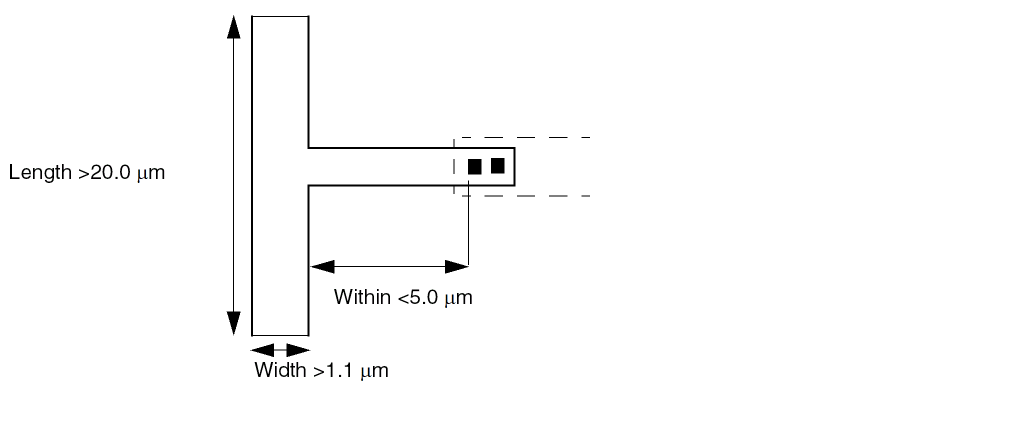
-
Minimum Cut Rule Example 5
The following syntax specifies that two via cuts are required for metal4 wires that are greater than 1.0 μm wide. The via cuts must be less than 0.3 μm from each other in order to meet the minimum cut rule. Figure 5-2 illustrates this example.MINIMUMCUT 2 WIDTH 1.0 WITHIN 0.3 ;
Figure 5-2 Minimum Cut Within Rule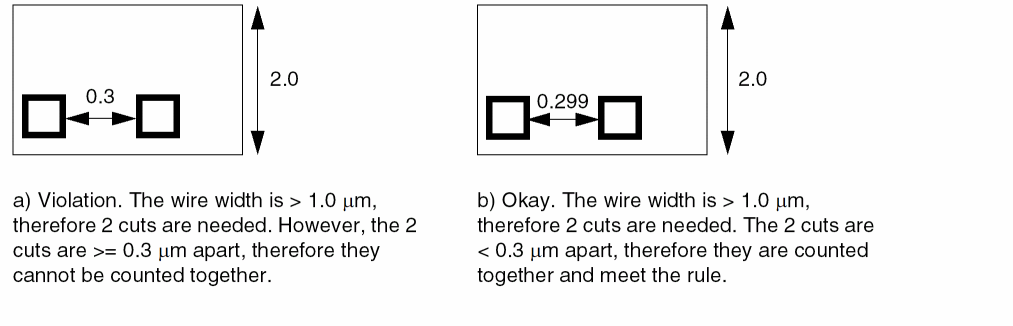
Specifies the minimum metal density allowed for the layer, as a percentage. The minDensity and maxDensity values represent the metal density range within which all areas of the design must fall. The metal density must be greater than or equal to minDensity and less than or equal to maxDensity. For an example of this statement, see Example 5-4.
Type: Float
Value: Between 0.0 and 100.0
MINSIZE minWidth minLength [minWidth2 minLength2]
Specifies the minimum width and length of a rectangle that must be able to fit somewhere within each polygon on this layer (see Figure 5-3). All polygons must meet this MINSIZE rule, if no AREA rule is specified. If an AREA rule is specified, all polygons must meet either the MINSIZE or the AREA rule.
You can specify multiple rectangles by specifying a list of minWidth2 and minLength2 values. If more than one rectangle is specified, the MINSIZE rule is satisfied if any of the rectangles can fit within the polygon.
Type: Float, specified in microns, for all values
Example 5-7 Minimum Size and Area Rules
Assume the following minimum size and area rules:
LAYER metal1
TYPE ROUTING ;
AREA 0.07 ; #0.20 um x 0.35 um = 0.07 um^2
MINSIZE 0.14 0.30 ; #0.14 um x 0.30 um = 0.042 um^2
....
Figure 5-3 illustrates how these rules behave when one or both of the rules are present in the LAYER statement:
Figure 5-3 Minimum Size and Area Rules
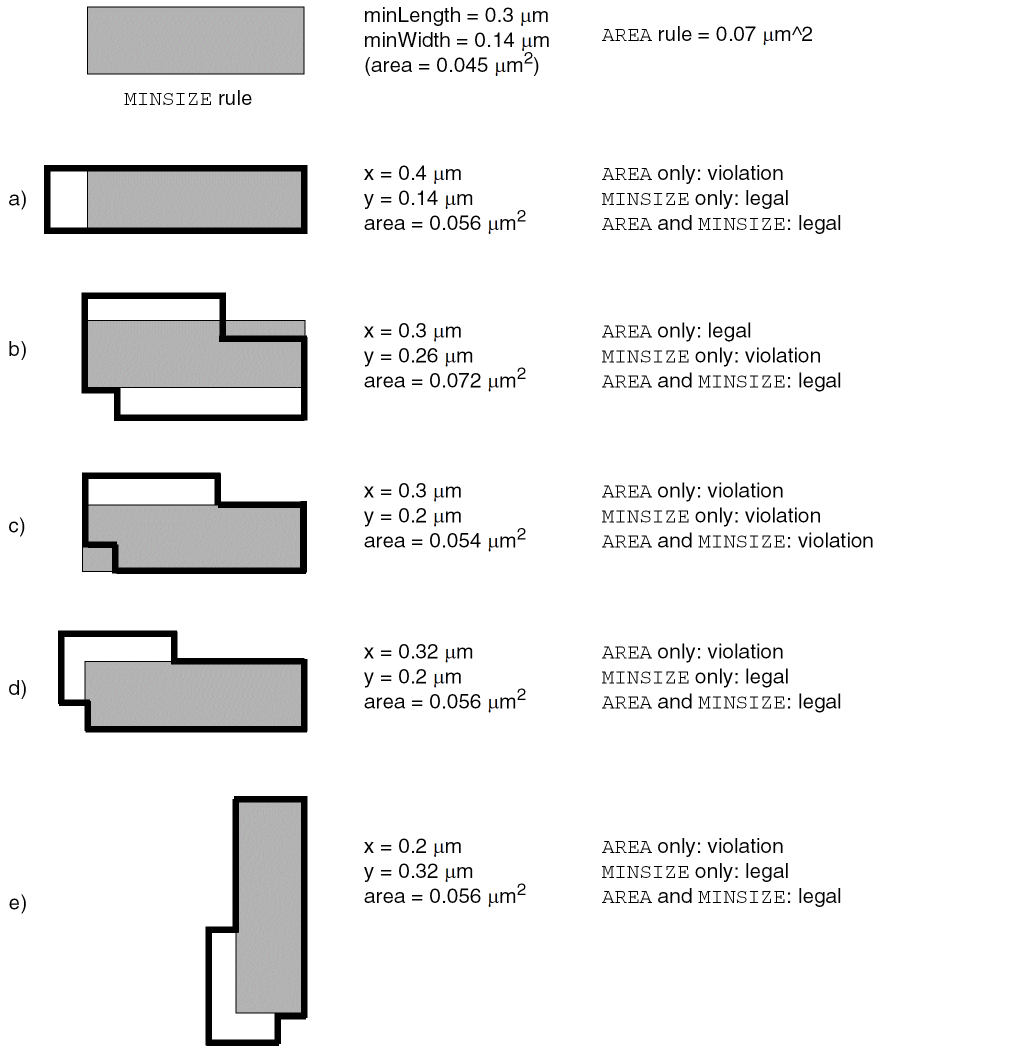
The following statement defines a MINSIZE rule that specifies that every polygon must have a minimum area of 0.07 μm2, or that a rectangle of 0.14 x 0.30 μm must be able to fit within the polygon, or that a rectangle of 0.16 x 0.26 μm must be able to fit within the polygon:
LAYER metal1
TYPE ROUTING ;
AREA 0.07 ; #0.20 x 0.35 um = 0.07 um^2
MINSIZE 0.14 0.30 0.16 0.26 ;  #0.14 x 0.30 um = 0.042 um^2
                                #0.16 x 0.26 um = 0.0416 um^2
...
END metal1
Specifies the minimum step size, or shortest edge length, for a shape. The MINSTEP rule ensures that Optical Pattern Correction (OPC) can be performed during mask creation for the shape.
Note: A single layer should only have one type of MINSTEP rule. It should include either INSIDECORNER, OUTSIDECORNER, or STEP statements (with an optional LENGTHSUM value), or one LENGTHSUM statement, or one MAXEDGES statement.
For an illustration of the MINSTEP rules, see Figure 5-4. For an example, see Example 5-8.
The syntax for MINSTEP is as follows:
[MINSTEPminStepLength[ [INSIDECORNER | OUTSIDECORNER | STEP][LENGTHSUMmaxLength]| [MAXEDGESmaxEdges] ;]
|
Specifies the minimum step size, or shortest edge length, for a shape. The edge of a shape must be greater than or equal to this value, or a violation occurs. |
|
|
Indicates that a violation occurs if two or more consecutive edges of an inside corner are less than minStepLength.
If
Shape |
|
|
Indicates that a violation occurs if two or more consecutive edges of an outside corner are less than minStepLength.
If
Shape |
|
|
Indicates that a violation occurs if one or more consecutive edges of a step are less than minStepLength.
If
Shape f in Figure 5-4 shows a step. It is considered a step because the two edges >= minStepLength (shown with thick lines) that abut the consecutive short edges < minStepLength (shown with dashed lines) form a step instead of a corner. |
|
|
Specifies the maximum total length of consecutive short edges (edges that are less than minStepLength) that OPC can correct without causing new DRC violations. If the total length of the edges is greater than maxLength, a violation occurs. No violation occurs if the total length is less than or equal to maxLength. |
|
|
Specifies that up to maxEdges consecutive edges that are less than minStepLength in length are allowed, but more than maxEdges in a row is a violation. Typically, most tools only allow a maxEdges value of |
|
Example 5-8 Minimum Step Rules
-
The following table shows the results of the specified
MINSTEPrules using the shapes in Figure 5-4. For these rules, assume minStepLength equals 0.05 μm, and that each dashed edge is 0.04 μm in length.
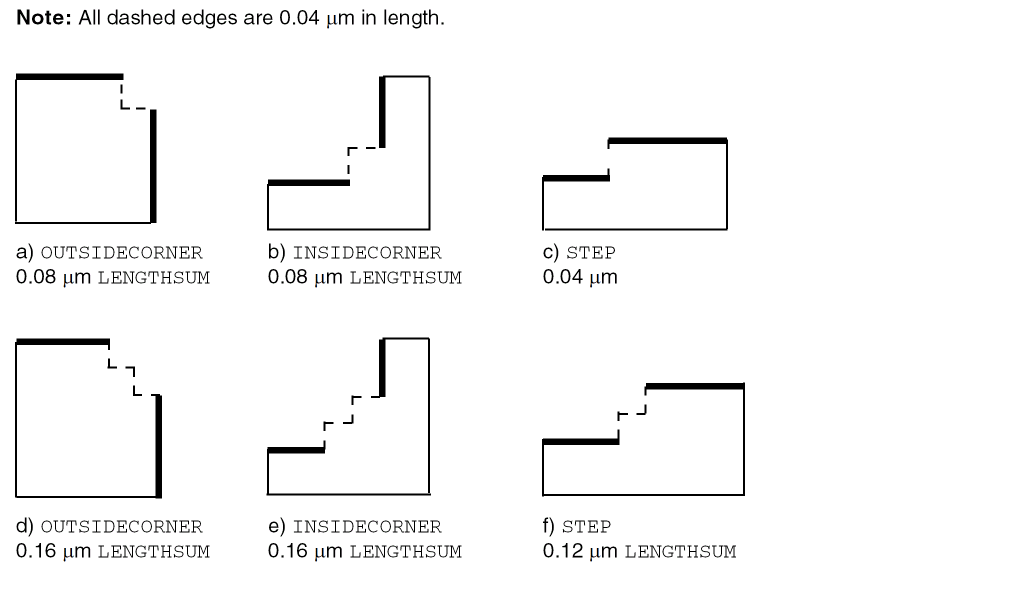
-
Figure 5-5 shows the results of the following
MINSTEPMAXEDGESrule:MINSTEP 1.0 MAXEDGES 2 ;
Figure 5-5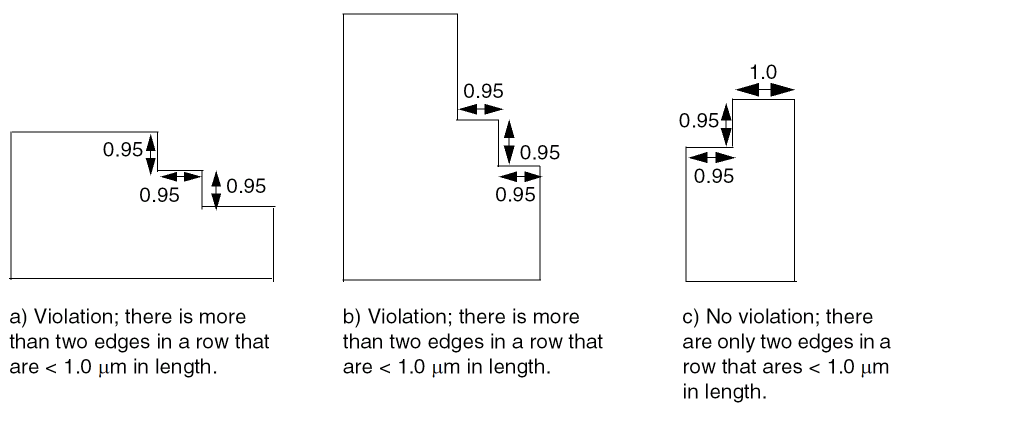
Specifies the minimum legal object width on the routing layer. For example, MINWIDTH 0.15 specifies that the width of every object must be greater than or equal to 0.15 μm. This value is used for verification purposes, and does not affect the routing width. The WIDTH statement defines the default routing width on the layer.
Default: The value of the WIDTH statement
Type: Float, specified in microns
OFFSET {distance | xDistance yDistance}
Specifies the offset for the routing grid from the design origin for the layer. This value is used to align routing tracks with standard cell boundaries, which helps routers get good on-grid access to the cell pin shapes. For best routing results, most standard cells have a 1/2 pitch offset between the MACRO SIZE boundary and the center of cell pins that should be aligned with the routing grid. Normally, it is best to not set the OFFSET value, so the software can analyze the library to determine the best offset values to use, but in some cases it is necessary to force a specific offset.
Generally, it is best for all of the horizontal layers to have the same offset and all of the vertical layers to have the same offset, so that routing grids on different layers align with each other. Higher layers can have a larger pitch, but for best results, they should still align with a lower layer routing grid every few tracks to make stacked-vias more efficient.
Default: The software is allowed to determine its own offset values for preferred and non-preferred routing tracks.
Type: Float, specified in microns
|
Specifies the offset value that is used for the preferred direction routing tracks. |
|
|
Specifies the x offset for vertical routing tracks, and the y offset for horizontal routing tracks. |
|
PITCH {distance | xDistance yDistance}
Specifies the required routing pitch for the layer. Pitch is used to generate the routing grid (the DEF TRACKS). For more information, see “Routing Pitch”.
Type: Float, specified in microns
Specifies a numerical or string value for a layer property defined in the PROPERTYDEFINITIONS statement. The propName you specify must match the propName listed in the PROPERTYDEFINITIONS statement.
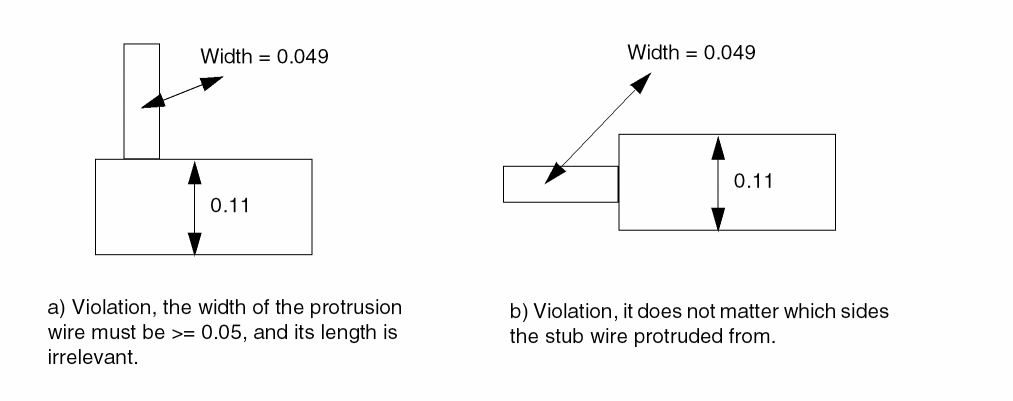
PROTRUSIONWIDTH width1 LENGTH length WIDTH width2
Specifies that the width of a protrusion must be greater than or equal to width1 if it is shorter than length, and it connects to a wire that has a width greater than or equal to width2 (see Figure 5-6). Length is determined by the shortest possible path among all of the protrusion wires with width smaller width1, and is measured by the shortest outside edges of the wires.
Type: Float, specified in microns
The following example specifies that a protrusion must have a width that is greater than or equal to 0.28 μm, if the length of the protrusion is less than 0.60 μm and the wire it connects to has a width that is greater than or equal to 1.20 μm.
LAYER m1
...
PROTRUSIONWIDTH 0.28 LENGTH 0.60 WIDTH 1.20 ;
...
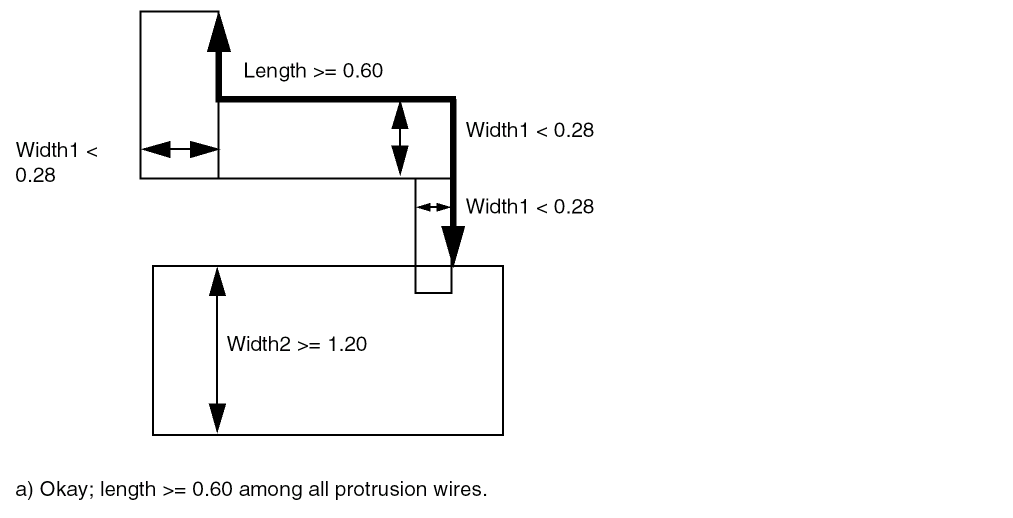
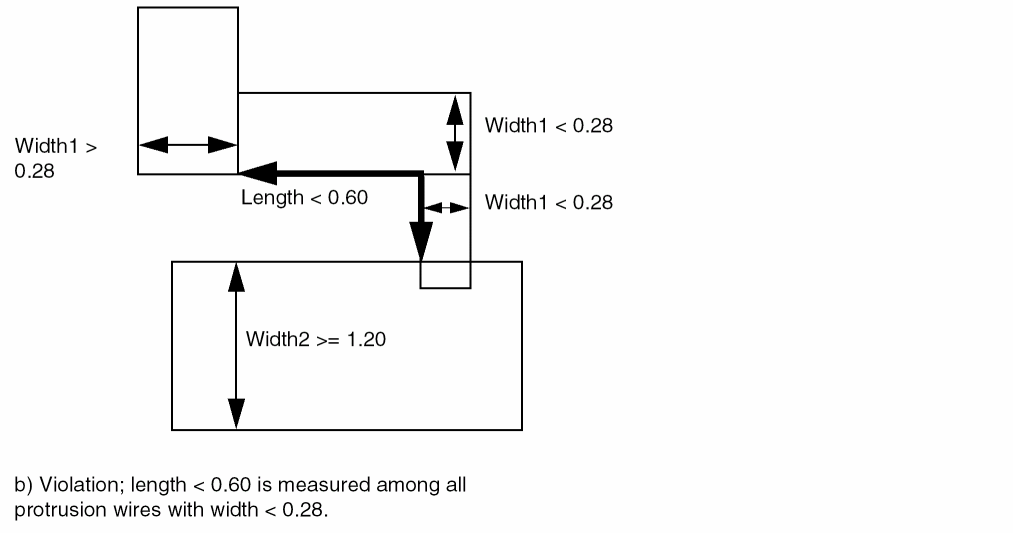
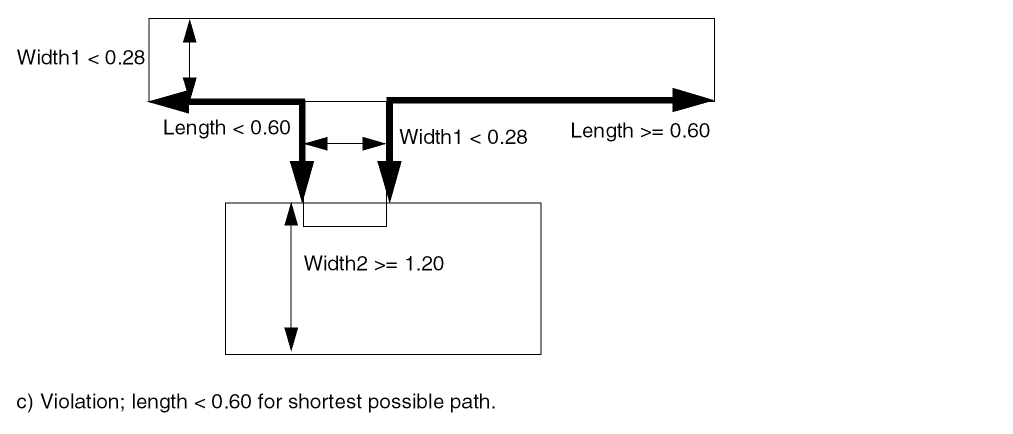
If the given value of LENGTH in PROTRUSIONWIDTH is zero, then the length of the protrusion wire is irrelevant. In this case, the width of the protrusion wire should always be checked independent of the length of the wire. The following example illustrates this rule:
PROTRUSIONWIDTH 0.05 LENGTH 0 WIDTH 0.11 ; " ;
Specifies the resistance for a square of wire, in ohms per square. The resistance of a wire can be defined as:
RPERSQU
Specifies the value to account for shrinkage of interconnect wiring due to the etching process. Actual wire widths are determined by subtracting this constant value.
Type: Float
Specifies the spacing rules to use for wiring on the layer. You can specify more than one spacing rule for a layer. See “Using Spacing Rules”.
The syntax for describing spacing rules is defined as follows:
[SPACINGminSpacing[ RANGEminWidthmaxWidth[ INFLUENCEinfluenceLength[RANGEstubMinWidthstubMaxWidth]| RANGEminWidthmaxWidth]| ENDOFLINEeolWidthWITHINeolWithin[PARALLELEDGEparSpaceWITHINparWithin[TWOEDGES]]| SAMENET [PGONLY]| NOTCHLENGTHminNotchLength| ENDOFNOTCHWIDTHendOfNotchWidthNOTCHSPACINGminNotchSpacingNOTCHLENGTHminNotchLength]
;] ...
|
Specifies the default minimum spacing, in microns, allowed between two geometries on different nets. |
|
|
Indicates that the minimum spacing rule applies to objects on the layer with widths in the indicated |
|
|
Indicates that any length of the stub wire that is less than or equal to influenceLength from the wide wire inherits the wide wire spacing.
The influence rule applies to stub wires on the layer with widths in the indicated |
|
|
Specifies an optional second width range. The spacing rule applies if the widths of both objects fall in the ranges defined (each object in a different range). For an object’s width to fall in a range, it must be greater than or equal to minWidth and less than or equal to maxWidth. |
|
|
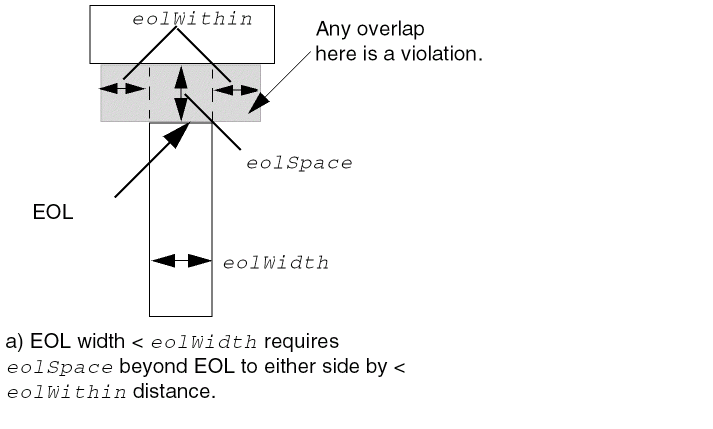
Indicates that an edge that is shorter than eolWidth, noted as end-of-line (EOL from now on) edge requires spacing greater than or equal to eolSpace beyond the EOL anywhere within (that is, less than) eolWithin distance (see Figure 5-7). Typically, eolSpace is slightly larger than the minimum allowed spacing on the layer. The eolWithin value must be less than the minimum allowed spacing. |
|
 |
|
|
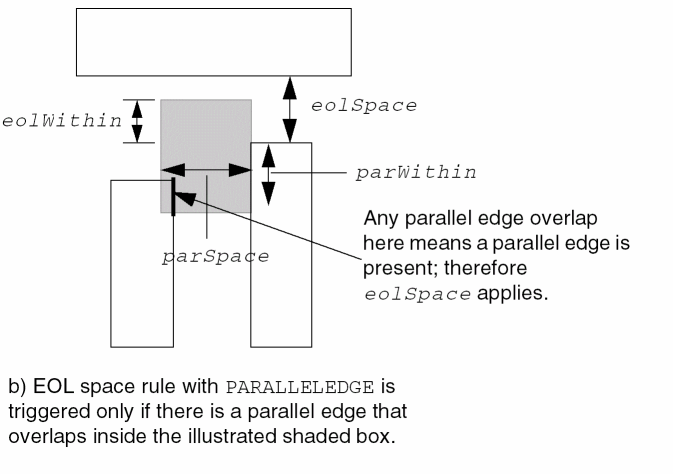
Indicates the EOL rule applies only if there is a parallel edge that is less than parSpace away, and is also less than parWithin from the EOL and eolWithin beyond the EOL (see Figure 5-8). |
|
 |
|
|
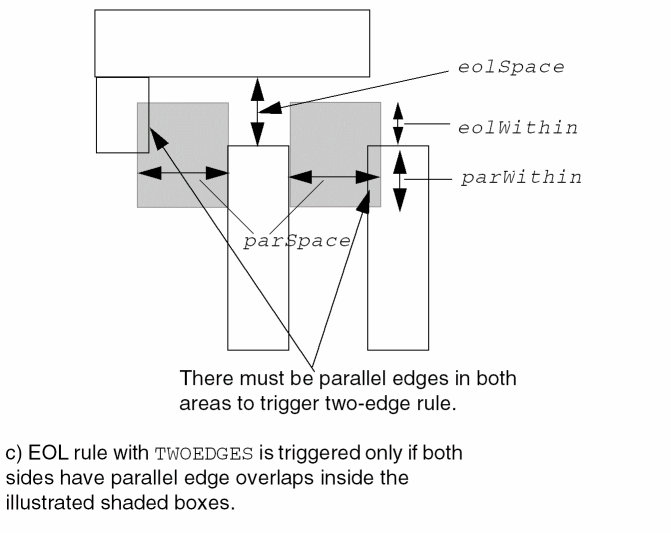
If |
|
 |
|
|
Indicates that the minSpacing value only applies to same-net metal. If This rule typically is used when a technology has wider spacing for wider width wires; however, it still allows minimum spacing for same-net wires, even if they are wide. (See Example 5-11.) |
|
|
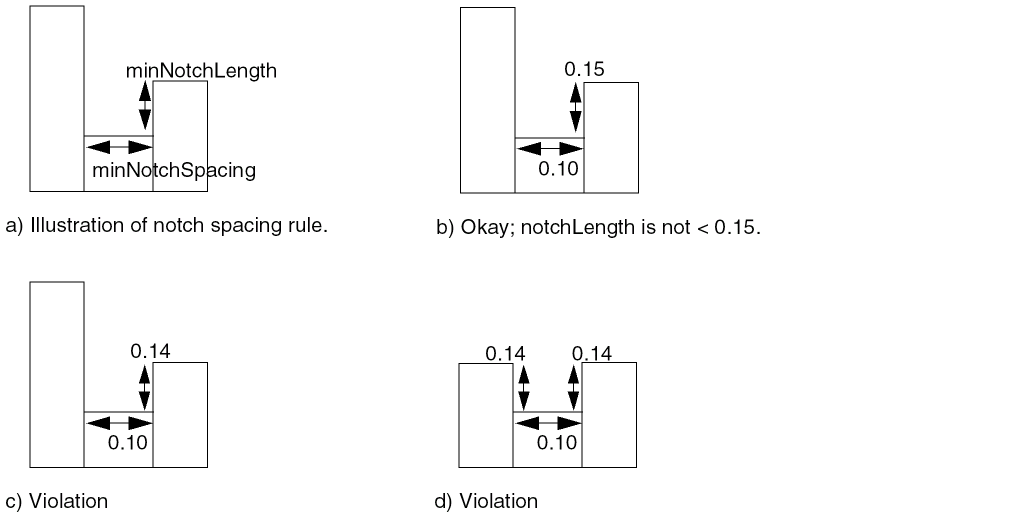
Indicates that any notch with a notch length less than minNotchLength must have notch spacing greater than or equal to minSpacing. (See illustration
The value you specify for minSpacing should be only slightly larger than the normal minimum spacing rule (typically, between 1x and 1.5x minimum spacing). If the value of the specified notch length is zero, then the length of the notch is irrevelant. In other words, the spacing of a notch should always be checked independent of its length. |
|
|
|
|
|
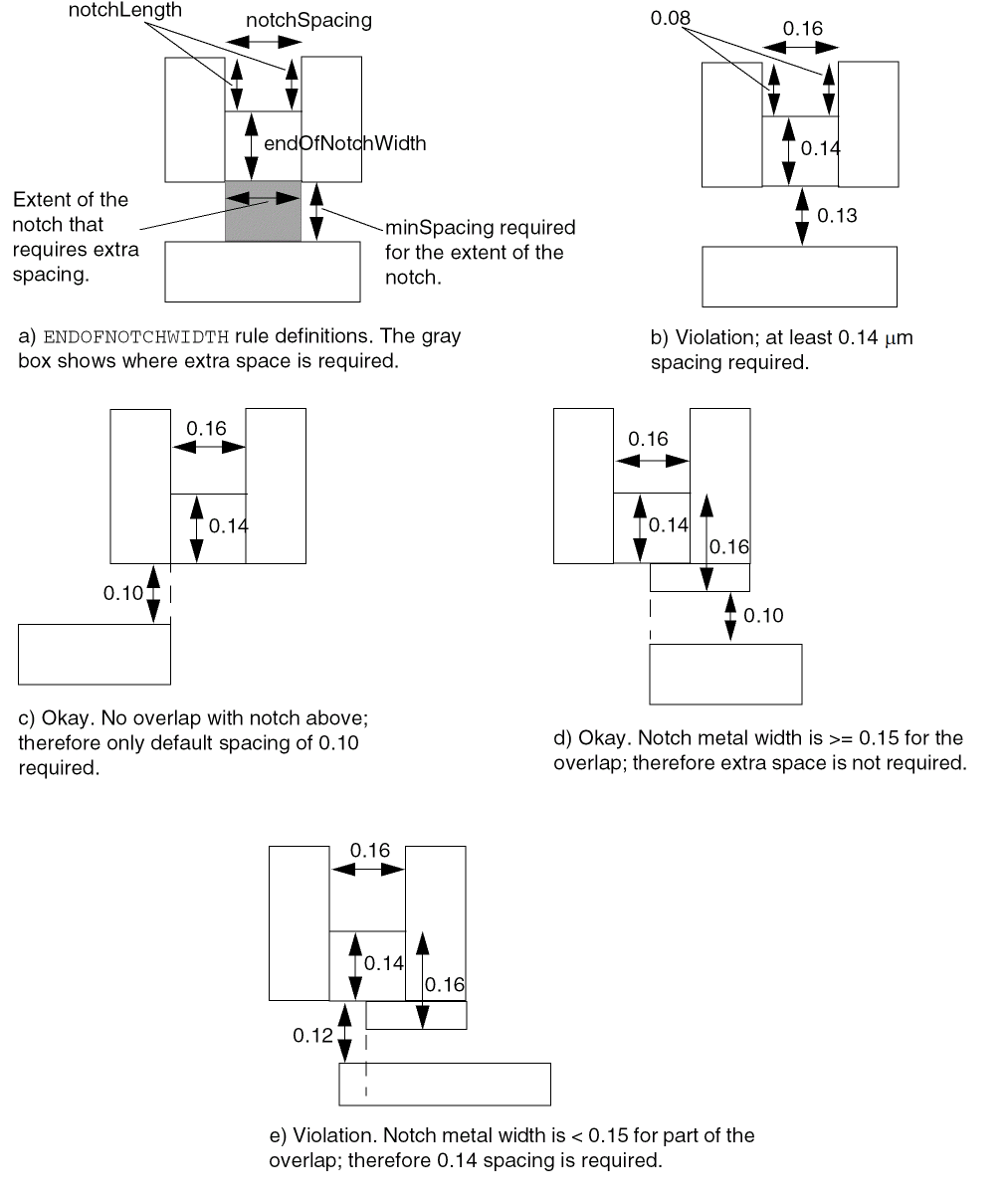
Indicates that the notch metal at the bottom end of a U-shaped notch requires spacing that is greater than or equal to minSpacing, if the notch has a width that is less than endOfNotchWidth, notch spacing that is less than or equal to minNotchSpacing, and notch length that is greater than or equal to minNotchLength. The spacing is required for the extent of the notch.
The values you specify for notchSpacing and minSpacing should be only slightly larger than the normal minimum spacing rule (typically between 1x and 1.5x minimum spacing). The value you specify for endOfNotchWidth should be only slightly larger than the minimum width rule (typically, between 1x and 1.5x minimum width). |
|
Using Spacing Rules
Spacing rules apply to pin-to-wire, obstruction-to-wire, via-to-wire, and wire-to-wire spacing. These requirements specify the default minimum spacing allowed between two geometries on different nets.
When defined with a RANGE argument, a spacing value applies to all objects with widths within a specified range. That is, the rule applies to objects whose widths are greater than or equal to the specified minimum width and less than or equal to the specified maximum width.
In the following example, the default minimum allowed spacing between two adjacent objects is 0.3 μm. However, for objects between 0.5 and 1.0 μm in width, the spacing is 0.4 μm. For objects between 1.01 and 2.0 μm in width, the spacing is 0.5 μm.
SPACING 0.3 ;
SPACING 0.4 RANGE 0.5 1.0 ;
SPACING 0.5 RANGE 1.01 2.0 ; #The RANGE begins at 1.01 and not 1.0 because
#RANGE values should not overlap.
Influence spacing rules are used to support the inheritance of wide wire spacing by nets connected to the wide wires. For example, a larger spacing is needed for stub wires attached to large objects like pre-routed power wires. A piece of metal connecting to a wider wire will inherit spacing rules for a user-defined distance from the wider wire.
In Figure 5-10, a minimum space of N is required between two metal lines when at least one metal line has a width that is >= Y. This spacing must be maintained for any small piece of metal (<Y) that is connected to the wide metal within X range of the wide metal. Outside of this range, normal spacing rules (Z) apply.
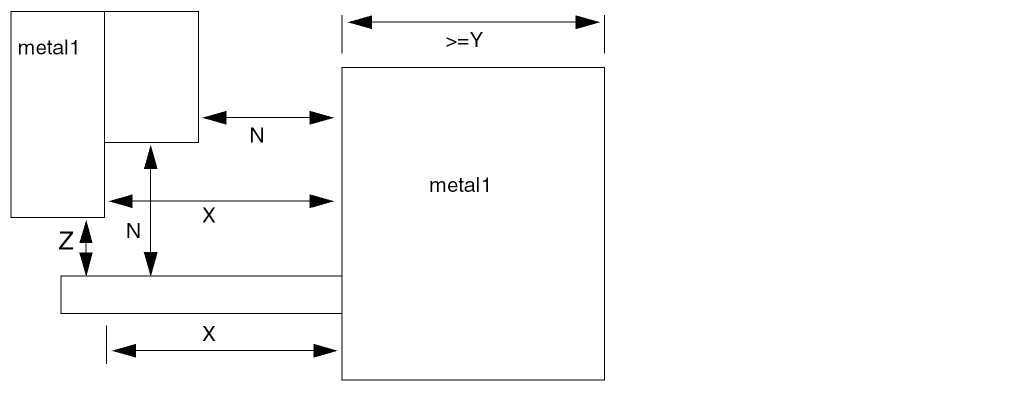
In the following example, the 0.5 μm spacing applies for the first 1.0 μm of the stub sticking out from the large object. This rule only applies to the stub wire; the previous rule must be included for the wide wire spacing. The SPACING 0.5 RANGE 2.01 2000.0 statement is required to get extra spacing for the wide-wire itself.
SPACING 0.5 RANGE 2.01 2000.0 ;
SPACING 0.28 ; #Minimum spacing is >= 0.28 um.
SPACING 0.5 RANGE 2.01 2000.0 ; #wide-wire >= 2.01 um wide requires 0.5um spacing
SPACING 0.5 RANGE 2.01 2000.0 INFLUENCE 1.000 ;
#Stub wires <= 1.0 um from wide wires >= 2.01
#require 0.5 um spacing.
Some processes only need the INFLUENCE rule for certain widths of the stub wire. In the following example, the 0.5 μm spacing is required only for stub wires between 0.5 and 1.0 μm in width.
SPACING 0.28 ; #Minimum spacing is >= 0.28 um.
SPACING 0.5 RANGE 2.01 2000.0 ; #wide-wire >= 2.01 um wide requires 0.5um spacing
SPACING 0.5 RANGE 2.01 2000.0 INFLUENCE 1.00 RANGE 0.5 1.0 ;
#Stub wires with 0.5 <= width <= 1.0, and <= 1.0 um from
#wide wide wires >= 2.01 require 0.5 um spacing.
Example 5-10 EOL Spacing Rules
-
If you include the following routing layer rules in your LEF file:
SPACING 1.0 ; #minimum spacing is 1.0 μm
SPACING 1.2 ENDOFLINE 1.3 WITHIN 0.6 ;
Any EOL that is less than 1.3 μm wide requires spacing that is greater than or equal to 1.2 μm beyond the EOL, within 0.6 μm to either side. Figure 5-11 includes examples of legal spacing for, and violations of, this rule.
Figure 5-11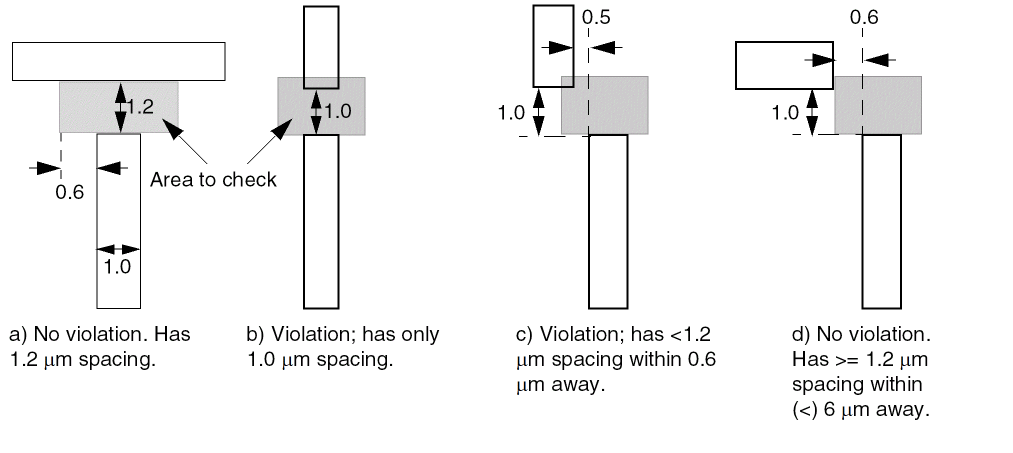
-
If you include the following routing layer rules in your LEF file:
SPACING 1.0 ; #minimum spacing is 1.0 μm
SPACING 1.2 ENDOFLINE 1.3 WITHIN 0.6 PARALLELEDGE 1.1 WITHIN 0.5 ;
Any line that is less than 1.3 μm wide, with a parallel edge that is less than 1.1 μm away, and is within 0.5 μm of the EOL, requires spacing greater than or equal to 1.2 μm beyond the EOL, within 0.6 μm to either side of the EOL. Figure 5-12 includes examples of legal spacing for, and violations of, this rule.
Figure 5-12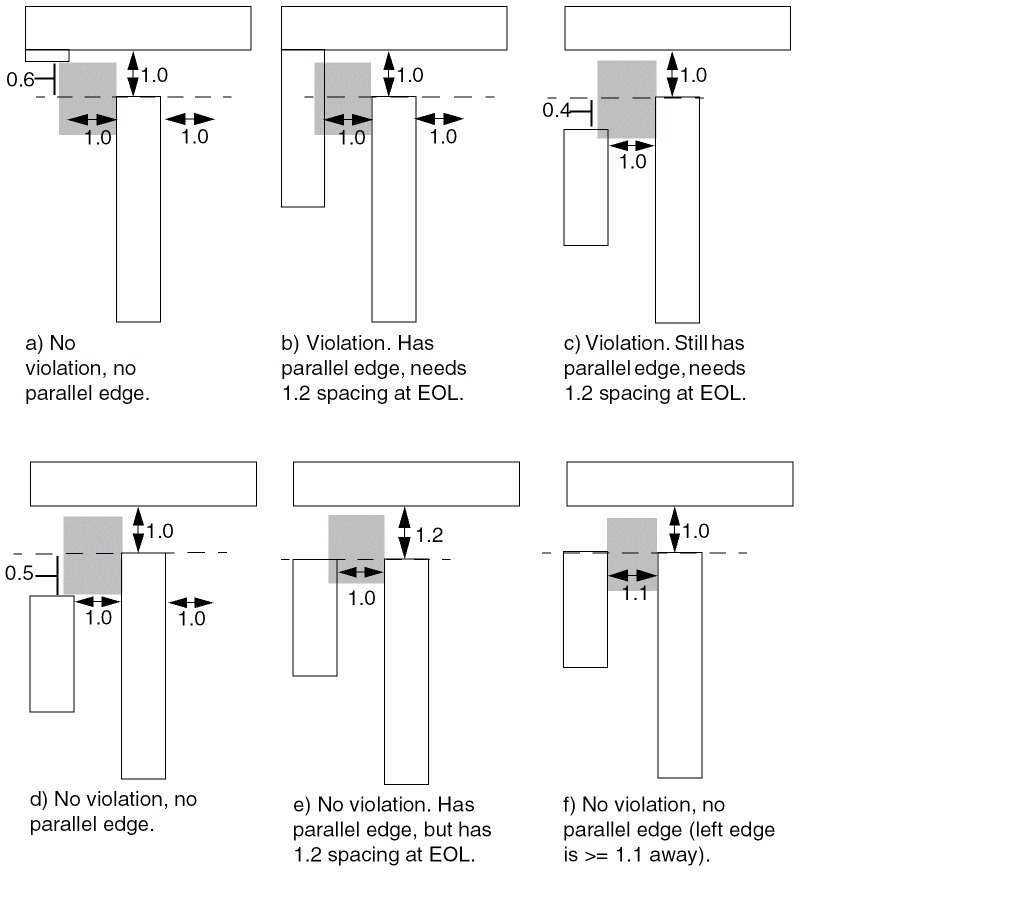
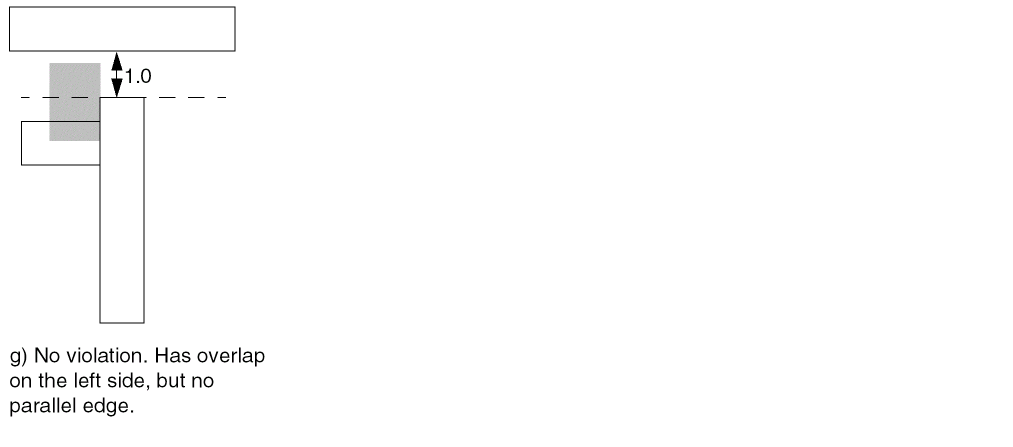
-
The following routing layer rule creates an EOL spacing rule for two parallel edges:
SPACING 1.0 ; #minimum spacing is 1.0 μm
SPACING 1.2 ENDOFLINE 1.3 WITHIN 0.6 PARALLELEDGE 1.1 WITHIN 0.5 TWOEDGES ;
Example 5-11 Same Net Spacing Rule
If you include the following routing layer rules in your LEF file, same-net power or ground nets can use 1.0 μm spacing, even if they are 2 μm to 5 μm wide, as shown in Figure 5-13:
LAYER M1
TYPE ROUTING ;
SPACING 1.0 ; #min spacing is 1.0
SPACING 1.5 RANGE 2.0 5.0 ; #need 1.5 spacing for 2 to 5 μm wide wires
SPACING 1.0 SAMENET PGONLY ;
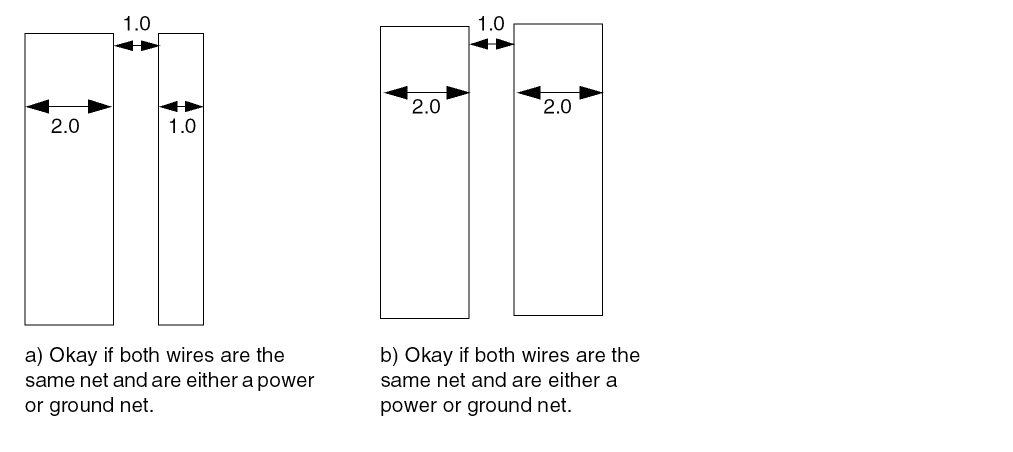
Example 5-12 Notch Length Spacing Rule
The figure below illustrates the following routing layer rules:
SPACING 0.10 ;
SPACING 0.12 NOTCHLENGTH 0.15 ;
Figure 5-14 Notch Length Rule Definitions
Example 5-13 End Of Notch Width Spacing Rule
If you include the following routing layer rules in your LEF file, the notch metal at the bottom end of a U-shaped notch must have spacing that is greater than or equal to 0.14 μm, if the notch metal has a width that is less than 0.15 μm, notch spacing that is less than or equal to 0.16 μm, and notch length that is greater than or equal to 0.08 μm. See Figure 5-15 for different layout examples for these rules.
SPACING 0.10 ; #default spacing
SPACING 0.14 ENDOFNOTCHWIDTH 0.15 NOTCHSPACING 0.16 NOTCHLENGTH 0.08 ;
Figure 5-15 End Of Notch Width Rule Definitions
Specifies the spacing tables to use for wiring on the layer. You can specify only one parallel run length and one influence spacing table for a layer. For information on and examples of using spacing tables, see “Using Spacing Tables”.
The syntax for describing spacing tables is defined as follows:
[SPACINGTABLEPARALLELRUNLENGTH {length} ...{WIDTHwidth{spacing} ...}... ;[SPACINGTABLEINFLUENCE {WIDTHwidthWITHINdistanceSPACINGspacing} ... ;]| TWOWIDTHS {WIDTHwidth[PRLrunLength]{spacing} ...} ... ;;]
|
Specifies the maximum parallel run length between two objects, in microns. If the maximum width of the two objects is greater than width, and the parallel run length is greater than length, then the spacing between the objects must be greater than or equal to spacing. The first spacing value is the minimum spacing for a given width, even if the PRL value is not met.
You must specify length, width, and spacing values in increasing order. |
|
|
Creates a table in which the spacing between two objects depends on the widths of both objects (instead of just the widest width). Optionally, it also can depend on the parallel run length between the two objects ( The first width value should be 0 without an accompanied run length definition.
The |
|
|
Creates a table that enforces wide wire spacing rules between nearby perpendicular wires. If an object has a width that is greater than width, and is located less than distance from two perpendicular wires, then the spacing between the perpendicular wires must be greater than or equal to spacing.
You must specify width values in increasing order. |
|
Specifying SPACING Statements with SPACINGTABLE
You can specify some of the SPACING statements with the SPACINGTABLE statements. For example, the following SPACING statements can be specified with SPACINGTABLE:
SPACING x SAMENET ___ ;
SPACING x ENDOFLINE ___ ;
SPACING x NOTCHLENGTH ___ ;
SPACING x ENDOFNOTCHWIDTH ___ ;
These SPACING checks are orthogonal to the SPACINGTABLE checks, except SAMENET spacing will override SPACINGTABLE for same-net objects.
However, you cannot specify some SPACING statements (as given below) with SPACINGTABLE as these would generate semantic errors.
SPACING x ;
SPACING x RANGE ___ ;
Using Spacing Tables
Some processes have complex width and length threshold rules. Instead of creating multiple SPACING rules with different length thresholds and RANGE statements, you can define the information in a spacing table.
For example, for Figure 5-16, a typical 90nm DRC manual might have the following rules described:
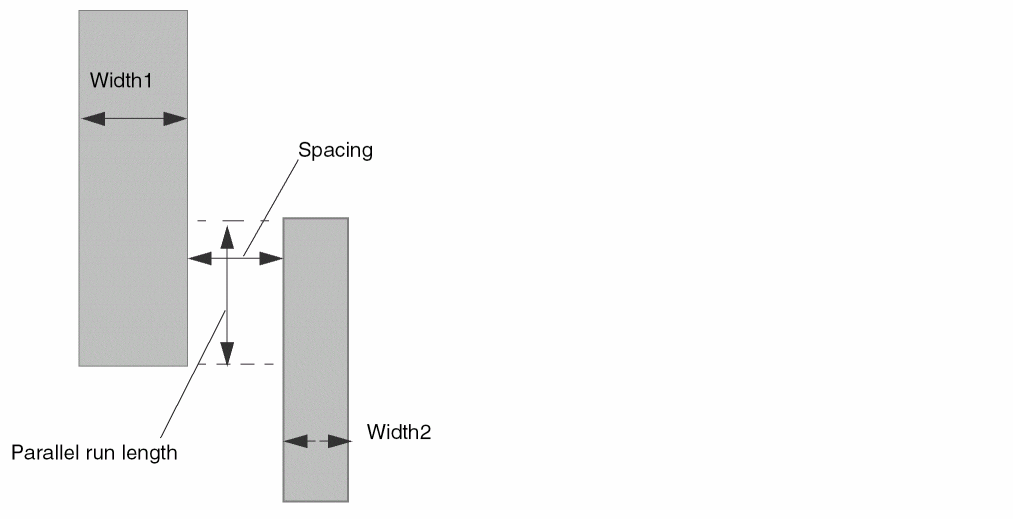
These rules translate into the following SPACINGTABLE PARALLELRUNLENGTH statement:
LAYER metal1
...
SPACINGTABLE
PARALLELRUNLENGTH 0.00 0.50 3.00 5.00 #lengths must be increasing
WIDTH 0.00 0.15 0.15 0.15 0.15 #max width>0.00
WIDTH 0.25 0.15 0.20 0.20 0.20 #max width>0.25
WIDTH 1.50 0.15 0.50 0.50 0.50 #max width>1.50
WIDTH 3.00 0.15 0.50 1.00 1.00 #max width>3.00
WIDTH 5.00 0.15 0.50 1.00 2.00 ; #max width>5.00
...
END metal1
Using the SPACINGTABLE PARALLELRUNLENGTH statement, the rules can be described in the following way:
- Find the maximum width of the two objects.
- Find the lowest table row where the maximum width is greater than the table-row width value. The first row is used even if the maximum width is less than and equal to the table-row width.
- Find the right-most table column where the parallel run length is greater than the table PRL value. The first column spacing value is used even if the object’s parallel run length is less than and equal to the table PRL value. The spacing value listed where the row and column intersect is the required spacing for that maximum width and parallel run length.
By definition, the width is the smaller dimension of the object (that is, the width of each object must be less than or equal to its length).
Processes often require a second spacing table to enforce the wide wire spacing rules between nearby perpendicular wires, even if the wires are narrow. Figure 5-17 illustrates this situation. Use the following SPACINGTABLE INFLUENCE syntax to describe this table:
SPACINGTABLE INFLUENCE
{WIDTH width WITHIN distance SPACING spacing} ... ;
If a wire has a width that is greater than width, and the distance between it and two other wires is less than distance, the other wires must be separated by spacing that is greater than or equal to spacing. Typically, the distance and spacing values are the same. Note that the distance halo extends horizontally, but not into the corners.
By definition, the width is the smaller dimension of the object (that is, the width is less than or equal to the length of the large wire).
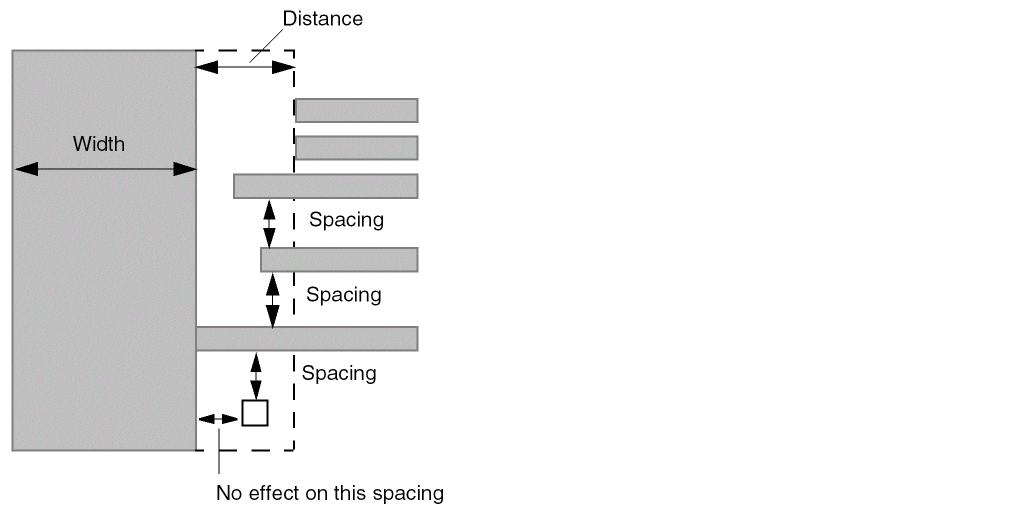
The wide wire rules often match the larger width and spacing values in the SPACINGTABLE PARALLELRUNLENGTH values. The previously described rules translate into the following SPACINGTABLE INFLUENCE statement:
LAYER metal1
...
SPACINGTABLE INFLUENCE
WIDTH 1.50 WITHIN 0.50 SPACING 0.50 #w>1.50, dist<0.50, needs sp>=0.50
WIDTH 3.00 WITHIN 1.00 SPACING 1.00 #widths must be increasing
WIDTH 5.00 WITHIN 2.00 SPACING 2.00 ;
...
END metal1
You can create a table that enforces spacing rules that depends on the width of both objects instead of just the widest width, and optionally depends on the parallel run length between the two objects. You can use this table to replace existing SPACING ...RANGE...RANGE rules to make it easier to read, and to include parallel run length effects in one common table. Use the following SPACINGTABLE TWOWIDTHS syntax to describe this table:
SPACINGTABLE
TWOWIDTHS {WIDTH width [PRL runLength] {spacing} ... } ... ;
To find the required spacing, a 2-dimensional table is used that implicitly has the same widths (and optional parallel run lengths) for the row and column headings. There must be exactly as many spacing values in each WIDTH row as there are WIDTH rows. The width and runLength values must be the same or increasing from top to bottom in the table. The spacing values must be the same or increasing from left to right, and from top to bottom in the table.
Given two objects with width1, width2, and a parallel overlap of runLength, you find the spacing using the following method:
- Find the last row where both width1 is greater than the table row width, and runLength is greater than the table row run length. If no table row run length exists, the runLength value is not checked for that row (only that width1 is greater than table row width is checked).
- Find the right-most column where both width2 is greater than table column width and runLength is greater than table column run length. If no table column run length exists, the runLength value is not checked for that column (only that width2 is greater than table column width is checked).
- The intersection of the matching row and column gives the required spacing.
For example, assume a DRC manual has the following rules described:
The rules translate into the following SPACINGTABLE:
SPACINGTABLE TWOWIDTHS
# width= 0.00 0.25 1.50 3.0
# prl= none 0.00 1.50 3.0
# ----------------------
WIDTH 0.00 0.15 0.20 0.50 1.00
WIDTH 0.25 PRL 0.0 0.20 0.25 0.50 1.00
WIDTH 1.50 PRL 1.50 0.50 0.50 0.60 1.00
WIDTH 3.00 PRL 3.00 1.00 1.00 1.00 1.20 ;
Note that both width and parallel run length (if specified) must be exceeded to index into the row and column. Therefore, in this example:
Specifies the thickness of the interconnect.
Type: Float
Identifies the layer as a routable layer.
Specifies the default routing width to use for all regular wiring on the layer.
Type: Float
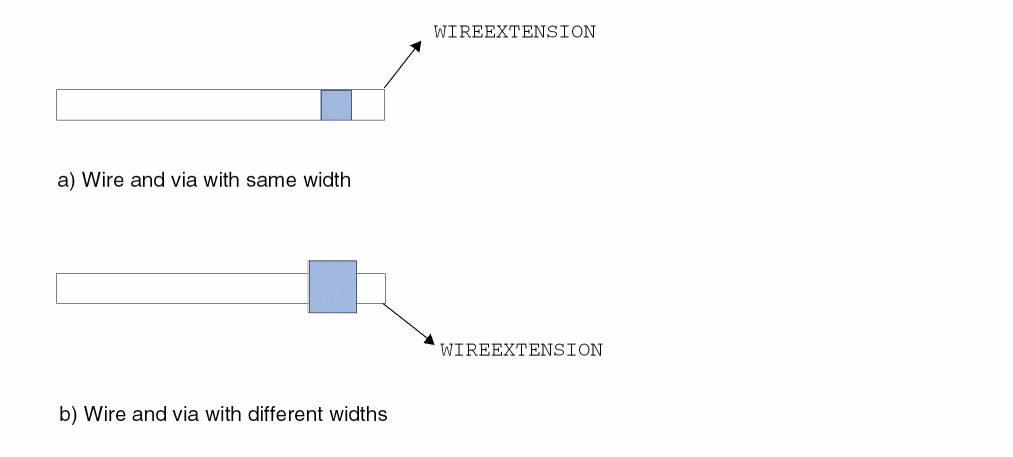
Specifies the distance by which wires are extended at vias. You must specify a value that is more than half of the routing width.
Default: Wires are extended half of the routing width
Type: Float
WIREEXTENSION statement only extends wires and not vias. For 65nm and below, WIREEXTENSION is no longer recommended because it may generate some advance rule violations if wires and vias have different widths.
The following figure shows WIREEXTENSION with same and different wire and via widths:
Figure 5-18 Illustration of WIREEXTENSION
Defining Routing Layer Properties to Create 32/28 nm and Smaller Nodes Rules
You can include routing layer properties in your LEF file to create 32/28 nm and smaller nodes rules that currently are not supported by existing LEF syntax. The properties are specified inside the LAYER ROUTING statements, where they can be seen with other rules.
Before you can reference them, properties must be defined at the beginning of the LEF file in the PROPERTYDEFINITIONS statement, immediately before the first LAYER statement.
-
Properties belong to the
LAYERobject and have a type ofSTRING. -
The property names used for these rules all start with
LEF_CDN_.
All properties use the following syntax within the LEF PROPERTYDEFINITIONS statement:
PROPERTYDEFINITIONS LAYERpropNameSTRING ["stringValue"] ;
END PROPERTYDEFINITIONS
The property definitions for the routing layer properties are as follows:
PROPERTYDEFINITIONS
LAYER LEF_CDN_ANTENNADIFFGATEPWL STRING ;
LAYER LEF_CDN_ANTENNADIFFONLYAREARATIO STRING ;
LAYER LEF_CDN_ANTENNADIFFPROTECTORAREARATIO STRING ;
LAYER LEF_CDN_ANTENNAGATEPWL STRING ;
LAYER LEF_CDN_ANTENNAGATEPLUSDIFF STRING ;
LAYER LEF_CDN_AREA STRING ;
LAYER LEF_CDN_BACKSIDE STRING ;
LAYER LEF_CDN_BOUNDARYBLOCKAGE STRING ;
LAYER LEF_CDN_BOUNDARYEOLBLOCKAGE STRING ;
LAYER LEF_CDN_COREEOLBLOCKAGE STRING ;
LAYER LEF_CDN_CORNEREOLKEEPOUT STRING ;
LAYER LEF_CDN_CORNERFILLSPACING STRING ;
LAYER LEF_CDN_CORNERSPACING STRING ;
LAYER LEF_CDN_ENCLOSURESPACING STRING ;
LAYER LEF_CDN_ENCLOSUREWITHEOL STRING ;
LAYER LEF_CDN_EOLKEEPOUT STRING ;
LAYER LEF_CDN_EOLTRACK STRING ;
LAYER LEF_CDN_EOLVIAKEEPOUT STRING ;
LAYER LEF_CDN_EOLEXTENSIONSPACING STRING ;
LAYER LEF_CDN_FILLTOFILLSPACING STRING ;
LAYER LEF_CDN_FIVEWIRESEOLSPACING STRING ;
LAYER LEF_CDN_FORBIDDENSPACING STRING ;
LAYER LEF_CDN_GAP STRING ;
LAYER LEF_CDN_JOINTCORNERSPACING STRING;
LAYER LEF_CDN_LINEENDGAP STRING ;
LAYER LEF_CDN_LITHOMACROHALO STRING ;
LAYER LEF_CDN_MAXWIDTH STRING ;
LAYER LEF_CDN_MINIMUMCUT STRING ;
LAYER LEF_CDN_MINLENGTHPARALLEL STRING ;
LAYER LEF_CDN_MINSIZE STRING ;
LAYER LEF_CDN_MINSTEP STRING ;
LAYER LEF_CDN_OPPOSITEEOLSPACING STRING ;
LAYER LEF_CDN_PINCONNECTBLOCKAGE STRING ;
LAYER LEF_CDN_PITCH STRING ;
LAYER LEF_CDN_PROTRUSIONWIDTH STRING;
LAYER LEF_CDN_RECTONLY STRING;
LAYER LEF_CDN_REGION STRING ;
LAYER LEF_CDN_RIGHTWAYONGRIDONLY STRING ;
LAYER LEF_CDN_SPACINGTABLE STRING ;
LAYER LEF_CDN_SPANLENGTHENCLOSURESPACING STRING ;
LAYER LEF_CDN_SPANLENGTHTABLE STRING ;
LAYER LEF_CDN_SPACING STRING ;
LAYER LEF_CDN_TWOWIRESFORBIDDENSPACING STRING ;
LAYER LEF_CDN_TYPE STRING ;
LAYER LEF_CDN_VOLTAGESPACING STRING ;
LAYER LEF_CDN_WIDTH STRING ;
LAYER LEF_CDN_WIDTHTABLE STRING ;
LAYER LEF_CDN_WRNGDIREOLKEEPOUT STRING ;
END PROPERTYDEFINITIONS
Type Rule
A type rule can be used to further classify a routing layer.
You can create a type rule by using the following property definition:
TYPE ROUTING;
PROPERTY LEF_CDN_TYPE
  “TYPE {POLYROUTING | MIMCAP | HIGHR
         | TSVMETAL | PADMETAL | STACKEDMIMCAP }
         ;" ;
The POLYROUTING and MIMCAP keywords are mutually exclusive; you cannot specify them together.
AC Current Density Rule
The AC density rule can be used to specify how much AC current a wire on a layer of a certain width can handle at a certain frequency in units of milliamps per micron (mA/mm).
You can define a AC current density rule by using the following property definition:
PROPERTY LEF_CDN_ACCURRENTDENSITY
  "ACCURRENTDENSITY {PEAK | AVERAGE | RMS}
     [TEMPPWL temp_1 multi_1 temp_2 multi_2  ...]
     [HOURSPWL hours_1 multi_1 hours_2 multi_2  ...]
     ; " ;
All other keywords are the same as the existing LEF routing layer ACCURRENTDENSITY syntax.
Note that the property statement is a compliment to the original syntax, which must be specified first.
AC Current Density Rule Examples
The following AC current density rule indicates that the RMS table entry values will be defined for 100C and 10000 hours since the corresponding multipliers are 1.0 for those values. At 80C and 15000 hours, the multiplier is 1.5 x 0.8 = 1.2. Hence, the wires can carry 1.2x times the RMS table values.
PROPERTY LEF_CDN_ACCURRENTDENSITY
  "ACCURRENTDENSITY RMS
     TEMPPWL 50 2.2 80 1.5 100 1.0 120 0.75
     HOURSPWL 5000 1.8 10000 1.0 15000 0.8 ; " ;
Antenna Diff Gate PWL Rule
The antenna diff gate PWL rule is used to specify that the antenna gate connected to the diffusion diode can be used to define a piece-wise linear (PWL) table on the given antenna model that is indexed by the real gate area, and returns an “effective gate area” interpolated from the table.
You can create an antenna diff gate PWL rule by using the following property definition:
PROPERTY LEF_CDN_ANTENNADIFFGATEPWL
"ANTENNADIFFGATEPWL {OXIDE1 | OXIDE2 | OXIDE3 | OXIDE4 | OXIDE5 | ...
   | OXIDE32}
   ((gateArea1 effectiveGateArea1) (gateArea2 effectiveGateArea2) ... )    ;" ;
Note that if ANTENNADIFFGATEPWL is defined, the ANTENNAGATEPWL rule is applied only to the antenna gate that is not connected to the diffusion diode. If ANTENNADIFFGATEPWL is not defined, the ANTENNAGATEPWL rule is applied to all the antenna gates.
Antenna Diff Only Area Ratio Rule
The antenna diff only area rule is used to specify a diffusion-area-based antenna ratio.
You can create an antenna diff only area rule by using the following property definition:
PROPERTY LEF_CDN_ANTENNADIFFONLYAREARATIO
  “ANTENNADIFFONLYAREARATIO {OXIDE1 | OXIDE2 | OXIDE3 | OXIDE4
     | OXIDE5 | ... | OXIDE32}  value
   ;..." ;
Antenna Diff Protector Area Ratio Rule
The antenna diff protector area rule is used to specify a protector diffusion-area-based antenna ratio.
You can create an antenna diff protector area rule by using the following property definition:
PROPERTY LEF_CDN_ANTENNADIFFPROTECTORAREARATIO
  “ANTENNADIFFPROTECTORAREARATIO {OXIDE1 | OXIDE2 | OXIDE3
     | OXIDE4 | OXIDE5 | ... | OXIDE32}  value
   ;..." ;
Antenna Gate PWL Rule
The antenna gate PWL rule can be used to define a PWL (piece-wise linear) table on the given antenna model that is indexed by the real gate area, and returns an “effective gate-area” interpolated from the table.
You can define antenna gate PWL rule by using the following property definition:
PROPERTY LEF_CDN_ANTENNAGATEPWL
  "ANTENNAGATEPWL {OXIDE1 | OXIDE2 | OXIDE3 | OXIDE4 | OXIDE5 | ...
   | OXIDE32}
   ((gateArea1 effectiveGateArea1) (gateArea2 effectiveGateArea2) ... )
   ;" ;
Antenna Gate Plus Diffusion Rule
The antenna gate plus diffusion rule can be used for representing protection provided by the diffusion area that is added to the gate-area value in the PAR equation on the given antenna model, which can be considered as “additional effective gate-area".
You can define the antenna gate plus diffusion rule by using the following property definition:
PROPERTY LEF_CDN_ANTENNAGATEPLUSDIFF
  "ANTENNAGATEPLUSDIFF {OXIDE1 | OXIDE2 | OXIDE3 | OXIDE4 | OXIDE5 | ...
    | OXIDE32}
    {plusDiffFactor |
    PWL ((diffArea1 plusDiffProtect1) (diffArea1 plusDiffProtect2) ...)}     ;" ;
All other keywords are the same as the existing LEF routing layer ANTENNAGATEPLUSDIFF syntax.
Antenna Gate Plus Diffusion Rule Examples
The following rule shows antenna gate plus diffusion rule for metal1:
metal_area <= 100 * (funcGate(gate_area) + funcDiff(diff_area))
funcGate = 1 for gate_area < 1, and equals 2 for gate_area >= 1
funcDiff = 10 for diff_area < 2, and equals 50 for diff_area >= 2.
100 >= metal_area / (funcGate(gate) + funcDiff(diff))
This fits the PAR formula above using gatePWL(gate) and plusDiffProtect(diff) values.
Then the LEF file will have the following:
#Max-ratio = 100 for all diff-area values because the diff-protect value is #accounted for inside the PAR equation. Note, there is no need for ANTENNAAREARATIO # which is only checked for metal with no diff connected, while ANTENNADIFFAREARATIO
#is checked for diff and no diff connected.
ANTENNAMODEL OXIDE1 ;
ANTENNADIFFAREARATIO ( 0 100 ) ( 10000.0 100 ) ;
#This models funcGate(gate_area) above: 0 to 0.99 is 1, above 1.0 is 2
PROPERTY LEF_CDN_ANTENNAGATEPWL OXIDE1
"ANTENNAGATEPWL ( ( 0 1 ) ( 0.99 1 ) ( 1.0 2 ) ( 10000.0 2 ) ) ;" ;
#This models funcDiff(diff_area) above: 0 to 1.99 is 10, above 1.0 is 50
PROPERTY LEF_CDN_ANTENNAGATEPLUSDIFF OXIDE1
"ANTENNAGATEPLUSDIFF
( ( 0 10 ) ( 1.99 10 ) ( 2.0 50 ) ( 10000.0 50 ) ) ;" ;
Area Rule
In some cases, it is necessary to allow a smaller minimum area for "simple rectangles" and simple polygon shapes, but require a larger minimum area for complex polygons. This is done with multiple AREA statements.
You can define a minimum area rule that requires a larger area
-
When all the edges of the polygon are short
or - If a minimum-sized rectangle cannot fit inside the polygon.
You can also combine the two into one statement, in which case the larger area is required if all the edges are short and a minimum-sized rectangle cannot fit inside the polygon.
You can create a minimum area rule by using the following property definition:
PROPERTY LEF_CDN_AREA "AREAminArea[MASKmaskNum] [EXCEPTMINWIDTHminWidth] | [EXCEPTEDGELENGTH {minEdgeLengthmaxEdgeLength|edgeLength}] [EXCEPTMINSIZE {minWidthminLength}...] [EXCEPTSTEPlength1length2] | RECTWIDTHrectWidth| EXCEPTRECTANGLE | LAYERtrimLayerOVERLAP {1 | 2} ] ;..." ;
All the other keywords are the same as the existing LEF routing layer AREA syntax.
Area Rule Examples
-
If you have the following
AREAdefinition in your routing layer statement:AREA 0.4 ;
All polygons on the layer must have a minimum area of 0.4 μm. -
If the following minimum area rule exists:
PROPERTY LEF_CDN_AREA "AREA 0.6 EXCEPTEDGELENGTH 0.5 ;" ;
All polygons on the layer must have a minimum area of 0.6 μm, except if a polygon has at least one edge that is greater than or equal to 0.5 μm. -
If the following minimum area rule exists:
PROPERTY LEF_CDN_AREA
  "AREA 0.6 EXCEPTEDGELENGTH 0.5 EXCEPTMINSIZE 0.1 0.5 ;" ;
Any polygon on the layer must have a minimum area of 0.6 μm when neither of the following conditions hold: -
If the following minimum area rule exists:
AREA 0.1 ;
PROPERTY LEF_CDN_AREA
   "AREA 0.15 EXCEPTMINWIDTH 0.05 ;" ;
All polygons with any width less than 0.05 μm must have a minimum area of 0.15 μm². Otherwise, a minimum area of 0.1 μm² is needed. -
The following minimum area rule indicates that any rectangles with width less than or equal to 0.05 µm must have an area greater than or equal to 0.08 µm², any rectangles with width greater than 0.05 µm and less than or equal to 0.1 µm must have an area greater than or equal to 0.12 µm² while any other objects must have an area greater than or equal to 0.15 µm².
AREA 0.15 ;
PROPERTY LEF_CDN_AREA
   "AREA 0.08 RECTWIDTH 0.05 ;
    AREA 0.12 RECTWIDTH 0.1 ; " ;
Figure 5-19 Illustration of Area Rule with EXCEPTSTEP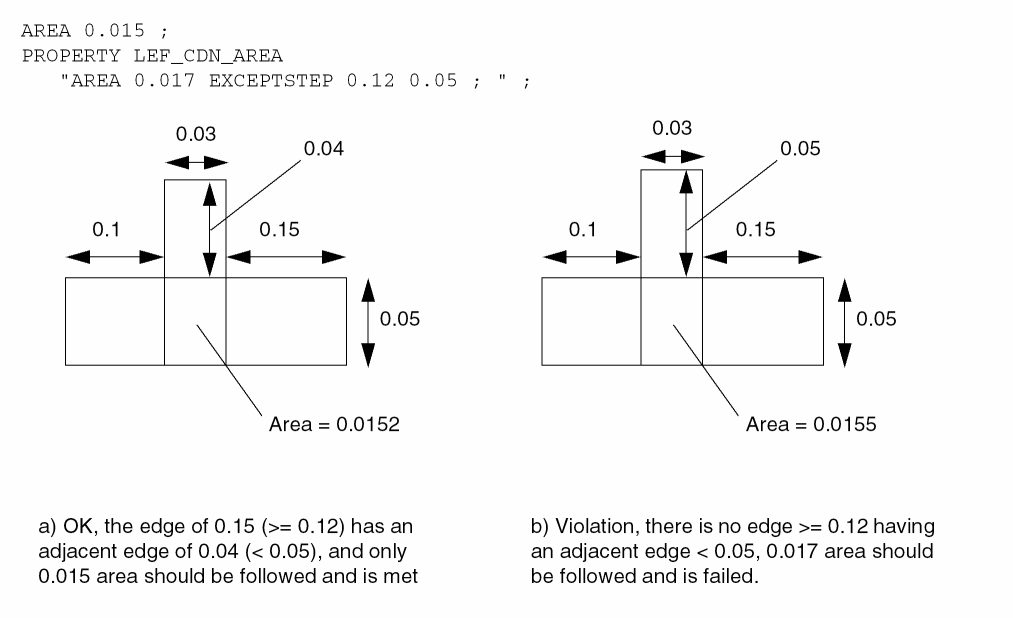
-
The following minimum area rule indicates that any rectangles must have an area greater than or equal to 0.08 μm², while any other polygons must have an area greater than or equal to 0.10 μm²:
AREA 0.08 ;
PROPERTY LEF_CDN_AREA
   "AREA 0.10 EXCEPTRECTANGLE ;" ;
Figure 5-20 Area Rule with EXCEPTRECTANGLE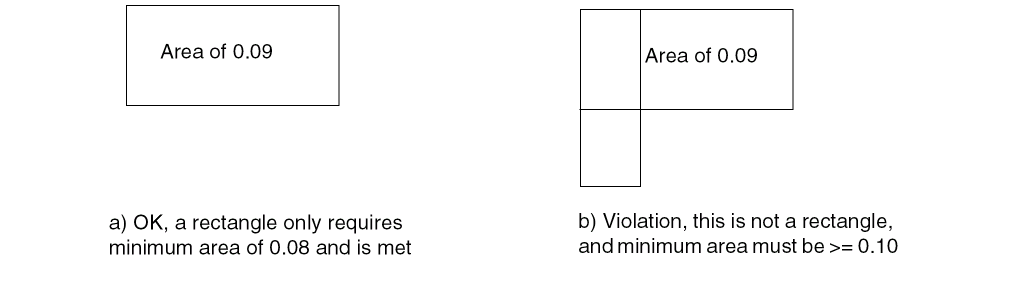
-
The following example illustrates minimum area rule for trim layer with overlap:
AREA 0.06 ;
PROPERTY LEF_CDN_AREA "
   AREA 0.5 LAYER TRIM1 OVERLAP 1
   AREA 0.4 LAYER TRIM1 OVERLAP 2 ;" ;
Figure 5-21 Area Rule for Trim Layer with Overlap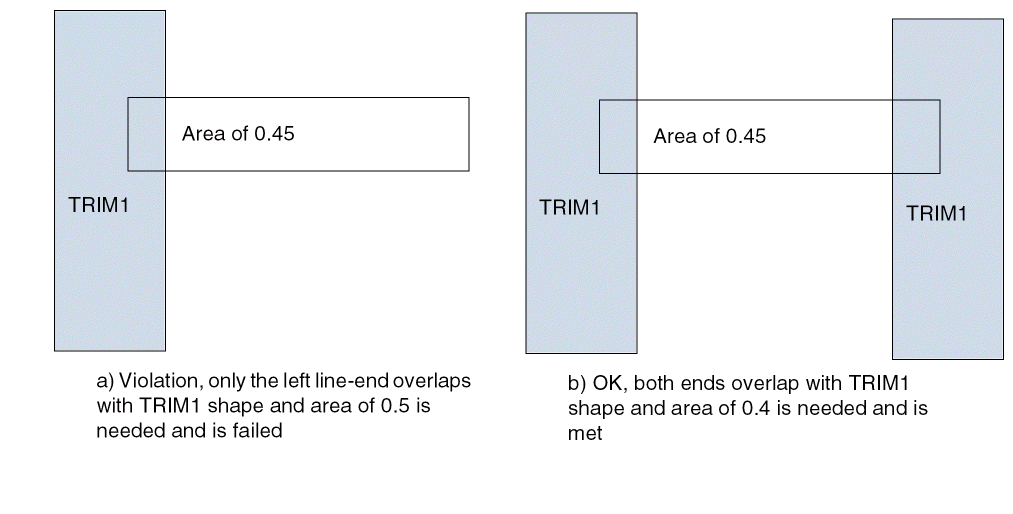
Backside Rule
A backside rule can be used to specify that the routing layer is used on the underside of the die.
You can create a backside rule by using the following property definition:
PROPERTY LEF_CDN_BACKSIDE
“BACKSIDE ;” ;
|
Indicates that the routing layer is a backside routing layer. |
The POLYROUTING, MIMCAP (PROPERTY LEF_CDN_TYPE), and BACKSIDE keywords are mutually exclusive; you cannot specify them together.
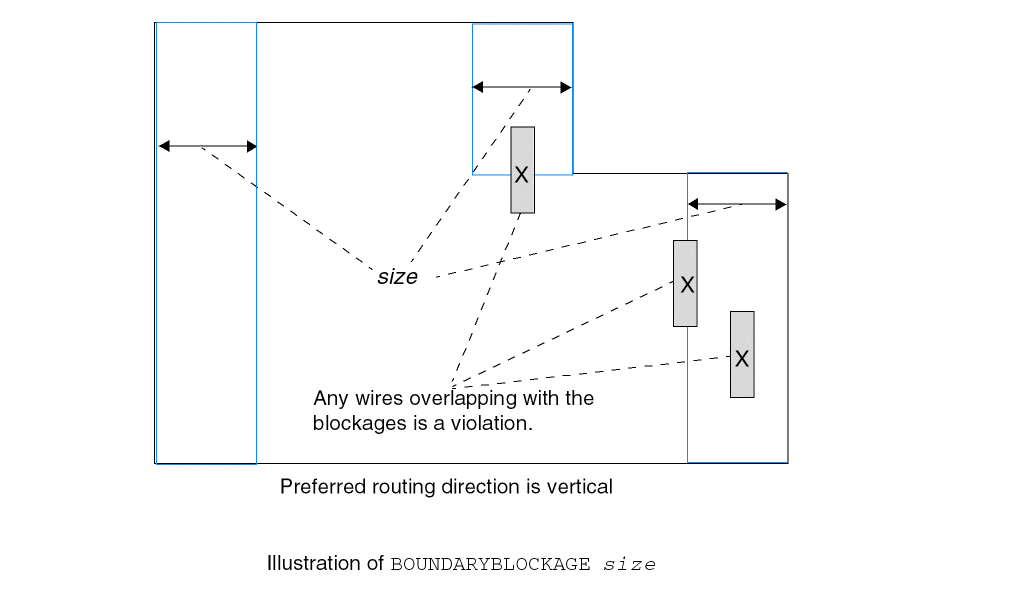
Boundary Blockage Rule
A boundary blockage rule is used to specify line-end blockages. You can create a boundary blockage rule by using the following property definition:
PROPERTY LEF_CDN_BOUNDARYBLOCKAGE
  “BOUNDARYBLOCKAGE size
     ;” ;
Figure 5-22 Illustration of the Boundary Blockage Rule
Boundary EOL Blockage Rule
A Boundary EOL blockage rule is used to specify line-end blockages. You can create a boundary EOL blockage rule by using the following property definition:
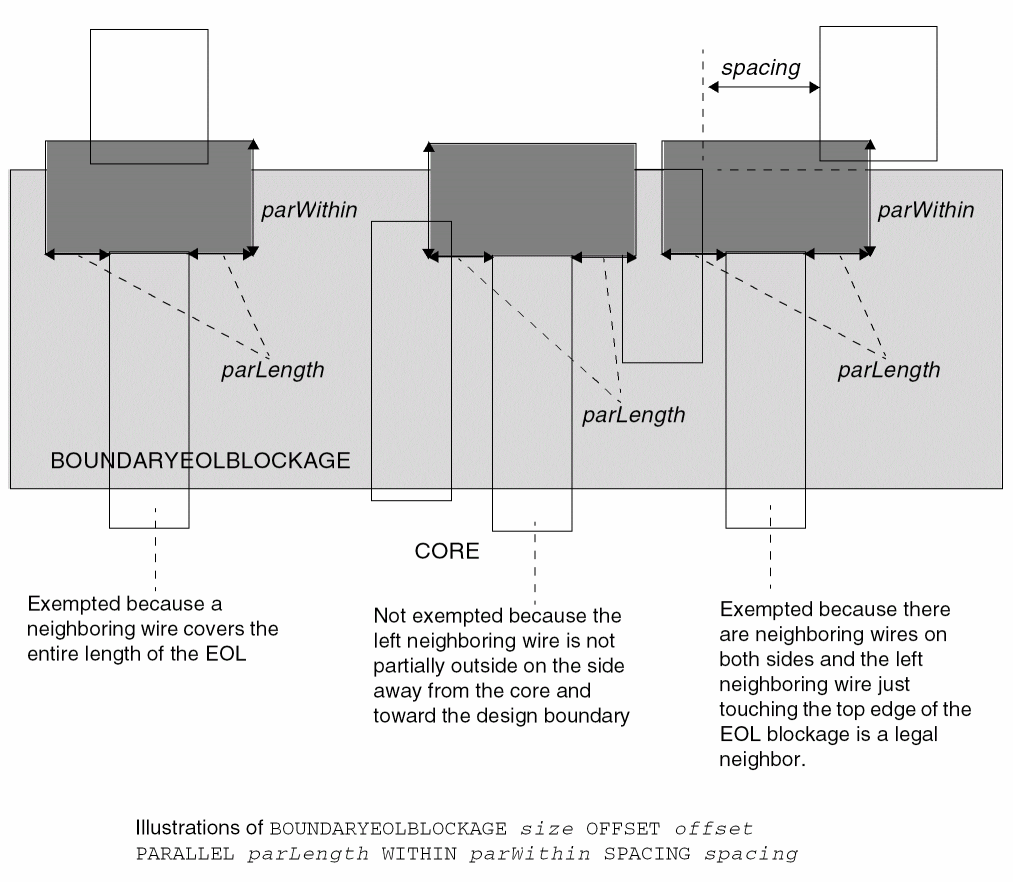
PROPERTY LEF_CDN_BOUNDARYEOLBLOCKAGE “BOUNDARYEOLBLOCKAGEsizeOFFSEToffset[PARALLELparLengthWITHINparWithinSPACINGspacing] ;” ;
Figure 5-23 Illustration of the Boundary EOL Blockage Rule
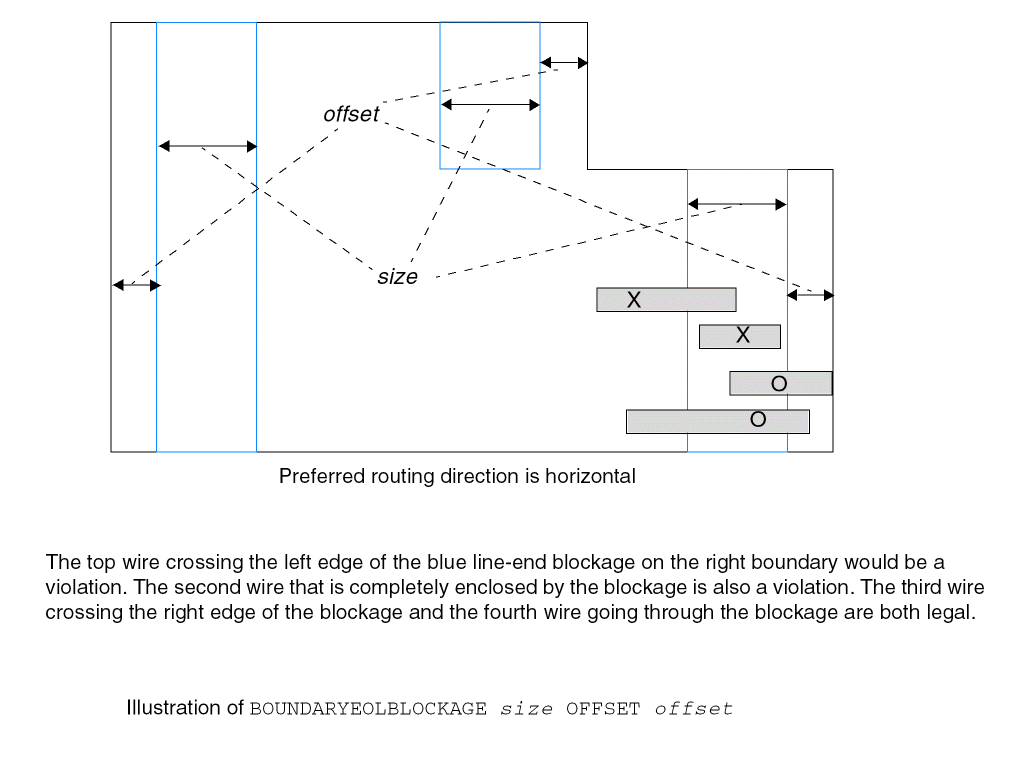
Figure 5-24 Illustration of the Boundary EOL Blockage Rule with PARALLEL, WITHIN, and SPACING
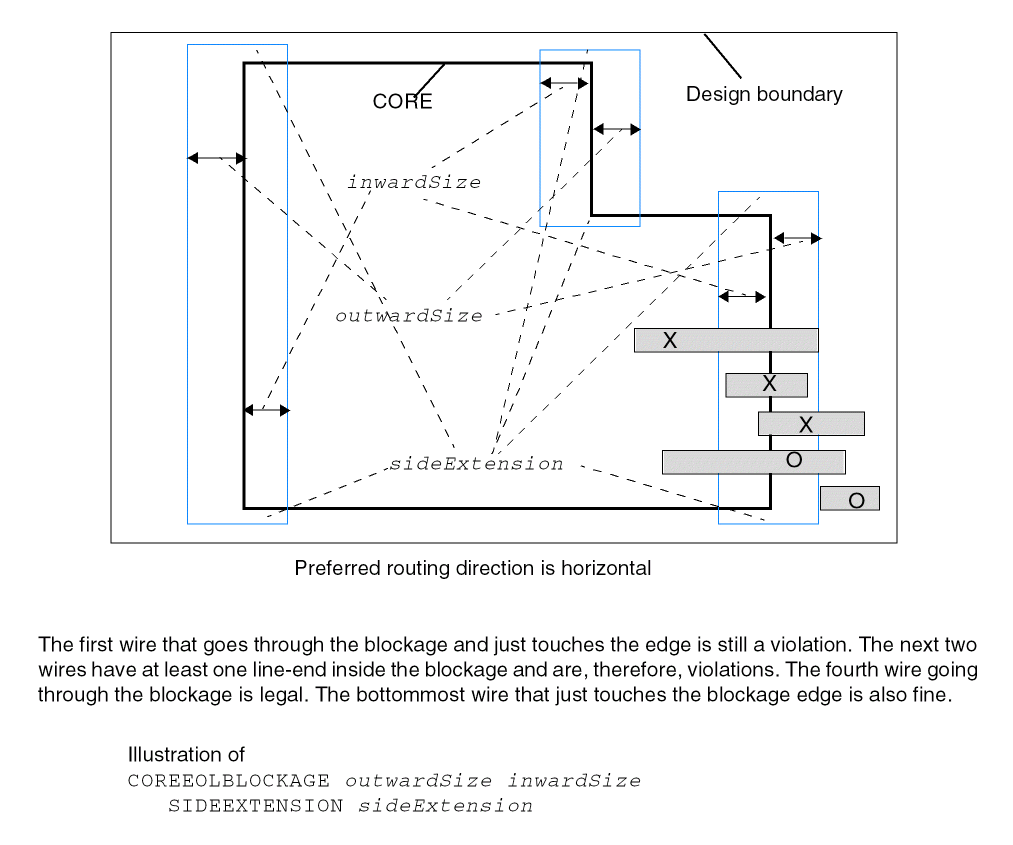
Core EOL Blockage Rule
A Core EOL blockage rule is used to specify line-end blockages formed from the core edges. You can create a core EOL blockage rule by using the following property definition:
PROPERTY LEF_CDN_COREEOLBLOCKAGE “COREEOLBLOCKAGEoutwardSize inwardSize[SIDEEXTENSIONsideExtension] ;” ;
Figure 5-25 Illustration of the Core EOL Blockage Rule
Corner EOL Keep-out Rule
A corner EOL keep-out rule specifies a keep-out region for an EOL edge. You can create a corner EOL keep-out rule by using the following property definition:
PROPERTY LEF_CDN_CORNEREOLKEEPOUT “CORNEREOLKEEPOUT WIDTHeolWidthEOLSPACINGeolSpacing{ SPACINGspacing1spacing2WITHINwithin1 within2| EXTENSIONbackwardExt sideExt forwardExt} ;” ;
Corner EOL Keep-out Rule Examples
The following diagrams illustrate the corner EOL keep-out rule:
Figure 5-26 Illustration of the Corner EOL Keep-out Rule with SPACING
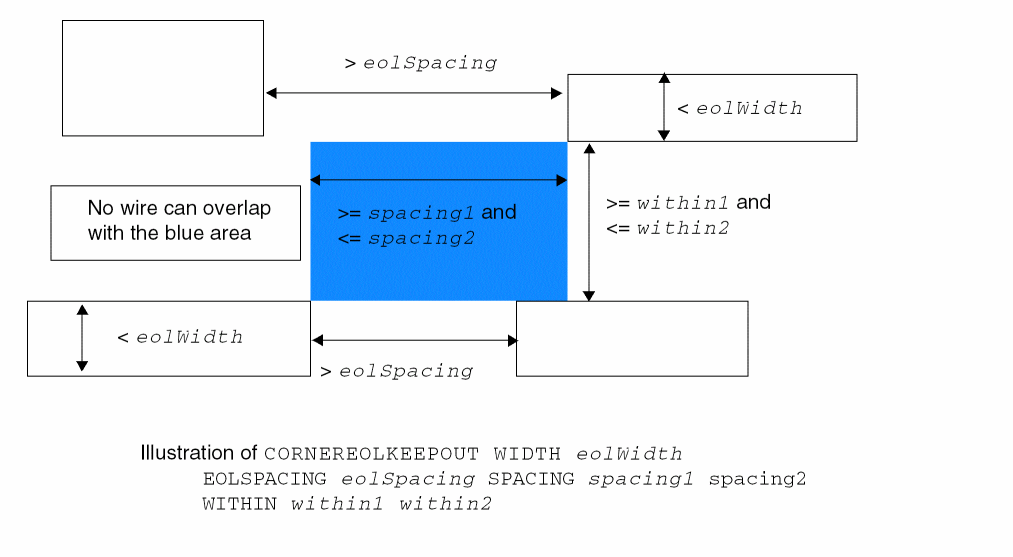
Figure 5-27 Illustration of the Corner EOL Keep-out Rule with EXTENSION
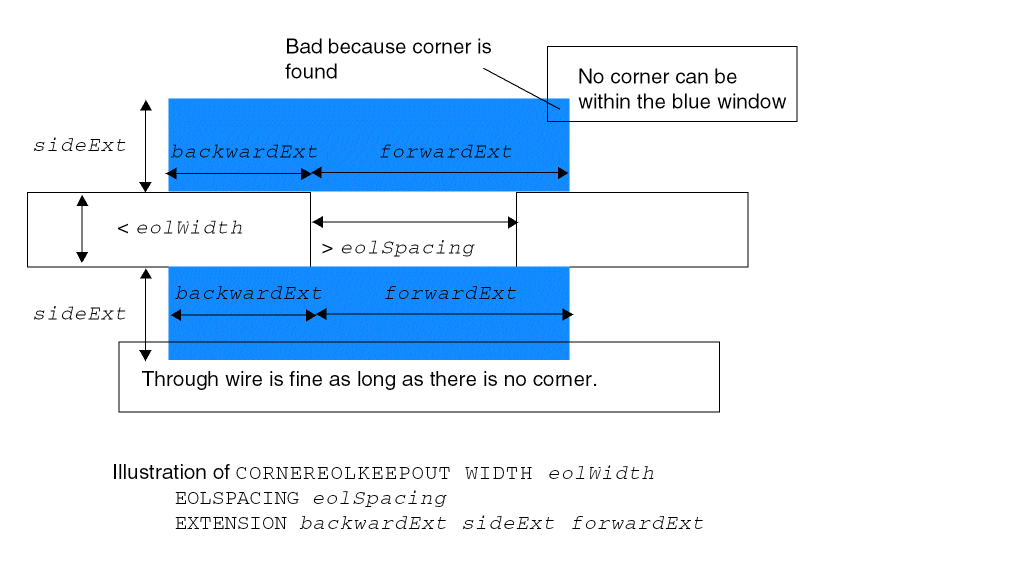
Corner Fill Spacing Rule
A corner fill spacing rule can be used to define spacing of missing corners.
You can create a corner fill spacing rule by using the following property definition:
PROPERTY LEF_CDN_CORNERFILLSPACING "CORNERFILLSPACINGspacingEDGELENGTHlength1length2ADJACENTEOLeolWidth;” ;
Figure 5-28 Illustration of Corner Fill Spacing Rule
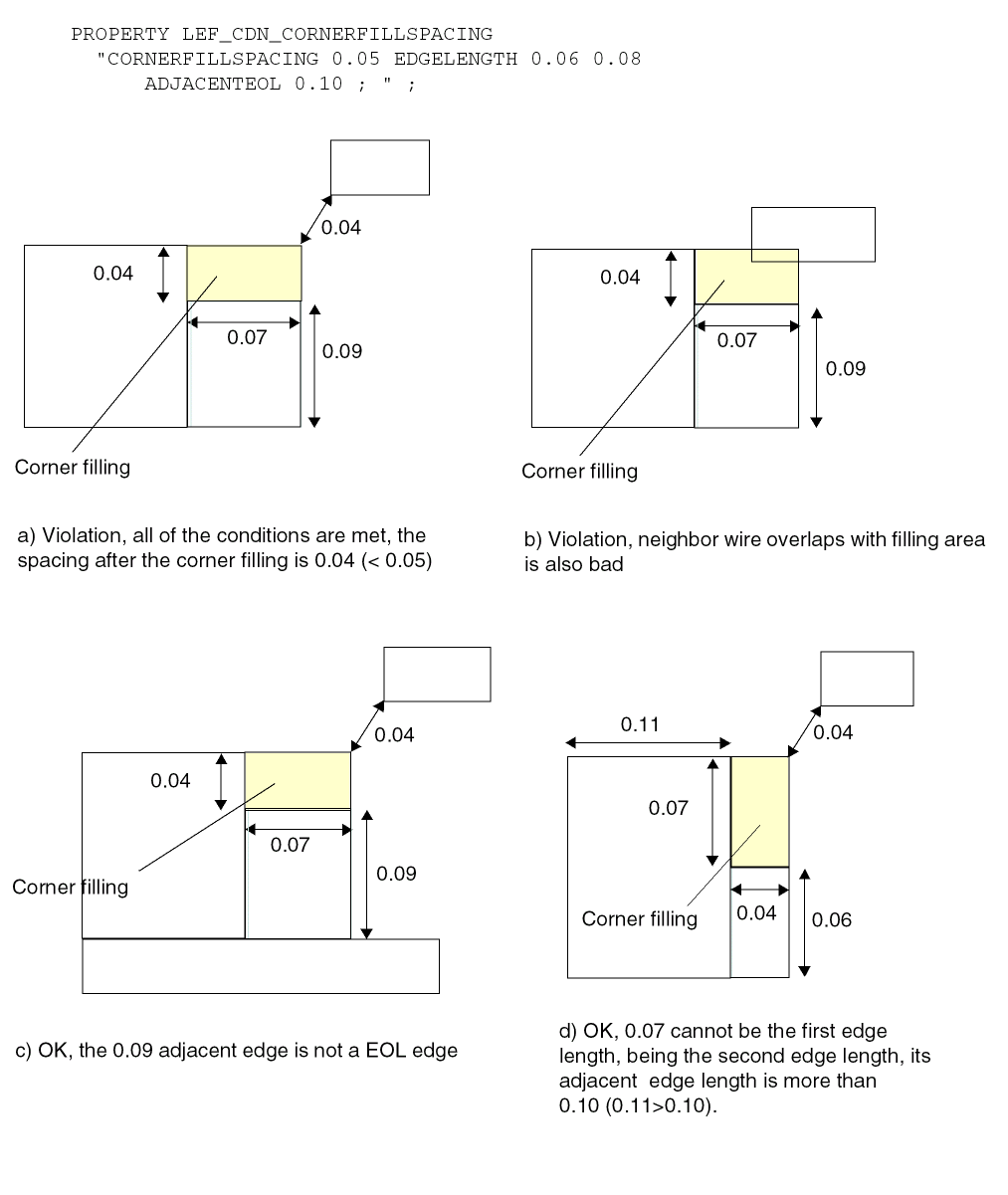
Corner Spacing Rule
You can create corner spacing rule to define spacing between convex/concave corners and any edges, depending on whether a convex or concave corner is defined.
You can create a corner spacing rule by using the following property definition:
PROPERTY LEF_CDN_CORNERSPACING
"CORNERSPACING
   {CONVEXCORNER [SAMEMASK]
       [CORNERONLY within | CORNERTOCORNER]
       [EXCEPTEOL eolWidth [EXCEPTJOGLENGTH length
            [EDGELENGTH] [INCLUDELSHAPE]]
       | EOLONLY eolWidth]
   |CONCAVECORNER
       [MINLENGTH minLength] [EXCEPTNOTCH [notchLength]] }
   [EXCEPTSAMENET | EXCEPTSAMEMETAL]
   {WIDTH width SPACING spacing
   | WIDTH width SPACING horizontalSpacing verticalSpacing}...
   ; " ;
|
Specifies that the corner spacing rule only applies to a neighbor corner, which is within spacing in the direction parallel to the specified direction in DIRECTION on a Manhattan routing layer and within in the perpendicular direction. |
|
|
|
|
|
Specifies the spacing, which is measured in |
|
|
Specifies that the rule applies only between two facing convex corners and the spacing is measured in Euclidean. In addition, the rule applies only when the PRL of the wires is strictly less than zero. |
|
|
Specifies that the rule applies only between two line ends with width less than eolWidth. |
|
|
Specifies that the corner spacing rule does not apply to a corner connected to a EOL edge with width less than the eolWidth. |
|
|
Specifies that the minimum default (right-way) spacing will be applied between a wrong way jog with minimum wrong way width and length less than length sandwiched by two right way wires with projected
If
If |
|
|
Specifies that the rule does not apply to a notch (U shape) that is a neighbor of the concave corner. notchLength specifies that the notch length must be less than the given value to be exempted from the rule. See Figure 5-34. |
|
|
Specifies that the rule does not apply to same-net or same-metal objects of the corner. |
|
|
Specifies that the corner spacing rule applies only if both edges of the concave corner have length >= minLength. |
|
|
Specifies that the corner spacing rule only applies to objects on the same mask. |
|
|
Specifies that the rule would require horizontalSpacing horizontally and verticalSpacing vertically from the concave corner in |
|
Corner Spacing Rule Examples
-
The following example illustrates the corner spacing rule:
PROPERTY LEF_CDN_CORNERSPACING“CORNERSPACING CONVEXCORNER EXCEPTEOL 0.090WIDTH 0.000 SPACING 0.110 ... ;CORNERSPACING CONCAVECORNER EXCEPTNOTCHWIDTH 0.000 SPACING 0.150 ; ” ;
Figure 5-29 Illustration of Corner Spacing RuleFigure 5-30 Corner Spacing Rule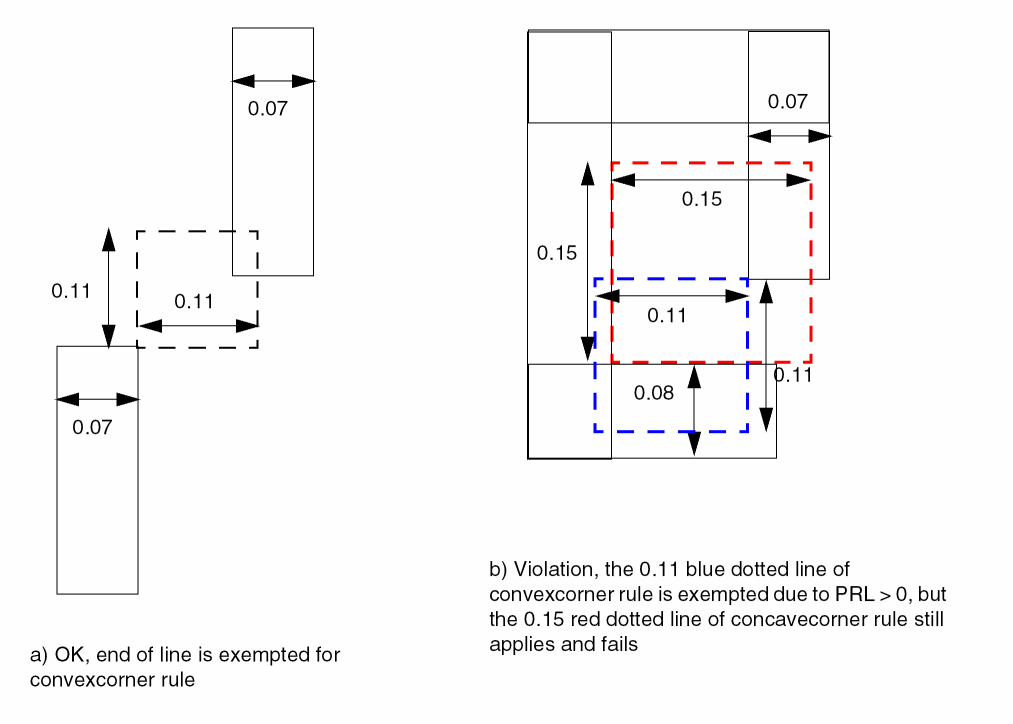
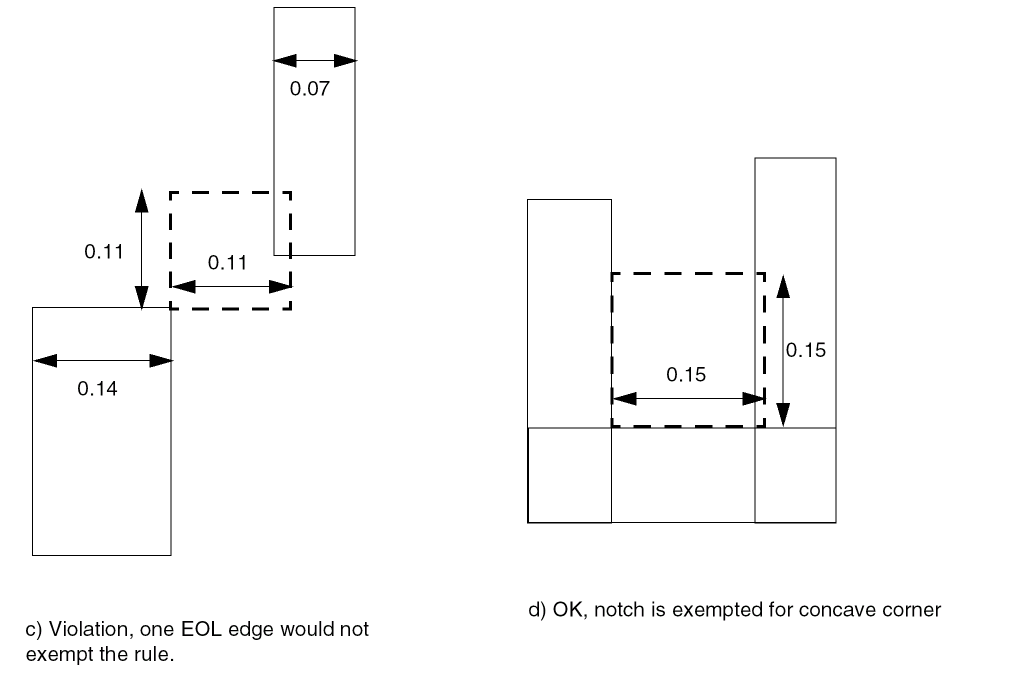
-
The following example illustrates corner spacing rule with
CORNERONLY:DIRECTION VERTICAL ;PROPERTY LEF_CDN_CORNERSPACING “CORNERSPACING CONVEXCORNER CORNERONLY 0.050WIDTH 0.000 SPACING 0.100 ; ” ;
Figure 5-31 Corner Spacing Rule with CORNERONLY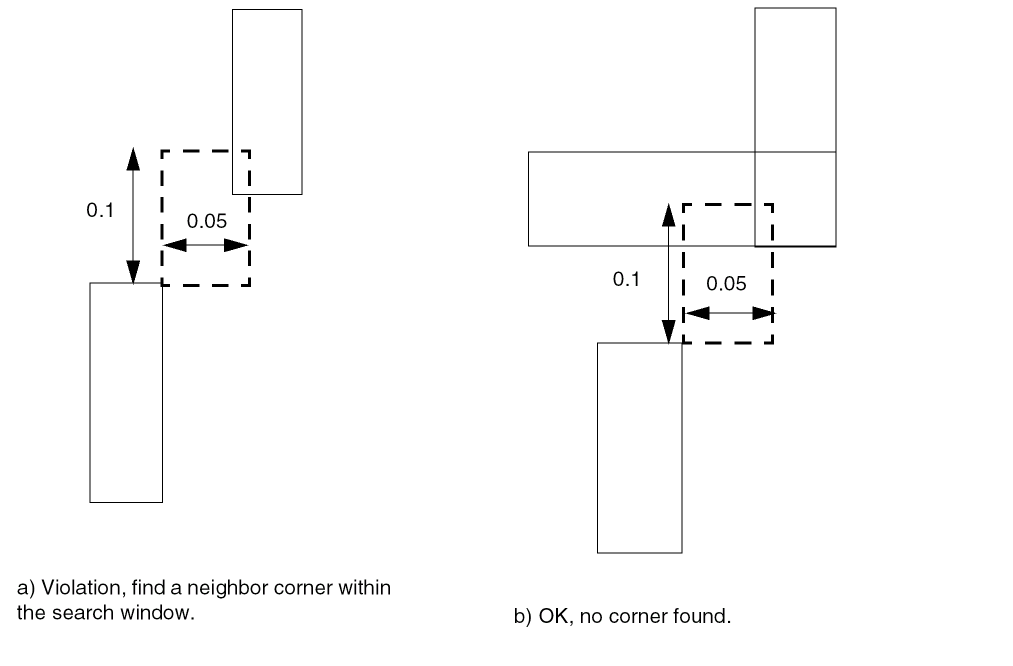
-
The following example illustrates the corner spacing rule:
DIRECTION VERTICAL ;PROPERTY LEF_CDN_WIDTHTABLE “WIDTHTABLE 0.050 ... ;WIDTHTABLE 0.090 ... WRONGDIRECTION ; ” ;PROPERTY LEF_CDN_CORNERSPACING “CORNERSPACING CONVEXCORNER EXCEPTEOL 0.090EXCEPTJOGLENGTH 0.170 INCLUDELSHAPEWIDTH 0.000 SPACING 0.110 ... ;CORNERSPACING CONCAVECORNER MINLENGTH 0.05WIDTH 0.000 SPACING 0.150 ; ” ;
Figure 5-32 Illustration of Corner Spacing Rule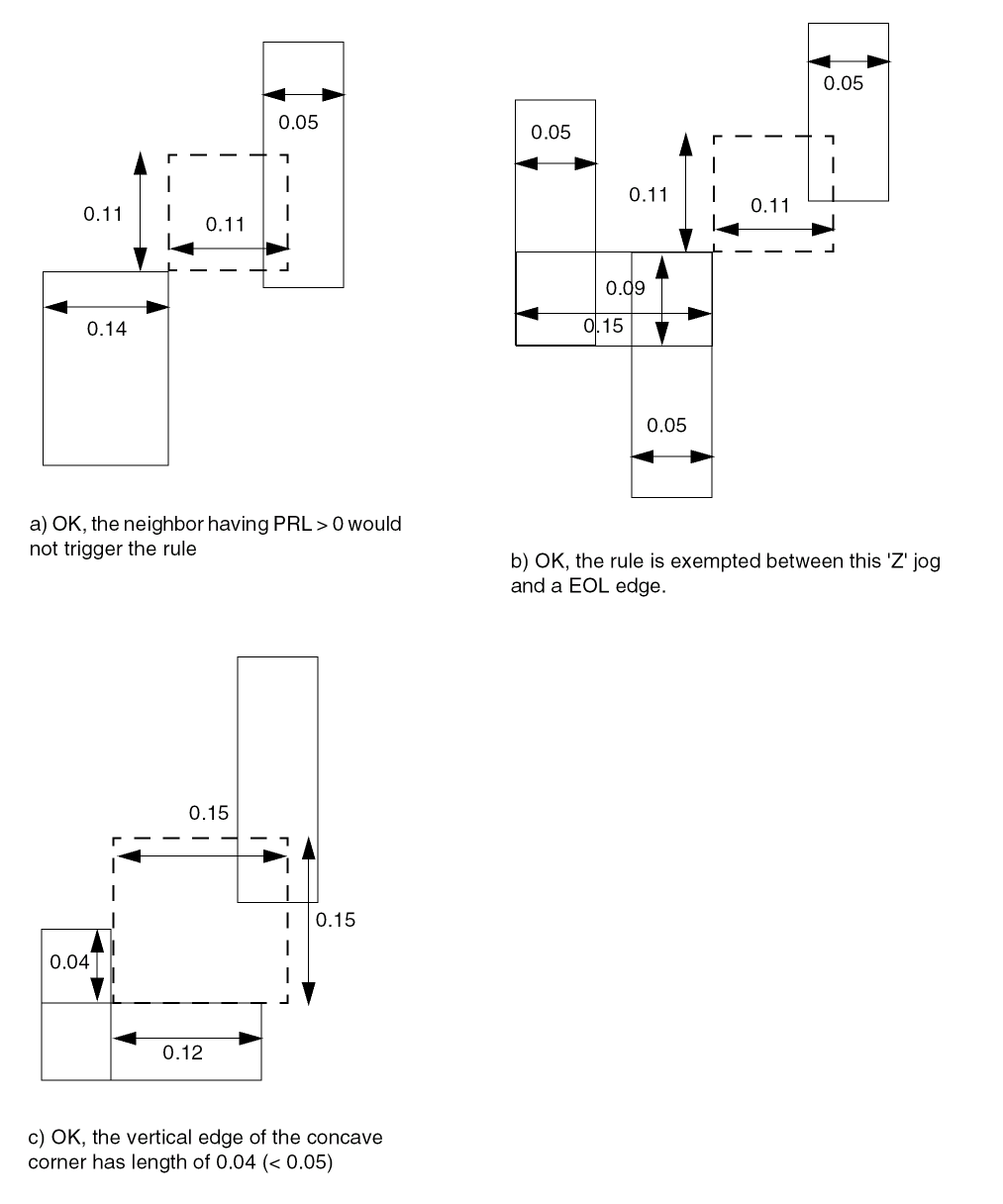
-
The following example illustrates the corner spacing rule:
DIRECTION VERTICAL ;PROPERTY LEF_CDN_WIDTHTABLE “WIDTHTABLE 0.050 ... ;WIDTHTABLE 0.090 ... WRONGDIRECTION ; ” ;PROPERTY LEF_CDN_CORNERSPACING “CORNERSPACING CONVEXCORNER EXCEPTEOL 0.090EXCEPTJOGLENGTH 0.170WIDTH 0.000 SPACING 0.110 ... ; ” ;
Figure 5-33 Illustration of Corner Spacing Rule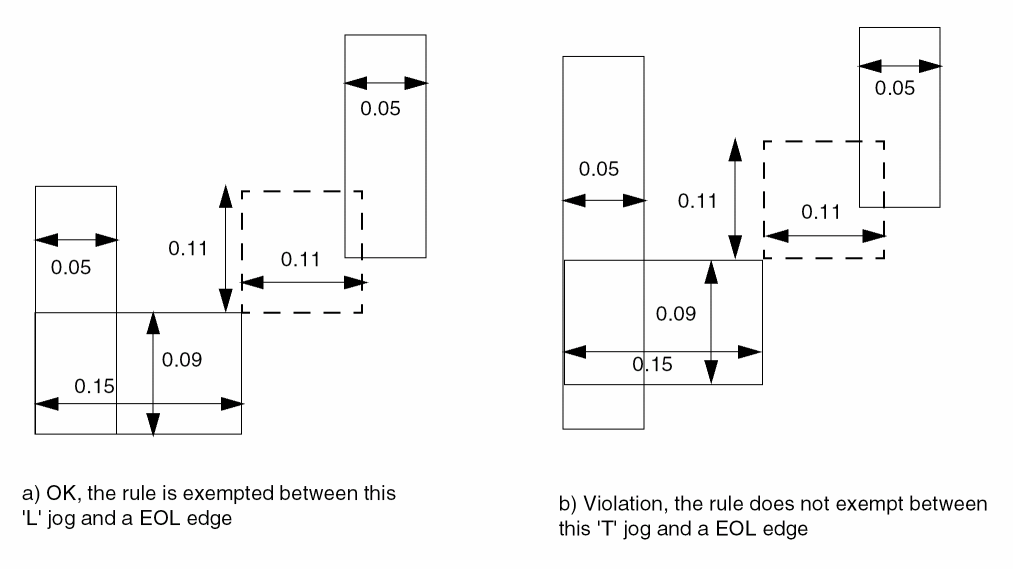
-
The following example illustrates the corner spacing rule:
PROPERTY LEF_CDN_CORNERSPACING “CORNERSPACING CONCAVECORNER EXCEPTNOTCH 0.08WIDTH 0.000 SPACING 0.100 0.120 ; ” ;
Figure 5-34 Illustration of Corner Spacing Rule with EXCEPTNOTCH in CONCAVECORNERFigure 5-35 Illustration of CORNERSPACING with EDGELENGTH in EXCEPTJOGLENGTH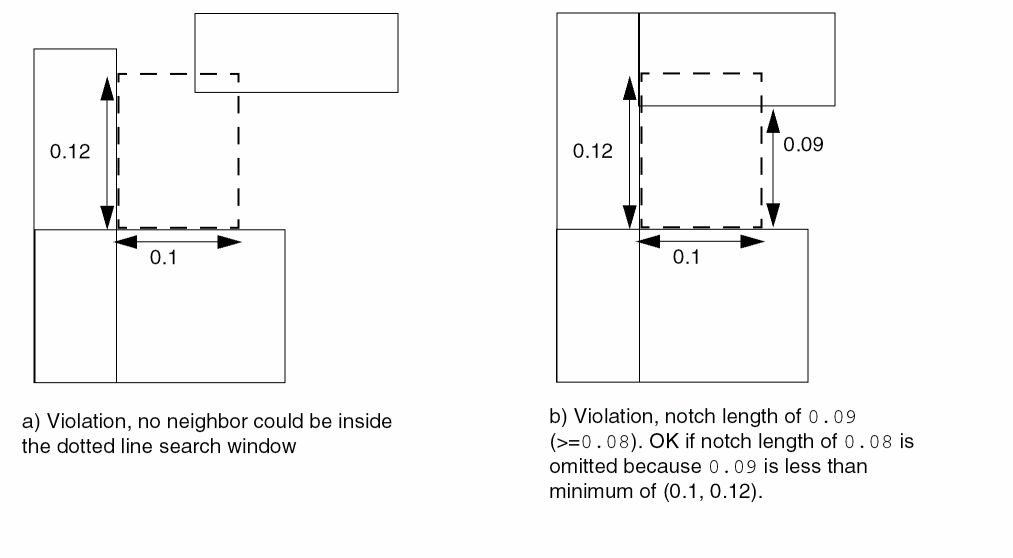
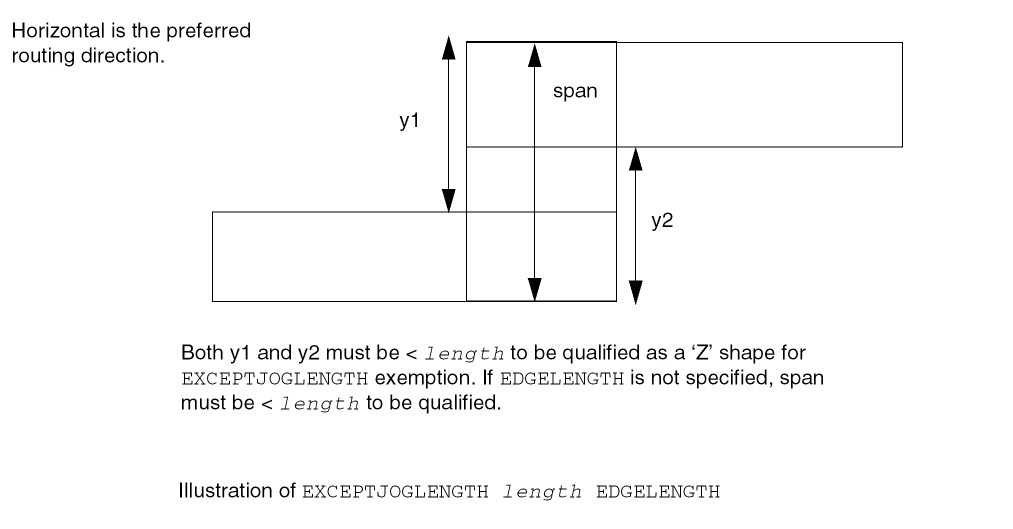
-
The following example illustrates the corner spacing rule with
CORNERTOCORNER:DIRECTION VERTICALPROPERTY LEF_CDN_CORNERSPACING“CORNERSPACING CONVEXCORNER CORNERTOCORNERWIDTH 0.000 SPACING 0.100 ; ” ;
Figure 5-36 Illustration of Corner Spacing Rule with CORNERTOCORNER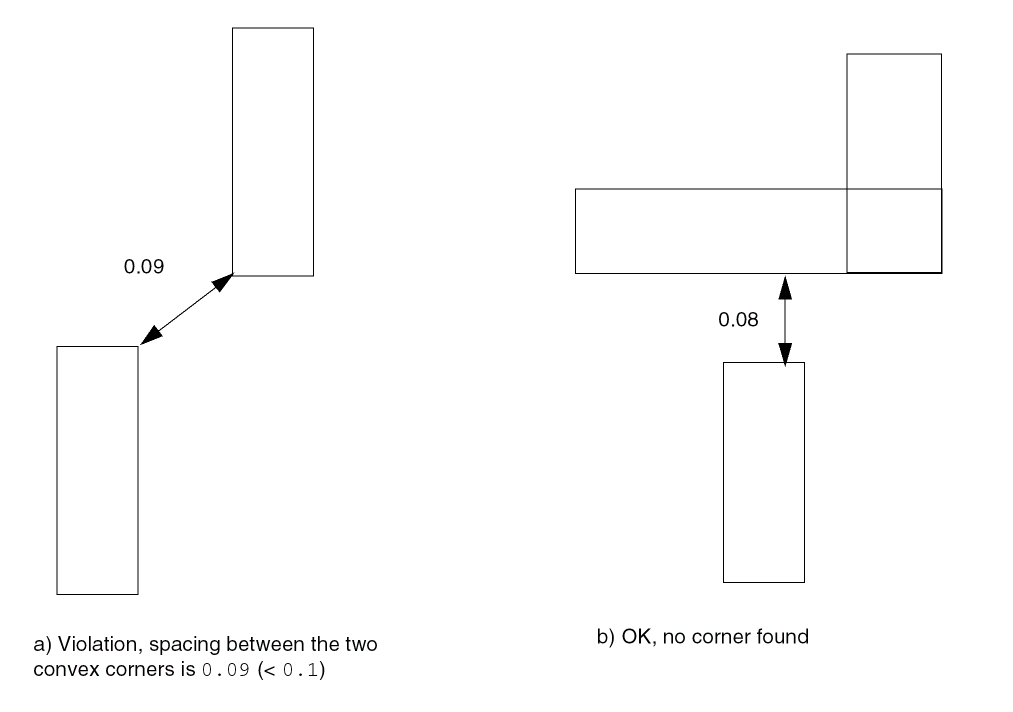
Enclosure Spacing Rule
You can use the enclosure spacing rule to specify the spacing on an edge with enclosure less than the specified enclosure.
You can define an enclosure spacing rule by using the following property definition:
PROPERTY LEF_CDN_ENCLOSURESPACING
"ENCLOSURESPACING
     [CUTCLASS cutClass [LONGEDGEONLY] ]
     [FROMABOVE | FROMBELOW]
     {ENCLOSURE enclosure SPACING spacing}...
 ; ... " ;
Enclosure Spacing Rule Example
The following rule indicates enclosure spacing:
PROPERTY LEF_CDN_ENCLOSURESPACING "
ENCLOSURESPACING CUTCLASS VB LONGEDGEONLY
ENCLOSURE 0.03 SPACING 0.1 ; " ;
Figure 5-37 Illustration of Enclosure Spacing Rule
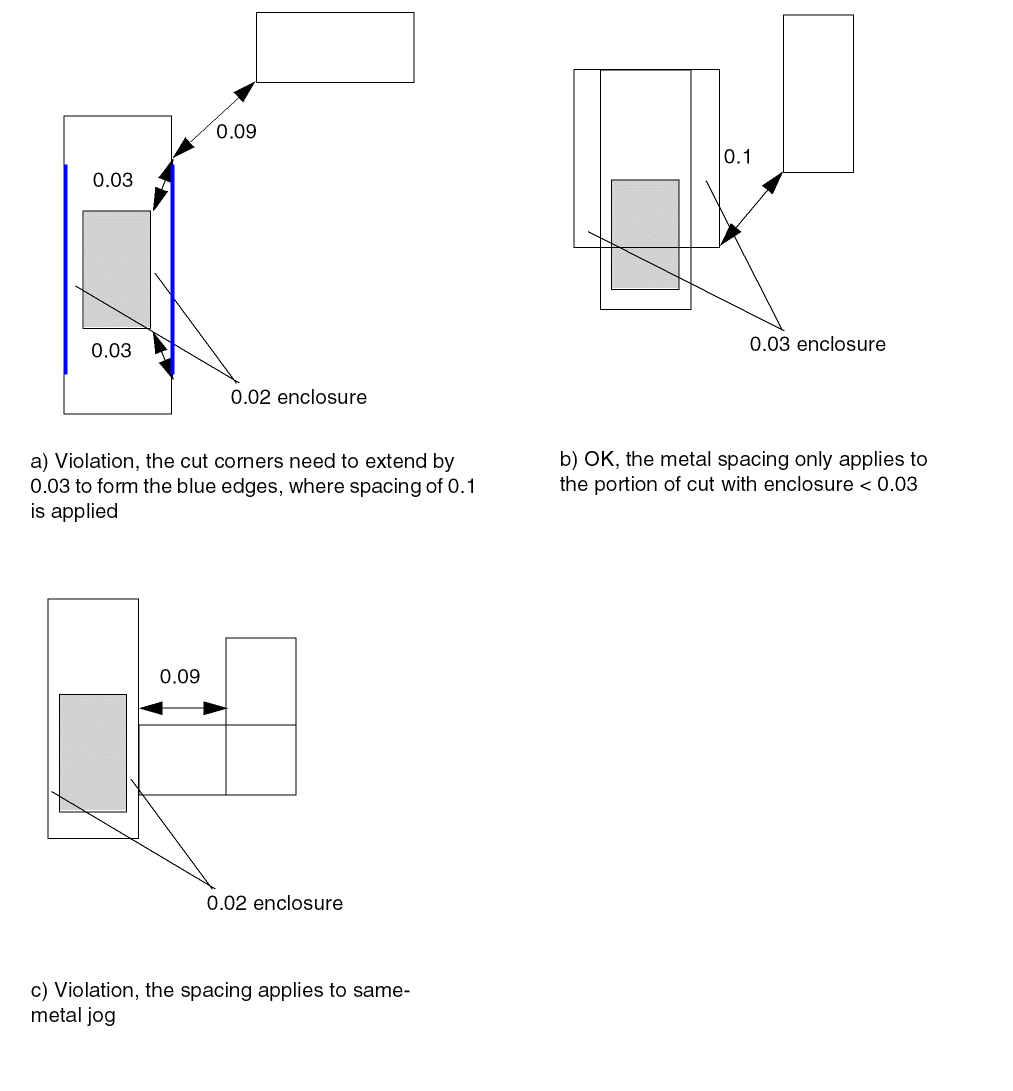
Enclosure with EOL Rule
You can use the enclosure with EOL rule to specify the conditions for the enclosure for a cut on the above or below cut layer with respect to an end-of-line edge.
You can define an enclosure with EOL rule by using the following property definition:
PROPERTY LEF_CDN_ENCLOSUREWITHEOL "ENCLOSUREWITHEOLeolWidth[CUTCLASSclassName] [FROMABOVE | FROMBELOW] {ENCLOSUREenclosureEXCEPTLINEENDSPACINGspacing| {ENCLOSURESPACINGspacing enclosure}... } ; ... " ;
Enclosure with EOL Rule Examples
Figure 5-38 Illustrations of Enclosure with EOL Rule
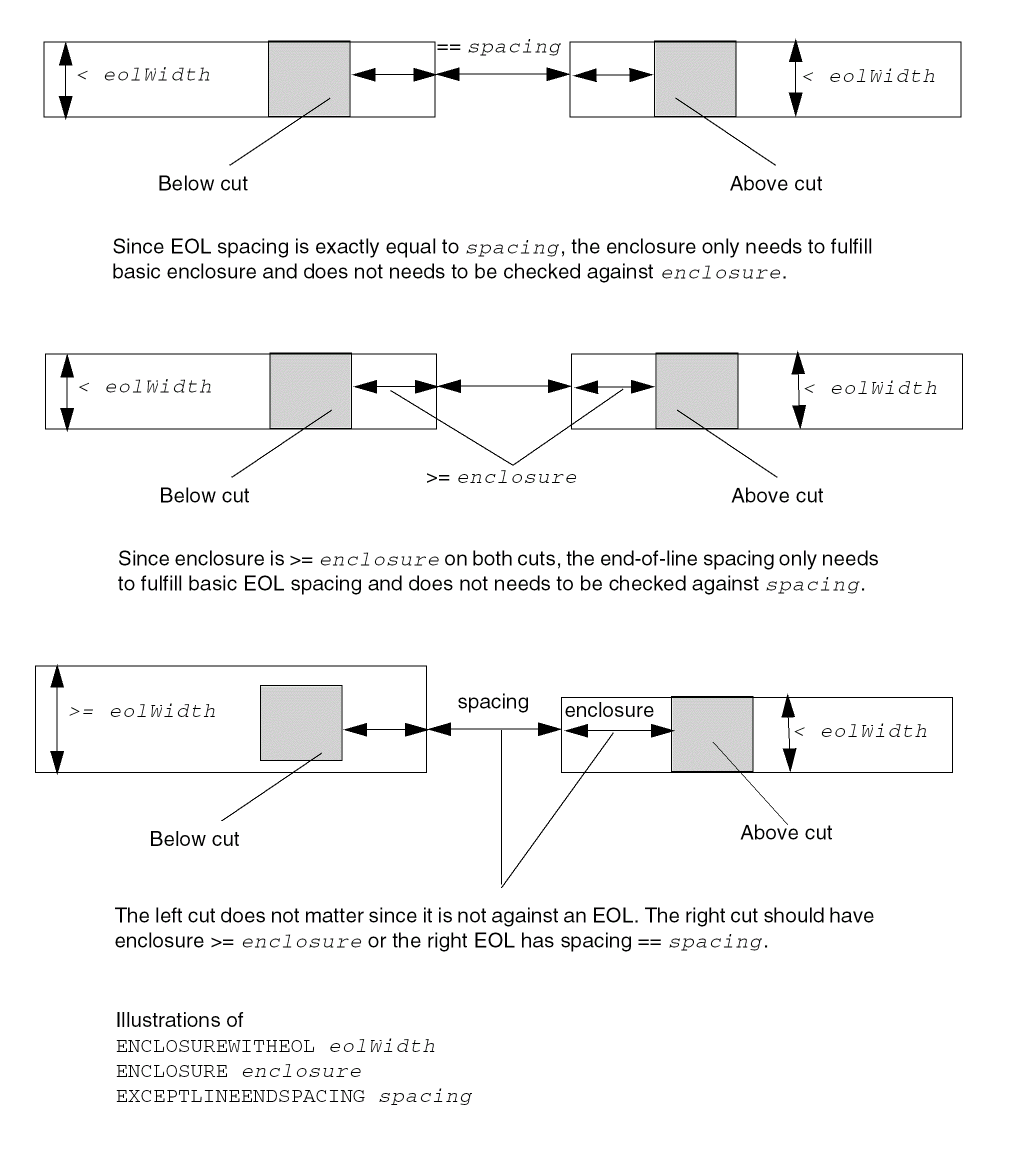
Figure 5-39 Illustrations of Enclosure with EOL Rule with ENCLOSURESPACING
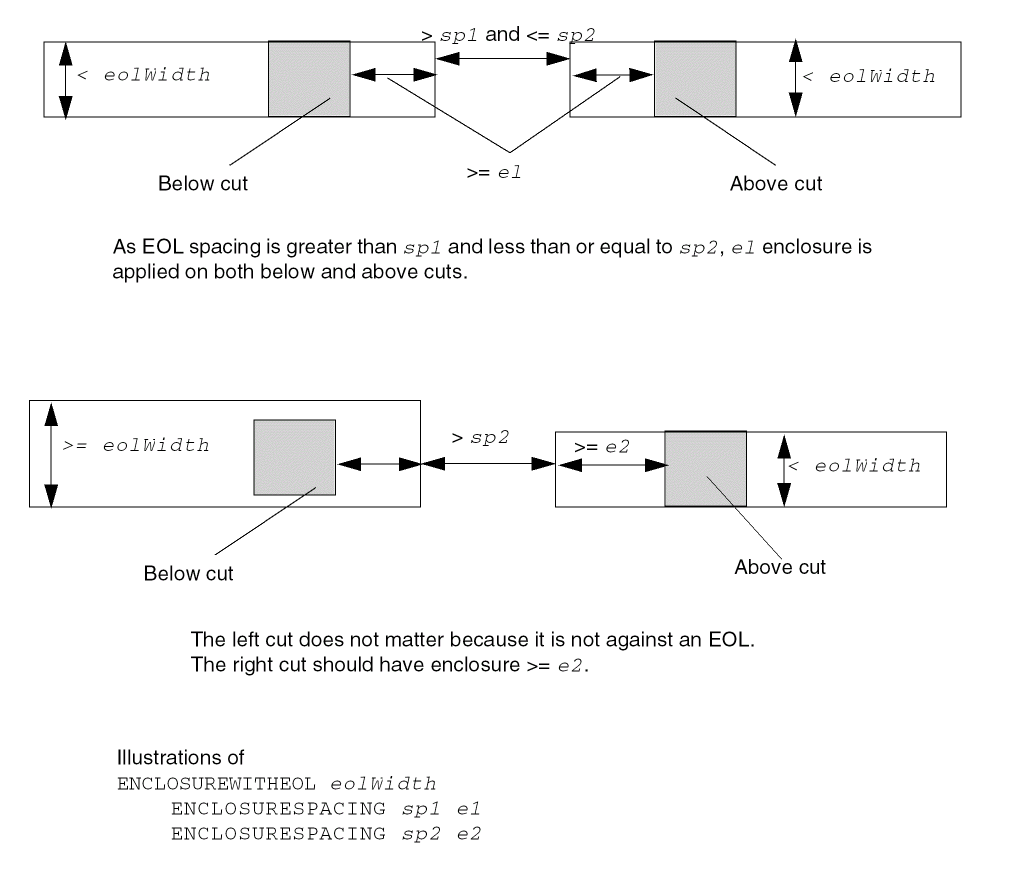
EOL Extension Spacing Rule
EOL extension spacing rule can be used to indicate that for a given width of an end-of-line certain extension should be applied to the EOL edge before checking for edge-to-edge spacing to any neighbor wires.
You can define a EOL extension spacing rule by using the following property definition:
PROPERTY LEF_CDN_EOLEXTENSIONSPACING "EOLEXTENSIONSPACINGspacing[SAMEMASK] [PARALLELONLY] [NONEOL]] [OTHERWIDTHotherWidth] {ENDOFLINEeolWidthEXTENSIONextension[ENDTOENDendToEndExtension]} ... [MINLENGTHminLength[TWOSIDES]] ;" ;
|
|
|
|
Specifies that for a given width of an end-of-line, find the last row where the width is less than eolWidth, the corresponding extension should be applied to the EOL edge before checking for edge-to-edge spacing to any neighbor wires. The eolWidth values should be increased for each subsequent
|
|
|
Indicates that the rule does not apply if the end-of-line length is less than minLength along both sides.
|
|
|
Specifies that the rule applies only if the width of the neighbor wire is less than otherWidth. See Figure 5-41. |
|
|
Specifies that the rule only applies if a facing neighbor parallel edge to the EOL edge is found. If |
|
|
Specifies that the EOL extension spacing only applies to same-mask objects. |
|
EOL Extension Spacing Rule Examples
-
The following EOL extension spacing rule indicates that an end-of-line edge with width less than 0.11 μm should have 0.14 μm extension, and an end-of-line edge with width less than 0.15 μm and greater than or equal to 0.11 μm should have 0.13 μm extension in end-to-end situation or 0.12 μm extension in end-to-side situation. Then 0.1 μm edge to edge spacing must be enforced with proper extension on the end-of-line edge(s).
PROPERTY LEF_CDN_EOLEXTENSIONSPACING
"EOLEXTENSIONSPACING 0.1 ENDOFLINE 0.11 EXTENSION 0.14
ENDOFLINE 0.15 EXTENSION 0.12 ENDTOEND 0.13 ;" ;
Figure 5-40 EOL Extension Spacing Rule ExampleFigure 5-41 EOL Extension Spacing Rule with OTHERWIDTH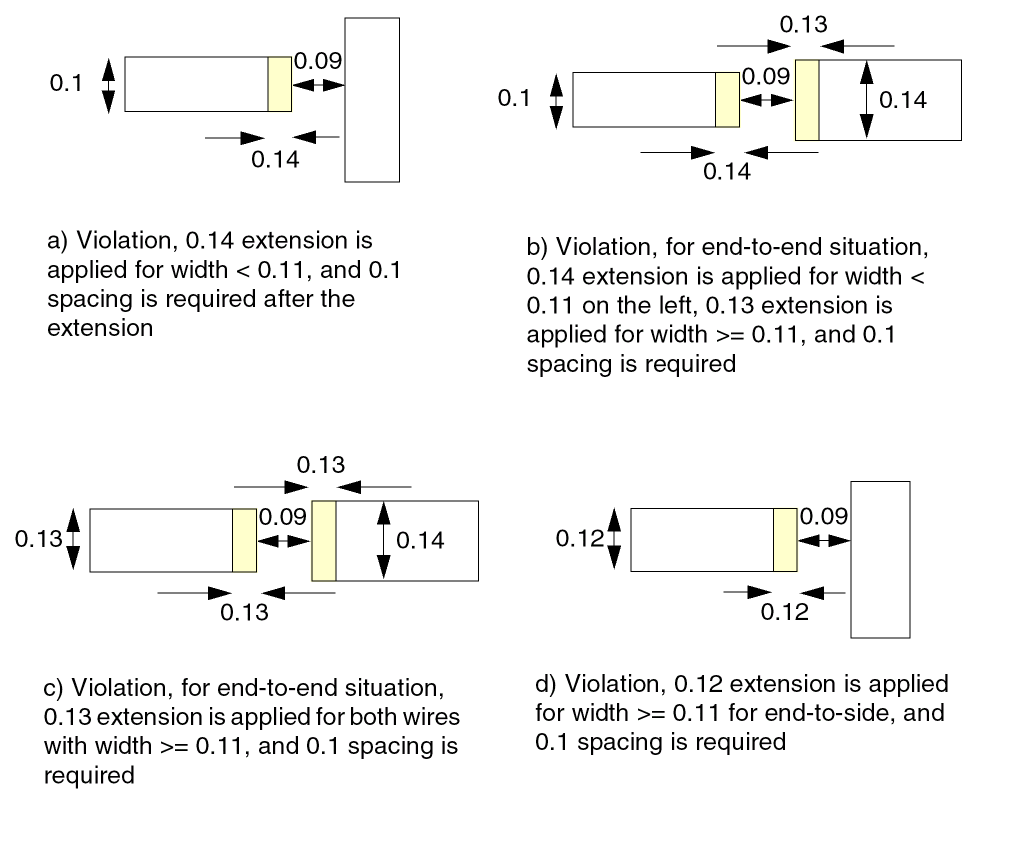 Figure 5-42 EOL Extension Spacing Rule with NONEOL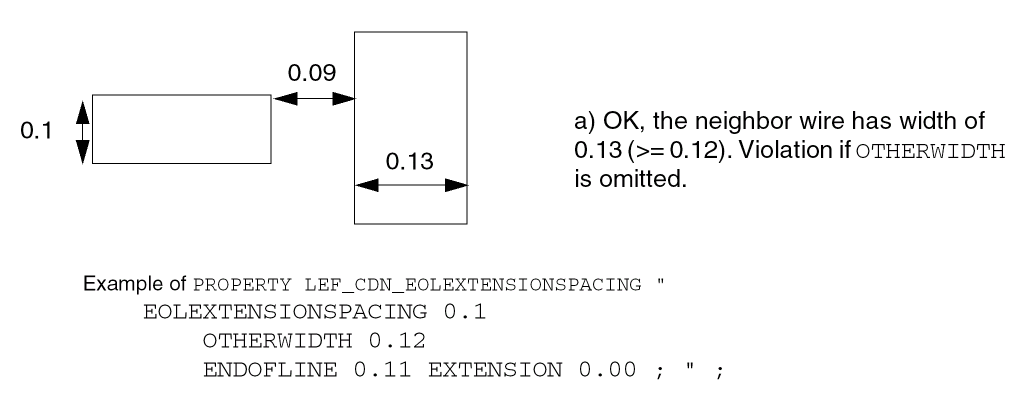
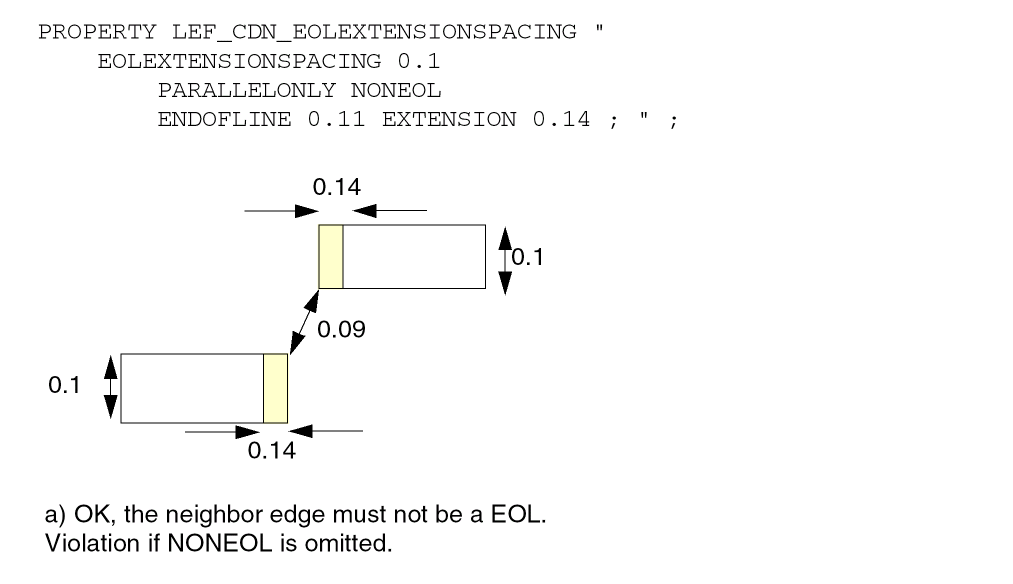
-
The following EOL extension spacing rule indicates that if a facing neighbor parallel edge to the EOL edge is found, then without
PARALLELONLYit will be a violation:PROPERTY LEF_CDN_EOLEXTENSIONSPACING
"EOLEXTENSIONSPACING 0.1 PARALLELONLY
ENDOFLINE 0.11 EXTENSION 0.14 ; " ;
Figure 5-43 EOL Extension Spacing Rule Example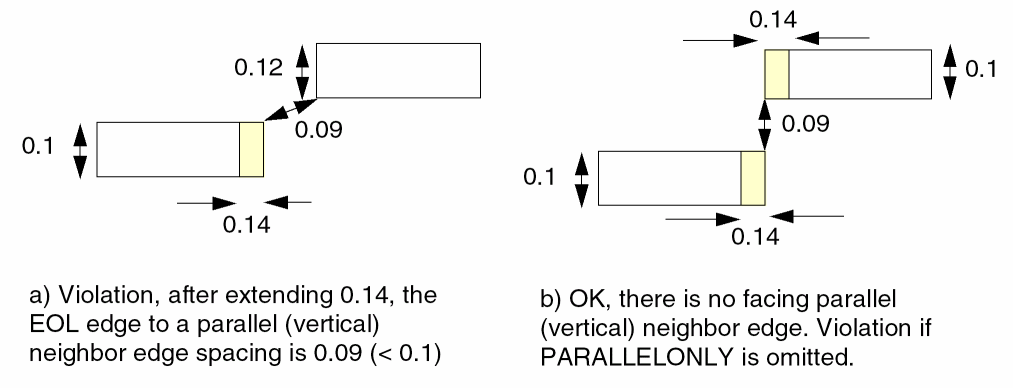
EOL Keep-out Rule
EOL keep-out rule can be used to define a keep-out region for an end-of-line edge.
You can create an EOL keep-out rule by using the following property definition:
PROPERTY LEF_CDN_EOLKEEPOUT
"EOLKEEPOUT {eolWidth | minEolWidth maxEolWidth}
    [RIGHTWAYONLY | WRONGWAYONLY]
    EXTENSION backwardExt sideExt forwardExt
    [EXCEPTWITHIN lowSideExt highSideExt]
    [CLASS className [OTHERENDEOL]]
    [CORNERONLY
        [EXCEPTFROM { BACKEDGE [EXACTALIGNED exactForwardExt]
            | FRONTEDGE}
         [MASK maskNum [TWOSIDES] [SAMEMASK]
         | DIFFMASK
         | SAMEMASK]
        [EXCEPTSAMESIDEMETAL backwardExt1 sideExt1 forwardExt1]
        [EXCEPTNOOPPSIDEMETAL backwardExt2 sideExt2 forwardExt2]
        [EXCEPTLINEENDSPACING spacing | EXCEPTLINEENDGAP]
        [EOLWITHINCUT withinCut]
        [EXCEPTEOLSPACING eolSpacing]
        ]]
    [EXCEPTSAMEMETAL]
    ; " ;
|
Assigns a class name to the rule. It is a violation if all the rules belonging to the same class fail. An entire set of failed class rules will be a violation. If any one of the rules have |
|
|
Specifies that it is a violation if there is a corner falling within the keep-out, and a pass-through edge is allowed. |
|
|
Specifies that the rule applies only to different-mask objects. |
|
|
Specifies that the rule applies only if there is a cut either on the below or above cut layer that is within withinCut from the end of line (EOL). |
|
|
Specifies that exactForwardExt applies only between two perfectly aligned EOL edges with the same width and the original |
|
|
Specifies that the rule only applies if the neighbor wire containing the corner is not coming from the front edge of the keep-out window in |
|
|
Specifies that the rule does not apply if there is no neighboring wire less than or equal to eolSpacing and parallel run length (PRL) greater than |
|
|
Specifies that the rule does not apply if the |
|
|
Specifies that the rule does not apply if there is another wire of the neighboring wire with spacing exactly equal to spacing with PRL greater than |
|
|
Specifies that the rule does not apply if there is no wire on the opposite side of the neighboring wire in a window formed by extensions of backwardExt2, sideExt2, and forwardExt2 on the end-of-line (EOL) edge. |
|
|
Specifies that the rule does not apply if there is another wire on the same side of the neighboring wire in a window formed by extensions of backwardExt1, sideExt1, and forwardExt1 on the end-of-line (EOL) edge. |
|
|
Specifies that the rule is not checked on a neighbor object overlapping with a region greater than or equal to lowSideExt and less than or equal to highSideExt away from the sides of the EOL edge, which covers the entire range of backwardExt and forwardExt. |
|
|
|
|
|
Defines a keepout region for an end-of-line edge with length less than the eolWidth by extending backwardExt going backward, sideExt on the side, and forwardExt going forward. Any objects falling within the region will be a violation. |
|
|
Specifies that the keepout region does not apply to same-metal objects. |
|
|
Specifies which mask the triggering wire of this rule belongs to, maskNum must be a positive integer, and most applications only support values of 1, 2, or 3. See Figure 5-51. |
|
|
Specifies that the rule applies only if the EOL width is greater than or equal to minEolWidth and less than maxEolWidth. |
|
|
Specifies that if the object found in the extension window is also an EOL, it is only a violation if that EOL also fails all of the |
|
|
Specifies that the rule applies only if the EOL edge is in the preferred routing direction in |
|
|
Specifies that the rule only applies if it has 2 different-mask wires on both sides. |
|
Figure 5-44 Definition of EOL Keep Out Rule
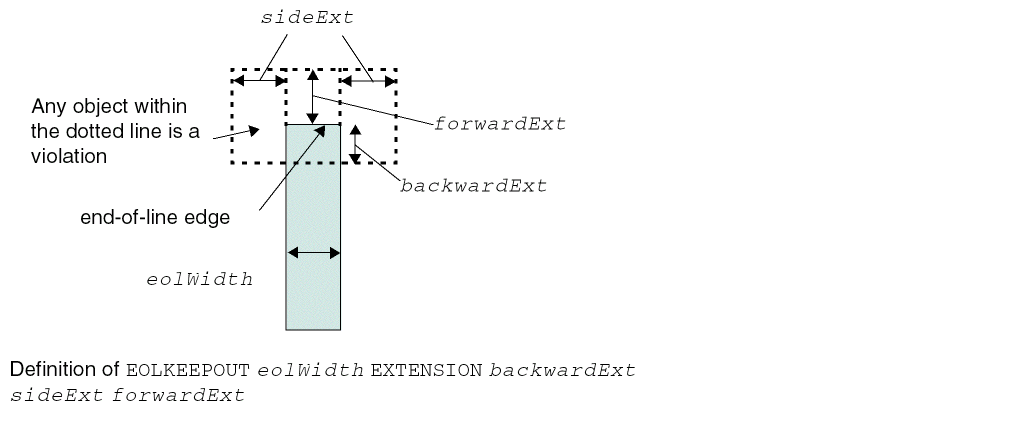
EOL Keep Out Rule Examples
-
The following example illustrates
EOLKEEPOUTwithEXTENSION:
Figure 5-45 Illustration of EOL Keep Out Rule with EXTENSIONFigure 5-46 Illustration of EOL Keep Out Rule with EXCEPTWITHIN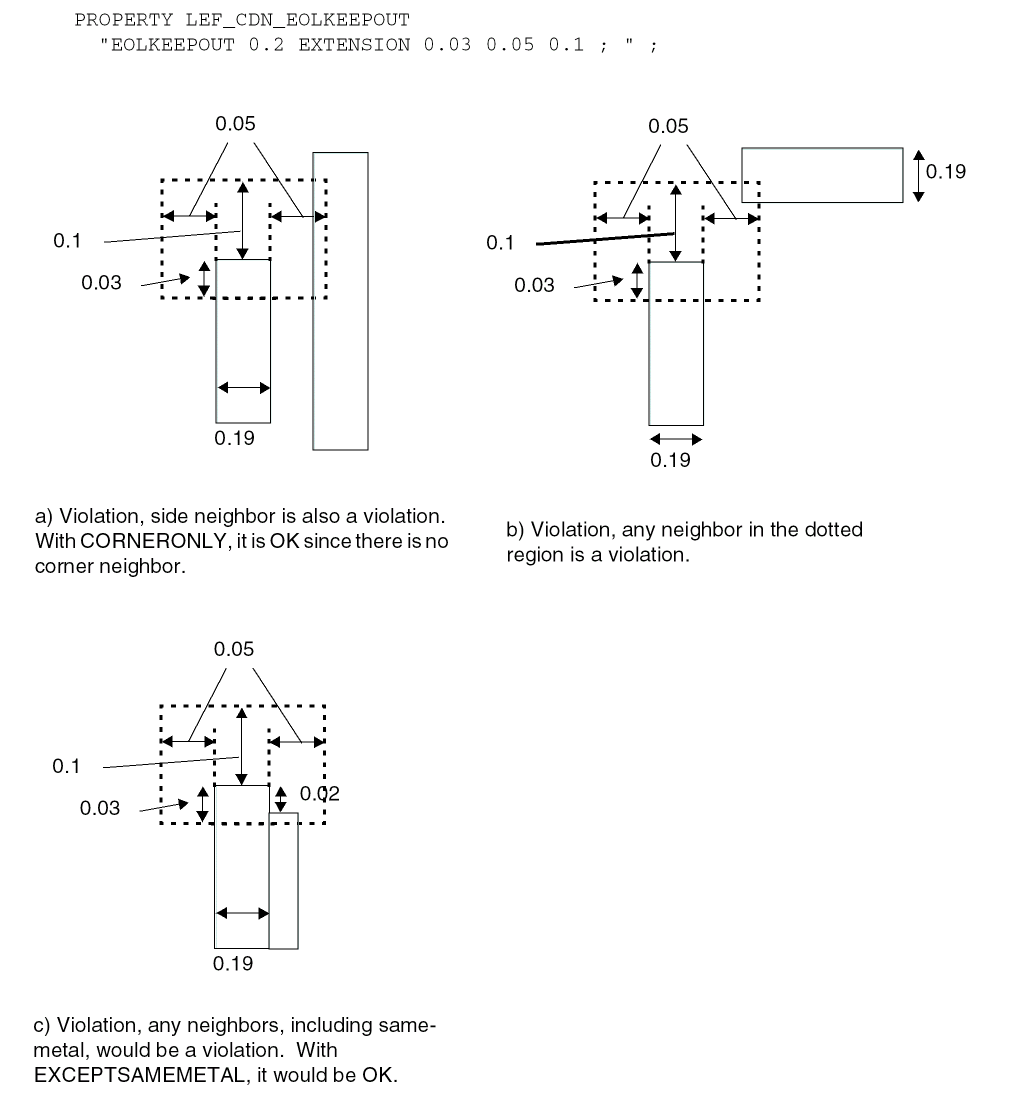
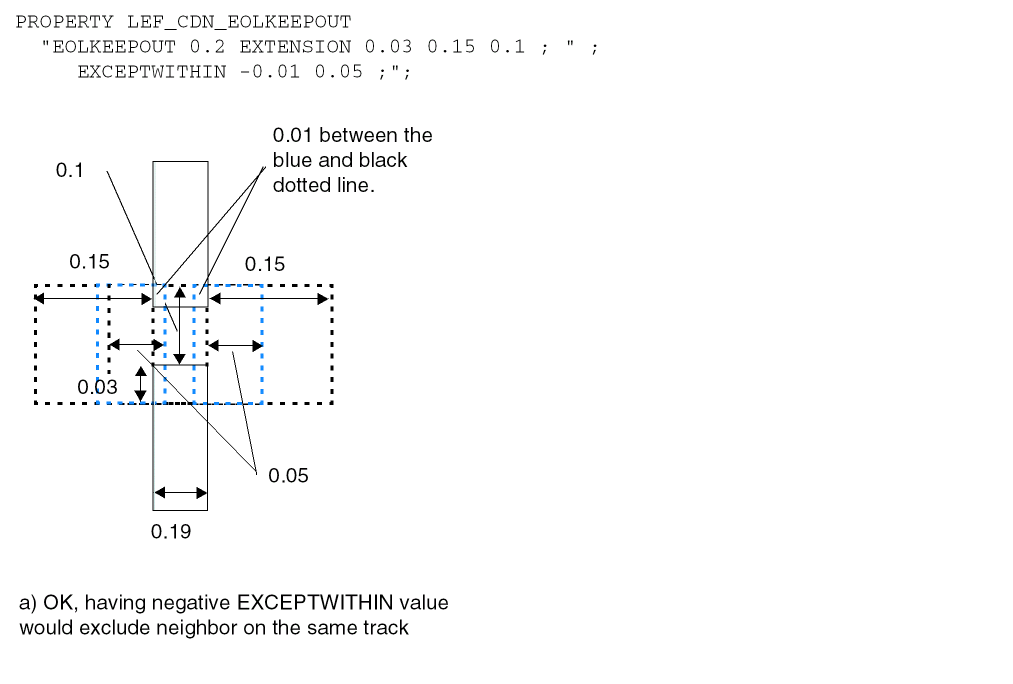
-
The following example indicates that it is a violation if all first three rules fail or both the last rules fail
:PROPERTY LEF_CDN_EOLKEEPOUT "
EOLKEEPOUT 0.06 EXTENSION 0.00 0.08 0.12 CLASS A CORNERONLY
EXCEPTFROM FRONTEDGE ;
EOLKEEPOUT 0.06 EXTENSION 0.04 0.08 0.00 CLASS A CORNERONLY
EXCEPTFROM BACKEDGE ;
EOLKEEPOUT 0.06 EXTENSION 0.04 0.06 0.12 CLASS A CORNERONLY ;
EOLKEEPOUT 0.09 EXTENSION 0.04 0.08 0.12 CLASS B CORNERONLY
EXCEPTFROM FRONTEDGE ;
EOLKEEPOUT 0.09 EXTENSION 0.04 0.00 0.12 CLASS B CORNERONLY
EXCEPTFROM BACKEDGE ; " ;
Figure 5-47 Illustration of EOL Keep Out Rule with eolWidthFigure 5-48 Illustration of EOL Keep Out Rule with EXCEPTFROM and FRONTEDGE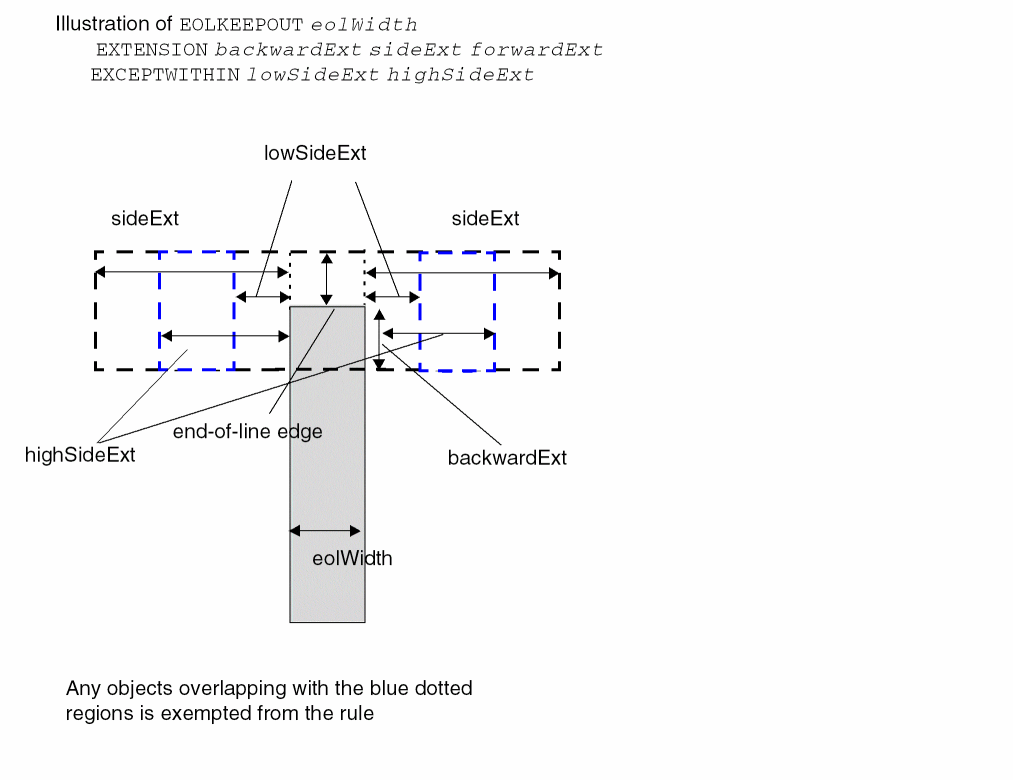
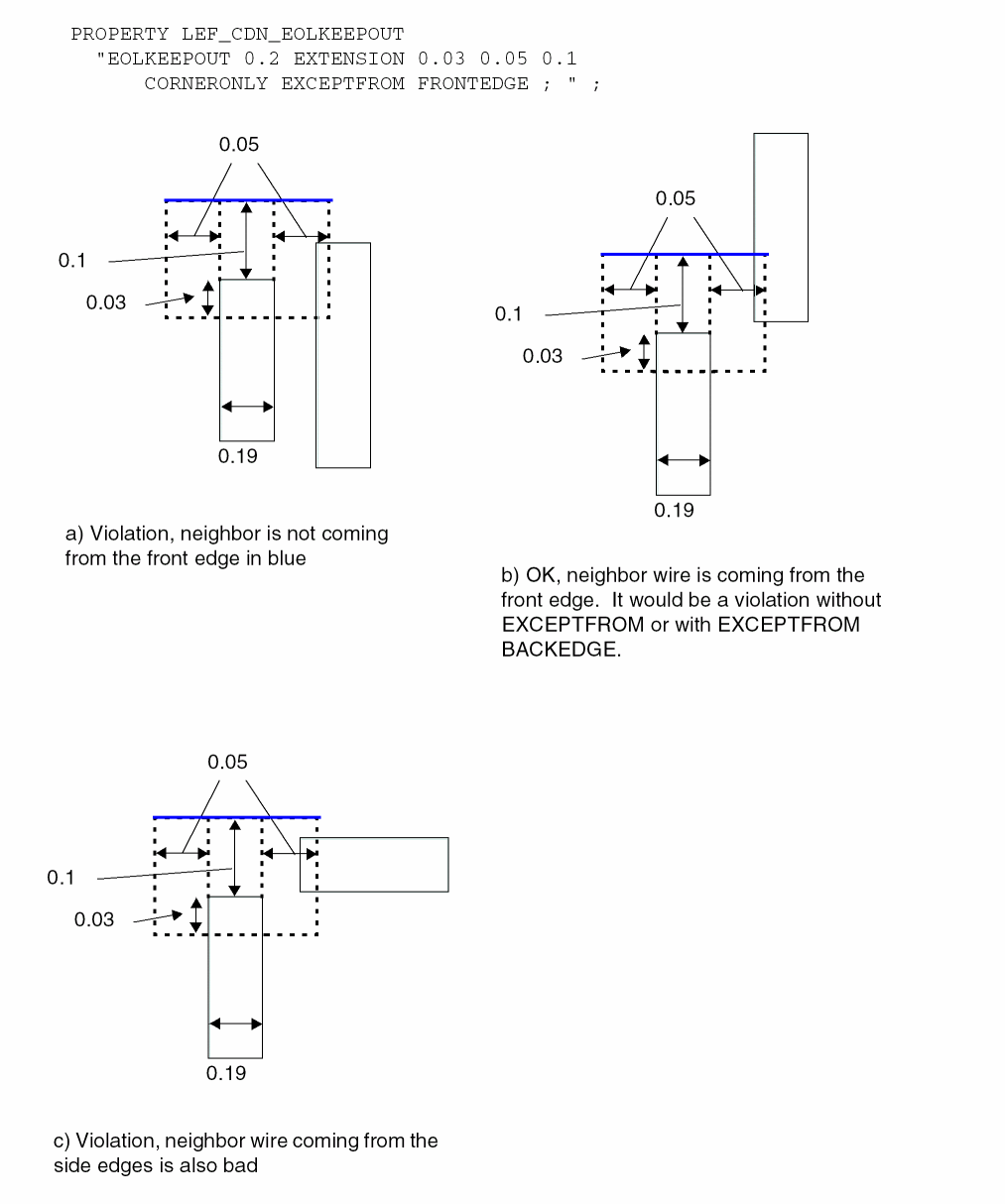
-
The following example indicates that the rule fails if both the statements with neighbors are on the same right side:
PROPERTY LEF_CDN_EOLKEEPOUT
"EOLKEEPOUT 0.2 EXTENSION 0.03 0.05 0.0 CLASS A
CORNERONLY EXCEPTFROM FRONTEDGE ;
EOLKEEPOUT 0.2 EXTENSION 0.0 0.05 0.1 CLASS A
CORNERONLY EXCEPTFROM BACKEDGE ; " ;
Figure 5-49 Illustration of EOL Keep Out Rule with FRONTEDGE and BACKEDGE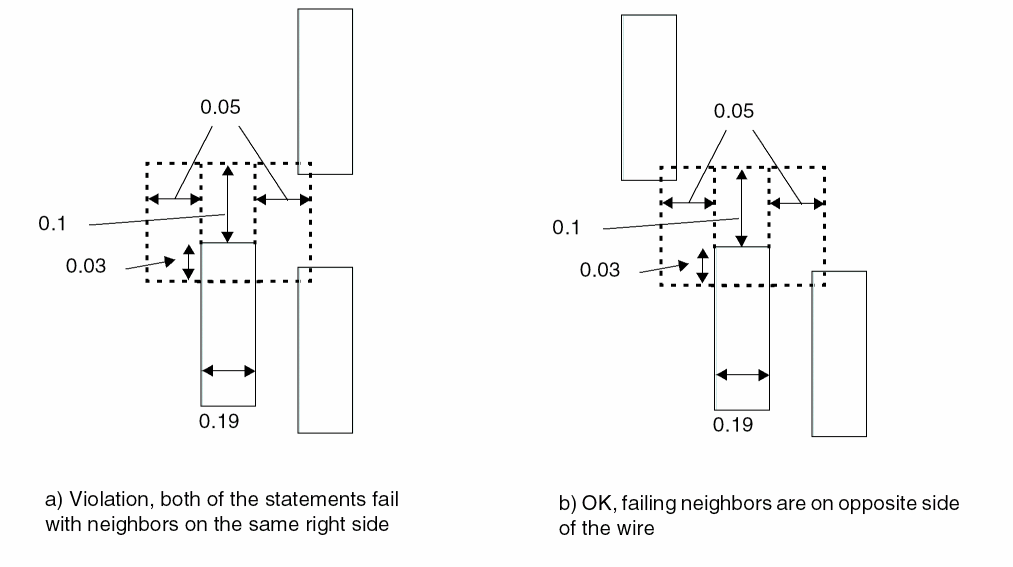
-
The following example indicates how the rule is applied for two perfectly aligned EOL edges with the same width:
PROPERTY LEF_CDN_EOLKEEPOUT
"EOLKEEPOUT 0.09 EXTENSION 0 0.01 0.11
CORNERONLY EXCEPTFROM BACKEDGE
EXACTALIGNED 0.1; " ;
Figure 5-50 Illustration of EOL Keep Out Rule with Exactly Aligned EOL Edges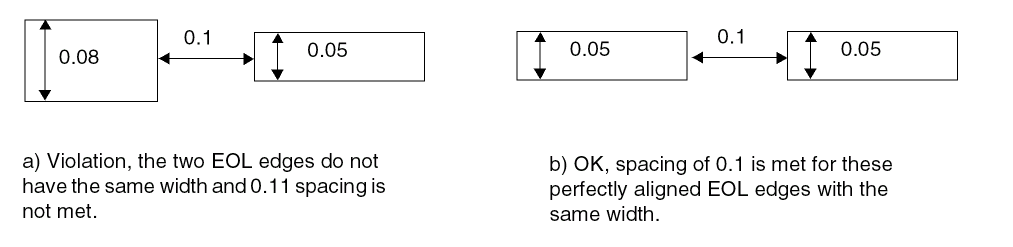
-
The following example indicates that the rule fails if the mask 1 wire has two different-mask (mask 2) wires on both sides:
PROPERTY LEF_CDN_EOLKEEPOUT
"EOLKEEPOUT 0.2 EXTENSION 0.03 0.05 0.1
CORNERONLY EXCEPTFROM BACKEDGE
MASK 1 TWOSIDES ; " ;
Figure 5-51 Illustration of EOL Keep Out Rule with Mask and Two SidesFigure 5-52 Illustration of EOL Keep Out Rule with OTHERENDEOL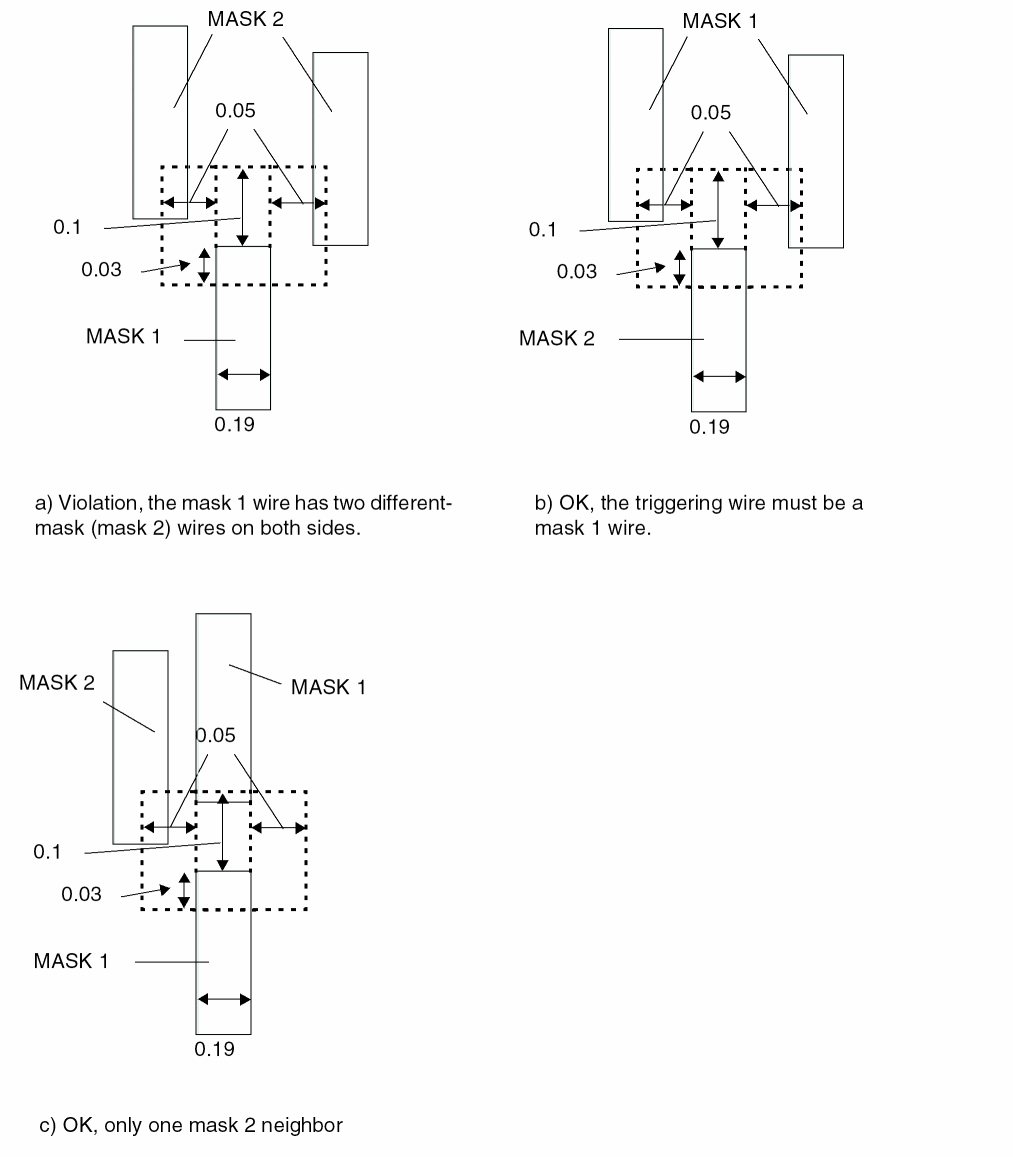 Figure 5-53 Illustration of EOL Keep Out Rule with EXCEPTSAMESIDEMETAL
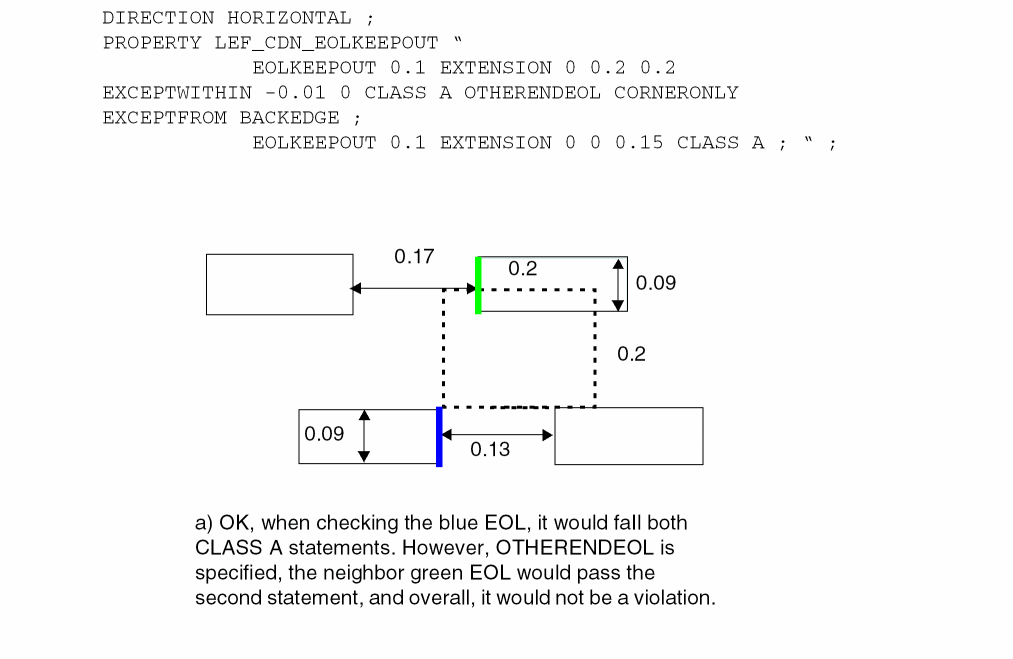 Figure 5-54 Illustration of EOL Keep Out Rule with EXCEPTNOOPPSIDEMETAL
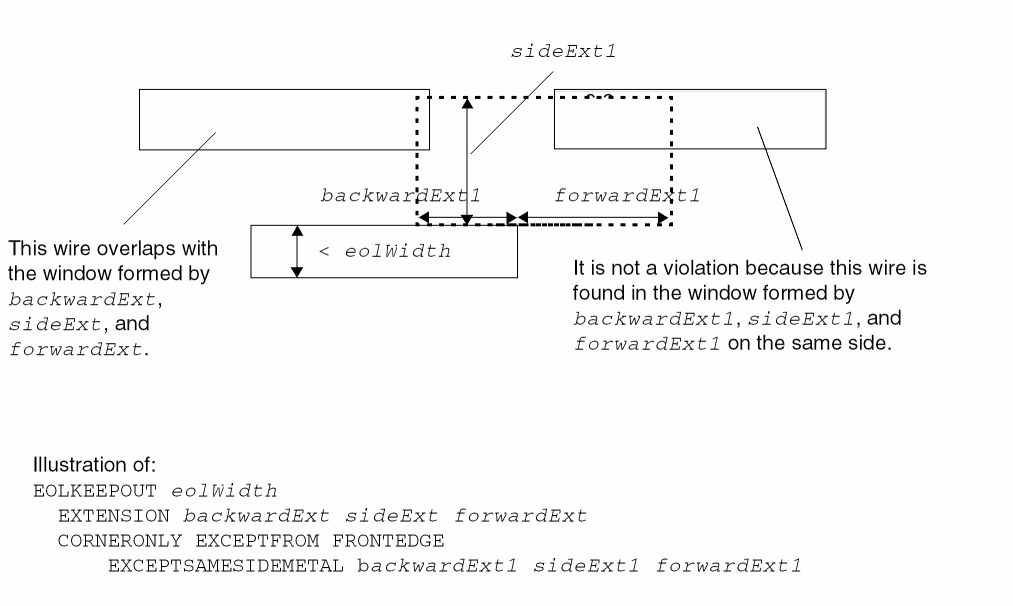 Figure 5-55 Illustration of EOL Keep Out Rule with EXCEPTLINEENDSPACING
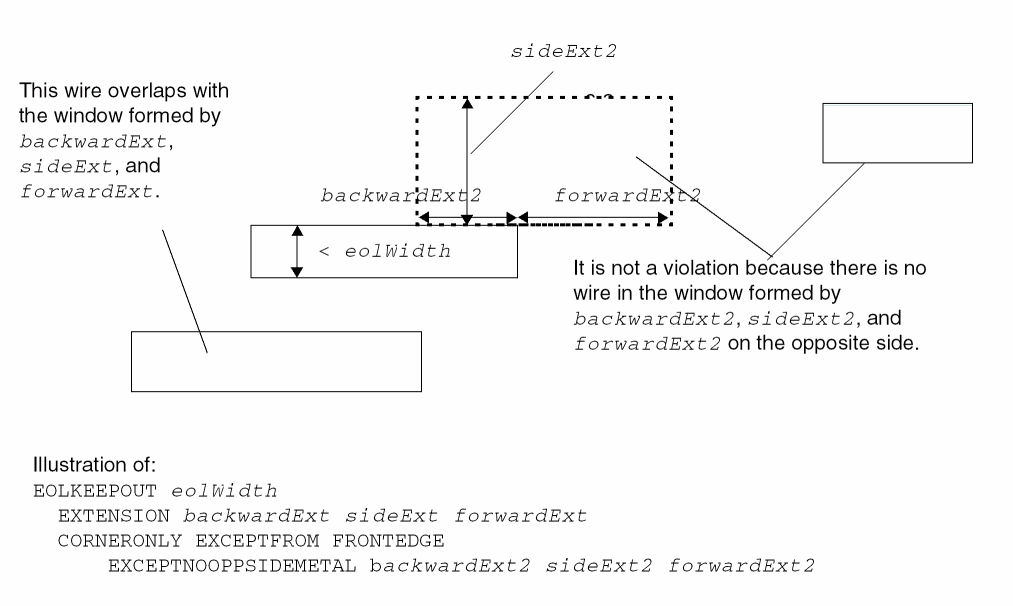 Figure 5-56 Illustration of EOL Keep Out Rule with EOLWITHINCUT
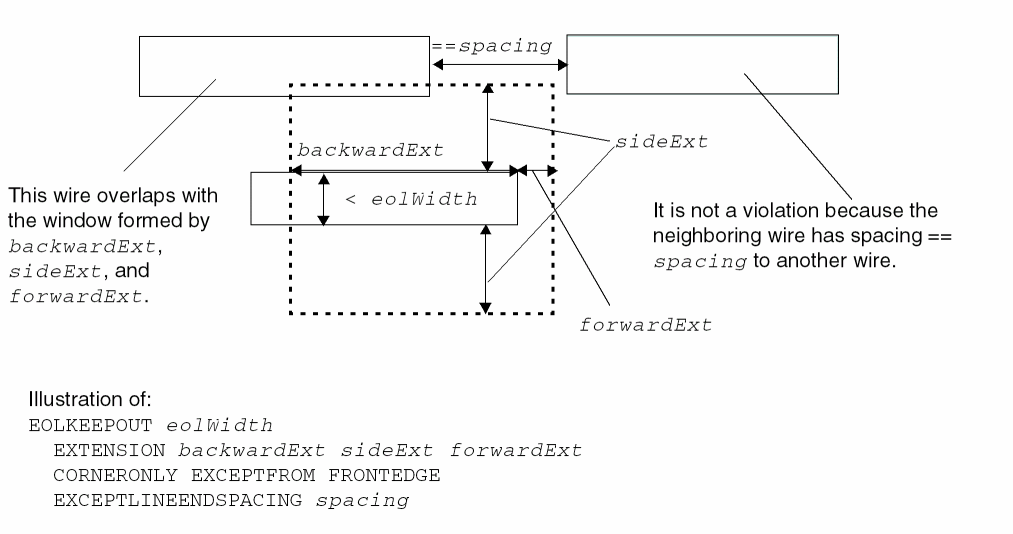 Figure 5-57 Illustration of EOL Keep Out Rule with EXCEPTLINEENDGAP
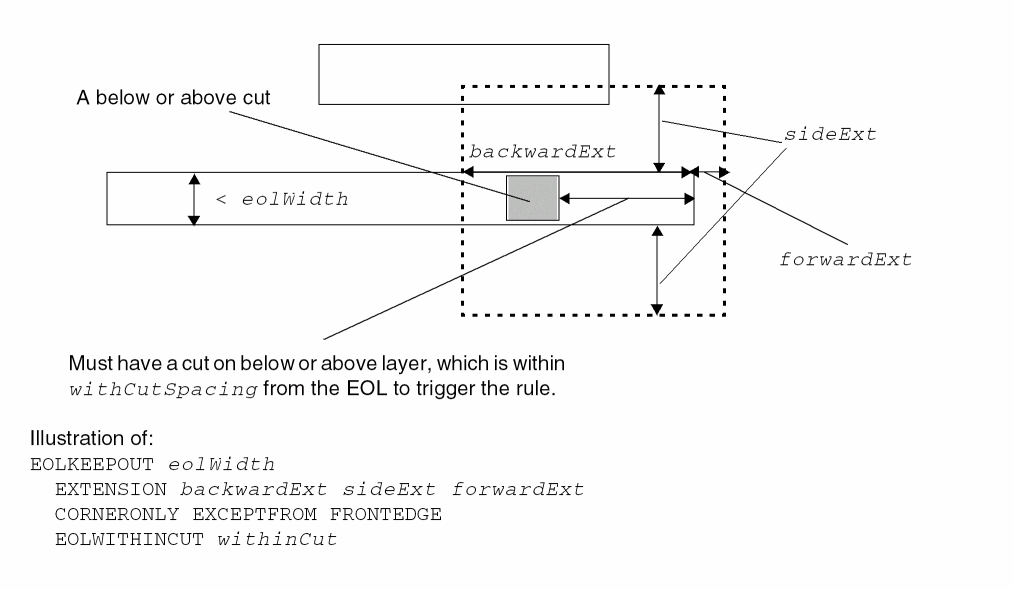 Figure 5-58 Illustration of EOL Keep Out Rule with EXCEPTEOLSPACING
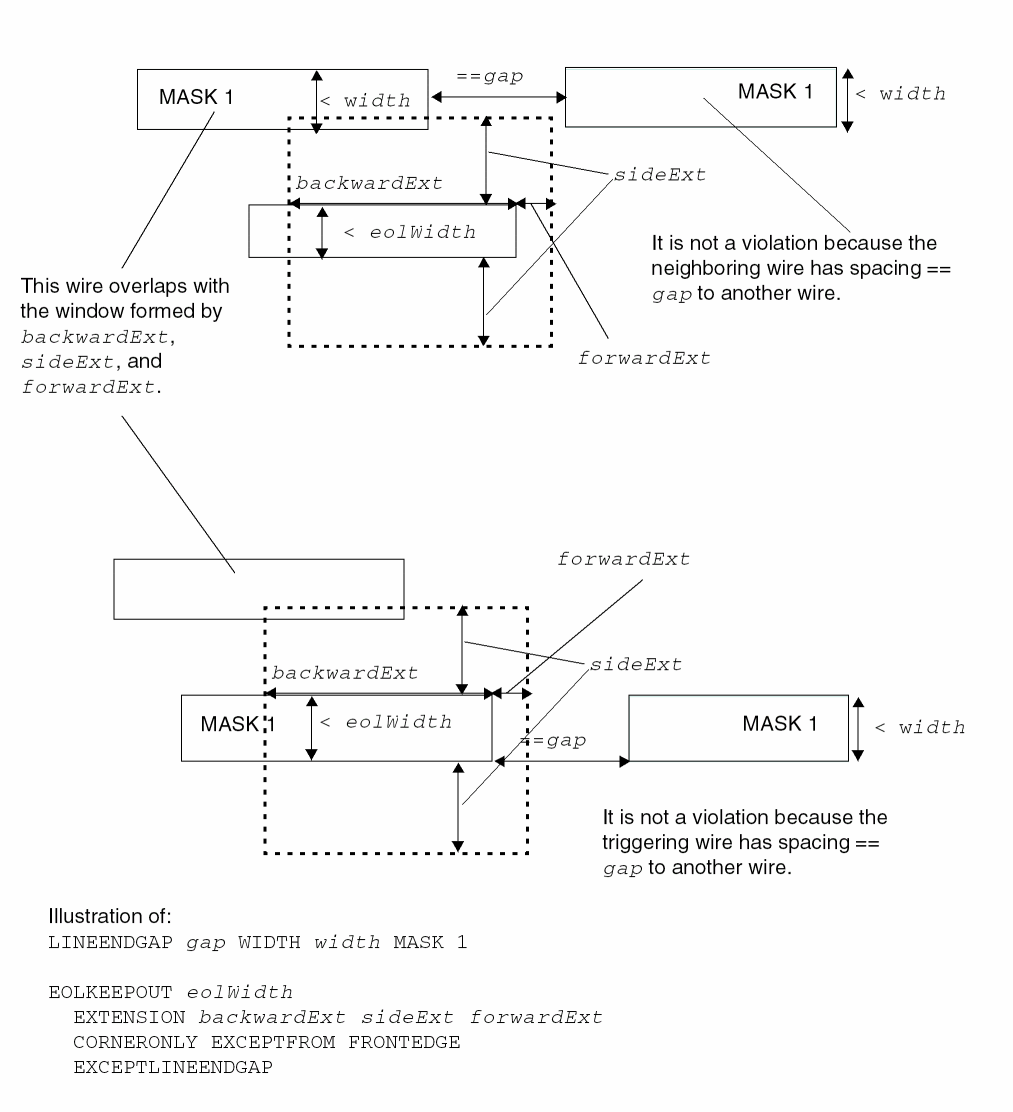 Figure 5-59 Illustration of EOL Keep Out Rule with RIGHTWAYONLY | WRONGWAYONLY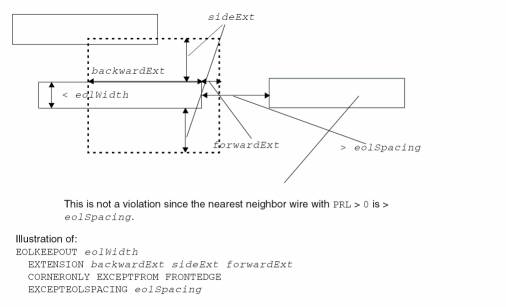
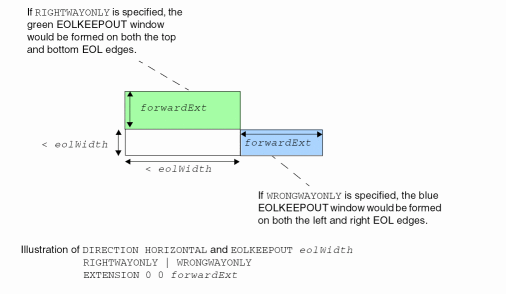
Figure 5-60 Illustration of EOL Keep Out Rule with RIGHTWAYONLY | WRONGWAYONLY
EOL Track Rule
An EOL track rule can be used to define alignment of EOL with certain tracks.
You can create an EOL track rule by using the following property definition:
PROPERTY LEF_CDN_EOLTRACK "EOLTRACKeolWidthPITCHpitchTRACKSDISTANCEdistance[EXCEPTEOLSPACINGeolSpacing[WITHINwithin]] ; " ;
EOL Track Rule Examples
Figure 5-61 Illustration of EOL Track Rule
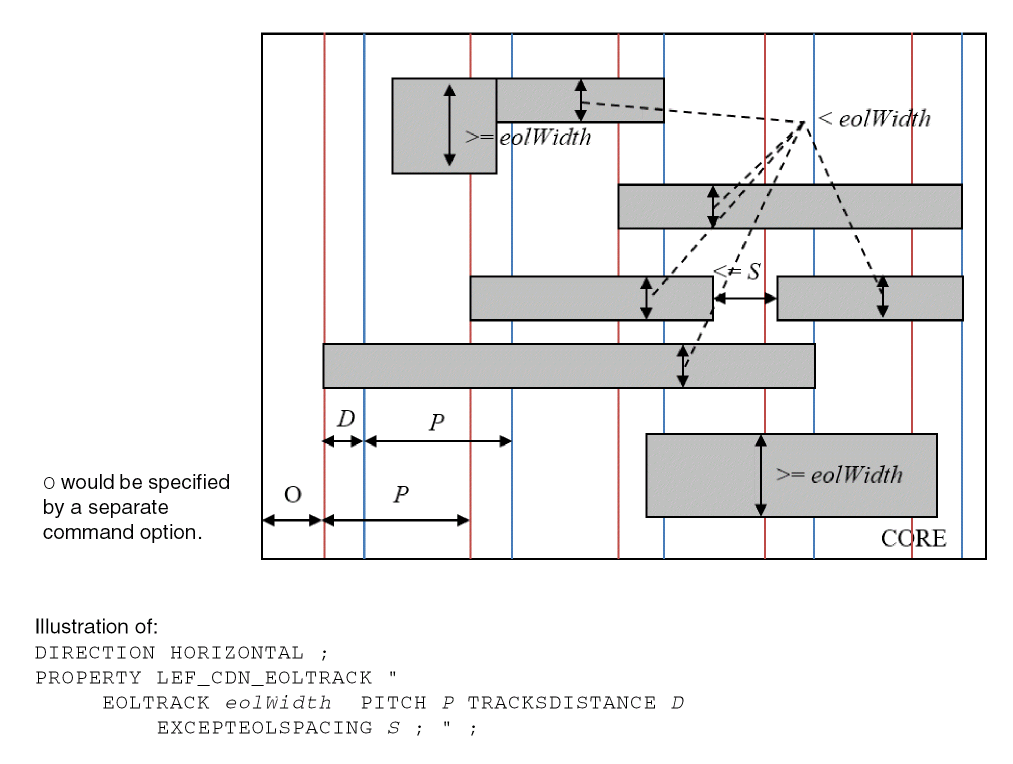
Figure 5-62 Illustration of EOL Track Rule with WITHIN in EXCEPTEOLSPACING
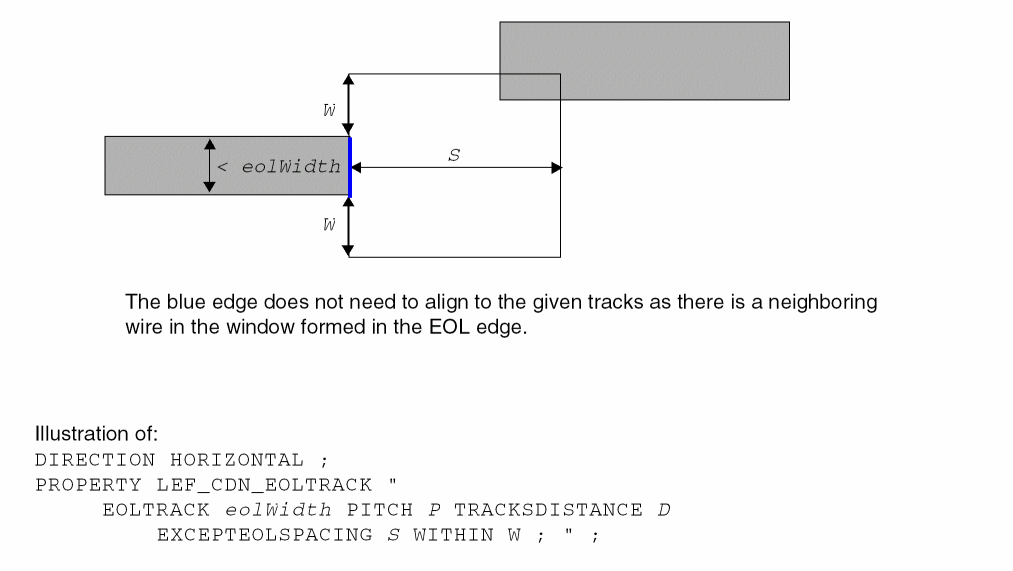
EOL Via Keep-out Rule
An EOL via keep-out rule can be used to define keep-out regions for end-of-line edges.
You can create an EOL via keep-out rule by using the following property definition:
PROPERTY LEF_CDN_EOLVIAKEEPOUT "EOLVIAKEEPOUTeolWidthMASKmaskNumEXTENSIONbackwardExt sideExt forwardExtOTHERWIDTHotherWidthOTHERENDEXTENSIONotherEndExtension[EXCEPTBACKSIDEALIGNED] ; " ;]
EOL Via Keep-out Rule Examples
Figure 5-63 Illustrations of EOL Via Keep-out Rule
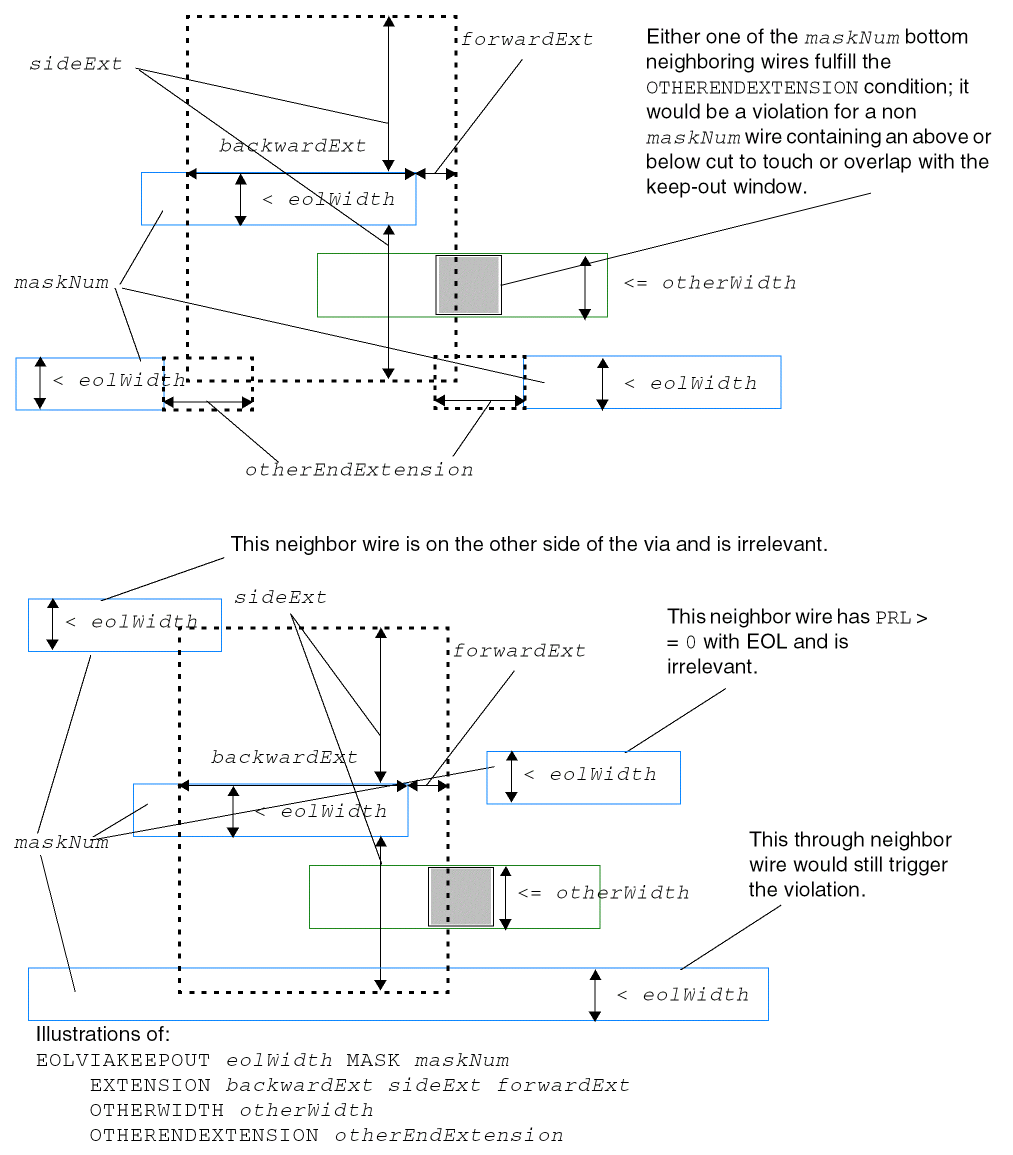
Figure 5-64 Illustration of EOL Via Keep-out Rule with EXCEPTBACKSIDEALIGNED
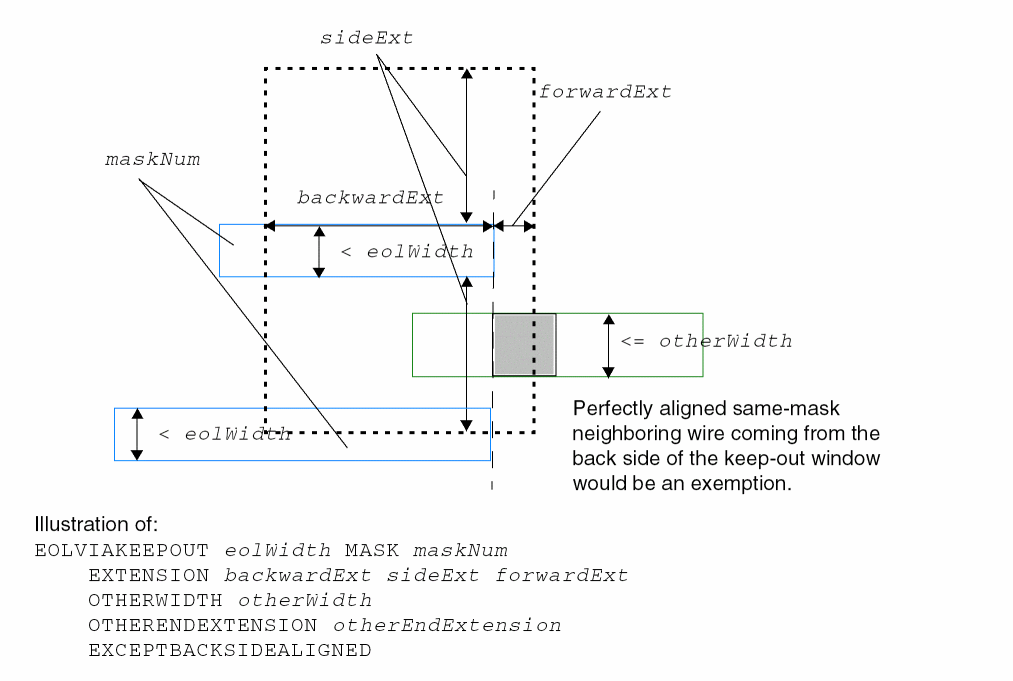
Fill to Fill Spacing Rule
A fill to fill spacing rule can be used to define spacing between metal fills.
You can create a fill to fill spacing rule by using the following property definition:
PROPERTY LEF_CDN_FILLTOFILLSPACING
“FILLTOFILLSPACING spacing ;” ;
|
Specifies the spacing between metal fills. |
Five Wires EOL Spacing Rule
The five wires EOL spacing rule is used to define spacing constraints for five consective wires meeting certain conditions.
You can create a five wire EOL spacing rule by using the following property definition:
PROPERTY LEF_CDN_FIVEWIRESEOLSPACING “FIVEWIRESEOLSPACINGeolSpacingWITHINeolWithinPRLprlENCLOSECUT {BELOW|ABOVE}encloseDistCUTWITHINcutWithinNOMETALEOLEXTENSIONeolSideExtensioneolForwradExtension;...”;
Five Wires EOL Spacing Rule Example
-
The following example is an illustration of
FIVEWIRESEOLSPACING:FIVEWIRESEOLSPACING
eolSpacingWITHINeolWithinPRL
prlENCLOSECUT BELOW
encloseDistCUTWITHINcutWithinNOMETALEOLEXTENSION
eolSideExtension eolForwardExtension
Figure 5-65 Illustration of FIVEWIRESEOLSPACING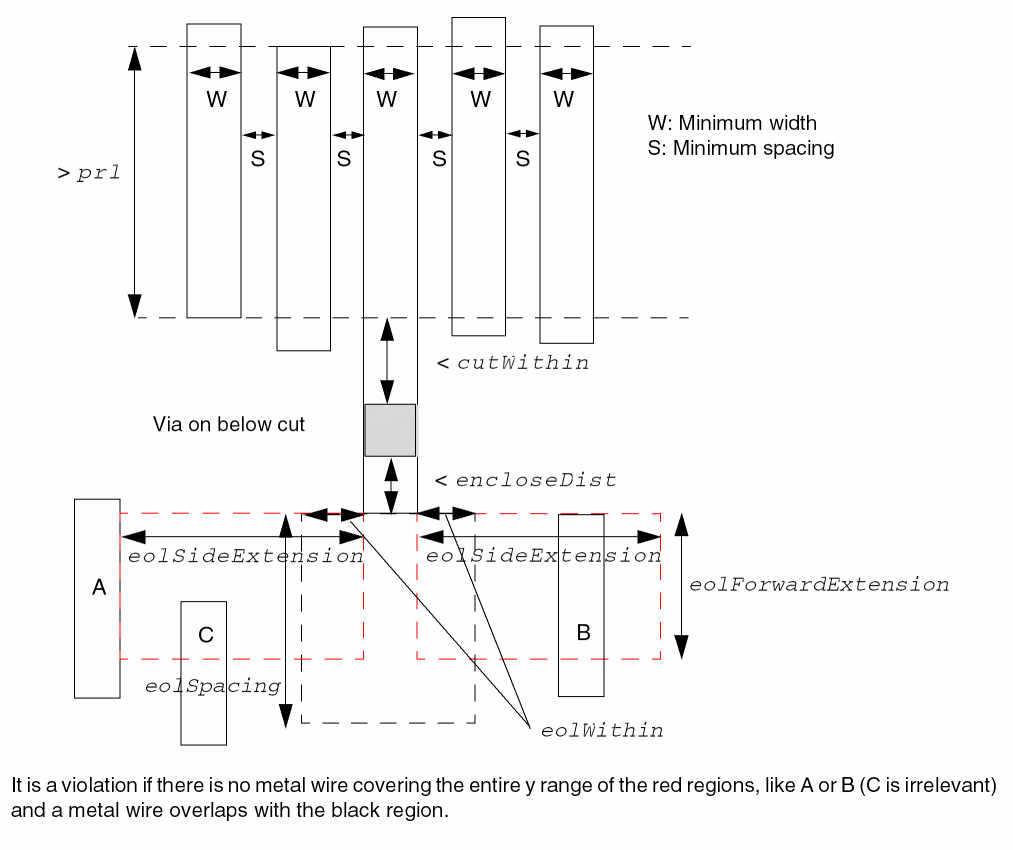
Forbidden Spacing Rule
A forbidden spacing rule can be used to define spacing between two wires, such that under certain conditions a violation may occur if there is a different-metal polygon wire between the wires.
You can create a forbidden spacing rule by using the following property definition:
PROPERTY LEF_CDN_FORBIDDENSPACING "FORBIDDENSPACINGminSpacingmaxSpacing[minSpacing2maxSpacing2] [WIDTHminWidthWITHINwithinPRLprl| [SAMEMASK] WIDTHmaxWidthPRLprl[TWOEDGESwithin| EXACTSPACINGEDGEexactSpacing[IGNOREMIDDLEwidthspacing] [SPANLENGTHspanLength[WITHINwithin]] [EXCEPTWIREWIDTHSPACING {width spacing}...]] | EXACTWIDTHexactWidthPRLprlOTHERWIDTHotherWidthEXACTSPACINGEDGEexactSpacing| [SAMEMASK | MASKmaskNum] WIDTHRANGEminWidth maxWidthPRLprlOTHERWIDTHotherWidthWITHINwithin[OTHERSAMEMASK]] ; " ;
|
Specifies forbidden spacing only applies if the wire width, less than the maxWidth, has a neighbor with exact spacing of exactSpacing on one side, and the forbidden spacing range will be applied on the opposite side. The forbidden spacing measurement will become the traditional edge-to-edge between wires from right/left or top/bottom of a wire to left/right or bottom/top of another wire. In addition, this rule will apply to right way wires only while the forbidden spacing range is measured in the direction perpendicular to the specified direction in |
|
|
|
|
|
Specifies that the spacing between a wire with width exactly equal to exactWidth and another wire with width greater than or equal to otherWidth must not be greater than or equal to minSpacing and less than or equal to maxSpacing if the first wire has another wire on the other side with the exact spacing of exactSpacing and the three wires have parallel run length greater than prl. |
|
|
Specifies that neighbor wires, with at least one of them not in the forbidden spacing range, having width exactly equal to width with |
|
|
|
|
|
Specifies that if the spacing between the right/left or top/bottom edge of a wire with width less than the maxWidth to the right/left or top/bottom of another wire is greater than or equal to the minSpacing and less than or equal to the maxSpacing with parallel run length greater than prl, then it will be a violation if and only if there is a different-metal polygon wire between these two wires. |
|
|
Specifies that a wire between the triggering wire and the forbidden spacing range wire would be ignored if that wire's width is not the same as width or its spacing to the triggering wire is not the same as spacing. See Figure 5-75. |
|
|
Specifies that the forbidden spacing rule applies only to the objects belonging to the given mask. In other words, forbidden spacing is checked against the objects in the given mask, and the mask of other neighboring objects is irrelevant. maskNum must be a positive integer, and most applications support only the values 1, 2, or 3. |
|
|
Specifies an additional second set of forbidden spacing range. This second set can be defined only if the |
|
|
Specifies that the forbidden spacing rule applies only if the two outer wires have the same mask. The mask of the middle wire is irrelevant. See Figure 5-73. |
|
|
Indicates that the forbidden spacing rule only applies if the wire width is less than the maxWidth that has neighbors on both the sides within within. The forbidden spacing measurement will become the traditional edge-to-edge between wires from right/left or top/bottom of a wire to left/right or bottom/top of another wire. |
|
|
Specifies that the forbidden spacing rule applies only to objects on the same mask. The objects are the ones that the forbidden spacing is checked against, and the colors of other neighbor objects are irrelevant. |
|
|
|
|
|
Specifies that the spacing between a wire with width greater than minWidth and less than maxWidth, which is sandwiched by two wires within within with width greater than otherWidth, and any of two wires must not be greater than or equal to minSpacing and less than or equal to maxSpacing if the three wires have parallel run length greater than prl. Type: Float, specified in microns
|
|
|
Specifies that the forbidden spacing range rule only applies if the span length of the neighbor wire is less than the spanLength. |
|
|
Specifies that it is a violation if two wires are apart by a distance that is greater than or equal to the minSpacing and less than or equal to the maxSpacing and are within within distance from a wire with width greater than or equal to the minWidth and has parallel run length greater than prl. |
|
|
Specifies that the forbidden spacing range rule only applies if the neighbor wire has another neighbor within (less than) a within distance on either side. See Figure 5-70. |
|
Forbidden Spacing Rule Examples
-
The following example shows forbidden spacing rule with
WIDTHandPRL:PROPERTY LEF_CDN_FORBIDDENSPACING
"FORBIDDENSPACING 0.2 0.25 WIDTH 0.05 PRL 0.15 ; " ;
Figure 5-66 Illustration of FORBIDDENSPACING with WIDTH and PRL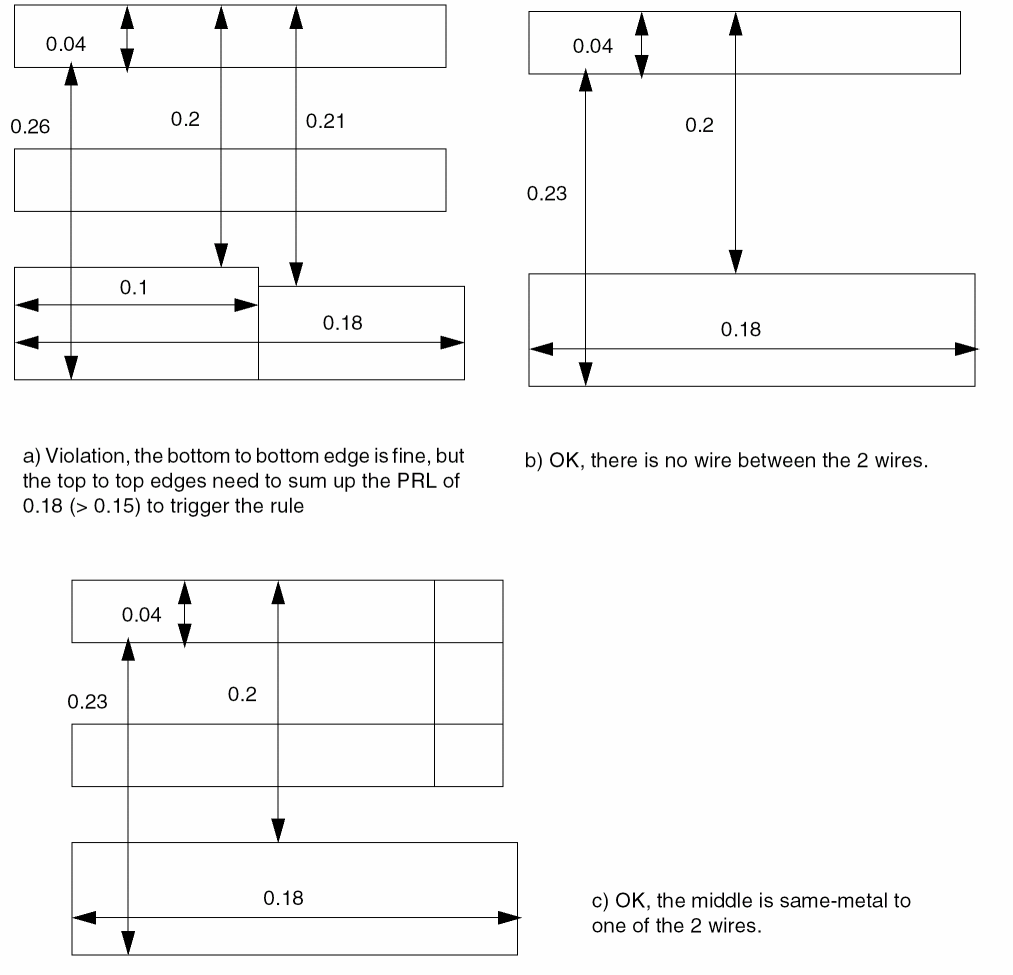
-
The following example shows forbidden spacing rule with
WIDTHandWITHIN:PROPERTY LEF_CDN_FORBIDDENSPACING
"FORBIDDENSPACING 0.07 0.09
WIDTH 0.2 WITHIN 0.4 PRL 0.1 ; " ;
Figure 5-67 Illustration of FORBIDDENSPACING with WIDTH and WITHIN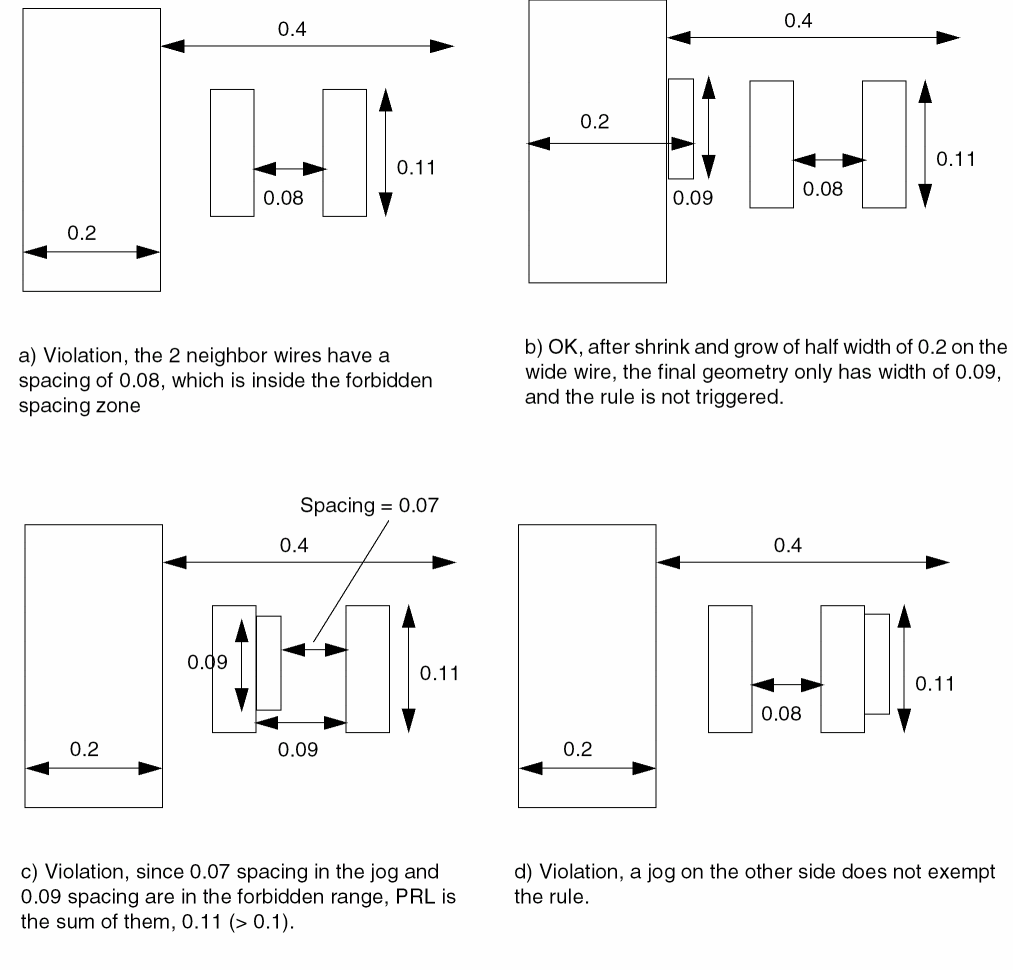
-
The following example shows forbidden spacing rule with
PRL:PROPERTY LEF_CDN_FORBIDDENSPACING
"FORBIDDENSPACING 0.07 0.09
WIDTH 0.2 WITHIN 0.4 PRL 0.1 ; " ;
Figure 5-68 Illustration of FORBIDDENSPACING with PRL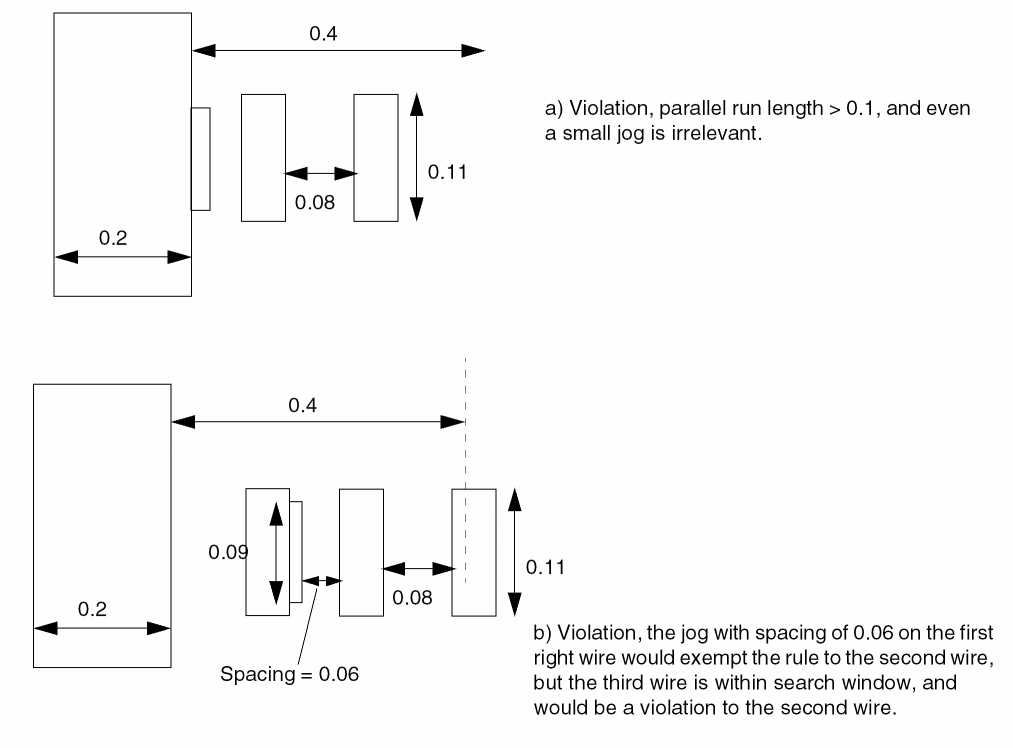
-
The following example shows forbidden spacing rule with
TWOEDGES:PROPERTY LEF_CDN_FORBIDDENSPACING
"FORBIDDENSPACING 0.2 0.25 0.3 0.33 WIDTH 0.05 PRL 0.15
TWOEDGES 0.06 ; " ;
Figure 5-69 Illustration of FORBIDDENSPACING with TWOEDGES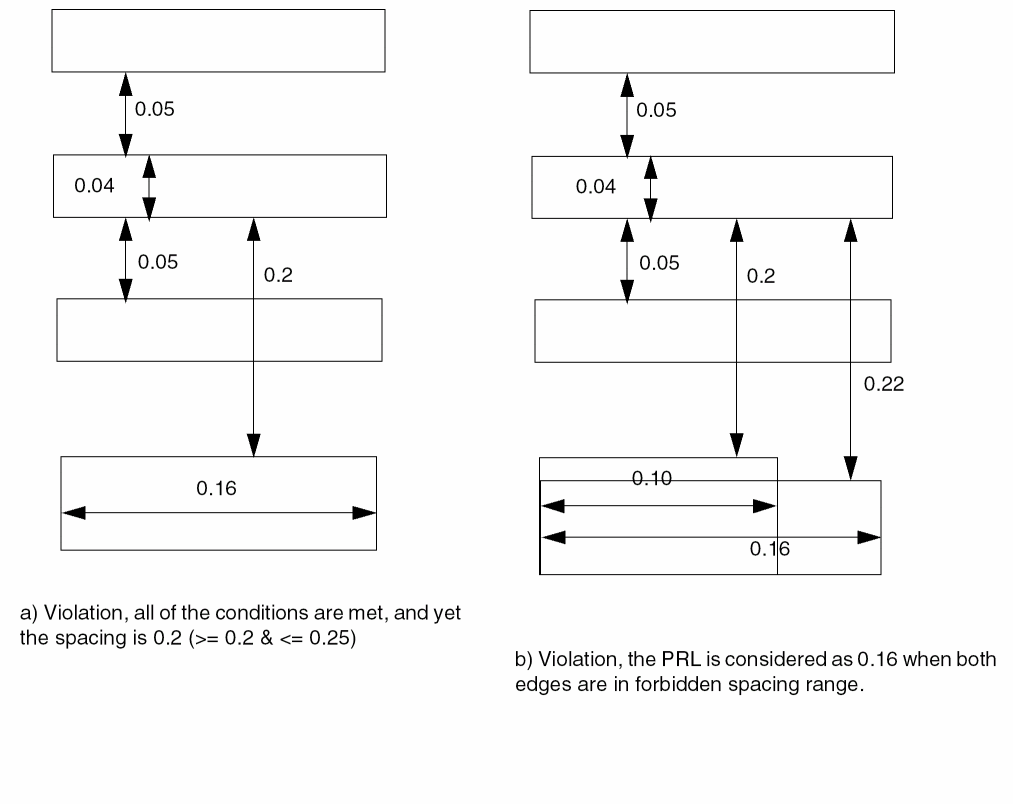
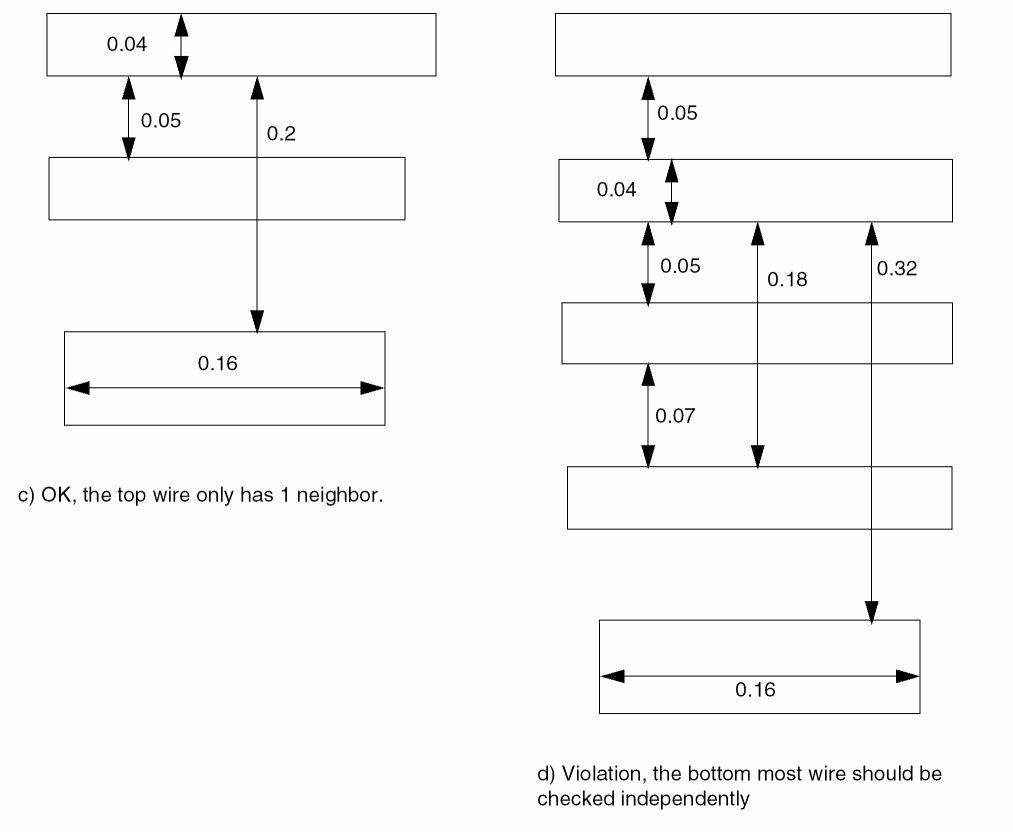
-
The following example shows forbidden spacing rule with
EXACTSPACINGEDGE:DIRECTION HORIZONTAL ;
PROPERTY LEF_CDN_FORBIDDENSPACING
"FORBIDDENSPACING 0.2 0.25 WIDTH 0.05 PRL 0.04
EXACTSPACINGEDGE 0.06 SPANLENGTH 0.09 ; " ;
Figure 5-70 Illustration of FORBIDDENSPACING with EXACTSPACINGEDGE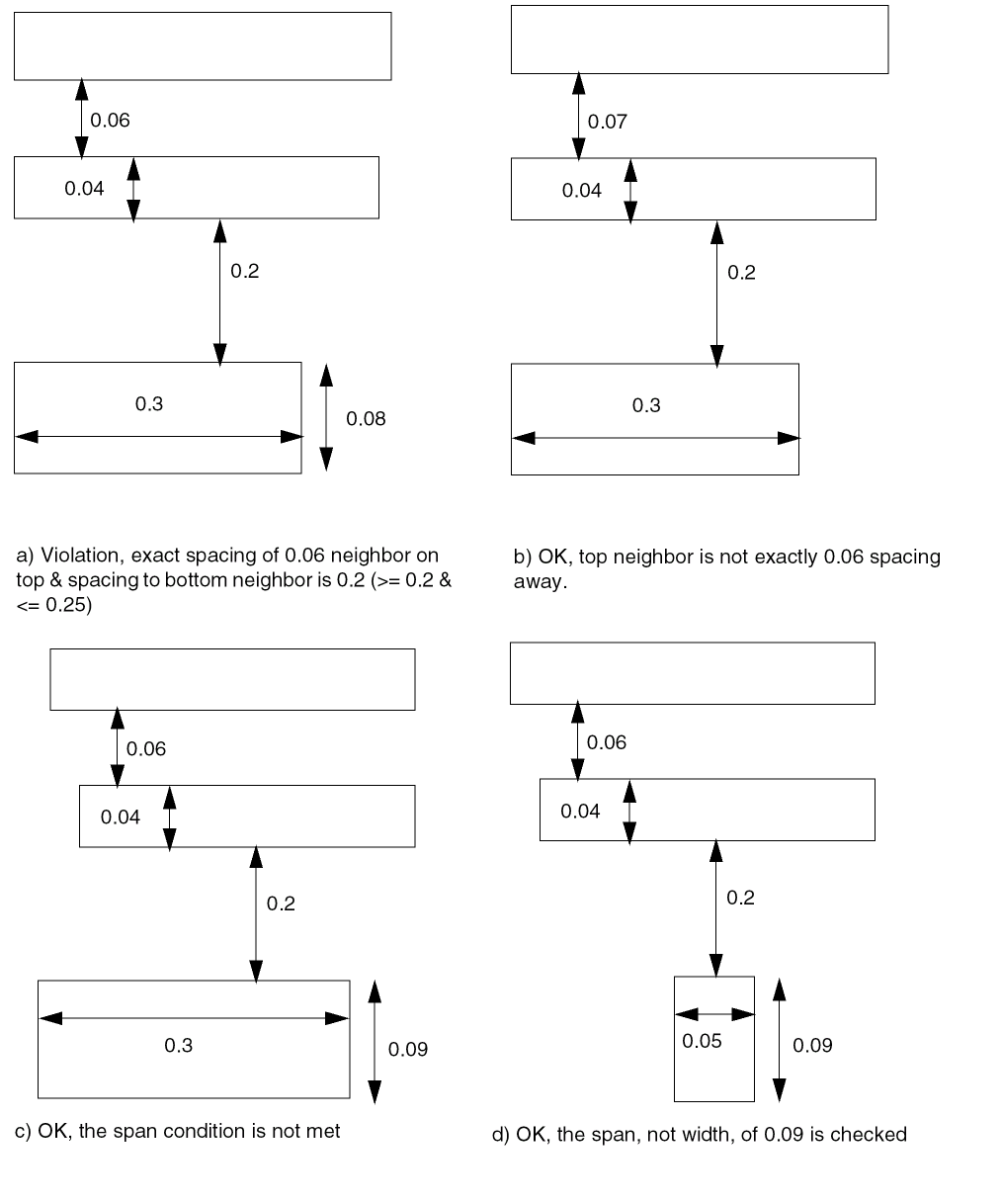
-
The following example shows forbidden spacing rule with
WITHINinEXACTSPACINGEDGE SPANLENGTH:DIRECTION HORIZONTAL ;
PROPERTY LEF_CDN_FORBIDDENSPACING
"FORBIDDENSPACING 0.08 0.12 0.2 0.25 WIDTH 0.05 PRL 0.04
EXACTSPACINGEDGE 0.06 SPANLENGTH 0.09
WITHIN 0.15 ; " ;
Figure 5-71 Illustration of FORBIDDENSPACING with WITHIN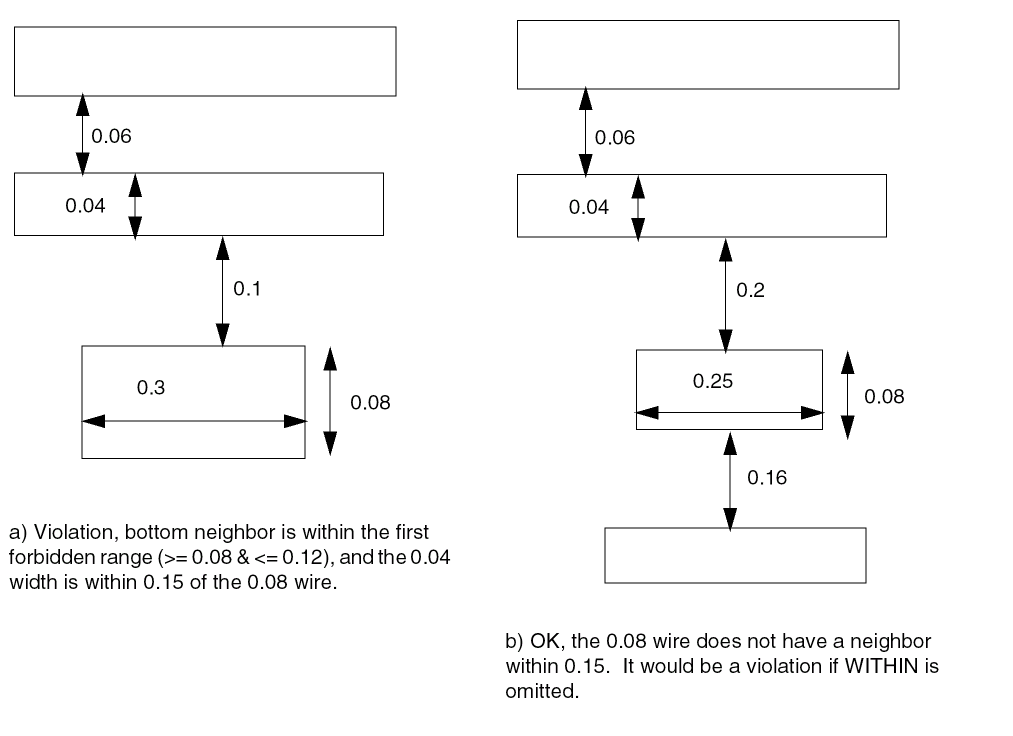
-
The following example shows forbidden spacing rule with
EXACTWIDTH:DIRECTION HORIZONTAL ;
PROPERTY LEF_CDN_FORBIDDENSPACING "
FORBIDDENSPACING 0.08 0.12 EXACTWIDTH 0.04 PRL 0
OTHERWIDTH 0.08 EXACTSPACINGEDGE 0.06 ; " ;
Figure 5-72 Illustration of FORBIDDENSPACING with EXACTWIDTH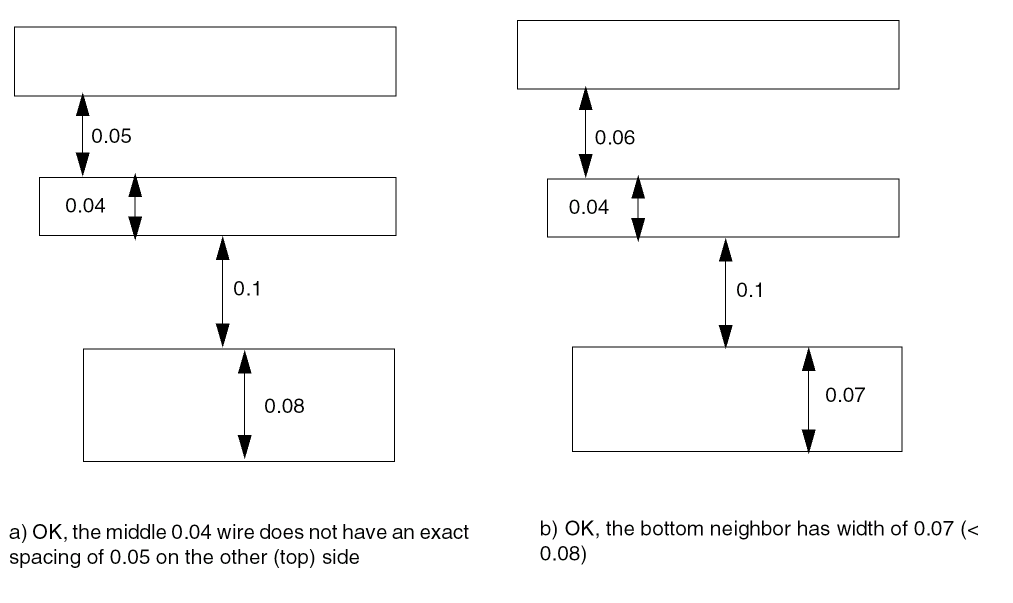
-
The following example shows forbidden spacing rule with
WIDTHRANGE:DIRECTION HORIZONTAL ;
PROPERTY LEF_CDN_FORBIDDENSPACING "
FORBIDDENSPACING 0.08 0.12 SAMEMASK
WIDTHRANGE 0.07 WITHIN 0.35 ; " ;
Figure 5-73 Illustration of FORBIDDENSPACING with WIDTHRANGE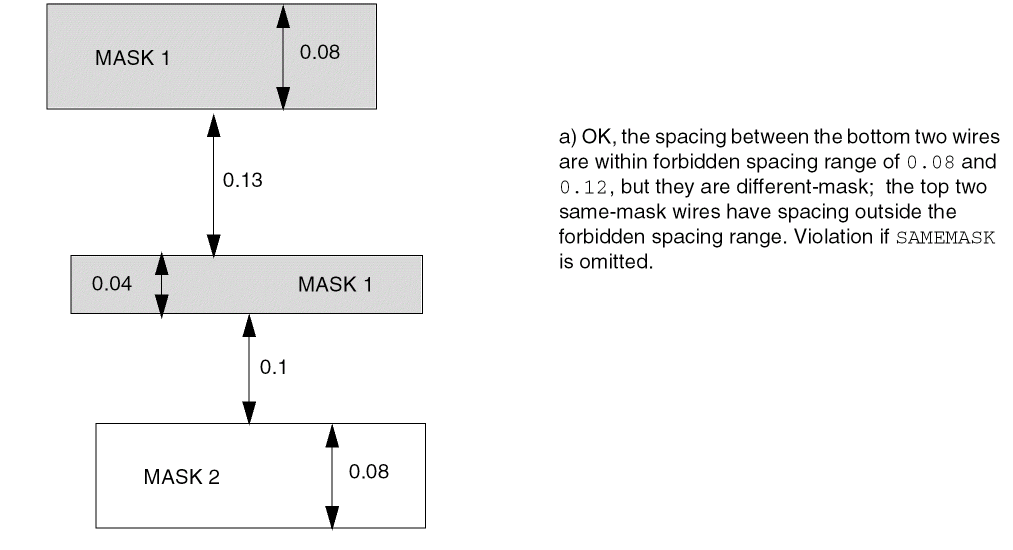
-
The following example shows forbidden spacing rule with
WIDTHRANGE:DIRECTION HORIZONTAL ;
PROPERTY LEF_CDN_FORBIDDENSPACING "
FORBIDDENSPACING 0.08 0.12
WIDTHRANGE 0.00 0.05 PRL 0.00
OTHERWIDTH 0.07 WITHIN 0.35 OTHERSAMEMASK ; " ;
Figure 5-74 Illustration of FORBIDDENSPACING with WIDTHRANGE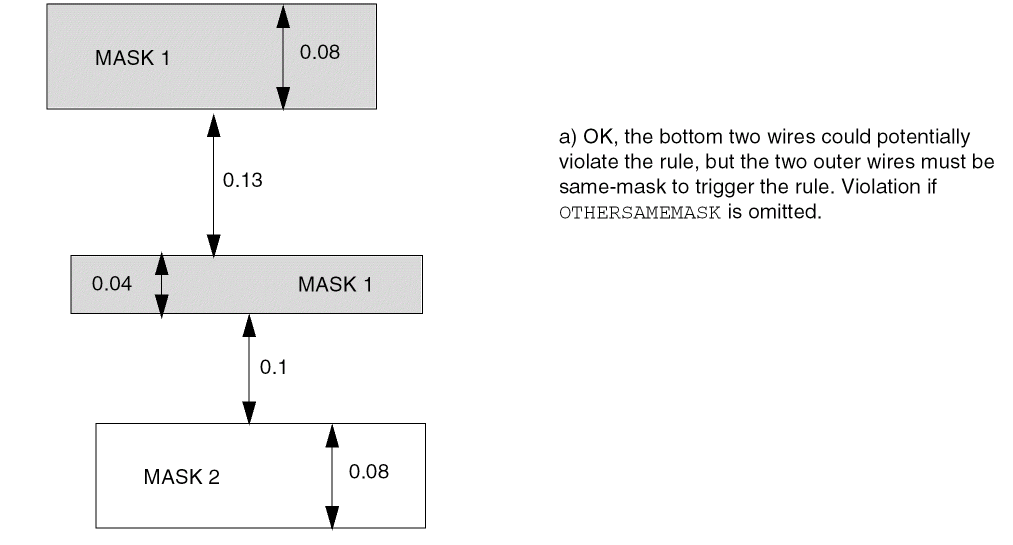
-
The following example shows forbidden spacing rule with
EXCEPTWIREWIDTHSPACING:DIRECTION HORIZONTAL ;
PROPERTY LEF_CDN_FORBIDDENSPACING "
FORBIDDENSPACING 0.2 0.25 WIDTH 0.05 PRL 0.00
EXACTSPACINGEDGE 0.06
EXCEPTWIREWIDTHSPACING 0.03 0.07 ; " ;
Figure 5-75 Illustration of FORBIDDENSPACING with EXCEPTWIREWIDTHSPACING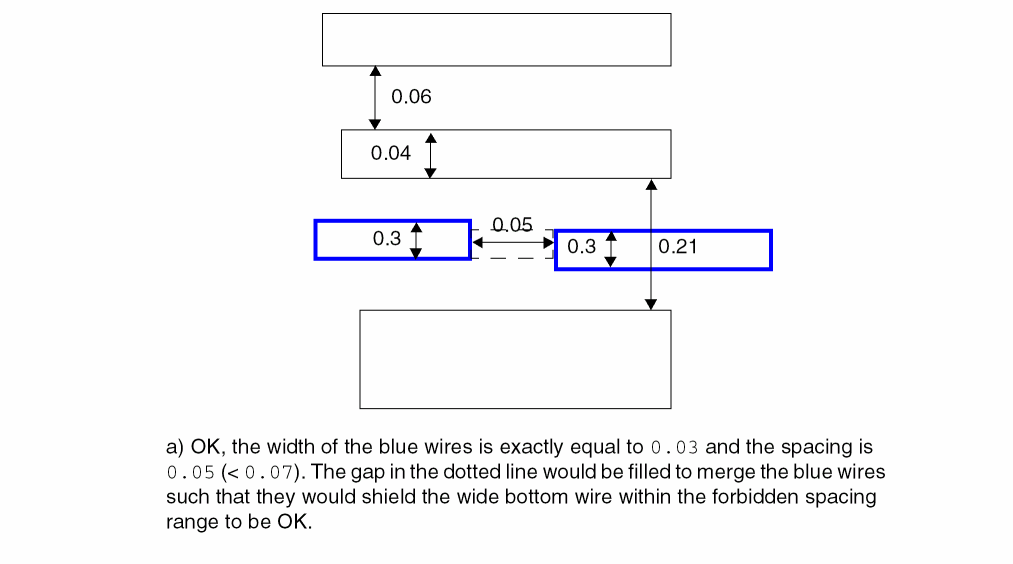
-
The following example shows forbidden spacing rule with
IGNOREMIDDLE:DIRECTION HORIZONTAL ;
PROPERTY LEF_CDN_FORBIDDENSPACING "
FORBIDDENSPACING 0.2 0.25 WIDTH 0.05 PRL 0.00
EXACTSPACINGEDGE 0.06
IGNOREMIDDLE 0.03 0.04 ; " ;
Figure 5-76 Illustration of FORBIDDENSPACING with IGNOREMIDDLE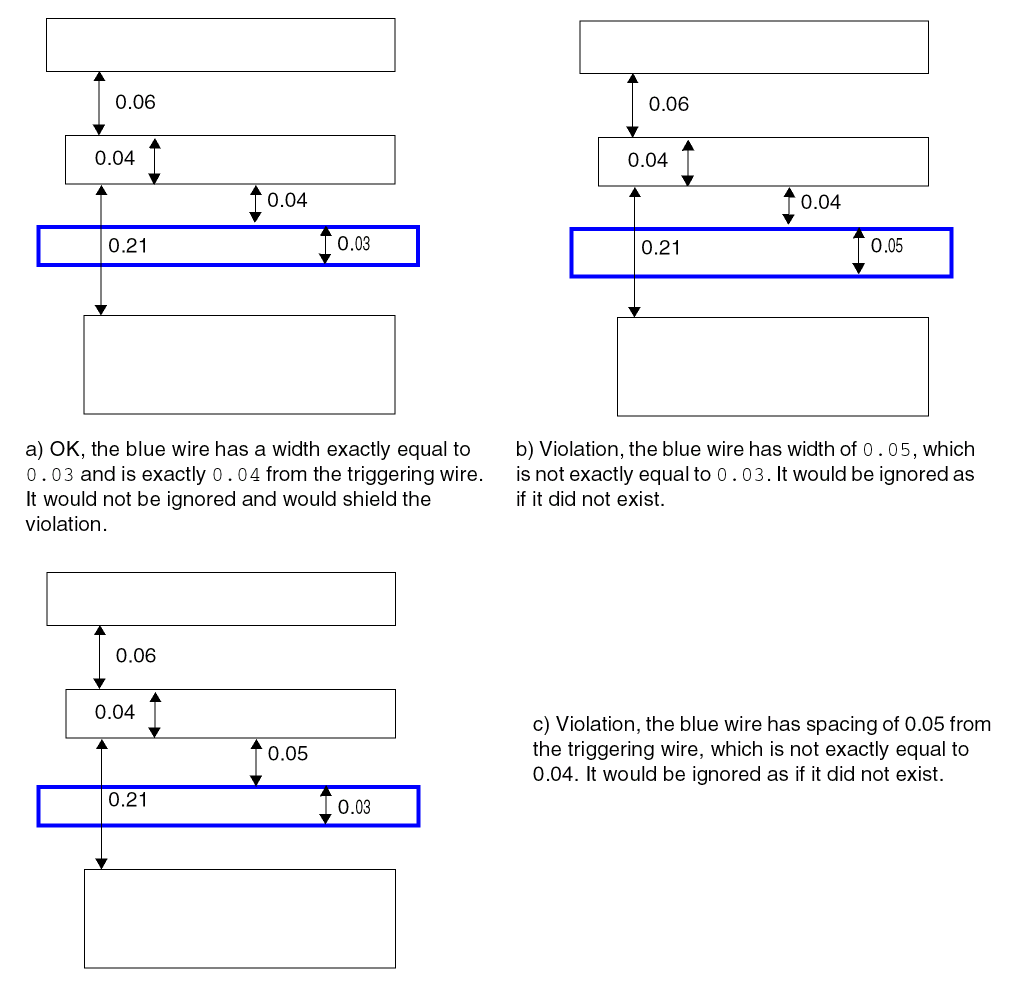
Gap Rule
A gap rule can be used to specify rectangular gaps in a design with certain width and length.
You can create a gap rule by using the following property definition:
PROPERTY LEF_CDN_GAP "GAP EXACTWIDTHexactWidthMAXLENGTHmaxLengthSPACING {{0 | 1 | 2}spacing}...[ENDTOENDendToEndSpacing] ; " ;
Gap Rule Example
-
The following rule illustrates the Gap rule with
ENDTOEND:DIRECTION HORIZONTAL ;PROPERTY LEF_CDN_GAP "GAP EXACTWIDTH 0.2 MAXLENGTH 0.6SPACING 0 0.4 1 0.3 2 0.5 ENDTOEND 0.8; " ;
Figure 5-77 Illustration of Gap Rule with ENDTOEND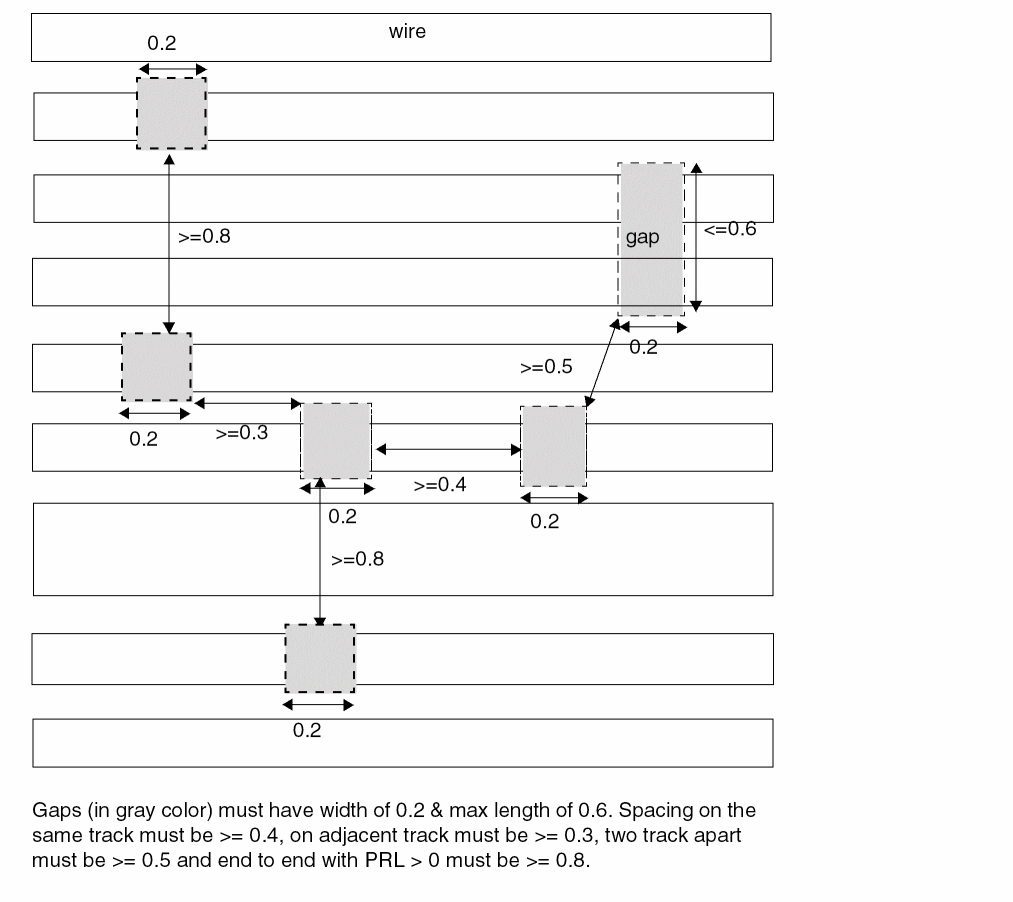
Joint Corner Spacing Rule
A joint corner spacing rule can be used to define the spacing between two facing joints of joint corners.
You can create a joint corner spacing rule by using the following property definition:
PROPERTY LEF_CDN_JOINTCORNERSPACING "JOINTCORNERSPACINGspacing[SAMEMASK] JOINTWIDTHjointWidth[MINLENGTHminLength] JOINTLENGTHspanLength[EDGELENGTHedgeLength] ; " ;
All other keywords are the same as the existing LEF routing layer joint corner spacing rule syntax.
Joint Corner Spacing Rule Example
Figure 5-78 Illustration of Joint Corner Spacing Rule
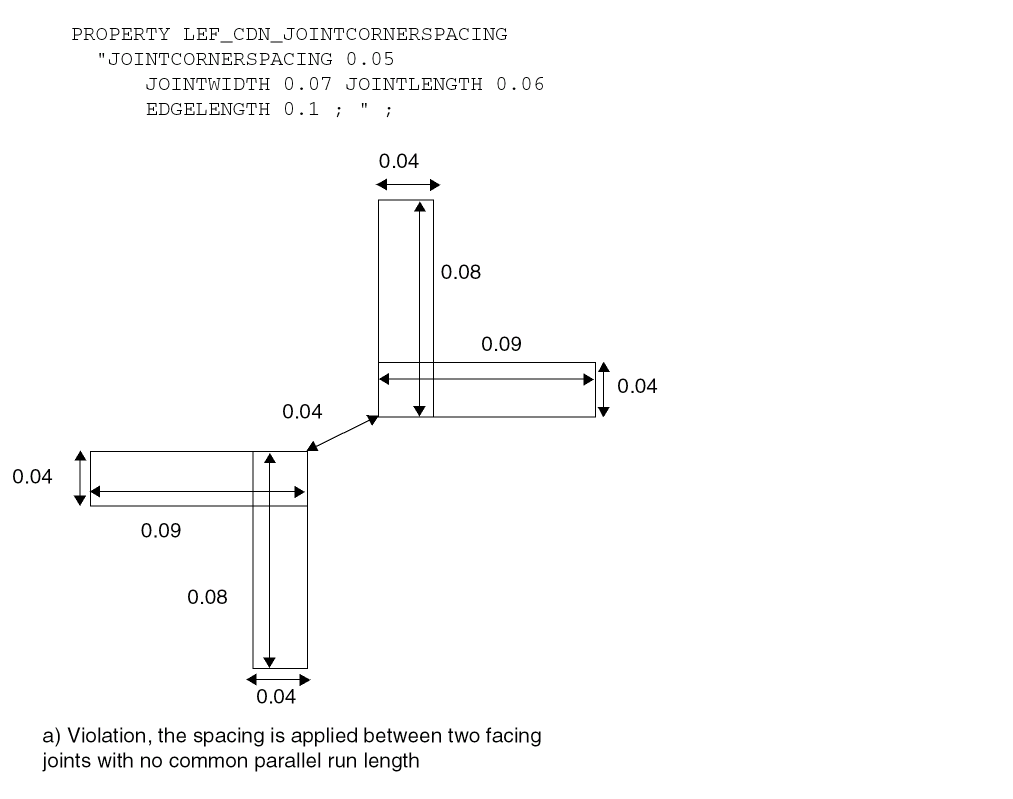
Joint Forbidden Spacing Rule
A joint forbidden spacing rule can be used to define forbidden spacing between a joint and a neighboring wire.
You can create a joint forbidden spacing rule by using the following property definition:
PROPERTY LEF_CDN_JOINTFORBIDDENSPACING "JOINTFORBIDDENSPACINGminSpacing maxSpacingWIDTHwidthWRONGDIRWIDTHwrongDirWidthOTHERWIDTHotherWidth[PRLprl] ; " ;
Figure 5-79 Illustration of Joint Forbidden Spacing Rule
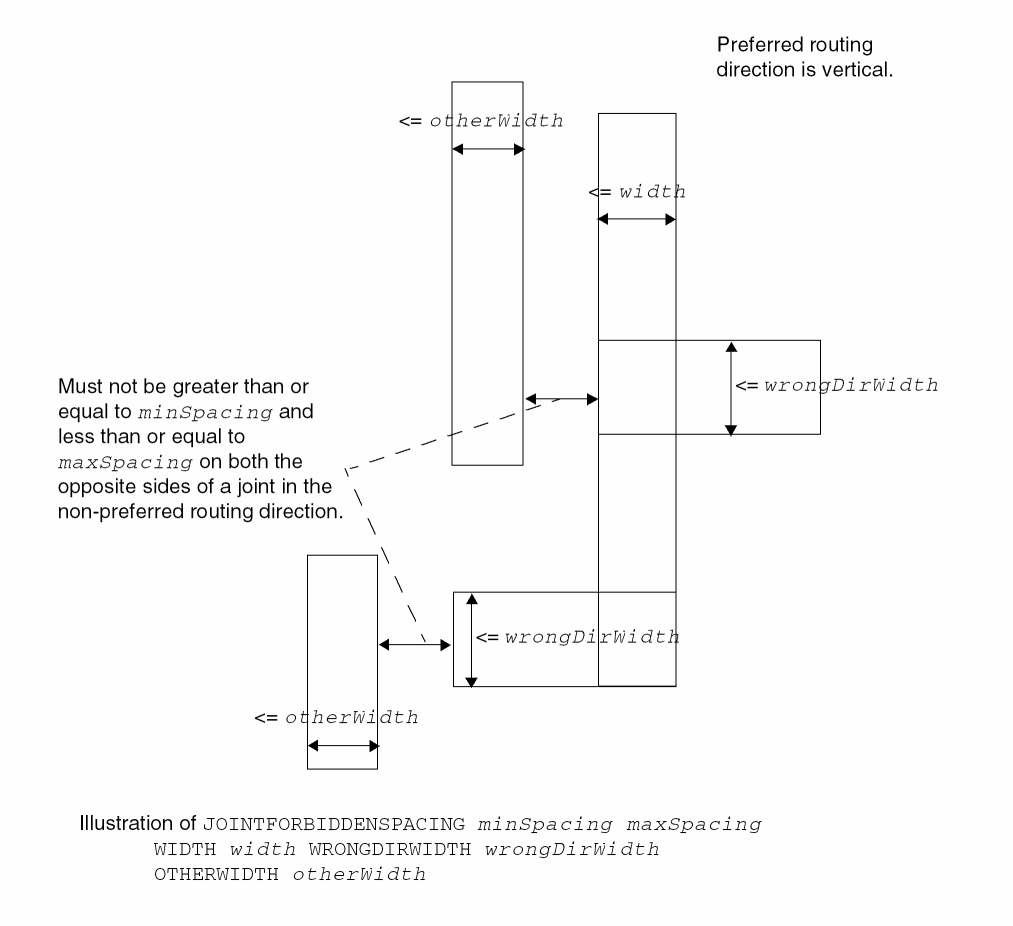
Line End Aligned With Cut Rule
You can create a line end aligned with cut rule by using the following property definition:
PROPERTY LEF_CDN_LINEENDALIGNEDWITHCUT "LINEENDALIGNEDWITHCUTalignedDistanceENCLOSUREenclosure[CUTCLASSclassName] {FROMABOVE | FROMBELOW} [CUTONANYWIRES] ; " ;
Figure 5-80 Line End Aligned With Cut Rule Example
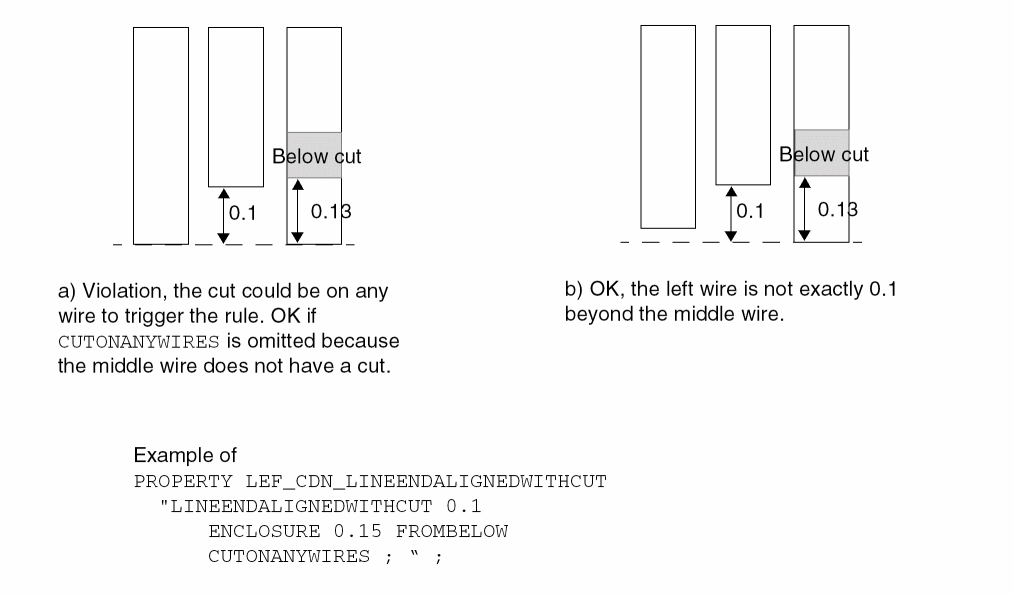
Line End Gap Rule
You can create a line end gap rule by using the following property definition:
PROPERTY LEF_CDN_LINEENDGAP"LINEENDGAPgapWIDTHwidth[MASKmaskNum] ; " ;
Litho Macro Halo Rule
A litho macro halo rule is used to define a routing halo that allows only planar connections to its pins.
You can create a litho macro halo rule by using the following property definition:
PROPERTY LEF_CDN_LITHOMACROHALO "LITHOMACROHALOhorizontalHalo verticalHalo{WIRESPACINGwireSpacing| NOSAMEMETALJOG} ; " ;
Maximum Diagonal Length Rule
The maximum length rule can be used to specify the maximum length of an edge on a routing layer allowing diagonal routing.
You can create a maximum diagonal length rule by using the following property definition:
PROPERTY LEF_CDN_MAXDIAGLENGTH
  "MAXDIAGLENGTH diagonalLength manhattanLength      ; " ;
Maximum Length with Cut Rule
A maximum length with cut rule can be used to specify the maximum length of a wire that has a single cut without a neighboring cut within the specified cut distance.
You can create a maximum length with cut rule by using the following property definition:
PROPERTY LEF_CDN_MAXLENGTHWITHCUT "MAXLENGTHWITHCUTlengthWIDTHwidthWITHINcutDistance{FROMABOVE | FROMBELOW} OTHERWIDTHotherWidthEXCEPTOTHERLENGTHotherLength[LAYERsecondLayerNameSECONDWIDTHsecondWidthEXCEPTSECONDLENGTHsecondLength] ; " ;
Figure 5-81 Maximum Length With Cut Rule Example
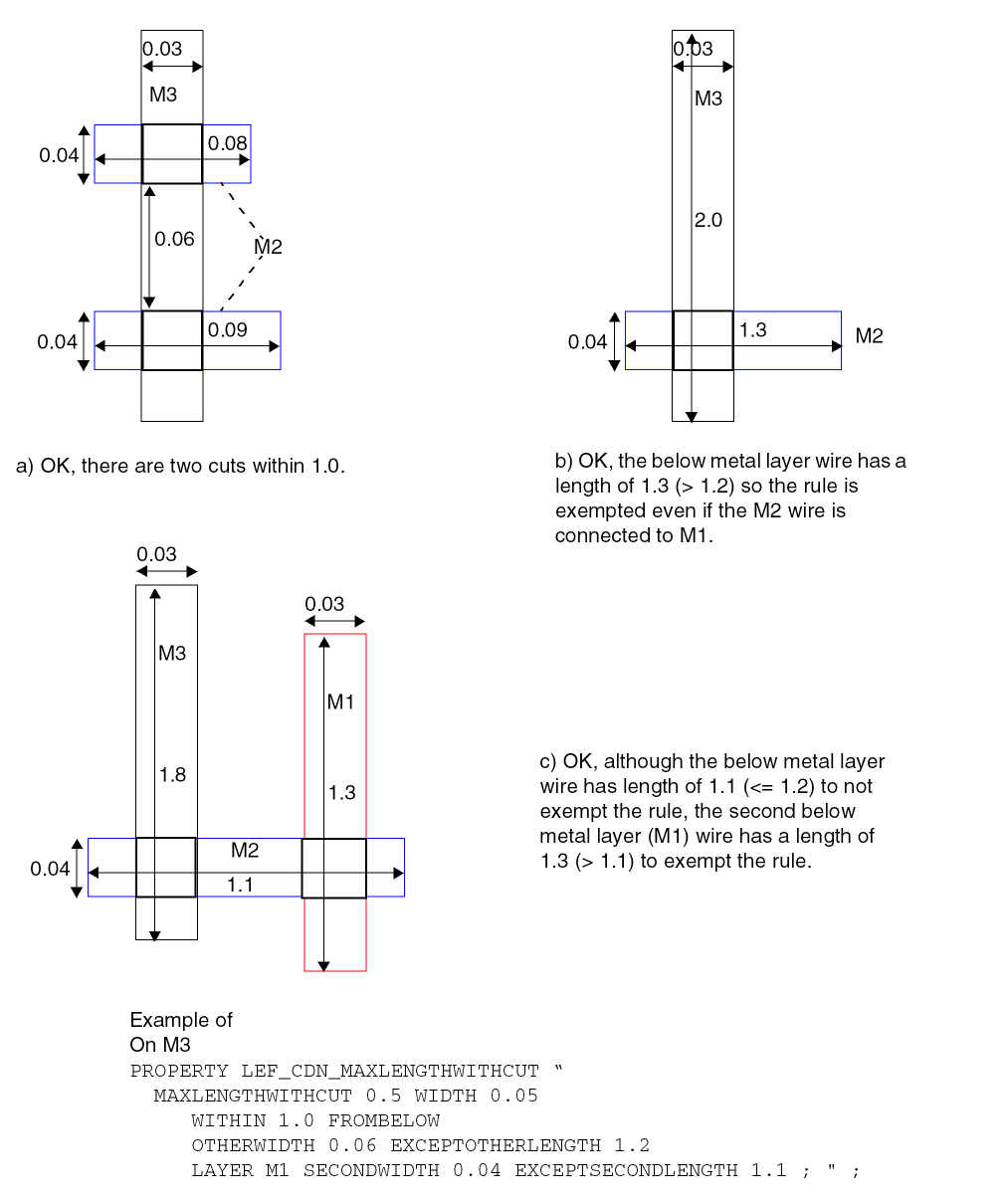
Maximum Overlap Length Rule
You can create a maximum overlap length rule between two consecutive routing layers, with one of them being a RDL layer, by using the following property definition:
PROPERTY LEF_CDN_MAXOVERLAPLENGTH "MAXOVERLAPLENGTHlengthLAYERsecondLayerName; " ;
Figure 5-82 Illustration of Maximum Overlap Length Rule
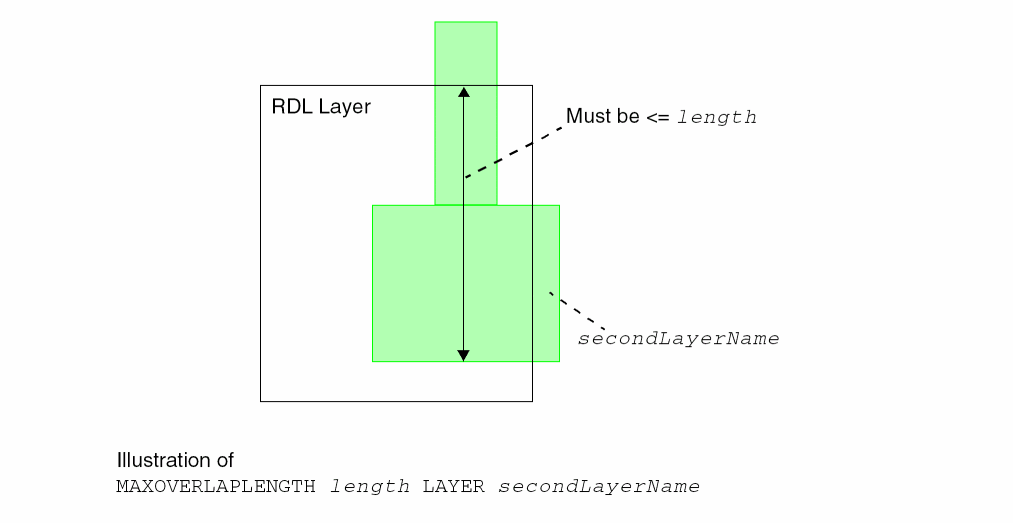
Maximum Width Rule
A maximum width rule can be used to specify the maximum wire width on a given layer.
You can create a maximum width rule by using the following property definition:
PROPERTY LEF_CDN_MAXWIDTH
"MAXWIDTH width [WRONGDIRECTION]
   ; " ;
All other keywords are the same as the existing LEF routing layer MAXWIDTH syntax.
|
Specifies the maximum wire width with direction perpendicular to the specified direction in |
Minimum Cut Rule
Minimum cut rules exist for thin wires connected to a wide wire or pin.
You can define a minimum cut rule by using the following property definition:
PROPERTY LEF_CDN_MINIMUMCUT
"MINIMUMCUT {numCuts | {CUTCLASS className numCuts
    [DIFFCUTCLASS]}... }
    WIDTH width [WITHIN cutDistance]
    [FROMABOVE | FROMBELOW]
    [EXCEPTOTHERWIDTH otherWidth]
    [LENGTH length WITHIN distance
    |AREA area [WITHIN distance]
    |SAMEMETALOVERLAP
    | FULLYENCLOSED]
    ; " ;
All other keywords are the same as the existing LEF routing layer MINIMUMCUT syntax.
|
Applies the minimum cut rule when the wide object has a width that is greater than width, and an area that is greater than area.
The area of a polygon is determined by a process in which the polygon is shrunk by an amount equal to width/2, then grown by an amount equal to width/2. The resulting polygon at the connection location is used for area comparison. If the connection is made at a thin wire (width less than and equal to width) that connects to the wide object, the biggest remaining neighbor should be checked individually with their own areas. If it is followed by a
If width is less than width of the default routing wire is used along with the
|
|
|
If
Note: You can specify either
If |
|
|
Defines the minimum cut rule for a specific cut class className in the cut layers either above or below the current routing layer to be numCuts. Multiple |
|
|
Specifies that if a wide wire has one cut belonging to className, then it must have at least numCuts |
|
|
Specifies that the minimum cut rule is exempted if the width on the other metal of all of the cuts is greater than or equal to otherWidth. |
|
|
Specifies that all the cuts must be completely inside a wide wire with width greater than minWidth to be counted against the minimum cut requirement of numCuts. |
|
|
Specifies that if the common metal on both the top and bottom layers containing the cut overlaps with the wide wire having a width greater than minWidth, then the rule still applies even if the cut itself does not overlap with the wide wire. See Figure 5-84. |
|
Minimum Cut Rule Examples
-
The following minimum cut rule indicates that if an object has width greater than 0.1 µm, either a VA via with minimum three cuts or a VB via with minimum two cuts are needed on that object:
PROPERTY LEF_CDN_MINIMUMCUT
"MINIMUMCUT CUTCLASS VA 3 CUTCLASS VB 2 WIDTH 0.1 ; " ;
-
The following minimum cut rule indicates that vias with
2cuts (placed at a distance less than0.05μm apart) are required, if the wire has a width greater than0.09μm, an area greater than2.0μm2, and width is less than the default routing width of0.10μm.PROPERTY LEF_CDN_MINIMUMCUT
"MINIMUMCUT 2 WIDTH 0.09 WITHIN 0.05 AREA 2.0 ;" ;
Figure 5-83 Minimum Cut Rule Example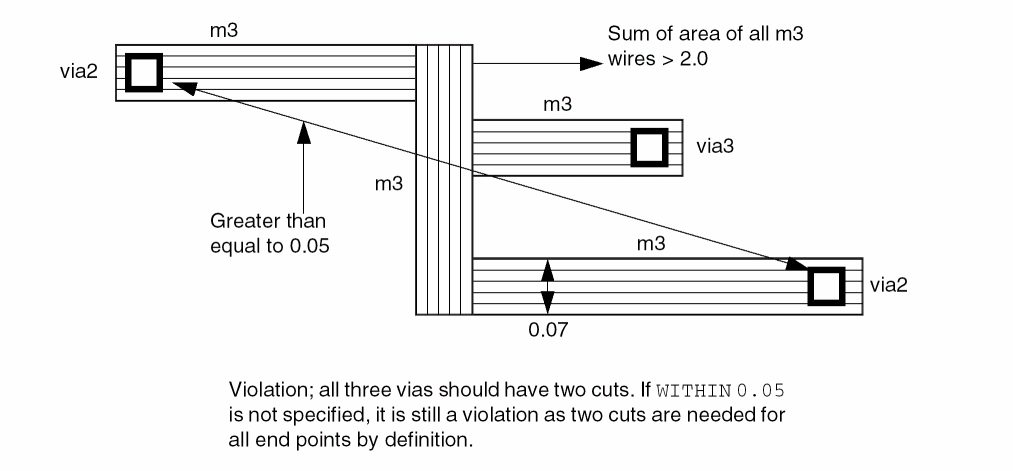
-
The following minimum cut rules indicate that
3via cuts are required, if a thin wire is connected to a wide wire with a width greater than0.24μm and an area greater than1.6μm2, and the distance between the vias and the wide wire is less than3.0μm.PROPERTY LEF_CDN_MINIMUMCUT
"MINIMUMCUT 2 WIDTH 0.24 ;
"MINIMUMCUT 3 WIDTH 0.40 ;
"MINIMUMCUT 2 WIDTH 0.24 AREA 0.3 WITHIN 10.0 ;
"MINIMUMCUT 3 WIDTH 0.24 AREA 1.6 WITHIN 3.0 ;" ;
Figure 5-84 Minimum Cut Rule Example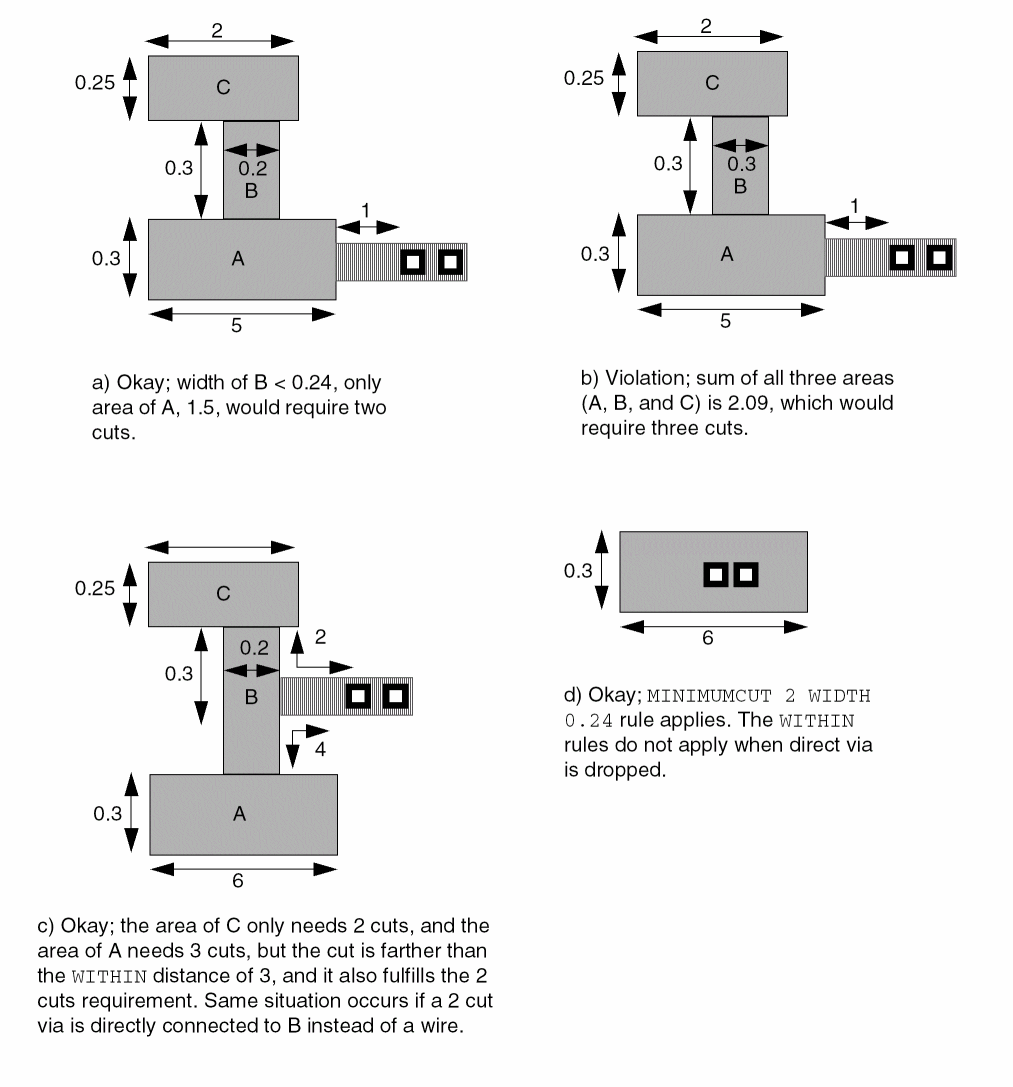
-
The following minimum cut rule indicates that if an object has width greater than 0.1 µm, either a VA via with minimum three cuts or a VB via with minimum two cuts are required on that object.
PROPERTY LEF_CDN_MINIMUMCUT
"MINIMUMCUT CUTCLASS VA 3 CUTCLASS VB 2 WIDTH 0.1 ; " ;
-
The following minimum cut rule indicates that if a common metal, between top and bottom layers, overlaps with a wide wire having a width of 0.2 µm, the rule still applies even if the cut itself does not overlap with the wide wire:
PROPERTY LEF_CDN_MINIMUMCUT
"MINMUMCUT 2 WIDTH 0.2 SAMEMETALOVERLAP ; " ;
Figure 5-85 Illustration of Minimum Cut Rule with SAMEMETALOVERLAP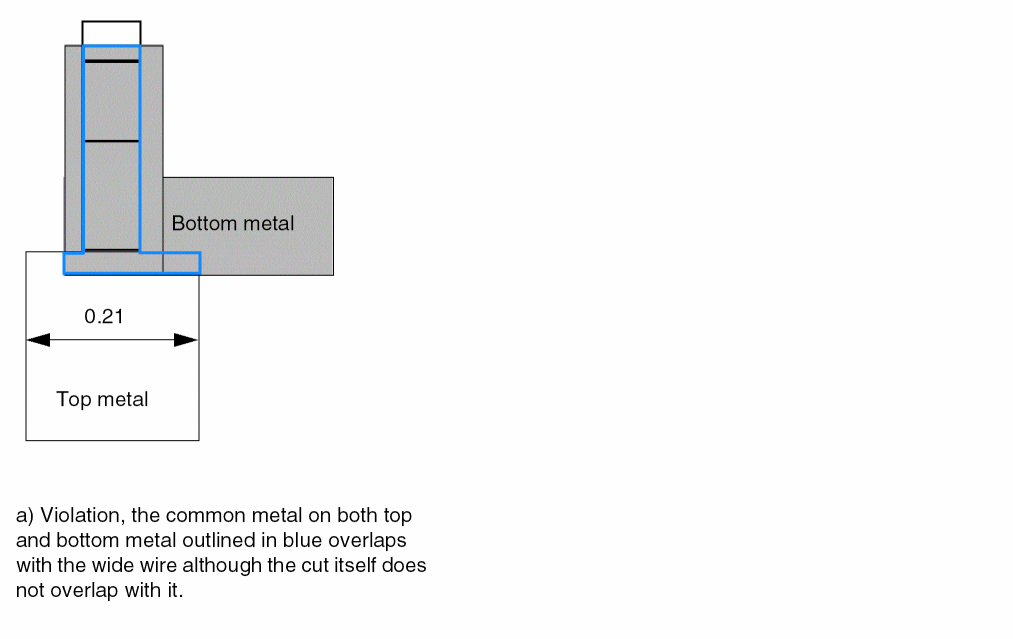
-
The following example is an illustration of the minimum cut rule with the
FULLYENCLOSEDkeyword:PROPERTY LEF_CDN_MINMUMCUT “
MINMUMCUT 3 WIDTH 0.2 FULLYENCLOSED ; “ ;
Figure 5-86 Illustration of Minimum Cut Rule with FULLYENCLOSEDFigure 5-87 Illustration of Minimum Cut Rule with DIFFCUTCLASS and EXCEPTOTHERWIDTH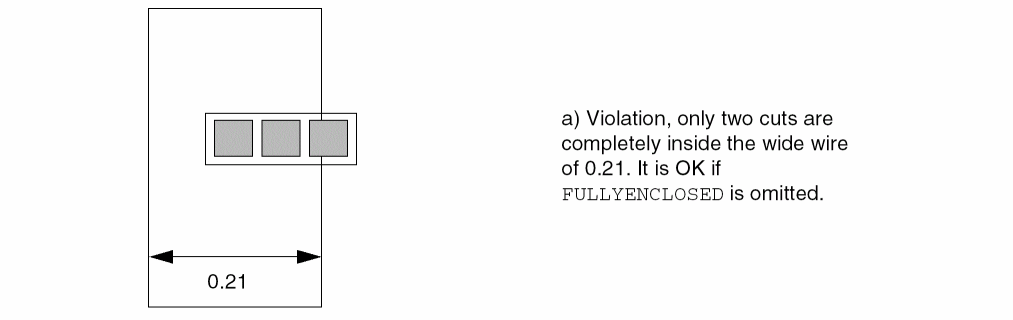
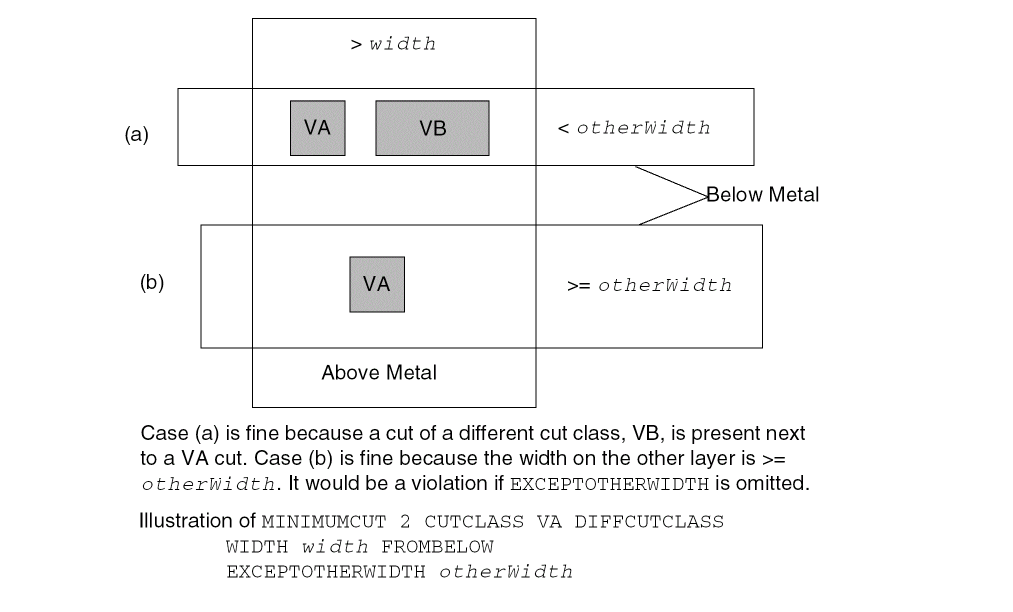
Minimum Length Parallel Rule
You can define a minimum length parallel rule by using the following property definition:
PROPERTY LEF_CDN_MINLENGTHPARALLEL "MINLENGTHPARALLELminLengthMASKmaskNumWIDTHwidth{FROMABOVE|FROMBELOW} CUTCLASSclassNameEXCEPTEOLSPACINGeolSpacingEXCEPTWITHINwithin; " ;
Minimum Length Parallel Rule Examples
Figure 5-88 Illustrations of Minimum Length Parallel Rule
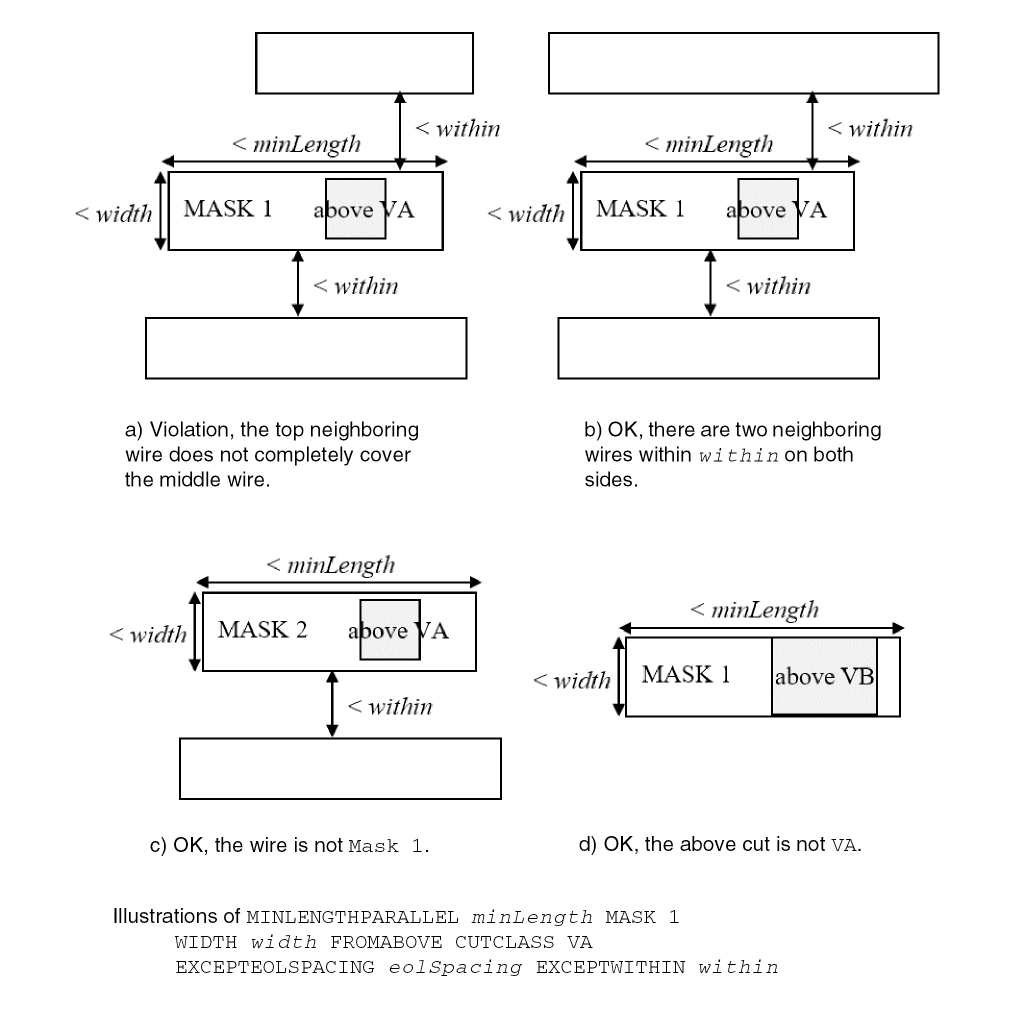
Figure 5-89 Illustrations of Minimum Length Parallel Rule
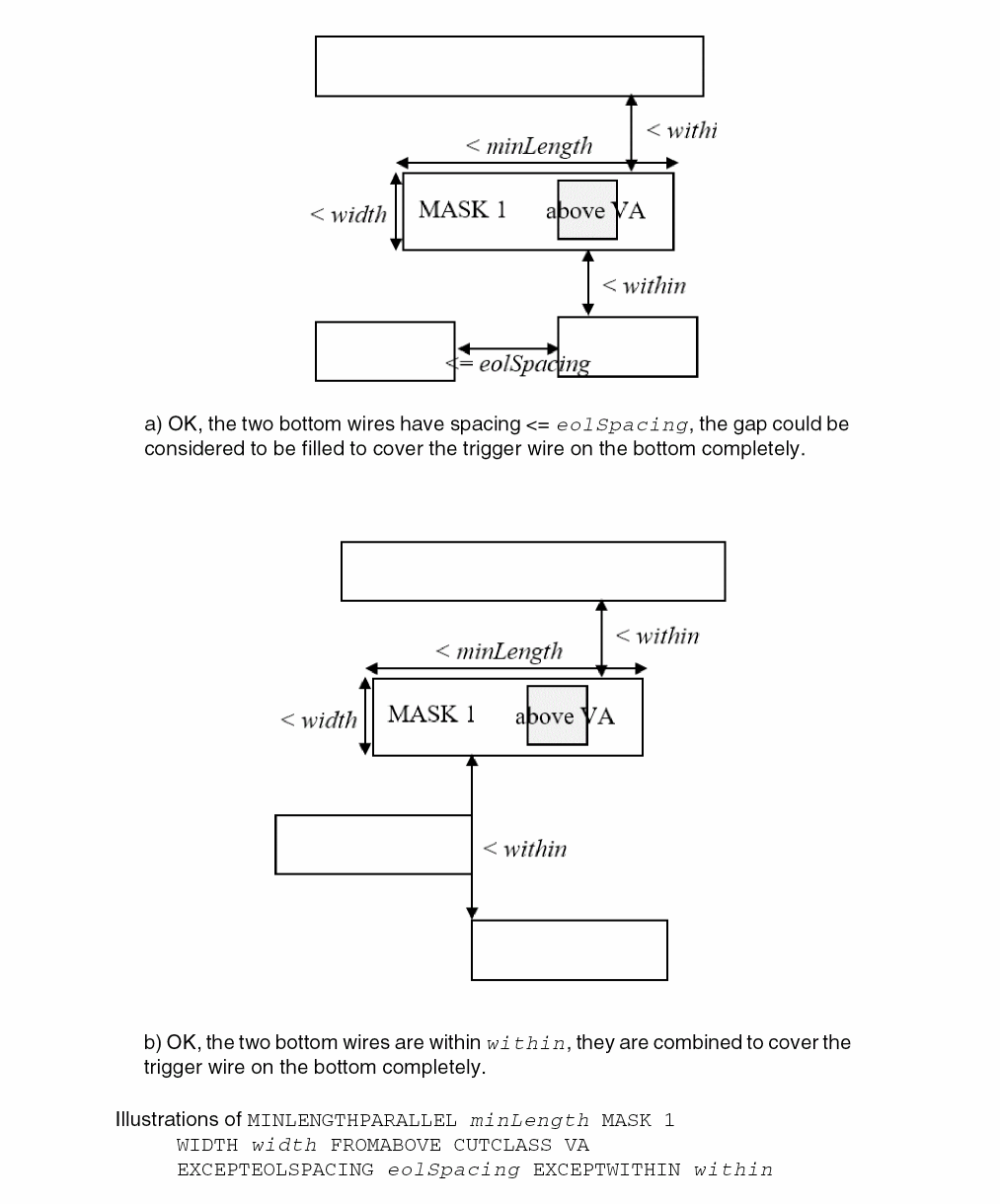
Minimum Size Rule
Minimum size rules allow you to specify the minimum width and length of a rectangle that must be able to fit somewhere within each polygon on a layer.
You can define a minimum size rule by using the following property definition:
PROPERTY LEF_CDN_MINSIZE "MINSIZE [RECTONLY]minWidthminLength[minWidthminLength]... ] ;..." ;
All the other keywords are the same as the existing LEF routing layer MINSIZE syntax.
|
Specifies that the minimum size rule applies only to rectangular wires. |
Minimum Step Rule
Minimum step rules allow you to require a minimum adjacent edge length following edges that are less than the specified minimum step length. You can define at the most two MINSTEP statements.
You can define a minimum step rule by using the following property definition:
PROPERTY LEF_CDN_MINSTEP "MINSTEPminStepLength[[INSIDECORNER | OUTSIDECORNER | STEP] [LENGTHSUMmaxLength]] |[MAXEDGESmaxEdges[EXCEPTRECTANGLE] [ MINADJACENTLENGTHminAdjLength[CONVEXCORNER [EXCEPTWITHINexceptWithin] |CONCAVECORNER |THREECONCAVECORNERS [CENTERWIDTHwidth] |minAdjLength2] | MINBETWEENLENGTHminBetweenLength[EXCEPTSAMECORNERS] | NOADJACENTEOLeolWidth] [EXCEPTADJACENTLENGTHminAdjLength|MINADJACENTLENGTHminAdjLength] [CONCAVECORNERS] | NOBETWEENEOLeolWidth| CONCAVEANDCONVEX] ] ; " ;
All the other keywords are the same as the existing LEF routing layer MINSTEP syntax.
|
Specifies that the rule applies only if all of the involved edges are between a concave corner and a convex corner. |
|
|
Specifies if a concave corner is between two convex corners, and if one of the length of the edges to form the concave corner is less than minAdjLength, then the other length must be greater than or equal to the minStepLength.
This has similar definition as |
|
|
Specifies that the adjacent EOL minimum step rules only apply if both of the neighbor edges of the EOL have concave corners at the other end. |
|
|
Indicates that the adjacent EOL minimum step rule does not apply if the other neighbor edge of the minstep edge has length greater than or equal to minAdjLength. |
|
|
Specifies that the rule does not apply on any rectangular shapes. |
|
|
Indicates that a minBetweenLength length is not required for an edge that has the same type of 90-degree corner at each end (that is, both corners are convex, or both are concave). See Figure 5-91 for an illustration of |
|
|
Specifies that if there is a neighbor object, same-net or different-net, is within exceptWithin measured in Euclidean distance from the convex corner or the two adjacent edges, the minstep rule does not apply. |
|
|
|
|
|
Indicates that the edges adjacent to min-step edges that are less than minStepLength must be greater than or equal to minAdjLength in length in order to be allowed; otherwise, it is considered a violation.If
The |
|
|
Specifies that the adjacent EOL minimum step rule applies only if the other neighbor edge forming a concave corner with the minimum step edge has length greater than minAdjLength. See Figure 5-95. |
|
|
Indicates that one of the edges between min-step edges that are less than minStepLength must be greater than or equal to minBetweenLength in length in order to be allowed; otherwise, it is considered a violation. |
|
|
Indicates that the adjacent edges to min-step edges less than minStepLength must not be EOL edge with length less than eolWidth in order to be allowed; otherwise, it is considered a violation. In addition, |
|
|
Indicates that the edge between two minstep edges less than minStepLength must not be a EOL edge with length less than eolWidth. In addition, |
|
|
Specifies that if a polygon has consecutive edges having three concave corners with two convex corners between them in a stair case, it is a violation if one of the edge touching the middle concave corner has length less than minStepLength and the other edge has length less than minAdjLength. If |
|
Minimum Step Rule Examples
-
The following minimum step rule indicates that a 0.9 μm EOL edge must not be between two minstep edges:
PROPERTY LEF_CDN_MINSTEP
"MINSTEP 0.5 MAXEDGES 1 NOBETWEENEOL 1.0 ;" ;
Figure 5-90 MinStep Rule with NOBETWEENEOL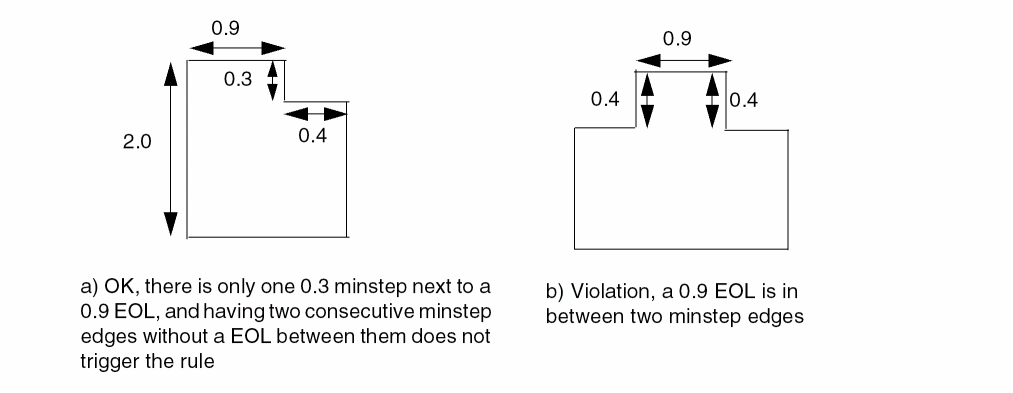
-
The following minimum step rule indicates that the rule applies if the non-EOL adjacent edge has a length that is greater than or equal to 0.8 μm:
PROPERTY LEF_CDN_MINSTEP
"MINSTEP 0.5 MAXEDGES 1
NOADJACENTEOL 1.0
EXCEPTADJACENTLENGTH 0.8 ;" ;
Figure 5-91 MinStep Rule with EXCEPTADJACENTLENGTHFigure 5-92 Illustration of ExceptSameCorners Definition in the MinStep Rule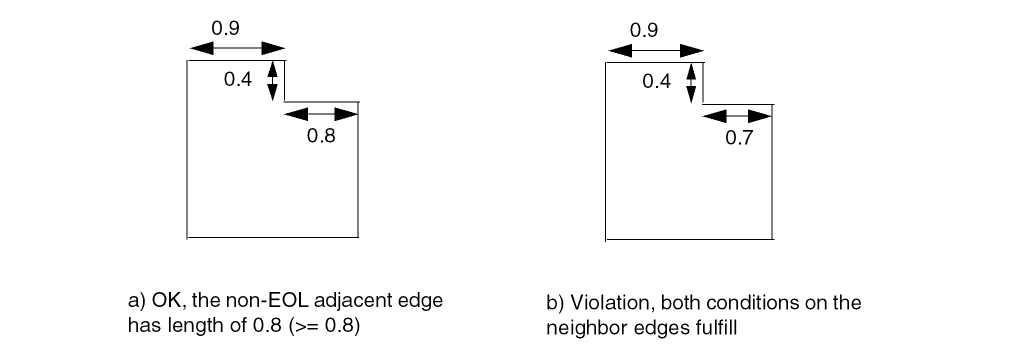
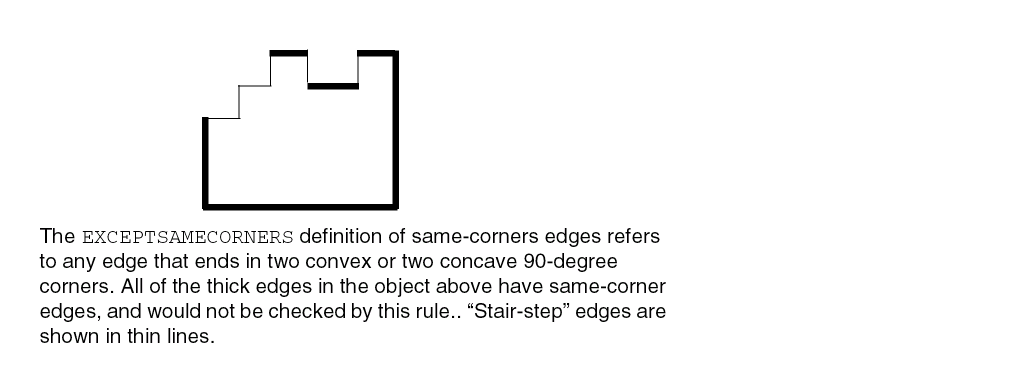
-
The following minimum step rule indicates that there can only be one edge less than 1.0 μm in a row. The adjacent edges must be greater than or equal to 1.0 μm.
PROPERTY LEF_CDN_MINSTEP
"MINSTEP 1.0 MAXEDGES 1 ;" ;
Figure 5-93 MinStep Rule with MAXEDGES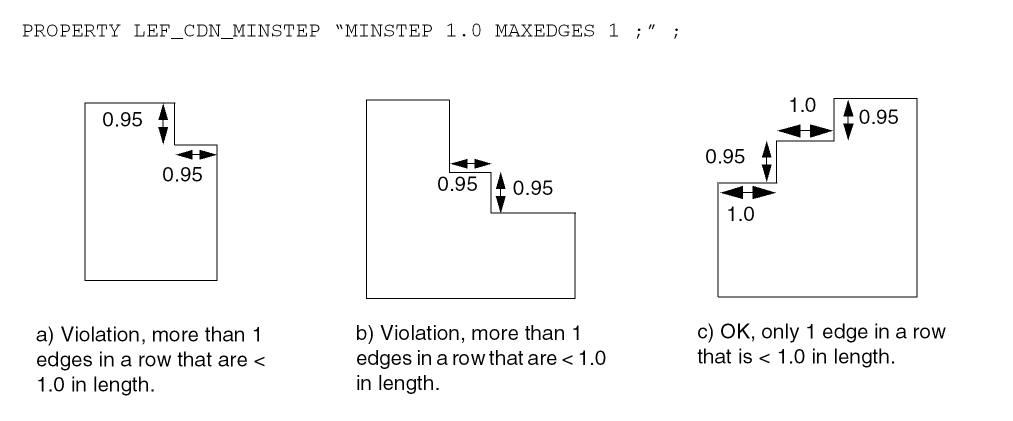
-
The following minimum step rule indicates that an edge less than 0.6 μm must have adjacent edges greater than or equal to 1.0 μm.
PROPERTY LEF_CDN_MINSTEP
"MINSTEP 0.6 MAXEDGES 1 MINADJACENTLENGTH 1.0 ;" ;
Figure 5-94 MinStep Rule with Adjacent Edge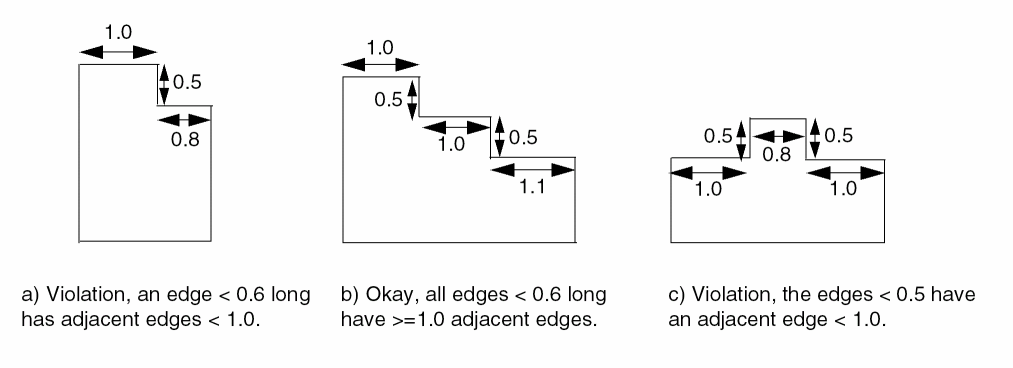
-
The following minimum step rule indicates that no edge less than 0.2 μm, and any edge less than 0.6 μm must have one adjacent edge greater than or equal to 1.0 μm, and the other adjacent edge greater than or equal to 1.2 μm.
MINSTEP 0.2 MAXEDGES 0 ;
PROPERTY LEF_CDN_MINSTEP
"MINSTEP 0.6 MAXEDGES 1 MINADJACENTLENGTH 1.0 1.2 ;" ;
Figure 5-95 MinStep Rule with MINADJACENTLENGTH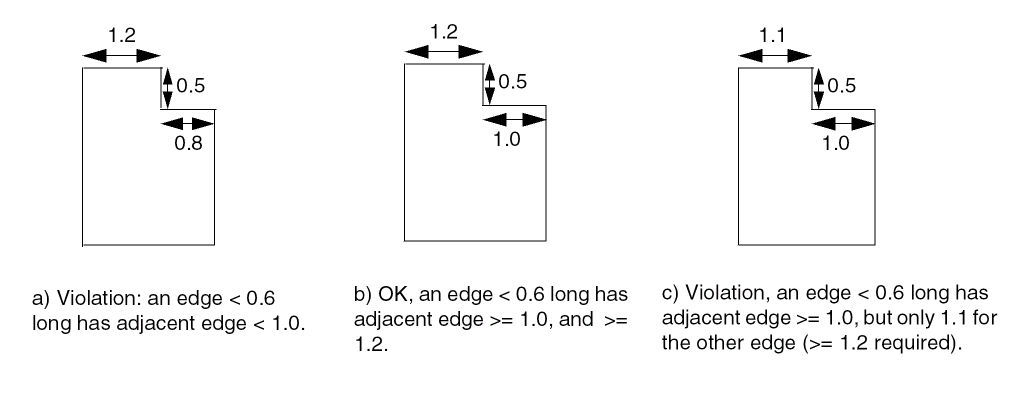
-
The following rule illustrates that the minimum step rule does not apply if the non-EDO adjacent edge has length greater than the specifed minimum adjacent length:
PROPERTY LEF_CDN_MINSTEP "
MINSTEP 1.5 MAXEDGES 1
NOADJACENTEOL 1.0
MINADJACENTLENGTH 0.7 ; " ;
Figure 5-96 MinStep Rule with MINADJACENTLENGTH in NOADJACENTEOL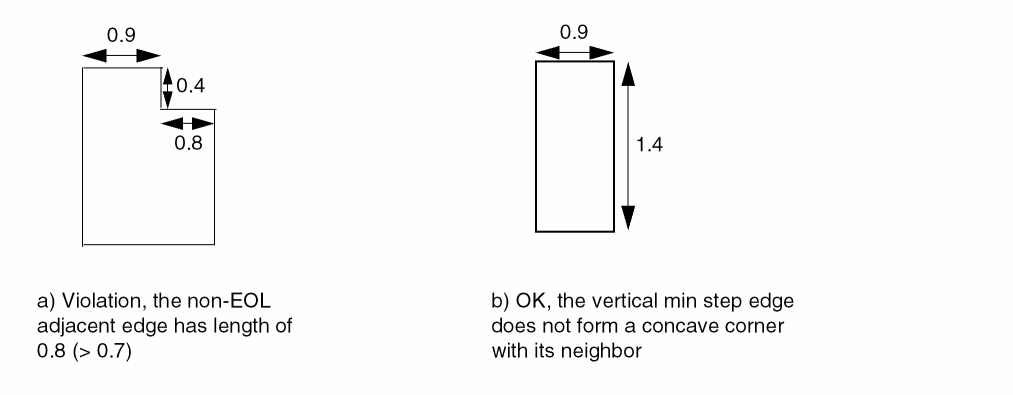
-
The following minimum step rule illustrates
CONVEXCORNER:PROPERTY LEF_CDN_MINSTEP
"MINSTEP 0.6 MAXEDGES 1 MINADJACENTLENGTH 1.0 CONVEXCORNER ;" ;
Figure 5-97 MinStep Rule with CONVEXCORNER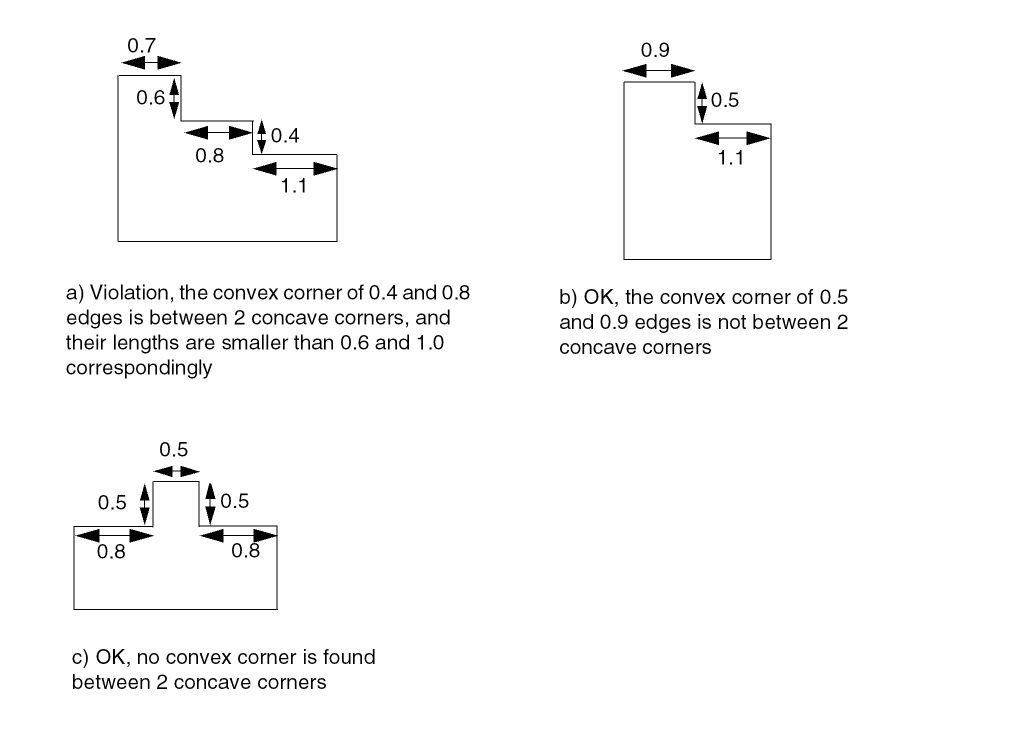
-
The following figure defines
EXCEPTWITHINexceptWithin inCONVEXCORNER:
Figure 5-98 EXCEPTWITHIN exceptWithin in CONVEXCORNER in the MinStep RuleFigure 5-99 MinStep Rule with EXCEPTSAMECORNERS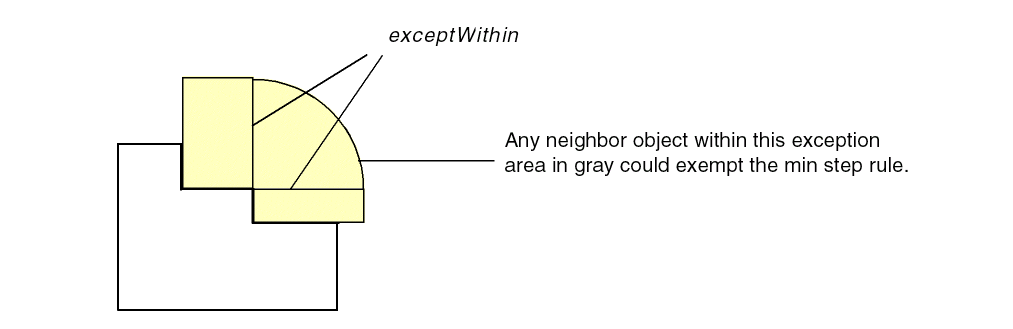 Figure 5-100 MinStep Rule with CONCAVECORNERS
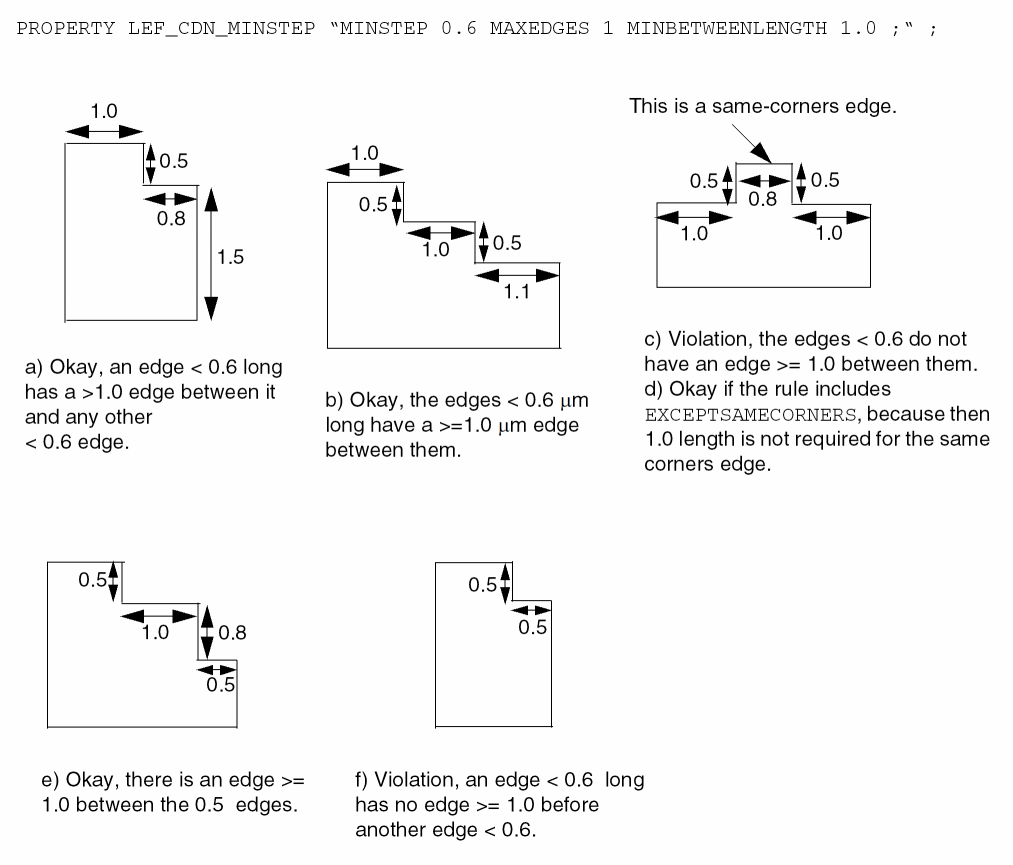 Figure 5-101 MinStep Rule with THREECONCAVECORNERS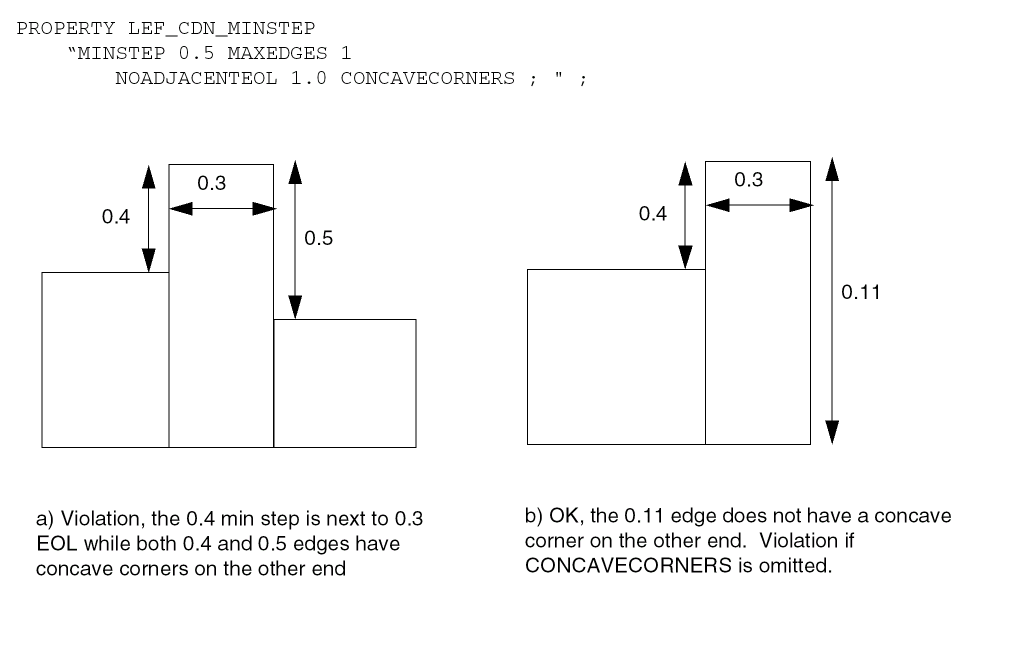
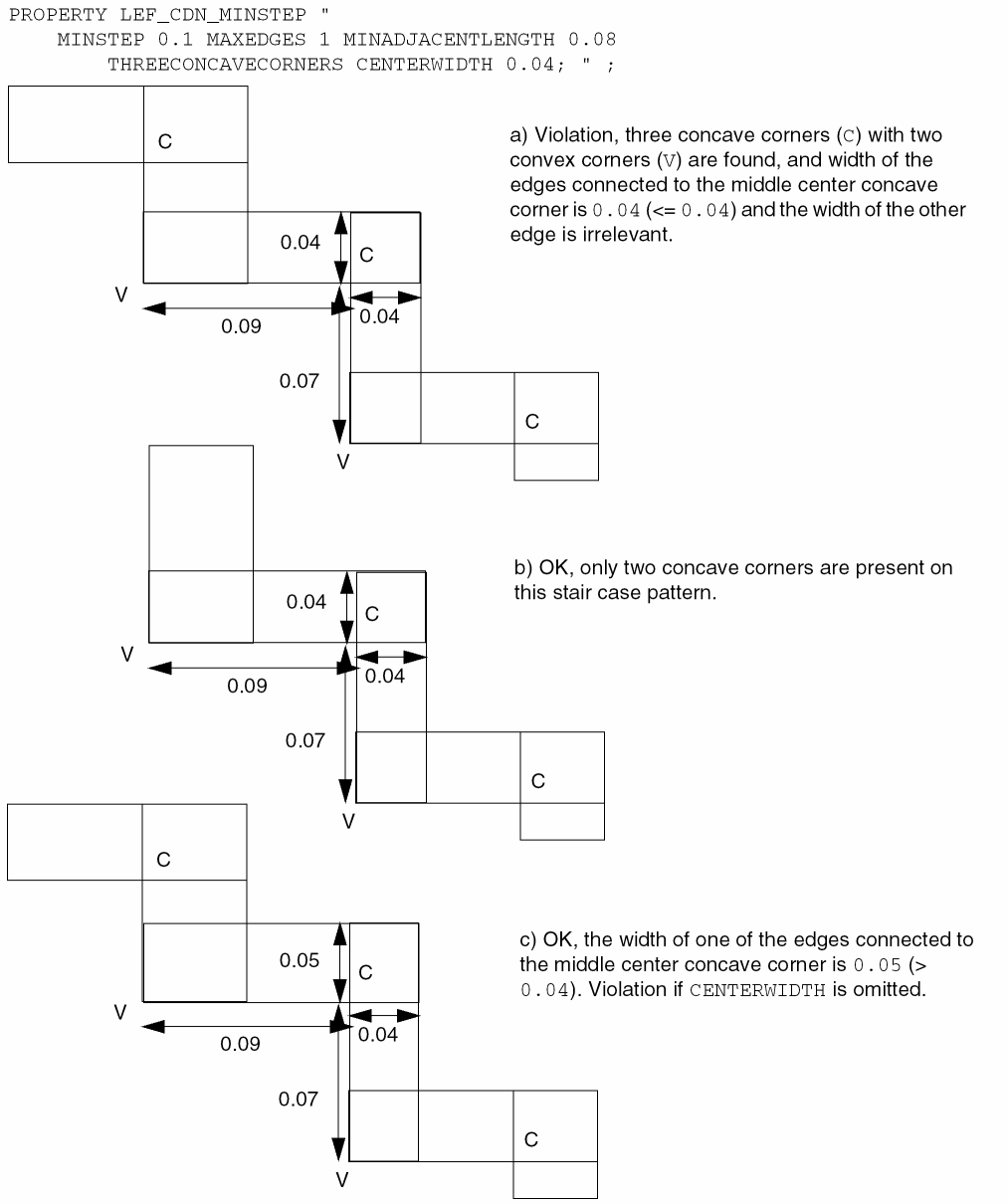
Opposite EOL Spacing Rule
An opposite EOL spacing rule can be used to define spacing on a wire with two neighbor wires on the opposite edges.
You can create an opposite EOL spacing rule by using the following property definition:
PROPERTY LEF_CDN_OPPOSITEEOLSPACING “OPPOSITEEOLSPACING [SAMEMASK] WIDTHwidth;” ; ENDWIDTHeolWidth[MINLENGTHminLength] [JOINTWIDTHjointWidth] JOINTLENGTHspanLength[JOINTTOEDGEENDjointToEdgeEndLength] [JOINTEXTENSIONjointExtension] [JOINTCORNERONLY] [SIDELENGTHlength[TOSIDEtoSideLength]] [SIDEEXTENSIONsideExtension[TOSIDEtoSideExtension]] [SIDEEDGELENGTHsideEdgeLength] [PRLprl] {[EXCEPTEDGELENGTHedgeLength[PRLmaxPRL]]}... ENDTOENDendSpacingendSpacing[PRLindividualPrl] ENDTOJOINTendSpacingjointSpacing[PRLindividualPrl] JOINTTOENDjointSpacing endSpacing[PRLindividualPrl] JOINTTOJOINTjointSpacingjointSpacing[PRLindividualPrl] [SIDETOENDsideSpacingendSpacing[PRLindividualPrl] SIDETOJOINTsideSpacingjointSpacing] [PRLindividualPrl] [JOINTTOSIDEjointSpacingsideSpacing] [PRLindividualPrl] [SIDETOSIDEsideSpacingsideSpacing] [PRLindividualPrl] ;" ;
|
Defines the spacing requirements on a wire with two neighbor wires on opposite edges that have a projected parallel run length greater than 0. The neighbor wires are classified either as a EOL or a T or L joint. |
|
|
Specifies that the rule applies only if all three objects to trigger the rule belong to the same mask. |
|
|
Specifies that the rule applies only if the width of the middle wire is less than width. |
|
|
Specifies that the rule applies only if the neighbor end-of-line has width less than eolWidth.
|
|
|
Specifies the extension on both sides of a joint to be jointExtension. The extension should be treated as if it is a part of the joint. |
|
|
|
|
|
Specifies that the neighbor wire end edge is a joint if its width is less than jointWidth, if specified, or less than eolWidth, its span is greater than spanLength, and it is not a EOL edge.
If |
|
|
Specifies that the neighbor wire end edge is a joint if it has width less than eolWidth and span greater than spanLength, and it is not an EOL, that is, it is either a T or L joint pattern. |
|
|
Specifies that the rule does not apply if both the end or joint neighbor edges have a length greater than and equal to edgeLength and projected parallel run length is less than and equal to maxPRL, if PRL is also specified. At the most, two such statements can be specified and supported. |
|
|
Specifies the spacing between the neighbor edges to the middle wire. There are four groups of two spacings. The keywords define the category of the neighbors, either as an end or a joint. For example, in the case of |
|
|
Specifies that the joint must form a joint corner, which is a convex corner consisting of two consecutive joints. |
|
|
Specifies a spacing requirement similar to |
|
|
Specifies that the rule only applies if the projected parallel run length of a wire and the two neighbor wires is greater than prl. If prl is negative, it is similar to extending the end, joint, or side edges by abs(prl) in a |
|
|
Specifies that the parallel run length on the given |
|
|
Specifies that a side fulfilling other conditions must also be an edge with length greater than the sideEdgeLength. |
|
|
Specifies the extension of a side of EOL edge to be toSideExtension only in the direction going beyond the EOL edge in case of SIDETOSIDE, and this extension definition is only applied to one of the |
|
|
Specifies the length on the sides of a EOL edge to be toSideLength in case of |
|
|
|
|
|
Specifies the spacing between a side of a EOL edge defined in |
|
|
Specifies a spacing requirement between two sides of a EOL edge with a middle wire. In addition, any defined |
|
Opposite EOL Spacing Examples
-
Figure 5-101 illustrates
ENDandJOINTwithENDWIDTH 0.1,MINLENGTH 0.05,JOINTLENGTH 0.15, andJOINTTOEDGEEND 0.08:
Figure 5-102 Illustration of END and JOINTFigure 5-103 Illustration of SIDEEDGELENGTH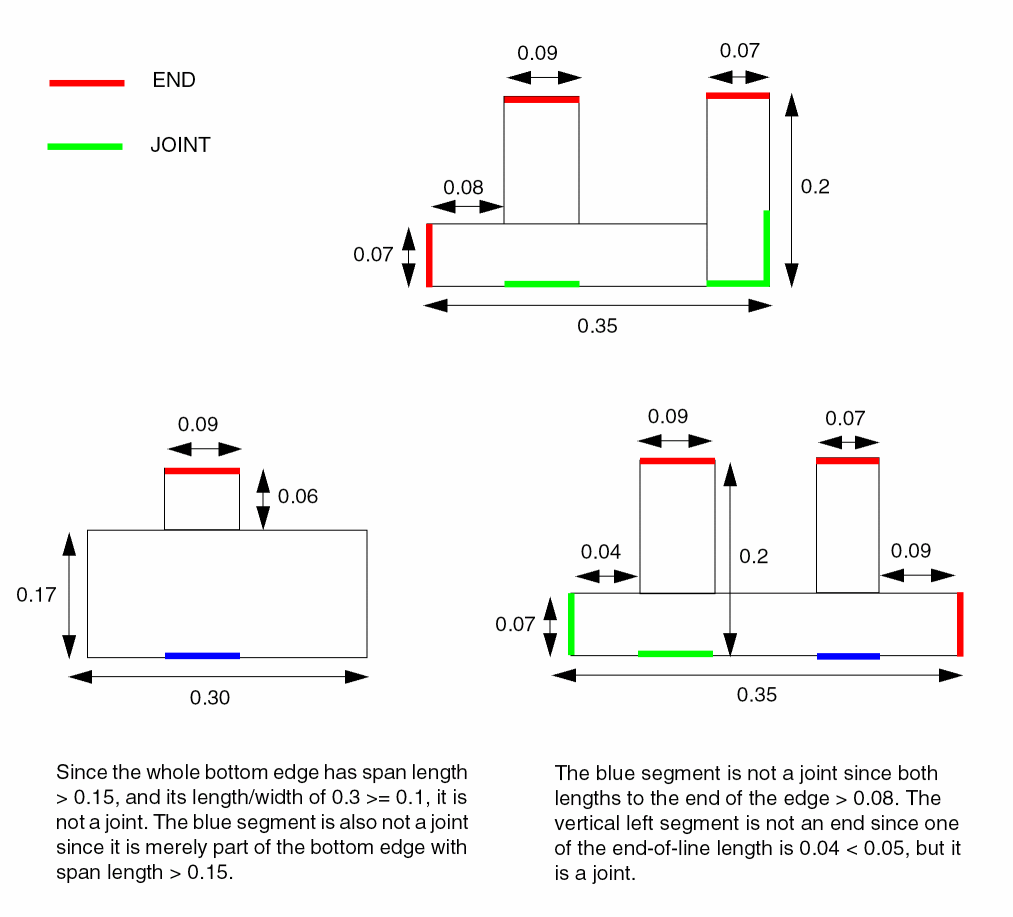 Figure 5-104 Illustration of SIDELENGTH and SIDEEXTENSION
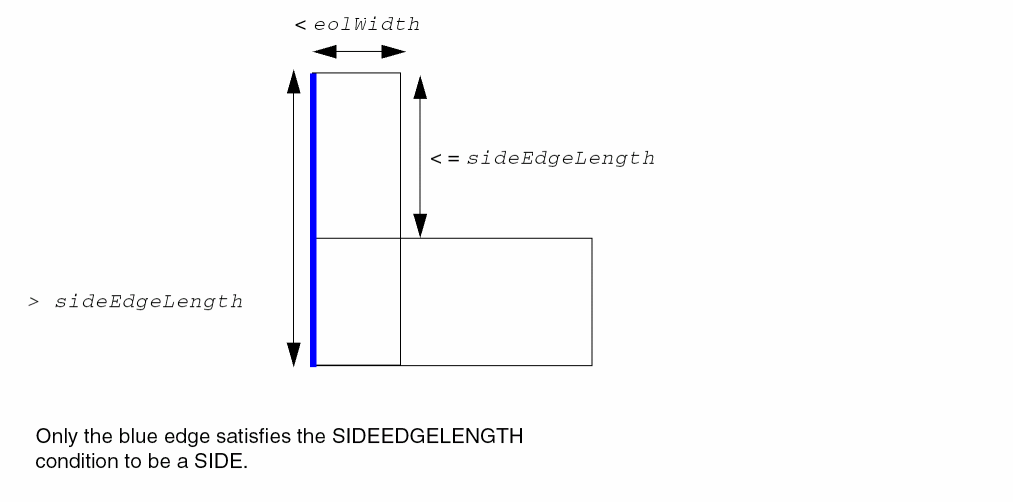 Figure 5-105 Illustration of JOINTEXTENSION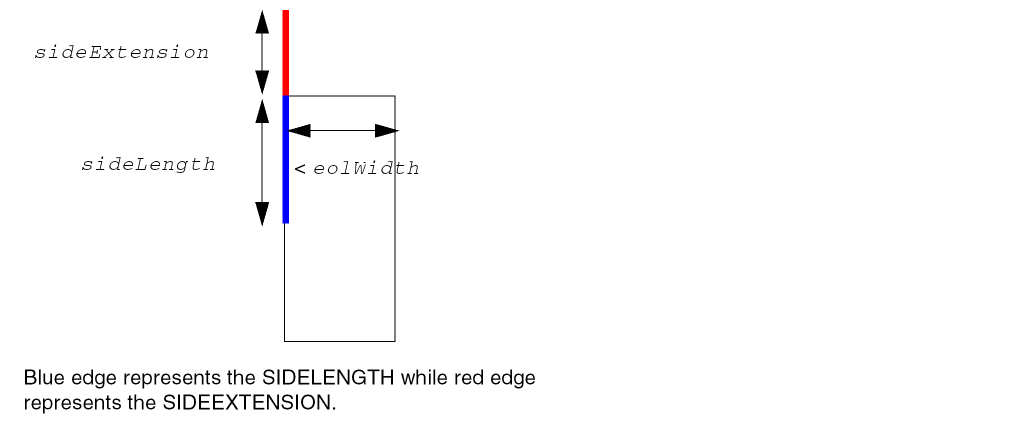
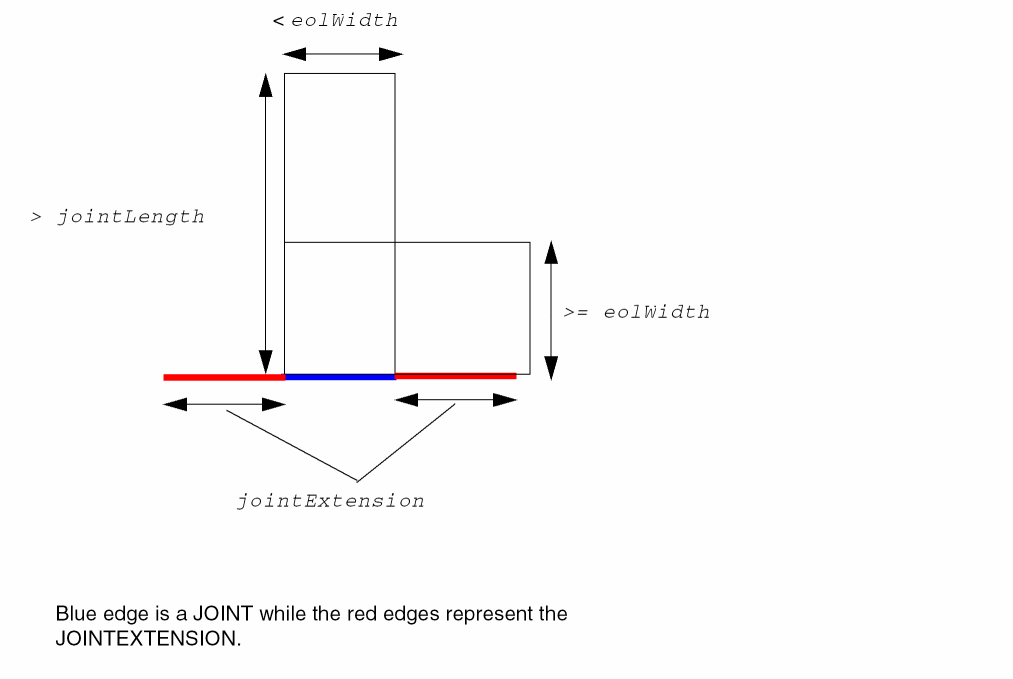
-
The following example illustrates the Opposite EOL Spacing rule given below:
PROPERTY LEF_CDN_OPPOSITEEOLSPACINGWIDTH 0.08ENDWIDTH 0.1JOINTLENGTH 0.15EXCEPTEDGELENGTH 0.08 PRL 0.03ENDTOEND 0.11 0.13ENDTOJOINT 0.12 0.10JOINTTOEND 0.12 0.10JOINTTOJOINT 0.12 0.16;
Figure 5-106 Illustration of OPPOSITEEOLSPACINGFigure 5-107 Illustration of OPPOSITEEOLSPACING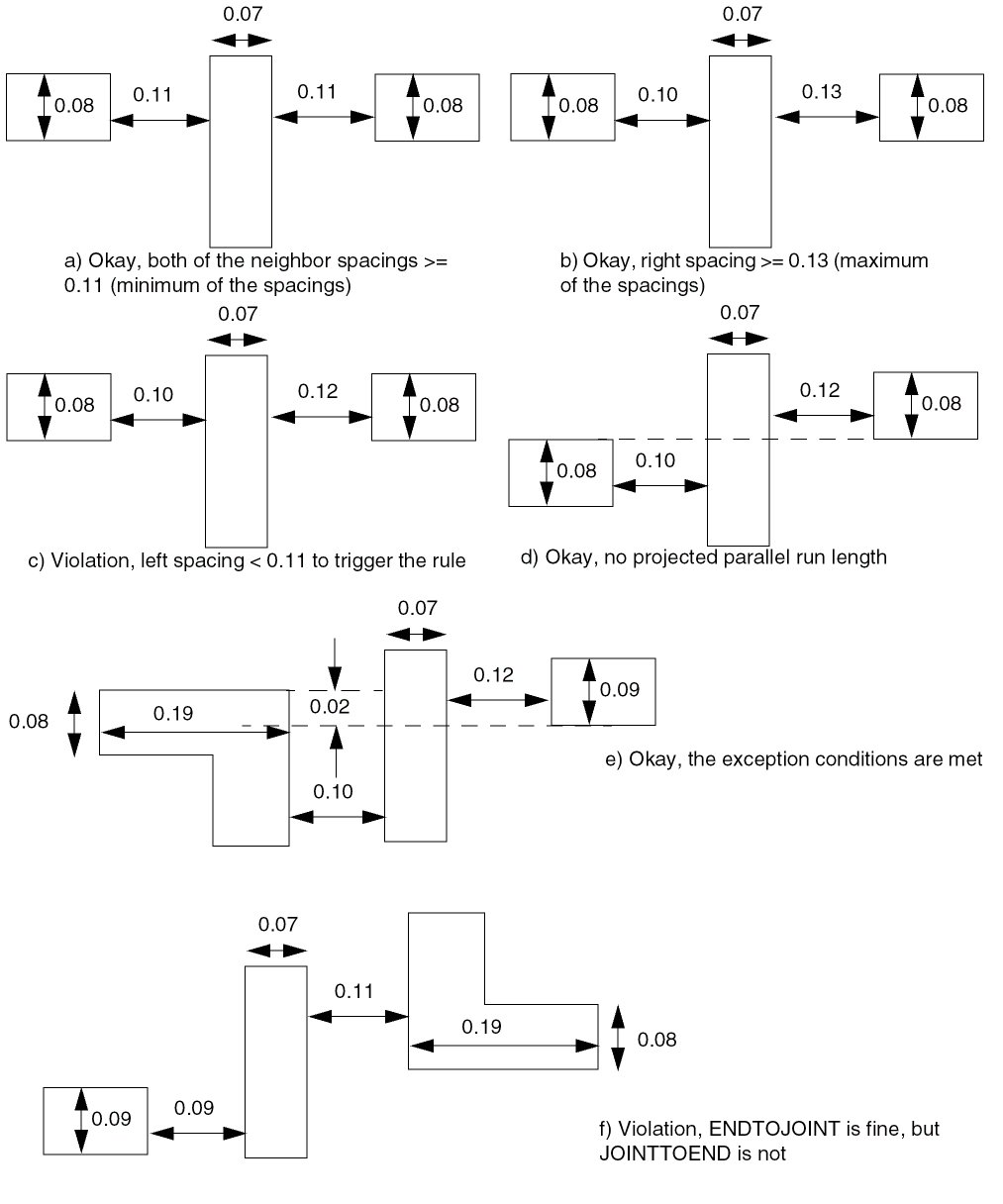 Figure 5-108 Illustration of SIDELENGTH in OPPOSITEEOLSPACING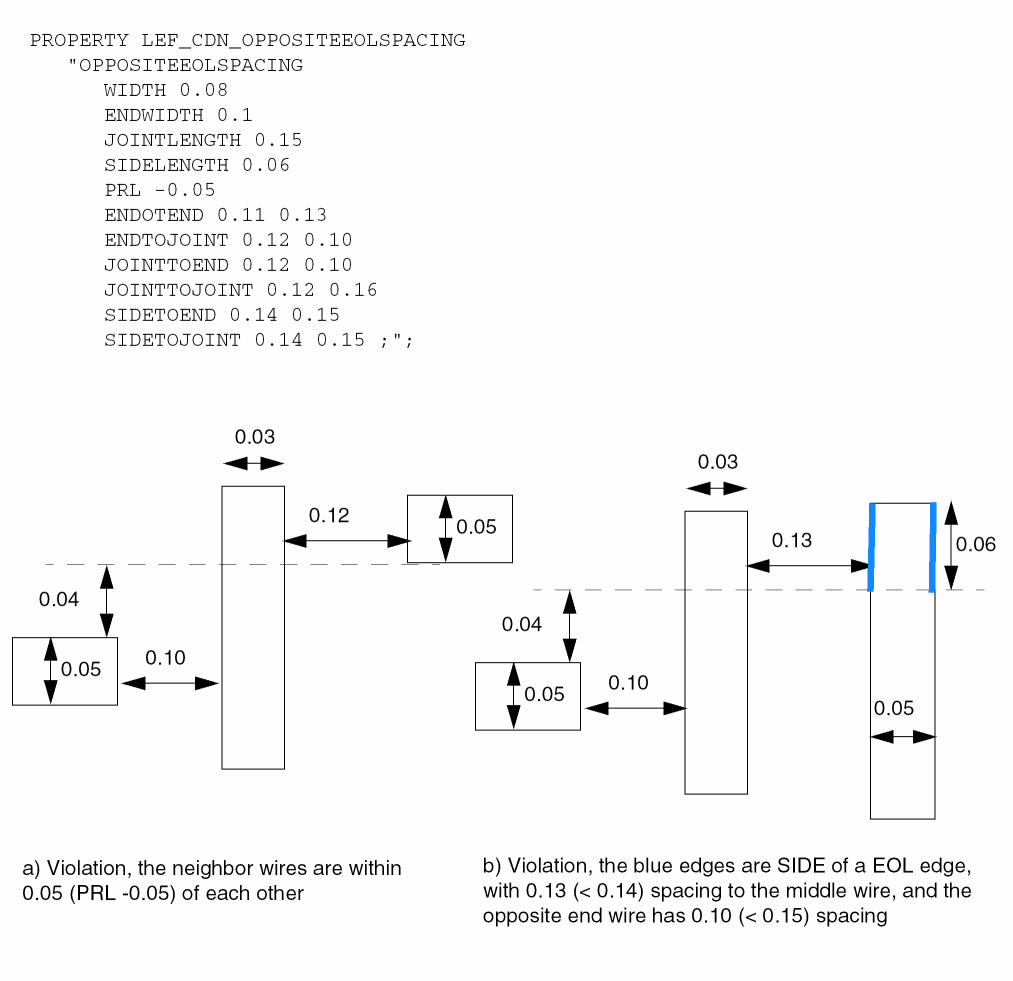
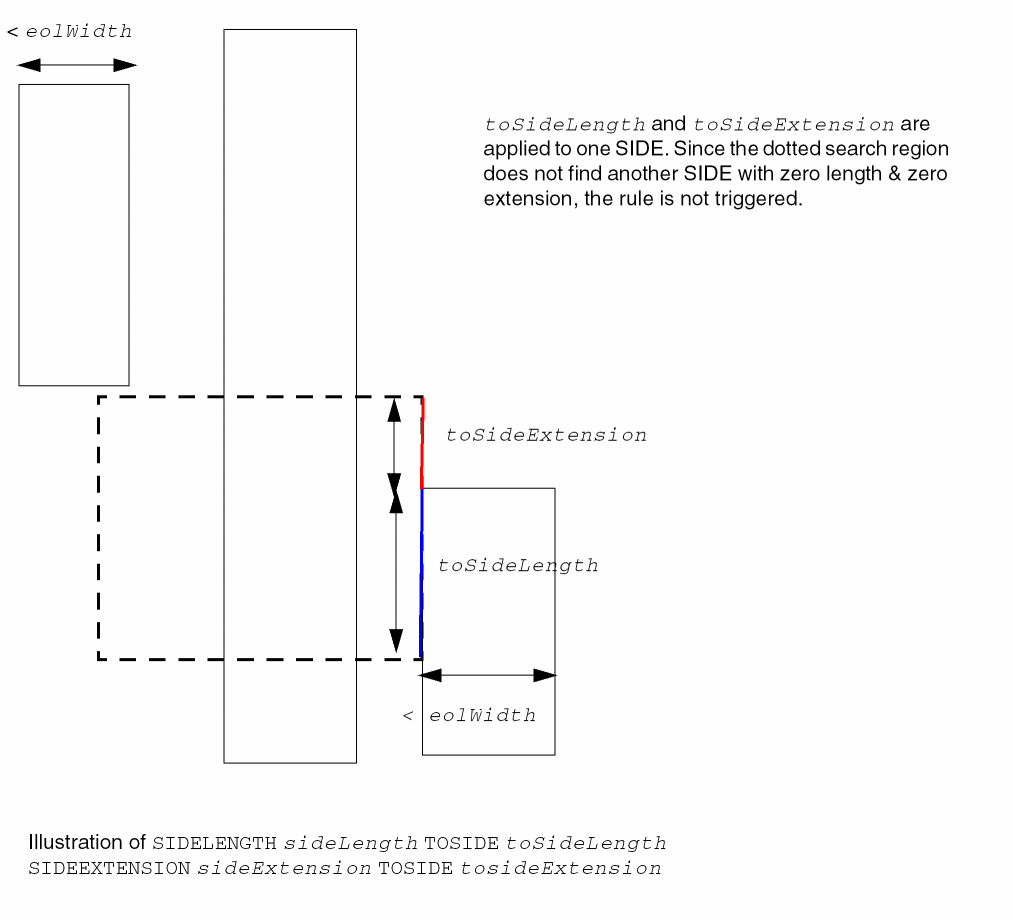
Pin Connect Blockage Rule
You can create a pin connect blockage rule to define a blockage area when a wire is connected to pins on a redistribution (RDL) layer.
You can create a pin connect blockage rule by using the following property definition:
PROPERTY LEF_CDN_PINCONNECTBLOCKAGE "PINCONNECTBLOCKAGEsizeENCLOSEDLENGTHenclosedLength; " ;
Pin Connect Blockage Rule Example
-
The following example illustrates a pin connect blockage rule:
Figure 5-109 Example of a Pin Connect Blockage Rule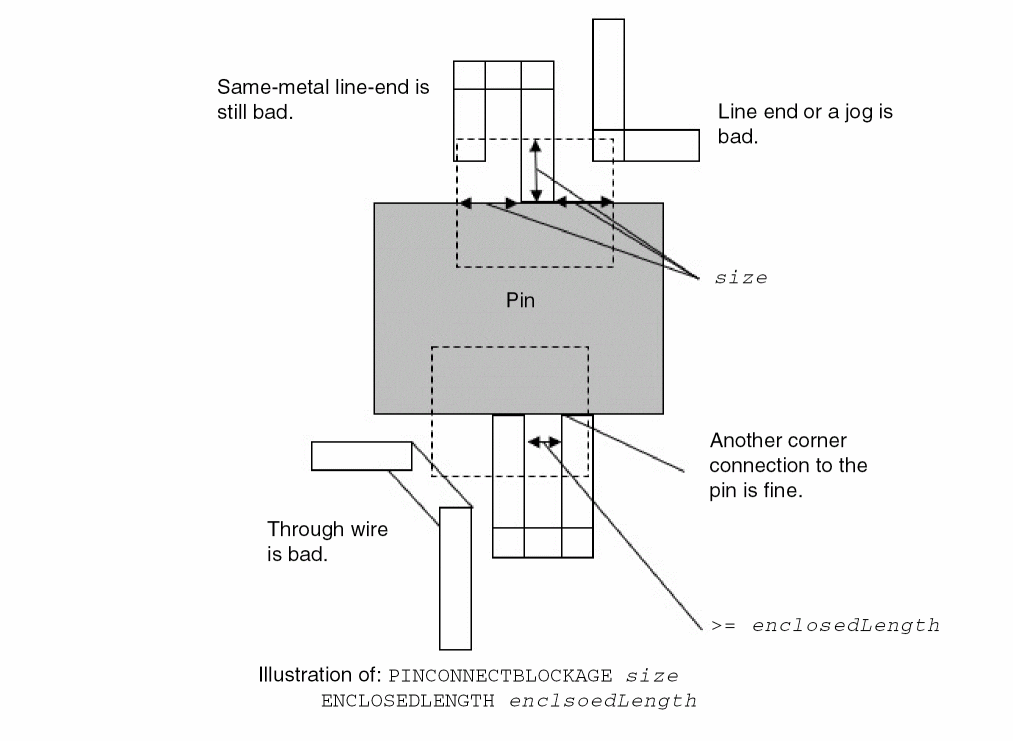
Pitch Rule
You can create a pitch rule to define non-uniform pitch or track on layers, whose preferred direction must the same as the direction of the standard cell rows.
You can create a pitch rule by using the following property definition:
PROPERTY LEF_CDN_PITCH
"PITCH {distance | xDistance yDistance } [FIRSTLASTPITCH firstLastPitch]
; " ;
All other keywords are the same as the existing LEF routing layer PITCH syntax.
Pitch Rule Examples
-
The following example shows routing tracks:
PROPERTY LEF_CDN_PITCH STRING "
PITCH 0.1 FIRSTLASTPITCH 0.14 ; ";
Figure 5-110 Example of Pitch Rule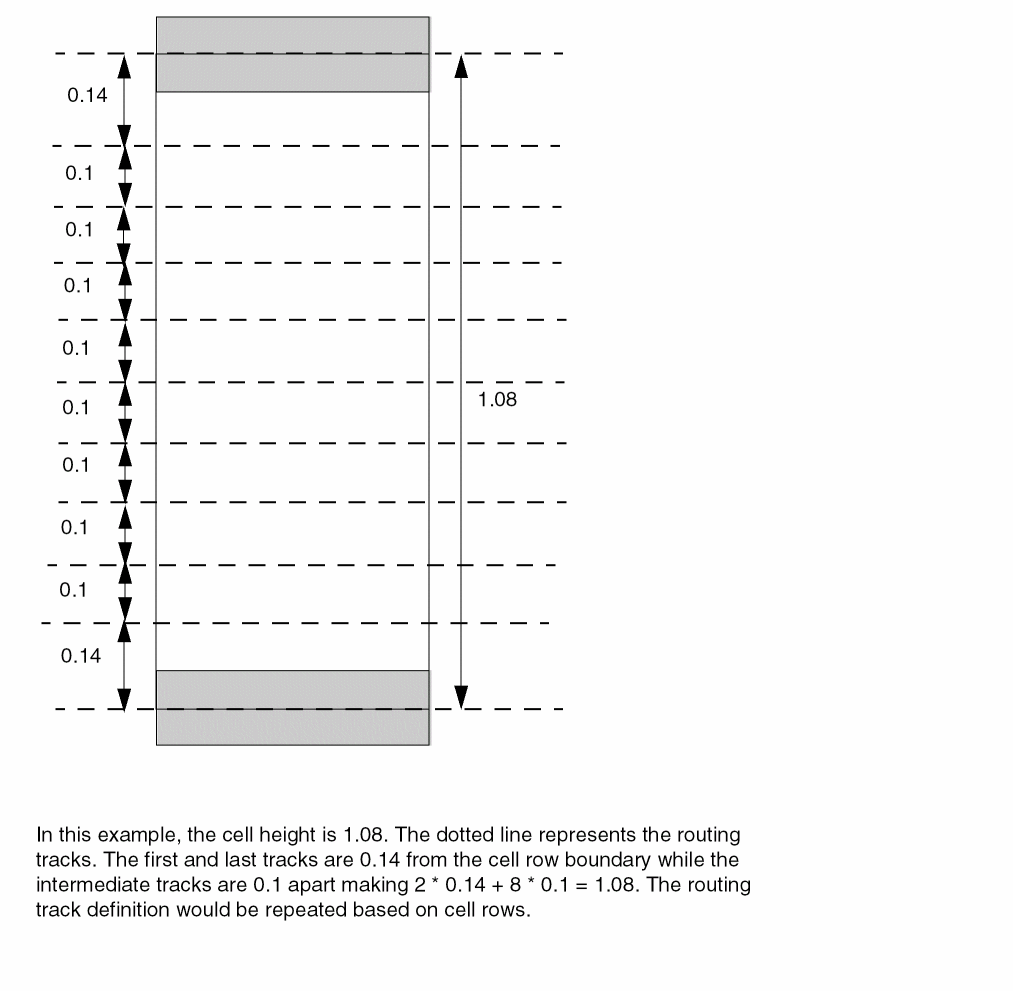
Protrusion Width Rule
You can use the protrusion width rule for a protrusion wire, connected to a wire, that has width greater than or equal to the specified width, or whose length is greater than or equal to the specified length.
You can define a protrusion width rule by using the following property definition:
PROPERTY LEF_CDN_PROTRUSIONWIDTH "PROTRUSIONWIDTHwidth1{LENGTHlengthWIDTHwidth2|{WIDTHwidth2{MINSIZE {minWidthminLength|minLengthCUTCLASSclassName{FROMABOVE | FROMBELOW}} | MINLENGTHminLength[EXCEPTCUTcutDistance[FROMABOVE | FROMBELOW]]}...} ; " ;
All other keywords are same as the existing LEF routing layer PROTRUSIONWIDTH syntax.
|
Specifies that if there is a cut of any cut classes in above, below, or either cut layer and if |
|
|
Specifies that it is a violation if the area of protruded wire with width greater than or equal to width1 outside of the wide wire of width greater than or equal to width2 does not enclose a size of minWidth minLength. The rule does not apply if there is no such area. See Figure 5-112. |
|
|
|
|
|
Specifies that it is a violation if the area outside the wide wire of width greater than or equal to width2 does not enclose a size of width1 minLength, and the protruded area contains one and only one cut with cut class of className, either on the above or below cut layer determined by |
|
|
Specifies that when a protrusion wire is connected to a wire with width greater than or equal to width2, then it must have length greater than or equal to the minLength and width greater than or equal to width1. |
|
Protrusion Width Rule Examples
-
The following protrusion width rule indicates that the width of the protrusion wire should be greater than or equal to the specified width of 0.05, and its length should be greater than or equal to the specified minimum lengths of 0.12 and 0.14 when it is connected to wide wire with width of 0.11 and 0.15.
PROPERTY LEF_CDN_PROTRUSIONWIDTH
"PROTRUSIONWIDTH 0.05
WIDTH 0.11 MINLENGTH 0.12
WIDTH 0.15 MINLENGTH 0.14 ; " ;
Figure 5-111 Illustration of Protrusion Width RuleFigure 5-112 Illustration of Protrusion Width Rule with EXCEPTCUT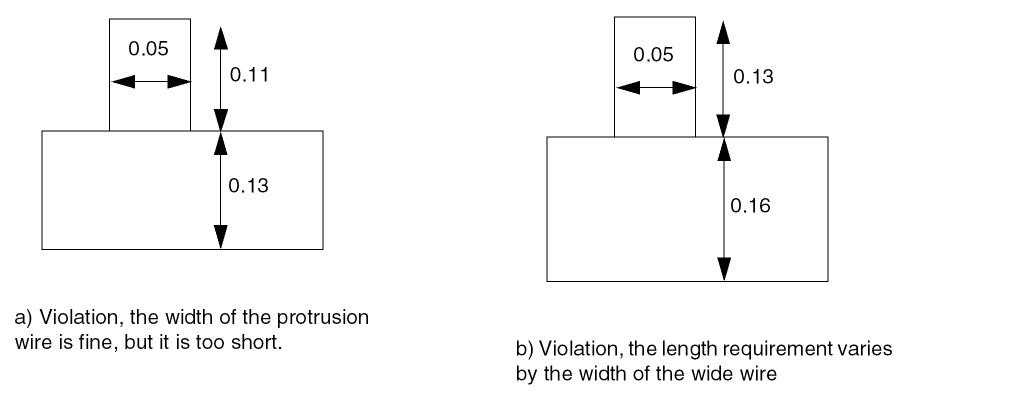 Figure 5-113 Illustration of Protrusion Width Rule with MINSIZE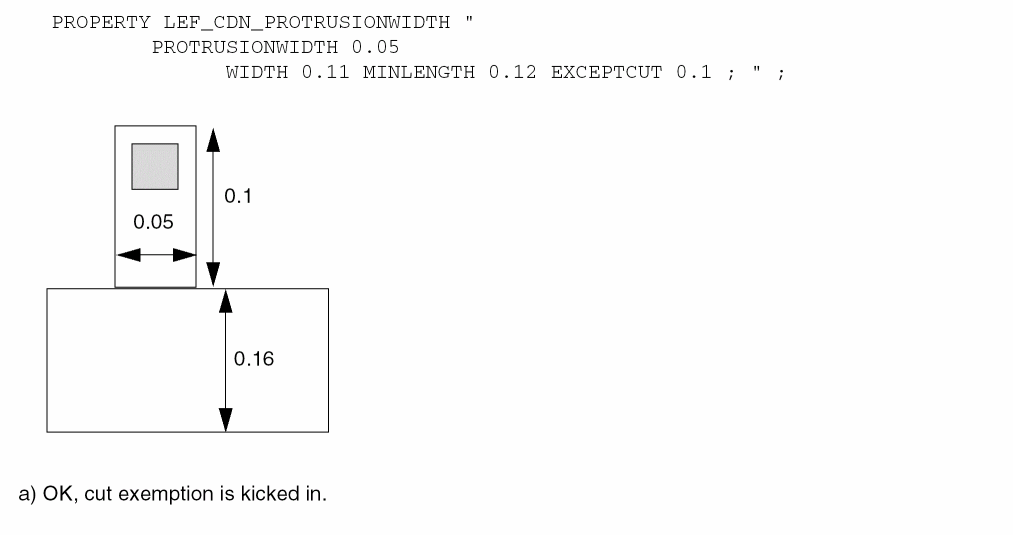
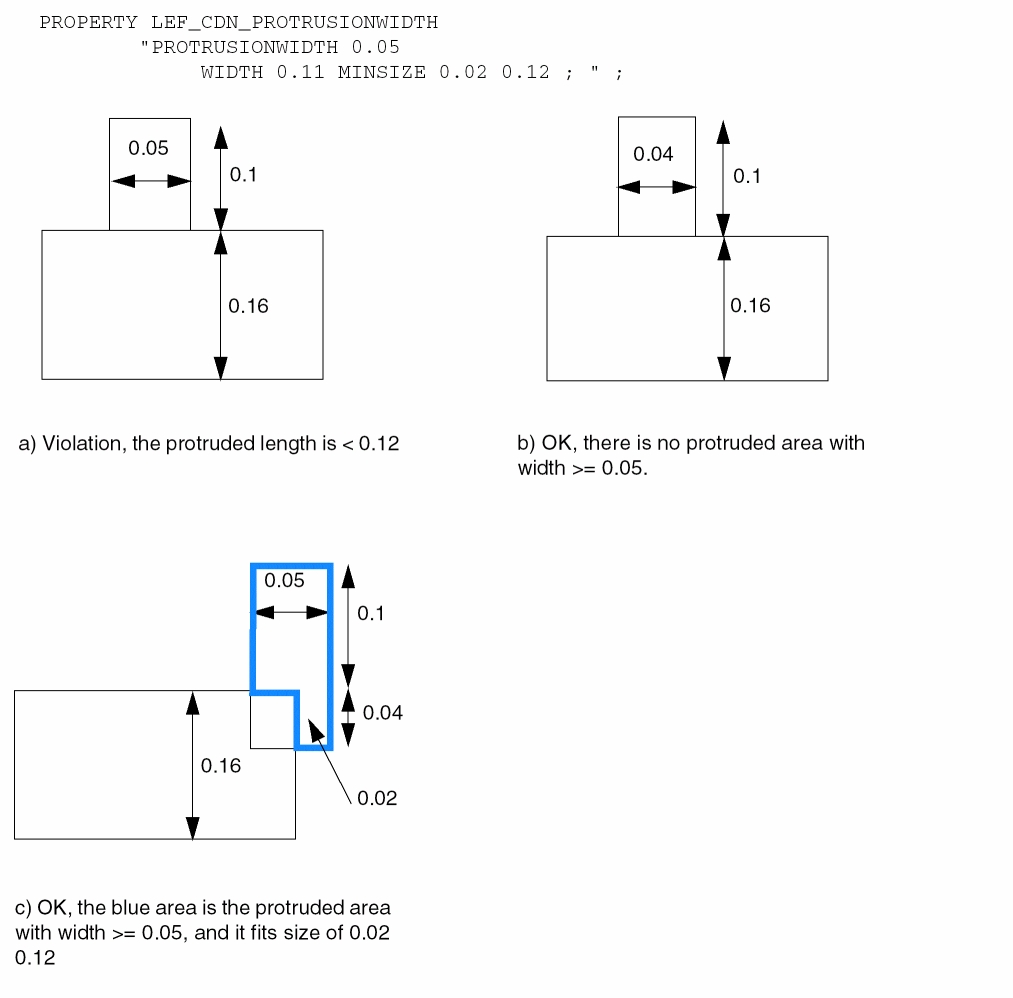
Figure 5-114 Illustration of Protrusion Width Rule with WIDTH and MINSIZE
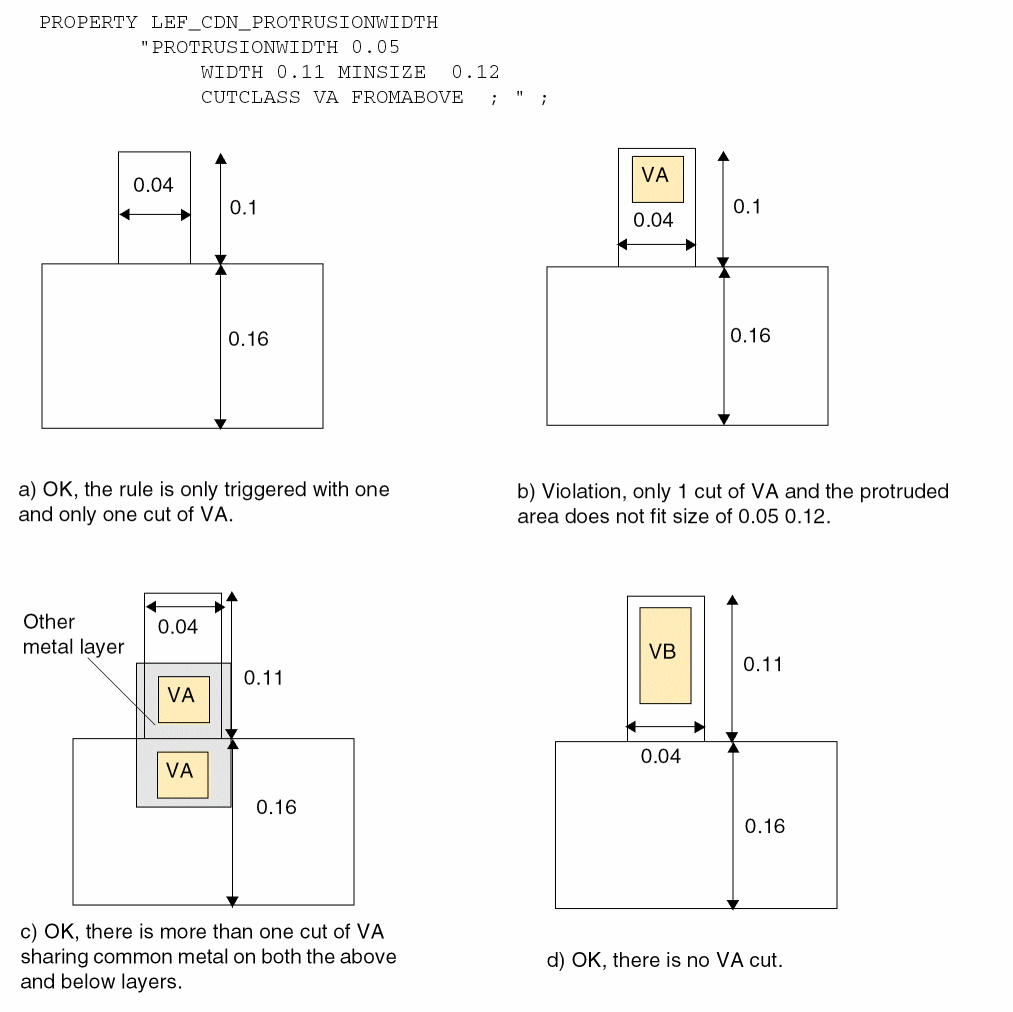
-
The following protrusion width rule indicates that the rule will fail when the given value of
LENGTHis 0, and if the protruded wire touches the wide wire, and the aligned portion has a width less than the specified first width:PROPERTY LEF_CDN_PROTRUSIONWIDTH
"PROTRUSIONWIDTH 0.05 LENGTH 0 WIDTH 0.11 ; " ;
Figure 5-115 Illustration of Protrusion Width Rule with LENGTH and WIDTH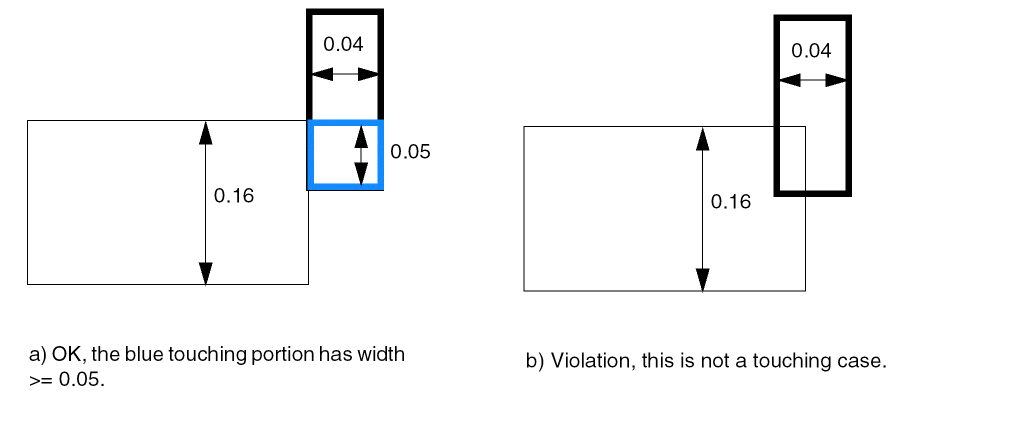
Rectangle Only Rule
Rectangle only rules can be used to indicate that a layer allows rectangular objects only.
You can create a rectangle only rule by using the following property definition:
PROPERTY LEF_CDN_RECTONLY
"RECTONLY [EXCEPTNONCOREPINS]
     [EXCEPTRIGHTWAYWIDTH maxWidth]
     [PARTIALTRACKS]
     ; " ;
Rectangle Only Rule Example
Figure 5-116 Illustration of Rectangle Only Rule
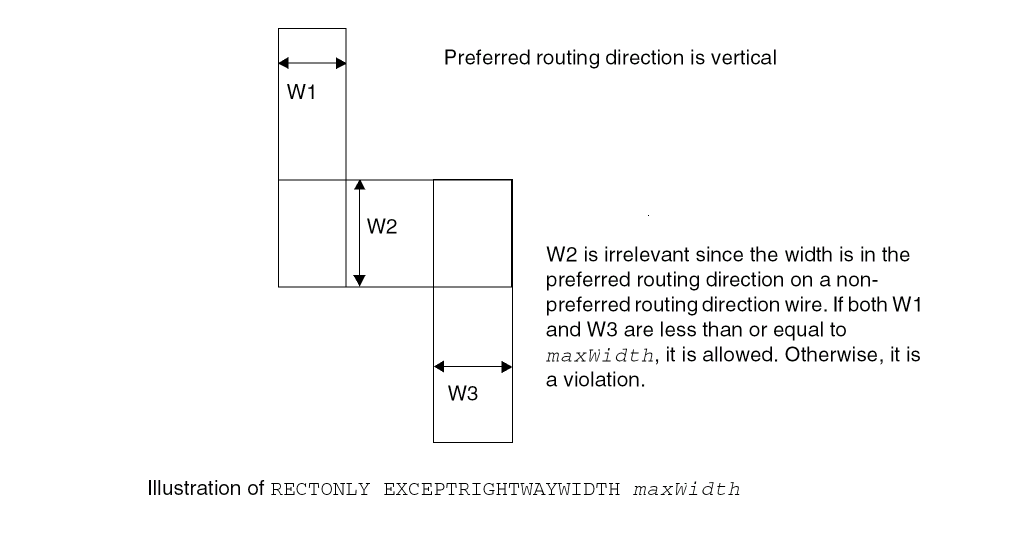
Region Rule
You can create a region rule to define area-based rules on a routing layer.
You can use the following property definition:
PROPERTY LEF_CDN_REGION “REGIONregionLayerNameBASEDLAYERroutingLayerName; ” ;
Region Rule Example
The following example means that a rectangular object overlapping region R1 should have spacing of 0.7 and a rectangular object outside region R1 should have spacing of 0.5. Non-rectangular object in region R1 would still follow 0.8 and any other rules on layer M1 (without REGION) would also be applied on region R1:
LAYER R1
TYPE MASTERSLICE ;
PROPERTY LEF_CDN_TYPE “TYPE REGION ; ” ;
END R1
...
LAYER M1
TYPE ROUTING ;
...
AREA 0.5 ;
PROPERTY LEF_CDN_AREA “AREA 0.8 EXCEPTRECTANGLE ; “ ;
...
END M1
LAYER M1R1
TYPE ROUTING ;
PROPERTY LEF_CDN_REGION “REGION R1 BASEDLAYER M1 ; ” ;
...
AREA 0.7 ;
...
END M1R1
Figure 5-117 Illustration of Region Rule
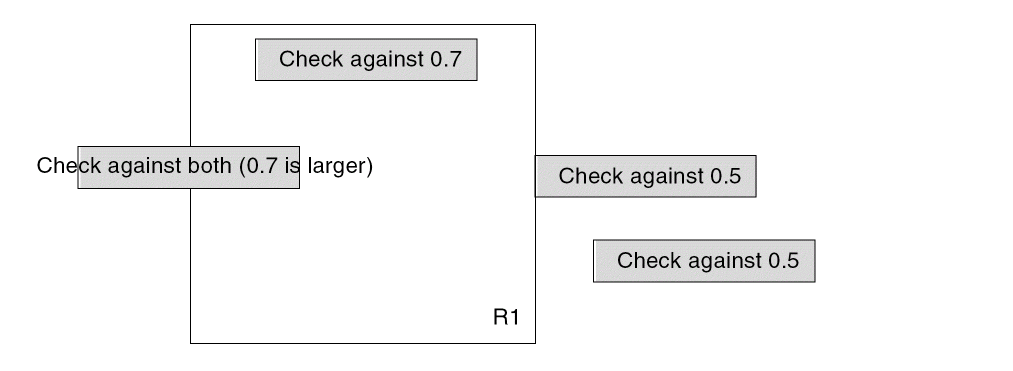
Right Way on Grid Only Rule
The right way on grid only rule can be used to specify that the wires on the preferred routing direction of the layer must be on grid/track.
You can create a right way on grid only rule by using the following property definition:
PROPERTY LEF_CDN_RIGHTWAYONGRIDONLY
"RIGHTWAYONGRIDONLY [CHECKMASK]
    [EXCEPTWIDTH exceptMinWidth]
    ; " ;
Span Length Enclosure Spacing Rule
A span length enclosure spacing rule can be used to specify spacing on an edge with a certain span length and edge length having a cut with a certain extension on that edge to any wires with given PRL.
You can create a span length enclosure spacing rule by using the following property definition:
PROPERTY LEF_CDN_SPANLENGTHENCLOSURESPACING "SPANLENGTHENCLOSURESPACINGspacingSPANLENGTHspanLengthMINLENGTHminLength{FROMABOVE|FROMBELOW} ENCLOSUREenclosurePRLprl; " ;
Span Length Enclosure Spacing Rule Example
-
The following example is an illustration of
SPANLENGTHENCLOSURESPACING:SPANLENGTHENCLOSURESPACING
spacingSPANLENGTHspanLengthMINLENGTHminLengthFROMABOVE ENCLOSUREenclosurePRLprl
Figure 5-118 Illustration of SPANLENGTHENCLOSURESPACING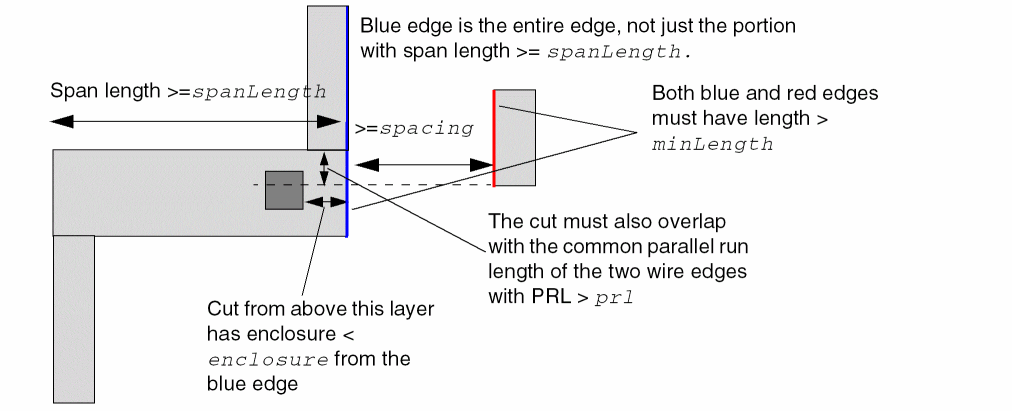
Span Length Table Rule
A span length table rule can be used to specify all the allowable legal span lengths on the routing layer.
You can create a span length table rule by using the following property definition:
PROPERTY LEF_CDN_SPANLENGTHTABLE
"SPANLENGTHTABLE {spanLength} ...  [MASK maskNum][WRONGDIRECTION]
     [ORTHOGONAL length]
     [EXCEPTOTHERSPAN otherSpanlength
     | {OTHERSPAN otherSpanLength
           [MINSPANLENGTH minSpanLength}...]
  ; " ;
Span Length Table Rule Examples
-
The following example is an illustration of
SPANLENGTHTABLE{spanLength}…ORTHOGONALlength andSPANLENGTHTABLE{spanLength}…WRONGDIRECTIONwith preferred direction being horizontal:
Figure 5-119 Illustration of SPANLENGTHTABLE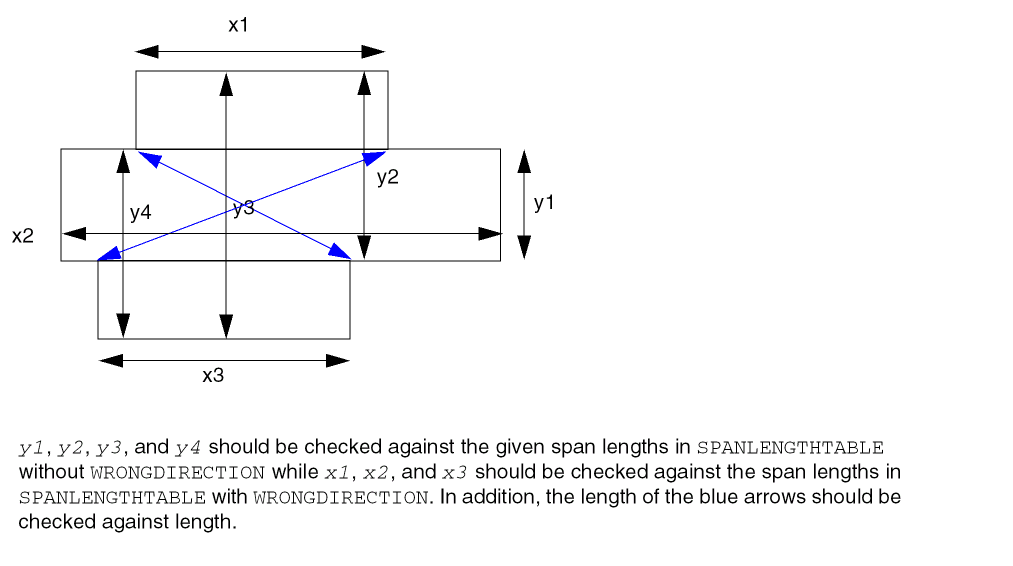
-
The following example is an illustration of
SPANLENGTHTABLEwithEXCEPTOTHERSPAN:DIRECTION HORIZONTAL ;
PROPERTY LEF_CDN_RECTONLY “
RECTONLY ; “ ;
PROPERTY LEF_CDN_SPANLENGTHTABLE “
SPANLENGTHTABLE 0.05 0.06 0.07 0.080 0.090 0.10 ;
SPANLENGTHTABLE 0.07 0.10 WRONGDIRECTION
EXCEPTOTHERSPAN 0.05 ; “ ;
Figure 5-120 Illustration of SPANLENGTHTABLE with EXCEPTOTHERSPAN
-
The following example is an illustration of
SPANLENGTHTABLEwithOTHERSPAN:DIRECTION HORIZONTAL ;
PROPERTY LEF_CDN_RECTONLY “
RECTONLY ; “ ;
PROPERTY LEF_CDN_SPANLENGTHTABLE “
SPANLENGTHTABLE 0.04 0.05 0.06 0.07 0.080 0.090 0.10 ;
SPANLENGTHTABLE 0.07 0.10 WRONGDIRECTION
        OTHERSPAN 0.04 MINSPANLENGTH 0.09
        OTHERSPAN 0.06 MINSPANLENGTH 0.08 ; “ ;
Figure 5-121 Illustration of SPANLENGTHTABLE with OTHERSPAN
EOL Spacing Rule
An EOL spacing rule ensures that Optical Proximity Correction (OPC) can be performed without interference between the OPC shapes added at the EOLs.
You can create an EOL spacing rule by using the following property definition:
PROPERTY LEF_CDN_SPACING "SPACINGeolSpaceENDOFLINEeolWidth[{EXACTWIDTH] [WRONGDIRSPACINGwrongDirSpace] {[OPPOSITEWIDTHoppositeWidth] WITHINeolWithin[wrongDirWithin][SAMEMASK] [EXCEPTEXACTWIDTHexactWidthotherWidth] [FILLCONCAVECORNERfillTriangle] [WITHCUT [CUTCLASScutClass] [ABOVE]withCutSpace[ENCLOSUREENDenclosureEndWidth[WITHINenclosureEndWithin]]] [ENDPRLSPACINGendPrlSpacePRLendPrl] [ENDTOENDendToEndSpace [oneCutSpace twoCutSpace][EXTENSIONextension[wrongDirExtension]] [OTHERENDWIDTHotherEndWidth]] [MAXLENGTHmaxLength| MINLENGTHminLength[TWOSIDES]] [EQUALRECTWIDTH] [PARALLELEDGE [SUBTRACTEOLWIDTH]parSpaceWITHINparWithin[PRLprl] [MINLENGTHminLength] [TWOEDGES] [SAMEMETAL][NONEOLCORNERONLY] [PARALLELSAMEMASK]] [ENCLOSECUT [BELOW | ABOVE]encloseDistCUTSPACINGcutToMetalSpace[ALLCUTS]] | TOCONCAVECORNER [MINLENGTHminLength] [MINADJACENTLENGTH {minAdjLength|minAdjLength1minAdjLength2}] | TONOTCHLENGTHnotchLength} ;..." ;
The keywords SPACING (including ENDOFLINE and WITHIN), PARALLELEDGE, and TWOEDGES are the same as the existing LEF syntax.
|
|
|
|
Indicates that the rule only applies if there is a cut below or above this metal that is less than encloseDist from the end-of-line edge and the cut-edge to metal-edge space beyond the EOL edge less than cutToMetalSpace. If there is more than one cut connecting the same metal shapes above and below, only one cut needs to meet this rule, unless
If you specify |
|
|
Specifies that the EOL spacing rule applies to a EOL edge touching a via cut with length equal to the wire width that is less than enclosureEndWidth.
The |
|
|
Specifies that endPrlSpace is applied between the end-of-line (EOL) edge to any neighbor wire with PRL greater than 0 but less than or equal to endPrl. Otherwise, |
|
|
Specifies the two EOL spacings. For end-to-end situation when there is a parallel run length greater than 0 between the two EOL edges with eolWithin extension on the checking EOL edge, endToEndSpace is applied. Otherwise, eolSpace is applied to end-to-line situation.
An end-to-end situation with one of the EOL edge touching a via cut (and the other does not touching a via cut) must have spacing greater than or equal to oneCutSpace. If both EOL edges touching a via cut, the spacing must be greater than or equal to twoCutSpace. These additional spacing values must be specified along with |
|
|
Indicates that if the length of the EOL edge is larger than the wire width, the rule does not apply. If there are multiple EOL statements with the |
|
|
Specifies that this end-of-line spacing rule only applies if the edge width/length is exactly equal to eolWidth. This construct would typically make sense only if |
|
|
Specifies the extension on two EOL edges facing each other as extension. The wrongDirExtension variable specifies the extension on two EOL edges parallel to the specified direction in |
|
|
Specifies that the end-of-line spacing rule does not apply if the EOL edge has width/length exactly equal to exactWidth and the width/length of the other neighbor edge is less than or equal to the otherWidth. See Figure 5-137. |
|
|
Specifies that the EOL to any neighbor concave corners should be filled by a triangle with value of fillTriangle along the edges to form the corner before spacing is checked. See Figure 5-136. |
|
|
Indicates that if the EOL is more than maxLength along both sides, the rule does not apply. (See Figure 5-130.) |
|
|
|
|
|
Specifies that the EOL to concave corner spacing rule applies only if both of the edge lengths forming the concave corner are greater than minAdjLength, or one of the edge length is greater than minAdjLength1 and the other edge length is greater than minAdjLength2. See Figure 5-134. |
|
|
Indicates that if the EOL length is less than minLength along both sides, the rule does not apply. |
|
|
Indicates that if the EOL length is less than minLength along the side, then any parallel-edge on that side is ignored, and the rule may not apply. If |
|
|
Specifies that the parallel edge neighbor wire must contain a corner that does not belong to another EOL edge. |
|
|
Indicates that the rule applies only if a wire beyond the end of the line edge has a perpendicular span to the EOL edge less than oppositeWidth. |
|
|
Indicates that the rule only applies if the width of the other wire is less than the otherEndWidth. |
|
|
Indicates that the EOL rule applies only if there is a parallel-edge less than parSpace away that is also less than parWithin from the end of the wire. |
|
|
Specifies that the end-of-line spacing rule only applies if there is a side neighbor having the same-mask of the wire with the EOL edge found in the side search window. Having a different-mask side neighbor in the search is irrelevant. |
|
|
Indicates that the end-of-line (EOL) spacing rule applies only if the side neighbor and the neighbor beyond the EOL edge have parallel run length greater than the specified prl after extending by the |
|
|
Indicates that the EOL spacing rule only applies between objects on the same mask. |
|
|
Specifies that the EOL spacing rule applies only if the neighbors on the side(s) of and beyond the EOL edge are connected as same-metal. In addition, if a side neighbor wire covering the entire length of parWithin, only if it is non-zero, then it will be exempted as a valid neighbor. |
|
|
Indicates that the parSpace value should be subtracted by the width of the EOL edge to define the distance required to search for a parallel neighbor edge. |
|
|
Specifies that the spacing between a EOL edge with width less than eolWidth and a concave corner of neighbor wires must be greater than or equal to spacing. |
|
|
Specifies the end-of-line spacing to a notch with length less than notchLength. See Figure 5-138. |
|
|
Indicates that the rule applies only when the EOL length is greater than and equal to minLength along both sides. In other words, if the EOL length is less than minLength along any one side, the rule does not apply. |
|
|
Specifies the EOL spacing, withCutSpace, only applies if a EOL edge touches a via cut in either below or above cut layer. Type: Float, specified in microns
The
The |
|
|
The wrongDirWithin variable specifies the within distance if a EOL edge is parallel to the specified direction in |
|
|
Specifies an optional end-of-line spacing for a EOL edge parallel to the specified direction in |
|
EOL Spacing Rule Examples
The following example illustrates EOL spacing with exact width:
PROPERTY LEF_CDN_WIDTHTABLE
"WIDTHTABLE 0.05 0.10 … ; " ;
SPACING 0.09 ENDOFLINE 0.051 WITHIN 0.02 ;
PROPERTY LEF_CDN_SPACING "
SPACING 0.07 ENDOFLINE 0.10 EXACTWIDTH WITHIN 0.04 ; " ;
Figure 5-122 Example of Spacing Rule with EXACTWIDTH
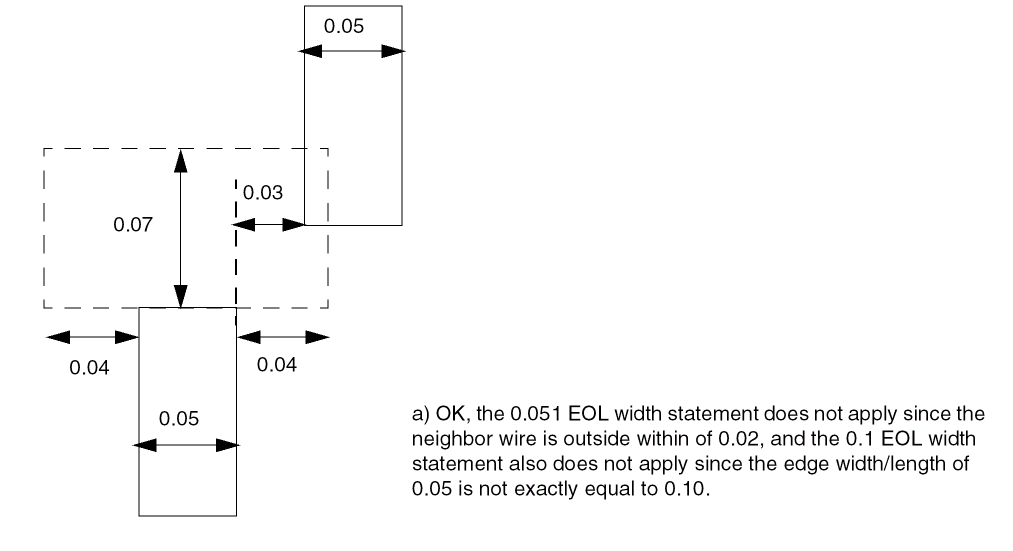
Figure 5-123 EOL Spacing Rule Illustrations
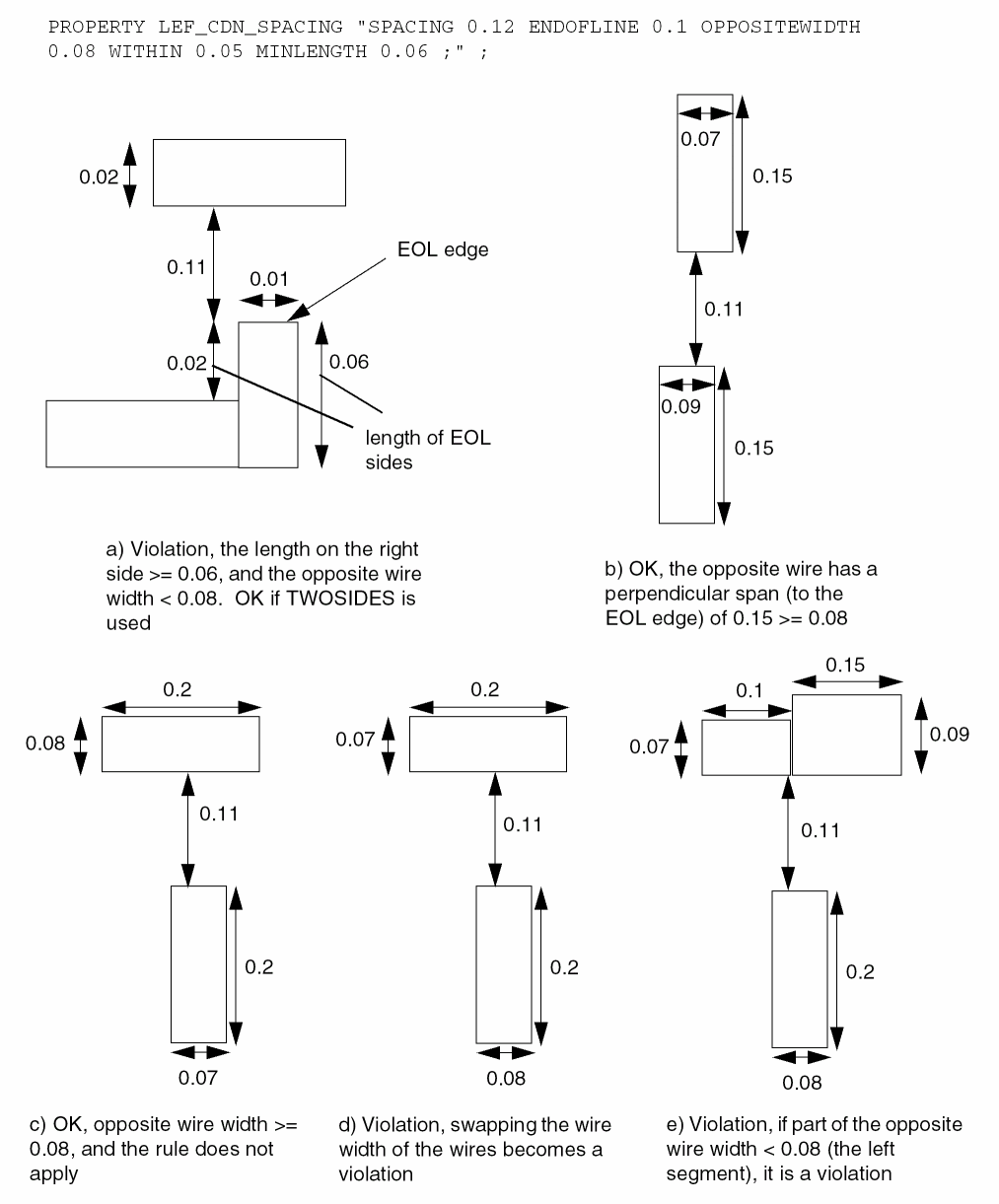
Figure 5-124 EOL Spacing Rule Illustrations
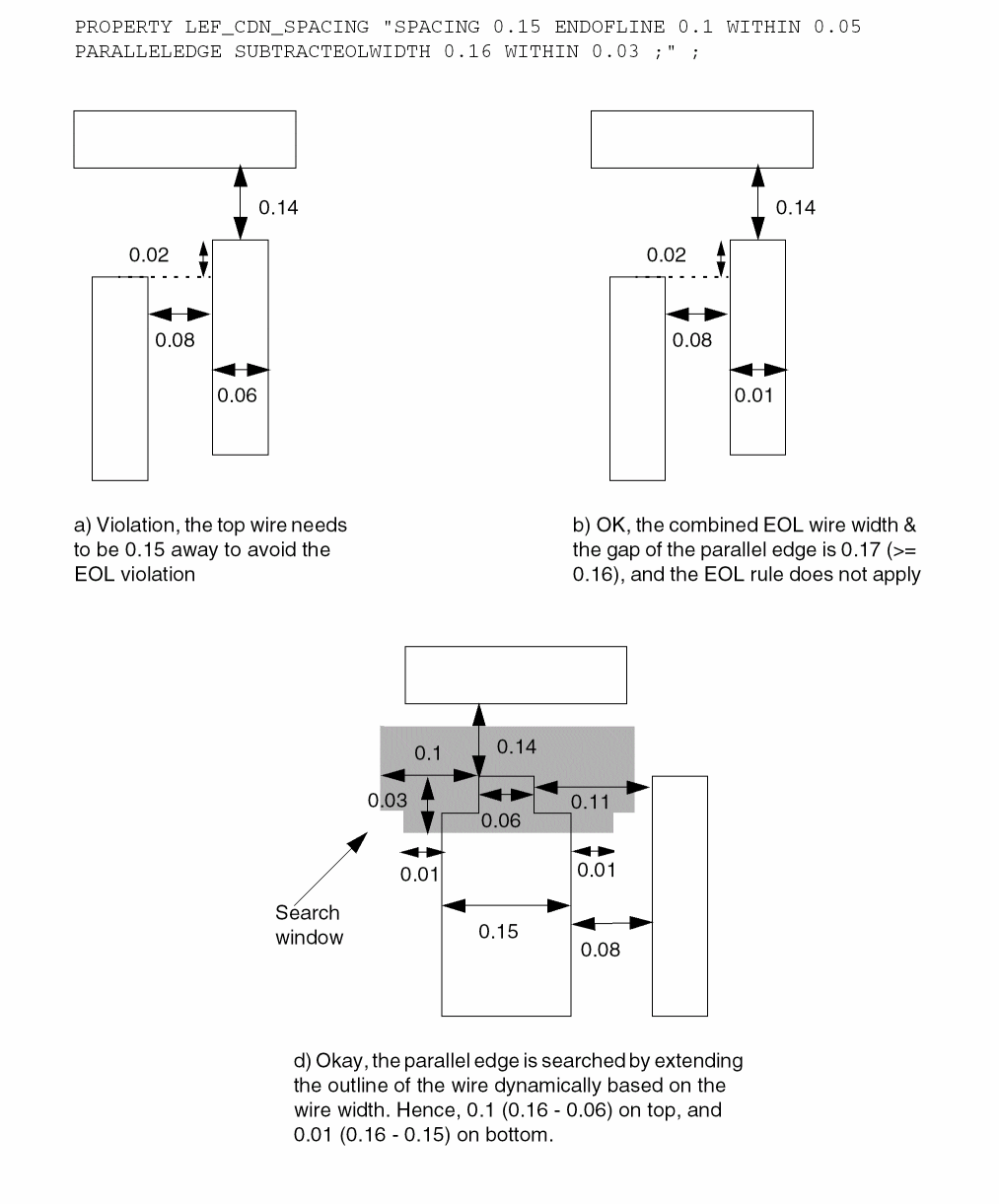
Figure 5-125 EOL Spacing Rule Illustrations
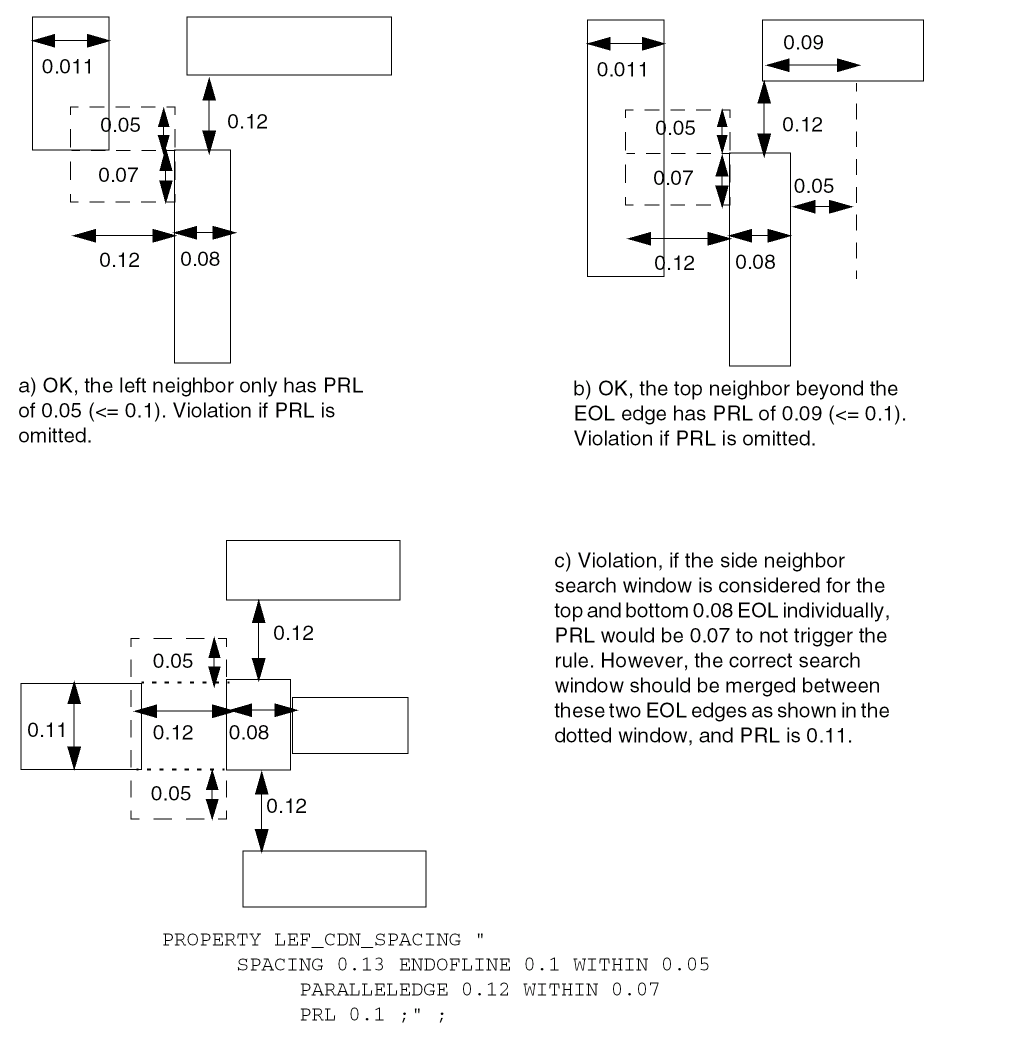
Figure 5-125 illustrates the following EOL spacing rule:
PROPERTY LEF_CDN_SPACING
"SPACING 0.10 ENDOFLINE 0.15 WITHIN 0.05 ENDTOEND 0.12
MINLENGTH 0.11 TWOSIDES ;" ;
Figure 5-126 EOL Spacing Rule Illustrations
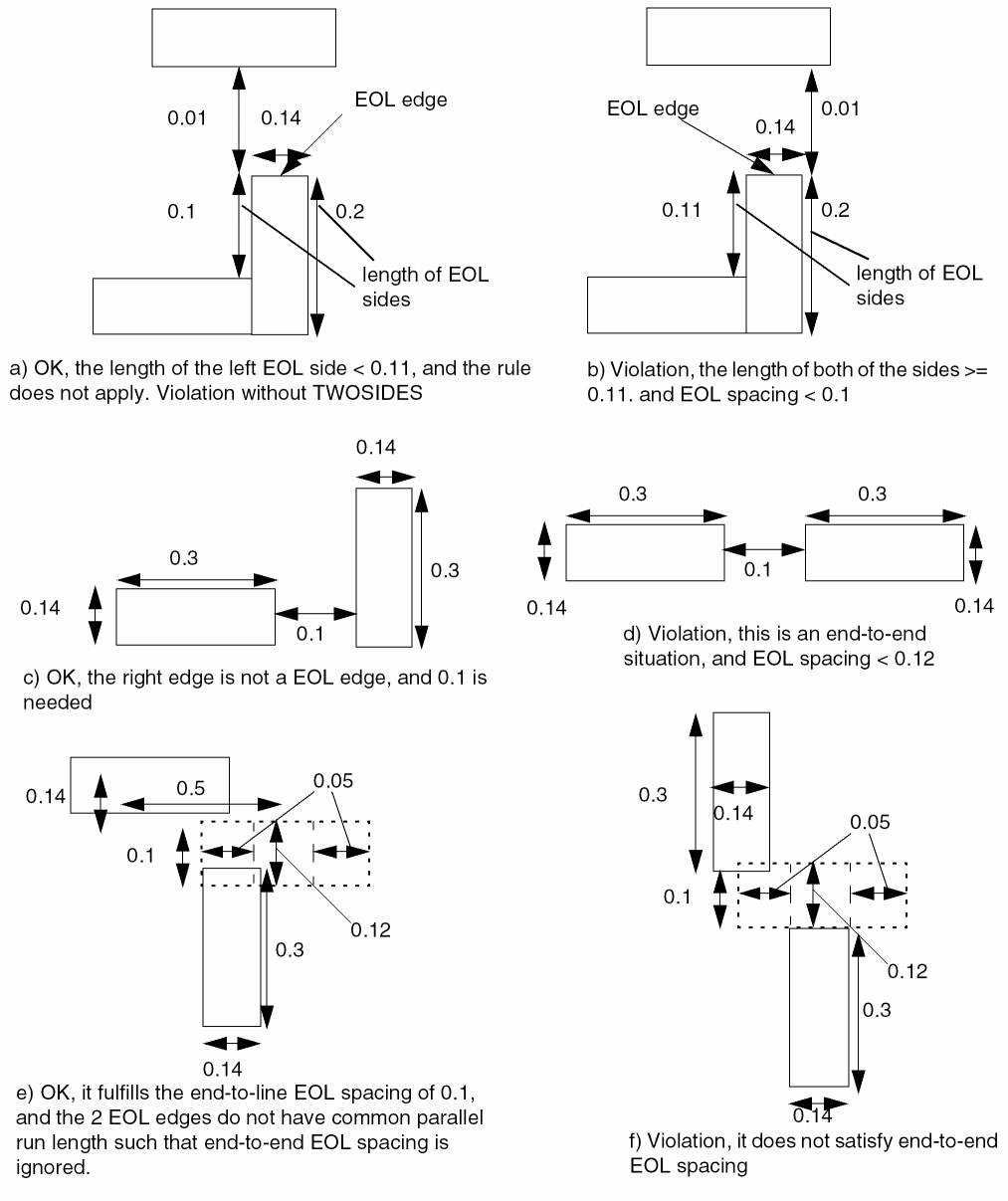
Figure 5-127 EOL Spacing Rule Illustrations with ENDPRLSPACING
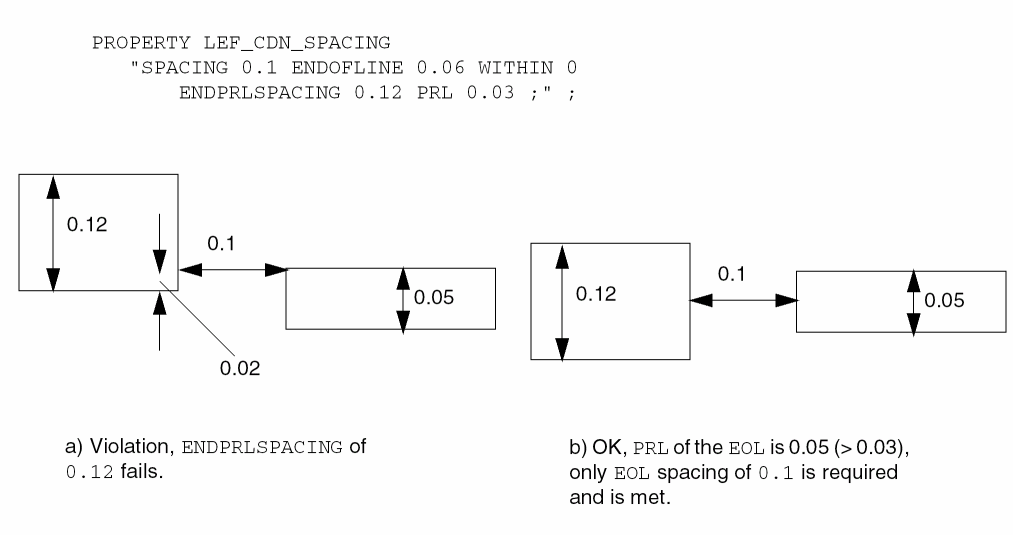
Figure 5-128 EOL Spacing Rule Illustrations
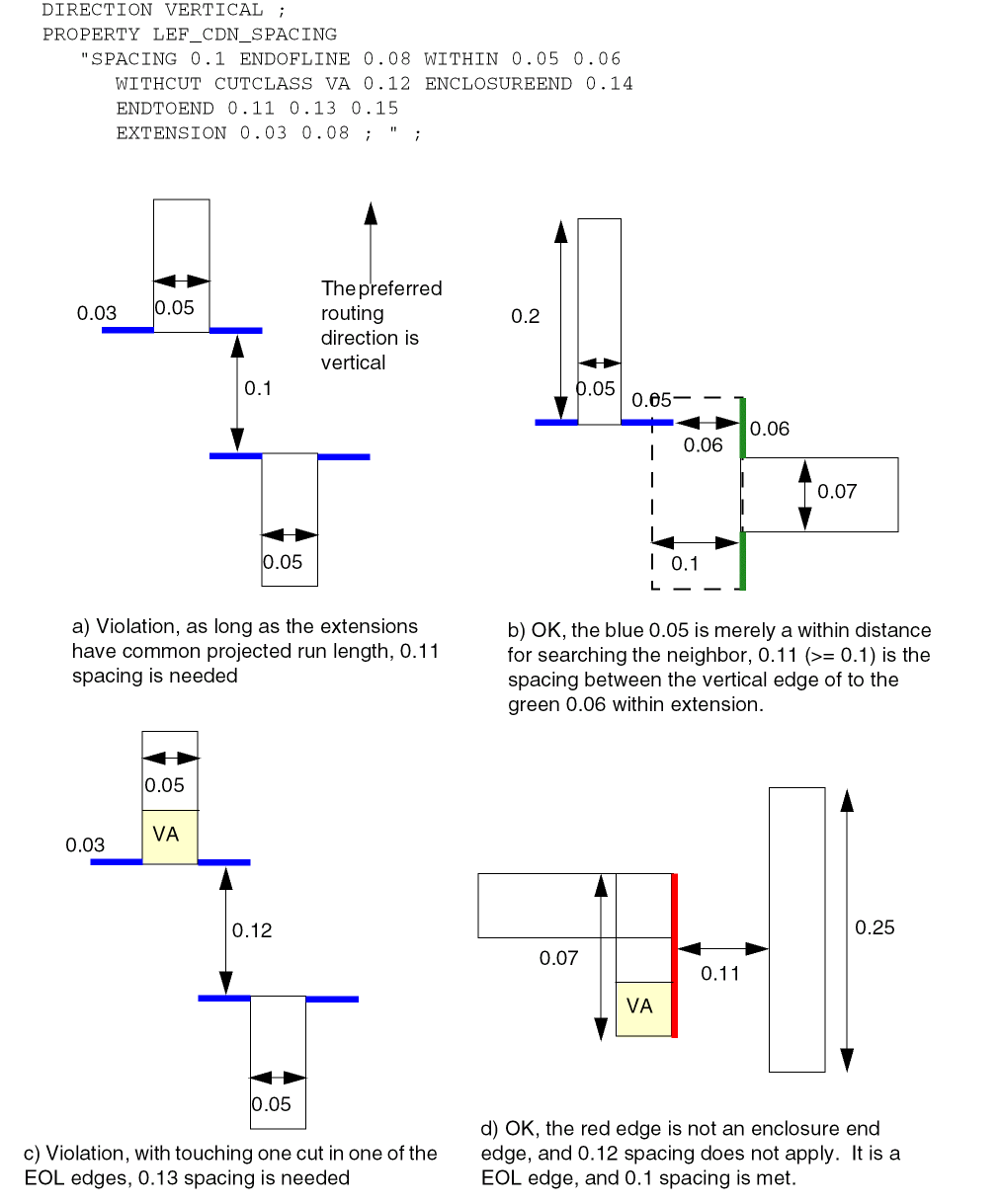
Figure 5-129 EOL Spacing Rule Illustrations
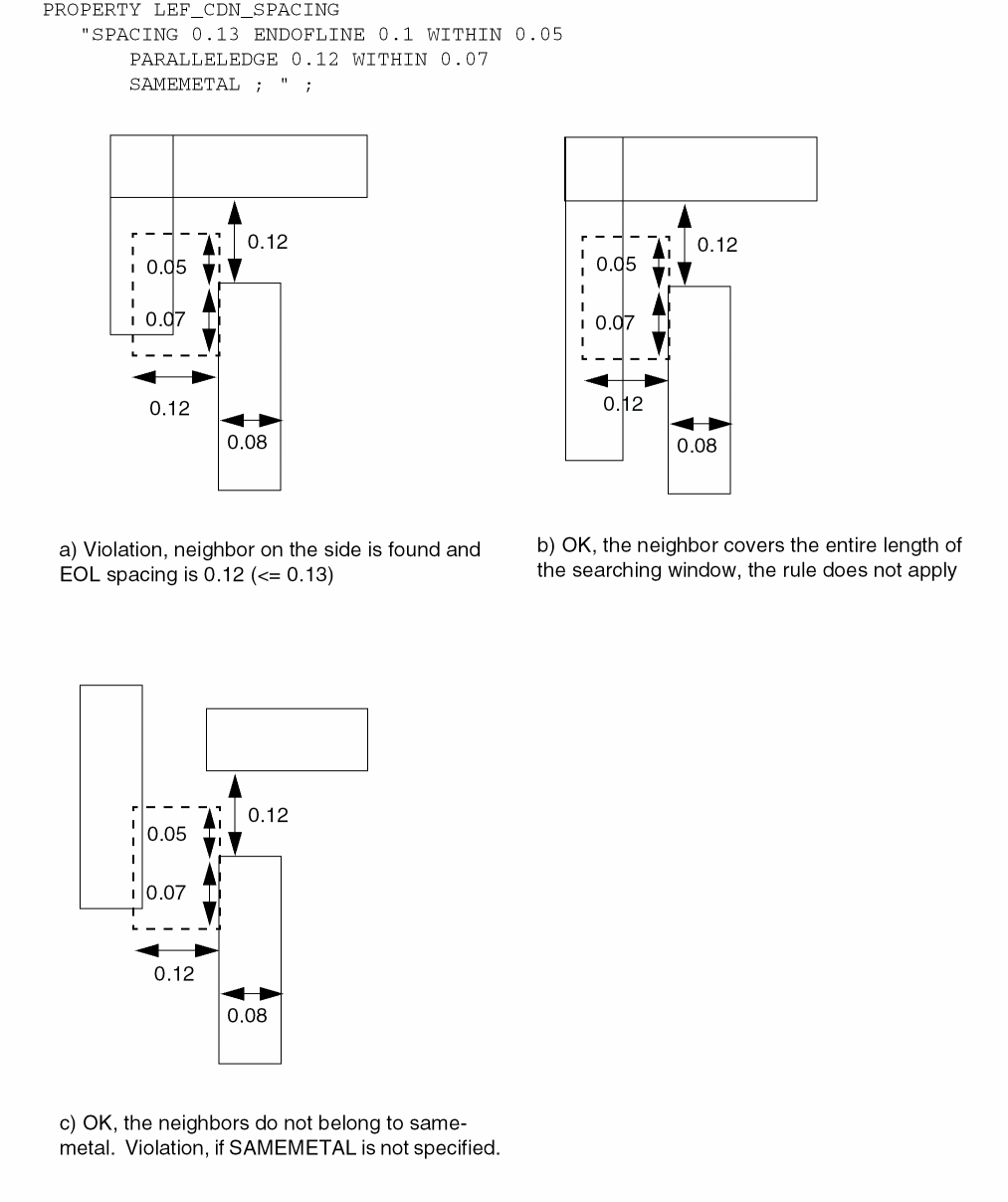
Figure 5-130 EOL Spacing Rule Illustrations
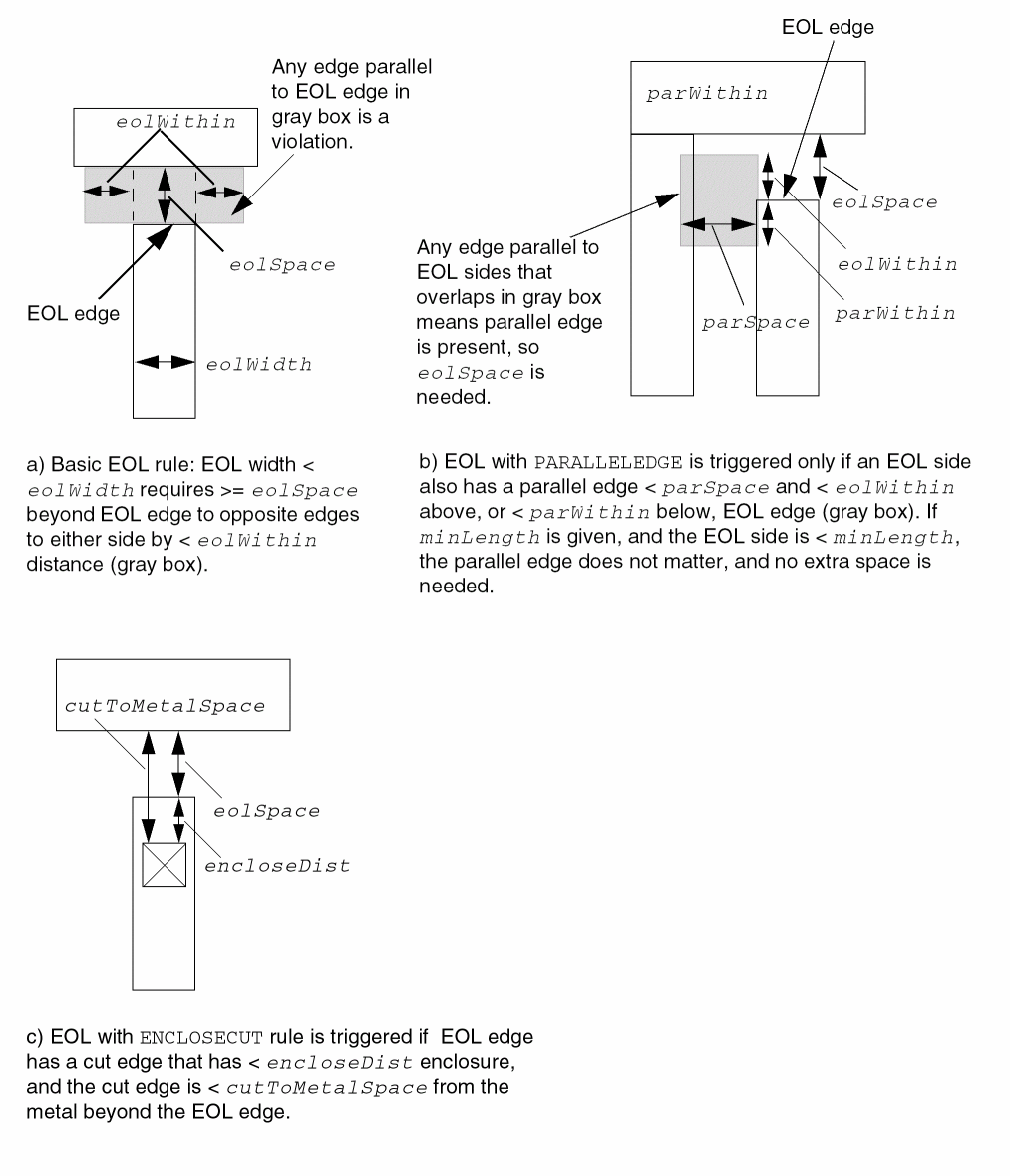
Figure 5-131 Examples of EOL Spacing Rule with MaxLength and MinLength
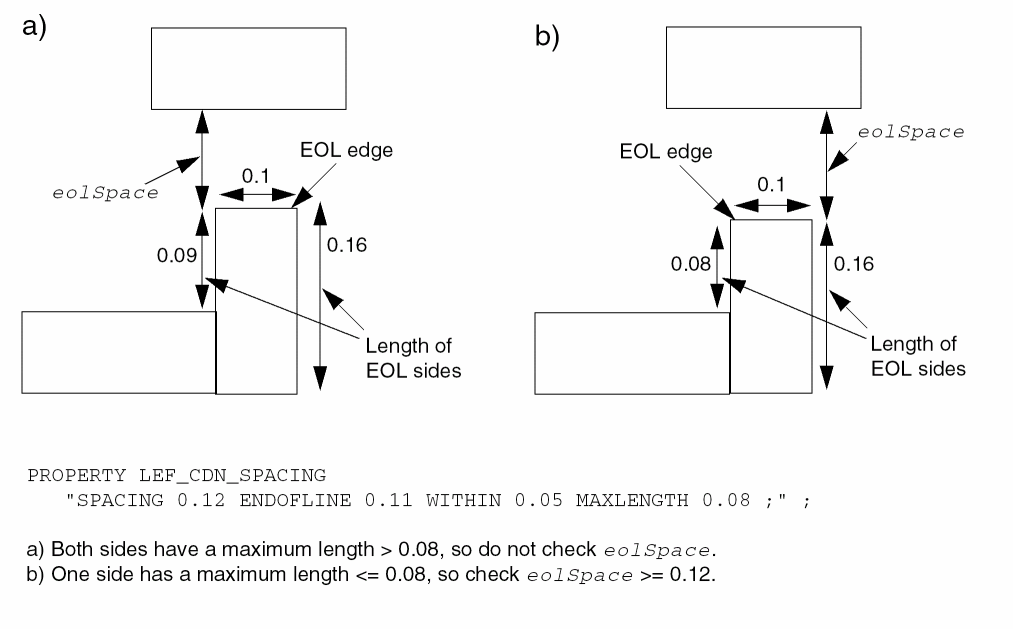
Figure 5-132 Example of More Complex EOL Spacing Rule
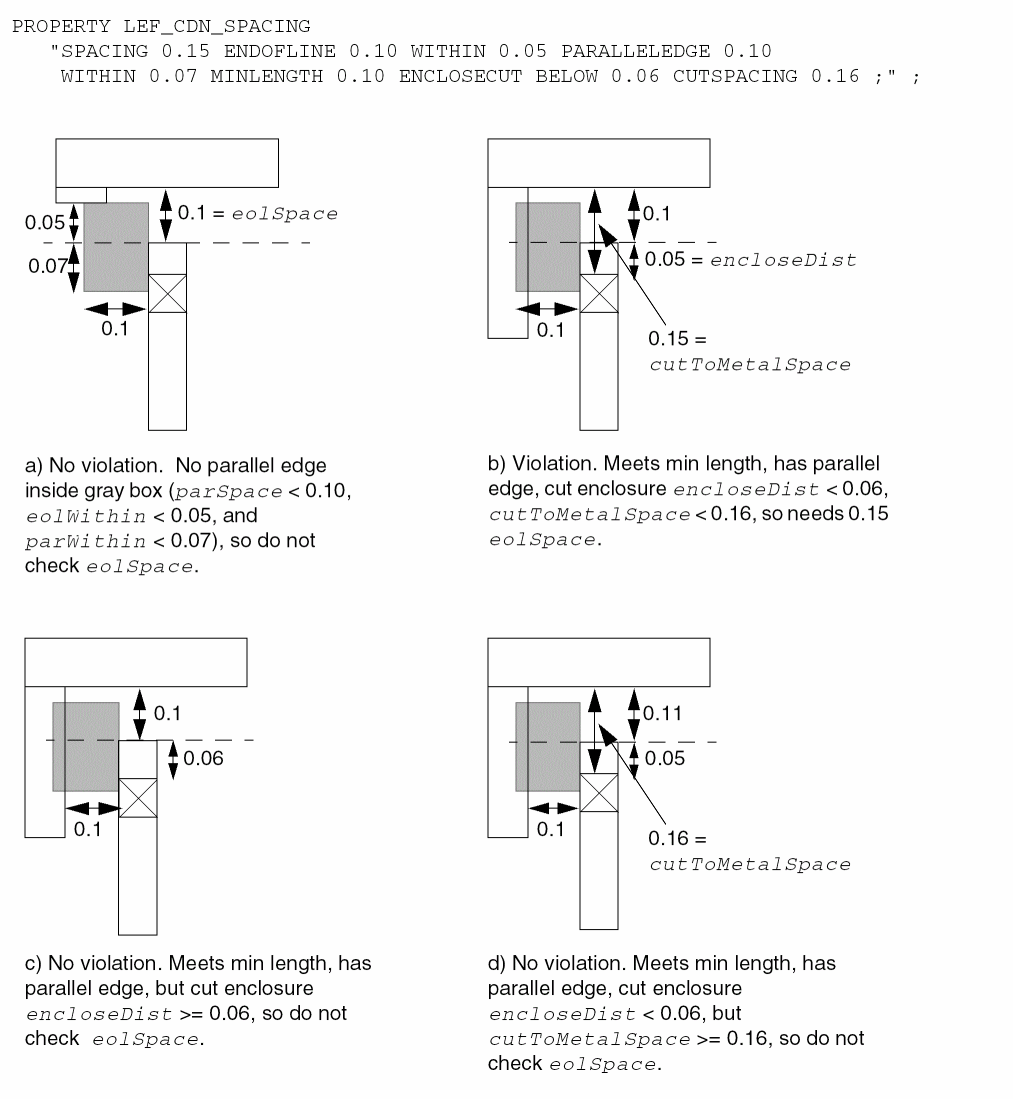
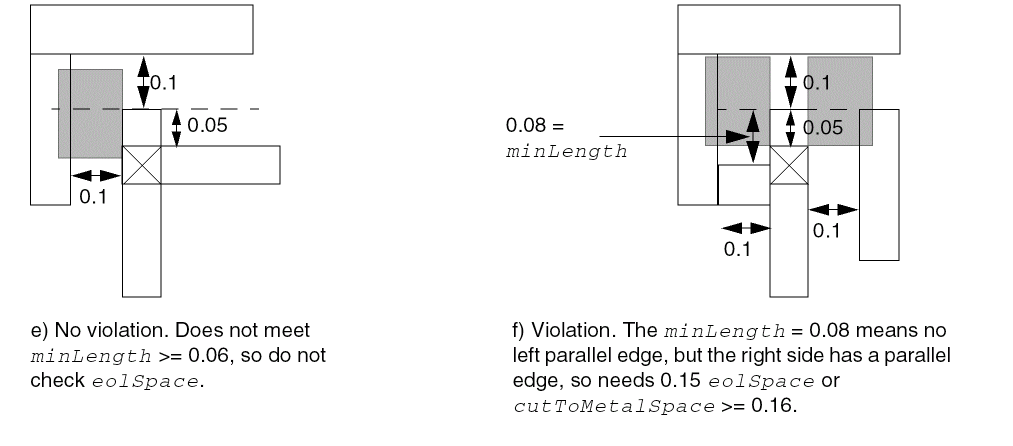
Figure 5-133 Example of EOL Spacing Rule with EQUALRECTWIDTH
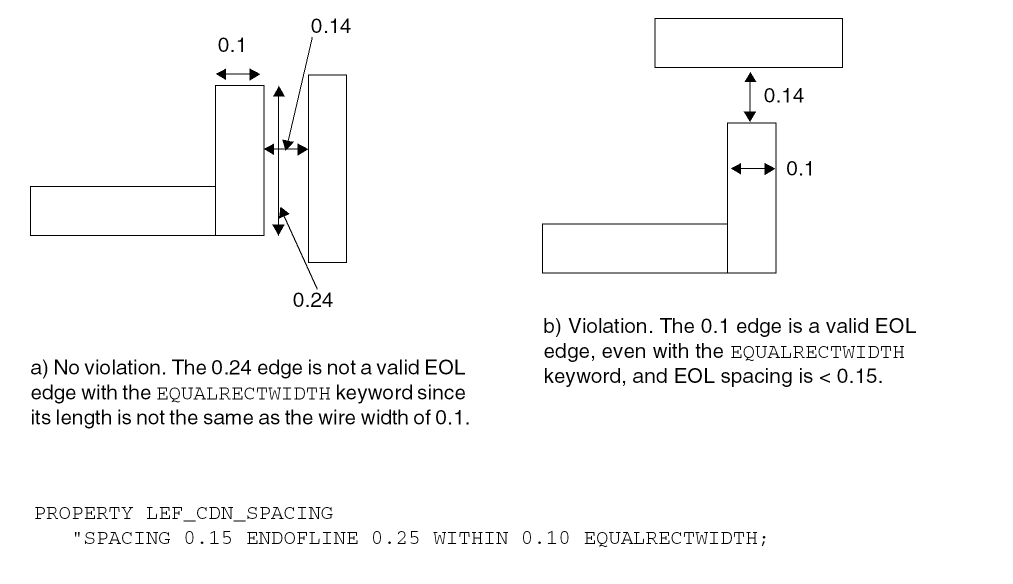
-
The following example indicates that the 0.15 μm EOL spacing is applied to an EOL edge less than 0.10 μm to objects on the same mask in the routing layer. This statement does not apply to objects on different masks, and a separate EOL rule without
SAMEMASKcan be defined to an EOL spacing for different mask objects.PROPERTY LEF_CDN_SPACING
"SPACING 0.15 ENDOFLINE 0.10 WITHIN 0.0 SAMEMASK ; " ;
Figure 5-134 Illustration of Spacing Rule with TOCONCAVECORNERFigure 5-135 Illustration of Spacing Rule with MINADJACENTLENGTH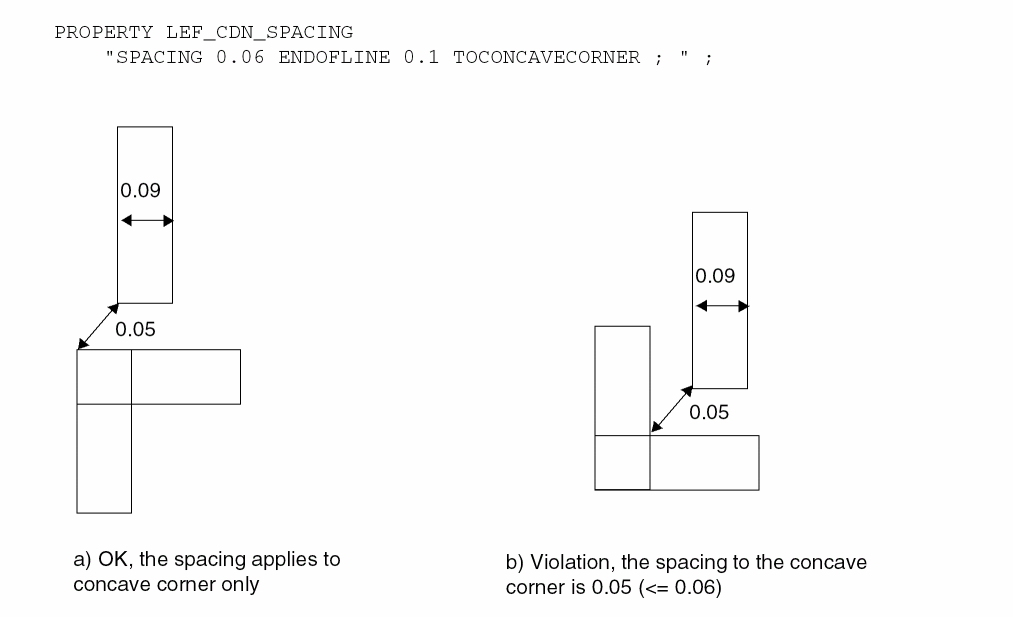 Figure 5-136 EOL Spacing Rule with NONEOLCORNERONLY
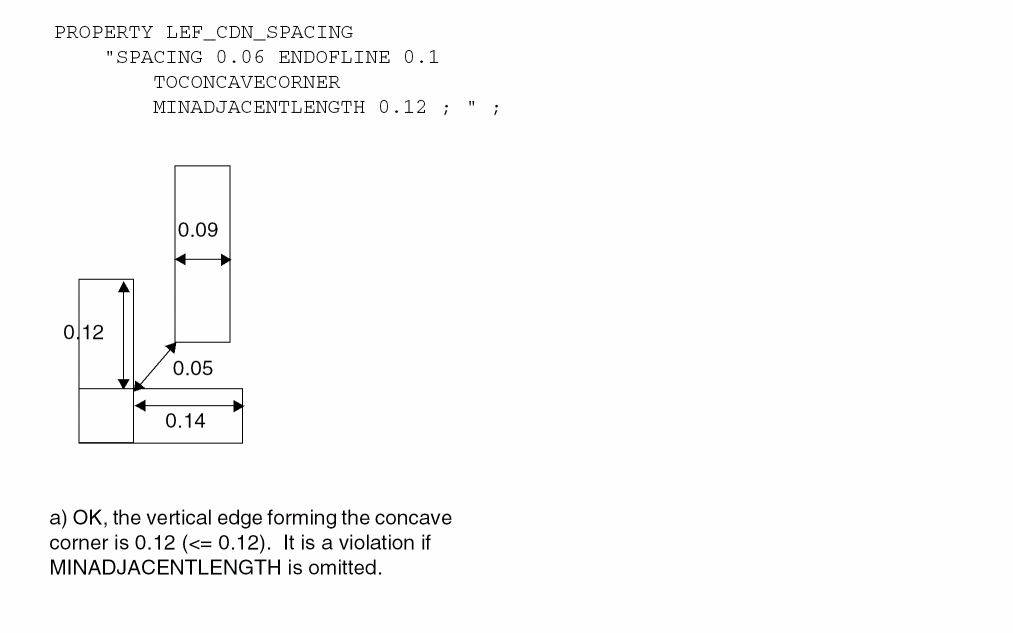 Figure 5-137 EOL Spacing Rule with FILLCONCAVECORNER
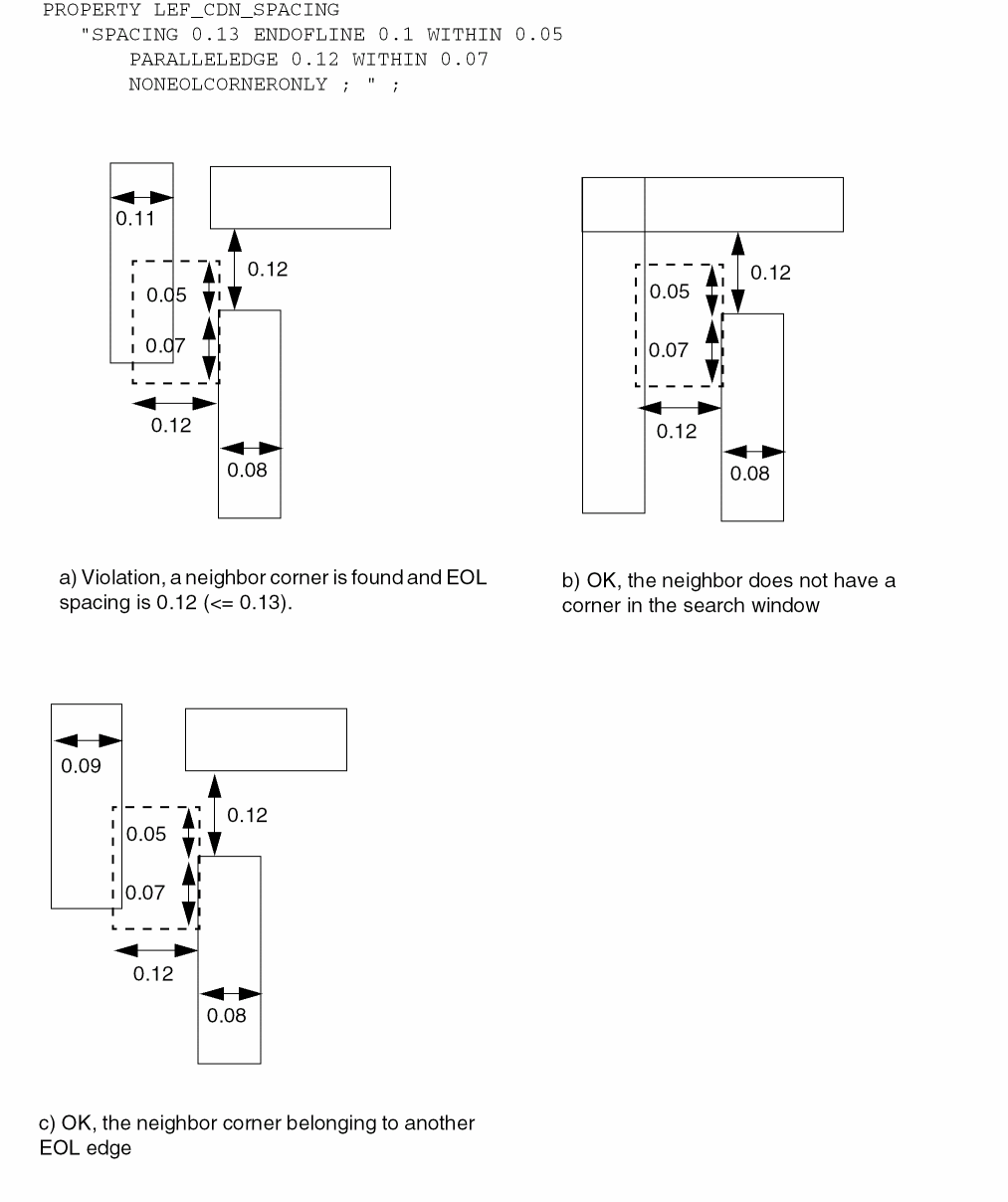 Figure 5-138 EOL Spacing Rule with EXCEPTEXACTWIDTH
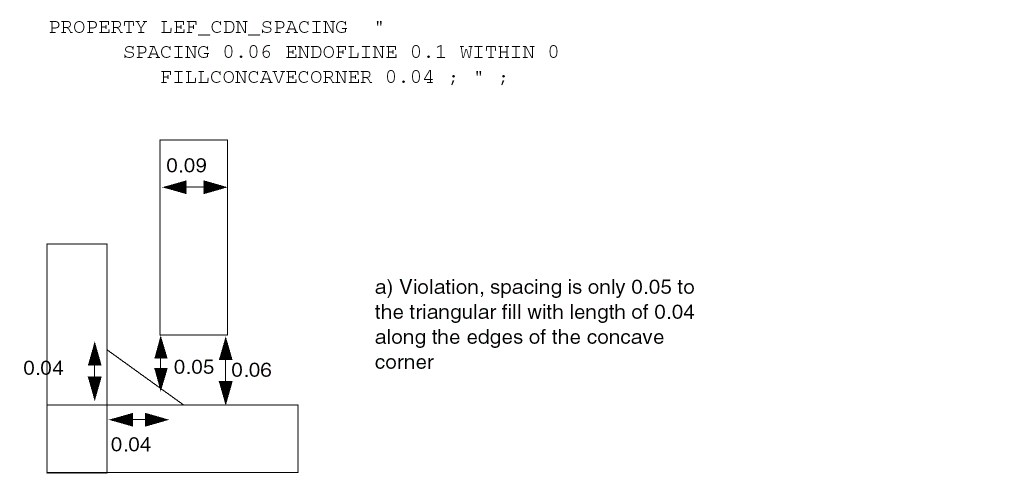 Figure 5-139 EOL Spacing Rule with TONOTCHLENGTH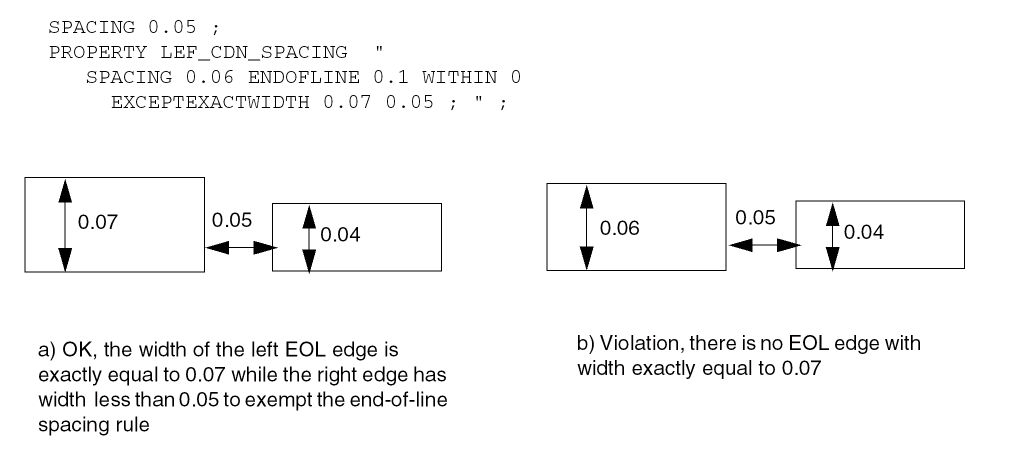
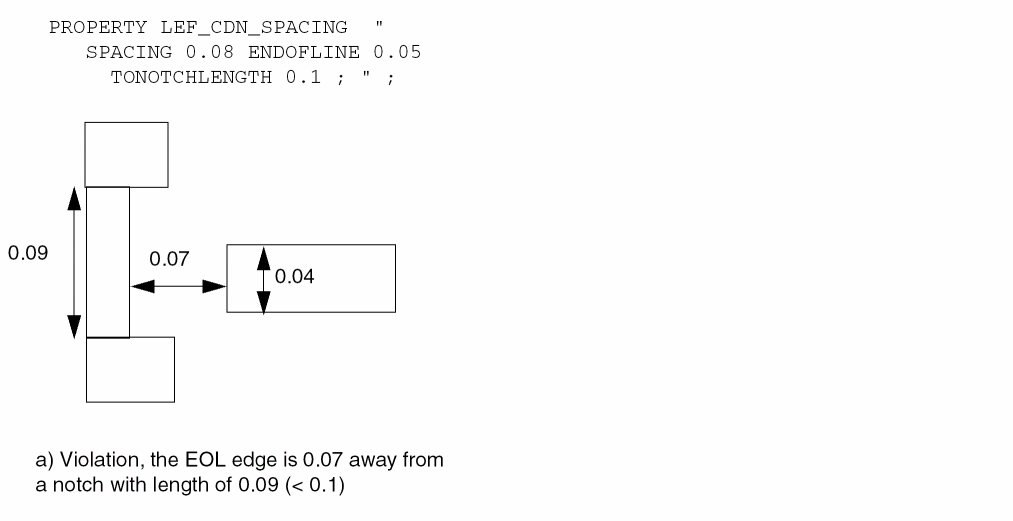
Convex Corners Spacing Rule
A convex corners spacing rule can be used to define spacing between two convex corners of two parallel wires
You can create convex corners spacing rule by using the following property definition:
PROPERTY LEF_CDN_SPACING
"SPACING {spacing | minSpacing maxSpacing }
     CONVEXCORNERS EXTENSION sideExt orthogonalExt
     [ SAMESIDE extension
     | SINGLE edgeForwardExt cornerForwardExt cornerBackwardExt
           SPANLENGTH spanLength OPPOSITEWIDTH oppWidth
           OPPOSITEEXTENSION oppSideExt
               oppForwardExt1 oppForwardExt2
     | MIDDLEWIRES {0 | 1 | 2} [INCLUDEPARTIALOVERALP]
           [BACKWARDWIRE sideExt backwardExt]
           [REVERSE
               [EXCEPTWRONGDIRWIRE edgeExt wrongDirEdgeExt]
               [EXCEPTCONVEXCORNER edgeBackwardExt
                   edgeForwardExt wrongDirEdgeExt]]]
    ; " ;
Figure 5-140 Illustration of Spacing Rule with CONVEXCORNERS
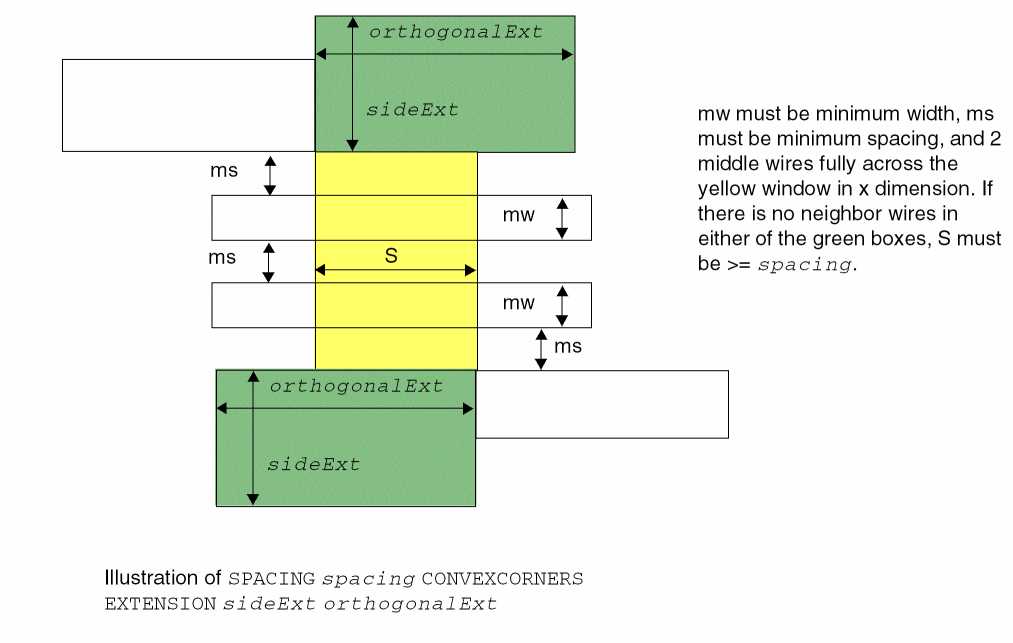
Figure 5-141 Illustration of Spacing Rule with CONVEXCORNERS
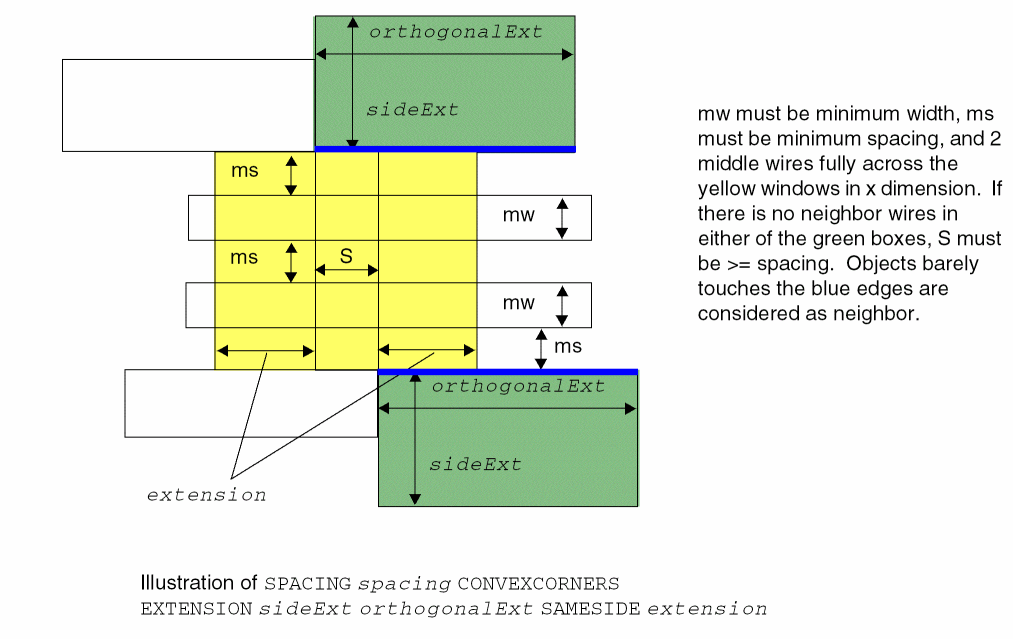
Figure 5-142 Illustration of Spacing Rule with CONVEXCORNERS
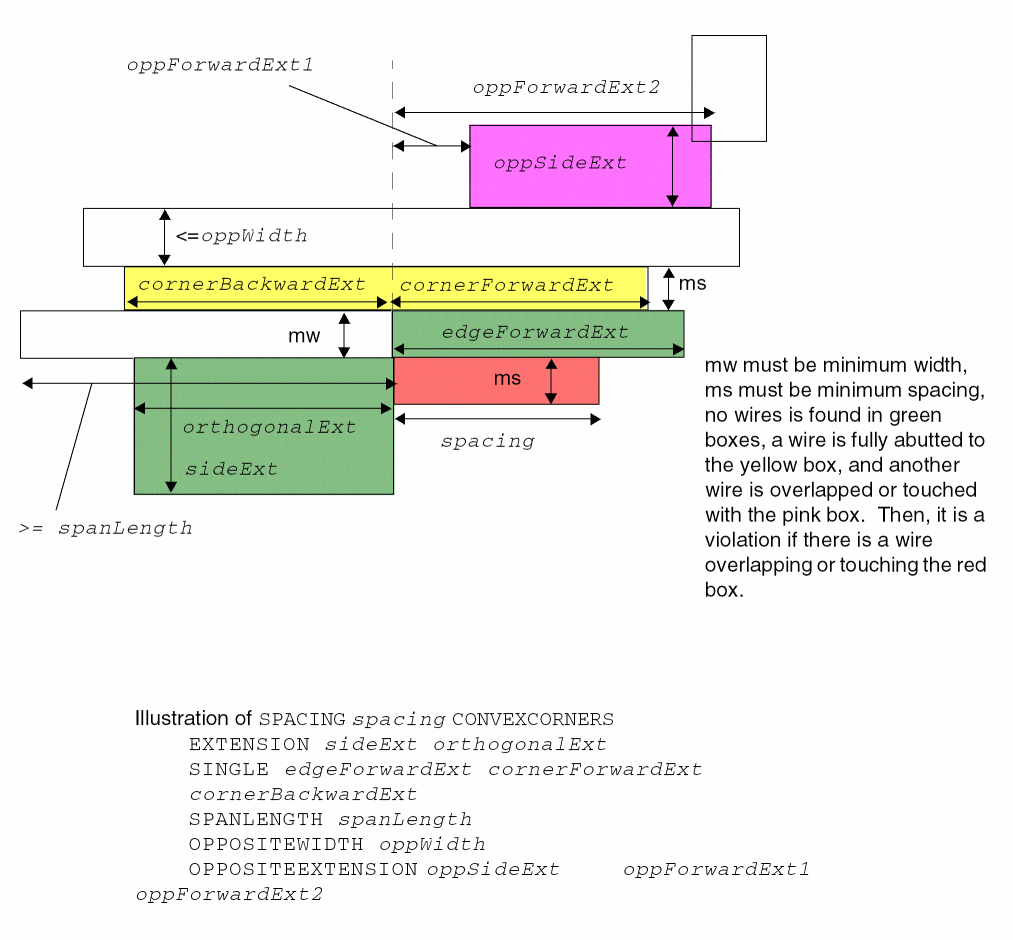
Figure 5-143 Illustrations of Spacing Rule with MIDDLEWIRES in CONVEXCORNERS
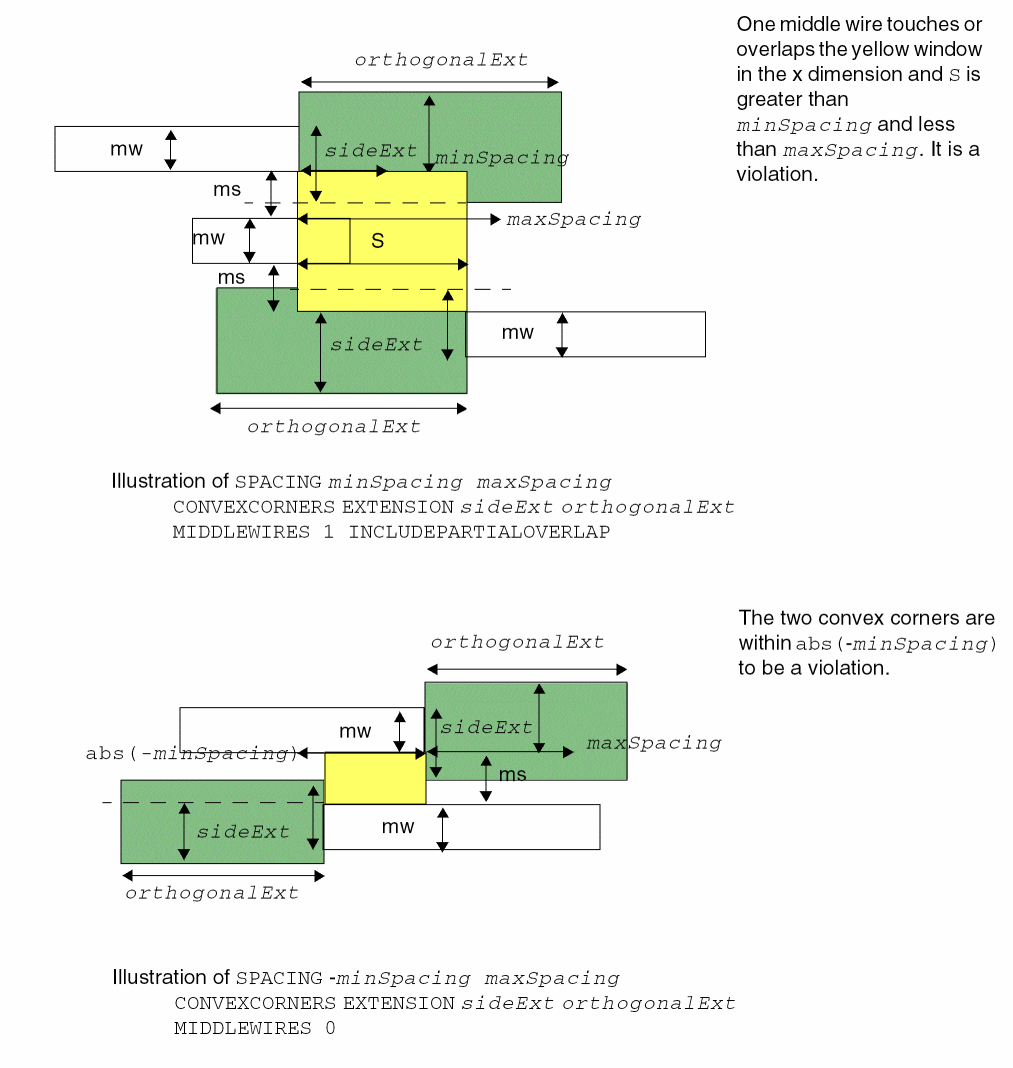
Figure 5-144 Illustration of Spacing Rule with BACKWARDWIRE in CONVEXCORNERS
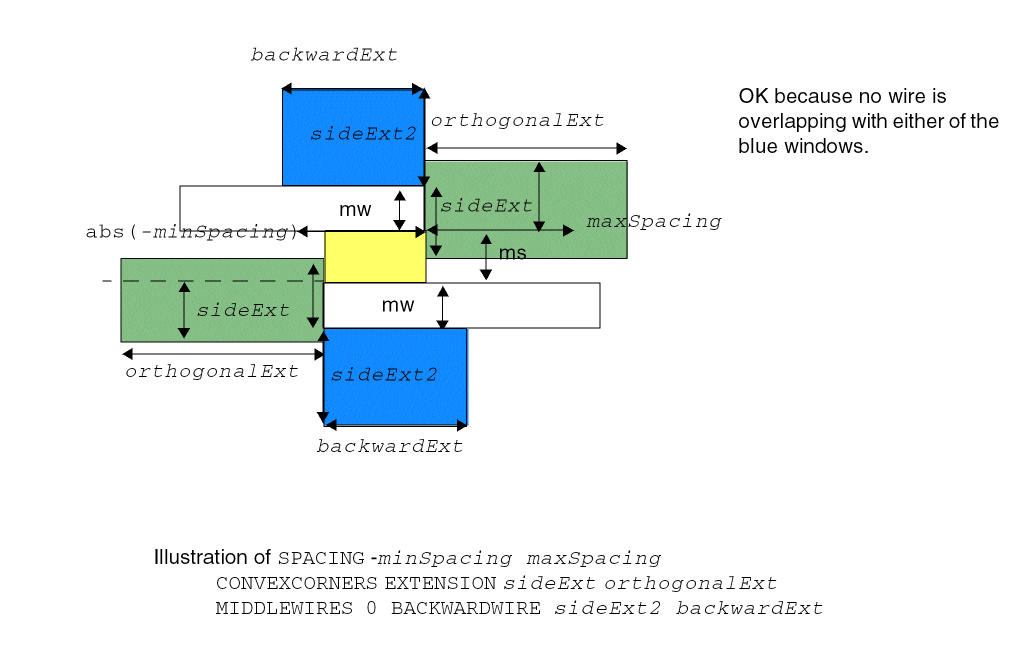
Figure 5-145 Illustrations of Spacing Rule with REVERSE in CONVEXCORNERS
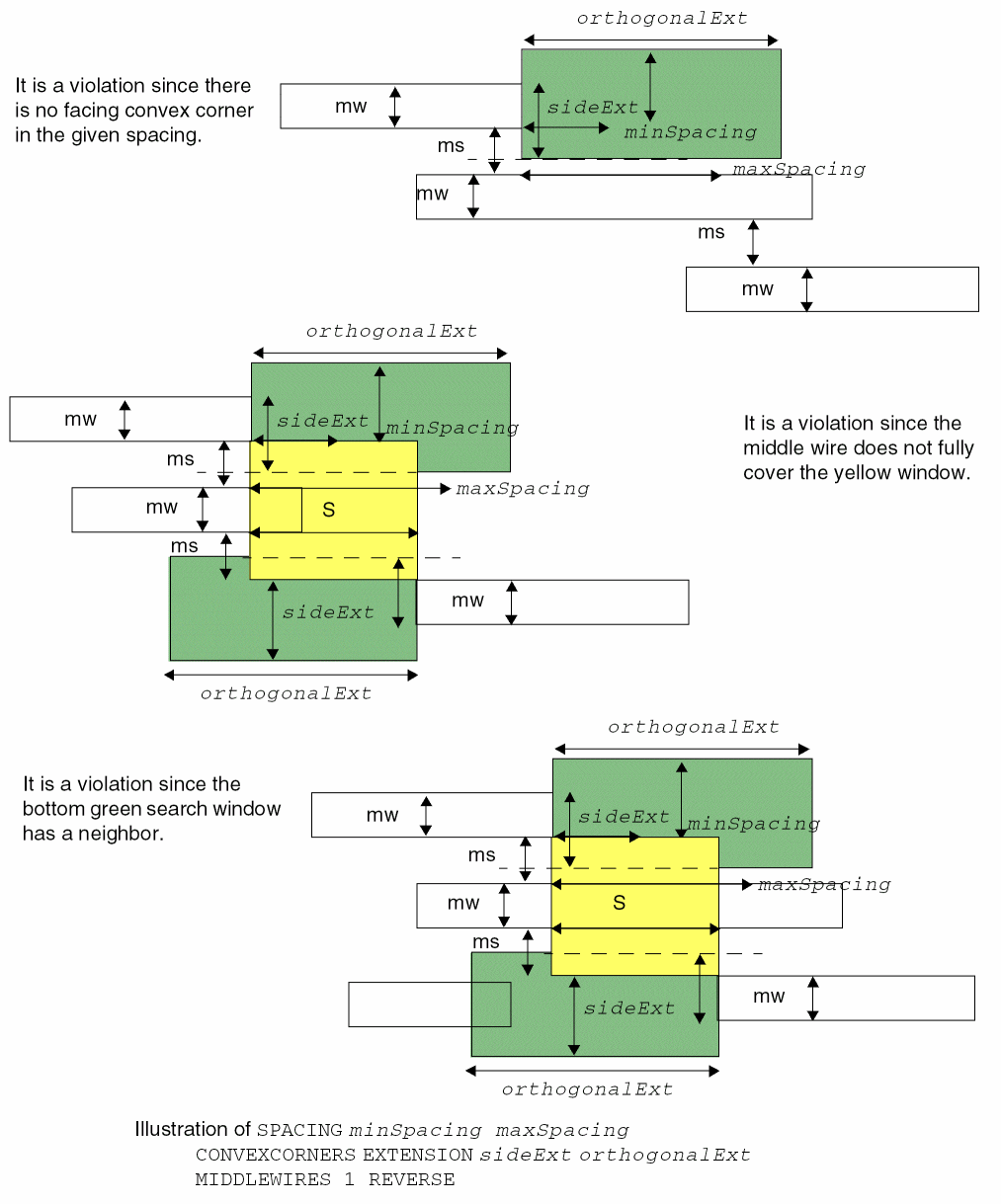
Figure 5-146 Illustration of Spacing Rule with EXCEPTWRONGDIRWIRE in CONVEXCORNERS
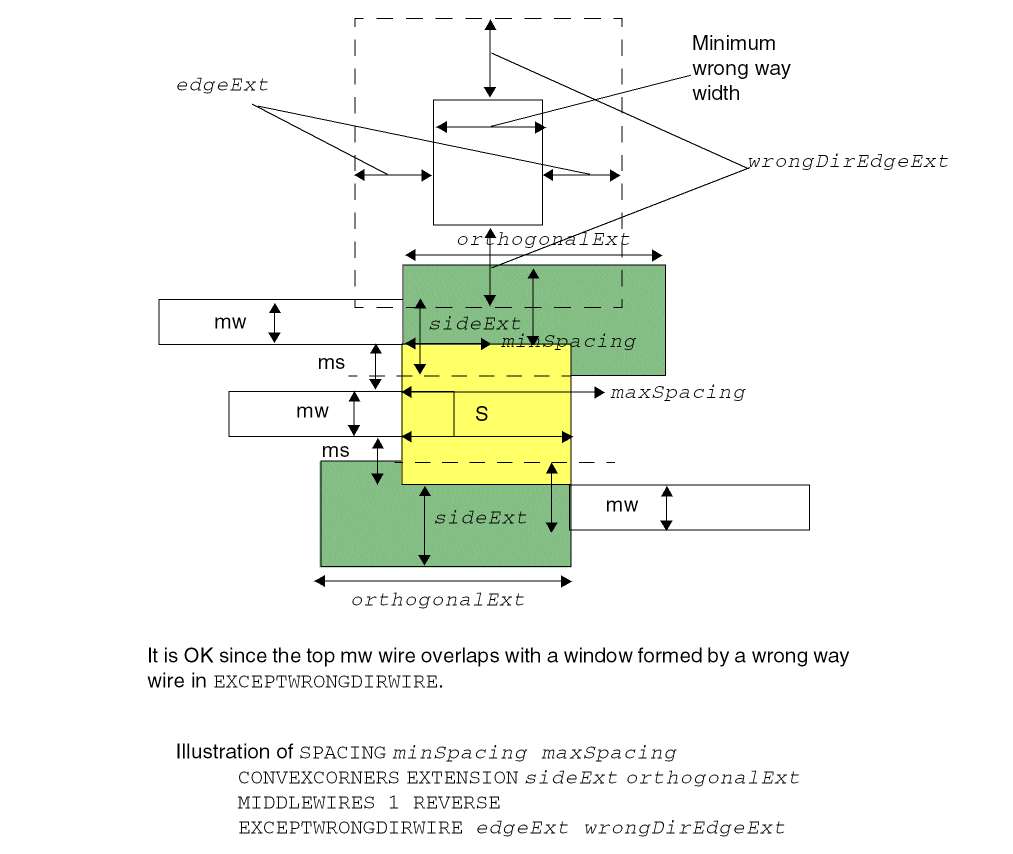
Figure 5-147 Illustration of Spacing Rule with EXCEPTCONVEXCORNER in CONVEXCORNERS
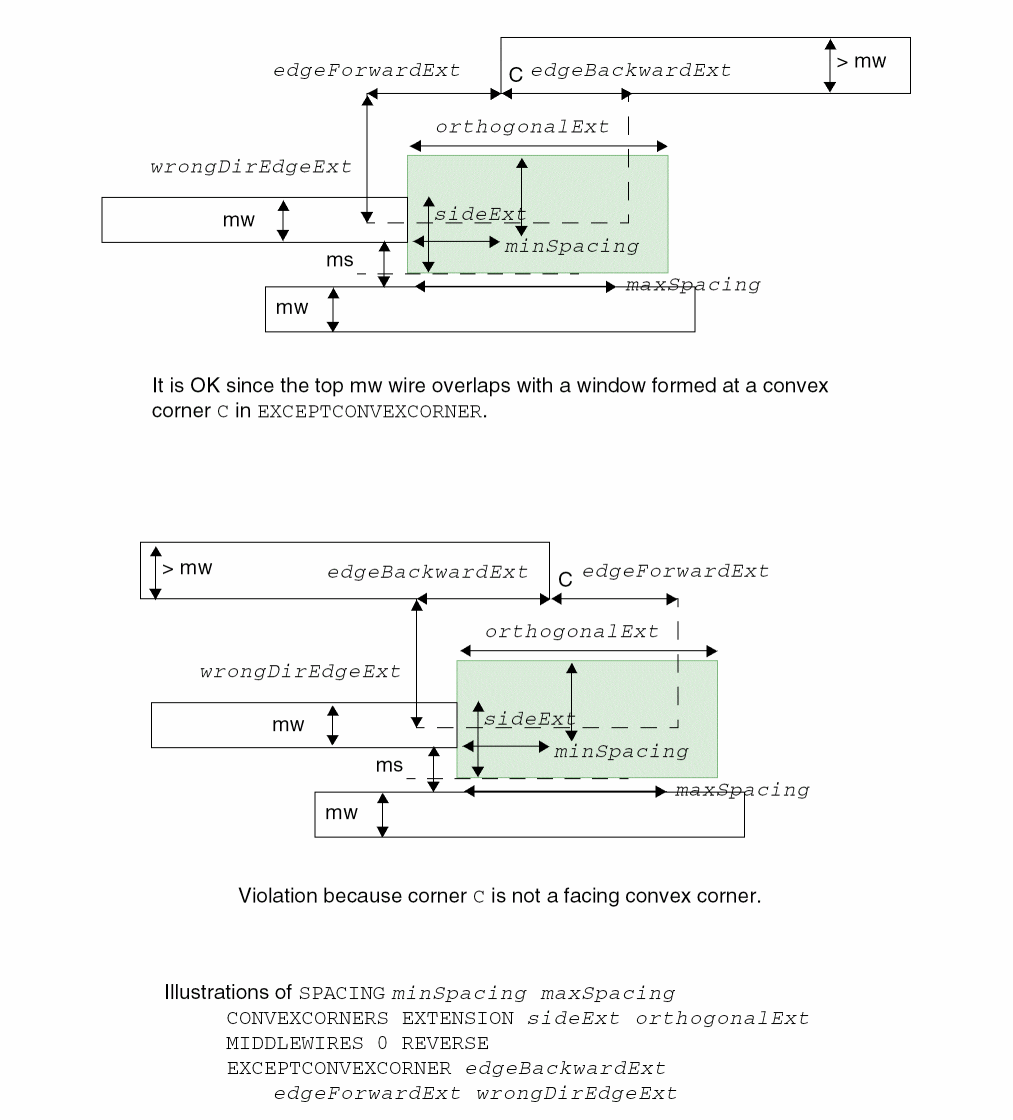
Perpendicular EOL Spacing Rule
Perpendicular EOL spacing rules can be specified to allow a different spacing rule for perpendicular edges versus opposite edges.
You can create a perpendicular EOL spacing rule by using the following property definition:
PROPERTY LEF_CDN_SPACING "SPACINGeolSpaceEOLPERPENDICULAReolWidthperWidth;" ;
Perpendicular EOL Spacing Rule Examples
Figure 5-148 Illustration of Perpendicular EOL Spacing Parameters
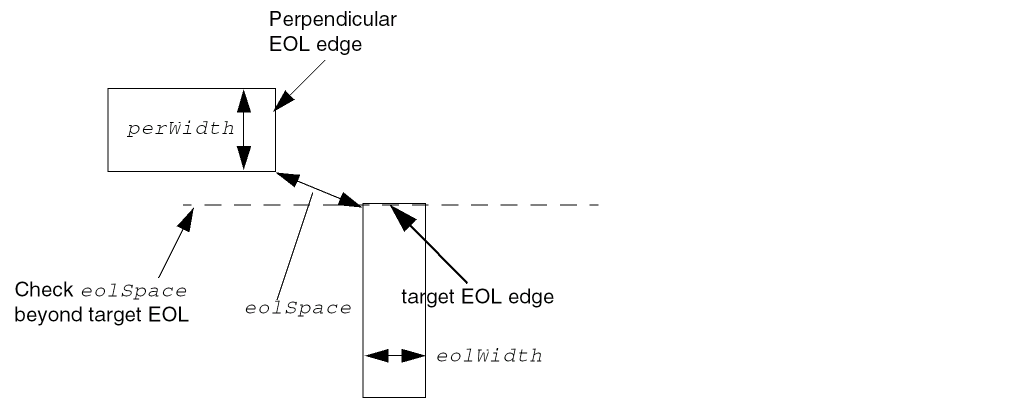
Figure 5-149 Example of Perpendicular EOL Spacing Rule
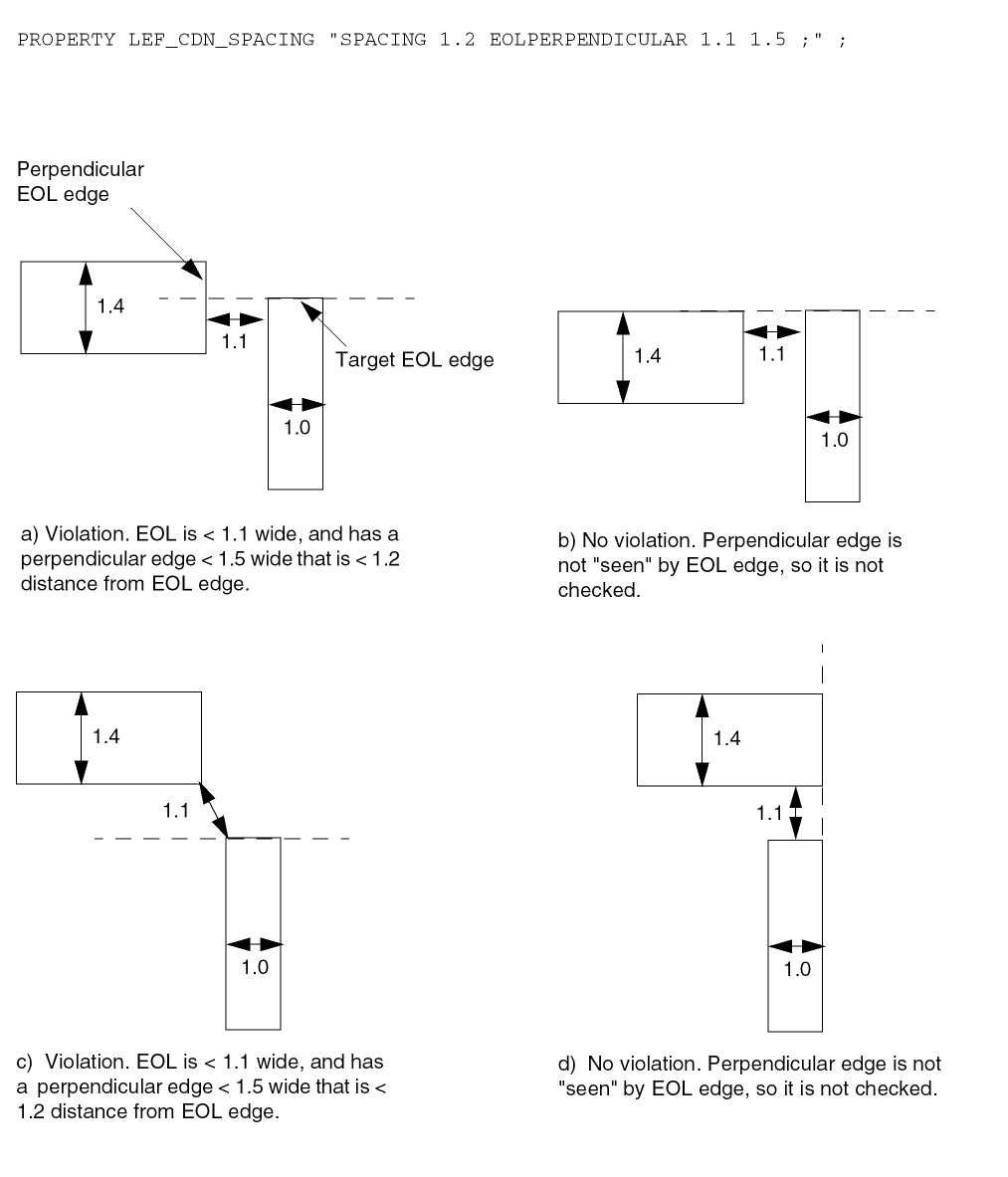
Spacing Area Rule
Area spacing rules can be specified between objects having area less than the maximum area to any other objects in the layer.
You can create an area spacing rule by using the following property definition:
PROPERTY LEF_CDN_SPACING "SPACINGminSpacingAREAmaxArea;" ;
|
Specifies the minimum spacing rule only applies between an object with area less than maxArea to any other objects in the layer. |
|
Spacing Area Rule Examples
The following spacing rule indicates that the minimum spacing of an object with area less than 0.03 μm² is 0.15 μm, while the minimum spacing of another object in the layer is 0.10 μm:
SPACING 0.10 ;
PROPERTY LEF_CDN_SPACING
   "SPACING 0.15 AREA 0.03 ;" ;
Figure 5-150 Illustration of Spacing Area Rule
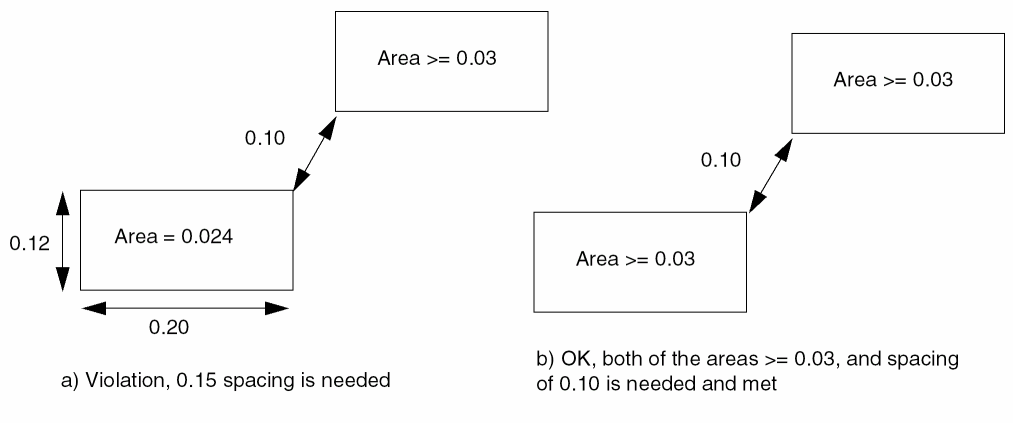
Spacing Layer Rule
Spacing layer rules can be specified for shapes in a TRIMMETAL layer.
You can create a spacing layer rule by using the following property definition:
PROPERTY LEF_CDN_SPACING "SPACINGminSpacingLAYERtrimLayer[TRIMMASKtrimMaskNum] [MASKmaskNum] EXCEPTOVERLAPoverlapLength[TRIMENDSPACINGtrimEndSpacing[PRLprl]] ;" ;
Spacing Layer Examples
-
The following spacing rule indicates that the spacing to shapes in
TRIMMETALlayerTRIM1should be greater than or equal to 0.1 μm, and the spacing to the end edges of shapes in theTRIMMETALlayerTRIM1should be greater than or equal to 0.12 μm. When a shape in the current layer overlaps with aTRIM1shape by a length greater than or equal to0.05in the horizontal direction in the current layer, the spacing check against thatTRIM1shape is skipped:DIRECTION HORIZONTAL ;PROPERTY LEF_CDN_SPACING “SPACING 0.1 LAYER TRIM1 EXCEPTOVERLAP 0.05TRIMENDSPACING 0.12;” ;
Figure 5-151 Illustration of Spacing Layer Rule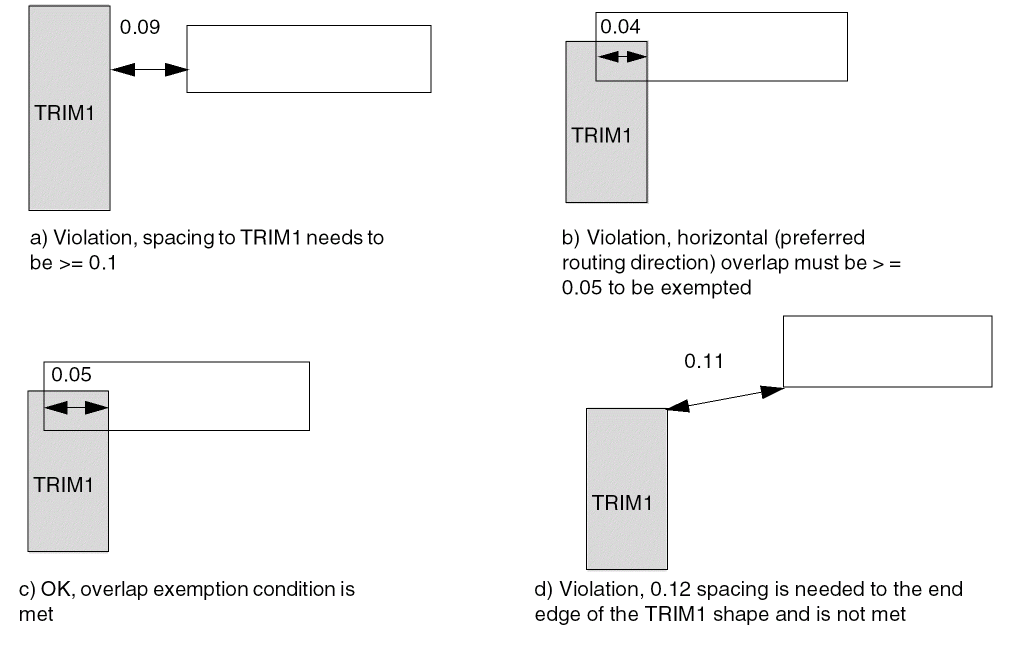
-
The following example illustrates a spacing layer rule with negative overlap length:
DIRECTION HORIZONTAL ;PROPERTY LEF_CDN_SPACING “SPACING 0.1 LAYER TRIM1 EXCEPTOVERLAP -0.05 ; ” ;
Figure 5-152 Illustration of Spacing Layer Rule with Negative Overlap Length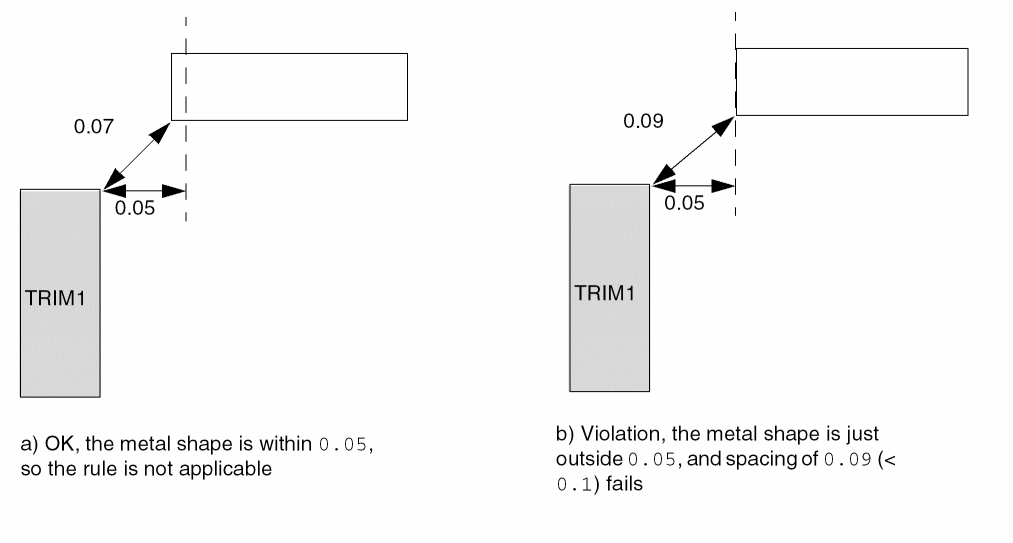
-
The following example illustrates a spacing layer rule with positive overlap length:
DIRECTION HORIZONTAL ;PROPERTY LEF_CDN_SPACING “SPACING 0.1 LAYER TRIM1 EXCEPTOVERLAP 0.15 ; ” ;
Figure 5-153 Illustration of Spacing Layer Rule with Positive Overlap Length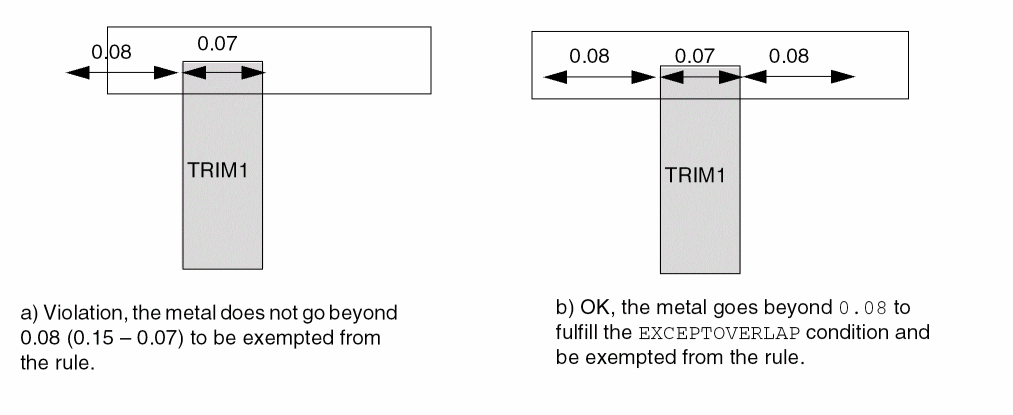
-
The following example illustrates a spacing layer rule with negative PRL:
DIRECTION HORIZONTAL ;PROPERTY LEF_CDN_SPACING “SPACING 0.1 LAYER TRIM1 EXCEPTOVERLAP -0.05TRIMENDSPACING 0.12 PRL -0.08
; ” ;
Figure 5-154 Illustration of Spacing Layer Rule with Negative PRL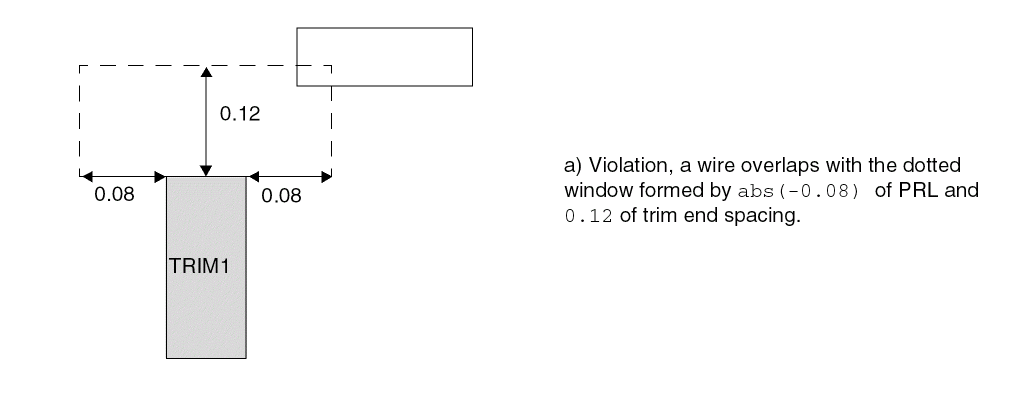
Same Mask Spacing Rule
Same mask spacing rule exists for double patterning technology, when two masks with different spacing requirements among them are applied on one routing layer. This adds a same mask spacing.
You can create same mask spacing rule by using the following property definition:
PROPERTY LEF_CDN_SPACING
"SPACING minSpacing SAMEMASK ;" ;
|
Specifies the minimum spacing rule only applies between objects on the same mask. |
Same Mask Spacing Rule Examples
-
The following same mask spacing rule indicates that the minimum spacing of objects on the same mask in the routing layer is 0.15 μm while the minimum spacing of objects on different masks is 0.10 μm.
SPACING 0.10 ;
PROPERTY LEF_CDN_SPACING
"SPACING 0.15 SAMEMASK ; " ;
Wrong Direction Spacing Rule
Wrong direction spacing rule exists for minimum spacing, which is larger than the right direction spacing, between the long or side edges of two wires with direction perpendicular to the specified direction in DIRECTION on a Manhattan routing layer.
You can create wrong direction spacing rule by using the following property definition:
PROPERTY LEF_CDN_SPACING "SPACINGminSpacing[WRONGDIRECTION [NONEOLeolWidth] [PRLprl]] ;" ;
All other keywords are the same as the existing LEF routing layer SPACING syntax.
Examples
-
The following example illustrates wrong direction spacing rule:
DIRECTION VERTICAL ;
SPACING 0.10 ;
PROPERTY LEF_CDN_SPACING
"SPACING 0.12 WRONGDIRECTION ; " ;
Figure 5-155 Illustration of Spacing with WRONGDIRECTION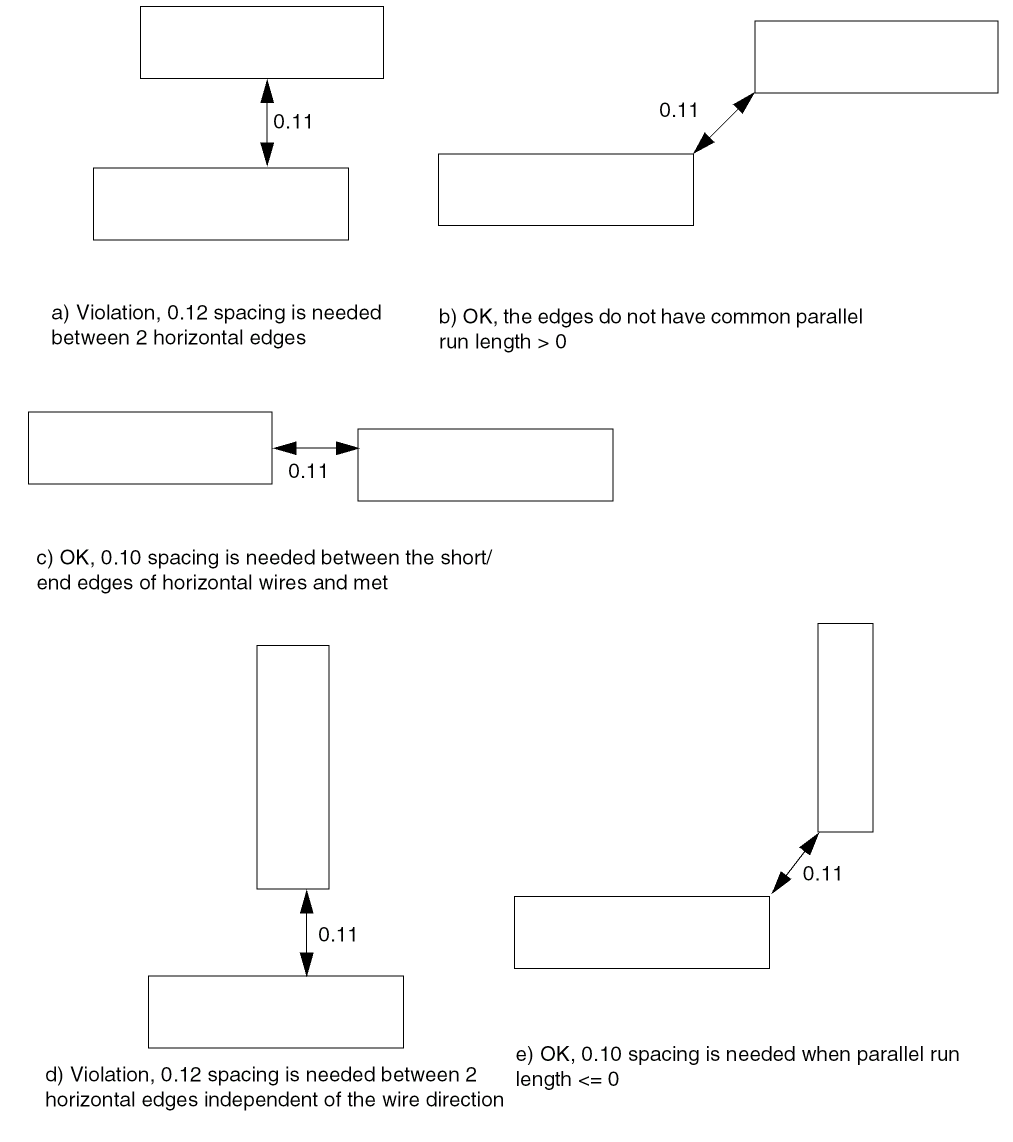
-
The following wrong direction spacing rule indicates that the long/side edges between two horizontal wires must have a spacing of 0.12 µm if they are not EOL edges with length less than 0.15 µm and they have common parallel run length greater than 0. Otherwise, 0.10 µm is the minimum spacing.
DIRECTION VERTICAL ;
SPACING 0.10 ;
PROPERTY LEF_CDN_SPACING
"SPACING 0.12 WRONGDIRECTION NONEOL 0.15 ; " ;
Figure 5-156 Illustration of WRONGDIRECTION with NONEOLFigure 5-157 Illustration of WRONGDIRECTION with PRL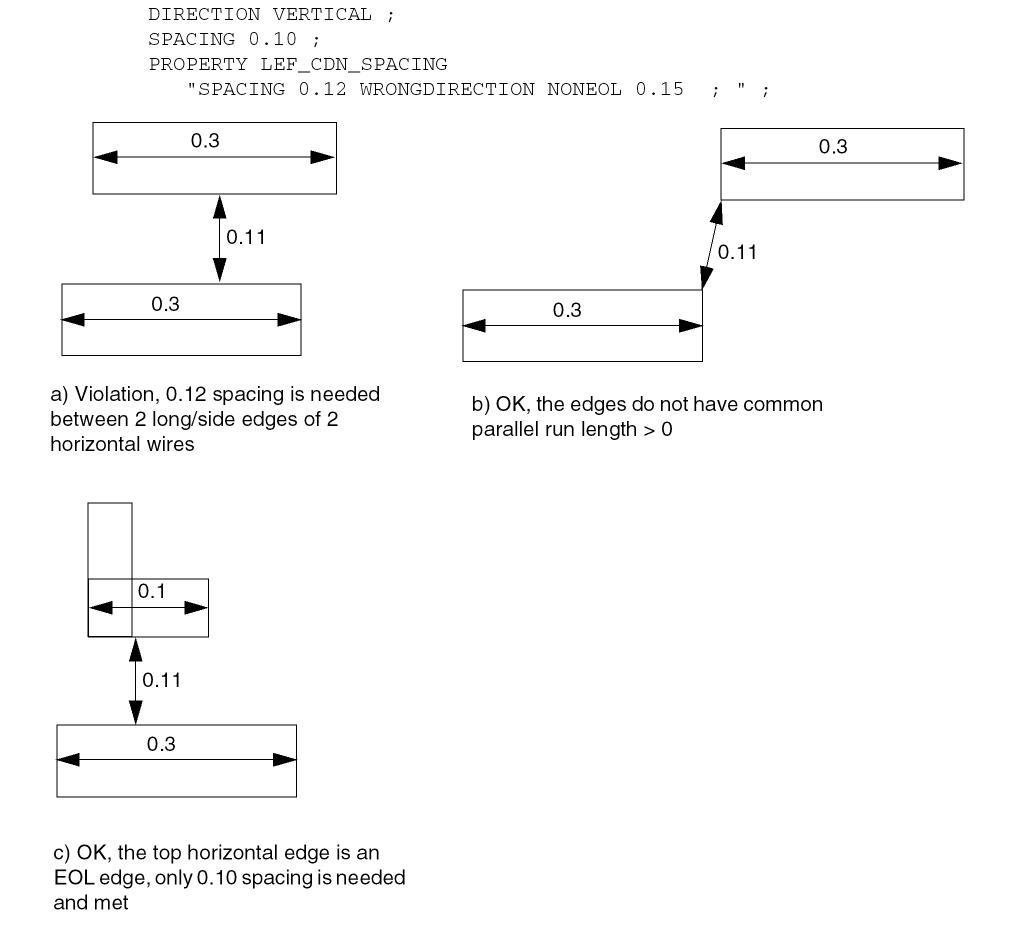
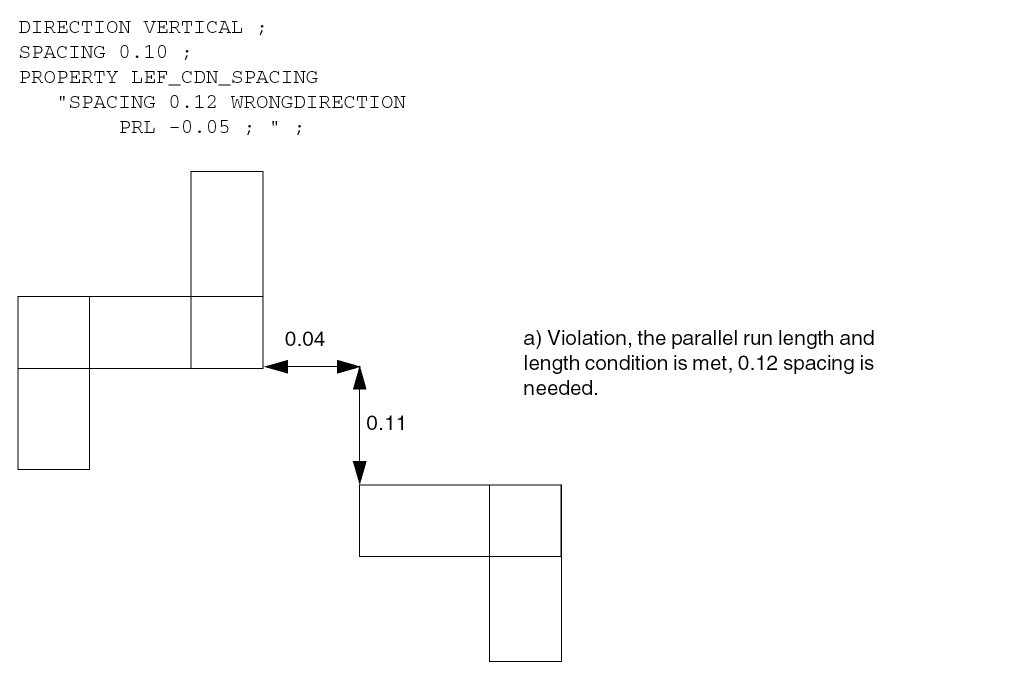
Notch Length Spacing Rule
Notch length spacing rule exists for any notch with a notch length less than the minimum notch length with notch spacing of less than or equal to the mininmum spacing.
You can create notch length spacing rule by using the following property definition:
PROPERTY LEF_CDN_SPACING "SPACINGminSpacingNOTCHLENGTHminNotchLength[EXCEPTWITHINlowExcludeSpacing highExcludeSpacing] [WITHINwithinSPANLENGTHsideOfNotchSpanLength| {WIDTH | CONCAVEENDS}sideOfNotchWidth| NOTCHWIDTHnotchWidth] ;" ;
All other keywords are the same as the existing LEF routing layer SPACING syntax.
Notch Length Spacing Rule Examples
-
The following spacing rule example shows notch length with
CONCAVEENDS:SPACING 0.10 ;
PROPERTY LEF_CDN_SPACING
"SPACING 0.12 NOTCHLENGTH 0.15 CONCAVEENDS 0.08 ; " ;
Figure 5-158 Illustration of Spacing Rule with NOTCHLENGTH and CONCAVEENDS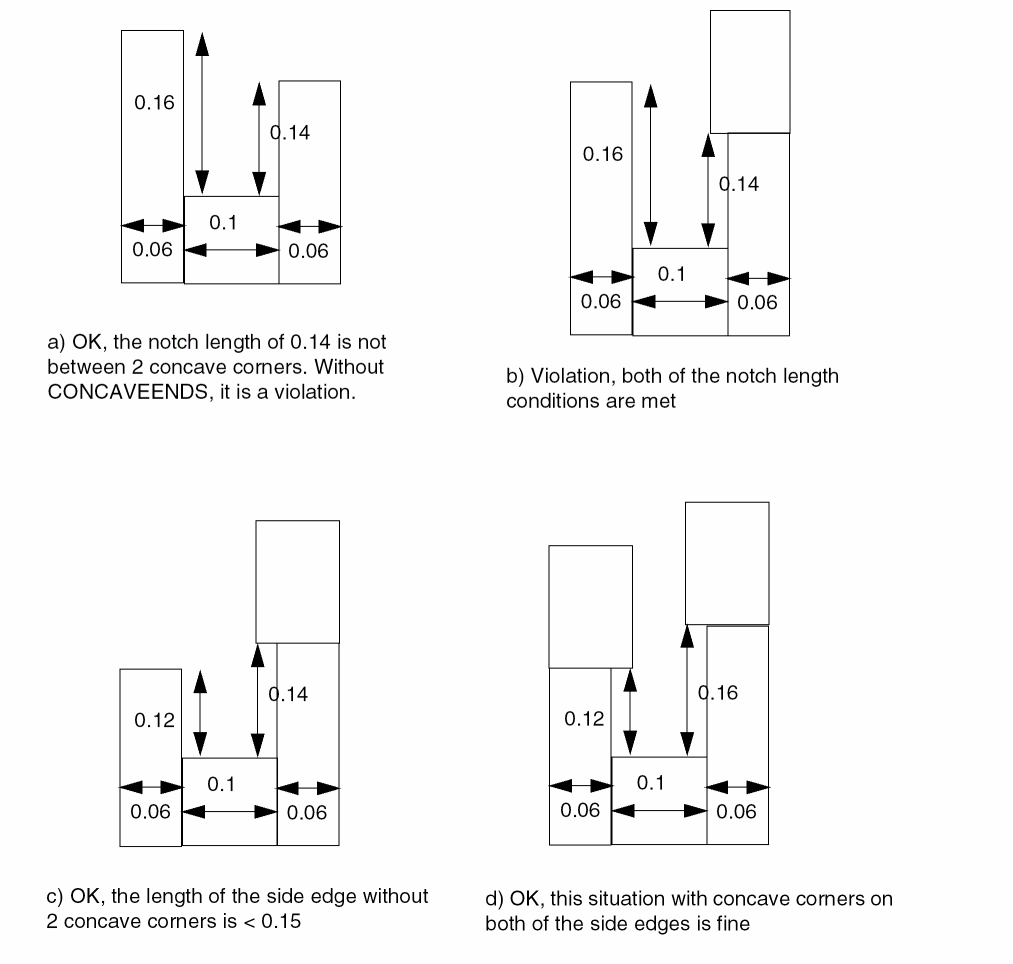
-
The following spacing rule example shows notch length with
EXCEPTWITHINandNOTCHWIDTH:PROPERTY LEF_CDN_SPACING "
SPACING 0.1 NOTCHLENGTH 0
EXCEPTWITHIN 0.06 0.08 NOTCHWIDTH 0.05 ; " ;
Figure 5-159 Illustration of Spacing Rule with EXCEPTWITHIN and NOTCHWIDTH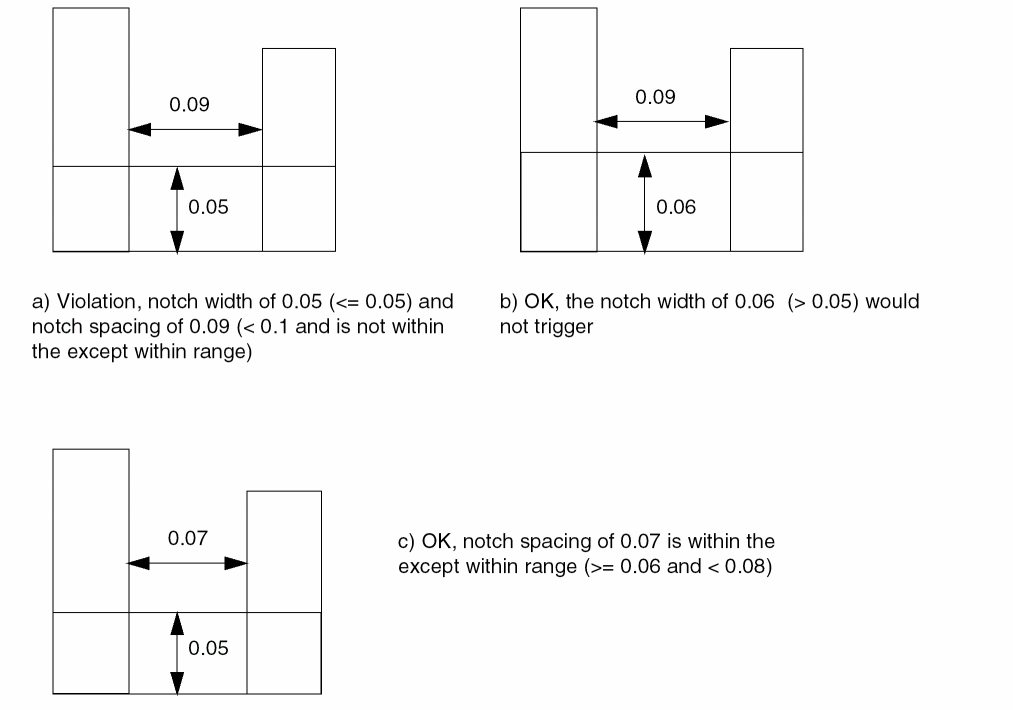
-
The following spacing rule example shows notch length with
WITHINandSPANLENGTH:SPACING 0.09 ;
PROPERTY LEF_CDN_SPACING
"SPACING 0.1 NOTCHLENGTH 0.06 WITHIN 0.2
SPANLENGTH 0.05 ; " ;
Figure 5-160 Illustration of Spacing Rule with WITHIN and SPANLENGTHFigure 5-161 Illustration of Spacing Rule with WITHIN and SPANLENGTH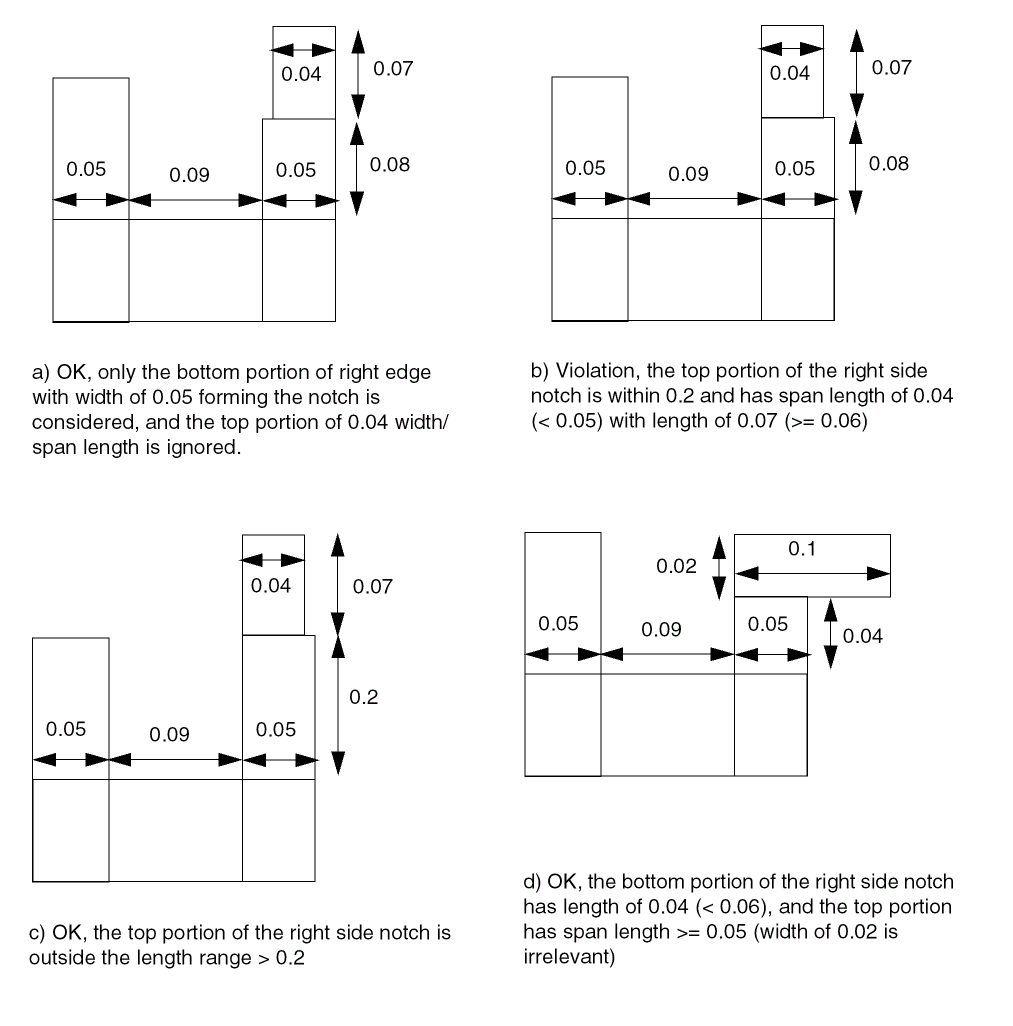
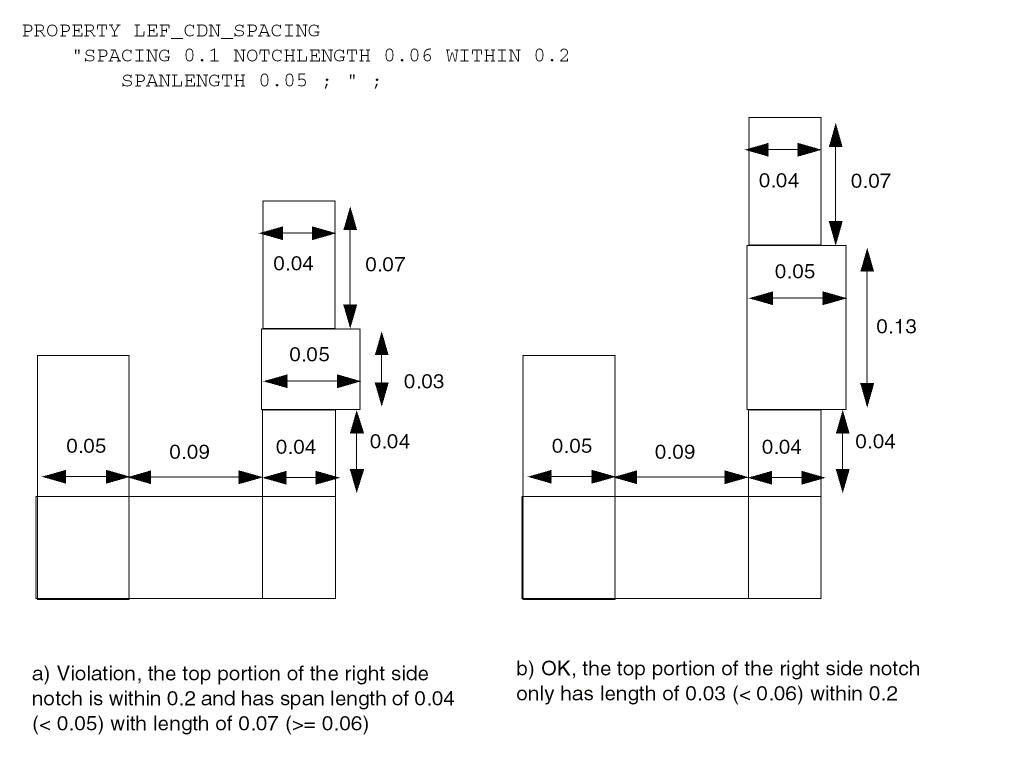
Notch Span Spacing Rule
Notch span spacing rule exists for any notch with span less than the specified span on both sides.
You can create notch span spacing rule by using the following property definition:
PROPERTY LEF_CDN_SPACING "SPACINGminSpacingNOTCHSPANspanNOTCHSPACINGnotchSpacingEXCEPTNOTCHLENGTHnotchLength; " ;
All other keywords are the same as the existing LEF routing layer SPACING syntax.
Examples
-
The following example shows spacing rule with notch span:
SPACING 0.08 ;
PROPERTY LEF_CDN_SPACING
"SPACING 0.1 NOTCHSPAN 0.15 NOTCHSPACING 0.12
EXCEPTNOTCHLENGTH 0.13 ; " ;
Figure 5-162 Illustration of Spacing Rule with NOTCHSPAN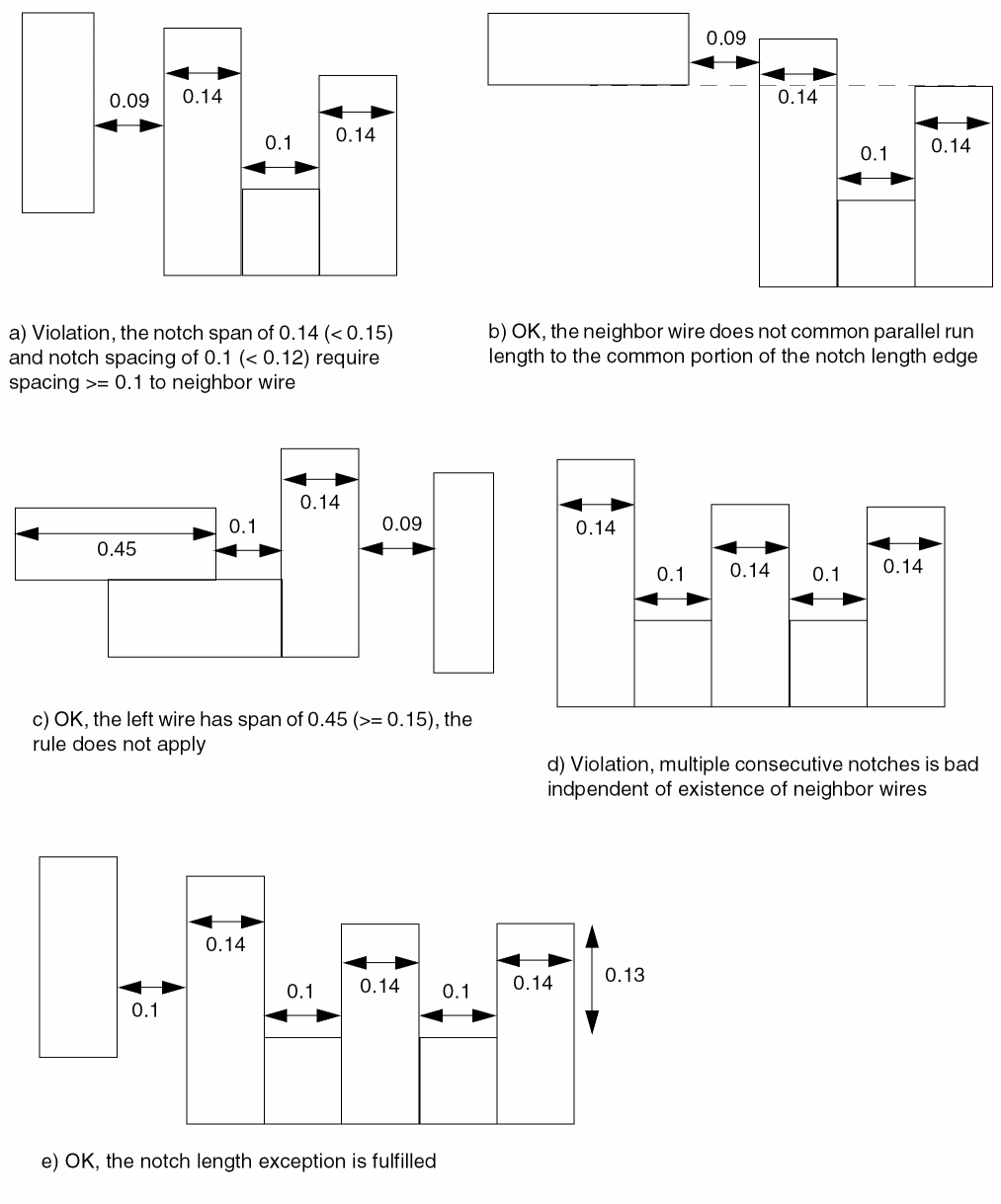
Jog to Jog Spacing Table Rule
Jog to Jog spacing table rules can be used to define jog or protrusion spacing requirements.
You can define a jog to jog spacing table rule by using the following property definition:
PROPERTY LEF_CDN_SPACINGTABLE "SPACINGTABLE JOGTOJOGSPACINGjogToJogSpacingJOGWIDTHjogWidthSHORTJOGSPACINGshortJogSpacing{WIDTHwidthPARALLELparLengthWITHINparWithin[EXCEPTWITHINlowExcludeSpacinghighExcludeSpacing] LONGJOGSPACINGlongJogSpacing[SHORTJOGSPACINGwidthShortJogSpacing]} ... ; " ;
Jog to Jog Spacing Table Rule Examples
-
Figure 5-162 illustrates the following jog to jog spacing table rules:
PROPERTY LEF_CDN_SPACINGTABLE "
"SPACINGTABLE JOGTOJOGSPACING 0.7
JOGWIDTH 0.2 SHORTJOGSPACING 0.08
WIDTH 0.4 PARALLEL 0.2 WITHIN 0.5
LONGJOGSPACING 0.13
WIDTH 0.8 PARALLEL 0.3 WITHIN 0.5
LONGJOGSPACING 0.15 ; " ;
Figure 5-163 Illustration of Spacing Table with JOGTOJOGSPACING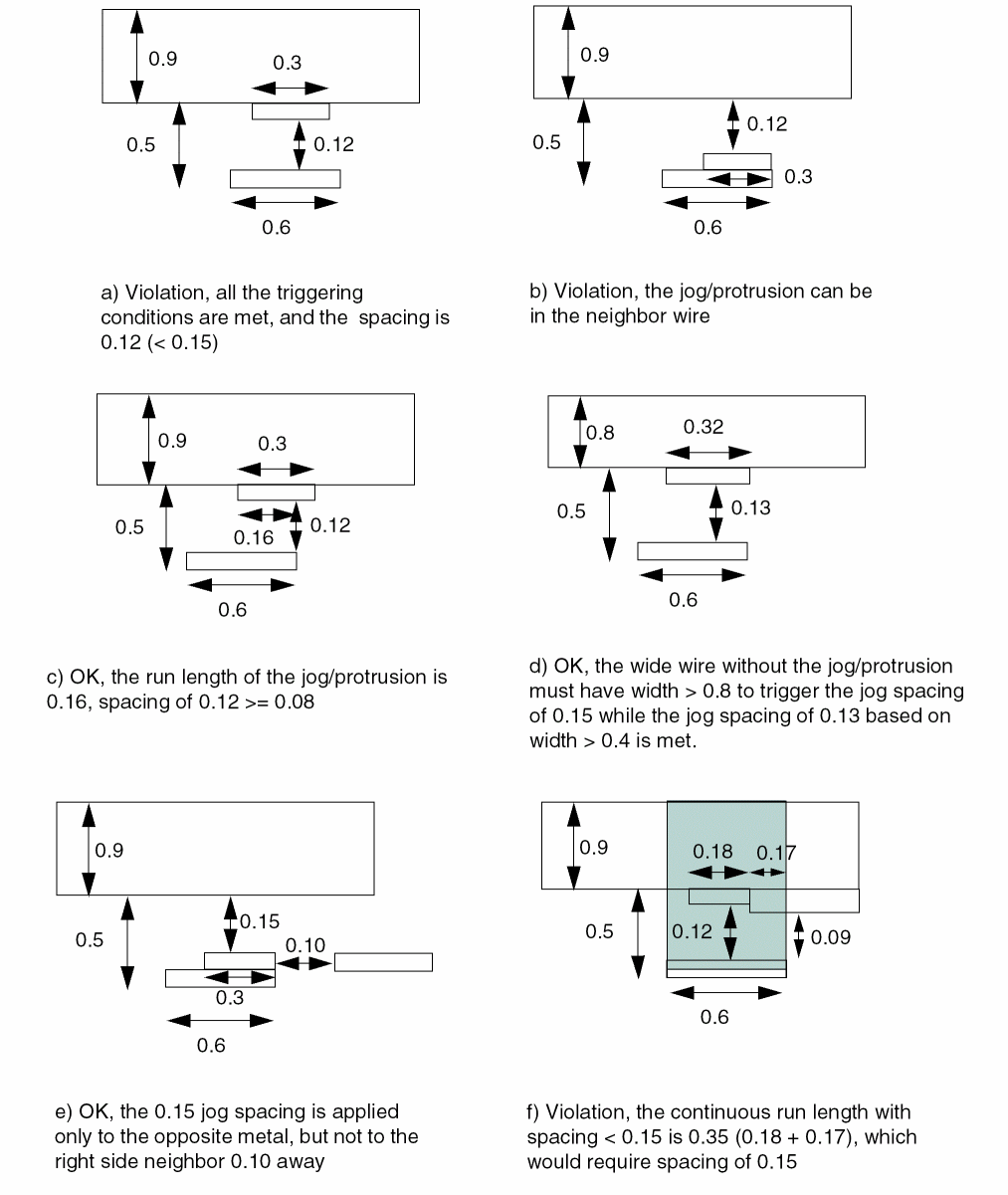
-
Figure 5-163 illustrates the following jog to jog spacing table rules:
PROPERTY LEF_CDN_SPACINGTABLE "
"SPACINGTABLE JOGTOJOGSPACING 0.7
JOGWIDTH 0.2 SHORTJOGSPACING 0.08
WIDTH 0.8 PARALLEL 0.3 WITHIN 0.5
LONGJOGSPACING 0.15 ; " ;
Figure 5-164 Illustration of Spacing Table with JOGTOJOGSPACING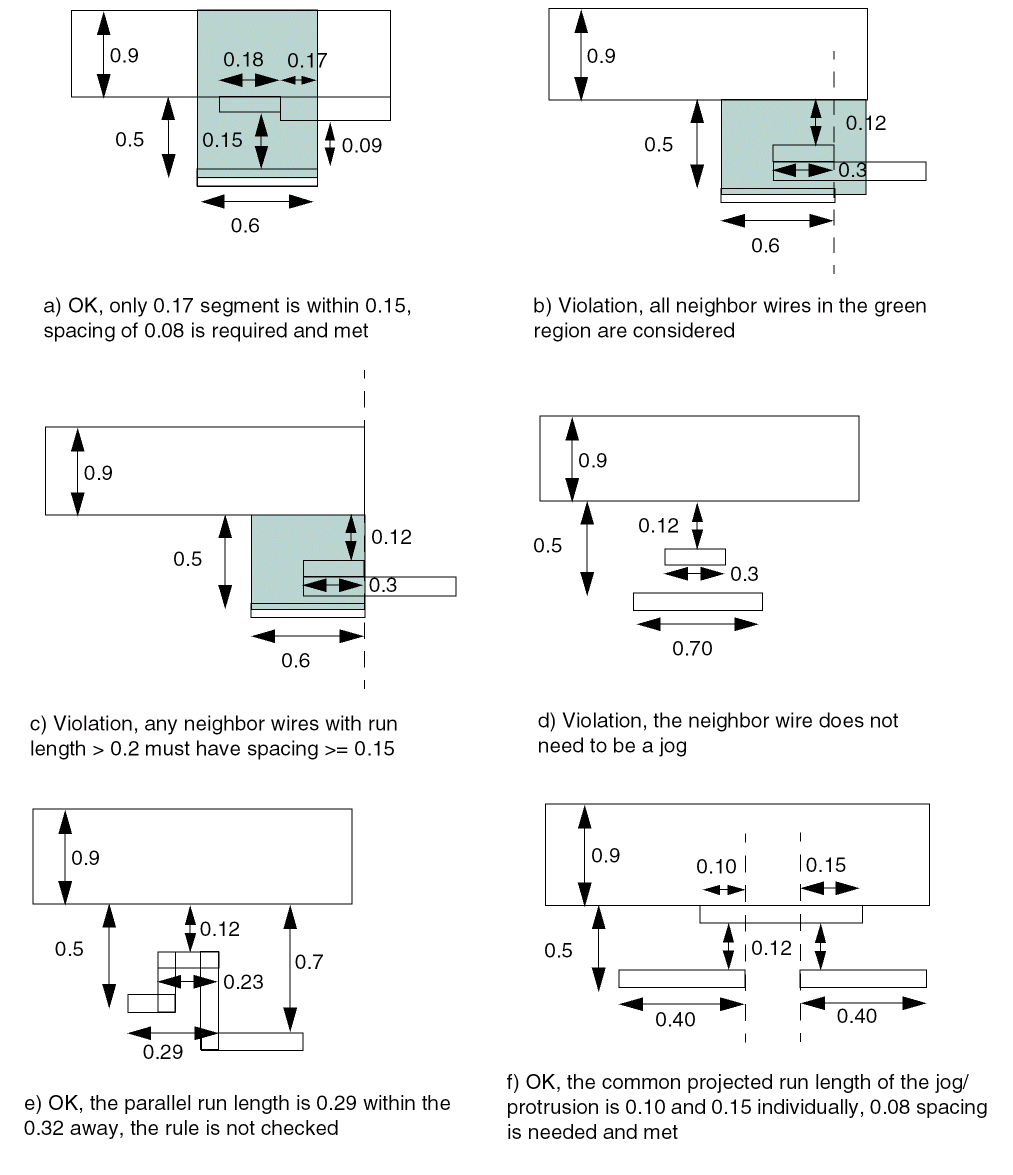
-
Figure 5-164 illustrates the following jog to jog spacing table rules:
PROPERTY LEF_CDN_SPACINGTABLE "
"SPACINGTABLE JOGTOJOGSPACING 0.7
JOGWIDTH 0.2 SHORTJOGSPACING 0.08
WIDTH 0.8 PARALLEL 0.3 WITHIN 0.5
LONGJOGSPACING 0.15 ; " ;
Figure 5-165 Illustration of Spacing Table with JOGTOJOGSPACING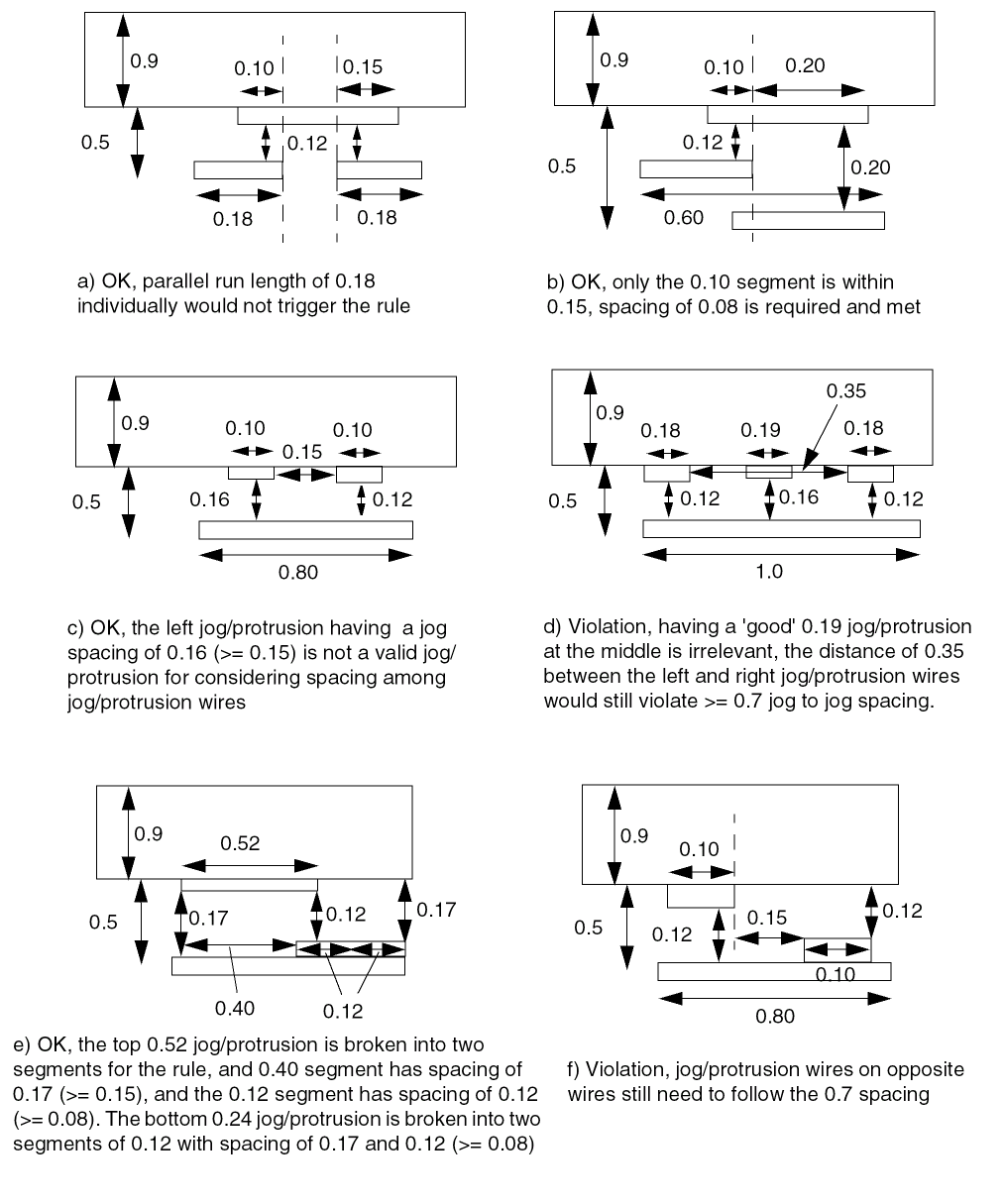
-
Figure 5-165 illustrates the following jog to jog spacing table rules with
JOGTOJOGSPACING0.3:PROPERTY LEF_CDN_SPACINGTABLE "
"SPACINGTABLE JOGTOJOGSPACING 0.7
JOGWIDTH 0.2 SHORTJOGSPACING 0.08
WIDTH 0.8 PARALLEL 0.3 WITHIN 0.5
LONGJOGSPACING 0.15 ; " ;
Figure 5-166 Illustration of Spacing Table with JOGTOJOGSPACING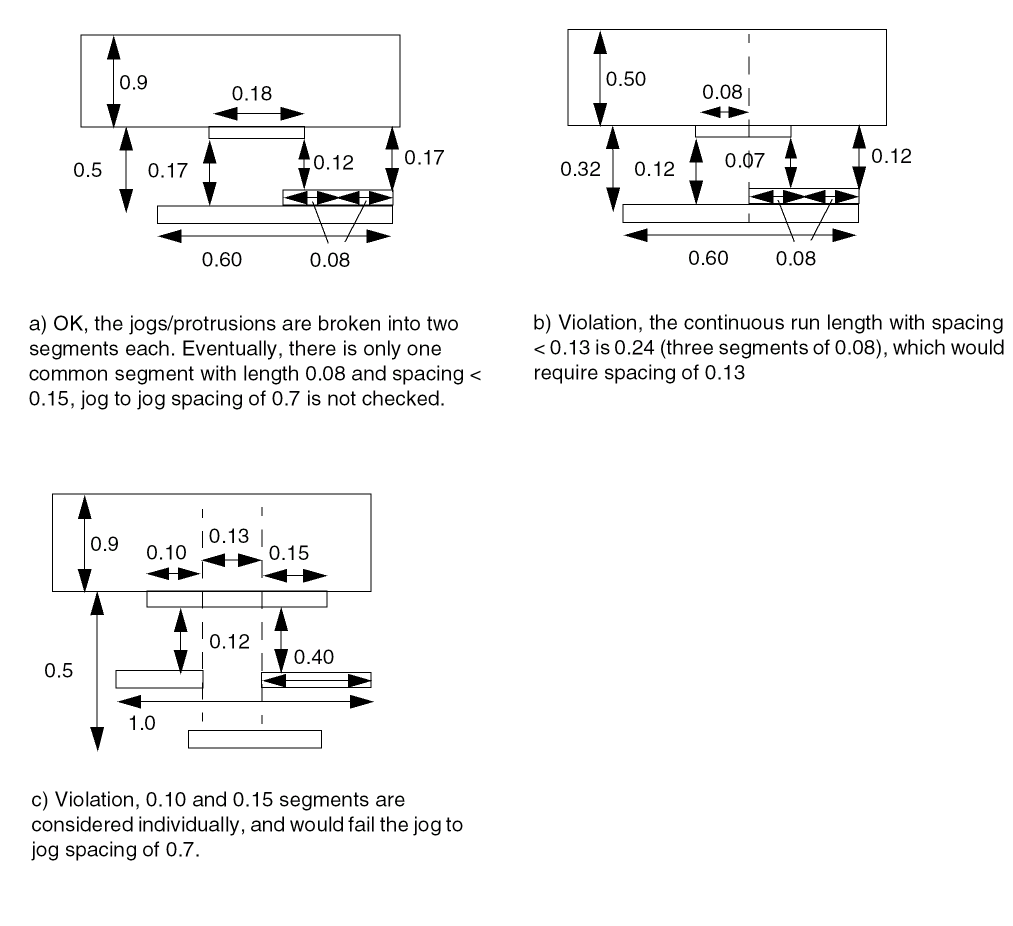
-
The following example indicates that the short jog spacing is 0.08 µm for width greater than 0.4 µm, 0.09 µm for width greater than 0.8 µm. Any neighbor wire greater than or equal to 0.04 µm and less than 0.06 µm away is ignored (for width greater than 0.8 µm only).
PROPERTY LEF_CDN_SPACINGTABLE "
"SPACINGTABLE JOGTOJOGSPACING 0.7
JOGWIDTH 0.2 SHORTJOGSPACING 0.08
WIDTH 0.4 PARALLEL 0.2 WITHIN 0.5
LONGJOGSPACING 0.13 SHORTJOGSPACING 0.08
WIDTH 0.8 PARALLEL 0.3 WITHIN 0.5
EXCEPTWITHIN 0.04 0.06
LONGJOGSPACING 0.15 SHORTJOGSPACING 0.09 ; " ;
Direction Span Length Spacing Table Rule
You can create a direction span length spacing table rule to create a table in which the spacing between two objects depends on the maximum span length of the two objects and their parallel run length.
You can define a direction span length spacing table using the following property definition:
PROPERTY LEF_CDN_SPACINGTABLE
"SPACINGTABLE
    DIRECTIONALSPANLENGTH [WRONGDIRECTION]
    [SAMEMASK]
    [EXCEPTJOGLENGTH length [EDGELENGTH] [INCLUDELSHAPE]]
    [EXCEPTEOL eolWidth]
    [EXACTSPANLENGTHSPACING spanLength1 TO spanLength2
        [PRL prl] {exactSpacing}...]...
    PRL {prl}...
    {SPANLENGTH spanLength
        [EXACTSPACING exactSpacing
        | SPACINGTOMINSPAN spacingToMinSpan]
        [EXACTSELFSPACING exactSelfSpacing]
        [NOEXCEPTEOL|EOLSPACING eolspacing] {spacing}...}...
; " ;
|
|
|
|
Creates a table in which spacing between two objects depends on the span length of the objects and their parallel run length. There must be exactly as many spacing values in each |
|
|
Specifies a spacing value that should be applied when the |
|
|
Specifies that two wires with span length that belong to the same row could have exact spacing of exactSelfSpacing. This should not be used on the first row since it would have the same meaning of |
|
|
Specifies that if the spacing of a wire with span length greater than specified span length of a row with |
|
|
|
|
|
Specifies a list of exact spacing values in {exactSpacing}..., which are also allowed between a wire with exact span length of spanLength1 and another wire with exact span length of spanLength2 with parallel run length greater than prl or zero if |
|
|
Specifies that the directional span length spacing does not apply to EOL edges with width less than the eolWidth. Those EOL edges should follow the |
|
|
Specifies that the minimum default (right-way) spacing would be applied between a wrong way jog with minimum wrong way width and length less than length sandwiched by two right way wires with projected
If
If |
|
|
Specifies that |
|
|
Specifies that the directional span length spacing rule only applies to objects on the same mask. |
|
|
Specifies that if the spacing of a wire with span length greater than specified span length of a row with |
|
|
Specifies that the spacing is applied to wrong direction edges. In other words, the spacing is |
|
Direction Span Length Spacing Table Rule Examples
-
The following example illustrates the following spacing table rules with direction span length:
DIRECTION VERTICAL ;
PROPERTY LEF_CDN_WIDTHTABLE
"WIDTHTABLE 0.050 ... ;
WIDTHTABLE 0.090 ... WRONGDIRECTION ; " ;
PROPERTY LEF_CDN_SPACINGTABLE "
SPACINGTABLE
DIRECTIONALSPANLENGTH
EXCEPTJOGLENGTH 0.170
PRL 0.000 ...
SPANLENGTH 0.000 0.050 ...
SPANLENGTH 0.140 0.100 ... ;
Figure 5-167 Illustration of Spacing Table Rule with DIRECTIONALSPANLENGTH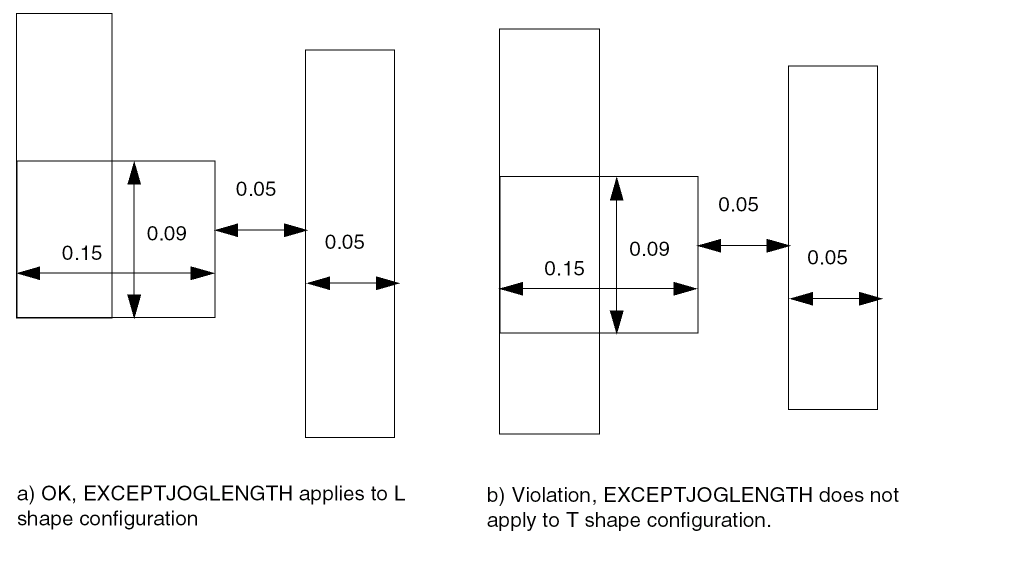
-
The following example illustrates use of
EDGELENGTH:
Figure 5-168 Illustration of DIRECTIONALSPANLENGTH with EDGELENGTH in EXCEPTJOGLENGTH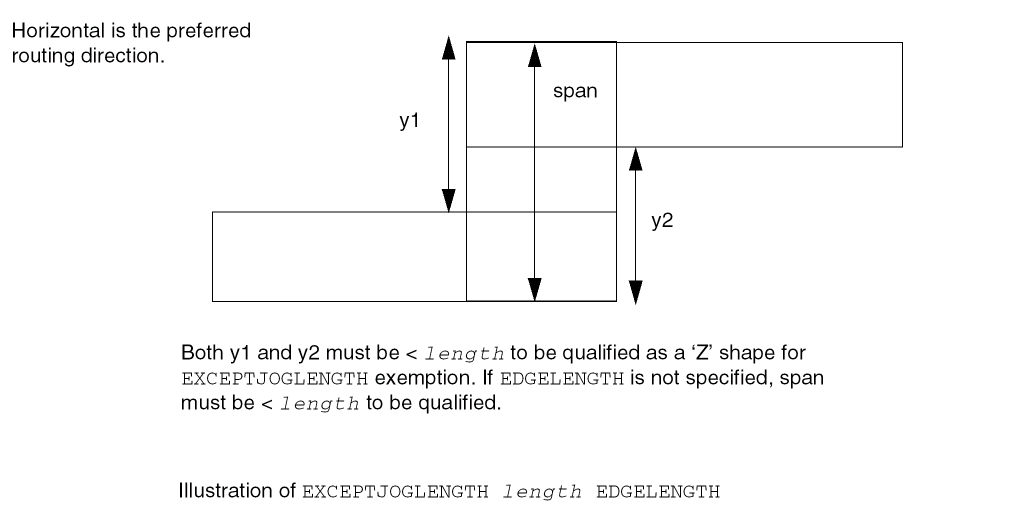
-
The following example illustrates direction spanlength with negative parallel run length:
DIRECTION HORIZONTAL ;
PROPERTY LEF_CDN_SPACINGTABLE "
SPACINGTABLE
DIRECTIONALSPANLENGTH
PRL -0.050 ...
SPANLENGTH 0.000 0.030 ... ; " ;
Figure 5-169 Illustration of DIRECTIONALSPANLENGTH with PRL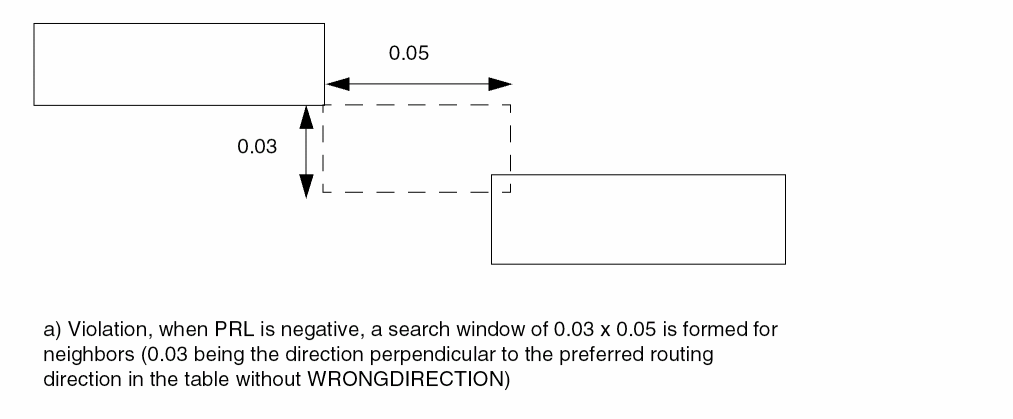
-
The following example illustrates direction span length with spacing to minimum span:
DIRECTION VERTICAL ;
PROPERTY LEF_CDN_SPACINGTABLE "
SPACINGTABLE
DIRECTIONALSPANLENGTH
PRL 0.000 ...
SPANLENGTH 0.000 EXACTSPACING 0.050 0.070 ...
SPANLENGTH 0.090 SPACINGTOMINSPAN 0.060 0.080 ...
SPANLENGTH 0.110 0.090 ... ; " ;
Figure 5-170 Illustration of Spacing Table Rule with DIRECTIONALSPANLENGTH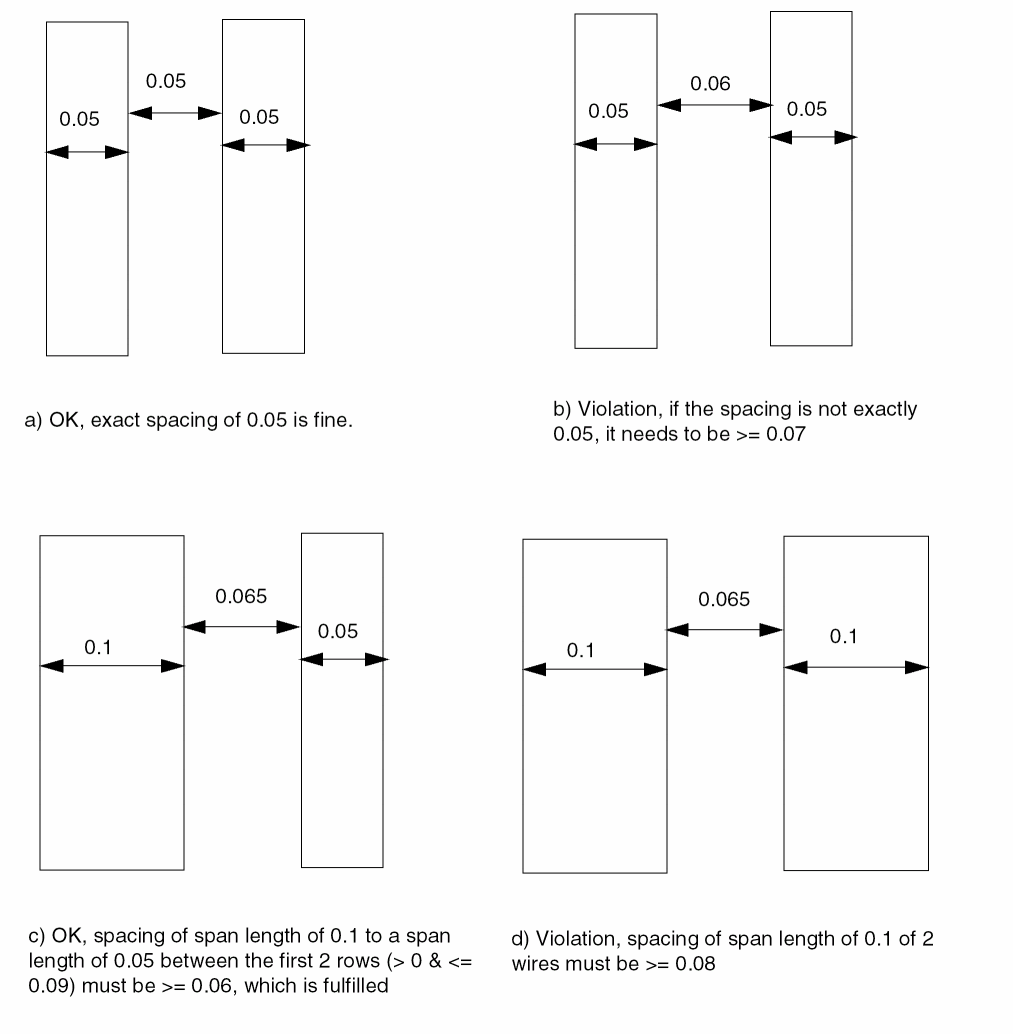
Two-Widths Spacing Table Rule
You can create a two-widths spacing table rule to create a table in which spacing between two objects depends on the widths of both the objects.
You can define a two-widths spacing table rule by using the following property definition:
PROPERTY LEF_CDN_SPACINGTABLE
"SPACINGTABLE
    TWOWIDTHS [WRONGDIRECTION]
       [SAMEMASK | MASK maskNum]
       [EXCEPTEOL eolWidth]
       [FILLCONCAVECORNER fillTriangle]
       {WIDTH width [PRL runLength] {spacing} ...} ...
    ; " ;
All other keywords are the same as the existing LEF routing layer SPACINGTABLE syntax.
|
Specifies that the two widths table does not apply to EOL edges with width less than eolWidth. Those EOL edges should follow the |
|
|
Specifies that any concave corners should be filled by a triangle with value of fillTriangle along the edges to form the corner before minimum spacing of the table is checked. This fill corner operation does not apply to any other spacing values. See Figure 5-170. |
|
|
Specifies that the spacing rule applies only between two wires with the given mask. In addition, the spacing in the table entry is always applied between two wires of the corresponding width values even if there is another wire with any mask between them. maskNum must be a positive integer, and most applications only support the values 1, 2, or 3. |
|
|
Specifies that spacing applies only to the objects that belong to the same mask. The same mask objects recognize the first spacing table, but not the second one. The spacing in the second table is incorporated in the first one. |
|
|
Specifies the spacings of an edge with direction perpendicular to the specified direction in |
|
Two-Widths Spacing Table Rule Examples
Figure 5-171 Two-Widths Spacing Table Rule with FILLCONCAVECORNER
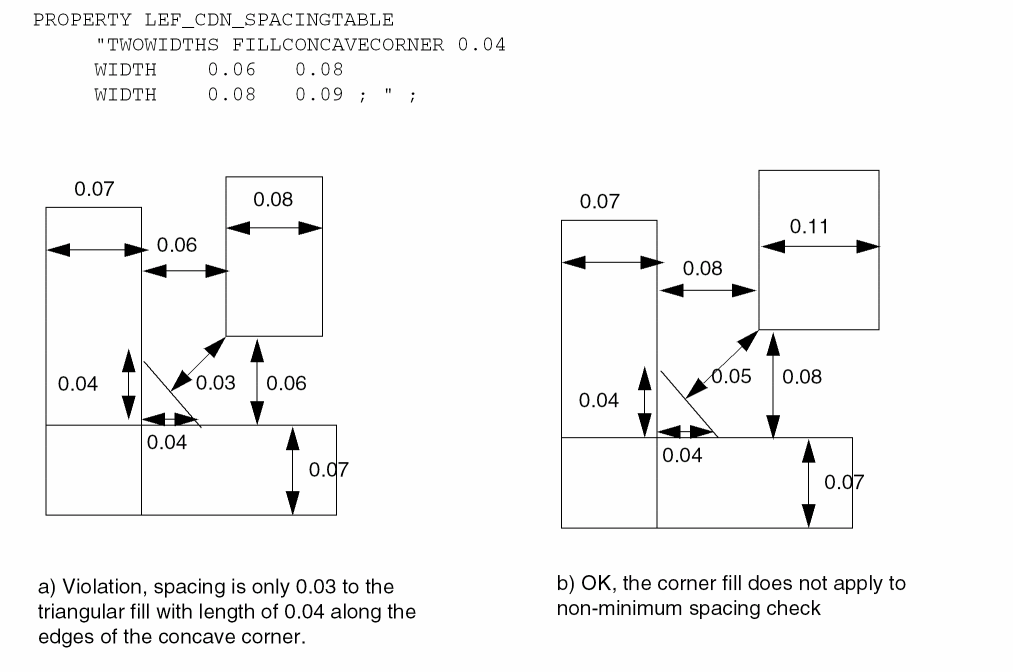
Figure 5-172 Two-Widths Spacing Table Rule with MASK
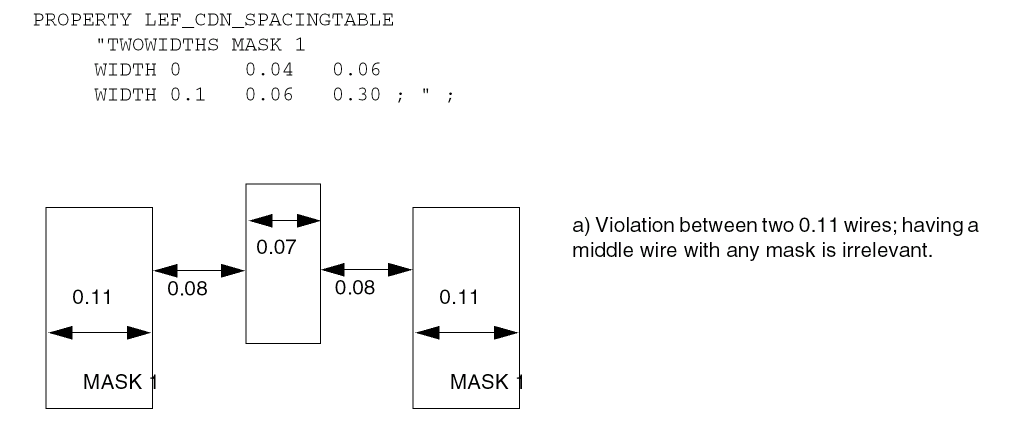
Parallel Span Length Spacing Table Rule
Parallel span length spacing table rules can be used to define supplement spacing constraints based on span length of the objects.
You can define a parallel span length spacing table rule by using the following property definition:
PROPERTY LEF_CDN_SPACINGTABLE
  "SPACINGTABLE
     PARALLELRUNLENGTH [DIAGONAL] [WRONGDIRECTION]
     [SAMEMASK]
     [EXCEPTEOL eolWidth]
     {length}...
     {WIDTH width
           [EXCEPTWITHIN lowExcludeSpacing highExcludeSpacing]
          {spacing}...}... ;
     [SPACINGTABLE
            INFLUENCE {WIDTH width WITHIN distance SPACING spacing} ... ;]
  ; " ;
All other keywords are the same as the existing LEF routing layer SPACINGTABLE syntax.
|
Specifies that the defined spacing is applied between a diagonal 45-degree wire to any wire in an RDL routing layer. |
|
|
Specifies that the parallel run length table does not apply to EOL edges with width less than eolWidth. Those EOL edges should follow the |
|
|
Specifies that any wire that is at a distance greater than or equal to the lowExcludeSpacing and less than highExcludeSpacing away from the wide wire should be ignored, as if it does not exist. The conditions lowExcludeSpacing and highExcludeSpacing only apply to spacing if both of them are less than the specified spacing. In other words, spacing between the two wires must not be greater than 0 to less than lowExcludeSpacing and greater than or equal to highExcludeSpacing to less than spacing.
Note that at the most one such
The length can be negative that will act as extending the edges by abs(length) in a |
|
|
|
|
|
Creates a table in which spacing between two objects depends on the span length of both the objects that have a parallel run length greater than runLength. To find the required spacing, a NxN two-dimensional table is used that implicitly has the same span lengths for row and column headings. There must be exactly as many spacing values in each
The parallel run length is measured as a sum of lengths between objects. Turning corners may break up the parallel run length thus resulting in inaccurate calculations. These are supplement spacing constraints, in addition to the regular spacing based on wire width. |
|
|
Specifies that the spacings only apply to objects belonging to the same mask. |
|
|
Specifies the spacings of an edge with direction perpendicular to the specified direction in
Note that at the most one such spacing table and another parallel run length spacing table without the
With the existence of |
|
Spacing Table Rule Examples
-
Figure 5-172 illustrates the following spacing table rules with
SPANLENGTH0,0.10, and0.20:PROPERTY LEF_CDN_SPACINGTABLE
"SPACINGTABLE
PARALLELSPANLENGTH PRL 0.15
SPANLENGTH 0 0.10 0.15 0.20
SPANLENGTH 0.10 0.15 0.17 0.23
SPANLENGTH 0.20 0.20 0.23 0.25 ; " ;
Figure 5-173 Spacing Table Rule Example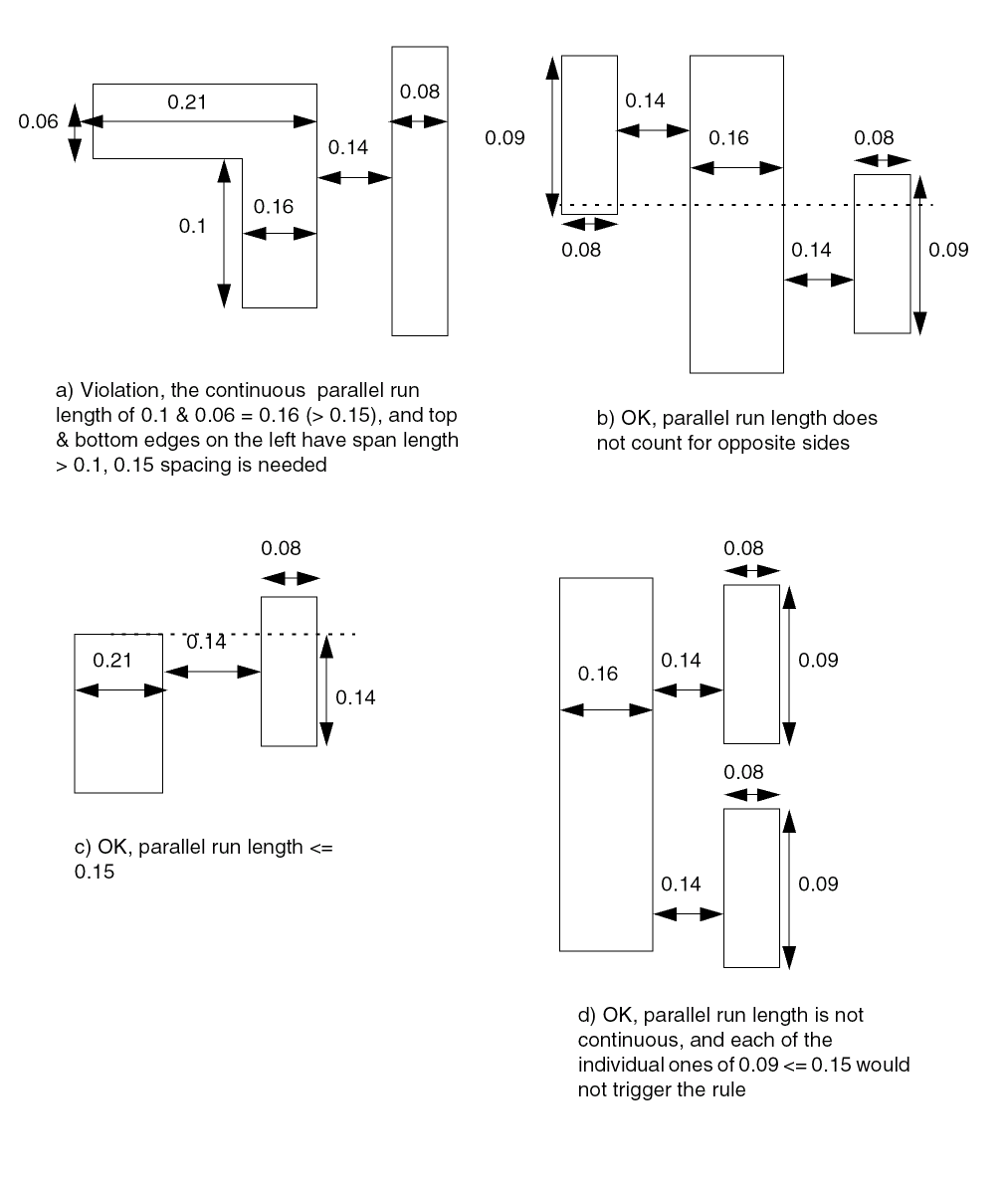
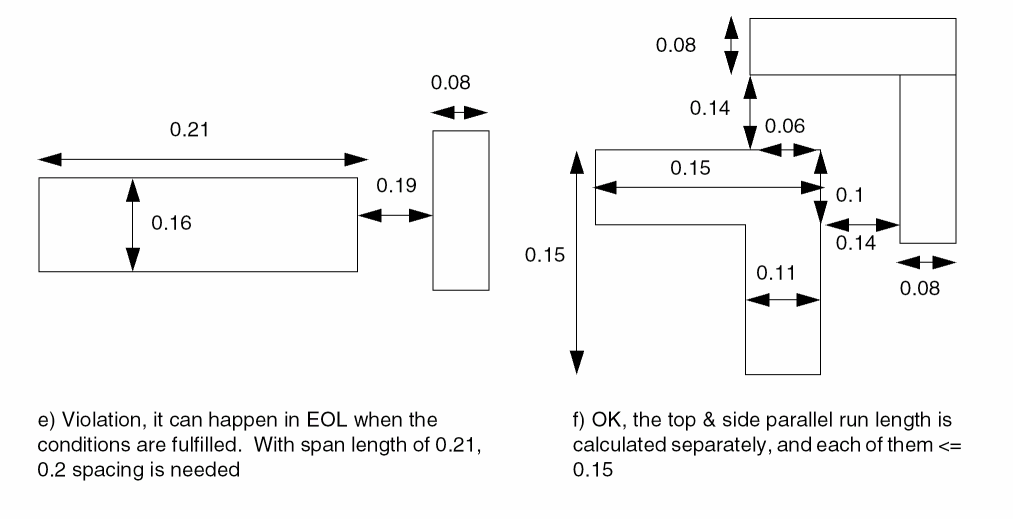
Figure 5-174 Illustration of Spacing Table Rule with WRONGDIRECTION
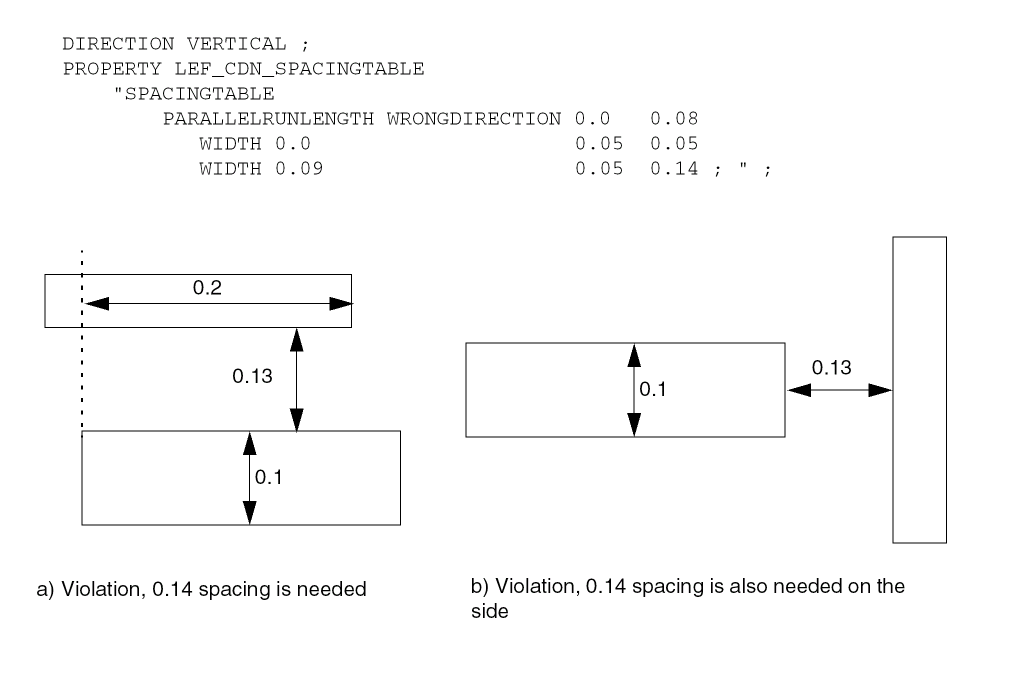
Figure 5-175 Illustration of Spacing Table Rule with EXCEPTWITHIN
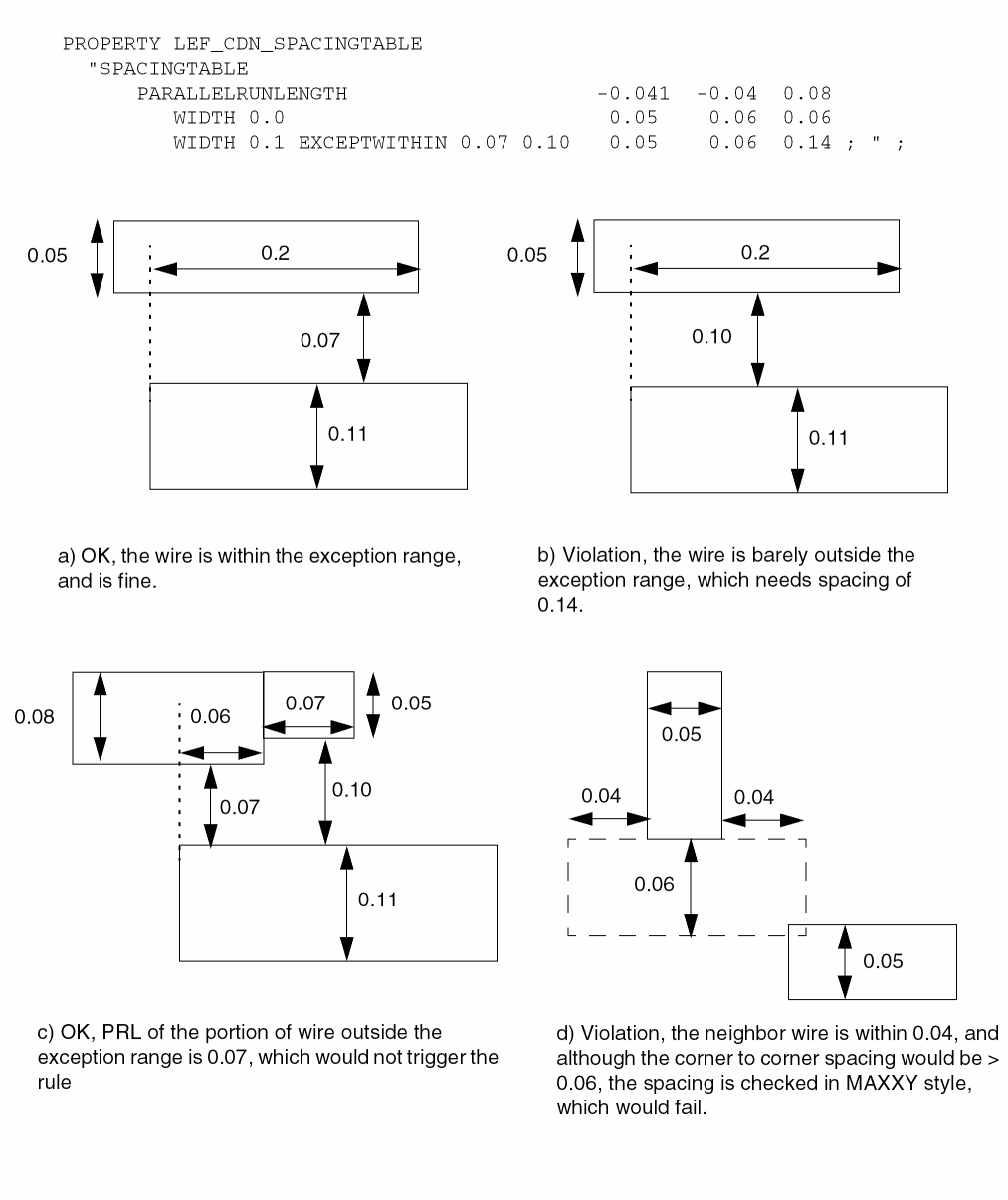
Figure 5-176 Illustration of Spacing Table Rule with EXCEPTWITHIN
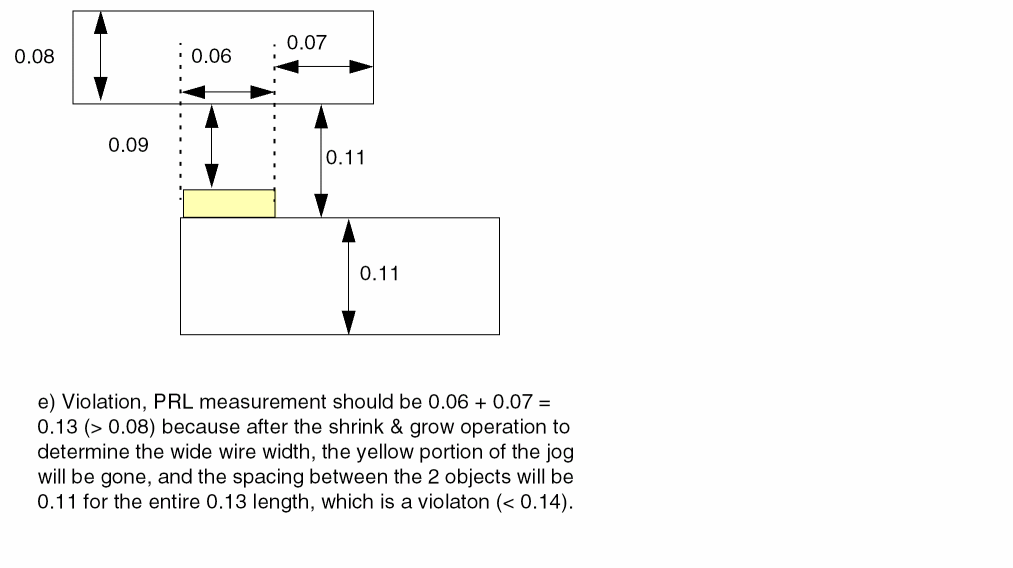
-
The following example illustrates
PARALLELRUNLENGTHwithWRONGDIRECTION:DIRECTION VERTICAL ;
PROPERTY LEF_CDN_WIDTH
"WIDTH 0.12 WRONGDIRECTION ;
SPACINGTABLE
PARALLELRUNLENGTH 0.00 0.07
WIDTH 0.0 0.05 0.05
WIDTH 0.1 0.05 0.08 ; " ;
PROPERTY LEF_CDN_SPACINGTABLE
"SPACINGTABLE
PARALLELRUNLENGTH WRONGDIRECTION ... ; " ;
Figure 5-177 Illustration of PARALLELRUNLENGTH with WRONGDIRECTION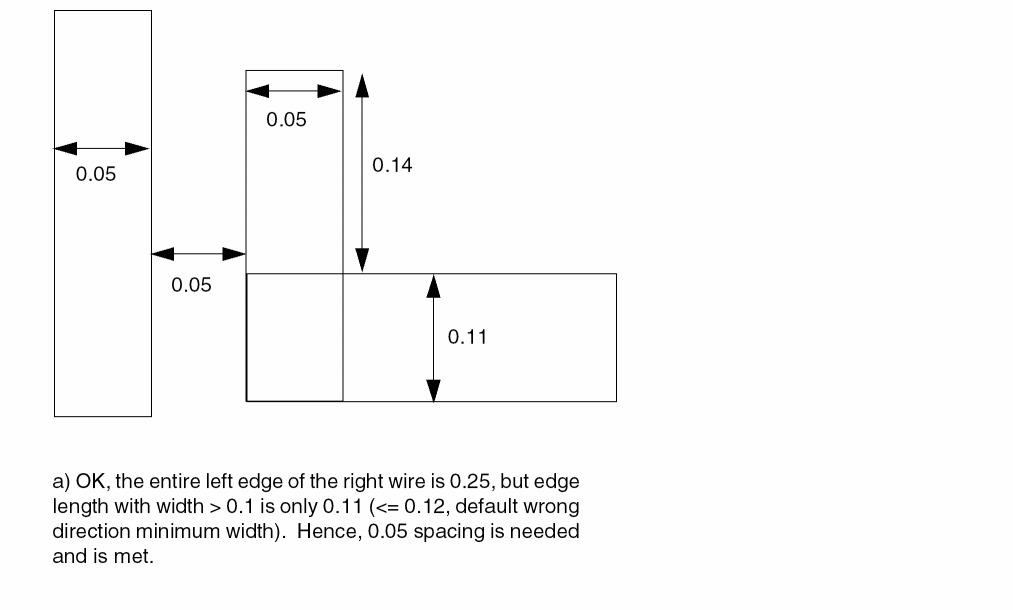
Two Wires Forbidden Spacing Rule
Two wires forbidden spacing rules can be used to define a list of forbidden spacing ranges between two wires.
You can create a two wires forbidden spacing rule by using the following property definition:
PROPERTY LEF_CDN_TWOWIRESFORBIDDENSPACING "TWOWIRESFORBIDDENSPACING [SAMEMASK | MASKmaskNum] {minSpacing maxSpacing}... [HORIZONTAL|VERTICAL] [IGNOREMIDDLE] { MINSPANLENGTHminSpanLength[EXACTSPANLENGTH] MAXSPANLENGTHmaxSpanLength[EXACTSPANLENGTH] |FIRSTSPANLENGTHspanLength1 spanLength2[OTHERSPANLENGTHotherSpanLength1] SECONDSPANLENGTHspanLength3 spanLength4} [OTHERSPANLENGTHotherSpanLength2] |OFFGRIDONLYminWidth1 maxWidth1[minWidth2 maxWidth2] } PRLprl; “ ;
Two Wires Forbidden Spacing Examples
-
In the following example, the specified forbidden spacing rules are applied only in the horizontal direction:
DIRECTION HORIZONTAL ;
PROPERTY LEF_CDN_TWOWIRESFORBIDDENSPACING “
       TWOWIRESFORBIDDENSPACING SAMEMASK 0.16 0.20
         MINSPANLENGTH 0.05 EXACTSPANLENGTH
         MAXSPANLENGTH 0.08 EXACTSPANLENGTH  PRL 0 ; “ ;
Figure 5-178 Illustration of TWOWIRESFORBIDDENSPACINGFigure 5-179 Illustration of TWOWIRESFORBIDDENSPACING with OTHERSPANLENGTH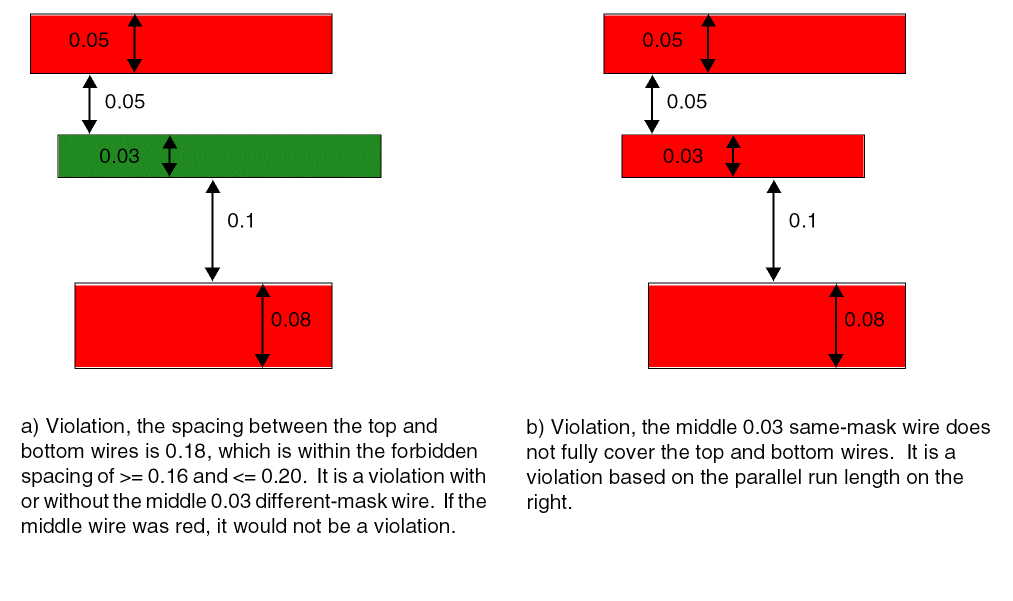
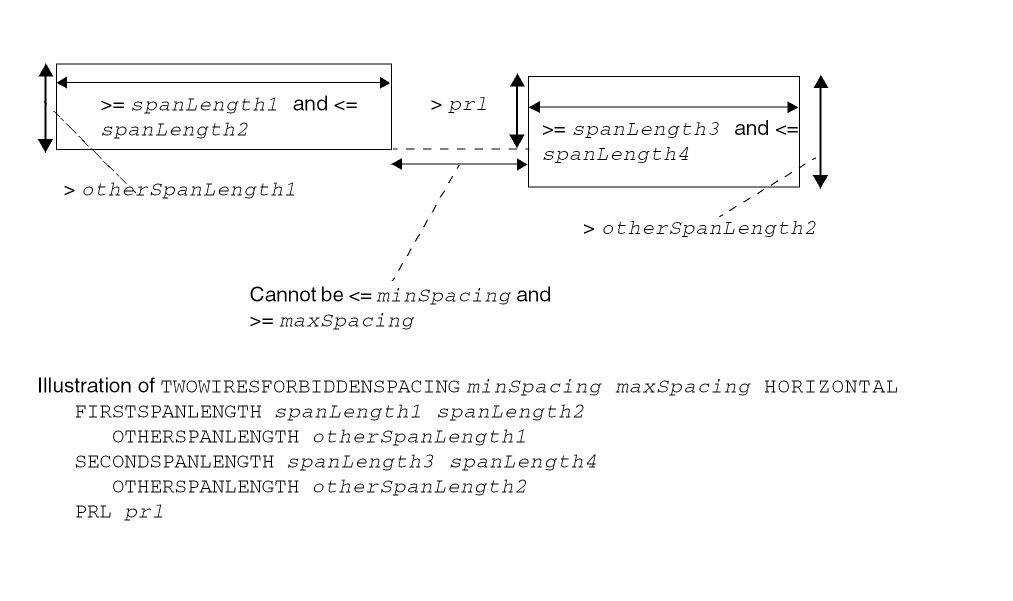
-
Consider the following forbidden spacing rule:
DIRECTION HORIZONTAL ;
PROPERTY LEF_CDN_TWOWIRESFORBIDDENSPACING “
       TWOWIRESFORBIDDENSPACING 0.16 0.20 IGNOREMIDDLE
         MINSPANLENGTH 0.05 EXACTSPANLENGTH
         MAXSPANLENGTH 0.08 EXACTSPANLENGTH  PRL 0.1 ; “ ;
Figure 5-180 Illustration of TWOWIRESFORBIDDENSPACING with IGNOREMIDDLE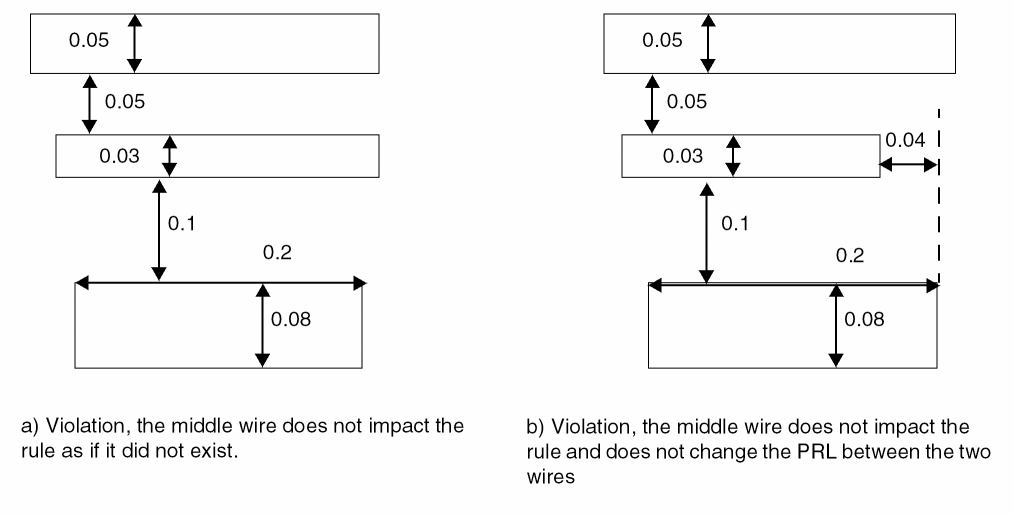
Voltage Spacing Rule
Voltage spacing rules can be used to define different-net spacing between objects on the metal layer and objects on the metal/cut layer above or below it according to different voltages.
You can create a voltage spacing rule by using the following property definition:
PROPERTY LEF_CDN_VOLTAGESPACING
"VOLTAGESPACING [TOCUT [ABOVE | BELOW]]
   {voltage spacing} ...
     ;...” ;
Voltage Spacing Rule Examples
-
The following example indicates that 0.1 μm is the wire to wire spacing for voltage greater than or equal to 2.0V and less than 3.0V, 0.15 μm is the wire to wire spacing for voltage greater than or equal to 3.0V and less than 4.0V, and 0.2 μm is the wire to wire spacing for voltage greater than or equal to 4.0V:
VOLTAGESPACING
2.0 0.1
3.0 0.15
4.0 0.2 ;
-
The following example indicates the same as above, except that the spacing is between wires in metal layer to all cut vias in the adjacent above and below cut layers:
VOLTAGESPACING TOCUT
2.0 0.1
3.0 0.15
4.0 0.2 ;
Width Table Rule
You can use width table rules to define all the allowable legal widths on the routing layer.
You can define a width table rule by using the following property definition:
PROPERTY LEF_CDN_WIDTHTABLE
"WIDTHTABLE {width}... [WRONGDIRECTION] [ORTHOGONAL]
   ;" ;
-
The following width table rule indicates that width must be 0.10 μm, 0.15 μm, 0.20 μm, 0.25 μm, 0.30 μm, and greater than or equal to 0.40 μm.
MAXWIDTH 0.40 ;# To define legal width =, instead of >=, 0.40 μm.PROPERTY LEF_CDN_WIDTHTABLE
"WIDTHTABLE 0.10 0.15 0.20 0.25 0.30 0.40 ;" ;
Figure 5-181 Illustration of WIDTHTABLE Rule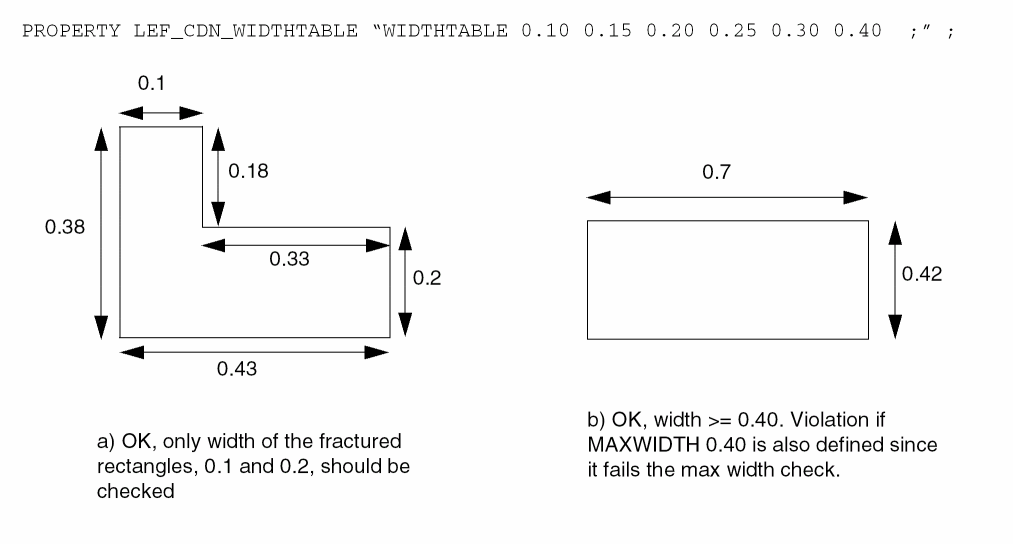
-
The following width table rule indicates that width must be 0.05 µm, 0.1 µm, or greater than or equal to 0.15 µm for horizontal wires.
DIRECTION VERTICAL ;
PROPERTY LEF_CDN_WIDTHTABLE
"WIDTHTABLE 0.05 0.1 0.15 WRONGDIRECTION ; " ;
Figure 5-182 Illustration of Width Table Rule with ORTHOGONAL and WRONGDIRECTION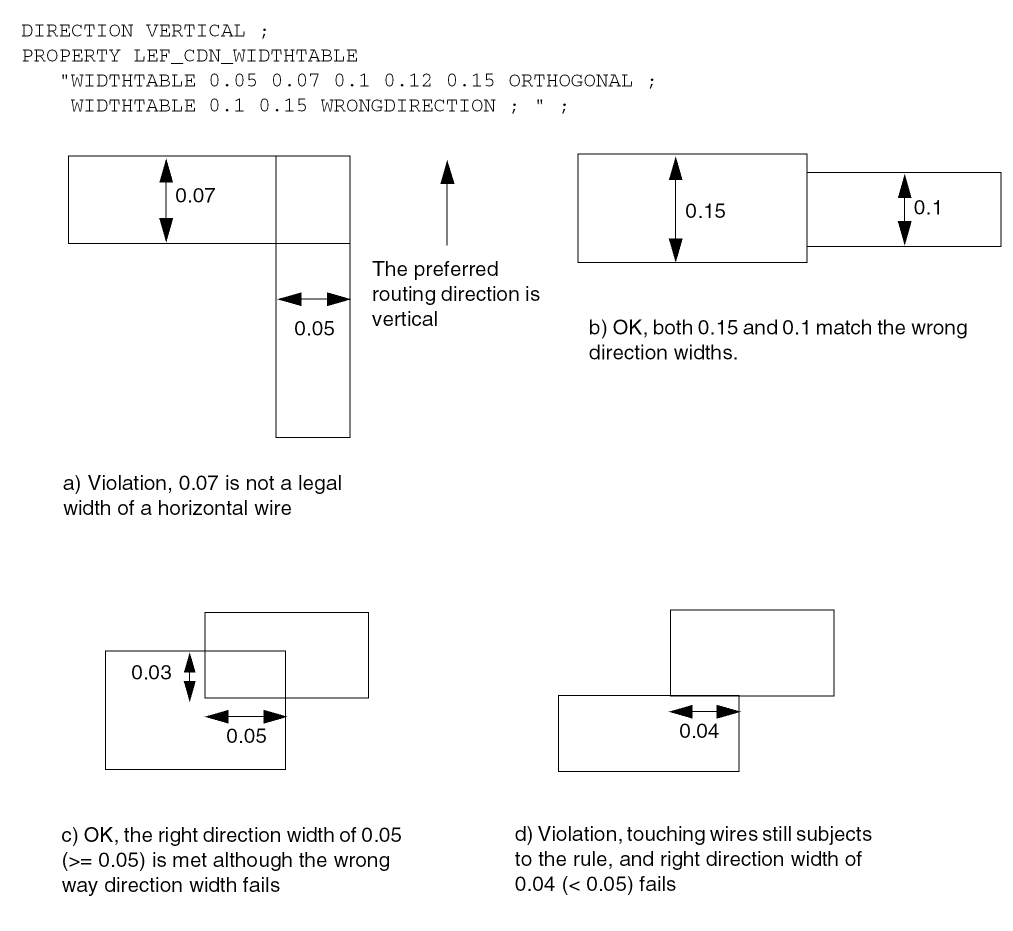
Width Rule
Width rules can be used to define the default routing width to use for all regular wiring on the layer.
You can define a width rule by using the following property definition:
PROPERTY LEF_CDN_WIDTH
"WIDTH minWidth [WRONGDIRECTION]
   ;" ;
WIDTH is the same as the existing routing layer WIDTH syntax.
Width Rule Examples
-
The following width rule indicates that the default routing width of a vertical route is 0.1 μm, while the default routing width of a horizontal route is 0.14 μm:
DIRECTION VERTICAL;
WIDTH 0.1;
PROPERTY LEF_CDN_WIDTH
"WIDTH 0.14 WRONGDIRECTION ;" ;
In theDEF, a vertical default route in theNETSsection will have a width of 0.10 μm with extension of 0.05 μm, while a horizontal route will have a width of 0.14 μm with extension of 0.05 μm.
In more advanced nodes, wider widths are required for non-preferred direction. The following example shows route with wrong-way segment:
Figure 5-183 Illustration of WIDTH Rule with WRONGDIRECTION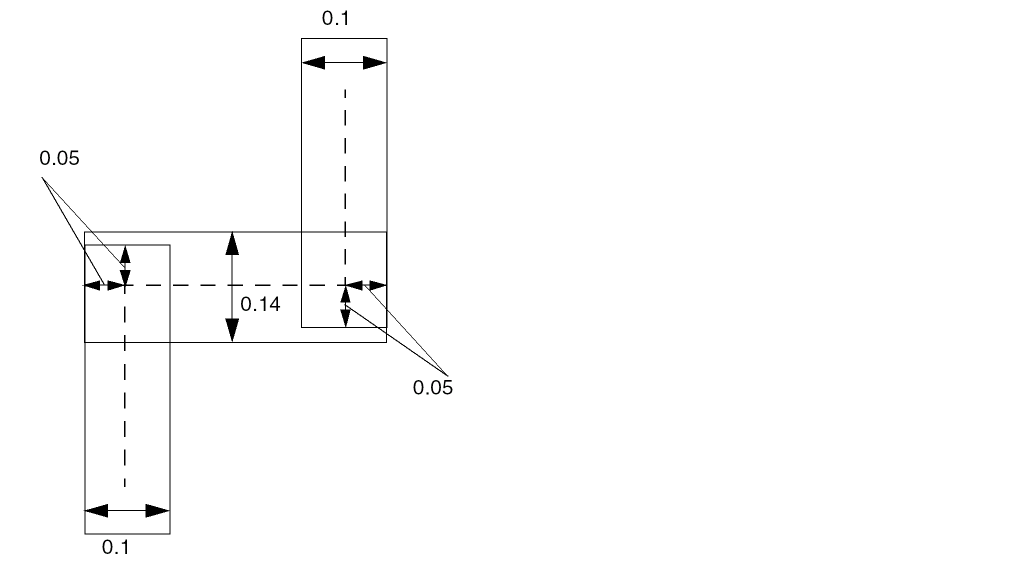
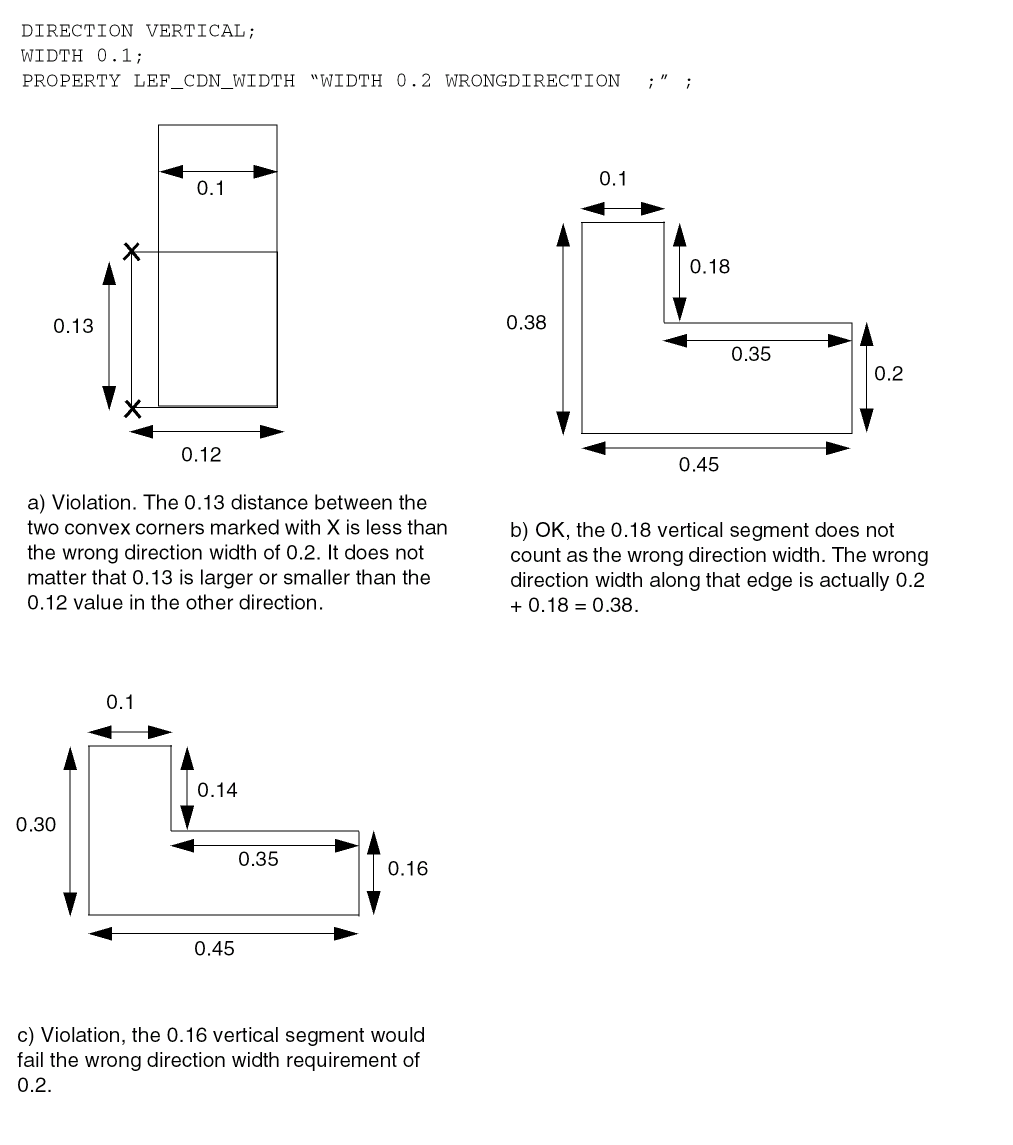
Wrong Direction EOL Keep Out Rule
You can define a wrong direction EOL keep out rule by using the following property definition:
PROPERTY LEF_CDN_WRONGDIREOLKEEPOUT "WRONGDIREOLKEEPOUTedgeExtwrongDirEdgeExtENDOFLINEeolWidthEDGELENGTHminLength maxLength;" ;
Wrong Direction EOL Keep Out Rule Example
Figure 5-184 Illustration of WRONGDIRECTIONEOLKEEPOUT Rule
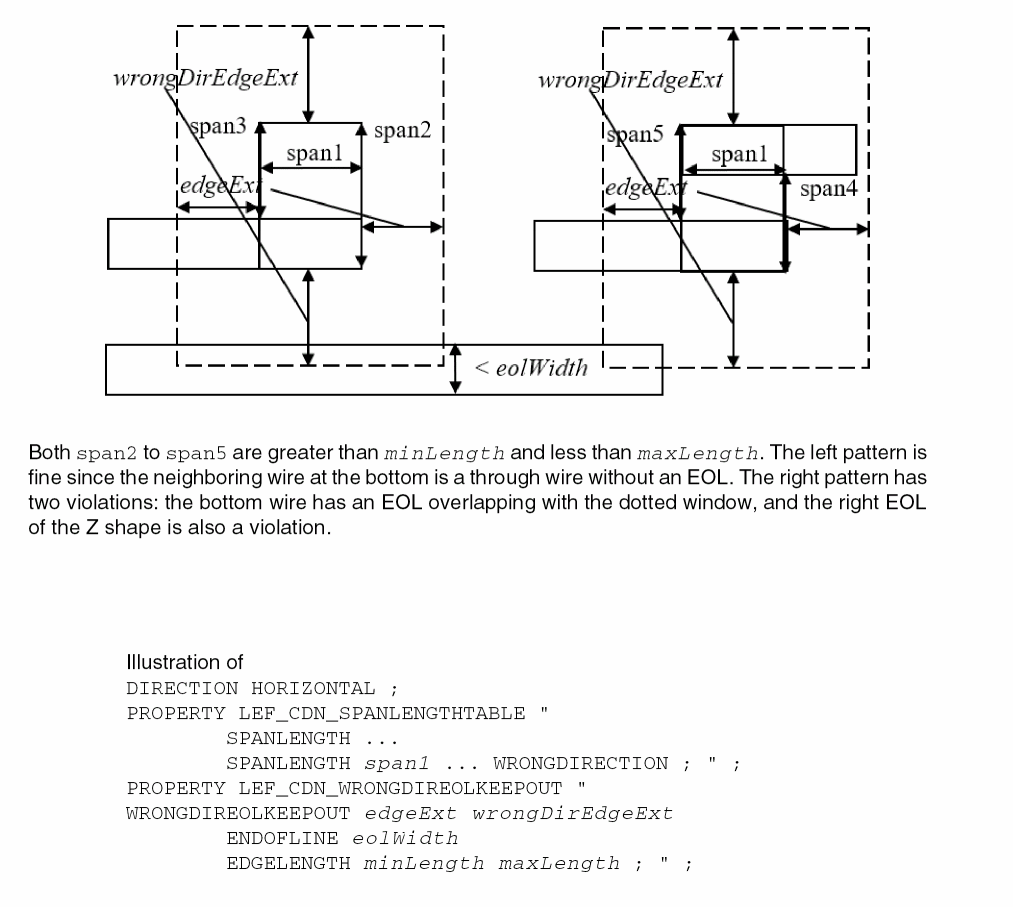
Routing Pitch
The PITCH statements define the detail routing grid generated when you initialize a floorplan. The pitch for a given routing layer defines the distance between routing tracks in the preferred direction for that layer. The complete routing grid is the union of the tracks generated for each routing layer.
The spacing of the grid should be no less than line-to-via spacing in both the horizontal and vertical directions. Grid spacing less than line-to-via spacing can result in routing problems and can decrease the utilization results.
The grid should normally allow for diagonal vias. Via spacing on all layers included in the via definition in LEF determines whether or not diagonal vias can be used. The router is capable of avoiding violations between diagonal vias. If you allow diagonal vias, less time is needed for routing and the layout creates a smaller design.
Return to top