4
LEF Syntax - Layer (Masterslice or Overlap)
This chapter contains information about the following topics:
Layer (Masterslice or Overlap)
LAYER layerName
TYPE {MASTERSLICE | OVERLAP} ;
[MANUFACTURINGGRID value ;]
[MASK maskNum ;]
[PROPERTY propName propVal ;] ...
[PROPERTY LEF_CDN_TYPE
   "TYPE [NWELL | PWELL | ABOVEDIEEDGE | BELOWDIEEDGE | DIFFUSION | TRIMPOLY
         | TRIMMETAL [VIRTUAL] | REGION | MEOL | WELLDISTANCE [BOUNDARYTAP]
         | CPODE | RCBLOCKAGE metalLayer | TRIMDIFFUSION | ABUTFILLER
         | ABUTLOGIC];" ;
[PROPERTY LEF_CDN_ABUTFILLER
   "ABUTFILLER distance LAYER abutFillerLayerName
   ; " ;]
[PROPERTY LEF_CDN_ADJACENTTRIMS
   "ADJACENTTRIMS trimNum SPACING spacing [SAMEMASK]
   ; " ;]
[PROPERTY LEF_CDN_AREA
   "AREA minArea
   ; " ;]
[PROPERTY LEF_CDN_COREEDGELENGTH
   "COREEDGELENGTH minLength [MAXLENGTH maxLength]
     [WIDTH width]
     [CONCAVECORNER | CONVEXCORNER | MIXEDCORNER]
     [EXTENDTOALIGN width spacing [EXTENDONLY | ALIGNONLY]]
     [FILLERONLY]
     ; " ;]
[PROPERTY LEF_CDN_ENCLOSURE
   "ENCLOSURE overhang LAYER secondLayerName;..." ;]
[PROPERTY LEF_CDN_FORBIDDENARRAY
   FORBIDDENARRAY numRows numCols XSPACING xLow xHigh
      YSPACING yLow yHigh
      [SAMEMASK]
      ; " ;]
[PROPERTY LEF_CDN_MAXLENGTH
  "MAXLENGTH length [HORIZONTAL|VERTICAL]
  ; " ;]
[PROPERTY LEF_CDN_MAXLENGTH
  "MAXLENGTH maxLength
      [[HORIZONTAL|VERTICAL] [GAPMERGED gap]
      [ORTHOGONALLENGTH minLength]]
      ; " ;]
[PROPERTY LEF_CDN_MAXLENGTH
  "MAXLENGTH maxLength [HORIZONTAL|VERTICAL]
  ; " ;]
[PROPERTY LEF_CDN_MAXLENGTH
  "MAXLENGTH maxLength [WIDTH width]
  ; " ;]
[PROPERTY LEF_CDN_MINENCLOSEDAREA
  "MINENCLOSEDAREA area
  ; " ;]
[PROPERTY LEF_CDN_RECTONLY
  "RECTONLY
  ; " ;]
[PROPERTY LEF_CDN_REGION
  "REGION regionLayerName BASEDLAYER trimLayerName
  ; " ;]
[PROPERTY LEF_CDN_ROWBASED
  "ROWBASED
  ; " ;]
[PROPERTY LEF_CDN_SPACING
   "SPACING minSpacing
   ; " ;]
[PROPERTY LEF_CDN_SPACING
   "SPACING minSpacing [SAMENET | LAYER secondLayerName];..." ;]
[PROPERTY LEF_CDN_SPACING
   "SPACING spacing
   ; " ;]
[PROPERTY LEF_CDN_SPACING
   "SPACING spacing PRL prl
   ; " ;]
[PROPERTY LEF_CDN_SPACING
   "SPACING spacing [MERGEDTRIM] [PRLSPACING prlSpacing1 prlSpacing2]
   [ENDTOEND endToEndSpacing [PRL prl]
        [EXACTALIGNED exactAlignedSpacing
            [EXCEPTDIFFMASKALIGNED]]
        [EDGEALIGNED edgeAlignedSpacing]
        [EXCEPTMIDMETALWIDTH width]]
   [SAMEMASK] [MASK maskNum]
   ; " ;...]
[PROPERTY LEF_CDN_TRIMMEDMETAL
   “TRIMMEDMETAL metalLayer [MASK maskNum]
   ]; “ ;
[PROPERTY LEF_CDN_TRIMSHAPE
   "TRIMSHAPE [METALMASK metalMaskNum] EXTENSIONMODEL
   {ADJACENTTRACK | MIDTRACK | EXTENSION extension [METALEDGE]}
   EXACTWIDTH exactWidth
   [GAPMERGED trimGapLength]
   [MAXLENGTH maxLength [GAPMERGEDFORLENGTH trimGapLength]
        [MASK maskNum]]
   [EXCEPTSPACING spacing] [EXCEPTWIDTH width]
   [USEMETALMASK]
   ; " ;]
[PROPERTY LEF_CDN_WIDTH
   "WIDTH minWidth [ZEROPRL]
   ;" ;]
[PROPERTY LEF_CDN_WIDTHLENGTHRATIO
   "WIDTHLENGTHRATIO ratio WIDTH width
   ;" ;]
END layerName
Defines masterslice (non-routing) or overlap layers in the design. Masterslice layers are typically polysilicon layers and are only needed if the cell MACROs have pins on the polysilicon layer.
The overlap layer should normally be named OVERLAP. It can be used in MACRO definitions to form rectilinear-shaped cells and blocks (that is, an “L”-shaped block).
Each layer is defined by assigning it a name and design rules. You must define masterslice or overlap layers separately, with their own layer statements.
You must define layers in process order from bottom to top. For example:
poly masterslice
cut01 cut
metal1 routing
cut12 cut
metal2 routing
cut23 cut
metal3 routing
LAYER layerName
Specifies the name for the layer. This name is used in later references to the layer.
MANUFACTURINGGRID value
Defines the manufacturing grid for this layer. The vertices of every shape on this layer must be on the manufacturing grid or a DRC violation will occur. If not specified, the library MANUFACTURINGGRID value is used. value is a positive float number in units of microns.
MASK maskNum
Specifies how many masks for double- or triple-patterning will be used for this layer. The maskNum variable must be an integer greater than or equal to 2. Most applications only support values of 2 or 3.
PROPERTY propName propVal
Specifies a numerical or string value for a layer property defined in the PROPERTYDEFINITIONS statement. The propName you specify must match the propName listed in the PROPERTYDEFINITIONS statement.
TYPE
Specifies the purpose of the layer.
|
MASTERSLICE
|
Layer is fixed in the base array. If pins appear in the masterslice layers, you must define vias to permit the routers to connect those pins and the first routing layer. Wires are not allowed on masterslice layers.
Routing tools can use only one masterslice layer. If a masterslice layer is defined, exactly one cut layer must be defined between the masterslice layer and the adjacent routing layers.
|
|
OVERLAP
|
Layer used for overlap checking for rectilinear blocks. Obstruction descriptions in the macro obstruction statements refer to the overlap layer.
|
Defining Masterslice Layer Properties to Create 32/28 nm and Smaller Nodes Rules
You can include masterslice layer properties in your LEF file to create 32/28nm and smaller nodes rules that currently are not supported by existing LEF syntax. The properties are specified inside the LAYER MASTERSLICE statements, where they can be seen with other rules.
Before you can reference them, properties must be defined at the beginning of the LEF file in the PROPERTYDEFINITIONS statement, immediately before the first LAYER statement.
-
Properties belong to the
LAYER object and have a type of STRING. -
The property names used for these rules all start with
LEF_CDN_.
All properties use the following syntax within the LEF PROPERTYDEFINITIONS statement:
PROPERTYDEFINITIONS
LAYER propName STRING ["stringValue"] ;
END PROPERTYDEFINITIONS
The property definitions for the masterslice layer properties are as follows:
PROPERTYDEFINITIONS
LAYER LEF_CDN_ABUTFILLER STRING ;
LAYER LEF_CDN_ADJACENTTRIMS STRING ;
LAYER LEF_CDN_AREA STRING ;
LAYER LEF_CDN_COREEDGELENGTH STRING ;
LAYER LEF_CDN_ENCLOSURE STRING ;
LAYER LEF_CDN_FORBIDDENARRAY STRING ;
LAYER LEF_CDN_MAXLENGTH STRING ;
LAYER LEF_CDN_MINENCLOSEDAREA STRING ;
LAYER LEF_CDN_RECTONLY STRING ;
LAYER LEF_CDN_REGION STRING ;
LAYER LEF_CDN_ROWBASED STRING ;
LAYER LEF_CDN_SPACING STRING ;
LAYER LEF_CDN_TAPDISTANCE STRING ;
LAYER LEF_CDN_TRIMMEDMETAL STRING ;
LAYER LEF_CDN_TRIMSHAPE STRING ;
LAYER LEF_CDN_TYPE STRING ;
LAYER LEF_CDN_WIDTH STRING ;
LAYER LEF_CDN_WIDTHLENGTHRATIO STRING ;
END PROPERTYDEFINITIONS
Type Rule
A type rule can be used to further classify a masterslice layer.
You can create a type rule by using the following property definition:
TYPE MASTERSLICE;
PROPERTY LEF_CDN_TYPE
  "TYPE [NWELL | PWELL | ABOVEDIEEDGE | BELOWDIEEDGE | DIFFUSION | TRIMPOLY
         | TRIMMETAL [VIRTUAL] | REGION | MEOL | WELLDISTANCE [BOUNDARYTAP]
         | CPODE | RCBLOCKAGE metalLayer | TRIMDIFFUSION | ABUTFILLER
         | ABUTLOGIC]
         ;" ;
Where:
|
ABOVEDIEEDGE | BELOWDIEEDGE
|
|
|
Specifies that the masterslice layer is a special one for a hard macro to define an OBS on the layer such that the die boundary of the above or below die do not overlap.
The following property statement can be defined on layers with type ABOVEDIEEDGE or BELOWDIEEDGE:
PROPERTY LEF_CDN_SPACING
"SPACING minSpacing
; " ;
|
|
ABUTFILLER
|
Specifies a special layer for abutment consideration. The standard cells with shapes on this layer should be filler cells with CLASS CORE SPACER.
The following property could be applied on this ABUTFILLER layer with type ABUTFILLER.
PROPERTY LEF_CDN_MAXLENGTH
"MAXLENGTH length [HORIZONTAL|VERTICAL]
; " ;
where
MAXLENGTH length [HORIZONTAL|VERTICAL]
Specifies that the maximum length of any shape on this layer must be less than or equal to length. If HORIZONTAL or VERTICAL is specified, the maximum length is checked only in the given direction.
Type: Float, specified in microns
|
|
ABUTLOGIC
|
Specifies a special layer for abutment consideration. The standard cells with shapes on this layer should be logic cells. This layer should be defined after layer with type ABUTFILLER.
The following property could be applied on this ABUTLOGIC layer with type ABUTLOGIC.
PROPERTY LEF_CDN_ABUTFILLER
"ABUTFILLER distance LAYER abutFillerLayerName
; " ;
|
|
CPODE
|
Specifies that this masterslice layer is a special layer related to poly and diffusion.
The following properties could be defined on a CPODE masterslice layer:
PROPERTY LEF58_MAXLENGTH
"MAXLENGTH maxLength
   [[HORIZONTAL|VERTICAL] [GAPMERGED gap]
   [ORTHOGONALLENGTH minLength]]
   ; " ;
PROPERTY LEF_CDN_SPACING
“SPACING spacing PRL prl
; ” ;
where
SPACING spacing PRL prl
Specifies that the spacing between two objects with parallel run length greater than prl must be greater than or equal to spacing.
Type: Float, specified in microns
|
|
DIFFUSION
|
Defines a diffusion layer.
The following property statements can be defined on this layer:
PROPERTY LEF_CDN_COREEDGELENGTH
"COREEDGELENGTH minLength [MAXLENGTH maxLength]
     [WIDTH width]
     [CONCAVECORNER | CONVEXCORNER | MIXEDCORNER]
     [EXTENDTOALIGN width spacing [EXTENDONLY |         ALIGNONLY]]
     [FILLERONLY]
     ; " ;
PROPERTY LEF_CDN_MINENCLOSEDAREA
"MINENCLOSEDAREA area
; " ;
where
MINENCLOSEDAREA area
Specifies the minimum area size of the hole to be greater than or equal to area.
Type: Float, specified in microns square
PROPERTY LEF_CDN_SPACING
"SPACING minSpacing
; " ;
PROPERTY LEF_CDN_WIDTHLENGTHRATIO
 "WIDTHLENGTHRATIO ratio WIDTH width; " ;
|
|
MEOL
|
Specifies that the masterslice layer is a middle-end-of-line (MEOL) layer, which is the front-end metal layer on a 3D IC design.
The following property statement can be defined on this layer:
PROPERTY LEF_CDN_MAXLENGTH
"MAXLENGTH maxLength
  ; " ;
where
MAXLENGTH maxLength
Specifies that the maximum length of any shape on an MEOL layer must be less than or equal to maxLength. Typically, some standard cells would have shapes on an MEOL layer. If placement abuts too many such cells, it could violate this rule. Placement needs to avoid such violations by honoring the rule.
|
|
NWELL
|
Indicates that the layer is a nwell layer.
The following property statements can be defined on this layer:
PROPERTY LEF_CDN_ENCLOSURE
"ENCLOSURE overhang LAYER secondLayerName;..." ;
PROPERTY LEF_CDN_SPACING
"SPACING minSpacing [SAMENET | LAYER              secondLayerName] ;..." ;
PROPERTY LEF_CDN_WIDTH
"WIDTH minWidth;" ;
|
|
PWELL
|
Indicates that the layer is a pwell layer.
The following property statements can be defined on this layer:
PROPERTY LEF_CDN_ENCLOSURE
"ENCLOSURE overhang LAYER secondLayerName;..." ;
PROPERTY LEF_CDN_SPACING
"SPACING minSpacing [SAMENET | LAYER            secondLayerName] ;..." ;
PROPERTY LEF_CDN_WIDTH
"WIDTH minWidth;" ;
|
|
RCBLOCKAGE
|
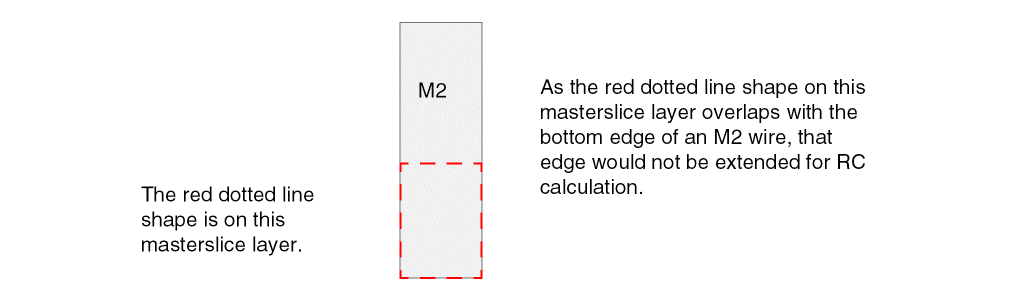
Specifies that if a shape on this masterslice layer overlaps with a shape on the specified metal layer, metalLayer, the metal line-end that is covered by the shape in the masterslice layer would not be extended for RC calculation.
|
|
REGION
|
Defines a special masterslice layer that is used to define the areas of a region on which a set of rules defined in the metal, cut, and/or trim metal layers with the REGION property would be applied.
The following property statements can be defined on this layer:
PROPERTY LEF_CDN_ROWBASED
"ROWBASED
;";
where
ROWBASED
Specifies that certain cell rows would be in this REGION layer, and the corresponding rules should be applied on them. This is typically used in mixed/hybrid row designs in which certain cell height row areas may be added in this REGION layer. The actual cell rows would be identified by the site name with a separate command.
|
|
TRIMDIFFUSION
|
Specifies a trim layer for a diffusion layer.
The following properties could be applied on this TRIMDIFFUSION layer.
PROPERTY LEF_CDN_MAXLENGTH
"MAXLENGTH maxLength {HORIZONTAL|VERTICAL}
; " ;
where
MAXLENGTH maxLength {HORIZONTAL|VERTICAL}
Specifies the maximum length when shapes are abutted horizontally or vertically to be less than or equal to maxLength when HORIZONTAL or VERTICAL is specified.
Type: Float, specified in microns
PROPERTY LEF_CDN_SPACING
"SPACING spacing
; " ;
where
SPACING spacing
Specifies the spacing between two non-abutted/overlapping shapes to be greater than or equal to spacing. This spacing is applied horizontally, vertically, and in Euclidean style. Two corner shapes are not allowed.
Type: Float, specified in microns
PROPERTY LEF_CDN_RECTONLY
"RECTONLY
; " ;
where
RECTONLY
Specifies that shapes must be rectangular on this layer.
|
|
TRIMMETAL
|
Defines a trim metal layer. This layer type is only used along with metal layers manufactured with self-aligned double patterning (SADP) technology. The TRIMMETAL layer has the shapes for the SADP mask used to “trim” or “cut” or “block” the self-aligned metal lines created during the first mask step of SADP processing. These shapes could be predefined in macros/cells or added at the line-end of a wire during routing. There are additional rules in cut and metal layers to define constraints to those shapes on a TRIMMETAL layer.
The TRIMMETAL layer can have the following property to indicate which metal layer or which mask of the metal layer can be trimmed by the TRIMMETAL shapes. The metal layer should have the MASK construct with value of 2 or larger to indicate that it is SADP (or DPT) layer. The TRIMMETAL layer could also have the MASK construct to indicate number of masks on that layer.
PROPERTY LEF_CDN_TRIMMEDMETAL
“TRIMMEDMETAL metalLayer [MASK maskNum]
  ; “ ;
|
|
|
In addition, the following property statements can be defined on this layer:
PROPERTY LEF_CDN_ADJACENTTRIMS
"ADJACENTTRIMS trimNum SPACING spacing [SAMEMASK]
; " ;
PROPERTY LEF_CDN_AREA
"AREA minArea
  ; " ;
PROPERTY LEF_CDN_FORBIDDENARRAY
"FORBIDDENARRAY numRows numCols XSPACING xLow xHigh
YSPACING yLow yHigh
[SAMEMASK]
; " ;
PROPERTY LEF_CDN_MAXLENGTH
"MAXLENGTH maxLength [WIDTH width]
; … " ;
PROPERTY LEF_CDN_SPACING
"SPACING minSpacing
  ; " ;
PROPERTY LEF_CDN_SPACING
"SPACING spacing LAYER cutLayer [CUTCLASS className]
    [MASK maskNum] [TRIMSPACING trimSpacing [DIFFMASK]]
    ; " ;...
PROPERTY LEF_CDN_SPACING
"SPACING spacing [MERGEDTRIM]
    [PRLSPACING prlSpacing1 prlSpacing2]
    [ENDTOEND endToEndSpacing [PRL prl]
       [EXACTALIGNED exactAlignedSpacing
          [EXCEPTDIFFMASKALIGNED]]
       [EDGEALIGNED edgeAlignedSpacing]
       [EXCEPTMIDMETALWIDTH width]]
    [SAMEMASK] [MASK maskNum]
    ; " ;...
|
|
|
PROPERTY LEF58_TRIMSHAPE
"TRIMSHAPE [METALMASK metalMaskNum] EXTENSIONMODEL
    {ADJACENTTRACK | MIDTRACK | EXTENSION extension         [METALEDGE]}
    EXACTWIDTH exactWidth
    [GAPMERGED trimGapLength]
    [MAXLENGTH maxLength
    [GAPMERGEDFORLENGTH trimGapLength][MASK maskNum]]
    [EXCEPTSPACING spacing] [EXCEPTWIDTH width]
    [USEMETALMASK]
    ; " ;
Typically, shapes on a trim metal layer could be defined in macros/cells only. There are additional rules in cut and metal layers to define constraints for the shapes on a TRIMMETAL layer.
|
|
TRIMPOLY
|
Defines a TPO layer for self-aligned double patterning (SADP) technology. Only cells would have shapes on that layer. The following property statements define the constraints that placement needs to honor:
PROPERTY LEF_CDN_AREA
"AREA minArea
  ; " ;
PROPERTY LEF_CDN_SPACING
"SPACING minSpacing
  ; " ;
PROPERTY LEF_CDN_COREEDGELENGTH
"COREEDGELENGTH minLength
  ; " ;
PROPERTY LEF_CDN_WIDTH
"WIDTH minWidth  [ZEROPRL]
; " ;
|
|
VIRTUAL
|
Specifies that it is a virtual trim layer. No trims would be displayed or output. It is used to achieve a fully filled track requirement with line-end gaps equal to the trim width.
This means that:
(1) EXCEPTSPACING should not be defined in TRIMSHAPE.
(2) Trim spacing could still be defined and would be translated to the spacing requirement between two line-end gaps.
This virtual trim layer could be defined to trim one of the metal masks virtually while a real trim layer could be defined to trim the other metal mask. Two virtual trim layers could also be defined to trim different metal masks with different critiques virtually.
|
|
WELLDISTANCE [BOUNDARYTAP]
|
|
|
Specifies that this masterslice layer is a special layer for defining the well tap distance. When a well tap cell or core boundary overlaps with the layer, its neighboring well tap cell and the well tap cell overlapping the layer should use the defined tap distance on this layer. BOUNDARYTAP indicates a region that requires a special way for inserting the well tap.
The following property can be defined on this layer:
PROPERTY LEF_CDN_TAPDISTANCE
"TAPDISTANCE {distance | { HALFROW rowNum         [LEFT|RIGHT] distance}...}
     TAPTYPE typeName
     ; " ;
|
Type Rule Examples
Abut Filler Rule for Abut Logic Layers
You can create an abut filler rule for abut logic layer of type ABUTLOGIC by using the following property definition:
PROPERTY LEF_CDN_ABUTFILLER
"ABUTFILLER distance LAYER abutFillerLayerName
; " ;
Where:
|
ABUTFILLER distance LAYER abutFillerLayerName
|
|
|
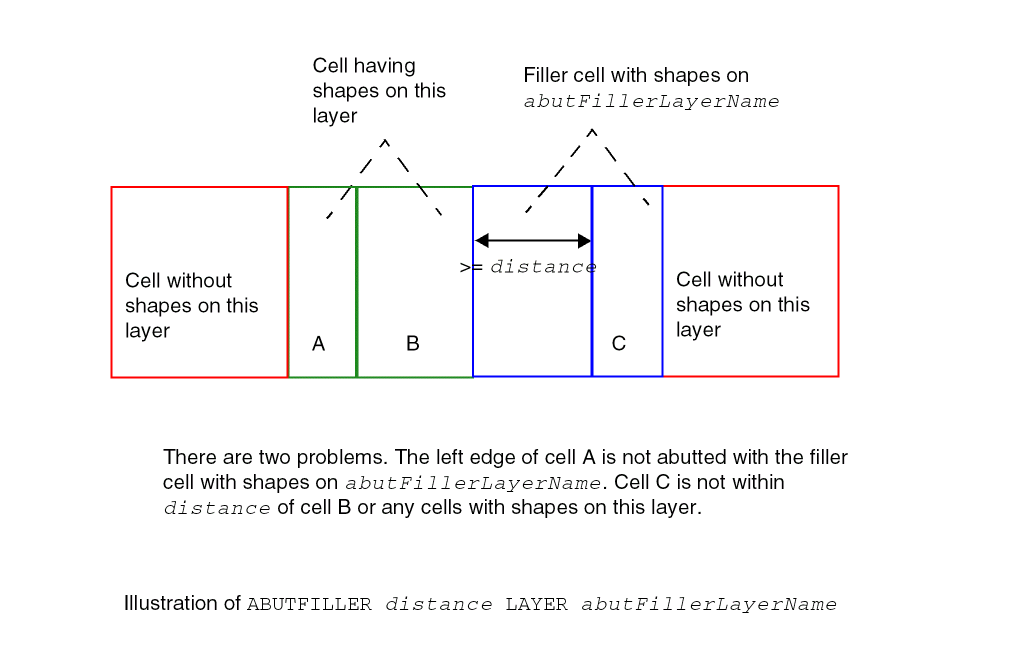
Specifies that standard cells with shapes on this layer must be abutted on both sides with filler cells with shapes in abutFillerLayerName, which must be a previously defined layer with type ABUTFILLER, on the same row. The standard cells with shapes on this layer could also be abutted together. Then, the leftmost and rightmost edges should fulfill this filler abutment condition. In addition, the filler cells with shapes in abutFillerLayerName must be inserted within distance of the standard cells with shapes in this layer. Note that the shapes in this layer and in abutFillerLayerName could overlap when the cells are abutted.
Type: Float, specified in microns
|
Figure 4-2
Illustration of Abut Filler Rule
Adjacent Trim Rule for Trim Metal Layers
You can create an adjacent trim rule for trim metal layers by using the following property definition:
PROPERTY LEF_CDN_ADJACENTTRIMS
"ADJACENTTRIMS trimNum SPACING spacing [SAMEMASK]
; " ;
Where:
|
ADJACENTTRIMS trimNum SPACING spacing
|
|
|
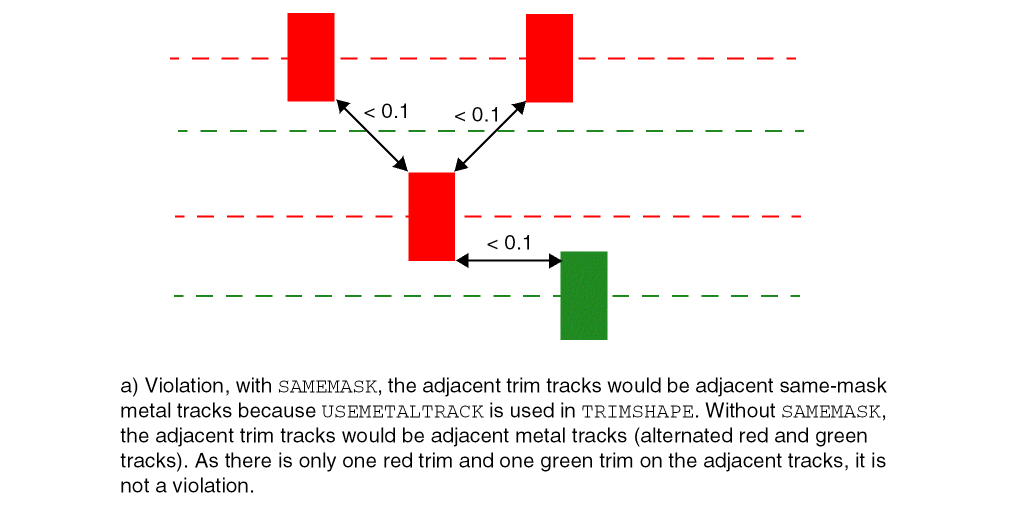
Specifies that it is a violation if two adjacent trim tracks have greater than or equal to trimNum trims and each of the trims has a spacing less than spacing to another trim on the adjacent trim track. This means that the trims would be in a zig-zag pattern on two adjacent trim tracks. Adjacent trim tracks mean the adjacent metal tracks, which the trim would cut. For example, if the trims cut only MASK 2 metal wires, adjacent trim tracks would be adjacent MASK 2 metal tracks. If the trims cut all the metal wires, adjacent trim tracks would be adjacent metal tracks of any masks.
Type: Float, specified in microns
|
|
SAMEMASK
|
Specifies that the rule is applied only on same-mask trims.
|
Adjacent Trim Rule Example
-
The following example illustrates the adjacent trim rule for trim metal shapes:
LAYER TRIM1
TYPE MASTERSLICE ;
MASK 2 ;
PROPERTY LEF_CDN_TYPE "TYPE TRIMMETAL ; " ;
....
PROPERTY LEF_CDN_TRIMSHAPE "TRIMSHAPE ... USEMETALMASK ; " ;
PROPERTY LEF_CDN_ ADJACENTTRIMS "
ADJACENTTRIMS 3 SPACING 0.1 SAMEMASK ; “ ;
END TRIM1
Figure 4-3
Example of Adjacent Trim Rule
Area Rule for a Trim Metal Layer
You can create an area rule for the masterslice TRIMMETAL layer by using the following property definition:
PROPERTY LEF_CDN_AREA
   “AREA minArea
   ; “ ;
Where:
|
AREA minArea
|
Specifies the minimum area on the masterslice TRIMMETAL layer.
Type: Float, specified in microns
|
Core Edge Length Rule with Diffusion
A core edge length rule can be used to indicate that the edge length of a diffusion shape of a standard cell must be greater than or equal to the specified minimum length.
You can create a core edge length rule by using the following property definition:
PROPERTY LEF_CDN_COREEDGELENGTH
"COREEDGELENGTH minLength [MAXLENGTH maxLength]
     [WIDTH width]
     [CONCAVECORNER | CONVEXCORNER | MIXEDCORNER]
     [EXTENDTOALIGN width spacing [EXTENDONLY | ALIGNONLY]]
     [FILLERONLY]
     ; " ;
Where:
|
[CONCAVECORNER | CONVEXCORNER | MIXEDCORNER]
|
|
|
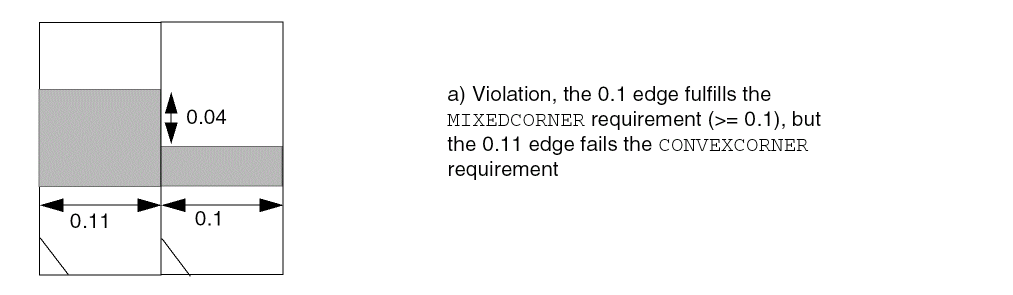
Specifies that the edge length is checked if the edge is between 2 concave corners in CONCAVECORNER, or if the edge is between two convex corners in CONVEXCORNER, or if the edge is between a concave and a convex corners in MIXEDCORNER. See Example of Core Edge Length Rule
|
|
COREEDGELENGTH minLength
|
|
|
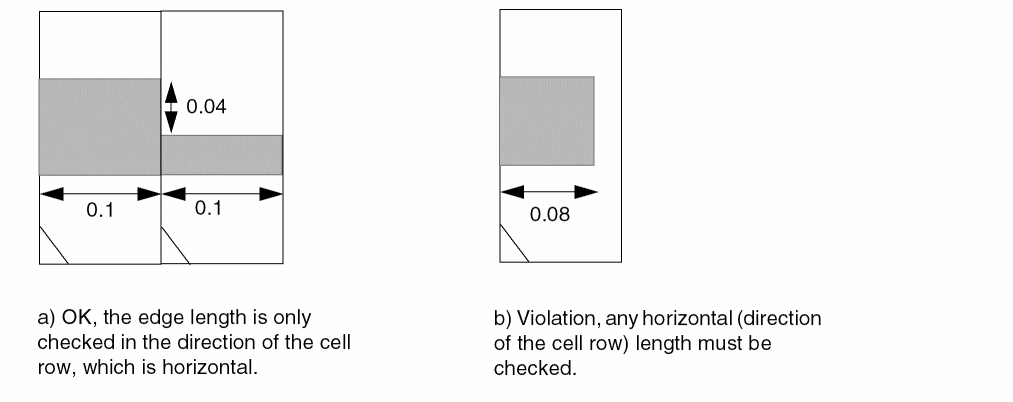
Specifies that the edge length of the diffusion shape of a CORE (standard) cell, in the direction of the cell row, must be greater than or equal to the minLength.
Type: Float, specified in microns
|
|
EXTENDTOALIGN width spacing [EXTENDONLY | ALIGNONLY]
|
|
|
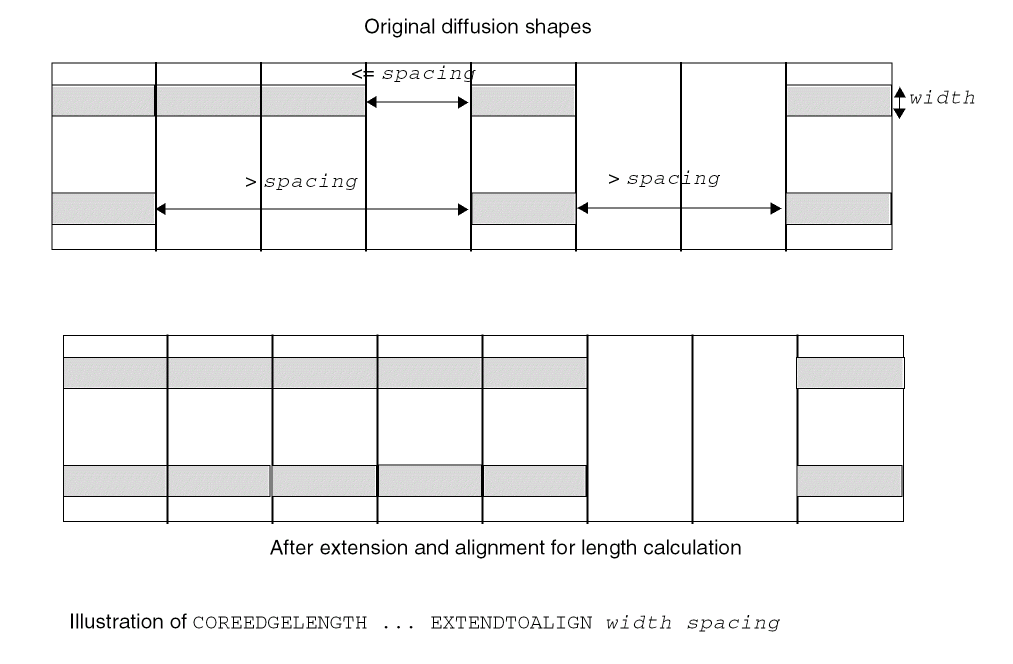
Specifies that if the diffusion shapes on the top and bottom edges within a cell row have width exactly equal to width, the shapes need to be extended and aligned. In addition, any gap on the same edge that is less than or equal to spacing should be filled and merged for length consideration. When MAXLENGTH is also defined, this alignment and extension operation is only considered for the maximum length check. In other words, minLength remains to be checked against the original diffusion shapes.
EXTENDONLY or ALIGNONLY specifies that only the extension or alignment operation is performed, respectively.
Type: Float, specified in microns
|
|
FILLERONLY
|
Specifies a larger minimum core edge length value, which would be considered only as a soft rule in filler insertion in placement. The defined minLength should be larger than another COREEDGELENGTH without FILLERONLY.
Type: Float, specified in microns
|
|
MAXLENGTH maxLength
|
|
|
Specifies that the edge length of the diffusion shape of a CORE (standard) cell, in the direction of the cell row, must be less than or equal to maxLength.
Type: Float, specified in microns
|
|
WIDTH width
|
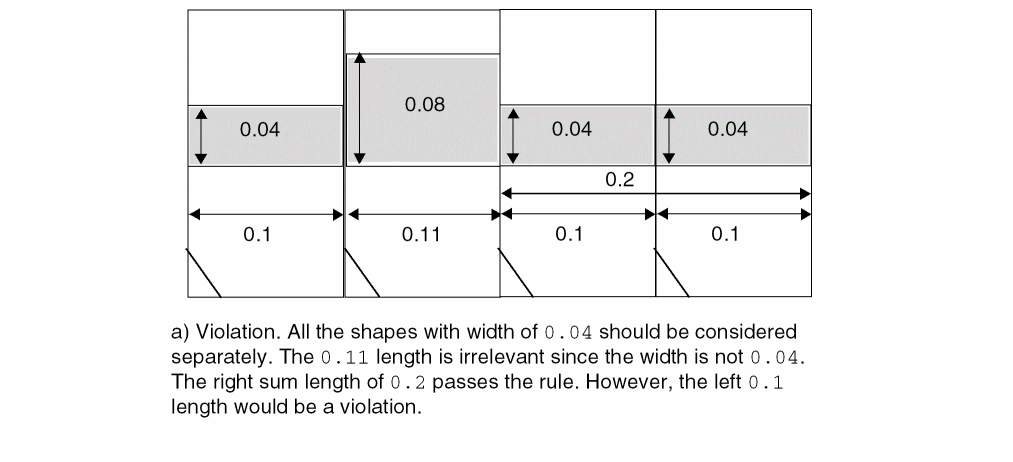
Specifies that the rule applies only on the diffusion shapes with width exactly equal to width. Rules without WIDTH would be applied to all diffusion shapes, independent of their width.
Type: Float, specified in microns
|
Core Edge Length Rule Examples
-
The following example illustrates the core edge length rule:
PROPERTY LEF_CDN_COREEDGELENGTH
"COREEDGELENGTH 0.1 ;
Figure 4-4
Example of Core Edge Length Rule
-
The following example illustrates the core edge length rule with
CONVEXCORNER and MIXEDCORNER:
PROPERTY LEF_CDN_COREEDGELENGTH
"COREEDGELENGTH 0.12 CONVEXCORNER ;
COREEDGELENGTH 0.1 MIXEDCORNER ; " ;
Figure 4-5
Example of Core Edge Length Rule
-
The following example illustrates the core edge length rule with
EXTENDTOALIGN:
Figure 4-6
Example of Core Edge Length Rule with EXTENDTOALIGN
-
The following example illustrates the core edge length rule with
WIDTH:
PROPERTY LEF_CDN_COREEDGELENGTH "
COREEDGELENGTH 0.12 WIDTH 0.04 ; " ;
Figure 4-7
Example of Core Edge Length Rule with WIDTH
Enclosure Rule for Well Layers
Enclosure rules can be used to specify that objects on the current well layer must be enclosed by at least overhang amount of objects in the specified second well layer on all the four sides.
You can create an enclosure rule by using the following property definition:
PROPERTY LEF_CDN_ENCLOSURE
"ENCLOSURE overhang LAYER secondLayerName;..." ;
Where:
|
ENCLOSURE overhang LAYER secondLayerName
|
|
|
Specifies that objects on the current well layer must be enclosed by at least overhang amount of objects in the secondLayerName well layer on all the four sides. The secondLayerName can be any well layer, including forward reference of more than one layer.
This syntax is only allowed on a well masterslice layer with property statement of LEF_CDN_TYPE "TYPE NWELL ; " or LEF_CDN_TYPE "TYPE PWELL ; ". This check is optional and is not performed if the enclosing layer does not exist around the well layer.
Type: Float, specified in microns
|
Enclosure Rule Example
-
The following example indicates that an enclosure of 0.1 μm is required for objects in
PWELLA layer by objects in NWELLA layer:
LAYER NWELLA
TYPE MASTERSLICE
PROPERTY LEF_CDN_TYPE "TYPE NWELL ;" ;
END NWELLA
LAYER PWELLA
TYPE MASTERSLICE
PROPERTY LEF_CDN_TYPE "TYPE PWELL ;" ;
PROPERTY LEF_CDN_ENCLOSURE "ENCLOSURE 0.1 LAYER NWELLA;" ;
END PWELLA
Forbidden Array Rule for Trim Metal Layers
You can create a forbidden array rule for trim metal layers by using the following property definition:
PROPERTY LEF_CDN_FORBIDDENARRAY
"FORBIDDENARRAY numRows numCols XSPACING xLow xHigh
YSPACING yLow yHigh
[SAMEMASK]
; " ;
Where:
|
FORBIDDENARRAY numRows numCols XSPACING xLow xHigh
YSPACING yLow yHigh
|
|
|
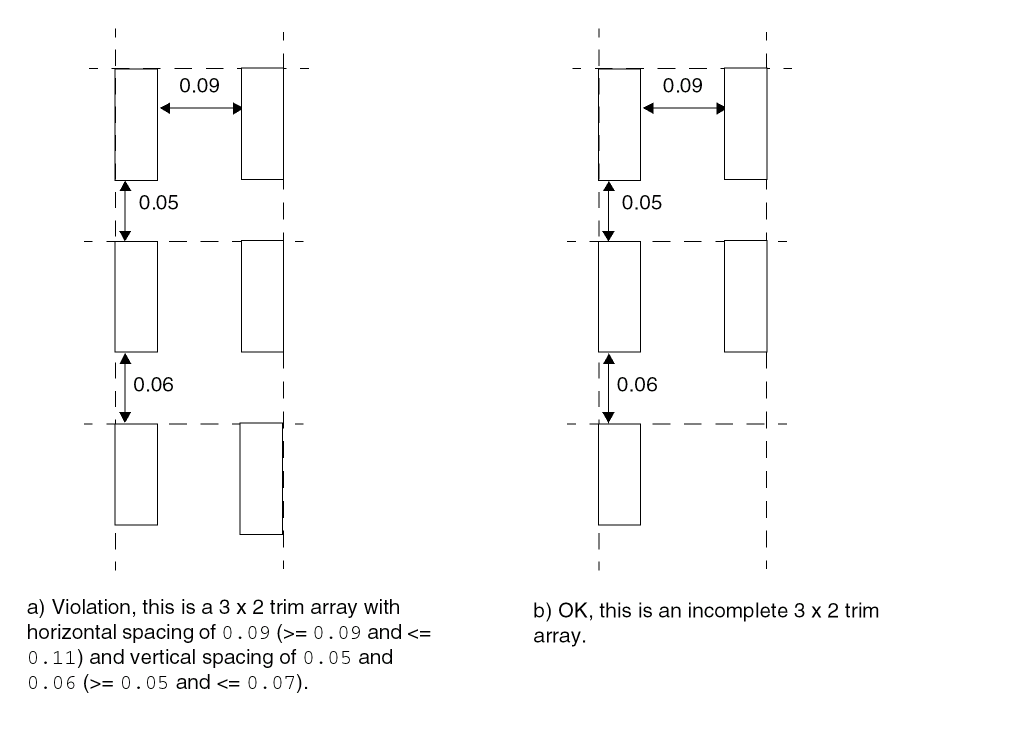
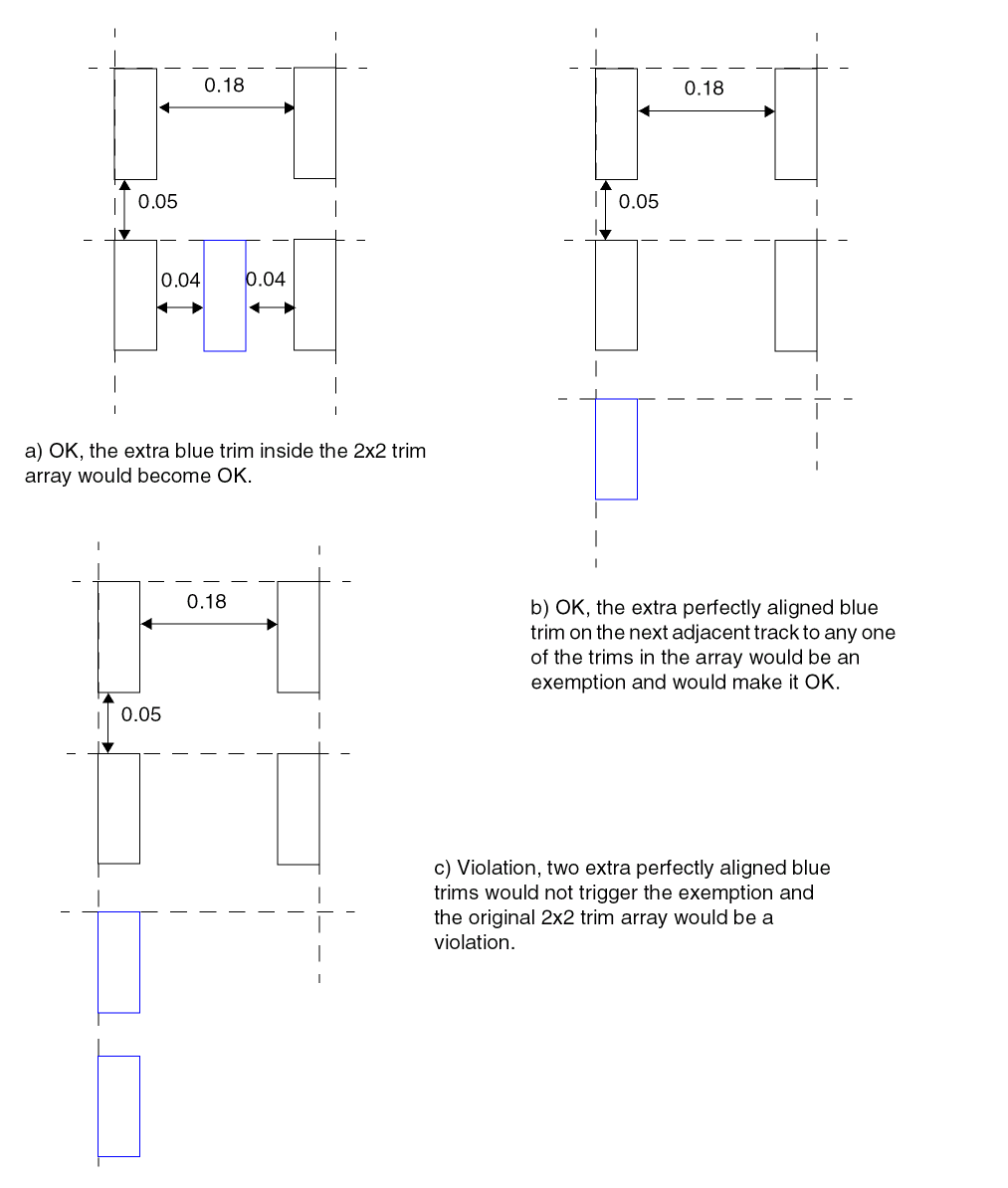
Specifies that the given trim array of numRows x numCols is not allowed if all the trims are perfectly aligned in both directions. Each of the two nearest trims are greater than or equal to xLow and less than or equal to xHigh horizontally and greater than or equal to yLow and less than or equal to yHigh vertically. This means that it is not a violation if any extra trim is present inside the trim array. In addition, there is a built-in exemption. If an extra perfectly aligned trim exists on the next adjacent track or the next same-mask adjacent track in SAMEMASK to any of trims in the array, it is not a violation. However, one or more additional perfectly aligned trim to that extra trim would be a violation.
Type: Float, specified in microns
|
|
SAMEMASK
|
Specifies that the rule applies only on the same-mask trims.
|
Forbidden Array Rule Examples
-
The following example illustrates the forbidden array rule below for trim metal shapes:
PROPERTY LEF_CDN_FORBIDDENARRAY "
FORBIDDENARRAY 3 2 XSPACING 0.09 0.11
YSPACING 0.05 0.07 ; " ;
Figure 4-8
Example of Forbidden Array Rule
-
The following example illustrates the forbidden array rule below for trim metal shapes:
PROPERTY LEF_CDN_FORBIDDENARRAY "
FORBIDDENARRAY 2 2 XSPACING 0.15 0.20
YSPACING 0.05 0.07 ; " ;
Figure 4-9
Example of Forbidden Array Rule
Max Length Rule for CPODE Layers
You can create a max length rule for CPODE layers by using the following property definition:
PROPERTY LEF_CDN_MAXLENGTH
"MAXLENGTH maxLength
   [[HORIZONTAL|VERTICAL] [GAPMERGED gap]
   [ORTHOGONALLENGTH minLength]]
   ; " ;
Where:
|
HORIZONTAL|VERTICAL
|
|
|
Specifies that the maximum length rule is checked only in the given direction.
|
|
GAPMERGED gap
|
Specifies that if two shapes are within gap in the given direction, they should be merged for this maximum length check.
|
|
MAXLENGTH maxLength
|
|
|
Specifies that the maximum length of any shape on this layer must be less than or equal to maxLength.
Type: Float, specified in microns
|
|
ORTHOGONALLENGTH minLength
|
|
|
Specifies that the rule applies only if the orthogonal length is greater than minLength. This construct must be specified along with HORIZONTAL or VERTICAL.
|
Max Length Rule for Trim Metal Layers
You can create a max length rule for trim metal layers by using the following property definition:
PROPERTY LEF_CDN_MAXLENGTH
"MAXLENGTH maxLength [WIDTH width]
; … " ;
Where:
|
MAXLENGTH maxLength
|
|
|
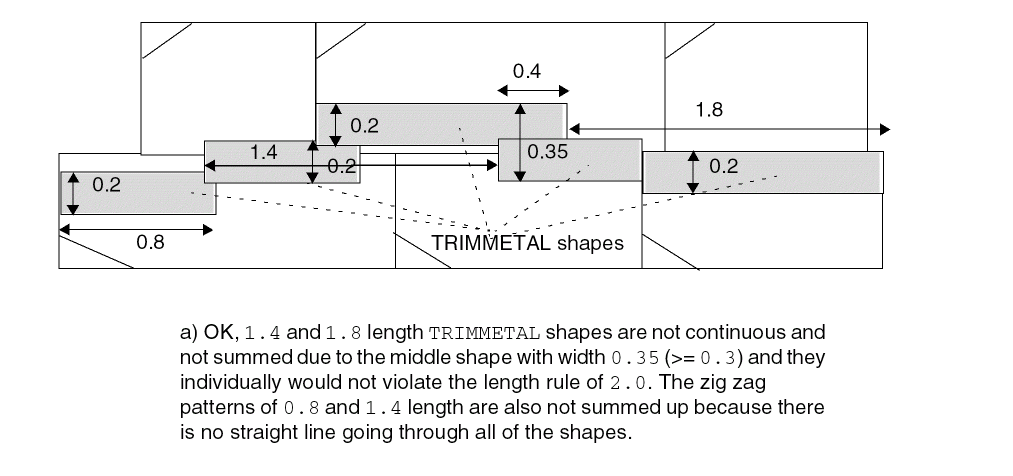
Specifies that the maximum length of any shape on this trim metal layer must be less than or equal to maxLength. This rule is honored only during placement by considering the cell trim shape abutment.
Type: Float, specified in microns
|
|
WIDTH width
|
Specifies that the maximum length rule applies only if the width of a shape is less than width.
Type: Float, specified in microns
|
Max Length Rule Example
Region Rule
You can create a region rule to define area-based rules on a trim layer.
You can use the following property definition:
PROPERTregionLayerName BASEDLAYER trimLayerName
; ” ;
Where:
|
REGION regionLayerName BASEDLAYER trimLayerName
|
|
|
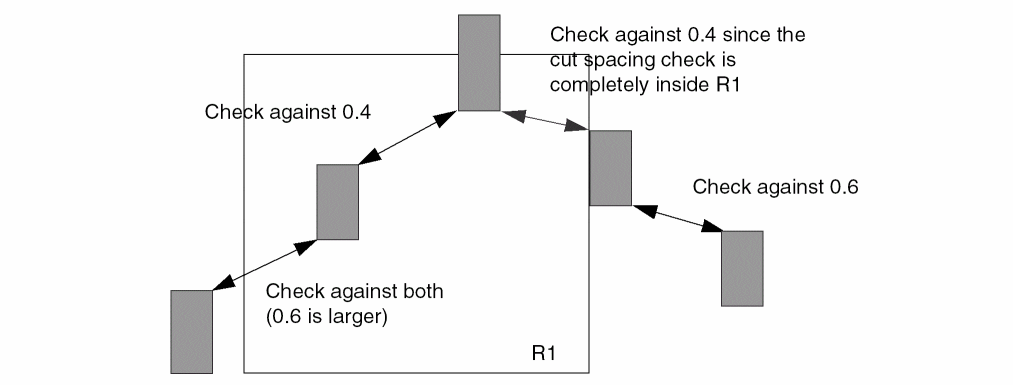
Specifies a set of region- or area-based rules on a trim layer trimLayerName. regionLayerName is a masterslice layer with type REGION. Users can create a blockage on that masterslice layer on a design to indicate the areas of the region. In addition, MACRO may also have OBS on that masterslice layer to indicate that the areas of its instance should be subjected to these region-based rules. All the rules specified on this trim layer with REGION are applied to the corresponding areas of regionLayerName on trimLayerName. The areas outside trimLayerName honor the set of rules on the given trim layer without type REGION. If a rule check crosses the boundaries of a region, it is subjected to the rules for both inside and outside the region, with the tighter rule values of the two sets dominating.
The set of rules defined in the layer with type REGION should be very small as compared to the layer without type REGION. The rules defined in this layer with type REGION should be a replacement of the corresponding rule (having the same set of the constructs of a LEF statement or a complete replacement on a table, like SPACINGTABLE) on the layer without type REGION. All the other rules defined on the layer without type REGION are also applicable on the layer with type REGION.
Type: String
|
Region Rule Example
The following example means that a trim metal completely inside region R1 should have spacing of 0.4. Otherwise, spacing of 0.6 should be applied. Any other rules on layer TM1 (without REGION) would also be applied on region R1:
LAYER R1
TYPE MASTERSLICE ;
PROPERTY LEF_CDN_TYPE “TYPE REGION ; ” ;
END R1
...
LAYER TM1
TYPE MASTERSLICE ;
PROPERTY LEF_CDN_TYPE "TYPE TRIMMETAL ; " ;
...
PROPERTY LEF_CDN_SPACING "SPACING 0.6 ;" ;
...
END TM1
LAYER TM1R1
TYPE MASTERSLICE ;
PROPERTY LEF_CDN_REGION "REGION R1 BASEDLAYER TM1 ; " ;
...
PROPERTY LEF_CDN_SPACING "SPACING 0.4 ;" ;
...
END TM1R1
Figure 4-11
Illustration of Region Rule
Spacing Rule for Well Layers
A spacing rule can be used to specify the minimum spacing allowed between objects on the same well layer or objects on different well layers.
PROPERTY LEF_CDN_SPACING
"SPACING minSpacing [SAMENET | LAYER secondLayerName] ;..." ;
Where:
|
minSpacing
|
Specifies the default minimum spacing in a well layer.
Type: Float, specified in microns
|
|
SAMENET
|
Indicates that the minimum spacing only applies to same-net cuts. The SAMENET minSpacing value should be smaller than the normal cut spacing value that applies to different-net cuts.
|
|
LAYER secondLayerName
|
|
|
Applies the spacing rule between objects on this well layer and objects on another previously defined well layer (secondLayerName) for specifying an inter-well layer spacing.
|
Spacing Rule for Above Die Edge, Below Die Edge, and Diffusion Layers
The following spacing rule can be defined on a masterslice layer for which ABOVEDIEEDGE, BELOWDIEEDGE, or DIFFUSION type rules have been defined:
PROPERTY LEF_CDN_SPACING
"SPACING minSpacing
; " ;
Where:
|
SPACING minSpacing
|
|
|
Specifies a spacing between an OBS on the masterslice layer with type ABOVEDIEEDGE, BELOWDIEEDGE, or DIFFUSION to the die boundary of the above or below die to be minSpacing.
Type: Float, specified in microns
|
Spacing Rule for a Trim Metal Layer
A TRIMMETAL spacing rule can be used to specify the spacing among trim metal shapes.
PROPERTY LEF_CDN_SPACING
   “SPACING spacing [MERGEDTRIM] [PRLSPACING prlSpacing1 prlSpacing2]
       [ENDTOEND endToEndSpacing [PRL prl]
          [EXACTALIGNED exactAlignedSpacing
             [EXCEPTDIFFMASKALIGNED]]
          [EDGEALIGNED edgeAlignedSpacing]
          [EXCEPTMIDMETALWIDTH width]]
       [SAMEMASK] [MASK maskNum]
       ; “ ;...
Where:
|
ENDTOEND endToEndSpacing [PRL prl]
|
|
|
Specifies the end-to-end spacing with parallel run length greater than prl, if specified, or 0 in the preferred routing direction on the metal layer that is trimmed.
Type: Float, specified in microns
|
|
EDGEALIGNED edgeAlignedSpacing
|
|
|
Specifies that the end-to-end spacing is edgeAlignedSpacing if the opposite long/side edges of the trim metal shapes are exactly aligned. That is the left/top edge of a trim metal shape is exactly aligned to the right/bottom edge of another trim metal. Otherwise, endToEndSpacing is applied.
Type: Float, specified in microns
|
|
EXACTALIGNED exactAlignedSpacing
|
|
|
Specifies that the end-to-end spacing is exactAlignedSpacing if the short/end side of the trim metal shapes are exactly aligned. Otherwise, endToEndSpacing is applied in Euclidean measurement independent of parallel run length if PRL is not defined. If PRL is also defined, endToEndSpacing is applied as MAXXY style in the orthogonal direction of the parallel run length.
Type: Float, specified in microns
|
|
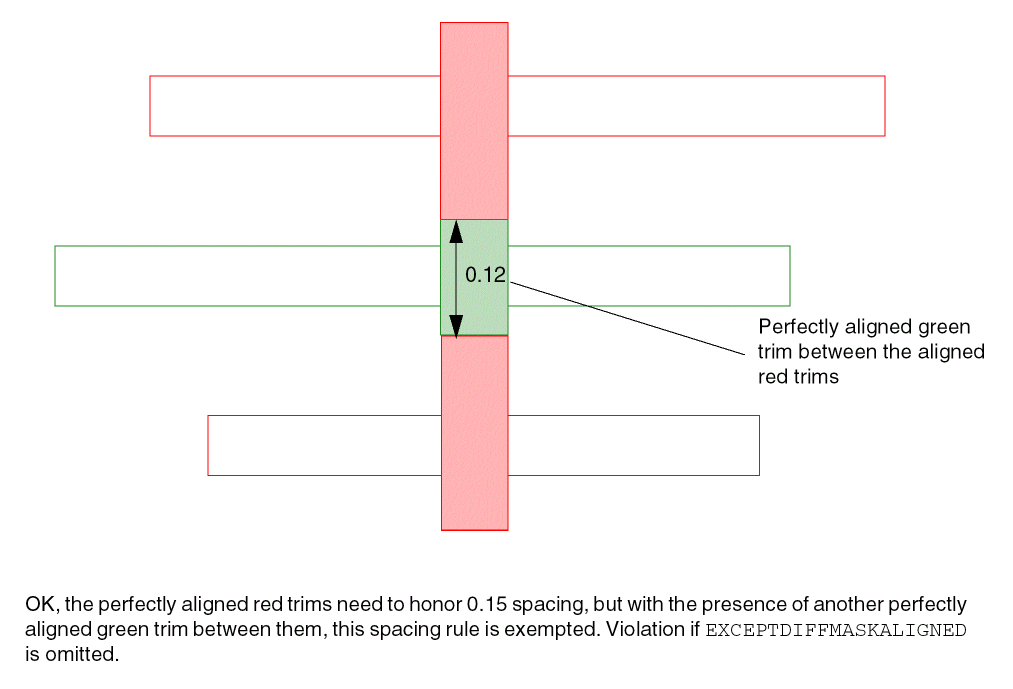
EXCEPTDIFFMASKALIGNED
|
|
|
Specifies that there is no spacing requirement on two same-mask, exactly aligned trims if there is another exactly aligned, different-mask trim between them. In other words, it is legal to have perfectly aligned, consecutive same-mask and different-mask trims. This construct must be specified with SAMEMASK.
|
|
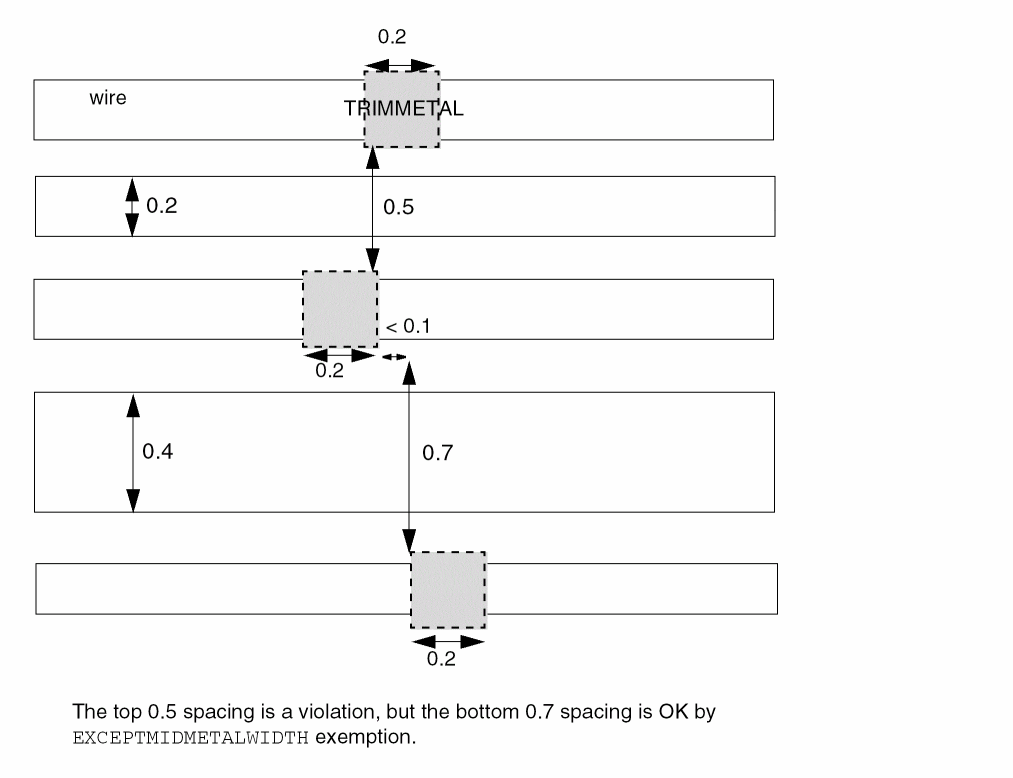
EXCEPTMIDMETALWIDTH width
|
|
|
Specifies that all the end-to-end spacing rules would be exempted if there is a metal of any mask with width greater than or equal to width on a layer that the trim metal trims.
Type: Float, specified in microns
|
|
MASK maskNum
|
Specifies that the trim spacing rule is applied only to a trim with the given mask to another trim with any mask. maskNum must be a positive integer, and most applications support only the values 1, 2, or 3.
Type: Integer
|
|
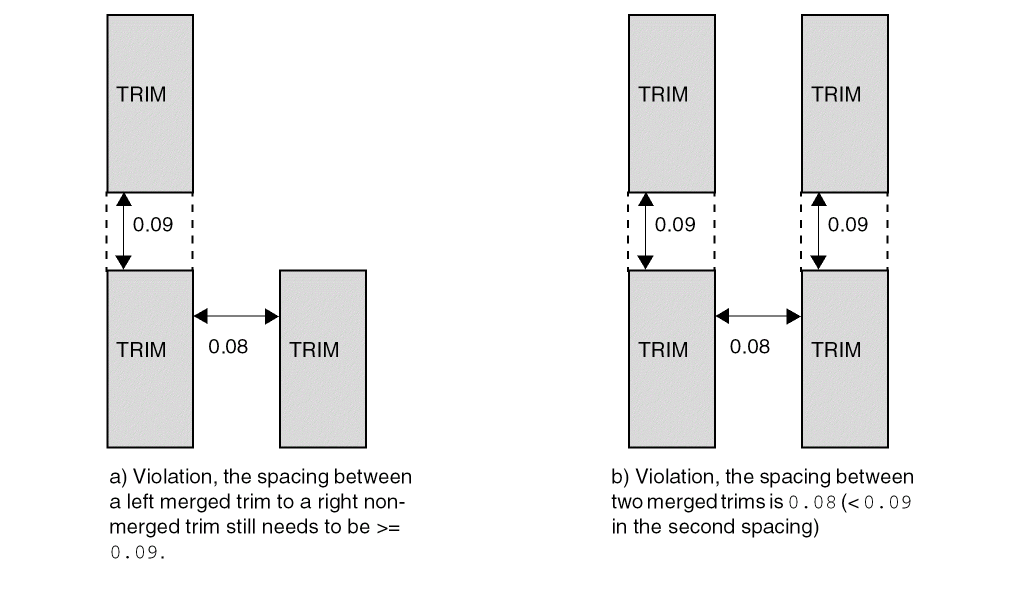
MERGEDTRIM
|
Specifies that the trim spacing rule applies only between a merged trim and another trim, which may be merged or non-merged.
|
|
SAMEMASK
|
Specifies that the spacing values are applied to same-mask objects. It is allowed to have just one spacing statement with SAMEMASK, which means that there is no constraint on different-mask shapes.
Type: Float, specified in microns
|
|
SPACING spacing [PRLSPACING prlSpacing1 prlSpacing2]
|
|
|
Specifies the minimum spacing to be spacing. If PRLSPACING is specified, prlSpacing1 is applied with parallel run length equal to 0, prlSpacing2 with parallel run length greater than 0 and spacing with parallel run length less than 0.
Type: Float, specified in microns
|
Examples of Spacing Rule for a Trim Metal Layer
-
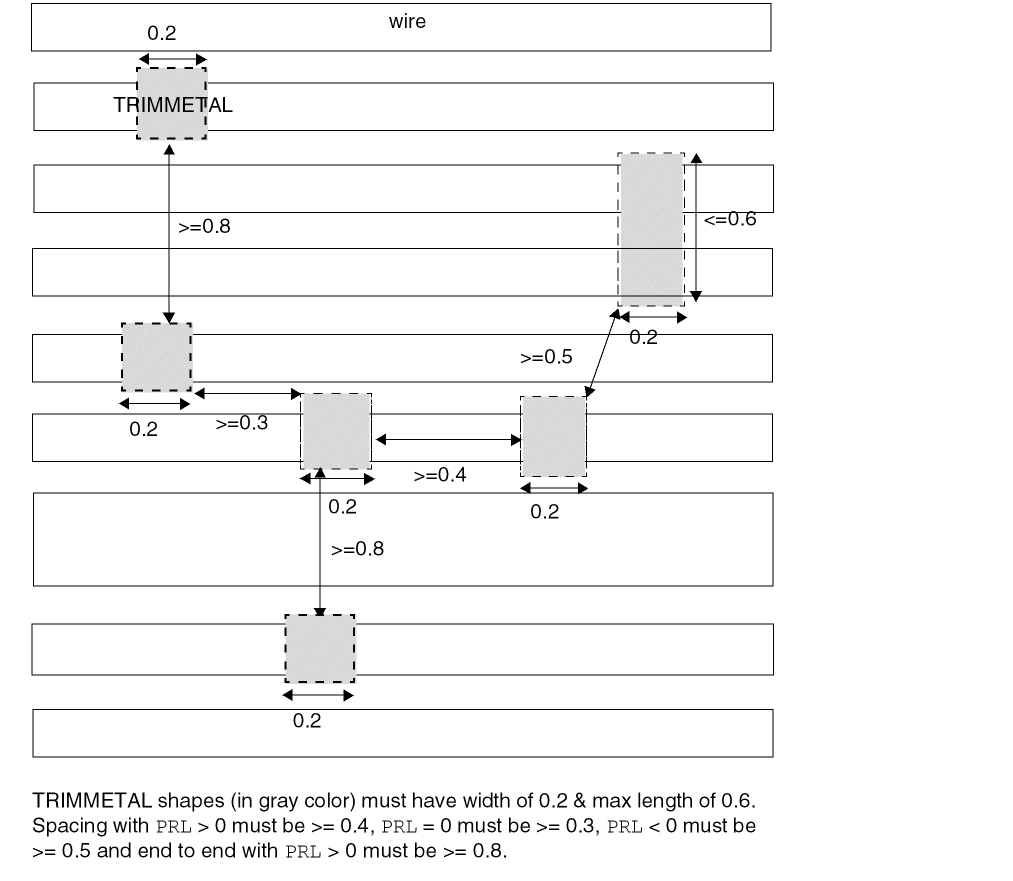
The following example illustrates the spacing rule for
TRIMMETAL layer:
# No MASK
PROPERTY LEF_CDN_TRIMSHAPE “
   TRIMSHAPE EXTENSIONMODEL MIDTRACK
      EXACTWIDTH 0.2 MAXLENGTH 0.6 ; “ ;
PROPERTY LEF_CDN_SPACING “
   SPACING 0.5 PRLSPACING 0.3 0.4 ENDTOEND 0.8 ; “ ;
Figure 4-12
Illustration of Spacing Rule for a Trim Metal Layer
-
The following example illustrates the spacing rule for
TRIMMETAL layer with EXACTALIGNED and EDGEALIGNED:
# No MASK
PROPERTY LEF_CDN_TRIMSHAPE “
TRIMSHAPE EXTENSIONMODEL MIDTRACK
EXACTWIDTH 0.2 ; “ ;
PROPERTY LEF_CDN_SPACING “
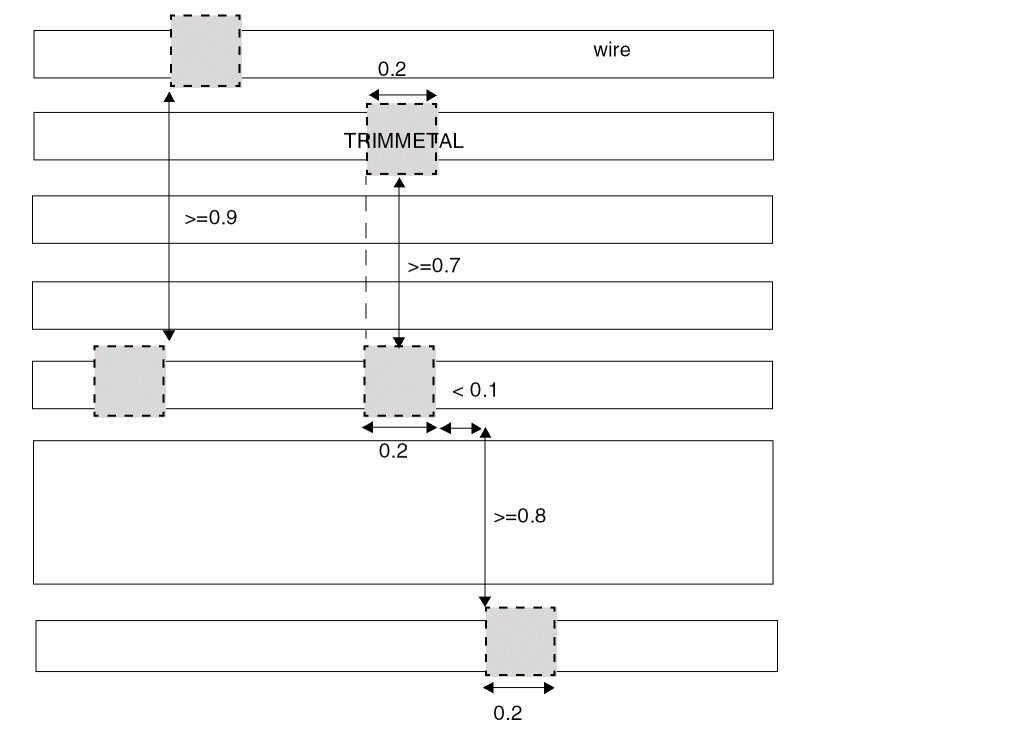
SPACING 0.5 ENDTOEND 0.8 PRL -0.1 EXACTALIGNED 0.7
EDGEALIGNED 0.9 ; “ ;
Figure 4-13
Illustration of Spacing Rule for a Trim Metal Layer
-
The following example illustrates the spacing rule for
TRIMMETAL layer with EXCEPTDIFFMASKALIGNED:
PROPERTY LEF_CDN_SPACING “
SPACING 0.05 ENDTOEND 0.1 EXACTALIGNED 0.15
EXCEPTDIFFMASKALIGNED SAMEMASK ; “ ;
Figure 4-14
Illustration of Spacing Rule for a Trim Metal Layer with EXCEPTDIFFMASKALIGNED
-
The following example illustrates the spacing rule for
TRIMMETAL layer with EXCEPTMIDMETALWIDTH:
# No MASK
PROPERTY LEF_CDN_TRIMSHAPE “
TRIMSHAPE EXTENSIONMODEL MIDTRACK
EXACTWIDTH 0.2 ; “ ;
PROPERTY LEF_CDN_SPACING “
SPACING 0.5 ENDTOEND 0.8 PRL -0.1
EXCEPTMIDMETALWIDTH 0.4 ; “ ;
Figure 4-15
Illustration of Spacing Rule for a Trim Metal Layer with EXCEPTMIDMETALWIDTH
-
The following example illustrates the spacing rule for
TRIMMETAL layer with MERGEDTRIM:
PROPERTY LEF_CDN_TRIMSHAPE "
TRIMSHAPE EXTENSIONMODEL ...
GAPMERGED 0.1 ; " ;
PROPERTY LEF58_SPACING “
SPACING 0.05
SPACING 0.09 MERGEDTRIM ; “ ;
Figure 4-16
Illustration of Spacing Rule for a Trim Metal Layer with MERGEDTRIM
Trim Spacing Rule for a Trim Metal Layer
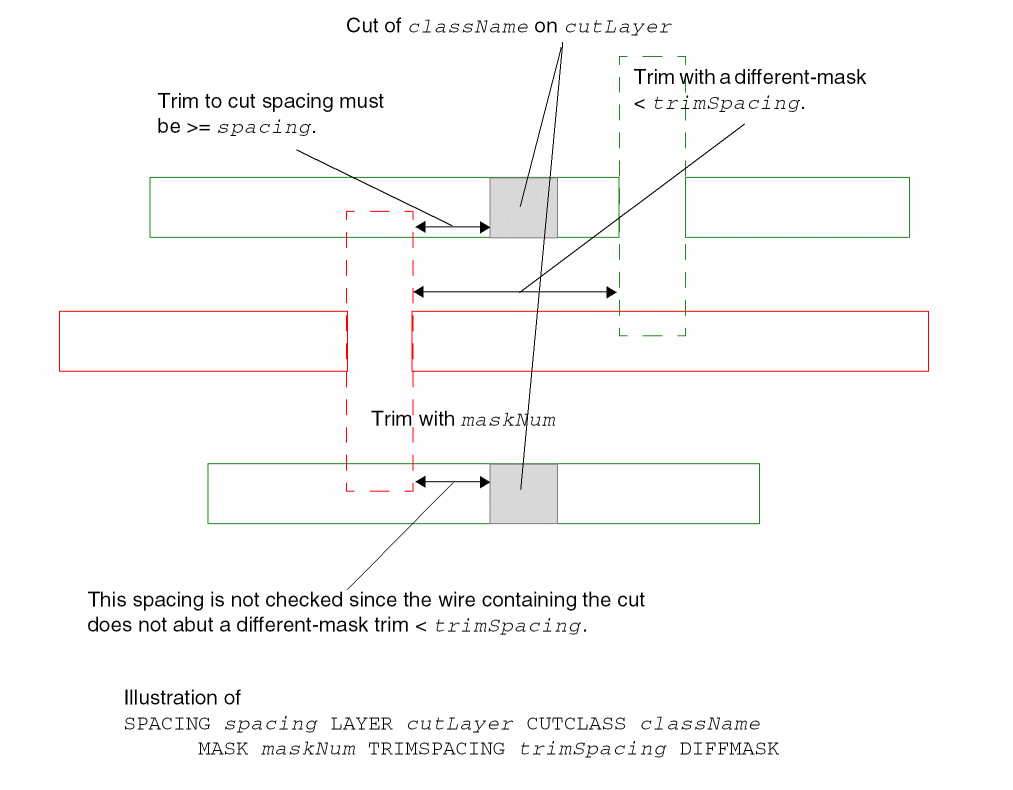
A trim spacing rule can be used to specify the spacing between any trims on the current layer to any cuts on the cut layer.
PROPERTY LEF_CDN_SPACING
“SPACING spacing LAYER cutLayer [CUTCLASS className]
   [MASK maskNum] [TRIMSPACING trimSpacing [DIFFMASK]]
   ; “ ;...
Where:
|
CUTCLASS className
|
|
|
Specifies that the trim-to-cut spacing rule applies only to cuts of the given cut class. If CUTCLASS is defined in the cut layer, CUTCLASS must be specified in this statement.
You can specify individual rules with the CUTCLASS keyword for each cut class, if required.
|
|
MASK maskNum
|
Specifies the cut spacing rule applies only on trims of the given mask.
|
|
SPACING spacing LAYER cutLayer
|
|
|
Specifies a spacing between any trims on the current layer to any cuts on cutLayer, which must be an adjacent cut layer to the metal layer that this trim metal layer trims.
Type: Float, specified in microns
|
|
TRIMSPACING trimSpacing [DIFFMASK]
|
|
|
Specifies that the rule applies only on a trim with a neighbor trim within trimSpacing. Only cuts on a wire abutted to that neighbor trim would be checked against the rule. DIFFMASK means that the neighbor trim must have different mask from the triggering trim.
Type: Float, specified in microns
|
Figure 4-17
Illustration of a Trim Spacing Rule for a Trim Metal Layer
Tap Distance Rule for a Well Distance Layer
You can create a tap distance rule to specify distance between well tap cells.
PROPERTY LEF_CDN_TAPDISTANCE
“TAPDISTANCE {distance | {HALFROW rowNum [LEFT|RIGHT] distance}...}
     TAPTYPE typeName
     ; “ ;
Where:
|
TAPDISTANCE {distance|{HALFROW rowNum [LEFT|RIGHT] distance}...}
TAPTYPE typeName
|
|
|
Specifies that the effective distance of a well tap cell with type typeName to be distance on both the left and right sides of the cell, which the cell could cover. The distance is measured from the center of the cell. For example, the center-to-center distance between two well tap cells of the same type must be less than or equal to 2 * distance.
Type: Float, specified in microns
HALFROW specifies that different distances could be defined on a half row basis. rowNum specifies the half row, with respect to the cell origin, on which the distance is defined.
LEFT|RIGHT specifies that different distances could be defined on the left or right sides on a half cell row basis. Left and right is referred with respect to the cell origin.
|
Trimmed Metal Rule for a Trim Metal Layer
Trimmed metal rules can be used to specify the metal layer that the shapes on the TRIMMETAL layer tries to trim.
You can create a trimmed metal rule by using the following property definition:
PROPERTY LEF_CDN_TRIMMEDMETAL
   “TRIMMEDMETAL metalLayer [MASK maskNum]; “ ;
Where:
|
TRIMMEDMETAL metalLayer [MASK maskNum]
|
|
|
Specifies the metal layer metalLayer that the shapes on the TRIMMETAL layer tries to trim. If maskNum is given, only maskNum on metalLayer is trimmed.
Type: Integer
|
Example of Trimmed Metal Rule
-
The following is an example of a double patterned layer
TM1 used to trim both masks of M1. As both TM1 and M1 are double-patterned, and the TRIMMEDMETAL property does not specify a mask, it implies that MASK 1 of TM1 trims MASK 1 of M1, and MASK 2 of TM1 trims MASK 2 of M1.
LAYER TM1
    TYPE MASTERSLICE ;
    MASK 2 ;
    PROPERTY LEF_CDN_TYPE "TYPE TRIMMETAL ; " ;
    PROPERTY LEF_CDN_TRIMMEDMETAL "TRIMMEDMETAL M1 ; " ;
...
END TM1
...
LAYER M1
   TYPE ROUTING ;
   MASK 2 ;
...
END M1
-
The following example is of a single patterned
TRIMMETAL TM2 layer, which trims only one mask of the double-patterned M2 layer. This is indicated by the MASK 1 portion of TM2’s TRIMMEDMETAL property:
LAYER TM2
    TYPE MASTERSLICE ;
    PROPERTY LEF_CDN_TYPE "TYPE TRIMMETAL ; " ;
    PROPERTY LEF_CDN_TRIMMEDMETAL "TRIMMEDMETAL M2 MASK 1 ; " ;
...
END TM2
LAYER M2
   TYPE ROUTING ;
    MASK 2 ;
...
END M2
Trim Shape Rule for a Trim Metal Layer
Trim shape rules can be used to specify that shapes on this layer should be formed based on the line-end wires on the metal layer that is trimmed.
You can create a trim shape rule by using the following property definition:
PROPERTY LEF_CDN_TRIMSHAPE
   "TRIMSHAPE [METALMASK metalMaskNum] EXTENSIONMODEL
      {ADJACENTTRACK | MIDTRACK | EXTENSION extension [METALEDGE]}
      EXACTWIDTH exactWidth
      [GAPMERGED trimGapLength]
      [MAXLENGTH maxLength [GAPMERGEDFORLENGTH trimGapLength]
          [MASK maskNum]]
      [EXCEPTSPACING spacing] [EXCEPTWIDTH width]
      [USEMETALMASK]
      ; " ;
Where:
|
GAPMERGED trimGapLength
|
|
|
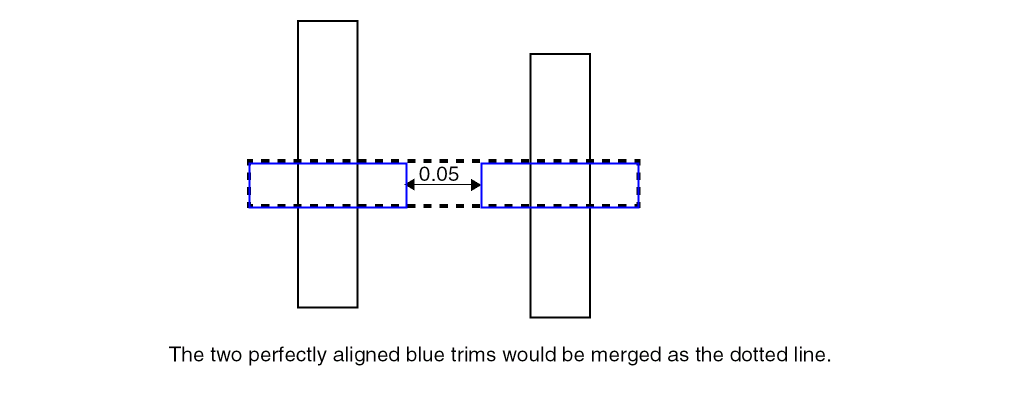
Specifies that perfectly aligned trims with spacing/gap length less than or equal to trimGapLength should be merged. Only same-mask trims can be merged. No trim spacing check would be applied among the merged trims. Merged trims would still check spacing against other trims as usual.
Type: Float, specified in microns
|
|
GAPMERGEDFORLENGTH trimGapLength
|
|
|
Specifies that perfectly aligned trims with spacing/gap length less than or equal to trimGapLength should be merged only for the MAXLENGTH check. No trim spacing check would be applied among the merged trims. Merged trims would still check spacing against other trims as usual.
Type: Float, specified in microns
|
|
MASK maskNum
|
Specifies that the maximum length rule applies on the given mask. maskNum must be a positive integer, and most applications support only the values 1, 2, or 3.
Type: Integer
|
|
METALEDGE
|
Specifies that extension is extended from the metal edges that the trim metal trims.
|
|
METALMASK metalMaskNum
|
|
|
Specifies the trim shape definition when the trim is added on the metal wires belonging to the given mask of metalMaskNum.
Type: Integer
|
|
TRIMSHAPE EXTENSIONMODEL
{ADJACENTTRACK | MIDTRACK | EXTENSION extension}
EXACTWIDTH exactWidth [MAXLENGTH maxLength]
[EXCEPTSPACING spacing] [EXCEPTWIDTH width]
|
|
|
Specifies that shapes on this layer should be formed based on the line-end wires on the metal layer (TRIMMEDEMETAL) that is trimmed. Typically, this trim metal technology would impose a strict 1D on grid routing methodology on TRIMMEDMETAL. Tracks in preferred routing direction of TRIMMEDMETAL could be non-uniform, but must be homogeneous across the entire design. In addition, wires with a same width are always used on any track.
The shapes must be a rectangle with width measured in the preferred routing layer on TRIMMEDMETAL exactly equal to exactWidth and length measured in the orthogonal direction less than or equal to maxLength, if specified. Shapes are always formed at the line-end of wires on TRIMMEDMETAL. The ‘width’ dimension is always sandwiched between two line-end wires along the preferred direction on TRIMMEDMETAL.
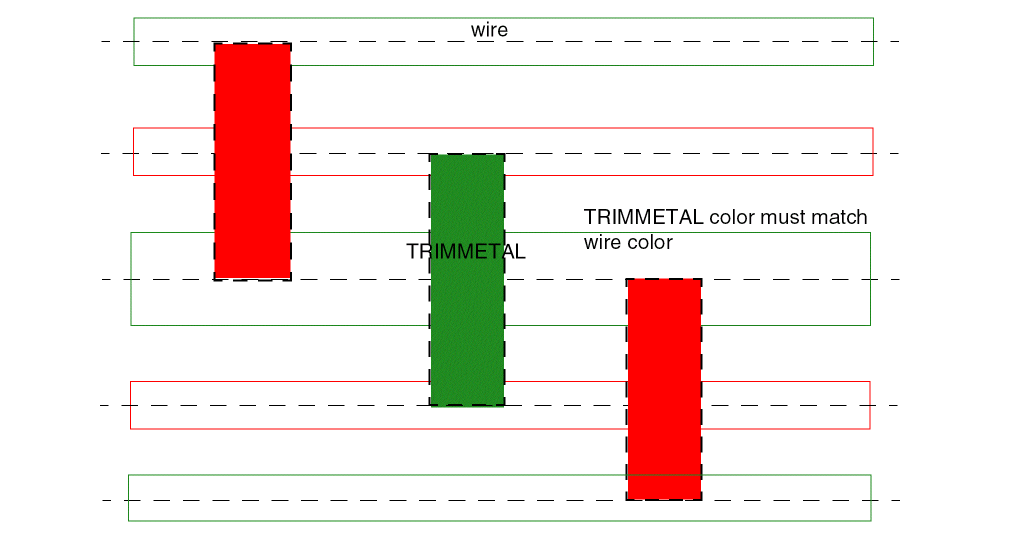
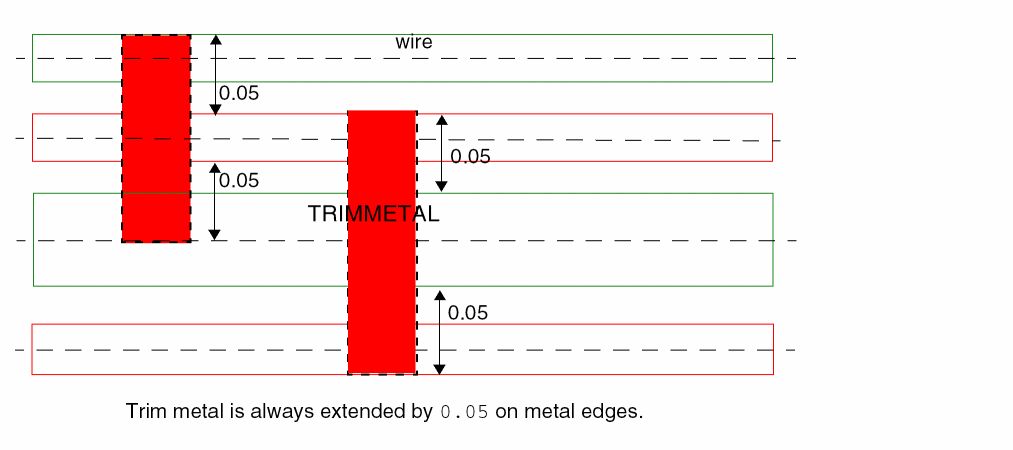
With ADJACENTTRACK specified in EXTENSIONMODEL, the ‘height’ would extend to the center line of the adjacent tracks on the orthogonal direction.
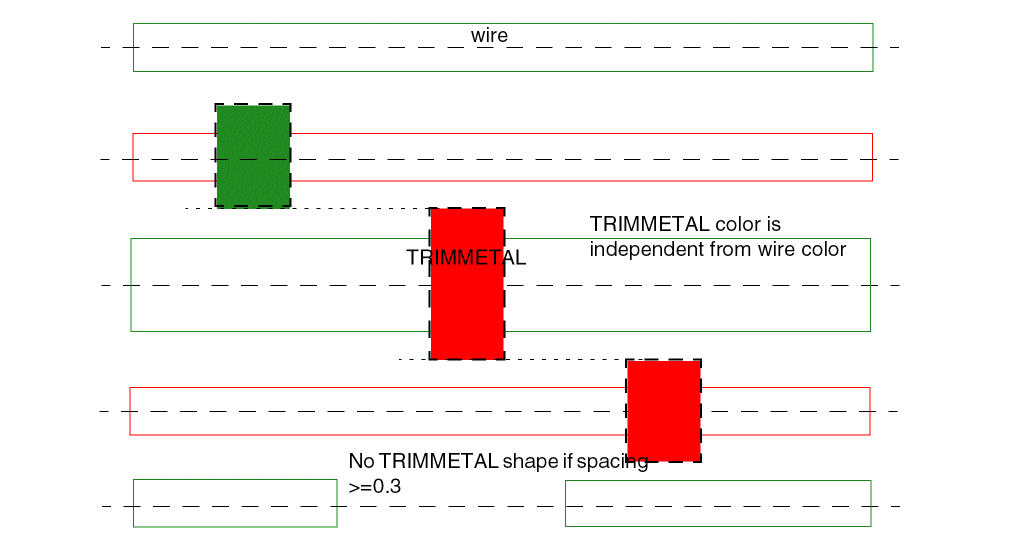
With MIDTRACK specified in EXTENSIONMODEL, the ‘height’ would extend by half of the required spacing of the wires. The shapes could be merged if they are perfectly aligned.
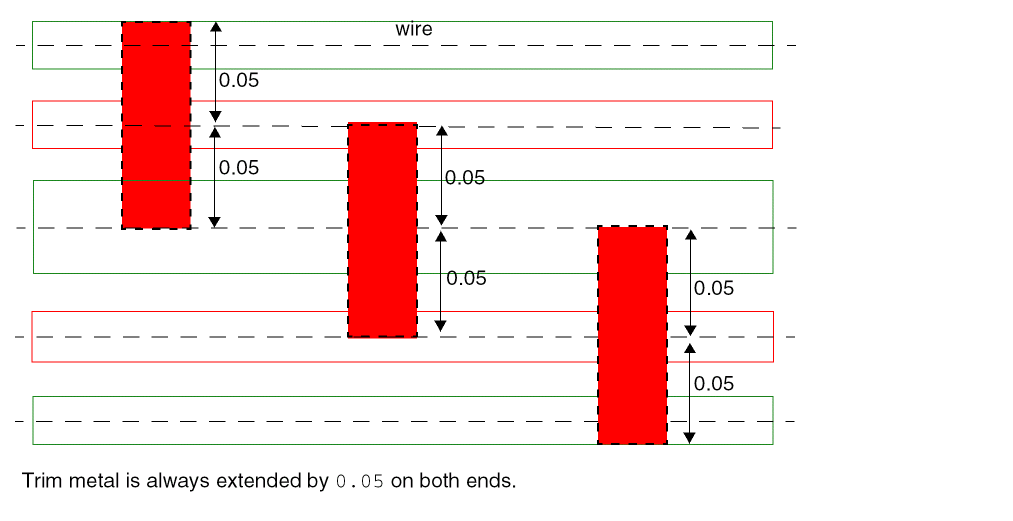
With EXTENSION extension specified in EXTENSIONMODEL, the ‘height’ of a trim metal would extend on both sides from the center by extension.
When the line-end to line-end spacing is greater than or equal to spacing, if specified, the shape is not formed.
When the width of line-end is greater than width, if specified, the shape is not formed.
|
|
USEMETALMASK
|
Specifies that the mask of a shape on this layer must follow the mask of a wire on TRIMMEDMETAL. This means that maskNum on this layer must match the mask number on the TRIMMEDMETAL.
|
Trim Shape Rule Examples
-
The following example is an illustration of
TRIMSHAPE rule with MIDTRACK extension model:
MASK 2 ;
PROPERTY LEF_CDN_TRIMSHAPE “
TRIMSHAPE EXTENSIONMODEL MIDTRACK
EXACTWIDTH 0.2 EXCEPTSPACING 0.3 ; “ ;
Figure 4-18
Illustration of Trim Shape Rule with MIDTRACK Extension Model
-
The following example is an illustration of
TRIMSHAPE rule with ADJACENTTRACK extension model:
MASK 2 ;
PROPERTY LEF_CDN_TRIMSHAPE “
TRIMSHAPE EXTENSIONMODEL ADJACENTTRACK
EXACTWIDTH 0.2 USEMETALMASK ; “ ;
Figure 4-19
Illustration of Trim Shape Rule with ADJACENTTRACK Extension Model
-
The following example is an illustration of
TRIMSHAPE rule with EXTENSION extension model:
PROPERTY LEF_CDN_TRIMSHAPE “
TRIMSHAPE EXTENSIONMODEL EXTENSION 0.05
EXACTWIDTH 0.2 ; “ ;
Figure 4-20
Illustration of Trim Shape Rule with EXTENSION Extension Model
-
The following example is an illustration of
TRIMSHAPE rule with extension from metal edges:
PROPERTY LEF_CDN_TRIMSHAPE “
TRIMSHAPE EXTENSIONMODEL EXTENSION 0.05
METALEDGE EXACTWIDTH 0.2 ; “ ;
Figure 4-21
Example of Trim Shape Rule with Extension from Metal Edges
-
The following example is an illustration of
TRIMSHAPE rule with GAPMERGED:
PROPERTY LEF_CDN_TRIMSHAPE "
TRIMSHAPE EXTENSIONMODEL ...
GAPMERGED 0.05 ; " ;
Figure 4-22
Example of Trim Shape Rule with GAPMERGED
Width Rule for a TRIMPOLY Layer
A width rule can be used to specify a minimum width for a TRIMPOLY layer.
You can create a width rule by using the following property definition:
PROPERTY LEF_CDN_WIDTH
"WIDTH minWidth [ZEROPRL]
;" ;
Where:
|
WIDTH minWidth
|
|
|
Specifies the minimum width for the TRIMPOLY layer.
|
|
ZEROPRL
|
Specifies that the width requirement applies only for two TRIMPOLY shapes on adjacent rows with zero parallel run length in the direction perpendicular to the row direction.
|
Width Rule for a Well Layer
A width rule can be used to specify a default width for a well layer.
You can create a width rule by using the following property definition:
PROPERTY LEF_CDN_WIDTH
"WIDTH minWidth;" ;
Where:
|
WIDTH minWidth
|
|
|
Specifies the default width for the well layer.
|
Width Length Ratio Rule for a Diffusion Layer
A width length ratio rule can be used to specify a length ratio between diffusion shapes with a given width on a masterslice layer.
You can create a width length ratio rule by using the following property definition:
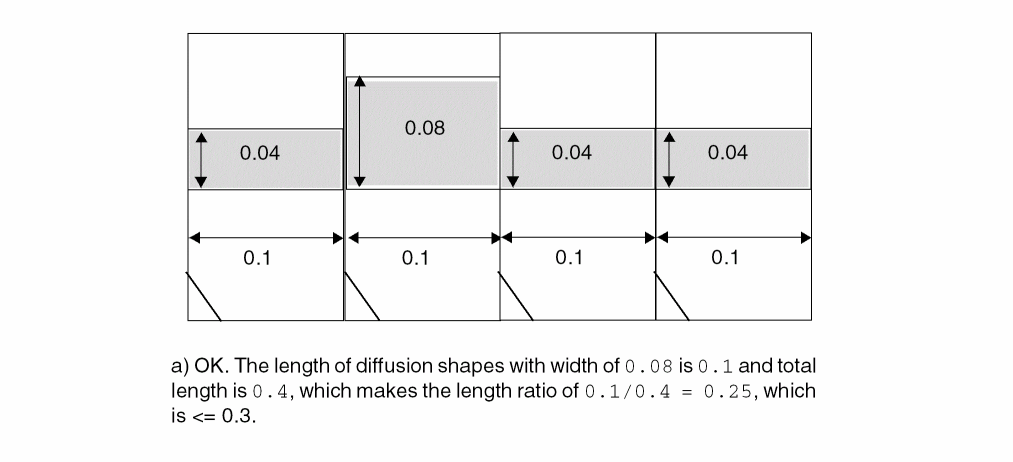
PROPERTY LEF_CDN_WIDTHLENGTHRATIO
"WIDTHLENGTHRATIO ratio WIDTH width; " ;
Where:
|
WIDTHLENGTHRATIO ratio WIDTH width
|
|
|
Specifies that the length ratio between the diffusion shapes with width exactly equal to width and all the diffusion shapes should be less than or equal to ratio, which is represented as a value between 0.0 and 100.0 in percentage. In other words, dividing the length of the diffusion shapes with width exactly equal to width by the length of all diffusion shapes should be less than or equal to ratio.
Type: Float, between 0.0 and 100.0
|
Width Length Rule Example
End of Chapter
Return to top