
1
Overview of the Translators
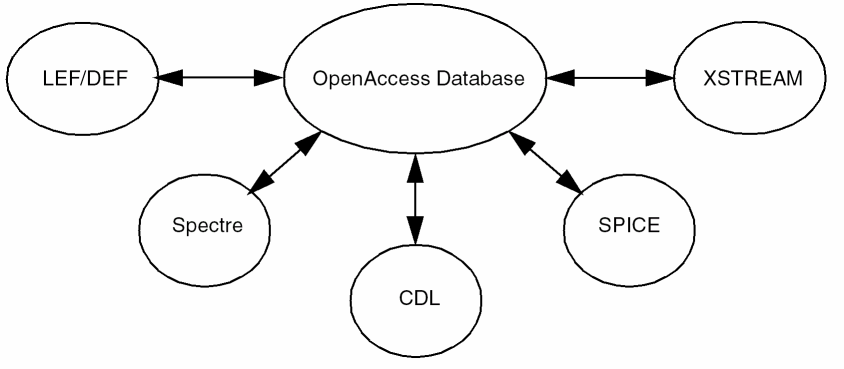
The design data translators convert designs from OpenAccess database to different formats and conversely. These translators fall into three categories: general, netlist, and physical translators.
This user guide is aimed at CAD developers and designers who are using third party tools which are not OA compliant and require an intermediate format for transferring the design data.
This manual has been written with an assumption that you are familiar with the development and design of integrated circuits. It has also been assumed that you are familiar with the Stream/GDSII format, the CDL format, and the LEF/DEF format. This manual contains reference information about the following Cadence® products:
- XStream In, which translates designs from GDSII Stream format into the OpenAccess database.
- XOasis Out, which translates designs from OpenAccess database into the GDSII Stream format.
- LEF In, which translates a LEF file to an OpenAccess technology library and macro information in the OpenAccess database.
- LEF Out, which translates an OpenAccess technology library and macro information to a LEF file.
- DEF In, which reads a DEF file and creates an OpenAccess cellview.
- DEF Out, which writes a DEF file from an OpenAccess cellview.
- Spice In, which translates designs from HSpice, Spectre, Spice, and CDL formats into the OpenAccess database.
- CDL Out, which translates designs from OpenAccess database into the Circuit Description Language format.
The Cadence® Virtuoso® Studio Design Environment is the foundation on which most Cadence tools are built. The Virtuoso Studio Design Environment on OpenAccess is an open system. You can enter your own design data with industry-standard data formats and use the Virtuoso Studio Design Environment tools to complete your job.
The design data translators let you translate a design in one format to a Cadence database or to take a Cadence database and translate it into another format. Cadence offers a variety of translators to use in integrating your work with the OpenAccess database.
Licensing Requirements
This section describes an overview of how licensing is implemented in physical translators, XStream In, XStream Out, XOasis In, XOasis Out, LEF In, LEF Out, DEF In, and DEF Out translators.
In case, a license is not available for a translator and you select File – Import – LEF/DEF/Stream option from CIW, a form will be displayed without a license. You can specify the values in the form and click the OK button. The translator in this case would perform a validation check for license and try to checkout the license. You will not be able to do the translation if the license is unavailable.
The 'Virtuoso Framework' (111) license is required to run all these physical design translators.
The 'Virtuoso Advance Node Framework' (95011) license is required to run all these physical design translators.
These translators work only with the Design Framework II license “111” and with no other product license. Therefore, even if Layout XL or a higher tier license is available, you will not be able to run these translators if license “111” is not available. Also, to be able to run some advanced SKILL APIs that used in libInit.il or Pcell SKILL code, you will require functionality based licenses.
This chapter contains the following sections:
Understanding the Translators
The design data translators fall into three categories: general, netlist, and physical translators.
The general translators translate EDIF and Verilog files to and from OpenAccess database. The netlist translators translate netlist designs to and from OpenAccess database. The physical translators translate physical (layout) designs to and from OpenAccess database.
General Translators
- EDIF 200 Writer, which translates designs from OpenAccess database to EDIF 200 format. For information about EDIF 200 Writer, see the Virtuoso EDIF 200 Reader and Writer User Guide.
- Verilog In, which imports a Verilog HDL description to a OpenAccess database. For information about Verilog In, see the Verilog In for Design Framework II User Guide and Reference.
Netlist Translators
- Spice In, which translates SPICE and Circuit Definition Language (CDL) files to OpenAccess database. For information about Spice In, see Chapter 4, “Netlist Import Using Spice In”.
- CDL Out, which translates a OpenAccess schematic design to a hierarchical netlist in Circuit Definition Language (CDL) format. For information about CDL Out, see Chapter 5, “Design Translation Using CDL Out.”.
Physical Translators
- Stream In, which translates Graphics Design Station (GDSII) Stream mask data from Stream format to the OpenAccess database. For information about Stream In, see Chapter 2, “Design Translation Using XStream Translator”.
- Stream Out, which translates files from OpenAccess database to Graphics Design Station II (GDSII) Stream mask data format. For information about Stream Out, see Chapter 2, “Design Translation Using XStream Translator”.
- LEF In, which translates a LEF file to an OpenAccess technology library and macro information in the OpenAccess database. For more information on LEF In, see Chapter 6, “Design Translation Using LEF/DEF Translator,”
- LEF Out, which translates an OpenAccess technology library and macro information to a LEF file. For more information on LEF Out, see Chapter 6, “Design Translation Using LEF/DEF Translator,”
- DEF In, which reads a DEF file and creates an OpenAccess cellview. For more information on DEF In, see Chapter 6, “Design Translation Using LEF/DEF Translator,”
- DEF Out, which writes a DEF file from an OpenAccess cellview. For more information on DEF Out, see Chapter 6, “Design Translation Using LEF/DEF Translator,”
Running the Translators
You can run all the design data translators in interactive mode by using the user interface forms present in the translators. You can access these forms by invoking the appropriate menu options available in the CIW. You can also run most of the translators in batch mode by entering a command on the command line.
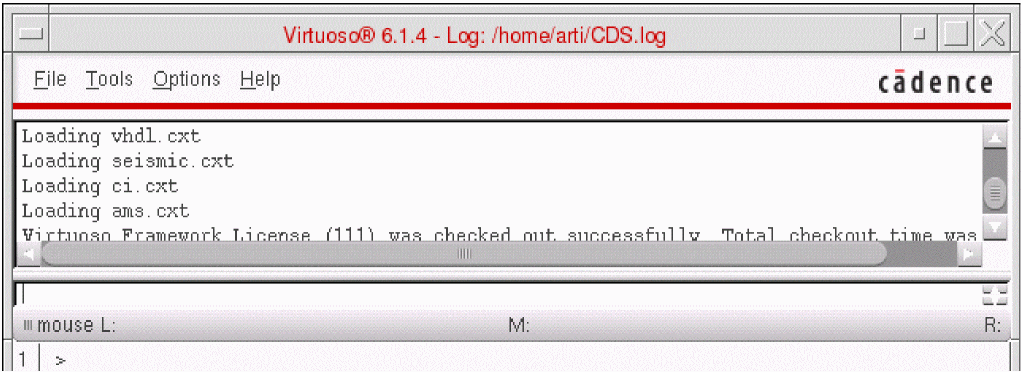
The CIW, shown below, displays a log of events when you run any of the Cadence applications, including one of the design data translators.
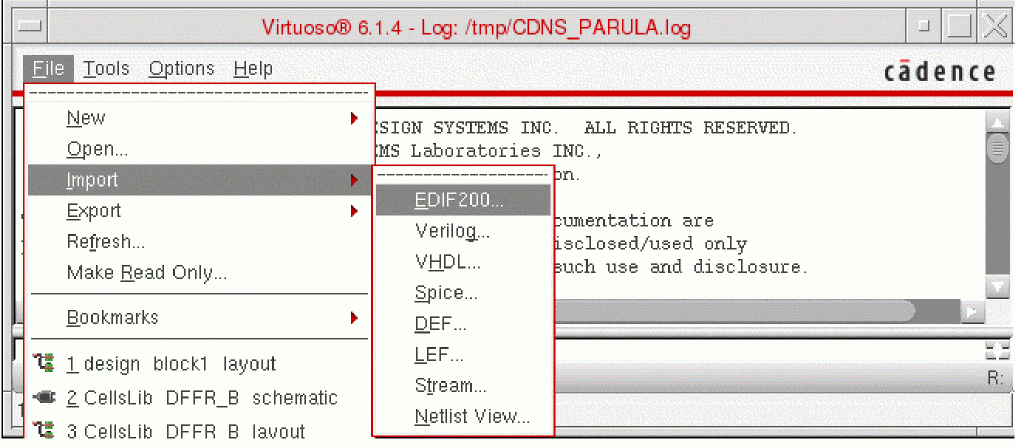
When you select File from the CIW banner, a pull-down menu appears. From this menu, you can choose the Import or Export menu option for using a specific translator. The following figure shows a list of translators that can be used for importing design files.
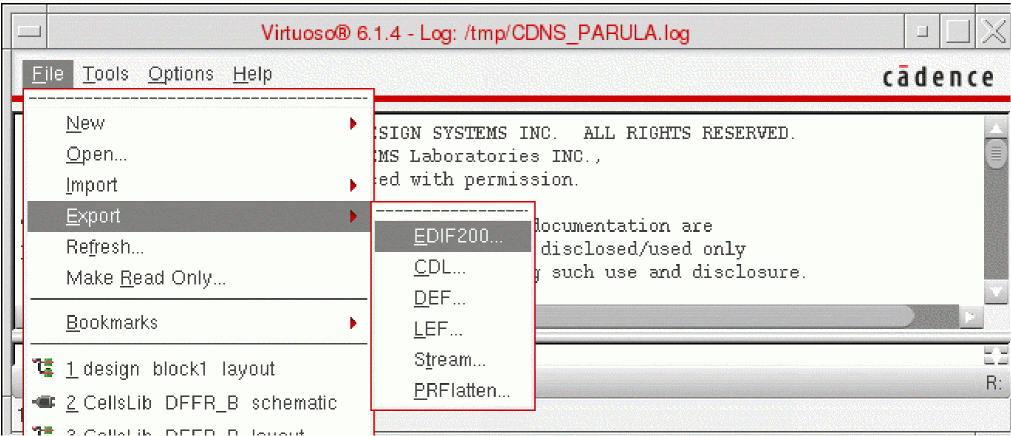
If you select Export from the File pull-down menu, the export translators appear on a pull-down menu.
Return to top