
B
Analog Probes and Sources
This appendix describes what analog probes and sources are and gives some examples of using them. For information, see
Overview of Probes and Sources
A probe is a branch in which no value is assigned for either the potential or the flow, anywhere in the module. A source is a branch in which either the potential or the flow is assigned a value by a contribution statement somewhere in the module.
You might find it useful to describe component behavior as a network of probes and sources.
- It is sometimes easier to describe a component first as a network of probes and sources, and then use the rules presented here to map the network into a behavioral description.
- A complex behavioral description is sometimes easier to understand if it is converted into a network of probes and sources.
The probe and source interpretation provides the additional benefit of unambiguously defining what the response will be when you manipulate a signal.
Probes
A flow probe is a branch in which the flow is used in an expression somewhere in the module. A potential probe is a branch in which the potential is used. You must not measure both the potential and the flow of a probe branch.
The equivalent circuit model for a potential probe is

The branch flow of a potential probe is zero.
The equivalent circuit model for a flow probe is
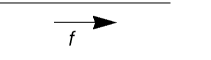
The branch potential of a flow probe is zero.
Port Branches
You can use the port access function to monitor the flow into the port of a module. The name of the access function is derived from the flow nature of the discipline of the port and you use the (<>) operator to delimit the port name. For example, I(<a>) accesses the current through module port a.
A port branch, which is a special form of a flow probe, measures the flow into a port rather than across a branch. When a port is connected to numerous branches, using a port branch provides a quick way of summing the flow.
The expression V(<a>) is invalid for ports and nets, where V is a potential access function. The port branch probe I(<a>) cannot be used on the left side of a contribution operator <+. As a result of these restrictions, you cannot use port branches to create behavioral resistors, capacitors, and inductors.
In the following example, the simulator issues a warning if the current through the diode becomes too large.
module diode (a, c) ;
electrical a, c ;
branch (a, c) diode, cap ;
parameter real is=1e-14, tf=0, cjo=0, imax=1, phi=0.7 ;
analog begin
    I(diode) <+ is*(limexp(V(diode)/$vt) – 1) ;
    I(cap) <+ ddt(tf*I(diode) - 2 * cjo * sqrt(phi * (phi * V(cap)))) ;
    if (I(<a>) > imax) // Checks current through port
        $strobe( "Warning: diode is melting!" ) ;
    end
endmodule
Sources
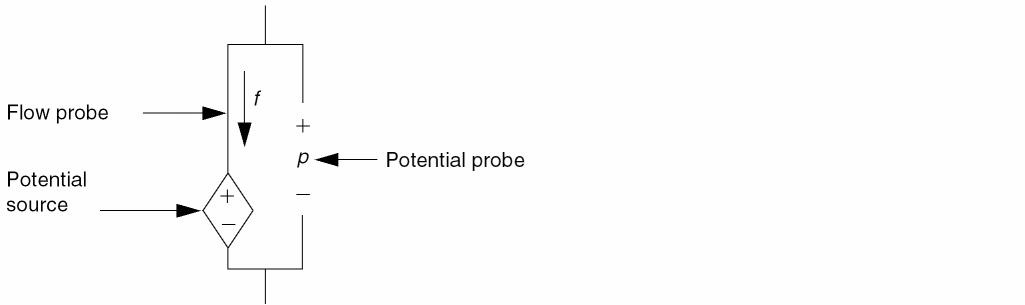
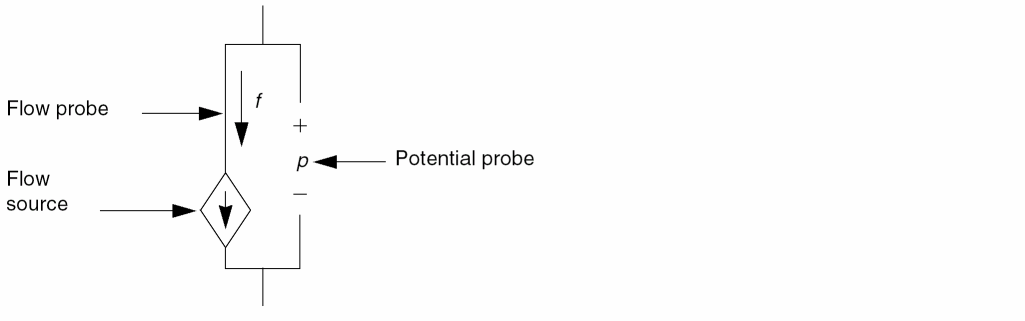
A potential source is a branch in which the potential is assigned a value by a contribution statement somewhere in the module. A flow source is a branch in which the flow is assigned a value. A branch cannot simultaneously be both a potential and a flow source, although it can switch between the two kinds. For additional information, see “Switch Branches”.
The circuit model for a potential source branch shows that you can obtain both the flow and the potential for a potential source branch.
Similarly, the circuit model for a flow source branch shows that you can obtain the flow and potential for a flow source branch.
With the flow and potential sources, you can model the four basic controlled sources, using node or branch declarations and contribution statements like those in the following code fragments.
The model for a voltage-controlled voltage source is
branch (ps,ns) in, (p,n) out;
V(out) <+ A * V(in);
The model for a voltage-controlled current source is
branch (ps,ns) in, (p,n) out;
I(out) <+ A * V(in);
The model for a current-controlled voltage source is
branch (ps,ns) in, (p,n) out;
V(out) <+ A * I(in);
The model for a current-controlled current source is
branch (ps,ns) in, (p,n) out;
I(out) <+ A * I(in);
Unassigned Sources
If you do not assign a value to a branch, the branch flow, by default, is set to zero. In the following fragment, for example, when closed is true, V(p,n) is set to zero. When closed is false, the current I(p,n) is set to zero.
if (closed)
    V(p,n) <+ 0 ;
else
    I(p,n) <+ 0 ;
Alternatively, you could achieve the same result with
if (closed)
    V(p,n) <+ 0 ;
This code fragment also sets V(p,n) to zero when closed is true. When closed is false, the current is set to zero by default.
Switch Branches
Switch branches are branches that change from source potential branches into source flow branches, and vice versa. Switch branches are useful when you want to model ideal switches or mechanical stops.
To switch a branch to being a potential source, assign to its potential. To switch a branch to being a flow source, assign to its flow. The circuit model for a switch branch illustrates the effect, with the position of the switch dependent upon whether you assign to the potential or to the flow of the branch.
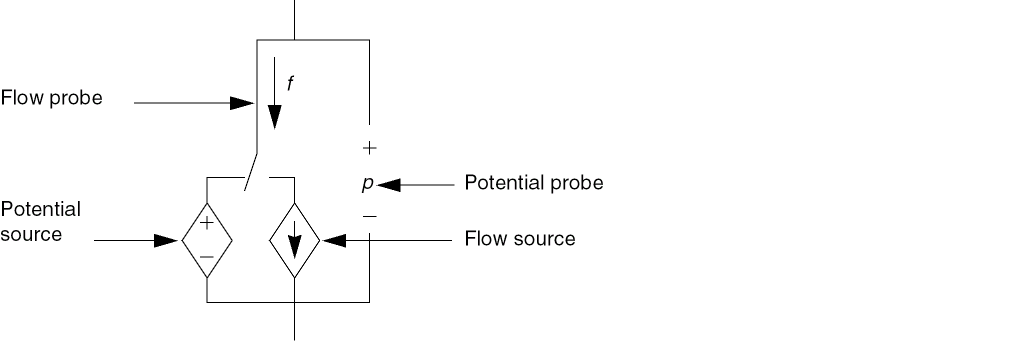
As an example of a switch branch, consider the module idealRelay.
module idealRelay (pout, nout, psense, nsense) ;
input psense, nsense ;
output pout, nout ;
electrical pout, nout, psense, nsense ;
parameter real thresh = 2.5 ;
analog begin
    if (V(psense, nsense) > thresh)
        V(pout, nout) <+ 0.0 ; // Becomes potential source
    else
        I(pout, nout) <+ 0.0 ; // Becomes flow source
    end
endmodule
The simulator assumes that a discontinuity of order zero occurs whenever the branch switches; so you do not have to use the discontinuity function with switch branches. For more information about the discontinuity function, see “Announcing Discontinuity”.
Contributing a flow to a branch that already has a value retained for the potential results in the potential being discarded and the branch being converted to a flow source. Conversely, contributing a potential to a branch that already has a value retained for the flow results in the flow being discarded and the branch being converted to a potential source. For example, in the following code, each of the contribution statements is discarded when the next is encountered.
analog begin
   V(out) <+ 1.0; // Discarded
   I(out) <+ 1.0; // Discarded
   V(out) <+ 1.0;
end
I(out) <+ 1.0;
V(out) <+ I(out);
the result of V(out) is not 1.0. Instead, these two statements are equivalent to
// I(out) <+ 1.0;
V(out) <+ I(out);
because the flow contribution is discarded. The simulator reminds you of this behavior by issuing a warning similar to the following,
The statement on line 12 contributes either a potential to a flow source or a flow to a potential source. To match the requirements of value retention, the statement is ignored.
Examples of Sources and Probes
The following examples illustrate how to construct models using sources and probes.
Linear Conductor
The model for a linear conductor is
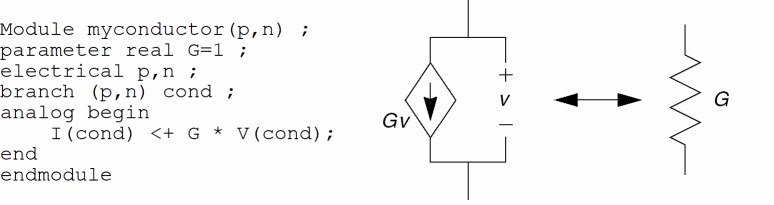
The contribution to I(cond) makes cond a current (flow) source branch, and V(cond) accesses the potential probe built into the current source branch.
Linear Resistor
The model for a linear resistor is
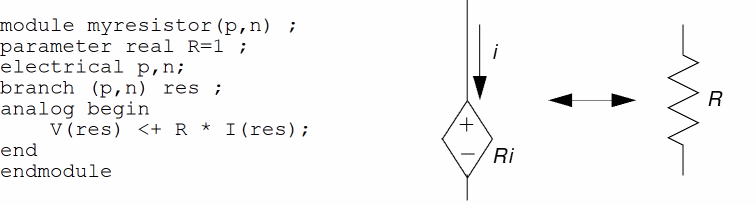
The contribution to V(res) makes res a potential source branch. I(res) accesses the flow probe built into the potential source branch.
RLC Circuit
A series RLC circuit is formulated by summing the voltage across the three components.

To describe the series RLC circuit with probes and sources, you might write
V(p,n) <+ R*I(p,n) + L*ddt(I(p,n)) + idt(I(p,n))/C ;
A parallel RLC circuit is formulated by summing the currents through the three components.

To describe the parallel RLC circuit, you might code
I(p,n) <+ V(p,n)/R + C*ddt(V(p,n)) + idt(V(p,n))/L ;
Simple Implicit Diode
This example illustrates a case where the model equation is implicit. The model equation is implicit because the current I(a,c) appears on both sides of the contribution operator. The equation specifies the current of the branch, making it a flow source branch. In addition, both the voltage and the current of the branch are used in the behavioral description.
I(a,c) <+ is * (limexp((V(a,c) – rs * I(a,c)) / Vt) – 1) ;
Return to top