
10
Instantiating Modules and Primitives
Chapter 2, “Creating Modules,” discusses the basic structure of Cadence® Verilog®-AMS language modules. This chapter discusses how to instantiate Verilog-AMS modules within other modules. Module declarations cannot nest in one another; instead, you embed instances of modules in other modules. By embedding instances, you build a hierarchy extending from the instances of primitive modules up through the top-level modules.
The following sections discuss
- Instantiating Verilog-AMS Modules
- Connecting the Ports of Module Instances
- Overriding Parameter Values in Instances
- Instantiating Analog Primitives
- Using an M Factor (Multiplicity Factor)
- Including Verilog-A Modules in Spectre Subcircuits
Instantiating Verilog-AMS Modules
Use the following syntax to instantiate modules in other modules.
module_instantiation ::=module_id[ parameter_value_assignment ] instance_list
instance_list ::=
    module_instance { , module_instance} ;
module_instance ::=
    name_of_instance ( [ list_of_module_connections ] )
name_of_instance ::=
module_instance_identifier[ constant_range ]
list_of_module_connections ::=
    ordered_port_connection { , ordered_port_connection }
   |named_port_connection { , named_port_connection }
ordered_port_connection ::=
    [ net_expression ]
named_port_connection ::=
    . port_identifier ( [ net_expression ] )
net_expression ::=
net_identifier|net_identifier[constant_expression]
|net_identifier[ constant_range ]
constant_range ::=
constant_expression:constant_expression
The instance_list expression is discussed in the following sections. The parameter_value_assignment expression is discussed in “Overriding Parameter Values in Instances”.
Creating and Naming Instances
This section illustrates how to instantiate modules. Consider the following module, which describes a gain block that doubles the input voltage.
module vdoubler (in, out) ;
input in ;
output out ;
electrical in, out ;
analog
    V(out) <+ 2.0 * V(in) ;
endmodule
Two of these gain blocks are connected, with the output of the first becoming the input of the second. The schematic looks like this.

This higher-level component is described by module vquad, which creates two instances, named vd1 and vd2, of module vdoubler. Module vquad also defines external ports corresponding to those shown in the schematic.
module vquad (qin, qout) ;
input qin ;
output qout ;
electrical qin, qout ;
wire aa1 ;
vdoubler vd1 (qin, aa1) ;
vdoubler vd2 (aa1, qout) ;
endmodule
Creating Arrays of Instances
The range specification on the module_instance_identifier allows you to create arrays of instances.
name_of_instance ::=
module_instance_identifier[ constant_range ]
However, a module_instance_identifier used to create an array of instances (an AOI_identifier) is restricted to being purely digital and cannot instantiate an analog object at any level. That means that you cannot use:
- An analog primitive or a connection module as the AOI_identifier.
- Inherited connection attributes, m-factor attributes, or dynamic parameters in the AOI_identifier.
In addition, you cannot use a VHDL design unit as the AOI_identifier.
You cannot connect to the AOI_identifier a net or bus that is declared to be analog. Nets or buses of undetermined discipline are forced to the default discipline when they connect to an AOI_identifier.
When you use both the xmelab -dresolution and -messages options, the elaborator notifies you when it encounters an array of instances. Regardless of the number of arrays of instances in the design, the elaborator produces only a single message. For example, you define the following modules.
/* Digital module instance array */
module pmem();
   wire [15:0]   xxpab,pab;
   nmos #0.06 npab[15:0] (xxpab,pab,1’b1);
endmodule
/* Instantiate both digital and analog modules */
module tmp ();
   pmem pmem();
   ana ana();
endmodule
/* Analog module */
module ana();
   electrical v;
   real vValue;
   initial begin
           vValue = 0.1;
           #100;
           vValue = 1.5;
   end
   analog begin
           V(v) <+ vValue;
   end
endmodule
When you run xmelab with both the -dresolution and -messages options, the following message is produced.
nmos #0.06 npab[15:0] (xxpab,pab,1’b1);
              |
xmelab: *W,AMSAOIW (./test.v,10|14): An array of instances was encountered in the AMS design. Only pure digital array of instance hierarchies are allowed in AMS designs.
Mapping Instance Ports to Module Ports
When you instantiate a module, you must specify how the actual ports listed in the instance correspond to the formal ports listed in the defining module. Module vquad, in the previous example, demonstrates one of the two methods provided in Verilog-AMS. Module vquad uses an ordered list, where instance vd1’s first actual port name qin maps to vdoubler’s first formal port name in. Instance vd1’s second actual port name aa1 maps to vdoubler’s second formal port name, and so on.
You can also map actual ports to the formal ports in the defining module explicitly, using name pairs. If you choose this approach, the order of the ports does not matter.
You cannot mix the two kinds of mapping within a single instance.
Mapping Ports with Ordered Lists
To use ordered lists to map actual ports listed in the instance to the formal ports listed in the defining module, ensure that the instance ports are in the same order as the defining module ports. For example, consider the following module child and the module instantiator that instantiates it.
module child (ina, inb, out) ;
input [0:3] ina ;
input inb ;
output out ;
electrical [0:3] ina ;
electrical inb ;
electrical out ;
endmodule
module instantiator (conin, conout) ;
input [0:6] conin ;
output conout ;
electrical [0:6] conin ;
electrical conout ;
child child1 (conin [1:4], conin [6], conout) ;
end module
You can tell from the order of port names in these modules that port ina[0] in module child maps to port conin[1] in instance child1. Similarly, port inb in child maps to port conin[6] in instance child1. Port out in child maps to port conout in instance child1.
Mapping Ports with Name Pairs
You can also link the formal ports in a defining module and the actual ports in an instance explicitly by pairing the port names. A period and the formal port name come first in each pair, followed, in parentheses, by the actual port name used in the instance. For example, in this module instantiation statement,
adc2 low (.in(rem_chain), .out(bout[1]), .outb()) ;
the formal names in, out, and outb, are from the defining module, and the actual names rem_chain and bout[1] are used in the instantiating module. The empty set of parentheses adjacent to outb show that the outb port is not used in this instance.
Ensure that the first name in each pair is a name specified on the module statement of the defining module. Then ensure that the second name, the actual one used in the instance and in the instantiating module, is one of the following:
- A simple net identifier
- A scalar member of a vector net or port declared within the instantiating module
- A sub-range of a vector net declared within the instantiating module
Connecting the Ports of Module Instances
Developing modules that describe components is an important step on the way to the overall goal of simulating a system. But an equally important step is combining those components together so that they represent the system as a whole. This section discusses how to connect module instances, using their ports, to describe the structure and behavior of the system you are modeling.
Consider again the modules vdoubler and vquad, which describe this schematic.

module vdoubler (in, out) ;
input in ;
output out ;
electrical in, out ;
analog
    V(out) <+ 2.0 * V(in) ;
endmodule
module vquad (qin, qout) ;
input qin ;
output qout ;
electrical qin, qout ;
wire aa1 ;
vdoubler vd1 (qin, aa1) ;
vdoubler vd2 (aa1, qout) ;
endmodule
This time, note how the module instantiation statements in vquad use port names to establish a connection between output port aa1 of instance vd1 and input port aa1 of instance vd2.
You can establish the same connections by using name pairs, as illustrated in the following two instantiation statements
vdoubler vd1 (.out (aa1), .in (qin)) ;
vdoubler vd2 (.in (aa1), .out (qout)) ;
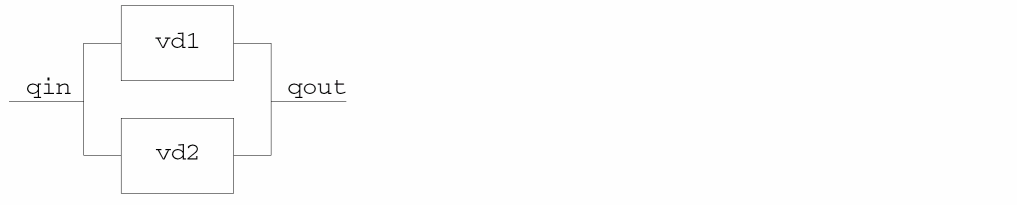
Module instantiation statements like
vdoubler vd1 (qin, qout) ;
vdoubler vd2 (qin, qout) ;
establish different connections. These statements describe a system where the gain blocks are connected in parallel, with this schematic.
Port Connection Rules
You can connect the ports described in the vdoubler instances because the ports are all analog, are defined with compatible disciplines, and are the same size. To generalize,
-
All analog ports connected to a net are compatible with each other. You can connect both analog and digital ports to the same net if you provide appropriate
connectstatements. - You must ensure that the sizes of connected ports and nets match. In other words, you can connect a scalar port to a scalar net, and a vector port to a vector net or concatenated net expression of the same width.
Overriding Parameter Values in Instances
The syntax for the module instance statement is
module_id [ parameter_value_assignment ] instance_list
The following sections discuss the parameter_value_assignment expression, which is further defined as
parameter_value_assignment ::=
                #( ordered_param_override_list )
    |   #( named_param_override_list )
ordered_param_override_list ::=
expression{ ,expression}
named_param_override_list ::=
        named_param_override { , named_param_override }
named_param_override ::=
.parameter_identifier(expression)
By default, instances of modules inherit any parameters specified in their defining module. If you want to change any of the default parameter values, you can do so on the module instantiation statement itself, or from other modules and instances by using the defparam statement. The defparam statement is particularly useful if you want to change parameters throughout your modules from a single location.
Overriding Parameter Values from the Instantiation Statement
Using the module instantiation statement, you can assign values to parameters in two ways. You can assign values in the order the parameters are declared, or you can assign values by explicitly referring to parameter names. The new values must be constant expressions.
Overriding Parameter Values with Ordered Lists
To override parameters using an ordered list of replacement values you must ensure that the list specifies replacement values in the same order that the parameters are defined in the defining module. You are not required to specify replacement values for every defined parameter, but if you omit any value you must omit every value from then on. In other words, you cannot skip over selected parameters. If a parameter does not need a new value, however, you can specify a replacement value equal to the default value.
Consider the two instances, weakp and plainp, instantiated within module m.
module m ;
voltage clk ;
electrical out_a, in_a ;
mosp # (2e-6, 1e-6) weakp (out_a, in_a, clk);//Overriding param values by order
mosp plainp (out_b, in_b, clk) ;
endmodule ;
The weakp module instantiation statement overrides the first two parameters given in the defining module, mosp, giving the first parameter the new value 2e-6 and the second parameter the value 1e-6. The plainp module instantiation statement has no parameter override expression, so the parameters assume their default values.
Overriding Parameter Values By Name
You can also override parameter values in an instantiated module by pairing the parameter names to be changed with the values they are to receive. A period and the parameter name come first in each pair, followed by the new value in parentheses. The parameter name must be the name of a parameter in the defining module of the module being instantiated. When you override parameter values by name, you are not required to specify values for every parameter.
Consider this modified definition of module vdoubler. This version has three parameters, parm1, parm2, and parm3.
module vdoubler (in, out) ;
input in ;
output out ;
electrical in, out ;
parameter parm1 = 0.2,
          parm2 = 0.1,
          parm3 = 5.0 ;
analog
    V(out) <+ (parm1 + parm2 + parm3) * V(in) ;
endmodule
module vquad (qin, qout) ;
input qin ;
output qout ;
vdoubler # (.parm3(4.0)) vd1 (qin, aa1) ;                // Overriding by name
vdoubler # (.parm1(0.3), .parm2(0.2)) vd2 (aa1, qout) ;  // Overriding by name
vdoubler # (0.3, 0.2) vd3 (aa1, qout) ;                  // By order
endmodule
The module instantiation statement for instance vd1 overrides parameter parm3 by name to specify that the value for parm3 should be changed to 4.0. The other two parameters retain the default values 0.2 and 0.1. The module instantiation statement for vd3 uses an ordered list to override the first two parameters, parm1, and parm2. Parameter parm3 retains the default value 5.0.
Overriding Parameter Values Using defparam
Use the defparam statement to set parameter values in any module instance throughout the module hierarchy. With this capability, for example, you can group all your parameter override assignments together in a single module. The syntax is
defparamparam=constant_exp{ ,param=constant_exp} ;
param must be a complete hierarchical path for the parameter whose value you want to change in a module instance. constant_exp must be an expression involving only constant numbers and parameters that are defined in the same module containing the defparam statement.
For example, as the following code demonstrates, you could remove the parameter overrides from module vquad and put them in a new module, annotate.
module vdoubler (in, out) ;
input in ;
output out ;
electrical in, out ;
parameter parm1 = 0.2,
          parm2 = 0.1,
          parm3 = 5.0 ;
analog
    V (out) <+ (parm1 + parm2 + parm3) * V (in) ;
endmodule
module vquad (qin, qout) ;
input qin ;
output qout ;
vdoubler vd1 (qin, aa1) ;
vdoubler vd2 (aa1, qout) ;
endmodule
module annotate ;
defparam
        vquad.vd1.parm3 = 4.0,
        vquad.vd2.parm1 = 0.3,
        vquad.vd2.parm2 = 0.2;
endmodule
Precedence Rules for Overriding Parameter Values
Use the following rules to determine which parameter override takes precedence when a parameter value is overridden by more than one assignment.
- If overrides take place at different levels of the module hierarchy, the highest level override takes precedence.
-
If overrides take place at the same level of the module hierarchy, an override done by the
defparamstatement takes precedence over overrides done by module instantiation statements.
ps #(.b(1.5) inst1 (in, out);
Instances of paramsets are allowed to override only parameters that are declared in the paramset. Using a paramset instance to attempt to override a parameter of the base module that is not declared in the paramset results in a warning and the offending parameter override is ignored.
Instantiating Analog Primitives
The remaining sections of the chapter describe how to instantiate some analog primitives in your code. For more information, see the “Preparing the Design: Using Analog Primitives and Subcircuits” chapter of the Virtuoso AMS Designer simulator User Guide.
As you can instantiate Verilog-AMS modules in other Verilog-AMS modules, you can instantiate Spectre and SPICE masters in Verilog-AMS modules. You can also instantiate models and subcircuits in Verilog-AMS modules. For example, the following Verilog-AMS module instantiates two Spectre primitives: a resistor and an isource.
module ri_test (pwr, gnd) ;
electrical pwr, gnd ;
parameter real ibias = 10u, ampl = 1.0 ;
electrical in, out ;
    resistor #(.r(100K)) RL (out, pwr) ;        //Instantiate resistor
    isource #(.dc(ibias)) Iin (gnd, in) ;    //Instantiate isource
endmodule
When you connect a net of a discrete discipline to an analog primitive, the simulator automatically inserts a connect module between the two.
However, some instances require parameter values that are not directly supported by the Verilog-AMS language. The following sections illustrate how to set such values in the instantiation statement.
Instantiating Analog Primitives that Use Array Valued Parameters
Some analog primitives take array valued parameters. For example, you might instantiate the svcvs primitive like this:
module fm_demodulator(vin, vout, vgnd) ;
input vin, vgnd ;
output vout ;
electrical vin, vout, vgnd ;
parameter real gain = 1 ;
    svcvs #(.gain(gain),.poles({-1M, 0, -1M, 0}))
         af_filter (vout, vgnd, vin, vgnd) ;
    analog begin
        ...
    end
endmodule
This fm_demodulator module sets the array parameter poles to a comma-separated list enclosed by a set of square brackets.
Instantiating Modules that Use Unsupported Parameter Types
Spectre built-in primitives take parameter values that are not supported directly by the Verilog-AMS language. The following cases illustrate how to instantiate such modules.
To set a parameter that takes a string type value, set the value to a string constant. For example, the next fragment shows how you might set the file parameter of the vsource device.
vsource #(.type("pwl"), .file("mydata.dat") V1(src,gnd);
To set an enumerated parameter in an instance of a Spectre built-in primitive, enclose the enumerated value in quotation marks. For example, the next fragment sets the parameter type to the value pulse.
vsource #(.type("pulse"),.val1(5),.period(50u)) Vclk(clk,gnd);
Using an M Factor (Multiplicity Factor)
Circuit designers use m factors to mimic parallel copies of identical devices without having to instantiate large sets of devices in parallel. A design instance can inherit an m factor from one of its ancestors in a hierarchy of instances. The value of the inherited m factor in a particular module instance is the product of the m factor values in the ancestors of the instance and of the m factor value in the instance itself. If there are no passed m factors in the instance or in the ancestors of the instance, the value of the m factor is one (1.0).
In the Cadence implementation of Verilog-AMS, you use the inherited_mfactor attribute to access the value of the m factor and set its value as follows:
(* inherited_mfactor *) parameter real m=1;
and you use the passed_mfactor attribute to pass an m factor down the hierarchy; for example:
one #(.m(3)) (* integer passed_mfactor = "m"; *) One();
This example specifies an m-factor parameter called m, gives it the value 3, and passes that value down to instance One of the module called one. Module one does not have to have the m parameter declared in its interface.
passed_mfactor attribute so that you only need to insert the inherited_mfactor parameter. Example: Using an M Factor
The following example illustrates how the m-factor value is passed down the hierarchy and how the effective value is the product of the m factors in the current instance and in the ancestors of the current instance.
//Verilog-AMS HDL for "amslib", "top" "verilogams"
‘include "constants.vams"
‘include "disciplines.vams"
module top;
    resistor R1(a,b);
    one #(.m(3)) (* integer passed_mfactor = "m"; *) One();
// The above sets the m factor for instance One to 3.
endmodule
//Verilog-AMS HDL for "amslib", "one" "verilogams"
‘include "constants.vams"
‘include "disciplines.vams"
module one ( );
    parameter real (* integer inherited_mfactor; *) m=1;
    resistor R1(a,b);
    two Two();
    analog $strobe ("Inherited mfactor in module one is %f",m);
// Value of m factor is 3, as set in module top.
endmodule
//Verilog-AMS HDL for "amslib", "two" "verilogams"
‘include "constants.vams"
‘include "disciplines.vams"
module two ( );
    three #(.m(2)) (* integer passed_mfactor="m";*) Three();
// m factor is not accessed in this module, but a factor of 2
// is added.
endmodule
//Verilog-AMS HDL for "amslib", "three" "verilogams"
‘include "constants.vams"
‘include "disciplines.vams"
module three ( );
    parameter real (* integer inherited_mfactor; *) m=1;
// The effective value of m factor is now 3 * 2 = 6.
    resistor R1(a,b);
    four Four(); // No m factor is specified.
    analog $strobe ("Inherited mfactor in module three is %f",m);
endmodule
//Verilog-AMS HDL for "amslib", "four" "verilogams"
‘include "constants.vams"
‘include "disciplines.vams"
module four ( );
    resistor R1(a,b);
endmodule
When you simulate, these modules produce output like the following.
xcelium> run
inherited mfactor in module one is 3.000000
inherited mfactor in module three is 6.000000
Including Verilog-A Modules in Spectre Subcircuits
Users of AMS Designer can instantiate Spectre cells in their Verilog-AMS code. By using the ahdl_include statement, those Spectre cells can, in turn, instantiate Verilog-A modules. This situation, which users of Spectre libraries often encounter, is summarized by the following diagram.

To set up a hierarchy like this one, you use an ahdl_include statement in the Spectre subcircuit to include the Verilog-A module.
The ahdl_include statement used in the Spectre subcircuit has the following format.
ahdl_include "filename"
For filename, use either a full or a relative path that resolves across your network. For a Verilog-A file, filename must have a .va file extension.
For example, to include in your Spectre subcircuit a Verilog-A npn instance with the name ahdlNpn, you use a statement like the following,
ahdl_include "/usr/ahdlNpn.va"
Be sure that you make the Spectre subcircuit available by defining the MODELPATH variable. For more information about this procedure, see the “Using Subcircuits and Models Written in SPICE or Spectre” section, in Chapter 3, of the Virtuoso AMS Designer simulator User Guide.
Return to top