
3
Netlisting a VHDL Design
This chapter describes the steps to netlist your VHDL design.
In this chapter, you will learn about the following topics:
- Initializing the Run Directory
- Configuring the VHDL Netlister
- Generating the Netlist
- Viewing Netlist Results
Initializing the Run Directory
In the VHDL Toolbox, choose Commands - Initialize Run Dir option to initialize the run directory that you specified in the Run Directory field and to validate the top design. The run directory is initialized with the default directory structure required to create hierarchical netlists.
The fixed menu commands become available after you initialize the run directory.
Configuring the VHDL Netlister
You can configure the VHDL netlister to customize the netlisting environment. Netlister configuration includes the following tasks:
- Customizing Pre- and Post-Processing Functions
- Setting up Hierarchical Specifications
- Setting up the VHDL Netlister for Inherited Connections
In addition, following are some additional features of the netlister:
- Support for Generating the Configurations of All the Cellviews in a Design
- Support for Instance Bindings
- Support for External VHDL Source Files
- Support for Type Conflict Resolution
- Support for Shorting Devices
- Support for Shorting Terminals
For information on the SKILL functions associated with VHDL Toolbox, see Digital Design Netlisting and Simulation SKILL Reference.
Customizing Pre- and Post-Processing Functions
The VHDL Toolbox allows you to customize and run the pre- and post-processing SKILL functions before you start the VHDL Toolbox. A pre-processing function executes before the netlisting starts while a post-processing function executes after the netlisting completes. VHDL Toolbox supports the hnlVHDLPreNetlistFunc()and hnlVHDLPostNetlistFunc()pre- and post-processing functions, which you can define in the .cdsinit or .simrc file. The following example shows how to define the hnlVHDLPreNetlistFunc() function:
procedure(hnlVHDLPreNetlistFunc()
printf("Welcome to VHDL Netlister !!\n")
)
The following example shows how to define the hnlVHDLPostNetlistFunc() function:
procedure( hnlVHDLPostNetlistFunc()
printf("Done with VHDL Netlisting !!\n")
)
Setting up Hierarchical Specifications
You need to set up hierarchical specifications before you can netlist your design. The hierarchical specifications specify how the cellviews combine to form a hierarchy. When you netlist your design, each top-level block is bound to an architecture cellview or schematic cellview. For example, you might bind the memory block to a behavior architecture cellview and a cntl_1 block to a schematic cellview.
The VHDL Setup - Netlist form enables you to specify different component configurations, such as Cadence HED Configuration, or Switch View and Stop View List, for your design at any given time.
To open the VHDL Setup - Netlist form:
-
In the VHDL Toolbox window, choose Setup - Netlist.
The VHDL Setup - Netlist form is displayed, as shown in the figure below. This form consists of three tabs: - Netlist Options Tab
- VHDL Options Tab
- Other Options Tab
Netlist Options Tab
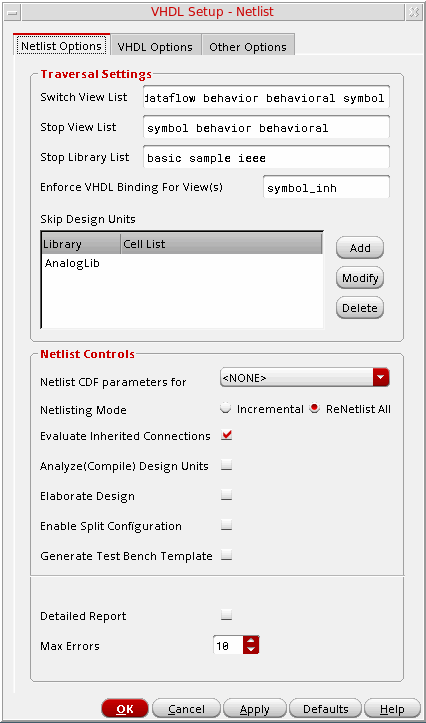
The following tables describe the various options on the Netlist Options tab.
Specifying the Traversal Settings
|
Specifies a list of views that define how the top cell/design is traversed. The top/cell design is finally netlisted as per the stop view list.
Default:
To generate the entity based on the symbol views, set the following flags in the
|
|
|
Specifies a list of views, which indicates the last levels of hierarchy needed for the netlist. If the switch view selected by a netlister is available on the stop view list, the hierarchy stops expanding. This indicates that the entity/architecture for the cellview is not required to be generated. The netlister prints only the instance line in the final netlist. If the current switch view is not available in the list, netlisting continues with the next level of hierarchy. |
|
|
Specifies a list of libraries, which contain the cells, which you do not need to traverse while netlisting a design. These cells are treated as stop cell views. If the library of the current instance appears in this list, the instance is not expanded further and only the instance line is printed in the final netlist. |
|
|
Specifies a list of proxy symbol views to be used for resolution of inherited connections. For more details about inherited connections, refer to Setting up the VHDL Netlister for Inherited Connections |
|
|
Specifies a list of libraries or library cells that are to be skipped while netlisting a design. If the library or library and cell name of the current instance appears in this list, the instance is ignored while netlisting and is not printed in the final netlist.
To ignore design cells, you do not need to set the design properties as |
Setting up Netlisting Controls
|
Lists the simulators, which are used to determine the parameters that need to be translated into VHDL generics. You can select any of these simulators depending on your need. The netlister reads instParameters field of the simulation view simInfo section in the cell CDF to resolve the parameter list. |
|
|
Enables you to re-netlist the entire design. The VHDL Toolbox does not support the Incremental netlist mode. The ReNetlist All option regenerates files for every design unit in the hierarchy. |
|
|
Specifies that the inherited connections should be evaluated before generating netlist. The netlister evaluates the expressions for inherited connections, stored with the For more information about support for inherited connections, refer to Setting up the VHDL Netlister for Inherited Connections |
|
|
Specifies whether to compile the design units before elaborating the entire design. |
|
|
Specifies whether to generate the configurations of all the cellviews in your design, instead of generating a single top-level configuration. |
|
|
Specifies whether to generate top level VHDL test bench template for the design automatically. A test bench file with a default name test_bench.vhd is saved in the run directory. To view and edit the auto generated test bench, choose Commands – Edit Test Bench. For more details, refer to Chapter 4, “Creating a Testbench.”. |
|
|
Specifies whether to display the debug messages generated while netlisting a design on Virtuoso Studio Design Environment workbench. These messages are automatically added to the CDS.log file. The messages include the information on how the netlister has resolved the inconsistencies while netlisting a design. Turn this option On if you need to display the messages. |
|
|
Specifies the maximum number of errors after which design compilation or elaboration aborts. |
VHDL Options Tab
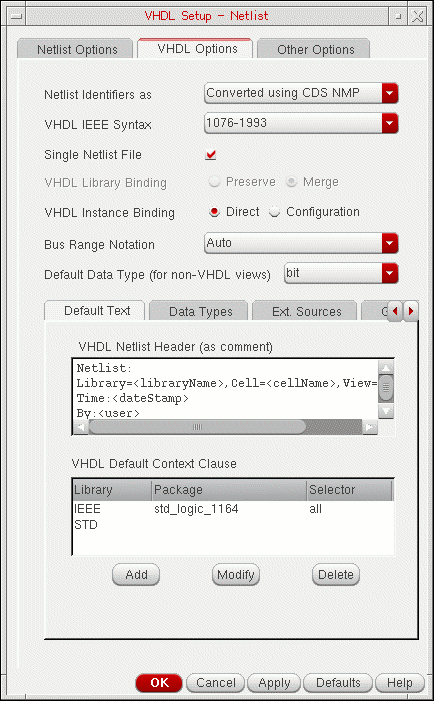
|
Lists the options to specify whether the identifiers, such as instance names and net names, should be converted using CDS NMP or their case should be preserved. By default, the value of Netlist Identifiers as is set to Converted using CDS NMP. With this option, the netlister uses Cadence name mapping and OSS tabular format. It translates all identifiers that are illegal in VHDL or contain uppercase characters to valid VHDL names using escaped name style. For example, an identifier aBc is translated as \aBc\ to preserve the uppercase character during simulation. To keep the case of the identifiers, set the value of Netlist Identifiers as to Case Preserved. In this case, an identifier aBc is saved with same name as aBc, but the uppercase of characters will not be preserved during simulation. |
|
|
Specifies the version of VHDL IEEE standard that is used to generate a netlist. The netlists are generated using any of the two versions, |
|
|
Specifies whether to create a single netlist file or multiple netlist files for VHDL design units. A single netlist file is generated with VHDL description of all non-primitive design units, by default. Turn this option For more information about analyzing netlists, refer to Analyzing the Netlist |
|
|
Specifies the compile library to which the netlister binds the design units. The netlister has two binding options, Preserve and Merge. The Preserve option binds the design units to the associated DFII library and the Merge option binds the netlisted design units to a single logical VHDL library,
When the VHDL library binding is set to Preserve and the |
|
|
Indicates that the instances are directly bound into the architectural description. The netlister has two instance binding options, Direct and Configuration. The default instance binding option is Direct. For more information, refer to |
|
|
Specifies the direction in which bus ranges should be printed for all vector signals. You can set this option as one of the following values:
If the bus ranges are given in both the directions and the Bus Range Notation is set as
For the default mode, to print the vector signals in the order specified in the design, set the
hnlVHDLMergeSignals variable to t. If a design has a descending bus and this variable is set to t, then the signal will be printed in descending order, irrespective of whether ascending part has more number of bits.
However, if the design contains a complete bus ( |
|
|
Contains a list of default data types, which can be used for the ports and signals in a netlist, if no information can be extracted from a design. A default signal scalar type (example: STD_ULOGIC) and vector type (example: STD_ULOGIC_VECTOR) is specified. You can modify these values when a signal type cannot be derived from an external VHDL model.
You can configure port type and port direction by using the . |
|
|
Contains the following information:
|
|
|
Allows you to specify user-defined data types that may be used in a design. The VHDL netlister need to know the scalar and vector names of a given data type because in VHDL, scalar and vector are different types. The data types can be specified in a tabular format in the following fields:
|
|
|
Lets you specify external VHDL sources to be used during netlisting. The Ext. Sources tab contains the VHDL External Source Directories table in which you can specify libraries and their directory paths. For more information, see Support for External VHDL Source Files. |
|
|
Allows you to add, modify, or delete generics for an instance or cell. For more information about generics, see Modeling Instance Properties as Generics. |
Other Options Tab
The following figure shows the Other Options tab on the VHDL Setup - Netlist form:
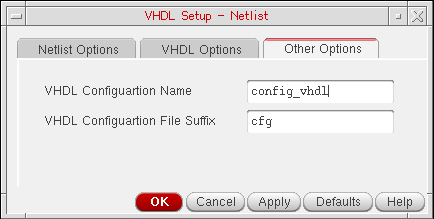
The various options on the Other Options tab are:
|
This option provides the control to specify the configuration name while generating instance binding in |
|
|
This option displays the suffix for the configuration file of your design. However, this feature is no longer supported. |
Setting up the VHDL Netlister for Inherited Connections
Inherited connections allow you to create global signals and override their names for selected branches of the design hierarchy. This section explains how VHDL Toolbox provides support to evaluate inherited connections during netlist generation.
An inherited connection is defined using the netExpr property in a lower-level schematic, which can also be overridden using the netSet property in a higher-level schematic. VHDL language does not support textual attributes such as netSet and netExpr. Therefore, the netlister evaluates these attributes and prints extra ports, called pseudo ports, in the netlist. The pseudo ports are created in the entity of the cellview being translated and is used to pass the inherited data signal up and down in the hierarchy. The names of these ports are prefixed with inh_ and are also assigned a default data type, which is obtained from the instance connection in the schematic design. For example,
port (
a : in bit;
y : in bit;
inh_powr : inout std_ulogic );
here, inh_powr is a pseudo port. The direction of the pseudo ports is always inout.
The connection from an instance terminal to an inherited signal is either a resolved netSet value or a pseudo terminal net. In the following example, inh_powr is a resolved net,
inst0: entity work.myinv
port map (
a => neta,
b => netb;
inh_powr => vdd_global
);
In the following example, inh_powr is a pseudo terminal net,
inst1: entity work.myinv
port map (
a => neta,
b => netb;
inh_powr => inh_powr
);
At the top level, all inherited connections are resolved to the netSet value or the default value of netExpr. Therefore, no pseudo ports exist at the entity interface.
For more details on inherited connections, see Chapter 2, Understanding Connectivity and Naming Conventions of Virtuoso Schematic Editor L User Guide.
You can specify the choice to evaluate inherited connections in three ways (listed in the order of preference from highest to lowest):
-
Setting the Evaluate Inherited Connections option in the Netlist Options tab of VHDL Setup - Netlist form. This will automatically set the
simPrintInhConnAttributesSKILL variable asnilin thesi.envfile. -
Setting the
simPrintInhConnAttributesSKILL variable asnilin the.simrcfile -
Setting the
simPrintInhConnAttributesSKILL variable asnilin the CIW
Configuring Pseudo Ports
Pseudo ports are by default prefixed with inh_. You can customize this prefix string as per your requirement using the hnlInhConnPrefix variable in the .simrc file. If you do not want to prefix the pseudo ports with any string, set this variable to "".
The default port type of the pseudo ports is INOUT and their data type is same as the default VHDL data type set using the hnlVHDLDefaultDataType variable. However, you can set a different default data type and port type for these ports using the hnlVHDLDefaultInhPortDataType and hnlVHDLDefaultInhPortMode variables, respectively.
Support for Implicit Inherited Connections for Leaf Cells
By default, the netlister does not consider the implicit inherited net expressions on wires of leaf (stopping) cellviews. To honor such inherited net expressions, set the following variables in the .simrc file:
-
Set the
simResolveStopCellImplicitConnsskill variable ast -
Set the
simPrintInhConnAttributesvariable asnil
When these flags are set, the netlister evaluates the implicit inherited net expression on wires of the stopping cellviews and creates pseudo ports at the top level, wherever required.
Support for Proxy Views
VHDL text views do not support textual attributes for inherited connections. Therefore, to print the inherited connections in the netlist, you need to create proxy views that contain description of the desired inherited pins and terminals. This section explains how the VHDL Toolbox provides support for printing inherited connections in the netlist by using proxy views.
The Netlist Options tab on the VHDL Setup - Netlist form contains the Enforce VHDL Binding for View(s) field, shown in the figure below. This field enables you to specify a list of proxy symbol views to be used for resolving inherited connections.
The netlister uses these proxy symbol views, in place of actual VHDL views to resolve inherited connections. After resolving the inherited connections, the netlister uses the actual VHDL text views for data type propagation. If proxy symbol views are not specified, the netlister directly uses actual VHDL text views. In this case, the inherited terminals are not resolved.

The following restrictions apply to the resolution of inherited terminals using proxy views:
- The actual VHDL view must have a valid OpenAccess database.
-
If the proxy view has terminals with the
nlActionproperty set asignore, those terminals are ignored during netlisting. Such terminals should have a default value in the actual VHDL text view for successful compilation.
The VHDL-OSS netlister supports the use of proxy views by using the same proxy for multiple VHDL architecture views while binding cells in HED. Therefore, you can bind cells or instances to multiple VHDL architectures and specify one proxy view for resolving inherited connections.
To support proxy views, the following prerequisites must be met:
- All architecture-entity pairs are created by using DFII 5x cellviews before binding.
- All architecture-entity views have a valid OpenAccess database.
- Proxy symbol, which include the port name, width, and direction, are in sync with the underlying VHDL text views.
When the netlister finds an instance with VHDL view binding, it uses the first-found view in the proxy view list to resolve inherited connections. If no proxy views are specified in the list, the actual VHDL view is used, which is the same behavior as without proxy views.
Additional Features of the Netlister
Support for Generating the Configurations of All the Cellviews in a Design
You can generate the configurations of all the cellviews in your design, instead of generating a single top-level configuration of the design using hnlVHDLSplitInstsInConfig. To enable this feature, set hnlVHDLSplitConfigEnabled to t. For example, you can add the following entry in the .simrc file.
hnlVHDLSplitConfigEnabled works with VHDL IEEE 1993 format with the configuration mode enabled in the netlister.
The following snippets illustrate parts of a netlist generated when hnlVHDLSplitConfigEnable is set to t. Note the bold text that illustrates how the configuration of a cellview is included in the netlist.
The following snippets illustrate parts of netlist of the same design when hnlVHDLSplitConfigEnable is not set or set to nil. Note that the configuration of the cellview is missing and the top-level configuration is in the expanded form.
Support for Instance Bindings
You can set VHDL Instance Binding Direct or Configuration option on the VHDL Options tab. If the instance binding is set as Direct and the syntax is IEEE 1993, all the instances are bound directly to their library/entity/architecture in the architectural description. If the syntax is IEEE 1987, instances are bound to components and component declarations and configuration specifications are printed in the architecture.
If the instance binding is set as Configuration, all instance bindings are deferred in a separate VHDL file called VHDL config file. Here, instances are bound to components and only component declarations are printed in the architectural description. With the Configuration option, the VHDL netlister enables you to generate two views: compact and detailed. By default, the VHDL Netlister generates a compact configuration view.
To generate a detailed configuration view such that binding is present for each instance, set the hnlVHDLSplitInstsInConfig variable to t.
To generate a configuration view that contains detailed binding for specific cells, provide the list of cells to the hnlVHDLSplitInstsInConfig variable. For example, if you want to generate instance configuration in the netlist for instances myinst1 and myinst2, set the variable as follows:
hnlVHDLSplitInstsInConfig = '("myinst1" "myinst2")
Example of a Compact and Detailed Configuration View
FOR ALL: pm_capa_unitaire
    USE ENTITY
    AFE.pm_capa_unitaire(vhdlrn_functional);
Corresponding detailed configuration view
FOR cap_lr_0 : pm_capa_unitaire
USE ENTITY
AFE.pm_capa_unitaire(vhdlrn_functional);
END FOR;
FOR cap_lr_1 : pm_capa_unitaire USE ENTITY
AFE.pm_capa_unitaire(vhdlrn_functional);
END FOR;
FOR cap_lr_2 : pm_capa_unitaire USE ENTITY
AFE.pm_capa_unitaire(vhdlrn_functional);
END FOR;
OTHERS instead of ALL by setting the SKILL variable hnlVHDLConfigSpecForCommonMaster="OTHERS" in the .simrc file. The default keyword is ALL.Support for External VHDL Source Files
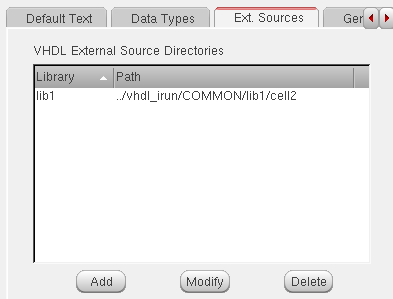
Each directory path can have multiple VHDL files. The tool identifies all the VHDL files in these directories as the external source files, parses them to extract the cell and port details, and binds them to the specified library (irrespective of the VHDL Library Binding option being set as Merge or Preserve). By default, the tool identifies files with .vhd or .vhdl extensions as VHDL files.
You can also specify the external source directories using the SKILL variable hnlVHDLExternalDirList. To specify a different set of file extensions, use the SKILL variable hnlVHDLDefFileExts .
VHDL text views may not exist for some cells, for such cells you need the VHDL Netlister to refer to external text files for specifying the port datatypes. The external VHDL sources can be specified in following ways:
-
As a list of directories that contain the VHDL source files where every file in the directory has a
.vhdor.vhdlextension. These files are parsed to gather information, such as cell names and ports data type.
The default extensions are controlled by thehnlVHDLDefFileExtsskill flag. - During design traversal, no further hierarchy expansion takes place if there is any DFII cell name that matches the entity name from the external sources.
While generating netlist using the external source files, the VHDL Toolbox considers the following points:
-
If Cadence name mapping (CDS NMP mode) is ON (that is, if the
hnlVHDLDonotUseCdsNmpvariable is set tonil), while compilation, the tool changes the case of the external entity names to lowercase. While comparing the names of design cells with the names of external entities, the tool considers the changed names. Depending on the CDS NMP mode, the results of cell name comparison will be as shown in the following table:Cell Names Results after Comparison Matches irrespective of the CDS NMP mode because the entity name has been escaped.
- If the name of a design cell matches with the name of an external entity, the netlister honors the external entity. The instance line printed by the netlister contains the instance name bound to the library name specified for the external source cell.
- During the first netlist run, the VHDL Toolbox parses all the files given in the external directories. In the following runs, the tool parses only new files. It parses an existing file only in the following cases:
-
VHDL Toolbox checks for the presence of multiple declarations for an entity. It reports errors in the following cases:
- If the external source data has multiple files (in same or different libraries) with same entity declaration.
- If a vhdl text view has same name as that of an external entity.
- If multiple stop cells that do not have vhdl text views (blackboxes) with same cell names are present in different DFII libraries. By default, this is not checked. If you want the netlister to check for this case, set the hnlVHDLCheckSameStopCellFromMultLibs SKILL variable to t.
-
By default, while compiling the external source files, the VHDL Toolbox reports all the compilation errors as errors. You can change the severity of these messages as warning by setting the hnlVHDLParseExtDataSeverity SKILL variable to
"warning". By default, this variable is set as"error". -
While parsing the external source files, if the VHDL Toolbox finds errors in a file, it reports the errors in the CIW and stops further compilation. This is because, by default, the hnlVHDLMaxExtFileErrCount SKILL variable is set to
1. If you want the tool to report errors for more than one file, say 10 files, set the hnlVHDLMaxExtFileErrCount SKILL variable to10. In this case, the tool will continue compilation until it finds errors in ten files or it parses all the files successfully, whatever happens first. -
After netlisting, the VHDL Toolbox maintains the compiled data in the cache. You can clear the cache by setting the hnlVHDLResetExternalVHDLData SKILL variable to
t.
Support for Type Conflict Resolution
During hierarchical netlisting, VHDL-OSS netlister propagates data types of intermediate connecting signals and cellview ports by using a process called type propagation. Type propagation can lead to conflicts when:
- A single signal is connected to multiple instance terminals of different data types.
- A vector signal has different data types on multiple bits.
In such cases, the netlister displays warning or error messages, but continues to generate the complete netlist, which is incorrect and cannot be elaborated.
To avoid such conflicts, you need to apply a resolution or a type conversion scheme. A resolution scheme involves providing a priority or type resolution table to find a resolved data type (see Using Type Resolution Tables). A type conversion scheme involves using a user-specified function that converts a signal of data type 'typeA' to data type 'typeB' (see Using Type Conversion Functions).
Using Type Resolution Tables
You can define the type resolution table by setting the hnlVHDLTypeResolverDefs SKILL variable in .simrc. During netlist generation, the tool searches the type resolution table to resolve any type conflicts. However, if any conflict is not resolved, the tool reports a warning message and completes the netlist.
If you want to change this default behavior so that the tool reports errors in case of unresolved type conflicts and discontinues the netlist generation, set the hnlVHDLTypeConflictSeverity SKILL variable as "error". By default, this variable is set as "warning".
Following are some examples to show how you can specify entries in the type resolution table:
hnlVHDLTypeResolverDefs='("typeA" "typeB" "typeC")
This implies that if the netlister finds a signal or a signal bit with two propagated data types, typeA and typeB, the resolved data type to be used is typeC. Here, typeC can be any one of typeA and typeB or any other data type.
hnlVHDLTypeResolverDefs = '(("typeQ" "typeW" "typeQW") ("typeE" "typeR" "typeER") )
The above example provides a list of entries for the type resolution table.
If there are more than two conflicting types on a single signal, it is recommended that you provide all type conflicting pairs in the list so that complete type resolution can be done. For example, if signals of three different types: typeA, typeB, and typeC are inflicted upon a single wire, you should provide the type resolution entries for all the following cases:
hnlVHDLTypeResolverDefs = '(("typeA" "typeB" "typeR") ("typeA" "typeC" "typeR") ("typeB" "typeC" "typeR"))
Using Type Conversion Functions
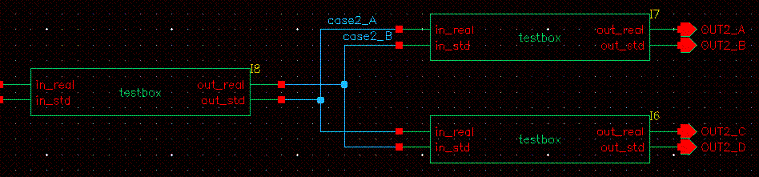
When a netlister finds a signal connected to several instance terminals of different types, it prefers the data type of the output instance terminal and assigns it to the signal. The netlister then adds a conversion function at the instance terminal signal (in PORT MAP section of the netlist) wherever the data type of the instance terminal is different from that of the preferred data type.
For example, in the figure below, signal case2_A on the output terminal I8/out_std has data type std_logic and is connected to an input terminal I7/in_real with data type real. Therefore, a type conversion function that converts the signal from std_logic to real is added at the PORT MAP of input terminal I7/in_real.
By default, the PORT MAP information is printed using named port mapping. However, this information can also be printed using positional association by setting the hnlVHDLPositionalAssociation variable to t. For example, if this variable is set, the PORT MAP information would appear as
PORT MAP(
OUT2_A,OUT2_B,std_logic2real(\case2_A\),real2std_logic(\case2_B\)));
----------------------- x -------------------------------
ARCHITECTURE schematic of \TOP_test_vhdl\ IS
-- Local SIGNALS and ALIASES ---
SIGNAL \case2_B\ : real;
SIGNAL \case2_A\ : std_logic;
…
begin
\I7\: ENTITY WORK.testbox(behavior)
PORT MAP(
out_real => \OUT2_A\,
out_std => \OUT2_B\,
in_real => std_logic2real(\case2_A\),
in_std => real2std_logic(\case2_B\)
);
\I6\: ENTITY WORK.testbox(behavior)
PORT MAP(
out_real => \OUT2_C\,
out_std => \OUT2_D\,
in_real => std_logic2real(\case2_A\),
in_std => real2std_logic(\case2_B\)
);
END schematic;
----------------------- x -------------------------------
Every time a conversion function is added at the PORT MAP of the input terminal, the netlister displays the following message in CIW:
“In schematic '<l.c.v>', the signal(net) '<sig>' on instance terminal '<inst>:<termName>' having type '<typeA>' is connected to other instance terminals having type '<typeB>'. Therefore, a conversion function '<func>' will be added to resolve the conflict.”
For type conversion to work, the following conditions must be satisfied with respect to the conflicting signal:
- The direction or mode of the connected instance ports of the conflicting signals must be input or output. The inout mode is not allowed.
- The connected output instance ports must have the same data type.
-
The conversion functions for all type conflicts must be defined.
You can define a type conversion function by setting the hnlVHDLTypeConversionFuncs SKILL variable in CIW or in the .simrc or si.env files as follows:
hnlVHDLTypeConversionFuncs = list( "typeA" "typeB" "fn_typeA2typeB" "fn_typeB2typeA" )
For example, to convert data type typeA to data type typeB, the conversion function fn_typeA2typeB is applied, and vice versa.
For specifying several type conversion functions this list can be changed to a 'list of list' as shown in the following example:
hnlVHDLTypeConversionFuncs = list(
list( "typeA" "typeB" "fn_typeA2typeB" "fn_typeB2typeA" )
list( "typeC" "typeD" "fn_typeC2typeD" "fn_typeC2typeD" )
Conflicts.log file
A conflicts.log file displaying resolved and unresolved conflicts is created when your design uses a type conversion function.
A typical conflicts.log file displaying resolved conflicts is as follows:
--------------------------------------------------------------------------------
RESOLVED CONFLICTS (testlib.basic1:schematic):
--------------------------------------------------------------------------------
Type conflict detected on net: 'testlib.basic1:schematic/r2std'. Final type is: 'real'.
On this net types are (inst/term:direction:<type>):
I0/out_real:OUT:<real>
I1/in_std:IN:<std_logic> conversion function added: 'real2std_logic'
In this file, a conflict (that was resolved) is detected on the net r2std in the lib/cell:view testlib.basic1:schematic. The final resolved type is real.
A typical conflicts.log file with unresolved conflicts is as follows:
--------------------------------------------------------------------------------
UNRESOLVED CONFLICTS (TOP.TOP_test_vhdl:schematic):
--------------------------------------------------------------------------------
Type conflict detected on net: 'TOP.TOP_test_vhdl:schematic/IN1'. Final type is: 'std_logic'.
On this net types are (inst/term:direction:<type>):
I38/in_std:IN:<std_logic>
I37/inout_real1:INOUT:<real>
I37/inout_real2:INOUT:<real>
Type conflict detected on net: 'TOP.TOP_test_vhdl:schematic/IN2'. Final type is: 'real'.
On this net types are (inst/term:direction:<type>):
I2A/in_real:IN:<real>
I2A/in_std:IN:<std_logic>
In this file, an unresolved conflict was detected on the net IN1 in the lib/cell: view TOP.TOP_test_vhdl:schematic. The final conflict selected was std_logic.
hnlVHDLPriorityTypes.
hnlVHDLPriorityTypes = list(?aType? ?bType?) ; aType is chosen over bType
Support for Shorting Devices
For OSS-based netlisters, you can short devices and replace them with a surviving net. For more information about how ports are shorted for devices, see “
To enable shorting for devices in the VHDL netlister, follow one of the methods listed below:
-
Set the
lxRemoveDevicestring property at the instance level.
You can set this property from the Property Editor assistant of Schematic Editor.
Example:
lxRemoveDevice(short(A B) short(C D E F))
In this example: -
Use the
hnlUserMultiTermShortCVListSKILL variable in.simrcto specify the cellview names and pin information in a list in the following syntax:
You must provide a value in all the fields of this variable. Otherwise, the netlister reports an error.hnlUserMultiTermShortCVList= ‘(("lib" "cell" "view" "(short(A B) short(C D E)" ))
Examples:hnlUserMultiTermShortCVList = ‘(("sample" "dffpp_c_" "symbol" "(short(in1 out3 out4))") ("testLib" "bottom" "symbol" "(short(in1 out2) short(in2 out3 out4 out5))"))
hnlUserMultiTermShortCVList = ‘(("sample" "dffpp_c_" "symbol" "(short(in1 out5))"))
-
To remove devices that have two terminal, use the
hnlUserShortCVListSKILL variable in the following syntax that specifies the cellview names in a list.hnlUserShortCVList = list(
;;; all cells from this library
"libN"
;;; cell1, cell2 and cell3 from lib1
list("lib1" "cell1" "cell2" "cell3")
;;; all cells from this library
list("libM") )
)
You can specify any of the elements in the list and keep the remaining elements blank.
Examples:hnlUserShortCVList = ‘("sample" "dffpp_c" "symbol")
hnlUserShortCVList = ‘("sample" "dffpp_c" "")
hnlUserShortCVList = list( list("analogLib" "res") list("testbottom"))
-
Cadence recommends that you use
hnlUserMultiTermShortCVListinstead ofhnlUserShortCVList. If required, usehnlUserShortCVListfor devices that have only two ports. -
OSS gives precedence to
hnlUserShortCVListorhnlUserMultiTermShortCVListoverlxRemovedDevice.
Regardless of the method you use to short devices, you need to set the SKILL variable hnlHonorLxRemoveDevice to t in .simrc. By default, hnlHonorLxRemoveDevice is not set.
Support for Shorting Terminals
You can short two terminals in a schematic by adding a special instance between the terminals. The default instance for shorting terminals is of the cellview basic/cds_thru/symbol. The cds_thru symbol is used, instead of the patch symbol that is used for other shorts, to avoid any extraction error associated with the connectivity of the shorted terminals.
If you want to use another library and cell for shorting terminals, instead of basic and cds_thru, use the following flags and insert the symbol between the two terminals:
-
vhdlLibForCdsThru
Set this flag to the custom library you want to use.
Example:vhdlLibForCdsThru = "myLib"
Default value:"basic" -
vhdlCellForCdsThru
Set this flag to the custom cell you want to use.
Example:vhdlCellForCdsThru = "my_cds_thru"
Default value:"cds_thru"
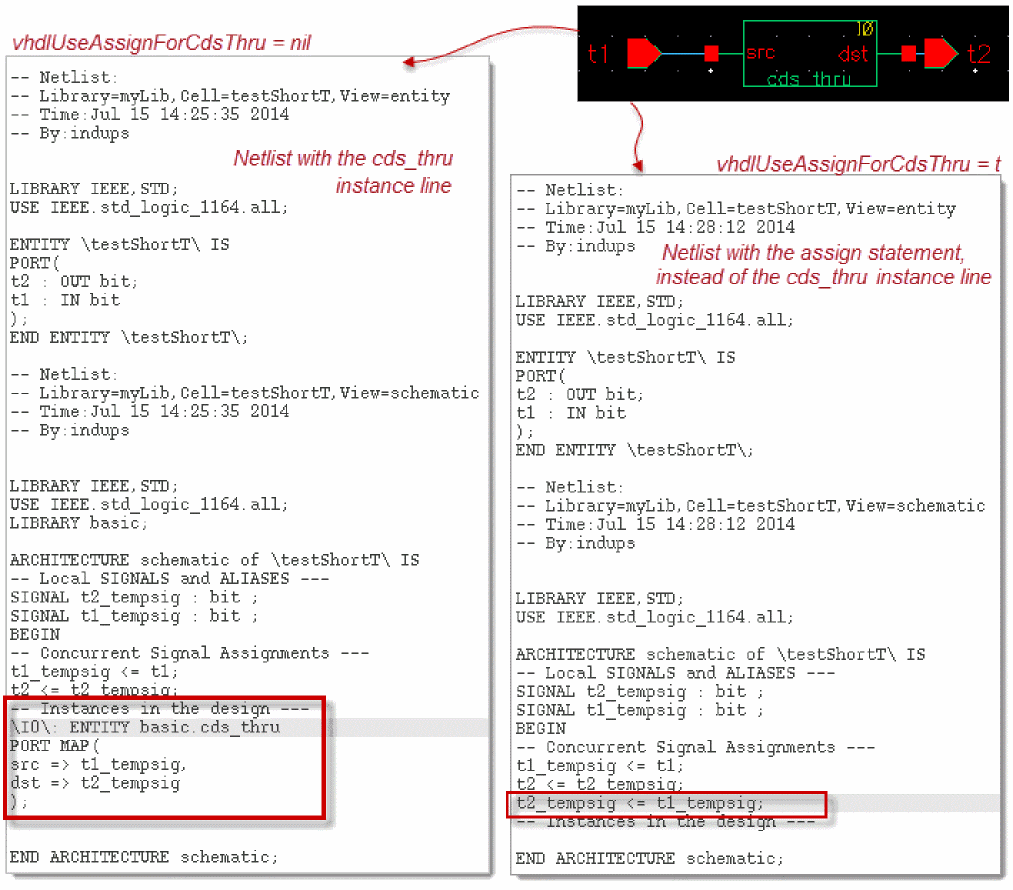
When you generate the netlist of a design where two terminals are shorted, the resulting netlist contains a cds_thru instance line, and not an assign statement. This instance line makes the netlist different from the imported netlist, which typically has an assign statement for the shorted terminals. To avoid this mismatch, configure VHDL Toolbox to print the assign statement instead of the cds_thru instance line to represent shorted terminals. For this, use the following flag:
-
vhdlUseAssignForCdsThru
Set this flag totto use the assign statement to represent shorted terminals. VHDL Toolbox considers this flag even if you have used a custom library and cell for shorting terminals.
Example:vhdlUseAssignForCdsThru = t
Default value:nil
You can set the flags in Virtuoso CIW, .simrc, or si.env.
The following figure illustrates the netlist with the cds_thru instance line and the netlist with the assign statement.
Resolving Floating Nodes
For resolving floating nodes, set the hnlVHDLPrintOpenForFloatingNode flag to t. When this flag is set, the keyword open is printed in the PORT MAP section for nodes that have no explicit net connected.
PORT MAP(
    RH_EN => open
);
Generating the Netlist
After you have completed the netlist setup, you generate the netlist by choosing Commands – Generate Netlist. Alternatively, you can generate a netlist by using the Netlist Design option on the fixed menu.
The Generate Netlist menu option triggers the netlister to generate the VHDL hierarchical netlist for a design specified in the Top Level Design fields. The tool supports incremental netlist generation and also provides the option to analyze and elaborate the generated netlist files. The netlister stops netlisting after the maximum number of errors that you have set is reached. If netlisting is successful, the message Netlisting Successful appears on the status line. The variables related to the OSS tabular name mapping are initialized to ensure that the generated netlist contains all the names in the VHDL namespace.
To display a message box on successful completion or failure of a netlist, set the hnlVHDLPopUpNetlistStatus flag to t.
Viewing Netlist Results
You can view the netlisted file for your VHDL design by choosing Results – Netlist. The VHDL netlist is saved as a .vhd text file in the run directory.
Analyzing the Netlist
The netlist generated successfully by VHDL Toolbox is saved in a defined directory structure under the Run directory. The netlister creates the following files and directories to save the design details:
A set of cds<n> directories in the <Run Directory>/ihnl directory, where each cds<n> directory contains the entity and architecture description for each netlisted unit. The file containing the design entity is named as <cell_name>-e.vhd and the file containing the architecture description is named as <cell_name>-<view_name>-a.vhd.
A configuration file, suffixed as -cfg.vhd, containing the configuration details.
A global package named as <top-cell-name>_cds_globals saved in the cds_globals sub directory of the Run directory. This package contains declaration of all the global signals. For example:
package WORK.mytop_cds_globals is
signal vdd_global : std_ulogic;
The architecture design unit refers to this global package, as shown below:
If Cadence name mapping is used, the global signals are printed as escaped names. For example, \gsig!\. Otherwise, the ! character in the global signals is by default mapped to the string _global. You can change this mapping by resetting the hnlMapNetInName SKILL variable.
If the Single Netlist File option on the VHDL Setup - Netlist form is turned on, the contents of all the files listed above are concatenated and saved in a single file named as <topcellname>.vhd. This file is shown in a separate window when you view the netlist using the Results – Netlist menu option.
Return to top