
6
Modeling Schematics as VHDL
This chapter describes key aspects of how the VHDL netlister models Virtuoso schematics and symbols in VHDL. The netlister does this through modeling constructs directly to VHDL, using name mapping, renaming, aliasing, assigning, and converting, or by generating a separate VHDL package.
The following sections describe
- Mapping Case Sensitivity
- Assigning VHDL Data Types
- Modeling Schematic Pins as VHDL Ports
- Modeling Schematic Nets as VHDL Signals
- Modeling Schematic Instances as VHDL Instances
- Modeling Multisheet Schematics
Mapping Case Sensitivity
Due to differences between the Virtuoso Schematic Editor L software, the Cadence® library structure, and VHDL in the way they handle mixed-case identifiers, it is important to understand how the VHDL netlister handles these differences. The following sections describe these differences, the rules used by the netlister to handle them, and the implications for how design data is created and organized.
Mapping Library, Cell, and Cellview Names to VHDL
VHDL design units are stored in Cadence libraries as cells and cellviews. For example, the orgate construct is stored in the gates library as
gates/orgate/entity
The behavioral architecture of the orgate structure is stored as
gates/orgate/behavioral
The names of libraries and design units in VHDL are case insensitive. This means that two referenced libraries named Gates and gates refer to the same library. In contrast, the names of libraries, cells, and cellviews in the Cadence library structure are case sensitive; so libraries defined as Gates and gates in the cds.lib file are considered as separate libraries.
To provide a consistent approach to mapping VHDL identifiers (which refer to library elements), Cadence uses the following rules for VHDL design units stored in a Cadence library:
-
Any reference to a library element that is not escaped, regardless of the case of the identifier, refers to the lowercase equivalent of the identifier. For example, if an identifier refers to
OrGate, then the equivalent library element is stored asgates/orgate. -
Any references to a library element that is escaped refers to the case-sensitive equivalent. For example, if an identifier refers to
\OrGate\, then the equivalent library element is stored asgates/OrGate.
You can avoid name mapping issues by always choosing names that use only lowercase letters and digits. For details on name mapping, refer to the Cadence Application Infrastructure User Guide.
When the netlister converts symbols or schematics to VHDL, the rules are applied to name-map all references to libraries, cells, and cellviews. The netlister maps the name of any reference to a library, cell, or cellview in the generated netlist, which contains uppercase characters by adding a backslash “\” to the beginning and end of the name. For example, a component declaration that refers to the OrGate cell in a Cadence library is netlisted as follows:
   COMPONENT \OrGate\
   PORT(
           in1 : IN std_ulogic;
           in2 : IN std_ulogic;
           out1: OUT std_ulogic
      );
   END COMPONENT;
Avoid naming issues between VHDL and the Cadence library structure by avoiding uppercase characters when you name libraries, cells, and cellviews in a Cadence library.
Mapping Identifier Names to VHDL
The names of objects (identifiers) in VHDL are case insensitive. This means two signals named signal_a and SIGNAL_A are the same signal. Identifiers in Virtuoso Schematic Editor L are case sensitive; so Virtuoso Schematic Editor L considers wires signal_a and SIGNAL_A to be separate nets.
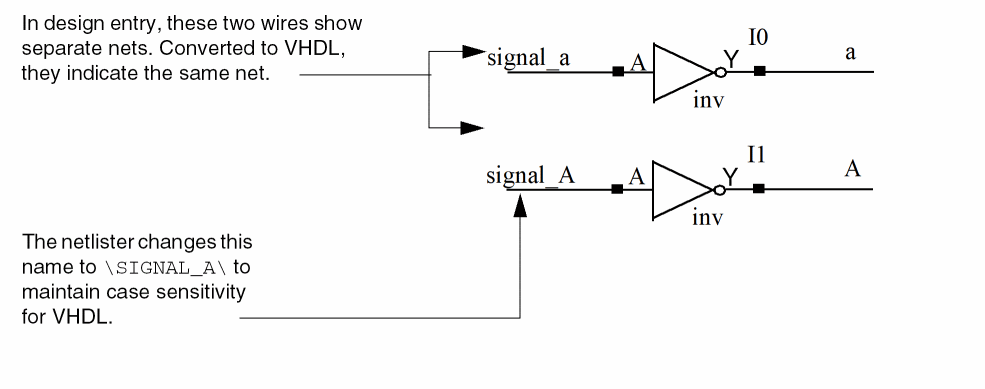
When converting the two schematic nets to VHDL, the netlister applies name mapping to one of the nets to model the identifiers correctly. The netlister uses the following rules to perform case-sensitive name mapping of pin, signal, alias, and instance names:
-
The netlister maps the name of any identifier that contains uppercase characters by adding a backslash (
\) to the front and back of the name. With the backslashes, the identifier becomes an escaped identifier in VHDL, and its case is preserved. For example,SIGNAL_Anetlists as\SIGNAL_A\.
To disable case-sensitive name mapping of pin, signal, alias, and instance names, set the simVhdlEscapeNameMapping variable to t and select Case Preserved from the Netlist Identifiers as drop-down in the VHDL Setup - Netlist form.
To generate instance names in 5141 format, set the hnlVHDL5141LIKEFORMATTING flag to t.
The netlister also escapes any name that is an invalid VHDL identifier or is a VHDL keyword (reserved word).
Matching Compliant and Noncompliant Data
To allow loose case matching among identifiers when the design is a mix of compliant and noncompliant data, do the following:
-
Set the CDS_ALT_NMP UNIX environment variable to a substring of
match(case insensitive).
Or, type the following command in the Command Interpreter Window (CIW):setShellEnvVar("CDS_ALT_NMP=match")
From the standalone VHDL Netlister, type the following command in a UNIX shell window:setenv CDS_ALT_NMP match ( for C shell )
The system preserves identifiers while converting from a case-sensitive name space to a case-insensitive one, such as VHDL.
vhdlKeepCaseAsNC variable to preserve the case of identifiers. For more information, see Appendix E, Customization Variables in Spectre AMS Designer Environment User Guide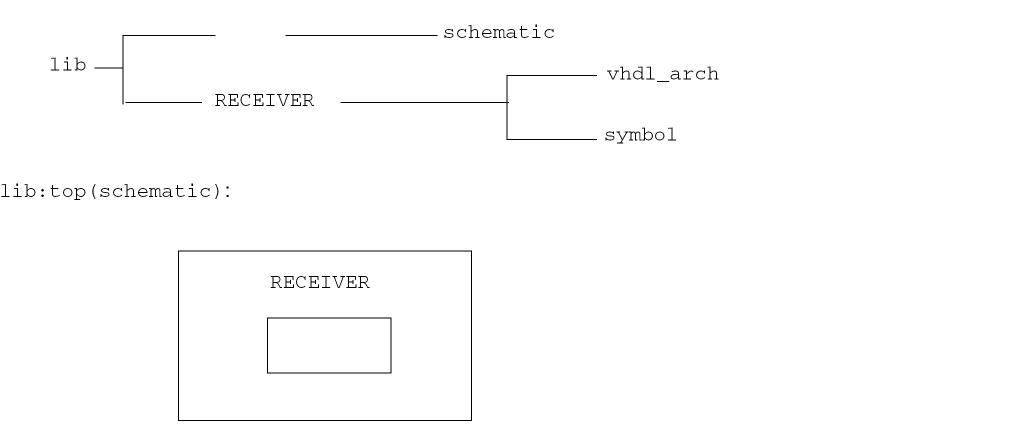
lib:RECEIVER(vhdl_arch) :
ARCHITECTURE vhdl_arch OF RECEIVER IS
BEGIN
END vhdl_arch;
When you netlist the design hierarchy shown above, the netlister escapes any uppercase identifier producing the following Virtuoso Schematic Editor L symbol RECEIVER:
ENTITY \RECEIVER\ IS
...
...
END \RECEIVER\;
However, in editing the VHDL architecture, if you use compliant data, but then used the following statement during the post netlisting analysis phase,
"ARCHITECTURE vhdl_arch OF RECEIVER IS
"
the statement would force the analyzer to believe that there is a VHDL entity called receiver since VHDL is case insensitive. However, the netlister, creates a VHDL entity named RECEIVER. This results in an analysis error. The name-mapping algorithm fails when the design hierarchy is a mixture of compliant and non-compliant data.
The alternative name-mapping algorithm allows a less strict name matching by retaining the case of an identifier when matching between a case-sensitive name space, such as OA, and a case-insensitive one, such as VHDL. However, the limitation in this approach is that all tools who support the VHDL name space need to do case insensitive library lookup.
When you map identifiers from a case-sensitive domain to the file system, the system converts the identifiers to lowercase. The netlisting results are as follows:
ENTITY RECEIVER IS
...
...
END RECEIVER;
If you netlist a cellview using the VHDL Netlister, and that cellview is on top of the hierarchy, the Netlister refers to the schematic for the port order property, and not to the symbol. Because no pins exist in the schematic, no port declarations exist in the above entity.
Assigning VHDL Data Types
The netlister assigns data types to ports and signals when generating entities and architectures. Data types are values of data that pass through a signal, such as 0 and 1 for bits or red and yellow for color.
The following list shows the rules, in order of priority, that the netlister uses for assigning a VHDL data type.
-
The object has a
vhdlDataTypeproperty already assigned to it, which the netlister uses. -
The netlister uses one of the objects connected to the data type, such as an instance pin.
The netlister predefines thevhdlDataTypeproperty, which you can set on pins and wires by choosing Edit – Properties – Objects in the schematic editor. If you use the VHDL pins, then the Edit Object Properties form automatically prompts you for these data types. -
The netlister uses the default scalar or vector data type specified on the cellview.
You can specify the default scalar or vector data type by choosing Edit – Properties – VHDL in the schematic editor. -
The netlister uses a default scalar or vector data type specified in the VHDL Toolbox. You can change the default scalar or vector VHDL data type in the VHDL Set Up Check dialog box. To display the VHDL Set Up Check dialog box choose Setup – Check in VHDL Toolbox. The default scalar data type is
std_ulogicand the default vector data type isstd_ulogic_vector.
In case of port bundles you can specify the VHDL datatype for individual signals as follows:
sigName1:sigType1, sigName2:sigType2, sigName3:sigType3
For example, you have defined two signals, sig1 and sig2 as:
vhdlDataType : sig1:real
In this case sig1 has real as the datatype and sig2 has the default scalar datatype.
vhdlDataType : real
In this case both the signals, sig1 and sig2, have real as the datatype.
If you do not specify the vhdlDataType then both the signals have the default scalar datatype defined in the VHDL Set Up Check dialog box.
Modeling Schematic Pins as VHDL Ports
The netlister models schematic pins as VHDL ports by converting the direction of the pin as follows:
| Schematic pins | VHDL ports |
|---|---|
If the schematic pin has the property
vhdlPortType = "buffer"
the netlister assigns the direction of the port as buffer.
Supporting Port Bundles
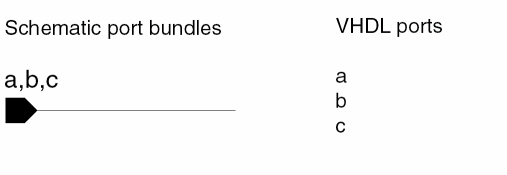
VHDL does not support bundles, so the netlister models port bundles as multiple VHDL ports, one for each bundle element. For example,
Discontinuous Ports
VHDL does not support sparse or discontinuous port ranges. That is, if a port is specified with a range, then all members of the range must be declared. Following is a simple example of a schematic that demonstrates a discontinuous port range.
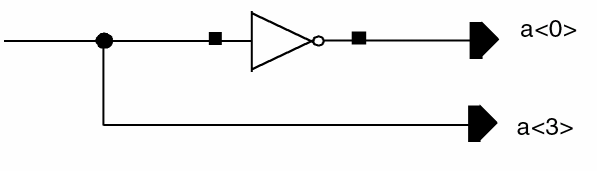
Here the schematic contains two out ports, a<0> and a<3>, which are discontinuous. The netlister name maps these port names by appending the index number and _split_%d to the end of the name.
Following is the entity generated from the previous example, where the a<0> and a<3> ports are name-mapped to a_split_0 and a_split_3, respectively:
ENTITY split IS
PORT(
a_split_0 : OUT std_ulogic;
a_split_3 : OUT std_ulogic
);
END split;
Modeling Schematic Nets as VHDL Signals
The netlister models schematic internal or local nets as VHDL signals. VHDL does not support signal bundles. The netlister models signal bundles as multiple VHDL signals, one for each bundle element, as in the previous VHDL port example.
Supporting Global Signals
The netlister supports global signals by
-
Generating a separate VHDL package to declare global signals called
cds_global_signals - Gathering global signals while traversing all cellviews in the hierarchy
-
Inserting a reference to the
cds_global_signalspackages in the context clause of each architecture that refers to a global signal (thecds_global_signalspackage is part of the top cellview library). -
Removing “
!” from the end of each global signal name, such asvdd!, and appending_cds_globalto the end of the signal name, such asvdd_cds_global.
Aliasing Ports and Signals
VHDL supports aliases for ports and local signals in the following ways:
-
The netlister declares aliases for all wire names that are marked as an alias using
Add – Wire Nameor patchcords in the Virtuoso Schematic Editor L. - The netlister declares an alias for a net name that is connected to a pin with a different name.
Modeling Feedback Signals
If a signal is driven (connected to an input pin or output instance pin) and read (connected to an output pin or input instance pin), then the signal is in a feedback loop. The netlister models feedback loops by inserting a temporary signal and connecting it between instances and ports. The following example shows a schematic with a temporary signal that connects instance I0, instance I1, and pin d and its resulting netlist.
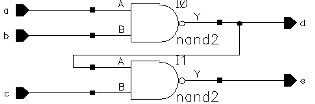
ARCHITECTURE schematic OF feedback IS
COMPONENT nand2
PORT(
Y : OUT std_ulogic;
B : IN std_ulogic;
A : IN std_ulogic
);
END COMPONENT;
SIGNAL d_tempsig : std_ulogic;
BEGIN
d <= d_tempsig;
I1 : nand2
PORT MAP(
Y => e,
B => c,
A => d_tempsig
);
I0 : nand2
PORT MAP(
Y => d_tempsig,
B => b,
A => a
);
END schematic;
Signal/Port Name Collisions
VHDL does not allow a port to be named a<0> and a signal to be named a<1>. Either a<0:1> is declared as a port or a signal, but not both. Following is a simple example that demonstrates how a schematic that violates this rule can be drawn:
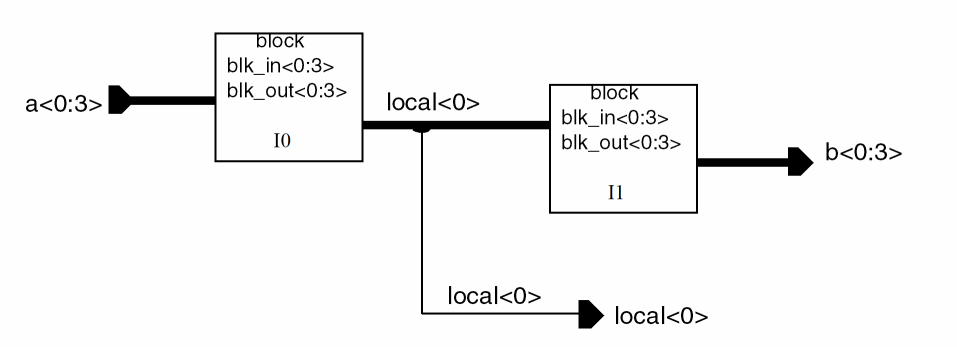
Here, the schematic contains a signal named local<0:3> and a port named local<0>. In VHDL, you cannot have a port and a signal with the same name, which in the example is local. Normally, the netlister can make the signal an alias of the port, but in this case the width of the signal is greater than the width of the port.
Following is the netlist that is generated from the previous example, where the local signal is name-mapped to be local_portclash:
ENTITY port_clash IS
PORT(
local : OUT std_ulogic_vector(0 DOWNTO 0);
b : OUT std_ulogic_vector(0 TO 3);
a : IN std_ulogic_vector(0 TO 3)
);
END port_clash;
ARCHITECTURE schematic OF port_clash IS
COMPONENT blk
PORT(
blk_out : OUT std_ulogic_vector(0 TO 3);
blk_in : IN std_ulogic_vector(0 TO 3)
);
END COMPONENT;
SIGNAL local_portclash : std_ulogic_vector(3 DOWNTO 0);
BEGIN
local(0) <= local_portclash(0);
I0 : blk
PORT MAP(
blk_in(0 TO 3) => a(0 TO 3),
blk_out(0) => local_portclash(0),
blk_out(1) => local_portclash(1),
blk_out(2) => local_portclash(2),
blk_out(3) => local_portclash(3)
);
I1 : blk
PORT MAP(
blk_in(0) => local_portclash(0),
blk_in(1) => local_portclash(1),
blk_in(2) => local_portclash(2),
blk_in(3) => local_portclash(3),
blk_out(0 TO 3) => b(0 TO 3)
);
END schematic;
Modeling Schematic Instances as VHDL Instances
The netlister models schematic instances as VHDL component instances.
Ignoring Instances
The netlister skips over those instances that have the nlAction property with the value of ignore on either the instance or the instance master. If you set the nlAction property, then the instance is ignored by all Cadence netlisters. Examples of instances that are ignored are pins, sheet borders, and power and ground symbols.
"nlAction" = "ignore"
If you want to prevent only the VHDL netlister from netlisting an instance, then you can set the string property, nlIgnore to vhdl on the design object as shown below:
nlIgnore = "vhdl"
If a design object has nlAction set to ignore then irrespective of the value of nlIgnore, the design object will not be netlisted. This is because, nlAction has precedence over nlIgnore.
nlIgnore property accepts space-separated values, each value being the netlister name that should ignore the design object, currently only the VHDL netlister implements the nlIgnore property.Modeling Iterated Instances
The netlister models iterated instances by splitting the iterated instances into individual instances. It names the individual instance using a base name appended with an iteration index. The following example shows a schematic containing an instance of a D flip-flop iterated from 0 to 3 and its resulting netlist.
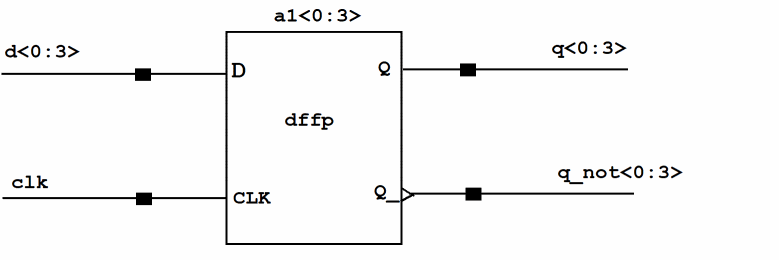
ARCHITECTURE schematic OF iterated IS
COMPONENT dffp
PORT(
Q : OUT std_ulogic;
Q_ : OUT std_ulogic;
CLK : IN std_ulogic;
D : IN std_ulogic
);
END COMPONENT;
SIGNAL q : std_ulogic_vector(0 TO 3);
SIGNAL q_not : std_ulogic_vector(0 TO 3);
SIGNAL clk : std_ulogic;
SIGNAL d : std_ulogic_vector(0 TO 3);
BEGIN
a1_0 : dffp
PORT MAP(
Q => q(0),
CLK => clk,
Q_ => q_not(0),
D => d(0)
);
a1_1 : dffp
PORT MAP(
Q => q(1),
CLK => clk,
Q_ => q_not(1),
D => d(1)
);
a1_2 : dffp
PORT MAP(
Q => q(2),
CLK => clk,
Q_ => q_not(2),
D => d(2)
);
a1_3 : dffp
PORT MAP(
Q => q(3),
CLK => clk,
Q_ => q_not(3),
D => d(3)
);
END schematic;
Modeling Instance Properties as Generics
Generics in VHDL let an instance pass information to its component. The netlister provides the ability to define generics of a component and to map the values of schematic instance properties to generics. The netlister accomplishes this through the use of the vhdlGenericDefList property.
The vhdlGenericDefList property defines a list of properties that represent the generics and their types for a component.
You can store the property in the cellview defining the interface for the component from Virtuoso Schematic Editor or Virtuoso Symbol Editor.
To store vhdlGenericDefList in a cell through Virtuoso Schematic Editor or Virtuoso Symbol Editor:
-
Open the cell in the editor and select Edit – Properties – VHDL.
The VHDL Properties form appears. -
Click the Add button.
The Add Generic form appears. - Specify the following information in their respective fields:
-
Click OK.
The added property appears in the generics section of VHDL Properties form. - Choose File — Check and Save in the editor.
- Use VHDL Toolbox to regenerate the netlist of the design.
hnlVHDLSkipGenericWithNoDefaultValue to t in Virtuoso CIW, .simrc, or si.env. You can set the default values of generics from the VHDL Setup - Netlist form. For details, see the Generic Defaults tab.
You can also store the vhdlGenericDefList property in the cell or library-level CDF of the component.
To store vhdlGenericDefList as a CDF parameter of a component:
-
Choose Tools – CDF – Edit from Virtuoso CIW.
The Edit CDF form appears. - Choose where you want to edit the CDF property, which can be at the Cell or Library level.
- Choose Base in the CDF Layer area.
- Specify the library and cell of the component in their respective fields.
- Add the component parameter in the component parameters table. Use the following guidelines:
- Click Apply, and then OK to save the CDF parameter and exit the Edit CDF form.
-
In the design, replace the entity so that it has the CDF parameter.
The VHDL generics become available in the newly created entity. You can then use VHDL Toolbox to regenerate the netlist.
VHDL Toolbox uses the vhdlGenericDefList property when generating entities from schematics or symbols, and for generating component declarations when generating architectures. The property is stored as a SKILL list of lists, with each sublist containing the generic name, type, and an optional value. For example:
vhdlGenericDefList = (("min_delay" "time" "5 ns")
("max_delay" "time"))
The following schematic and resulting netlist show an instance of a D flip-flop with the two properties min_delay and max_delay representing generics. The D flip-flop symbol contains the vhdlGenericDefList property, which defines these properties as generics with the type of time.
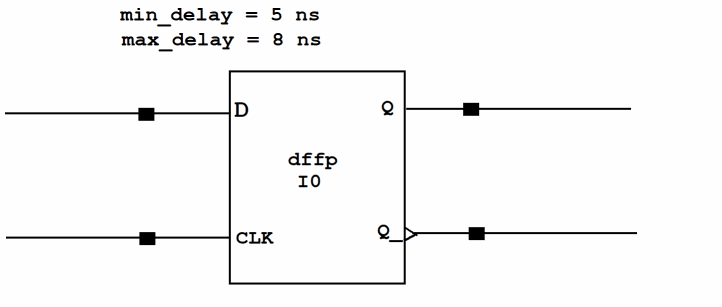
ARCHITECTURE schematic OF generic_example IS
COMPONENT dffp
GENERIC(
max_delay : time;
min_delay : time
);
PORT(
Q : OUT std_ulogic;
Q_ : OUT std_ulogic;
CLK : IN std_ulogic;
D : IN std_ulogic
);
END COMPONENT;
BEGIN
I0 : dffp
GENERIC MAP(
max_delay => 8 ns,
min_delay => 5 ns
)
PORT MAP(
Q => q,
CLK => clk,
Q_ => q_not,
D => d
);
END schematic;
It is possible that the same property is set in the VHDL file and a CDF parameter of a cell. In such a case, VHDL Toolbox determines the property to print in the GENERIC section of the netlist using the SKILL variable hnlVHDLoverCDFGenerics. By default, this variable is set to nil and VHDL Toolbox prints the CDF parameter. To configure VHDL Toolbox to print the VHDL property, instead of the conflicting CDF parameter, set hnlVHDLoverCDFGenerics to t in Virtuoso CIW, .simrc, or si.env.
When you create entity view for a cell using cv2cv, the properties added as Generics through vhdl properties are printed in the entity generics. But, if a property with same name is added on the cellview through cellview properties, then the value corresponding to this property gets printed. If you do not wish to override this generic value, set the vhdlDoNotUseCVPropForGenerics flag to t.
Specifying Explicit Component Binding
Normally, the netlister determines a component’s binding while traversing a design hierarchy. However, it can be useful to explicitly specify the binding for a component instance. The netlist provides the following property for this purpose
The vhdlArchitectureName property can be placed on an instance in a schematic to explicitly specify the component binding for the instance. The property is stored as a string and specifies the library, entity, and architecture names of the component to use when generating a configuration specification for the instance. An example is mixed.half_adder(behavior).
The following schematic contains two instances of the half_adder component, each containing a different value for vhdlArchitectureName. The resulting netlist follows the schematic.
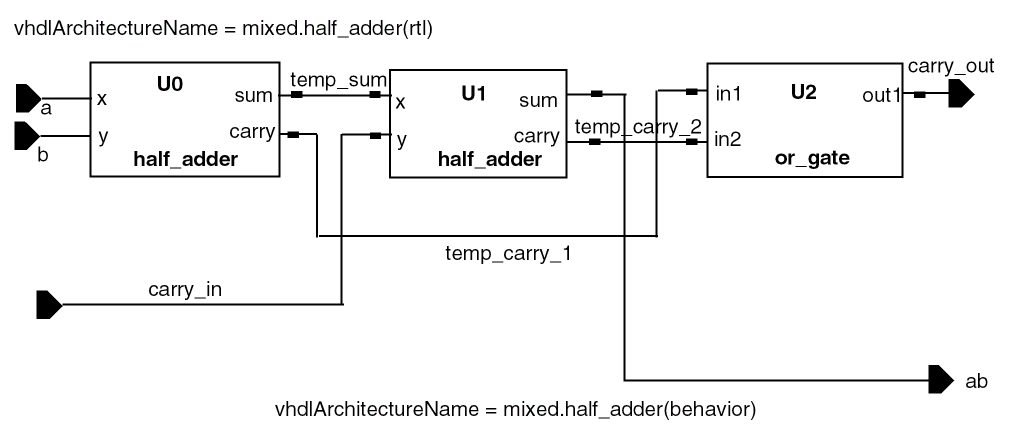
ARCHITECTURE schematic OF full_adder IS
COMPONENT or_gate
PORT(
in1 : IN std_ulogic;
in2 : IN std_ulogic;
out1 : OUT std_ulogic
);
END COMPONENT;
COMPONENT half_adder
PORT(
x : IN std_ulogic;
y : IN std_ulogic;
sum : OUT std_ulogic;
carry : OUT std_ulogic
);
END COMPONENT;
SIGNAL temp_carry_2 : std_ulogic;
SIGNAL temp_carry_1 : std_ulogic;
SIGNAL temp_sum : std_ulogic;
FOR U0 : half_adder
USE ENTITY mixed.half_adder(rtl);
FOR U1 : half_adder
USE ENTITY mixed.half_adder(behavior);
BEGIN
U2 : or_gate
PORT MAP(
in2 => temp_carry_2,
out1 => carry_out,
in1 => temp_carry_1
);
U0 : half_adder
PORT MAP(
x => a,
y => b,
sum => temp_sum,
carry => temp_carry_1
);
U1 : half_adder
PORT MAP(
x => temp_sum,
y => carry_in,
sum => ab,
carry => temp_carry_2
);
END schematic;
Specifying Components Declared in External Packages
The netlister generates component declarations for all components that are instantiated in the schematic being netlisted. However, it is common to specify component declarations in a package that can be referenced by architectures that instantiate these components. The netlister provides the following properties for specifying components declared in an external package.
-
You can place the
vhdlComponentDeclproperty in a symbol to specify the name of the external package containing its component declaration. When generating a netlist for a schematic that instantiates the symbol, the netlister does not generate a component declaration.
However, the component declaration won’t be skipped when you place thevhdlComponentDeclproperty on a symbol (for example,library:cell::L1:C1) and specify an externalvhdltext file containing the definition for a cell with the same name in a different library (for example,library:cell::L2:C1).
The following schematic demonstrates the use of this property:
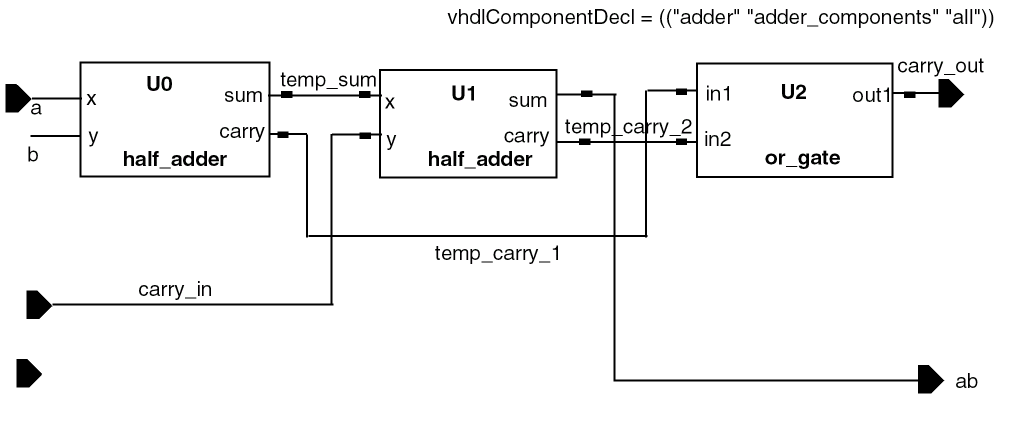
The schematic contains two instances of half_adder and one of or_gate. The schematic also contains the property
specifying that the component declaration for the half_adder component exists in an external package. The or_gate symbol contains the property
vhdlComponentDecl=(("adder" "adder_components" "all"))
specifying that its component declaration exists in the adder_components package in the adder library. Following is the resulting netlist:
LIBRARY ieee, adder;
USE ieee.std_logic_1164.all;
USE adder.adder_components.all;
ARCHITECTURE schematic OF full_adder IS
SIGNAL temp_carry_2 : std_ulogic;
SIGNAL temp_carry_1 : std_ulogic;
SIGNAL temp_sum : std_ulogic;
BEGIN
U2 : or_gate
PORT MAP(
in2 => temp_carry_2,
out1 => carry_out,
in1 => temp_carry_1
);
U0 : half_adder
PORT MAP(
x => a,
y => b,
sum => temp_sum,
carry => temp_carry_1
);
U1 : half_adder
PORT MAP(
x => temp_sum,
y => carry_in,
sum => ab,
carry => temp_carry_2
);
END schematic;
Modeling Multisheet Schematics
The netlister models a multisheet schematic as a single design unit (architecture) by
- Generating a single entity for the schematic index to declare hierarchical pins
- Defining each sheet in the architecture as a separate VHDL block
- Matching the name of the block to the instance name of the sheet
- Maintaining separate name scopes within a block that directly map to the use model of separate cellviews for each sheet
Return to top