Create Slot Form
Use the Create Slot form to select a rectangle or path to which you want to add slots. To edit a slot, use the Edit Slot form.
The Create Slot command is available only for rectangles and paths. For information about creating slots while creating rectangles and paths, see Creating a Rectangle and Creating a Path.
The following table describes the options available in the Create Slot form and the Edit Slot form.
|
Field
|
Description
|
|
Layer
|
Enables you to specify an LPP where you want slots to be created in ROD objects. Because no real holes are created in ROD objects in the design, the Slot Layer information is used later by manufacturers to punch holes in the metal layer where the slot LPP occurs. You do not need to specify a slot LPP for polygons because real holes are created in the polygon metal layer in the design.
|
|
Shape Type
|
Indicates the type of the resultant shape that is created after slots are added to it.
Environment variable: slotShapeMode
-
Preserve: Retains the original shape type after slots are added to the shape. A polygon shape remains a polygon after slots are added to it. Similarly, a ROD object remains a ROD object after slots are added to it.
-
Convert to Polygon: Converts a shape to a polygon after slots are added to the shape.
-
Convert to ROD: Converts a shape to a ROD object after slots are added to the shape.
|
|
Specify width, area
|
Enables you to specify the width and area parameters for a slot in the Dimensions field. The length of the slot is automatically calculated.
Environment variables: slotWidth and slotSpecifyArea
|
|
Dimensions
|
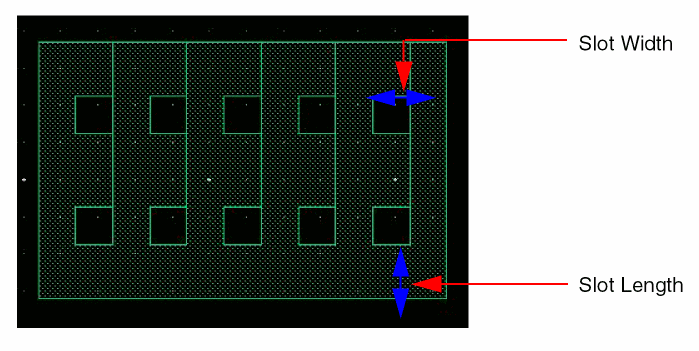
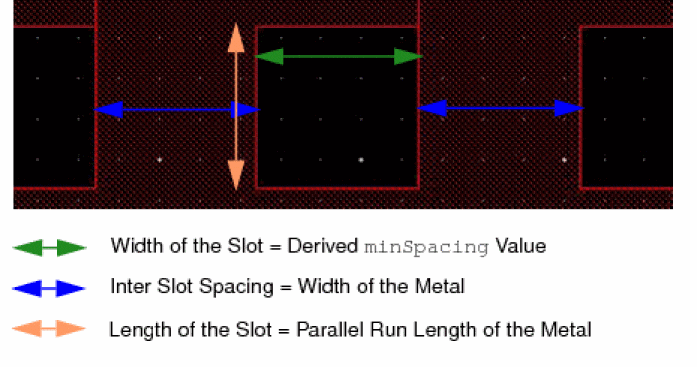
Width/Length: Enables you to specify the width and length parameters for a slot. The area of the slot is automatically calculated.
For information about the process rules associated with these fields, see Calculating Dimensions Associated with Slots.
The following figure illustrates the width and length of slots.
|
|
Spacing
|
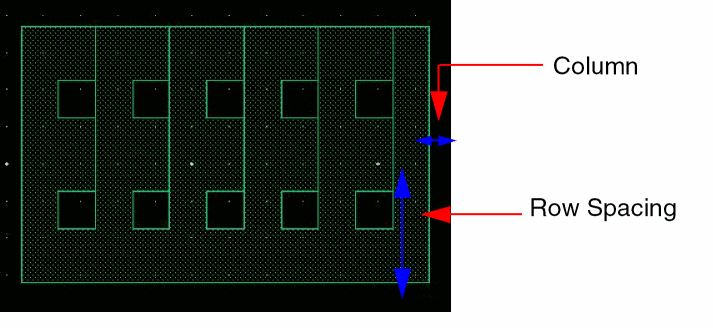
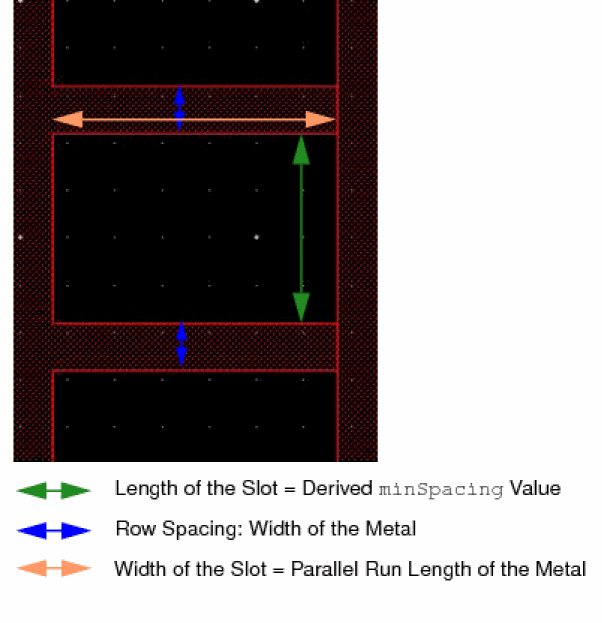
The following figure illustrates the types of spacings between slots.
-
Column: Specifies the distance between the slots in a row.
Environment variable: slotInterSlotSpacing -
Row: Specifies the distance between two slot rows.
Environment variable: slotRowSpacing -
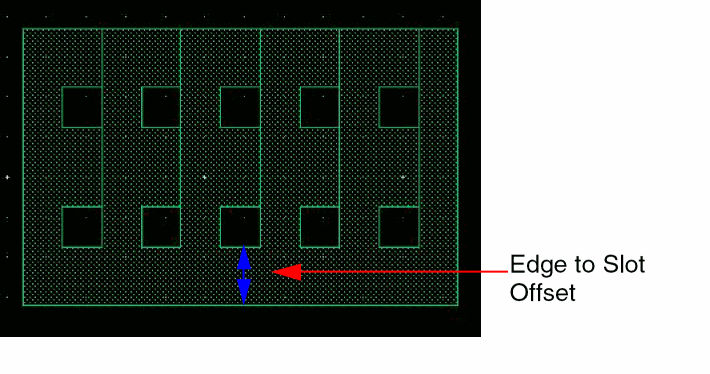
Edge: Specifies the distance between the slot edge and the shape edge.
Environment variable: slotEdgeToSlotOffset
The following figure illustrates the edge-to-slot distance.
|
|
Stagger
|
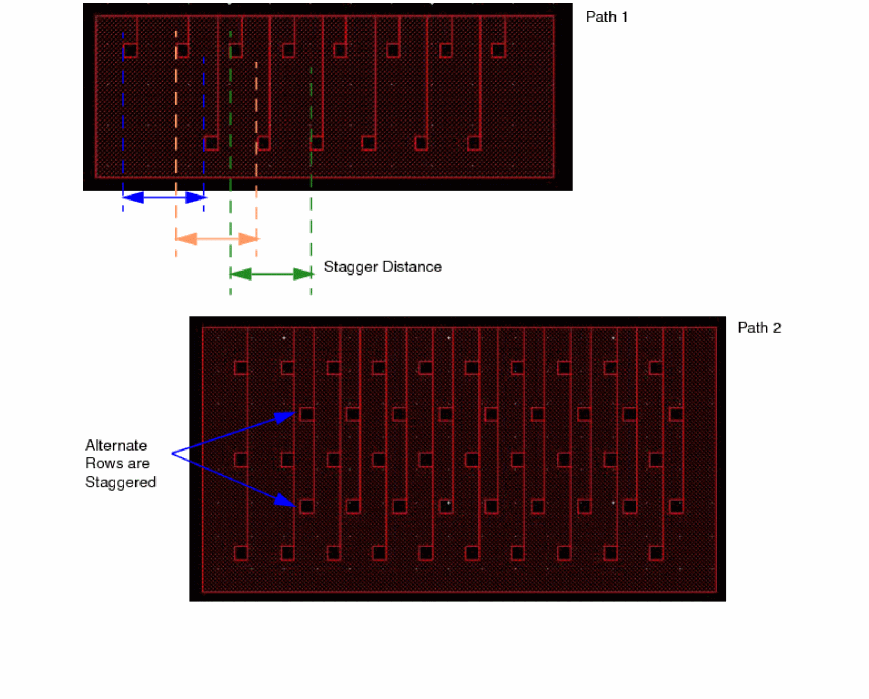
Specifies the spacing between the edges of slots in consecutive rows. Only alternate rows are staggered.Staggering of slots is not supported in rectangles.
Environment variable: slotStaggerOffset
The following figures illustrate staggering of slots in paths.
|
Calculating Dimensions Associated with Slots
The dimensions associated with slots are calculated based on the rules specified below:
|
Field
|
Description
|
|
Spacing (Column)
|
Represents the width of the metal between slots. The metal spacing between the slots is governed by the minWidth and maxWidth rules.
|
|
Spacing (Row)
|
Represents the width of the metal between slots, which is governed by the minWidth and maxWidth rules.
|
|
Spacing (Edge)
|
Represents the width of the metal between a slot and the shape edge. Here too the metal spacing is governed by the minWidth and maxWidth rules.
|
|
Stagger
|
Represents the metal spacing around slots. The metal spacing for this optional field is governed only by the maxWidth rule.
|
|
Width
|
Based on the values you specify in the fields listed above, the values in the Width and Length fields are calculated automatically. The Width and Length values comply with the minSpacing rule, the values are calculated.
The spacing between slots is taken into consideration to derive the minSpacing value if a 1-D spacing table exists in the technology file. Both interslot spacing and the length of the slot are taken into consideration to derive the minSpacing value if a 2-D spacing table exists in the technology file.
|
|
Length
|
Considers the spacing between rows to derive the minSpacing value if a 1-D spacing table exists in the technology file. Both row spacing and the width of the slot are taken into consideration to derive the minSpacing value if a 2-D spacing table exists in the technology file.
|
Related Topics
Creating Slots
Editing Slots
leHiCreateSlot
Return to top