
Creating TLines Instances
The Virtuoso RF Solution provides a library that contains the symbol view, simulation view, and OA layout view for TLines. You can instantiate the symbol views and capture connectivity in the package schematic. Tline components are derived from rfTlineLib, which is a library of wideband-accurate transmission line models in multi-conductor microstrip and stripline configurations.
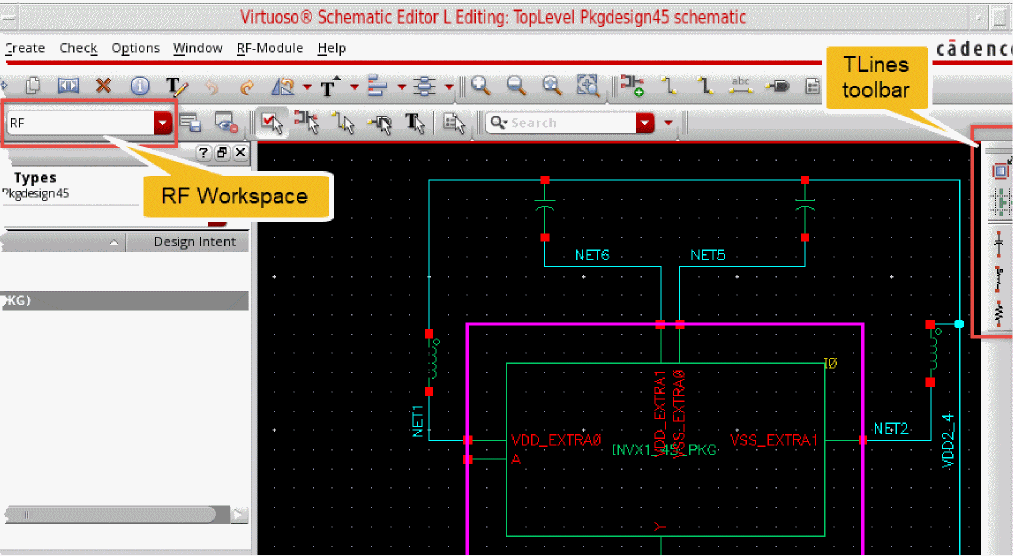
TLine instances can be added to the package schematic by using the RF toolbar available in the RF workspace. The RF toolbar lets you access the TLine components that can be placed in the schematic.
Each button on the toolbar opens the Add Instance form to enable you place the components on the canvas. All TLine components in a schematic can be found by using the Search toolbar or assistant with the keyword “tlines”. This is useful for cross selecting multiple instances to compare width and length parameters in the Property Editor.
Based on the frequency-dependent per-unit-length parameters calculated by a 2D quasi-static electromagnetic solver, the models are integrated in Virtuoso Analog Design Environment and accessible from standalone Spectre netlists.
To create stackup and net topology:
- Inflate the existing schematic to preserve the design for accommodating space for transmission line insertion.
- Create stackup to represent a partial slice through the technology stack and store material properties and cross section information.
- Create net topology to provide a fast error-free method of creating and editing net topologies.
Related Topic
Return to top