
Void Shapes
Voiding is an important step in creating the package layout that lets you route on ground/ power planes by automatically insulating signal nets.
Ground/power planes are typically used in packages to reduce the impedance of the power/ground supply network by lowering ohmic resistance and shielding nearby components from EM noise. If routing for other signals cannot be completed on the layers other than the ones devoted to power and ground, they must be completed on power and ground planes.
The Virtuoso RF solution includes a void generator that lets you generate void shapes in package layout designs. Void shapes are automatic shapes that insulate signal shapes (routing) from dynamic shapes such as power or ground planes. The power and ground planes are created on a dynamic purpose and the void shapes cut holes on the dynamic shape around the signal shapes. The effective conducting shape on power or ground is the Boolean subtraction of the void shapes from the dynamic shape.
Voiding helps designers route on the ground/power planes by automatically insulating signal nets. Void the shapes by using Module – Void Dynamic Shapes. It deletes the existing void shapes and creates voids to insulate signal shapes. By insulating the signal shapes from the ground/power planes, it eliminates shorts between shapes on signal and power/ground nets. You can also click Module – Void Selected Dynamic Shapes to void a few selected shapes.
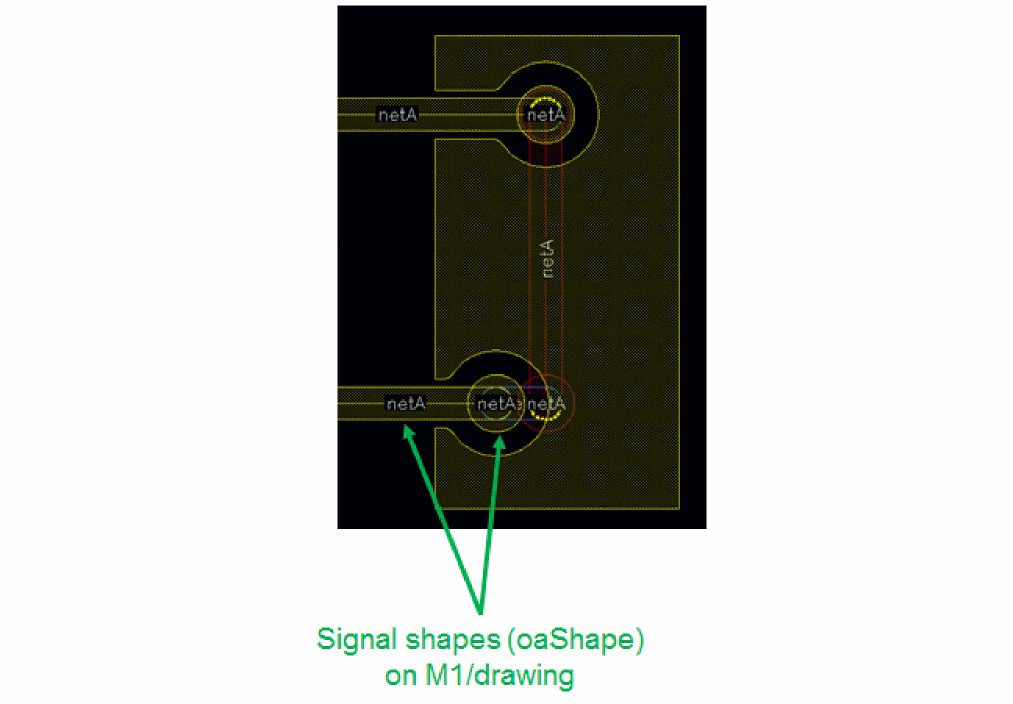
Before generating void shapes, you must create the required dynamic shapes. The technology file must define the dynamic purposes before dynamic shapes can be created.
After creating the dynamic shapes and signal shapes, you can generate void shapes. Void shapes are generated to insulate signal paths or vias that have a different connectivity from the plane they are going through, as shown in the following figure:
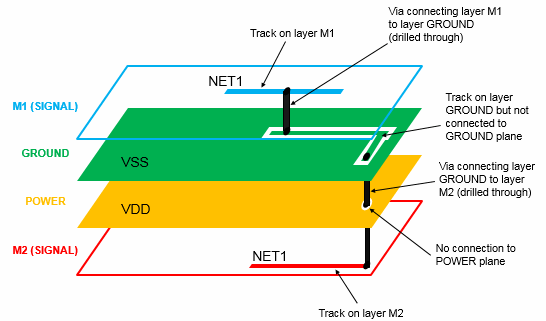
In this example, a via connects layers M1 and GROUND; a second via connects layers GROUND, POWER, and M2. Voids are generated around the vias and paths in layer GROUND and around the via on layer POWER to insulate the NET1 signal from the respective planes.
Related Topic
Convert Selected Dynamic Shapes
Package Constraints Supported by the Void Generator
Return to top